

Page 1
SAMXQ User Guide V1.1
I
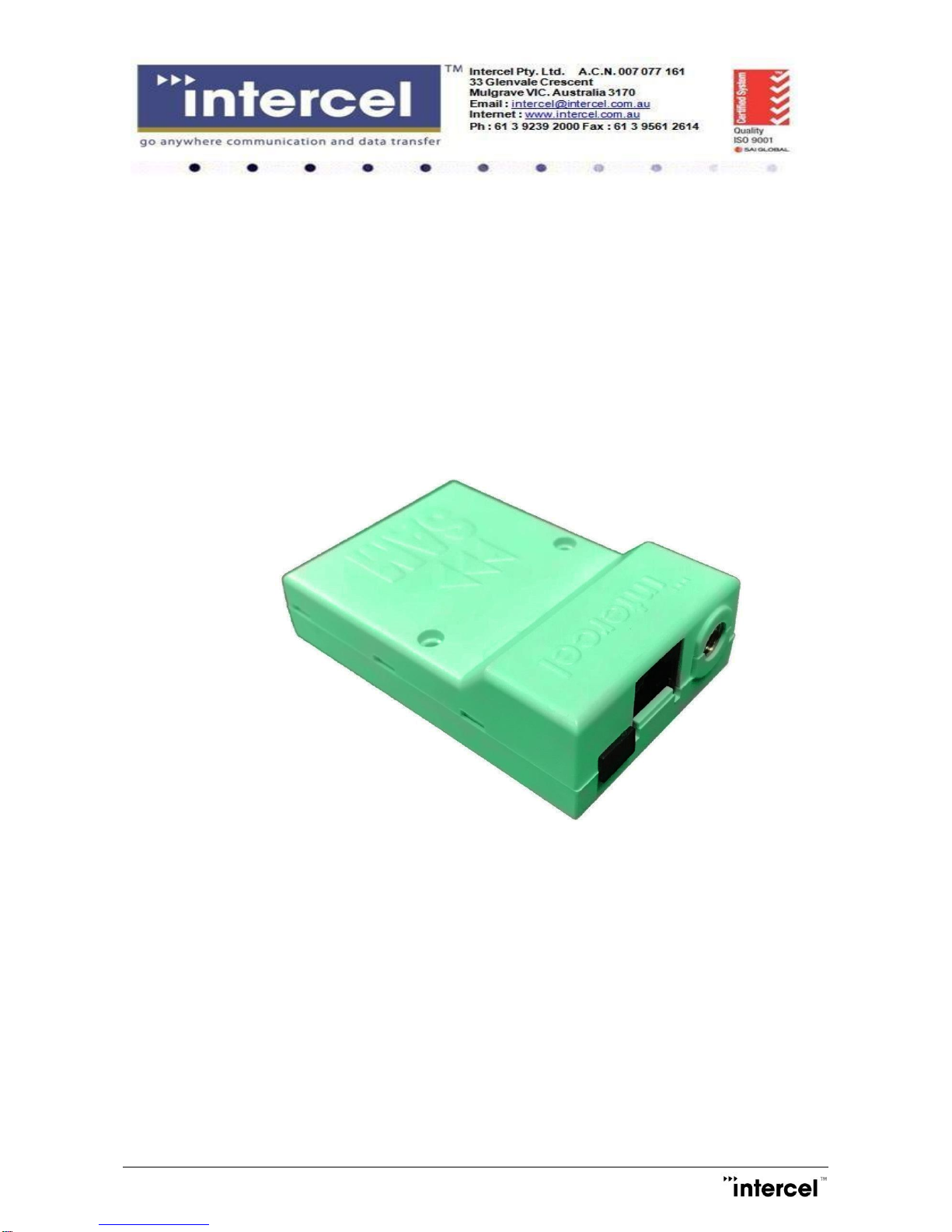
SAMXQ
User Guide
Page 2

Smart SAMXT User Guide V1.1
II
Revision History
Version
Modified By
Date
Description
1.0 30/11/2018
Initial version
1.1
Van Pham
06/12/2018
Minor adjustments and name update
Page 3

SAMXQ User Guide V1.1
1
Contents
1 Introduction ..........................................................................................................................................................2
2 Safety Precautions .............................................................................................................................................3
3 Radio Frequency Exposure - SAR ...................................................................................................................4
4 WEEE Directive 2002/96/EC, Disposal of Old Electronic Equipment ........................................................5
5 Packaging ............................................................................................................................................................6
5.1 Contents ......................................................................................................................................................6
5.2 Packaging Box ...........................................................................................................................................6
5.3 Production Label ........................................................................................................................................7
6 Functionality ........................................................................................................................................................8
6.1 General .......................................................................................................................................................8
6.2 RJ45 Socket ...............................................................................................................................................9
6.3 FME-Male 50Ω Antenna Connectors......................................................................................................9
6.4 SIM Holder ..................................................................................................................................................9
6.5 LED Status .................................................................................................................................................9
6.6 Data Cable ................................................................................................................................................11
7 Electrical Characteristics .................................................................................................................................12
7.1 Power Consumption ................................................................................................................................12
7.2 Receive Sensitivity ..................................................................................................................................12
7.3 Conducted Transmit Power ...................................................................................................................13
7.4 Main Antenna Specifications .................................................................................................................13
7.5 Environmental Characteristics ...............................................................................................................13
8 The SAMXQ TCP/IP Operation ......................................................................................................................14
8.1 Communication Sockets .........................................................................................................................14
8.2 TCP/IP AT$ Commands ........................................................................................................................15
9 Firmware Upgrade ...........................................................................................................................................26
9.1 The LTE Module Firmware .....................................................................................................................26
9.2 The Modem’s Controller Software ........................................................................................................26
Page 4
SAMXQ User Guide V1.1
2
1 Introduction
The SAMXQ is a compact, light-weight, LTE based modem. It provides CATM1, 3GPP Release 13 compliant
with the uplink speed of (up to) 375Kbps and downlink speed of (up to) 300Kbps in Cat M1 Mode.
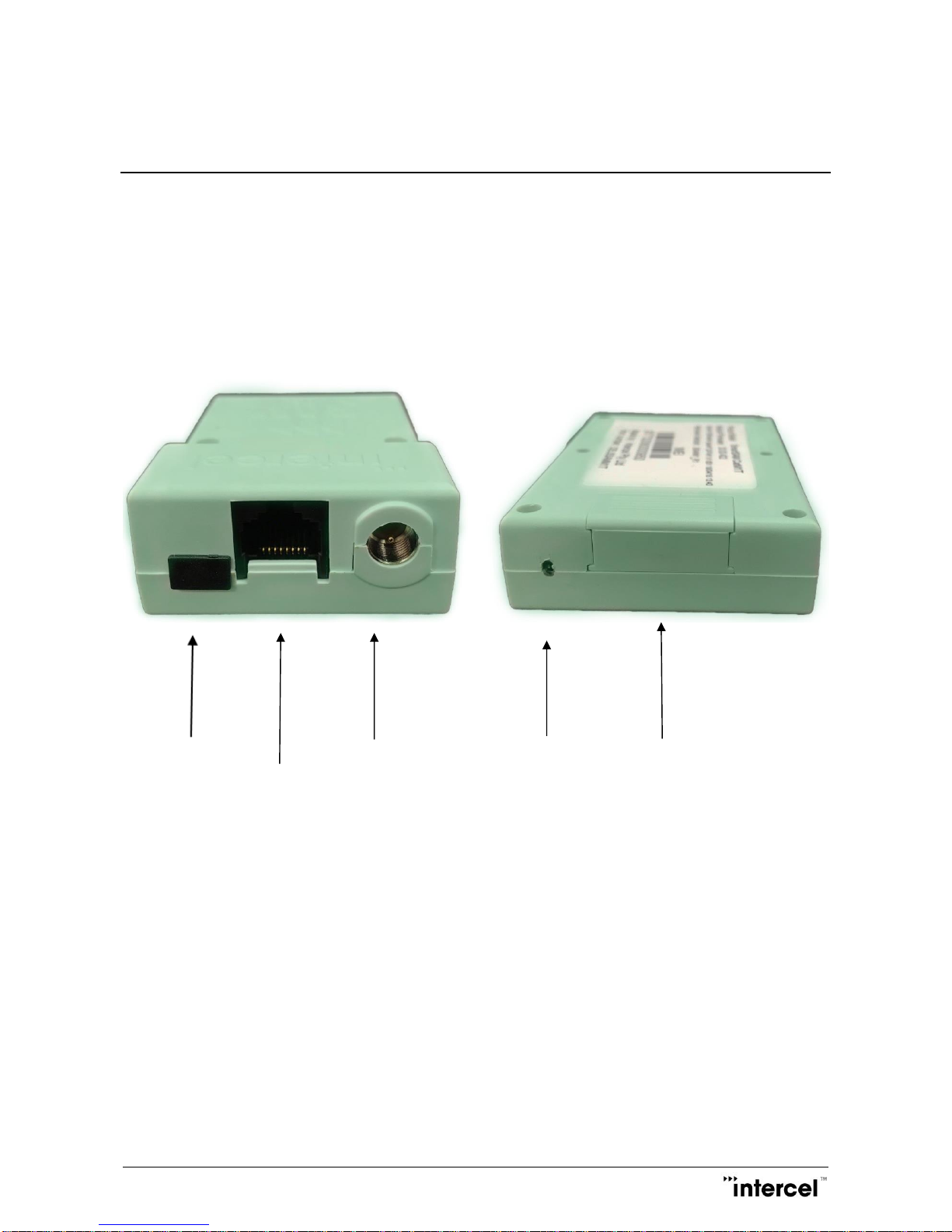
The SAMXQ is designed for both mobile and fixed M2M applications. It has an RJ45 socket for input voltage
and the serial RS232 signals, one FME-male for main antenna connection, a SIM holder and an LED indicator.
The SAMXQ is controlled by a set of AT commands.
USB port Main Antenna LED Mini-SIM compartment
RJ45 socket for input power and serial RS232
Mobile station engine BG96-AUT
3GPP Release 13 (CAT M1)
RCM tick mark
Page 5

SAMXQ User Guide V1.1
3
2 Safety Precautions
The following safety precautions must be observed whenever the SAMXQ modem is in operation or in service.
Failure to comply with these precautions violates the safety standards of the design, manufacture and intended
use of the product
- Switch off the SAMXQ modem:
• In hospitals or places where medical equipment may be in use
• In an aircraft
• Refueling points
• Explosive areas
- Restricted use of the SAMXQ modem:
• Near any chemical plant
• Near any fuel depot
• Areas with mobile phone warning signs
Respect national regulations on the use of cellular devices.
The SAMXQ modem receives and transmits radio frequency energy while switched on, therefore
interference can occur if the SAMXQ is near TVs, radios, PCs or any inadequately shielded equipment.
Page 6

SAMXQ User Guide V1.1
4
3 Radio Frequency Exposure - SAR
The SAMXQ modem is a low-power transceiver, similar to a typical handheld 3G/LTE mobile phone. When it
is turned on, it will emit low-level radio frequency energy.
There are different guidelines and standards around the world that govern the permitted levels of radio
frequency exposure for general population. The levels include a safety margin to a human body.
The Specific Absorption rate (SAR) is a measure of the rate at which radio frequency energy is absorbed by
the body when exposed to radio frequency electromagnetic field. The SAR value is determined at the highest
certified power level in the laboratory conditions, but the actual SAR level of the transceiver while operating
can be well below this value. This is because the transceiver is designed to use minimum power to connect to
the network.
The SAMXQ modem is approved to use in applications where the antenna is placed more than 21cm from
the body.
For other applications, the integrator is responsible for the local SAR requirements.
Page 7
SAMXQ User Guide V1.1
5
4 WEEE Directive 2002/96/EC, Disposal of Old Electronic
Equipment
This symbol on the product indicates that this product shall not be treated as household waste. It
must be placed at an appropriate collection point for the recycling of electrical and electronic equipment.
By ensuring the correct disposal of this equipment, it will help the environment and human health. Recycling
will also help to conserve natural resources.
The SAMXQ product is RoHS compliant
Page 8
SAMXQ User Guide V1.1
6
5 Packaging
5.1 Contents
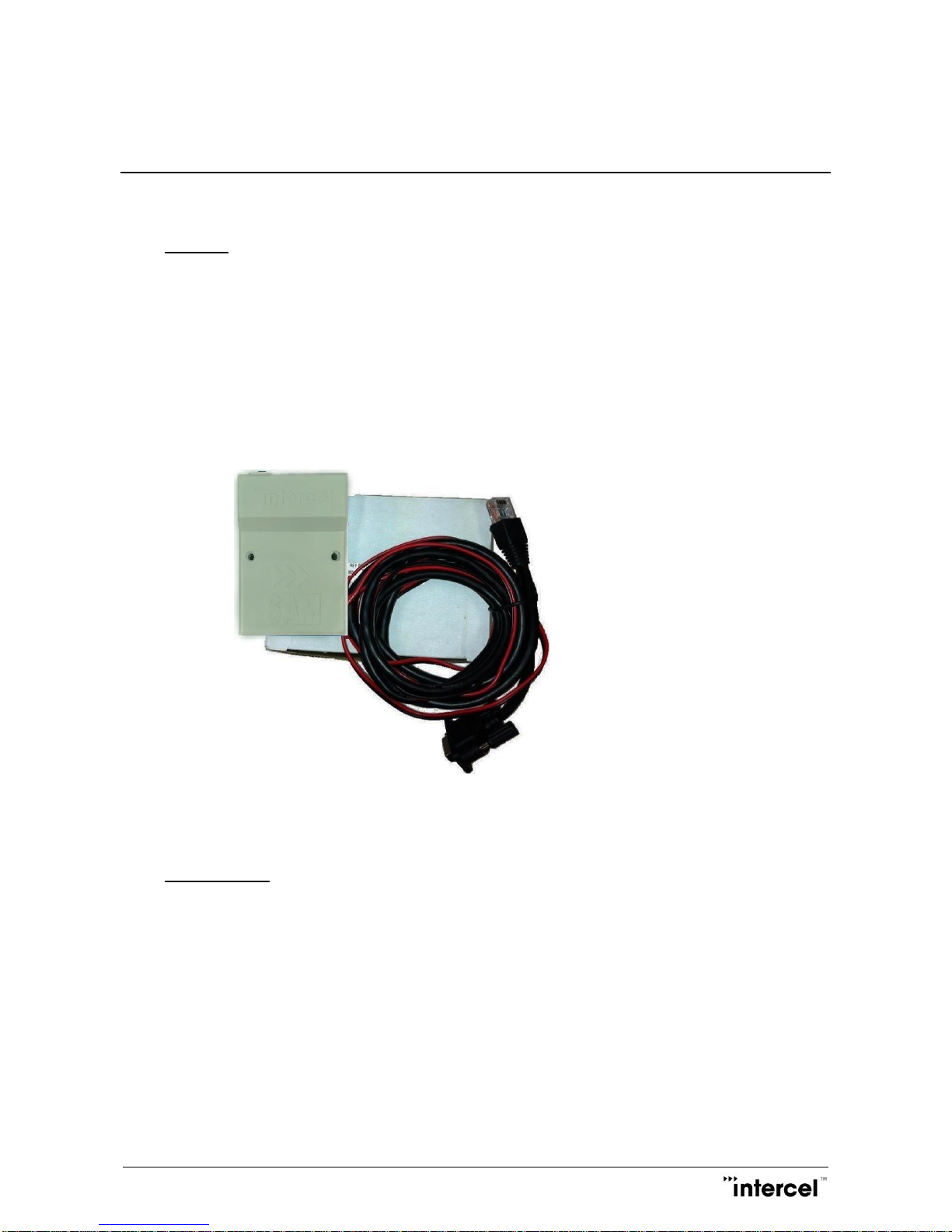
The SAMXQ package consists of:
- SAMXQ Modem
- Data Cable
The SAMXQ User Guide is available at www.intercel.com.au
5.2 Packaging Box
The carton box diameter is 120mm x 95mm x 60mm
The data cable is 2m long
The label diameter is 50mm x 33mm
A suitable power supply is available on request. The SAMXQ must be powered using a limited power source
of 12V/1A power supply according to the clause 2.5 of AS/NZS 60950.1.
A suitable antenna is also available on request. Please make sure the correct antenna is used to get optimized
performance from the SAMXQ.
Page 9
SAMXQ User Guide V1.1
7
5.3 Production Label
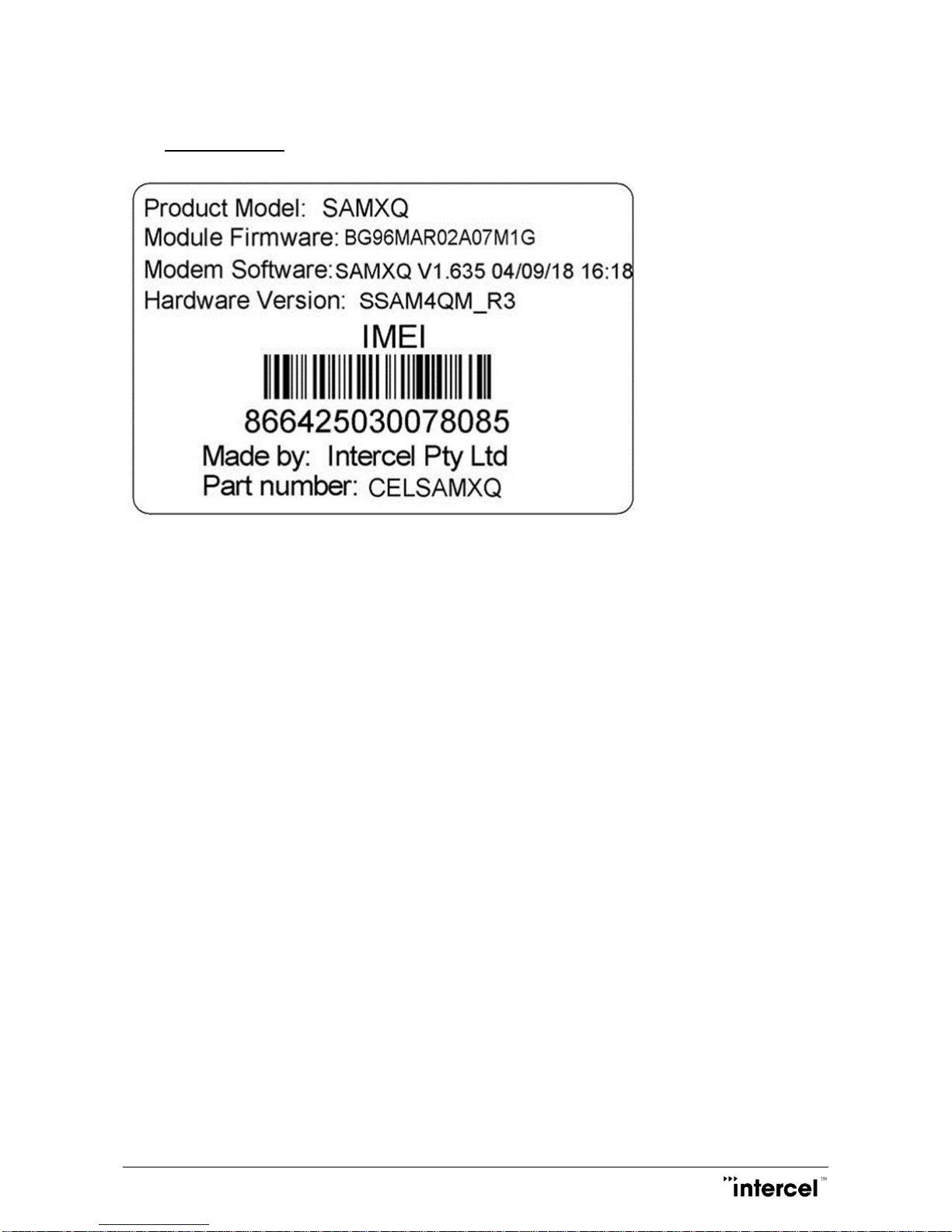
The production part number is located at the back of the SAMXQ, which includes:
- Product Model
- Software Version
- Hardware Version
- IMEI Number
- Manufacturer
- Part Number
Page 10
SAMXQ User Guide V1.1
8
6 Functionality
6.1 General
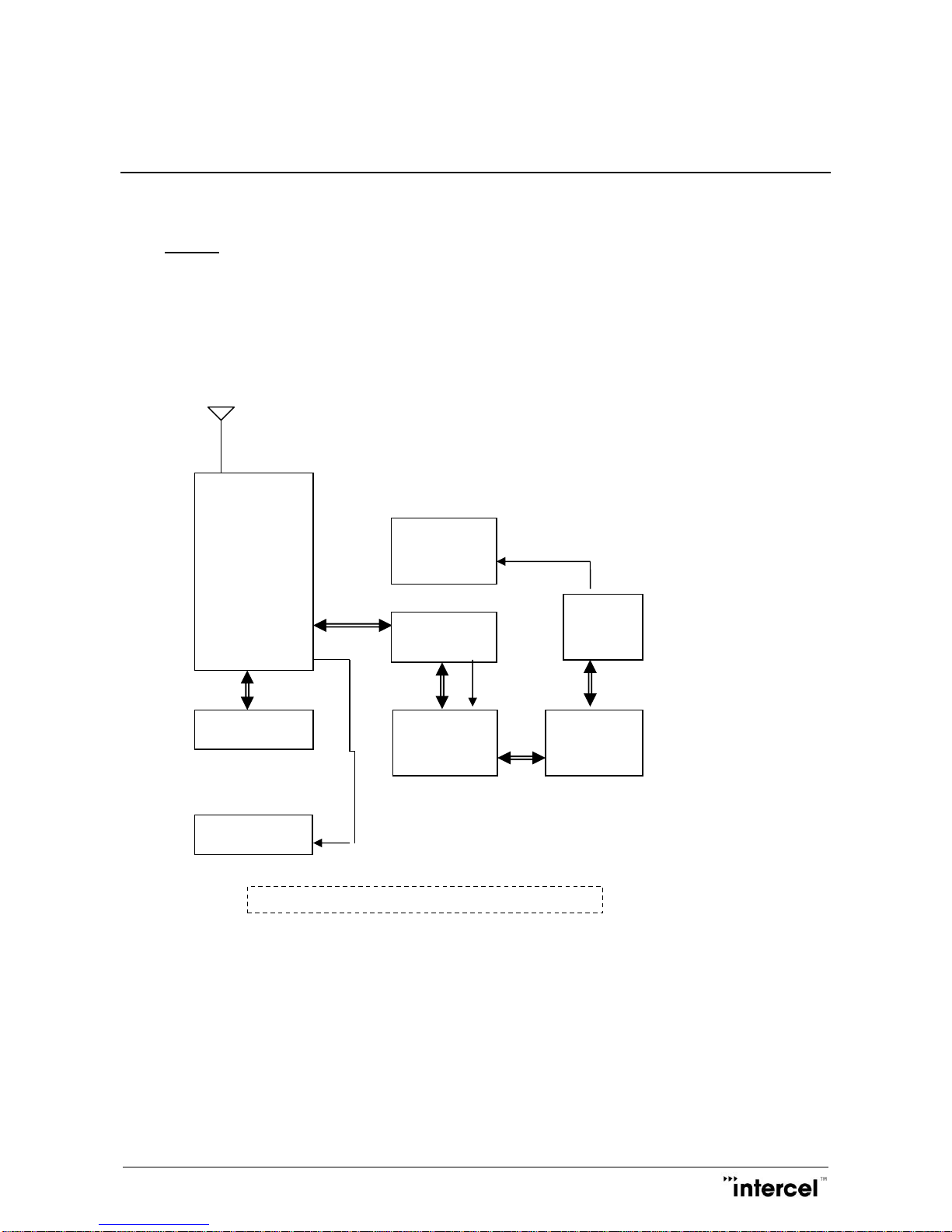
The SAMXQ modem consists of an RJ45 socket for serial port and input power, a SIM holder and an FME
male connector for main antenna. The LED indicator, located next to the SIM holder, indicates the SAMXQ
operating status.
Main antenna
Quectel
BG96-AUT
LTE
ENGINE
Switching
Power
Supply
RS232
Serial Data
Interface
SIM Interface
RJ45
Socket
LED Indicator
The SAMXQ Functional Block Diagram
ARM Cortex
M3
Serial Data
switches
Page 11

SAMXQ User Guide V1.1
9
6.2 RJ45 Socket
Pin Signals Description
1 VIN Input voltage 5Vdc - 32Vdc
2 DCD Data Carrier Detect
3 DTR/RI Data terminal Ready/Ring Indicator
4 GND Common Ground
5 RXD Serial Data out of the SAMXQ
6 TXD Serial Data into the SAMXQ
7 CTS Clear to Send
8 RTS Ready to Send
6.3 FME-Male 50Ω Antenna Connectors
The FME male antenna connector is a 50Ω impedance antenna connector. The antenna used for the SAMXQ
must have 50Ω impedance.
6.4 SIM Holder
The SIM holder is designed to accommodate a mini-SIM card. The SIM card can either be 3V or 1V8 SIM. To
insert the SIM card, remove the door by sliding it back towards the end. Make sure the SIM card faces the right
way as indicated on the box. Voltage levels over this SIM interface complies with 3GPP standards.
6.5 LED Status
The LED indicator has the following status for different SAMMODE:
SAMMODE=0
-Network searching: Red LED flickers slowly 200ms on 1800ms off
-Idle: Red LED flickers slowly 1800ms on 200ms off
-Data transfer is ongoing: Red LED flickers quickly 125ms on 125ms off
SAMMODE=1
Modem power on until SIM ready: Red LED On
Modem initialize on NB1: Red LED 1s On/Off
Modem initialize on M1: Red LED 500ms On/Off
Remote socket connection on NB1: Orange LED 500ms On/Off
Remote socket connection on M1: Green LED 500ms On/Off
Page 12

SAMXQ User Guide V1.1
10
Modem failed to connect to IP: Red LED 100ms On/Off
Modem connected to IP: Green LED flashing on M1, Orange LED flashing on NB1, LED timing patterns are
explained below.
On M1 RSRP Signal Strength
> -90 dBm 4 pulses of Green LED (100ms On 300ms Off) then 3s Off
-90 dBm to -105 dBm 3 pulses of Green LED (100ms On 300ms Off) then 3s Off
-106 dBm to -120 dBm 2 pulses of Green LED (100ms On 300ms Off) then 3s Off
< -120 dBm 1 pulse of Green LED (100ms On 300ms Off) then 3s Off
On NB1 RSRP Signal Strength
> -90 dBm 4 pulses of Orange LED (100ms On 300ms Off) then 3s Off
-90 dBm to -105 dBm 3 pulses of Orange LED (100ms On 300ms Off) then 3s Off
-106 dBm to -120 dBm 2 pulses of Orange LED (100ms On 300ms Off) then 3s Off
< -120 dBm 1 pulse of Orange LED (100ms On 300ms Off) then 3s Off
If modem is IP connected in idle state but is searching for network or is of limited service: Red LED flashing,
LED timing patterns are explained below.
RSRP Signal Strength
> -90 dBm 4 pulses of Red LED (100ms On 300ms Off) then 3s Off
-90 dBm to -105 dBm 3 pulses of Red LED (100ms On 300ms Off) then 3s Off
-106 dBm to -120 dBm 2 pulses of Red LED (100ms On 300ms Off) then 3s Off
< -120 dBm 1 pulse of Red LED (100ms On 300ms Off) then 3s Off
FOTA (M1/NB1 module Firmware Over The Air upgrade) or DOTA (Modem software Download Over the Air
upgrade):
Process run on NB1: Orange LED 100ms On/Off
Process run on M1: Green LED 100ms On/Off
Page 13
SAMXQ User Guide V1.1
11
6.6 Data Cable
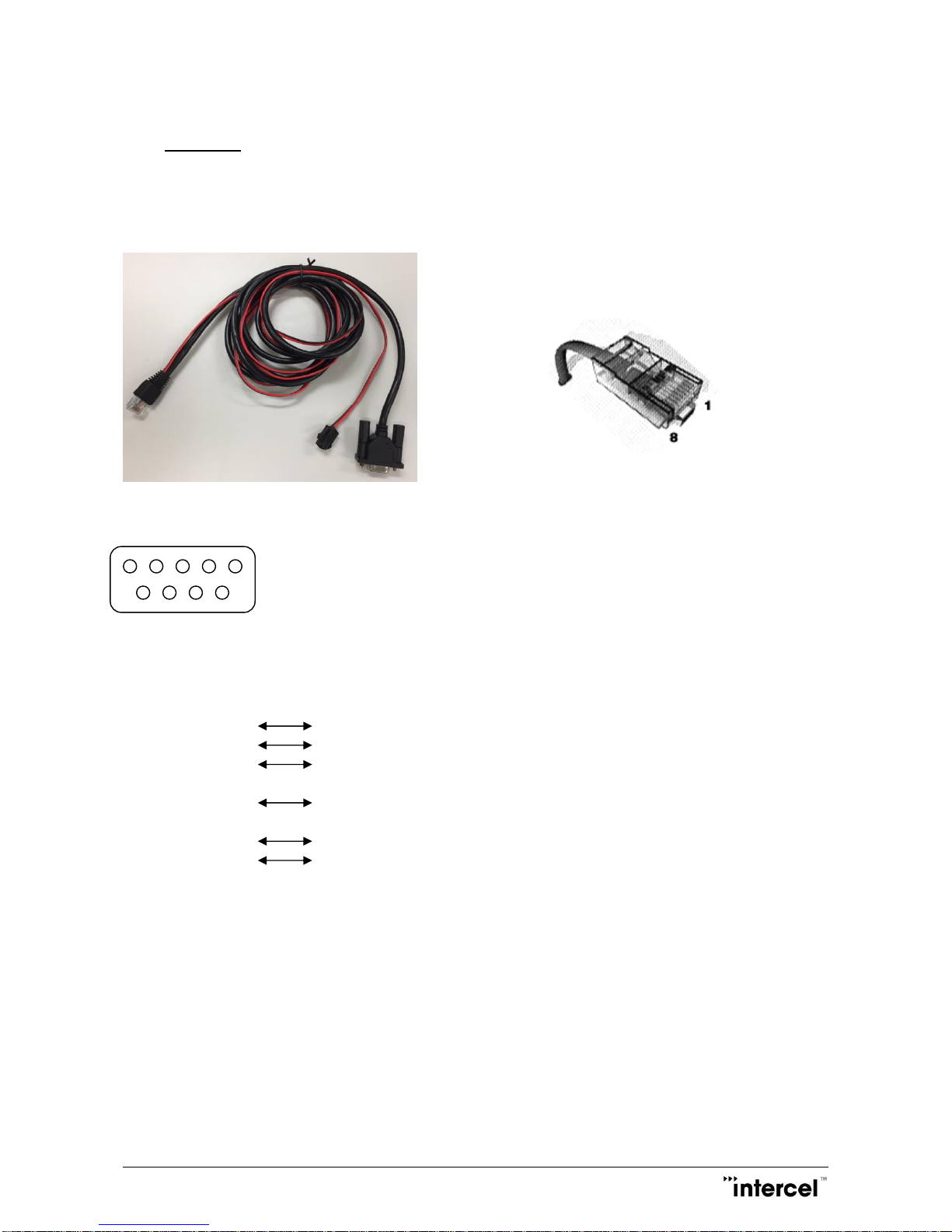
The data cable is 2m long. It consists of an RJ45 plug, a DB9-female connector and a 4 pin micro-fit
termination.
5 4 3 2 1
9 8 7 6
DB9 Signals RJ45 Description
1 DCD 2 Data Carrier Detect
2 RXD 5 Serial Data out of the SAMXQ
3 TXD 6 Serial Data into the SAMXQ
4 DTR 3 Not used
5 GND 4 Common Ground
6 DSR
7 RTS 8 Ready to Send
8 CTS 7 Clear to Send
9 RI Not used
1 RED wire : Input voltage from 5Vdc to 32Vdc
4 BLACK wire : Power Ground
Page 14
SAMXQ User Guide V1.1
12
7 Electrical Characteristics
7.1 Power Consumption
Idle mode 30mA @12V
Average in-use mode 80mA@12V
Full Tx power 90mA@12V
Peak current requirement 0.3A@12V
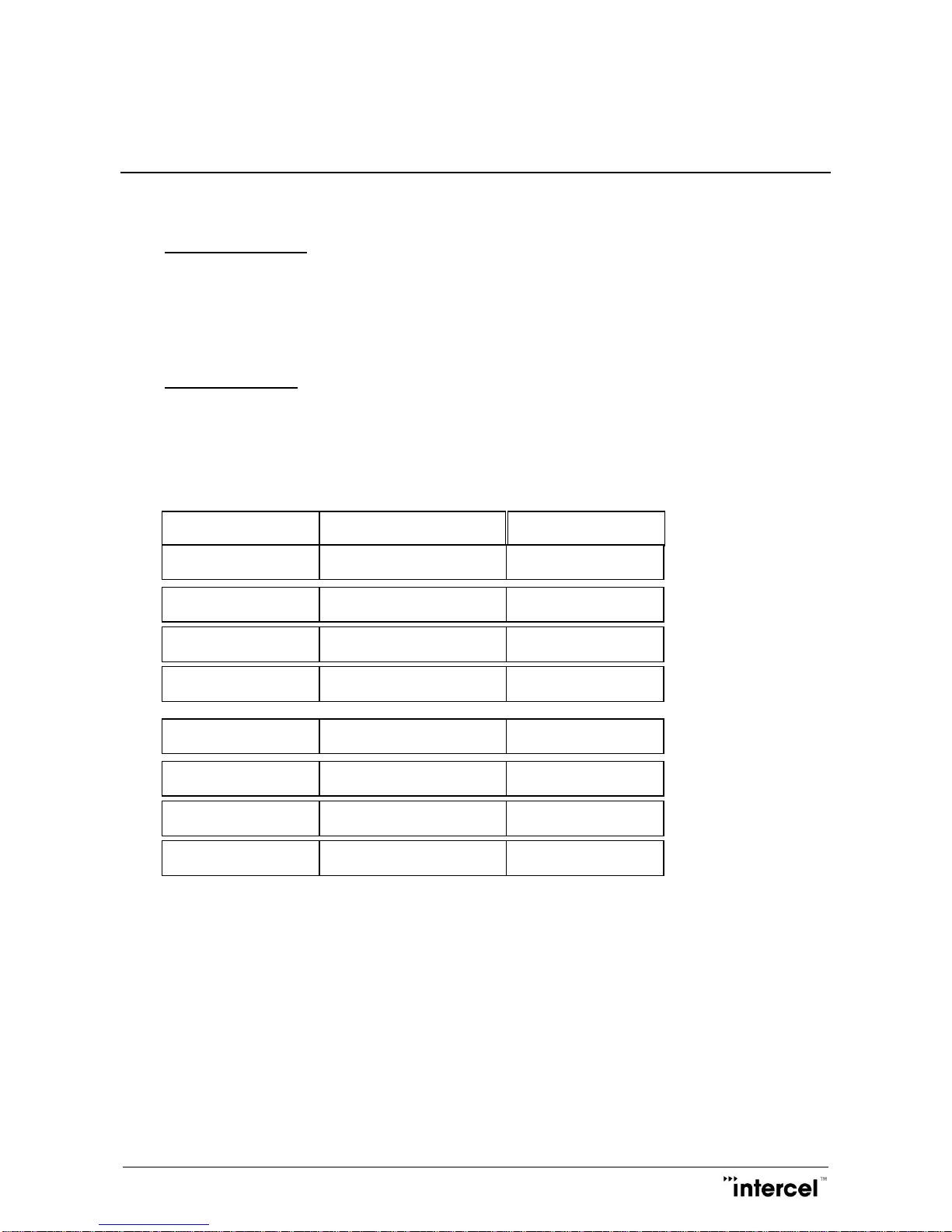
7.2 Receive Sensitivity
Measurement setup:
(LTE) CAT M1 Throughput >95% According to 3GPP 36.521-1
(LTE) CAT NB1 Throughput >95% According to 3GPP 36.521-1
REF Sensitivity (dBm)
3GPP REFSens (dBm)
MODE/BAND
CAT M1 / Band 3
CAT M1 / Band 5
CAT M1 / Band 8
CAT M1 / Band 28
-108 dBm
-108.8 dBm
-108.4 dBm
-108 dBm
-99.3 dBm
-100.8 dBm
-99.8 dBm
-100.8 dBm
CAT NB1 / Band 3
CAT NB1 / Band 5
CAT NB1 / Band 8
CAT NB1 / Band 28
-115.6 dBm
-114.6 dBm
-113.8 dBm
-115.2 dBm
-107.5 dBm
-107.5 dBm
-107.5 dBm
-107.5 dBm
Page 15
SAMXQ User Guide V1.1
13
7.3 Conducted Transmit Power
7.4 Antenna Specifications
Max cable loss 0.5dBm
Impedance 50Ω
VSWR recommended 2:1
VSWR absolute maximum 10:1
7.5 Environmental Characteristics
Operating temperature -30°C to +85°C
Storage temperature -40°C to +95°C
Humidity 90% relative humidity (non-condensing)
Band
Mode
Class
RF power (dBm)
All Bands
All Bands
(LTE) CAT-M1
3
23 (±2 dB)
(LTE) CAT-NB1
3
23 (±2 dB)
Page 16

SAMXQ User Guide V1.1
14
8 The SAMXQ TCP/IP Operation
The SAMXQ has an MCU (Microcontroller) to control the LTE module BG96. The SAMXQ can be operating in
three different modes, defined by the parameter SAMMODE:
-SAMMODE=0. The modem is in standard mode. When powered on, the MCU turns on the LTE module,
checks its baud rate, turns on the LED and releases control of the LTE module to the connecting device. AT
commands can be sent from the serial port here after, the MCU will keep monitoring the LTE module Rx pin
for AT$ commands and checks time in the RESETPERIOD parameter to reset itself and the LTE module.
-SAMMODE=1. The modem is in PSD (Packet Switch Data) smart mode. The MCU is in total control of the
LTE module. When powered on the software reads all parameters from flash and activates a PSD connection,
it then creates a UDP and a TCP socket to listen for data transfer connection, opens a UDP and a TCP socket
to listen for remote AT commands connection. If programmed as a TCP client it will try to connect to a remote
TCP server, the modem then stays in PSD online idle state waiting for SMS, UDP or TCP connection. The
software maintains PSD connectivity by means of PING using POLLPERIOD parameter stored in flash.
8.1 Communication Sockets
TCP Data: The socket connection allows transparent data (excluded IP header) to pass through from the
remote host to the modem serial port and vice versa. In TCP server mode, the socket will be
disconnected after 5 minutes of no data transfer.
UDP Data: The socket connection allows transparent data to pass through from the remote host to the
modem serial port and vice versa. A block of data received from a remote UDP server will
open a 2 minutes window for data to be transferred from the serial port.
TCP AT Command: The socket connection allows a user from the host computer to send AT commands to the
modem and receive its responses. The socket will be disconnected after 5 minutes of no
activity. The socket can also be used for remote firmware update.
UDP AT Command: The socket connection allows a user from the host computer to send AT commands to
the modem and receive its responses. The socket can also be used for remote firmware
update.
.
Page 17

SAMXQ User Guide V1.1
15
8.2 TCP/IP AT$ Commands
Communications parameters are stored in Flash using AT$PARAMETERS.
Parameters are defined as:
APN=Access Point Name
USERNAME=Username that may be required with GPRS login
PASSWORD=Password that may be required with GPRS login
LTCPPORT=Local TCP listening port
RTCPIP=Remote TCP server IP
RTCPPORT= Remote TCP server port
TCPMODE=0 or 1 (0 to disable the modem TCP client, 1 to enable the modem TCP client)
LUDPPORT=Local binding UDP port (modem listens for UDP data on this port)
RUDPIP=Remote binding UDP IP (modem only accepts data from this IP)
RUDPPORT=Remote binding UDP port (modem sends UDP data to this port)
PINGIP=If set, the modem will send PING packet to this IP to check for PSD connectivity.
POLLPERIOD=Modem uses this time to send TRACE or PING packet to check for PSD connectivity.
RESETPERIOD=Set time to reset modem periodically.
SBREAKTIME=Serial port break time, modem will wait for this break in serial port transmission before it
packetizes the data and sends.
MBREAKTIME=Modem or GSM module serial break time, use to adjust the way the modem rebuilds long IP
packets from fragments of CMUX frames.
BAUDRATE=Serial port baud rate.
DATALEN=Serial port data bits 7 or 8
PARITY= NONE or ODD or EVEN
SAMMODE=0 for standard modem, 1 for PSD mode.
SERIALLOCK= When modem access is safeguarded by username and password, 0=serial port access is not
lock, 1=serial port access is locked
LOGINTIMEOUT=Timeout (in seconds) after repeated failed login attempts (set at 5 failed attempts).
SESSIONIDLETIME=Set the time interval (in seconds) the login session could stay idle before it is closed
Page 18

SAMXQ User Guide V1.1
16
PPPAUTH=PAP or CHAP for PPP authentication, PAP is the default value.
All parameters can be programmed all at once.
AT$PARAMETERS=APN=telstra.extranet,USERNAME=intercel,PASSWORD=mach,LTCPPORT=10000,RT
CPIP=203.45.1.236,RTCPPORT=10000,TCPMODE=,LUDPPORT=20000,RUDPIP=203.45.1.236,RUDPPO
RT=20000,POLLPERIOD=60,SBREAKTIME=100,MBREAKTIME=5,BAUDRATE=115200,DATALEN=8,PAR
ITY=NONE,SAMMODE=0,SERIALLOCK=0,LOGINTIMEOUT=300,SESSIONIDLETIME=120,
PPPAUTH=PAP
Saved parameters to flash...
OK
Or a few parameters or one at a time.
AT$PARAMETERS=APN=telstra.extranet,USERNAME=intercel,PASSWORD=mach
Saved parameters to flash...
OK
AT$PARAMETERS=LTCPPORT=10000,RTCPIP=203.45.1.236,RTCPPORT=10000,TCPMODE=,LUDPPO
RT=20000,RUDPIP=203.45.1.236,RUDPPORT=20000
Saved parameters to flash...
OK
AT$PARAMETERS=POLLPERIOD=60,SBREAKTIME=100,MBREAKTIME=5,BAUDRATE=115200,DATALE
N=8,PARITY=NONE
Saved parameters to flash...
OK
AT$PARAMETERS=SAMMODE=0
Saved parameters to flash...
OK
AT$PARAMETERS?
$PARAMETERS:
Page 19

SAMXQ User Guide V1.1
17
APN: telstra.extranet
USERNAME: intercel
PASSWORD: mach
LTCPPORT: 10000
RTCPIP: 203.45.1.236
RTCPPORT: 10000
TCPMODE: 0
LUDPPORT: 20000
RUDPIP: 203.45.1.236
RUDPPORT: 20000
BAUDRATE: 115200
DATALEN: 8
PARITY: NONE
POLLPERIOD: 60
RESETPERIOD: 1440
SBREAKTIME: 100
MBREAKTIME: 5
SERIALLOCK: 0
LOGINTIMEOUT: 300
SESSIONIDLETIME: 120
PPPAUTH: CHAP
SAMMODE: 0
OK
AT$UDPCONNECT
If the modem is already allocated an IP address, this command will put the modem in UDP data mode, the
modem DCD pin goes high, data from serial will be packetized into UDP packets and sent to remote UDP
server (UDP settings must be set prior), modem will return to AT Command mode if it receives no UDP data
in 30 seconds.
AT$TCPCONNECT
If the modem is already allocated an IP address, this command will make a TCP client connection to the remote
TCP server, the modem will return to AT Command mode if it receives no TCP ACK in 30 seconds.
AT$DDNS
Use to setup parameters required for Dynamic DNS updating.
Parameters are defined as:
DDNSENABLE= 0 or 1 (0 disable, 1 enable)
DDNSHOST=Host name
DDNSUSERNAME=DNNS account name
Page 20

SAMXQ User Guide V1.1
18
DDNSPASSWORD=DDNS account password
DDNSSERVER=DDNS server
DDNSSTRING: Only need to change from default in some circumstances with Intercel support
DDNSAUTH: Only need to change from default in some circumstances with Intercel support
DDNSAGENT: Only need to change from default in some circumstances with Intercel support
PDNSIP=Primary DNS, leave blank if not using your own DNS server, not a requirement for DDNS.
SDNSIP=Secondary DNS, leave blank if not using your own DNS server, not a requirement for DDNS
DNSTTL= DNS Time To Live in minutes before updating of DNS entries, not a requirement for DDNS.
AT$DDNS=PDNSIP=8.8.8.8,SDNSIP=8.8.4.4,DNSTTL=240,DDNSENABLE=0,DDNSHOST=intercelau.ddns
.net,DDNSUSERNAME=intercelau,DDNSPASSWORD=123456789,DDNSSERVER=dynupdate.noip.com,D
DNSSTRING=GET/nic/update?hostname=%s&myip=%sHTTP/1.0,DDNSAUTH=Authorization:
Basic%s,DDNSAGENT=User-Agent:SAMXQ/1.0 [email protected]
Saved parameters to flash...
OK
AT$DDNS?
$DDNS:
DDNSENABLE: 0
DDNSHOST: intercelau.ddns.net
DDNSUSERNAME: [email protected]
DDNSPASSWORD: 123456789
DDNSSERVER: dynupdate.no-ip.com
DDNSSTRING: GET /nic/update?hostname=%s&myip=%s HTTP/1.0
DDNSAUTH: Authorization: Basic %s
DDNSAGENT: User-Agent: SAMXQ/1.0 [email protected]
PDNSIP: 8.8.8.8
SDNSIP: 8.8.4.4
DNSTTL: 240
OK
AT$DDNSTEST
Use to force a manual updating of IP to the DDNS server, all required parameters must be set beforehand.
AT$DDNSTEST
Page 21

SAMXQ User Guide V1.1
19
$DDNSTEST: Starting....
$DDNSTEST: Resolving dynupdate.no-ip.com....
Connecting to DDNS dynupdate.no-ip.com ....
Connected to DDNS dynupdate.no-ip.com
HTTP/1.1 200 OK
Date: Tue, 02 Sep 2014 00:33:32 GMT
Server: Apache/2
Content-Location: update.php
Vary: negotiate
TCN: choice
Content-Length: 19
Connection: close
Content-Type: text/plain; charset=UTF-8
good 123.209.169.62
DDNS host intercelau.ddns.net updated with 123.209.169.62
OK
Page 22

SAMXQ User Guide V1.1
20
AT$ACCESS
Use to setup parameters required for remote access.
Parameters are defined as:
IPBLOCK=0 or 1 (0 disable, 1 enable remote IP access from REMOTEIP1-REMOTEIP4)
REMOTEIP1= nnn.nnn.nnn.nnn
REMOTEIP2= nnn.nnn.nnn.nnn
REMOTEIP3= nnn.nnn.nnn.nnn
REMOTEIP4= nnn.nnn.nnn.nnn
SMSBLOCK=0 or 1 (0 disable, 1 enable remote SMS access from REMOTESMS1-REMOTESMS4)
REMOTESMS1= ccnnnnnnnnn cc for country code
REMOTESMS2= ccnnnnnnnnn
REMOTESMS3= ccnnnnnnnnn
REMOTESMS4= ccnnnnnnnnn
DIALBLOCK= 0 or 1 (0 disable, 1 enable remote dialing access from REMOTEDIAL1-REMOTEDIAL4)
REMOTEDIAL1= acnnnnnnnn ac for area code
REMOTEDIAL2= acnnnnnnnn
REMOTEDIAL3= acnnnnnnnn
REMOTEDIAL4= acnnnnnnnn
AT$ACCESS=IPBLOCK=1,REMOTEIP1=10.64.24.2,REMOTEIP2=,REMOTEIP3=,REMOTEIP4=,SMSBLO
CK=1,REMOTESMS1=0413586218,REMOTESMS2=,REMOTESMS3=,REMOTESMS4=,DIALBLOCK=1,R
EMOTEDIAL1=0395612959,REMOTEDIAL2=,REMOTEDIAL3=,REMOTEDIAL4=
Saved parameters to flash...
OK
AT$ACCESS?
$ACCESS:
IPBLOCK: 1
REMOTEIP1: 10.64.24.2
REMOTEIP2:
Page 23

SAMXQ User Guide V1.1
21
REMOTEIP3:
REMOTEIP4:
SMSBLOCK: 1
REMOTESMS1: 0413586218
REMOTESMS2:
REMOTESMS3:
REMOTESMS4:
DIALBLOCK: 1
REMOTEDIAL1: 0395612959
REMOTEDIAL2:
REMOTEDIAL3:
REMOTEDIAL4:
OK
AT$LGSMS
Use to program parameters for last gasp SMS.
Parameters are defined as:
LGSMSMSG=SMS message text, default is "SAMXQ low power detected...”
LGSMSDELAY= Time delay to make sure supply power is down for this long before sending last gasp
SMS
LGSMSNO=SMS phone number
AT$LGSMS= LGSMSMSG= SAMXQ power supply is low....,60,LGSMSNO=+61418505361
Saved parameters to flash...
OK
AT$LGSMS?
$LGSMS:
LGSMSMSG: SAMXQ power supply is low....
LGSMSDELAY: 60
LGSMSNO: +61418505361
OK
AT$LOGIN
Use to setup login details for remote sending of AT commands, parameters and software updating; password
is encrypted so remote login required PC software SAMXQ Terminal.
Page 24

SAMXQ User Guide V1.1
22
AT$LOGOFF
Use to log off remote access instantly.
AT$IP
Use to return the allocated IP addresses of the current GPRS connection
AT$IP
$IP: 120.157.107.60
$DNS Primary: 10.4.182.20
$DNS Secondary: 10.4.81.103
OK
AT$VERSION
This command returns the TCP/IP software version.
AT$VERSION
SAMXQ V1.635 04/09/18 16:18
OK
AT$RESET
Use to remotely reset the modem, normally after sending of new parameters
AT$RESET
SAM Reset...
OK
AT$SMSTOSERIALON
This command allows the connecting device to receive SMS notification for 300s: e.g. “+CMTI: "SM",1”, the
connecting device must send AT+CMGR to read SMS and AT+CMGD to delete it, during this 300s period, the
modem will not be able to decode AT$ commands sending to it over SMS.
Page 25

SAMXQ User Guide V1.1
23
AT$FOTA
Use to start FOTA (LTE module Firmware Download Over The Air).
AT$FOTA=FTP_Server,FTP_Username,FTP_Password,FTP_Path,FTP_Filename
FTP_Server: FTP server in dot format nnn.nnn.nnn.nnn
FTP_Username: Maximum length 100
FTP_Password: Maximum length 100
FTP_Path: Maximum length 50
FTP_Filename: Maximum length 50
AT$FOTA=120.157.48.51,vp,test,., 30.00.402-30.00.402-B997_FOTA.bin
OK
AT$DOTA
Use to start DOTA (Modem software Download Over The Air).
AT$DOTA=FTP_Server,FTP_Username,FTP_Password,FTP_Path,FTP_Filename
FTP_Server: FTP server in dot format nnn.nnn.nnn.nnn
FTP_Username: Maximum length 100
FTP_Password: Maximum length 100
FTP_Path: Maximum length 50
FTP_Filename: Maximum length 50
AT$DOTA=120.157.48.51,vp,test,.,SAMXQ V1631 100818 1637.bin
OK
Page 26

SAMXQ User Guide V1.1
24
AT$GETLOG
Use to check read logged events from flash.
Read all logged events:
AT$GETLOG
$GETLOG:
1 2015/04/08 13:08:25+40 257 Software start
2 2015/04/08 13:08:30+40 259 BG96_OFF
3 2015/04/08 13:08:36+40 258 BG96_ON
4 2015/04/08 13:08:42+40 288 NW registered
…..
249 2015/04/09 10:52:19+40 320 $version.
250 2015/04/09 11:17:10+40 320 $getlog.
OK
Read last 5 events:
AT$GETLOG=5
$GETLOG:
246 2015/04/09 10:26:15+40 288 NW registered
247 2015/04/09 10:26:16+40 262 /04/09,10:26:16
248 2015/04/09 10:52:19+40 320 $version.
249 2015/04/09 11:17:10+40 320 $getlog.
250 2015/04/09 11:21:13+40 320 $getlog=5.
OK
AT$CLEARLOG
Use to clear logged events from flash.
AT$CLEARLOG
OK
AT$MODEMLOG
Use to enable and disable events logging,
Page 27

SAMXQ User Guide V1.1
25
AT$MODEMLOG=1 enable logging
AT$MODEMLOG=0 disable logging
AT$MODEMLOG?
$MODEMLOG: 1
OK
AT$DEFAULT
Use to restore modem’s parameters to default settings.
AT$DEFAULT
OK
Page 28

SAMXQ User Guide V1.1
26
9 Firmware Upgrade
9.1 The LTE Module Firmware
The module firmware can be upgraded via the modem’s USB port, or can be upgraded over-the-air (FOTA) by
instructing it to download from a HTTP server.
9.2 The Modem’s Controller Software
The modem’s software can be upgraded over the serial port using the SAM-BA software tool from ATMEL.
The modem software and parameters can be upgraded over the serial port, PSD, or SMS (parameters only)
using SAM Terminal program running on PC.
For mass upgrade of modem’s software, the new software can be loaded onto a HTTP server and the modem
is instructed to download the new software from this HTTP server.
Page 29

27
Notes
-In SAMMODE=0, after power on the MCU turns on the LTE module, checks its baud rate, turns on LED before
releasing control of the LTE module to the connecting device. All this takes between 15 to 20 seconds, so the
modem is only ready for AT commands here after.
-In SAMMODE=1, the modem takes 30 to 60 seconds to connect to PSD, the modem only responds to AT
commands from serial port once it is connected to PSD or after it has failed. If it failed to connect it will reset
after 120 seconds.
-In SAMMODE 1 if the SAMXQ modem is powered up without a SIM card it will go into AT command mode
after 20 seconds.
Page 30

28
Contact Information
Australia (Headquarters)
33 Glenvale Crescent
Mulgrave 3170
Victoria, Australia
Ph: +61 (0)3 9239 2000
Fx: +61 (0)3 9561 2614
Email: [email protected]
Internet: www.Intercel.com.au
New Zealand
For New Zealand Customers
Toll Free No: 0800 742 600
United Kingdom
5 Elstree Gate
Elstree Way
Borehamwood
Hertfordshire
WD6 1JD
Email: [email protected]
Hong Kong
Unit 6, 17th Floor
Vanta Industrial Centre
21-33 Tai Lin Pai Road
Kwai Chung, New Territories
HKSAR of the PRC
Ph: +852 2362 9018
Fx: +852 2648 8806
Shenzhen
Room 1303, 13/F, West Wing
Tian’an High-Tech Plaza Phase II
Tian’an Cyber Park
Futian, Shenzhen
China
Ph: +86 755 8835 3778
Fx: +86 755 8835 2489
The information in this document is believed to be accurate in all respects at the time of publication but is subject to
change without notice. intercelTM assumes no responsibility for errors and omissions, and disclaims responsibility for
any consequences resulting from the use of information included herein. Additionally, intercelTM assumes no
responsibility for the functioning of undescribed features or parameters. intercelTM reserves the right to make changes
without further notice. intercelTM makes no warranty, representation or guarantee regarding the suitability of its
products for any particular purpose, nor does intercelTM assume any liability arising out of the application or use of any
product or circuit, and specifically disclaims any and all liability, including without limitation consequential or incidental
damages. intercelTM products are not designed, intended, or authorized for use in applications intended to support or
sustain life, or for any other application in which the failure of the intercelTM product could create a situation where
personal injury or death may occur. Should Buyer purchase or use intercelTM products for any such unintended or
unauthorized application, Buyer shall indemnify and hold intercelTM harmless against all claims and damages.
 Loading...