

Page 1
1
Intercel Pty. Ltd. A.C.N. 007 077 161
33 Glenvale Crescent
Mulgrave VIC. Australia 3170
Email : [email protected]
Internet : www.intercel.com.au
Ph : 61 3 9239 2000 Fax : 61 3 9561 2614
TThhee SSAAMM33GG++ UUsseerr GGuuiiddee
Document history
18th May 2007 : Start Version 1.0
12th June 2007 : Update SAM3G pictures Version 1.1
18th Oct 2007 : Update section 5 and section 8 Version 1.2
26th Oct 2007 : Update section 8.2.a Version 1.3
26th Oct 2007 : Update section 1,5,7 and 8 Version 1.4
24th Mar 2009 : Update for SAM3G+ Version 2.0
27th April 2012 : Update for LED indicator Version 2.1
18th April 2013 : Update serial cable Version 2.2
17th May 2013 : Update bands Version 2.3
15th July 2013: Update Intercel logo and phone no. Version 2.4
Version 2.4
Page 2

2
Intercel Pty. Ltd. A.C.N. 007 077 161
33 Glenvale Crescent
Mulgrave VIC. Australia 3170
Email : [email protected]
Internet : www.intercel.com.au
Ph : 61 3 9239 2000 Fax : 61 3 9561 2614
1. Introduction
2. Safety precautions
3. Radio frequency exposure - SAR
4. WEEE Directive 2002/96/EC - disposal of old electronic equipment
5. Packaging
5.1 Contents
5.2 The packaging box
5.3 The production label
6. Functionality
a. General
b. The RJ45 socket
c. The MiniB USB connector
d. The SMB-Jack 50Ω antenna connector
e. The USIM holder
f. The LED status
g. The Data cable
7. Electrical characteristics
a. Power consumption
b. RF bands
c. Receive sensitivity
d. Conducted transmit power tolerances
e. Main antenna specifications
f. Environmental characteristics
8. Operation
8.1. Using the USB port
a. Installing the USB driver
b. Firmware upgrade
8.2. Using the serial RS232 port
a. General configuration
b. Meter configuration
c. AT commands
Contents
Page 3
3
Intercel Pty. Ltd. A.C.N. 007 077 161
33 Glenvale Crescent
Mulgrave VIC. Australia 3170
Email : [email protected]
Internet : www.intercel.com.au
Ph : 61 3 9239 2000 Fax : 61 3 9561 2614
1. Introduction
The SAM3G+ is a compact, light-weight, UMTS, HSPA based modem. It provides GSM, GPRS,
EDGE and WCDMA connectivity. The SAM3G+ is a quad-band GSM/GPRS/EDGE 850MHz,
900MHz, 1800MHz, 1900MHz and a quad-band WCDMA/HSDPA : 850MHz, 900MHz,1900MHz,
2100MHz
The SAM3G+ is designed for both mobile and fixed M2M applications. It has an RJ45 socket for
both input voltage and serial RS232 signals, a MiniB USB connector, a SMB-Jack for antenna
connection, a SIM holder and an LED indicator.
The SAM3G+ is capable of sending/receiving SMS, Circuit switched data and Packet-switched
data.
SMB-Jack antenna
connector
SIM holder
LED indicator
Mini USB connector RJ45 for input power and serial RS232
Type Approval GCF full type approval
Mobile station modem Version Qualcomm’s MSM6290
TA code 35362602
EU approval CE-0682
Page 4
4
Intercel Pty. Ltd. A.C.N. 007 077 161
33 Glenvale Crescent
Mulgrave VIC. Australia 3170
Email : [email protected]
Internet : www.intercel.com.au
Ph : 61 3 9239 2000 Fax : 61 3 9561 2614
2. Safety Precautions
The following safety precautions must be observed whenever the SAM3G+ modem is in
operation or in service. Failure to comply with these precautions violates the safety standards of
the design, manufacture and intended use of the product
- Switch off the SAM3G+ modem :
In hospitals or places where medical equipments may be in use.
In an aircraft
Refueling points
Explosive areas
- Restricted use of the SAM3G+ modem
Near any chemical plant
Near any Fuel depot
Areas with mobile phone warning signs
Respect national regulations on the use of cellular devices. Road safety always comes first
The SAM3G+ modem receives and transmit radio frequency energy while switched on,
therefore interference can occur if the SAM3G+ is near TVs, radios, PCs or any inadequately
shielded equipments.
3. Radio frequency exposure - SAR
The SAM3G+ modem is a low-power transceiver, similar to a typical handheld
GSM/GPRS/UMTS mobile phone. When it is turned on, it will emit low-level radio frequency
energy.
There are different guidelines and standards around the world that govern the permitted levels of
radio frequency exposure for general population. The levels include a safety margin to a human
body.
The Specific Absorption rate (SAR) is a measure of the rate at which radio frequency energy is
absorbed by the body when exposed to radio frequency electromagnetic field. The SAR value is
determined at the highest certified power level in the laboratory conditions, but the actual SAR
level of the transceiver while operating can be well below this value. This is because the
transceiver is designed to use minimum power to connect to the network.
The SAM3G+ modem is approved to use in applications where the antenna is placed more
than 21cm from the body.
For other applications, the integrator is responsible for the local SAR requirements.
Page 5
5
Intercel Pty. Ltd. A.C.N. 007 077 161
33 Glenvale Crescent
Mulgrave VIC. Australia 3170
Email : [email protected]
Internet : www.intercel.com.au
Ph : 61 3 9239 2000 Fax : 61 3 9561 2614
4. WEEE directive 2002/96/EC, disposal of old electronic equipment
This symbol on the product indicates that this product shall not be treated as
household waste . It must be placed at an appropriate collection point for the recycling of
electrical and electronic equipments.
By ensuring the correct disposal of this equipment, it will help the environment and human’s
health. The recycling will help to conserve the natural resources.
The SAM3G+ product is RoHS compliant
Page 6
6
Intercel Pty. Ltd. A.C.N. 007 077 161
33 Glenvale Crescent
Mulgrave VIC. Australia 3170
Email : [email protected]
Internet : www.intercel.com.au
Ph : 61 3 9239 2000 Fax : 61 3 9561 2614
5. Packaging
5.1 Contents
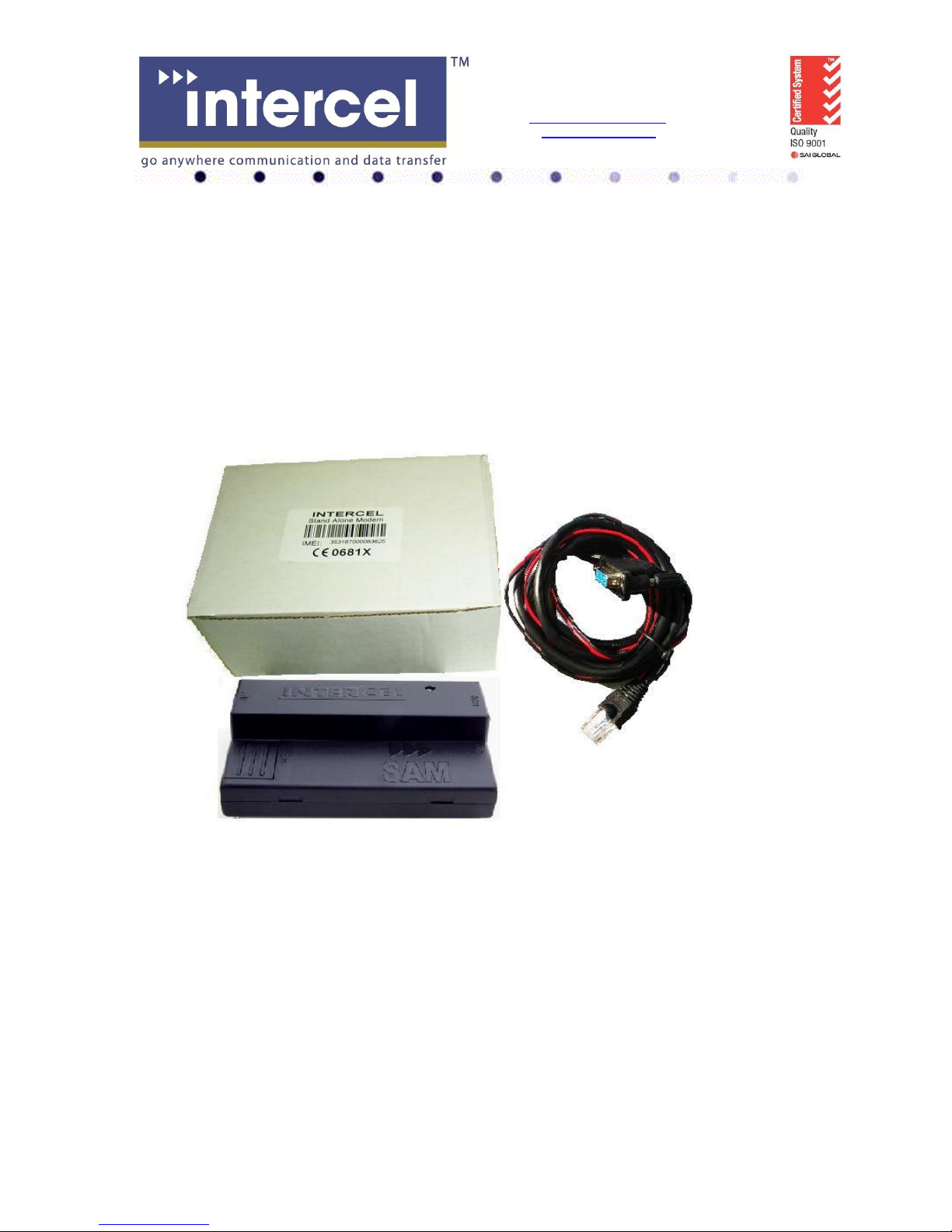
The SAM3G+ package consists of :
- A SAM3G+ modem
- A data cable
- A short specification of the SAM3G+ and its pinouts
- A SAM3G+ User Guide
5.2 The packaging box
The carton box diameter is 120mm x 95mm x 60mm
The Data cable is 2m long
The Label diameter is 50mm x 33mm
The Power supply is available on request. It is recommended that the SAM3G+ is powered using
a 12Vdc/1A power supply.
The antenna is also available on request. Please make sure the correct antenna is used to get
optimised performance from the SAM3G+ (see section 7.e. Main Antenna specifications).
5.3 The production label
Page 7
7
Intercel Pty. Ltd. A.C.N. 007 077 161
33 Glenvale Crescent
Mulgrave VIC. Australia 3170
Email : [email protected]
Internet : www.intercel.com.au
Ph : 61 3 9239 2000 Fax : 61 3 9561 2614
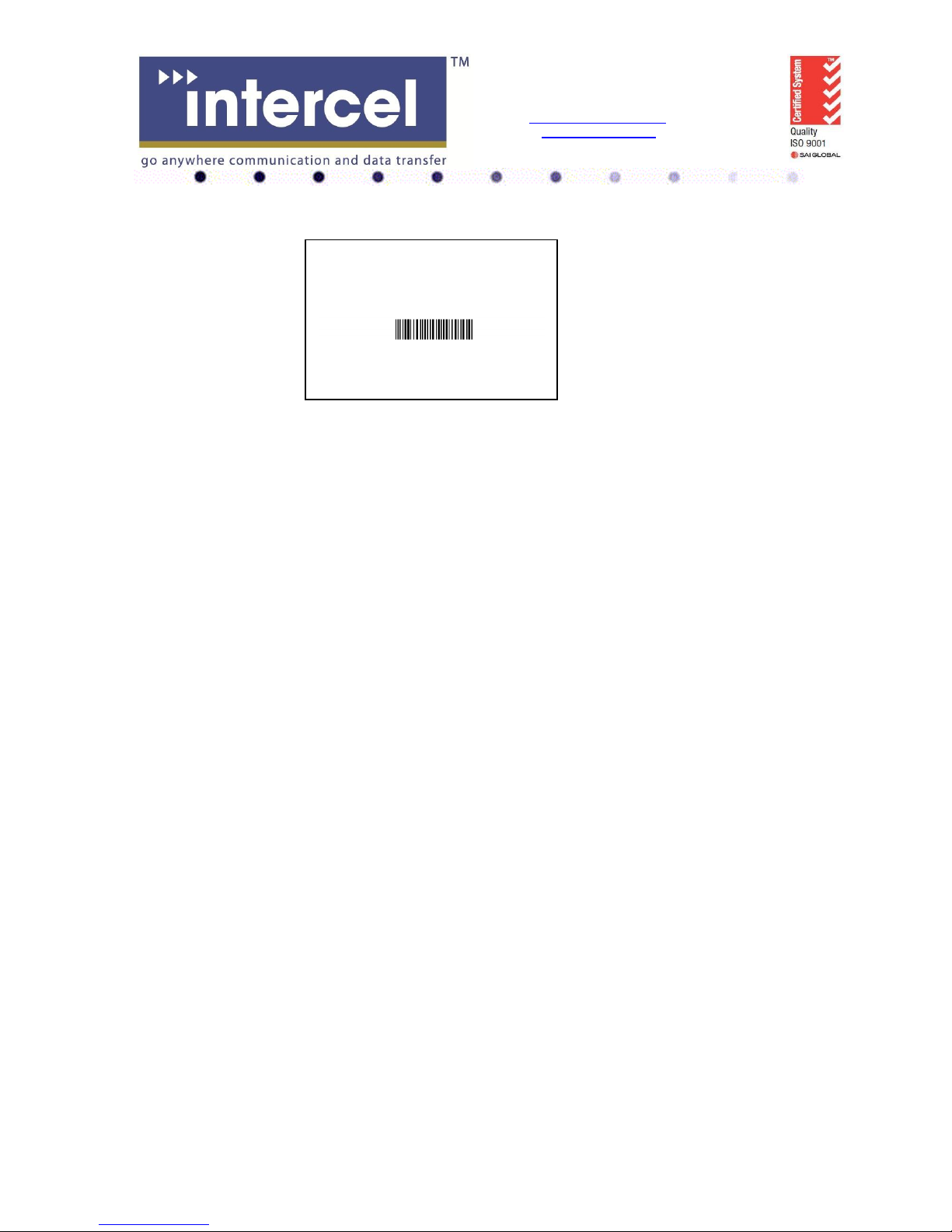
Product Model: SAM3G+ AMR
Software : Version 1.C
Hardware : Version 3.2
IMEI
352679010 049570
Made by: Intercel - N592
Part number : ASSSAM3G+AMR
The production part number is located at the back of the SAM3G+, which includes :
- The product model
- The software Version
- The Hardware Version
- The IMEI number
- The manufacturer
- The part number
Page 8
8
Intercel Pty. Ltd. A.C.N. 007 077 161
33 Glenvale Crescent
Mulgrave VIC. Australia 3170
Email : [email protected]
Internet : www.intercel.com.au
Ph : 61 3 9239 2000 Fax : 61 3 9561 2614
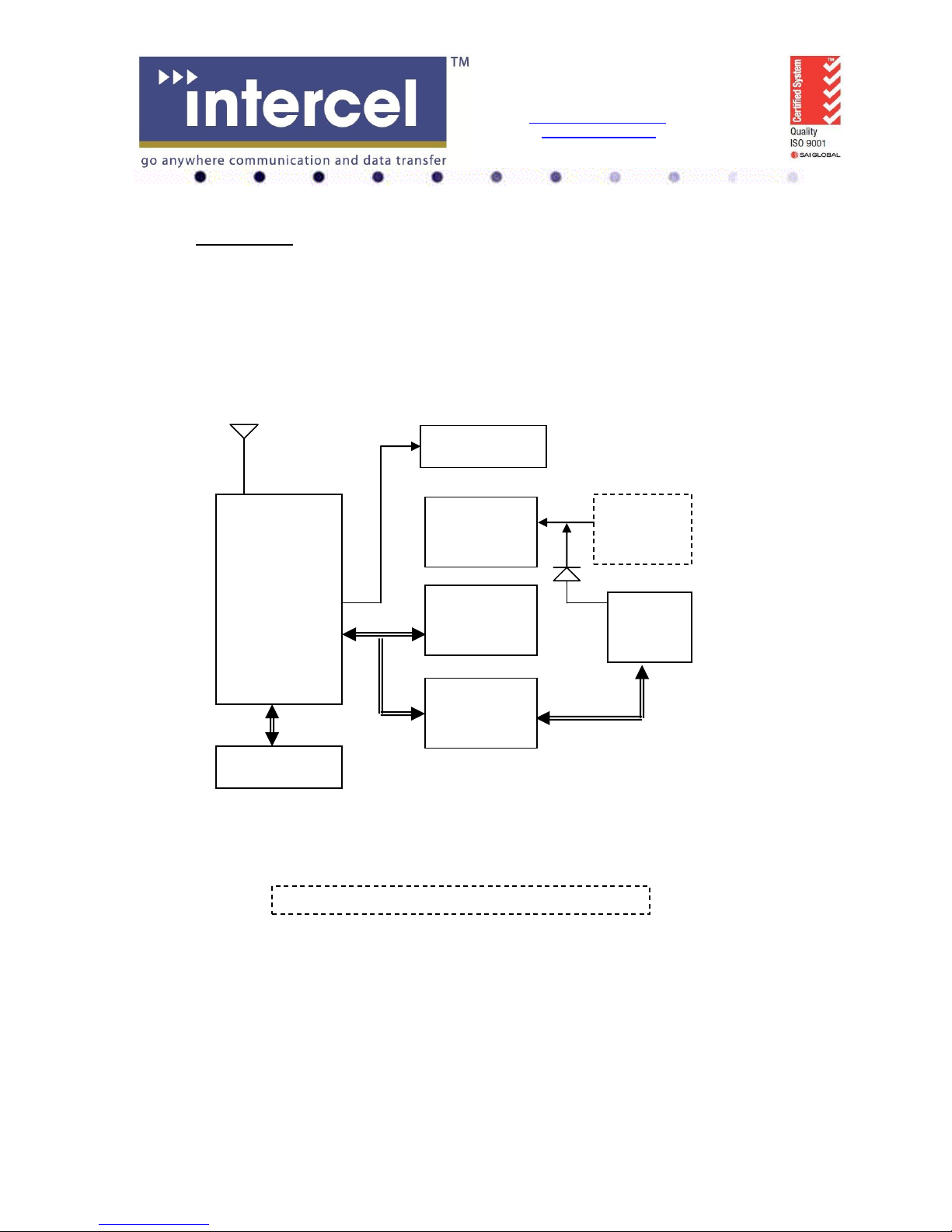
3G ENGINE
Switching
Power
Supply
RS232
Serial Data
Interface
SIM Interface
RJ45
Socket
MiniB
USB
Connector
LED Indicator
The SAM3G+ Functional Block Diagram
uController
6. Functionality
a. General
The SAM3G+ modem consists of an RJ45 connector for serial port and input power, a miniB USB
connector, an SMB Jack antenna connector and a SIM holder. The LED indicator, located on top,
indicates the SAM operating status.
SMB connector
Page 9
9
Intercel Pty. Ltd. A.C.N. 007 077 161
33 Glenvale Crescent
Mulgrave VIC. Australia 3170
Email : [email protected]
Internet : www.intercel.com.au
Ph : 61 3 9239 2000 Fax : 61 3 9561 2614
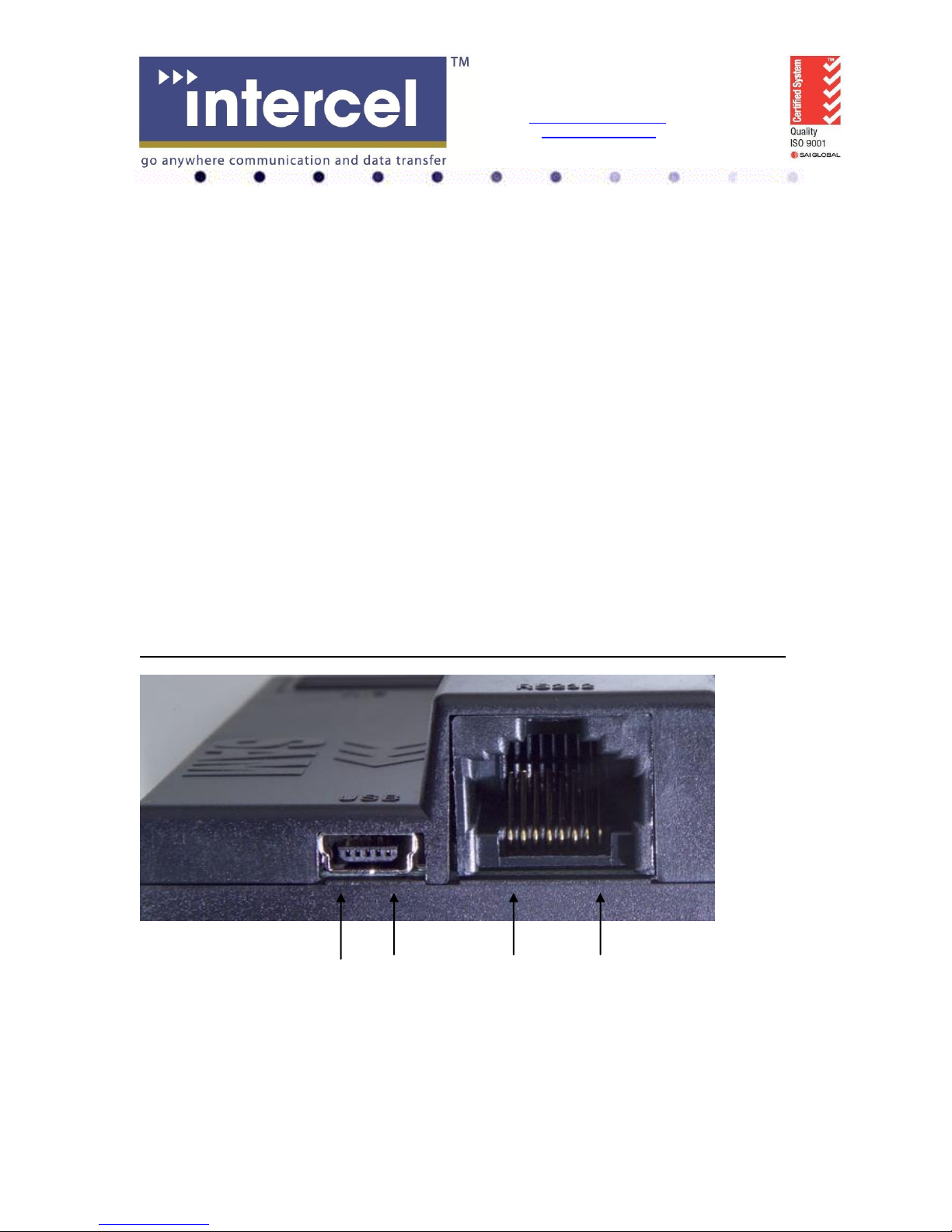
b. The RJ45 socket
Pin Signals Description
1 VIN Input voltage 5Vdc - 30Vdc
2 DCD Data Carrier Detect
3 DTR Data terminal Ready
4 GND Common Ground
5 RXD Serial Data out of the SAM
6 TXD Serial Data into the SAM
7 CTS Clear to Send
8 RTS Ready to Send
c. The MiniB USB connector
Pin Signal
1 VIN
2 D3 D+
4 N/C
5 GND
Important Note : RS232 and USB ports must not be connected/operated simultaneously
Pin5 Pin1 Pin8 Pin1
Page 10
10
Intercel Pty. Ltd. A.C.N. 007 077 161
33 Glenvale Crescent
Mulgrave VIC. Australia 3170
Email : [email protected]
Internet : www.intercel.com.au
Ph : 61 3 9239 2000 Fax : 61 3 9561 2614
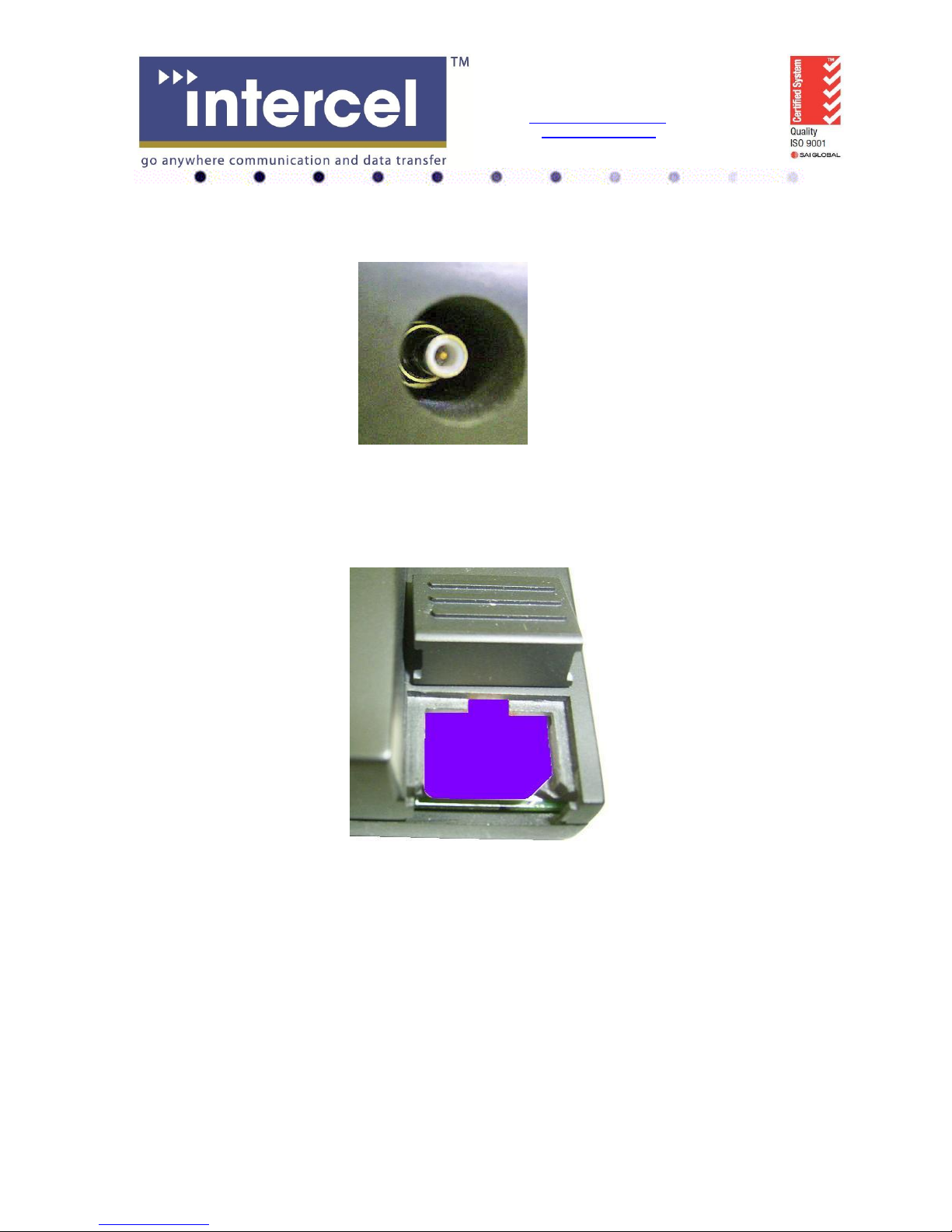
d. The SMB-Jack 50Ω antenna connector
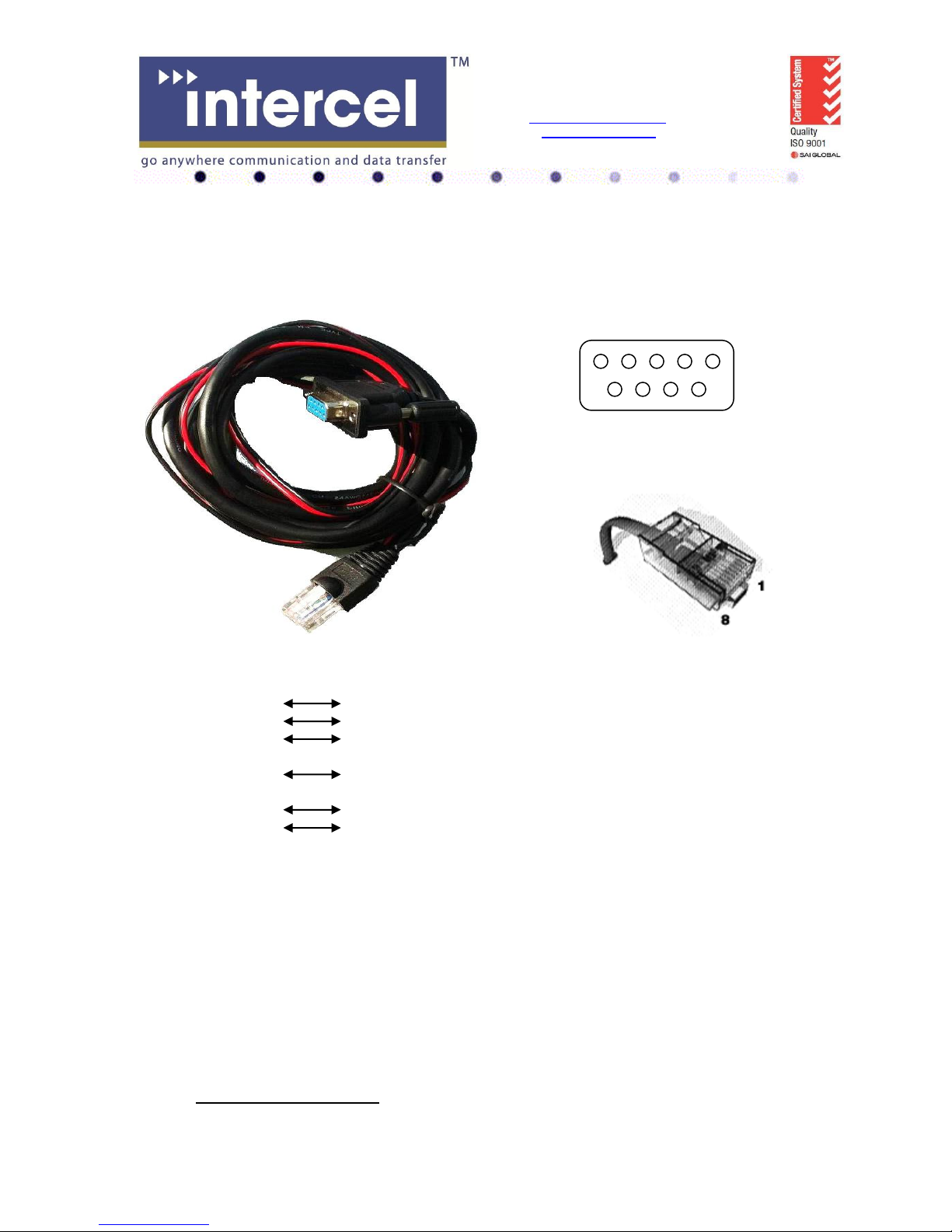
e. The USIM holder
To insert the SIM card, remove the door by sliding it back toward the end. Make sure
the SIM card faces the right way as indicated on the box. Voltage levels over this USIM interface
complies with 3GPP standards
f. The LED status
The LED indication has the following status :
- LED on steady: The SAM3G+ is searching for network.
- LED flashes very slowly: No SIM card inserted.
- LED flashes regularly: The SAM3G+ is on and connected to the network, but not
transmitting or receiving data.
- LED flashes at fast rate : The SAM3G+ is in use (transmit/receive data)
- LED is off : No power
Page 11
11
Intercel Pty. Ltd. A.C.N. 007 077 161
33 Glenvale Crescent
Mulgrave VIC. Australia 3170
Email : [email protected]
Internet : www.intercel.com.au
Ph : 61 3 9239 2000 Fax : 61 3 9561 2614
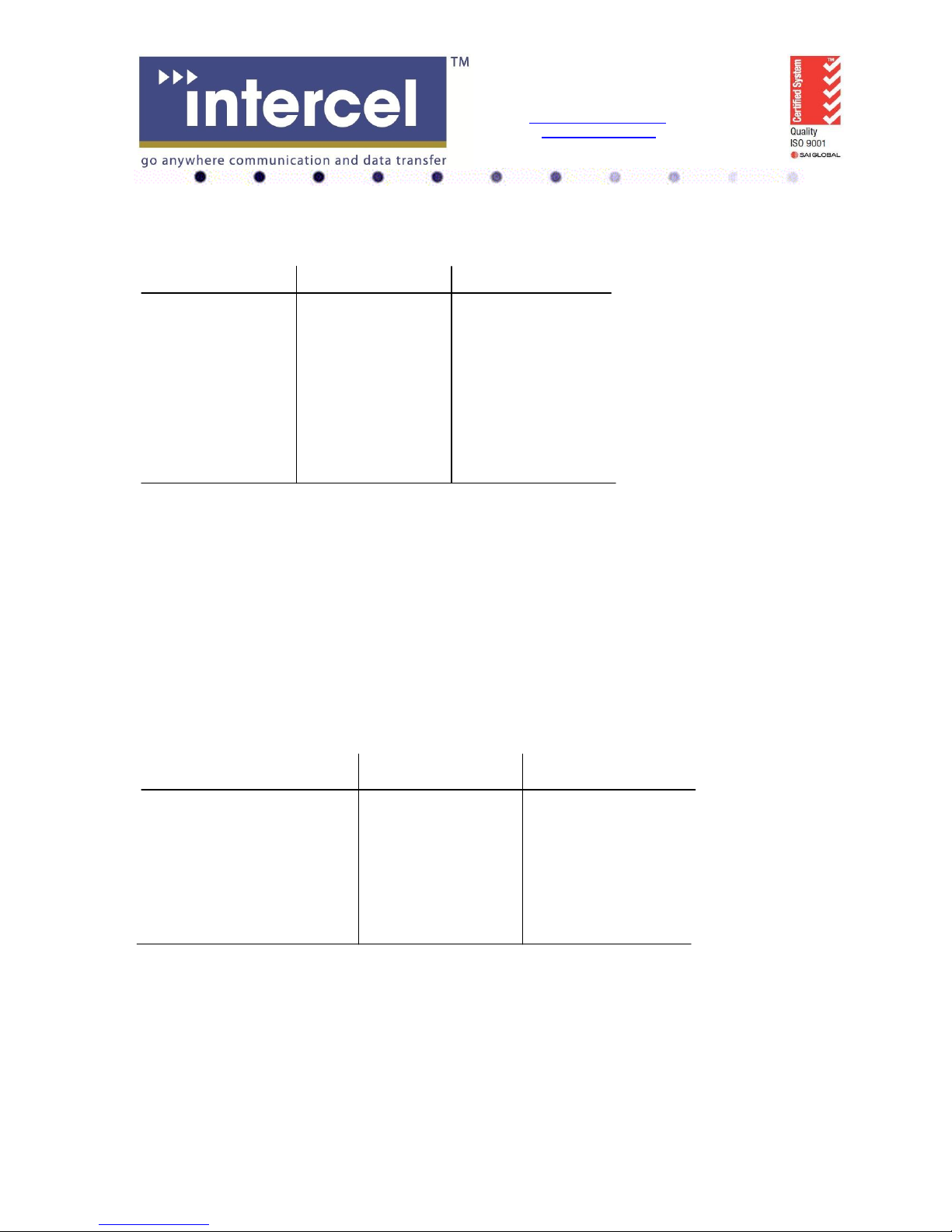
g. The data cable
The data cable is 2m long. It consists of an RJ45 plug, a DB9-female connector and a 2-wire
input power.
5 4 3 2 1
9 8 7 6
DB9 Signals RJ45 Description
1 DCD 2 Data Carrier Detect
2 RXD 5 Serial Data out of the SAM3G+
3 TXD 6 Serial Data into the SAM3G+
4 DTR 3 Not used
5 GND 4 Common Ground
6 DSR
8 CTS 7 Clear to Send
7 RTS 8 Ready to Send
9 RI Not used
1 RED wire : Input voltage from 5Vdc to 32Vdc
4 BLACK wire : Power Ground
7. Electrical characteristics
Page 12
12
Intercel Pty. Ltd. A.C.N. 007 077 161
33 Glenvale Crescent
Mulgrave VIC. Australia 3170
Email : [email protected]
Internet : www.intercel.com.au
Ph : 61 3 9239 2000 Fax : 61 3 9561 2614
a. Power consumption
Vin = 12Vdc HSDPA/WCDMA GSM/GPRS/EDGE
Idle mode 31mA 31mA
Standby mode 105mA 80mA
Average In-Use :
2Mbps@10dBm Tx 158mA HSUPA -
7.2Mbps Rx 158mA HSDPA 384Kbps@10dBm Tx 137mA WCDMA GSM CSD (9600bps) - 87mA
GPRS PSD - 110mA
EDGE - 137mA
b. RF bands
GSM850 : Tx = 824MHz - 849MHz, Rx = 869MHz - 894MHz
EGSM900 : Tx = 880MHz - 915MHz, Rx = 925MHz - 960MHz
DCS1800 : Tx = 1710MHz - 1785MHz, Rx = 1805MHz - 1880MHz
PCS1900 : Tx = 1850MHz - 1910MHz, Rx = 1930MHz - 1990MHz
UMTS2100 : Tx = 1920MHz - 1980MHz, Rx = 2110MHz - 2170MHz
UMTS1900 : Tx = 1850MHz - 1910MHz, Rx = 1930MHz - 1990MHz
UMTS900 : Tx = 880MHz - 915MHz, Rx = 925MHz - 960MHz
UMTS850 : Tx = 824MHz - 849MHz, Rx = 869MHz - 894MHz
c. Receive sensitivity
Band Typical Rx Sensitivity Maximum Rx Sensitivity
(dBm) (dBm)
GSM850 (2% ber) CS -107.5 -106
EGSM900 (2% ber) CS -107.5 -106
DCS1800 (2% ber) CS -106.5 -105
PCS1900 (2% ber) CS -106.5 -105
UMTS2100(.1% ber) 12.2Kbps -110.5 -109
UMTS1900(.1% ber) 12.2Kbps -110.5 -109
UMTS900(.1% ber) 12.2Kbps -110.5 -109
UMTS850(.1% ber) 12.2Kbps -111.5 -110
Notes :
- Ber : bit error rate
- CS : Circuit-switched
Page 13
13
Intercel Pty. Ltd. A.C.N. 007 077 161
33 Glenvale Crescent
Mulgrave VIC. Australia 3170
Email : [email protected]
Internet : www.intercel.com.au
Ph : 61 3 9239 2000 Fax : 61 3 9561 2614
d. Conducted Transmit Power tolerances
Parameter Conducted Tx Power Note
GSM850 & GSM900 CS +32dBm ±1dBm GMSK mode, connectorized (Cl.4)
+27dBm ±1dBm 8PSK mode, connectorized (Cl.E2)
DCS1800 & PCS1900 CS +29dBm ±1dBm GMSK mode, connectorized (Cl.1)
+26dBm ±1dBm 8PSK mode, connectorized (Cl.E2)
UMTS1900,900&850 12.2Kbps +23dBm ±1dBm connectorized (Cl.3)
UMTS2100 12.2Kbps +23dBm ±1dBm connectorized (Cl.3)
e. Main antenna specifications
Max cable loss 0.5dBm
Impedance 50Ω
Max allowed VSWR 3:1
The maximum antenna gain recommended, for consideration against RF exposure and
ERP/EIRP limits, is :
- In Cellular band : 5dBi
- In PCS band : 4dBi
f. Environmental characteristics
Operating temperature -25°C to 60°C full RF performance
60°C to 75°C reduced RF performance
Storage temperature -40°C to 85°C
Humidity 85% relative humidity (non-condensing)
Page 14
14
Intercel Pty. Ltd. A.C.N. 007 077 161
33 Glenvale Crescent
Mulgrave VIC. Australia 3170
Email : [email protected]
Internet : www.intercel.com.au
Ph : 61 3 9239 2000 Fax : 61 3 9561 2614
8. Operation
The SAM3G+ can support either the USB port or the Serial RS232 port. The port
configuration is done at the point of sale. Do not operate these 2 ports at the same time !
8.1 Using the USB port
a. Installing the USB driver
Note : If the old driver version has been installed, it must be removed, before installing the latest
driver. To uninstall the old driver, follow these steps :
- Open the Control Panel
- Double click System, System Properties window appears
- Select the Hardware tab
- Select the Device Manager
- Expand the Universal Serial Bus controllers to show the installed devices.
- Right click the Sierra Wireless MC87xx device entry and choose Uninstall.
- Click OK to confirm.
Step1 : Locate and run the DriverInstaller.exe . Note that there is no feedback, just wait a few
moments for the program to run.
Step2 : Connect the SAM3G+ to the PC, using the supplied USB cable. Several Found New
Hardware balloons appear above the tool tray as the system detects the new devices. After the
devices are detected, the Device Manager will show, in the following categories :
- Network Adapters : Sierra Wireless HSDPA Network adapter.
- Port (COM&LPT) :
Sierra Wireless AT Command port (UMTS)
Sierra Wireless CNS port (UMTS)
Sierra Wireless Data Port (UMTS)
Sierra Wireless DM Port (UMTS)
- Universal Serial Bus Controllers : Sierra Wireless MC87xx device
b. Firmware upgrade
The USB port is used for firmware upgrade. Refer to the SAM3G+FirmwareUpgrade document
for further details.
Page 15
15
Intercel Pty. Ltd. A.C.N. 007 077 161
33 Glenvale Crescent
Mulgrave VIC. Australia 3170
Email : [email protected]
Internet : www.intercel.com.au
Ph : 61 3 9239 2000 Fax : 61 3 9561 2614
8.2 Using the Serial RS232 port
The RS232 default configuration is :
- Terminal speed : 115200bps (+IPR=115200)
- Data format : 8 data bits 1 stop bit (+ICF=3,3)
- Hardware RTS, CTS flow control (+IFC=2,2)
- No auto-answer (S0=0)
There are 6 serial data signals available at the RJ45 connector, namely DCD, DTR, RXD, TXD,
RTS and CTS. There is an option for RI (Ring Indicator) signal instead of DTR signal.
This configuration allows any external controller to communicate with the SAM3G+ at 115200bps
over the serial port. The external device can set up the SAM3G+ modem using AT commands,
can tranfer Circuit-switched data or Packet-switched data.
With packet-switched data, the external device must be capable of communicating using PPP,
TCP/IP or UDP/IP.
c. AT commands :
The SAM3G+ modem supports most of the AT commands specified in the following standards :
- 3GPP TS 27.005 : Control SMS functions for devices on GSM/WCDMA networks
- 3GPP TS27.007 : Control devices operating on GSM/WCDMA networks
- ITU-T V.250 : Control serial communications over an asynchronous interface
For details of the AT commands, refer to the “Supported AT command” and “Extended AT
commands” manuals.
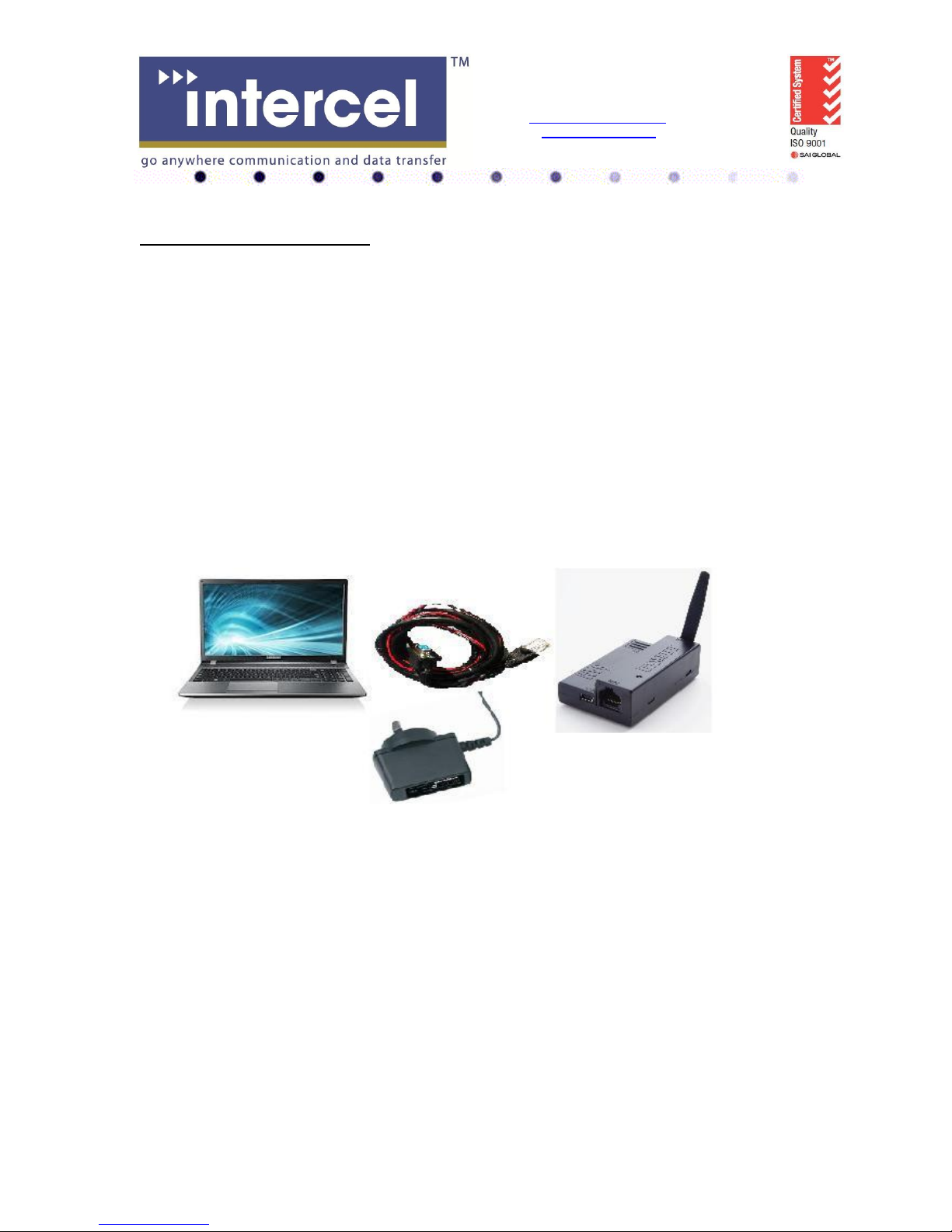
Setup example : Serial port connection to a PC
 Loading...