

Page 1
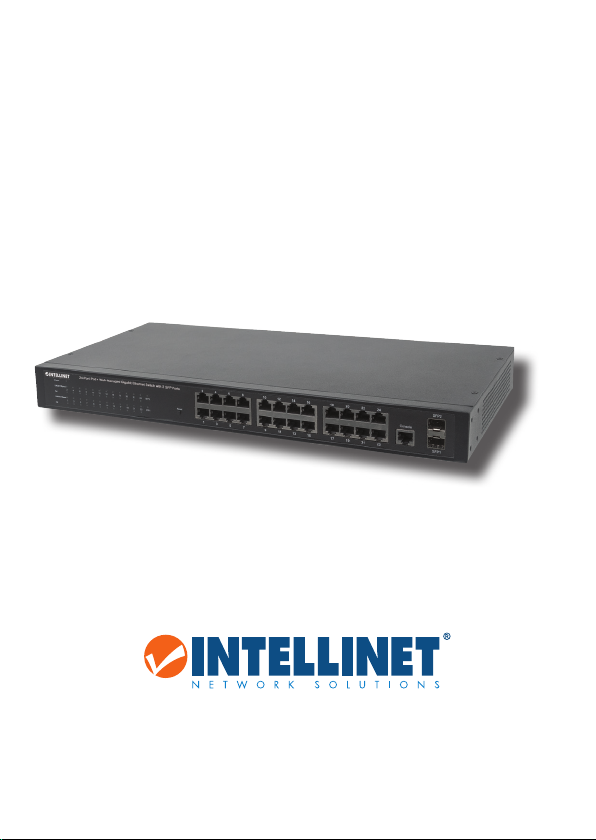
PoE WEB-MANAGED
GIGABIT ETHERNET
SWITCH
24-PORT WITH 2 SFP PORTS
QUICK INSTALL GUIDE
MODEL 560559
intellinet-network.com
Important: Read before use. • Importante: Leer antes de usar.
INT-560559-QIG-ML1-0914-05
Page 2
PoE Web-Managed Gigabit Ethernet Switch English
This guide presents the basic steps to set up and operate this device. For
detailed instructions and specifications, refer to the user manual on the
CD enclosed with this product or at intellinetnetwork.com.
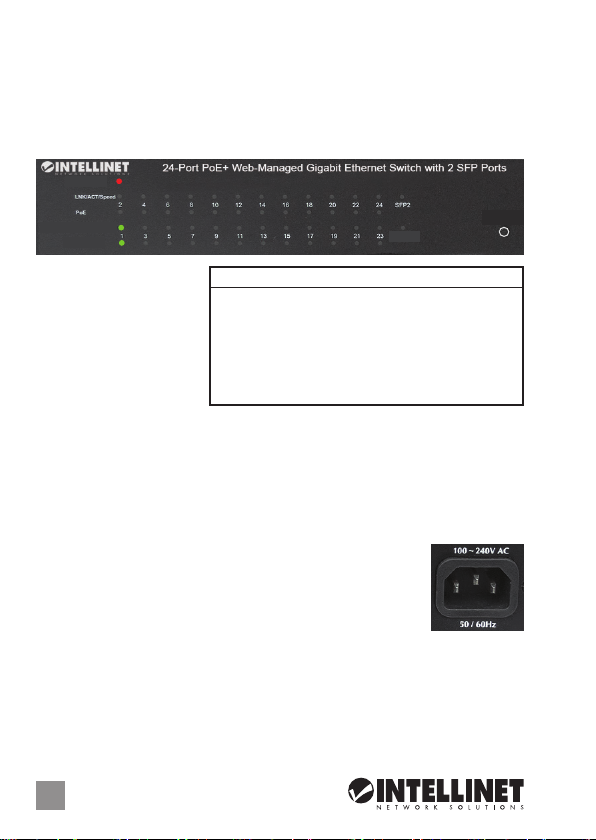
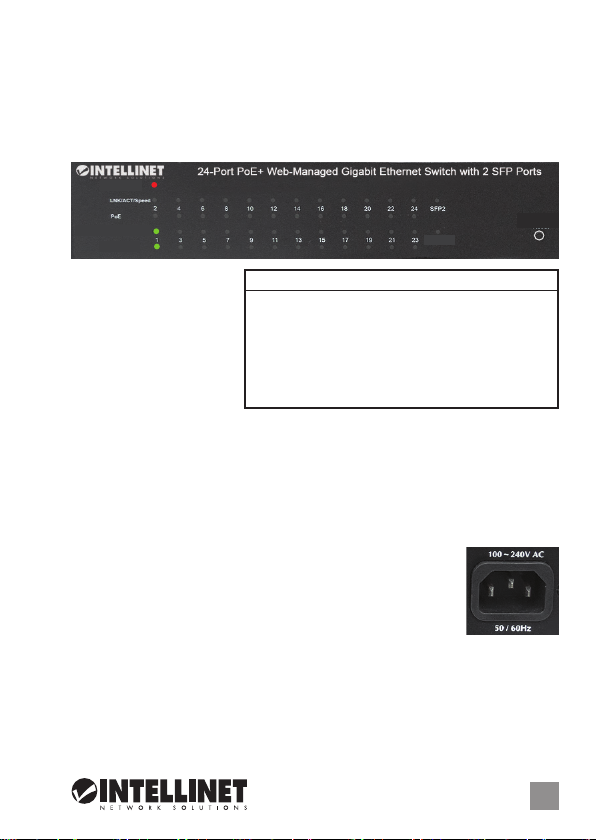
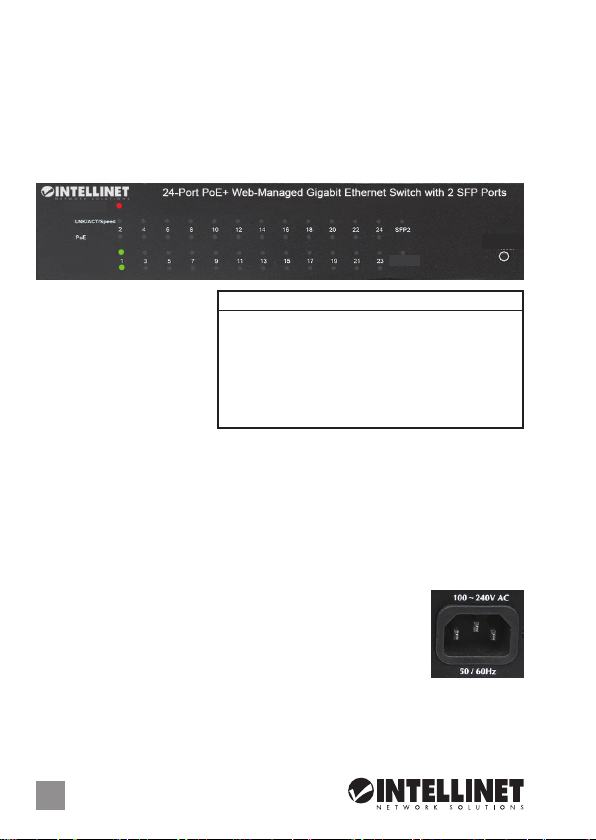
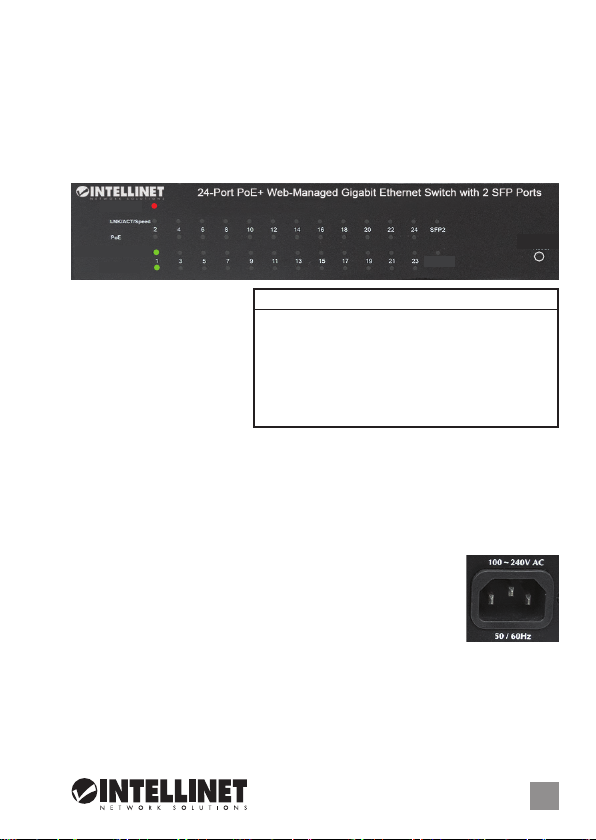
CONNECTIONS & INDICATORS
Power
LNK/ACT/Speed
PoE
LEDs
The LED indicators —
Power, PoE, Link/Activity
— make it easier to
monitor the switch and
its connections.
Ports
SFP1
LED Status Operation
Power On Power on
Off Check the AC connection; turn the power on
PoE On Port is linked to a PSE/PoE device
Off No PSE/PoE device is linked
LNK/ACT On Valid port connection
& SFP Blinking Valid port connection; data transmitted/received
Off No link established
Reset
All ports on the switch support Auto-MDI/MDI-X functionality, so crossover
cables and uplink ports are not needed for connections to PCs, routers,
hubs, other switches, etc. Cat5/5e/6 UTP/STP cables provide optimal
performance; if a status LED doesn’t indicate a link or activity, check the
corresponding device for proper setup and operation. NOTE: The Reset
button can be pressed to reset the switch if it isn’t responding.
Power
Use the included power cord to connect the device to an
AC outlet. Confirm that the power LED on the front panel
is lit.
INSTALLATION TIPS
Prior to use, it is recommended that the switch be placed/positioned:
•
on a level surface with at least 25 mm (approx. 1”) of clearance for ventilation;
• away from sources of electrical noise: radios, transmitters, broadband
amplifiers, etc.
2
ENGLISH
Page 3
PoE Web-Managed Gigabit Ethernet Switch Deutsch
Diese Kurzanleitung zeigt die grundlegenden Schritte zur Einrichtung und
Inbetriebnahme dieses Geräts. Für genauere Anweisungen nutzen Sie
bitte das beiliegende Handbuch auf CD oder auf intellinetnetwork.com.
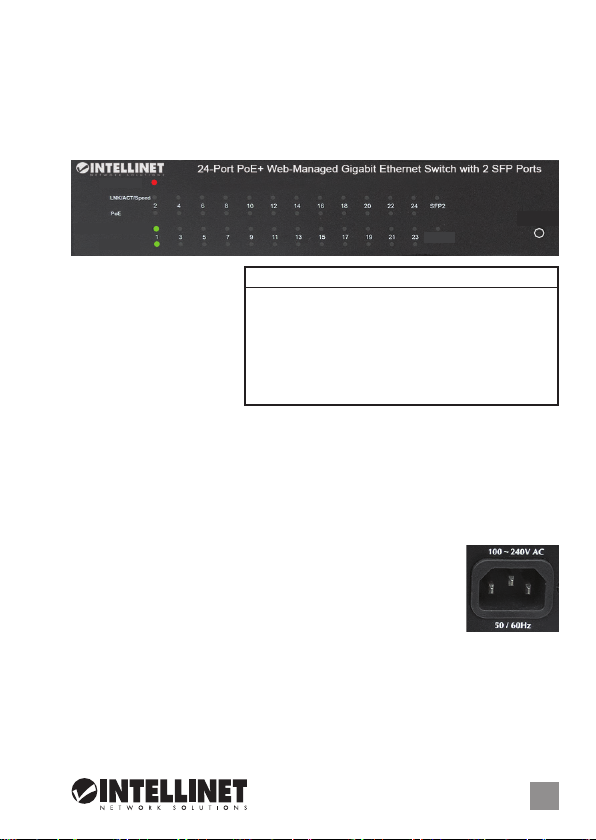
ANSCHLÜSSE & ANZEIGEN
Power
LNK/ACT/Speed
PoE
LED-Anzeigen
Die LEDs — Strom, PoE,
Verbindung/Aktivität —
vereinfachen das Ablesen
der Funktionen und
Anschlüsse.
Ports
SFP1
LED Status Operation
Power An Gerät wird mit Strom versorgt
Aus Stromanschluss prüfen/Gerät einschalten
PoE An Port ist mit PSE/PoE-Gerät verbunden
Aus Kein PSE/PoE-Gerät angeschlossen
LNK/ACT An Verbindung ist hergestellt
& SFP Blinkend Verbindung ist hergestellt; Datenübertragung
Aus Verbindung ist nicht hergestellt
Reset
Alle Ports unterstützen Auto-MDI/MDI-X Funktionalität, daher werden
Crosskabel und Uplink-Ports für Verbindungen zu PCs, Routern, anderen
Switchen, etc. nicht benötigt. Cat5/5e- UTP/STP-Kabel bieten die beste
Performance. Wenn eine LED keine Verbindung/Aktivität anzeigt, überprüfen
Sie das verbundene Gerät. HINWEIS: Der Reset-Knopf kann gedrückt
werden, um den Switch zurückzusetzen, falls er nicht mehr reagiert.
Strom
Schließen Sie das beiliegende Stromkabel an das Gerät
und an eine Steckdose an. Vergewissern Sie sich dass die
“Power”-LED aufleuchtet.
INSTALLATIONSTIPPS
Es wird empfohlen, den Switch vor der Nutzung folgendermaßen
aufzustellen:
• auf ebenem Untergrund mit mind. 25 mm Rundumabstand für
ausreichend Luftdurchsatz
•
fern von anderen Übertragungsgeräten wie Radio, Breitbandverstärker, etc.
DEUTSCH
3
Page 4
Switch Administrable por Web Gigabit Ethernet Español
Esta guía presenta los pasos básicos para instalar y operar este dispositivo.
Para obtener instrucciones detalladas y más especificaciones, consulte el
manual de usuario incluido en el CD o visite intellinetnetwork.com.
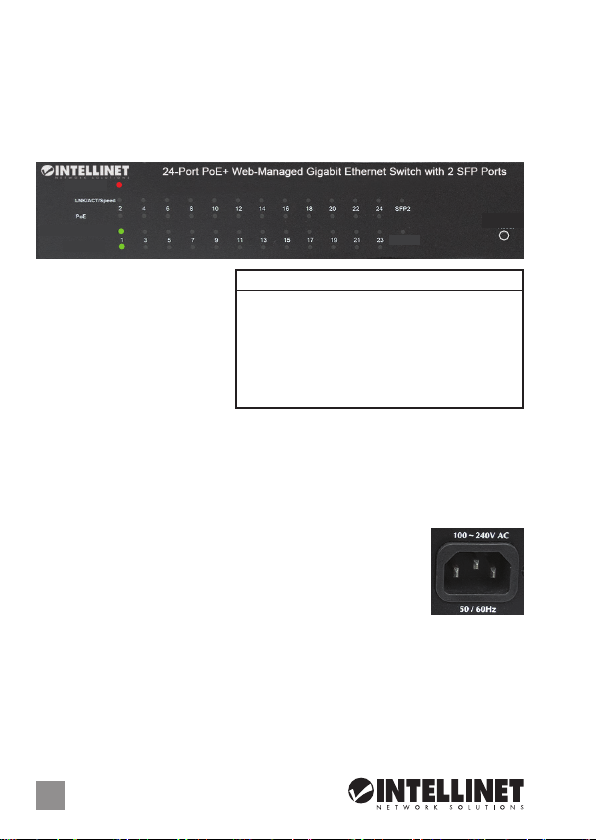
CONEXIONES E INDICADORES
Power
LNK/ACT/Speed
PoE
LEDs
Los LEDs — Power, PoE Link/
Activity — hacen mas facil
monitorear el switch y sus
conexiones.
Puertos
Todos los puertos del switch
SFP1
LED Status Operación
Power Encendido Encendido
Apagado Revise la conexión AC; encienda de nuevo
PoE Encendido Puerto vinculado a un dispositivo PSE/PoE
Apagado No hay un dispositivo PSE/PoE conectado
LNK/ACT Encendido Valide el puerto de conexión
& SFP Parpadeo Datos trasmitidos/recibidos
Apagado No hay comunicación
Reset
soportan Auto-MDI/MDI-X , los cables crossover y puertos de enlace no
son necesarios para las conexiones para PCs, routers, otros switches, etc.
los cables Cat5/5e UTP/STP proporcionan un redimiento optimo; Si un
LED no indica conectividad ó actividad, compruebe las conexiones sean
adecuadas. NOTA: El botón reinicio se puede presionar para resetear el
switch si no responde.
Alimentación
Utilice el cable de alimentación incluido para conectar el
dispositivo a una toma de CA. Confirme que el LED en el
panel frontal está encendido.
TIPS DE INSTALACION
Antes de utilizarlo, se recomienda que el switch sea ubicado/fijado:
• sobre una supercie plana con al menos 25 mm de espacio libre para
ventilación;
• lejos de fuentes de ruido: radios, transmisores, amplicadores de banda
ancha, etc.
4
ESPAÑOL
Page 5
Commutateur PoE Gigabit Web Ethernet Français
Ce guide décrit les bases pour configurer et opérer cet appareil. Pour des
instructions et spécifications détailées, veuillez lire le manuel de
l’utilisateur sur le CD inclus ou sur intellinetnetwork.com.
CONNEXIONS & INDICATEURS
Power
LNK/ACT/Speed
PoE
Les DEL
Les voyants d’état — PoE,
Alimentation, Connexion/
Activité — simplifient lire
les fonctions et les
connexions.
Les ports
SFP1
LED Status Operation
Power Allumé Appareil est alimenté
Éteint Vérifiez l’alimentation/Allumez l’appareil
PoE Allumé Port est connecté à un appareil PSE/PoE
Éteint Port n’est connecté pas à un appareil PSE/PoE
LNK/ACT Allumé Connexion est établie
& SFP Clignotant Connexion est établie; données sont transmises
Éteint Connexion n’est pas établie
Reset
Tous les ports de ce commutateur prennent en charge la fonctionnalité
Auto-MDI/MDI-X, donc des câbles croisés et des liaisons montantes ne
sont pas nécessaires pour des connections aux PC, routeurs, etc. Des
câbles Cat5/5e UTP/STP garantissent des performances optimales; si un
DEL n’indique pas d’activité, vérifiez l’appareil correspondant. REMARQUE:
Le bouton de reset peut être appuyé si le commutateur ne réagit pas.
Alimentation
Connectez le cordon d’alimentation à l’appareil et à une
prise de courant. Vérifiez que le DEL “Power” sur le panneau
avant est allumé.
CONSIGNES D’INSTALLATION
Avant d’utiliser le commutateur, il est recommandé de le placer:
•
sur une surface plane avec un écartement de 25 mm d’autres objets pour
la ventilation
• loin des appareils électriques qui peuvent être source d‘interférence (des
radios etc.)
FRANÇAIS
5
Page 6
Przełącznik Web-Smart Gigabit Ethernet PoE Polski
Niniejsza instrukcja szybkiej instalacji przedstawia podstawowe kroki
potrzebne do uruchomienia i obsługi urządzenia. Aby uzyskać szczegółowe
informacje techniczne oraz podręcznik użytkownika zapoznaj się z
zawartością dołączonej płyty CD lub odwiedź stronę intellinetnetwork.com.
PANEL PRZEDNI URZĄDZENIA
Power
LNK/ACT/Speed
PoE
Diody
Diody sygnalizacyjne LED
dla funkcji zasilania, PoE,
link/aktywności ułatwiają
monitorowanie przełącznika
i jego połączeń.
Porty
SFP1
Dioda Status Objaśnienie
Power On (wł.) Urządzenie włączone
Off (wył.) Sprawdź, czy zasilanie jest podłączone; włącz urządzenie
PoE On (wł.) Port jest połączony z urządzeniem PoE
Off (wył.) Nie ma połączenia z urządzeniem PoE
LNK/ACT On (wł.) Prawidłowe podłączenie portu
& SFP
Migająca
Off (wył.) Nie nawiązano połączenia
Prawidłowe podłączenie portu; transmisja/odbiór pakietów
Reset
Wszystkie porty przełącznika obsługują auto-krosowanie MDI/MDI-X, więc
kabel krosowany oraz port uplink nie jest wymagany do połączenia z
komputerami, routerami, czy innymi przełącznikami. Kable Cat5/5e/6 UTP/
STP zapewniają optymalną wydajność; jeśli diody statusu nie sygnalizują
linku lub aktywności, sprawdź podłączone urządzenie pod kątem
poprawności konfiguracji oraz jego zasilania. UWAGA: Naciśnij przycisk
Reset, aby zresetować wyłącznik.
Zasilanie
Użyj znajdującego się w zestawie kabla zasilającego do
podłączenia przełącznika do gniazda sieci energetycznej.
Sprawdź, czy dioda zasilania (Power) zapaliła się.
WSKAZÓWKI INSTALACYJNE
Zaleca się, aby urządzenie w trakcie użytkowania było umiejscowione:
• dla zapewnienia dobrej wentylacji w odległości co najmniej 25 mm
obudowy urządzenia od podłoża, na którym się znajduje;
• z dala od źródeł zakłóceń elektrycznych: radia, nadajniki, itp.
6
POLSKI
Page 7
Gigabit PoE a Web Management Ethernet Switch Italiano
La presente guida fornisce le basi essenziali per il settaggio e il
funzionamento dell’apparecchiatura. Per istruzioni più dettagliate e
maggiori specifiche, far riferimento al manuale d’istruzioni contenuto nel
CD allegato al prodotto o visitare intellinetnetwork.com.
CONNESSIONI E INDICATORI
Power
LNK/ACT/Speed
PoE
LEDs
Gli indicatori LED — Power,
PoE, Link/Activity —
permettono di monitorare
facilmente lo switch e le
sue connessioni.
Porte
SFP1
LED Stato Operazione
PWR Acceso Acceso
Spent o Verificare la connessione AC; accendere l’apparecchio
PoE Acceso Porta collegata alla periferica PSE/PoE
Spento Nessuna periferica PSE/PoE è collegata
LNK/ Acceso Porta di connessione valida
ACT
Lampeggiante Porta di connessione valida; trasmissione/ricevimento dati
& SFP
Spento Nessuna connessione stabilita
Reset
Tutte le porte dello switch supportano la funzionalità Auto-MDI/MDI-X, così cavi
incrociati e porte uplink non sono necessarie per connessioni a PC, router, altri
switch, etc. I cavi Cat5/5e/6 UTP/STP forniscono ottimali prestazioni; se il LED
di stato non indica una connessione o un’attività, verificare la corrispondente
periferica per un corretto settaggio e funzionamento. NOTA: Il tasto Reset può
essere premuto per resettare lo switch se questo non risponde.
Alimentazione
Utilizzare il cavo di alimentazione per collegare
l’apparecchiatura alla presa di corrente AC. Verificare che il
LED di alimentazione sul pannello frontale è illuminato.
SUGGERIMENTO PER L’INSTALLAZIONE
Prima dell’uso, si raccomanda che lo switch venga posizionato:
• su una supercie piana con almeno 25 mm di spazio libero per una
corrette ventilazione
• lontano da fonti di disturbo elettrico: radio, trasmettitori, amplicatori a
banda larga, etc.
ITALIANO
7
Page 8

WASTE ELECTRICAL & ELECTRONIC EQUIPMENT
(applicable in the European Union and other European countries with separate collection systems)
ENGLISH
This symbol on the product or its packaging indicates that this product shall not be treated as household
waste. Instead, it should be taken to an applicable collection point for the recycling of electrical and
electronic equipment. By ensuring this product is disposed of correctly, you will help prevent
potential negative consequences to the environment and human health, which could otherwise
be caused by inappropriate waste handling of this product. If your equipment contains easily
removable batteries or accumulators, dispose of these separately according to your local
requirements. The recycling of materials will help to conserve natural resources. For more
detailed information about recycling of this product, contact your local city office, your household waste
disposal service or the shop where you purchased this product. In countries outside of the EU: If you wish
to discard this product, contact your local authorities and ask for the correct manner of disposal.
DEUTSCH
Dieses auf dem Produkt oder der Verpackung angebrachte Symbol zeigt an, dass dieses Produkt nicht mit
dem Hausmüll entsorgt werden darf. In Übereinstimmung mit der Richtlinie 2012/19/EU des Europäischen
Parlaments und des Rates über Elektro- und Elektronik-Altgeräte (WEEE) darf dieses Elektrogerät nicht
im normalen Hausmüll oder dem Gelben Sack entsorgt werden. Wenn Sie dieses Produkt entsorgen
möchten, bringen Sie es bitte zur Verkaufsstelle zurück oder zum Recycling-Sammelpunkt Ihrer Gemeinde.
ESPAÑOL
Este símbolo en el producto o su embalaje indica que el producto no debe tratarse como residuo doméstico.
De conformidad con la Directiva 2012/19/UE de la UE sobre residuos de aparatos eléctricos y electrónicos
(RAEE), este producto eléctrico no puede desecharse con el resto de residuos no clasificados. Deshágase
de este producto devolviéndolo a su punto de venta o a un punto de recolección municipal para su
reciclaje.
FRANÇAIS
Ce symbole sur Ie produit ou son emballage signifie que ce produit ne doit pas être traité comme un
déchet ménager. Conformément à la Directive 2012/19/UE sur les déchets d’équipements électriques
et électroniques (DEEE), ce produit électrique ne doit en aucun cas être mis au rebut sous forme de
déchet municipal non trié. Veuillez vous débarrasser de ce produit en Ie renvoyant à son point
de vente ou au point de ramassage local dans votre municipalité, à des fins de recyclage.
ITALIANO
Questo simbolo sui prodotto o sulla relativa confezione indica che il prodotto non va trattato come un rifiuto
domestico. In ottemperanza alla Direttiva UE 2012/19/UE sui rifiuti di apparecchiature elettriche ed
elettroniche (RAEE), questa prodotto elettrico non deve essere smaltito come rifiuto municipale misto. Si
prega di smaltire il prodotto riportandolo al punto vendita o al punto di raccolta municipale locale per un
opportuno riciclaggio.
POLSKI
Jeśli na produkcie lub jego opakowaniu umieszczono ten symbol, wówczas w czasie utylizacji nie wolno
wyrzucać tego produktu wraz z odpadami komunalnymi. Zgodnie z Dyrektywą Nr 2012/19/UE w sprawie
zużytego sprzętu elektrycznego i elektronicznego (WEEE), niniejszego produktu elektrycznego nie wolno
usuwać jako nie posortowanego odpadu komunalnego. Prosimy o usuniecie niniejszego produktu
poprzez jego zwrot do punktu zakupu lub oddanie do miejscowego komunalnego punktu zbiórki
odpadów przeznaczonych do recyklingu.
Disposal of Electric and Electronic Equipment
8
Page 9

REGULATORY STATEMENTS
This equipment has been tested and found to comply with the limits for a Class A digital device,
pursuant to Part 15 of the Federal Communications Commission (FCC) Rules. These limits are
designed to provide reasonable protection against harmful interference when the equipment
is operated in a commercial environment. This equipment generates, uses and can radiate radio
frequency energy, and if not installed and used in accordance with the instruction manual may
cause harmful interference to radio communications. Operation of this equipment in a residential
area is likely to cause harmful interference, in which case the user will be required to correct
the interference at his own expense. Any changes or modifications made to this equipment without
the approval of the manuafacturer could result in the product not meeting the Class A limits, in
which case the FCC could void the user’s authority to operate the equipment.
English: This device complies with the requirements of directives 2014/53/EU and/or 2004/108/EC &
2006/95/EC. The Declaration of Conformity for this product is available at:
Deutsch: Dieses Gerät enspricht den Direktiven 2014/53/EU und/oder 2004/108/EC & 2006/95/EC.
Die Konformitätserklärung für dieses Produkt finden Sie unter:
Español: Este dispositivo cumple con los requerimientos de las Directivas 2014/53/UE y/o 2004/108/
EC & 2006/95/EC. La declaración de conformidad para este producto esta disponible en:
Français: Cet appareil satisfait aux exigences des directives 2014/53/UE et/ou 2004/108/CE &
2006/95/CE. La Déclaration de Conformité pour ce produit est disponible à l’adresset :
Polski: Urządzenie spełnia wymagania dyrektyw 2014/53/UE i/lub 2004/108/EC & 2006/95/EC.
Deklaracja zgodności dostępna jest na stronie internetowej producenta:
Italiano: Questo dispositivo è conforme alle direttive 2014/53/UE e/o 2004/108/EC & 2006/95/EC. La
dichiarazione di conformità per questo prodotto è disponibile al:
FCC Class A
CE / R&TTE
intellinetnetwork.com
9
Page 10

WARRANTY INFORMATION
ENGLISH:
For warranty information, go to intellinetnet work.com/warranty.
DEUTSCH:
Garantieinformationen finden Sie hier unter intellinetne twork.com/war ranty.
ESPAÑOL:
Si desea obtener información sobre la garantía, visite intellinetnet work.com/warranty.
FRANÇAIS:
Pour consulter les informations sur la garantie, rendezvous à l’adresse
intellinetnetwork.com/warranty.
POLSKI:
Informacje dotyczące gwarancji znajdują się na stronie intellinetnetwork.com/warranty.
ITALIANO:
Per informazioni sulla garanzia, accedere a intellinetnet work.com/warranty.
EN MÉXICO: Póliza de Garantia Intellinet — Datos del importador y responsable ante el consumidor
IC Intracom México, S.A.P.I. de C.V. • Av. Interceptor Poniente # 73, Col. Parque Industrial La Joya, Cuautitlán
Izcalli, Estado de México, C.P. 54730, México. • Tel. (55)1500-4500
La presente garantía cubre este producto por 3 años contra cualquier defecto de fabricación en sus
materiales y mano de obra, bajo las siguientes condiciones:
1. Todos los productos a que se refiere esta garantía, ampara su cambio físico, sin ningún cargo para
el consumidor.
2. El comercializador no tiene talleres de servicio, debido a que los productos que se garantizan no
cuentan con reparaciones, ni refacciones, ya que su garantía es de cambio físico.
3. La garantía cubre exclusivamente aquellas partes, equipos o sub-ensambles que hayan sido instaladas
de fábrica y no incluye en ningún caso el equipo adicional o cualesquiera que hayan sido adicionados
al mismo por el usuario o distribuidor.
Para hacer efectiva esta garantía bastará con presentar el producto al distribuidor en el domicilio donde
fue adquirido o en el domicilio de IC Intracom México, S.A.P.I. de C.V., junto con los accesorios contenidos
en su empaque, acompañado de su póliza debidamente llenada y sellada por la casa vendedora
(indispensable el sello y fecha de compra) donde lo adquirió, o bien, la factura o ticket de compra
original donde se mencione claramente el modelo, número de serie (cuando aplique) y fecha de
adquisición. Esta garantía no es válida en los siguientes casos: Si el producto se hubiese utilizado en
condiciones distintas a las normales; si el producto no ha sido operado conforme a los instructivos de
uso; o si el producto ha sido alterado o tratado de ser reparado por el consumidor o terceras personas.
North & S outh Ameri ca
IC Intracom Americas
550 Commerce Blvd.
Oldsmar, FL 34 677
USA
All trade marks and tra de names are the p roperty o f their respe ctive owner s.
Alle Marken und Markennamen sind Eigentum Ihrer jeweiligen Inhaber.
Todas las marcas y nombres comerciales son propiedad de sus respectivos dueños.
Toutes les mar ques et noms comm erciaux sont l a propriété de l eurs propri étaires resp ectifs.
Tutti i marchi registrati e le dominazioni commerciali sono di proprietà dei loro rispettivi proprietari.
10
Wszys tkie znaki tow arowe i nazw y handlowe nale żą do ich właśc icieli.
Asia & Afr ica
IC Intraco m Asia
4-F, No. 77, Sec. 1, Xintai 5th R d.
Xizhi Dis t., New Taipei Cit y 221
Taiw an
Europe
IC Intracom Europe
Löhbach er Str. 7
D-58553 Halver
Germany
Page 11

Page 12

Intellin et is a trademark o f IC Intracom, re gistered in the U. S. and other count ries.
© IC Intraco m. All rights res erved.
 Loading...