

Page 1

24-Port Gigabit Ethernet
PoE+ Switch with 2 SFP Ports
Instructions
Model 561891 (IP S-24G 02- 370W
Important: Read before use. • Importante: Leer antes de usar.
)
For additional benets:
Scan to
register your
product warranty
or go to: register.intellinet-network.com/r/561891
Page 2
Instructions
The Intellinet Network Solutions 24-Port Gigabit Ethernet PoE+ Switch with 2 SFP Ports offers
an array of time-saving, cost-effective features while providing superior network throughput.
No configuration is required and installation is plug and play. With a backplane speed of 52
Gbps, plenty of performance is available for your computers, servers and other networking
devices. Each of the ports automatically senses the link speed of the connected network
device and adjusts to 10, 100 or 1000 Mbps for compatibility and maximum performance.
This PoE switch is designed to provide compatible devices with enough power when needed.
It offers up to 30 watts of power per port until its power budget of 370 watts is reached.
Green Ethernet Technology
This Intellinet Network Solutions switch detects link status to all connected devices and
reduces the power usage of ports not in use. In addition, the switch can adjust the level of
power output based on the length of the network cable connected to a particular port. This
feature allows for the enjoyment of maximum network performance, and when things slow
down, it automatically scales back power usage to conserve energy and save money.
For specifications, visit intellinetnetwork.com. Register your product at
register.intellinet-network.com/r/561891 or scan the QR code on the cover.
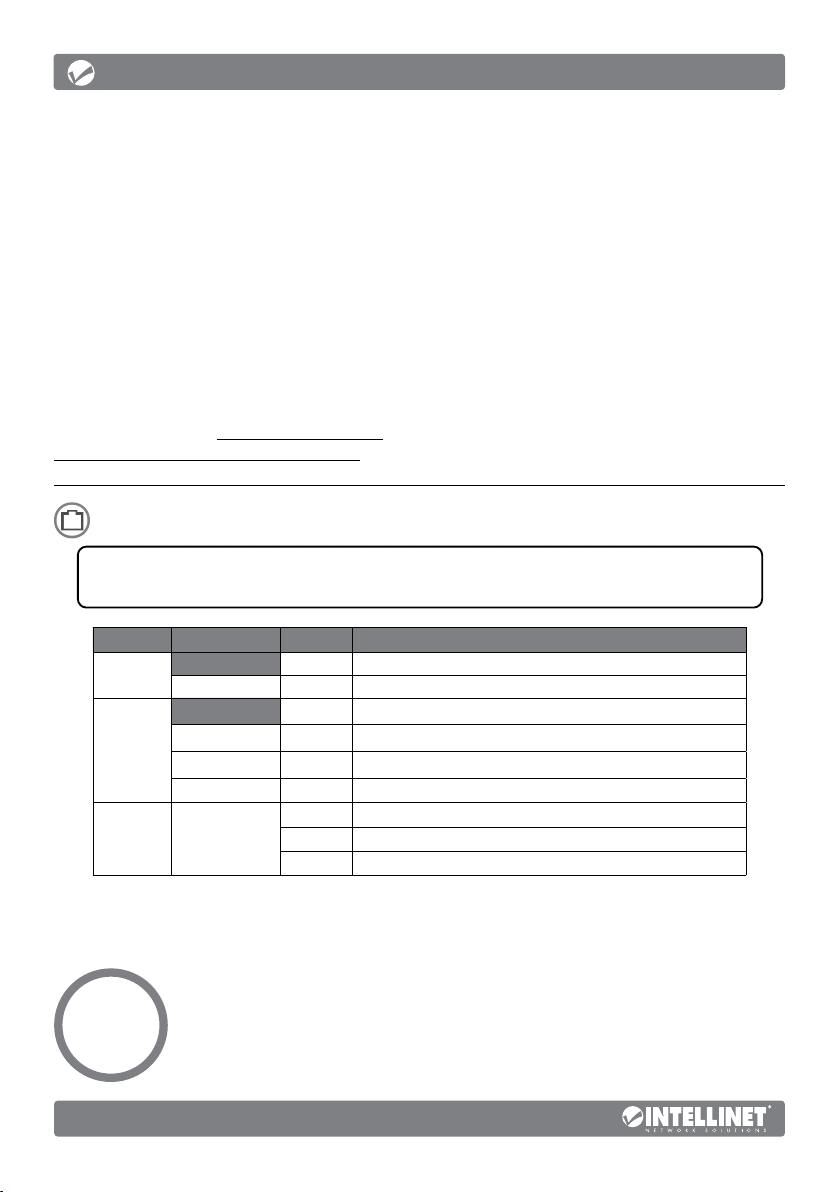
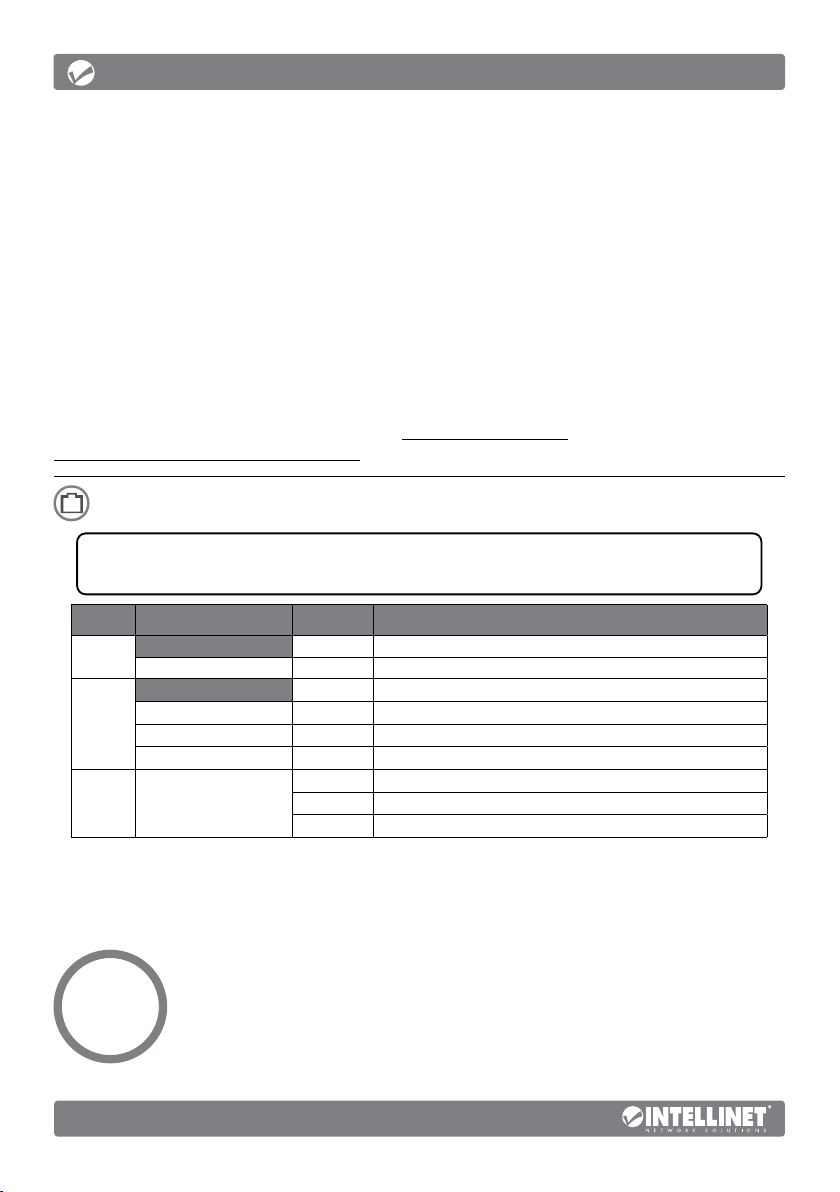
Front Panel
LED COLOR STATUS STATUS DESCRIPTION
PWR
Link/Act/
Speed
(1-24,
25F-26F
[SFP])
PoE (1-24) Green
Green On Power On
Orange On A device is connected to the port at 10/100 Mbps speeds.
Green On A device is connected to the port at 1000 Mbps speeds.
Orange / Green Flashing Sending or receiving data
Off Power Off
Off No device is connected to the port.
Off No powered device (PD) is connected to the port.
On The connected device is receiving power.
Flashing Abnormal power supply
Cat5e/6/6a/8.x UTP/STP cables provide optimal performance; if a status LED doesn’t indicate
a link or activity, check the corresponding device for proper setup and operation.
Slide Switch
• Normal: default mode; allows normal communication between ports 1 – 26.
• Flow Control: disables the switch’s flow-control function.
• VLAN: isolates ports 1 – 24 from each other while
allowing them to connect to ports 25 and 26.
2
English
Page 3
Instructions
Rear Panel
Power
Use the included power cord to connect the device (on the rear panel)
to an AC outlet. The device supports AC 100 – 240 V, 50/60 Hz.
Chassis Ground Column
Located on the side of the power supply connector, a grounding terminal connector is used to
provide proper grounding for your Intellinet Network Solutions switch. If you use the chassis
grounding screw, it should be wired to an object that provides earth ground. In rackmount
installations, grounding is typically provided by the metal frame of the mounting rack.
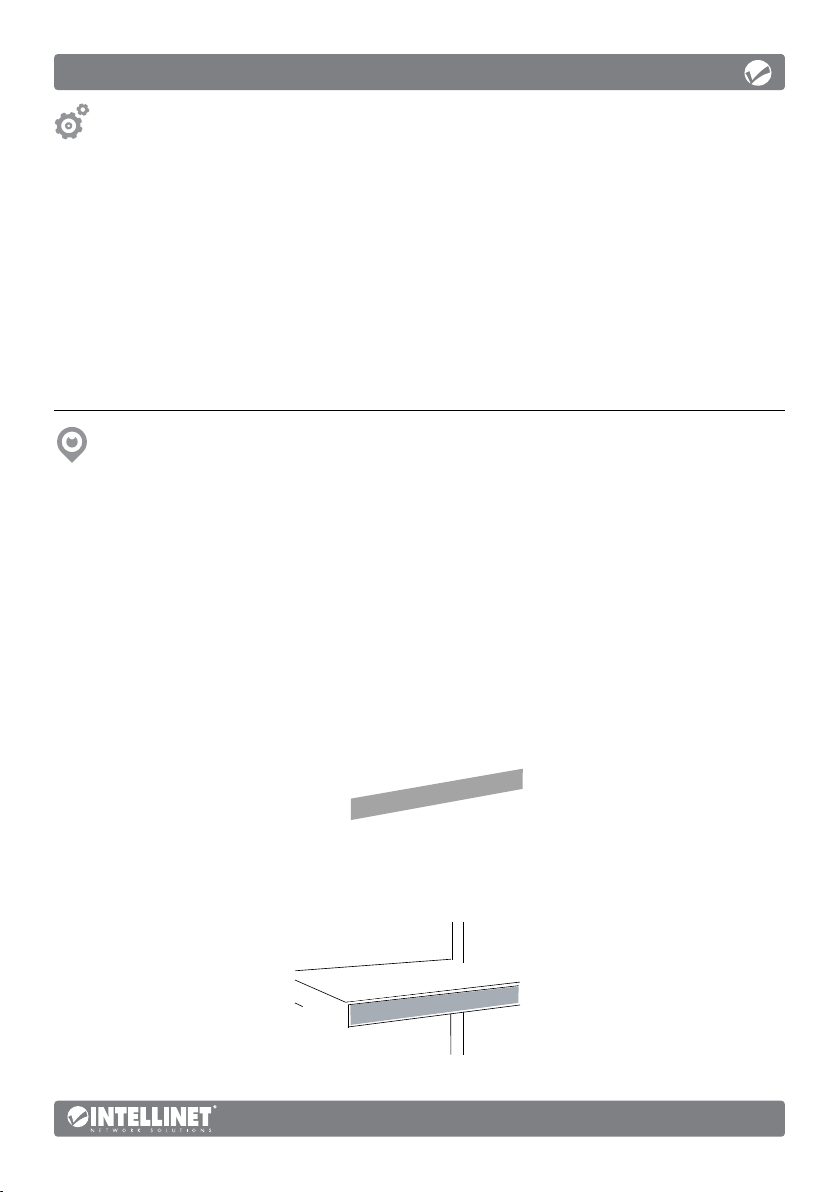
Placement
Desktop Installation
Prior to use, it is recommended that the switch be placed/positioned on a level surface that can
support the weight of the switch (and possibly other objects) with at least 25 mm (approx. 1”) of
clearance for ventilation; away from sources of electrical noise (radios, transmitters, broadband
amplifiers); and within 100 m (approx. 328’) of network devices it’s to be connected to.
Rackmount Installation
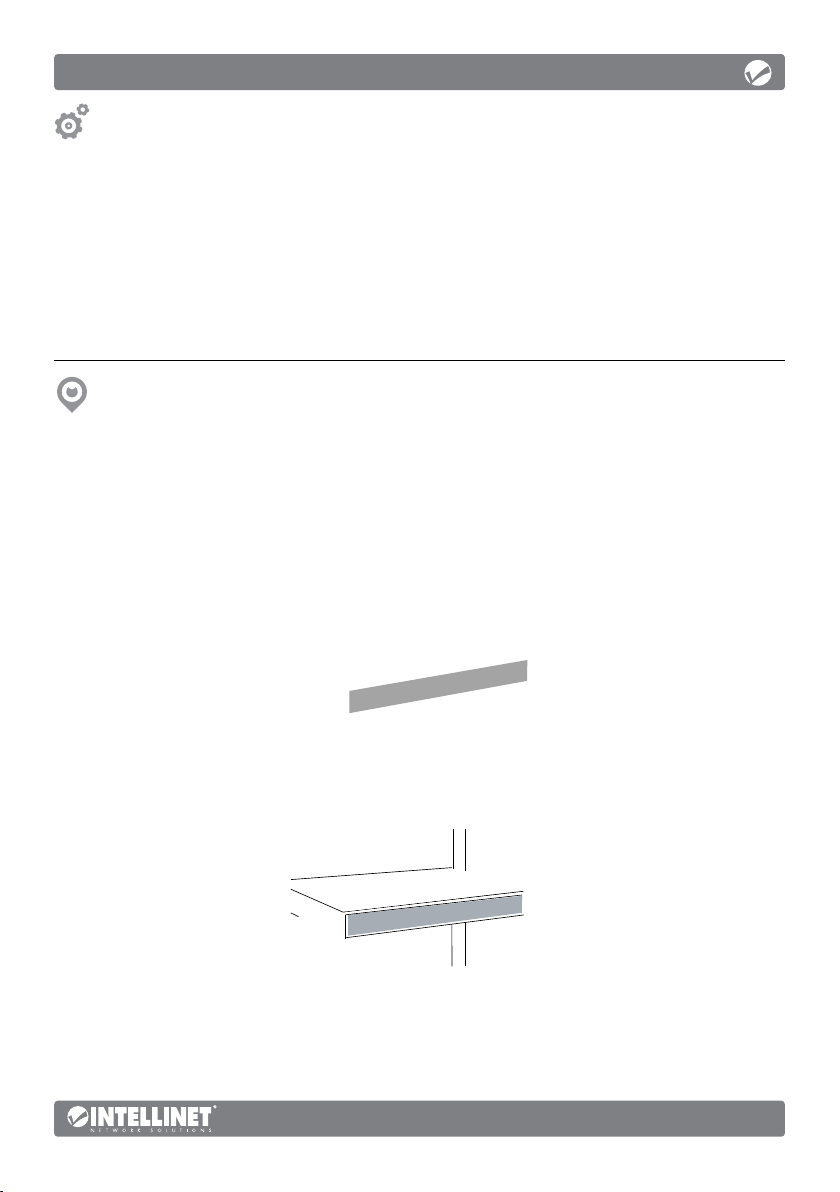
The switch can be mounted in an EIA standard-sized, 19-inch rack. Attach the mounting brackets
on the switch’s side panels (one on each side) and secure them with the screws provided.
Use the screws provided with the equipment rack to mount the
Intellinet Network Solutions switch to the rack.
English
3
Page 4
Anleitung
Der Intellinet Network Solutions 24-Port Gigabit Ethernet PoE+ Switch mit 2 SFP-Ports bietet
eine Reihe von zeitsparenden, kosteneffektiven Funktionen und gleichzeitig einen hohen
Netzwerkdurchsatz. Es ist keine Konfiguration erforderlich und die Installation ist Plug and
Play. Mit einer Backplane-Geschwindigkeit von 52 Gbit/s steht viel Leistung für Ihre Computer,
Server und andere Netzwerkgeräte zur Verfügung. Jeder der Ports erkennt automatisch die
Verbindungsgeschwindigkeit des angeschlossenen Netzwerkgeräts und stellt sich auf 10, 100
oder 1000 Mbit/s ein, um Kompatibilität und maximale Leistung zu gewährleisten. Dieser PoESchalter wurde entwickelt, um kompatiblen Geräten bei Bedarf ausreichend Leistung zu liefern.
Er bietet bis zu 30 Watt Leistung je Port, bis sein Leistungsbudget von 370 Watt erreicht ist.
Grüne Ethernet-Technologie
Der Intellinet Network Solutions-Switch die Höhe der Ausgangsleistung an die Länge
des Netzwerkkabels anpassen, das an einen bestimmten Port angeschlossen ist. Diese
Funktion ermöglicht eine maximale Netzwerkleistung, und wenn etwas langsamer wird,
wird der Stromverbrauch automatisch reduziert, um Energie und Geld zu sparen.
Die Spezifikationen finden Sie auf intellinetnetwork.com. Registrieren Sie Ihr Produkt auf
register.intellinet-network.com/r/561891 oder scannen Sie den QR-Code auf dem Deckblatt.
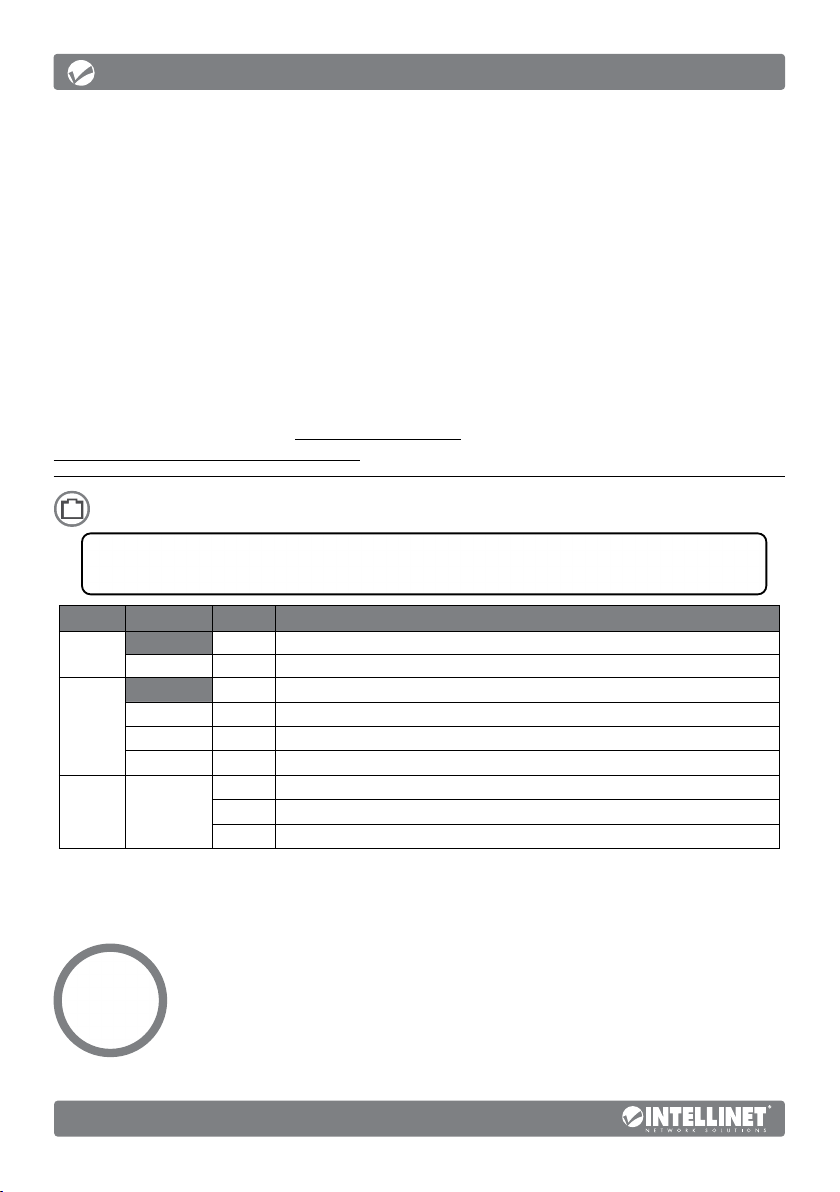
Frontblende
LED FARBE STATUS BEDEUTUNG
PWR
(Strom)
Link/Act/
Speed
(1-24,
25F-26F
[SFP])
PoE
(1-24)
Grün An Angeschaltet
Orange An Ein Gerät ist mit einer Geschwindigkeit von 10/100 Mbit/s an den Port angeschlossen.
Grün An Ein Gerät ist mit einer Geschwindigkeit von 1000 Mbit/s an den Port angeschlossen.
Orange / Grün Blinkend Senden oder Empfangen von Daten
Grün
Aus Ausgeschaltet
Aus Es ist kein Gerät an den Port angeschlossen.
Aus Es ist kein Gerät (PD) an den Port angeschlossen.
An Das angeschlossene Gerät erhält Strom.
Blinkend Unnormale Spannungsversorgung am Port
Cat5e/6/6a/8.x- UTP/STP-Kabel bieten die beste Performance. Wenn eine LED
keine Verbindung/Aktivität anzeigt, überprüfen Sie das verbundene Gerät.
Schiebeschalter
• Standard: Standardmodus; erlaubt normale
Kommunikation zwischen den Ports 1 – 26.
• Flow Control (Flusskontrolle): Deaktiviert die
Flusskontrollfunktion des Schalters.
• VLAN: isoliert die Ports 1 – 24 voneinander, kann sich
aber mit den Ports 25 oder 26 verbinden.
4
Deutsch
Page 5
Anleitung
Rückseite
Strom
Verwenden Sie das beiliegende Stromkabel, um die Strombuchse auf der
Rückseite des Switches mit einer Steckdose zu verbinden und prüfen Sie, dass
die Power-LED leuchtet. Das Gerät unterstützt AC 100 – 240 V, 50/60 Hz.
Gehäuseerdungsschraube
Der Erdungsendverbinder, der sich auf der rechten Seite des Netzsteckers befindet,
erleichtert die korrekte Erdung des Intellinet Network Solutions Schalters. Wenn Sie
die Gehäuseerdungsschraube verwenden, stellen Sie bitte sicher, dass sie mit einem
Objekt verbunden ist, das eine direkte Verbindung zu einem Erdungsleiter besitzt. In
Leiterplattengehäusen ist dies üblicherweise der Fall durch den Metallrahmen des Gehäuses.
Nutzungsumgebung
Desktop-Installation
Es wird empfohlen, den Switch vor der Nutzung folgendermaßen aufzustellen: Auf
ebenem Untergrund, der das Gewicht des Switches (und evtl. anderer Gegenstände)
trägt, mit mindestens 25 mm Abstand zu allen Seiten für angemessenen Luftdurchsatz,
fern von anderen Übertragungsgeräten wie Radios, Breitbandverstärkern etc. und
max. 100 m von den Netzwerkgeräten entfernt, die Sie anschließen möchten.
Installation von Leiterplattengehäusen
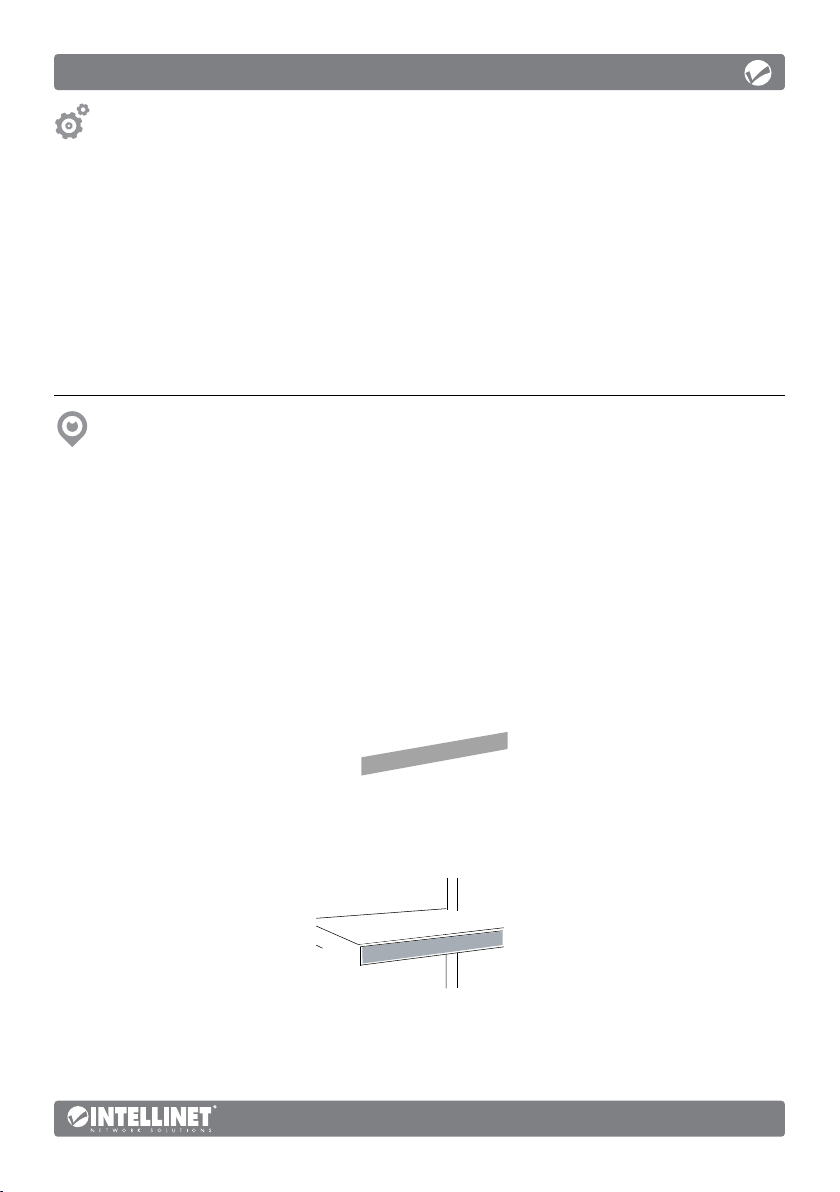
Der Schalter kann in einem EIA Standard 19-inch Gehäuse befestigt werden.
Bringen Sie die Befestigungsklammern an den Seitenteilen des Steckers (einen
an jeder Seite) an und sichern Sie sie mit den beiliegenden Schrauben.
Verwenden Sie die als Zubehör beiliegenden Schrauben, um den Intellinet Network Solutions
Data Schalter auf dem Gehäuse anzubringen.
Deutsch
5
Page 6
Instrucciones
Switch PoE+ de 24 puertos Gigabit Ethernet con 2 Puertos SFP Intellinet Network Solutions
cuenta con múltiples características que le ahorrarán tiempo y dinero, mientras disfruta
de un mayor rendimiento en la red. No es necesario configurarlo y la instalación es plug
and play. Con una velocidad backplane de 52 Gbps, sus ordenadores, servidores y otros
dispositivos de red podrán disfrutar de un mayor rendimiento. Cada uno de los puertos
detecta automáticamente la velocidad de enlace del dispositivo y la ajusta a 10, 100 o
1000 Mbps para una compatibilidad y rendimiento máximos. Diseñado para dar amplia
potencia a dispositivos compatibles que la necesiten, este switch PoE ofrece hasta 30
vatios de potencia por puerto hasta alcanzar su presupuesto de energía de 370 vatios.
Tecnología Green Ethernet
El interruptor Intellinet Network Solutions puede ajustar el nivel de la potencia
basándose en la longitud del cable conectado a un puerto en particular. Esta
característica le da la posibilidad de disfrutar de un rendimiento absoluto y,
cuando las cosas empiecen a marchar más lentas, el interruptor ajusta el consumo
energético automáticamente para conservar energía y ahorrar dinero.
Para más especificaciones, visite intellinetnetwork.com. Registre el producto en
register.intellinet-network.com/r/561891 o escanee el código QR en la cubierta.
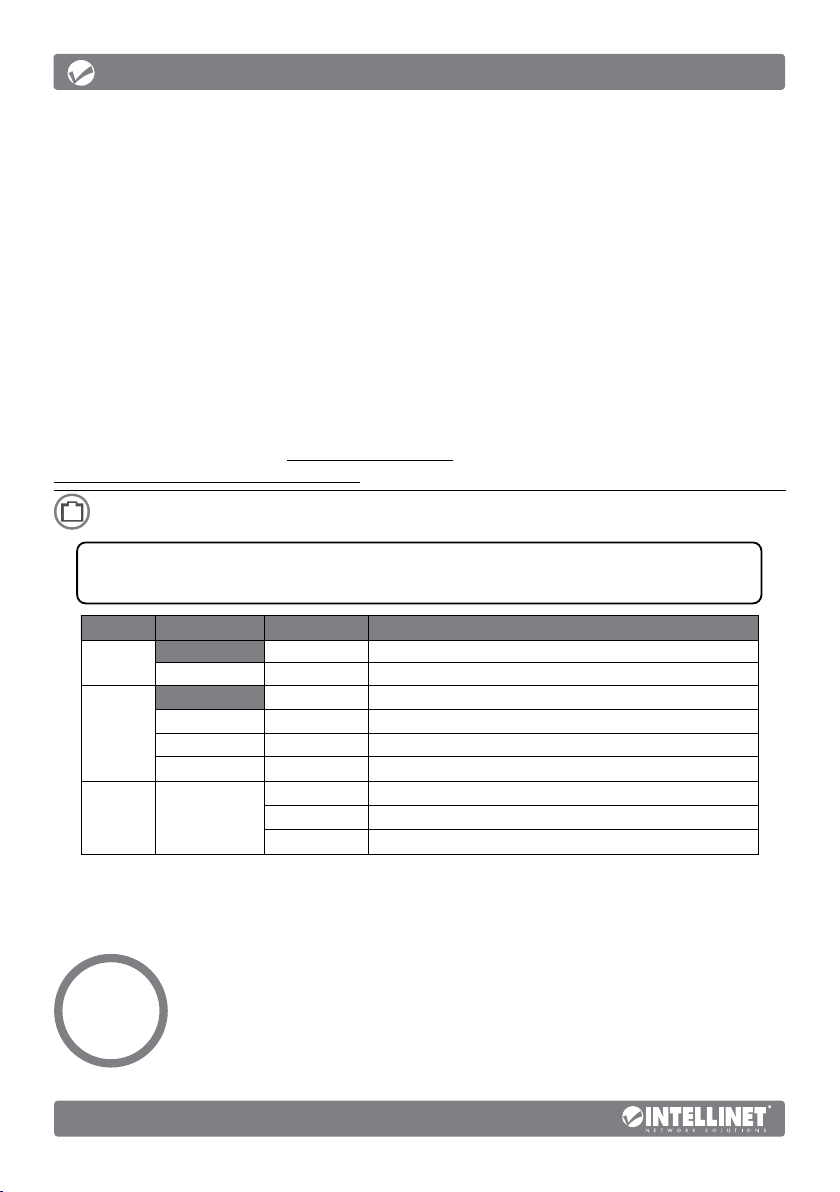
Panel frontal
LED COLOR ESTADO INDICACIÓN
PWR
Link/Act/
Speed
(1-24,
25F-26F
[SFP])
PoE
(1-24)
Verde Encendido Interruptor encendido
Naranja Encendido Un dispositivo está conectado al puerto a 10/100 Mbps.
Verde Encendido Un dispositivo está conectado al puerto a 1000 Mbps.
Naranja / Verde Parpadeando Enviando o recibiendo datos
Verde
Apagado Interruptor apagado
Apagado No hay ningún dispositivo conectado al puerto.
Apagado No hay ningún dispositivo (PD) conectado al puerto.
Encendido El dispositivo conectado recibe alimentación eléctrica.
Parpadeando Suministro eléctrico anómalo
Los cables Cat5e/6/6a/8.x UTP/STP proporcionan un redimiento optimo; Si un LED
no indica conectividad ó actividad, compruebe las conexiones sean adecuadas.
Interruptor deslizante
• Standard (Estándar): modo predeterminado; permite
la comunicación normal entre puertos 1 – 26.
• Flow Control (Control de flujo): desactiva la función
de control de flujo del interruptor.
• VLAN: aísla los puertos 1 – 24 unos de otros pero
pueden conectarse a los puertos 25 o 26.
Español
6
Page 7
Instrucciones
Panel Trasero
Alimentación
Utilice el cable de corriente incluido para conectar la parte trasera del
switch con una toma de corriente, y confirme que el LED de encendido se
ilumina. El dispositivo es compatible con AC 100 – 240 V, 50/60 Hz.
Chasis-Tornillo de toma de tierra
Ubicado en el lado derecho del conector de la fuente de alimentación, el conector del terminal
de tierra facilita la adecuada conexión para el switch (conmutador) de Intellinet Network
Solutions. Cuando utilice el tornillo de toma de tierra del chasis, asegúrese de engancharlo a un
objeto que proporcione acceso directo a un conductor de tierra. En las instalaciones de montaje
en bastidor, esto ocurre generalmente a través del marco metálico del estante de montaje.
Colocación
Instalación de escritorio
Antes de utilizarlo, se recomienda que el switch sea colocado/fijado: sobre una superficie plana
que pueda soportar el peso del switch (y cualquier otro artículo que deba ser considerado), con
un mínimo de 25 mm (1” aprox.) de espacio libre en la parte superior y en los lados para una
ventilación adecuada, apartado de fuentes de ruido eléctrico (radios, transmisores, amplificadores,
etc.) y dentro de 100 m (aprox. 328’) de los dispositivos de red que deben conectarse.
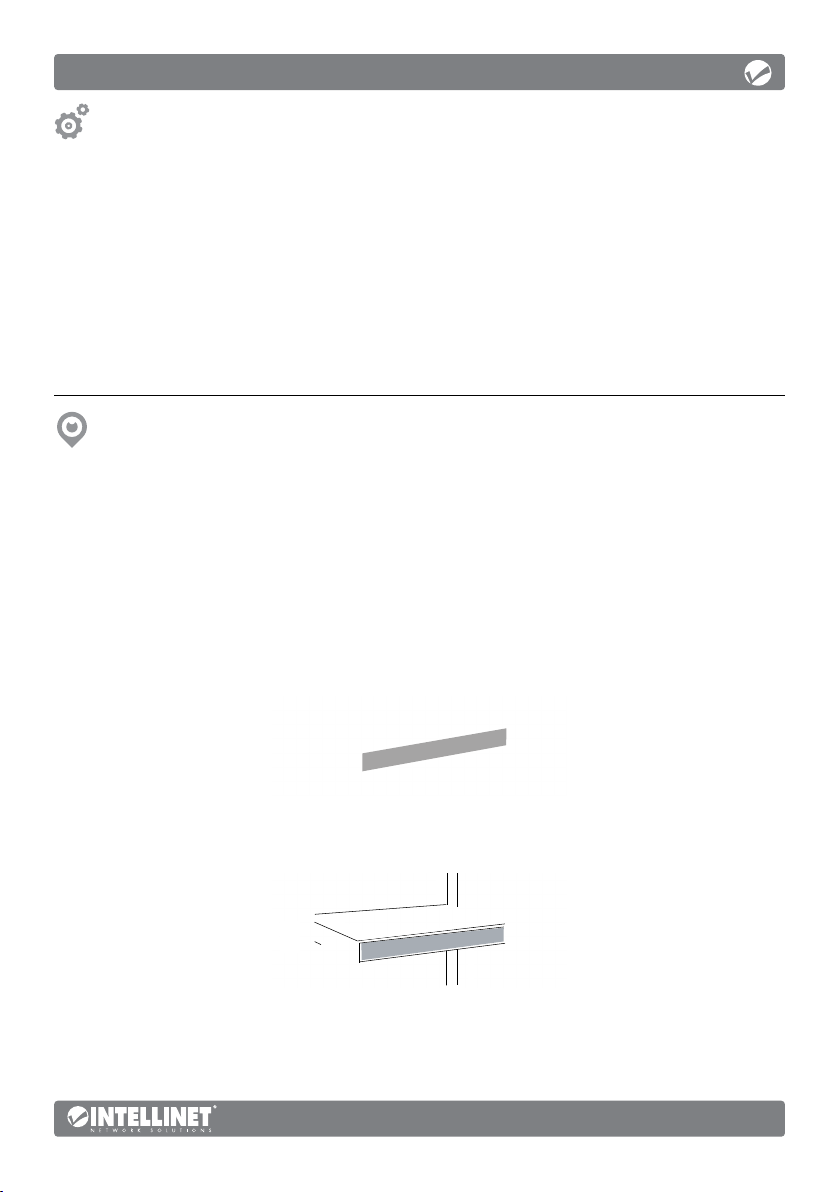
Instalación en bastidor
El switch (conmutador) se puede montar en un bastidor EIA de 19 pulgadas de
tamaño estándar. Fije los soportes de montaje en los paneles laterales del switch
(uno en cada lado) y asegúrelos con los tornillos que se proporcionan.
Utilice los tornillos que se proporcionan con el bastidor del equipo para montar el
switch (conmutador) de datos Intellinet Network Solutions en el bastidor.
Español
7
Page 8
Instructions
Commutateur Gigabit Ethernet 24 ports PoE+ avec 2 ports SFP propose toute une
gamme de fonctionnalités assurant le débit optimal de votre réseau, ainsi qu’un gain
notable de temps et d’argent. Pas besoin de configuration, puisque l’installation se fait
en plug and play. Avec sa vitesse de fond de panier de 52 Gbit/s, le commutateur offre
des performances de pointe à vos ordinateurs, à vos serveurs, et à vos autres appareils
connectés. Chacun des ports détecte automatiquement la vitesse de connexion de
l’appareil réseau connecté, et s’ajuste automatiquement à 10, 100 ou 1000 Mbit/s, pour une
performance et une compatibilité accrues. Conçu pour fournir une importante puissance
aux appareils compatibles, ce commutateur PoE offre une puissance maximale de 30
watts par port jusqu’à ce que sa puissance maximale de 370 watts ait été atteinte.
Une technologie ethernet verte
Le commutateur Intellinet Network Solutions peut moduler le niveau de sa
puissance de sortie en fonction de la longueur du câble réseau connecté à un port
donné. Cette fonctionnalité permet de profiter au maximum des performances
de votre réseau, et lorsque les choses se calment, elle réduit automatiquement la
consommation énergétique, afin d’économiser de l’énergie et de l’argent.
Vous trouvez les spécifications sur intellinetnetwork.com. Enregistrez votre produit sur
register.intellinet-network.com/r/561891 ou scannez le code QR figurant sur la couverture.
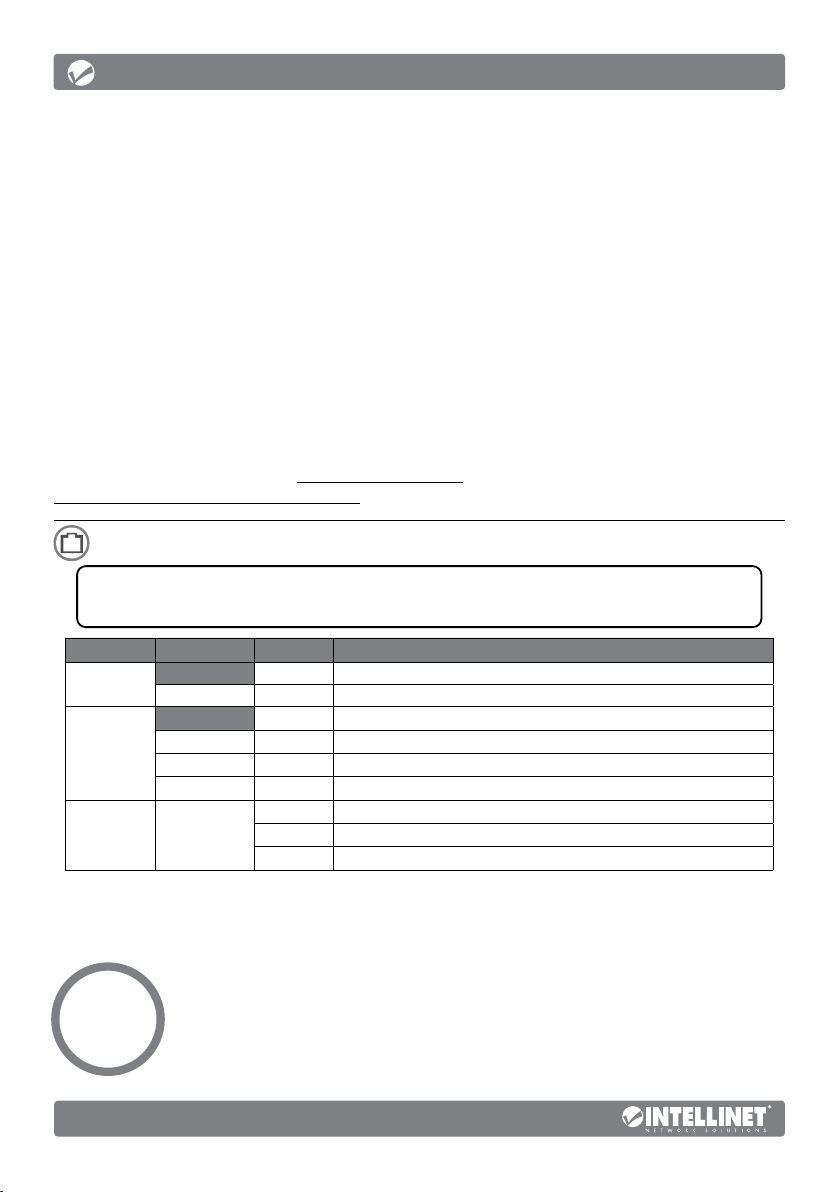
Panneau avant
DEL COULEUR STATUT INDICATION
PWR
Link/Act/
Speed (1-
24, 25F-26F
[SFP])
PoE (1-24) Vert
Vert Éteint Vérifiez l’alimentation/Allumez l’appareil.
Orange Allumé Un appareil est connecté au port à une vitesse de 10/100 Mbit/s.
Vert Allumé Un appareil est connecté au port à une vitesse de 1000 Mbit/s.
Orange / Vert Clignote En train d’émettre ou de recevoir des données
Allumé Appareil est alimenté.
Éteinte Aucun appareil n’est connecté au port.
Éteinte Aucun appareil (PD) n’est connecté au port.
Allumé L’appareil connecté est alimenté.
Clignote Alimentation électrique anormale
Des câbles Cat5e/6/6a/8.x UTP/STP garantissent des performances optimales;
si un DEL n’indique pas d’activité, vérifiez l’appareil correspondant.
Commutateur à glissière
• Standard : mode par défaut ; permet une communication
normale entre les ports 1 – 26.
• Flow Control (Contrôle de flux) : désactive la fonction
de contrôle de flux du commutateur
• VLAN : isole les ports 1 – 24 les uns des autres mais
peut se connecter aux ports 25 et 26.
Français
8
Page 9
Instructions
Panneau arrière
Alimentation
Utilisez le cordon d’alimentation inclus pour connecter l’entrée d’alimentation
au panneau arrière du commutateur à une prise de courant et confirmez que
la DEL s’allume. L’appareil prend en charge 100 – 240 V AC, 50/60 Hz.
Vis de châssis/Mise à la terre
Situé sur le côté droit du connecteur d’alimentation, le connecteur de terre facilite
la mise à la terre du commutateur de données Intellinet Network Solutions. Lors de
l’utilisation de la vis de mise à la terre du châssis, assurez-vous de la connecter à un
objet qui fournit un accès direct à la terre. Dans les installations en armoire (ou en
rack), ce contact se fait généralement via le cadre métallique du rack de montage.
Placement
Installation de bureau
Avant d’utiliser le commutateur, il est recommandé de le placer sur une surface
plane qui peut supporter son poids (et celui d’autres objets), ac. un écartement
minimal de 25 mm d’autres objets pour une ventilation suffisante, loin des appareils
électriques qui peuvent être source d‘interférence (des radios etc.) et pas plus de
100 m des périphériques réseau auxquels vous souhaitez vous connecter.
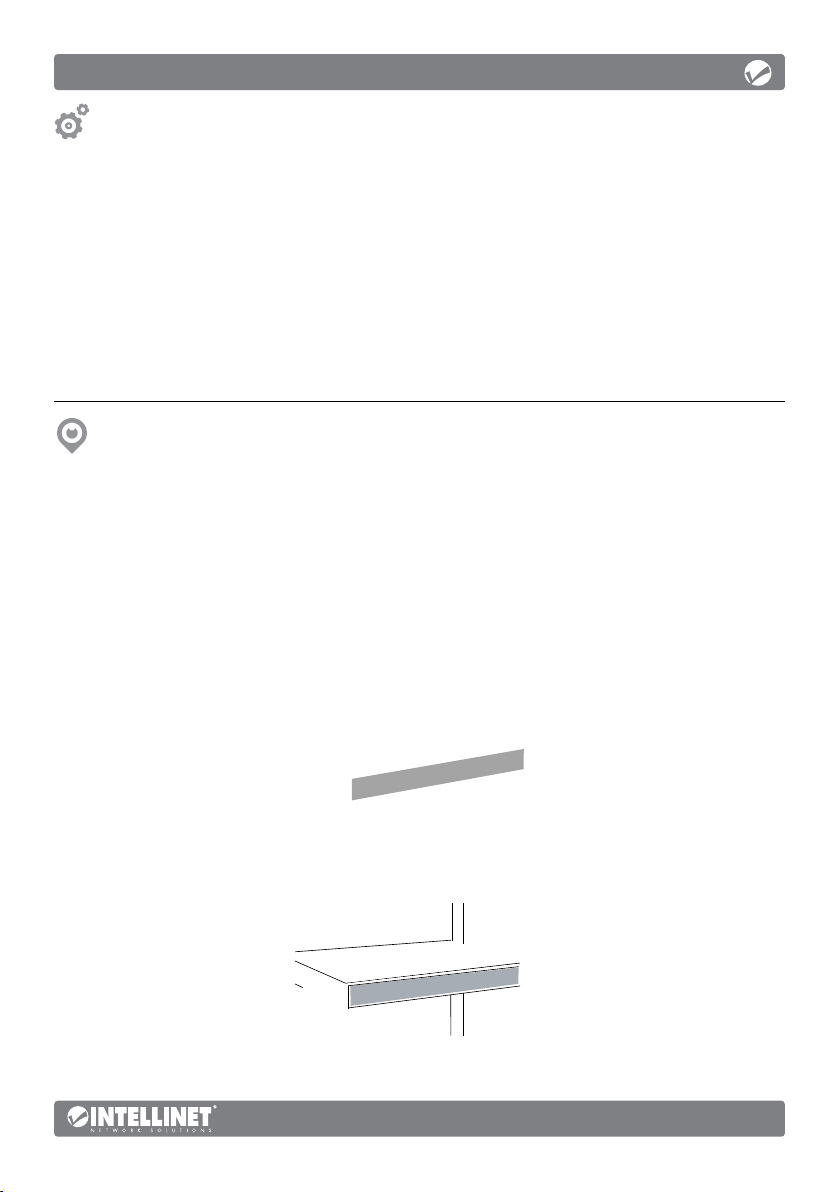
Installation en rack
Le commutateur peut être monté dans un rack EIA de 19 pouces de taille
standard. Fixez les supports de montage sur les panneaux latéraux du
commutateur (un de chaque côté) et fixez-les à l’aide des vis fournies.
Utilisez les vis fournies avec le rack d’équipement pour monter le
commutateur de données Intellinet Network Solutions sur le rack.
Français
9
Page 10
Instrukcje
24-Portowy Przełącznik Gigabit Ethernet PoE+ z Slotami SFP Intellinet Network Solutions
zapewnia oszczędność czasu i pieniędzy, oferując jednocześnie maksymalną przepustowość
sieci. Nie wymaga żadnej konfiguracji, działa samodzielnie po podłączeniu na zasadzie plug
and play. Obwody drukowane o przepustowości 52 Gbps oferują wysoką wydajność twoim
komputerom, serwerom i innym urządzeniom sieciowym. Każdy z portów automatycznie
wykrywa prędkość łącza podłączonego urządzenia i optymalnie dostosowuje ją w przedziałach
10, 100 lub 1000 Mbps, uzyskując maksymalną wydajność. Zaprojektowany do rozdzielania
napięcia do dostosowanych urządzeń wedle zapotrzebowania, ten przełącznik PoE dostarcza
do 30 Watów prądu na port, z górnym limitem przekazu o wysokości 370 Watów.
Technologia Green Ethernet
Przełącznik Intellinet Network Solutions dopasowuje poziom mocy w oparciu
o długość kabla sieciowego podłączonego do każdego portu. Funkcja ta
pozwala cieszyć się maksymalną wydajnością sieci, a kiedy praca dobiega końca,
automatycznie obniża poziom zużycia mocy, oszczędzając energię i pieniądze.
Specyfikacja techniczna dostępna jest na stronie intellinetnetwork.com. Zarejestruj produkt na
register.intellinet-network.com/r/561891 lub zeskanuj znajdujący się na pokrywie kod QR.
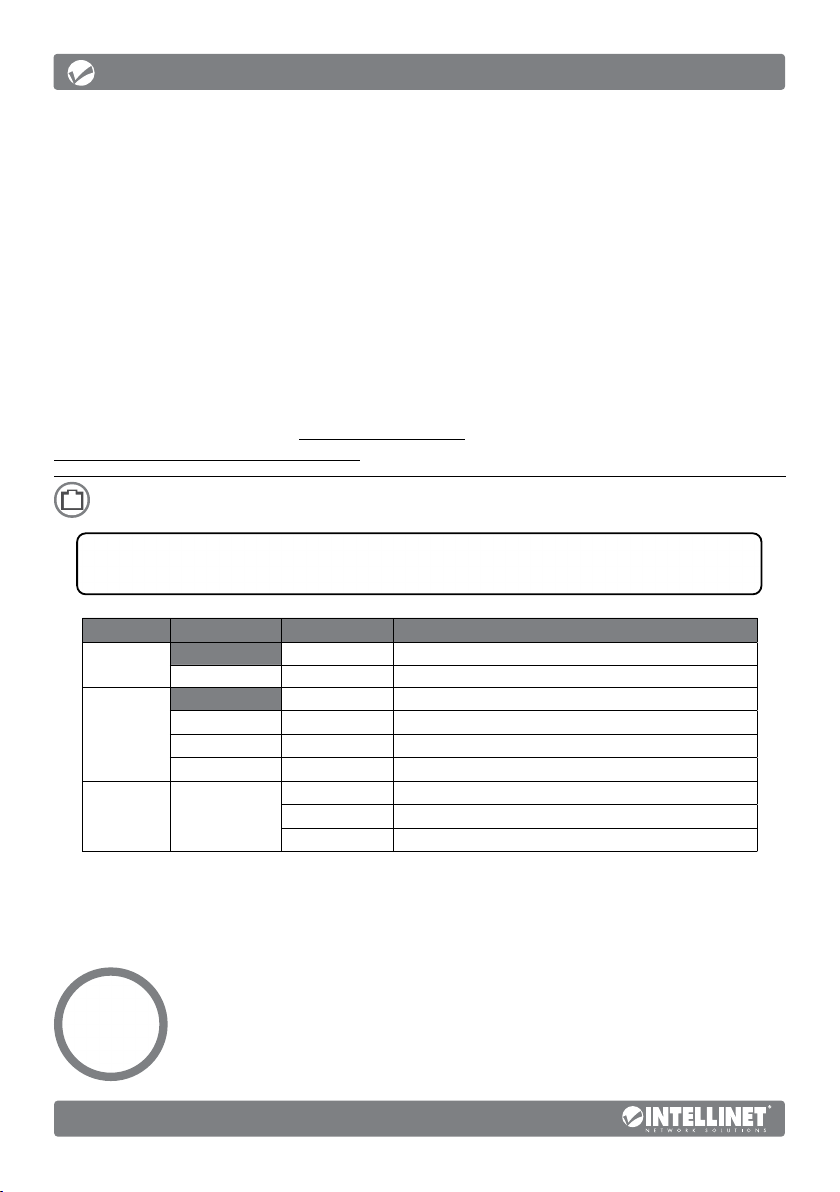
Panel przedni
DIODA
LED
PWR
Link/Act/
Speed
(1-24,
25F-26F
[SFP])
PoE
(1-24)
KOLOR STAN ZNACZENIE
Wyłączony Zasilanie wyłączone
Zielony Włączony Zasilanie włączone
Wyłączony Żadne urządzenie nie jest podłączone do portu.
Pomarańczowy Włączony Urządzenie jest podłączone do portu z szybkością 10/100 Mb/s.
Zielony Włączony Urządzenie jest podłączone do portu z szybkością 1000 Mb/s.
Pomarańczowy / Zielony Miga Wysyła lub odbiera dane
Wyłączony Żadne urządzenie (PD) nie jest podłączone do portu.
Zielony
Włączony Podłączone urządzenie jest zasilane.
Miga Nieoczekiwanie wysokie napięcie wydzielone do portu.
Kable Cat5e/6/6a/8.x/6 UTP/STP zapewniają optymalną wydajność; jeśli
diody statusu nie sygnalizują linku lub aktywności, sprawdź podłączone
urządzenie pod kątem poprawności konfiguracji oraz jego zasilania.
Przełącznik suwakowy
• Standard (Tryb standardowy): pozwala na normalną
komunikację pomiędzy portami 1 – 26.
• Flow Control: wyłącza tylko funkcję kontroli przepływu przełącznika.
• VLAN (Tryb VLAN): izoluje porty 1 – 24 od siebie nawzajem,
ale pozwala im się łączyć z portami 25 lub 26.
10
Polski
Page 11
Instrukcje
Panel tylny
Zasilanie
Użyj dołączonego kabla, aby podłączyć zasilanie do gniazda na tylnym
panelu przełącznika, sprawdź, czy zapaliła się dioda zasilania. Urządzenie
wspiera napięcia zasilania zmiennego 100 do 240 V, 50/60 Hz.
Śrubka uziemienia obudowy
Ulokowany po prawej stronie gniazda zasilania, terminal uziemiający pozwala
prawidłowo uziemić przełącznik Intellinet Network Solutions. W przypadku użycia
śrubki uziemienia obudowy upewnij się, że przewód połączony jest z przedmiotem
z bezpośrednim dostępem do przewodnika uziemienia. W przypadku montażu
w stojakach, następuje to przeważnie poprzez metalową ramę stojaka.
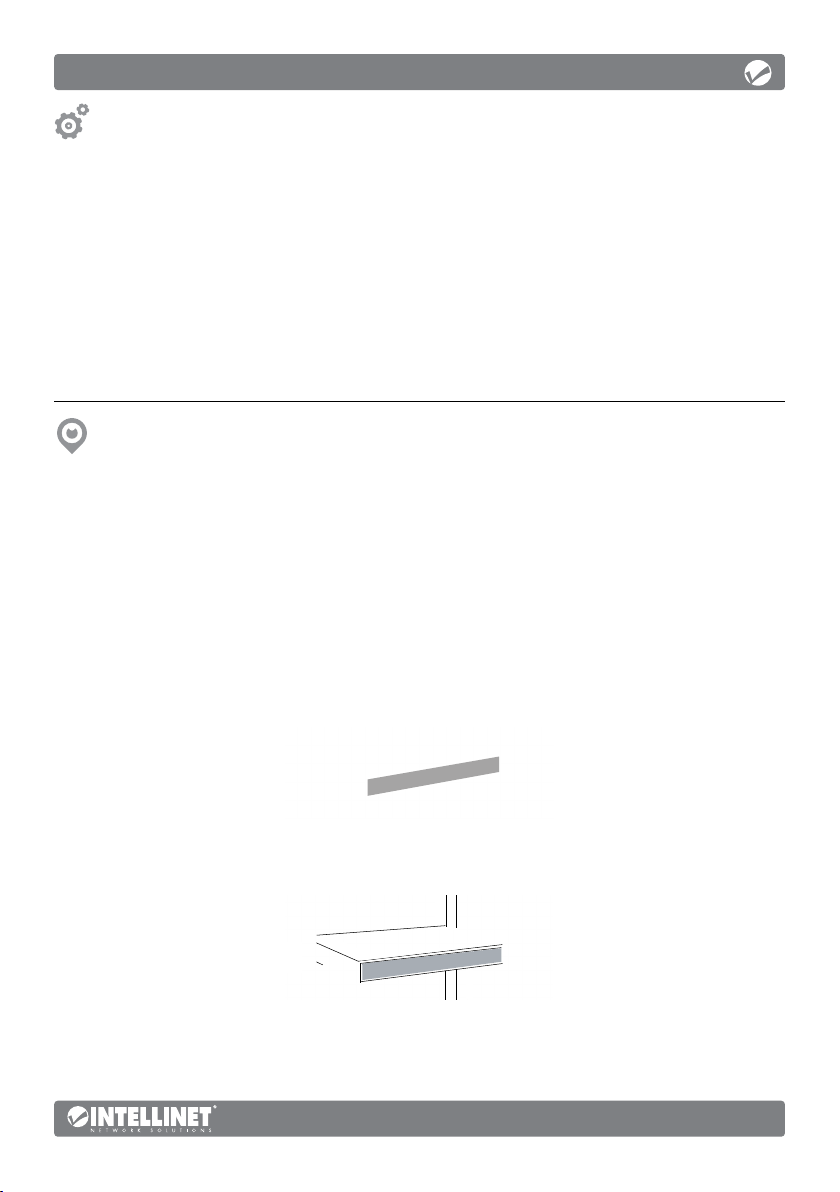
Umiejscowienie
Instalacja pulpitu
Zaleca się, aby urządzenie w trakcie użytkowania było umiejscowione na płaskiej powierzchni,
w miejscu odpowiednim do wagi urządzenia, dla zapewnienia dobrej wentylacji w
odległości co najmniej 25 mm obudowy urządzenia od podłoża, na którym się znajduje, z
dala od źródeł zakłóceń elektrycznych (radia, nadajniki szerokopasmowe, itp.) w odległości
do 100 m od innych urządzeń sieciowych, z którymi bezpośrednio jest połączony.
Instalacja w stojaku
Przełącznik może być instalowany w 19 calowych stojakach standardu
EIA. Przytwierdź klamry montażowe do bocznych paneli przełącznika (po
jednym z każdej strony) i zabezpiecz je dostarczonymi śrubami.
Użyj dostarczonych ze stojakiem śrub, aby przymocować
przełącznik Intellinet Network Solutions do stojaka.
Polski
11
Page 12
Istruzioni
L’ Intellinet Network Solutions 24-Port Gigabit Ethernet PoE + Switch con 2 porte SFP offre
una combinazione di caratteristiche veloci e convenienti, pur fornendo una capacità di
trasmissione eccellente. Non è richiesta alcuna configurazione e l’installazione è ad uso
immediato. Con una velocità della scheda di collegamento di 52 Gbps, una performance
incredibile sarà possibile per i vostri computer, server o altri dispositivi per la rete. Ognuna
delle porte traccia automaticamente la velocità del dispositivo di rete connesso e la regola
a 10, 100 o 1000 Mbps per massimizzare compatibilità e performance. Progettato per
distribuire la tensione ai dispositivi personalizzati secondo necessità, questo switch fornisce
fino a 30 Watt di potenza per porta, con un limite di trasferimento superiore di 370 Watt.
Ethernet e Green Technology
L’Intellinet Network Solutions Switch può regolare il livello di output di energia basandosi
sulla lunghezza del cavo di rete connesso ad una porta specifica. Questa caratteristica
vi permetterà di apprezzare la miglior performance della rete, e quando ci sarà meno
da fare, ridurrà automaticamente il consumo per conservare energia e soldi.
Per ulteriori specifiche, visita il sito intellinetnetwork.com. Registra il tuo prodotto su
register.intellinet-network.com/r/561891 o scansiona il codice QR presente sulla copertina.
Pannello frontale
LED COLORE STATO INDICAZIONE
PWR
Link/Act/
Speed (1-
24, 25F-26F
[SFP])
PoE (1-24) Verde
Verde Accesso Acceso
Arancia Accesso Un dispositivo è connesso alla porta a 10/100 Mbps.
Verde Accesso Un dispositivo è connesso alla porta a 1000 Mbps.
Arancia / Verde Lampeggiante Invio o ricezione dati
Spento Spento
Spento Nessun dispositivo collegato alla porta.
Spento Nessun dispositivo (PD) collegato alla porta.
Accesso Il dispositivo collegato sta ricevendo corrente.
Lampeggiante Alimentazione elettrica anomala
I cavi Cat5e/6/6a/8.x/6 UTP/STP forniscono ottimali prestazioni; se il LED di
stato non indica una connessione o un’attività, verificare la corrispondente
periferica per un corretto settaggio e funzionamento.
Switch a scorrimento
• Standard: modalità predefinita; consente la normale
comunicazione tra le porte 1 – 26.
• Flow Control: Controllo del flusso: disabilita la
funzione di controllo del flusso dello switch
• VLAN: isola tra loro le porte 1 – 24 ma può connettersi alle porte 25 o 26.
12
Italiano
Page 13
Istruzioni
Pannello posteriore
Alimentazione
Utilizzare il cavo di alimentazione incluso per collegare la presa sul retro dello
switch ad una presa di corrente e verificare che la luci del LED di alimentazione
sia accesa. Il dispositivo supporta l’alimentazione AC100–240V, 50/60 Hz.
Vite di messa a terra del telaio
Collocato sul lato destro del connettore di alimentazione elettrica, il connettore del
terminal di messa a terra facilita la corretta messa a terra dello switch dati Intellinet Network
Solutions. Quando si utilizza la vite di messa a terra del telaio occorre collegarla con un cavo
a una oggetto che fornisca accesso diretto a un conduttore di massa. Normalmente nelle
installazioni in rack questo avviene attraverso la cornice metallica del rack di montaggio.
Posizionamento
Installazione desktop
Prima di utilizzare il prodotto, si consiglia di fare attenzione a dove viene collocato lo switch:
su una superficie piana che può supportare il peso dello switch (o qualsiasi altro oggetto che
deve essere tenuto in considerazione), con un minimo di 25 mm (approssimativamente 1”) di
spazio libero verso l’alto e lateralmente per permettere un’adeguata ventilazione, lontano da
sorgenti che possono provocare disturbi e interferenze elettro magnetiche (radio, trasmettitori,
amplificatori di banda, ecc.) e entro 100 m dalle periferiche di rete a cui è stato connesso.
Installazione in rack
Lo switch può essere montato in un rack di dimensioni standard EIA
da 19”. Fissare le staffe di montaggio sui pannelli laterali dello switch
(uno su ciascun lato) e assicurarli con le viti in dotazione.
Utilizzare le viti fornite con il rack dell’apparecchiatura per montare
lo switch dati Intellinet Network Solutions sul rack.
Italiano
13
Page 14

WASTE ELECTRICAL & ELECTRONIC EQUIPMENT
(Applicable In The European Union And Other European Countries With Separate Collection Systems)
ENGLISH: This symbol on the product or its
packaging means that this product must not
be treated as unsorted household waste. In
accordance with EU Directive 2012/19/EU on
Waste Electrical and Electronic Equipment (WEEE),
this electrical product must be disposed of in
accordance with the user’s local regulations for
electrical or electronic waste. Please dispose of this
product by returning it to your local point of sale
or recycling pickup point in your municipality.
DEUTSCH: Dieses auf dem Produkt oder der
Verpackung angebrachte Symbol zeigt an, dass dieses
Produkt nicht mit dem Hausmüll entsorgtwerden
darf. In Übereinstimmung mit der Richtlinie
2012/19/EU des Europäischen Parlaments und
des Rates über Elektro- und Elektronik-Altgeräte
(WEEE) darf dieses Elektrogerät nicht im normalen
Hausmüll oder dem Gelben Sack entsorgt werden.
Wenn Sie dieses Produkt entsorgen möchten,
bringen Sie es bitte zur Verkaufsstelle zurück oder
zum Recycling-Sammelpunkt Ihrer Gemeinde.
ESPAÑOL: Este símbolo en el producto o su
embalaje indica que el producto no debe tratarse
como residuo doméstico. De conformidad con
la Directiva 2012/19/EU de la UE sobre residuos
de aparatos eléctricos y electrónicos (RAEE), este
producto eléctrico no puede desecharse se con el
resto de residuos no clasificados. Deshágase de este
producto devolviéndolo a su punto de venta o a un
punto de recolección municipal para su reciclaje.
FRANÇAIS: Ce symbole sur Ie produit ou son
DISPOSAL OF ELECTRIC AND ELECTRONIC EQUIPMENT
emballage signifie que ce produit ne doit pas être
traité comme un déchet ménager. Conformément à la
Directive 2012/19/EU sur les déchets d’équipements
électriques et électroniques (DEEE), ce produit
électrique ne doit en aucun cas être mis au rebut
sous forme de déchet municipal non trié. Veuillez
vous débarrasser de ce produit en Ie renvoyant à
son point de vente ou au point de ramassage local
dans votre municipalité, à des fins de recyclage.
ITALIANO: Questo simbolo sui prodotto o
sulla relativa confezione indica che il prodotto
non va trattato come un rifiuto domestico. In
ottemperanza alla Direttiva UE 2012/19/EU sui
rifiuti di apparecchiature elettriche ed elettroniche
(RAEE), questa prodotto elettrico non deve
essere smaltito come rifiuto municipale misto.
Si prega di smaltire il prodotto riportandolo al
punto vendita o al punto di raccolta municipale
locale per un opportuno riciclaggio.
POLSKI: Jeśli na produkcie lub jego opakowaniu
umieszczono ten symbol, wówczas w czasie
utylizacji nie wolno wyrzucać tego produktu
wraz z odpadami komunalnymi. Zgodnie z
Dyrektywą Nr 2012/19/EU w sprawie zużytego
sprzętu elektrycznego i elektronicznego (WEEE),
niniejszego produktu elektrycznego nie wolno
usuwać jako nie posortowanego odpadu
komunalnego. Prosimy o usuniecie niniejszego
produktu poprzez jego zwrot do punktu zakupu
lub oddanie do miejscowego komunalnego punktu
zbiórki odpadów przeznaczonych do recyklingu.
WARRANTY AT: | GARANTIE AUF: | GARANTÍA EN: | GARANTIE À : | GWARANCJA NA: | GARANZIA A:
intellinetnetwork.com
EN MÉXICO: Póliza de Garantía Intellinet Network Solutions — Datos del importador y responsable
ante el consumidor • IC Intracom México, S.A.P.I. de C.V. • Av. Interceptor Poniente # 73, Col. Parque
Industrial La Joya, Cuautitlán Izcalli, Estado de México, C.P. 54730, México. • Tel. (55)1500-4500
La presente garantía cubre los siguientes productos contra cualquier
defecto de fabricación en sus materiales y mano de obra.
A Garantizamos los productos de limpieza, aire comprimido y consumibles, por 60
dias a partir de la fecha de entrega, o por el tiempo en que se agote totalmente
su contenido por su propia función de uso, lo que suceda primero.
B Garantizamos los productos con partes móviles por 3 años.
C Garantizamos los demás productos por 5 años (productos sin
partes móviles), bajo las siguientes condiciones:
1 Todos los productos a que se refiere esta garantía, ampara su
cambio físico, sin ningún cargo para el consumidor.
14
Page 15

2 El comercializador no tiene talleres de servicio, debido a que los productos que se garantizan
no cuentan con reparaciones, ni refacciones, ya que su garantía es de cambio físico.
3 La garantía cubre exclusivamente aquellas partes, equipos o sub-ensambles que
hayan sido instaladas de fábrica y no incluye en ningún caso el equipo adicional o
cualesquiera que hayan sido adicionados al mismo por el usuario o distribuidor.
Para hacer efectiva esta garantía bastará con presentar el producto al distribuidor en el domicilio
donde fue adquirido o en el domicilio de IC Intracom México, S.A.P.I. de C.V., junto con los accesorios
contenidos en su empaque, acompañado de su póliza debidamente llenada y sellada por la casa
vendedora (indispensable el sello y fecha de compra) donde lo adquirió, o bien, la factura o ticket de
compra original donde se mencione claramente el modelo, número de serie (cuando aplique) y fecha
de adquisición. Esta garantía no es válida en los siguientes casos: Si el producto se hubiese utilizado en
condiciones distintas a las normales; si el producto no ha sido operado conforme a los instructivos de
uso; o si el producto ha sido alterado o tratado de ser reparado por el consumidor o terceras personas.
REGULATORY STATEMENTS
FCC Class A
This equipment has been tested and found to comply with the limits for a Class A digital device, pursuant
to Part 15 of the Federal Communications Commission (FCC) Rules. These limits are designed to provide
reasonable protection against harmful interference when the equipment is operated in a commercial
environment. This equipment generates, uses and can radiate radio frequency energy, and if not installed and
used in accordance with the instruction manual may cause harmful interference to radio communications.
Operation of this equipment in a residential area is likely to cause harmful interference, in which case the
user will be required to correct the interference at his own expense. Any changes or modifications made
to this equipment without the approval of the manuafacturer could result in the product not meeting
the Class A limits, in which case the FCC could void the user’s authority to operate the equipment.
CE
ENGLISH : This device complies with the requirements of CE 2014/30/EU and / or
2014/35/EU. The Declaration of Conformity for is available at:
DEUTSCH : Dieses Gerät enspricht der CE 2014/30/EU und / oder 2014/35/EU. Die
Konformitätserklärung für dieses Produkt finden Sie unter:
ESPAÑOL : Este dispositivo cumple con los requerimientos de CE 2014/30/EU y / o
2014/35/EU. La declaración de conformidad esta disponible en:
FRANÇAIS : Cet appareil satisfait aux exigences de CE 2014/30/EU et / ou
2014/35/EU. La Déclaration de Conformité est disponible à:
POLSKI : Urządzenie spełnia wymagania CE 2014/30/EU I / lub 2014/35/EU. Deklaracja
zgodności dostępna jest na stronie internetowej producenta:
ITALIANO : Questo dispositivo è conforme alla CE 2014/30/EU e / o 2014/35/EU.
La dichiarazione di conformità è disponibile al:
support.intellinet-network.com/barcode/561891
North America
IC Intracom America
550 Commerce Blvd.
Oldsmar, FL 34677 USA
All trademarks and trade names are the property of their respective owners.
Alle Marken und Markennamen sind Eigentum Ihrer jeweiligen Inhaber.
Todas las marcas y nombres comerciales son propiedad de sus respectivos dueños.
Toutes les marques et noms commerciaux sont la propriété de leurs propriétaires respectifs.
Tutti i marchi registrati e le dominazioni commerciali sono di proprietà dei loro rispettivi proprietari.
Wszystkie znaki towarowe i nazwy handlowe należą do ich właścicieli.
Asia & Africa
IC Intracom Asia
4-F, No. 77, Sec. 1, Xintai 5th Rd.
Xizhi Dist., New Taipei City 221, Taiwan
Europe
IC Intracom Europe
Löhbacher Str. 7, D-58553
Halver, Germany
15
Page 16

intellinetnetwork.com
All trademarks and trade names are the property of their respective owners. © IC Intracom. All rights reserved.
Intellinet Network Solutions is a trademark of IC Intracom, registered in the U.S. and other countries.
Printed on recycled paper.
INT_561891_QIG_0222_REV_5.11
 Loading...