

Page 1
ITALIANO: Questo simbolo sui prodotto o sulla relativa confezione indica
che il pr odotto no n va tratt ato come un ri fiuto do mestico. I n ottempe ranza
alla Dir ettiva U E 2012/19/EU sui rif iuti di app arecchia ture elet triche e d
elet tronich e (RAEE), ques ta prodo tto elet trico non de ve essere s maltito com e
rif iuto munic ipale mist o. Si prega di sm altire il p rodotto r iporta ndolo al pun to
vendi ta o al punto di r accolta mu nicipale l ocale per u n opport uno ricicl aggio.
8-Port Gigabit
Warranty at: | Garantie auf: | Garantía en: | Garantie à : | Gwarancja na: | Garanzia a:
EN MÉXI CO: Póliza de G arantía In tellinet Ne twork So lutions — Da tos del impo rtador y r esponsa ble ante el co nsumidor IC I ntracom M éxico, S.A .P.I.
de C.V. • Av. Interce ptor Ponie nte # 73, Col. Parq ue Indust rial La Joya , Cuautitl án Izcalli, E stado de Mé xico, C.P. 54730, Méx ico. • Tel. (55)15004500 • La p resente ga rantía cub re los sigu ientes pro ductos co ntra cual quier defe cto de fab ricació n en sus mater iales y mano d e obra.
A Garan tizamos lo s produc tos de limpi eza, aire co mprimid o y consumib les, por 60 di as a parti r de la fecha de e ntrega, o p or
el tiem po en que se ago te totalme nte su conten ido por su pr opia func ión de uso, lo qu e suceda pr imero.
B Garant izamos lo s produc tos con par tes móvile s por 3 años.
C Ga rantiza mos los demá s product os por 5 años ( product os sin part es móvile s), bajo las sigu ientes con diciones :
1 1. Todo s los produc tos a que se r efiere e sta garan tía, ampara s u cambio fí sico, sin nin gún cargo p ara el consu midor.
2 2. El c omercial izador no t iene talle res de ser vicio, debi do a que los pr oductos q ue se garant izan no
cuent an con repar aciones , ni refacc iones, ya qu e su garantí a es de cambio f ísico.
3 . La garantía c ubre exclu sivament e aquellas p artes, eq uipos o sub -ensamb les que haya n sido inst aladas de fá brica y no in cluye
en ningún caso el equipo adicional o cualesquiera que hayan sido adicionados al mismo por el usuario o distribuidor.
Para hac er efect iva esta g arantía ba stará con p resenta r el produc to al distr ibuidor en e l domicili o donde fue a dquirid o o en el domici lio de IC Intr acom Méxic o,
S.A.P.I. de C.V., jun to con los acce sorios co ntenidos e n su empaque , acompaña do de su póliz a debidame nte llenada y s ellada por l a casa vend edora (ind ispensa ble
el sell o y fecha de com pra) donde l o adquirió, o b ien, la fac tura o ticke t de compra o riginal do nde se menc ione clara mente el mod elo, númer o de serie (cua ndo
apliq ue) y fecha de ad quisició n. Esta gar antía no es v álida en los si guientes c asos: Si el p roducto s e hubiese u tilizad o en condici ones dist intas a las no rmales; si e l
produ cto no ha sid o operado co nforme a lo s instruc tivos de u so; o si el produ cto ha sido a lterado o t ratado de se r reparad o por el consu midor o terc eras pers onas.
Regulatory Statements
FCC Clas s B
This eq uipment ha s been test ed and foun d to comply wi th the limit s for a Class B d igital de vice, purs uant to Part 15 of F ederal Co mmunicat ions Commis sion
(FCC) Ru les. Thes e limits are d esigned to p rovide re asonable p rotect ion agains t harmful i nterfer ence in a resi dential in stallat ion. This eq uipment ge nerates,
uses an d can radia te radio fre quency e nergy, and if n ot install ed and used i n accordan ce with the in struct ions may cau se harmfu l interf erence to ra dio
communications. However, there is no guarantee that interference will not occur in a particular installation. If this equipment does cause harmful interference
to radi o or televis ion recept ion, which c an be deter mined by tur ning the eq uipment of f and on, th e user is enco uraged to tr y to corre ct the inte rferen ce
by one or m ore of the fo llowing mea sures: re orient or re locate th e receivin g antenna; in crease th e separati on betwe en the equip ment and th e receiver ;
conne ct the equi pment to an ou tlet on a cir cuit dif ferent f rom the rece iver; or con sult the dea ler or an exp erienced r adio/T V technici an for help.
CE
ENGLISH : This d evice comp lies with th e require ments of CE 2014/ 30/EU and/or 2 014/35/EU. The Dec laratio n of Conform ity for is av ailable at :
DEUTSCH : Dieses Ge rät enspr icht der CE 2014/ 30/EU und / ode r 2014/35/EU. Die Kon formit ätserkl ärung für d ieses Pro dukt fin den Sie unte r:
ESPAÑOL : E ste dispos itivo cump le con los re querimie ntos de CE 2014/3 0/EU y / o 2014/35/EU. La d eclarac ión de confo rmidad es ta dispon ible en:
FRANÇAIS : Cet ap pareil sa tisfait a ux exigen ces de CE 2014/30/ EU et/ou 2014/35/ EU. La Déclar ation de Con formité e st dispon ible à :
POLSKI : Urząd zenie spe łnia wym agania CE 2014/ 30/EU I / lub 2014/35/ EU. Deklarac ja zgodno ści dostę pna jest na s tronie int ernetowe j producen ta:
ITALIANO : Questo d isposit ivo è confor me alla CE 2014/3 0/EU e / o 2014/35/EU. La d ichiaraz ione di conf ormità è d isponibi le al:
support.intellinet-network.com/barcode/561679
Ethernet PoE+
Switch with PoE Passthrough
Instructions
Important: Read before use. • Importante: Leer antes de usar.
2
Placement
Prior to use, it is recommended that this product be placed/
positioned on a level surface with at least 25 mm (approx.
1”) of clearance for ventilation. In addition, it should be
positioned away from other transmission devices such
as radios , broadband amplifiers , etc. and should not be
exposed to excessive moisture. At tach the rubber feet to the
bottom of each corner of the switch to increase st ability.
Setup
1 Use Ether net cable (Cat5e min.) to connec t powered
source device (e.g., PoE injector or s witch) to PoE IN port.
2 Use Ether net cable (Cat5e min.) to connec t
powered device(s) to PoE port(s).
3 Wire the grounding terminal to an earth-
groundi ng object to prevent power spikes.
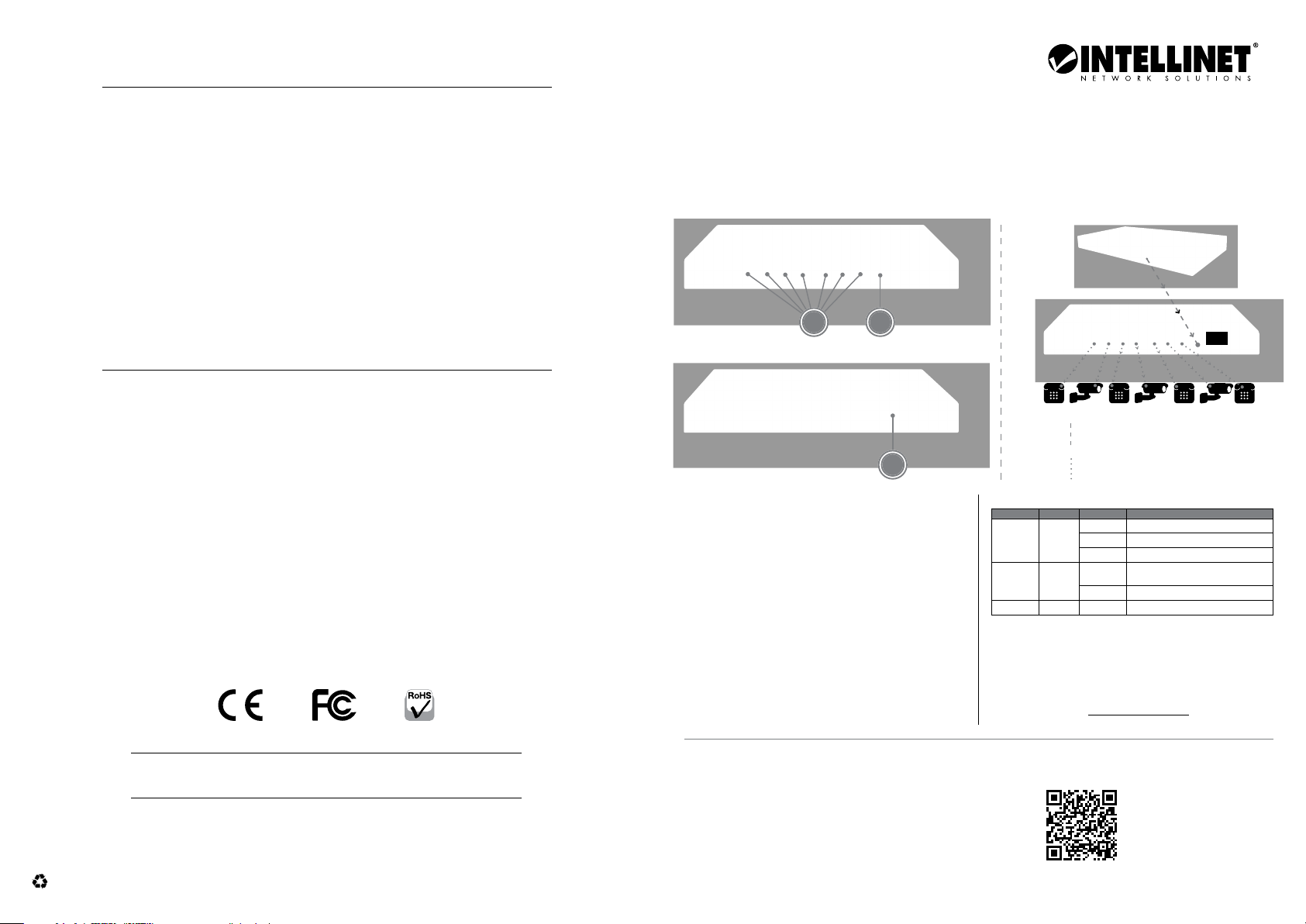
Model 561679 (IPS-08G-85W)
1
3
LEDs
LED Color Status Operation
Link/Act Yell ow
PoE Green
PWR Green On Power on
Power
• PoE power budg et of 85 W with 90 W power
input through IEEE 802.3bt connection
• PoE power budg et of 20 W through IEEE 802.3at
connec tion and 10 W through IEEE 802.3af connection
For specif ications, visit intellinetnetwork.com.
PoE Switch / Injector
PSE
PD
PSE (power sourcing equipment)
Power & Data (up to 90 W)
PD (powered device)
Power & Data
On Valid port connection
Blinking Sending or receiving data
Off No link established.
On
Off No PSE/PoE devic e is linked.
The conne cted device is
receiving power.
PDPD PDPDPDPDPD
Printed on recycled paper.
North & South America
IC Intracom Americas
550 Commerce Blvd.
Oldsmar, FL 34677, USA
All tra demarks a nd trade nam es are the pr opert y of their res pectiv e owners. © IC Intracom. All rights reserved.
Intellinet Network Solutions is a trademark of IC Intracom, registered in the U.S. and other countries.
Asia & Africa
IC Intracom Asia
4-F, No. 77, Sec. 1, Xintai 5th Rd.
Xizhi Dist., New Taipei City 221, Taiwan
Europe
IC Intracom Europe
Löhbacher Str. 7
D-58553 Halver, Germany
INT_5 61679_QIG _1120_REV_ 5.11
For additional benets:
Scan to
register your
product warranty
or go to: register.intellinet-network.com/r/561679
Page 2
DEUTSCH: 8-Po rt PoE+ Gigabit Sw itch mit PoE-Pas sthrough
Platzierung
Es wird empfohlen, das Produkt b ei der
Verwendung folgendermaßen zu platzieren:
Auf geradem Untergrund, der das Gewicht des Produktes
tragen k ann und mit mindes tens 25 mm Abstand zu
allen Seiten für angemessenen Luftdurchsatz. Zudem
sollte es fern von anderen Übertragungsgeräten wie
Radios, Breitbandverstärkern, etc positionier t und
nicht übermäßiger Feuchtigkeit ausgesetzt werden.
Befestigen Sie die Gummifüße an der Unterse ite jeder
Ecke des Schalters, um die Stabilität zu erhöhen.
Einrichtung
1 Verwend en Sie ein Etherne t-Kab el (Cat5e min.) zum
Anschluss des mit Strom versorgten Quellgeräts (z.B.
PoE-Injektor oder -Switch) an den PoE-IN-Por t.
2 Verwenden Sie ein Ethernet-Kabel (Cat5e
min.) zum Anschluss von mit Strom verso rgten
Geräten an den PoE Out Ports .
3 Verkabe ln Sie den Erdungspu nkt, um
Spannungsspitzen zu vermeiden.
LEDs
LED Farbe Status Bedeutung
Link/
Act
PoE Grün
PWR Grün An Gerät wird mit Strom versorgt
An Verbindung ist hergestellt
Gelb
Blinkend Senden oder Empfangen von Daten
Aus Verbindung ist nicht hergestellt
An Das angeschlossene Gerät erhält Strom
Aus Kein PSE/PoE-Gerät angeschlossen
Strom
• PoE-Strombudget von 85 Watt b ei 90 W
Eingangsstrom via IEEE 802.3bt-Verbindung
• PoE-Strombudget von 20 Watt b ei IEEE 802.3atVerbindung und 10 Watt bei IEEE 802.3af-Verbindung
Die Spez ifikationen f inden Sie auf
intellinetnetwork.com.Registri eren Sie Ihr Produk t
auf register.intellinet-network.com/r/561679 oder
scannen Sie den QR-Code auf dem Deckblatt.
ESPAÑOL: Sw itch PoE+ con 8 puer tos Gigabit
alimentado por PoE (Passthrough)
Colocación
Antes de utilizarlo, s e recomienda que el producto sea
ubicado/fijado s obre una superficie plana que pueda
sopor tar el peso del producto con un mínimo de 25 mm (1”
aprox.) de espacio lib re en la parte supe rior y en los lados
para una ventilación adecuada lejos de fuentes de ruido
eléctrico: radios, transmisores, amplificadores, etc. donde
puede verse afectado por la humedad excesiva. Fije
los pies de goma en la base de cada esquina
del switch para aumentar su estab ilidad.
Configuración
1 Utilice el cable Ethernet (mín. Cat 5e) para conectar el
dispositivo de alimentación de origen (p. ej. , inyector
o conmuta dor PoE) al puerto PoE de entrada.
2 Utilice el cable Ethernet (mín. Cat 5e) para conectar
los dispo sitivos al puerto PoE de salid a.
3 Conecte el terminal de conexión a tierra a un objeto
de conexión a tierra p ara evitar picos de energía.
LEDs
LED Color Status Operación
Link/
Amarillo
Act
PoE Verde
PWR Verde Encendido Encendido
Encendido Valide el pu erto de conexi ón
Parpadeo Datos trasmitidos/recibidos
Apagado No hay comu nicación
Encendido
Apagado
El disposi tivo conectad o recibe
alimentación eléctrica
No hay un disp ositivo
PSE/PoE conectado
Energía
• Presupuesto de energía PoE de 85 W con una entrada de
energía de 90 W a través de la conexión IEEE 802.3bt
• Presupuesto de energía PoE de 20 W a través de la conexión
IEEE 802. 3at y 10 W a través de la conexión IEEE 802.3af
Para más especificaciones, visite intellinetnetwork.com. Registre
el produc to en register.intellinet-network.com/r/561679
o escanee el có digo QR en la cubier ta.
FRANÇAIS: Commutateur PoE+ 8 por ts
Ethern et Gigabit avec passage PoE
Placement
Avant d’utiliser l’appareil, il est recommandé de le placer
sur une sur face plane qui peut suppor ter son poids
ac. un écartement m inimal de 25 mm d’autres objets
pour une ventilation suffisante loin des appareils
électriques qui peuvent être source d‘interférence
(des radios etc.) loin des environnements humides.
Fixer les pieds en caou tchouc sous chacun des coins
du commutateur pour en améliorer la stabilité.
Configuration
1 Utilisez un câble Ethernet (Cat5e min.) pour connecter
un dispositif source alimenté (par e xemple, un
injecteur ou un commutateur PoE) au port PoE IN .
2 Utilisez un câble Ethernet (Cat5e min.) pour connecter le(s)
dispositif(s) alimenté(s) au(x) port(s) de sortie (PoE OUT).
3 Câblez la borne de mise à la terre à un objet de mise
à la terre pour éviter les pointes de tension.
DEL
LED Couleur Status Operation
Link/
Jaune
Act
PoE Verte
PWR Ver te Allumé Appareil est alimenté
Allumé Connexion est établie
Clignotant
Éteint Co nnexion n’est pas ét ablie
Allumé L’appareil connecté est alimenté
Éteint
En train d’éme ttre ou de
recevoir d es données
Port n’est con necté pas à
un appareil PSE/PoE
Alimentation
• Alimentation PoE de 85 W avec alimentation
de 90 W via un e connexion IEEE 8 02.3bt
• Alimentation PoE de 20 W via la connexion IEEE
802.3at et de 10 W via la connexion IEEE 802. 3af
Vous trouvez l es spécificati ons sur
intellinetnetwork.com. Enregistre z votre produit
sur register.intellinet-network.com/r/561679 ou
scannez le code QR figurant sur la couverture.
POLSKI: 8-portow y Przełącznik Gigab it
Ethern et PoE+ z funkcją PoE Pa ssthrough
Umiejscowienie
Zaleca się, aby urządzenie w trakcie uży tkowania było
umiejscowione: na płaskiej powierzchni, w miejscu
odpowiednim do wagi urządzenia dla zapewnienia dobrej
wentylacji w odległości co najm niej 25 mm obudow y
urząd zenia od podłoża, na któr ym się znajduje z dala od źróde ł
zakłó ceń elektrycznych: radia, nadajnik i szerokopasmowe, itp.
Podłąc z gumowe podnóż a od dołu na każdym rogu splittera.
Konfiguracja
1 Użyj ka bla Ethernet (min. Cat5e), aby pod łączyć
zasilane urządzenie źródł owe (np. wtryskiwacz
lub przełącznik PoE) do por tu PoE IN.
2 Użyj kabla Ethern et (min. Cat5e), aby pod łączyć
zasilane urządzenie/a do por tu/ów PoE Out.
3 Podłąc z przewód uziemiający do instalacji
uziemiającej, aby zapobiec skokom napięcia.
Diody LED
Dioda Kolor Status Objaśnienie
Link/
Act
PoE Zielona
PWR Zielona Wł Urządzenie włączone
Wł. Prawidłow e podłączeni e portu
Żółta
Miga Wysyła lub od biera dane
Wył. Nie nawiąz ano połączenia
Wł. Port jest p ołączony z ur ządzeniem PoE
Wył Nie ma połącz enia z urządzen iem PoE
Mocy
• Budżet moc y PoE do 85 W z mocą wejściową do 90
W dzięki połączeniu w standardzie IEEE 802.3bt
• Budżet moc y PoE do 20 W dla połąc zenia w standardzie IEEE
802.3at i do 10 W dla połąc zenia w standard zie IEEE 802.3af
Specyfikacja techniczna dostępna jest na stronie
intellinetnetwork.com. Zarejestru j produkt na
register.intellinet-network.com/r/561679 lub
zeskanuj zna jdujący się na po krywie kod Q R.
Waste Electrical & Electronic Equipment
Dispo sal of Elec tric and El ectron ic Equipme nt (applica ble in the E.U. an d other coun tries wit h separat e collect ion syste ms)
ENGLISH: This sy mbol on the p roduct o r its packa ging means t hat this
produ ct must no t be treated a s unsort ed househo ld waste. In
accord ance with EU D irecti ve 2012/19/EU on Waste E lectri cal and
Electronic Equipment (WEEE), this electrical product must be
dispo sed of in acco rdance wit h the user ’s local regu lations fo r electr ical
or elec tronic w aste. Pleas e dispose o f this produ ct by retu rning it to yo ur
local point of sale or recycling pickup point in your municipality.
DEUTSCH: Dieses a uf dem Prod ukt oder de r Verpacku ng angebra chte Symbo l
zeigt a n, dass dies es Produk t nicht mit de m Hausmüll e ntsorgt werden da rf. In
Übereinstimmung mit der Richtlinie 2012/19/EU des Europäischen Parlaments
und des R ates über El ektro- u nd Elekt ronik-Altg eräte (WEE E) darf die ses
Elek trogerät n icht im nor malen Hausm üll oder dem G elben Sac k entsorg t
werde n. Wenn Sie dies es Produk t entsor gen möcht en, bringe n Sie es bitt e zur
Verkaufsstelle zurück oder zum Recycling-Sammelpunkt Ihrer Gemeinde.
ESPAÑ OL: Este s ímbolo en el p roduct o o su embalaje i ndica que e l produc to
no debe t ratars e como resid uo domést ico. De conf ormidad co n la Direct iva
2012/19/EU de la U E sobre resi duos de apa ratos eléc tricos y e lectrón icos
ITALIANO: Switch PoE+ Gigabit Ethern et
a 8 porte con passthr ough PoE
Posizionamento
Prima di utilizzare il prodotto, si consiglia di fare attenzione
a dove vien e posizionato su una superf icie piana che può
suppor tare il peso del prodotto con un minimo di 25 mm
(approssimativamente 1”) di spazio libero verso l’alto
e lateralmente per permettere un’adeguata ventilazione
lontano da sorgenti che possono provocare disturbi e
interferenze elettromagnetiche: radio, trasmettitori,
amplif icatori di banda, ecc. dove non venga sottoposto ad
eccessiva umidità. Fissare il pie dino in gomma sul fondo
di ogni angolo dello s witch per migliorarne la stabilità.
Configurazione
1 Utiliz zare un cavo Ethernet (Cat5e min .) per
collegare il dispositivo alimentato (ad esempi o,
iniettore PoE o interruttore) alla porta PoE IN.
2 Utiliz zare un cavo Ethernet (Cat5e min .) per collegare
i dispositivi alimentati alle porte PoE Out .
3 Fissare il terminale di m essa a terra su un oggetto con
messa a terra per prevenire i picchi di potenza.
LED
LED Colore Stato Operazione
Link/
Act
PoE Verde
PWR Verde Acceso Acceso
Acceso Porta di connessione valida
Giallo
Lampeggiante Inv io o ricezione dati
Spento Nessuna connessione stabilita
Acceso
Spento
Il disposi tivo collegato st a
ricevendo corrente
Nessuna periferica PSE/
PoE è colleg ata
Alimentazione
• Budget di alimentazione PoE di 85 W con ingresso di
aliment azione di 90 W tramite connessi one IEEE 802.3bt
• Budget di alimentazione PoE di 20 W trami te connessione
IEEE 802. 3at e 10 W tramite connessi one IEEE 802.3af
Per ulteriori specifiche, visita il sito
intellinetnetwork.com. Registra il tuo p rodotto
su register.intellinet-network.com/r/561679 o
scansiona i l codice QR presente sull a copertina.
(RAEE), e ste produ cto eléc trico no pu ede desec harse se c on el resto de
resid uos no clasi ficado s. Deshága se de este pr oducto d evolvién dolo a su
punto d e venta o a un pun to de recole cción muni cipal par a su recicla je.
FRANÇAIS: Ce sym bole sur Ie pr oduit ou so n emballag e signifi e que ce produ it
ne doit p as être tra ité comme un d échet mén ager. Confor mément à la D irecti ve
2012/19/EU sur les déchets d’équipements électriques et électroniques
(DEEE), ce p roduit él ectriq ue ne doit en au cun cas êtr e mis au rebu t sous form e
de déch et munici pal non tri é. Veuillez vou s débarra sser de ce pr oduit en Ie
renvoy ant à son poin t de vente ou au p oint de rama ssage loc al dans votr e
munic ipalité, à de s fins de re cyclage .POLSKI: Jeśli na pro dukcie lub j ego
opakow aniu umies zczono te n symbol, wó wczas w cz asie uty lizacji n ie wolno
wyr zucać tego p rodukt u wraz z odpa dami komuna lnymi. Zgo dnie z Dyre ktywą
Nr 2012/19/EU w sp rawie zuż ytego spr zętu elek trycz nego i elek tronic znego
(WEEE), niniejszego produktu elektrycznego nie wolno usuwać jako nie
posortowanego odpadu komunalnego. Prosimy o usuniecie niniejszego
produ ktu popr zez jego z wrot do punk tu zakup u lub oddani e do miejsco wego
komunalnego punktu zbiórki odpadów przeznaczonych do recyklingu.
 Loading...