

Page 1
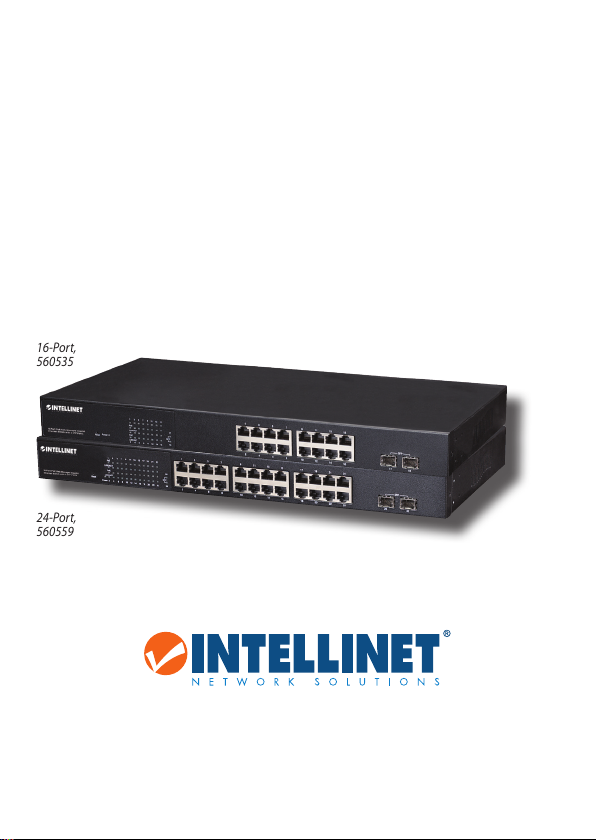
PoE WEB-MANAGED
GIGABIT ETHERNET
SWITCH
WITH 2 SFP PORTS
QUICK INSTALL GUIDE
MODELS 560535
& 560559
16-Port,
560535
24-Port,
560559
intellinet-network.com
Important: Read before use. • Importante: Leer antes de usar.
INT-560535/560559-QIG-ML1-0714-04
Page 2
PoE Web-Managed Gigabit Ethernet Switch English
Thank you for purchasing the Intellinet Network Solutions PoE Web-Managed
Gigabit Ethernet Switch
, Model 560535 (16-Port) or 560559 (24-Port). This guide
presents the basic steps to set up and operate this device. For detailed instructions
and specifications, refer to the user manual on the CD enclosed with this product
or at intellinet-network.com.
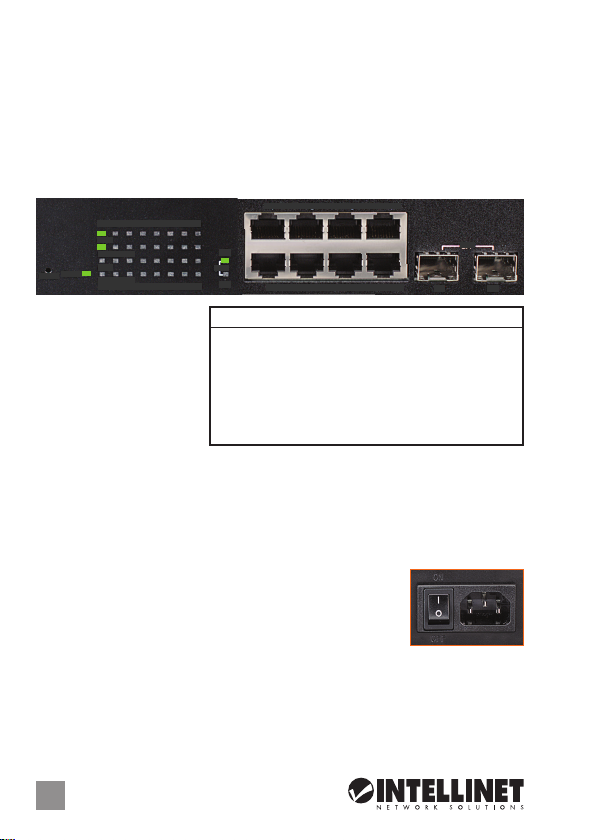
CONNECTIONS & INDICATORS
1 3 5 7 9 11 13 15
PoE
LINK/ACT
PoE
Power
Reset
LINK/ACT
2 4 6 8 10 12 14 16
LEDs
The LED indicators — Power,
PoE, Link/Activity — make it
easier to monitor the switch
and its connections.
Ports
All ports on the switch
support Auto-MDI/MDI-X
functionality, so crossover cables and uplink ports are not needed for connections
to PCs, routers, hubs, other switches, etc. Cat5/5e/6 UTP/STP cables provide
optimal performance; if a status LED doesn’t indicate a link or activity, check the
corresponding device for proper setup and operation. NOTE: The recessed Reset
button can be pressed (using a pin or similar pointed object) to reset the switch if
it isn’t responding.
Power
Use the included power cord to connect the device (next to
the On/Off switch on the rear panel) to an AC outlet. Confirm
that the power LED on the front panel is lit.
1 3 5 7
17
SFP
18
2 4 6 8
LED Status Operation
Power On Power on
Off Check the AC connection; turn the power on
PoE On Port is linked to a PSE/PoE device
Off No PSE/PoE device is linked
Link/Act On Valid port connection
& SFP Blinking Valid port connection; data transmitted/received
Off No link established
SFP
17 18
ON
OFF
INSTALLATION TIPS
Prior to use, it is recommended that the switch be placed/positioned:
•onalevelsurfacewithatleast25mm(approx.1”)ofclearanceforventilation;
•awayfromsourcesofelectricalnoise:radios,transmitters,broadbandampliers,
etc.
2
ENGLISH
Page 3
PoE Web-Managed Gigabit Ethernet Switch Deutsch
Vielen Dank für den Kauf des
Gigabit Ethernet Switch, Modell 560535
zanleitung zeigt die grundlegenden Schritte zur Einrichtung und Inbetriebnahme
dieses Geräts. Für genauere Anweisungen nutzen Sie bitte das beiliegende
Handbuch auf CD oder auf intellinet-network.com.
Intellinet Network Solutions
(16-Port) oder 560559 (24-Port)
PoE Web-Managed
. Diese Kur-
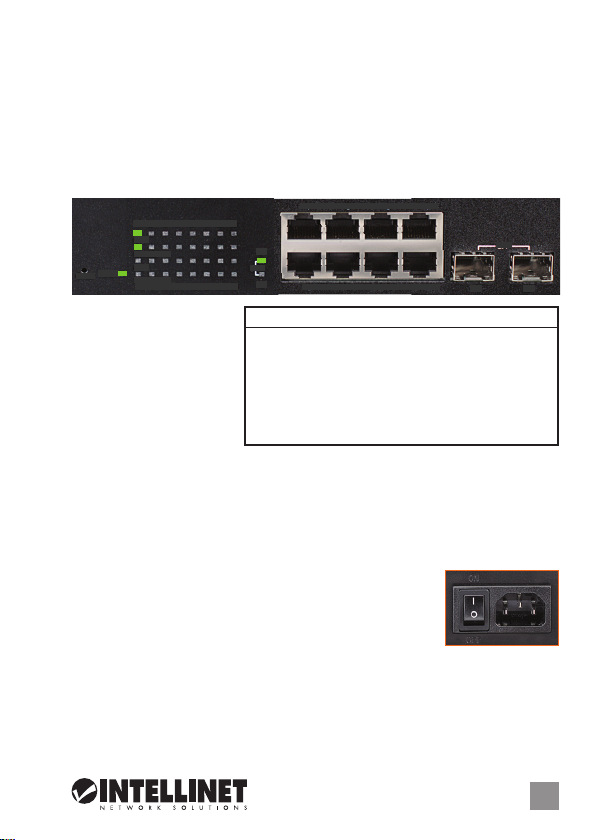
ANSCHLÜSSE & ANZEIGEN
1 3 5 7 9 11 13 15
PoE
LINK/ACT
PoE
Power
Reset
LINK/ACT
2 4 6 8 10 12 14 16
LED-Anzeigen
Die LEDs — Strom, PoE,
Verbindung/Aktivität —
vereinfachen das Ablesen
der Funktionen und
Anschlüsse.
Ports
Alle Ports unterstützen
Auto-MDI/MDI-X Funktionalität, daher werden Crosskabel und Uplink-Ports für
Verbindungen zu PCs, Routern, Hubs, anderen Switchen, etc. nicht benötigt.
Cat5/5e- UTP/STP-Kabel bieten die beste Performance. Wenn eine LED keine
Verbindung/Aktivität anzeigt, überprüfen Sie das verbundene Gerät. HINWEIS:
Der Reset-Knopf kann (mit einer Büroklammer oder ähnlichem) gedrückt werden,
um den Switch zurückzusetzen, falls er nicht mehr reagiert.
Strom
Schließen Sie das beiliegende Stromkabel an das Gerät (neben
dem An/Aus-Schalter) und an eine Steckdose an. Vergewissern
Siesichdassdie“Power”-LEDaueuchtet.
1 3 5 7
17
SFP
18
2 4 6 8
LED Status Operation
Power An Gerät wird mit Strom versorgt
Aus Stromanschluss prüfen/Gerät einschalten
PoE An Port ist mit PSE/PoE-Gerät verbunden
Aus Kein PSE/PoE-Gerät angeschlossen
Link/Act An Verbindung ist hergestellt
& SFP Blinkend Verbindung ist hergestellt; Datenübertragung
Aus Verbindung ist nicht hergestellt
SFP
17 18
ON
OFF
INSTALLATIONSTIPPS
Es wird empfohlen, den Switch vor der Nutzung folgendermaßen aufzustellen:
•aufebenemUntergrundmitmind.25mmRundumabstandfürausreichend
Luftdurchsatz
•fernvonanderenÜbertragungsgerätenwieRadio,Breitbandverstärker,etc.
DEUTSCH
3
Page 4
Switch Administrable por Web Gigabit Ethernet Español
Gracias por comprar el Switch Administrable por Web Gigabit Ethernet de
Network Solutions, Modelo 560535 (16 puertos) ó 560559 (24 puertos)
presenta los pasos básicos para instalar y operar este dispositivo. Para obtener
instrucciones detalladas y más especificaciones, consulte el manual de usuario
incluido en el CD o visite intellinet-network.com.
Intellinet
. Esta guía
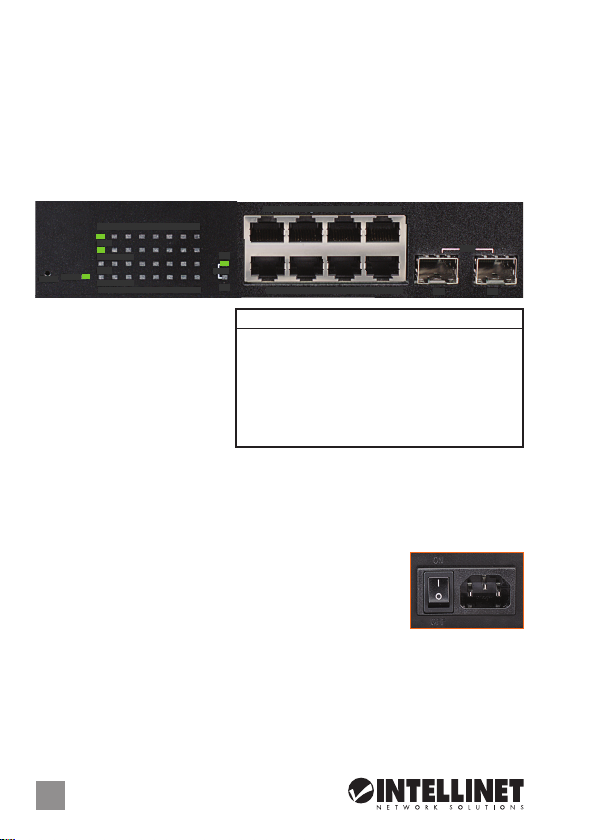
CONEXIONES E INDICADORES
1 3 5 7 9 11 13 15
PoE
LINK/ACT
PoE
Power
Reset
LINK/ACT
2 4 6 8 10 12 14 16
LEDs
Los LEDs — Power, PoE Link/
Activity — hacen mas facil
monitorear el switch y sus
conexiones.
Puertos
Todos los puertos del switch
soportan Auto-MDI/MDI-X , los
cables crossover y puertos de enlace no son necesarios para las conexiones para
PCs, routers, hubs, otros switches, etc. los cables Cat5/5e UTP/STP proporcionan
un redimiento optimo; Si un LED no indica conectividad ó actividad, compruebe
las conexiones sean adecuadas. NOTA: El botón reinicio se puede presionar (con
una aguja u otro objeto puntiagudo) para resetear el switch si no responde.
Alimentación
Utilice el cable de alimentación incluido para conectar el
dispositivo (junto al switch On /Off ) a una toma de CA.
Confirme que el LED en el panel frontal está encendido.
1 3 5 7
17
SFP
18
2 4 6 8
LED Status Operación
Power Encendido Encendido
Apagado Revise la conexión AC; encienda de nuevo
PoE Encendido Puerto vinculado a un dispositivo PSE/PoE
Apagado No hay un dispositivo PSE/PoE conectado
Link/Act Encendido Valide el puerto de conexión
& SFP Parpadeo Datos trasmitidos/recibidos
Apagado No hay comunicación
17 18
ON
OFF
SFP
TIPS DE INSTALACION
Antes de utilizarlo, se recomienda que el switch sea ubicado/fijado:
•sobreunasupercieplanaconalmenos25mmdeespaciolibreparaventilación;
•lejosdefuentesderuido:radios,transmisores,amplicadoresdebandaancha,
etc.
4
ESPAÑOL
Page 5

Commutateur PoE Gigabit Web Ethernet Français
Merci d’avoir acheté l’Intellinet Network Solutions Commutateur PoE Gigabit Web
Ethernet, modèle 560535
(16 ports) ou 560559 (24 ports)
. Ce guide décrit les bases
pour configurer et opérer cet appareil. Pour des instructions et spécifications
détailées, veuillez lire le manuel de l’utilisateur sur le CD inclus ou sur intellinetnetwork.com.
CONNEXIONS & INDICATEURS
1 3 5 7 9 11 13 15
PoE
LINK/ACT
PoE
Power
Reset
LINK/ACT
2 4 6 8 10 12 14 16
Les DEL
Les voyants d’état — PoE,
Alimentation, Connexion/
Activité — simplifient lire les
fonctions et les connexions.
Les ports
Tous les ports de ce
commutateur prennent en
charge la fonctionnalité Auto-MDI/MDI-X, donc des câbles croisés et des liaisons
montantes ne sont pas nécessaires pour des connections aux PC, routeurs, etc.
Des câbles Cat5/5e UTP/STP garantissent des performances optimales; si un DEL
n’indique pas d’activité, vérifiez l’appareil correspondant. REMARQUE: Le bouton
de reset peut être appuyé (avec un trombone ou un objet similaire) si le
commutateur ne réagit pas.
Alimentation
Connectez le cordon d’alimentation à l’appareil (à côté de
l’ interrupteur du réseau) et à une prise de courant. Vérifiez
queleDEL“Power”surlepanneauavantestallumé.
1 3 5 7
17
SFP
18
2 4 6 8
LED Status Operation
Power Allumé Appareil est alimenté
Éteint Vérifiez l’alimentation/Allumez l’appareil
PoE Allumé Port est connecté à un appareil PSE/PoE
Éteint Port n’est connecté pas à un appareil PSE/PoE
Link/Act Allumé Connexion est établie
& SFP Clignotant Connexion est établie; données sont transmises
Éteint Connexion n’est pas établie
SFP
17 18
ON
OFF
CONSIGNES D’INSTALLATION
Avant d’utiliser le commutateur, il est recommandé de le placer:
•surunesurfaceplaneavecunécartementde25mmd’autresobjetspourla
ventilation
•
loin des appareils électriques qui peuvent être source d‘interférence (des radios etc.)
FRANÇAIS
5
Page 6

Przełącznik Web-Smart Gigabit Ethernet PoE Polski
Dziękujemy za zakup Przełącznika Web-Smart Gigabit Ethernet PoE
Network Solutions
, model 560535
(16-portowy) lub 560559 (24-portowy)
instrukcja szybkiej instalacji przedstawia podstawowe kroki potrzebne do uruchomienia i obsługi urządzenia. Aby uzyskać szczegółowe informacje techniczne
oraz podręcznik użytkownika zapoznaj się z zawartością dołączonej płyty CD lub
odwiedź stronę intellinet-network.com.
Intellinet
. Niniejsza
PANEL PRZEDNI URZĄDZENIA
1 3 5 7 9 11 13 15
PoE
LINK/ACT
PoE
Power
Reset
LINK/ACT
2 4 6 8 10 12 14 16
Diody
Diody sygnalizacyjne LED
dla funkcji zasilania, PoE,
link/aktywności ułatwiają
monitorowanie przełącznika
i jego połączeń.
Porty
Wszystkie porty przełącznika
obsługują auto-krosowanie MDI/MDI-X, więc kabel krosowany oraz port
jest wymagany do połączenia z komputerami, routerami, czy innymi przełącznikami.
Kable Cat5/5e/6 UTP/STP zapewniają optymalną wydajność; jeśli diody statusu
nie sygnalizują linku lub aktywności, sprawdź podłączone urządzenie pod kątem
poprawności konfiguracji oraz jego zasilania. UWAGA: Znajdujący się w zagłębieniu
przycisk Reset należy wcisnąć cienkim narzędziem, aby zresetować przełącznik.
Zasilanie
Użyj znajdującego się w zestawie kabla zasilającego do
podłączenia przełącznika do gniazda sieci energetycznej.
Sprawdź, czy dioda zasilania (Power) zapaliła się.
1 3 5 7
17
SFP
18
2 4 6 8
Dioda Status Objaśnienie
Power On (wł.) Urządzenie włączone
Off (wył.) Sprawdź, czy zasilanie jest podłączone; włącz urządzenie
PoE On (wł.) Port jest połączony z urządzeniem PoE
Off (wył.) Nie ma połączenia z urządzeniem PoE
Link/Act On (wł.) Prawidłowe podłączenie portu
& SFP
Migająca Prawidłowe podłączenie portu; transmisja/odbiór pakietów
Off (wył.) Nie nawiązano połączenia
SFP
17 18
uplink nie
ON
OFF
WSKAZÓWKI INSTALACYJNE
Zaleca się, aby urządzenie w trakcie użytkowania było umiejscowione:
•dlazapewnieniadobrejwentylacjiwodległościconajmniej25mmobudowy
urządzenia od podłoża, na którym się znajduje;
•zdalaodźródełzakłóceńelektrycznych:radia,nadajniki,itp.
6
POLSKI
Page 7

Gigabit PoE a Web Management Ethernet Switch Italiano
Grazie per aver scelto
Network Solutions
guida fornisce le basi essenziali per il settaggio e il funzionamento dell’apparecchiatura.
Per istruzioni più dettagliate e maggiori specifiche, far riferimento al manuale d’istruzioni
contenuto nel CD allegato al prodotto o visitare intellinet-network.com.
CONNESSIONI E INDICATORI
Power
Reset
LEDs
Gli indicatori LED — Power,
PoE, Link/Activity — permettono
di monitorare facilmente lo
switch e le sue connessioni.
Porte
Tutte le porte dello switch
supportano la funzionalità
Auto-MDI/MDI-X, così cavi incrociati e porte uplink non sono necessarie per connessioni
a PC, router, hub, altri switch, etc. I cavi Cat5/5e/6 UTP/STP forniscono ottimali
prestazioni; se il LED di stato non indica una connessione o un’attività, verificare la
corrispondente periferica per un corretto settaggio e funzionamento. NOTA: Il tasto
rientrante Reset può essere premuto (usando uno spillo o un simile oggetto appuntito)
per resettare lo switch se questo non risponde.
Alimentazione
Utilizzare il cavo di alimentazione per collegare l’apparecchiatura
(vicino all’interruttore posto sul pannello posteriore) alla presa di
corrente AC. Verificare che il LED di alimentazione sul pannello
frontale è illuminato.
il Gigabit PoE a Web Management Ethernet Switch
, Modello 560535 (16-porte) o 560559 (24-porte). La presente
1 3 5 7 9 11 13 15
PoE
LINK/ACT
PoE
LINK/ACT
2 4 6 8 10 12 14 16
1 3 5 7
17
SFP
18
2 4 6 8
LED Stato Operazione
PWR Acceso Acceso
Spento Verificare la connessione AC; accendere l’apparecchio
PoE Acceso Porta collegata alla periferica PSE/PoE
Spento Nessuna periferica PSE/PoE è collegata
LNK/ Acceso Porta di connessione valida
ACT
Lampeggiante Porta di connessione valida; trasmissione/ricevimento dati
& SFP
Spento Nessuna connessione stabilita
Intellinet
SFP
17 18
ON
OFF
SUGGERIMENTO PER L’INSTALLAZIONE
Prima dell’uso, si raccomanda che lo switch venga posizionato:
• suunasuperciepianaconalmeno25mmdispazioliberoperunacorretteventilazione
•lontanodafontididisturboelettrico:radio,trasmettitori,amplicatoriabandalarga,etc.
ITALIANO
7
Page 8

WASTE ELECTRICAL & ELECTRONIC EQUIPMENT
(applicable in the European Union and other European countries with separate collection systems)
ENGLISH
This symbol on the product or its packaging indicates that this product shall not be treated as household
waste. Instead, it should be taken to an applicable collection point for the recycling of electrical and
electronic equipment. By ensuring this product is disposed of correctly, you will help prevent
potential negative consequences to the environment and human health, which could otherwise
be caused by inappropriate waste handling of this product. If your equipment contains easily
removable batteries or accumulators, dispose of these separately according to your local
requirements. The recycling of materials will help to conserve natural resources. For more
detailed information about recycling of this product, contact your local city office, your household waste
disposal service or the shop where you purchased this product. In countries outside of the EU: If you wish
to discard this product, contact your local authorities and ask for the correct manner of disposal.
DEUTSCH
Dieses auf dem Produkt oder der Verpackung angebrachte Symbol zeigt an, dass dieses Produkt nicht mit
dem Hausmüll entsorgtwerdendarf. In Übereinstimmungmitder Richtlinie 2002/96/EG des Europäischen
Parlaments und des Rates über Elektro- und Elektronik-Altgeräte (WEEE) darf dieses Elektrogerät nicht
im normalen Hausmüll oder dem Gelben Sack entsorgt werden. Wenn Sie dieses Produkt entsorgen
möchten, bringen Sie es bitte zur Verkaufsstelle zurück oder zum Recycling-Sammelpunkt Ihrer Gemeinde.
ESPAÑOL
Este símbolo en el producto o su embalaje indica que el producto no debe tratarse como residuo doméstico.
De conformidad con la Directiva 2002/96/CE de la UE sobre residuos de aparatos eléctricos y electrónicos
(RAEE), este producto eléctrico no puede desecharse con el resto de residuos no clasificados. Deshágase
de este producto devolviéndolo a su punto de venta o a un punto de recolección municipal para su
reciclaje.
FRANÇAIS
Ce symbole sur Ie produit ou son emballage signifie que ce produit ne doit pas être traité comme un
déchet ménager. Conformément à la Directive 2002/96/EC sur les déchets d’équipements électriques
et électroniques (DEEE), ce produit électrique ne doit en aucun cas être mis au rebut sous forme de
déchet municipal non trié. Veuillez vous débarrasser de ce produit en Ie renvoyant à son point
de vente ou au point de ramassage local dans votre municipalité, à des fins de recyclage.
ITALIANO
Questo simbolo sui prodotto o sulla relativa confezione indica che il prodotto non va trattato come un rifiuto
domestico. In ottemperanza alla Direttiva UE 2002/96/EC sui rifiuti di apparecchiature elettriche ed
elettroniche (RAEE), questa prodotto elettrico non deve essere smaltito come rifiuto municipale misto. Si
prega di smaltire il prodotto riportandolo al punto vendita o al punto di raccolta municipale locale per un
opportuno riciclaggio.
POLSKI
Jeśli na produkcie lub jego opakowaniu umieszczono ten symbol, wówczas w czasie utylizacji nie wolno
wyrzucać tego produktu wraz z odpadami komunalnymi. Zgodnie z Dyrektywą Nr 2002/96/WE w sprawie
zużytego sprzętu elektrycznego i elektronicznego (WEEE), niniejszego produktu elektrycznego nie wolno
usuwać jako nie posortowanego odpadu komunalnego. Prosimy o usuniecie niniejszego produktu
poprzez jego zwrot do punktu zakupu lub oddanie do miejscowego komunalnego punktu zbiórki
odpadów przeznaczonych do recyklingu.
Disposal of Electric and Electronic Equipment
8
Page 9

REGULATORY STATEMENTS
This equipment has been tested and found to comply with the limits for a Class A digital device,
pursuant to Part 15 of the Federal Communications Commission (FCC) Rules. These limits are
designed to provide reasonable protection against harmful interference when the equipment
is operated in a commercial environment. This equipment generates, uses and can radiate radio
frequency energy, and if not installed and used in accordance with the instruction manual may
cause harmful interference to radio communications. Operation of this equipment in a residential
area is likely to cause harmful interference, in which case the user will be required to correct
the interference at his own expense. Any changes or modifications made to this equipment without
the approval of the manuafacturer could result in the product not meeting the Class A limits, in
which case the FCC could void the user’s authority to operate the equipment.
English: This device complies with the requirements of R&TTE Directive 1999/5/EC. The Declaration of
Conformity for this product is available at:
Deutsch: Dieses Gerät enspricht der Direktive R&TTE Direktive 1999/5/EC. Die Konformitätserklärung
für dieses Produkt finden Sie unter::
Español: Este dispositivo cumple con los requerimientos de la Directiva R&TTE 1999/5/EC. La declaración de conformidad para este producto esta disponible en:
Français: Cet appareil satisfait aux exigences de la directive R&TTE 1999/5/CE. La Déclaration de
Conformité pour ce produit est disponible à l’adresset :
Polski: Urządzenie spełnia wymagania dyrektywy R&TTE 1999/5/EC. Deklaracja zgodności dostępna
jest na stronie internetowej producenta:
Italiano: Questo dispositivo è conforme alla Direttiva 1999/5/EC R&TTE La dichiarazione di conformità
per questo prodotto è disponibile al:
FCC Class A
CE / R&TTE
intellinet-network.com
9
Page 10

WARRANTY INFORMATION
ENGLISH:
For warranty information, go to intellinet-net work.com/warranty.
DEUTSCH:
Garantieinformationen finden Sie hier unter intellinet-ne twork.com/war ranty.
ESPAÑOL:
Si desea obtener información sobre la garantía, visite intellinet-net work.com/warranty.
FRANÇAIS:
intellinet-network.com/warranty.
POLSKI:
ITALIANO:
EN MÉXICO: Póliza de Garantia Intellinet — Datos del importador y responsable ante el consumidor
IC Intracom México, S.A.P.I. de C.V. • Av. Interceptor Poniente # 73, Col. Parque Industrial La Joya, Cuautitlán
Izcalli, Estado de México, C.P. 54730, México. • Tel. (55)1500-4500
La presente garantía cubre este producto por 3 años contra cualquier defecto de fabricación en sus
materiales y mano de obra, bajo las siguientes condiciones:
1. Todos los productos a que se refiere esta garantía, ampara su cambio físico, sin ningún cargo para
el consumidor.
2. El comercializador no tiene talleres de servicio, debido a que los productos que se garantizan no
cuentan con reparaciones, ni refacciones, ya que su garantía es de cambio físico.
3. La garantía cubre exclusivamente aquellas partes, equipos o sub-ensambles que hayan sido instaladas
de fábrica y no incluye en ningún caso el equipo adicional o cualesquiera que hayan sido adicionados
al mismo por el usuario o distribuidor.
Para hacer efectiva esta garantía bastará con presentar el producto al distribuidor en el domicilio donde
fue adquirido o en el domicilio de IC Intracom México, S.A.P.I. de C.V., junto con los accesorios contenidos
en su empaque, acompañado de su póliza debidamente llenada y sellada por la casa vendedora
(indispensable el sello y fecha de compra) donde lo adquirió, o bien, la factura o ticket de compra
original donde se mencione claramente el modelo, número de serie (cuando aplique) y fecha de
adquisición. Esta garantía no es válida en los siguientes casos: Si el producto se hubiese utilizado en
condiciones distintas a las normales; si el producto no ha sido operado conforme a los instructivos de
uso; o si el producto ha sido alterado o tratado de ser reparado por el consumidor o terceras personas.
Pour consulter les informations sur la garantie, rendezvous à l’adresse
Informacje dotyczące gwarancji znajdują się na stronie intellinet-network.com/warranty.
Per informazioni sulla garanzia, accedere a intellinet-net work.com/warranty.
North & S outh Ameri ca
IC Intracom Americas
550 Commerce Blvd.
Oldsmar, FL 34 677
USA
All trade marks and tra de names are the p roperty o f their respe ctive owner s.
Alle Marken und Markennamen sind Eigentum Ihrer jeweiligen Inhaber.
Todas las marcas y nombres comerciales son propiedad de sus respectivos dueños.
Toutes les mar ques et noms comm erciaux sont l a propriété de l eurs propri étaires resp ectifs.
Tutti i marchi registrati e le dominazioni commerciali sono di proprietà dei loro rispettivi proprietari.
10
Wszys tkie znaki tow arowe i nazw y handlowe nale żą do ich właśc icieli.
Asia & Afr ica
IC Intraco m Asia
4-F, No. 77, Sec. 1, Xintai 5th R d.
Xizhi Dis t., New Taipei Cit y 221
Taiw an
Europe
IC Intracom Europe
Löhbach er Str. 7
D-58553 Halver
Germany
Page 11

Page 12

Intellin et is a trademark o f IC Intracom, re gistered in the U. S. and other count ries.
© IC Intraco m. All rights res erved.
 Loading...