

Page 1
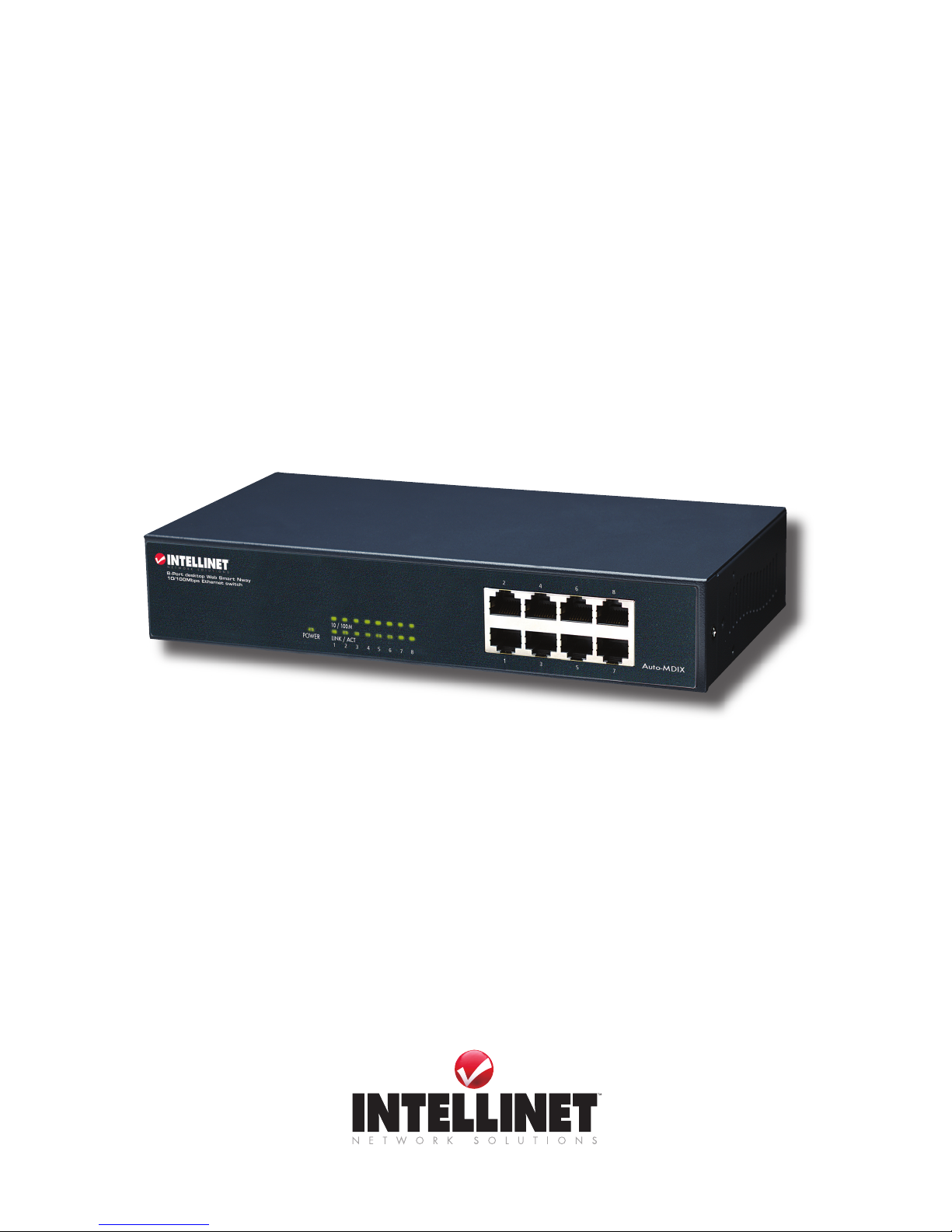
8 PORT FAST
ETHERNET
WEB-SMART
SWITCH
USER
MANUAL
MODEL 523783
INT-523783-UM-0407-01
Page 2

Page 3

INTRODUCTION
Thank you for purchasing the INTELLINET NETWORK SOLUTIONS™ 8-Port Fast Ethernet
Web-Smart Switch, Model 523783.
This device is designed for growing businesses that want control over their network without
the cost and complexity of a full Layer 2/Layer 3 management implementation. This highperforming switch features a non-blocking wire-speed architecture for maximum data
throughput. All RJ-45 ports automatically negotiate to the highest speed and support Auto
Uplink™ technology to make the right link. In addition, an intuitive, Web-browser interface
offers the simple Smart Switch management, making it a snap to monitor switch performance,
congure ports, even set up port trunks, VLANs and trafc prioritization.
Shipped ready for use straight out of the box, INTELLINET NETWORK SOLUTIONS WebSmart Switches are ideal for adding basic management to your unmanaged networks and
extending your managed networks. The easy-to-follow instructions in this user manual help
make setup and operation quick and simple, so you’ll also soon be enjoying the benets of
these additional features:
• 10/100 Mbps auto-sensing Auto-MDIX RJ-45 ports automatically detecting optimal network
speeds
• Conguration via Web browser
• Supports NWAY Auto-Negotiation
• Store and forward switching architecture
• Full/half duplex operation
• IEEE 802.3x ow control for full duplex
• Zero packet loss back-pressure ow control for half duplex
• Packet ltering/forwarding rates: 148,800 pps (100 Mbps), 14,880 pps (10 Mbps)
• Supports port-based VLAN, 4 groups
• Supports three types of QoS: port-based, 802.1p and DiffServ
• Supports Spanning Tree protocol
• Bandwidth control for all ports with 8 levels
• Broadcast storm control
• Supports MAC address port security
• Supports user-dened maximum forwarding packet size (1536 or 1552)
• Supports up to 1024 MAC address entries
• 128 kBytes buffer memory
• Lifetime Warranty
3
INTRO DUCTION
Page 4
CONFIGURATION
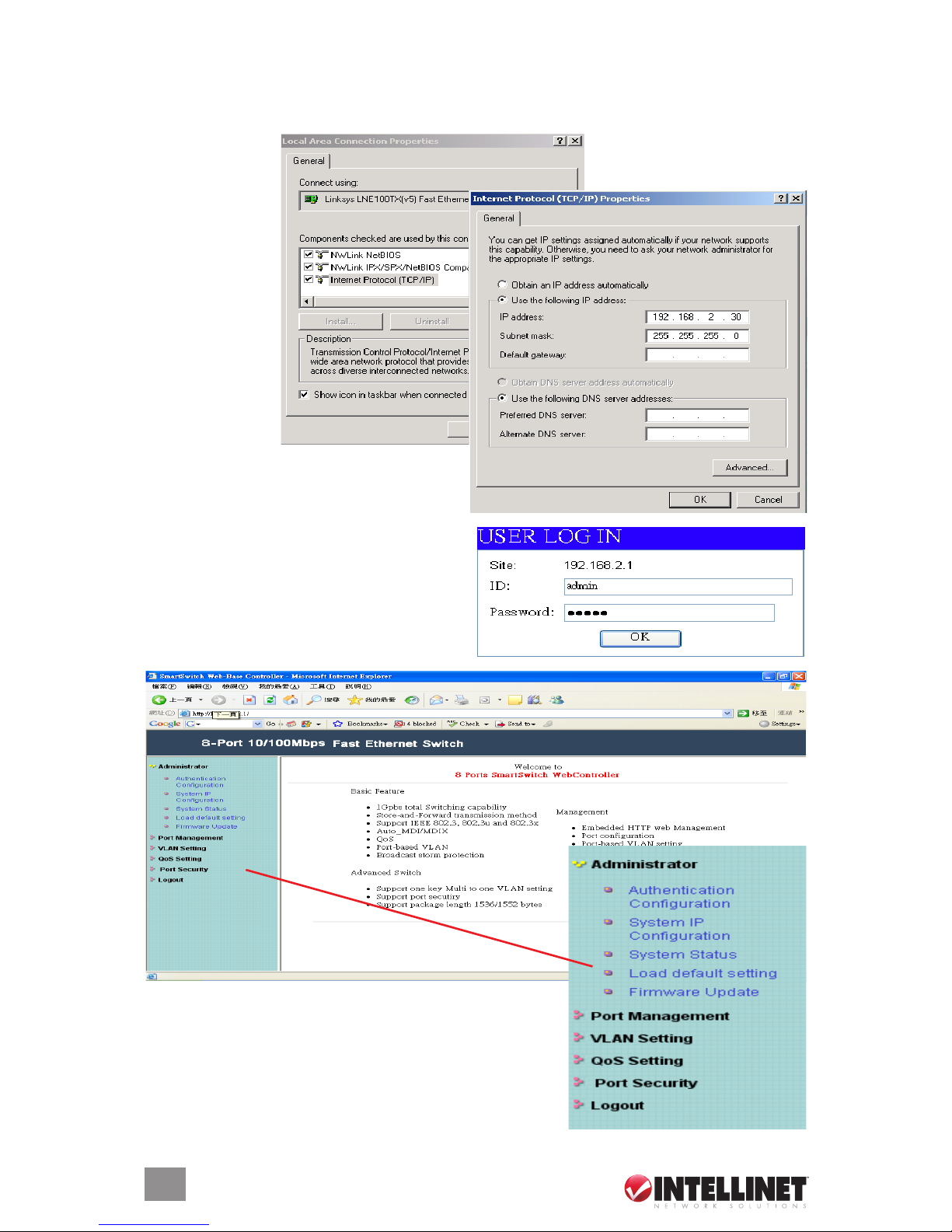
1. Use a twisted pair cable to connect the Web-Smart Switch to your PC, then turn on power to
the switch.
2. Set your PC’s IP
to 192.168.2.xx.
3. Open your Web browser, then go to the
192.168.2.1 site to display the login screen
(right). Key in the username and password
(the factory defaults are “admin” for both).
Click “OK” to continue to the Web-Smart
Switch’s Welcome screen.
The Welcome screen presents the conguration menu
options for the Web-Smart Switch settings in the left-hand
column, as shown at right: Administrator, Port Management,
VLAN Setting, QoS Setting, Port Security and Logout.
4
CONFIGUR ATION
Page 5

Administrator
Authentication
If you change the password — or create a new username and password — ll in the
appropriate elds, then click “Update.” Restart the switch to effect any change.
System IP Conguration
If you change the IP address, ll in the appropriate eld(s); click “Update” to effect any change.
System Status
On this screen, you can view the switch’s MAC address and designate System Time-Out
Handling as either “Back to the last display” or “Logout (Default).”
5
CONFIGUR ATION
Page 6

Load Default Setting
To load the factory default settings, click “Load,” then restart the switch to effect the change.
Firmware Update
To update with new rmware, follow the instructions on this screen.
Port Management
Port Conguration
6
CONFIGUR ATION
Page 7

Port No. lets you select the port number you want to congure from the drop-down menu.
Link Capability lets you set the selected port in either Auto-Nego(tiation) mode or Force mode
on 100M or 10M.
Duplex lets you designate the selected port as full or half duplex.
Tx & Rx lets you enable or disable the selected port.
Bandwidth Control
Port No. lets you select the port number you want to congure from the drop-down menu.
Tx Rate lets you set the transmission rate for the selected port: 128 kbps, 256 kbps, 512 kbps,
1 Mbps, 2 Mbps, 4 Mbps, 8 Mbps or Full (no limit).
Rx Rate lets you set the receiving rate for the selected port: 128 kbps, 256 kbps, 512 kbps,
1 Mbps, 2 Mbps, 4 Mbps, 8 Mbps or Full (no limit).
Broadcast Storm Control
This screen lets you enable/disable the broadcast storm protection feature.
7
CONFIGUR ATION
Page 8
8
CONFIGUR ATION
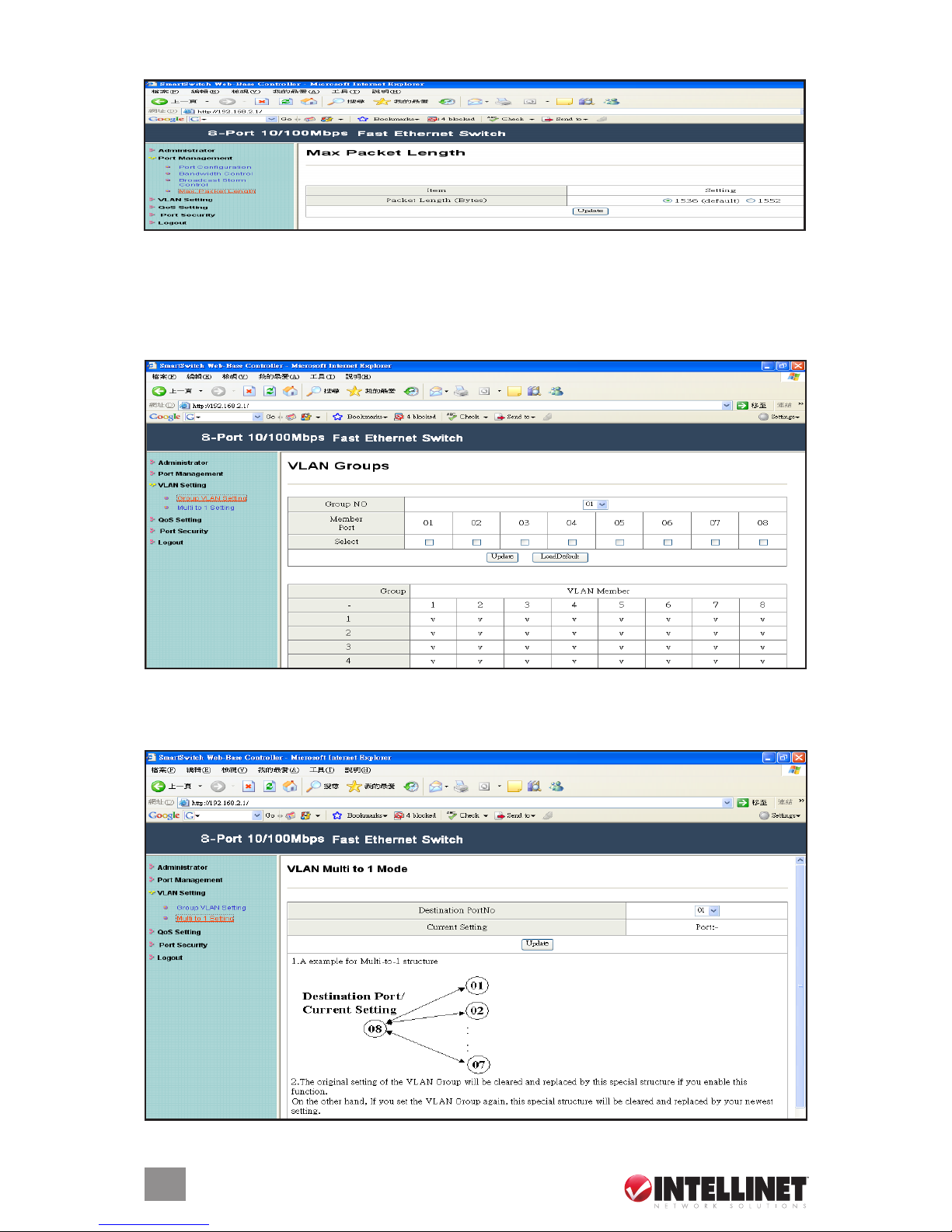
Max Packet Length
Here, select either 1536 or 1552 Bytes as the maximum packet length supported by the switch.
VLAN Setting
Group VLAN Setting
Four VLAN groups can be used. Select a group, then click the port number you want included.
VLAN Multi to 1 Mode
Once this setting’s been activated, ports can only connect with the designated destination port.
Page 9

9
CONFIGUR ATION
QoS Setting
Class of Service Conguration
On this screen, select the class of service for each port.
High Priority Queue Conguration
On this screen, select the Weight Round Robin weight: 1/4 or 1/8.
Customization DiffServ
To change the settings, follow the instructions on the screen.
Page 10
10
SPECIFICATIONS
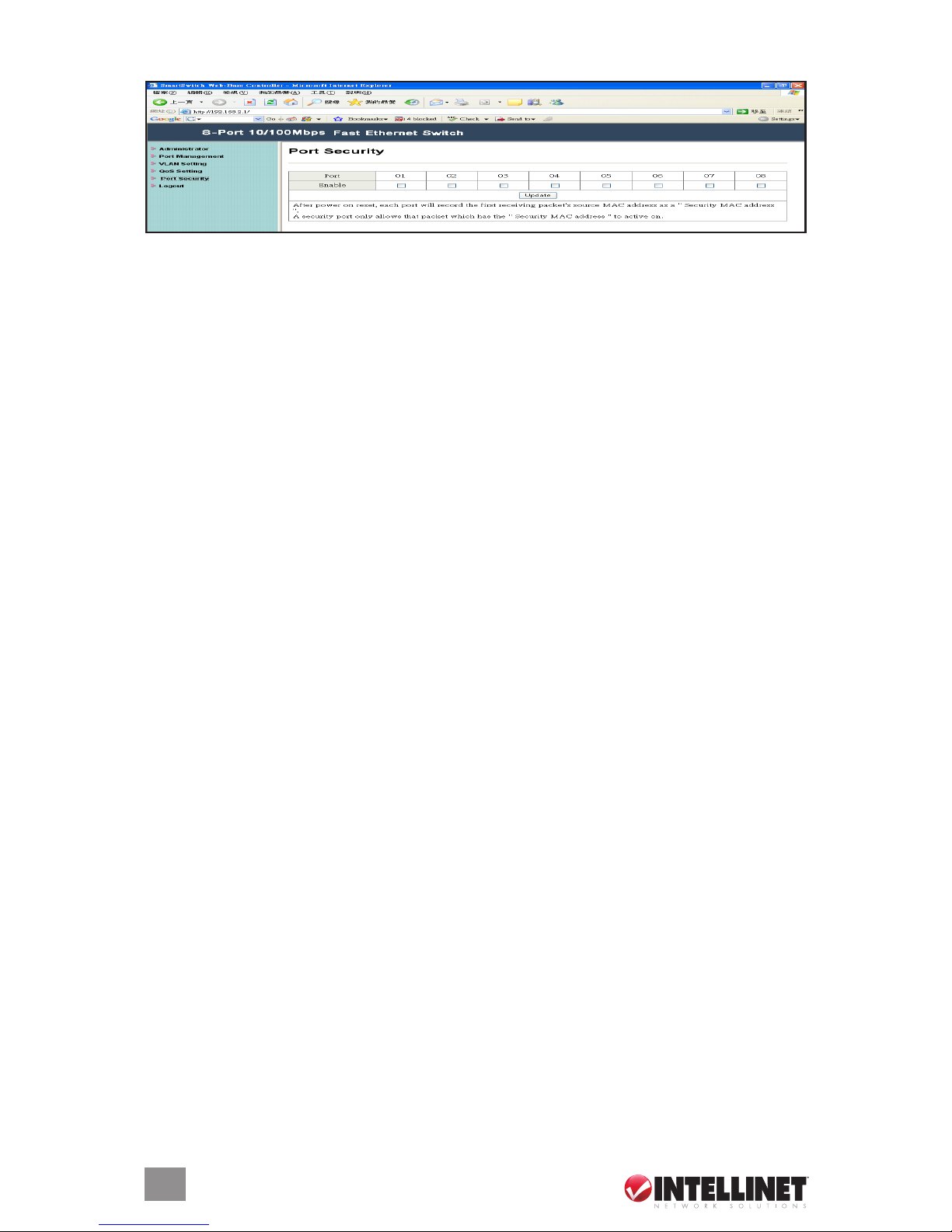
Port Setting
When this function is enabled, the port will record the rst receiving-source MAC address as the
security MAC address, and will allow only the packet which has the MAC address to be active
on the port.
Logout
Click to log off.
SPECIFICATIONS
Standards
• IEEE 802.3 (10Base-T Ethernet)
• IEEE 802.3u (100Base-TX Fast Ethernet)
• IEEE 802.3x (ow control, for full duplex mode)
• IEEE 802.1p (QoS)
General
• Media support:
- 10Base-T Cat3, 4, 5 UTP/STP RJ-45
- 100Base-TX Cat5 UTP/STP RJ-45
• Packet lter/forwarding rate:
- 148,800 pps (100 Mbps)
- 14,880 pps (10 Mbps)
• Backplane speed: 1.6 Gbps
• Buffer memory: 128 kBytes
• MAC address table: 1024 entries
• Switch architecture: store and forward
• Certications: FCC Class B, CE Mark
Smart Features
• Port-based VLAN: 4 groups
• QoS Quality of Service:
- port-based
- tag-based
- DiffServ
• Port conguration options
- enable/disable
- 10, 100 Mbps or auto-negotiation
- full duplex or half duplex
- bandwidth control
- MAC address port security enable/disable
• Bandwidth control options: 128 / 256 / 512 /
1,024 / 2,048 / 4,096 / 8,192 kbps; no limit
LEDs
• Power
• Link/Tx
• 10/100 Mbps
Power
• Internal power supply, 100 – 240 V AC,
50/60 Hz
• Power consumption: 4 Watts (maximum)
Environmental
• Metal housing, desktop size
• Dimensions: 230 (W) x 123 (L) x 44 (H) mm
(9 x 4.8 x 1.7 in.)
• Weight: 0.9 kg (2.0 lbs.)
• Operating temperature: 0 – 60°C (32 –
140°F)
• Operating humidity: 10 – 90% RH,
non-condensing
• Storage temperature: -20 – 90°C (-4 –
194°F)
Package Contents
• Fast Ethernet Web-Smart Switch
• 19” mounting brackets
• Power cable
• User manual
Page 11

Page 12

Are you completely satised with this product?
Please contact your INTELLINET NETWORK SOLUTIONS™ dealer
with comments or questions.
Copyright © INTELLINET NET WORK
SOLUTIONS
All products mentioned are trademarks or registered trademarks of their respective owners.
www.intellinet-network.com
 Loading...