

Page 1
User Manual
MULTIMEDIA PLAYER
Inphic
Read your Us er Manual f irst for quic k tips that mak e
using your I nphic pro duct more enj oyable.
Thank you fo r choosin g
real
If you have read your instructions an d still need a ssistanc e, you
may access our online help.
Website: http://www.inphic.com
R
Page 2
Tip s
Warni ng
Op e r a t i o n tips
Wa r n i n g m e ssag e
2
Contents
Features highlight......... ............................. ........ .................2
Package contents ............ ............................. .....................2
1.Product overview .......... ............................. ....................3
2.Connections ..... ........ ............................. .......................4
3.Main menu
3.1.Adjust settings . ............................. ........ .................6
3.2.Select device ... ..................................... ..................7
4.Playback Features
4.1.Play movie ...... ............................. ..........................8
4.2.Play music ...... ............................. .........................9
4.3.Play photo ...... ............................. ........................10
4.4.Play e-book ..... ............................. ........ ...............11
5.File management
5.1.All file list ..... ............................. ........ ..................11
5.2.File edit ....... ................... ........... ..........................11
5.3.Software upgrad e ........ ...... ........................ ..........12
Troubles hooting. ............................. ............................. ..13
Specifications ............ ......... ..................... .....................14
1
Features & Accessories
²Full functi on remo te co ntrolled, especially the powe r suppl y of external hard
disk an d main CPU can be sh ut down by remote control ler;
²Support time seek playbac k, five b ookmark s playback and re su ming pla yback
from th e last stopped point;
²Support A-B repe at pla yback;
²Support LED to indica te curre nt video output mode;
²SupportF ull fu nc tion remote co ntrol;
²Supp o rt La s t mov i e /pic t u re/mu s ic di r e ctor y entr y with remote c ontro l
“movie/p icture/ music” key,an d “ ”
²Support Contra st ,bright ness and saturat ion ad justable;
²Vid eo Pla yb ack: support AVI, MPG, MPEG , RM/RMV B, DIVX, XVID, VOB,
DAT,mo tion-jp eg(only for i6) etc. vid eo format s, a nd suppor t mu lti-sub titles, the
various sub titles files can be :
are adju stable, support movie one time play back over,and sup port movi e
playback or fa st forward/b ackward pl ay back with cur rent time or the rest of time
display;
²Music playbac k: su pport MP3, WMA, OG G and AAC file fo rmat, and Suppo rt
ID3, synchron ized lyrics displ ay,su pport music shuffle listed play back,or der
listed playbac k, MP3 A-B repeat playback ;
²Picture Play ba ck: support JPEG, BMP, TIFF, GIF et c . Slides how ca n supp ort
above 12 modes, support picture playbac k with backgro und musi c;
²Independ ent fro m PC, sup port to c opy/move/ delete files bet ween ex te rnal
storage( i8 sup po rt Fat /Fat 32 partitio n only);
²Support YPbPr, AV( CVBS) and VGA vi deo o utput, suita bl e for TV or compute r
display( no VGA for i6) ;
²Two high-sp eed USB2.0 hos t i nterfac e, support all kin ds of USB stora ge
device(o nly on e for i6 and two for i8);
²OSD mul ti-lang ua ges:sim plified Chinese ,traditio nal Chin ese an d Englis h;
3456Volume +/- key uninterr upted re sponse;
*.srt,*. smi,*.s sa , * .sub, and the font size and color
User manua l:1
Remote con trol:1
AV cab le(YRW):1
Componen t cable(G BR):1
In case of mis sing or inc ompletene ss of the abo ve a ccessor ies, please
contact yo ur dealer w ithout dela y.( No te: Porta ble HDD is opti onal )
Warni ng
使用
说
明书
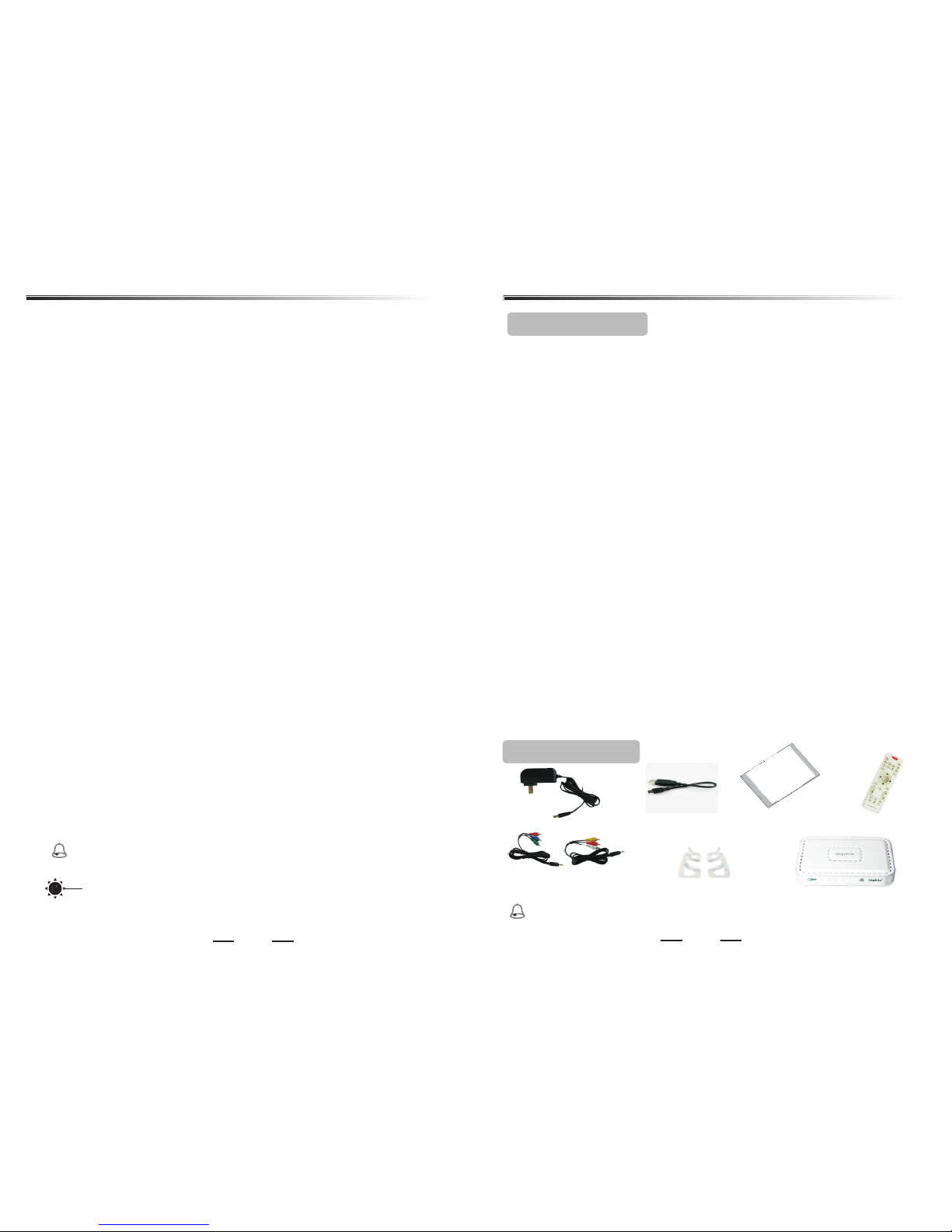
Power adap ter:1
Package contents
Brackets:2
Media play er:1
Features highlight
USB harddi sk
connecti on line:1
Page 3
+
VOL
MENU
TV MODE
MUTE
INFO
TIME SEEK
PHOTO
MUSIC
MARK
MOVIE
FILE
比?
AUDIO
16:9/4:3
ZOOM
PLAY/PAUSE
ROTATE
SUBTITLE
EXIT
确认
ENTER
NEXT
STOP
PREV
Mul timed ia Play er
-
3
Product overview
4
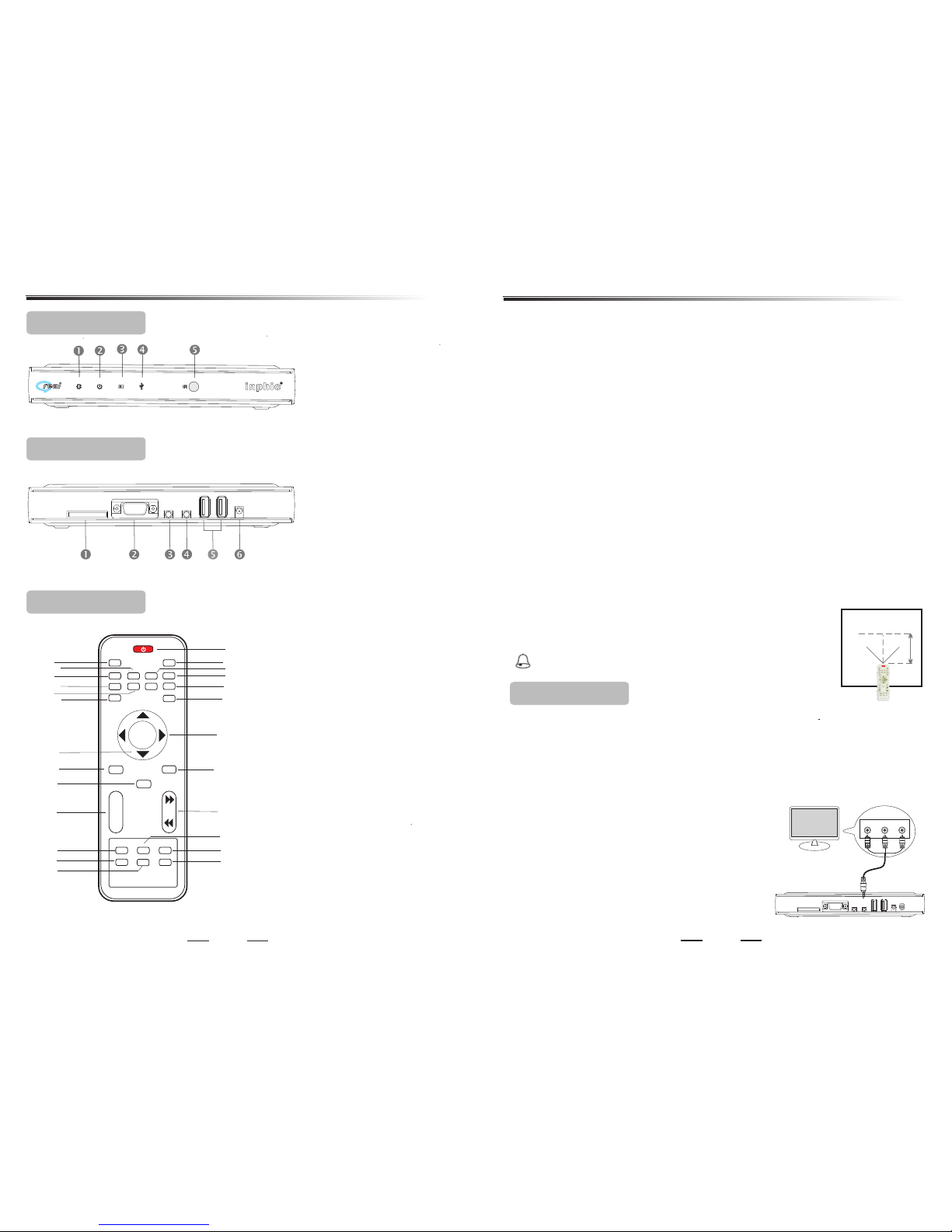
Power LED
Standby LED
Card LED
USB LED
IR Sensor
u
v
w
y
x
u
v
w
x
y
z
SD/MMC/XD/MS
VGA out(only for i8)
Component out
Composite out
USB2.0 port(one for
i6 and, two for i8)
5V-DC in
后面板 说 明
1
2
3
4
11
12
6
17
19
7
13
14
18
20
8
10
15
16
9
5
22
24
21
23
25
(1)P ow er :
To switch stan dby mode on \off .
(2)M ut e : To swi tch sound o n\off.
(3)T V mo de :
To switch vide o output mo de.
(4)P ic tu re :
Hotkey to ac cess the la st entry of
picture di rectory.
(5)M ov ie : H otkey to ac cess the last
entry of mov ie direct ory.
(6)M us ic :
Hotkey to ac cess the la st entry of mus ic
director y.
(7)F il e : Ho tkey to acc es s file menu .
(8)M ar k : To mak e five vide o
bookmark s at most or ac cess
bookmark s menu.
(9)Time se ek : Time sear ch play back.
(10)9/::
(11) <: Stop play ing or use to mar k the
selected f ile in file m enu;In musi c
items,to m arkþ music file s while
making lis t of contin uous or rando m
playback o f music.
Previous c hapter( page) /
next chapt er(page ).
Remote control
后面 板说 明Rear panel
后面 板说 明Front panel
Y/Pb/Pr
SD/MMC/XD/MS
USB2.0
DC 5V
VGA
A/V
(12)In fo : To display th e video file in formation o r current t ime or the rest o f time or
the pictur e informa tion while pl aying a vid eo o r a picture ; To show the file ed it
menu while o peratio n of file (movi ng,copy in g,delet ing etc.);I n music ite ms,to
access con tinuous o r random musi c playbac k me nu.
(13)3/4: Le ft/righ t /p age up/pa ge down or fast b ackward /forward wh en playin g
movie/mu sic;To chan ge the subtit le font size or c olor toge ther with S ub title k ey.
(14)5/6: Up/ down or to co ntrol volum e +/-.
(15)Ex it : To return to th e previous me nu.
(16)Me nu : To return to ma in menu;To use as “ A-B repeat ke y” while pl aying
movie or mus ic.
(17)7/8: Fa st backwa rd/forwar d when play in g video/m usic.
(18)En te r :Enter/ confirm or pl ay/stop.
(19)Zo om : To Zoom in vide o or picture.
(20)Volum e +/ - :To change volu me of video /m usic .
(21)4;:Play or pau se.
(22)Au di o :To switch au dio channel .
(23)Su bt itle :To turn o n/off subtitle sh ow, and to cha nge the subti tle font si ze or
color.
(24)16 :9 /4:3 :To swit ch video aspe ct ratio.
(25)Ro ta te :To rotate p icture to 90、18 0、270 degre e.
Remove bat teries if t hey are exhau sted or if the re mote
icontrol n ot to be used f or a long time.
Please usi ng the remo te control in t he effective di stance to
make sure it o peratio n well.
q Notic e fo r remot e co nt rol:
Warni ng
45
45
5M
Ò ¿ Æ
2.1 Using AV cable out (CVBS)
Use the AV cable to co nnect the pla yer jack
to the v id eo i n jack on TV, and m ake sure the
cable colo r is the same w ith the jack.
's AV
Change you r TV source to AV mode, n ow you
can see the pl ay's menu o n TV. If the menu
's TV mo de key
's
you
see is skew or t he color is i ncorrect, y ou can
change the o utput mod e to NTSC compo sit by
the remote c ontrol ( Default
system out put mode is : PAL compo si te).
Impo rta nt!
FIf you can see n othing on TV, probably bec ause syst em video outp ut is
mismatch w ith your co nnection, p lease che ck i t refer to th e following o ptions.
FYou only n eed to make one v ideo conn ection form t he follow ing options ,
dependin g on the capa bilities of y our telev ision.
Connections
VIDEO
L-AUDI O-R
Medi a playe r
TV
YPbPr
SD/MMC/XD/MS
USB2.0
DC 5V
VGA
AV
POWER
Connections
Page 4
5
6
Connections
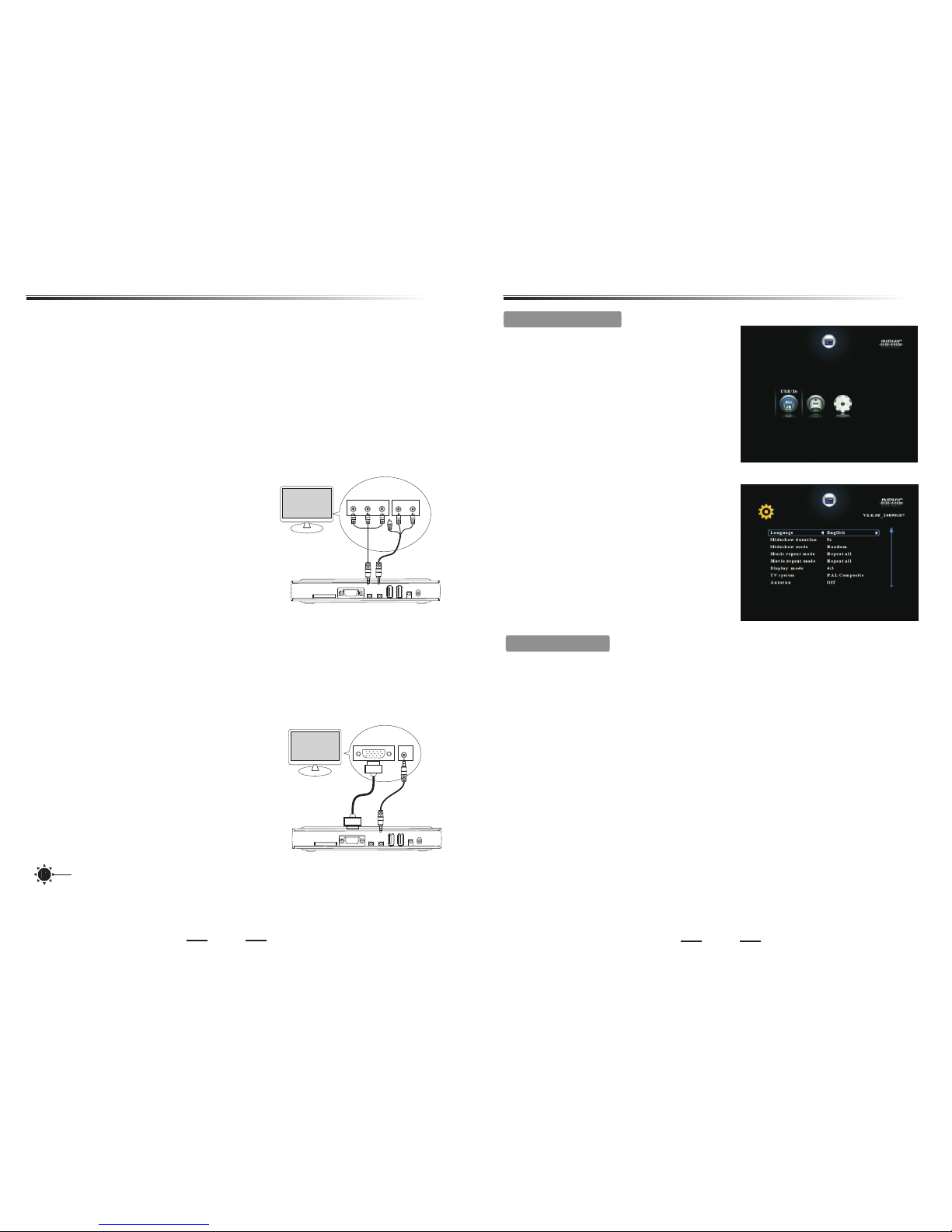
Use the comp onent vid eo cable (
red/blue /green ) to c onnect the pl ayer
To hear sound of t he player t hrough your
televisi on, use the AV cable( white/r ed)to
connect AV jack o f player to the
correspo nding L -A udio- R jack s on the
televisi on.
's
YPbP r jack t o the YPbPr input j acks on the
televisi on.
2.2 Using Component cable out ( )YPbPr
FThe progre ssive sca n video quali ty is only po ss ible when u sing YPbPr and a
progress ive scan te levision is r equired .
FThe Compon ent cable j ust carry vid eo signal , so w e need the AV cable to
connect at t he same tim e.
2.3 Using VGA out(only i8,none for i6)
The V GA cable and t he Componen t cable sho ul d not to be equ ipped
same time, i t will affect the q uality of t he v ideo outp ut.
at the
Tip s
If you need to c onnect VG A display, u
VGA cable (no t supplie d ) to connect th e
player
To swit ch your TV to the P C mo de, and
correspo nding pla yer is set to "VG A"mode.
Then you can s ee correc t output pict ure.
se the
's VGA ja ck to the P C jack s on your
televisi on. Simil arly connec t the audio c ab le
at the same ti me as shown .
Medi a playe r
TV
Y
Pb Pr
L-AUDIO -R
green
blue
Red
YPbPr
SD/MMC/XD/MS
USB2.0
DC 5V
VGA
AV
POWER
Medi a playe r
TV
PC AUDIO
PC
YPbPr
SD/MMC/XD/MS
USB2.0
DC 5V
VGA
AV
POWER
1
1
1
1
1
1
1
1
1
1
Language : E nglish, S impli fi ed C hines e, Trad itional C hinese
Slidesho w duratio n : 3s, 5s, 15s, 1m in, 15min s, 1 hour
Slidesho w mode : Ra nd om, Fading, O ff , Bo ttom_To_Top ,
Top_To_Botto m, Left_To_ Right, Righ t_To_Left , Do or_Clos e,
Door_Ope n, Hori_C ross, Verti_ Cross
Music repe at mode : R ep eat all , Repe at one,Shuffl e
Movie repe at mode : R ep eat all , Repe at one,Re pe at off
Display mo de : 4:3, 16: 9
TV system* : N TSC Com po si te, PAL Compo site, HD Mode ,VGA(i8 ),
NTSC Inter lace, NTS C Progressi ve,PAL Interl ace, PAL Prog ressive
Autorun : Of f, On(Aut om aticall y play the vide o file that l ast view or
bookmark s in memory w hen system st artup)
Vid eoAdjus tment:Y,Pb,Pr (componen t
mode);Br ightnes s,Contras t,Saturat ion(com posite mode )
Default
3. Main menu
When conne ction is ok , tu rn on playe r
power,you w ill see "Lo ading ..."o n the
screen.A fter init ializing, The m ai n menu
will be show n(You can a lways go ba ck to
the main men u by pressi ng the ME NU
button). See right p icture.
If not acces s any stora ge d evice, th e
menu shows o nly a "setu p" icon.
's
3.1 Adjust s etting
In order to ac hieve a bet ter viewing
experien ce, Pleas e adjust the pl ayer
settings a ccordin g to your TV. Selec t
"Setup" ic on, press E nter button t o enter
setting me nu.
Press 5/6 t o select each i tem.
Press 3/4to se lect differen t options.
Press En te r to confir m. P ress EXIT to
exit menu.
Setup Options:
Main menu
Change you r TV ' s source to Com ponent mo de, Th en turn on po we r ,now you
can see the pl ay's menu o n screen. If th e menu you se e is s kew or the co lor is
incorrec t, you can ch ange the syst em output mod e to match yo ur connecti on.
Suggested that the players output m o d e i s s e t t o " H D m o d e " i n o r d e r
to achieve the best results show, If y o u r t e l e v i s i o n s u p p o r t 7 2 0 P
high-definition.
When using t he TV mod e ke y to s witch vid eo output mod e, the LED li ght on
front pane l will flic ker at the same t ime to show cur rent outp ut mode. For
example :I f card ligh t flicker, it sh ow that the cur rent outp ut mode is NT SC
composit e. For more d etail pleas e see adjus t se tting at pa ge 7.
Page 5
7
8
A*Not e1 :
When using t he A / V mode to di splay video , select NT SC o r PAL composi te
(CVBS) vid eo will sho w the normal im age; if the u se o f compone nt mode, it
must be chos en NTSC int erlaced / NTS C progres si ve / PAL interl aced /
PAL Progress ive / HD mode ; Similarly, the u se o f PC mode, it i s important t o
select VGA mo de to displ ay images;
A*Not e2 :
In the main me nu and setu p menu, to pres s the remote co ntrol "TV m ode"
button wil l switch vi deo output mo de quickl y. And the l ight in front o f the
player wil l flicker a t the same time , flashin g di ff erent ways me ans different
output mod e, as follo ws:
NTSC progr essive :u sb light and st andby lig ht s blinkin g at the same tim e;
Interlac ed NTSC : sta ndby and card l ight blin ki ng at the sam e time;
PAL progress ive :usb an d card lights b linking a t th e same time ;
PAL interlac ed :usb lig ht blinking ;
NTSC compo site :car d light blink ing;
PAL composit e : standby l ight flashe s;
HD mode: sta ndby, usb and card l ight blin ki ng at the sam e time;
VGA: stand by, usb and the card l ights turn off at t he same time( only i8);
Main menu
Tip s
3.2 Select device
The p layer wit h two USB host in terface , yo u can conne ct U disk, mobi le hard
disk and oth er USB inte rface stora ge device s. Al so with a 4-i n-1 card read er,
compatib le with SD, M MC, XD, MS four t ypes of memor y cards.
When inser t a storage d evice, the sc reen will add a n icon corr esponding ly .
You can ch oose the stor age devic e icon by remot e control b y 3/4 key, then
press En te r key to sele ct storage de vice . The file typ e menu will sho w, includi ng
Movi e, M us ic, pho to , E- boo k, F il e items. 1
Tip s
You can us e USB HUB to su pport add itional USB d evice.
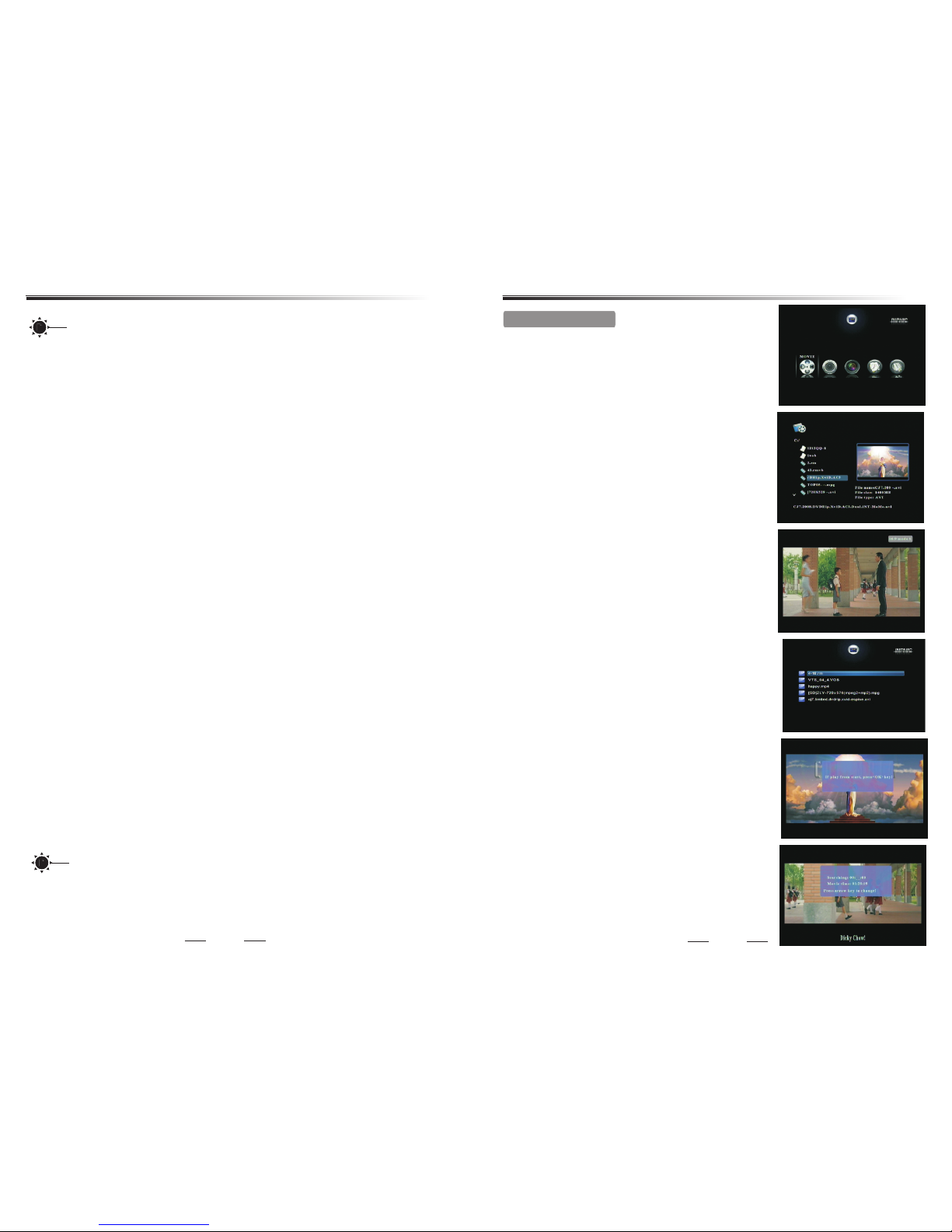
4.1. Pl ay m ovie
On the file ty pe menu, pr es s 34key to sel ect
Movi e icon , press E nt er key to enter v ideo file lis t
page(You can always g et in last en try of video fi le
list page by p ressing t he hotkey M ov ie button).
On this page , all the ava ilable fold ers and vid eo
files will b e listed on t he left side. P review wi nd ow
on the right s ide will pl ay the select ed video fi le
automati cally, and it's pr ofile mes sa ge will app ear
together , s o users can g et the genera l informa ti on
of this vide o file easi ly.Pr ess 5/6key to select
file;Pre ss3/4key or 9/:key to previ ous / next
page; Pres s Enter key to enter s elected f older;
Press Ex it key to r eturn previ ous folde r;Press
4;key(or En te r key) to p lay video fil e .
4.Play
In the movie p layback s tate:
Press vo l+ /- key or 5/6 ke y to adjust p roper
volume;P ress mu te k ey to turn on/o ff the v oice;
Press3/4ke y or 7/8key fo r fast backwa rd /fast
forward, o ptions av ailable und er the X2, X3 a nd X 4.
Display th e current t ime or the rest o f time on the
rightup at t he same tim e. Press En te r key o r4;key
to stop and re play;Pr ess Ent er key or4;key to
pause and pl ay; Press < key to s top and ret urn to
file list pa ge;Pres s 9/: key to p lay previ ous
chapter / ne xt chapte r in the same dir ectory;Pr ess
Audi o key sw itch audi o channel if mu lti-track
availabl e;Press Z oom key repea tedly, the pictu re
can be zoom in X 2, X3 and X4, a nd in zoom stat e,
press Arrow k eys to focu s more detail .
Playback features
Press 16 :9 /4:3 key to a dj ust the vid eo screen
aspect rat io, you can c hoose :full -screen , 16 :9
mode1, 16: 9 mode2, 4: 3 mode and keep r atio; Pre ss
Mark key to sa ve curren t playing fil e's name an d
point-in -time whi le playing a vi deo file, at most,
names and po int-in- times of the la st five pla ye d
video file s can be save d .In other men u, press Ma rk
key ,you can e nter the me nu of five mark s items and
select one o f marks to re sume playin g at last saved
point-in -time.
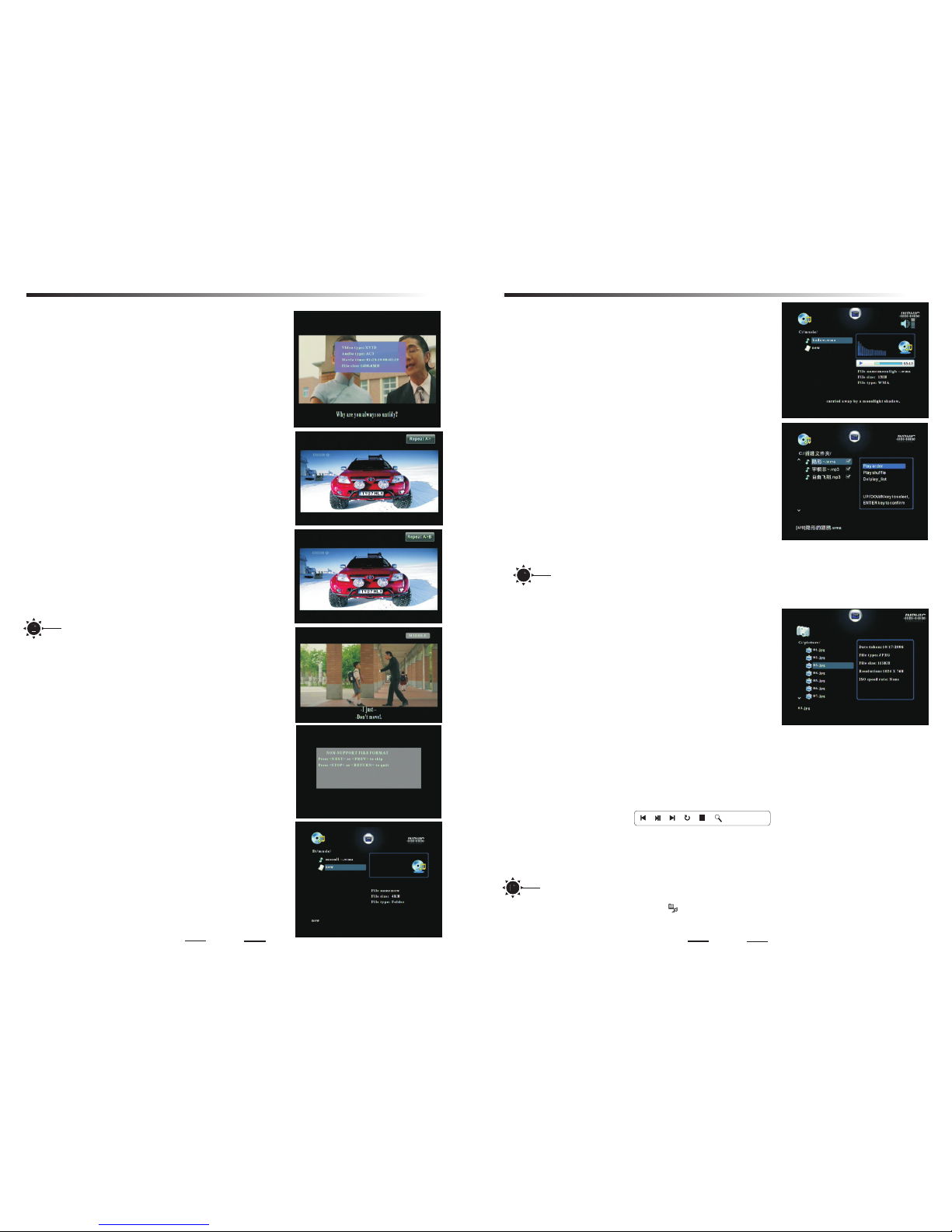
Press Ex it k ey when pla ying movie, s ystem wil l
return to fi le list and s ave the movie 's breakp oi nt
automati cally. Next time t o play the fi le , you can
select pla ying from t he breakpoi nt or the beg in ning.
Press Time s ee k key to show tim e seek menu ,
press 3/4key to select h our/minut e/secon d.
Press 5/6keyto chang e current pla ying time .
Ente r key to c onfirm. E xi t key to retu rn.
Page 6
Press 5/6keyto selec t file;Pres s3/4key or
9/:k ey to previ ous / next page ; Press E nt er key to
enter sele cted fold er; Press E xi t key t o return
previous f older;P ress 4;key(or En te r key ) to p lay
music file .Press Vol +/ - ke y to adjust pro per
volume; Pr ess Mut e ke y to turn on/off the vo ice;
Press3/4ke y or7/8key for fast ba ck ward / fast
forward, o ptions av ailable is X2 , X4 and X8.P re ss <
key to stop pl aying.A s fig 1 on the righ t.
Music list p layback :in music mod e,enter fil e
folders, press < key to selec t Ryourself fa vorite
music file s and make li st of music,t hen press INF O
key to enter t he select ing menu of mus ic list playb ack
mode,by se lecting “ play oder” or “ play shuffle” , you
can play lis ted music o rderly or ran dom;you c an
delete the m usic list b y selecting “ del play- li st”.The
music list w ill be lost a fter powero ff .A s fig 2 on the
right.
Music AB repe at:Me nu k ey c an be a multi -key,
used as AB segm ent repea t key while pla ying a musi c
9
10
On the file ty pe menu, pr ess 34k ey to selec t
Musi c icon , press E nt er key to enter m usic file lis t
page(
).
On this page , all the ava ilable fold ers and mus ic
files will b e listed on t he left side. The s elected
music file w ill play au tomatical ly on the rig ht s ide,
and it's pro file mess age will show a t the same ti me ,
so users can g et the gene ral informa tion of thi s fi le
easily.As fig 6 o n the right.
You can al ways get in las t entry of mu sic file
list page by p ressing t he hotkey M us ic button
4.2.Play music
4.3.Play picture
On the file ty pe menu, pr es s 34k ey to selec t
Pict ur e ic on, press E nter key to ent er picture fi le list
page(
On this page , all the ava ilable fold ers and pic tu re
files will b e listed on t he left side. The s elected fil e's
profile in formati on will show on t he right wi nd ow.
Press 5/6key to select f ile;Press 3/4key or
9/:k ey to previ ous / next page ; Press E xi t key to
You can al ways get in las t entry of pi cture file
list page by p ressing t he hotkey P ic ture button ).
Press 4;key(or En ter key) to play pic ture file y ou s elected o n full-scre en.
In the pictu re playba ck state:Pr ess3/4key or 9/:key to prev ious / next
picture; Press 4;key to pau se o r replay.Press E xit key or < key to s top playi ng
and return t o file list p age.Press I nfo key or En te r key to show t ools menu as
shown belo w:
PH OT O. JP G
In tools men u:
Press3/4ke y to select t he c ontrol ic on; Press E nt er key to con firm;
Press In fo k ey or Ent er key t o resume th e menu.(the m enu will au to disappea r
if no operat ion after 5 s ec. )
In the pictu re playba ck s tate, Pre ss Audi o key to p lay pictu re with backg round
music, and y ou will see t he icon on the sc reen. Now pre ss Vol+/- key to adj ust
proper vol ume; Pres s Mute key to tur n on/off the voic e; Press Au di o key again t o
cancel the b ackgrou nd music.
Tip s
Playback features Playback features
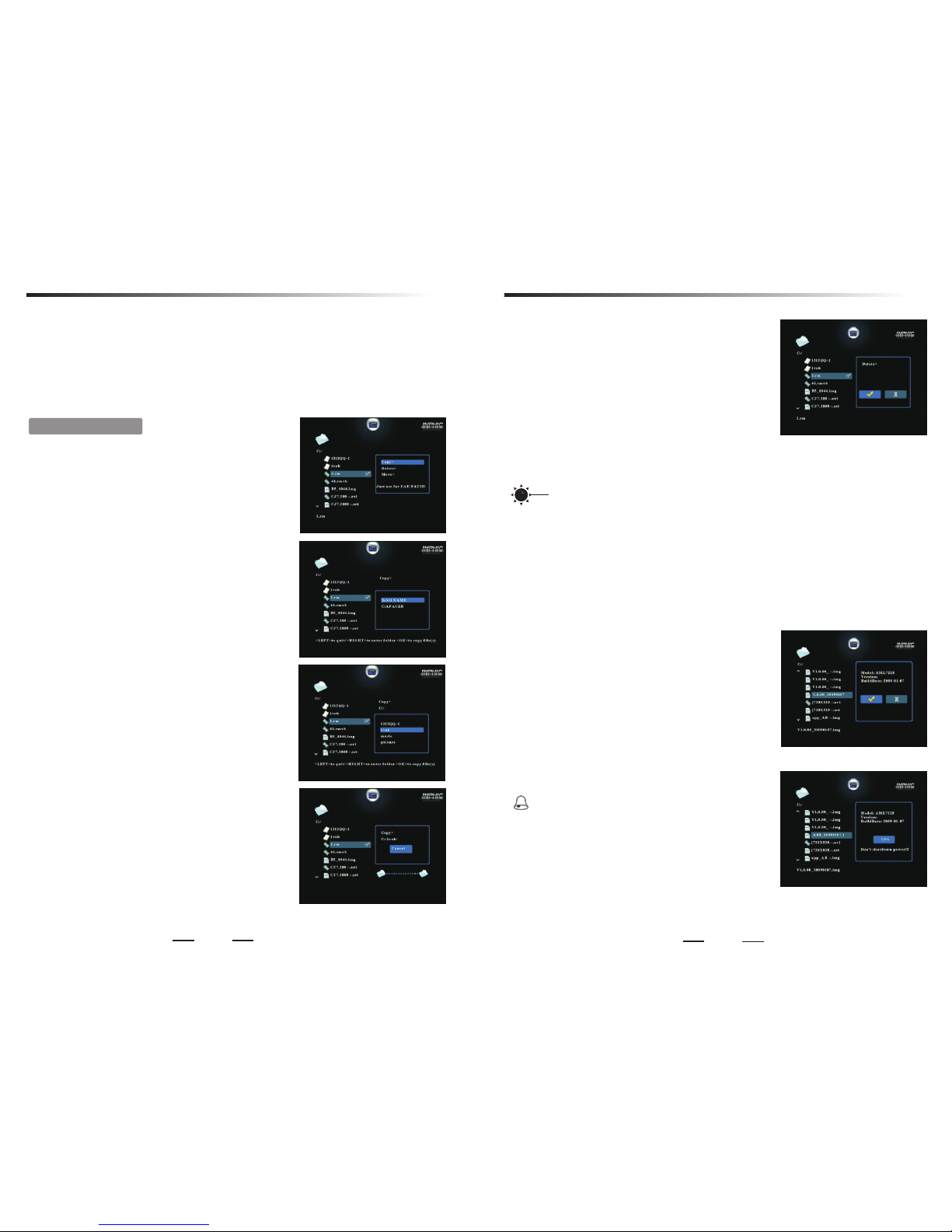
You can press In fo key thre e times
continuo usly.For the fir st time, to sho w the curre nt
file infor mation, i ncluding vi deo type, a ud io type,
file size, a nd total ti me;For the se cond time ,to
show total t ime/cur rent time; F
Exit key to re turn. As
fig 1 on the rig ht:
Video A-B repeat:Me nu k ey can be a mul ti-
key,used as A-B se gment repea t key while p laying
a video file .Press me nu key for the fi rst time,se t
“A” as the sta rt of segme nt,press me nu key for the
second tim e,set “B” a s the end of segm ent,then th e
player wil l play the se gment A-B repe atedly,until
menu key is pr essed for t he third time ,or exi t key is
pressed. As fig 2&3 on t he right:
or the third t ime ,to
show total t ime/res t of time.
Tip s
Press Su bt itle key to s ho w or hide plu g subtitle
or adjust su btitle' s font size or co lor if subtit le file is
availabl e (just for * .avi file). B ig, middl e, s mall
three font s ize is avai lable, and on e of five
colors(w hite,bl ue,yellow, red,gre en etc.) is
availabl e and suppo rt subtitle f ile type su ch a s
*.srt,*. smi,*.s sa . Special ly, sub title fil e and video
file must be t he same pre fix name and in t he same
director y, ot herwise, th e plug-su bt itle can no t be
displaye d. As fig 4 on the r ight.
System sup port lyrics d isplay in s ync, it is nece ssary to co rr ectly
display th e lyrics, l yrics's fil e must be consi stent wit h the audio fil e of the same
name, and in t he same dir ectory.
Tip s
1.System s upport Au to resu me fun ction, if
Auto ru n it em is set to “o n” o n the sutup m enu, the
player wil l play the la st video file o n the saved
breakpoi nt.
2.System s upport ma ny video type , as follow:
MPEG-1、2、4(AVI、MP G、DAT、VOB、
DivX、XviD) : r esoluti on ratio up to 72 0×576;
RM、RMVB: res olution u p to 1024×576;
MOV: re solution up t o 640×480;
If a file's vi deo encod ing format is n ot above or
beyond the s cope of the h ighest bit ra te, system
will not sup port the fi le, and pop-u p menu as sho wn
file.Ope ration me thod is the sam e as video A-B s eg ment repe at (see page 9) .
return pre vious fol der;Press E nter k ey to enter sel ected fol der;
Page 7
11
12
4.4.Play e-book
On the file ty pe menu, pr es s 34k ey to selec t E-boo k icon , press E nt er k ey to
enter txt fi le list pag e.
Press 5/6key to select * .txt file; Pr ess Ent er key to ent er folder o r open the
*.txt file ;
In the pictu re playba ck state:
Press3/4key to or 9/: to page down/up;
Press 5/6 o r 7/8 to next li ne ;
2.De lete>:
Press En te r key to dele te m enu,
Press34key to choose " O" icon or "P" icon,
Press En te r key to retu rn to all file li st page when
delete fin ished. as p icture 1 show n:
3.Mo ve>:
Press En te r key to ente r mo ve file men u,
Press 5/6key to select d isk,
Press34key to enter su bdirector y or go back to
last level d irector y.
Press En te r key to star t co pying fil e after set the t arget pat h, and system w ill
delete the s ource fil e automatic ally.
Ente r key to g o back all fi le list page.
5.File manage
5.1.All file list
On the file ty pe menu, pr es s 34k ey to selec t
File icon, p ress Ente r ke y to enter al l file list
page(You can always g et in this pa ge by pressin g
the hotkey F ile butto n) .
On this page , all type of f il es and the av ailable
folders wi ll be liste d on the left sid e. The p rofile
informat ion will sh ow on the right w indow.
5.2.File edit
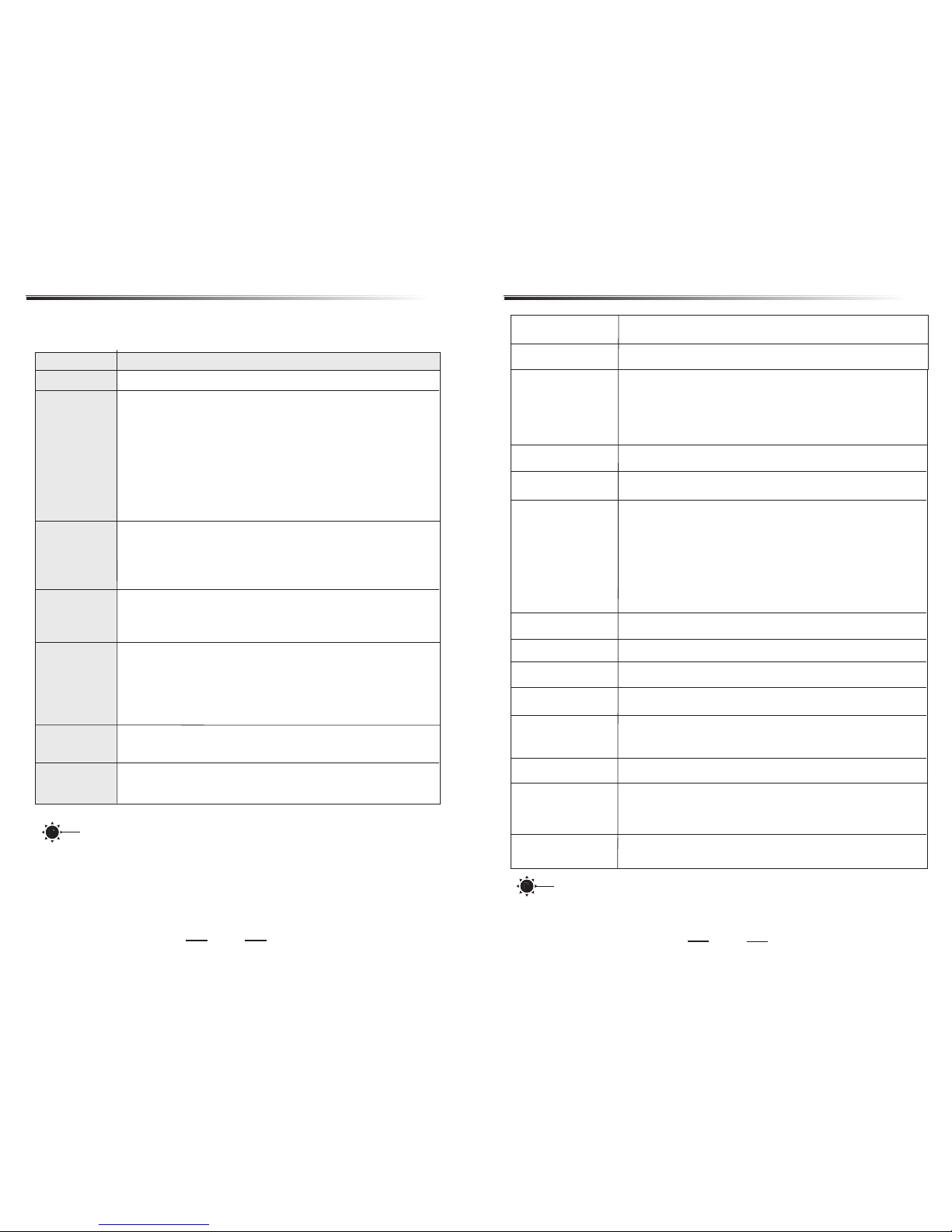
1.Co py>:
Press En te r key to ente r co py file men u,
Press 5/6key to select d isk,
Press34key to enter su bdirector y or go back to
last level d irector y, as pic ture 3 show n:
Press En te r key to star t co pying fil e after set the
target pat h, as pictu re 4 shown:
Press En te r key to retu rn t o all file li st page
when copy fi nished.
Press 5/6key to select f ile;
Press 4;key(or En ter key) to play fil e;
Press3/4ke y or 9/:key to p revious / nex t
page;
Press En te r key t o enter selec ted folde r;
Press Ex it k ey or < key t o stop playin g and
return to fi le list pag e.
In non-pla ying file state:
Press < key to mark th e highlight f ile, and yo u
will see a "R"icon appe ar on the hig hlight bar, If
press < k ey again wi ll unmark the f ile;
Press In fo key to s how the file ma nagemen t
menu on the ri ght windo w when the file h as been
marked.
On this menu , you can sel ect:
Copy >,
Dele te >,
Move > ,
Tip s
1.The ta rget path c an not be set to or iginal di re ctory, otherwi se will pro mpt an
error.
2.I f yo u want to cop y or delete man y files, yo u can mark the al l files ;
3.Due to the l icence no t be permitte d by Micros of t , the produ ct just suppo rt
read but not w rite on the N TFS format di sk.So the fil e can not be co pied,move d
and delete d on NTFS par tition , othe rwise wil l le ad to a mista ke.
5.3.Firmwar e upgrade
You can do wnload the la test firm ware from our
website.
Select the s torage de vices with th e firmwar e,
enter all fi le list pag e, and select t he *.img fi le .
Press En te r key to show u pgrade menu , as
picture 3 sh own:
Press34key to choose " O" icon or "P" icon,
Ente r key to c onfirm, a nd you will see t he upgrad e
schedule o n the scree n. As picture 4 sh own. Syst em
will reboo t when upgr ade finishe d.
Getting th e firmwar e ve rsion by en ter the setti ngs
menu, the up per right c orner shows t he versio n.
Warni ng
Note1:
Do not s hu t do wn powe r du ri ng upgr ad e!!!
Otherwis e, might ca use unrecov erable da ma ge to
the player ;
Note2:
The *.img is fo r firmware up grade, so p le ase do not
store any si milar doc uments in the s torage de vi ce.
File management
File management
Page 8
Type
Power cons umption
480Mbps US B2.0 HOST for U-d isk, Mobi le h arddisk ,
Card reade r and so on
Ambient te mperatu re: -20~+50 d egree. Hu mi dity: <90 %;
Storage te mperatu re: -30~+70 d egree. Hu mi dity: <95 %;
Vid eo output
Audio outp ut
USB
Temperatur e
Specific ations
Note: Specification and design are subject to change without notice.
13
14
If you encounter problems when using this unit, check the following points before
requesting service.
² µ ² ×
No sound
-- Check the audio connection, the red and white jacks are
connected correctly.
-- If system is on component output or VGA output mode , you need
to connect the additional audio cable.
Slow operation
Problem
Solution
-- Make sure the AC outlet has power.
No picture
or The picture
is distorted
-- Check the video connection between the player and the TV.
-- Be sure the player's video output mode match with the TV .
player's output mode, as following:
A/V: PAL composite / NTSC composite
Y/Pb/Pr: NTSC interlaced / NTSC progressive / PAL interlaced /
PAL Progressive / HD mode
PC: VGA
Using the TV mode button on the remote control to select the
DC:5V/2A,S tandby mo de < 20 mW
Componen t output
VGA output
AV out put(CVB S)
Stereo out put
File syste m
FAT32,N TFS
Vid eo format
RMVB、RM
MPEG-1(AVI、MPG、DAT)
MPEG-2(AVI、VOB)
MPEG-4(AVI、DivX、X viD)
MP4、MJPEG、MO V、
Audio form at
MP3、WMA、OGG、AA C
Picture fo rmat
JPG、BMP、TIFF、P NG、GIF
Output Res olution
480i、576i、48 0p、576p、720 p
Remote con trol
IR@38KHz
Card reade r
SD、MMC、MS、XD Car d
Dimensio ns
178×116×28MM
File name shows
abnormal
Icon shows
abnormal
Tip s
Specifications
Troubleshooting
No power
Remote control
does not work
-- Check the polarities of the batteries are as indicated on the remote
control.
--Batteries are weak, replace the batteries.
-- Big size file or high resolution image takes longer time to read
and display on the TV.
--A simple file folder system will greatly accelerate the response speed
of the system.
--The number of files would be better not to over 300 in one folder.
-- If any fault occurs due to misoperation, please press power button
of remote control to re-initialize the unit.
-- Try to use English and Chinese character for the folder name,
and the characters no more than 10.
Note: Due to continuous perfection and upgrade of the system, the actual display
and operations may different from the manual, It is normal and will not affect your
normal operation and enjoyments.
Tip s
 Loading...