

Page 1
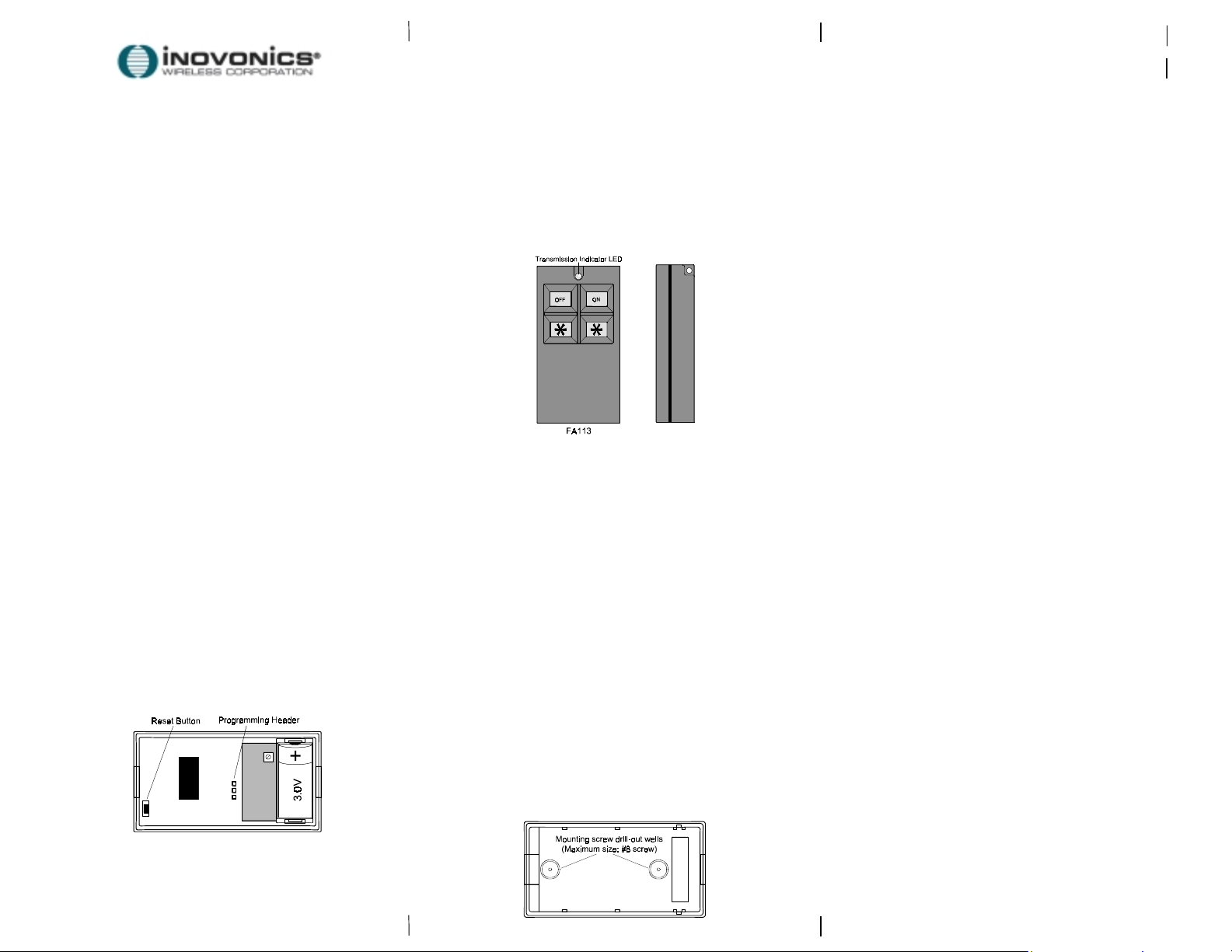
FA113
Frequency Agile
®
900MHz
4-Button Command Transmitter
Installation Instructions
02226C
Important Notes
These products are designed to be ins talled and
!"
maintained by professi onal security technicians.
Products, unless specifically noted, are int ended for indoor
!"
use.
Manually test all products regularl y.
!"
02226c.doc LIT-FA113-INSTALL hc:19-Sep-01
Inovonics Wireless Corporation
315 CTC Blvd
Louisville CO 80027
(800) 782-2709
FAX: (303)939-8977
www.inovonics.com
E-MAIL: [email protected]
Operation
The FA113 ON button arms the system.
The FA113
Pressing both “
emergency alarm signal .
Press and hold the button or butt ons to activate.
Activation signals are transmitted mul tiple times, and are
indicated by the blinking t ransmission indicat or LED.
button disarms the system.
OFF
” buttons simult aneously sends an
!
Fold line indicator:
Cut line indicator:
Opening the transmitter
Insert a small s l otted screwdriver in the slot behind the
transmission i ndi cator LED.
Apply careful leverage, bringing the handl e of the
screwdriver forward to pry open the transmit ter case.
To close the transmi t ter housing, snap the case
together, aligning the bottom edge first.
ATTENTION: The battery is not supervised in this
arming device. Test the FA113 weekly.
Device type: Remote
Typical battery life: 3 to 5 years
Battery: 3.0V lithium Sanyo CR2
* To extend battery life, actual check-in interval is 2 to 3 times the programmed value.
Programming the FA113 to the Inovonics Vision Plus
1. Program the FA113 type as Rem ot e.
2. Select Monitored, Audible and Relay Out options as desired.
3. Press "Enter" when prompted " E NTER to program".
4. When prompted t o " Plug in xmitter", connect the programming
cable from the KP103 executi ve k eypad to the transmitter
programming header and press the transmitter reset but ton.
5. Disconnect the programming cable.
6. The FA113 ON button will arm the system in the Away mode.
NOTE: FA113 transmitters retain programming data in nonvolatile memory. They do not require reprogramming after loss
of power. Install a new battery and press the reset button to
re-initialize the transmitter and restore programming.
Optional Mounting
If desired, the FA113 can be sc rew-m ount ed to a fixed surface. Drill
through-holes (.200" max diamet er) i n the back housing cover in
locations shown below. Wood screws used to mount the transmitter
should be size #8 or smaller. Screw head height must be less than
.150". Larger screw heads may cause short-circuits on t he uni t.
Page 2

novonics Wireless Corporation ("Inovonics") warrants its
I
products ("Product" or "Products") to conform to its own
specifications and to be free of defects in materials and
workmanship under normal use for a period of twenty-four
(24) months from the date of manufacture. Within the
warranty period Inovonics will repair or replace, at its option,
all or any part of the warrantied product. Inovonics will not be
responsible for dismantling and/or reinstallation charges. To
exercise the warranty, the User ("User", "Installer" or
"Consumer") must be given a Return Material Authorization
("RMA") Number
arranged at that time
This warranty does not apply in cases of improper installation,
misuse, failure to follow installation and operating
instructions, alteration, abuse, accident or tampering, and
repair by anyone other than Inovonics.
This warranty is exclusive and expressly in lieu of all other
warranties, obligations or liabilities, whether written, oral,
express, or implied, including any warranty of merchantability
or fitness for a particular purpose. Inovonics will not be liable
to anyone for any consequential or incidental damages for
breach of this warranty or any other warranties.
This warranty will not be modified, varied or extended.
Inovonics does not authorize any person to act on its behalf
to modify, vary or extend this warranty. This warranty will
apply to Inovonics Products only. All other products,
accessories or attachments used in conjunction with
Inovonics equipment, including batteries, will be covered
solely by their own warranty, if any. Inovonics will not be liable
for any direct, incidental or consequential damage or loss
whatsoever, caused by the malfunction of Product due to
products, accessories, or attachments of other
manufacturers, including batteries, used in conjunction with
Inovonics Products.
This warranty does not warrant the replacement of batteries
that are used to power Inovonics Products.
Warranty & Disclaimer
Inovonics. Details of shipment will be
by
.
The User recognizes that a properly installed and
maintained security system may only reduce the risk of
events such as burglary, robbery, personal injury and
fire. It does not insure or guarantee that there will be no
death, personal damage and/or damage to property as
a result.
may not be compromised and/or circumvented, or
that the Product will prevent any death, personal
and/or bodily injury and/or damage to property
resulting from burglary, robbery, fire or otherwise,
or that the Product will in all cases provide
adequate warning or protection.
Inovonics shall have no liability for any death,
injury or damage, however incurred, based on a
claim that Inovonics Products failed to function.
However, if Inovonics is held liable, directly or
indirectly, for any loss or damage arising under this
limited warranty or otherwise, regardless of cause or
origin, Inovonics' maximum liability will not in any case
exceed the purchase price of the Product, which will be
fixed as liquidated damages and not as a penalty, and
will be the complete and exclusive remedy against
Inovonics.
Warning: The User should follow all installation,
operation and maintenance instructions.
strongly advised to conduct Product and systems tests
at least once each week. Changes in environmental
conditions, electric or electronic disruptions and
tampering, may cause the Product to not perform as
expected.
Warning: Inovonics warrants its Product to the
User.
prudence and taking necessary precautions for the
safety and protection of lives and property wherever
Inovonics Products are installed. Inovonics strongly
advises the User to program Products to be supervised
whenever used in applications affecting life safety.
Users are warned that unsupervised devices are
subject to undetected failure due to malfunction,
battery failure, tampering, or changes in environment.
Inovonics does not claim that the Product
!
The User is
!
The User is responsible for exercising all due
 Loading...