

Page 1

Inovlx
IMP65
1 What's in the box?
Earphone DriversCD·ROMUSB Cable UserManual
If any item is damaged ar missing, return it ta the dealer from whom you purchased
this product for attention.
Battery
:a
2 Installing the player
Windows 98 systems:
Place the supplied driver disc in the computer'sCOtray. Start the
CD.
TheCOmenu
should open. If theCDdoes not open: In the START menu, press RUN, then type D:
(where 0 is the letter of yourCDdrive). TheCDwill now open:
In theCDmenu select SETUP. Accept all the prampts and wait for the 'MP3 Player
Utilities' to fully install. Remove the disc and re-startthe computer.
Windows 2000, ME,Xp,Mac OSX:
Power on/off (make sure the lock key is unlocked, if the player
lock, it will be auto shut off circuit when power on.) ~
Power on: Push the PLAY/STOP key for an extended time.
player will be powered on.
Power off: Push the PLAY/STOP key for an extended time to
power off the player.
3 Transferring files
After t e MP3 Player isconnected to your PC,the follOwing
will be displayed on the LCD.
I~I
Normal connection,
USB mode
4 Player Overview
Top
Microphone (MIC)
Left side PLAY/ON/ Front
OFF/STOP
Volume
Volume-
e-
+
Menu key
Record/A-B
MODE
ACCESS
5.Playing Music
1.Press and hold ~II to until the
player turns on;
2.Press MODE button to enter
the main menu;
3.Again press MODE button to enter
the music playing mode;
4.Press ~II button to play music;
In the playing mode: .
1.Press ~ ~ to select the last/next
music file; -
2.Press and hold ~ ~ to fast
forward or fast rewind;
3.Press ~IIto pause playback;
4.Press
88
decrease the volume;
5.Re-reading mode:
.In play mode, Press@to
confirm the starting point A.
• Again press@to confirm
the finishing point B. Then the
player will replay the contents from
PointA to Point B.
• Press@, and the player will be
set to the normal playing status.
EXCESSIVE SOUND LEVELS
DAMAGE YOUR HEARING
Playing status
Musicbeing
played currently
Sound effect mode
to increase/
{jYesterdayMP3
D
Alone.MP3
@G)<S8
®
Enter music
playing mode play musIc
e8CD
@G)<S8
®
FFW/REW by
@G)<S8
t
®A-B Re-reading
t
t
<i)Select
®V~lume+,-
Last/next
t
holding
th~
it
USBcover~
6. Recording Mode
@0G:3)
®
Enter ReCOrd~g ®~elect Voice
mode
®
@0e3
A-B Re_reatding CZf.a~tfnext
FFW/REW by
holding
@0<:E3
t
@Pressto
record
it
Page 2
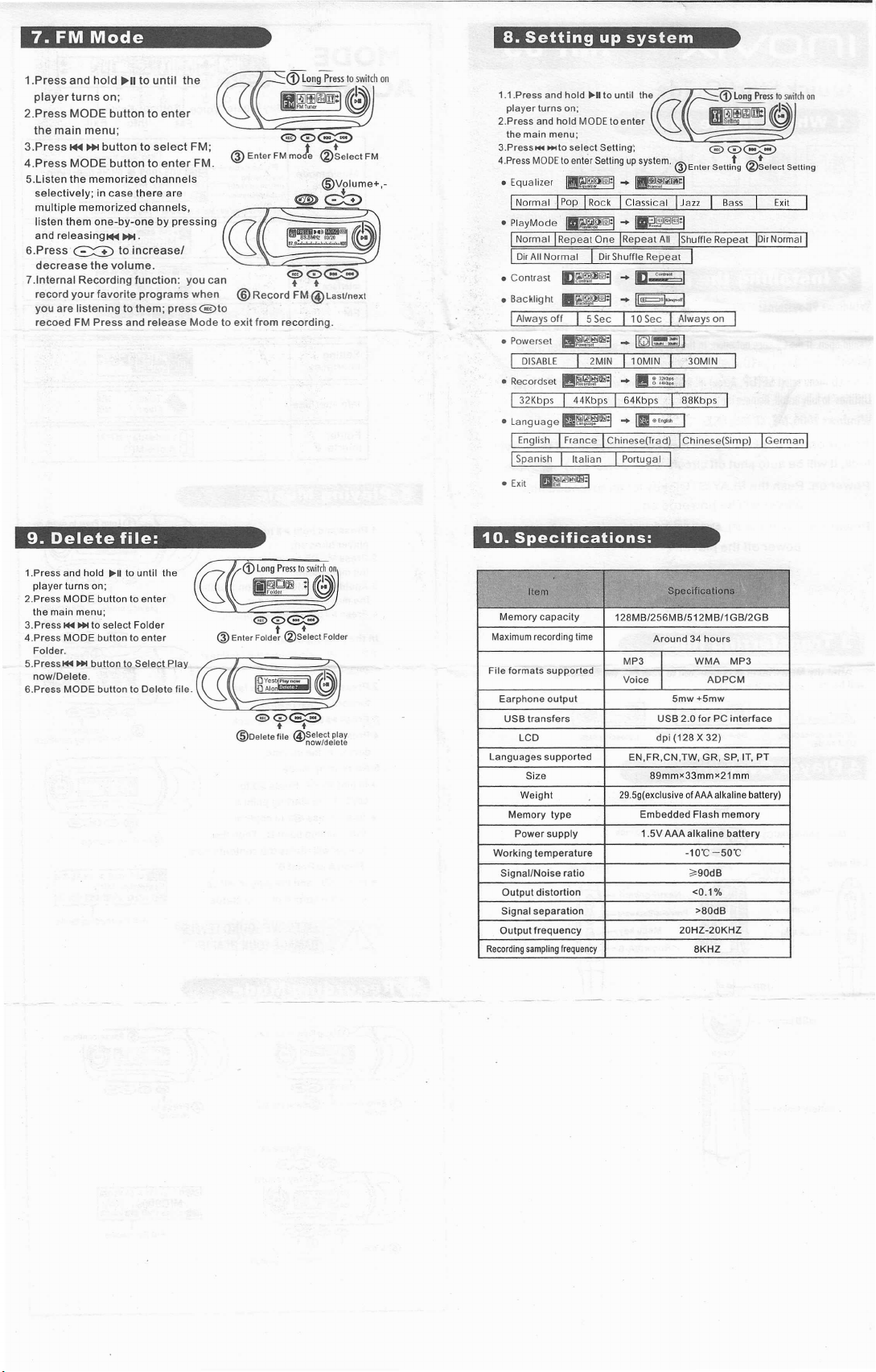
7. FM Mode
8. Setting up system
1.Press and hold ~II to until the
player turns on;
2.Press MODE button to enter
the main menu;
3.Press 144••• button to select FM;
4.Press MODE button to enter FM.
5.Listen the memorized channels
selectively; in case there are
multiple memorized channels,
listen them one-by-one by pressing
and releasingl44 •••.
6.Press ~ to increase!
decrease the volume.
7.lnternal Recording function: you can
record your favorite programs when
you are listening to them; press@to
recoed FM Press and release Mode to exit from recording.
®
@0(33)
EnterFM
moJe
@0(33)
®
+ +
Record FM @Last/next
9. Delete file:
~~elect FM
®vr
e>G8
lume
1.1.Press and hold ~II to until the
player turns on:
2.Press and hold MODEtoenter ~ •••'" ~
the main menu;
3.Press••••••to select Setting';
4.PressMODEtoenterSettingupsystem.®Enter setti~g ®~elect Setting
+,-
• Equalizer ~ •• ~
I Normal IPop IRockIClassicalIJazz Bass Exit
• PlayMode ~ .•• ~
I Normal IRepeat One IRepeat All IShuffieRepeat IDi'Normal
I DirAllNormal I Di,Shuffle Repeat
• Contrast
• Backlight ~ •• ~
I
• Powerset ~ ~ ~
I DISABLEI2MIN 110MINI30MIN
I 32Kbps I 44KbpsI64KbpsI88Kbps
.Language~ •.•.~
I EnglishIFrance IChinese(T,ad) IChinese(Simp) IGermanl
I
• Exit ~
ll~l>I:l ..•
AlwaysoffI5SecI10SecIAlwayson
SpanishIItalian I Portugal
III --
n
[]<D
I
I
I
LongPresstoswitchon
1!'Ir.i1ltllfll!liil
@
0~
~L~
I
10. Specifications:
1.Press and hold ~II to until the
player turns on:
2.Press MODE button to enter
the main menu;
3.Press
1+4 •••
4.Press MODE button to enter
Folder.
5.Pressl+4'" button to Select Play
nowlDelete.
6.Press MODE button to Delete file.
to select Folder
<D
LongPresstoswitchon
1!Qi!drJil
@0G::3)
®Enler FOldet
:I~~~
folder ~
(2)S:lect
Folder
Item
Memory capacity
Maximum recording time
File formats supported
Earphone output
USBtransfers USB 2.0 for PC interface
LCD
Languages supported
Size
Weight
Memory type Embedded Flash memory
Power supply 1.5VAAA alkaline battery
Working temperature
Signal/Noise ratio
Output distortion
Signal separation >80dB
Output frequency
Recordingsamplingfrequency
128MB/256MB/512MB/1 GB/2GB
Specifications
Around 34 hours
MP3
Voice
EN,FR,CN,TW, GR, SP, IT,PT
29.5g(exclusiveofAAAalkalinebattery)
WMA
I
ADPCM
I
5mw+5mw
dpi (128 X 32)
89mmx33mmx21mm
-10"C-50"C
;'90dB
<0.1%
20HZ-20KHZ
8KHZ
MP3
 Loading...