

Page 1
USER MANUAL
mod. S-01
SECURITY PLAYER
Version 1.3
Page 2

User manual S-01 v.1.3
Pag. 1
Warranty
Security Player is covered by 24 month warranty on its electronics parts, starting from the
date of purchase. This warranty becomes void in case of tampering with the device and in
case of work carried out on it by people that were not authorized by the manufacturer or by
an authorized dealer. Warranty conditions are those described in the “Warranty Rules”.
NOTE - responsibility of the purchaser: in case of repair under warranty, the device must
be packed in order to avoid damage during transport and shipped to the manufacturer
together with all the accessories.
Warranty Rules.
1. In order to exercise his warranty rights, the purchaser must include with the device a
copy of the evidence of purchase duly stamped by the dealer (bill/invoice).
2. The warranty lasts 24 months on the electronic parts. The warranty is granted at the
point of sale or it could be directly requested to the manufacturer.
3. The warranty only covers damage to the product which makes it work badly.
4. Work under warranty will only mean repairing or replacing, free of charge, any parts
acknowledged being defective during manufacture or in their material, including labour
costs.
5. The warranty does not apply to damage caused by negligence or failure to comply with
the instructions, or damage caused by unauthorised people, with a special reference to
the external parts.
6. Also, the warranty does not apply to damage caused to the device by connection to
unsuitable power sources.
7. The warranty does not cover parts that are subject to wear as a consequence of the
use, as well as the chassis if the material is not defective.
8. The warranty does not include transport costs, which will be paid by the purchaser
depending on way and time of transport.
9. The warranty expires 24 months after the purchase. In this case, service will be
provided charging for the replaced parts, labour costs and transport according to the
current rates.
10.In case of any controversy the Court of Law of Venice has the exclusive jurisdiction.
Page 3

User manual S-01 v.1.3
Pag. 2
SUMMARY
1. Introduction
1.1 What is the Security Player?
1.2 What is the MP3?
1.3 Encoder
1.4 Decoder
1.5 Player
1.6 Wave
1.7 Audio compression in the different formats
2. Installation
2.1 Content of the Security Player kit
2.2 Safety rules
3. Description
3.1 Security Player front panel
3.2 Security Player rear panel
4. Wiring
4.1 Power supply
4.2 Inputs
4.3 Relay output
4.4 Audio output
5. Configuration file
5.1 What is the configuration file?
5.2 Content of the configuration file
5.3 How it is managed by Security Player
5.4 Preparing the file
5.5 Memorising the files in the flash memory
5.6 Audio adjustment parameters
5.7 Input management parameters
6. Mode of Operation
6.1 Security Player mode of operation
6.2 High active input mode
6.3 Low active input mode
7. Operation with logical inputs
7.1 Binary input command codes
8. Specifications
8.1 Technical features
Page 4

User manual S-01 v.1.3
Pag. 3
1
Introduction
1.1 What is the Security Player?
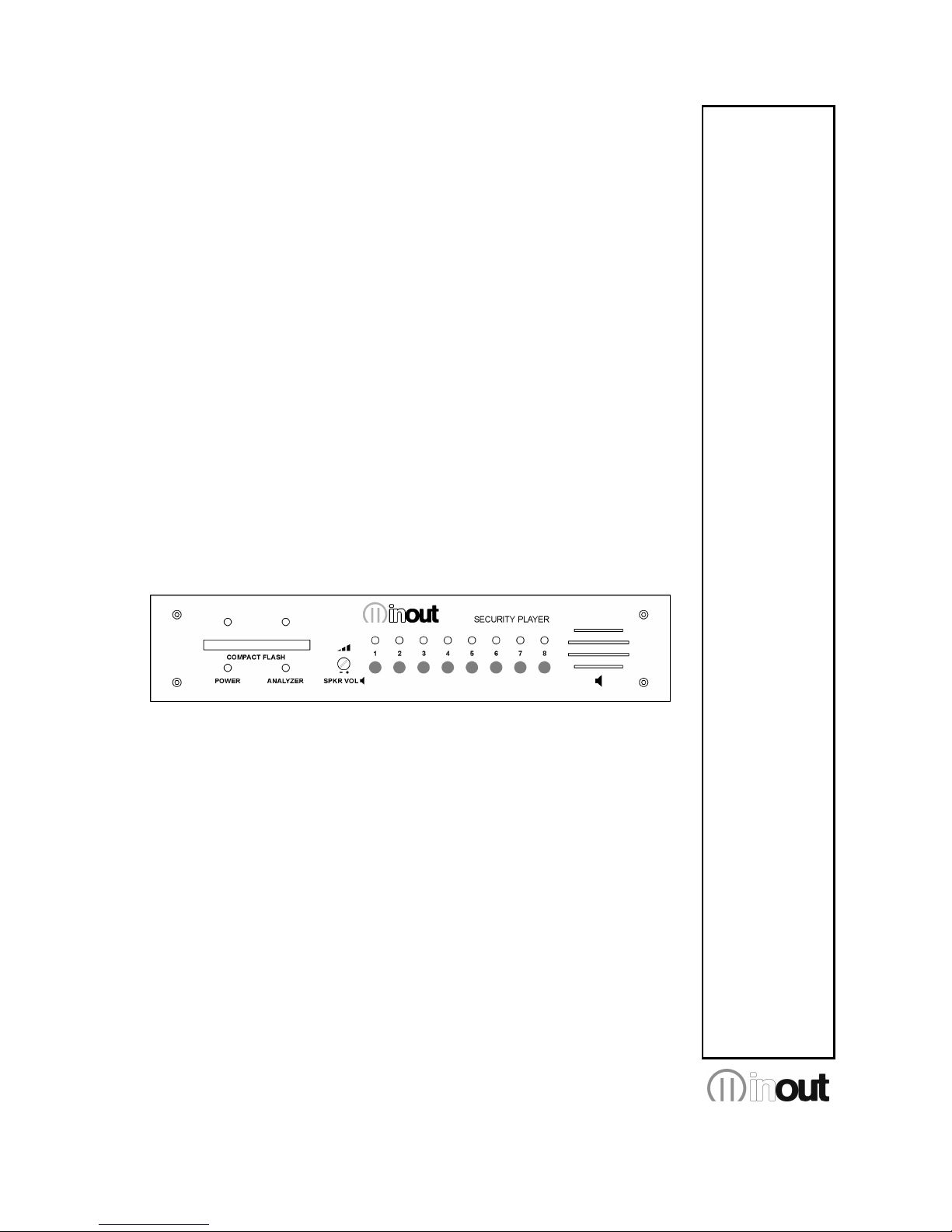
Security Player is a device that can reproduce audio messages registered on Compact
Flash (solid state memory), after a specific binary combination of input commands.
1.2 What is Mp3?
Mp3 is an acronym for Mpeg-1 layer 3. This is an audio compression standard which
eliminates sounds which the human ear cannot hear via a psycho-acoustic algorithm. The
purpose of this compression is to reduce the space taken up by an audio file while still
ensuring excellent quality. The greater the compression, the less the audio quality. The
right compromise, which guarantees a quality comparable to that of a Compact Disc, is
128 Kbps (thousands of bits per second) which represents the most widely used manner,
and reduces the size of an uncompressed file by 10 times.
1.3 Encoder
Software which compresses audio CDs or wave files into MP3s. There are many software
of this kind, and it is virtually impossible to say which is the best.
1.4 Decoder
Software which decompresses an MP3 audio file in order to send it to a digital-analog
converter and reconstruct the original audio signal.
1.5 Player
Hardware and software system able to read MP3 audio files. Security Player is able to
carry out this function.
1.6 Wave
High quality audio format (extension .wav), compatible with the tracks of normal music
CD’s. If one uses a wave file in format 44.1 KHz/sec. at 16 bit in stereo, one will get
exactly the same quality as a music CD, but the size of the file is about 10Mb per minute.
1.7 Audio compression in various formats.
The following graphic shows the space taken up by an uncompressed audio file of about 5
minutes (.wav) and compressed in MP3 at 128Kbps (MP3).
Wave 51,1 MB
MP3 4,6 MB
Page 5

User manual S-01 v.1.3
Pag. 4
2
Installation
2.1 Content of the Security Player kit
n° 1 Security Player device;
n° 1 User Manual;
n° 1 power supply cable;
n° 1 Compact Flash Memory card
2.2 Safety rules
Read carefully the following warnings to keep your and others safety, for the right use of
the device and to avoid warranty invalidation.
1. Do not expose the device to rain or high humidity. Protect the device from accidental
liquid penetration, if it happens, stop using the device and apply to qualified or
authorized personnel.
2. Do not insert things into the device through the openings to avoid risk of fire or electric
shock.
3. Security Player has been designed and produced to operate ONLY with a 230VAC
mains power.
4. If the original power cord is waste or deteriorate, replace it with a similar one.
5. Disconnect the device from the light socket before make cleaning operations. Clean the
device with a dry and soft cloth. Do not use liquids or spray that can contain flammable
elements.
6. Device maintenance must be done only by qualified personnel.
7. For any requirement or technical information contact InOut or authorized personnel.
OBSOLETE DEVICES DISPOSAL
This picture means that the device is European Directive 2002/96/EC
compliant.
All electronic and electric devices should be disposed separately from the
normal garbage, by specific gathering plants designated by the government or
by local authorities.
Correct disposal of obsolete devices, of the accessories and especially of the
batteries, contribute to prevent possible negative consequences on human
health and on the environment.
For detailed information on obsolete devices disposal, contact the
municipality, the garbage disposal service or the store where you bought the
device.
Page 6
User manual S-01 v.1.3
Pag. 5
3
Description
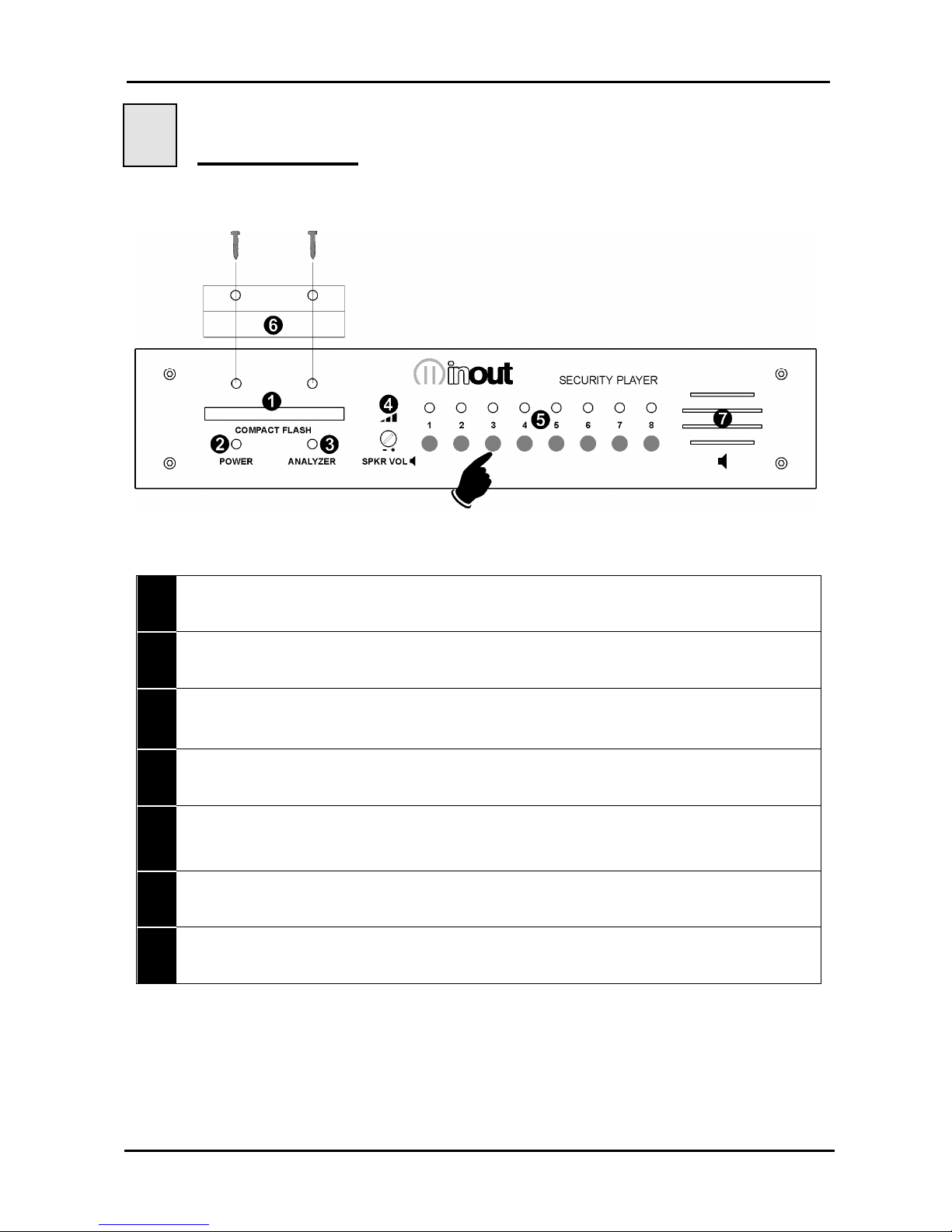
3.1 Security Player front panel
1 -
Slot for inserting the Compact Flash memory.
2 -
Red LED: lit = device is live.
3 -
Green LED:
lit =
blinking =
off =
Analyzer.mp3 file playing;
1-->255.mp3. file playing;
S-01 in STOP.
4 -
Trimmer for adjusting the volume of the internal speaker.
5 -
Buttons on front to control reproduction of messages: the number of the file being
reproduced is shown when the corresponding LED in binary combination is switched on.
The missing Compact Flash memory is signalled by LEDs 1-8 flashing at the same time.
6 -
Tamper-proof metal protection for Compact Flash memory is fixed with 2 screws.
7 -
Internal speaker.
Page 7
User manual S-01 v.1.3
Pag. 6
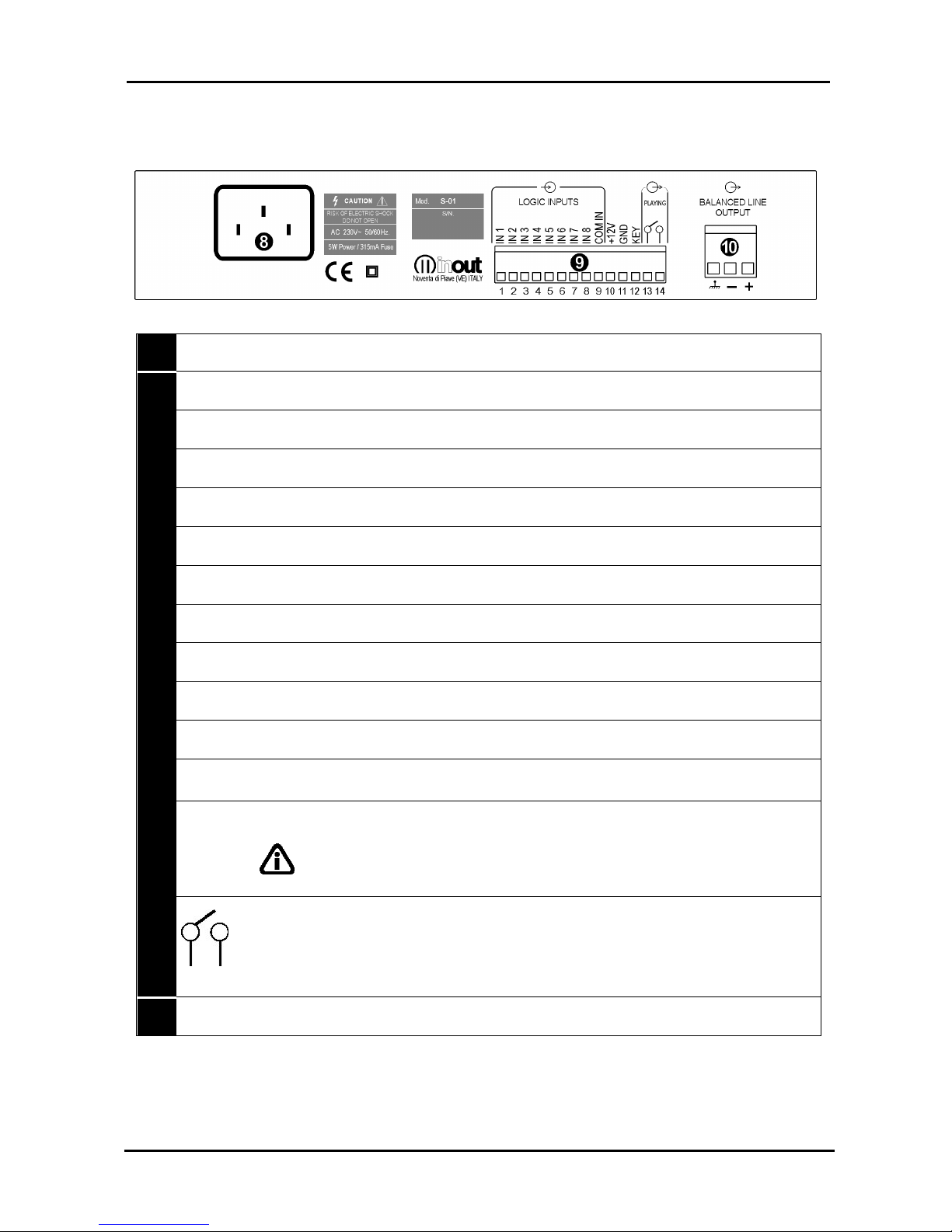
3.2 Security Player rear panel
Connections at the rear of the device:
8 -
230V ac power supply socket on VDE plug.
9 -
IN1
Input for activating 1.mp3 file (direct or bit 0 in binary combination).
IN2
Input for activating 2.mp3 file (direct or bit 1 in binary combination).
IN3
Input for activating 4.mp3 file (direct or bit 2 in binary combination).
IN4
Input for activating 8.mp3 file (direct or bit 3 in binary combination).
IN5
Input for activating 16.mp3 file (direct or bit 4 in binary combination).
IN6
Input for activating 32.mp3 file (direct or bit 5 in binary combination).
IN7
Input for activating 64.mp3 file (direct or bit 6 in binary combination).
IN8
Input for activating 128.mp3 file (direct or bit 7 in binary combination).
COM IN
Common inputs (COM INPUT)
+12V
Voltage +12V dc auxiliary available for activation of inputs using external relay
contacts.
GND
Ground of the auxiliary device available for activation of inputs using external
relay contacts.
KEY
Connected to the GND of the device, it disables the 8 buttons on the front in
order to prevent accidental emission of messages.
WARNING : DO NOT CONNECT THE PIN KEY TO +12V! IT WOULD
CAUSE THE IMMEDIATE BREAKDOWN OF THE PIN.
Auxiliary relay output contact N.O. for external commands. Activation of the
output occurs in the moment in which the reproduction of an audio file begins
and is maintained for the whole of the duration of the file.
NOTE - The relay is not activated during the reproduction of the Analyzer.mp3
file. Relay contacts: 1A / 120Vac
10 -
Balanced audio output (at 0dBu) on an extractable terminal.
Page 8

User manual S-01 v.1.3
Pag. 7
4
Connections
4.1 Power supply
When the Security Player is connected to the 230V ac power supply, via the appropriate
supply cable provided, the red LED POWER comes on.
4.2 Inputs
Security Player has eight logical optoisolated inputs for controlling the reproduction of the
messages.
The pins are:
1- IN 1
2- IN 2
3- IN 3
4- IN 4
5- IN 5
6- IN 6
7- IN 7
8- IN 8
9- COM IN
In order to activate the reproduction of a file, apply a voltage between +5 e +12Vdc to
COM IN (common inputs) pin and the required input (or the required inputs if working in
binary logic). The positive can be connected either on the COM IN or on the input pin.
The input is activated by connecting it to GND (pin 11) on the Security Player.
N.B. the external power supply source must be able to guarantee a current of at least
10mA for each input.
If an external power source is unavailable, it is possible to connect the COM IN to the
+12V (pin 10) terminal on the Security Player. N.B. Galvanic isolation is not guaranteed in
this case.
4.3 Relay output
The relay output on the Security Player is normally an open contact.
Activation of this output occurs in the moment in which the reproduction of an audio file
begins and is maintained for the whole duration of the file.
N.B. The relay is not activated during the reproduction of the file Analyzer.mp3.
4.4 Audio output
The audio output on the Security Player is available on an extractable terminal in balanced
mode (0dBu).
Page 9

User manual S-01 v.1.3
Pag. 8
5
Configuration file
5.1 What is the configuration file?
Security Player is a device which can be adapted to suit the requirements of the
application for which it is being used. Different applications may require adjustment of
volume, tone, loudness, special parameters of communication or timing. The text file,
called ‘configuration file’ and stored in the main directory of the flash memory, together
with the audio files, makes it possible to programme the various parameters of Security
Player.
This file must be assigned the name config.txt (this extension has been used so it can be
modified by any text editor, including those for portable PocketPC terminals).
5.2 Content of the configuration file
Each line of the configuration file consists of:
Mnemonic code of the parameter to be set. It always consists of four CAPITAL
alphanumeric characters, and must always be at the beginning of the line. No more
than one parameter is permitted on the same line.
Separating character. ‘=’. This MUST be inserted just after the mnemonic code, without
any spacing or tabulation character.
The relevant numerical parameter expressed as a decimal, to be inserted directly after
the separation character, without any spacing or tabulation character.
Example file config.txt:
LOUT=14
LLOU=10
LTRE=14
LBAS=10
MOMN=1
Audio adjustment parameters
TPCM=10
MICP=1
MIRS=0
IOMD=0
Logical inputs parameters (direct or binary combinaton)
5.3 How it is managed by Security Player
At the time the device is turned on, or when the flash memory is inserted, Security Player
will start to read the main directory of the memory; once it has found the file config.txt, it
interprets the parameters inserted in each line, memorising them permanently in its
internal memory, of a non volatile kind. The parameters therefore stay in memory even
after the device has been turned off. This is why it is not indispensable for the
configuration file to be always present in the flash memory: once all the parameters have
been acquired, this file can also be deleted.
NOTE: If it is necessary to configure various Security Players with the same parameters,
one can prepare a single flash memory with the appropriate config.txt file, alternately insert
this memory on all the modules to be configured, then insert the memory with the audio
files only.
Page 10
User manual S-01 v.1.3
Pag. 9
5.4 Preparing the file
To create the file, one can use an ordinary text editor (like Windows Notebook). The file
must be saved as a pure text file (.txt). Should other programmes be used (e.g. Microsoft
Word) one must be careful to save the document as “text only”: otherwise, control
characters would be inserted which would make it impossible for Security Player to
interpret this file.
5.5 Memorising the files in the flash memory
The configuration file and all the MP3 audio files can be memorised in the flash memory
via a special USB reader/writer for PC.
5.6 Audio adjustment parameters
Security Player allows for the following audio adjustments:
adjustments general pre-amplified output.
adjustment of loudness level.
adjustment of high tone level.
adjustment of low tone level.
ON/OFF internal speaker
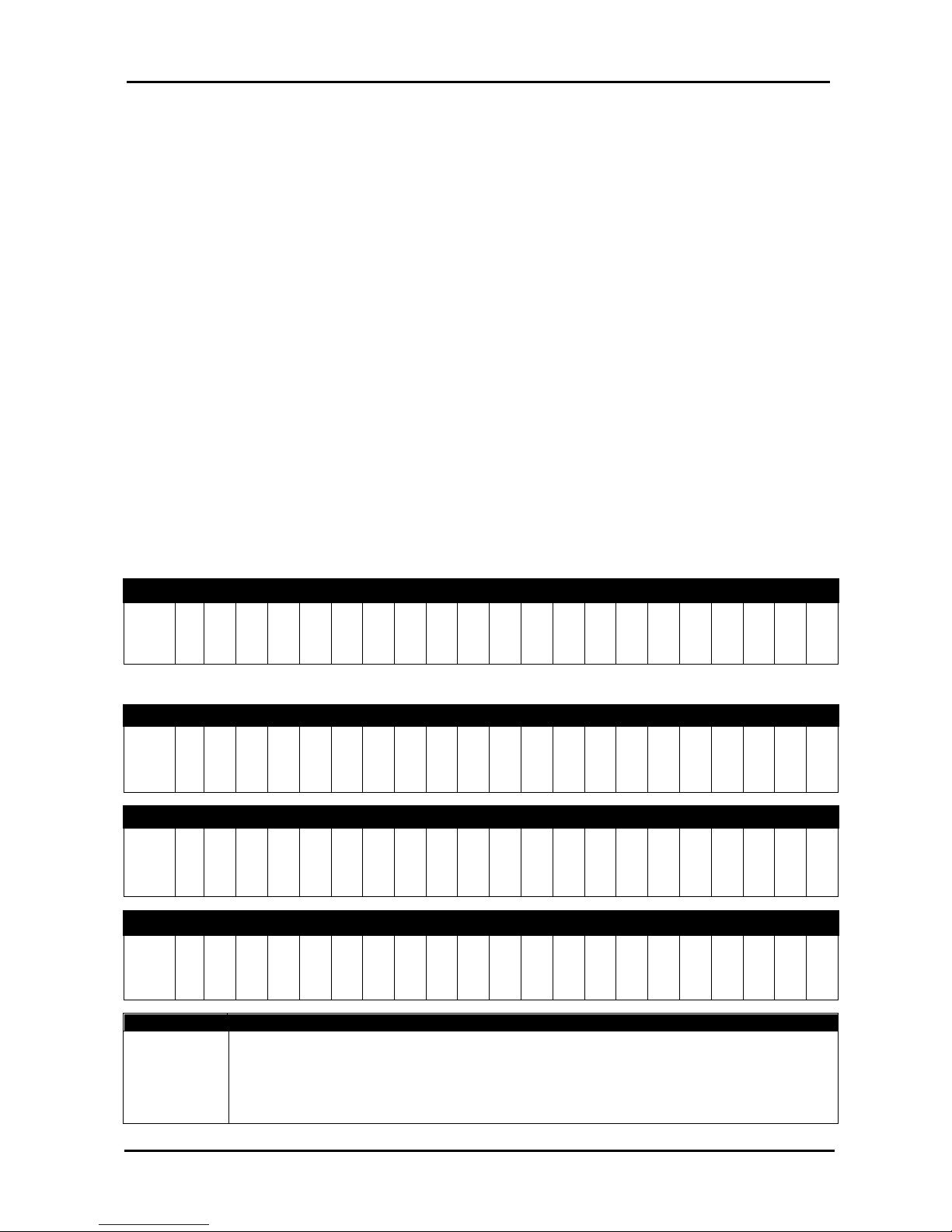
The following tables show the relation between the value set in the configuration file and
the actual value of the audio parameter.
LOUT (DEFAULT=14) general output pre-amplified level*
LOUT=
0 1 2 3 4 5 6 7 8 9 10 11 12 13 14 15 16 17 18 19 20
dB
level
OFF -55 -35 -28 -23 -20 -17 -14 -12 -10 -8 -6 -4 -2 0 +2 +4 +6 +8 +10 +12
the dB value is always related to the premaplified signal.
LLOU
(DEFAULT=10)
loudness level
LLOU=
0 1 2 3 4 5 6 7 8 9 10 11 12 13 14 15 16 17 18 19 20
dB
level
0
+0,5
+ 1
+1,5
+ 2
+2,5
+ 3
+ 4
+ 5
+ 6
+ 7
+ 8
+ 9
+ 10
+11
+ 12
+ 13
+ 14
+ 15+16
+ 17
LTRE
(DEFAULT=14)
high tone level
LTRE=
0 1 2 3 4 5 6 7 8 9 10 11 12 13 14 15 16 17 18 19 20
dB
level
-12 -10 -8 -7 -6 -5 -4 -3 -2 -1
0
+ 1 + 2 + 3 + 4 + 5 +6 +7 +8 +10 +12
LBAS (DEFAULT=10) low tone level
LBAS=
0 1 2 3 4 5 6 7 8 9 10 11 12 13 14 15 16 17 18 19 20
dB
level
-12 -10 -8 -7 -6 -5 -4 -3 -2 -1
0
+ 1 + 2 + 3 + 4 + 5 +6 +7 +8 +10 +12
Mnemonic Description parameter
MOMN
(DEFAULT=1)
0=the internal speaker is always deactivated;
1=the internal speaker is activated during the reproduction of a coded file
(therefore excluding the analyzer.mp3 file)
Page 11

User manual S-01 v.1.3
Pag. 10
5.7 Input management parameters
The playing of the files takes place by activating the available logical inputs, the activation
modes are set through the TPCM, MICP and MIRS parameters inserted in the
configuration files.
Mnemonic Description of timing parameter
TPCM
(DEFAULT=10)
Setting the persistence time of the input command (time to wait before Security
Player is able to interpret the input command) expressed in decimals of
milliseconds (value between 0 and 255 in decimal).
0 = no delay
1 =10mSeconds
2 =20mSeconds
100 = 1 second
200 = 2 seconds
250 = 2,5 seconds (max. value)
MICP
(DEFAULT=1)
Setting Mode Input Continuous Play
0 = having terminated the playing of the codified file, requested from the input code,
Security Player goes in standby.
1 = the requested codified file is continuously played until the relevant input code is
inserted.
MIRS
(DEFAULT=0)
Setting Mode Input ReStart
0 = repeated activation or deactivating of the same input code does not influence
the playing of the relevant file. Only the activation of a different code can block
the playing underway and activate the playing of the new requested file.
1 = in the moment in which an input code is enabled the playing of the of the
relevant file from its beginning takes place, even if it is already in play.
IMOD
(DEFAULT=1)
Setting Input Management Mode
0 = active-high input mode or with contact normally open.
1 = active-low input mode or with contact normally closed.
Page 12

User manual S-01 v.1.3
Pag. 11
6
Mode of operation
6.1 Security Player mode of operation
Security Player is an automatic player of security messages and the activation of these
messages is typically handled by an external supervision system.
The device operates as follows:
In stand-by conditions, Security Player reproduces the file called analyzer.mp3 in a
continuous loop. This file is stored on the Compact Flash and is made up of a
20KHz sinusoidal audio signal. This signal can be monitored continuously by the
external supervision system. In the event that this audio file is not stored, the device
remains in stand-by without reproducing audio files, waiting for the inputs to be
activated.
reproduction of the security messages occurs by activating the 8 optoisolated inputs
situated at the back of the device. These inputs can also be controlled manually
using the 8 buttons situated on the front of the device. The 8 messages available
with the single activation of each input must have the following denomination:
1.mp3
= IN 1
2.mp3
= IN 2
4.mp3
= IN 3
8.mp3
= IN 4
16.mp3
= IN 5
32.mp3
= IN 6
64.mp3
= IN 7
128.mp3
= IN 8
By activating the inputs in binary combination, it is possible to start the reproduction
of a maximum of 255 messages, naming the audio files as shown in table 1.
The modes of reproduction are set using the parameters IMOD, TPCM, MICP and
MIRS, entered in the configuration file (sect. 5.7).
The device has 8 optoisolated inputs for controlling the start of the messages; the
pins are: IN 1, IN 2, IN 3, IN 4, IN 5, IN 6, IN 7, IN 8, COM IN.
The LEDs 1-8 flash at the same time to signal that the Compact Flash memory is
missing.
The 2 modes for activating the inputs are given below:
Page 13
User manual S-01 v.1.3
Pag. 12
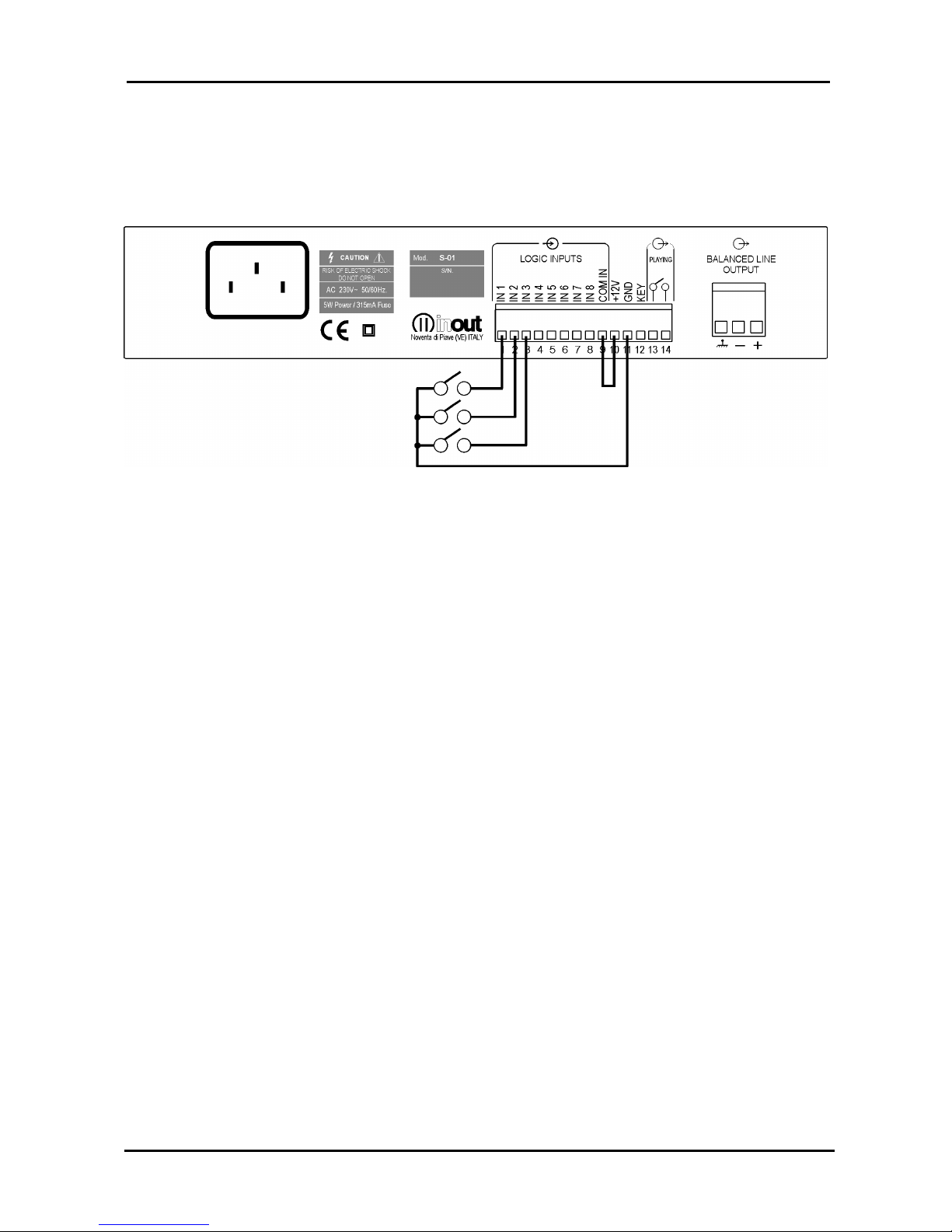
6.2 High active input mode.
IMOD=0
High-active input mode or with contact normally open.
To activate the inputs operate as follows:
Use voltage between 5 and 12V dc to COM IN pin* and the required input or via
binary combination of inputs according to table 1. The positive can either be on
COM IN or on the input pin.
N.B. the external power source must be able to ensure there is a current of at least
10mA for each input.
The following modes can be used to supply the inputs:
Connecting the COM IN pin to an external power supply line between 5 and 12V dc.
To activate the input connect it to GND of the power source.
Connecting the COM IN pin to GND of external power supply . In order to activate
the input, apply a positive voltage between 5 and 12V dc to the inputs.
If there is no external voltage, the COM IN can be connected to the +12V pin. The input is
activated by connecting it to GND of the device.
Using the buttons 1-8 on the front panel.
Page 14
User manual S-01 v.1.3
Pag. 13
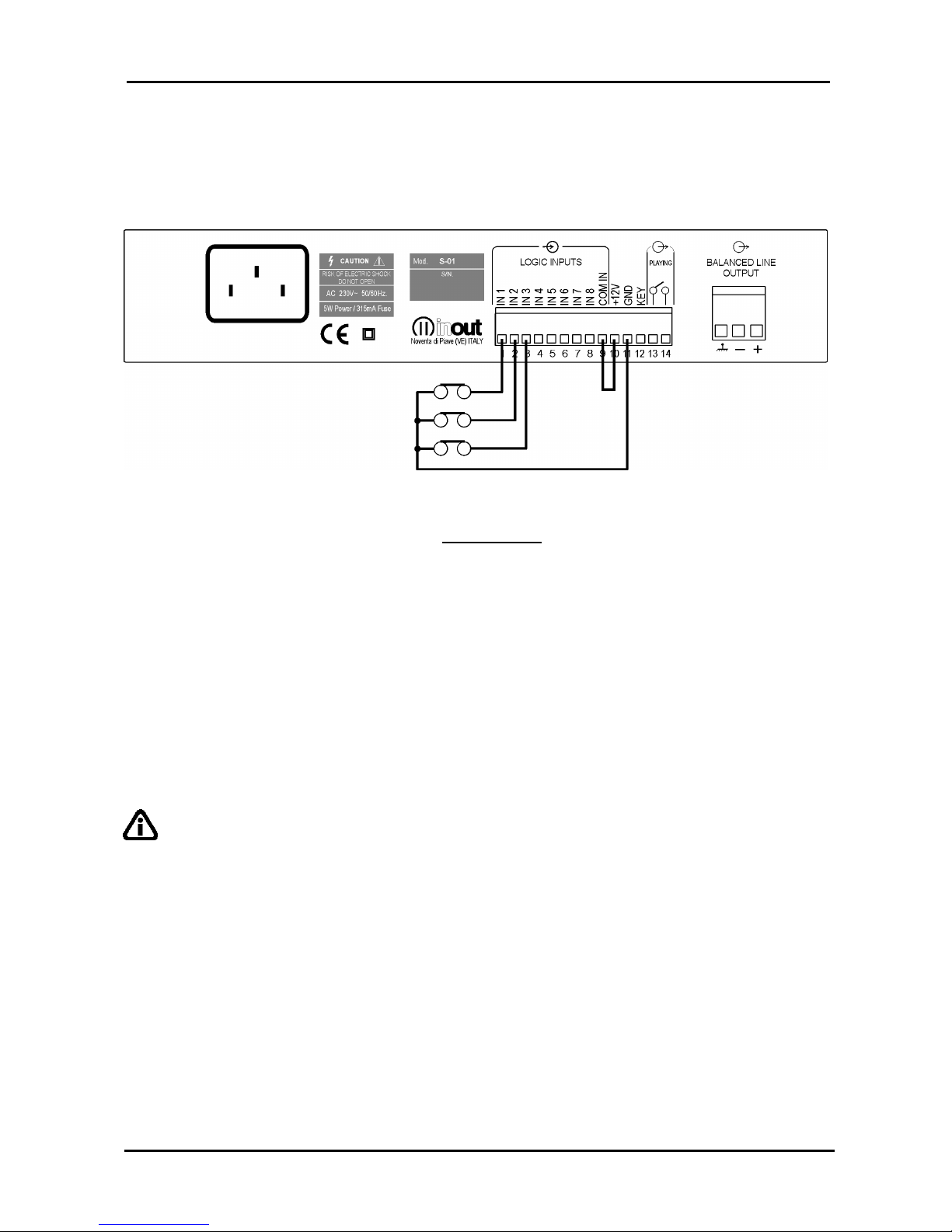
6.3 Low active input mode.
IMOD=1
Low-active input mode or with contact normally closed.
N.B. this management mode operates in the opposite way to the previous one; the
inputs reproduce the messages when they are not active.
The following modes can be used to supply the inputs:
Connecting the COM IN pin to an external power supply line between 5 and 12V dc.
To activate the input disconnect it from GND of the power source.
Connecting the COM IN pin to GND of external power supply. In order to activate
the messages, disconnect the input from the positive voltage.
If there is no external voltage, the COM IN can be connected to the +12V terminal. The
input is activated by disconnecting it from GND of the device.
Using the buttons 1-8 on the front panel.
IMPORTANT:
working in negative logic, the unused logic inputs must also be activated with
straps on the connector (e.g. with no input connected, the Security Player plays the
255.mp3 file).
Page 15
User manual S-01 v.1.3
Pag. 14
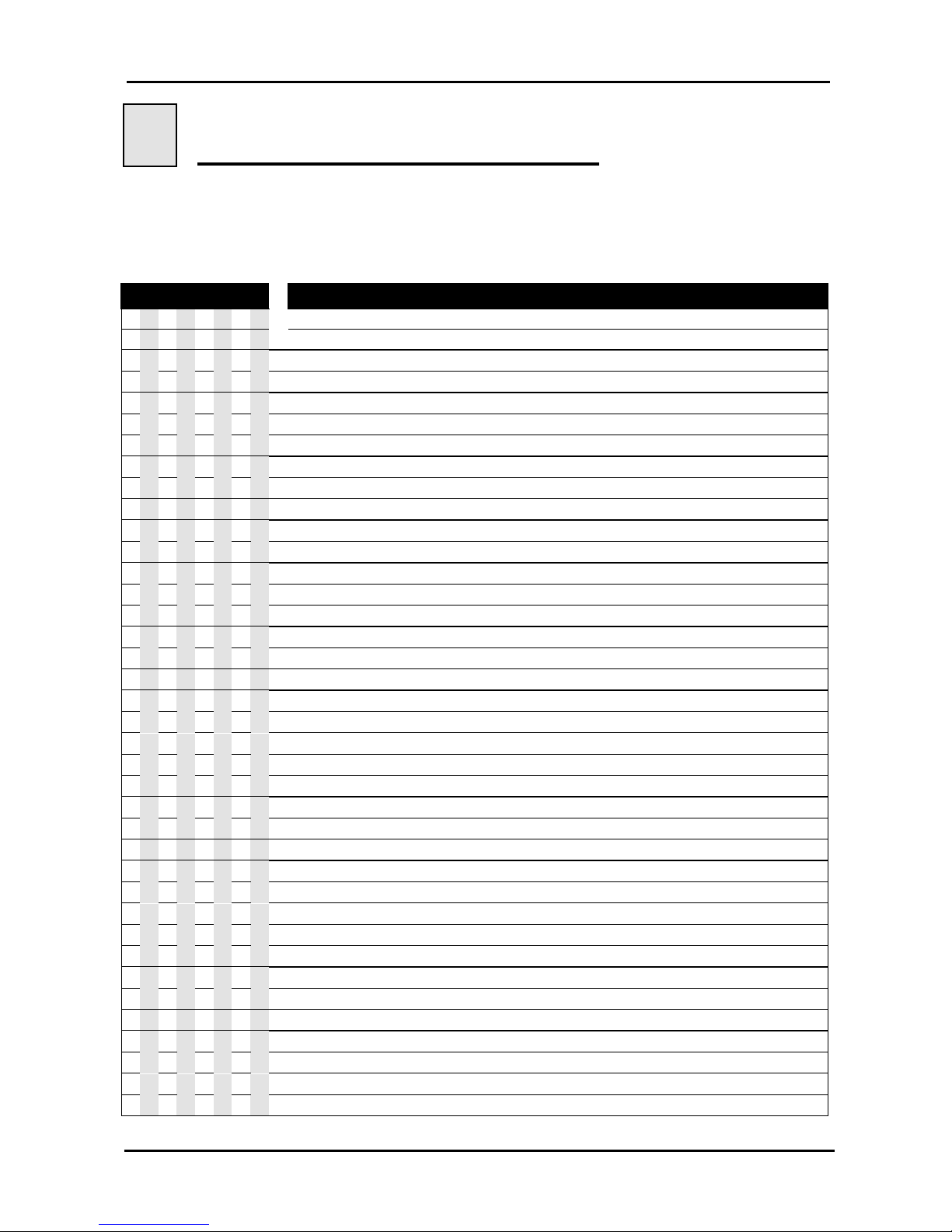
7
Operation with logical inputs
7.1 Binary input command codes
Activating the inputs in binary combination, one can launch the playing of a maximum of
255 messages, naming the audio files as shown on the following table.
INPUT FILE INPUTS BINARY COMBINATION
1234567
8
(.mp3)
O O O O O O O O
=
Stand by
1 O O O O O O O
=
1
IN 1
O 1 O O O O O O
=
2
IN 2
1 1 O O O O O O
=
3
IN 1 + IN 2
O O 1 O O O O O
=
4
IN 3
1 O 1 O O O O O
=
5
IN 1 + IN 3
O 1 1 O O O O O
=
6
IN 2 + IN 3
1 1 1 O O O O O
=
7
IN 1 + IN 2 + IN 3
O O O 1 O O O O
=
8
IN 4
1 O O 1 O O O O
=
9
IN 1 + IN 4
O 1 O 1 O O O O
=
10
IN 2 + IN 4
1 1 O 1 O O O O
=
11
IN 1 + IN 2 + IN 4
O O 1 1 O O O O
=
12
IN 3 + IN 4
1 O 1 1 O O O O
=
13
IN 1 + IN 3 + IN 4
O 1 1 1 O O O O
=
14
IN 2 + IN 3 + IN 4
1 1 1 1 O O O O
=
15
IN 1 + IN 2 + IN 3 + IN 4
O O O O 1 O O O
=
16
IN 5
1 O O O 1 O O O
=
17
IN 1 + IN 5
O 1 O O 1 O O O
=
18
IN 2 + IN 5
1 1 O O 1 O O O
=
19
IN 1 + IN 2 + IN 5
O O 1 O 1 O O O
=
20
IN 3 + IN 5
1 O 1 O 1 O O O
=
21
IN 1 + IN 3 + IN 5
O 1 1 O 1 O O O
=
22
IN 2 + IN 3 + IN 5
1 1 1 O 1 O O O
=
23
IN 1 + IN 2 + IN 3 + IN 5
O O O 1 1 O O O
=
24
IN 4 + IN 5
1 O O 1 1 O O O
=
25
IN 1 + IN 4 + IN 5
O 1 O 1 1 O O O
=
26
IN 2 + IN 4 + IN 5
1 1 O 1 1 O O O
=
27
IN 1 + IN 2 + IN 4 + IN 5
O O 1 1 1 O O O
=
28
IN 3 + IN 4 + IN 5
1 O 1 1 1 O O O
=
29
IN 1 + IN 3 + IN 4 + IN 5
O 1 1 1 1 O O O
=
30
IN 2 + IN 3 + IN 4 + IN 5
1 1 1 1 1 O O O
=
31
IN 1 + IN 2 + IN 3 + IN 4 + IN 5
O O O O O 1 O O
=
32
IN 6
1 O O O O 1 O O
=
33
IN 1 + IN 6
O 1 O O O 1 O O
=
34
IN 2 + IN 6
1 1 O O O 1 O O
=
35
IN 1 + IN 2 + IN 6
O O 1 O O 1 O O
=
36
IN 3 + IN 6
Page 16

User manual S-01 v.1.3
Pag. 15
INPUT FILE INPUTS BINARY COMBINATION
1234567
8
(.mp3)
1 O 1 O O 1 O O
=
37
IN 1 + IN 3 + IN 6
O 1 1 O O 1 O O
=
38
IN 2 + IN 3 + IN 6
1 1 1 O O 1 O O
=
39
IN 1 + IN 2 + IN 3 + IN 6
O O O 1 O 1 O O
=
40
IN 4 + IN 6
1 O O 1 O 1 O O
=
41
IN 1 + IN 4 + IN 6
O 1 O 1 O 1 O O
=
42
IN 2 + IN 4 + IN 6
1 1 O 1 O 1 O O
=
43
IN 1 + IN 2 + IN 4 + IN 6
O O 1 1 O 1 O O
=
44
IN 3 + IN 4 + IN 6
1 O 1 1 O 1 O O
=
45
IN 1 + IN 3 + IN 4 + IN 6
O 1 1 1 O 1 O O
=
46
IN 2 + IN 3 + IN 4 + IN 6
1 1 1 1 O 1 O O
=
47
IN 1 + IN 2 + IN 3 + IN 4 + IN 6
O O O O 1 1 O O
=
48
IN 5 + IN 6
1 O O O 1 1 O O
=
49
IN 1 + IN 5 + IN 6
O 1 O O 1 1 O O
=
50
IN 2 + IN 5 + IN 6
1 1 O O 1 1 O O
=
51
IN 1 + IN 2 + IN 5 + IN 6
O O 1 O 1 1 O O
=
52
IN 3 + IN 5 + IN 6
1 O 1 O 1 1 O O
=
53
IN 1 + IN 3 + IN 5 + IN 6
O 1 1 O 1 1 O O
=
54
IN 2 + IN 3 + IN 5 + IN 6
1 1 1 O 1 1 O O
=
55
IN 1 + IN 2 + IN 3 + IN 5 + IN 6
O O O 1 1 1 O O
=
56
IN 4 + IN 5 + IN 6
1 O O 1 1 1 O O
=
57
IN 1 + IN 4 + IN 5 + IN 6
O 1 O 1 1 1 O O
=
58
IN 2 + IN 4 + IN 5 + IN 6
1 1 O 1 1 1 O O
=
59
IN 1 + IN 2 + IN 4 + IN 5 + IN 6
O O 1 1 1 1 O O
=
60
IN 3 + IN 4 + IN 5 + IN 6
1 O 1 1 1 1 O O
=
61
IN 1 + IN 3 + IN 4 + IN 5 + IN 6
O 1 1 1 1 1 O O
=
62
IN 2 + IN 3 + IN 4 + IN 5 + IN 6
1 1 1 1 1 1 O O
=
63
IN 1 + IN 2 + IN 3 + IN 4 + IN 5 + IN 6
O O O O O O 1 O
=
64
IN 7
1 O O O O O 1 O
=
65
IN 1 + IN 7
O 1 O O O O 1 O
=
66
IN 2 + IN 7
1 1 O O O O 1 O
=
67
IN 1 + IN 2 + IN 7
O O 1 O O O 1 O
=
68
IN 3 + IN 7
1 O 1 O O O 1 O
=
69
IN 1 + IN 3 + IN 7
O 1 1 O O O 1 O
=
70
IN 2 + IN 3 + IN 7
1 1 1 O O O 1 O
=
71
IN 1 + IN 2 + IN 3 + IN 7
O O O 1 O O 1 O
=
72
IN 4 + IN 7
1 O O 1 O O 1 O
=
73
IN 1 + IN 4 + IN 7
O 1 O 1 O O 1 O
=
74
IN 2 + IN 4 + IN 7
1 1 O 1 O O 1 O
=
75
IN 1 + IN 2 + IN 4 + IN 7
O O 1 1 O O 1 O
=
76
IN 3 + IN 4 + IN 7
1 O 1 1 O O 1 O
=
77
IN 1 + IN 3 + IN 4 + IN 7
O 1 1 1 O O 1 O
=
78
IN 2 + IN 3 + IN 4 + IN 7
1 1 1 1 O O 1 O
=
79
IN 1 + IN 2 + IN 3 + IN 4 + IN 7
O O O O 1 O 1 O
=
80
IN 5 + IN 7
1 O O O 1 O 1 O
=
81
IN 1 + IN 5 + IN 7
O 1 O O 1 O 1 O
=
82
IN 2 + IN 5 + IN 7
Page 17

User manual S-01 v.1.3
Pag. 16
INPUT FILE INPUTS BINARY COMBINATION
1234567
8
(.mp3)
1 1 O O 1 O 1 O
=
83
IN 1 + IN 2 + IN 5 + IN 7
O O 1 O 1 O 1 O
=
84
IN 3 + IN 5 + IN 7
1 O 1 O 1 O 1 O
=
85
IN 1 + IN 3 + IN 5 + IN 7
O 1 1 O 1 O 1 O
=
86
IN 2 + IN 3 + IN 5 + IN 7
1 1 1 O 1 O 1 O
=
87
IN 1 + IN 2 + IN 3 + IN 5 + IN 7
O O O 1 1 O 1 O
=
88
IN 4 + IN 5 + IN 7
1 O O 1 1 O 1 O
=
89
IN 1 + IN 4 + IN 5 + IN 7
O 1 O 1 1 O 1 O
=
90
IN 2 + IN 4 + IN 5 + IN 7
1 1 O 1 1 O 1 O
=
91
IN 1 + IN 2 + IN 4 + IN 5 + IN 7
O O 1 1 1 O 1 O
=
92
IN 3 + IN 4 + IN 5 + IN 7
1 O 1 1 1 O 1 O
=
93
IN 1 + IN 3 + IN 4 + IN 5 + IN 7
O 1 1 1 1 O 1 O
=
94
IN 2 + IN 3 + IN 4 + IN 5 + IN 7
1 1 1 1 1 O 1 O
=
95
IN 1 + IN 2 + IN 3 + IN 4 + IN 5 + IN 7
O O O O O 1 1 O
=
96
IN 6 + IN 7
1 O O O O 1 1 O
=
97
IN 1 + IN 6 + IN 7
O 1 O O O 1 1 O
=
98
IN 2 + IN 6 + IN 7
1 1 O O O 1 1 O
=
99
IN 1 + IN 2 + IN 6 + IN 7
O O 1 O O 1 1 O
=
100
IN 3 + IN 6 + IN 7
1 O 1 O O 1 1 O
=
101
IN 1 + IN 3 + IN 6 + IN 7
O 1 1 O O 1 1 O
=
102
IN 2 + IN 3 + IN 6 + IN 7
1 1 1 O O 1 1 O
=
103
IN 1 + IN 2 + IN 3 + IN 6 + IN 7
O O O 1 O 1 1 O
=
104
IN 4 + IN 6 + IN 7
1 O O 1 O 1 1 O
=
105
IN 1 + IN 4 + IN 6 + IN 7
O 1 O 1 O 1 1 O
=
106
IN 2 + IN 4 + IN 6 + IN 7
1 1 O 1 O 1 1 O
=
107
IN 1 + IN 2 + IN 4 + IN 6 + IN 7
O O 1 1 O 1 1 O
=
108
IN 3 + IN 4 + IN 6 + IN 7
1 O 1 1 O 1 1 O
=
109
IN 1 + IN 3 + IN 4 + IN 6 + IN 7
O 1 1 1 O 1 1 O
=
110
IN 2 + IN 3 + IN 4 + IN 6 + IN 7
1 1 1 1 O 1 1 O
=
111
IN 1 + IN 2 + IN 3 + IN 4 + IN 6 + IN 7
O O O O 1 1 1 O
=
112
IN 5 + IN 6 + IN 7
1 O O O 1 1 1 O
=
113
IN 1 + IN 5 + IN 6 + IN 7
O 1 O O 1 1 1 O
=
114
IN 2 + IN 5 + IN 6 + IN 7
1 1 O O 1 1 1 O
=
115
IN 1 + IN 2 + IN 5 + IN 6 + IN 7
O O 1 O 1 1 1 O
=
116
IN 3 + IN 5 + IN 6 + IN 7
1 O 1 O 1 1 1 O
=
117
IN 1 + IN 3 + IN 5 + IN 6 + IN 7
O 1 1 O 1 1 1 O
=
118
IN 2 + IN 3 + IN 5 + IN 6 + IN 7
1 1 1 O 1 1 1 O
=
119
IN 1 + IN 2 + IN 3 + IN 5 + IN 6 + IN 7
O O O 1 1 1 1 O
=
120
IN 4 + IN 5 + IN 6 + IN 7
1 O O 1 1 1 1 O
=
121
IN 1 + IN 4 + IN 5 + IN 6 + IN 7
O 1 O 1 1 1 1 O
=
122
IN 2 + IN 4 + IN 5 + IN 6 + IN 7
1 1 O 1 1 1 1 O
=
123
IN 1 + IN 2 + IN 4 + IN 5 + IN 6 + IN 7
O O 1 1 1 1 1 O
=
124
IN 3 + IN 4 + IN 5 + IN 6 + IN 7
1 O 1 1 1 1 1 O
=
125
IN 1 + IN 3 + IN 4 + IN 5 + IN 6 + IN 7
O 1 1 1 1 1 1 O
=
126
IN 2 + IN 3 + IN 4 + IN 5 + IN 6 + IN 7
1 1 1 1 1 1 1 O
=
127
IN 1 + IN 2 + IN 3 + IN 4 + IN 5 + IN 6 + IN 7
O O O O O O O 1
=
128
IN 8
Page 18

User manual S-01 v.1.3
Pag. 17
INPUT FILE INPUTS BINARY COMBINATION
1234567
8
(.mp3)
1 O O O O O O 1
=
129
IN 1 + IN 8
O 1 O O O O O 1
=
130
IN 2 + IN 8
1 1 O O O O O 1
=
131
IN 1 + IN 2 + IN 8
O O 1 O O O O 1
=
132
IN 3 + IN 8
1 O 1 O O O O 1
=
133
IN 1 + IN 3 + IN 8
O 1 1 O O O O 1
=
134
IN 2 + IN 3 + IN 8
1 1 1 O O O O 1
=
135
IN 1 + IN 2 + IN 3 + IN 8
O O O 1 O O O 1
=
136
IN 4 + IN 8
1 O O 1 O O O 1
=
137
IN 1 + IN 4 + IN 8
O 1 O 1 O O O 1
=
138
IN 2 + IN 4 + IN 8
1 1 O 1 O O O 1
=
139
IN 1 + IN 2 + IN 4 + IN 8
O O 1 1 O O O 1
=
140
IN 3 + IN 4 + IN 8
1 O 1 1 O O O 1
=
141
IN 1 + IN 3 + IN 4 + IN 8
O 1 1 1 O O O 1
=
142
IN 2 + IN 3 + IN 4 + IN 8
1 1 1 1 O O O 1
=
143
IN 1 + IN 2 + IN 3 + IN 4 + IN 8
O O O O 1 O O 1
=
144
IN 5 + IN 8
1 O O O 1 O O 1
=
145
IN 1 + IN 5 + IN 8
O 1 O O 1 O O 1
=
146
IN 2 + IN 5 + IN 8
1 1 O O 1 O O 1
=
147
IN 1 + IN 2 + IN 5 + IN 8
O O 1 O 1 O O 1
=
148
IN 3 + IN 5 + IN 8
1 O 1 O 1 O O 1
=
149
IN 1 + IN 3 + IN 5 + IN 8
O 1 1 O 1 O O 1
=
150
IN 2 + IN 3 + IN 5 + IN 8
1 1 1 O 1 O O 1
=
151
IN 1 + IN 2 + IN 3 + IN 5 + IN 8
O O O 1 1 O O 1
=
152
IN 4 + IN 5 + IN 8
1 O O 1 1 O O 1
=
153
IN 1 + IN 4 + IN 5 + IN 8
O 1 O 1 1 O O 1
=
154
IN 2 + IN 4 + IN 5 + IN 8
1 1 O 1 1 O O 1
=
155
IN 1 + IN 2 + IN 4 + IN 5 + IN 8
O O 1 1 1 O O 1
=
156
IN 3 + IN 4 + IN 5 + IN 8
1 O 1 1 1 O O 1
=
157
IN 1 + IN 3 + IN 4 + IN 5 + IN 8
O 1 1 1 1 O O 1
=
158
IN 2 + IN 3 + IN 4 + IN 5 + IN 8
1 1 1 1 1 O O 1
=
159
IN 1 + IN 2 + IN 3 + IN 4 + IN 5 + IN 8
O O O O O 1 O 1
=
160
IN 6 + IN 8
1 O O O O 1 O 1
=
161
IN 1 + IN 6 + IN 8
O 1 O O O 1 O 1
=
162
IN 2 + IN 6 + IN 8
1 1 O O O 1 O 1
=
163
IN 1 + IN 2 + IN 6 + IN 8
O O 1 O O 1 O 1
=
164
IN 3 + IN 6 + IN 8
1 O 1 O O 1 O 1
=
165
IN 1 + IN 3 + IN 6 + IN 8
O 1 1 O O 1 O 1
=
166
IN 2 + IN 3 + IN 6 + IN 8
1 1 1 O O 1 O 1
=
167
IN 1 + IN 2 + IN 3 + IN 6 + IN 8
O O O 1 O 1 O 1
=
168
IN 4 + IN 6 + IN 8
1 O O 1 O 1 O 1
=
169
IN 1 + IN 4 + IN 6 + IN 8
O 1 O 1 O 1 O 1
=
170
IN 2 + IN 4 + IN 6 + IN 8
1 1 O 1 O 1 O 1
=
171
IN 1 + IN 2 + IN 4 + IN 6 + IN 8
O O 1 1 O 1 O 1
=
172
IN 3 + IN 4 + IN 6 + IN 8
1 O 1 1 O 1 O 1
=
173
IN 1 + IN 3 + IN 4 + IN 6 + IN 8
O 1 1 1 O 1 O 1
=
174
IN 2 + IN 3 + IN 4 + IN 6 + IN 8
Page 19

User manual S-01 v.1.3
Pag. 18
INPUT FILE INPUTS BINARY COMBINATION
1234567
8
(.mp3)
1 1 1 1 O 1 O 1
=
175
IN 1 + IN 2 + IN 3 + IN 4 + IN 6 + IN 8
O O O O 1 1 O 1
=
176
IN 5 + IN 6 + IN 8
1 O O O 1 1 O 1
=
177
IN 1 + IN 5 + IN 6 + IN 8
O 1 O O 1 1 O 1
=
178
IN 2 + IN 5 + IN 6 + IN 8
1 1 O O 1 1 O 1
=
179
IN 1 + IN 2 + IN 5 + IN 6 + IN 8
O O 1 O 1 1 O 1
=
180
IN 3 + IN 5 + IN 6 + IN 8
1 O 1 O 1 1 O 1
=
181
IN 1 + IN 3 + IN 5 + IN 6 + IN 8
O 1 1 O 1 1 O 1
=
182
IN 2 + IN 3 + IN 5 + IN 6 + IN 8
1 1 1 O 1 1 O 1
=
183
IN 1 + IN 2 + IN 3 + IN 5 + IN 6 + IN 8
O O O 1 1 1 O 1
=
184
IN 4 + IN 5 + IN 6 + IN 8
1 O O 1 1 1 O 1
=
185
IN 1 + IN 4 + IN 5 + IN 6 + IN 8
O 1 O 1 1 1 O 1
=
186
IN 2 + IN 4 + IN 5 + IN 6 + IN 8
1 1 O 1 1 1 O 1
=
187
IN 1 + IN 2 + IN 4 + IN 5 + IN 6 + IN 8
O O 1 1 1 1 O 1
=
188
IN 3 + IN 4 + IN 5 + IN 6 + IN 8
1 O 1 1 1 1 O 1
=
189
IN 1 + IN 3 + IN 4 + IN 5 + IN 6 + IN 8
O 1 1 1 1 1 O 1
=
190
IN 2 + IN 3 + IN 4 + IN 5 + IN 6 + IN 8
1 1 1 1 1 1 O 1
=
191
IN 1 + IN 2 + IN 3 + IN 4 + IN 5 + IN 6 + IN 8
O O O O O O 1 1
=
192
IN 7 + IN 8
1 O O O O O 1 1
=
193
IN 1 + IN 7 + IN 8
O 1 O O O O 1 1
=
194
IN 2 + IN 7 + IN 8
1 1 O O O O 1 1
=
195
IN 1 + IN 2 + IN 7 + IN 8
O O 1 O O O 1 1
=
196
IN 3 + IN 7 + IN 8
1 O 1 O O O 1 1
=
197
IN 1 + IN 3 + IN 7 + IN 8
O 1 1 O O O 1 1
=
198
IN 2 + IN 3 + IN 7 + IN 8
1 1 1 O O O 1 1
=
199
IN 1 + IN 2 + IN 3 + IN 7 + IN 8
O O O 1 O O 1 1
=
200
IN 4 + IN 7 + IN 8
1 O O 1 O O 1 1
=
201
IN 1 + IN 4 + IN 7 + IN 8
O 1 O 1 O O 1 1
=
202
IN 2 + IN 4 + IN 7 + IN 8
1 1 O 1 O O 1 1
=
203
IN 1 + IN 2 + IN 4 + IN 7 + IN 8
O O 1 1 O O 1 1
=
204
IN 3 + IN 4 + IN 7 + IN 8
1 O 1 1 O O 1 1
=
205
IN 1 + IN 3 + IN 4 + IN 7 + IN 8
O 1 1 1 O O 1 1
=
206
IN 2 + IN 3 + IN 4 + IN 7 + IN 8
1 1 1 1 O O 1 1
=
207
IN 1 + IN 2 + IN 3 + IN 4 + IN 7 + IN 8
O O O O 1 O 1 1
=
208
IN 5 + IN 7 + IN 8
1 O O O 1 O 1 1
=
209
IN 1 + IN 5 + IN 7 + IN 8
O 1 O O 1 O 1 1
=
210
IN 2 + IN 5 + IN 7 + IN 8
1 1 O O 1 O 1 1
=
211
IN 1 + IN 2 + IN 5 + IN 7 + IN 8
O O 1 O 1 O 1 1
=
212
IN 3 + IN 5 + IN 7 + IN 8
1 O 1 O 1 O 1 1
=
213
IN 1 + IN 3 + IN 5 + IN 7 + IN 8
O 1 1 O 1 O 1 1
=
214
IN 2 + IN 3 + IN 5 + IN 7 + IN 8
1 1 1 O 1 O 1 1
=
215
IN 1 + IN 2 + IN 3 + IN 5 + IN 7 + IN 8
O O O 1 1 O 1 1
=
216
IN 4 + IN 5 + IN 7 + IN 8
1 O O 1 1 O 1 1
=
217
IN 1 + IN 4 + IN 5 + IN 7 + IN 8
O 1 O 1 1 O 1 1
=
218
IN 2 + IN 4 + IN 5 + IN 7 + IN 8
1 1 O 1 1 O 1 1
=
219
IN 1 + IN 2 + IN 4 + IN 5 + IN 7 + IN 8
O O 1 1 1 O 1 1
=
220
IN 3 + IN 4 + IN 5 + IN 7 + IN 8
Page 20

User manual S-01 v.1.3
Pag. 19
INPUT FILE INPUTS BINARY COMBINATION
1234567
8
(.mp3)
1 O 1 1 1 O 1 1
=
221
IN 1 + IN 3 + IN 4 + IN 5 + IN 7 + IN 8
O 1 1 1 1 O 1 1
=
222
IN 2 + IN 3 + IN 4 + IN 5 + IN 7 + IN 8
1 1 1 1 1 O 1 1
=
223
IN 1 + IN 2 + IN 3 + IN 4 + IN 5 + IN 7 + IN 8
O O O O O 1 1 1
=
224
IN 6 + IN 7 + IN 8
1 O O O O 1 1 1
=
225
IN 1 + IN 6 + IN 7 + IN 8
O 1 O O O 1 1 1
=
226
IN 2 + IN 6 + IN 7 + IN 8
1 1 O O O 1 1 1
=
227
IN 1 + IN 2 + IN 6 + IN 7 + IN 8
O O 1 O O 1 1 1
=
228
IN 3 + IN 6 + IN 7 + IN 8
1 O 1 O O 1 1 1
=
229
IN 1 + IN 3 + IN 6 + IN 7 + IN 8
O 1 1 O O 1 1 1
=
230
IN 2 + IN 3 + IN 6 + IN 7 + IN 8
1 1 1 O O 1 1 1
=
231
IN 1 + IN 2 + IN 3 + IN 6 + IN 7 + IN 8
O O O 1 O 1 1 1
=
232
IN 4 + IN 6 + IN 7 + IN 8
1 O O 1 O 1 1 1
=
233
IN 1 + IN 4 + IN 6 + IN 7 + IN 8
O 1 O 1 O 1 1 1
=
234
IN 2 + IN 4 + IN 6 + IN 7 + IN 8
1 1 O 1 O 1 1 1
=
235
IN 1 + IN 2 + IN 4 + IN 6 + IN 7 + IN 8
O O 1 1 O 1 1 1
=
236
IN 3 + IN 4 + IN 6 + IN 7 + IN 8
1 O 1 1 O 1 1 1
=
237
IN 1 + IN 3 + IN 4 + IN 6 + IN 7 + IN 8
O 1 1 1 O 1 1 1
=
238
IN 2 + IN 3 + IN 4 + IN 6 + IN 7 + IN 8
1 1 1 1 O 1 1 1
=
239
IN 1 + IN 2 + IN 3 + IN 4 + IN 6 + IN 7 + IN 8
O O O O 1 1 1 1
=
240
IN 5 + IN 6 + IN 7 + IN 8
1 O O O 1 1 1 1
=
241
IN 1 + IN 5 + IN 6 + IN 7 + IN 8
O 1 O O 1 1 1 1
=
242
IN 2 + IN 5 + IN 6 + IN 7 + IN 8
1 1 O O 1 1 1 1
=
243
IN 1 + IN 2 + IN 5 + IN 6 + IN 7 + IN 8
O O 1 O 1 1 1 1
=
244
IN 3 + IN 5 + IN 6 + IN 7 + IN 8
1 O 1 O 1 1 1 1
=
245
IN 1 + IN 3 + IN 5 + IN 6 + IN 7 + IN 8
O 1 1 O 1 1 1 1
=
246
IN 2 + IN 3 + IN 5 + IN 6 + IN 7 + IN 8
1 1 1 O 1 1 1 1
=
247
IN 1 + IN 2 + IN 3 + IN 5 + IN 6 + IN 7 + IN 8
O O O 1 1 1 1 1
=
248
IN 4 + IN 5 + IN 6 + IN 7 + IN 8
1 O O 1 1 1 1 1
=
249
IN 1 + IN 4 + IN 5 + IN 6 + IN 7 + IN 8
O 1 O 1 1 1 1 1
=
250
IN 2 + IN 4 + IN 5 + IN 6 + IN 7 + IN 8
1 1 O 1 1 1 1 1
=
251
IN 1 + IN 2 + IN 4 + IN 5 + IN 6 + IN 7 + IN 8
O O 1 1 1 1 1 1
=
252
IN 3 + IN 4 + IN 5 + IN 6 + IN 7 + IN 8
1 O 1 1 1 1 1 1
=
253
IN 1 + IN 3 + IN 4 + IN 5 + IN 6 + IN 7 + IN 8
O 1 1 1 1 1 1 1
=
254
IN 2 + IN 3 + IN 4 + IN 5 + IN 6 + IN 7 + IN 8
1 1 1 1 1 1 1 1
=
255
IN 1 + IN 2 + IN 3 + IN 4 + IN 5 + IN 6 + IN 7 + IN 8
Page 21

User manual S-01 v.1.3
Pag. 20
8
SPECIFICATIONS
8.1 Technical features
Power supply ……………………: ~ 230VAC
Consumption in standby ……… : 1 W
Protection ………………………. : internal fuse: 315mA delayed.
Capacity of extractable memory : Compact Flash from 32MB to 1GB.
Input absorption…………..……. : 5 mA
Relay contacts specifications … : 1A / 120Vac
Formats accepted ………………: MPEG1 layer 3 (file MP3 from 64 to 192 Kbps)
Response in frequency ……….. : 20 ~ 20.000 Hz (±3dB)
Signal/noise ratio …………….... : > 90dB.
Harmonic distortion ………….... : < 0,1%
Audio controls ………………..…
: - General output volume control
- Separate control of low and high tones
- Loudness level control
Classification………………….. : IP 30 in the strength of liquid and powders permeation.
Dimensions………………..……. : 158x215x44mm. width ½ rack unit 19”.
Weight……………………..……. : 1,3 Kg.
CEE directive compliant:
Safety……………..………….. : 2006/95/EC
Electromagnetic compatibility : 2004/108/EC
Applied standards:
Safety
: EN 60065: 2002 + A1:2006
Audio, video and similar
electronic apparatus –
Safety
requirements.
Electromagnetic
compatibility:
: EN 55103-1: 1998 Environment E2
Product family standard or audio, video, audio-visual a
nd
entertainment lighting control apparatus for professional use.
Part 1: Emission
: EN 55103-2: 1998 Environment E2
Product family standard or audio, video, audio-
visual and
entertainment lighting control apparatus for professional use.
Part 2: Immunity
Manufactured by:
Noventa di Piave (VE) - ITALY
 Loading...