

Page 1
0
0
USER MANUAL
0
Version 1.4
Page 2

Panelplayer User Manual v.1.4
Page 1
Warranty
Panelplayer has a 24 month warranty on the electronic parts, running from the date of
purchase. The warranty will not be valid in case of tampering with the device or in case
personnel not authorised by the manufacturer or by the authorised dealer should carry out
work on it.
N.B. responsibility of the purchaser: in case of operation under warranty, the device must
be packaged so as to prevent damage during transport and shipped to the manufacturer
together with all the accessories.
Warranty rules
1. In order to exercise his warranty rights, the purchaser must enclose with the device a
copy of evidence of purchase duly stamped by the dealer (bill/invoice).
2. The warranty lasts for 24 months for the electronic parts. The warranty is granted at the
point of sale or else directly requested from the manufacturer.
3. The warranty only covers damage to the product which makes it work badly.
4. Work under warranty will only mean repairing or replacing, free of charge, any parts
acknowledged to be defective during manufacture or in their material, including labour
costs.
5. The warranty does not apply to damage caused by negligence or failure to comply with
the instructions, or damage caused by unauthorised people, with a special reference to
the outside parts.
6. Also, the warranty does not apply to damage caused to the device by connection to
unsuitable power sources.
7. The warranty does not cover parts subject to wear after use, or the container if the
material is not defective.
8. The warranty does not include transport costs, which will be paid for by the purchaser
in relation to the manner and time of transport.
9. The warranty will run out after 24 months have elapsed. In this case, service will be
provided charging for the parts replaced, labour costs and transport according to the
current rates.
10. Any dispute will be settled exclusively before the Court of Law of Venice.
Page 3

Panelplayer User Manual v.1.4
Page 2
TABLE OF CONTENTS
1.
Introduction
1.1 What is Panelplayer?
1.2 What is Mp3?
1.3 Encoder
1.4 Decoder
1.5 Player
1.6 Wave
1.7 Audio compression in various formats
2.
Installation
2.1 Content of the Panelplayer kit
2.2 Notices
3.
Description and connections
3.1 Command description
3.2 Connection description
3.3 Power supply
3.4 Logical inputs
3.5 IN/OUT 8 - Vlink input/output
3.6 Serial RS485 connection
3.7 Pre-amplified audio input
3.8 Pre-amplified audio output
3.9 Amplified audio output
4.
Configuration file
4.1 What is the configuration file?
4.2 Content of the configuration file
4.3 How it is managed by Panelplayer
4.4 Preparing the file
4.5 Memorising the files in the Flash memory
4.6 Audio adjustment parameters
4.7 Timing and switchover parameters
4.8 Diagram of the operating parameters
4.9 Input management parameters
4.10 Infrared movement sensor management parameters
5.
Scheduled operation
5.1 Introduction to timed operation
5.2 The palimpsest file – palin.txt
5.3 MIXER function
5.4 AVC function – automatic control of the output volume
6.
Playlist operation
6.1 Introduction to playlist mode operation
6.2 What is a playlist file?
6.3 Playlist activation by logical inputs - MPLL (Mode PLayList) parameter
6.4 Stop & Play Priority Playlist
6.5 Priority Playlist
6.6 Stop & Play Standard Playlist
6.7 Standard Playlist
6.8 Stop & Play Restart Playlist
6.9 Restart Playlist
6.10 Music player function
Page 4

Panelplayer User Manual v.1.4
Page 3
7.
Operation with logical inputs
7.1 Introduction to the logical input operation mode
7.2 Binary input command codes
8.
Special operations
8.1 Connection of two Panelplayers with different programming
8.2 Amplifier connection to 40W bridge
9.
RS485 serial communication
9.1 RS485 communication
9.2 Serial port communication parameters (config.txt)
9.3 Framing error on master
9.4 NAK reply by Panelplayer
9.5 Transmitting a command by master
9.6 How to read the figures of the dedicated protocols
9.7 When the Master delivers a command to Panelplayer
9.8 Basic format of the dedicated protocols
9.9 Basic set-up of the data transmission
9.10 Control codes
9.11 Address (ADD)
9.12 Command (CMD)
9.13 CheckSum (CHK)
9.14 Basic protocol
9.15 Basic protocol with CheckSum
9.16 Basic protocol with CR and LF
9.17 Basic protocol with CheckSum, CR and LF
9.18 List of commands
9.19 Error codes
10.
Specifications
10.1 Technical features
10.2 Obsolete devices disposal
Addendum:
Examples of serial RS485 communication
Page 5

Panelplayer User Manual v.1.4
Page 4
1
Introduction
1.1 What is Panelplayer?
Panelplayer is a sophisticated amplified player of audio MP3 with a solid state memory,
designed to manage sequences of audio messages, musical items, commercial
communications and all kinds of audio MP3 files in a rapid, effective and interactive way.
Coupled with switches, touch-sensors or infrared movement sensors, it permits one to
create info-interactive areas, didactic and museum routes, information totems for trade
fairs and expositions, musical shows and interactive points for commercial promotions.
1.2 What is Mp3?
Mp3 is an acronym for Mpeg-1 layer 3. This is an audio compression standard which
eliminates sounds which the human ear cannot hear via a psycho-acoustic algorithm. The
purpose of this compression is to reduce the space taken up by an audio file while still
ensuring excellent quality. The greater the compression, the less the audio quality. The
right compromise, which guarantees a quality comparable to that of a Compact Disc, is
128 Kbps (thousands of bits per second) which represents the most widely used manner,
and reduces the size of an uncompressed file by 10 times.
1.3 Encoder
Software which compresses a CD audio or wave file in MP3. There are many programmes
of this kind, and it is virtually impossible to say which is the best.
1.4 Decoder
Software which decompresses an MP3 audio file in order to send it to a digital-analog
converter and reconstruct the original audio signal.
1.5 Player
Hardware and software system able to read MP3 audio files. Panelplayer is able to carry
out this function.
1.6 Wave
High quality audio format (extension .wav), compatible with the tracks of normal music
CD’s. If one uses a wave file in format 44.1 KHz/sec. at 16 bit in stereo, one will get
exactly the same quality as a music CD, but the size of the file is about 10Mb per minute.
1.7 Audio compression in various formats.
The following graphic shows the space taken up by an uncompressed audio file of about 5
minutes (.wav) and compressed in MP3 at 128Kbps (MP3).
Wave
51,1 MB
MP3
4,6 MB
Page 6
Panelplayer User Manual v.1.4
Page 5
2
Installation
2.1 Content of the kit Panelplayer
- n° 1 Panelplayer device;
- n° 1 Panelplayer user manual;
- n° 1 adaptor mains AC230V (*)
- n° 1 flash memory.
(*) optional depending on the country )
2.2 Notices
1. Panelplayer has been designed and made to work only with the following mains power
supply: 12÷24VDC.
2. The device must be serviced only by qualified staff.
3. Do not put objects inside the device through the openings, in order to prevent the risk
of fire or shock.
4. Disconnect the device from the power socket before cleaning. Clean the device using a
soft, dry cloth. Do not use liquids or spray which can contain flammable substances.
Obsolete devices disposal :
When you find this picture on a device, it means that the device is
compliant with European Directive 2002/96/EC.
All electronic and electric devices should be disposed separately from
normal garbage.
The proper disposal of old devices, accessories, and of the batteries in
particular, it contributes to prevent possible negative consequences for
human health and for the environment.
For more detailed information on the disposal of obsolete devices, contact
the municipality, the garbage disposal service or the shop in which the
product has been acquired.
Page 7
Panelplayer User Manual v.1.4
Page 6
3
Description and connections
3.1 Command description
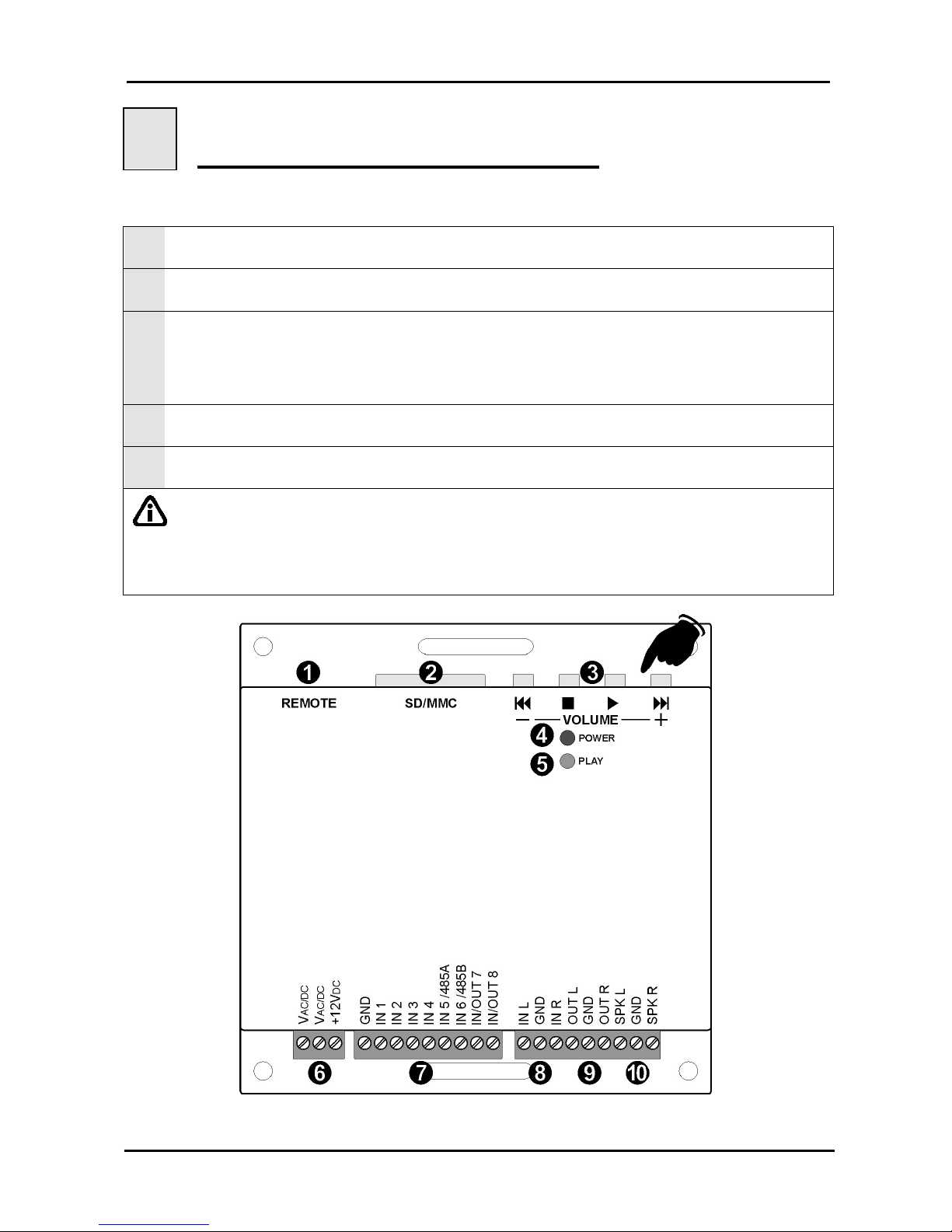
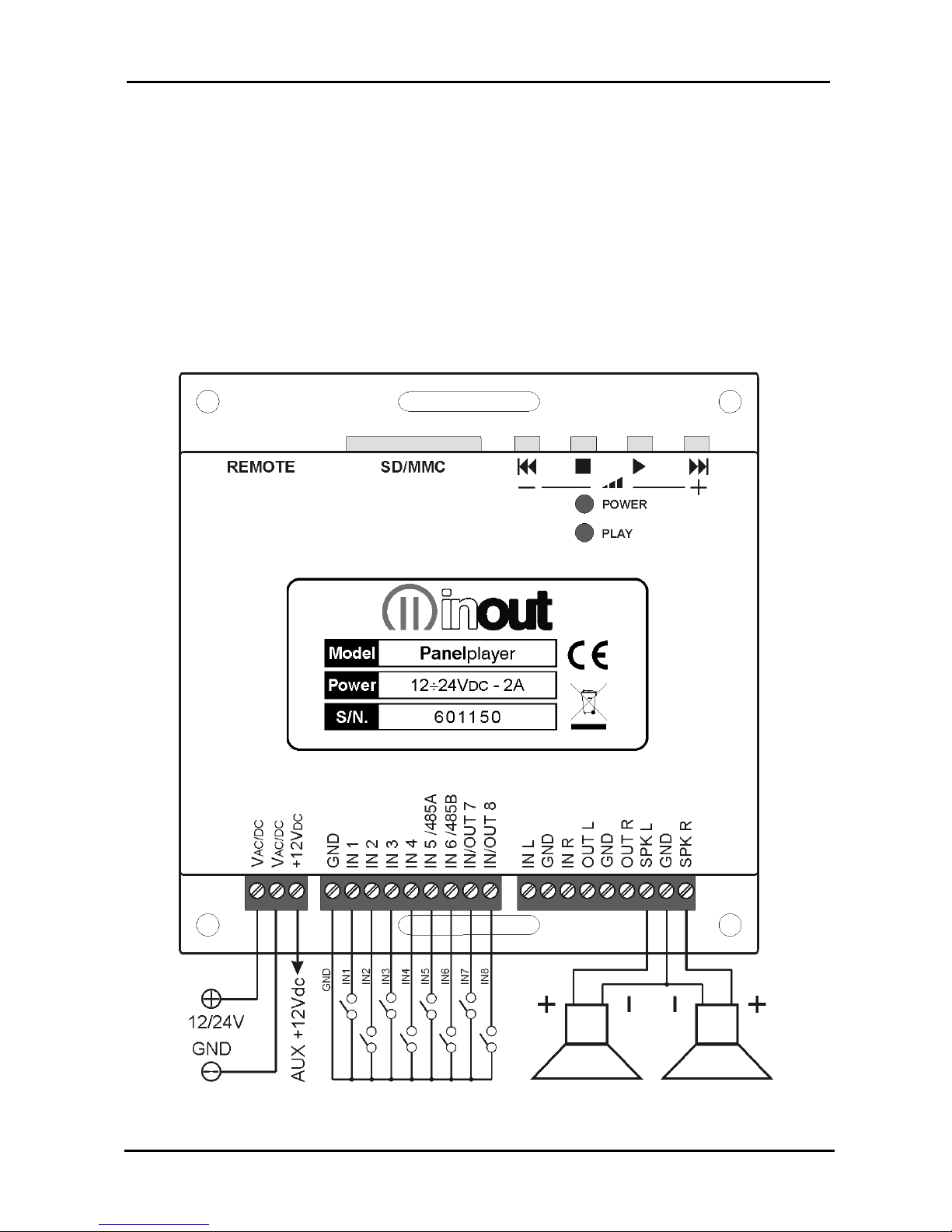
1
Connector for outside connection of the memory and command buttons.
2
Flash memory introduction slot for Secure Digital or MultiMedia Card.
3
Command keys:
= (brief pressure) precedent MP3 file / (prolonged pressure) reduce output volume
= STOP
= PLAY
= (brief pressure) next MP3 file / (prolonged pressure) increase output volume
4
Red LED: lit = device is live.
5
Green LED:
lit =
blinking =
MP3 file playing;
Panelplayer in pause/STOP.
IMPORTANT:
volume control with the keys is active only during the playing of the MP3 file.
pressing STOP during play, Panelplayer remains in pause excluding all the logical inputs until
reactivation with the PLAY key. This condition is indicated by the blinking green LED.
Page 8
Panelplayer User Manual v.1.4
Page 7
3.2 Connection description
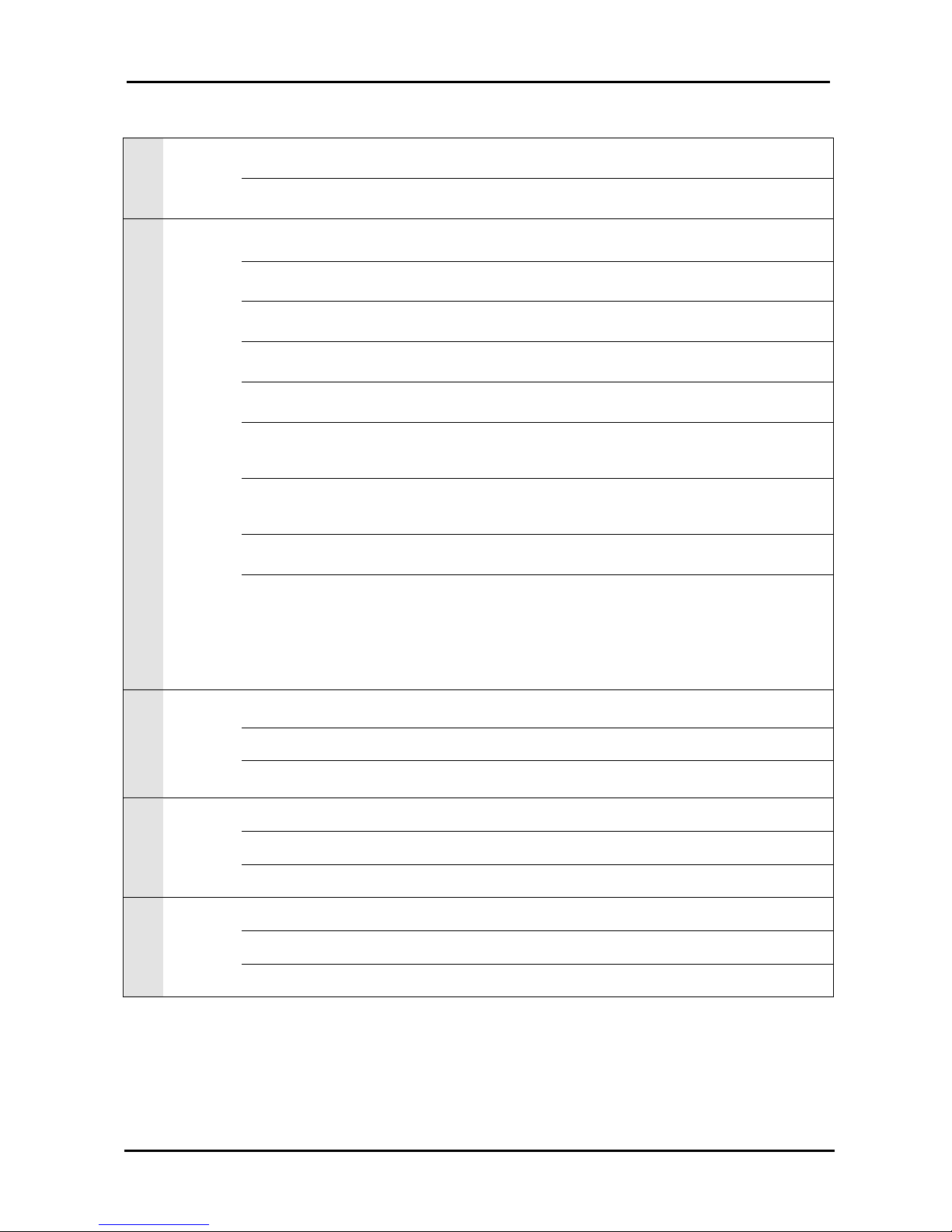
6
VAC/DC
Input feed 12÷24VDC.
+12VDC
Auxiliary + 12Vdc voltage, available for input activation or outside feed sensors.
MAX. 100mA.
7
GND
Ground for input activation using outside contacts; auxiliary ground voltage.
IN1
Multi-function input for activating 1.mp3 file or 1.m3u playlist (direct or bit 0 in
binary combination).
IN2
Multi-function input for activating 2.mp3 file or 2.m3u playlist (direct or bit 1 in
binary combination).
IN3
Multi-function input for activating 4.mp3 file or 3.m3u playlist (direct or bit 2 in
binary combination).
IN4
Multi-function input for activating 8.mp3 file or 4.m3u playlist (direct or bit 3 in
binary combination).
IN5/485A
Multi-function input for activating 16.mp3 file or 5.m3u playlist (direct or bit 4 in
binary combination).
Configurable for serial RS485 communication (see chap. 9).
IN6/485B
Multi-function input for activating 32.mp3 file or 6.m3u playlist (direct or bit 5 in
binary combination).
Configurable for serial RS485 communication (see chap. 9).
IN/OUT7
Multi-function input/output for activating 64.mp3 file or 7.m3u playlist (direct or bit
6 in binary combination).
IN/OUT8
Multi-function input/output for activating 128.mp3 file (direct or bit 7 in binary
combination).
Configurable for outside applications. 0=standby 1=in play (+5V). Permits two
Panelplayers to be connected in cascade for the synchronised management of
t
he musical bases and commercials and spots in a scheduled time frame
(connection Vlink, par. 8.1).
8
IN L
Pre-amplified audio input L channel, for outside music sources (SAT, DAB, CDE,
etc.) with Mixer function.
GND
Ground signal of pre-amplified audio input.
IN R
Pre-amplified audio input R channel, for outside music sources (SAT, DAB, CD,
etc.) with Mixer function.
9
OUT L
Pre-amplified audio output L channel.
GND
Ground signal of pre-amplified audio output.
OUT R
Pre-amplified audio output R channel.
10
SPK L
Amplified 20W audio output for speaker, L channel.
GND
Ground signal of amplified audio output.
SPK R
Amplified 20W audio output for speaker, R channel.
Page 9
Panelplayer User Manual v.1.4
Page 8
3.3 Power supply
Panelplayer may operate with the following voltage power supplies: 12÷24VDC.
The red POWER LED lights up when it is turned on with active feed.
3.4 Logical inputs
Panelplayer has six/eight multi-function logical inputs to control the playing of the playlists or
direct calling up of individual audio files.
In order to activate the playing of a file, connect the desired GND input (or the desired inputs
when one is operating in binary logic).
Page 10

Panelplayer User Manual v.1.4
Page 9
3.5 IN/OUT 8 - input/output Vlink
Programmable input/output to connect two Panelplayers in cascade, for synchronised
management of musical playlists with commercials at scheduled introduction without
interruptions.
Vlink: 0 = standby
1 = in play (+5V).
3.6 Serial RS485 connection
Panelplayer can be connected through serial gate, to a RS485 bus that can be controlled
by a system master or by a computer. To enable the RS485 gate (pin IN5/485A and
IN6/485B), raise the cover of the device and move the relative jumpers (see para. 9.1).
3.7 Pre-amplified audio input
Pre-amplified STEREO L+R audio input for outside music source (SAT, DAB, CD, etc.)
with Mixer function to mix a music source with scheduled commercials; extractable
terminal strip.
3.8 Pre-amplified audio output
Pre-amplified STEREO L+R audio output on extractable terminal strip.
3.9 Amplified audio output
Amplified STEREO 20W+20W audio output on extractable terminal strip.
Connect the outside 4/8 speakers to the SPK L/GND and SPK R/GND terminal strip.
IMPORTANT:
Use a speaker with equal or greater power to that supplied to the amplifier within
Panelplayer.
It is recommended to cable the device far from power cables; the two cables that
connect the speaker with Panelplayer could be a potential source of interference.
Page 11
Panelplayer User Manual v.1.4
Page 10
4
Configuration file
4.1 What is the configuration file?
Panelplayer is a very versatile device which can be adapted to the needs of the application
in which it is used. Different applications may require adjustment of volume, tone,
loudness, special parameters of communication or timing. The text file, called
‘configuration file’ and stored in the main directory of the flash memory, together with the
audio files, makes it possible to programme the various parameters of Panelplayer.
This file must be assigned the name config.txt (this extension has been used so it can be
modified by any text editor, including those for portable PocketPC terminals).
4.2 Content of the configuration file
Each line of the configuration file consists of:
Mnemonic code of the parameter to be set. It always consists of four CAPITAL
alphanumeric characters, and must always be at the beginning of the line. No more
than one parameter is permitted on the same line.
Separating character. ‘=’. This MUST be inserted just after the mnemonic code, without
any spacing or tabulation character.
The relevant numerical parameter expressed as a decimal, to be inserted directly after
the separation character, without any spacing or tabulation character.
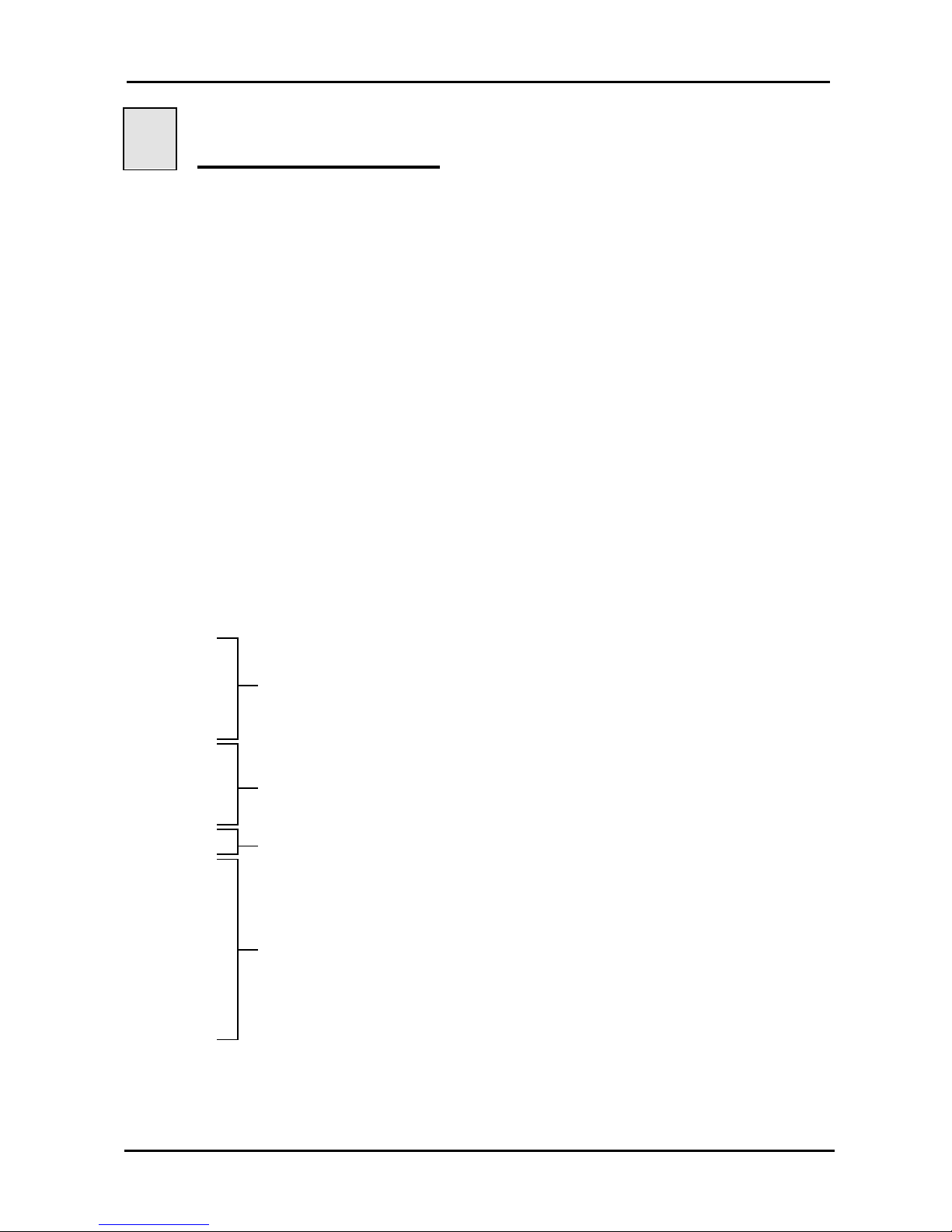
Example of file config.txt:
LOUT=14
LLOU=10
LTRE=14
LBAS=10
MOMD=0
Audio adjustment parameters
TPCM=10
MICP=1
MIRS=0
IMOD=0
Logical inputs parameters (direct or binary combinaton)
MPLL=14
Playlist/music player mode parameter
CMAD=0
CMCK=1
CMCL=0
CMBR=3
CMPR=0
CMSB=1
CMDB=8
CMDR=0
CMNR=0
RS485 serial port communication parameters
Page 12
Panelplayer User Manual v.1.4
Page 11
4.3 How it is managed by Panelplayer
At the time the device is turned on, or when the flash memory is inserted, Panelplayer will
start to read the main directory of the memory; once it has found the file config.txt, it
interprets the parameters inserted in each line, memorising them permanently in its
internal memory, of a non volatile kind. The parameters therefore stay in memory even
after the device has been turned off. This is why it is not indispensable for the
configuration file to be always present in the flash memory: once all the parameters have
been acquired, this file can also be deleted.
NOTE: If it is necessary to configure various Panelplayers with the same parameters, one
can prepare a single flash memory with the appropriate config.txt file, alternately insert this
memory on all the modules to be configured, then insert the memory with the audio files
only.
4.4 Preparing the file
To create the file, one can use an ordinary text editor (like Windows Notebook). The file
must be saved as a pure text file (.txt). Should other programmes be used (e.g. Microsoft
Word) one must be careful to save the document as “text only”: otherwise, control
characters would be inserted which would make it impossible for Panelplayer to interpret
this file.
4.5 Memorising the files in the flash memory
The configuration file and all the MP3 audio files can be memorised in the flash memory
via a special USB reader/writer for PC.
4.6 Audio adjustment parameters
Panelplayer allows for the following audio adjustments:
Independent adjustments of the MP3 file level, INL/INR music source input and general
amplified/pre-amplified output.
Adjustment of loudness level.
Separate adjustment of high and low levels.
Adjusting the level of the musical background while delivering the spots.
Activation/deactivation audio amplifier muting in output.
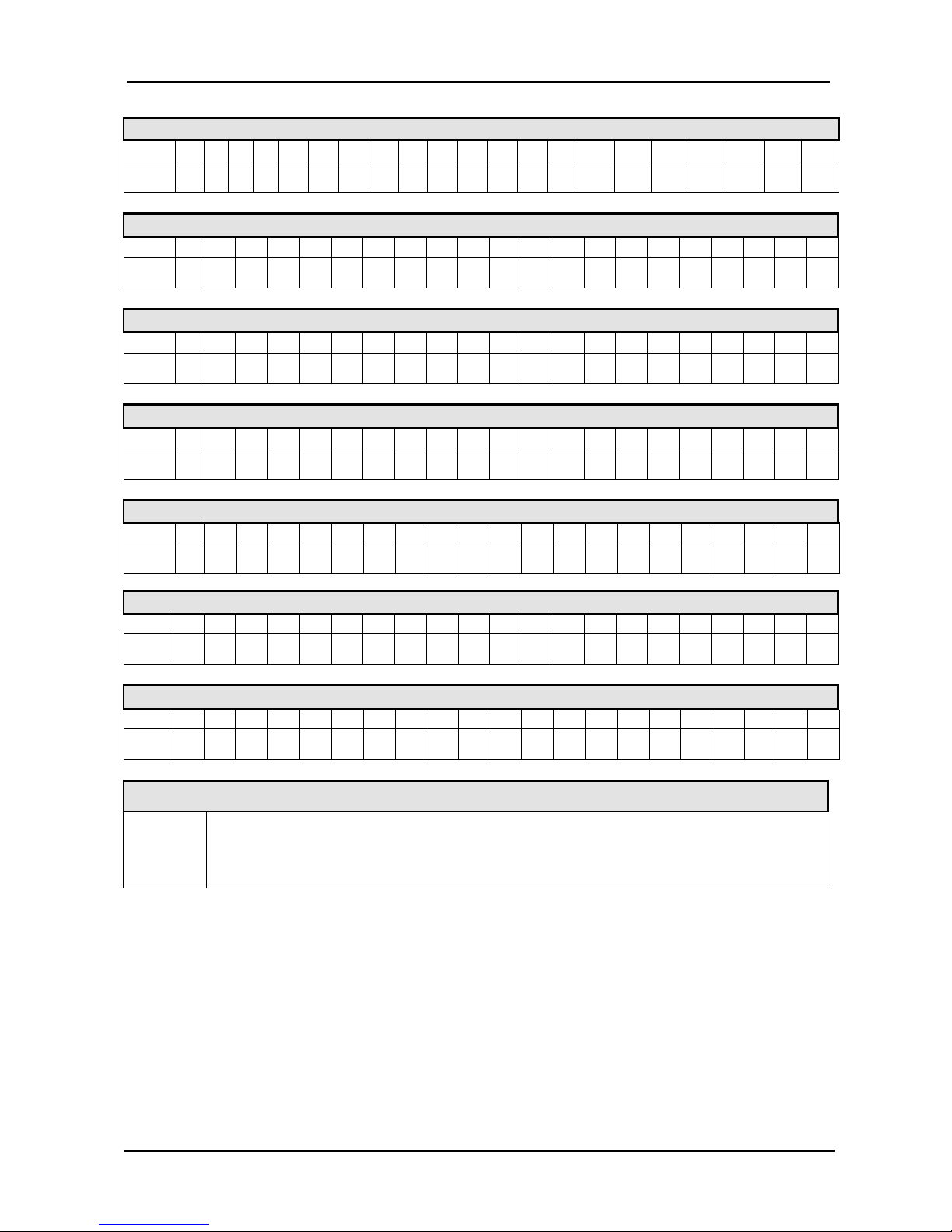
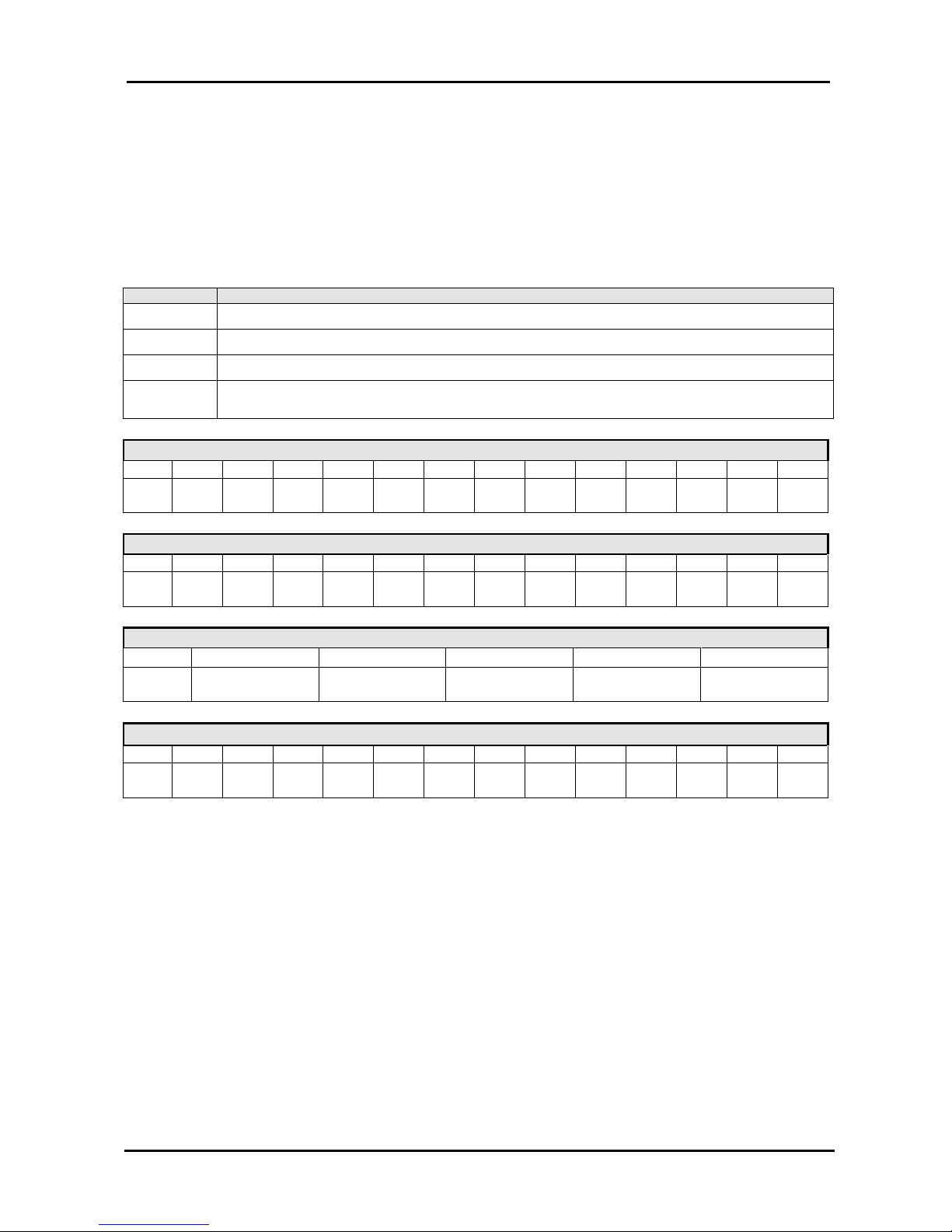
The following tables show the relation between the value set in the configuration file and
the actual value of the audio parameter.
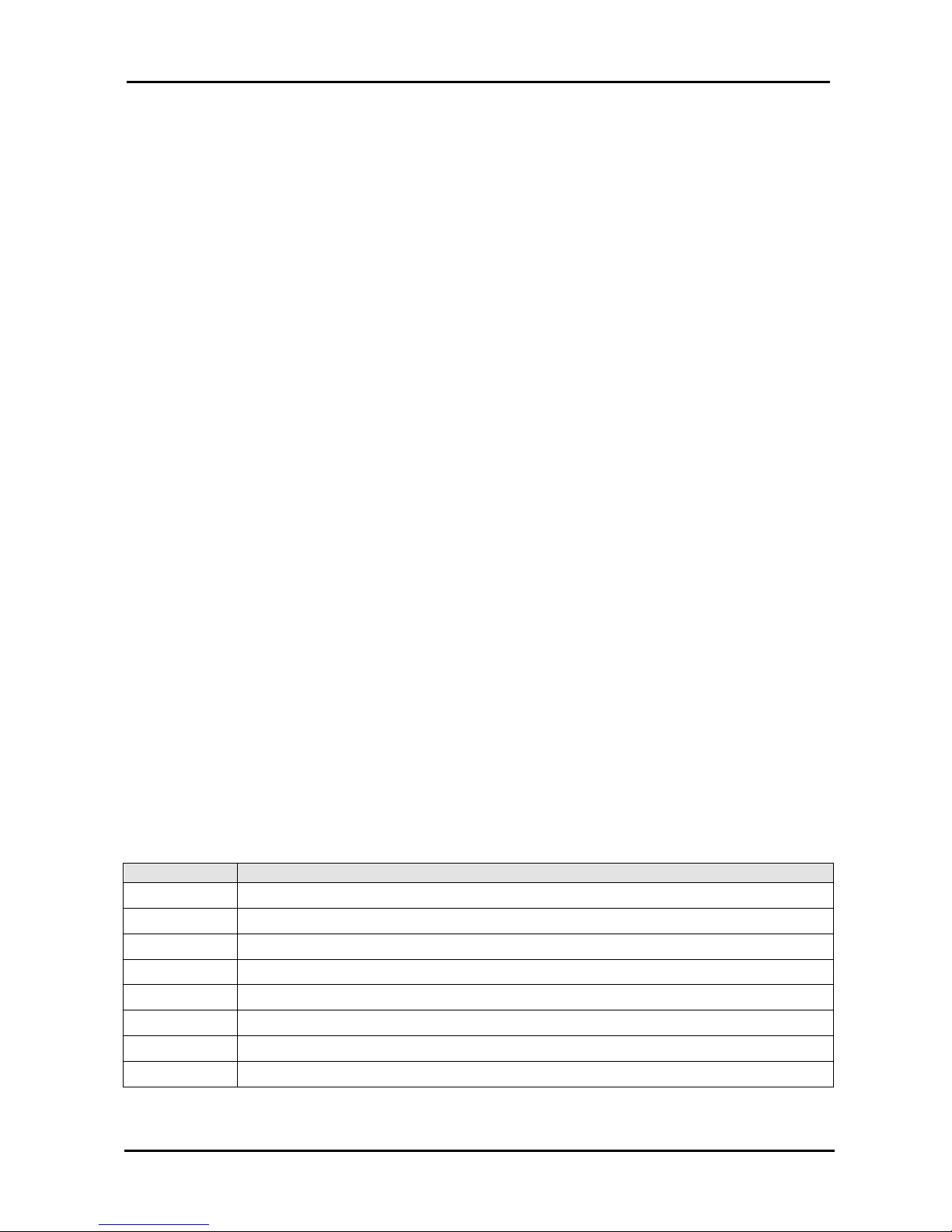
Mnemonic Description
LMP3
MP3 decoder output level (value between 0 and 20 in decimal).
LOUT
Level audio output LINE OUTPUT (value between 0 and 20 in decimal).
LLIN
Input level LINE INPUT (value between 0 and 20 in decimal).
LLI2
Background level LINE INPUT (value between 0 and 20 in decimal).
LLOU
Loudness level (value between 0 and 20 in decimal).
LTRE
High tone level (value between 0 and 20 in decimal).
LBAS
Low tone level (value between 0 and 20 in decimal).
MOMD
Mode output muting deactivation (0=OFF/1=ON ).
Page 13
Panelplayer User Manual v.1.4
Page 12
LMP3 (MP3 decod
er output level)
Value
0 1 2 3 4 5 6 7 8 9 10 11 12 13 14 15 16 17 18 19 20
Level
OFF 2% 5% 9% 14% 20% 26% 33% 40% 48% 56% 66% 77% 88% 100%
0dB
112% 128% 144% 161% 178% 200%
+6dB
LOUT (general output amplified/pre-amplified level)
Value
0 1 2 3 4 5 6 7 8 9 10 11 12 13 14 15 16 17 18 19 20
Level
OFF -55dB-35dB-28dB-23dB-20dB-17dB-14dB-12dB-10dB-8dB-6dB-4dB-2
dB0dB+2dB+4dB+6dB+8dB
+10dB+12
dB
LLIN (input level INL/INR)
Value
0 1 2 3 4 5 6 7 8 9 10 11 12 13 14 15 16 17 18 19 20
Level
OFF -55dB-35dB-28dB-23dB-20dB-17dB-14dB-12dB-10dB-8dB-6dB-4dB-2
dB0dB+2dB+4dB+6dB+8dB
+10dB+12
dB
LLI2 (input level INL/INR of the background during the playing of the MP3 file)
Value
0 1 2 3 4 5 6 7 8 9 10 11 12 13 14 15 16 17 18 19 20
Level
OFF -55dB-35dB-28dB-23dB-20dB-17dB-14dB-12dB-10dB-8dB-6dB-4dB-2
dB0dB+2dB+4dB+6dB+8dB
+10dB+12
dB
LLOU (loudness level)
Value
0 1 2 3 4 5 6 7 8 9 10 11 12 13 14 15 16 17 18 19 20
Level
0
dB
+0,5
dB
+ 1dB+1,5dB+ 2dB+2,5dB+ 3dB+ 4dB+ 5dB+ 6dB+ 7dB+ 8dB+ 9dB+ 10
dB
+11
dB
+ 12dB+ 13dB+ 14dB+ 15dB+ 16dB+ 17
dB
LTRE (high tone level)
Value
0 1 2 3 4 5 6 7 8 9 10 11 12 13 14 15 16 17 18 19 20
Level
-12dB-10dB-8dB-7dB-6dB-5dB-4dB-3dB-2dB-1
dB0dB
+ 1dB+ 2dB+ 3dB+ 4dB+ 5dB+6dB+7dB+8dB+10dB+12
dB
LBAS (low tone level)
Value
0 1 2 3 4 5 6 7 8 9 10 11 12 13 14 15 16 17 18 19 20
Level
-12dB-10dB-8dB-7dB-6dB-5dB-4dB-3dB-2dB-1
dB0dB
+ 1dB+ 2dB+ 3dB+ 4dB+ 5dB+6dB+7dB+8dB+10dB+12
dB
MOMD (Mode Output Muting Disable)
MOMD
1 = Muting deactivated (amplifier power always active).
0 = Muting active. The power amplifier is active only during the playing of the
MP3 files.
Page 14
Panelplayer User Manual v.1.4
Page 13
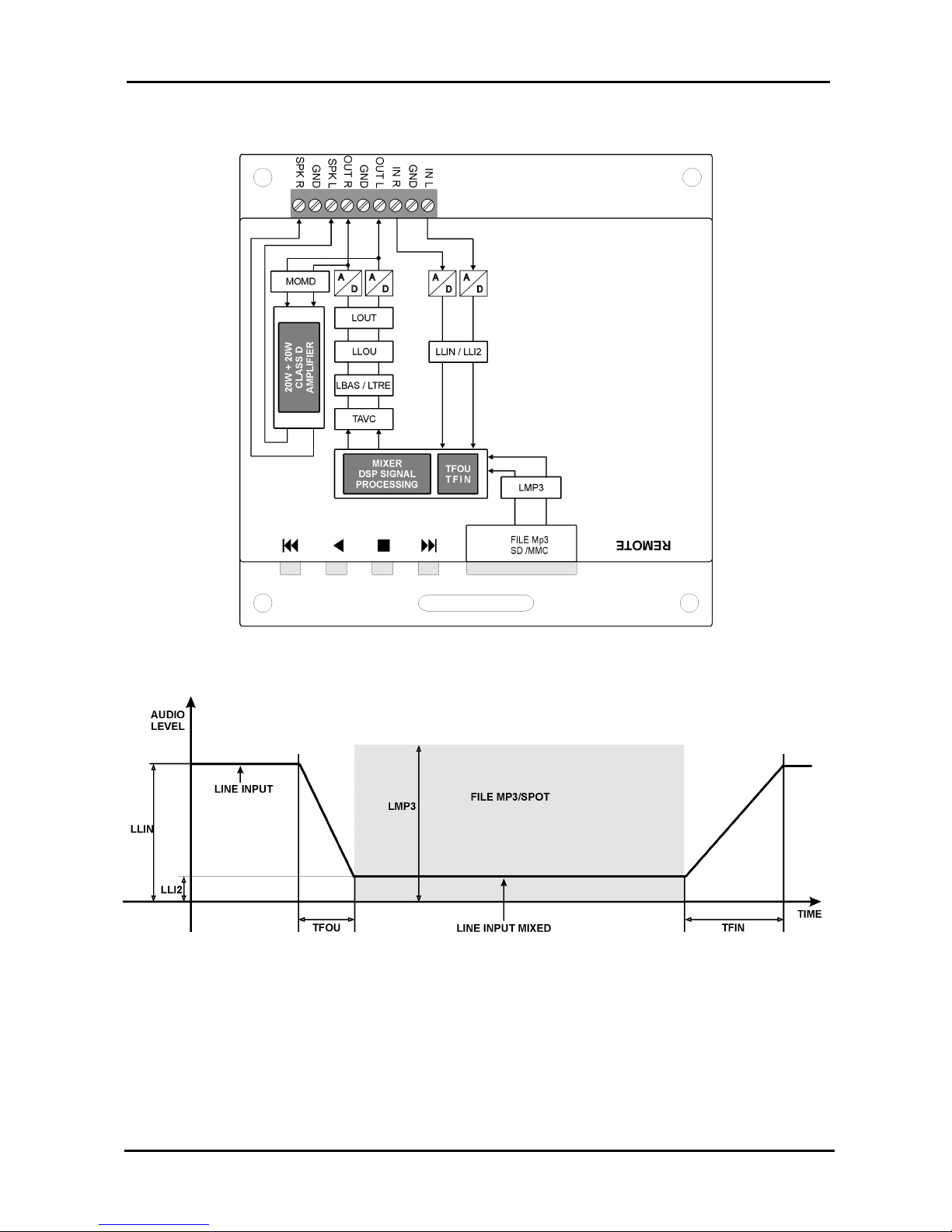
4.7 Timing and switchover parameters
One can set the fade-off time, the reaction time of the automatic output volume and the
advance time for starting the spot before the end of the piece of music.
Example: TFOU=15
TFIN=15
TAVC=3
TADU=15
Mnemonic Description of timing parameter
TFOU
Setting the Fade-Out time in 1/10 of one second (value between 1 and 30 in decimal).
TFIN
Setting the Fade-In time in 1/10 of one second (value between 1 and 30 in decimal).
TAVC
Setting the reaction time of the automatic output volume control.
TADU
Setting the advance Play time of the spot in 1/10 of one second between Panelplayers
in cascade (value between 0 and 20 in decimal).
TFOU (fade OUT):
setting the fading time of the INL/INR before playing the MP3 file (spot).
Value 1 2....4 5 6....9 10 11...14 15 16...19 20 21...24 25 26...29 30
Time
1/10
second
½
second
1
second
1,5
seconds
2
seconds
2,5
seconds
3
seconds
TFIN (fade IN):
setting the fading time of the INR/INL after playing the MP3 file (spot).
Value 1 2....4 5 6....9 10 11...14 15 16...19 20 21...24 25 26...29 30
Time
1/10
second
½
second
1
second
1,5
seconds
2
seconds
2,
5
seconds
3
seconds
TAVC:
Setting the reaction time of the automatic output volume control.
Value 0 1 2 3 4
Time OFF
2/10
second
2
seconds
4
seconds
8
seconds
TADU: Setting the advance Play time of the spot in 1/10 second between Panelplayers in cascade.
Value 1 2....4 5 6....9 10 11...14 15 16...19 20 21...24 25 26...29 30
Time
1/10
second
½
second
1
second
1,5
seconds
2
seconds
2,5
seconds
3
seconds
Page 15
Panelplayer User Manual v.1.4
Page 14
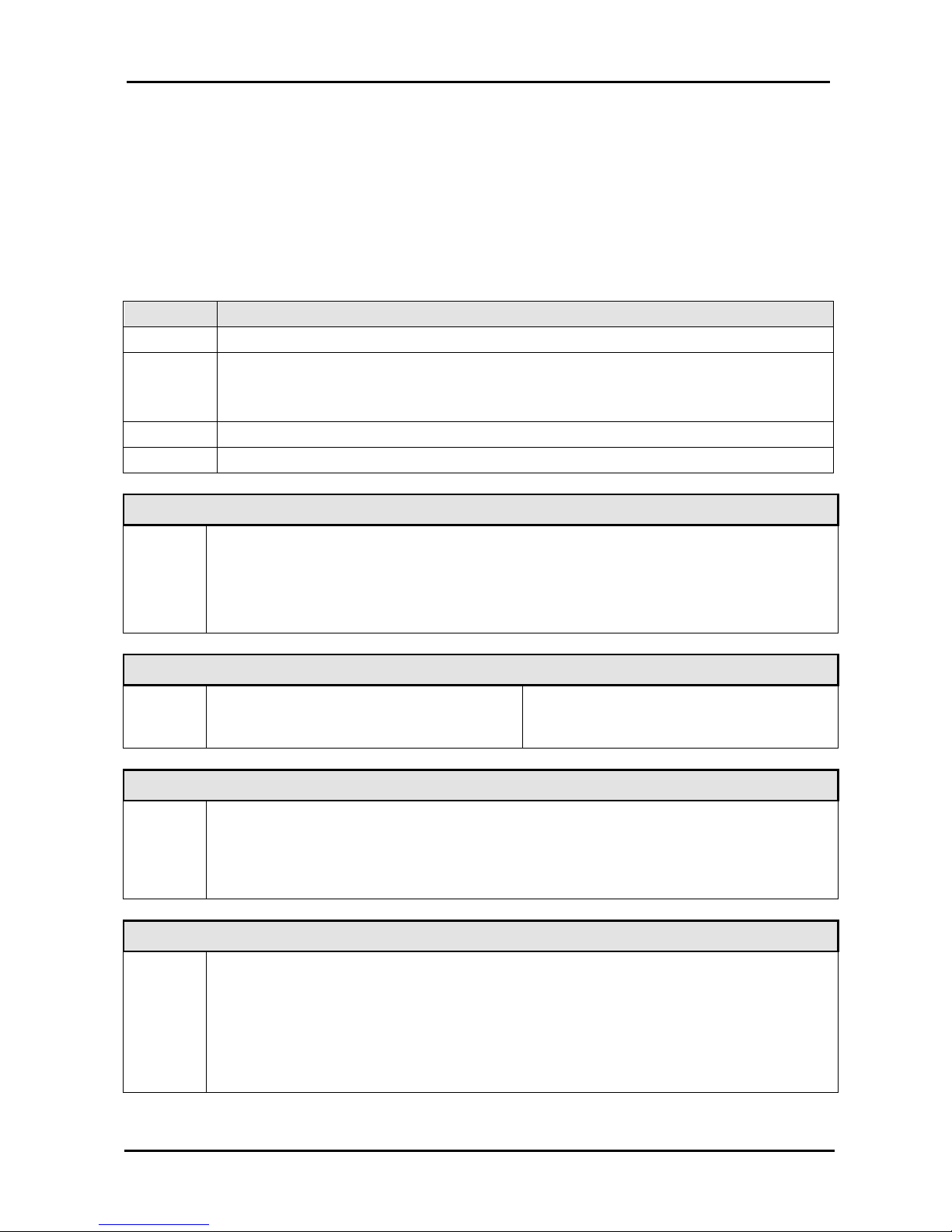
4.8 Diagram of the operating parameters
Page 16
Panelplayer User Manual v.1.4
Page 15
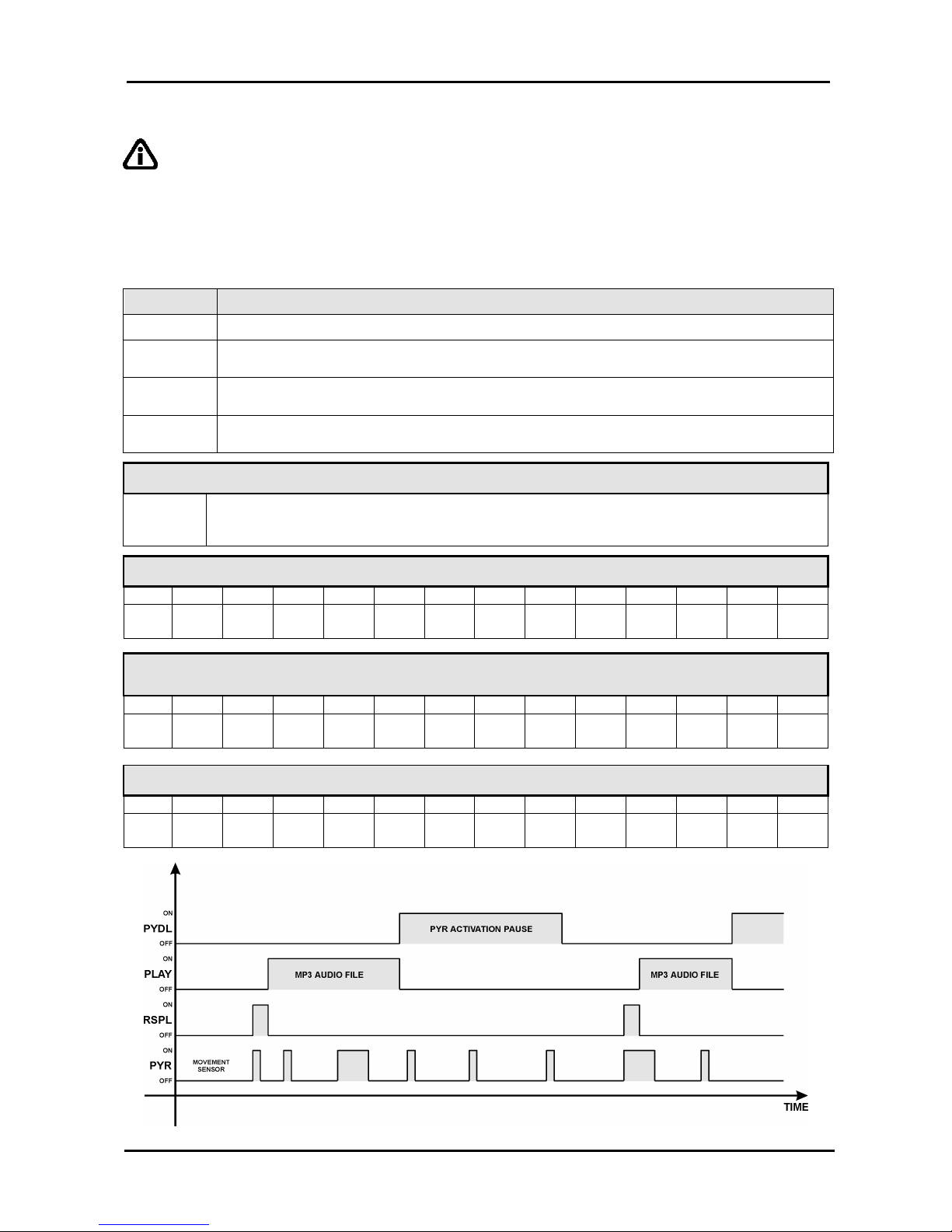
4.9 Input management parameters
The playing of the files takes place by activating the available logical inputs, the activation
modes are set through the IMOD, TPCM MICP and MIRS parameters inserted in the
configuration files.
Example: IMOD=0
TPCM=10
MICP=1
MIRS=0
Mnemonic Description of timing parameter
IMOD
Setting the mode of input active high or active low.
TPCM
Setting the persistence time of the input command (time to wait before Panelplayer is
able to interpret the input command) expressed in decimals of milliseconds (value
between 0 and 255 in decimal).
MICP Setting Mode Input Continuous Play
MIRS Setting Mode Input ReStart
IMOD (Input management mode)
IMOD
0= active-low input mode; the functioning of the input is connected to the
ground/GND of the device.
1= active-high input mode; the functioning of the input is applied with a positive
voltage between 5 and 12Vdc.
TPCM (Time persistence input command mode)
TPCM
0 =no delay
1 =10mSeconds
2 =20mSeconds
100= 1 second
200= 2 seconds
250= 2,5 seconds
MICP (Mode Input Continuous Play)
MICP
0=having terminated the playing of the codified file, requested from the input
code, Panelplayer goes in standby.
1=the requested codified file is continuously played until the relevant input code
is inserted.
MIRS (Mode input Restart)
MIRS
0=repeated activation or deactivating of the same input code does not
influence the playing of the relevant file. Only the activation of a different
code can block the playing underway and activate the playing of the new
requested file.
1=in the moment in which an input code is enabled the playing of the of the
relevant file from its beginning takes place, even if it is already in play.
Page 17
Panelplayer User Manual v.1.4
Page 16
4.10 Infrared movement sensor management parameters
IMPORTANT: the following parameters are enabled exclusively for the IN1 input.
and in the presence of a playlist 1.m3u (see paragraph 6.2).
Example: PYDT=1
PYDL=10
TAPL=0
RSPL=3
Mnemonic Description
PYDT
Activation IR sensor (0=OFF/1=ON ).
PYDL
Delay time between two activations of the IR sensor (value between 0 and 240 in
decimal).
TAPL
Setting of the AUTOPLAY time for playing of a message when the IR sensor is not
activated (value between 0 and 240 in decimal).
RSPL
Delay time of the Play message from the activation of the IR
sensor (value between
0 and 20 in decimal).
PYDT (activation infrared movement sensor)
PYDT
1 = IR sensor activated
0 = sensor deactivated
PYDL (pause between two activations of the IR sensor)
Value 0 1 2 3 4 5 10 20 30 60 120 180
240
Time
IR
1
second
2
seconds3seconds4seconds5seconds10seconds20seconds30seconds1minute2minutes3minutes4minutes
TAPL (setting AUTOPLAY time for playing files when the IR se
nsor is not
activated)
Value 0 1 2 3 4 5 6 12 18 30 60 180 240
Time
Not
managed10seconds20seconds30seconds40seconds50seconds1minute2minutes3minutes5minutes10minutes30minutes40minutes
RSPL (delay time of the Play message from the activation of the IR sensor)
Value 1 2....4 5 6....9 10 11...14 15 16...19 20 21...24 25 26...49 50
Time
1/10
second
½
second
1
second
1,5
seconds
2
seconds
2,5
seconds
5
seconds
Page 18

Panelplayer User Manual v.1.4
Page 17
5
Scheduled operation
5.1 Introduction to timed operation
When the flash memory is inserted, Panelplayer will analyse its contents and – depending
on the files which are present – will automatically set the mode of operation.
In the presence of the PALIN.TXT file, Panelplayer plays the sequence of communiqués in
a cyclical emission (one hour cycles) called PALIMPSEST which are contained in the
same PALIN.TXT file.
5.2 The palimpsest file – palin.txt
With Panelplayer one can draw up a sequence or list of communiqués to be played according
to pre-set intervals. This list is a simple text file (palin.txt) which contains the indication in
minutes (00:00÷00:59) and the names of the MP3 files to be played.
There are a few simple rules on how to set the palimpsest; first of all, you must set the time.
Es: 00:10
N.B. It is very important to start a new line of text with this, and to separate the hours from the
minutes using the character (:)
On the same line, you must then introduce the names of the MP3 audio files (max. 8 characters).
You can choose among various kinds of introduction:
1. separating character [Tab] between one spot and the next:
E.g.: 00:10 spot01 spot02 spot03
2. comma (,) between one spot and the next:
E.g.: 00:10,spot01,spot02,spot03
3. semicolon (;) between one spot and the next:
E.g.: 00:10;spot01;spot02;spot03
Once the insertion has been completed, the file will appear as in the following example:
00:00 Spot04 Spot07
Example of palin.txt
file with cyclical
emission at intervals
of 5 minutes of
commercial spots
00:05 Spot09 Spot17
00:10 Spot11 Spot02
00:15 Spot01 Spot08 Spot03 Spot06 Spot05
00:20 Spot12 Spot03
00:25 Spot16 Spot17
00:30 Spot09 Spot10
00:35 Spot05 Spot11 Spot12 Spot13 Spot14
00:40 Spot02 Spot11
00:45 Spot04 Spot07
00:50 Spot02 Spot11
00:55 Spot09 Spot11
An example of the reading and functioning of a timetable bar is provided below:
00:05 Spot05 Spot11 Spot12 Spot13 Spot14
00:11 Spot01 Spot07 Spot03
Page 19
Panelplayer User Manual v.1.4
Page 18
In this case, Panelplayer remains in standby for 5 minutes from the moment it is turned on;
at the 5th minute Panelplayer fades out the input audio signal in order to play the 00:05
bar, composed of 5 files/spots.
Once the bar has finished, Panelplayer brings the input audio signal to its precedent value
and remains in standby until reaching the 11th minute, fading in the input audio to play the
00:10 bar, composed of 3 files/spots.
IMPORTANT: Using the pre-amplified audio input, verify the setting of the LLIN, LLI2 and
MOMD parameters inserted in the configuration files (par. 4.6).
Programming limits:
Max. programming permitted……………………… 1 hour (cyclic) from 00:00 to 00:59
Max. quantity of hour bars…………………………. 60 bars
Max. quantity of commercials per bar…….…….... 8 spots/file
Max. quantity of commercials per palimpsest…… 500 spots/file
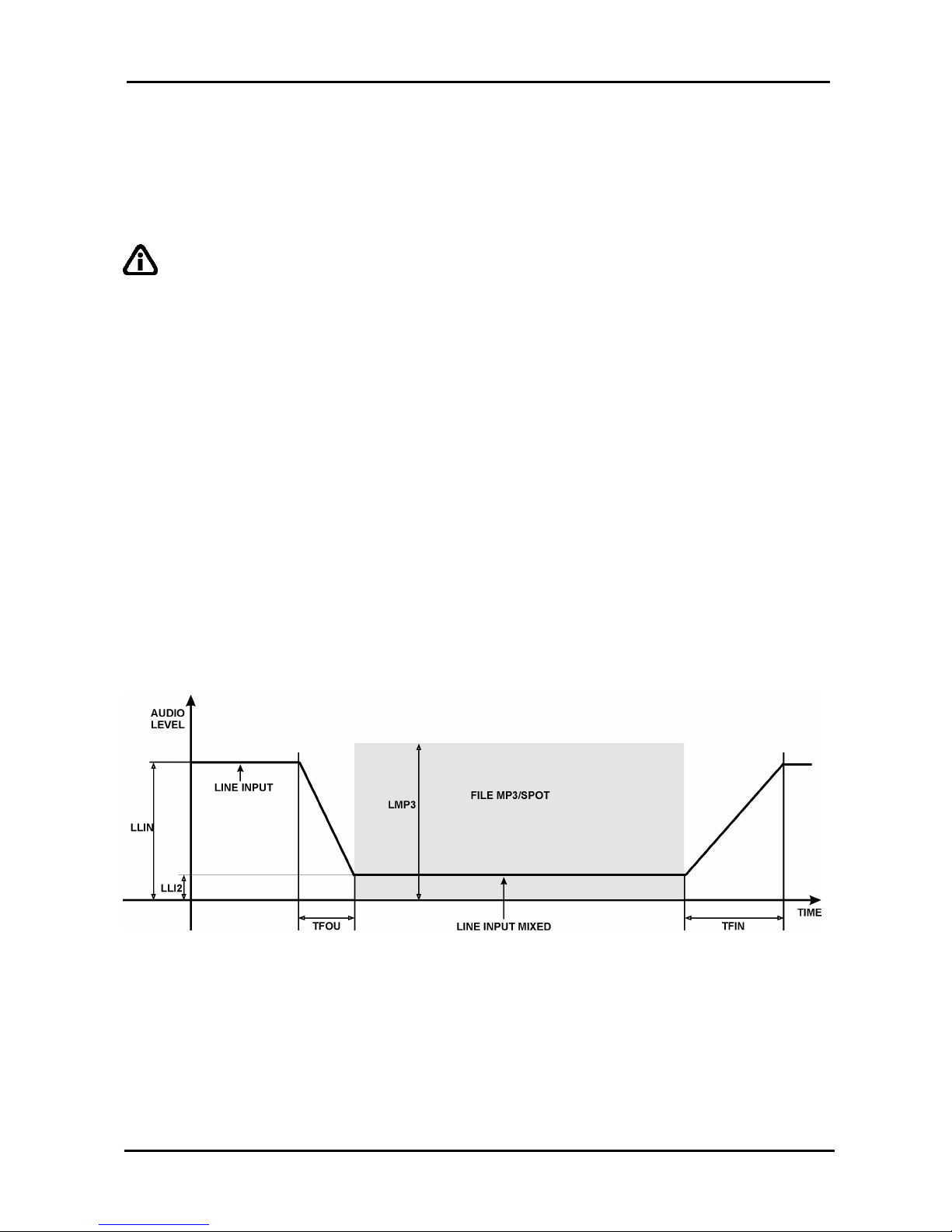
5.3 MIXER function
Panelplayer has an audio input for connection to outside music sources, with a mixer
function to mix this source with the files played by flash memory (see par. 8.3). At the time
scheduled for delivering the advertising bar, Panelplayer fades out the input audio signal
from the level LLIN to the level LLI2, according to a programmed fade TFOU. Then the
MP3 file of the bar with level LMP3 is played, mixed with the outside audio source, present
in the background with level LLI2.
Once the whole hour bar has been finished, Panelplayer brings the input audio signal back
to the level LLIN according to a programmed fade TFIN.
5.4 AVC function – automatic control of the output volume
Panelplayer has an automatic control of the output volume (parameter TAVC, par. 4.7)
which allows you to normalise the level of the audio contributions: signal from LINE IN
(radio, CD, other Panelplayer).
This allows you to make less evident any differences of levels among the various MP3 files
being played.
Page 20
Panelplayer User Manual v.1.4
Page 19
6
Playlist operation
6.1 Introduction to playlist mode operation
When the flash memory is introduced, Panelplayer analyses its content on the base of the
presence of the relevant files, and automatically sets the following operation mode:
1. FILE PLAYLIST:TXT: audio player with pieces in sequence according to the list
present in the files.
2. FILE 1.M3U, 2.M3U, 3.M3U, 4.M3U, 5.M3U, 6.M3U, 7.M3U: audio player of the
sequence contained in the files depending on the logical input activated:
1.m3u = IN 1 2.m3u = IN 2 3.m3u = IN 3 4.m3u = IN 4
5.m3u = IN 5 6.m3u = IN 6 7.m3u = IN 7
During play the four command buttons REW, STOP, PLAY and FWD are activated.
6.2 What is a playlist file?
Panelplayer is able to follow a sequence or list of music pieces; this play list is a simple
text file called playlist.txt which can be inserted in the main directory of the same memory
containing the audio files (this extension is used so it can be modified via a handy
PocketPC portable terminal).
Follow a few, easy rules to set the sequence:
Example
with
numbers:
1
3
7
9
5
01
005
Example
with
names:
intro
part 1
part 2
monologu
music
part 3
finale
IMPORTANT:
Rename the MP3 audio files with
numbers or names with max. 8
characters.
Do not write in the extension (.mp3)
Max. 500 pieces per playlist
Fit the memory into its seat and wait for Panelplayer to read the playlist in order to check
the list of pieces contained.
At the end of the reading operation, if the names of the pieces have been fitted in correctly,
Panelplayer will automatically start to play the musical items in the programmed sequence
or it will await the activation of a logical input.
6.3 Playlist activation by logical inputs - MPLL (Mode PLayList) parameter
The seven available playlists, activated by the logical inputs, can be played with different
modes, depending upon the varying needs.
To choose these different manners of operation, you must work directly on the configuration
parameter MPLL (Mode PLayList) inserted in the file config.txt.
When the flash memory is put in, Panelplayer, depending on the configuration of the
parameter MPLL in the file config.txt, will switch over to the relevant manner of operation.
IMPORTANT:
the names of the 7 playlists are fixed
the loading times of the Playlists may last even tens of
seconds, in the meantime, Panelplayer is not able to play.
Page 21
Panelplayer User Manual v.1.4
Page 20
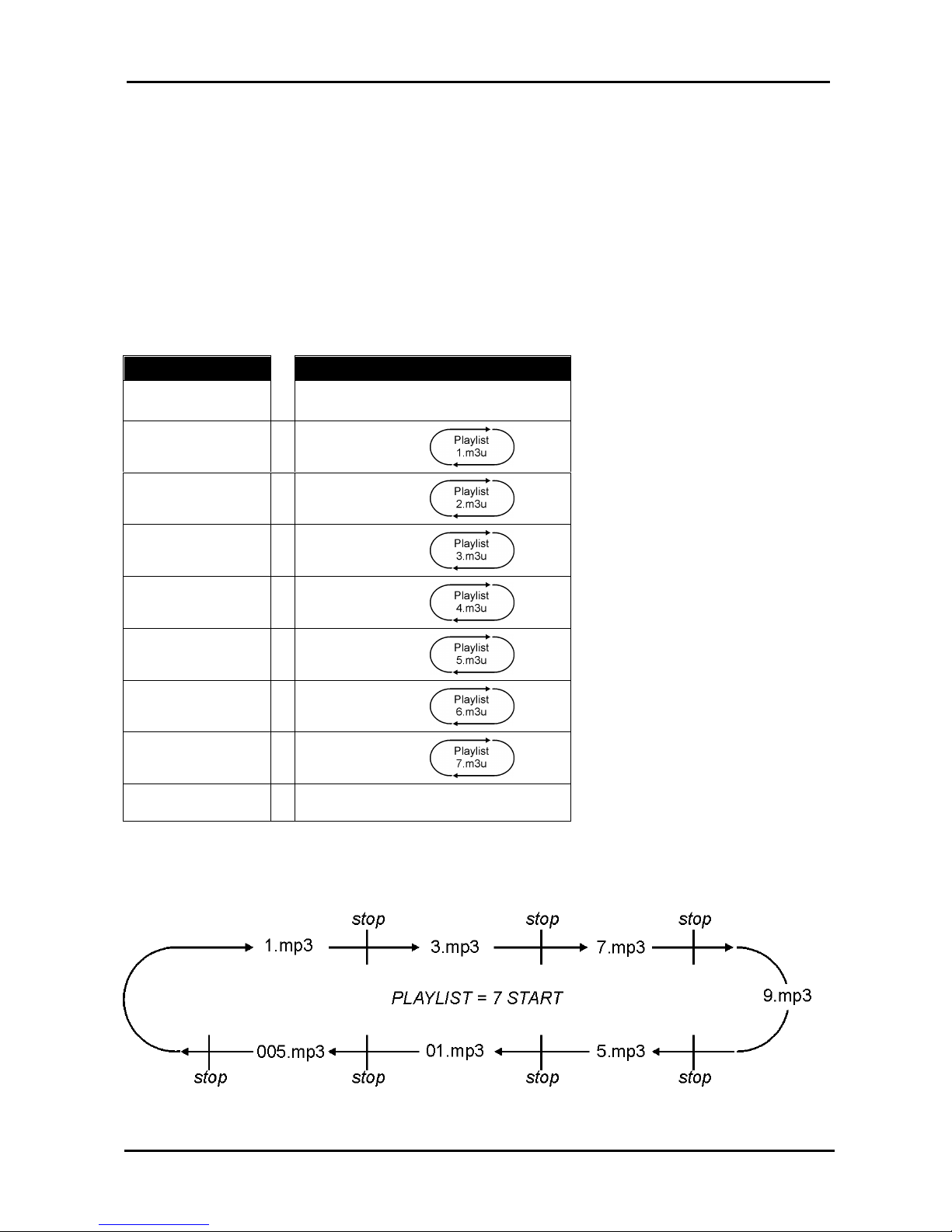
6.4 MPLL=10: Stop & Play Priority playlist
Operating mode:
Activated the input, the relative item in the Playlist is played: at the end of it, Panelplayer
goes in standby, awaiting a further activation. Activating the input once again or if the
activation remains, the successive file is played.
Repeated activations or deactivations of the same input or of other inputs does not
influence the playing of the file.
The position of the last item played is stored in memory, in order to start out again
always by the next one in case of restart.
The playlist is activated in loop, as long as the activation of the relative logical input
remains activated.
INPUT RELATIVE PLAYLIST
none = Standby
IN 1 = 1.m3u
IN 2 = 2.m3u
IN 3 = 3.m3u
IN 4 = 4.m3u
IN 5 = 5.m3u
IN 6 = 6.m3u
IN 7 = 7.m3u
IN 8 = VLINK function
N.B. If several inputs are activated, the playlist relevant to the lowest input is activated. For
example, if IN4 and IN5 are active, the playlist 4.m3u is played.
Page 22
Panelplayer User Manual v.1.4
Page 21
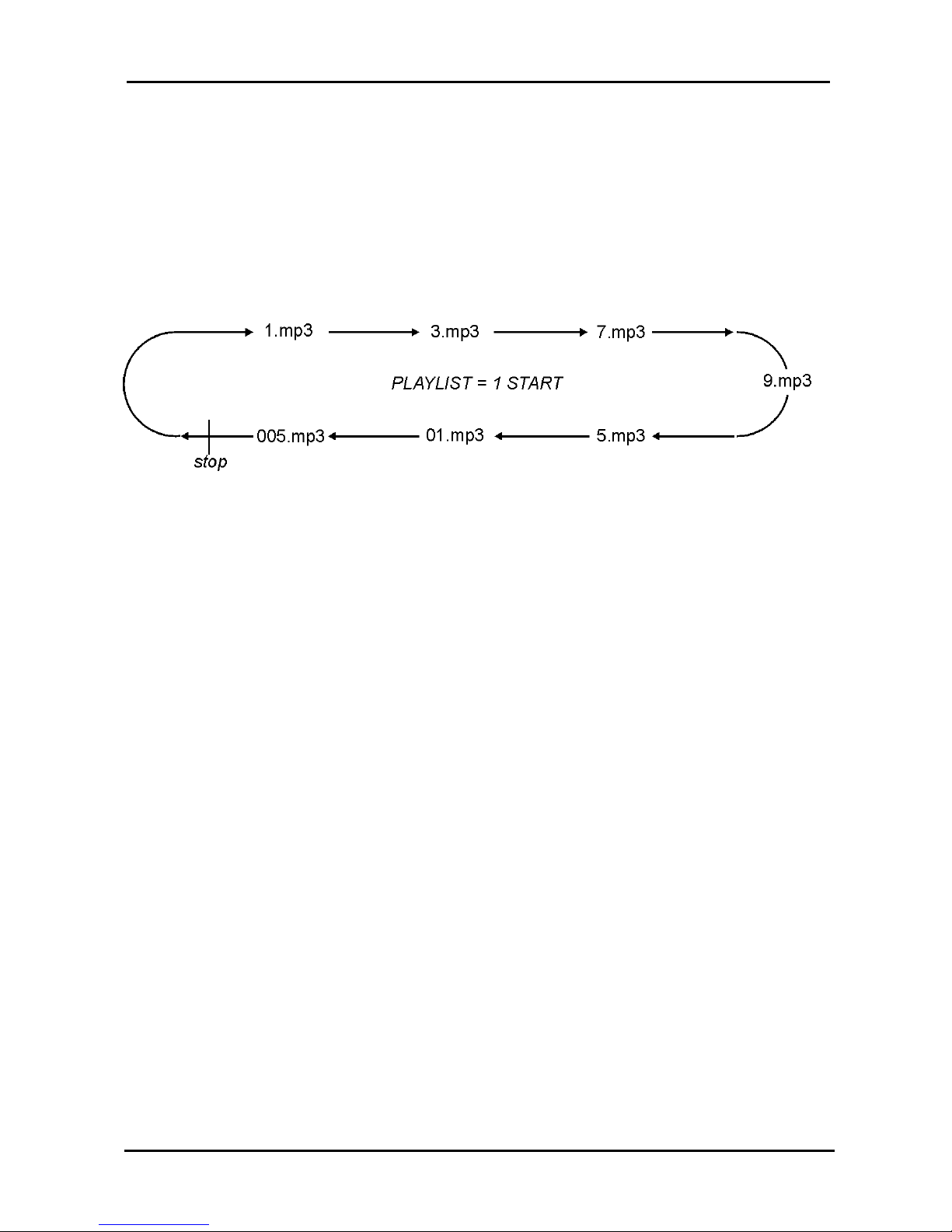
6.5 MPLL=11: Priority playlist
Operating mode:
Activated the input, the relative item in the Playlist is played: at the end of it,
Panelplayer goes in standby, awaiting a further activation.
Repeated activations or disabling of the same input or of other inputs does not
influence the playing of the file.
The playlist is activated in loop, as long as the activation of the relative logical input
remains activated.
6.6 MPLL=12: Stop & Play Standard playlist
Operating mode as MPLL=10 except:
Repeated activations or deactivations of the same logical input does not influence the
playing of the file; only the activation of a different input blocks the playing underway
and activates the relative playlist.
6.7 MPLL=13: Standard playlist
Operating mode as MPLL=11 except:
Repeated activations or deactivations of the same logical input does not influence the
playing of the file; only the activation of a different input blocks the playing underway
and activates the relative playlist.
6.8 MPLL=14: Stop & Play Restart playlist
Operating mode as MPLL=10 except:
From the moment that the same logical input is reactivated, the restart of the file is
commanded, even if it is playing. The activation of a different input blocks the playing
underway and activates the relative playlist.
6.9 MPLL=15 : Restart playlist
Operating mode as MPLL=11 except:
From the moment that the same logical input is reactivated, the restart of the file is
commanded, even if it is playing. The activation of a different input blocks the playing
underway and activates the relative playlist.
Page 23
Panelplayer User Manual v.1.4
Page 22
6.10 Music Player function (MPLL=16)
Panelplayer works just like a standard player in this mode and does not require any
specific programming (or playlist file). Any MP3 file can be played, even with long names.
Use the MPLL (Mode PlayList) parameter to set this mode (in config.txt).
Example file config.txt:
LLOU=10
LTRE=14
LBAS=10
Audio adjustment parameters
MPLL=16
Music player mode parameter
The tracks will be played in the sequence in which they are memorised in the flash
memory; if a block of data is transferred then the written sequence in the flash memory will
depend on the operating system used; if a precise sequence is preferred, then we
recommend transferring one MP3 file at a time.
In this mode, Panelplayer will automatically start to play the audio file, starting from the first
track, when the device is switched on or when the flash memory is inserted; the user can
run through the files just like listening to an audio CD by using the buttons on the front of
the device or by activating the commands with logical inputs, as in the following table:
The 4 keys in the front panel, work as follows:
= (brief pressure) precedent MP3 file / (prolonged pressure) reduce output volume
= (brief pressure) PLAY
= (brief pressure) STOP
= (brief pressure) next MP3 file / (prolonged pressure) increase output volume
IMPORTANT:
volume control with the keys is active only during the playing of the MP3 file.
When the Stop button is pressed, Panelplayer memorises the track currently being
played; press Play and Panelplayer will play the track from the beginning. This
function enables very long file sequences in large flash memories to be played,
without having to re-listen to the entire sequence from the first track.
If you wish to listen to the entire sequence again starting from the first track, just
remove the flash memory of turn the Panelplayer off and on again.
Page 24
Panelplayer User Manual v.1.4
Page 23
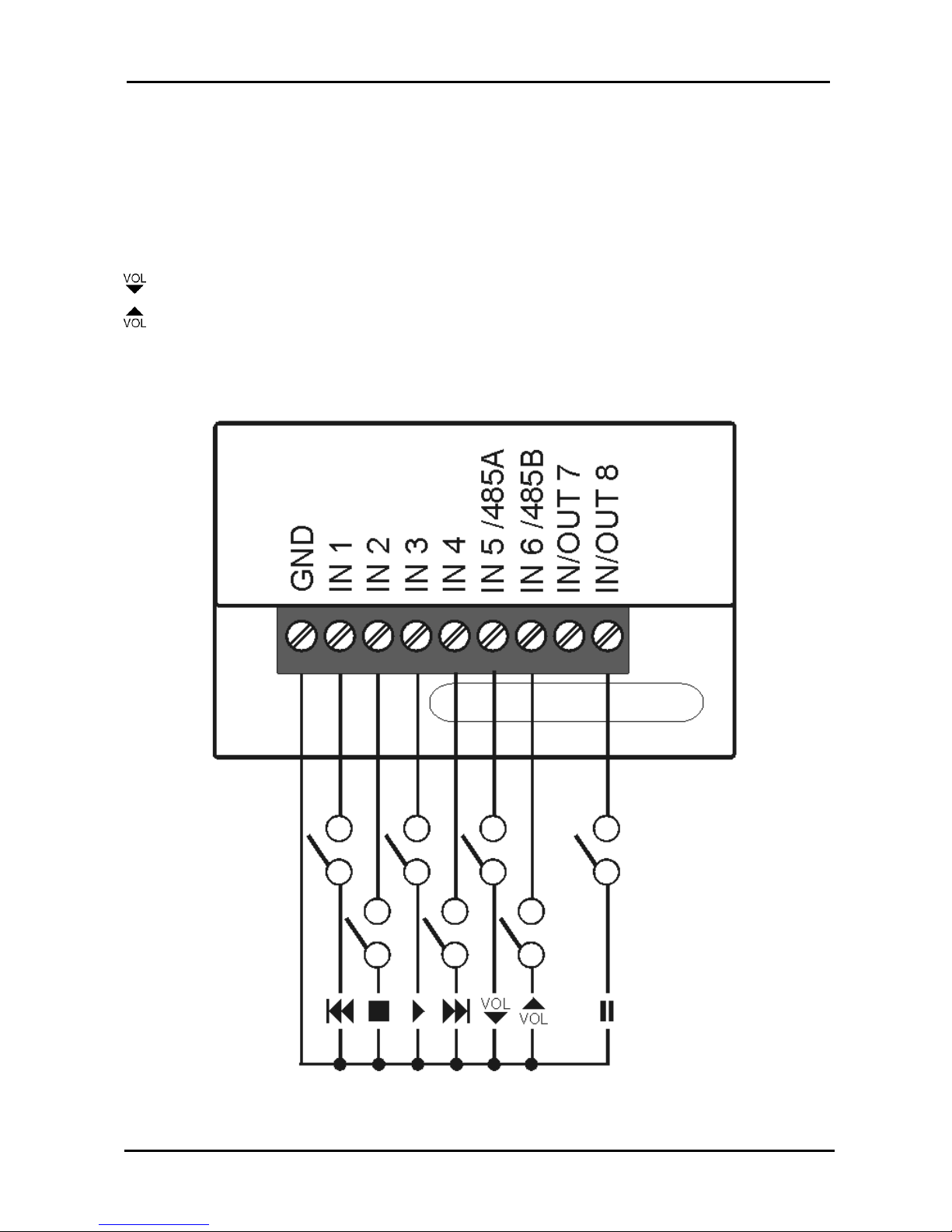
In music player mode, the logical inputs can be used for player control.
= previous MP3 file
= stops file reproduction.
= Panelplayer restarts from the beginning of the interrupted file
= next MP3 file
= reduce output volume
= increase output volume
= PAUSE, ( end mp3 file).
Page 25
Panelplayer User Manual v.1.4
Page 24
7
Operation with logical inputs
7.1 Introduction to the logical input operation mode
Panelplayer can also play individual (message) audio files with direct selection from eight
inputs (par. 3.4). Panelplayer enters this working mode if there are no PALIN.TXT and
PLAYLIST.TXT files present.
Activation is carried out directly or in binary combination, up to a maximum of 255 files,
using the inputs IN1, IN2, IN3, IN4, IN5, IN6, IN7, IN8.
For the manner of connection, see the paragraph 3.4.
Activating the inputs in binary combination, one can launch the playing of a maximum of
255 messages, naming the audio files as shown on the table 1.
The play modes are set through the IMOD, TPCM, MICP and MIRS parameters inserted in
the configuration files (par. 4.9).
7.2 Binary input command codes
Activating the inputs in binary combination, one can launch the playing of a maximum of
255 messages, naming the audio files as shown on the following table.
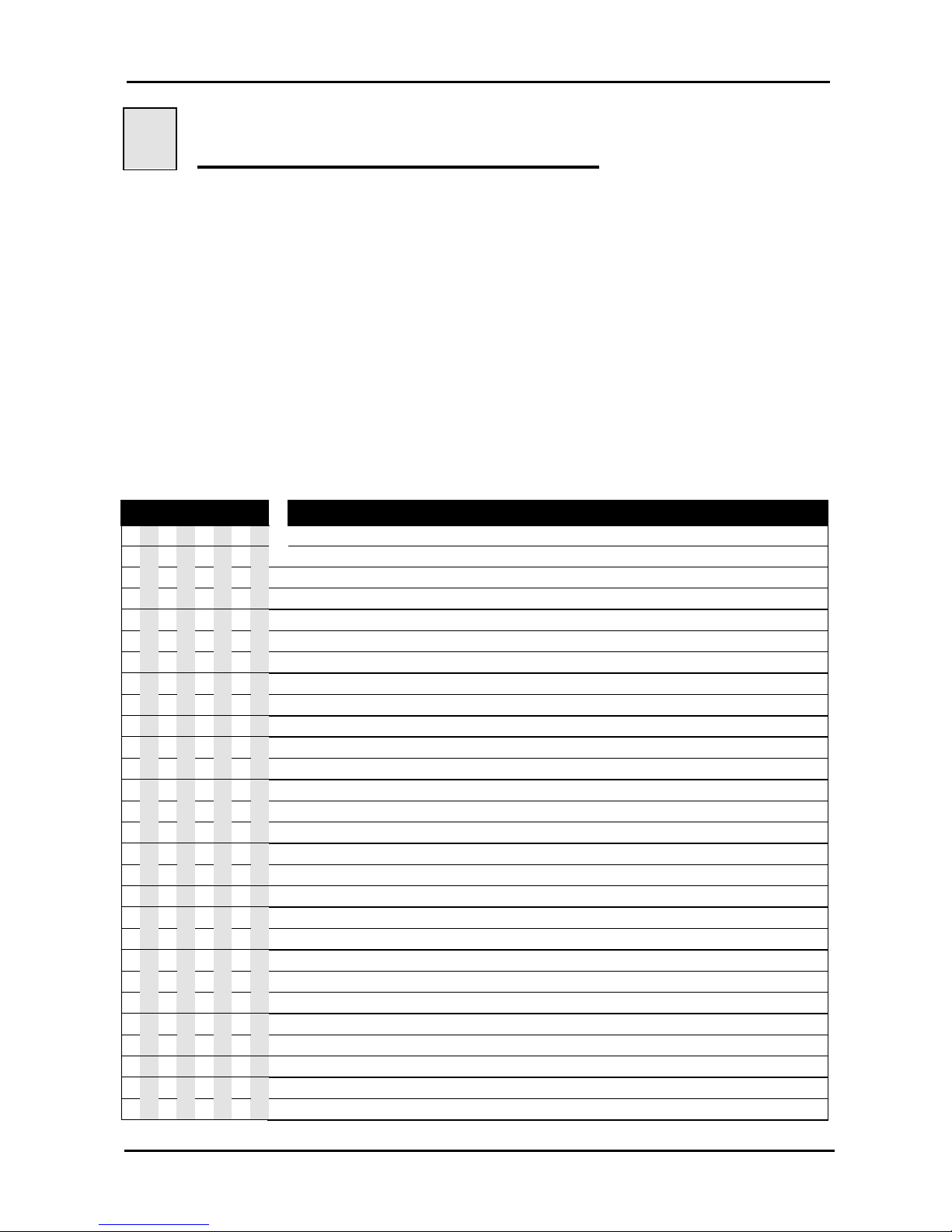
INPUT FILE INPUTS BINARY COMBINATION
1234567
8
(.mp3)
O O O O O O O O
=
Stand by
1 O O O O O O O
=
1
IN 1
O 1 O O O O O O
=
2
IN 2
1 1 O O O O O O
=
3
IN 1 + IN 2
O O 1 O O O O O
=
4
IN 3
1 O 1 O O O O O
=
5
IN 1 + IN 3
O 1 1 O O O O O
=
6
IN 2 + IN 3
1 1 1 O O O O O
=
7
IN 1 + IN 2 + IN 3
O O O 1 O O O O
=
8
IN 4
1 O O 1 O O O O
=
9
IN 1 + IN 4
O 1 O 1 O O O O
=
10
IN 2 + IN 4
1 1 O 1 O O O O
=
11
IN 1 + IN 2 + IN 4
O O 1 1 O O O O
=
12
IN 3 + IN 4
1 O 1 1 O O O O
=
13
IN 1 + IN 3 + IN 4
O 1 1 1 O O O O
=
14
IN 2 + IN 3 + IN 4
1 1 1 1 O O O O
=
15
IN 1 + IN 2 + IN 3 + IN 4
O O O O 1 O O O
=
16
IN 5
1 O O O 1 O O O
=
17
IN 1 + IN 5
O 1 O O 1 O O O
=
18
IN 2 + IN 5
1 1 O O 1 O O O
=
19
IN 1 + IN 2 + IN 5
O O 1 O 1 O O O
=
20
IN 3 + IN 5
1 O 1 O 1 O O O
=
21
IN 1 + IN 3 + IN 5
O 1 1 O 1 O O O
=
22
IN 2 + IN 3 + IN 5
1 1 1 O 1 O O O
=
23
IN 1 + IN 2 + IN 3 + IN 5
O O O 1 1 O O O
=
24
IN 4 + IN 5
1 O O 1 1 O O O
=
25
IN 1 + IN 4 + IN 5
O 1 O 1 1 O O O
=
26
IN 2 + IN 4 + IN 5
Page 26
Panelplayer User Manual v.1.4
Page 25
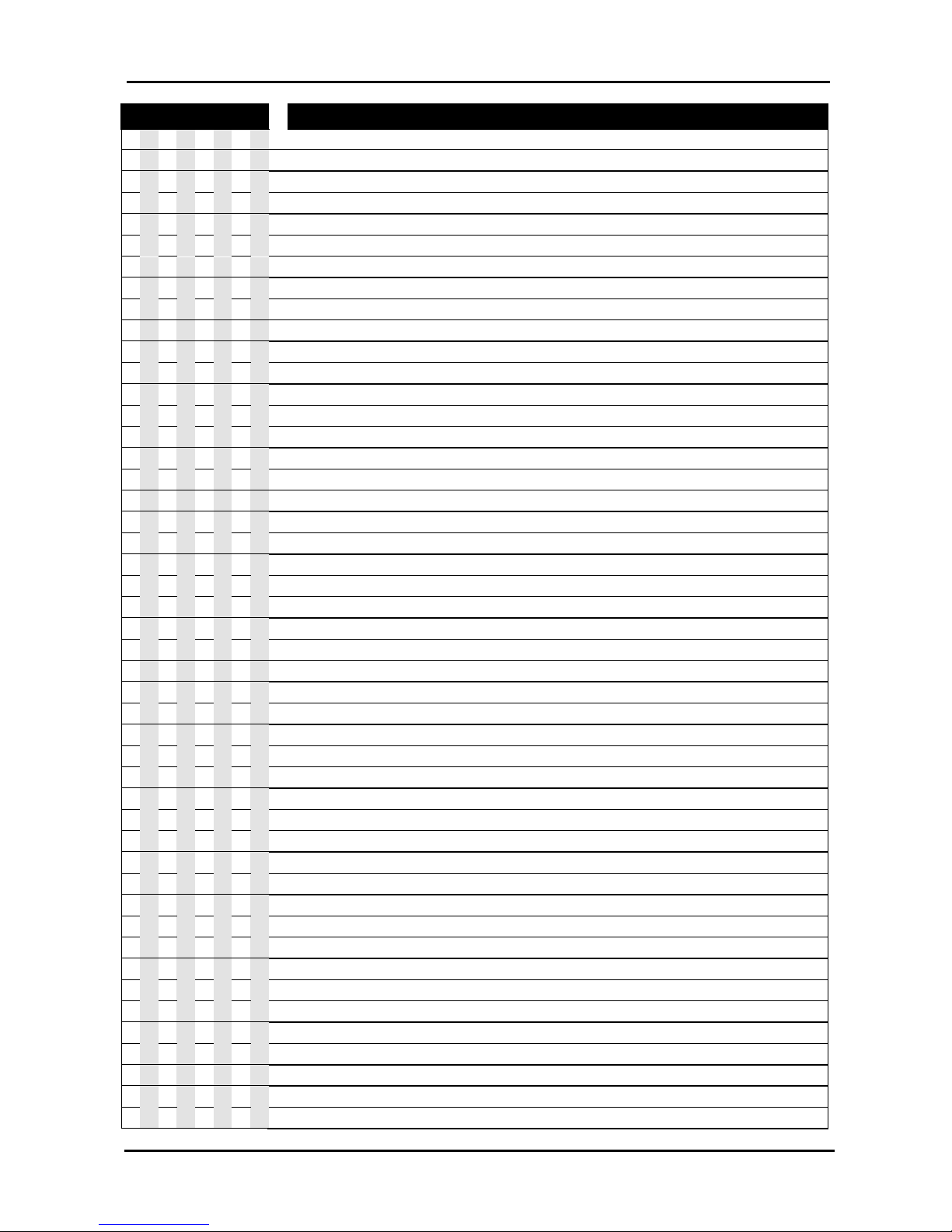
INPUT FILE INPUTS BINARY COMBINATION
1234567
8
(.mp3)
1 1 O 1 1 O O O
=
27
IN 1 + IN 2 + IN 4 + IN 5
O O 1 1 1 O O O
=
28
IN 3 + IN 4 + IN 5
1 O 1 1 1 O O O
=
29
IN 1 + IN 3 + IN 4 + IN 5
O 1 1 1 1 O O O
=
30
IN 2 + IN 3 + IN 4 + IN 5
1 1 1 1 1 O O O
=
31
IN 1 + IN 2 + IN 3 + IN 4 + IN 5
O O O O O 1 O O
=
32
IN 6
1 O O O O 1 O O
=
33
IN 1 + IN 6
O 1 O O O 1 O O
=
34
IN 2 + IN 6
1 1 O O O 1 O O
=
35
IN 1 + IN 2 + IN 6
O O 1 O O 1 O O
=
36
IN 3 + IN 6
1 O 1 O O 1 O O
=
37
IN 1 + IN 3 + IN 6
O 1 1 O O 1 O O
=
38
IN 2 + IN 3 + IN 6
1 1 1 O O 1 O O
=
39
IN 1 + IN 2 + IN 3 + IN 6
O O O 1 O 1 O O
=
40
IN 4 + IN 6
1 O O 1 O 1 O O
=
41
IN 1 + IN 4 + IN 6
O 1 O 1 O 1 O O
=
42
IN 2 + IN 4 + IN 6
1 1 O 1 O 1 O O
=
43
IN 1 + IN 2 + IN 4 + IN 6
O O 1 1 O 1 O O
=
44
IN 3 + IN 4 + IN 6
1 O 1 1 O 1 O O
=
45
IN 1 + IN 3 + IN 4 + IN 6
O 1 1 1 O 1 O O
=
46
IN 2 + IN 3 + IN 4 + IN 6
1 1 1 1 O 1 O O
=
47
IN 1 + IN 2 + IN 3 + IN 4 + IN 6
O O O O 1 1 O O
=
48
IN 5 + IN 6
1 O O O 1 1 O O
=
49
IN 1 + IN 5 + IN 6
O 1 O O 1 1 O O
=
50
IN 2 + IN 5 + IN 6
1 1 O O 1 1 O O
=
51
IN 1 + IN 2 + IN 5 + IN 6
O O 1 O 1 1 O O
=
52
IN 3 + IN 5 + IN 6
1 O 1 O 1 1 O O
=
53
IN 1 + IN 3 + IN 5 + IN 6
O 1 1 O 1 1 O O
=
54
IN 2 + IN 3 + IN 5 + IN 6
1 1 1 O 1 1 O O
=
55
IN 1 + IN 2 + IN 3 + IN 5 + IN 6
O O O 1 1 1 O O
=
56
IN 4 + IN 5 + IN 6
1 O O 1 1 1 O O
=
57
IN 1 + IN 4 + IN 5 + IN 6
O 1 O 1 1 1 O O
=
58
IN 2 + IN 4 + IN 5 + IN 6
1 1 O 1 1 1 O O
=
59
IN 1 + IN 2 + IN 4 + IN 5 + IN 6
O O 1 1 1 1 O O
=
60
IN 3 + IN 4 + IN 5 + IN 6
1 O 1 1 1 1 O O
=
61
IN 1 + IN 3 + IN 4 + IN 5 + IN 6
O 1 1 1 1 1 O O
=
62
IN 2 + IN 3 + IN 4 + IN 5 + IN 6
1 1 1 1 1 1 O O
=
63
IN 1 + IN 2 + IN 3 + IN 4 + IN 5 + IN 6
O O O O O O 1 O
=
64
IN 7
1 O O O O O 1 O
=
65
IN 1 + IN 7
O 1 O O O O 1 O
=
66
IN 2 + IN 7
1 1 O O O O 1 O
=
67
IN 1 + IN 2 + IN 7
O O 1 O O O 1 O
=
68
IN 3 + IN 7
1 O 1 O O O 1 O
=
69
IN 1 + IN 3 + IN 7
O 1 1 O O O 1 O
=
70
IN 2 + IN 3 + IN 7
1 1 1 O O O 1 O
=
71
IN 1 + IN 2 + IN 3 + IN 7
O O O 1 O O 1 O
=
72
IN 4 + IN 7
Page 27
Panelplayer User Manual v.1.4
Page 26
INPUT FILE INPUTS BINARY COMBINATION
1234567
8
(.mp3)
1 O O 1 O O 1 O
=
73
IN 1 + IN 4 + IN 7
O 1 O 1 O O 1 O
=
74
IN 2 + IN 4 + IN 7
1 1 O 1 O O 1 O
=
75
IN 1 + IN 2 + IN 4 + IN 7
O O 1 1 O O 1 O
=
76
IN 3 + IN 4 + IN 7
1 O 1 1 O O 1 O
=
77
IN 1 + IN 3 + IN 4 + IN 7
O 1 1 1 O O 1 O
=
78
IN 2 + IN 3 + IN 4 + IN 7
1 1 1 1 O O 1 O
=
79
IN 1 + IN 2 + IN 3 + IN 4 + IN 7
O O O O 1 O 1 O
=
80
IN 5 + IN 7
1 O O O 1 O 1 O
=
81
IN 1 + IN 5 + IN 7
O 1 O O 1 O 1 O
=
82
IN 2 + IN 5 + IN 7
1 1 O O 1 O 1 O
=
83
IN 1 + IN 2 + IN 5 + IN 7
O O 1 O 1 O 1 O
=
84
IN 3 + IN 5 + IN 7
1 O 1 O 1 O 1 O
=
85
IN 1 + IN 3 + IN 5 + IN 7
O 1 1 O 1 O 1 O
=
86
IN 2 + IN 3 + IN 5 + IN 7
1 1 1 O 1 O 1 O
=
87
IN 1 + IN 2 + IN 3 + IN 5 + IN 7
O O O 1 1 O 1 O
=
88
IN 4 + IN 5 + IN 7
1 O O 1 1 O 1 O
=
89
IN 1 + IN 4 + IN 5 + IN 7
O 1 O 1 1 O 1 O
=
90
IN 2 + IN 4 + IN 5 + IN 7
1 1 O 1 1 O 1 O
=
91
IN 1 + IN 2 + IN 4 + IN 5 + IN 7
O O 1 1 1 O 1 O
=
92
IN 3 + IN 4 + IN 5 + IN 7
1 O 1 1 1 O 1 O
=
93
IN 1 + IN 3 + IN 4 + IN 5 + IN 7
O 1 1 1 1 O 1 O
=
94
IN 2 + IN 3 + IN 4 + IN 5 + IN 7
1 1 1 1 1 O 1 O
=
95
IN 1 + IN 2 + IN 3 + IN 4 + IN 5 + IN 7
O O O O O 1 1 O
=
96
IN 6 + IN 7
1 O O O O 1 1 O
=
97
IN 1 + IN 6 + IN 7
O 1 O O O 1 1 O
=
98
IN 2 + IN 6 + IN 7
1 1 O O O 1 1 O
=
99
IN 1 + IN 2 + IN 6 + IN 7
O O 1 O O 1 1 O
=
100
IN 3 + IN 6 + IN 7
1 O 1 O O 1 1 O
=
101
IN 1 + IN 3 + IN 6 + IN 7
O 1 1 O O 1 1 O
=
102
IN 2 + IN 3 + IN 6 + IN 7
1 1 1 O O 1 1 O
=
103
IN 1 + IN 2 + IN 3 + IN 6 + IN 7
O O O 1 O 1 1 O
=
104
IN 4 + IN 6 + IN 7
1 O O 1 O 1 1 O
=
105
IN 1 + IN 4 + IN 6 + IN 7
O 1 O 1 O 1 1 O
=
106
IN 2 + IN 4 + IN 6 + IN 7
1 1 O 1 O 1 1 O
=
107
IN 1 + IN 2 + IN 4 + IN 6 + IN 7
O O 1 1 O 1 1 O
=
108
IN 3 + IN 4 + IN 6 + IN 7
1 O 1 1 O 1 1 O
=
109
IN 1 + IN 3 + IN 4 + IN 6 + IN 7
O 1 1 1 O 1 1 O
=
110
IN 2 + IN 3 + IN 4 + IN 6 + IN 7
1 1 1 1 O 1 1 O
=
111
IN 1 + IN 2 + IN 3 + IN 4 + IN 6 + IN 7
O O O O 1 1 1 O
=
112
IN 5 + IN 6 + IN 7
1 O O O 1 1 1 O
=
113
IN 1 + IN 5 + IN 6 + IN 7
O 1 O O 1 1 1 O
=
114
IN 2 + IN 5 + IN 6 + IN 7
1 1 O O 1 1 1 O
=
115
IN 1 + IN 2 + IN 5 + IN 6 + IN 7
O O 1 O 1 1 1 O
=
116
IN 3 + IN 5 + IN 6 + IN 7
1 O 1 O 1 1 1 O
=
117
IN 1 + IN 3 + IN 5 + IN 6 + IN 7
O 1 1 O 1 1 1 O
=
118
IN 2 + IN 3 + IN 5 + IN 6 + IN 7
Page 28
Panelplayer User Manual v.1.4
Page 27
INPUT FILE INPUTS BINARY COMBINATION
1234567
8
(.mp3)
1 1 1 O 1 1 1 O
=
119
IN 1 + IN 2 + IN 3 + IN 5 + IN 6 + IN 7
O O O 1 1 1 1 O
=
120
IN 4 + IN 5 + IN 6 + IN 7
1 O O 1 1 1 1 O
=
121
IN 1 + IN 4 + IN 5 + IN 6 + IN 7
O 1 O 1 1 1 1 O
=
122
IN 2 + IN 4 + IN 5 + IN 6 + IN 7
1 1 O 1 1 1 1 O
=
123
IN 1 + IN 2 + IN 4 + IN 5 + IN 6 + IN 7
O O 1 1 1 1 1 O
=
124
IN 3 + IN 4 + IN 5 + IN 6 + IN 7
1 O 1 1 1 1 1 O
=
125
IN 1 + IN 3 + IN 4 + IN 5 + IN 6 + IN 7
O 1 1 1 1 1 1 O
=
126
IN 2 + IN 3 + IN 4 + IN 5 + IN 6 + IN 7
1 1 1 1 1 1 1 O
=
127
IN 1 + IN 2 + IN 3 + IN 4 + IN 5 + IN 6 + IN 7
O O O O O O O 1
=
128
IN 8
1 O O O O O O 1
=
129
IN 1 + IN 8
O 1 O O O O O 1
=
130
IN 2 + IN 8
1 1 O O O O O 1
=
131
IN 1 + IN 2 + IN 8
O O 1 O O O O 1
=
132
IN 3 + IN 8
1 O 1 O O O O 1
=
133
IN 1 + IN 3 + IN 8
O 1 1 O O O O 1
=
134
IN 2 + IN 3 + IN 8
1 1 1 O O O O 1
=
135
IN 1 + IN 2 + IN 3 + IN 8
O O O 1 O O O 1
=
136
IN 4 + IN 8
1 O O 1 O O O 1
=
137
IN 1 + IN 4 + IN 8
O 1 O 1 O O O 1
=
138
IN 2 + IN 4 + IN 8
1 1 O 1 O O O 1
=
139
IN 1 + IN 2 + IN 4 + IN 8
O O 1 1 O O O 1
=
140
IN 3 + IN 4 + IN 8
1 O 1 1 O O O 1
=
141
IN 1 + IN 3 + IN 4 + IN 8
O 1 1 1 O O O 1
=
142
IN 2 + IN 3 + IN 4 + IN 8
1 1 1 1 O O O 1
=
143
IN 1 + IN 2 + IN 3 + IN 4 + IN 8
O O O O 1 O O 1
=
144
IN 5 + IN 8
1 O O O 1 O O 1
=
145
IN 1 + IN 5 + IN 8
O 1 O O 1 O O 1
=
146
IN 2 + IN 5 + IN 8
1 1 O O 1 O O 1
=
147
IN 1 + IN 2 + IN 5 + IN 8
O O 1 O 1 O O 1
=
148
IN 3 + IN 5 + IN 8
1 O 1 O 1 O O 1
=
149
IN 1 + IN 3 + IN 5 + IN 8
O 1 1 O 1 O O 1
=
150
IN 2 + IN 3 + IN 5 + IN 8
1 1 1 O 1 O O 1
=
151
IN 1 + IN 2 + IN 3 + IN 5 + IN 8
O O O 1 1 O O 1
=
152
IN 4 + IN 5 + IN 8
1 O O 1 1 O O 1
=
153
IN 1 + IN 4 + IN 5 + IN 8
O 1 O 1 1 O O 1
=
154
IN 2 + IN 4 + IN 5 + IN 8
1 1 O 1 1 O O 1
=
155
IN 1 + IN 2 + IN 4 + IN 5 + IN 8
O O 1 1 1 O O 1
=
156
IN 3 + IN 4 + IN 5 + IN 8
1 O 1 1 1 O O 1
=
157
IN 1 + IN 3 + IN 4 + IN 5 + IN 8
O 1 1 1 1 O O 1
=
158
IN 2 + IN 3 + IN 4 + IN 5 + IN 8
1 1 1 1 1 O O 1
=
159
IN 1 + IN 2 + IN 3 + IN 4 + IN 5 + IN 8
O O O O O 1 O 1
=
160
IN 6 + IN 8
1 O O O O 1 O 1
=
161
IN 1 + IN 6 + IN 8
O 1 O O O 1 O 1
=
162
IN 2 + IN 6 + IN 8
1 1 O O O 1 O 1
=
163
IN 1 + IN 2 + IN 6 + IN 8
O O 1 O O 1 O 1
=
164
IN 3 + IN 6 + IN 8
Page 29
Panelplayer User Manual v.1.4
Page 28
INPUT FILE INPUTS BINARY COMBINATION
1234567
8
(.mp3)
1 O 1 O O 1 O 1
=
165
IN 1 + IN 3 + IN 6 + IN 8
O 1 1 O O 1 O 1
=
166
IN 2 + IN 3 + IN 6 + IN 8
1 1 1 O O 1 O 1
=
167
IN 1 + IN 2 + IN 3 + IN 6 + IN 8
O O O 1 O 1 O 1
=
168
IN 4 + IN 6 + IN 8
1 O O 1 O 1 O 1
=
169
IN 1 + IN 4 + IN 6 + IN 8
O 1 O 1 O 1 O 1
=
170
IN 2 + IN 4 + IN 6 + IN 8
1 1 O 1 O 1 O 1
=
171
IN 1 + IN 2 + IN 4 + IN 6 + IN 8
O O 1 1 O 1 O 1
=
172
IN 3 + IN 4 + IN 6 + IN 8
1 O 1 1 O 1 O 1
=
173
IN 1 + IN 3 + IN 4 + IN 6 + IN 8
O 1 1 1 O 1 O 1
=
174
IN 2 + IN 3 + IN 4 + IN 6 + IN 8
1 1 1 1 O 1 O 1
=
175
IN 1 + IN 2 + IN 3 + IN 4 + IN 6 + IN 8
O O O O 1 1 O 1
=
176
IN 5 + IN 6 + IN 8
1 O O O 1 1 O 1
=
177
IN 1 + IN 5 + IN 6 + IN 8
O 1 O O 1 1 O 1
=
178
IN 2 + IN 5 + IN 6 + IN 8
1 1 O O 1 1 O 1
=
179
IN 1 + IN 2 + IN 5 + IN 6 + IN 8
O O 1 O 1 1 O 1
=
180
IN 3 + IN 5 + IN 6 + IN 8
1 O 1 O 1 1 O 1
=
181
IN 1 + IN 3 + IN 5 + IN 6 + IN 8
O 1 1 O 1 1 O 1
=
182
IN 2 + IN 3 + IN 5 + IN 6 + IN 8
1 1 1 O 1 1 O 1
=
183
IN 1 + IN 2 + IN 3 + IN 5 + IN 6 + IN 8
O O O 1 1 1 O 1
=
184
IN 4 + IN 5 + IN 6 + IN 8
1 O O 1 1 1 O 1
=
185
IN 1 + IN 4 + IN 5 + IN 6 + IN 8
O 1 O 1 1 1 O 1
=
186
IN 2 + IN 4 + IN 5 + IN 6 + IN 8
1 1 O 1 1 1 O 1
=
187
IN 1 + IN 2 + IN 4 + IN 5 + IN 6 + IN 8
O O 1 1 1 1 O 1
=
188
IN 3 + IN 4 + IN 5 + IN 6 + IN 8
1 O 1 1 1 1 O 1
=
189
IN 1 + IN 3 + IN 4 + IN 5 + IN 6 + IN 8
O 1 1 1 1 1 O 1
=
190
IN 2 + IN 3 + IN 4 + IN 5 + IN 6 + IN 8
1 1 1 1 1 1 O 1
=
191
IN 1 + IN 2 + IN 3 + IN 4 + IN 5 + IN 6 + IN 8
O O O O O O 1 1
=
192
IN 7 + IN 8
1 O O O O O 1 1
=
193
IN 1 + IN 7 + IN 8
O 1 O O O O 1 1
=
194
IN 2 + IN 7 + IN 8
1 1 O O O O 1 1
=
195
IN 1 + IN 2 + IN 7 + IN 8
O O 1 O O O 1 1
=
196
IN 3 + IN 7 + IN 8
1 O 1 O O O 1 1
=
197
IN 1 + IN 3 + IN 7 + IN 8
O 1 1 O O O 1 1
=
198
IN 2 + IN 3 + IN 7 + IN 8
1 1 1 O O O 1 1
=
199
IN 1 + IN 2 + IN 3 + IN 7 + IN 8
O O O 1 O O 1 1
=
200
IN 4 + IN 7 + IN 8
1 O O 1 O O 1 1
=
201
IN 1 + IN 4 + IN 7 + IN 8
O 1 O 1 O O 1 1
=
202
IN 2 + IN 4 + IN 7 + IN 8
1 1 O 1 O O 1 1
=
203
IN 1 + IN 2 + IN 4 + IN 7 + IN 8
O O 1 1 O O 1 1
=
204
IN 3 + IN 4 + IN 7 + IN 8
1 O 1 1 O O 1 1
=
205
IN 1 + IN 3 + IN 4 + IN 7 + IN 8
O 1 1 1 O O 1 1
=
206
IN 2 + IN 3 + IN 4 + IN 7 + IN 8
1 1 1 1 O O 1 1
=
207
IN 1 + IN 2 + IN 3 + IN 4 + IN 7 + IN 8
O O O O 1 O 1 1
=
208
IN 5 + IN 7 + IN 8
1 O O O 1 O 1 1
=
209
IN 1 + IN 5 + IN 7 + IN 8
O 1 O O 1 O 1 1
=
210
IN 2 + IN 5 + IN 7 + IN 8
Page 30
Panelplayer User Manual v.1.4
Page 29
INPUT FILE INPUTS BINARY COMBINATION
1234567
8
(.mp3)
1 1 O O 1 O 1 1
=
211
IN 1 + IN 2 + IN 5 + IN 7 + IN 8
O O 1 O 1 O 1 1
=
212
IN 3 + IN 5 + IN 7 + IN 8
1 O 1 O 1 O 1 1
=
213
IN 1 + IN 3 + IN 5 + IN 7 + IN 8
O 1 1 O 1 O 1 1
=
214
IN 2 + IN 3 + IN 5 + IN 7 + IN 8
1 1 1 O 1 O 1 1
=
215
IN 1 + IN 2 + IN 3 + IN 5 + IN 7 + IN 8
O O O 1 1 O 1 1
=
216
IN 4 + IN 5 + IN 7 + IN 8
1 O O 1 1 O 1 1
=
217
IN 1 + IN 4 + IN 5 + IN 7 + IN 8
O 1 O 1 1 O 1 1
=
218
IN 2 + IN 4 + IN 5 + IN 7 + IN 8
1 1 O 1 1 O 1 1
=
219
IN 1 + IN 2 + IN 4 + IN 5 + IN 7 + IN 8
O O 1 1 1 O 1 1
=
220
IN 3 + IN 4 + IN 5 + IN 7 + IN 8
1 O 1 1 1 O 1 1
=
221
IN 1 + IN 3 + IN 4 + IN 5 + IN 7 + IN 8
O 1 1 1 1 O 1 1
=
222
IN 2 + IN 3 + IN 4 + IN 5 + IN 7 + IN 8
1 1 1 1 1 O 1 1
=
223
IN 1 + IN 2 + IN 3 + IN 4 + IN 5 + IN 7 + IN 8
O O O O O 1 1 1
=
224
IN 6 + IN 7 + IN 8
1 O O O O 1 1 1
=
225
IN 1 + IN 6 + IN 7 + IN 8
O 1 O O O 1 1 1
=
226
IN 2 + IN 6 + IN 7 + IN 8
1 1 O O O 1 1 1
=
227
IN 1 + IN 2 + IN 6 + IN 7 + IN 8
O O 1 O O 1 1 1
=
228
IN 3 + IN 6 + IN 7 + IN 8
1 O 1 O O 1 1 1
=
229
IN 1 + IN 3 + IN 6 + IN 7 + IN 8
O 1 1 O O 1 1 1
=
230
IN 2 + IN 3 + IN 6 + IN 7 + IN 8
1 1 1 O O 1 1 1
=
231
IN 1 + IN 2 + IN 3 + IN 6 + IN 7 + IN 8
O O O 1 O 1 1 1
=
232
IN 4 + IN 6 + IN 7 + IN 8
1 O O 1 O 1 1 1
=
233
IN 1 + IN 4 + IN 6 + IN 7 + IN 8
O 1 O 1 O 1 1 1
=
234
IN 2 + IN 4 + IN 6 + IN 7 + IN 8
1 1 O 1 O 1 1 1
=
235
IN 1 + IN 2 + IN 4 + IN 6 + IN 7 + IN 8
O O 1 1 O 1 1 1
=
236
IN 3 + IN 4 + IN 6 + IN 7 + IN 8
1 O 1 1 O 1 1 1
=
237
IN 1 + IN 3 + IN 4 + IN 6 + IN 7 + IN 8
O 1 1 1 O 1 1 1
=
238
IN 2 + IN 3 + IN 4 + IN 6 + IN 7 + IN 8
1 1 1 1 O 1 1 1
=
239
IN 1 + IN 2 + IN 3 + IN 4 + IN 6 + IN 7 + IN 8
O O O O 1 1 1 1
=
240
IN 5 + IN 6 + IN 7 + IN 8
1 O O O 1 1 1 1
=
241
IN 1 + IN 5 + IN 6 + IN 7 + IN 8
O 1 O O 1 1 1 1
=
242
IN 2 + IN 5 + IN 6 + IN 7 + IN 8
1 1 O O 1 1 1 1
=
243
IN 1 + IN 2 + IN 5 + IN 6 + IN 7 + IN 8
O O 1 O 1 1 1 1
=
244
IN 3 + IN 5 + IN 6 + IN 7 + IN 8
1 O 1 O 1 1 1 1
=
245
IN 1 + IN 3 + IN 5 + IN 6 + IN 7 + IN 8
O 1 1 O 1 1 1 1
=
246
IN 2 + IN 3 + IN 5 + IN 6 + IN 7 + IN 8
1 1 1 O 1 1 1 1
=
247
IN 1 + IN 2 + IN 3 + IN 5 + IN 6 + IN 7 + IN 8
O O O 1 1 1 1 1
=
248
IN 4 + IN 5 + IN 6 + IN 7 + IN 8
1 O O 1 1 1 1 1
=
249
IN 1 + IN 4 + IN 5 + IN 6 + IN 7 + IN 8
O 1 O 1 1 1 1 1
=
250
IN 2 + IN 4 + IN 5 + IN 6 + IN 7 + IN 8
1 1 O 1 1 1 1 1
=
251
IN 1 + IN 2 + IN 4 + IN 5 + IN 6 + IN 7 + IN 8
O O 1 1 1 1 1 1
=
252
IN 3 + IN 4 + IN 5 + IN 6 + IN 7 + IN 8
1 O 1 1 1 1 1 1
=
253
IN 1 + IN 3 + IN 4 + IN 5 + IN 6 + IN 7 + IN 8
O 1 1 1 1 1 1 1
=
254
IN 2 + IN 3 + IN 4 + IN 5 + IN 6 + IN 7 + IN 8
1 1 1 1 1 1 1 1
=
255
IN 1 + IN 2 + IN 3 + IN 4 + IN 5 + IN 6 + IN 7 + IN 8
Page 31
Panelplayer User Manual v.1.4
Page 30
8
SPECIAL FUNCTIONS
8.1 Connection of two Panelplayers with different programming
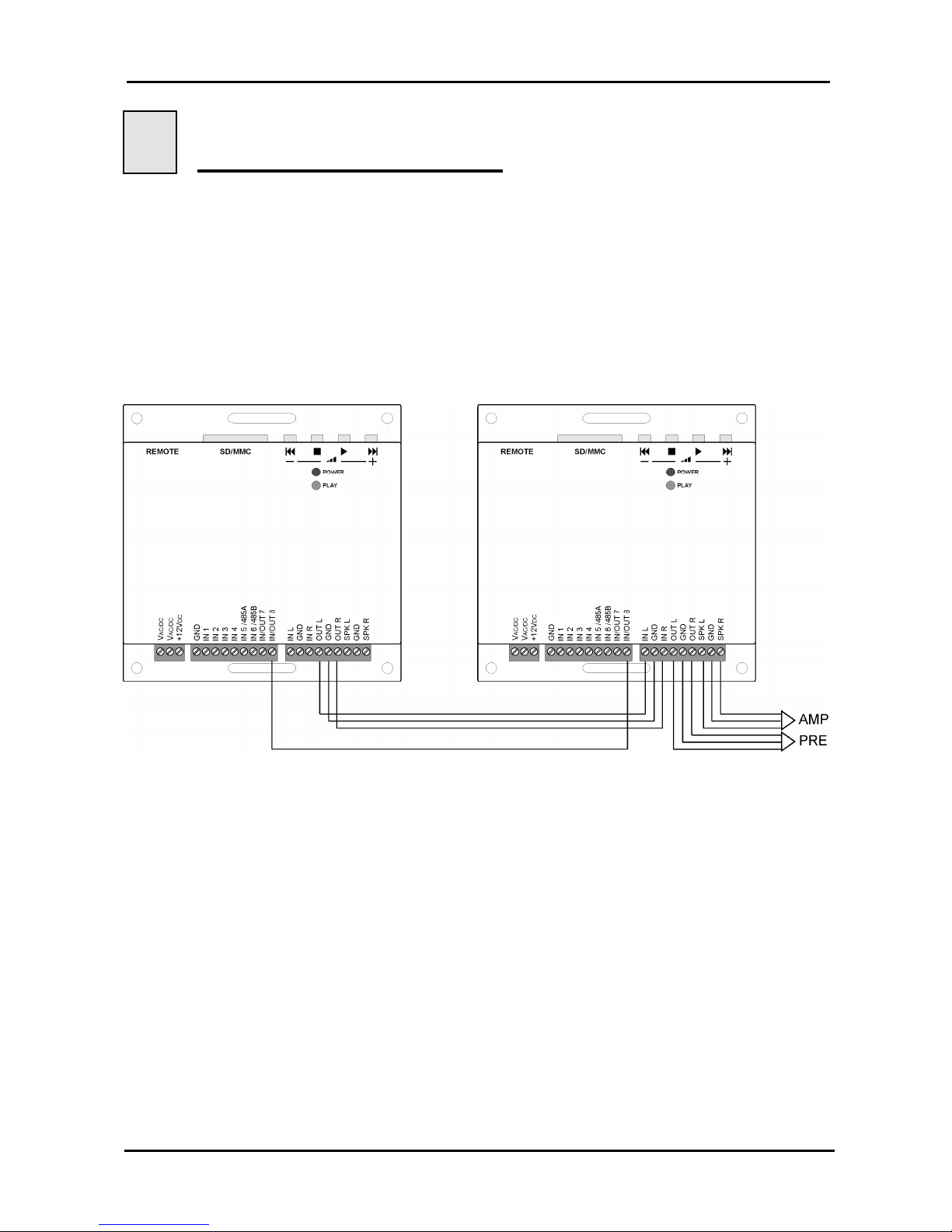
Connecting two Panelplayers in cascade via Vlink connection and the audio inputs/outputs
(see figure), one can recreate the typical operating mode of a commercial radio station.
One Panelplayer must be programmed to run in playlist mode, playing the musical items
(PLAYLIST.TXT), the other programmed to run according to schedule (PALIN.TXT) plays
the commercial spots.
Panelplayer with playlist Panelplayer with palimpsest
When an hour bar is to be played, the schedule-programmed Panelplayer waits for
consent for the end of the item from playlist-programmed Panelplayer (which goes into
standby), before starting to issue the commercials. Once the playing of the hour bar is
over, the playlist-programmed Panelplayer will start to play the following item.
Page 32
Panelplayer User Manual v.1.4
Page 31
8.2 Amplifier connection to 40W bridge
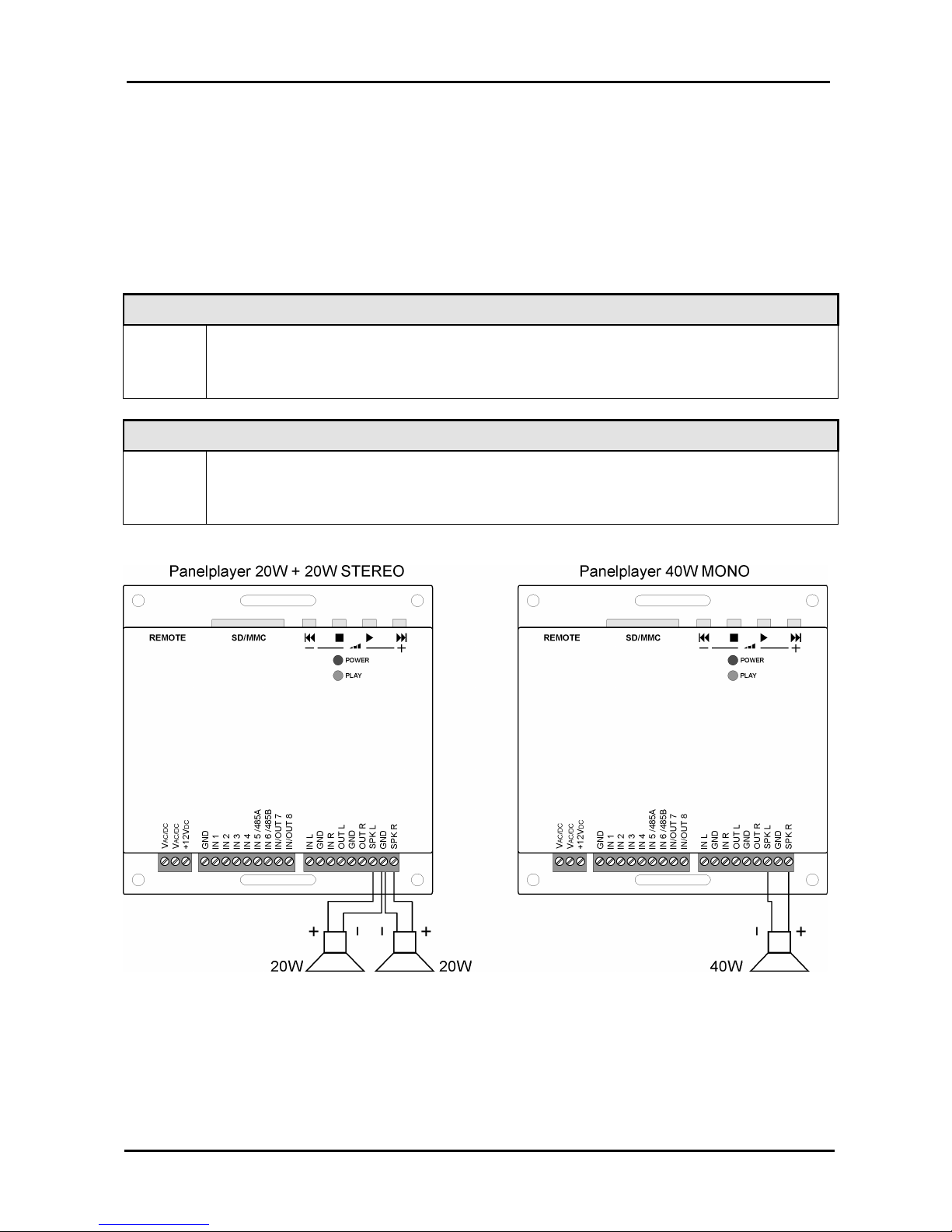
Panelplayer has the capability of commuting the stereo output of the amplifier in a 40W
mono bridge configuration, to pilot a single diffuser with greater power.
To enable this operational mode, in addition to having a different connection to the output
clams, it is necessary to set the following configuration parameters in the config.txt file:
OMON=1
INVR=1
OMON STEREO / MONO audio output switch
OMON
0= STEREO audio output
1= MONO audio output
INVR Inverted R channel audio output switch
INVR
0= R channel not inverted ( STEREO )
1= Inverted R channel ( MONO/BRIDGE configuration )
Page 33
Panelplayer User Manual v.1.4
Page 32
9
Serial RS485 communication
9.1 RS485 communication
IMPORTANT: The RS485 is active in every configuration.
Panelplayer can be connected to an RS485 communication bus through a serial port,
which is controlled from a master system or by a computer.
Due to interference from outside the serial line, one may find anomalous behaviour from
part of the master system which could cause possible damage to Panelplayer. To avoid
this mishap one must take the following precautions:
1. Do not let the serial cables transit in the same conduits as power cables or cables with
elevated voltage. Maintain a safety distance of at least 10 cm. between these cables.
2. Connect serial cable screen to the ground the on one of the two sides (do not connect
the screen from both sides); in addition, the ground connection of the screen must not
be made in the same point in which piloted circuits of elevated tension are connected.
3. Cut the voltage of the entire system before beginning the wiring of the serial lines:
even dispersed or parasite currents could damage the modules.
Panelplayer withstands serial communication in 4 different modes with the RS485
electrical standard. This type of serial multipoint communication consents the connection
in bus of up to 32 devices, with a maximum distance of 50 metres.
The Panelplayer devices connected to the RS485 bus can not autonomously begin
communication, but they can only respond to a specific request (command) from the
master station (usually a PLC or a computer).
The RS485 connection parameters (speed, parity, check-sum, etc.) are set via the
configuration file config.txt. (par. 9.2).
IMPORTANT:
The internal electronics of Panelplayer are not galvanically insulated from the RS485
line; in case of short circuit or discharge to ground, it is possible to damage not only
the Panelplayer, but even the master system to which it is connected!
For the RS485 connection, one must remember to ignore the transmission echo from
the master that is returning through the serial line.
IMPORTANT:
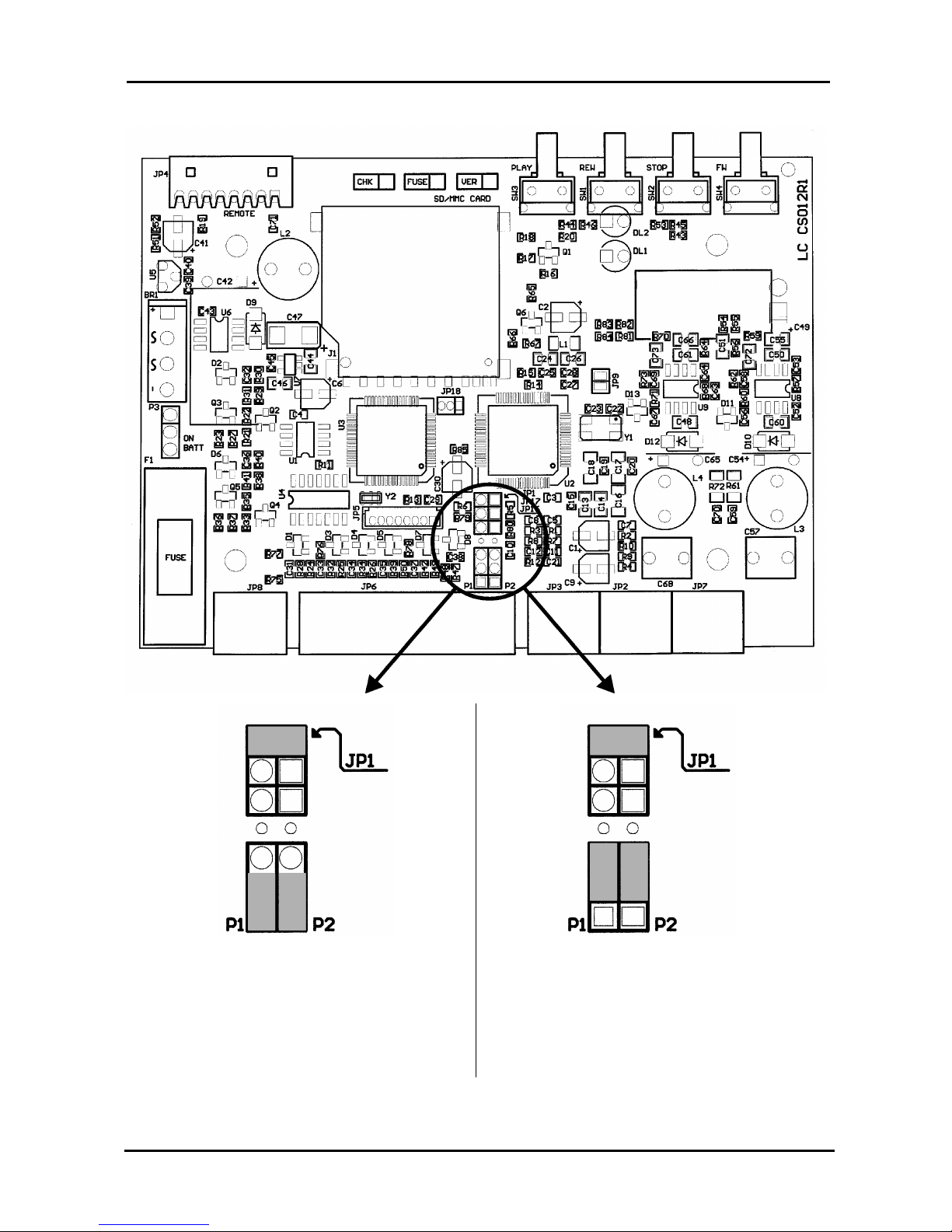
To enable the serial port through the IN5/485A and IN6/485B pins, raise the cover of
the device and move the P1 and P2 jumpers of the diagram as indicated in the
following figure.
With the RS485 connection one must supply termination resistors on both extremes of
the line, to avoid the generation of stationary waves and to define the impedance of
the lines even in absence of transmission. Panelplayer already has within itself a
termination resistor, enabled through a JP1 bridge jumper; to deactivate such
resistance it is sufficient to raise the cover of the device and remove the JP1 jumper
indicated in the figure.
Page 34
Panelplayer User Manual v.1.4
Page 33
Position P1 and P2 jumpers: IN5 and IN6
inputs with logical operation. (Default)
Position P1 and P2 jumpers: IN5 and IN 6
inputs enabled to the operation as RS485
serial port. To move the bridges, raise the
cover of the device and move the jumpers
of the board as indicated in the figure.
Page 35
Panelplayer User Manual v.1.4
Page 34
9.2 Serial port communication parameters (config.txt)
The parameters of the RS485 serial port (length of the packs, parity, speed, etc.) are set
via the configuration file config.txt.
Example file config.txt:
LLOU=10
LTRE=14
LBAS=10
Audio adjustment parameters
CMAD=0
CMCK=1
CMCL=0
CMBR=3
CMPR=0
CMSB=1
CMDB=8
CMDR=0
CMNR=0
RS485 serial port communication parameters
These parameters must coincide with those of the outside device with which Panelplayer is to
communicate.
IMPORTANT:
To make the modification of these parameters effective, it is necessary to restart
Panelplayer after having introduced the flash memory with the file config.txt.
If Panelplayer is not used with Playlist or as music player, set MPLL=0 in the config.txt.
IMPORTANT: notes for the Master system
Conditions in which a transmission sequence is initialised.
The Panelplayer transmission sequence is initialised under the following conditions:
When Panelplayer is turned on.
When the data communication has been normally completed.
When the timeout time for receiving a pack has expired.
Page 36
Panelplayer User Manual v.1.4
Page 35
The following table lists the values of the parameters needed to connect Panelplayer to a
Master system coordinating it (protocol, speed, timings, etc.).
Mnemonic Description
CMAD
(DEFAULT=0)
Address Panelplayer in the 485 bus (ADD) (Value between 0 and 63 in decimal).
IMPORTANT: This address MUST be univocal, two devices with the same
address can not co-exist on the same bus.
CMCK
(DEFAULT=1)
Enabling introduction of the Checksum: 0= Checksum deactivated
1= Checksum activated
CMCL
(DEFAULT=0)
Enabling introduction of end-of-pack
characters CR and LF (hexadecimal values
OD and 0A)
0= No CR and LF
1= Insertion of CR and LF activated
CMBR
(DEFAULT=3)
Baud rate (communication speed in bits
per second)
0=1200 bps
1=2400 bps
2=4800 bps
3=9600 bps
CMPR
(DEFAULT=0)
Parity Bits: 0= no parity
1= odd parity
2= even parity
CMSB
(DEFAULT=1)
Number of Stop Bits 1=1 stopBit
2=2 stopBits
CMDB
(DEFAULT=8)
Number of data bits 7=7 bits per datum
8=8 bits per datum
CMDR
(DEFAULT=0)
Minimum delay between end of reception
of the pack and delivery of the reply.
(Value expressed in tenths of msec
between 0 and 15 in decimal)
0= Minimum delay of about 4msec
1= Minimum delay of 10msec
2= Minimum delay of 20msec
CMNR
(DEFAULT=0)
Deactivate all replies: 0= standard function, every command is
followed by a confirmation or error reply.
1= all replies deactivated.
Message waiting time (CMDR)
This is the delay time of the reply message, required by some computers to switch over
between the state of transmission and the state of reception.
The awaiting time determines the minimum delay before the Panelplayer sends data in
reply to the message received from the Master. Set this time at a value different from 0
only if the specifications of the Master demand it, since the delay determines an extension
of the time needed to complete the command.
Page 37
Panelplayer User Manual v.1.4
Page 36
9.3 " Framing" error on the master
When commercial RS-485 interfaces are used on the master, a Framing error may take
place if nothing is being transmitted on the serial line.
In order to avoid this mishap, it is indispensable that the system master ignores all the data
until it has received one of the STX, ACK or NAK characters coming from a Panelplayer.
9.4 NAK reply by Panelplayer
The reply with the character NAK is sent from Panelplayer to the master when any kind of
error is detected in the message received.
9.5 Transmitting a command by master
When you send a command from the master to Panelplayer using one of the dedicated
protocols, make sure you send it with a delay of at least 10mS starting from the moment
the last command received by Panelplayer has been completely performed.
IMPORTANT: when one is using the RS485 bus (only on a duplex cable)
remember to bear in mind or to ignore the echo of the command that is sent from the
master (with RS485 an echo is always present).
9.6 How to read the figures of the dedicated protocols
When the master reads the data from Panelplayer.
(Panelplayer > Master)
a) The data areas A and C indicate the transmission of data from the master to
Panelplayer.
b) The data area B indicates the transmission of data from Panelplayer to the master.
c) The programme of the Master is structured so as to manage the data in the manner
shown on the figure from left to right. Therefore, the data management sequence is A, B,
C.
Example : In area A, the character ENQ (05H) is transmitted, followed by all the other data
indicated as " Data" in the figure to the right of the character ENQ.
E
N
Q
Data
S
T
X
Data
A
C
K
Data
Maste
r
Panelplay
A
C
B
Page 38
Panelplayer User Manual v.1.4
Page 37
9.7 When the Master delivers a command to Panelplayer
(Master > Panelplayer)
a) The data area A indicates the transmission of data from the master to Panelplayer.
b) The data area B indicates the transmission of data from Panelplayer to the master.
c) The programme of the master is structured so as to manage the data in the manner
shown on the figure from left to right. Therefore, the data management sequence is A, B.
Example : In area A, the character ENQ (05H) is transmitted, followed by all the other data
indicated as " Data" in the figure to the right of the character ENQ.
9.8 Basic format of the dedicated protocols
Panelplayer manages up to four dedicated protocols.
The definition of which of these four protocols must be used by the serial connection, is set
in the configuration file config.txt. (par. 9.2).
The difference among these four formats is due to the presence or absence of CheckSum
and/or of the characters CR (Carriage Return, character 0DH) and LF (Line Feed,
character 0AH).
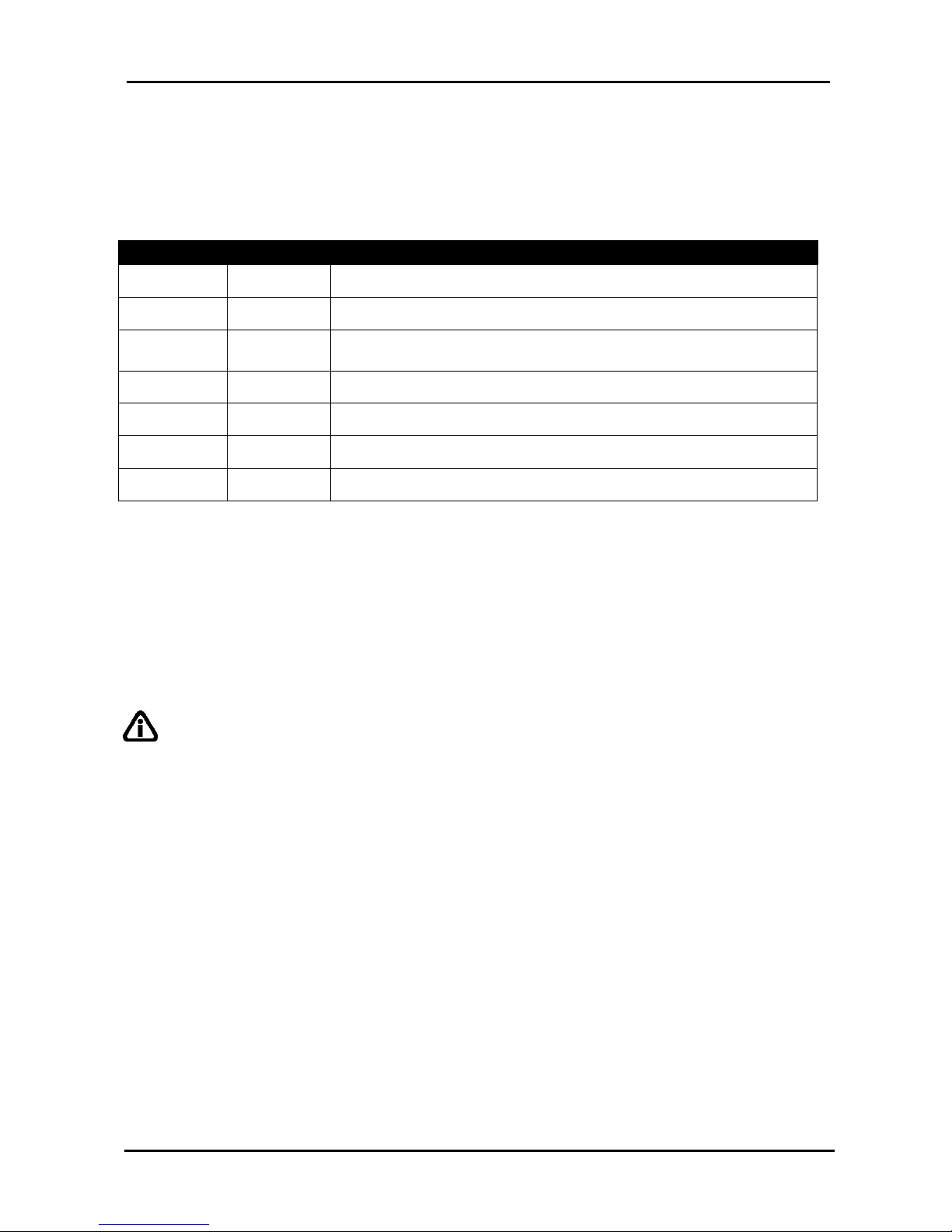
9.9 Basic set-up of the data transmission
IMPORTANT: the introduction of CheckSum at the end of the block of data and
characters of CR + LF is defined in the configuration file (par. 9.2).
E
N
Q
Data
A
C
K
Data
Master
Panelplay
A
B
Control code
Panelplayer address
Command code
Command data
CheckSum
CR/LF control codes
Page 39
Panelplayer User Manual v.1.4
Page 38
9.10 Control codes
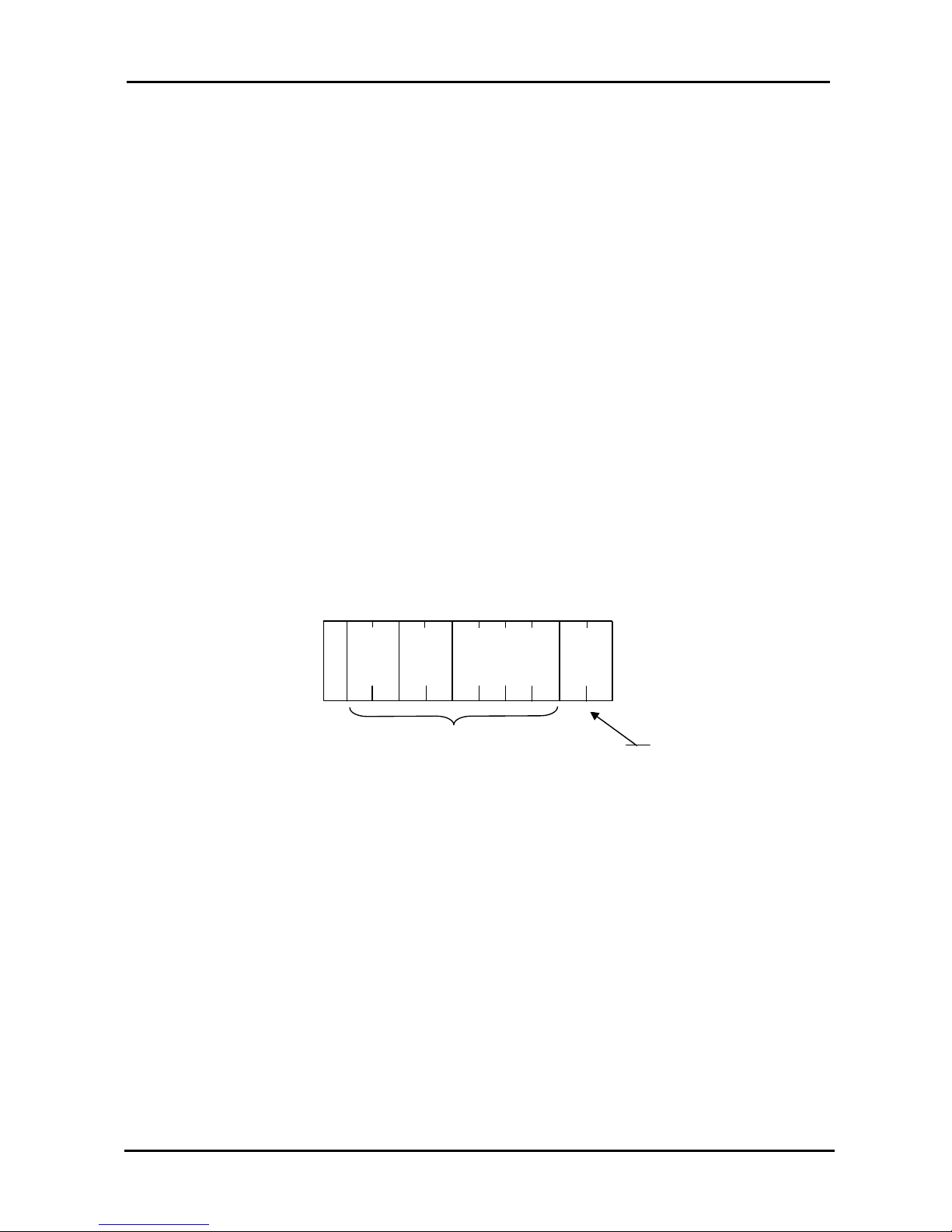
The control codes are characters (they belong to the first 32 ASCII characters and cannot
be printed out) which define the kind of information contained in the pack following them.
The control codes used are those which appear on the following table.
Panelplayer initialises the transmission sequence when it receives the character ENQ.
Mnemonic Code Description
STX
02H
Start TeXt. Beginning of transmission of reply pack.
ETX 03H End TeXt. End of reply pack.
ENQ 05H
EnQuiry. Beginning of pack addressed to Panelplayer ( or #
for RS485).
ACK 06H ACKnowledge. Beginning of reply pack: all OK!
LF 0AH Line Feed. End of line code.
CR 0DH Carriage Return.
NAK 15H Not AcKnowledge. Beginning of pack with error code.
N.B. The codes are expressed in hexadecimal.
9.11 Address (ADD)
The address is a number that allows the system Master to establish communication with
one of the various modules connected to the same serial line.
The value of this address is defined in Panelplayer through a configuration file config.txt
(par. 9.2).
IMPORTANT: when setting the address it is necessary to be careful to not define
more than one module with the same number, otherwise the communication becomes
confused and irregular and the data exchanged will no longer make sense.
The address can assume any value between 00H and 1FH.
The address is expressed in ASCII characters and consists of 2 characters.
Note! BROADCAST Commands (CMAD=00)
Panelplayer processes commands received with a 00 address without providing a reply.
9.12 Command (CMD)
This is used to define the operation to be carried out (for example PLAY, reading the state
or setting of the volume). The commands are defined in ASCII characters and consists of
2 characters.
In the following sections of this chapter, we provide the list of commands and every detail
about each command.
Page 40
Panelplayer User Manual v.1.4
Page 39
9.13 CheckSum (CHK)
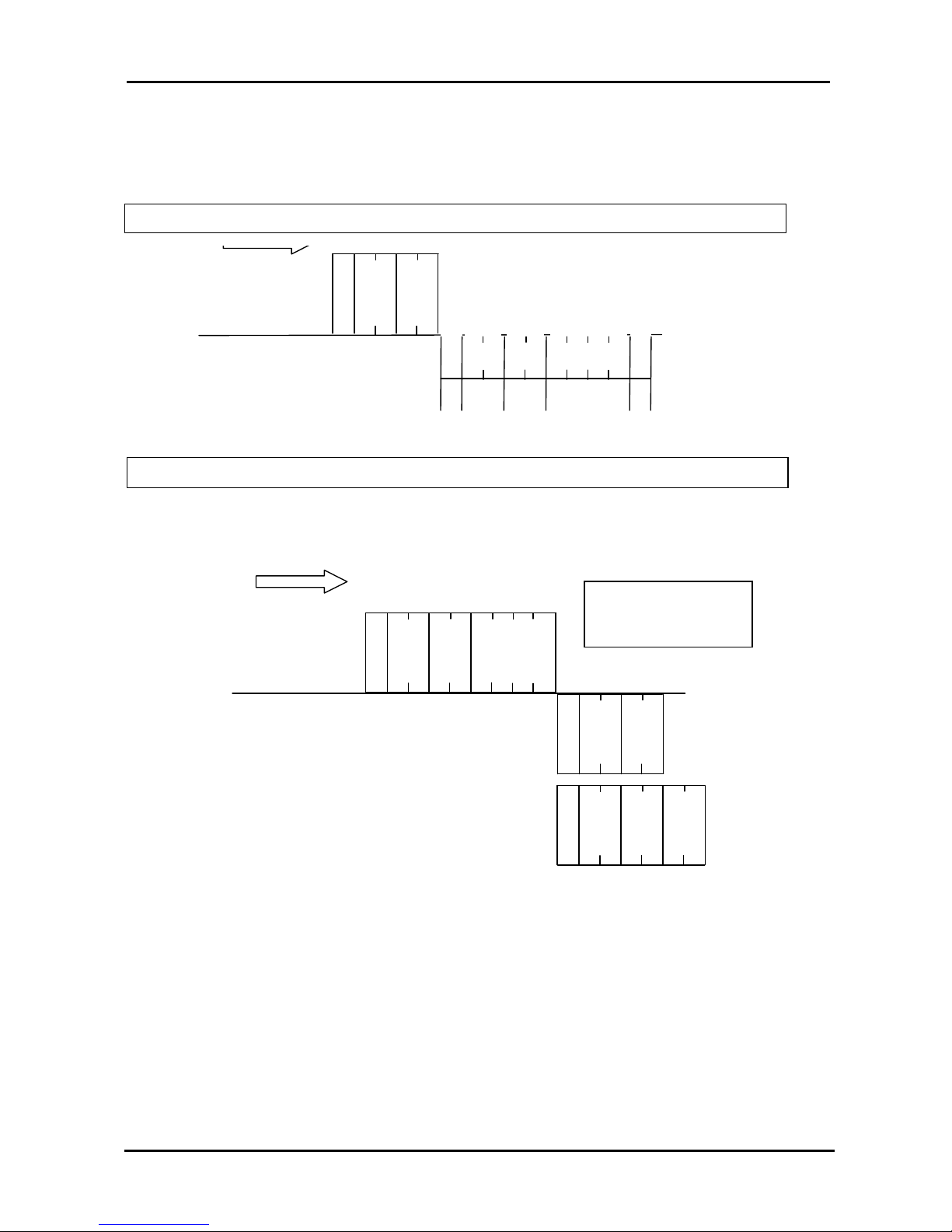
The CheckSum makes sure that the packs are complete and not corrupted during their
transmission by any noise induced on the line.
The CheckSum is calculated summing the hexadecimal value of the ASCII characters
contained in the data area defined for the CheckSum. The two least significant characters
(in hexadecimal) of the sum represent the CheckSum which is introduced into the two
dedicated ASCII characters at the end of the pack (before any CR and LF characters).
Note ! The sum of the value in decimal of the ASCII codes, converted into hexadecimal,
must give the same result. Introduction and management of the CheckSum is established
by the CMCK parameter of the configuration file.
If CMCK=1 has been set, CheckSum will be calculated automatically and added to the
term of the reply pack (the one beginning ’STX’) when this is delivered. When a pack is
received, Panelplayer calculates the new CheckSum and compares it with the one
contained in the pack itself; if it agrees, Panelplayer goes on to perform the command,
otherwise it delivers an error pack (pack beginning with ‘NAK’).
If CMCK=0 has been set, CheckSum will not be delivered in transmission and will not
be compared (also because it is missing in the data) in the received messages. The
following figure shows an example of calculation of CheckSum in a command pack
delivered by the master.
0 1
5 0
0 1 3 2
E
N
Q
05H
35H
30H
30H
31H
30H
31H
33H32H
38H
ADD
43H
CMD
DATA
CHK
8 C
30H + 31H + 35H + 30H + 30H + 31H + 33H +
Page 41
Panelplayer User Manual v.1.4
Page 40
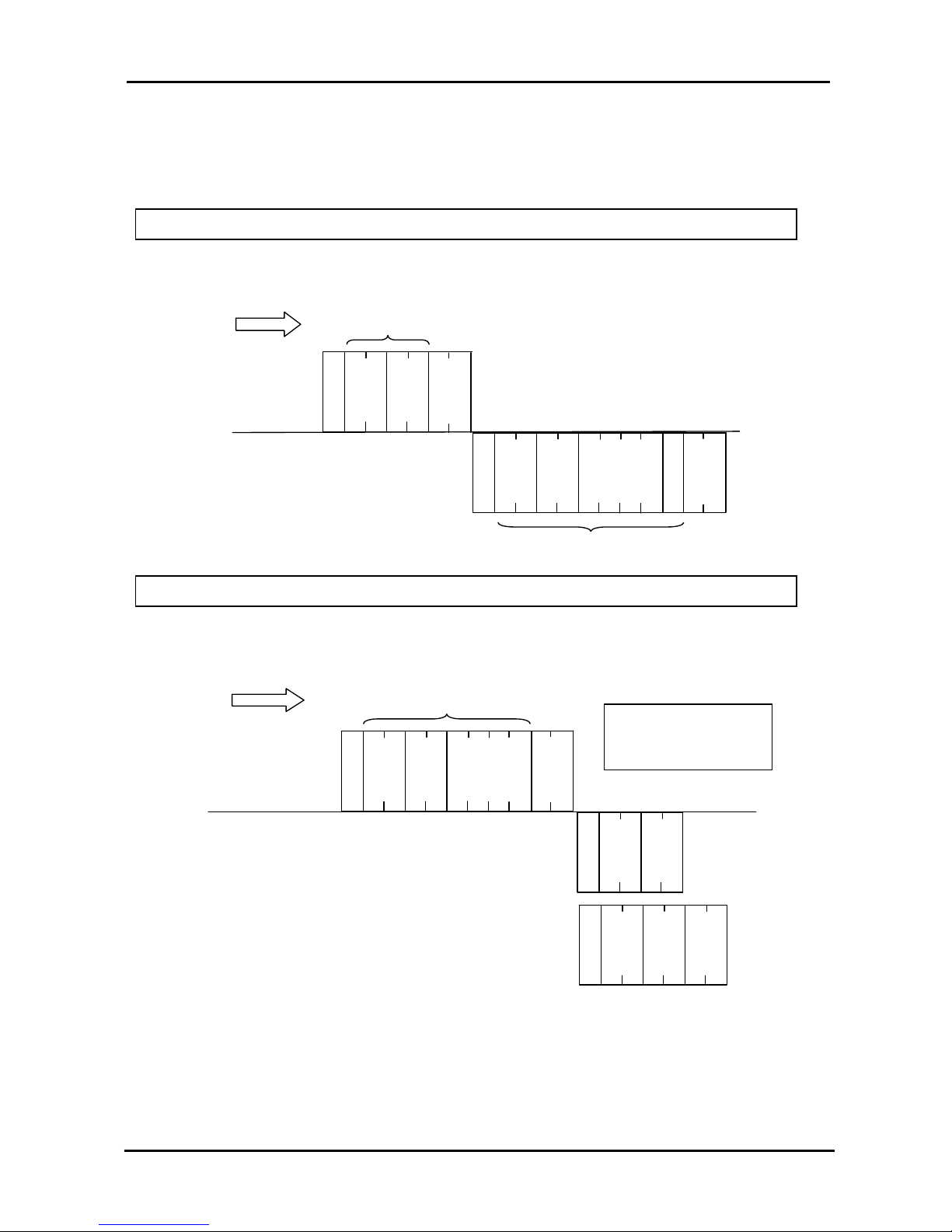
9.14 Basic protocol
A
D
D
C
M
D
Master
Panelplayer
Transmission sequence
E
N
Q
A
D
D
C
M
D
DATA
S
T
X
E
T
X
A
D
D
C
M
D
DATA
Master
Panelplayer
Transmission sequence
E
N
Q
A
D
D
C
M
D
A
C
K
Reading the data of the Panelplayer from the master
Command transmission from mast
er to Panelplayer
A
D
D
C
M
D
N
A
K
E
R
R
The DATA block is
inserted only if provided
for by command used
Page 42
Panelplayer User Manual v.1.4
Page 41
9.15 Basic protocol with CheckSum
A
D
D
C
M
D
Master
Panelplayer
Transmission
sequence
E
N
Q
A
D
D
C
M
D
DATA
S
T
X
E
T
X
A
D
D
C
M
D
DATA
Master
Panelplayer
Transmission sequence
E
N
Q
A
D
D
C
M
D
A
C
K
Reading the data of the Panelplayer from the master
Command transmission from master to Panelplayer
C
H
K
C
H
K
C
H
K
A
D
D
C
M
D
N
A
K
E
R
R
1. The CheckSum is introduced if the configuration parameter CMCK=1.
2. The CheckSum is calculated summing all the characters marked by an asterisk.
The DATA block is
inserted only if provided
for by command used
Page 43
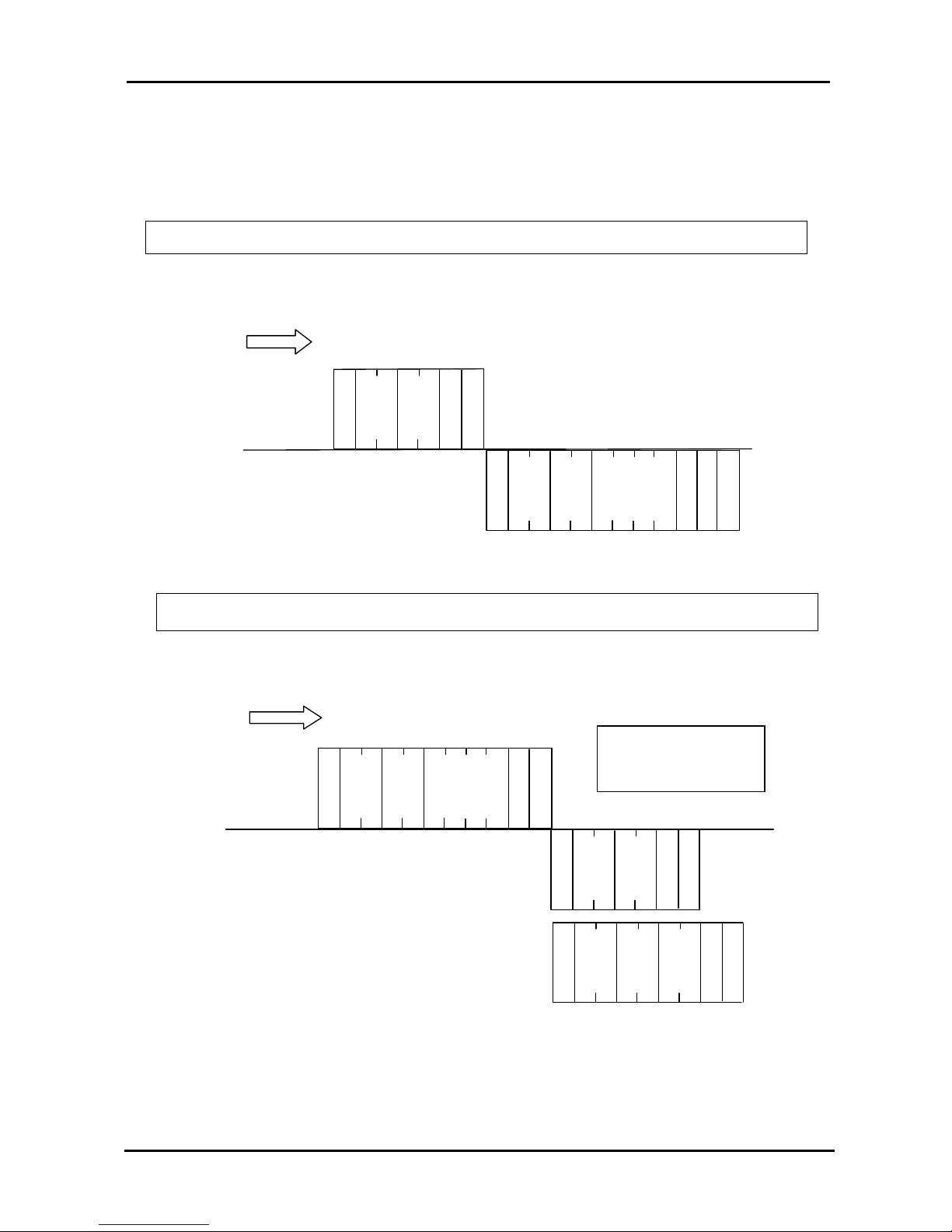
Panelplayer User Manual v.1.4
Page 42
9.16 Basic protocol with CR and LF
A
D
D
C
M
D
Master
Panelplayer
Transmission sequence
E
N
Q
A
D
D
C
M
D
DATA
S
T
X
E
T
X
A
D
D
C
M
D
DATA
Mast
er
Panelplayer
Transmission sequence
E
N
Q
A
D
D
C
M
D
A
C
K
Reading the data of the Panelplayer from the master
Command transmission from master to Panelplayer
CRA
D
D
C
M
D
N
A
K
E
R
R
LFC
R
L
F
CRLFCRLFCRL
F
The DATA block is
inserted only if provided
for by command used
Page 44
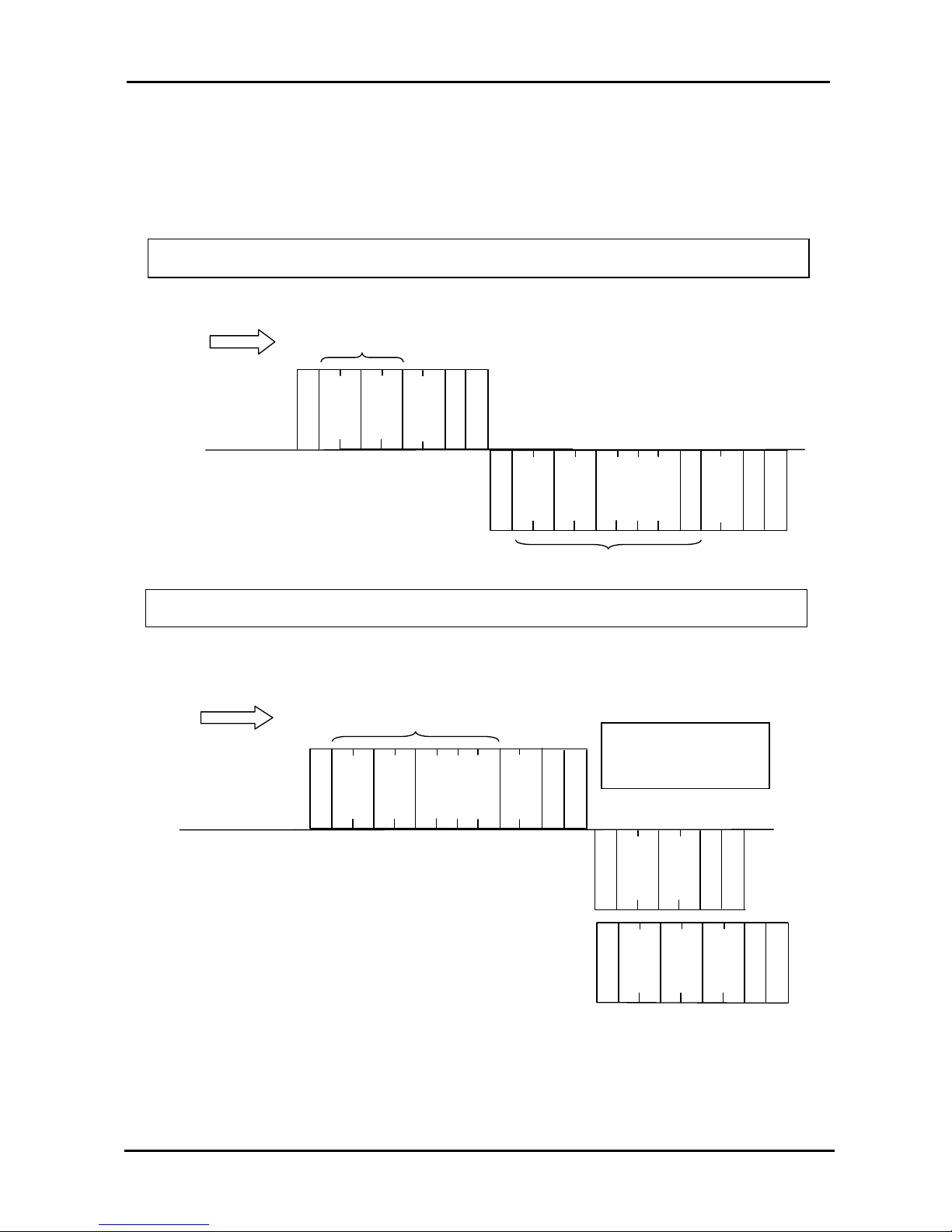
Panelplayer User Manual v.1.4
Page 43
9.17 Basic protocol with CheckSum, CR and LF
A
D
D
C
M
D
Master
Panelplayer
Transmission sequence
E
N
Q
A
D
D
C
M
D
DATA
S
T
X
E
T
X
A
D
D
C
M
D
DATA
Master
Panelplayer
Transmission sequence
E
N
Q
A
D
D
C
M
D
A
C
K
Reading the data of the Panelplayer from the master
Command transmission from master to Panelplayer
C
H
K
C
H
K
C
H
K
A
D
D
C
M
D
N
A
K
E
R
R
1. The CheckSum is introduced if the configuration parameter CMCK=1.
2. The CheckSum is calculated summing all the characters marked by an asterisk.
The DATA block is
inserted only if provided
for by command used
CRL
F
C
R
LFCRLFCRLFCRL
F
Page 45
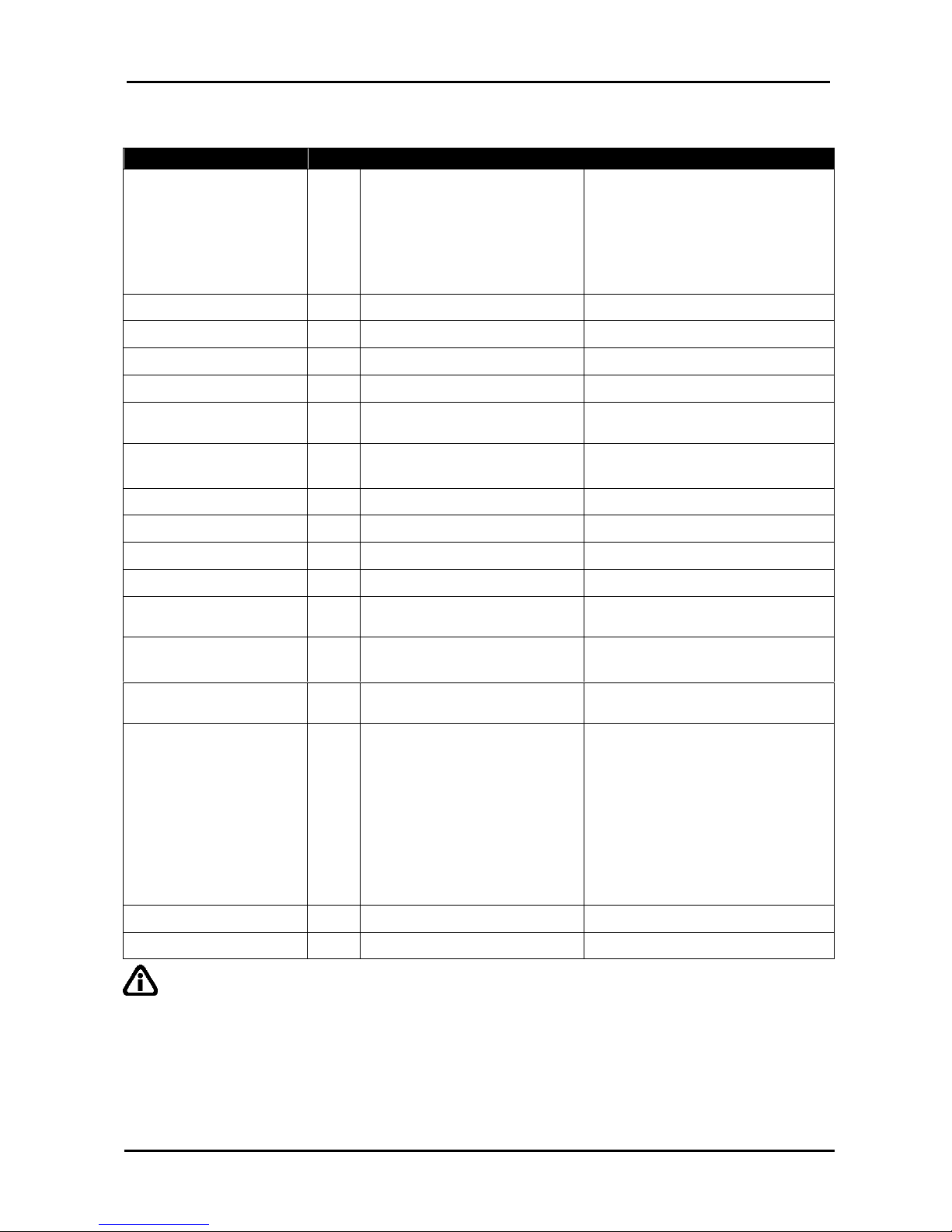
Panelplayer User Manual v.1.4
Page 44
9.18 List of commands and operating fields
Thistable provides the list, with the relevant comments, of allthe commands managed by Panelplayer.
Description
CMD
Command data
Reply data
STATUS request
30
None
a b c d
a = State of the player: S = Stop
P = Play
b = (reserved)
c = (reserved)
d = (reserved)
STOP
31
None None
PLAY First
32
None None
PLAY Next
33
None None
PLAY Prior
34
None None
PLAY File
50
Name of file without extension
(4 characters only)
None
PLAY File 2
(automaticSTOPbeforePLAY)
51
Name of file without extension
(4 characters only)
None
SET Volume
52
Level in hexadecimal (0..14H) None
SET Treble
53
Level in hexadecimal (0..14H) None
SET Bass
54
Level in hexadecimal (0..14H) None
SET Loudness
55
Level in hexadecimal (0..14H) None
PLAY FileB
56
Name of file without extension
(4 characters only)
None
PLAY File2B
57
Name of file without extension
(4 characters only)
None
Version of firmware 35 None
P = Panelplayer
x = version xx = Release Version
State of inputs
37
None
a b c d e f g h
a = IN 8
b = IN 7
c = IN 6
d = IN 5
e = IN 4
f = IN 3
g = IN 2
h = IN 1
Flash memory size
38
None Size of the flash (MAX. 4 characters)
Title of item being played
39
None Title of the item (MAX. 12 characters)
IMPORTANT: in order to manage any error messages correctly with the PLAY File (command
code 50H) and PLAY File 2 (command code 51H) commands, Panelplayer will check for the requested MP3
file with a consequent delay of 800/900 mseconds whilst the reply is sent.
When using the PLAY File B (command code 56H) and PLAY File 2 B (command code 57H) commands,
Panelplayer will not check the memory and will immediately send an interpreted command message and the
track will begin to play once the reply has been sent. The following errors are not managed with these
commands: "File not found" (error code 32H) and “PLAY file failed" (error code 33H).
Page 46
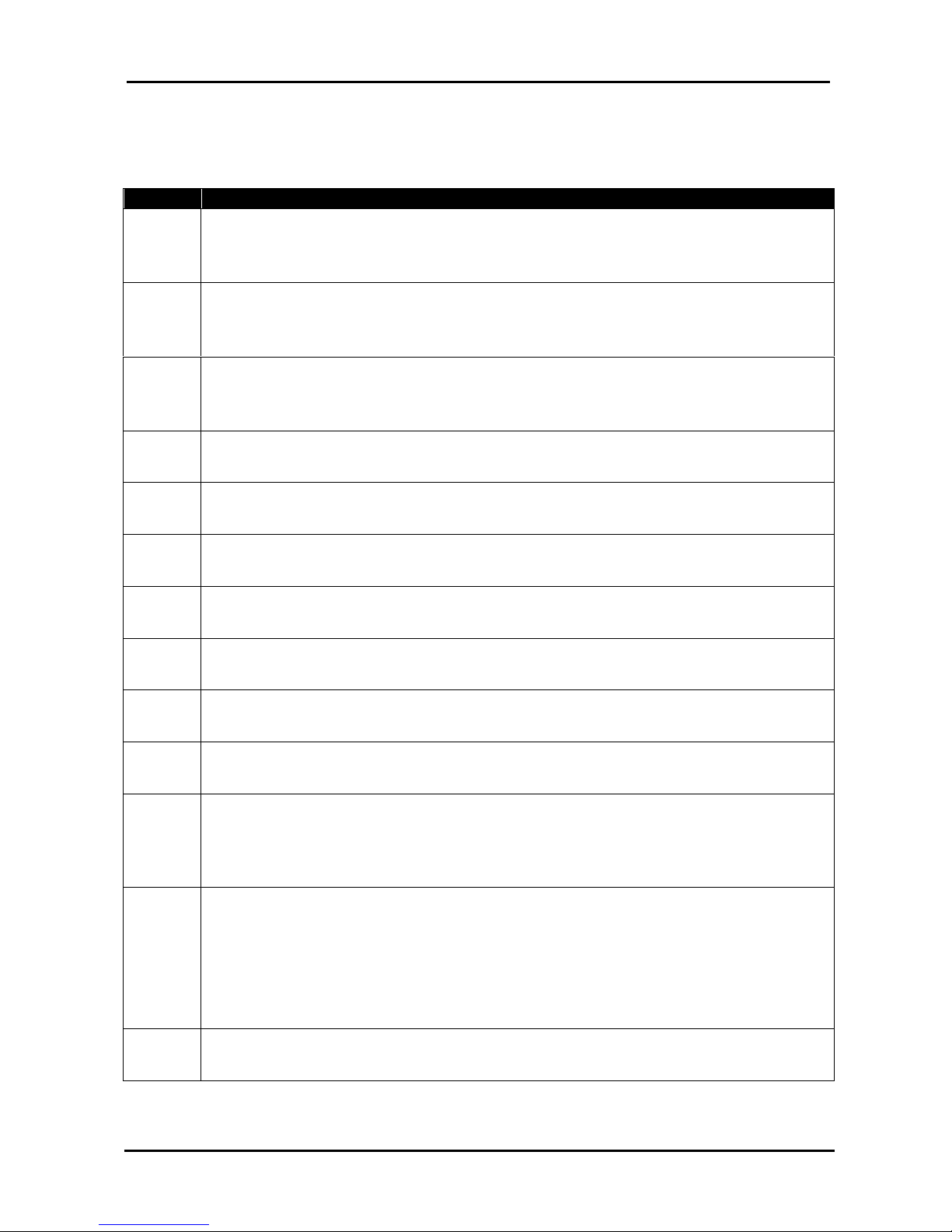
Panelplayer User Manual v.1.4
Page 45
9.19 Error codes
The following table lists all the error codes which Panelplayer delivers together with the
NAK pack if problems are found.
Code
Description
10H
Failure to convert command code (CMD). It could contain characters which are
outside the representation of a hexadecimal value.
The permitted values are: ‘a’ .. ‘f’ ‘A’ …. ‘F’ ‘0’….’9’.
11H
Failure to convert the value contained in ‘DATA’ into a number. It could contain
characters which are outside the representation of a hexadecimal value.
The permitted values are: ‘a’ .. ‘f’ ‘A’ …. ‘F’ ‘0’….’9’.
12H
Failure to convert the CheckSum (CHK). It could contain characters which are
outside the representation of a hexadecimal value.
The permitted values are: ‘a’ .. ‘f’ ‘A’ …. ‘F’ ‘0’….’9’.
13H CheckSum wrong.
14H Reserved error.
20H
Wrong value in the parameter of the command SET_Volume. It could be more
than the maximum permitted value.
21H
Wrong value in the parameter of the command SET_Treble. It could be more
than the maximum permitted value.
22H
Wrong value in the parameter of the command SET_Bass. It could be more
than the maximum permitted value.
23H
Wrong value in the parameter of the command SET_Loudness. It could be
more than the maximum permitted value.
30H
The command PLAY cannot be processed because the flash memory is
missing.
31H
The command PLAY (excluding PLAY File 2) cannot be processed because
Panelplayer is already playing. To solve the problem, first send the command
STOP, or else use the command PLAY_File_2 which automatically stops any
file being played.
32H
The file requested via the command PLAY_File or PLAY_File_2 has not been
found.
The four characters inserted as an argument for these commands must
correspond exactly to the name of the file you intend to play, except for the
extension.
E.g.: the command ENQ + 00501234 requires the playing of the file 1234.mp3
on Panelplayer with address 00.
33H Failure to play the requested file. The file could be corrupt.
Page 47
Panelplayer User Manual v.1.4
Page 46
10
SPECIFICATIONS
10.1 Technical features
Power supply ……………………: 12÷24VDC.
Consumption in standby ……… : 1 W
Protection ………………………. : inside fuse, 4A delayed.
Capacity of extractable memory : SD/MMC from 32MB to 1GB.
Input absorption…………..……. : 5 mA
Formats accepted ………………: MPEG1 layer 3 (file MP3 from 64 to 192 Kbps)
Response in frequency ……….. : 20 ~ 20.000 Hz (±3dB)
Signal/noise ratio …………….... : > 90dB.
Harmonic distortion ………….... : < 0,1%
Output power………………….…: max. 20+20W ( 24V / 4 Ω ) THD+N= 10%
Audio controls ………………..…
: - General output volume control
- Separate control of low and high tones
- Loudness level control
Control keys ……………...…….. : 4 buttons REW, PLAY, STOP, FWD and menu functions.
Classification………………….. : IP 30 on the basis of liquid and dust penetration.
Size………………………..……. : 102x102x19mm.
10.2 Obsolete devices disposal
When you find this picture on a device, it means that the device is
compliant with European Directive 2002/96/EC.
All electronic and electric devices should be disposed separately from
normal garbage.
The proper disposal of old devices, accessories, and of the batteries in
particular, it contributes to prevent possible negative consequences for
human health and for the environment.
For more detailed information on the disposal of obsolete devices, contact
the municipality, the garbage disposal service or the shop in which the
product has been acquired.
Manufactured by: Noventa di Piave (VE) - ITALY
Product compliant with the safeguard regulations 2006/95/CE and 2004/108/CE about
electromagnetic safety and compatibility.
Page 48
Panelplayer User Manual v.1.4
Page 47
COMMAND
(CMAD=1, CMCK=0)
CMD
TO Panelplayer
FRO M Pane l pla y er
NOTE 1 NOTE 2
HEX ASCII HEX ASCII
STATUS REQUEST
30 05 30 31 33 30 ENQ 0130 02 30 31 33 30 53 4D 30 30 03 STX 0130SM00 ETX
if in stop mode
02 30 31 33 30 50 4D 30 30 03 STX 0130PM00 ETX
if in play mode
STOP
31 05 30 31 33 31 ENQ 0131 06 30 31 33 31 ACK 0131
PLAY FIRST
32 05 30 31 33 32 ENQ 0132 06 30 31 33 32 ACK 0132
if in stop mode
15 30 31 33 32 33 31 NAK 013231
if in play mode (Panelplayer
doesn’t perform the action)
PLAY NEXT
33 05 30 31 33 33 ENQ 0133 06 30 31 33 33 ACK 0133
if in stop mode
15 30 31 33 33 33 31 NAK 013331
if in play mode (
Panelplayer doesn't jump to the
following file, it is first required to send a stop)
PLAY PRIOR
34 05 30 31 33 34 ENQ 0134 06 30 31 33 34 ACK 0134
if in stop mode
15 30 31 33 34 33 31 NAK 013431
if in play mode (Panelplayer doesn't jump to th
e
previous file, it is first required to send a stop)
PLAY FILE song.mp3
50 05 30 31 35 30 73 6F 6E 67 ENQ 0150song 06 30 31 35 30 ACK 0150
if in stop mode
15 30 31 35 30 33 31 NAK 015031
if in play mode (Panelplayer doesn’t perform the
action, it is first required to send a stop)
PLAY FILE fire.mp3
50 05 30 31 35 30 66 69 72 65 ENQ 0150fire 06 30 31 35 30 ACK 0150
if in stop mode
15 30 31 35 30 33 31 NAK 015031
if in play mode (Panelplayer doesn’t perform the
action, it is first required to send a stop)
PLAY FILE 2 song.mp3
(automatic STOP before
PLAY)
51 05 30 31 35 31 73 6F 6E 67 ENQ 0151song 06 30 31 35 31 ACK 0151
if in play mode (Panelplayer restarts from the
beginning of the interrupted file)
06 30 31 35 31 ACK 0151
if in stop mode
SET VOLUME (0 db
-
14)
52 05 30 31 35 32 30 30 31 34 ENQ 01520014 06 30 31 35 32 ACK 0152
SET VOLUME (
-
23 db-4)
52 05 30 31 35 32 30 30 30 34 ENQ 01520004 06 30 31 35 32 ACK 0152
SET VOLUME (off
-
00)
52 05 30 31 35 32 30 30 30 30 ENQ 01520000 06 30 31 35 32 ACK 0152
SET TREBLE (12 db
–
20)
53 05 30 31 35 33 30 30 32 30 ENQ 01530020 06 30 31 35 33 ACK 0153
SET BASS (12 db
–
20)
54 05 30 31 35 34 30 30 32 30 ENQ 01540020 06 30 31 35 34 ACK 0154
SET LOUDNESS(12 db
-
20)
55 05 30 31 35 35 30 30 32 30 ENQ 01550020 06 30 31 35 35 ACK 0155
VERSION OF
FIRMWARE
35 05 30 31 33 35 ENQ 0135
02 30 31 33 35 50 32 30 35 03
STX 0135P205 ETX
P = Panelplayer
x = version
xx = Release
STATE OF INPUTS
37 05 30 31 33 37 ENQ 0137 02 30 31 33 37 30 30 30 30 30
30 30 30 03
STX 013700000000
ETX
a b c d e f g h
a = IN 8
b = IN 7
c = IN 6
d = IN 5
e = IN 4
f = IN 3
g = IN 2
h = IN 1
Page 49
Panelplayer User Manual v.1.4
Page 48
COMAND
(CMAD=1, CMCK=0)
CMD
TO Panelplayer
FRO M Pane l pla y er
NOTE 1 NOTE 2
HEX ASCII HEX ASCII
FLASH MEMORY SIZE
38 05 30 31 33 38 ENQ 0138
02 30 31 33 38 31 32 35 4D 03
STX 0138125M ETX
Size of the flash
(MAX. 4 characters)
TITLE OF ITEM BEING
PLAYED
39 05 30 31 33 39 ENQ 0139 15 30 31 33 39 33 36 NAK 013936
if in stop mode
File title
(if present in ID3, 12
characters MAX; file
name (8 characters
truncated) if the title
is not present.
02 30 31 33 39 47 49 47 49 2E
4D 50 33 03
STX 0139SONG.MP3
ETX
If it is playing son.mp3
02 30 31 33 39 47 49 47 4F 2E
4D 50 33 03
STX 0139FIRE.MP3
ETX
If it is playing fire.mp3
02 30 31 33 39 43 41 4C 41 42
52 7E 31 2E 4D 50 33 03
STX
0139CALABR~1.MP3
ETX
If it is playing
calabriacrotone.mp3
STOP WITH CHECKSUM
(CMCK=1)
31 05 30 31 33 31 43 35 ENQ 0131C5 06 30 31 33 31 ACK 0131
STOP WITH CMCL=1
(without checksum)
31 05 30 31 33 31 0D 0A ENQ 0131 CRLF06 30 31 33 31 0D 0A ACK 0131 CR LF
STOP WITH CMDL=1
(without checksum)
31 05 30 31 33 31 0D 0A ENQ 0131 CRLF06 30 31 33 31 0D 0A ACK 0131 CR LF
STOP WITH CMCL=1
(with checksum)
31
05 30 31 33 31 43 35 0D 0A
ENQ 0131 CRLF06 30 31 33 31 0D 0A ACK 0131 CR LF
STOP WITH CMCL=1
(with checksum)
31
05 30 31 33 31 43 35 0D 0A
ENQ 0131 CRLF06 30 31 33 31 0D 0A ACK 0131 CR LF
ST
OP (CMAD=255
-
FF)
31 05 46 46 33 31 ENQ 0131 06 46 46 33 31 ACK FF31
STOP (CMAD=255
-
FF)
31 05 46 46 33 31 ENQ 0131 06 46 46 33 31 ACK FF31
STOP MULTICAST
31 05 00 00 33 31 ENQ 0131 no answer with multicast address
Control characters:
STX = 0x02
IMPORTANT:
ETX = 0x03
ENQ = 0x05
Address CMAD from 1 to 255 (0x01 – 0xff). Multicast address = 00 (0x00).
ACK = 0x06
NAK = 0x015
If checksum is enabled (CMCK=1), Panelplayer answers with the present checksum only if there is
the data field.
CR = 0x0D
LF = 0x0A
 Loading...