

Page 1
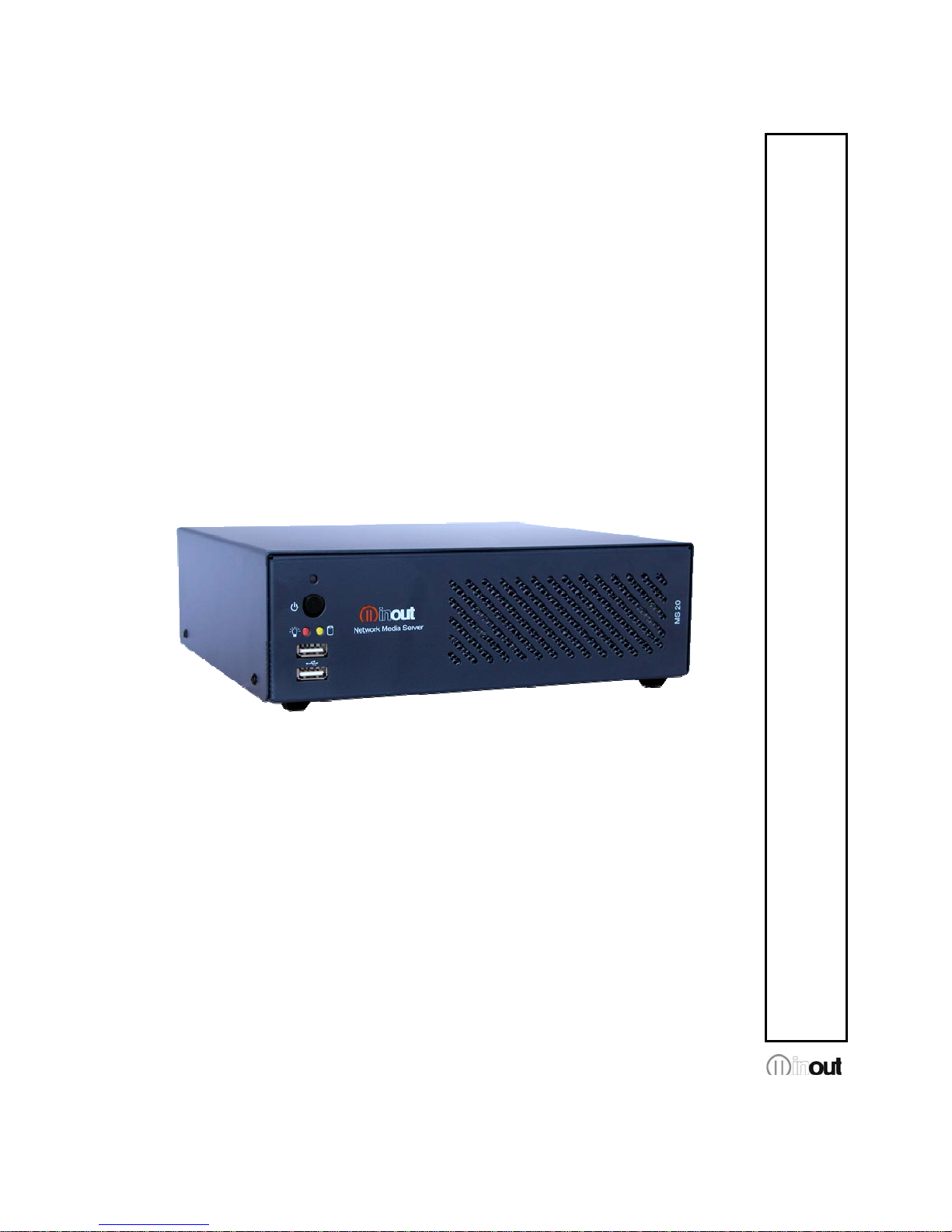
QUICK GUIDE
MS 20 - NAS
Version 1.0
Page 2

MS20 - NAS Quick Guide v.1.0
Pag. 1
Warranty
MS 20-PC has a 24 month warranty on the electronic parts, running from the date of
purchase. The warranty will not be valid in case of tampering with the device or in case
personnel not authorized by the manufacturer or by the authorized dealer should carry out
work on it.
N.B. responsibility of the purchaser: in case of operation under warranty, the device must be
packaged so as to prevent damage during transport and shipped to the manufacturer together
with all the accessories.
Warranty rules
1. In order to exercise his warranty rights, the purchaser must enclose with the device a
copy of evidence of purchase duly stamped by the dealer (bill/invoice).
2. The warranty lasts for 24 months for the electronic parts. The warranty is granted at the
point of sale or else directly requested from the manufacturer.
3. The warranty only covers damage to the product which makes it work badly.
4. Work under warranty will only mean repairing or replacing, free of charge, any parts
acknowledged to be defective during manufacture or in their material, including labour
costs.
5. The warranty does not apply to damage caused by negligence or failure to comply with
the instructions, or damage caused by unauthorised people, with a special reference to
the outside parts.
6. Also, the warranty does not apply to damage caused to the device by connection to
unsuitable power sources.
7. The warranty does not cover parts subject to wear after use, or the container if the
material is not defective.
8. The warranty does not include transport costs, which will be paid for by the purchaser in
relation to the manner and time of transport.
9. The warranty will run out after 24 months have elapsed. In this case, service will be
provided charging for the parts replaced, labour costs and transport according to the
current rates.
10. Any dispute will be settled exclusively before the Court of Law of Venice.
Limitations of Liability
InOut not be held responsible for a possible loss of data on Hard Disk. The costs for possible
recovery of corrupted data will be incurred by the buyer.
Page 3

MS20 - NAS Quick Guide v.1.0
Pag. 2
Index
Introduction..........................................................................................................................3
Main features of MS 20-NAS...............................................................................................3
Package Content.................................................................................................................4
Front panel description .......................... .. .. .. ............................. .. .. .. .. .. ... .. .. .. .. ......................5
Rear panel description............ .. .. .. .. .. ... .. .. .. .. .. ... .. ............................ .. .. ... .. .. .. .. .. ... .. ...............5
Installation............................................................................................................................6
Default configuration............................................................................................................7
Configurating the MS20-NAS –WEB interface.. .. .. .. .. ... .. .. .. .. .. ... .. .. .. .. .. ... .. .. ..........................8
Reset to default settings ....................................................................................................10
Disk formatting............... .. .. .. ............................. .. .. ............................ .. ... .. ..........................11
OS automatic updates..................................................... .. .. .. ... .. .. .. .. .. ... ............................12
Should the Internet Connection not be available it is possible to download the update and
manually upload it to the device.........................................................................................12
Problem solving.................................................................................................................13
Power on led doesn’t light up......................................................................................13
Lan led doesn’t light up ...............................................................................................13
Browser fails to link NAS address – forgotten IP address...........................................13
Authentication failure – forgotten Username and Password.................. .. .. ... .. .. .. .. ....... 13
It was set to acquire IP address automatically and you do not connect more to the NAS
.................................................................................................................................... 13
It’s not possible to access to the shares......................................................................13
It’s not possible to access to the automatic updates ...................................................13
Technical support ..............................................................................................................14
Page 4

MS20 - NAS Quick Guide v.1.0
Pag. 3
Introduction
MS 20-NAS (Network Attached Storage) offers a high security level, storage and content
sharing capabilities in a easy to use device, that makes it ideal for small LAN.
The sophisticated RAID1 technology protects against the data loss caused by disk failure.
The enterprise level Linux operational system ensures long term reliability with high
performance at no compromise.
By a simple web based wizard you can speed up users management as well as access
control list to shared folders.
Main features of MS 20-NAS
• Processor Intel Atom
• RAM 2 Gb 667Mhz
• Linux Based O.S.
• integrated Web server (IE6.0, Firefox, Safari)
• Samba Server (SMB\CIFS)
• NTP Time server
• DHCP Client & Server
• DNS Server
Interfaces
• LAN RJ45 10/100/1000 Base-T Ethernet (auto MDI/MDI-X)
• 2 front Port USB 2.0
(software update only, reset procedure to factory store)
• 2 LED diagnostic (Power & Activity)
• Reset and power on button
Hard Disk
• 2 x 320Gb 2,5” SATA HDD in RAID1 (Mirror)
• 1 x 8Gb DOM solid state O.S. use only
Power
• mains: 90 – 132 / 187 – 264 Vac, socket IEC 320 C5 (47-63 Hz)
• Safeguard: fuse T4A/250V (both hot and neutral )
• Power comsumption: 85W, (no load) 3.6W
Page 5
MS20 - NAS Quick Guide v.1.0
Pag. 4
Case
• Dimensions: 215mm x 68 mm x 201mm (W*H*D)
• Weight: 1,8Kg (Hard Disks excluded)
• Chassis: steel with internal aluminium tray for self dissipation
• Working Temperature: 0°C - 40°C
• maintenance: Temperature: -10°C - 60°C, Humidity: 10-85%
• Cooling: Self regulated fan, 40mm with spherical pillow block (low-noise)
Package Content
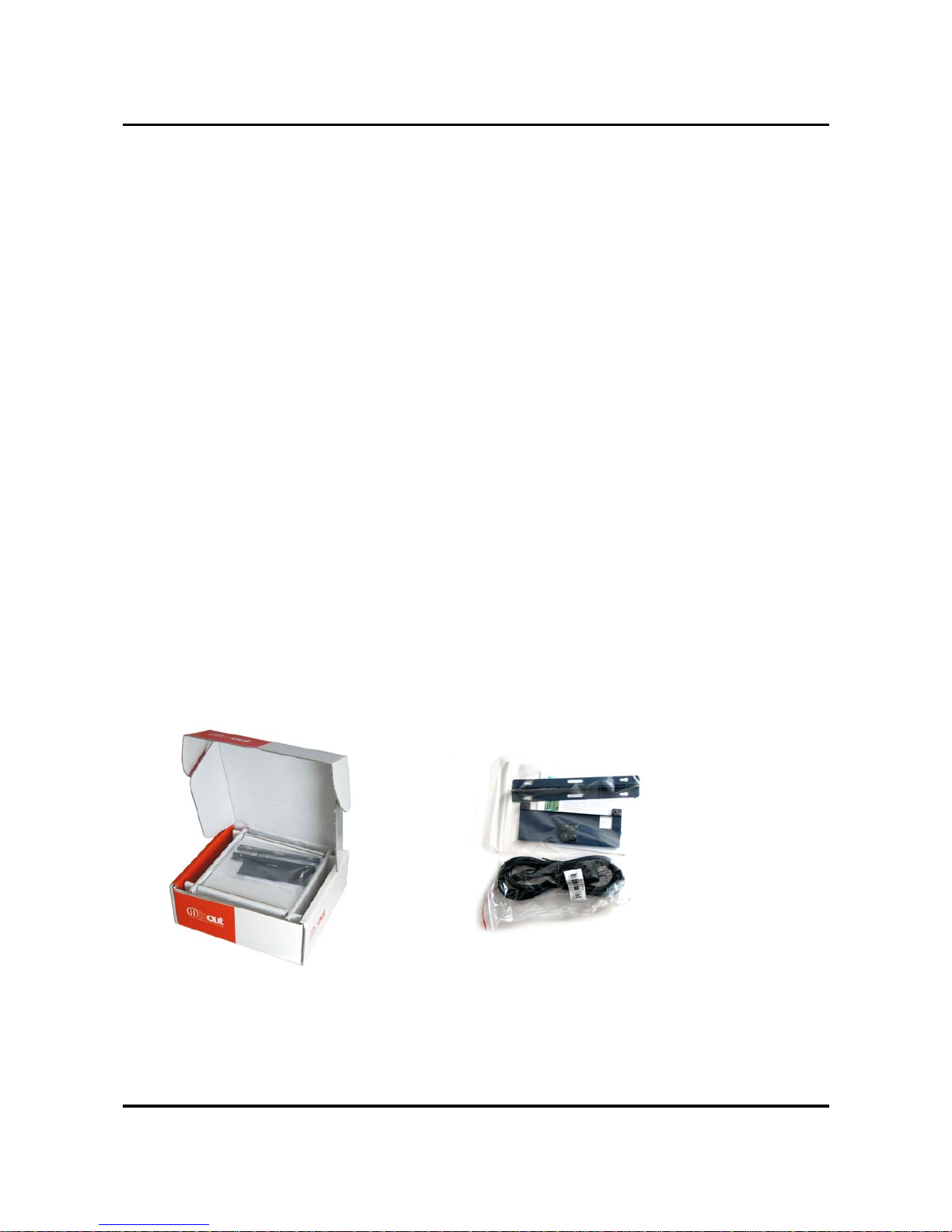
Before use verify the following content:
• 1 InOut MS 20-NAS
• 1 quick guide Italian – English
• 1 poer supply cable 220Vac italian IEC plug
• Wall/desk Kit bracket
• Desktop rubber Kit
Page 6
MS20 - NAS Quick Guide v.1.0
Pag. 5
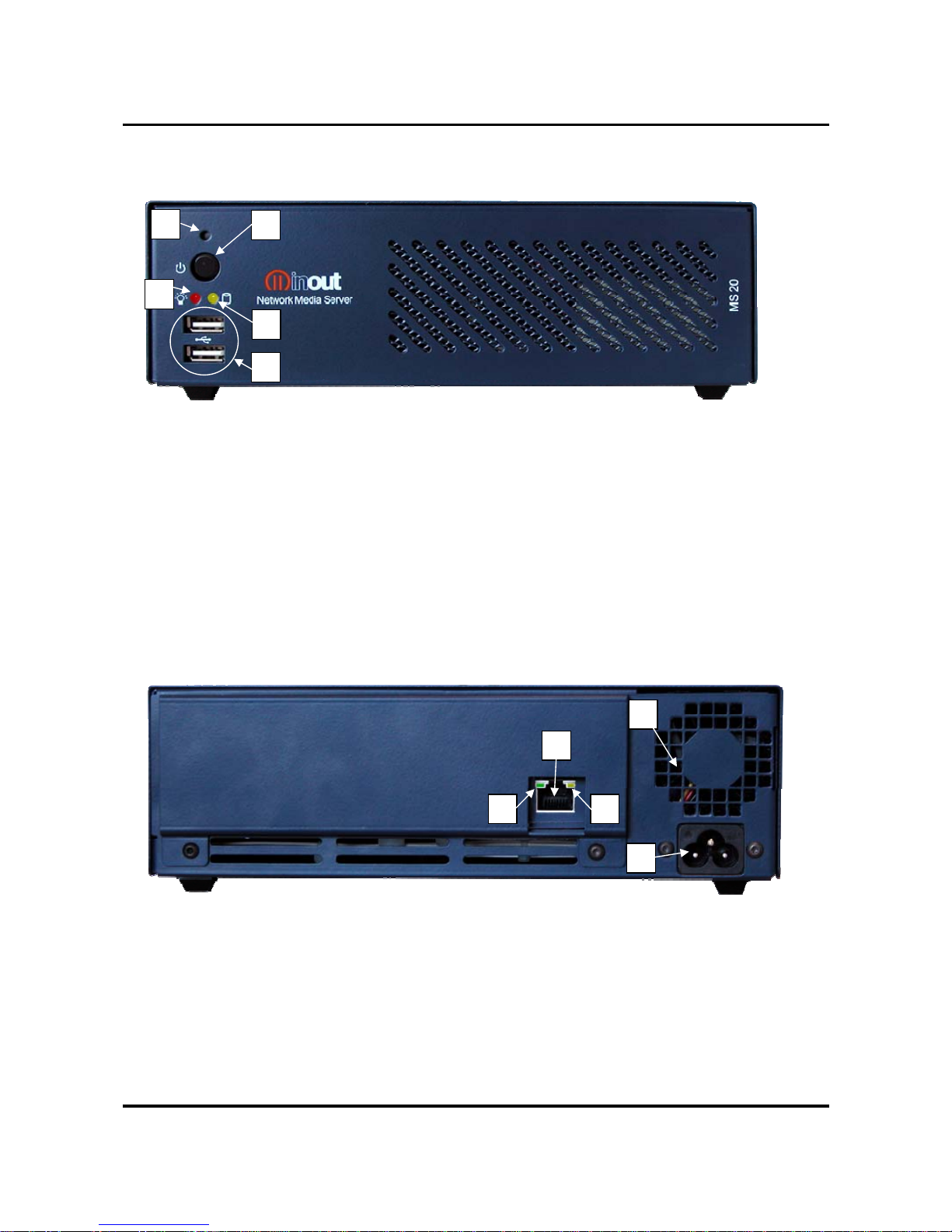
Front panel description
1. Reset button
2. on/off switch
3. Led indicator power on/off
4. Led indicator disk activity
5. USB 2.0 port
Rear panel description
1. Lan Port 100/1000 Mbit/s
2. Led Link
3. Led indicator lan activity
4. power socket 220 Vac
5. Fan cooler
1
2
3
4
5
1
2
3
4
5
Page 7
MS20 - NAS Quick Guide v.1.0
Pag. 6
Installation
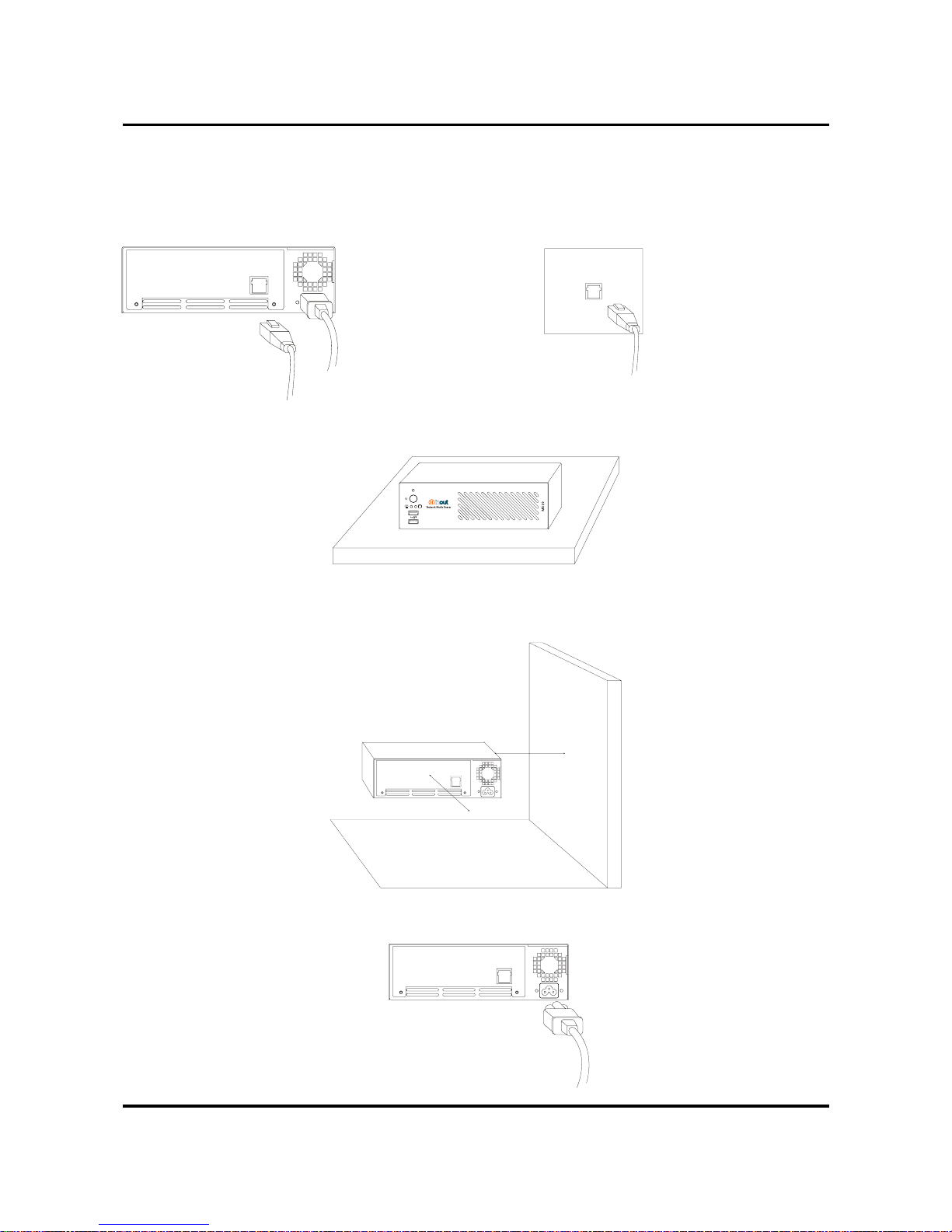
Choose to place the InOut MS20-NAS according to the following:
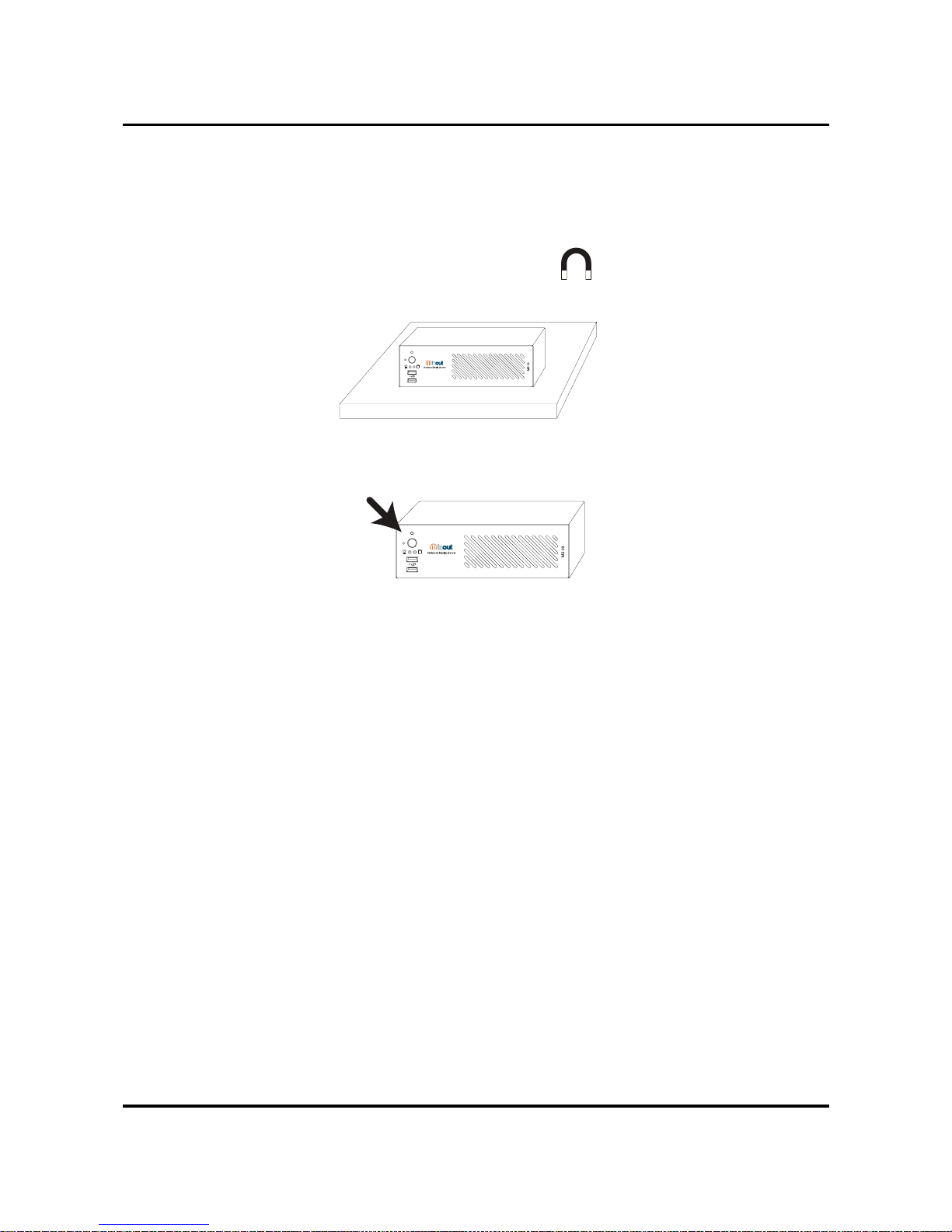
• Place it near an Ethernet port
• Place it on a solid surface capable of at least 3 Kg
• Let enough room near the fan to allow a good air flow. In case of vertical mounting the fan
should be placed upside.
• Better if connected to a grounded power source. We suggest to connect the device to a UPS unit.
Page 8
MS20 - NAS Quick Guide v.1.0
Pag. 7
• Avoid to expose to direct sunlight, high temperatures, dust e and source of electromagnetic
fields.

[
[
Ã
[
• Once settled, turn on the device by pressing the power-on button and go ahead with the
device configuration as following described.
Default configuration
Default settings of the NAS MS20-NAS are:
• USER NAME: admin
• PASSWORD: admin
• INDIRIZZO IP: 192.168.100.1 (NETMASK: 255.255.255.0)
• NETBIOS NAME: ms20nas
• WORKGROUP: WORKGROUP
A DHCP Server is also provided by default configuration with the following parameters:
• SUBNET: 192.168.100.0
• NETMASK: 255.255.255.0
• START IP: 192.168.100.100
• STOP IP: 192.168.100.200
The NAS function must be set as local DNS server.
Page 9
MS20 - NAS Quick Guide v.1.0
Pag. 8
Configurating the MS20-NAS –WEB interface
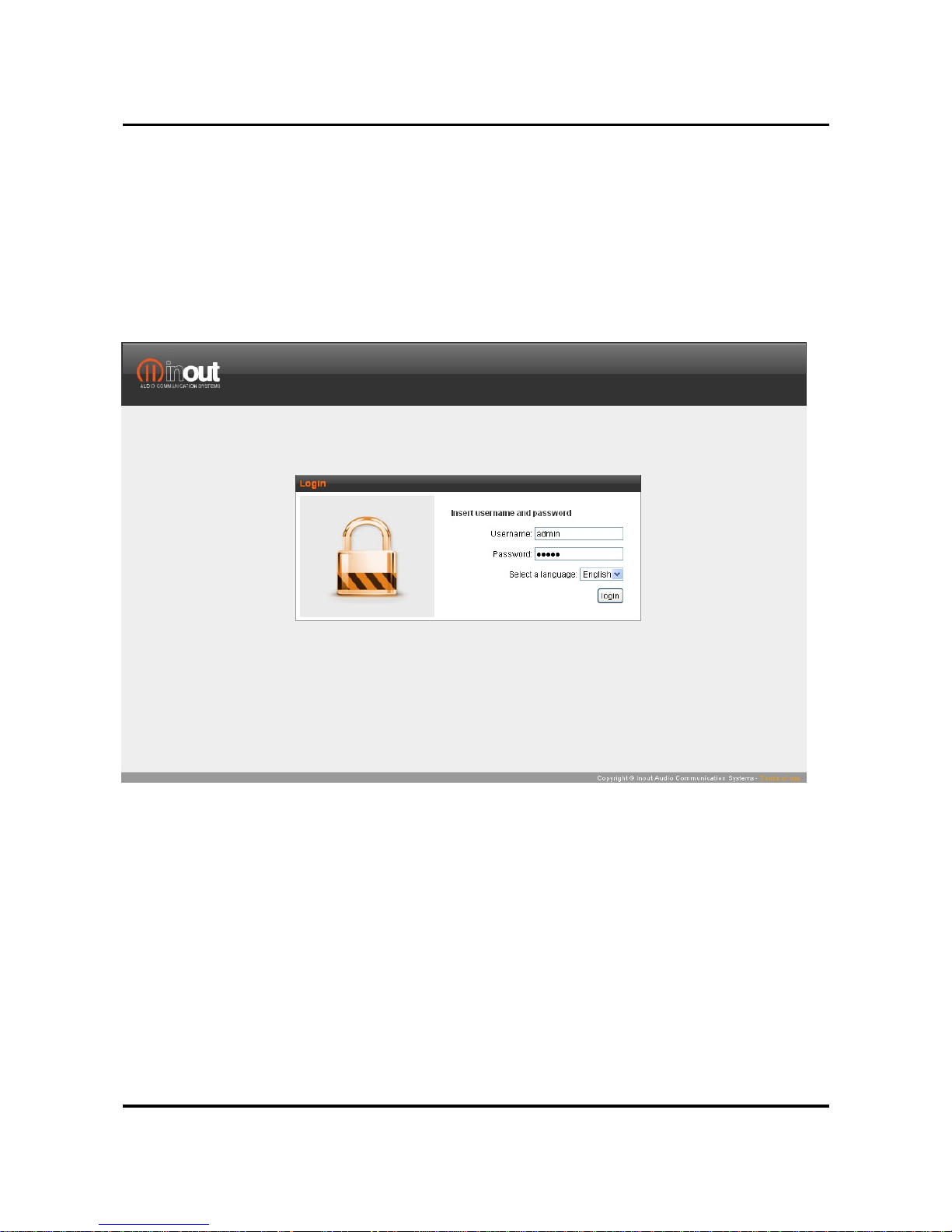
You can use the default settings to connect to an InOut MS20-NAS by whatever web browser
(Internet Explorer, FireFox, Safari etc.) and make it quickly operational just by the
configuration available wizards.
Type the IP address of the storage unit in the web address bar to get access to the
authentication page, fill in the username and password to login the system.
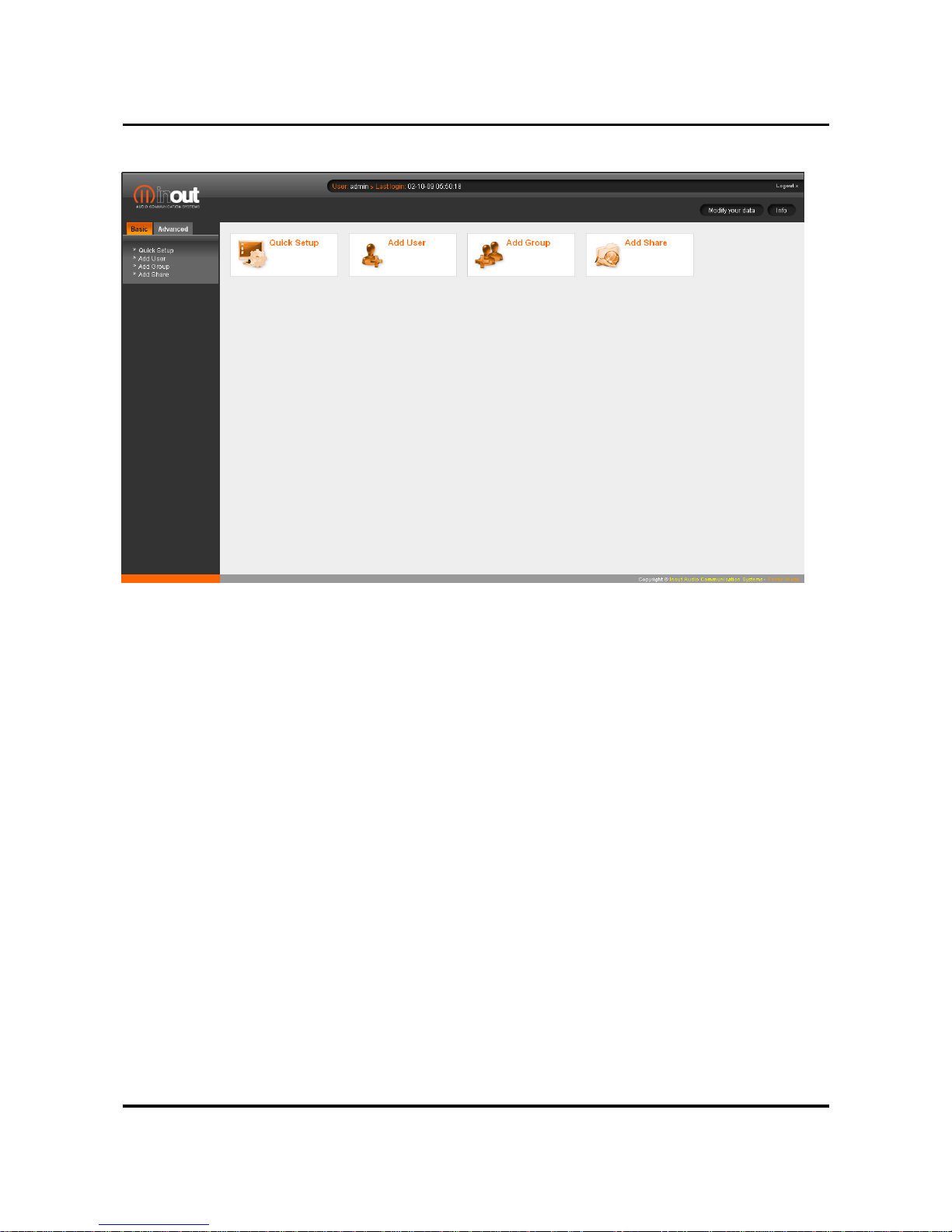
After the logon you can start the wizards to configure the NAS step by step.
Page 10
MS20 - NAS Quick Guide v.1.0
Pag. 9
Quick Configuration Wizard allow to modify based on your needs:
• Password
• Network parameters (Hostname , IP address, subnet mask, Gateway, DNS Server)
• Workgroup, NetBios name, WINS server
• Data and hour, NTP server
Other Wizards allow you to quickly configure Users, Groups and sharing policy.
A simple demo of the configuration wizard procedure is available at the InOut-Digital web
page.
Page 11

MS20 - NAS Quick Guide v.1.0
Pag. 10
Reset to default settings
Save an empty file on a USB key to restore the InOut MS20-NAS to the factory settings.
The filename must be servermanager-reset.tar.gz
Insert the key on a USB port and power cycle the device.
The reset will affect the following:
• LAN settings will be set to the default value
• admin’s password will be set to the default value
• DHCP server will be set to the default value
• Proxy will be disabled
• NAS will be set as local DNS Server
Sharing policy, users and user-groups will not be affected.
Page 12
MS20 - NAS Quick Guide v.1.0
Pag. 11
Disk formatting
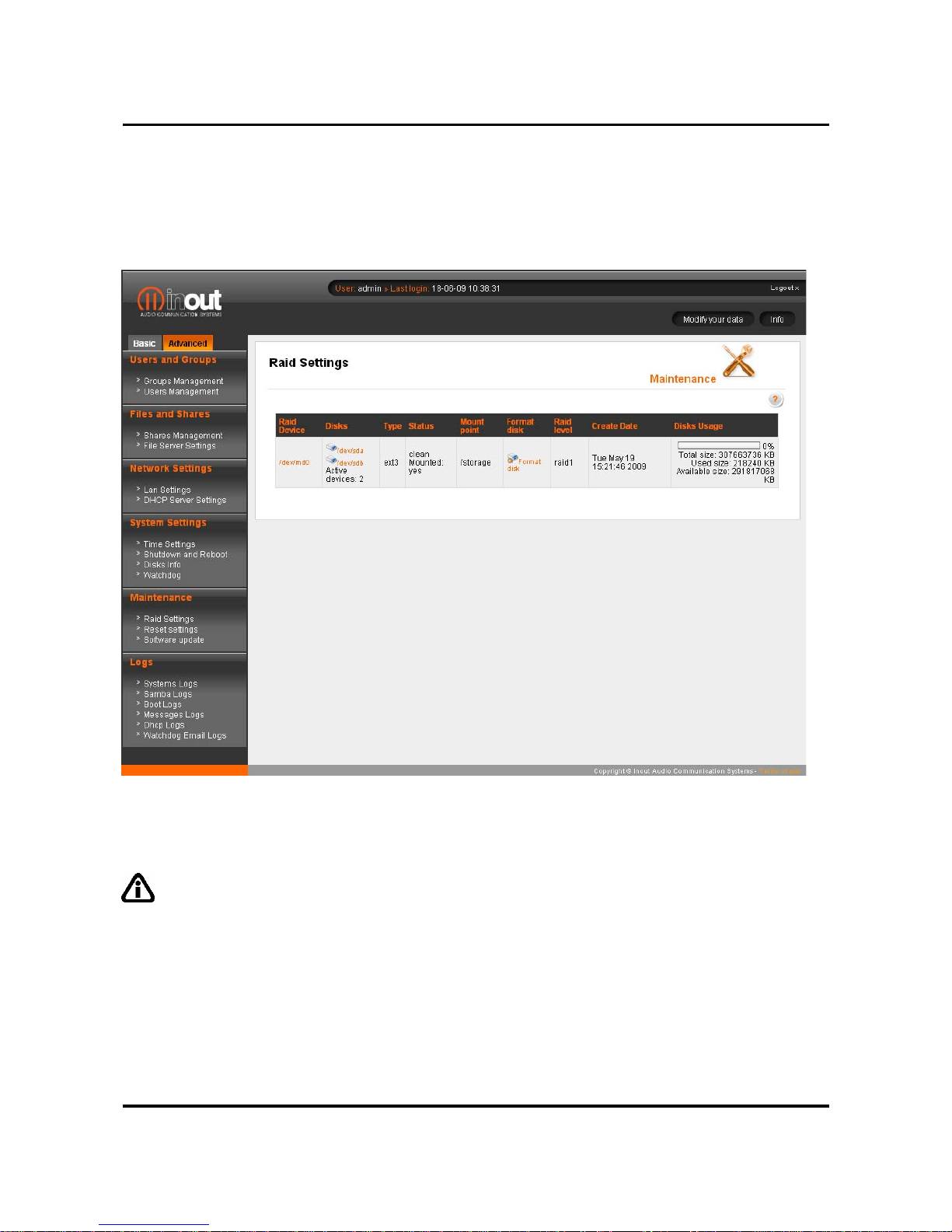
Should be necessary the disk formatting it would be enough to access the RAID conf iguration
page in the advanced settings.
RAID building procedure takes a relatively long time to complete, all the NAS functionality will
however be available.
Warning: disk formatting involve the complete cancellation of every saved data as well
as the shared folders. Proceed if necessary to back-up the entire disk before formatting.
Page 13
MS20 - NAS Quick Guide v.1.0
Pag. 12
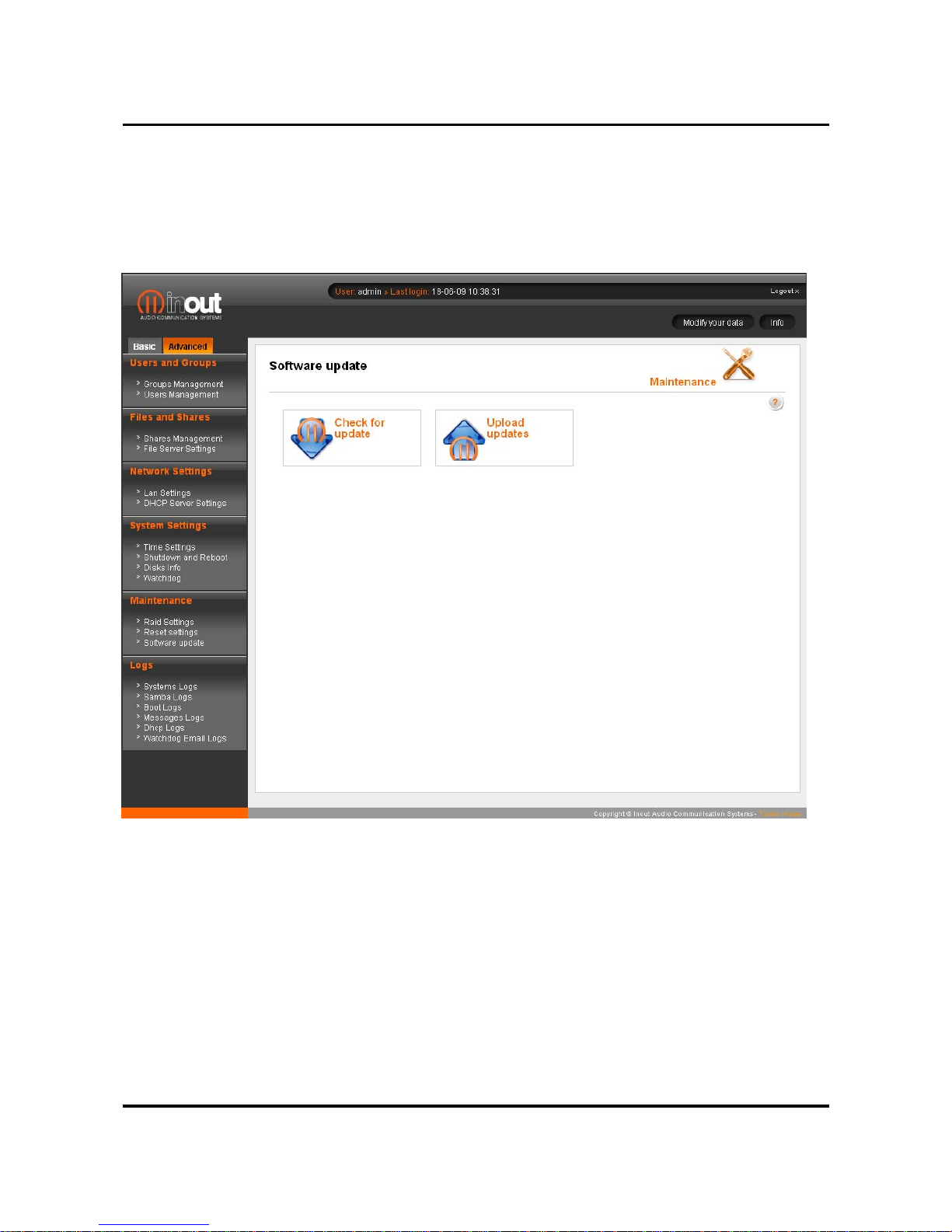
OS automatic updates
In case of availability of an Internet connection it is possible to perform the NAS automatic
software update. The whole automatic procedure requests to submit a registration form.
Should the Internet Connection not be available it is possible to download the update and
manually upload it to the device.
Page 14

MS20 - NAS Quick Guide v.1.0
Pag. 13
Problem solving
Power on led doesn’t light up
Verify the power cable should be properly connected to both the MS20-NAS and the AC
socket.
Lan led doesn’t light up
Verify that RJ45 connectors should be properly connected by the Ethernet cable between the
MS20-NAS and a network switch or a PC. Verify the port whom the cable is connected to is
properly working.
Browser fails to link NAS address – forgotten IP address
Restore to factory setting of the NAS is mandatory, please refer to the above procedure.
Authentication failure – forgotten Username and Password
Restore to factory setting of the NAS is mandatory, please refer to the above procedure.
It was set to acquire IP address automatically and you do not connect more to the NAS
Verify the IP released list by the DHCP server from the configuration page. Should not be
available the procedure to know the released IP it would be necessary to restore the NAS to
the factory settings.
It’s not possible to access to the shares
Verify the network symbolic path as follow \\NetBIOS-name\share-path.
Verify the
authentication and type the correct credentials (user-group-password).
Verify the File server is enabled (Advanced section).
Remember that, on Windows OS based systems, whenever should be changed the sharing
credentials, it is mandatory to restart the computer. Gaining access by NetBIOS name is not
allowed if multiple IP address are defined on the same network card (alias): if so set one
single IP address or use the following symbolic path: \\IP-address\share-path.
It’s not possible to access to the automatic updates
Verify in the Diagnostic page whether or not the MS 20-NAS is provided of an internet
connection (Ping). Should the operation not succeed, verify in the Lan Configuration that
Gateway and DNS Server are enabled. Behind a Proxy server within a LAN set the correct
parameters in the Client-Proxy http Settings.
For further troubles exploit the Disk information section to test the proper functionality of the
hard disks. Try if necessary with the disk formatting at the Raid Configuration section.
Page 15

MS20 - NAS Quick Guide v.1.0
Pag. 14
Technical support
All the supported is available at the web address:
www.inout-digital.com
In case of technical issues it is possible to contact the technical support InOut at the e-mail
address:
Manufactured by:
Noventa di Piave (VE) - ITALY
 Loading...