

Page 1
PHOENIX
NET
Quick Start Guide
Page 2

Contents
Thank you for the purchase of your new PhoenixNET!
This Quick Start Guide will provide step-by-step instructions on how
to connect and get started with your new PhoenixNET simply and
quickly!
Should you have any issues, please contact [email protected] and
we will be happy to assist you.
Innuos PhoenixNET Quick Start Guide (English)
Document version 1.0
1 Box Contents ��������������������������������������������� 2
Rear Panel Diagram ���������������������������������������� 3
2
Connect PhoenixNET to Main Power ������������������������� 4
3
Connect PhoenixNET to Router/Home Network �������������� 5
4
Connect network devices to PhoenixNET���������������������� 6
5
Switching off the PhoenixNET�������������������������������� 7
6
1
Page 3
P H O E N I X N E T
1
2
3
EU UKUSA / CANCHN / AUS
1
EMPLOYER
UNIQUEMENT
AVEC UN FUSIBLE
DE 250V
USE ONLY WHITH A
250V FUSE
3
4
5
21
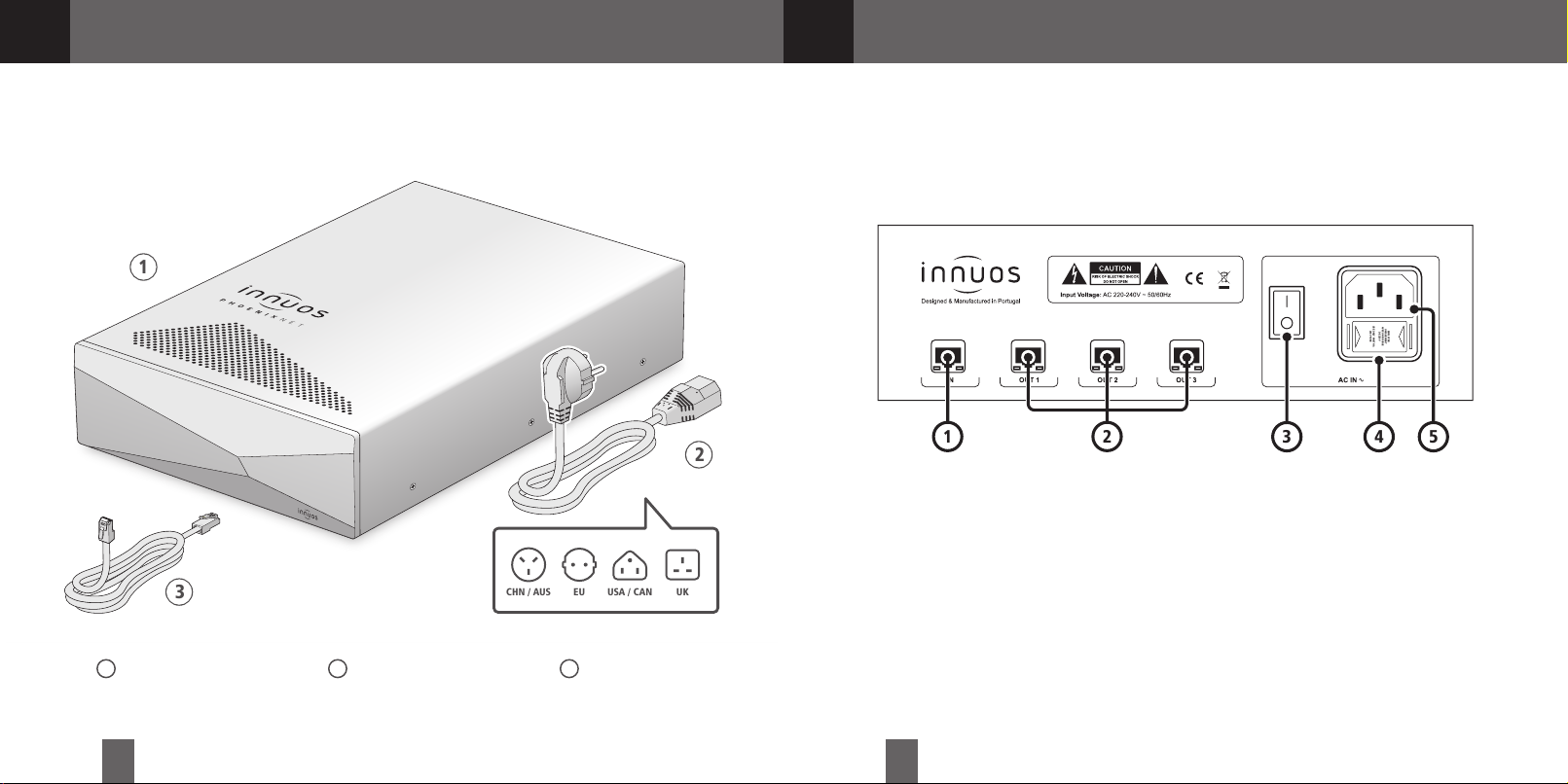
Box Contents
2
Rear Panel Diagram
1 Innuos PhoenixNET 2 Mains Cable 3 2m Ethernet Cable
2 3
Ethernet IN
1
Ethernet OUT
2
On/Off Switch
3
Fuse Box
4
AC Power Connector
5
Page 4
Designed & Manufactured in Portugal
RISK OF ELECTRIC SHOCK
DO NOT OPEN
Input Voltage: AC 220-240V ~ 50/60Hz
AC IN
ᵔᵕ
OUT1
IN
OUT2
OUT3
EMPLOYER
UNIQUEMENT
AVEC UN FUSIBLE
DE 250V
USE ONLY WHITH A
250V FUSE
P H O E N I X N E T
WAN
INTERNET
ETHERNET
3
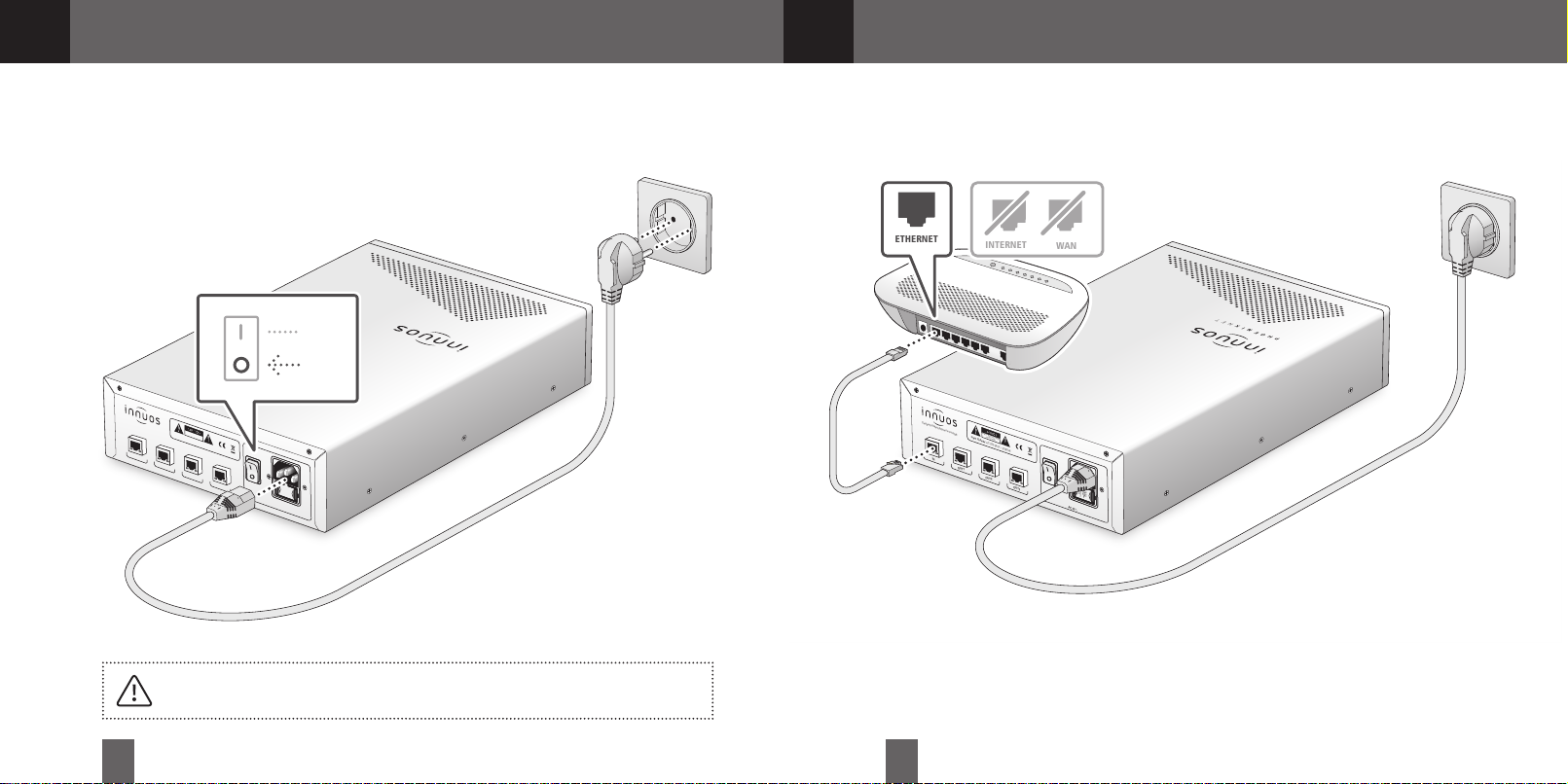
Connect PhoenixNET to Main Power
4
Connect PhoenixNET to Router/Home Network
Designed & Manufactured in Portugal
ON
OFF
RISK OF ELECTRIC SHOCK
DO NOT OPEN
Input Voltage: AC 220-240V ~ 50/60Hz
IN
OUT1
OUT2
OUT3
USE ONLY WHITH A
AVEC UN FUSIBLE
250V FUSE
UNIQUEMENT
DE 250V
EMPLOYER
AC IN
ᵔᵕ
P H O E N I X N E T
Make sure your PhoenixNET is powered off before connec ting the AC Mains Cable.
4 5
Page 5
AC IN
ᵔᵕ
Designed in England
Manufactured in Portugal
Please read the manual before u se
RISK OF ELECTRIC SHOCK
DO NOT OPEN
Input Voltage: AC 220-240V ~ 50/60Hz
LAN STREAMERSERVICE ONLY
BACKUP DAC
EMPLOYER
UNIQUEMENT
AVEC UN FUSIBLE
DE 250V
USE ONLY WHITH A
250V FUSE
Designed & Manufactured in Portugal
RISK OF ELECTRIC SHOCK
DO NOT OPEN
Input Voltage: AC 220-240V ~ 50/60Hz
AC IN
ᵔᵕ
OUT1
IN
OUT2
OUT3
EMPLOYER
UNIQUEMENT
AVEC UN FUSIBLE
DE 250V
USE ONLY WHITH A
250V FUSE
P H O E N I X N E T
LAN
USB Male A
to Male B Cable
OFF
ON
Designed & Manufactured in Portugal
RISK OF ELECTRIC SHOCK
DO NOT OPEN
Input Voltage: AC 220-240V ~ 50/60Hz
AC IN
ᵔᵕ
OUT1
IN
OUT2
OUT3
EMPLOYER
UNIQUEMENT
AVEC UN FUSIBLE
DE 250V
USE ONLY WHITH A
250V FUSE
P H O E N I X N E T
OFF
ON
5
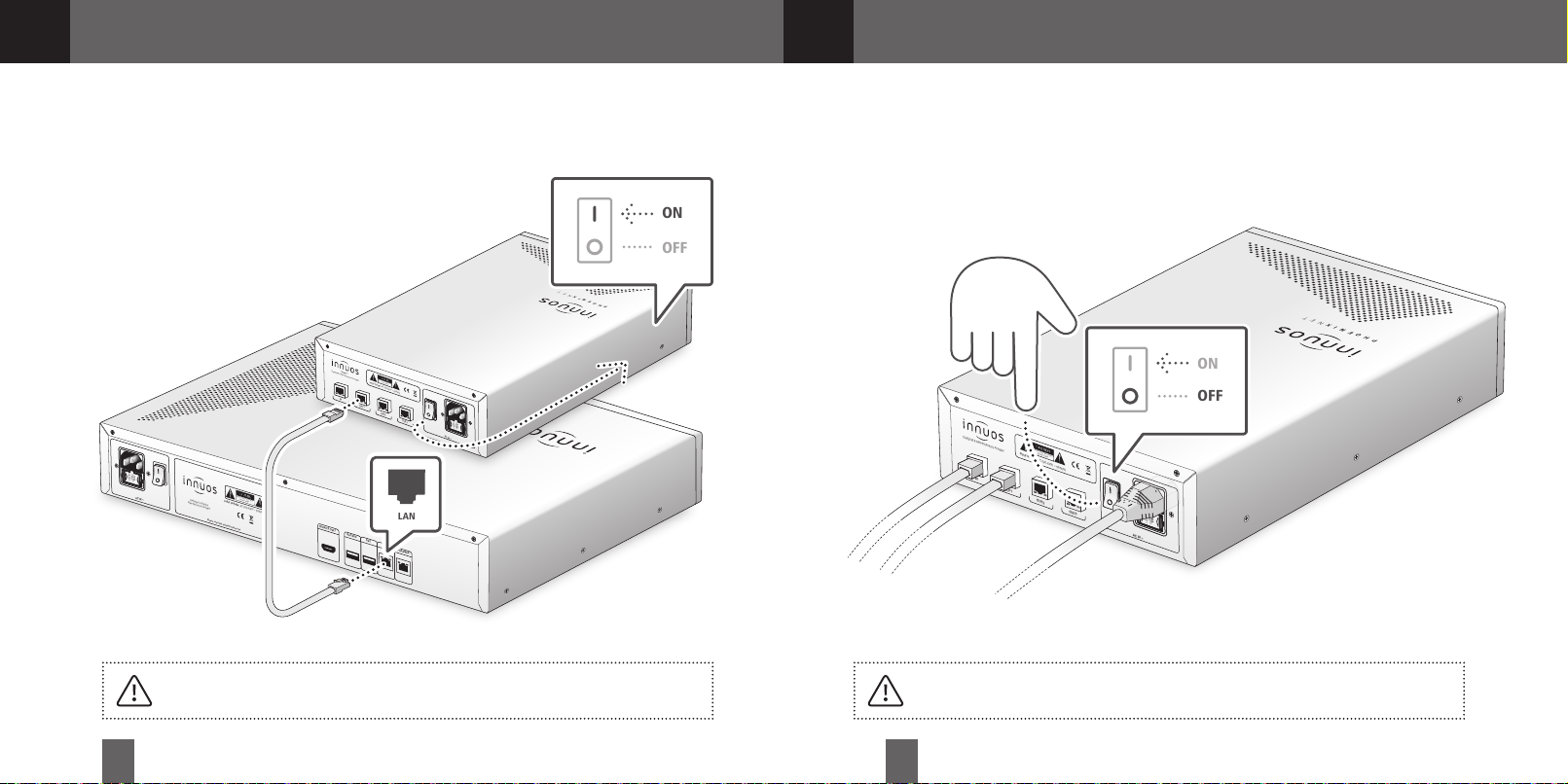
Connect network devices to PhoenixNET
6
There are no lights at the IN and OUT ports to prevent noise. You can check the lights on
the back of your connected device for this.
6 7
Switching off the PhoenixNET
Do not switch off the PhoenixNET unless it’s to move the unit or for a longer period of
time (ex: when expected to be off for more than a week). This will keep the unit’s clock
performing at its best.
Page 6

For more information and for the latest version of this quick start guide please visit:
innuos.com/support
 Loading...