

Page 1

Innovo® CMS 50F PLUS User Manual
I
Instructions to User
Dear users, thank you for purchasing our Pulse Oximeter.
This Manual is written and compiled in accordance with the
council directive MDD93/42/EEC for medical devices and
harmonized standards. The information contained in this
document is subject to change without notice.
The Manual describes, in accordance with the Pulse Oximeter’s
features and requirements, its features, functions, specifications,
transportation methods, installation, usage, operation, repair,
maintenance and storage, etc. as well as the safety procedures to
protect both the user and equipment. Refer to the respective
chapters for details.
Please read the User Manual carefully before using this product.
The User Manual which describes the operating procedures
should be followed strictly. Failure to follow the User Manual
may lead to measurement abnormality, equipment malfunction
and body injury. The manufacturer is NOT responsible for any
safety, reliability, monitoring abnormality, malfunction and
performance issues with regards to the equipment and/or any
personal injuries that arise due to user’s negligence to follow the
manual’s instructions.
As the device is undergoing constant revision and improvisation,
the product(s) you received may not be in total accordance with
the description of this User Manual. We sincerely regret for the
inconvenience.
Caution: This device is not intended to diagnose or treat any
medical condition or disease. It is intended for non-medical
use in healthy people to monitor their pulse and blood oxygen
levels during sports and/or aviation only. People who need
SpO2 and pulse rate measurements because of a medical
condition should not use the device and should consult with
Page 2

Innovo® CMS 50F PLUS User Manual
II
their physician.
WARNING:
Users might experience discomfort if the device is used
continuously for a long period of time, especially for
users suffering from poor microcirculation. It is
recommended that the sensor should not be applied to
the same finger for over 2 hours.
The device should not be clipped on edema affected
and/or tender tissue.
The infrared light emitted from the device is invisible
and can cause irreversible damage to the eyes, possibly
leading to blindness. You should not stare at the light.
Users should not use enamel or other makeup on the
finger.
User’s fingernail should be kept neat and short for best
result.
Please refer to correlative literature about clinical
restrictions of the device
This device is not intended for medical treatment.
Page 3

Innovo® CMS 50F PLUS User Manual
III
Copyright © Innovo Groups
2014-2015. All rights reserved.
Innovo Groups owns and reserves all of the rights comprised
in the copyright of this document. No part of this document
may be changed, excerpted, copied, reproduced, or imitated
in any form or by any means without prior written consent of
Innovo groups
All statements, information, and recommendations in this
document are provided "AS IS" without warranties, guarantees or
representations of any kind, either express or implied. The
information in this document is subject to change without notice.
Summit DME reserves the right of final interpretation of this
document.
Version 2.0
Issuing Date: May 2015
To download the latest manual or watch videos on how to use
the CMS 50F, please visit http://www.innovogroups.com
Page 4

Innovo® CMS 50F PLUS User Manual
IV
CONTENTS
1 Safety ........................................................................................ 1
1.1 Saftey Information ............................................................. 1
1.2 Warning ............................................................................. 1
1.3 Attention ............................................................................ 2
2 Overview ................................................................................... 3
2.1 Features ............................................................................. 4
2.2 Major Applications and Scope of Application.................... 4
2.3 Environment Requirements ............................................... 4
3 Principle.................................................................................... 5
4 Technical Specifications ........................................................... 7
4.1 Features ............................................................................. 7
4.2 Parameters ......................................................................... 7
5 Product Description .................... Error! Bookmark not defined.
5.1 View of the Front Panel ..................................................... 9
5.2 Probe Connection .............................................................. 9
5.3 Accessories ....................... Error! Bookmark not defined.
6 Operating Guide .................................................................... 11
6.1 Using the Device ............................................................. 11
6.2 Warnings ........................................................................ 199
6.3 Clinical Restrictions......................................................... 20
7 Maintain, Transportation and Storage ................................. 21
7.1 Cleaning and Disinfecting ............................................... 21
7.2 Maintain .......................................................................... 21
7.3 Transportation and Storage .............................................. 21
8 Troubleshooting........................... Error! Bookmark not defined.
Page 5

Innovo® CMS 50F PLUS User Manual
V
9 Symbols ...................................... Error! Bookmark not defined.3
10 Function Specification .............. Error! Bookmark not defined.
Appendix 1 ..................................... Error! Bookmark not defined.
Appendix 2 ................................................................................ 27
Page 6

Innovo® CMS 50F PLUS User Manual
1
1 Safety
1.1 Safety Information
a) Check the main unit and all accessories periodically to make
sure that there is no visible damage that may affect patient’s
safety and/or monitoring performance of the device. The device
should be inspected at least once a week. Stop using the device if
physical damage is observed.
b) Maintenance must be performed by qualified service engineers
ONLY. Users should not to maintain the device by themselves.
The oximeter should only be used with devices and/or
A.
accessories specified in this User’s Manual.
This product is calibrated before leaving factory.
B.
1.2 Warning
Explosive hazard—DO NOT use the oximeter in environment
with inflammable gas such as ignitable anesthetic agents.
DO NOT use the oximeter while the user is undergoing MRI or
CT scan.
Do not remove the wristband while using the oximeter. Users
who are allergic to the wristband should not use the pulse
oximeter.
The person who is allergic to rubber cannot use this device.
The disposal of the device, accessories and packing material
(including but not limited to battery, plastic bags, foams and paper
boxes) should follow local laws and regulations.
Please check that all the device and accessories listed in the
packing list are accounted for before use.
Please make sure that the accessories you use with the
oximeter are approved by the manufacturer. Unapproved
accessories may cause irreversible damage to the device.
Please make sure that the battery chargers are in compliance
Page 7

Innovo® CMS 50F PLUS User Manual
2
with the requirements of IEC 60601-1, or the device might be
damaged.
Please do not use the device while charging.
The device should only be used with the Acc U Rate®
SnugFit probe. Using the Contec CMS 50F probe might
damage the oximeter.
1.3 Attention
Keep the oximeter away from dust, vibration, corrosive
substances, explosive materials, high temperature and moisture.
If the oximeter gets wet, stop operating it immediately.
When it is carried from cold environment to warm or humid
environment, please do not use it immediately.
DO NOT operate keys on front panel with sharp materials.
High temperature or high pressure steam disinfection of the
oximeter is not permitted. Refer to User Manual in the relative
chapter (7.1) for instructions of cleaning and disinfection.
Do not immerse the oximeter in liquid. To clean it, please wipe
its surface with medical alcohol with soft material. Do not spray
any liquid on the device directly.
When cleaning the device with water, the temperature should
be lower than 60°C.
The performance of the device is affected if the fingers are too
small or cold. As such, please clip and insert the thumb or middle
finger as deeply as possible into the probe.
The pulse oximeter can be used for adult or infant. However, a
special probe is required for infant. Please contact the
manufacturer for more details.
During measurement, the data is updated on average, every 5
seconds. However, this might change depending on individual.
Please read the measure value only when the amplitude of the
waveform is equal and steady. At this point, the measured value
Page 8

Innovo® CMS 50F PLUS User Manual
3
will be most accurate.
If some abnormal conditions appear on the screen during test
process, pull out the finger and reinsert to restore normal use.
You should not use the device after three years.
This device has a built-in alarm which will go off when the
measured data is beyond the highest or lowest limit. Please check
chapter 6.1 for more details.
The device may not work for all patients. If you are unable to
achieve stable readings, discontinue use.
2 Overview
SpO2 stands for Peripheral capillary oxygen saturation. It is an
estimation of the oxygen saturation level in your blood. Oxygen
saturation is defined as the ratio of oxyhemoglobin to the total
concentration of hemoglobin (i.e. Oxyhemoglobin + reduced
hemoglobin) present in the blood. SpO2 is an important
bio-parameter. A number of diseases relating to the respiratory
system may cause a decrease of SpO2 in blood. Homeostasis
failure and surgery complications may only lead to a reduction of
oxygen supply to the human body. This could lead to vertigo,
impotence, emesis and in severe hypoxia, coma and death.
Therefore, prompt information of patients' SpO2 is helpful to a
doctor to anticipate potential danger and is of great importance in
the clinical medical field.
The Pulse Oximeter feature herein is small, portable, non-invasive,
easy to use and requires little power. The user only needs to insert a
finger into the probe for SpO2 and Pulse Rate measurement.
Page 9

Innovo® CMS 50F PLUS User Manual
4
2.1 Features
1. The device is simple and easy to operate.
2. The product is small and portable.
3. Low power consumption.
2.2 Major Applications and Scope of Application
The Pulse Oximeter can be used to measure SpO2 and pulse rate
through a finger. The product is suitable for used at home, hospital,
oxygen bar and community center. It can also be used during sports
and/or aviation. However, the device is not recommended to be
used when the user is exercising or physically active
The pulse oximeter might register a higher reading if the
user is suffering from toxicosis caused by carbon monoxide.
The device is not recommended to be used under such
circumstance.
2.3 Environment Requirements
Storage Environment
a) Temperature : -40°C to +60°C
b) Relative humidity : ≤95%
c) Atmospheric pressure : 500hPa~1060hPa
Operating Environment
a) Temperature: 10°C ~40°C
b) Relative Humidity : ≤75%
c) Atmospheric pressure: 700hPa~1060hPa
Page 10
Innovo® CMS 50F PLUS User Manual
5
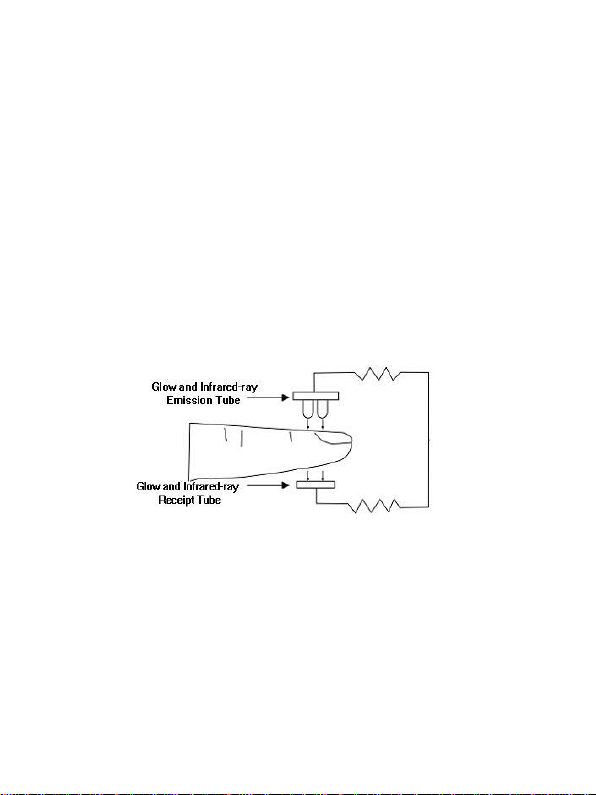
3 Principle
Oxygenated blood absorbs light at 660nm (red light), whereas
deoxygenated blood absorbs light preferentially at 940nm
(infra-red). Pulse oximeters consist of two light emitting diodes,
at 600nm and 940nm, and two light collecting sensors, which
measure the amount of red and infra-red light emerging from
tissues traversed by the light rays. The relative absorption of light
by oxyhemoglobin (HbO) and deoxyhemoglobin is then
processed according to the Beer-Lambert's law and an oxygen
saturation level is reported. The device directs its attention at
pulsatile arterial blood and ignores local noise from the tissues.
The result is a continuous qualitative measurement of the patients’
oxyhemoglobin status. Oximeters deliver data about pulse rate,
oxygen saturation (SpO2) and cardiac output.
The use of pulse oximeters is limited by a number of factors:
Abnormal movement, such as occurs with agitated patients, will
cause interference with SpO2 measurement. Low blood flow,
hypotension, vasoconstriction and hypothermia will reduce the
pulsatility of capillary blood, and the pulse-oximeter will
under-read or not read at all. Conversely, increased venous
pulsation, such as tricuspid regurgitation, may be misread by the
Figure 1.
Page 11

Innovo® CMS 50F PLUS User Manual
6
pulse-oximeter as arterial blood, with a low resultant reading.
Finally, it is generally accepted that the saturation percentage is
unreliable on the steep part (around 60 mm Hg) of the
oxyhemoglobin dissociation curve.
The Acc U Rate® SnugFit probe attempts to ameliorate some of
the problems by
1) Fitting snugly without causing discomfort to the user’s finger
even under prolonged use. This allows reliable measurement of
user’s Pulse Rate and SpO
during sleep and/or exercise.
2
2) Increasing the sensitivity of the sensor/receipt tube (See Figure
3) so that it can measure user’s SpO
and Pulse Rate (PR) with
2
precision even at low blood perfusion.
4) Blocking ambient light from reaching the sensor/receipt tube in
(See Figure 1) that might affect the precision and reliability of the
readings.
Page 12

Innovo® CMS 50F PLUS User Manual
7
4 Technical Specifications
4.1 Main Performance
A. SpO2 value display
B. Pulse rate value display, bar graph display
C. Pulse waveform display
D. Low-voltage indication: low-voltage indicator appears before
working abnormally which is due to low-voltage
E. Screen brightness can be changed
F. A pulse sound indication
G. With alarm function
H. Store 24 hours of SpO2 value and pulse rate data which can
be uploaded to computers for analysis
I. Uses an external oximeter probe to take measurement
J. Data can be transmitted to computers
K. With clock and alarm function
L. Wireless Transmission function (Bluetooth enabled model
only)
4.2 Main Parameters
A. Measurement of SpO2
Measuring range: 0%~100%
Accuracy:
When the range of SpO2 is 70%~100%, the permissible error is
±2%;
Below 70% - unspecified.
B. Measurement of pulse rate
Measuring range: 30 bpm~250 bpm
Accuracy: ±2 bpm or ±2% (select larger)
C. Resolution
SpO2 : ±1%, Pulse rate: ±1bpm.
D. Measurement Performance under low blood perfusion
Page 13

Innovo® CMS 50F PLUS User Manual
8
The device can measure SpO2 and pulse rate at blood perfusion
level as low as 0.4%. However, SpO2 error is increased to ±4%,
and pulse rate error to ±2 bpm or ±2% (select larger).
E. Resistance to ambient light
The deviation between the values measured indoors or under
man-made light and that of a darkroom is less than ±1%.
F. Power supply requirement: 3.6 V DC ~ 4.2V DC.
G. Optical Sensor
Red light (wavelength is 660nm,6.65mW)
Infrared (wavelength is 880nm, 6.75mW)
H. Adjustable alarm range
SpO2 : 0%~100%
Pulse Rate: 0bpm~254bpm
Page 14
Innovo® CMS 50F PLUS User Manual
9
5 Product Description
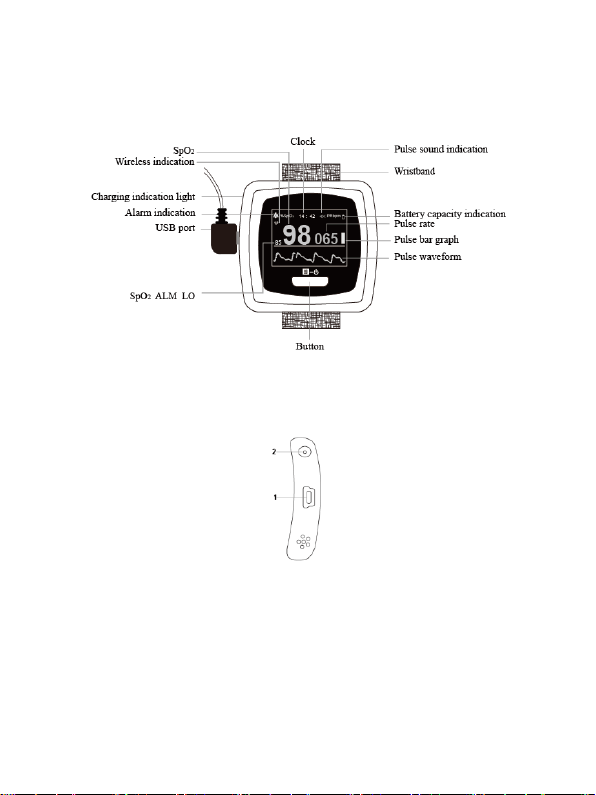
5.1 Front Panel View
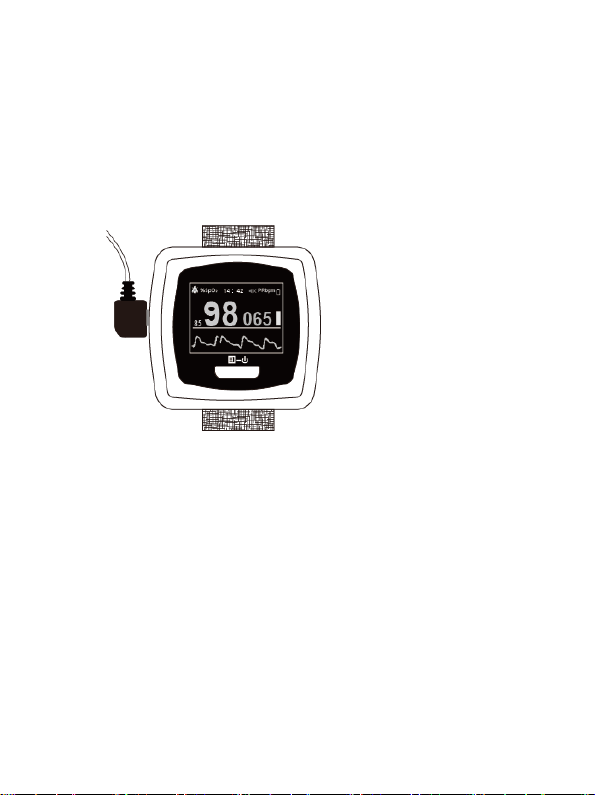
Figure 2. Front view
Figure 3. Left view
1. This USB port has multiple uses. It can be used to connect
the SpO2 probe/sensor, upload the data to a personal computer or
to charge the lithium battery.
2. Charging indication light. When the device is charging, the
indication light will be orange. When the battery status is full, the
Page 15
Innovo® CMS 50F PLUS User Manual
10
light turns to green.
5.2 Probe Connection
When connecting the Acc U Rate® SnugFit probe, make sure it is
inserted properly and all the way into the pulse oximeter as shown
in Figure 4.
Figure 4.
5.3 Accessories
A. User Manual
B. Power adapter
C. USB Cable
D. Minidisc (PC software)
E. An adult-oximeter probe
An infant-oximeter probe (Purchase separately)
Page 16
Innovo® CMS 50F PLUS User Manual
11
6 Operating Guide
6.1 Using the Device
A. Install the probe as outlined in Chapter 5.2. (Please do not use
probes made by other manufacturers as the algorithm used by
the watch will not work with them. Unapproved probes might
also damage the oximeter)
B. Put the finger into the probe as shown in Figure 5 below.
C. Turn on the device by pushing the button on the panel for >1
second.
D. User should try to stay still as much as possible during
measurement. Do not move the finger as this is the most
common reason for inaccurate measurements.
Figure 5.
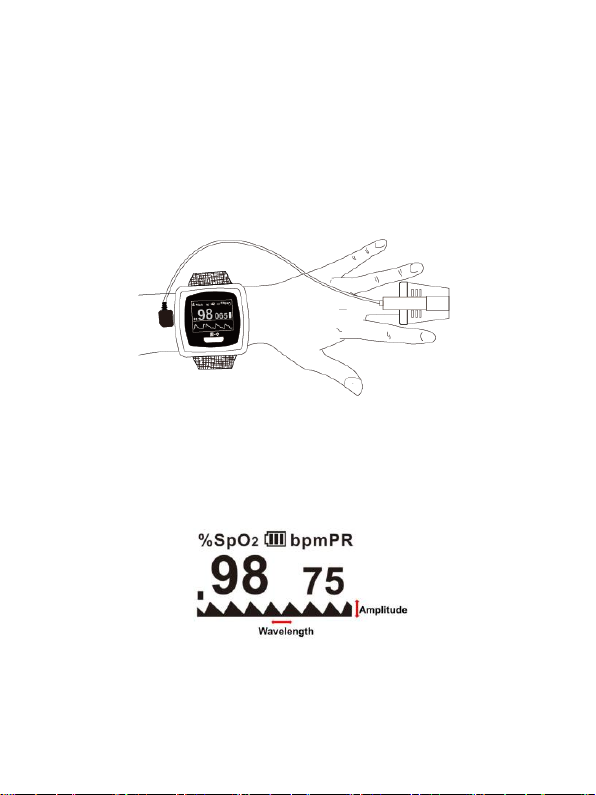
E. Wait 10-30 seconds for the pulse oximeter to be optimized. The
Figure 6.
pulse oximeter is optimized when the plethysmograph gives a
Page 17

Innovo® CMS 50F PLUS User Manual
12
constant, stable reading. In other words, the wavelength and
amplitude of each wave will be identical to the next (Figure 6).
F. You may now read the SpO2 and PR displayed on the OLED
screen.
ATTENTION
The Fingernails should be facing the LED lights and not
the sensor
Make sure that your finger is put deep into the probe
such that the fingertip is directly in between the LED
sensor and the LED light source.
Make sure your finger is stationary in the probe while
you are measuring your SpO2 levels.
Excessive ambient infra-red light, especially for people
who use the pulse oximeter in an overly bright lit room
can interfere with the sensor.
Poor circulation can affect oximeter readings. Warm
your hands and fingers before taking your
measurements. Remember your pulse oximeter is
measuring your SpO2 and PR based on your blood flow.
If the blood flow in your finger drops below a certain
level, the pulse oximeter will not be able to function.
If the alarm function is on, a medium-priority alarm will
go off when the probe does not register a reading (like
when the finger is out). User will hear an intermittent
beeping sound and a "FINGER OUT" message will be
displayed across the user interface. Medium priority
alarms indicate that prompt operator response is
required.
The pulse oximeter is sensitive to the duration of the button (See
Figure 2) being pressed. A short PUSH (<1 sec) or a long HOLD
Page 18
Innovo® CMS 50F PLUS User Manual
13
(>1 sec) of the button activates different functions of the pulse
oximeter.
A. Enter the clock interface
You can press the button to enter the clock interface from the
measuring interface.
B. Exit the clock interface
1) The clock interface will automatically return to the measuring
interface if no operations are registered within 30 seconds.
2) You may also press the button to exit the clock interface.
C. Pause alarm
1. The built in auditory and visual alarm will be activated if the
oximeter is not place correctly on the finger, the battery is low or
when your SpO2 is beyond set limits. You may pause the alarm
function by a PUSH to the button, but the alarm will be
reactivated again in 60 seconds
2. If you do not want the alarm to go off, you must enter the
operation menu to turn it off permanently (see below).
D. Menu operations
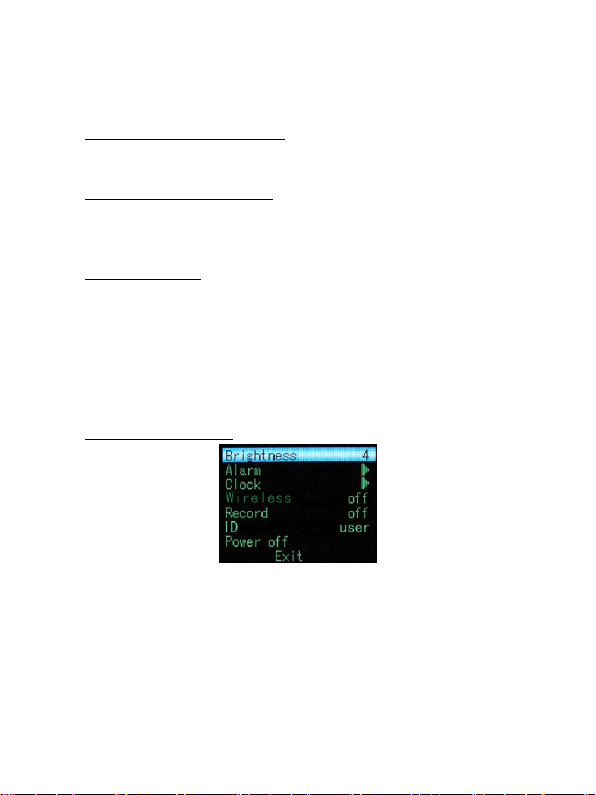
Figure 7. Main Menu Interface
When the device is in the measuring interface, HOLD the button
in order to enter the operation menu shown in Figure 7. Users can
adjust the backlight, alarm, clock, wireless transmission (option
available only in Bluetooth enabled model), data storage, and
power settings through the main menu. The specific operation
methods are as follow:
Page 19
Innovo® CMS 50F PLUS User Manual
14
1) Backlight adjustment
In the main menu interface, PUSH button to select "Brightness".
HOLD the button to adjust backlight brightness.
2) Alarm setting
In the main menu interface, PUSH button to select "Alarm".
HOLD the power button to enter the alarm setting interface as
shown in Figure 8:
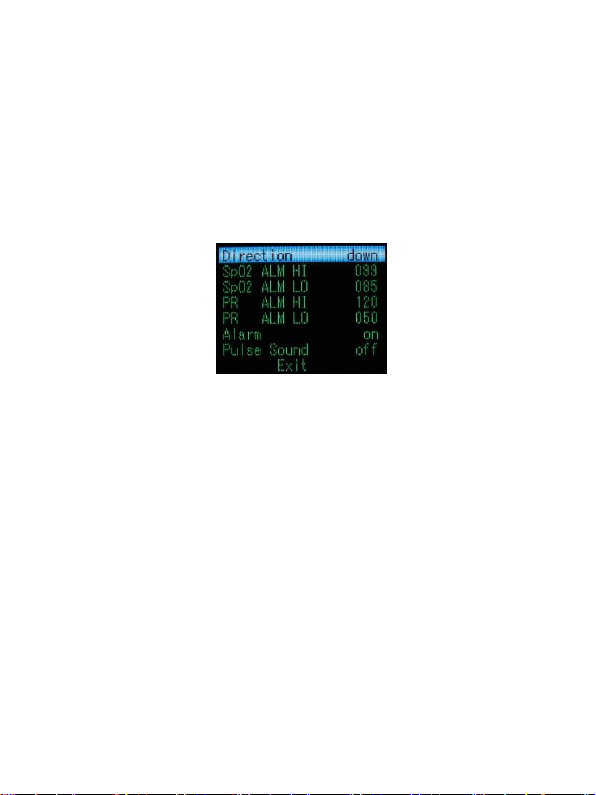
Figure 8. Alarm Setting Menu
Adjusting the alarm parameters
PUSH the button to select "Direction", then HOLD the button to
choose Up or Down. (This will be the direction the value of the
SpO2 and pulse rate limits will be adjusted)
To raise the SpO2 and pulse rate limit, choose "Direction" as "up",
then PUSH the button to highlight the parameter to be adjusted:
SpO2 high limit (SpO2 ALM HI), SpO2 low limit (SpO2 ALM LO),
Pulse rate high limit (PR ALM HI), Pulse rate low limit (PR ALM
LO). HOLD the button to adjust the high limit to the desired
value and release the button once the desired limit has been
reached.
To lower the SpO2 and pulse rate limit, choose "Direction" as
"down", then PUSH the button to choose the parameter to be
adjusted. HOLD the button to adjust the selected limit to the
desired value and release the button once the desired limit has
been reached.
Page 20
Innovo® CMS 50F PLUS User Manual
15
If the alarm function is on, the device will provide
medium-priority alarm signal when the data of SpO2 or pulse
rate falls beyond set limit. Intermittent alarm will occur and
the measurement will be displayed in yellow font.
Medium priority indicating that prompt operator response is
required.
The alarm state setting
PUSH the button to select "Alarm". HOLD the button to set
alarm on or off. Select "on" to turn on the alarms and "off" to turn
off the alarms.
Pulse sound indication setting
PUSH the button to select "Pulse Sound". HOLD the button to
set Pulse Sound (heart beat) alarm to "on" or "off".
Exit the Alarm settings
PUSH the button to select "EXIT". HOLD the button to exit the
Alarm Settings Menu.
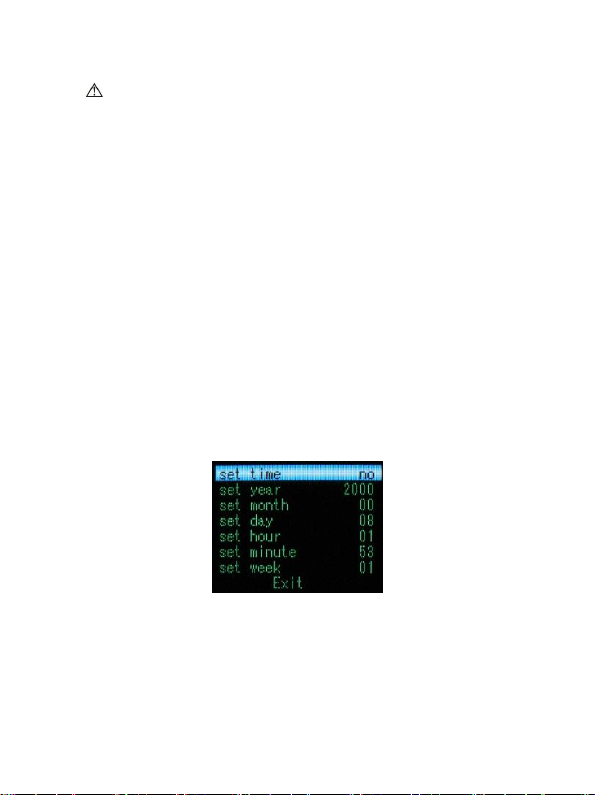
3) Clock setting
On the main menu interface, PUSH the button to select "Clock".
HOLD the button to enter the clock setting interface.
A) When entering the clock setting menu, “Set time” will always
Figure 9. Clock Setting Menu
be set to “NO” to prevent unexpected changes to the time as
shown in Figure 9. If you want to change the time, HOLD the
button to change “Set time” to “YES”.
Page 21

Innovo® CMS 50F PLUS User Manual
16
B) PUSH the button to select the parameter that you want to
change. HOLD the button to adjust the data.
C) PUSH the button to select "Exit". HOLD the button to exit
the clock setting menu. If you have reset the time or date, when
exiting the clock setting menu, the renewed time and date would
be displayed on the screen before returning to the main menu; if
you didn’t reset the time and date, the device would return to the
main menu directly when exiting the clock setting menu.
4) Wireless setting (This option will appear in Bluetooth enabled
model only)
PUSH the button to select "Wireless". HOLD the button to turn
on/off the Wireless function.
It is recommended to use the included 2.4GHZ wireless
adapter which uses CSR as the main chip to transmit your
data. Please do not unplug the USB cable or wireless adapter
when the data is being transmitted between device and
computer. When the data is being transmitted between the
device and the computer, the user will not be able to alter
"Wireless" settings. If the user still could not alter "Wireless"
settings after completion of data transmission, please wait 30
seconds before trying again.
5) Record - Data storage setting
This device has the ability to store 24 hours of data. The data can
then be transferred to the computer for analysis via the included
“SpO2 Assistant” software. Please refer to <SpO2 Assistant user
manual> for instructions.
A. To record data, in the main menu interface, PUSH the button
to select "Record", then HOLD the button to choose "Yes" to
begin data recording. Select “No” if you want to turn off data
recording.
B. The device will register the time of the recording
Page 22

Innovo® CMS 50F PLUS User Manual
17
automatically.
C. If the data storage function is being turned on, a red "REC"
sign and a flashing red dot would appear on the screen when
returning to the measuring interface.
D. When the device is storing data, “Recording" would appear in
the screen for 30 seconds irregardless of the interfaces the device
might be in. The clock interface would then appear after several
seconds and the screen automatically shut down. If you PUSH the
button at this moment, "Recording" would appear on the screen
again, and then the screen will be automatically shut down again;
if a HOLD is applied to the button, the device would return to the
former interface.
E. Turning on the data storage function will erase previous stored
data
F. While recording, the pulse sound indication would be turned
off after the screen is shut down to save power.
G. When the storage space is full, "Memory is full" will be
displayed on the screen whenever you activate the device. No data
will be recorded at this point. Please upload the data to the PC so
that the space can be freed up to record new data. A PUSH to the
button will trigger the pulse oximeter to enter into the measuring
interface.
6) Device ID
The user can modify device ID by the “SpO2 Assistant " software.
Figure 10 Software Icon
7) Power off
In the main menu interface, PUSH the button to select "Power
off". PUSH the button again to shut down the device.
Page 23

Innovo® CMS 50F PLUS User Manual
18
8) Exit the main menu
In the main menu interface, PUSH the button to select "Exit”.
PUSH the button again to exit the main menu.
E. Uploading Data
You may connect the device to the computer via USB or
Bluetooth (in selected model only). To connect the pulse oximeter
to the computer via Bluetooth, please make sure that you set the
“wireless” option to “on” (See Wireless Setting above at page 16).
Please do NOT connect the pulse oximeter to the computer via
“Add a Bluetooth device”. Please refer to the SpO2 Assistant
Manual on how to connect the pulse oximeter to the computer to
upload data. If you prefer to watch a video on how to connect the
pulse oximeter to the computer, please refer to
http://innovogroups.com/products/cms50f.
If the users choose to turn on the synchronizing display
function on computer, it would probably take several seconds
for the data to appear in the computer screen. (If no data is
displayed, unplug the Wireless adapter or the USB cable and
try again.)
F. Charging the device
There are two ways to charge the device:
a) Connect the device to the computer with the USB cable
b) Connect the device to the power supply via the power adaptor.
When the device is charging, the indication light will be orange.
When the battery is full, the light turns to green.
If the alarm function is on, the device will display a
high-priority alarm signal when the battery is in low power
status. Intermittent alarm will occur and the battery icon
turns red in the state of flashing.
Page 24

Innovo® CMS 50F PLUS User Manual
19
High priority alarm indicates that immediate operator
response is required.
6.2 Cautions
A. Please check device before use to confirm that it is working
normally. The SpO2 and PR should be displayed correctly on the
screen.
B. The finger should be place in between the LED lights and
the sensor (see Figure 1 and 5 for reference), or it may result in
inaccurate measurement.
C. The SpO2 sensor should not be used on an arm with a blood
pressure cuff or undergoing intravenous injection. It should not be
used on the arterial canal too.
D. Do not fix the SpO2 sensor with adhesive as it might lead to
inaccurate measurement of the SpO2 and pulse rate.
E. Excessive ambient light may affect measuring result
although the Acc U Rate® SnugFit probe is designed to minimize
such interference. Ambience light includes, but is not limited to
fluorescent lamp, dual ruby light, infrared heater, direct sunlight
and LED lights.
F. Strenuous activities or extreme electrosurgical interference
may affect accuracy pf device.
G. User should not use enamel or other makeup to ensure
accuracy.
H. Please clean and disinfect the device according to
instructions outlined in Chapter 7.1 of the user manual.
6.3 Clinical Restrictions
A. As the accuracy of the device is based on the arteriole blood,
an adequate amount of blood flow is required. The SpO2
waveform (Plethysmography) will decrease for users with a weak
Page 25

Innovo® CMS 50F PLUS User Manual
20
pulse due to shock, low body temperature, major bleeding, or use
of vascular contracting drug. Under such circumstances, the
measurement will be more sensitive to interference.
B. For users with a substantial amount of staining dilution drug
such as methylene blue, indigo green and acid indigo blue, carbon
monoxide hemoglobin (COHb), methionine (Me+Hb),
thiosalicylic hemoglobin or icterus, the SpO2 readings may be
inaccurate.
C. Drugs like dopamine, procaine, prilocaine, lidocaine and
butacaine may also affect the accuracy of SpO2 measurement.
D. Patients with serious anemia may also report good SpO2
measurement.
If you think that the above conditions apply to you, please consult
a physician.
Page 26

Innovo® CMS 50F PLUS User Manual
21
7 Maintenance, Transportation and Storage
7.1 Cleaning and Disinfecting
Use medical alcohol to disinfect the device. Let it air dry or clean
it with clean soft cloth.
7.2 Maintenance
A. Please clean and disinfect the device as outline above.
B. Recharge the battery when the screen shows the empty battery
icon .
C. The battery should be FULLY recharged before use if it has not
been used for six months. This will extend the battery life
significantly.
D. All units come pre-calibrated. You do not need to calibrate the
oximeter.
7.3 Transportation and Storage
A. The device should not be transported with toxic, harmful,
corrosive material.
B. The packed device should be stored in room with no
corrosive gases and with good ventilation. Temperature:
-40°C~60°C; Humidity: ≤95%
Page 27

22
8 Troubleshooting
Trouble
Possible Reason
Solution
No SpO2 and
Pulse Rate is
registered
1. The finger is not
properly positioned.
2. The patient’s
blood perfusion is
too low to be
detected.
1. Make sure that
the finger is
inserted properly
into the device.
2. Make sure
nothing is
restricting your
blood flow (See
Chapter 6.3).
The SpO2 and
Pulse Rate values
displayed on the
screen are
erractic or lower
than a spot check
monitor
1. The finger is not
placed deep enough
into the probe.
2. The finger is
moving.
1. Place the finger
properly and try
again.
2. Try to keep the
patient stationary
The device cannot
be turned on or
the display turns
off suddenly
1. The battery is
drained.
2. The device has
malfunctioned.
1. Please recharge
the battery.
2. Please contact
the local service
center.
After a full
charge, the
battery is
discharged after
only a few hours
of usage
1. The battery is not
fully charged.
2. The battery has
malfunctioned
1. Please recharged
the battery.
2. Please contact
the local service
center.
Innovo® CMS 50F PLUS User Manual
Page 28
23
The battery is not
fully charged
after 10 hrs.
1. The battery has
malfunctioned
1. Please contact
the local service
center.
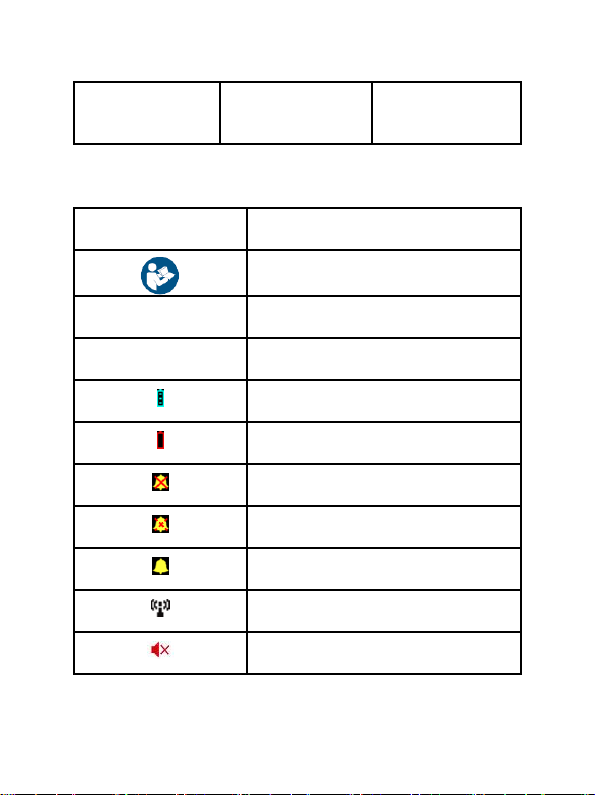
Symbol
Description
Refer to instruction manual/booklet
%SpO2
Oxygen saturation (%)
PRbpm
Pulse rate (bpm)
Full-voltage
Low-voltage
Alarm is deactivated
Alarm paused
Alarm is activated
Bluetooth is enabled (option available
in selected model only)
Pulse sound deactivated
9 Symbols
Innovo® CMS 50F PLUS User Manual
Page 29
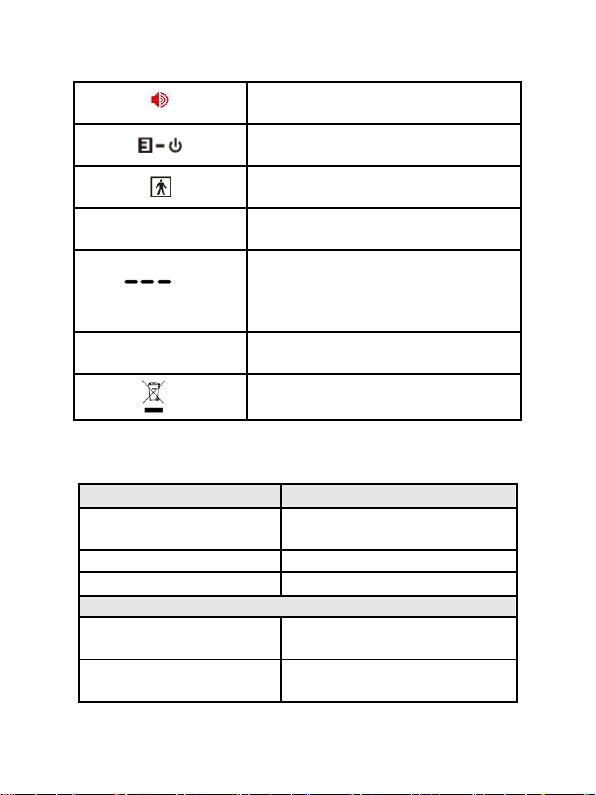
24
Pulse sound activated
menu button/power button
Type BF
SN
Serial number
1. the finger clip falls off ( no finger
inserted)
2. Probe error
3. Signal inadequacy indicator
IP22
International Protection
WEEE (2002/96/EC)
Information
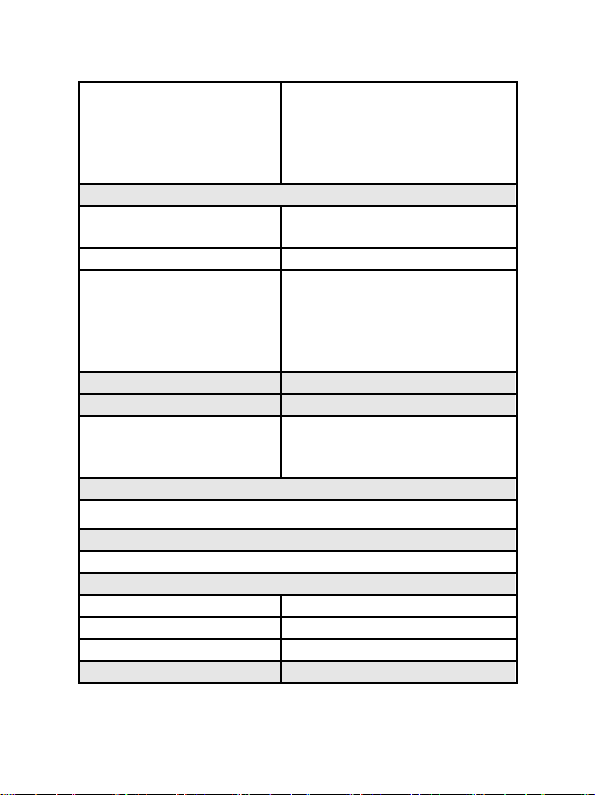
Display Mode
The Pulse Oxygen
Saturation(SpO2)
2-digit digital OLED display
Pulse Rate(PR)
3-digit digital OLED display
Pulse Intensity (bar-graph)
bar-graph OLED display
SpO2 Parameter Specification
Measuring range
0%~100%, (the resolution is
1%).
Accuracy
70%~100%:±2% , Below 70%
unspecified.
10 Function specification
Innovo® CMS 50F PLUS User Manual
Page 30
Innovo® CMS 50F PLUS User Manual
25
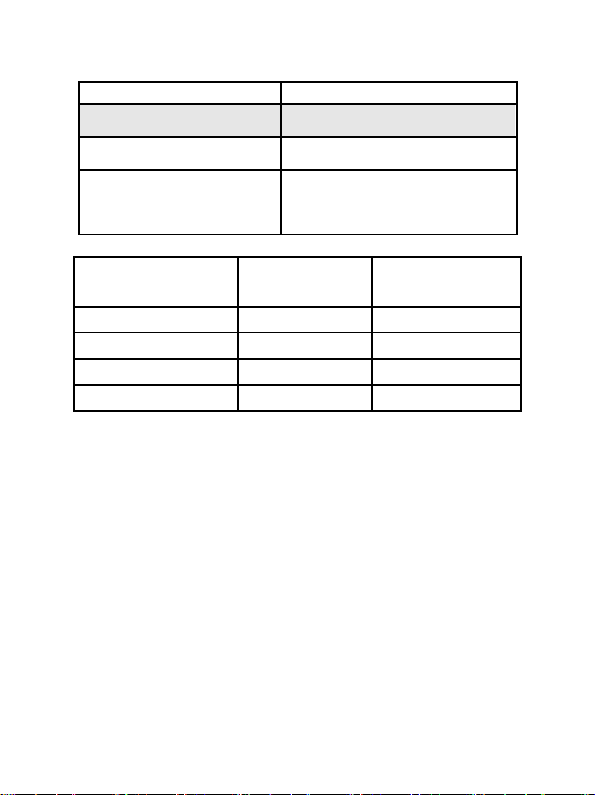
Average value
Average value is derived from 4
previous values.
The deviation between average
and true value does not exceed
1%.
Pulse Parameter Specification
Measuring range
30bpm~250bpm, (resolution =
1bpm)
Accuracy
±2bpm or±2% (select larger)
Average pulse rate
Average value is derived from 4
previous values.
The deviation between average
and true value does not exceed
1%.
Safety Type
Interior Battery, BF Type
Pulse Intensity
Range
Continuous bar-graph display,
higher amplitude indicates
stronger pulse.
Battery Requirement
Voltage 3.7 rechargeable lithium battery × 1
Battery working life
Charge and discharge no less than 500 times.
Power Adapter
Input Voltage
100 to 240V AC, 50/60 Hz
Output voltage
5V DC
Output current
1A
Wireless Module
Page 31
26
Transmit frequency
2.4GHz
Dimensions and Weight
Dimensions
61(L) × 56(W) × 24 (H) mm
Weight
About 50g (with the lithium
battery*1)
Appendix 1
State
Alarm condition
delay
Alarm signal
generation delay
Low voltage alarm
0.6s
20ms
SpO2 alarm
400ms
20ms
Pulse rate alarm
400ms
20ms
Probe error alarm
400ms
20ms
Innovo® CMS 50F PLUS User Manual
Page 32

Innovo® CMS 50F PLUS User Manual
27
Guidance and manufacture’s declaration –
electromagnetic emission
The CMS50F PLUS Pulse Oximeter is intended for use in
the electromagnetic environment specified below. The
user should assure that it is used in such environment.
Emission
test
Compliance
Electromagnetic
environment – guidance
RF
emissions
CISPR 11
Group 1
The CMS50F PLUS Pulse
Oximeter uses RF energy
only for its internal
function. Therefore, its
RF emissions are very
low and are not likely to
cause any interference in
nearby electronic
equipment.
RF
emission
CISPR 11
Class B
The CMS50F PLUS
Pulse Oximeter is suitable
for use in all
establishments, including
domestic establishments
and those directly
connected to the public
low-voltage power supply
network that supplies
buildings used for
Harmonic
emissions
IEC
61000-3-2
Not
applicable
Voltage
fluctuations
flicker
Not
applicable
Appendix 2
Guidance and manufacture's declaration
– electromagnetic emissions for all EQUIPMENT and
SYSTEMS
Page 33

Innovo® CMS 50F PLUS User Manual
28
emissions
IEC
61000-3-3
domestic purposes.
Page 34

Innovo® CMS 50F PLUS User Manual
29
Guidance and manufacture’s declaration – electromagnetic
immunity
The CMS50F PLUS Pulse Oximeter is intended for use in the
electromagnetic environment specified below. The user should
assure that it is used in such an environment.
Immunity
test
IEC 60601
test level
Complianc
e level
Electromagneti
c environment
- guidance
Electrostatic
discharge
(ESD)
IEC
61000-4-2
6 kV
contact
8 kV air
6 kV
contact
6 kV air
Floors should
be wood,
concrete or
ceramic tile. If
floor are
covered with
synthetic
material, the
relative
humidity should
be at least 30%.
The
manufacturer
may
recommend the
ESD
precautionary
procedures to
user.
Guidance and manufacture’s declaration – electromagnetic
immunity –
for all EQUIPMENT and SYSTEMS
Page 35

30
Power
frequency
(50/60Hz)
magnetic field
IEC
61000-4-8
3A/m
3A/m
Power
frequency
magnetic fields
should be at
levels
characteristic of
a typical
location in a
typical
commercial or
hospital
environment.
Innovo® CMS 50F PLUS User Manual
Page 36

Innovo® CMS 50F PLUS User Manual
31
Guidance and manufacture’s declaration – electromagnetic
immunity
The CMS50F PLUS Pulse Oximeter is intended for use in the
electromagnetic environment specified below. The user should
assure that it is used in such an environment.
Immunity
test
IEC 60601
test level
Comp
liance
level
Electromagnetic
environment -
guidance
Conducted
RF
IEC
61000-4-6
Radiated
RF
IEC
61000-4-3
3 V
rms
150 kHz to
80 MHz
3 V/m
80 MHz to
2.5 GHz
3 V
rms
3 V/m
Portable and mobile RF
communications
equipment should be
used no closer to any
part of the CMS50F
PLUS Pulse Oximeter,
including cables, than
the recommended
separation distance
calculated from the
equation applicable to
the frequency of the
transmitter.
Recommended
separation distance
Guidance and manufacture’s declaration – electromagnetic
immunity –
for EQUIPMENT and SYSTEMS that are not
LIFE-SUPPORTING
Page 37

32
P
V
d
1
5.3
P
E
d
1
5.3
80 MHz to 800 MHz
P
E
d
1
7
800 MHz to 2.5 GHz
Where P is the
maximum output power
rating of the transmitter
in watts (W) according
to the transmitter
manufacturer and d is
the recommended
separation distance in
meters (m).
Field strengths from
fixed RF transmitters,
as determined by an
electromagnetic site
survey,a should be less
than the compliance
level in each frequency
range.b
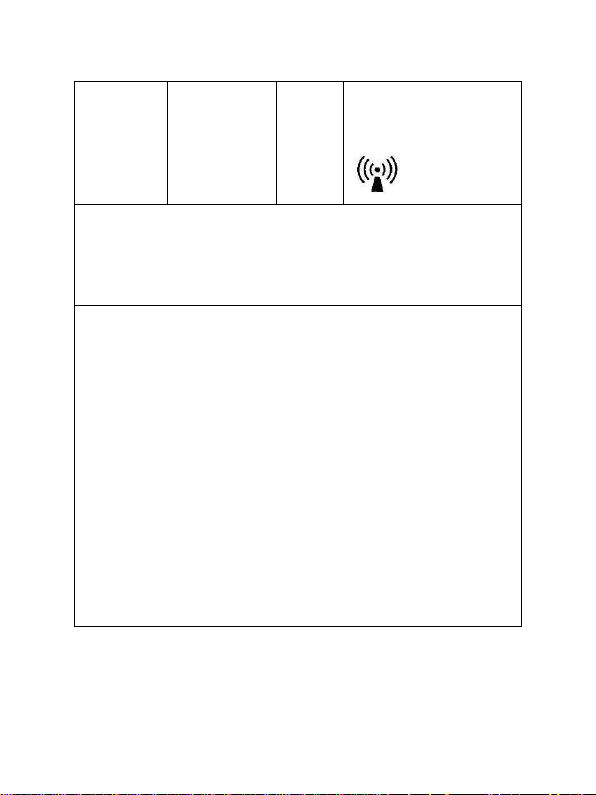
Interference may occur
Innovo® CMS 50F PLUS User Manual
Page 38
Innovo® CMS 50F PLUS User Manual
33
in the vicinity of
equipment marked with
the following symbol:
NOTE 1 At 80 MHz and 800 MHz, the higher frequency
range applies.
NOTE 2 These guidelines may not apply in all situations.
Electromagnetic propagation is affected by absorption and
reflection from structures, objects and people.
a
Field strengths from fixed transmitters, such as base stations
for radio (cellular/cordless) telephones and land mobile
radios, amateur radio, AM and FM radio broadcast and TV
broadcast cannot be predicted theoretically with accuracy.
To assess the electromagnetic environment due to fixed RF
transmitters, an electromagnetic site survey should be
considered. If the measured field strength in the location in
which the CMS50F(W) PLUS Pulse Oximeter is used
exceeds the applicable RF compliance level above, the
CMS50F PLUS Pulse Oximeter should be observed to
verify normal operation. If abnormal performance is
observed, additional measures may be necessary, such as
reorienting or relocating the CMS50F PLUS Pulse
Oximeter.
b
Over the frequency range 150 kHz to 80 MHz, field strengths
should be less than 3 V/m.
Page 39

Innovo® CMS 50F PLUS User Manual
34
Recommended separation distances between
portable and mobile RF communications equipment and the
CMS50F PLUS Pulse Oximeter.
The CMS50F PLUS Pulse Oximeter is intended for use in an
electromagnetic environment in which radiated RF disturbances
are controlled. The user can help prevent electromagnetic
interference by maintaining a minimum distance between
portable and mobile RF communications equipment
(transmitters) and the CMS50F PLUS Pulse Oximeter as
recommended below, according to the maximum output power
of the communications equipment.
Rated
maximum
output
power of
transmitter
(W)
Separation distance according to frequency of
transmitter
(m)
150 kHz to 80
MHz
P
V
d
1
5.3
80 MHz to
800 MHz
P
E
d
1
5.3
800 MHz to
2.5 GHz
P
E
d
1
7
0.01
0.117
0.117
0.233
0.1
0.369
0.369
0.738
1
1.167
1.167
2.333
Recommended separation distances between portable and
mobile
RF communications equipment and the EQUIPMENT or
SYSTEM –
for EQUIPMENT or SYSTEM that are not
LIFE-SUPPORTING
Page 40

Innovo® CMS 50F PLUS User Manual
35
10
3.689
3.689
7.379
100
11.67
11.67
23.33
For transmitters rated at a maximum output power not listed
above, the recommended separation distance d in meters (m)
can be estimated using the equation applicable to the frequency
of the transmitter, where P is the maximum output power rating
of the transmitter in watts (W) according to the transmitter
manufacturer.
NOTE 1 At 80 MHz and 800 MHz, the separation distance
for the higher frequency range applies.
NOTE 2 These guidelines may not apply in all situations.
Electromagnetic propagation is affected by absorption and
reflection from structures, objects and people.
Phone: +1-858-888-9781
http://www.innovogroups.com
Distributed by:
Innovo Groups
 Loading...