

Page 1
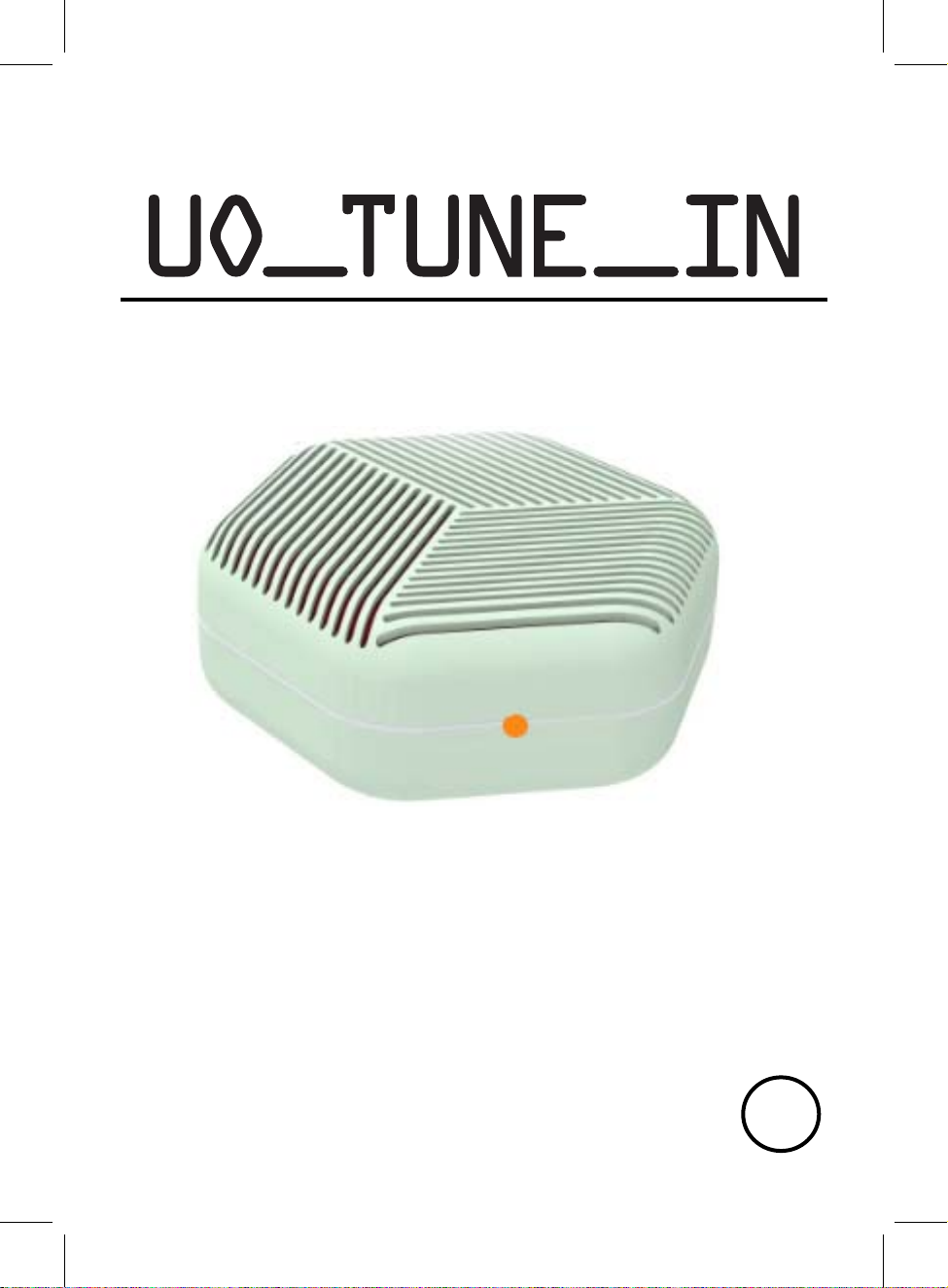
006_ D
PL EA SE R EA D CA RE FU LLY BEFORE OPERATING THIS EQUIPMENT
KE EP I T IN A S AF E PL AC E FO R FU TU RE R EF ER EN CE
BC
Page 2

DANGEROUS VOLTAGE:The lighting flash with arrowhead symbol within
an equilateral triangle is intended to alert the user to the presence of
uninsulated “dangerous voltage” within the product’s enclosure that may
ATTENTION:The exclamation point within an equilateral triangle is intended to
alert the user to the presence of important operating and maintenance
(servicing) instructions in the literature accompanying the appliance.
CAUTION
RISK OF ELECTRIC SHOCK
DO NOT OPEN
CAUTIO
COVER (OR BACK). NO USER SERVICEABLE PART INSIDE, REFER
SERVICING TO QUALIFIED SERVICE PERSONNEL.
IC statement:
This device complies with Industry Canada license-exempt RSS standard(s).
Operation is subject to the following two conditions:
(1) this device may not cause interference, and
(2) this device must accept any interference, including interference that may cause
W
ARNING:TO PREVENT FIRE OR SHOCK HAZARD, DO NOT EXPOSE
N: TO REDUCE THE ELECTRIC SHOCK, DO NOT REMOVE THE
be of sufficient magnitude to constitute a risk of electric shock to persons.
undesired operation of the device.
THIS UNIT TO RAIN OR MOISTURE.
WARNING: USE UNDER SUPERVISION OF AN ADULT DUE TO LONG
CORD This unit has a long cord that can be easily tripped on or pulled on,
causing injury. Please make sure it is arranged so that it will not drape over a
tabletop, etc. Where it can be pulled on by children or tripped over accidentally.
FCC STATEMENT:
This device complies with part 15 of the FCC Rules. Operation is subject to the
following two conditions:
(1)This device may not cause harmful interference, and
(2)This device must accept any interference received, including interference
that may cause undesired operation.
2
Page 3
1. Read these instructions
2. Keep these instructions
3. Heed all warnings
4. Follow all instructions
FCC NOTICE:
5. Do not use this apparatus near water
This equipment has been tested and found to comply with the limits for a Class
B digital device, pursuant to Part 15 of the FCC Rules. These limits are
designed to provide reasonable protection against harmful interference in a
residential installation. This equipment generates, uses and can radiate radio
frequency energy and, if not installed and used in accordance with the
instructions, may cause harmful interference to radio communications.
However, there is no guarantee that interference will not occur in a particular
installation. If this equipment does cause harmful interference to radio or
television reception, which can be determined by turning the equipment off and
on, the user is encouraged to try to correct the interference by one or more of
the following measures:
●Reorient or relocate the receiving antenna.
●Increase the separation between the equipment and receiver.
●Connect the equipment into an outlet on a circuit different from that to which
the receiver is connected.
●Consult the dealer or an experienced radio/TV technician for help.
●CAUTION: Changes or modifications not expressly approved by the party
responsible forcompliance could void the user's authority to operate the
equipment.
FCC WARNING:
To assure continued operation, follow the attached installation instructions and
use only shield cables when connecting to other devices. Changes or
modifications not expressly approved by the party responsible for compliance
could void the user's authority to operate the equipment.
B
efore using the unit, be sure to read all operating instruction carefully, please
note that these are general precautions and may not pertain to your unit. For
example, this unit may not have the capability to be connected to an outdoor
antenna.
A
ll the safety and operating instructions should be read before the appliance is
operated.
T
he safety and operating instructions should be kept for future reference.
A
ll warnings on the appliance and in the operating instructions should be
adhered to.
All operation and use instructions should be followed.
he appliance should not be used near water; for example, near a bath tub,
T
3
Page 4
washbowl, kitchen sink, laundry tub, in a wet basement, or near a swimming
6. Clean only with dry cloth
7. Do not block any ventilation openings. Install in accordance with the
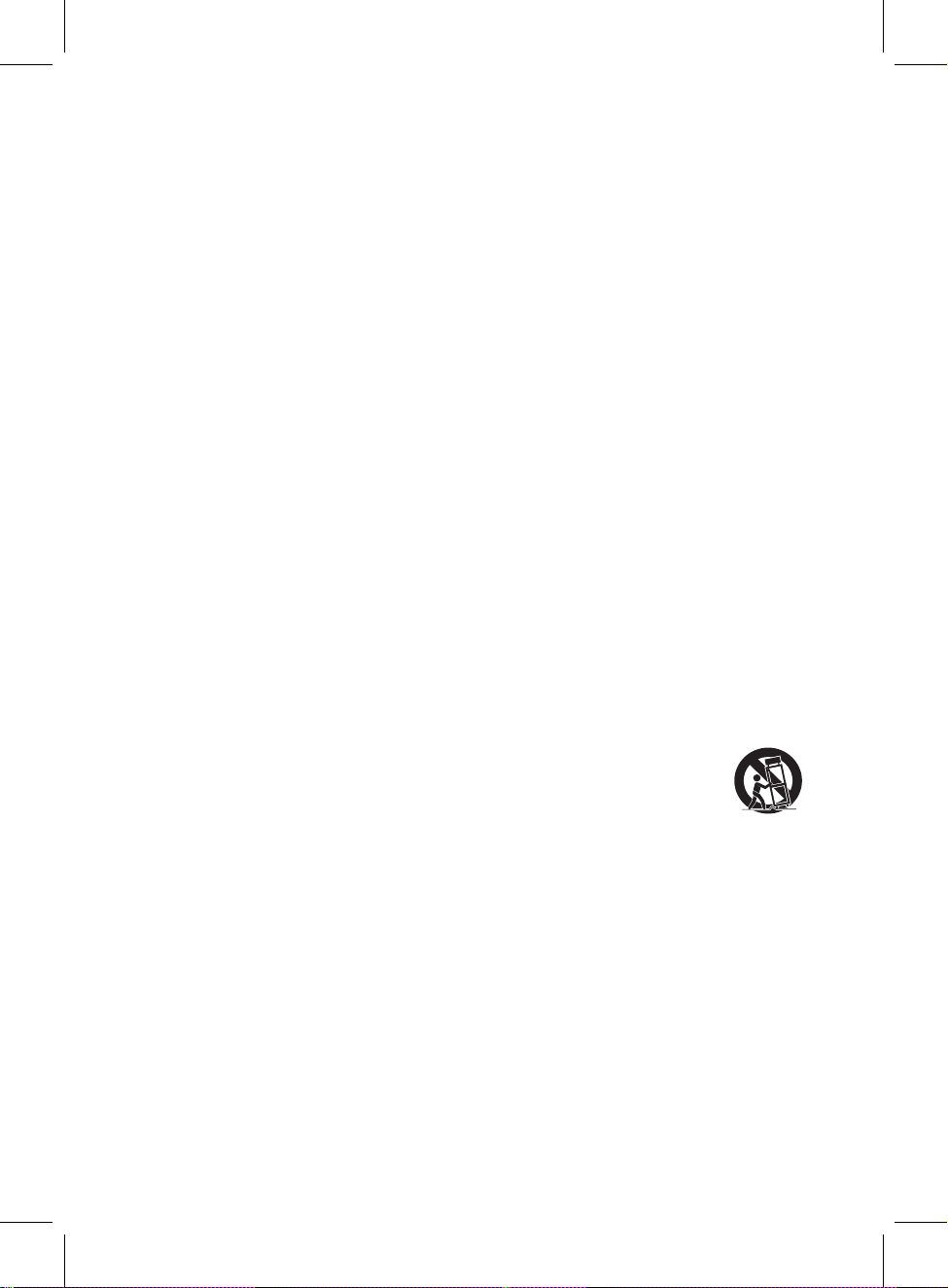
12. Use only with a cart, stand, tripod, bracket, or table
specified by the manufacturer, or sold with the apparatus.
When a cart is used, use caution when moving the
cart/apparatus combination to avoid injury
from tip-over.
13. Unplug this apparatus during lightning storms or when unused for
pool.
The appliance should be cleaned only as recommended by the manufacturer.
manufacturer’s instructions.
Slots and openings in the cabinet and in the back or bottom are provided for
ventilation, to ensure reliable operation of the product and to protect it from
overheating. These openings must not be blocked or covered. The openings
should never be blocked by placing the product on a bed, sofa, rug, or similar
surface. This product should never be placed near or over a radiator or heat
source. This product should not be placed in a built-in installation, such as a
bookcase or rack unless proper ventilation is provided or the manufacturer’s
instructions have been adhered to.
8. Do not install near any heat sources such as radiators, heat registers,
stoves, or other apparatus (including amplifiers) that produce heat.
9. Do not defeat the safety purpose of the polarized or grounding-type
plug. A polarized plug has two blades with one wider than the other. A
grounding type plug has two blades and a third grounding prong. The
wide or the third prong are provided for your safety. If the provided plug
does not fit into your outlet, consult an electrician for replacement of the
obsolete outlet.
10. Protect the power cord from being walked on or pinched particularly
at plugs, convenience receptacles, and the point where they exit from the
apparatus.
11. Only use attachments / accessories specified by the manufacturer.
Portable Cart Warning
An appliance and cart combination should be moved with care. Quick stop,
excessive fore and uneven surfaces may cause the appliance and cart
combination to overturn.
long periods of time.
To protect your product from a lightning storm, or when it is left unattended and
unused for long periods of time, unplug it from the wall outlet and disconnect
the antenna or cable system. This will prevent damage to the product due to
lightning and power-line surges.
14. Refer all servicing to qualified service personnel. Servicing is
required when the apparatus has been damaged in any way, such as
power-supply cord or plug is damaged, liquid has been spilled or objects
have fallen into the apparatus, the apparatus has been exposed to rain or
4
Page 5
moisture, does not operate normally, or has been dropped.
15. Power source
This product should be operated only from the type of power source indicated
on the marking label. If you are not sure of the type of power supply to your
home, consult your appliance dealer or local power company. For products
intended to operate from battery power, or other source, refer to the operation
instructions.
16. Power lines
An outside antenna system should not be located in the vicinity of overhead
power lines or other electric light or power circuits, or where it can fall into such
power lines or circuits. When installing an outside antenna system, extreme
care should be taken to keep from touching such power lines or circuits as
contact with them might be fatal.
17. Overloading
Do not overload wall outlets and extension cords as this can result in a risk of
fire or electric shock.
18. Object and liquid entry
Never push objects of any kind into the product through openings as they may
touch dangerous voltage points or short out parts that could result in fire or
electric shock. Never spill or spray any type of liquid on the product.
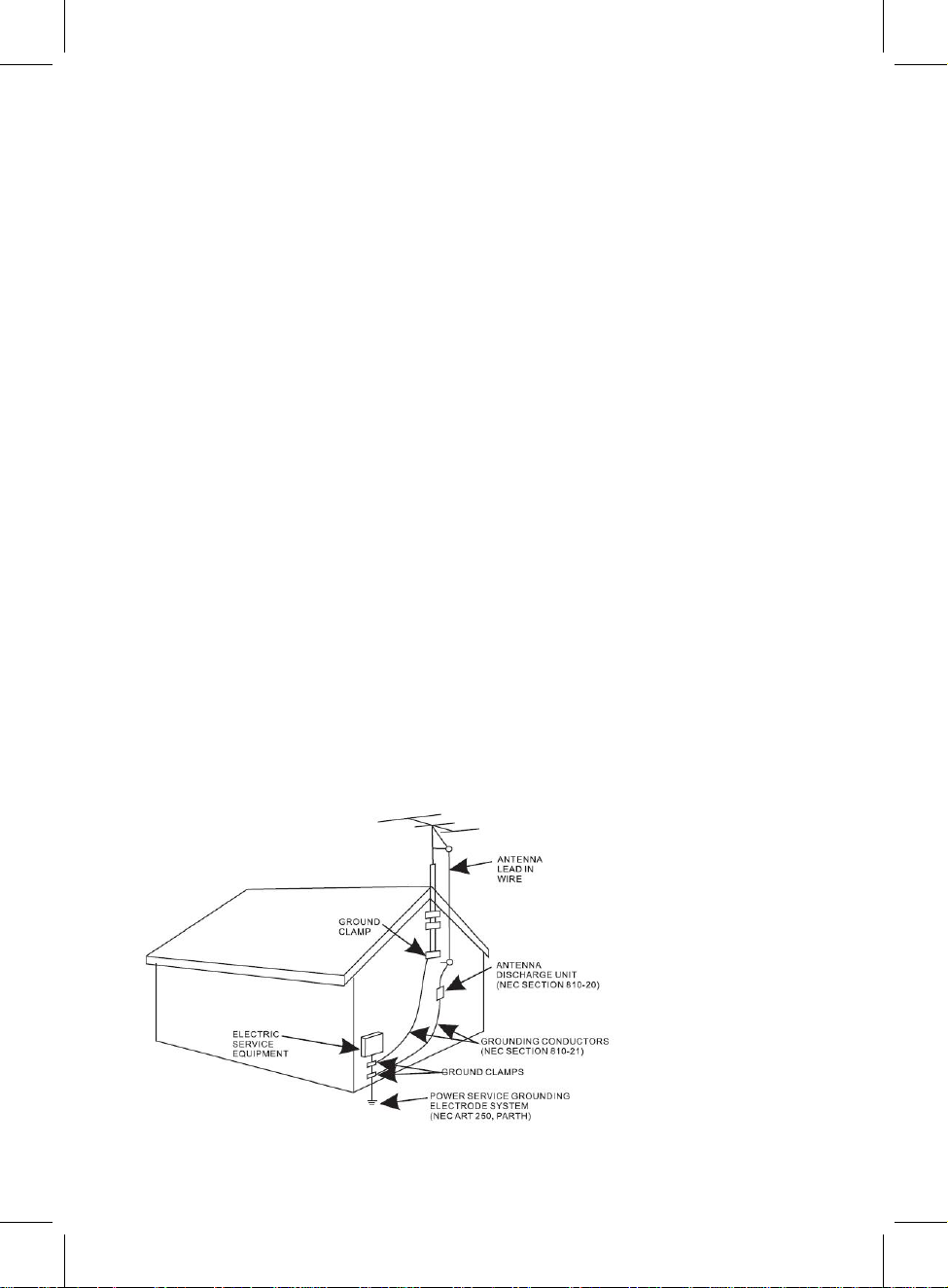
19. Outdoor antenna grounding
If an outside antenna is connected to the product, be sure the antenna system
is grounded so as to provide some protection against voltage surges and built
up static charges. Section 810 of the National Electric Code ANSI/ NFPA 70
provides information with respect to proper grounding of the mast and
supporting structure, grounding of the lead- in wire to an antenna discharge
product, size of grounding conductors, location of antenna- discharge product,
connection to grounding electrodes and requirements for the grounding
electrodes.
5
Page 6

20. Ser
23. Wall or ceiling mounting
vice
Do not attempt to service this product yourself as opening or removing covers
may expose you to dangerous voltage or other hazards. Refer all servicing to
qualified service personnel.
21. Replacement parts
When replacement parts are required, be sure the service technician uses
replacement parts specified by the manufacturer or those that have the same
characteristics as the original parts. Unauthorized substitutions may result in
fire or electric shock or other hazards.
22. Safety check
Upon completion of any service or repairs to this product, ask the service
technician to perform safety checks to determine that the product is in proper
operating condition.
Th
e product should be mounted to a wall or ceiling only as recommended by
the manufacturer.
24. Damage requiring service
Unplug this product from the wall outlet and refer service to qualified service
personnel under the following conditions.
a)When the power- supply cord or plug is damaged.
b)If liquid has been spilled or objects have fallen into the product.
c)If the product has been exposed to rain or water.
d)If the product does not operate normally by following the operating
instructions. Adjust only those controls that are covered by the operating
instructions, as an adjustment of other controls may result in damage and will
require extensive work by a qualified technician to restore the product to its
normal operation.
e)If the product has been dropped or the cabinet has been damaged.
f)When the product exhibits a distinct change in performance- this indicates a
need for service.
25. Note to CATV system installer
This reminder is provided to call the CATV system installer' s attention to
Article 820- 40 of the NEC that provides guidelines for proper grounding and,
in particular, specifies that the cable ground shall be connected to the
grounding system of the building, as close to the point of cable entry as
practical.
NOTE: Refer all servicing to qualified service personnel. Servicing is
required when the unit has been damaged in any way such as the
following: the power-supply cord or plug has been damaged, liquid has
been spilled into unit, the unit has been exposed to rain or moisture, the
unit has been dropped or the unit does not operate normally.
6
Page 7
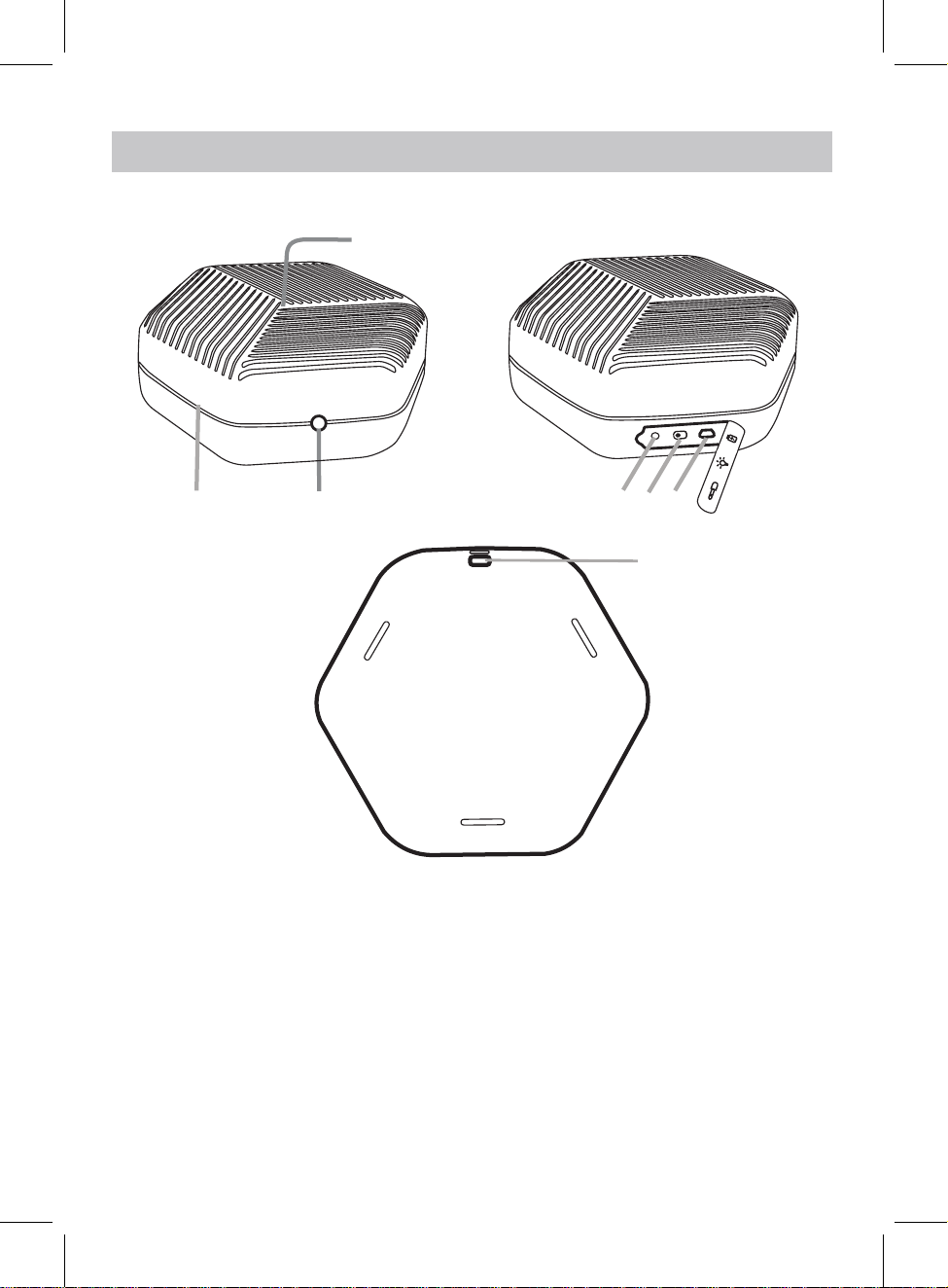
PRODUCT OVERVIEW
TOP&FRONT VIEW
2
SIDE VIEW
1
4 5
3
BOTTOM VIEW
6
7
1. Speaker
2. LED Light Ring
3. Power Button
4. Aux In Jack
5. LED Light On/Off Switch
6. Micro USB Charging Port
7. Strap Hole
7
Page 8
POWER SOURCE
3.
Connect the full sized USB Plug from the supplied USB Connection Cable
4.
A.
Before first time use, charge it approximately
hours until the unit is fully
B.
Recharge and store the unit within the temperature range of 5°C~35°C
C.
Do not charge longer than 24 hours. Excessive charging or running the
D.
Battery life naturally shortens slowly over time.
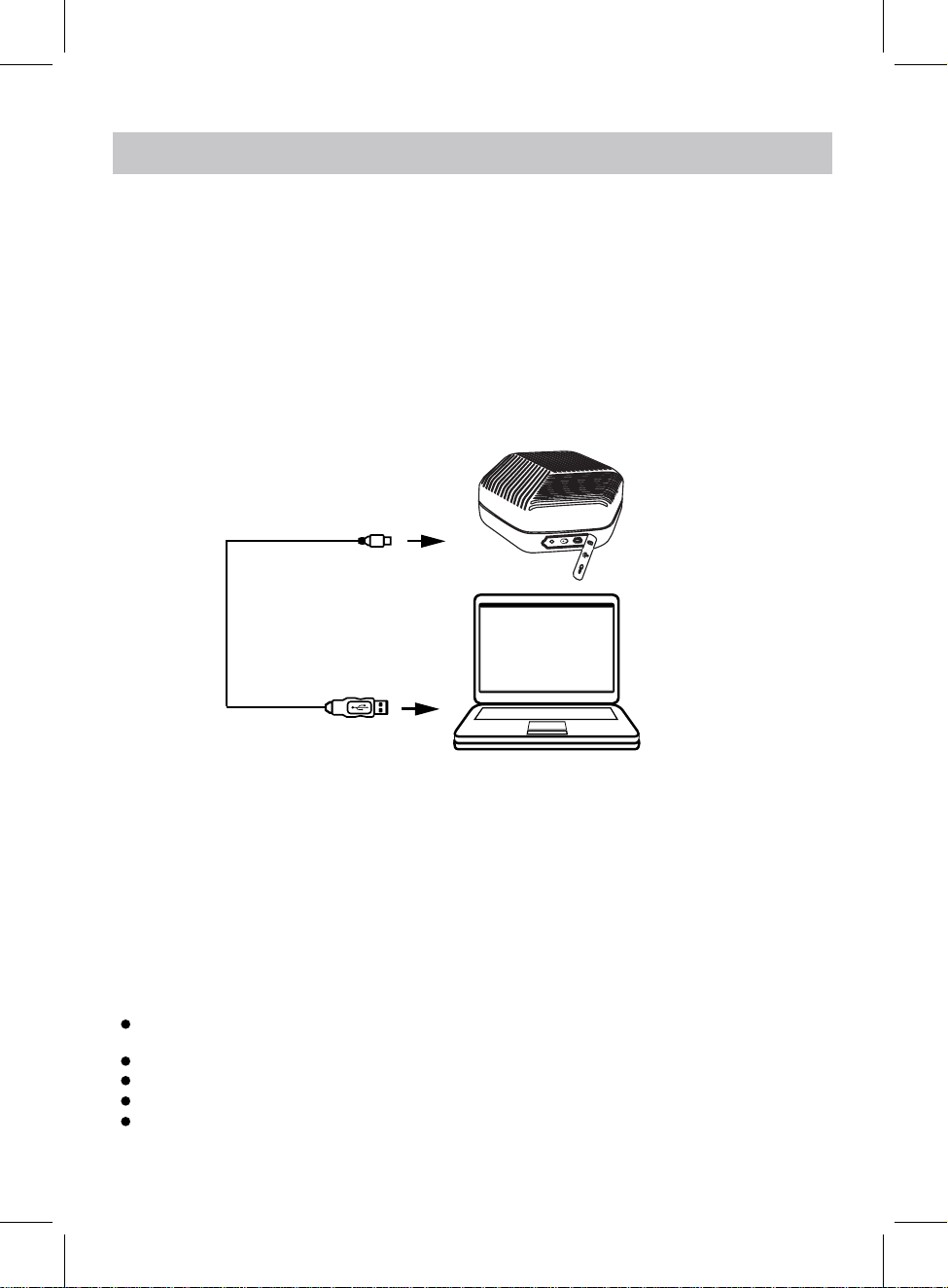
1. Uncover the rubber cover at the rear of the unit and slide the LED switch to left to turn on the
Ring.
2. Connect the Micro USB Plug from the supplied USB Connection Cable to the Micro USB Port at the
rear of the unit.
to the USB Port on the
Computer or USB Charger. (Computer and USB
During charging in power on mode, the LED Ring will be white and blink, after fully charged, it will be
solid white. (NOTE: Charging in power off mode, the LED Ring will be solid white, after fully charged,
it will turn off.)
NOTE: There is a built-in battery in this unit. The LED Light will blink quickly and an alarm will
sound, indicating the battery is in low level and needs to be recharged.
To Micro USB Port
USB Connection Cable
To USB Port on PC or USB Charger
Charger NOT supplied).
Main unit
PC
LED
NOTES:
Your battery will last longer if you're following these simple guidelines for
2-3
will damage battery. Battery life will be
CAUTIONS:
The built-in rechargeable battery is not replaceable. Do not remove or replace it, do not throw in the
trash or in a fire.
Do not dispose device in standard garbage disposal sites.
Dispose of device at available Battery Recycling Sites after fully discharging battery.
Not doing so may violate local disposal laws and regulations.
Please refer to local regulations for proper battery disposal.
extended if you keep the battery fully charged.
caring and storing:
charged.
(40°F~95°F).
unit until battery fully drains
8
Page 9

BLUETOOTH OPERATION
1. Uncover the rubber cover at the rear of the unit and slide the LED switch to left to turn on the
LED Ring.
2. Press and hold the Power button on the unit until the LED Ring lighting up and blinking to power
on the unit.
3. Activate the bluetooth function on your external device, and try searching, the pairing name
UO_TUNE_IN_006
" "
4. Select it and register in your player.
5. After successful connection, the LED Ring will be solid white and it will send an indication
sound.
6. Adjust the volume level by the connected external player and play music as usual.
Note:
The unit can be automatically connected with the last paired device after first time pairing
when both of them are powered on and the Bluetooth is activated and in range.
Do not plug in the AUX IN cable, or it will switch to AUX IN mode.
will appear on the pairing name list.
AUX IN OPERATION
1. Uncover the rubber cover at the rear of the unit and slide the LED switch to left to turn on the
LED Ring.
2. Press and hold the Power button on the unit until the LED Ring lighting up and blinking to power
on the unit.
3. Connect one end of the AUX IN Cable to the AUX IN jack, the unit will send an indication sound
and the LED Ring will be solid white.
4. Connect another end of the AUX IN Cable to the AUX OUT, Line Out or Headphone jack on the
external player like Mobilephone, MP3 Player etc..
5. Adjust the volume level by the connected external player and play music as usual.
9
Page 10
TROUBLESHOOTING
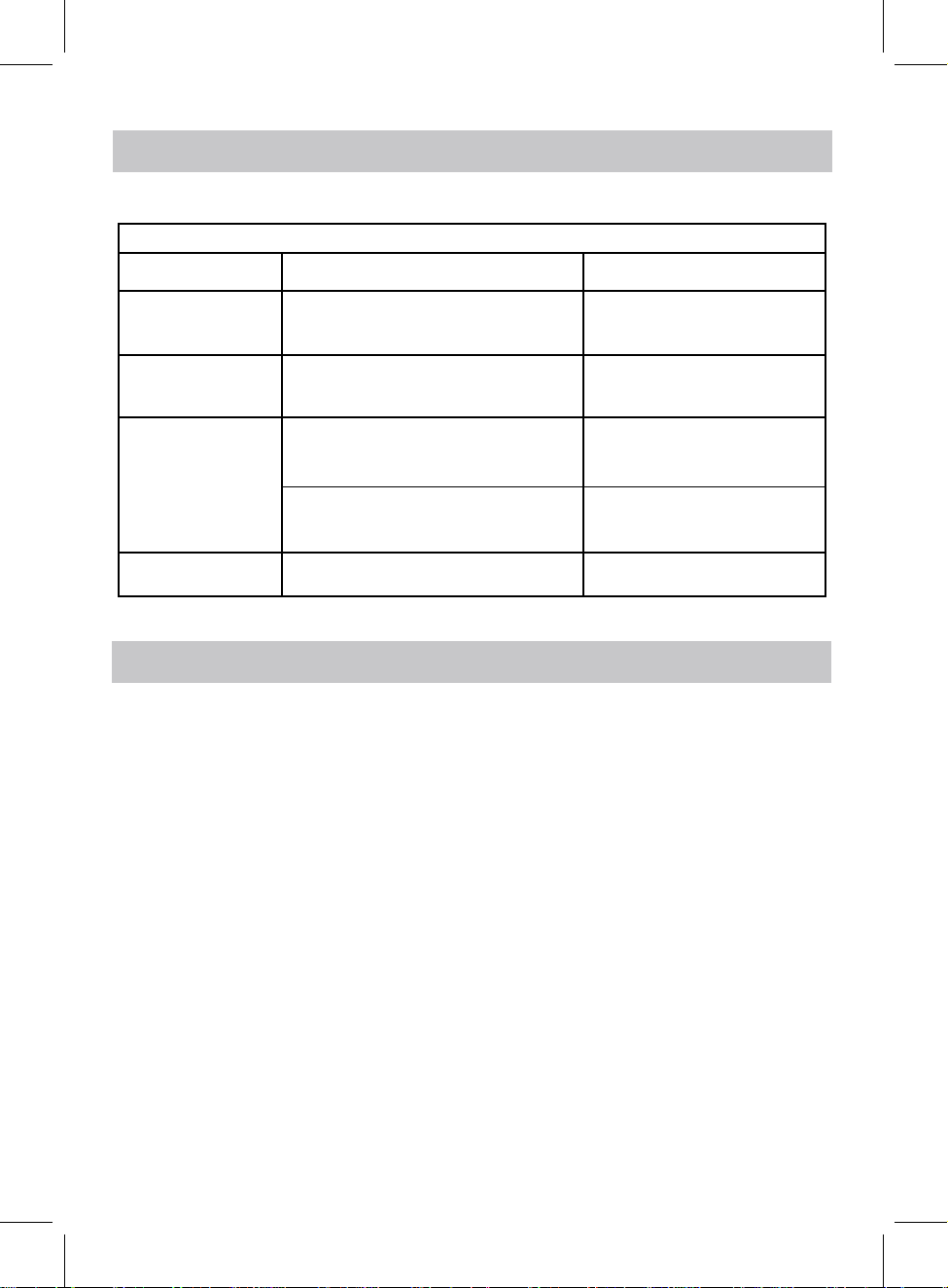
Check the following before requesting service:
SYMPTOM POSSIBLE CAUSE POSSIBLE SOLUTION
Can’t power on Built in battery drained Recharge the battery
No sound or
sound weak
Sound distortion
BT not
functioning
LED Ring is off
Volume level of paired/connected device
is in low level
Volume level of the connected/paired
device too high
The external BT device had NOT paired
to
the unit
The external BT device too far from the
unit
Built in battery drained
Rise the volume level of the
paired/connected device
Reduce the volume level of the
connected/paired device
Pair the external BT device to the
unit
Place the external BT device
close to the unit
Recharge the battery
and switch on the LED
SPECIFICATIONS
Audio power: 1 x 3W (RMS)
BT Version: 4.1
BT Operation Distance: ≧32 Feet in open area
Built-in battery:
Charger:
Same charging time for 1A or 2A charger
1. Under no battery condition, the charging time is around 2 hours and 45 minutes;
2. Under 50% battery condition, the charging time is around 2 hours.
3.7V, 1000mAh
5V,1A
ACCESSORIES:
1 x User's Manual
1 x Micro USB Charging Cable with transparent clip
1 x Audio Connection Cable with transparent clip
Design and specification are subject to change without notice.
Bluetooth is a registered trademark of Bluetooth SIG, Inc.
Other trademarks and trade names are those of their respective owners.
Made in China.
10
Page 11

WARRANTY
Innovative Technology Electronics LLC.
Limited Warranty: 90 Days Labor, One Year Parts
Innovative Technology Electronics LLC. (IT) warrants the product to be free from
“Defects” in materials under normal use for a period of “One Year” from the date of
the original purchase. The Warranty is “Not” transferable. IT agrees, within the initial
“90 Day” period, to repair or replace the product if it is determined to be defective
at “No Charge”. It is further agreed that IT will cover the cost to repair or replace
damaged “Parts” only for a total period of “One Year” from the date of the original
purchase. The warranty does not cover cosmetic damage, antennas, AC cords,
cabinets, headbands, ear-pads, or damage due to line power surges, connection to
improper voltage supply or settings, misuse, mishandling, accident, acts of God or
attempted repair by an unauthorized service agent.
To obtain service, the purchaser MUST present an original sales receipt / proof
of purchase. Please contact us at www.ithomeproducts.com to request an
RMA (Return Material Authorization) number to return products for service or
replacement. Returns without an RMA number on the package will be refused
and returned to sender. Upon receipt of the returning item and our full inspection
(IT) may issue a replacement to customer for the same item or of one that has
equivalent value and features. To return an item, supply full name, return address,
phone number, item purchased, receipt of purchase and reason for return to obtain
RMA number.
All returns must be in the original packaging or reasonable substitute to prevent damage.
Customer “Must” include full name, shipping address and telephone number inside
of package. No return will be shipped back to a PO Box or APO address.
Please include your check or money order in the amount of
• USD $5.00 for items $10.00 to $39.99 (Price Paid Per Unit)
• USD $10.00 for items $40.00 to $99.99 (Price Paid Per Unit)
• USD $16.00 for items $100.00 and up (Price Paid Per Unit)
• Shipping fees are non-refundable
to be payable to Innovative Technology Electronics LLC. (for handling and return
shipping charges) (IT) will not be responsible for delays or unprocessed claims
resulting from a purchaser’s failure to provide any / all of the necessary information.
Page 12

WARRANTY
Send all inquiries or RMA request via our website www.ithomeproducts.com/support.
Innovative Technology Electronics LLC.
1 Channel Drive
Port Washington, NY 11050
Toll free: 1-877-483-2497
Website for support: www.ithomeproducts.com/support
There are no express warranties except as listed above.
REPAIR OR REPLACEMENT AS PROVIDED UNDER THIS WARRANTY IS THE EXCLUSIVE
REMEDY OF THE CUSTOMER, (IT) SHALL NOT BE LIABLE FOR ANY INCIDENTAL OR
CONSEQUENTIAL DAMAGES FOR BREACH OF ANY EXPRESS OR IMPLIED WARRANTY
ON THIS PRODUCT EXCEPT TO THE EXTENT PROHIBITED BY APPLICABLE LAW. ANY
IMPLIED WARRANTY OF MERCHANTABILITY OR FITNESS FOR A PARTICULAR PURPOSE
ON THIS PRODUCT IS LIMITED IN DURATION TO THE DURATION OF THIS WARRANTY.
Some states do not allow the exclusion or limitation of incidental or consequential
damages, or limitations on how long an implied warranty lasts, so the above
exclusions or limitations may not apply to you. This warranty gives you specific legal
rights and you may also have other rights, which vary from state to state.
Page 13
006_D
HEXAGON SPEAKER
Model / Modèle N.006_D
Made in China / Fabriqué en Chine
Urban Outfitters
24 Market Place, 3rd Floor
London W1W8AN UK
www.urbanoutfitters.com
 Loading...