

Page 1
WINSTON-E™ WORKSTATION
WARNING
WARNING: FAILURE TO CAREFULLY FOLLOW ASSEMBLY, SAFETY, AND OPERATION
INSTRUCTIONS AND WARNINGS REGARDING THIS PRODUCT MAY RESULT IN BODILY
INJURY AND/OR PROPERTY DAMAGE.
Liability: The manufacturer does not accept warranty claims or liability claims for damages
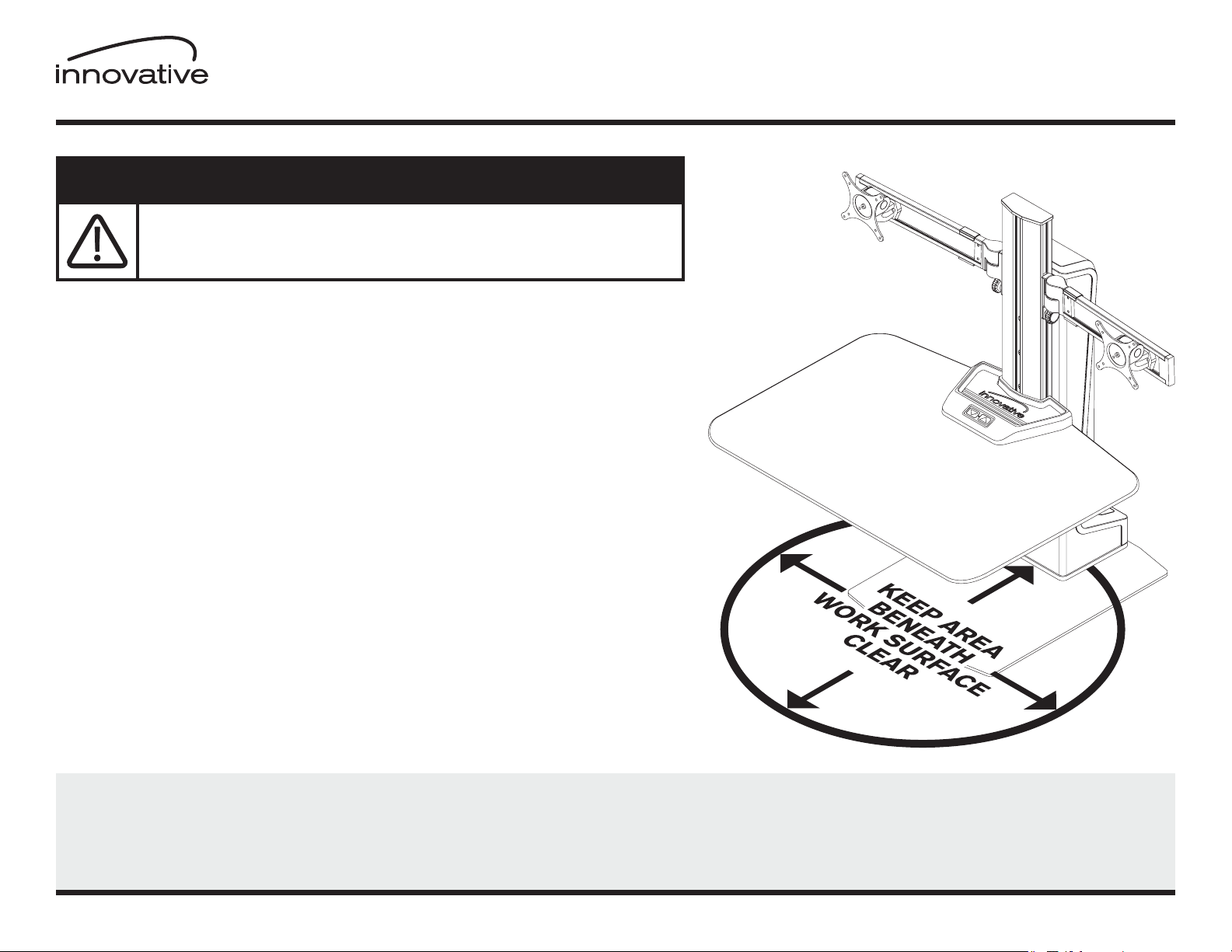
arising from improper use of Winston-E. For safe use, do not place any objects or body parts
underneath the work surface. Make sure no body parts, objects or furnishings are located above
the Winston-E. When using Winston-E, make sure no hands, ngers or other body parts are near
the lifting column or between the cross beam and work surface. Winston-E must be set on a
level, stable surface for safe use.
Additional Warning: Do not use Winston-E if it has a damaged cord or plug. Winston-E
should not be carried by the cord. Pull on the plug, not the cord, to unplug Winston-E. Keep
liquids away from Winston-E. Keep hair, loose clothing, ngers, and body parts away from
openings and moving parts.
Switch off power supply and remove main power supply plug before installation or
troubleshooting. Ensure no cables or cords can get jammed or stripped when raising or
lowering Winston-E. Ensure all wires are not entangled in the Winston-E and have enough
length when the unit is raised to the desired height.
WINSTON-E IS NOT A TOY. Children should not use Winston-E. Do not crawl, lie, or move
around the unit. Do not sit, kneel, or stand on the work surface. Do not use Winston-E if you
are distracted or are under the inuence of medications that can cause diminished control.
Winston-E is not a toy and should only be installed and used by someone familiar with and
capable of adhering to the warnings and instructions.
WARRANTY
Winston-E includes a 5 year limited warranty. This limited warranty covers any defects in materials and workmanship of the product. This limited warranty may
not cover problems, damage or injuries caused by misuse, accidents or abuse. The manufacturer may require proof of purchase before performing any repairs or
replacing products during the warranty period. This warranty is non-transferable and applies only to the original purchaser.
800.524.2744 www.LCDarms.com
800.524.2744 www.LCDarms.com © 2016 Innovative Office Products, LLC P512714 REV A
PAGE 1 OF 10
Page 2
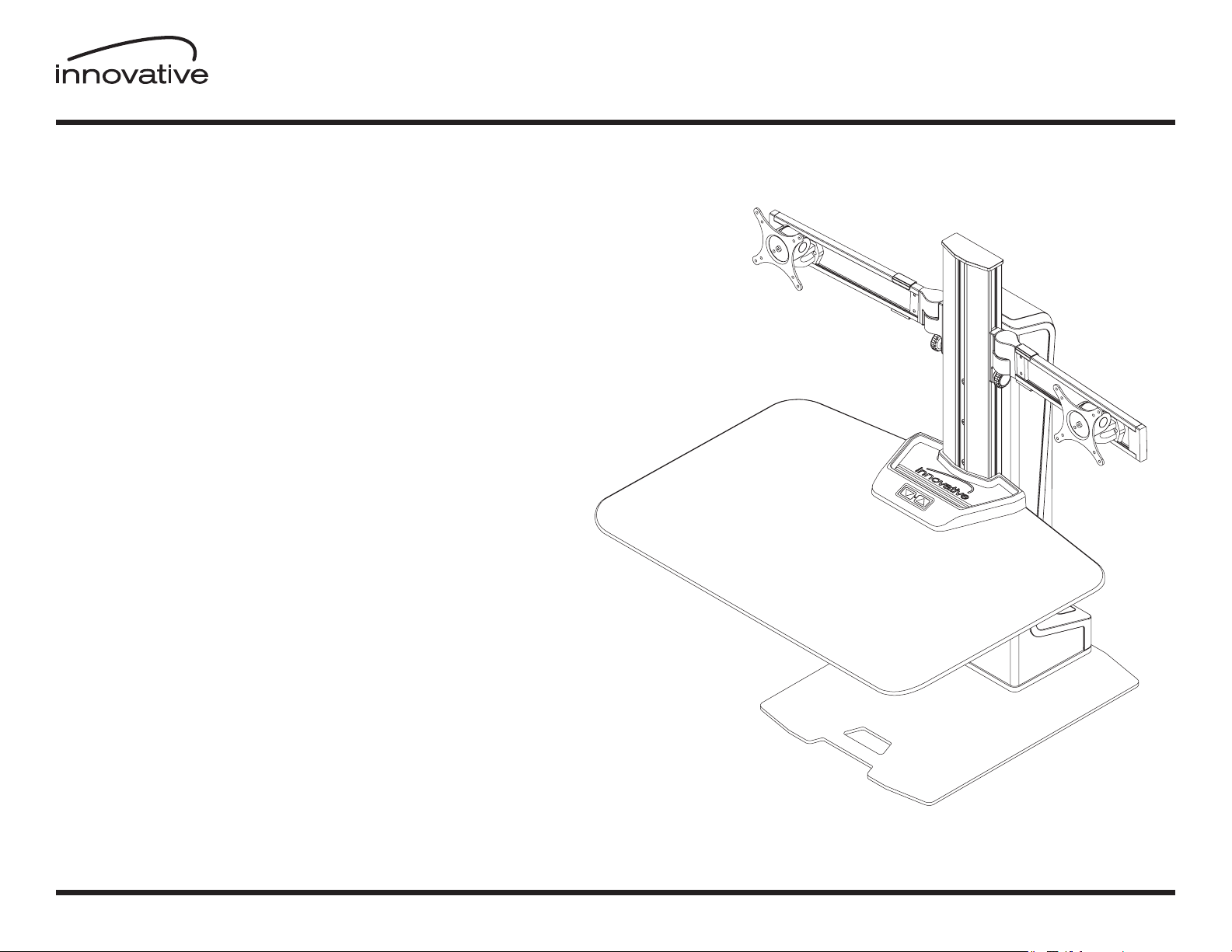
STEP 1 | FREESTANDING BASE ................................................. Page 4
STEP 2 | WORK SURFACE ....................................................................... Page 5
STEP 3 | WINGS ................................................................................................................................ Page 7
WNSTE-2
Winston-E™ Workstation Dual | Installation Instructions
STEP 4 | MONITOR TILTER ...................................................................................... Page 8
STEP 5 | CABLE MANAGEMENT .............................................................. Page 9
STEP 6 | BUTTON PROGRAMMING .................................................. Page 10
800.524.2744 www.LCDarms.com
PAGE 2 OF 10
Page 3
WNSTE-2
Winston-E™ Workstation Dual | Parts List
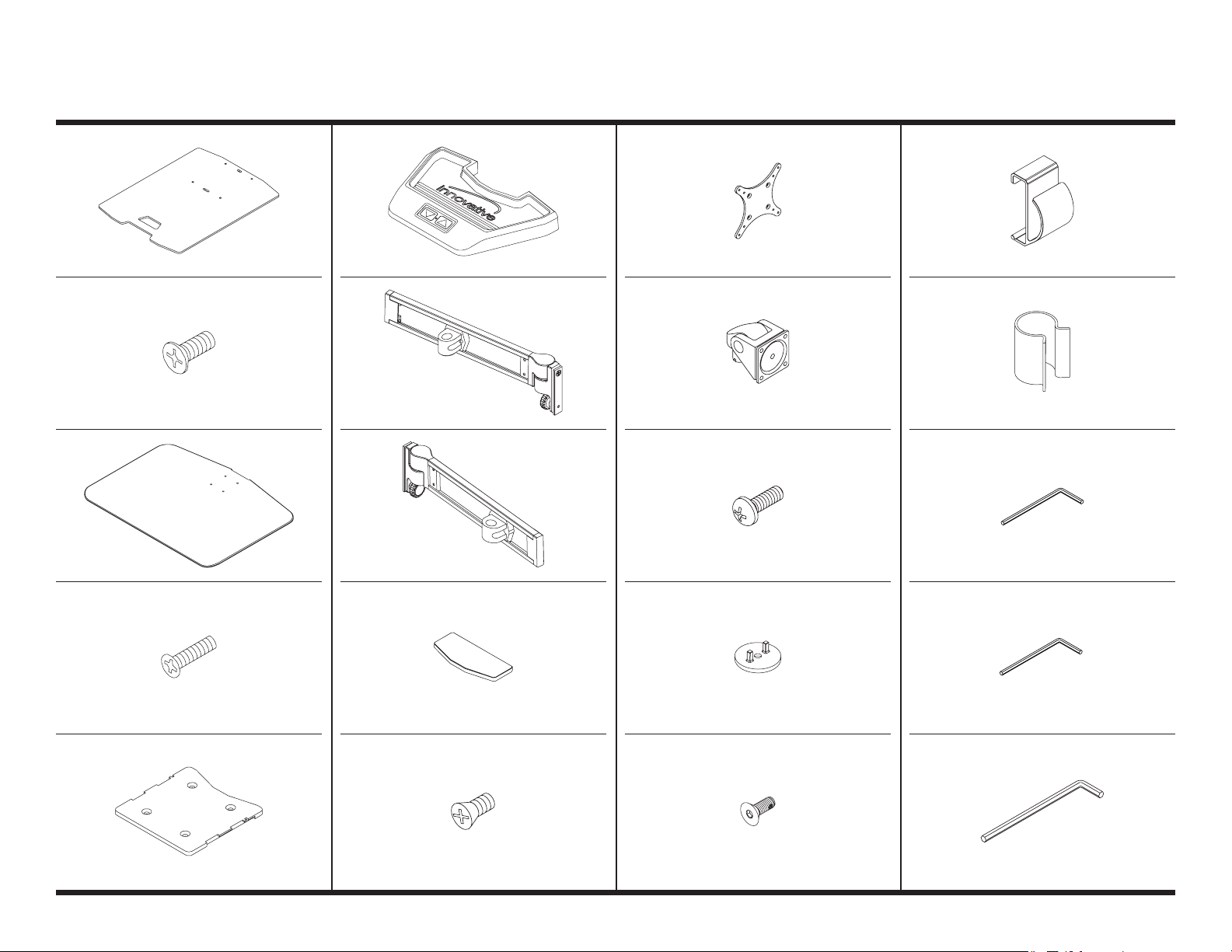
A Freestanding Base
4122 68
B M6 x 1 x 16mm FPhMS
702 013
C Work Surface
1117 0 0
F Util ity Tr ay
4122 69
G Left Wing
3122 70-12. 5-L
H Right Wing
312270 -12.5 -R
K 75/100 mm VESA Adapte r
10558 7
L Standard Monitor Tilter
405397
M M4 x 12 mm PhPH S
7020 96
P Wing Ca ble Clip
112 08 2
Q Column Cable Clip
112 55 0
R 3/32" Allen Wrench
70 0146
D M6 x 1 x 25mm F PhMS
71187 0
E Work Surf ace Plate
1117 01
800.524.2744 www.LCDarms.com
I Cap
1120 57
J 10-32 x 3/8 " PhPHS
702281
PAGE 3 OF 10
N Dog Washer
1112 30 -6 03
O 10-32 x 1/2" FHSC S
71124 0
S 1/8" Allen Wrench
701312
T 7/32" Allen Wrench
70 1127
Page 4
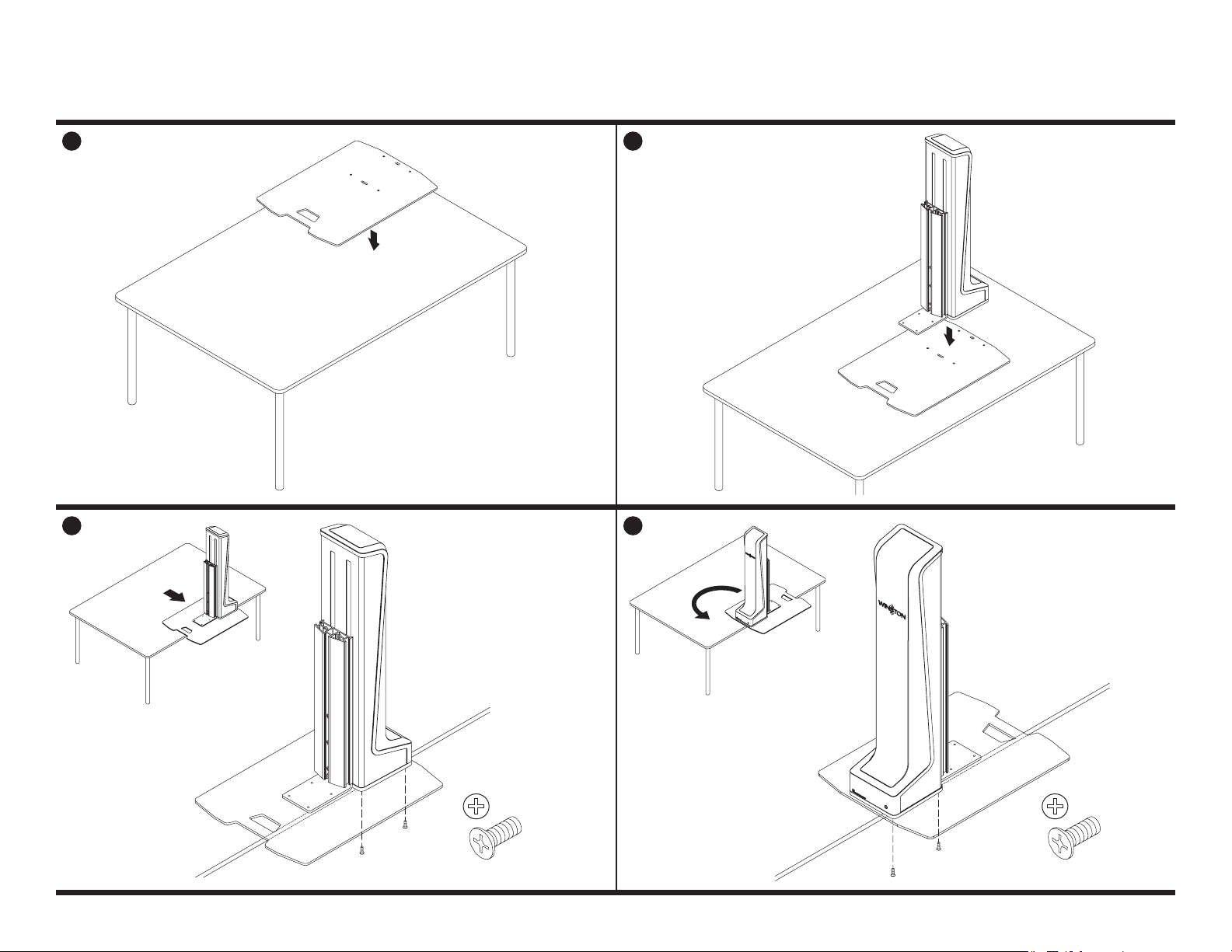
FREESTANDING BASESTEP 1
1
A
3
2
4
800.524.2744 www.LCDarms.com
B
PAGE 4 OF 10
B
Page 5
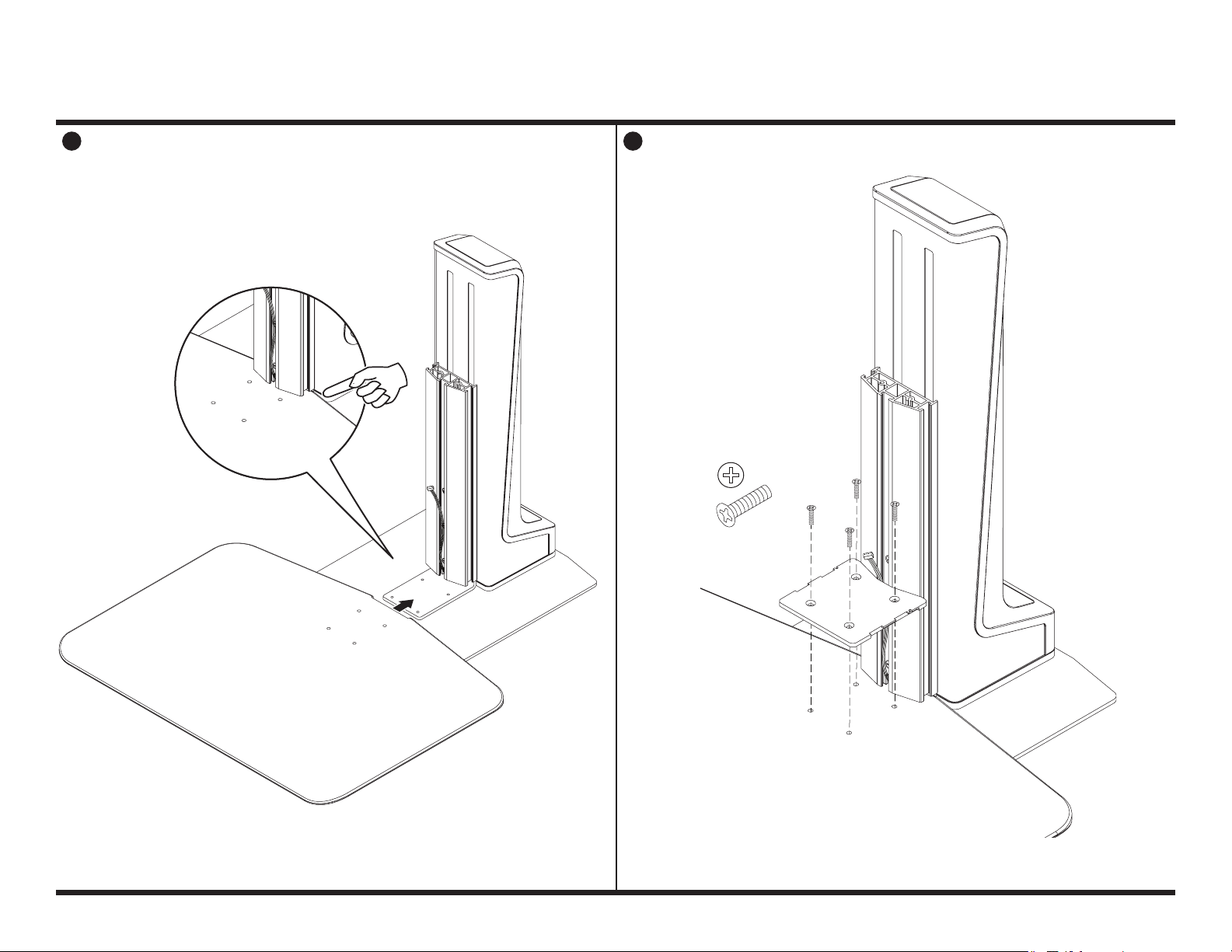
WORK SURFACESTEP 2
21
D
C
800.524.2744 www.LCDarms.com
E
PAGE 5 OF 10
Page 6
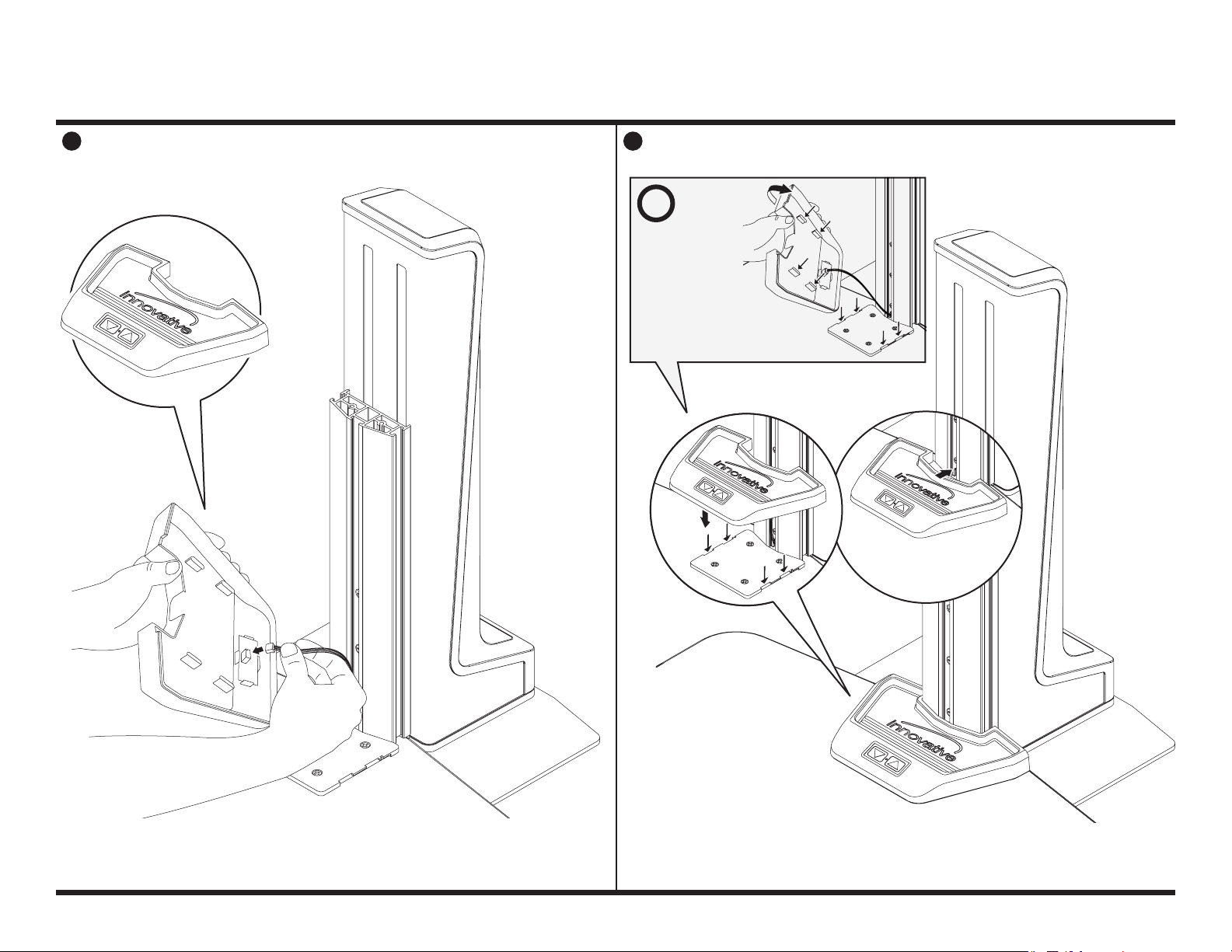
WORK SURFACESTEP 2
43
i
F
Place the utility tray
on top of the work
surface by aligning
the (4) tabs on
utility tray with
recessed areas on
work surface plate.
With the tabs aligned, slide
utility tray towards the column
to secure into place.
800.524.2744 www.LCDarms.com
PAGE 6 OF 10
Page 7
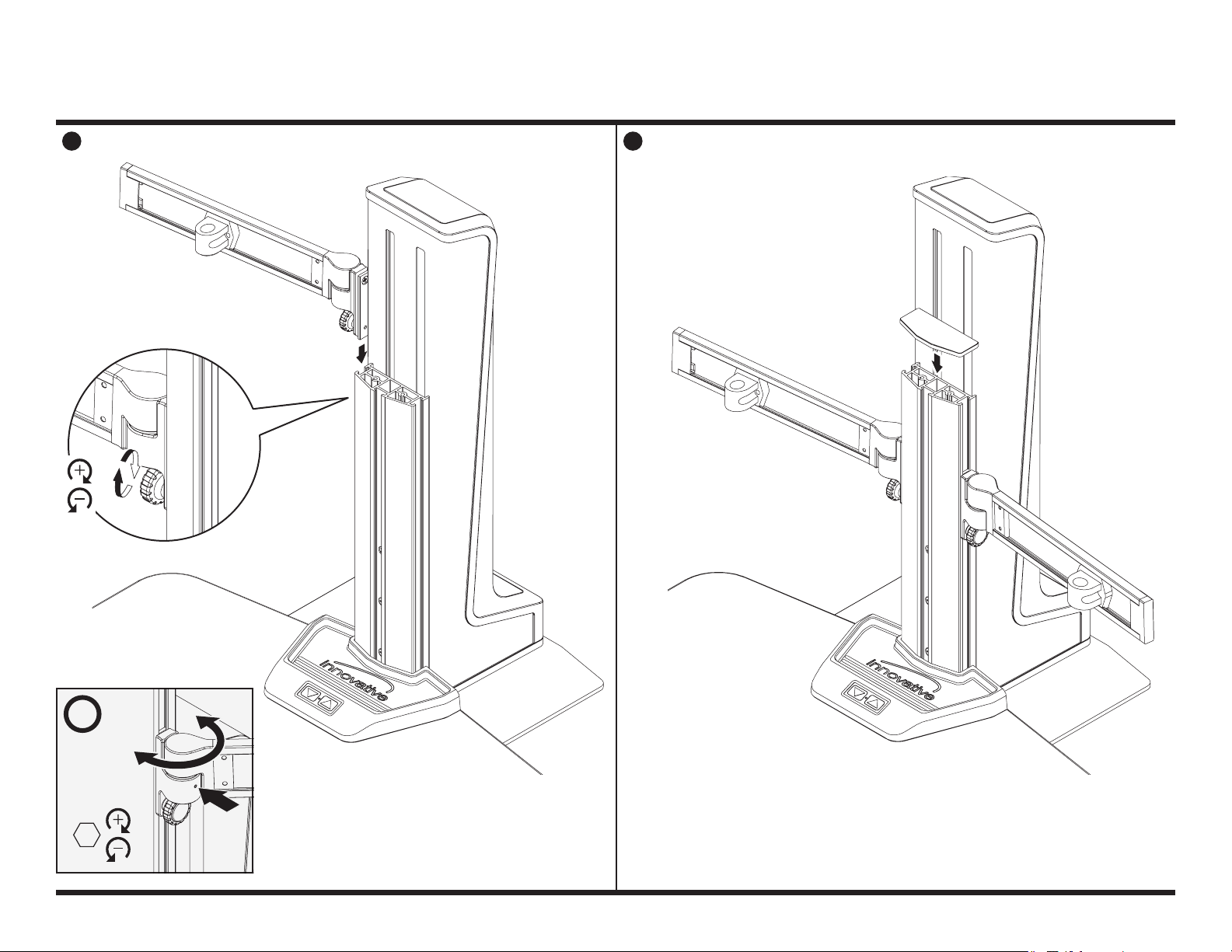
WINGSSTEP 3
1
G
2
2x
I
H
i
Tension can
be tightened
or loosened
as shown.
3/32"
800.524.2744 www.LCDarms.com
PAGE 7 OF 10
Page 8
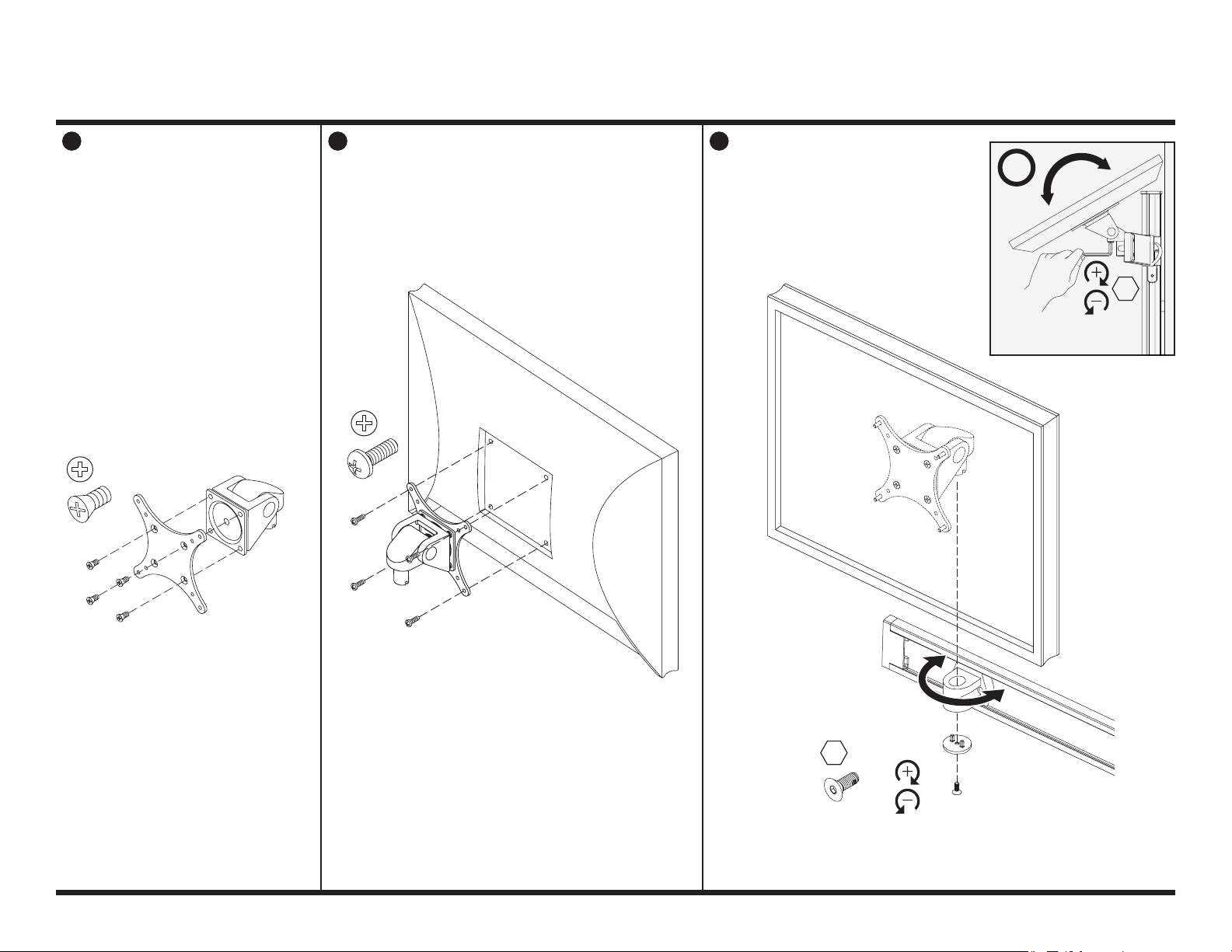
2x
MONITOR TILTERSTEP 4
2 31
i
7/3 2"
2x
2x
Tension can be tightened
or loosened as shown.
7/3 2"
J
800.524.2744 www.LCDarms.com
K
L
M
1/8 "
O
PAGE 8 OF 10
N
Page 9
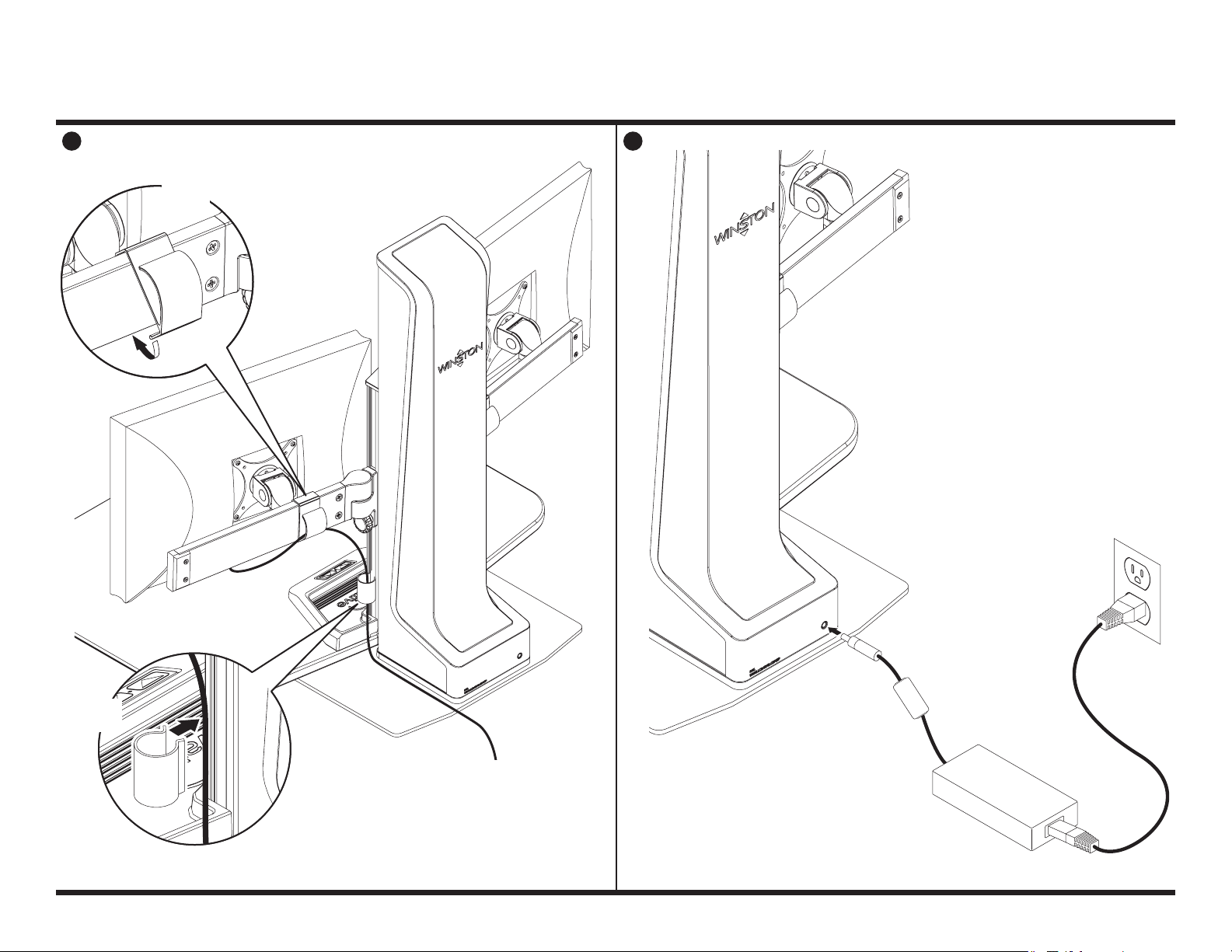
1 2
2x
P
CABLE MANAGEMENTSTEP 5
2x
Q
800.524.2744 www.LCDarms.com
PAGE 9 OF 10
Page 10
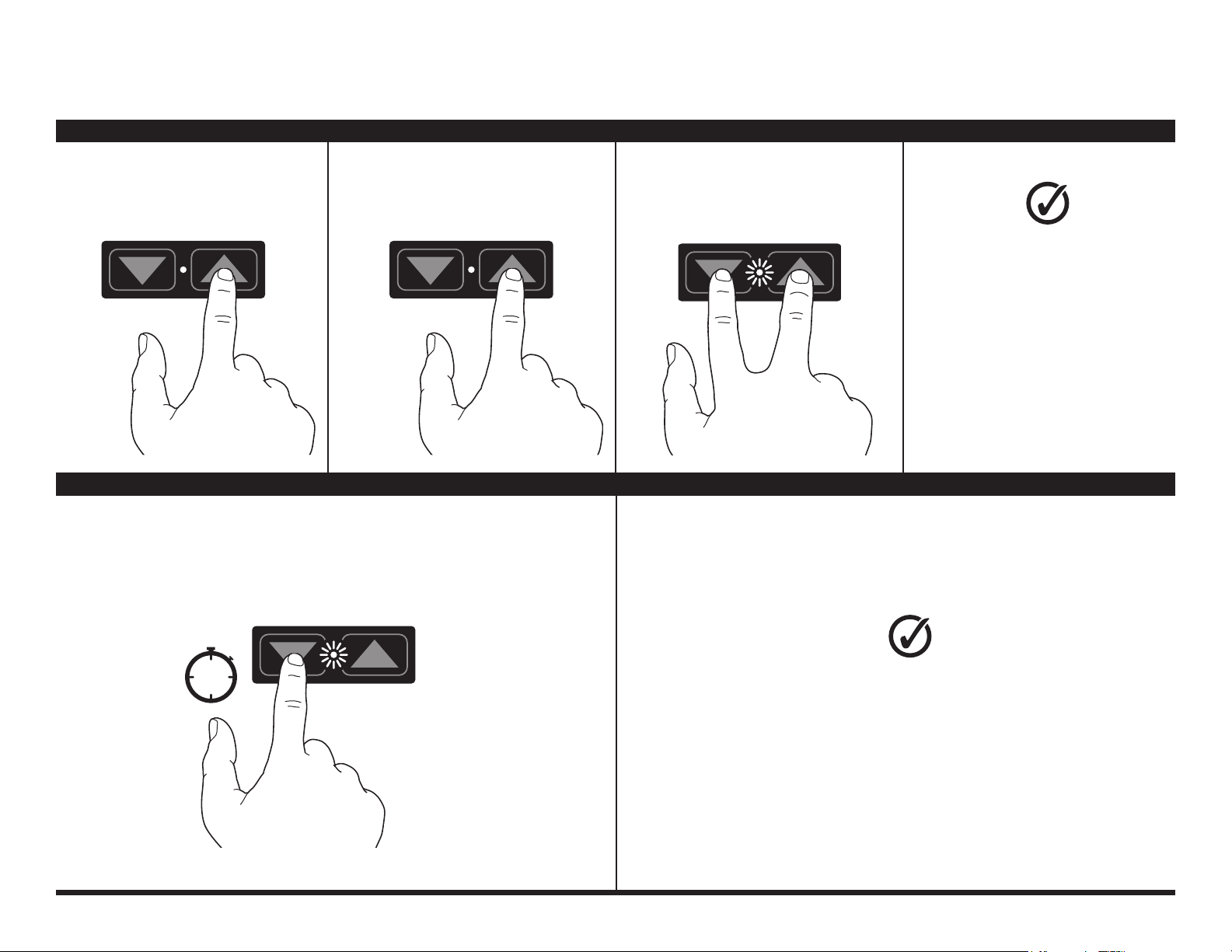
STEP 6
BUTTON PROGRAMMING
HOW TO PROGRAM
With work surface at its lowest position,
1 2 3
press up button and release.
With work surface at its lowest position,
press and hold down button
for three seconds. Light will blink
to confirm setting has been erased.
Press up or down button to stop the
work surface at desired height.
1
Wait several seconds for light to blink.
While light is blinking, press up and
down buttons at the same time and release.
Your Winston-E
is now programmed!
Next time the up button is pressed,
the work surface will rise and
automatically stop
at your preset height.
To reprogram your single-touch
height adjust setting,
you will first need to erase
the programmed setting
(see below).
HOW TO ERASE
3s
800.524.2744 www.LCDarms.com
Your Winston-E height adjust
setting has been erased!
To reprogram the single-touch height
adjust setting, follow the steps
“How to Program” above.
PAG E 10 O F 10
 Loading...