

Page 1
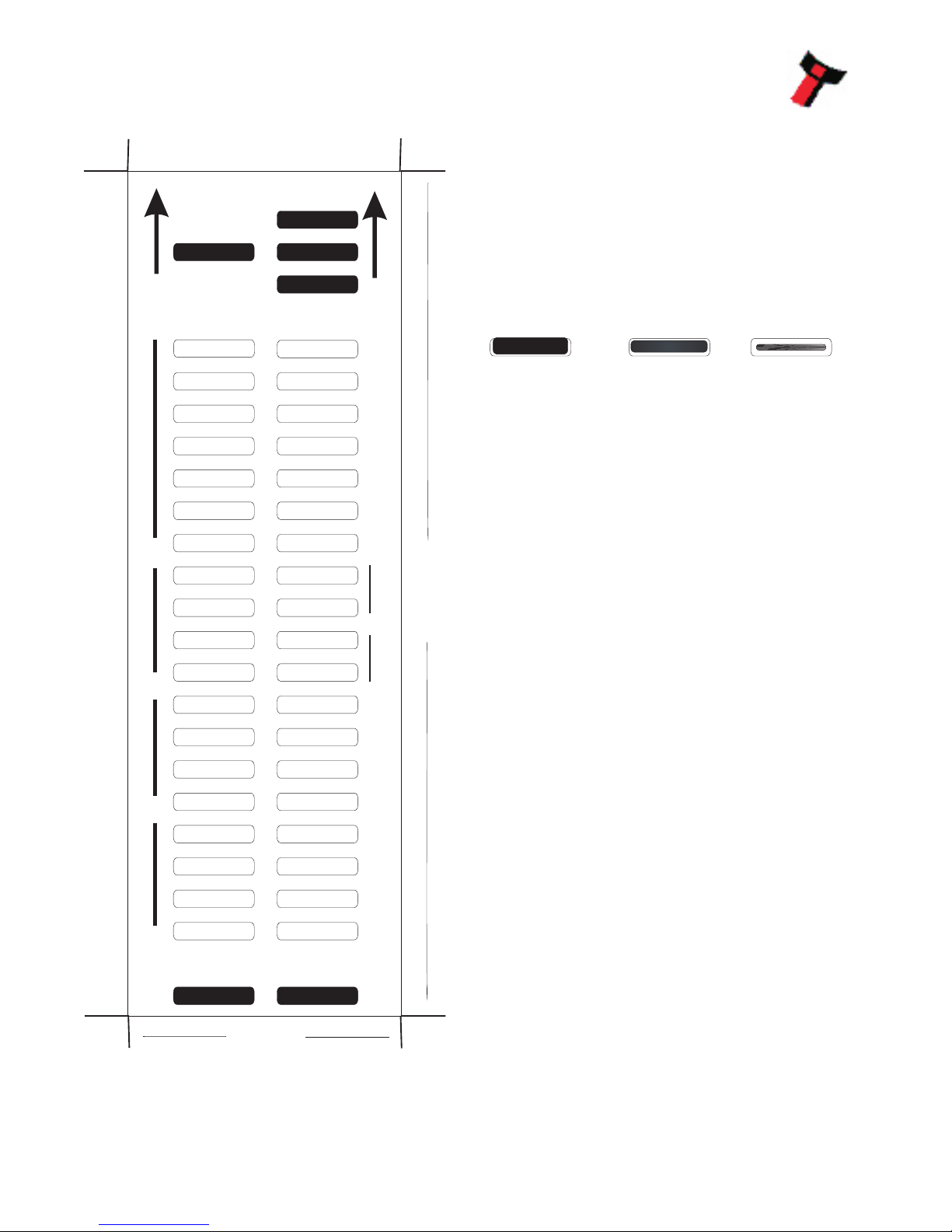
V
1.7
P
s
e
e
t
in
g
s u
l S
t
S e
e
p
d
P
u
l
s
es
Per
D
o
l
l
a
r
n
ts
I hib
i
Op
t o
si
n
n
r eI t
e
fac
SSP
MDB
IF 31
SIO
SP 4
IF 32
I/F Spare 2
High 50ms
Low 50ms
1
2
Bill 1
Bill 2
Bill 3
Bill 4
High Speed
Start Disabled
Low Power
Credit Hold
PULSE
IF 30
CCTALK
PARALLEL
NIS
I/F Spare 1
I/F Spare 3
High 100ms
Low 100ms
4
8
Bill 5
Bill 6
Bill 7
Bill 8
cctalk plain
cctalk 8 bit chk
Binary
option spare 3
GA 713 BV Configuration Option Progamming
66mm
2
4mm0
Insert this end first
Instructions for use
1 - Select correct width card for bezel. Cut card around
outline - check measurements as printed. Check print
options ‘Page scaling’ is set to ‘None’ when printing a pdf
file to ensure correct size.
2 - Fill in sections as required. Take care to fill in the
sections correctly, keep inside the lines and fill boxes fully
as example below:
GOOD OK BAD
3 - Power-up BV and allow to reset.
4 - Click ‘Function’ button on BV to access Configuration
Mode, BV bezel LEDs should be flashing at 1 second
interval.
5 - Enter card into BV in direction indicated by arrows.
6 - Card will be rejected and if configuration was good the,
bezel LEDs will flash at a fast rate while programming takes
place. TAKE CARE TO ENSURE THE POWER IS NOT
REMOVED AT THIS STAGE, THE BV MAY SUFFER
PERMANENT DAMAGE !! The BV will then reset.
7 - If an error has occurred, the card will be rejected and the
bezel LEDs will flash slowly a number of times to indicate
the error cause. (See table below for codes).
8 - IMPORTANT - CHECK THAT THE CONFIGURATION
GA713-1-7
Flash Error
______________________________________________
2 Invalid card read - card entered wrong way round,
card mis-read or card wrong version.
______________________________________________
3 No interface selection was detected on card.
______________________________________________
4 Multiple interface selection detected.
______________________________________________
5 Invalid interface selected - the selected interface is
not available for this BV.
______________________________________________
6 Selected interface not compatible with BV version.
______________________________________________
7 Pulse configuration error. Selected pulse options
invalid.(e.g. multiple pulse per dollar)
______________________________________________
8 ccTalk configuration error. Selected cctalk options
invalid. (cctalk 8 bit chk not allowed without ccTalk
Plain.)
______________________________________________
9 Low power mode not available on this BV version.
_______________________________________
Page 2
For example:
A pulse inteface with 50ms high, 100ms low, 2 pulse per dollar will flash as follows 2,5,10,2
A SSP interface will only ever flash once
A cc talk interface with 16 bit c hecksum, no encryption wil flash 6,1
A cc talk interface with 8 bit c hec ksum, no encryption wil flash 6,1,2
A Binary interface will flash 8,1
To check settings on a programmed unit:
1 - Power on unit.
2 - Click program set button on unit twice (like double click on mouse).
3 - Monitor bezel led and check flash codes on table below
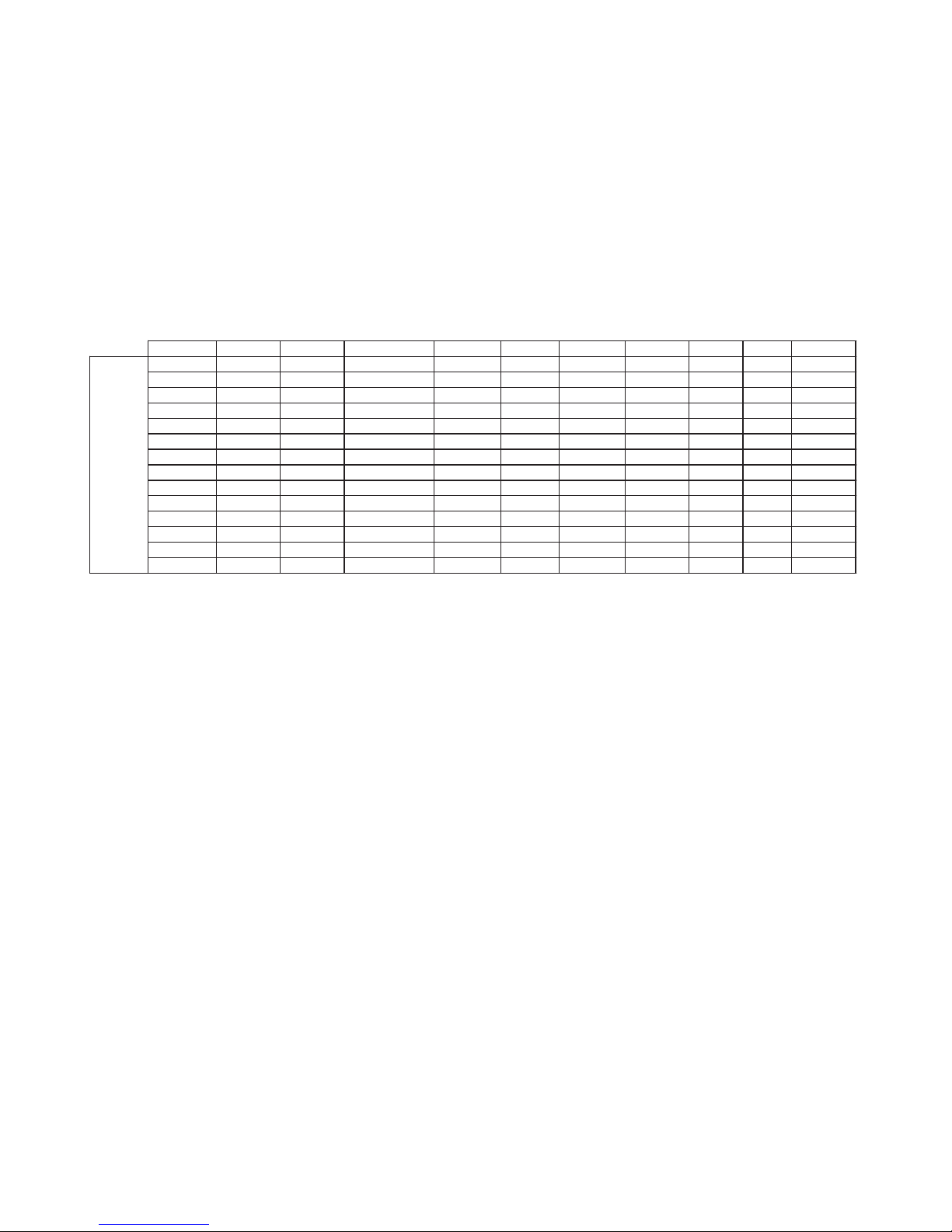
Program Check Procedure
Flash count Pulse High Pulse Low Pulse per dollar High speed Disabled cctalk plain cctalk 8 bit
low power binary Credit Hold
SSP 1
Pulse 2 ms/10 ms/10 value 3 flash
MDB 3
IF 30 4
IF 31 5
cctalk 6 1 flash 2 flashes
SIO 7 1 flash 2 flashes
Parallel 8 1 flash
SP 4 9 ms/10 ms/10 value 3 flash
NIS 10
IF 32 11 1 flash
spare 12
spare 13
spare 14
Page 3
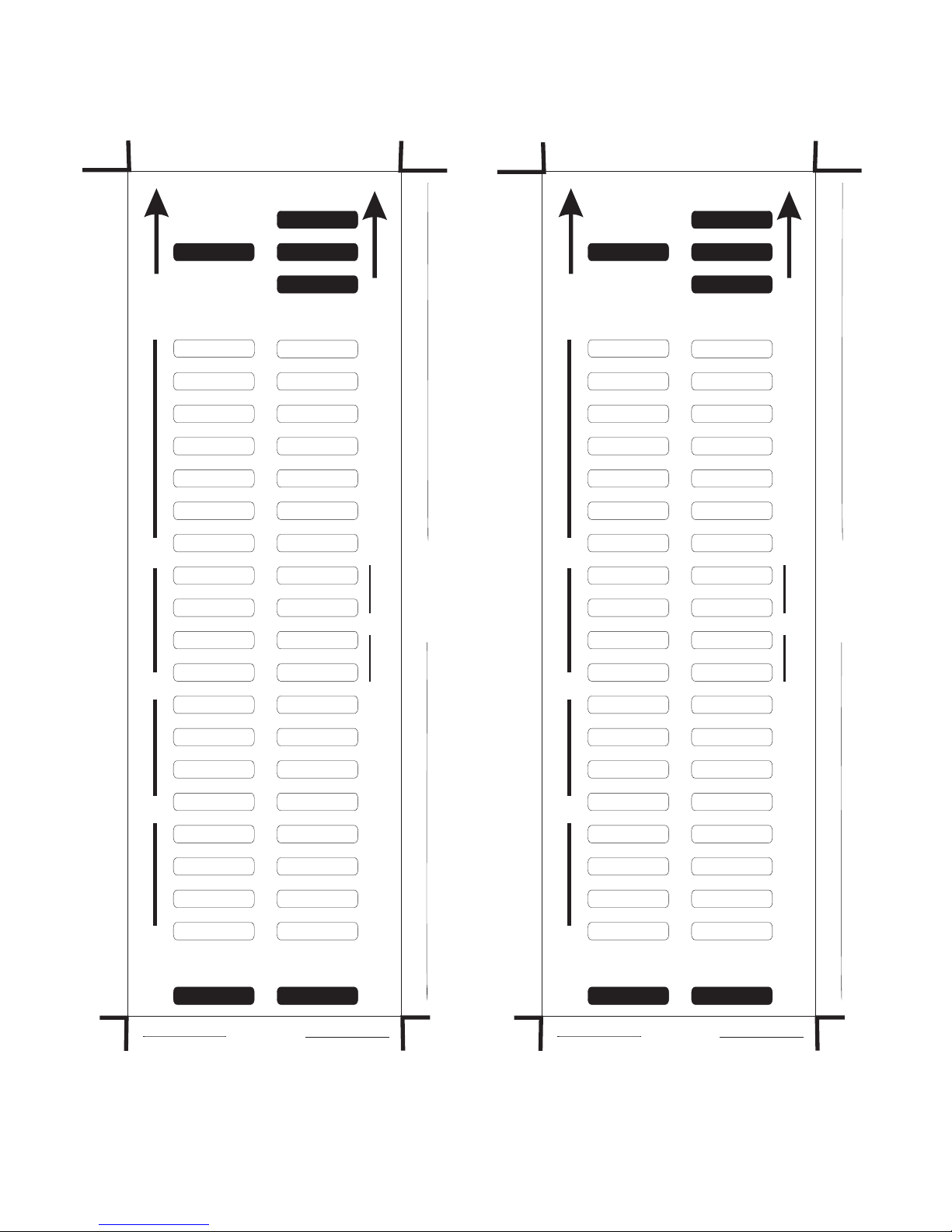
7
6V
1. 6
V
.7
66
1
P
s
e
e
t
in
g
s u
l S
t
P s i
ng
s
u
l
e
Set
t
S e
e
p
d
eSpe
d
P
u
l
s
es
Per
D
o
l
l
a
r
Pulse
s
P
e
r
D la
r
ol
n
ts
I hib
i
n tI
h
ibi
s
Op
t o
si
n
o
O
p
t
i
ns
n
r eI t
e
fac
I
n
t
e
r
fa
ce
SSP SSP
MDB MDB
IF 31 IF 31
SIO SIO
SP 4 SP 4
IF 32 IF 32
I/F Spare 2 I/F Spare 2
High 50ms High 50ms
Low 50ms Low 50ms
1 1
2 2
Bill 1 Bill 1
Bill 2 Bill 2
Bill 3 Bill 3
Bill 4 Bill 4
High Speed High Speed
Start Disabled Start Disabled
Low Power Low Power
Credit Hold Credit Hold
PULSE PULSE
IF 30 IF 30
CCTALK CCTALK
PARALLEL PARALLEL
NIS NIS
I/F Spare 1 I/F Spare 1
I/F Spare 3 I/F Spare 3
High 100ms High 100ms
Low 100ms Low 100ms
4 4
8 8
Bill 5 Bill 5
Bill 6 Bill 6
Bill 7 Bill 7
Bill 8 Bill 8
cctalk plain cctalk plain
cctalk 8 bit chk cctalk 8 bit chk
Binary Binary
option spare 3 option spare 3
Insert this end first Insert this end first
66mm 66mm
2
4mm0
4
mm
2
0
66mm Bezel
Page 4
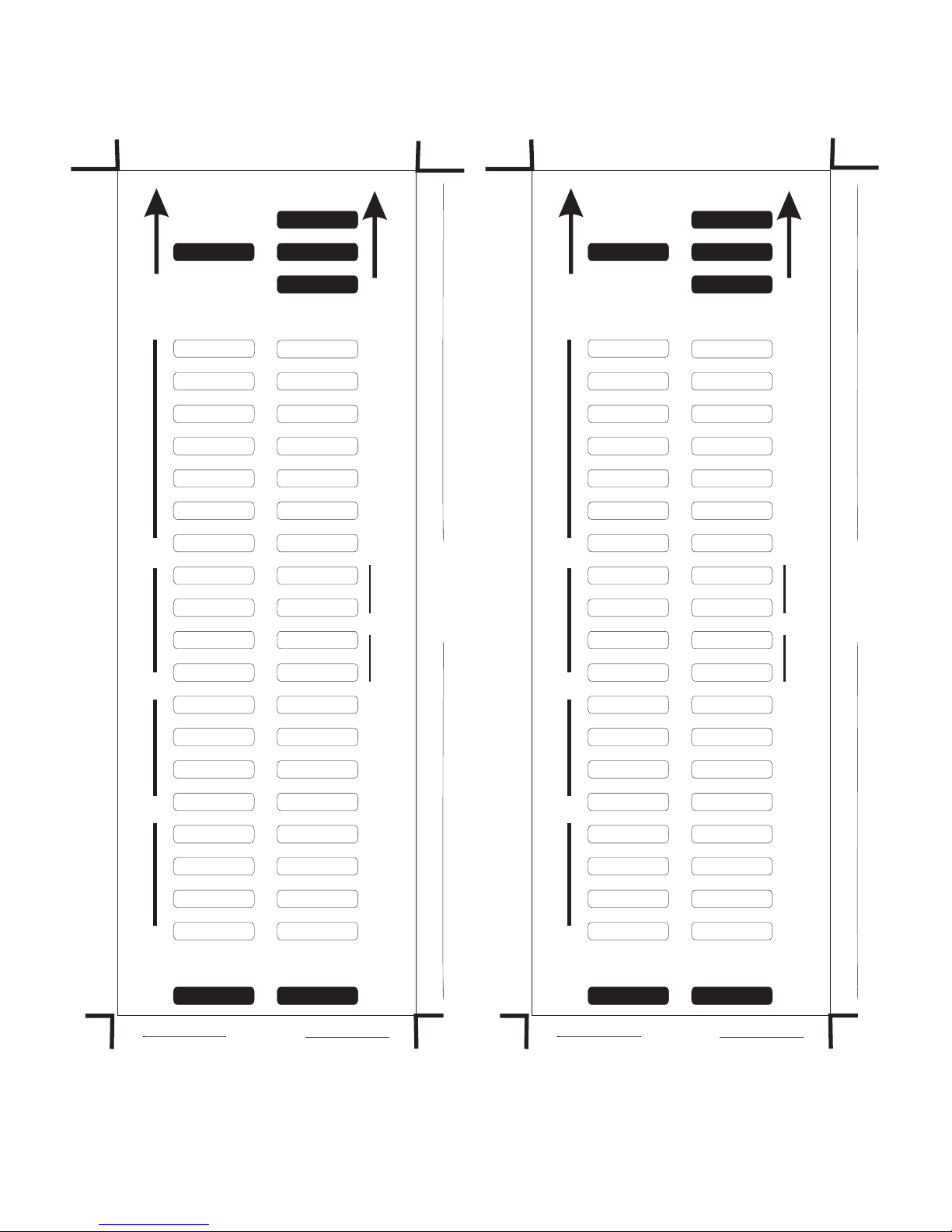
V
1
.7
72
V
.7
7
2
1
P
s
e
e
t
in
g
s u
l S
t
P s i
ng
s
u
l
e
Set
t
S e
e
p
d
eSpe
d
P
u
l
s
es
Per
D
o
l
l
a
r
Pulse
s
P
e
r
D la
r
ol
n
ts
I hib
i
n tI
h
ibi
s
Op
t o
si
n
o
O
p
t
i
ns
n
r eI t
e
fac
I
n
t
e
r
fa
ce
SSP SSP
MDB MDB
IF 31 IF 31
SIO SIO
SP 4 SP 4
IF 32 IF 32
I/F Spare 2 I/F Spare 2
High 50ms High 50ms
Low 50ms Low 50ms
1 1
2 2
Bill 1 Bill 1
Bill 2 Bill 2
Bill 3 Bill 3
Bill 4 Bill 4
High Speed High Speed
Start Disabled Start Disabled
Low Power Low Power
Credit Hold Credit Hold
PULSE PULSE
IF 30 IF 30
CCTALK CCTALK
PARALLEL PARALLEL
NIS NIS
I/F Spare 1 I/F Spare 1
I/F Spare 3 I/F Spare 3
High 100ms High 100ms
Low 100ms Low 100ms
4 4
8 8
Bill 5 Bill 5
Bill 6 Bill 6
Bill 7 Bill 7
Bill 8 Bill 8
cctalk plain cctalk plain
cctalk 8 bit chk cctalk 8 bit chk
Binary Binary
option spare 3 option spare 3
Insert this end first Insert this end first
72mm 72mm
4
2
0
mm
2
04
m
m
72mm Bezel
 Loading...