

Page 1
0
INNOV.NET PTY LTD
User guide
Version1
2016
Page 2
1
INNOV.NET PTY LTD
Contents
Compatibility .................................................................................................................................................. 1
What’s in the package? ............................................................................................................................... 1
Setup the RM Pro .......................................................................................................................................... 1
Meaning of the LED indicators .................................................................................................................. 2
Setup e-Control on your smartphone ..................................................................................................... 2
Can I program a remote control using the Internet session while the Wi-Fi router is turned
on? .................................................................................................................................................................... 4
Can I add a new device of BroadLink using the Internet session? ................................................. 4
FAQ ................................................................................................................................................................... 4
Technical specification ............................................................................................................................... 9
Contact us: ................................................................................................................................................... 10
Compatibility: iPhone, iPad, iPod and Android devices. For Apple devices it requires iOS
6.0 or latest.
Language support: English, French, Hebrew, Japanese, Portuguese, Russian, Chinese,
Spanish, and Vietnamese.
What’s in the package?
RM Pro x 1; USB Cable x 1; Adapter x 1 and a user guide.
Setup the RM Pro
* You need the Wall mount USB power adaptor and RM Pro.
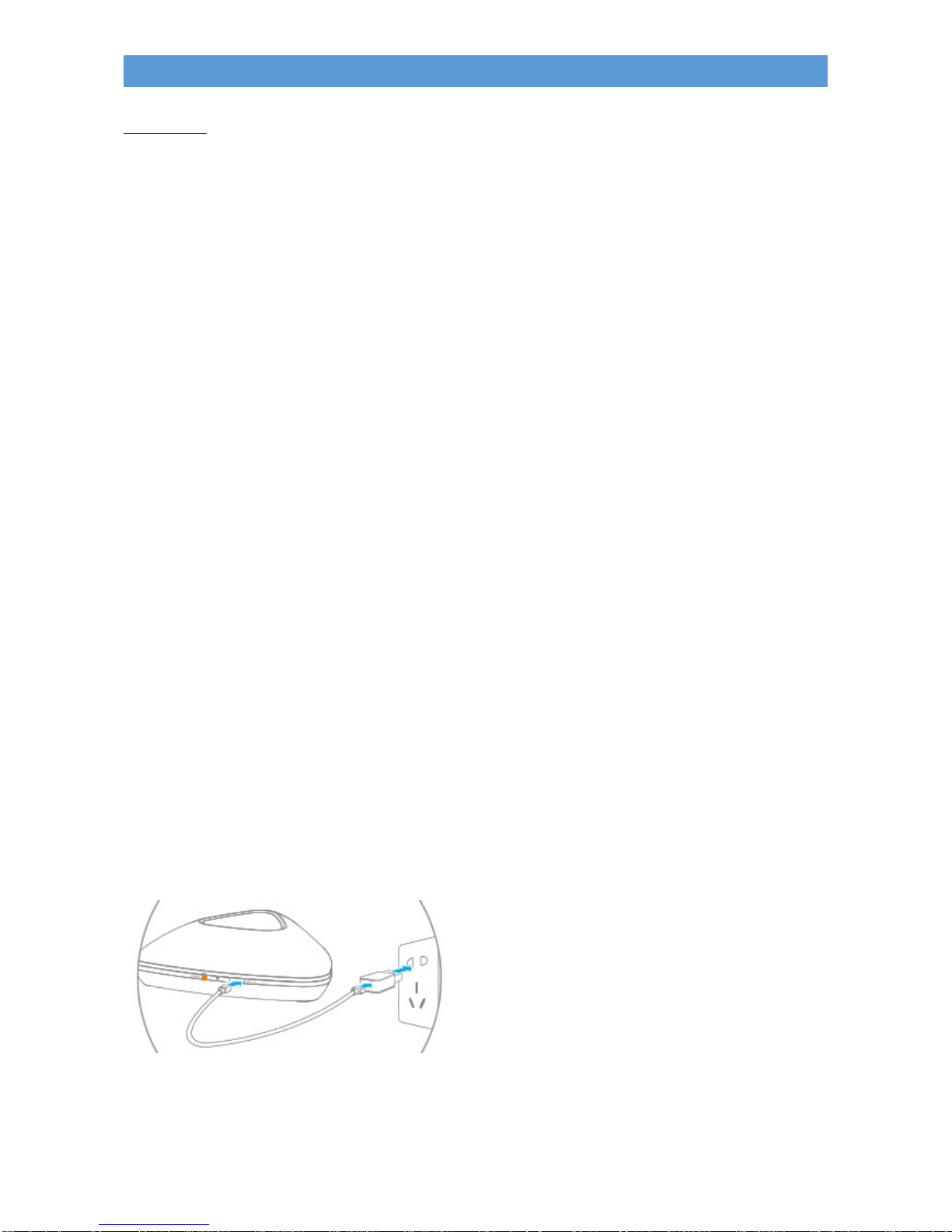
* Connect the USB cable to your RM Pro as shown below.
* Plug in the RM Pro into the General Purpose Outlet.
* Turn on the RM Pro.
Page 3
2
INNOV.NET PTY LTD
* The blue light on the RM Pro will be constantly blinking. This mean the RM Pro is ready
to pair the device. If the blue light is stationary, you need to press and hold the reset button
on the RM Pro for 3 seconds and release it then the light will start blinking.
Meaning of the LED indicators
a) Blue LED flashes rapidly: The device is in configuration mode (SmartConfig™) and
waiting for setup. This mode is enabled after the device is powered on for first time or you
long press the reset button.
b) Blue LED flashes every second: The device configuration is failed. This is usually
caused by incorrect input of password. Please reset the device and try again.
c) Blue LED flashes blink for 4 times and stop for 1 sec. and repeats the cycle: The device
is in AP configuration mode. This mode is enabled after you long press the reset button
when the device is already in configuration mode.
d) Off: The device is configured successfully. You can view the device shortcut icon in the
main control page or tap the + icon on top right corner and then choose Device list to view
the device.
Setup e-Control on your smartphone
* Download e-Control software from your App Store (iOS) or Google Play
(Android).
* Turn on your Wi-Fi router of where the RM Pro is residing.
* Ensure your smartphone is connected to your Wi-Fi network and your RM Pro is blinking.
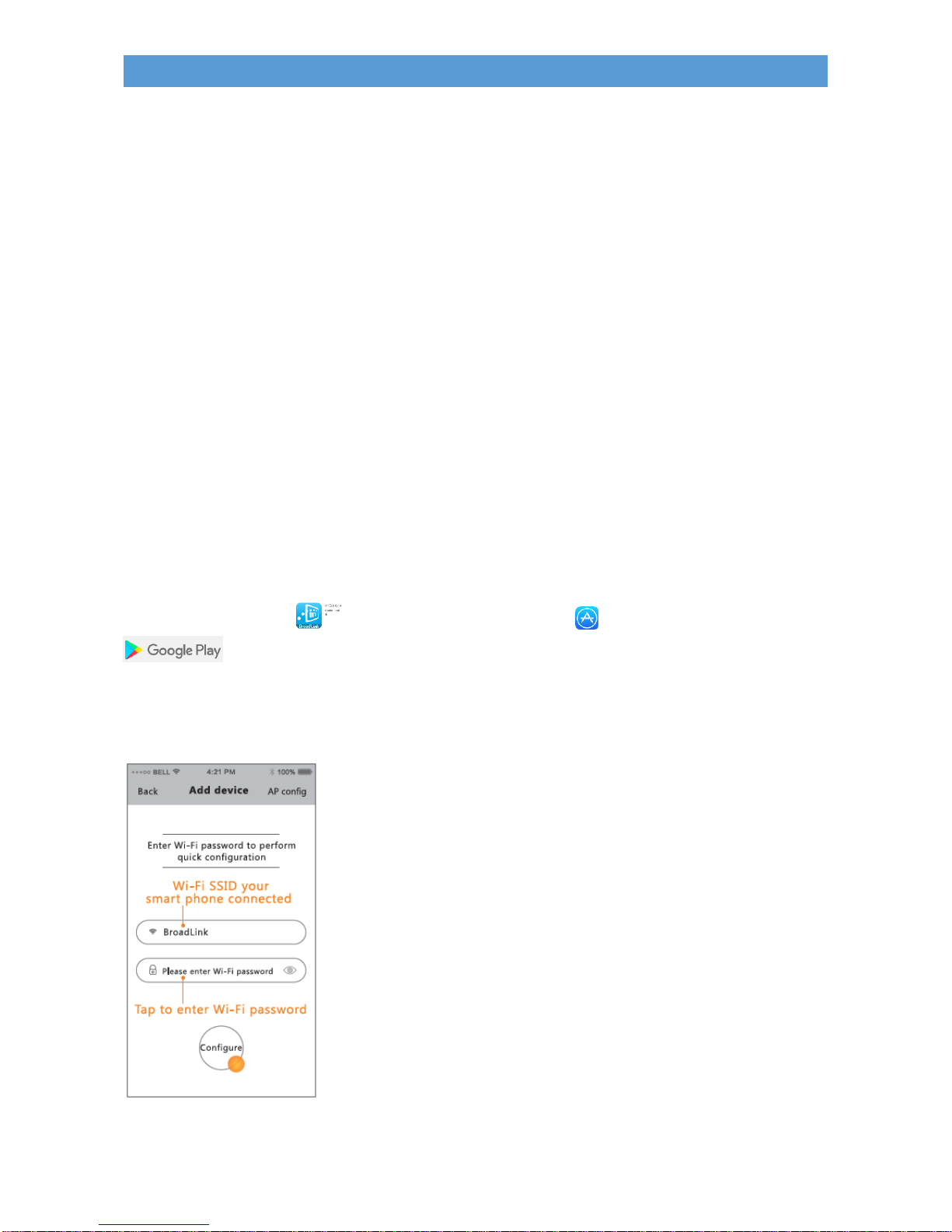
* Open the e-Control software and tap the + icon on top right corner then choose Add
device.
Page 4
3
INNOV.NET PTY LTD
* In the configuration page, the Wi-Fi SSID should be filled automatically and you just need
to input the password of your Wi-Fi network to start the configuration.
* Once the e-Control detected the RM Pro, the eRemote will automatically be displayed on
the Device list.
* Tap on the eRemote and commence pairing your remote control devices.
Note: The password of your Wi-Fi network will be saved and you will never need to input
the password the next time when you configure the devices.
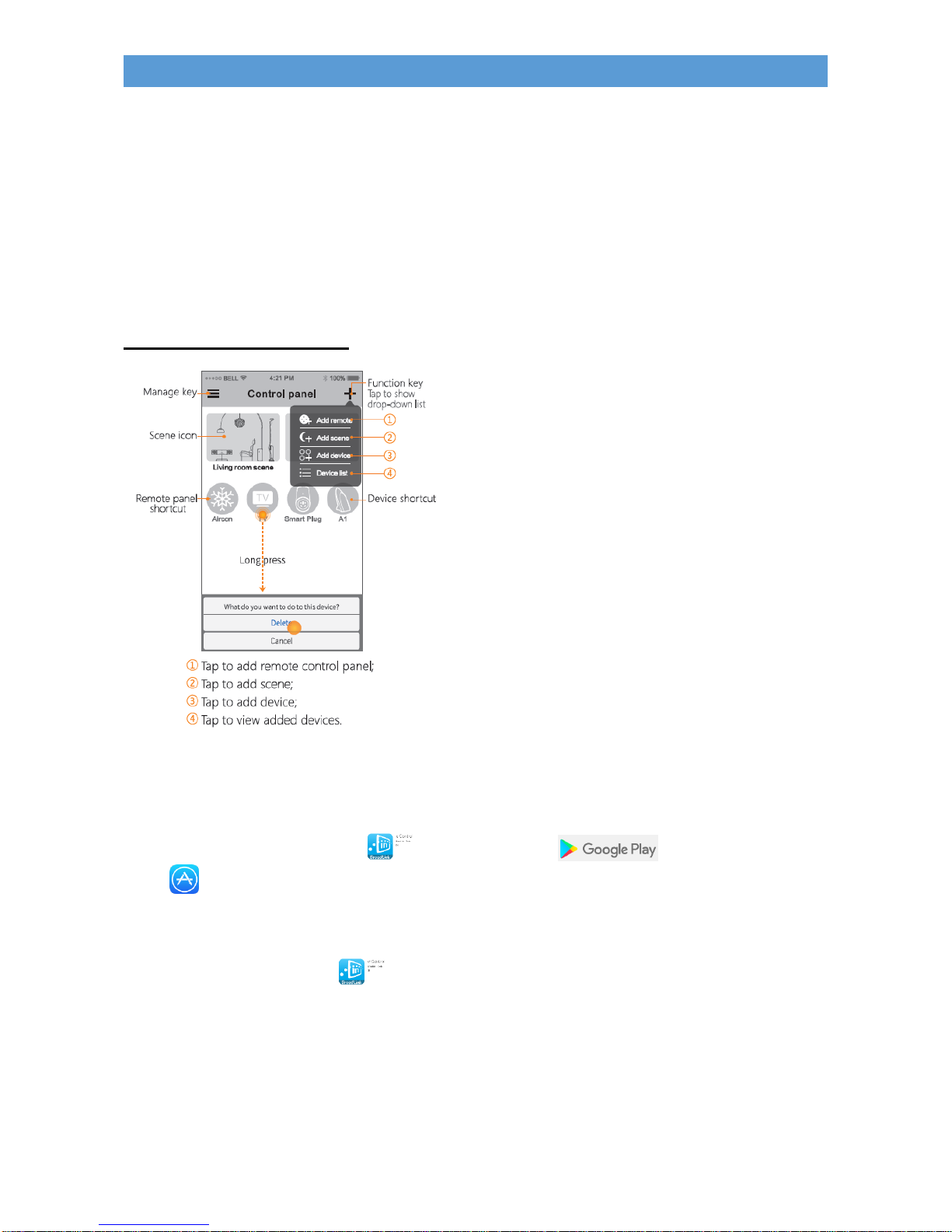
Control panel explanations
How to pair a remote control with RM Pro from your smartphone?
To pair the remote control with RM Pro from your smartphone, follow the below
instructions:
* Download e-Control software from Google Play (Android) or App
Store (iOS) to your smartphone.
* Turn on your Wi-Fi router.
* Turn on the RM Pro.
* Place the remote control next to the RM Pro.
* Tap on the e-Control icon from your smartphone.
* You will need to select an RM device before choosing remote type if you have more than
one RM device.
* At the top right corner tap the + icon and select Add remote.
* Select a remote template.
* Press a button from the remote control once and you will see the amber light flashing on
the RM Pro and your smartphone displayed the message as Saved successfully.
* Complete the programming of the buttons of the remote control.
Page 5

4
INNOV.NET PTY LTD
* Tap on the icon < back button from the top left corner of the e-Control’s software.
* An icon will be created and displayed on the Control page. Now test the function of the
icon that was created.
Can I program a remote control using the Internet session while the Wi-Fi router is
turned on?
Yes. You can. Ensure the RM Pro is placed next to your remote device.
Can I add a new device of BroadLink using the Internet session?
No. To add a new device it requires the Wi-Fi router’s authentications. That is to verify the
Wi-Fi’s login name and the password.
FAQ
How to pair the air conditions with the RM Pro?
Follow the below instructions:
* Plug in and turn on the RM Pro where it closes to the air condition unit.
* Place the air condition’s remote control and your smartphone next to the RM Pro.
* Start pairing the remote control.
Can a single RM Pro handle all the remote controls of the house?
It is depending on the location of the remote control’s appliances were installed. RM Pro
works within the reception of the signal. If the remote control’s appliances are separated
with a partition wall, then it is required another RM Pro to control from there.
Can RM Pro work on tablets?
Yes. It can. Provided the tablet has the Internet and Wi-Fi capabilities.
When I clicked on the http://www.iBroadLink.com/en/sa/sa2015003.pdf and got the
error message.
Ignore the error message. The sa2015003.pdf file is a user guide.
Do I need to install an additional program to enable the connection of RM Pro?
No. The RM Pro has a built-in software that can detect, communicate and connect to the
Wi-Fi router. However, in order for the RM Pro to work, the Wi-Fi router must turn on all
the time.
How to update the firmware of RM Pro?
In the e-Control software, tap on the + button on the top right corner, then tap on the
Device list and select eRemote from the list. Tap on the setting icon that is located at
the top right corner and select Device info. Tap on the Firmware update. This will update
the firmware to the latest version.
How to reset the RM Pro?
On the RM Pro, use a paper clip pin and press on the Reset’s hole until the amber light is
flashing and then release it. Then the RM Pro is back to default factory status.
Page 6
5
INNOV.NET PTY LTD
What should I do if my smartphone is lost?
To avoid unauthorized usage of your device(s) you should power off all the BroadLink
devices and reset it.
Does the product support 5G network configuration?
BroadLink’s products are currently supporting 2.4G Wi-Fi network only.
e-Control application
Where can I download the e-Control application?
The e-Control application is available from Google’s Play Store for Android devices or App
Store for iOS devices.
Is the e-Control application free?
Yes it is.
What is the e-Control application icon looks like?
The e-Control application icon looks like this .
Can all BroadLink products controlled by the e-Control software?
Yes it can.
Can I pair multiple remote controls with RM Pro simultaneously?
No. The RM Pro can only pair one remote control at a time.
How to protect my device and avoid being searched by others?
BroadLink's devices are connected to your secured Wi-Fi router. Therefore your device will
be seen and control by you. In addition, there is a lock features in the e-Control software
you can explore.
How to lock my devices in e-Control?
Go to the Device list and tap on the device icon that you wish to lock. Then tap on the
setting icon on the top right corner and tap on the Lock device's button.
Can I control BroadLink devices when I am away from home?
Yes. You can. All BroadLink devices are automatically linked to the Internet only when
your Wi-Fi router is turned on and has Internet access. The BroadLink devices enables the
owner to remote control the devices anywhere in the world from the smartphone via
Internet.
Will the device settings lost when my phone has no network connection or it is
powered off?
Page 7
6
INNOV.NET PTY LTD
No. All action settings are saved in the device permanently unless you reset the device.
The settings or configuration of the BroadLink devices in your phone will stay unless you
have changed or deleted it.
What to do when I make a mistake while pairing the remote control?
You can redo it by deleting the icon first. First hold on the icon for more than 1 second and
the option list will display. Tab on the Delete button and the icon will be deleted and you
may start pairing again.
Can I modify the name of my device?
Yes you can. There are couple easy methods to modify the device name as follows:
Method 1
* Tap on the icon you wish to change the name. Then tap on the setting icon on the
top right corner and tap on the Device info. In the Name’s field delete the existing one and
key in the new name then tap on the Save button on the top right corner.
Method 2
* Long press the device item on the device list and choose “Edit name” from popup menu.
Then in the device operation page, tap the icon on top right corner and choose “Edit
device”.
Can I take a picture of the device and use it as an icon for the device?
Yes. You can. Tap on the icon you wish to change the picture of the icon. Then tap on the
setting button on the top right corner and tap on the Device info. In the Icon’s field, tap on
the > button and an option list will be displayed. Select Take a picture and once you
happy about it tab on the Save button on the top right corner.
(Please note: the picture will be stored in the smartphone).
What to do when I cannot find a template for my device?
A User-Defined template is readily available from the e-Control under Add remote.
Received “Connection offline” messages. What to do?
Need to restart the smartphone.
Receives “Poor internet connections…” messages. What to do?
Ensure the Internet signal coverage is strong and perform the required task again. If that
doesn’t work, restart the smartphone.
How to find out the firmware version of RM Pro?
Log in to the e-Control app, in the Control page, go to the top right corner and tap on the
“+” icon, then a list of the device will be displayed. Tab on eRemote and on the top right
corner, tap on the setting on the top right corner, and tap on Device info. Select
Firmware update and the firmware version shall display on your smartphone. This is also
where you update the firmware.
What is the function of Push Message in e-Control?
The function of Push Message in e-Control is to grab the information from the server and
send to a smartphone immediately. Eg, in S1, when a door is opened and instantly a
message will send to smartphone and inform the owner of the situation.
Page 8

7
INNOV.NET PTY LTD
How to delete the device permanently from e-Control?
In the main control page, tap “+” on the top right corner and choose “Device list” to view
all devices. For iOS system, slide from right to left on a device item to delete it; For
Android system, long press the device icon and choose “Delete” to delete the device.
How to backup and restore settings?
You can back up all device and software’s settings to cloud and restore it when needed.
To do so, it is required to login to your account before engaging the backup operations.
To back up the settings, tap on the icon at the top left corner and then choose “Backup” in
the menu. Tap “Backup to cloud” and choose “OK” to start backup.
To restore the settings, tap on the icon in top left corner and then choose “Backup” in the
menu. Tap “Cloud backup list” and choose a backup file from the list to start restoration.
Note: After restoration, you need to connect your devices in the same WiFi (WLAN)
network before using the device.
How to share settings with other phones?
Settings can be shared to other phones but must be on the same WiFi (WLAN) network
and software version without using account. To share the setting follow the below
instructions:
* Tap the icon in the top left corner and then choose “Share” in the menu. Tap “Share to
other phones in WLAN” to prepare the sharing.
* On another phone, tap “Import from shared phone in WLAN” in “Share” menu, the
software will search available sharing data and import it.
Note: Keep your phone active and unlock during sharing and importing.
What is “Cloud Share”?
You can use cloud share function to share your RM panel to the cloud. Other users can
download the shared panel and do not need to learn each button.
How to use Access Point (AP) configuration?
* Make sure Wi-Fi (WLAN) is enabled on your smartphone and your device is in AP
configuration mode. Slow blink for 4 times and stop for 1 second and repeats the cycle:
Now the device will be in AP configuration mode. This mode is enabled after you long
press the reset button when the device is already in configuration mode.
* Open the app, tap the “+” icon on top right corner and then choose “Add device”.
* In the configuration page, tap “AP mode” on top right corner and tap “OK” after you read
the prompt. The app will lead you to the Wi-Fi selection page.
* Connect to the network “BroadlinkProv” and tap to return. The app will show a Wi-Fi list.
Please designate the same Wi-Fi network you used before AP configuration and input the
password.
* After configuration, the app will automatically connect to your previous Wi-Fi network and
you will see the device in the list.
Note: When using AP configuration, your smartphone should connect to the same Wi-Fi
network that you want the devices to connect to.
Page 9

8
INNOV.NET PTY LTD
What should I do if the data is lost or devices cannot be controlled after the
software is updated?
Check if you have deleted the files under BroadLink directory (for Android phones it is
stored in the root directory of SD card) including pictures or changed the SD card. If you
have done the above operations by mistake, please uninstall the APP and reinstall the
software.
How to learn infrared code?
In the device panel, tap an unlearned button, a prompt box including “waiting for button
learning” will pop up and the orange LED of the device will be on. Point the remote to RM
and press the matching button on remote. If the orange LED is off and it shows “Save
Successfully”, it means the learning is successful. Then you can tap the learned button
on APP, if the orange LED is on, which means the IR command is sent successfully.
How to learn an aircon remote automatically by using the template of Pre-Defined
Aircon?
When you add a remote, select “Air Conditioner”. A prompt box will pop up and the
orange LED will be on. Then press any button of “ON/OFF” / “Mode” / “Temperature up
and down” etc and the orange indicator will be off. The device will search the IR code in
the cloud code library and download the matching template. After the template is
downloaded, you can test your smart phone by controlling the aircon.
Why can’t I use some of the buttons in Pre-Defined Aircon panel?
Try to program and learn more buttons. Alternatively you might like to use User-Defined
aircon template and learn each button. Customer can also submit an email request to
include the model of the remote control to [email protected]. We will check
with our engineer and about the request and reply to you.
How to add a User-Defined Aircon?
The IR code of aircon is more complex than TV. Each button of TV remote only represents
a specific IR code. Each button of aircon may trigger a code combination, including
temperature, mode, wind speed, etc. So we pre-define buttons for frequently used
functions, such as cooling, heating, and auto mode. Each of them are treated as ON
button for a combination. For example, if you want to learn cooling at 22°C, you should
pre-set the mode to cooling and temperature to 22°C on your remote and then press the
ON/OFF button to turn off the aircon. Tap Cooling at XX°C in the panel on APP to prepare
learning. Now, press ON/OFF button on the remote control to finish the learning and the
learned status should displayed as turn on cooling at 22°C. You can learn the OFF
button in any status when you press the ON/OFF button to turn off the aircon (Although we
use only one button for both ON and OFF functions on aircon remote but in the APP you
need to learn them separately.)
You can repeat the above learning steps to learn all the status with all temperature levels.
How to learn a combination button?
Choose an unlearned user-defined button and tap “Learn combo” to start the learning.
Combination button learning can execute multiple commands. For example, if you want to
switch to Channel 128 for TV, you need to learn button 1, 2 and 8 one by one. When you
tap the button CH128, it will execute the command 1-2-8, just like you press the buttons 1,
Page 10
9
INNOV.NET PTY LTD
2 and 8 on remote. You can also learn a combination button to turn on set-top box, TV and
audio just by pressing one button.
Why can’t I learn any button in “mi TV” and “Apple TV” panel?
These two panels are pre-set with all IR codes for mi TV and Apple TV which can be used
by users directly without learning.
What is scene?
It is a pre-program function to activate all selected devices with pre-set time lag. Customer
can select devices and define the action of each device.
How to set the timer tasks of the RM?
Long press the learned button on the panel and tap Timer ON. After setting, tap Save on
top right corner to save the timer.
How many timer tasks can be added for RM Pro?
15.
How to delete the timer task in e-Control?
On remote list page, tap … on top right corner and select Timer. You can view and delete
the timers here.
How to update the e-Control’s app?
Like any smartphone’s apps, when there is a new update available, your smartphone will
prompt you to update the app. This applies to Android and Apple devices.
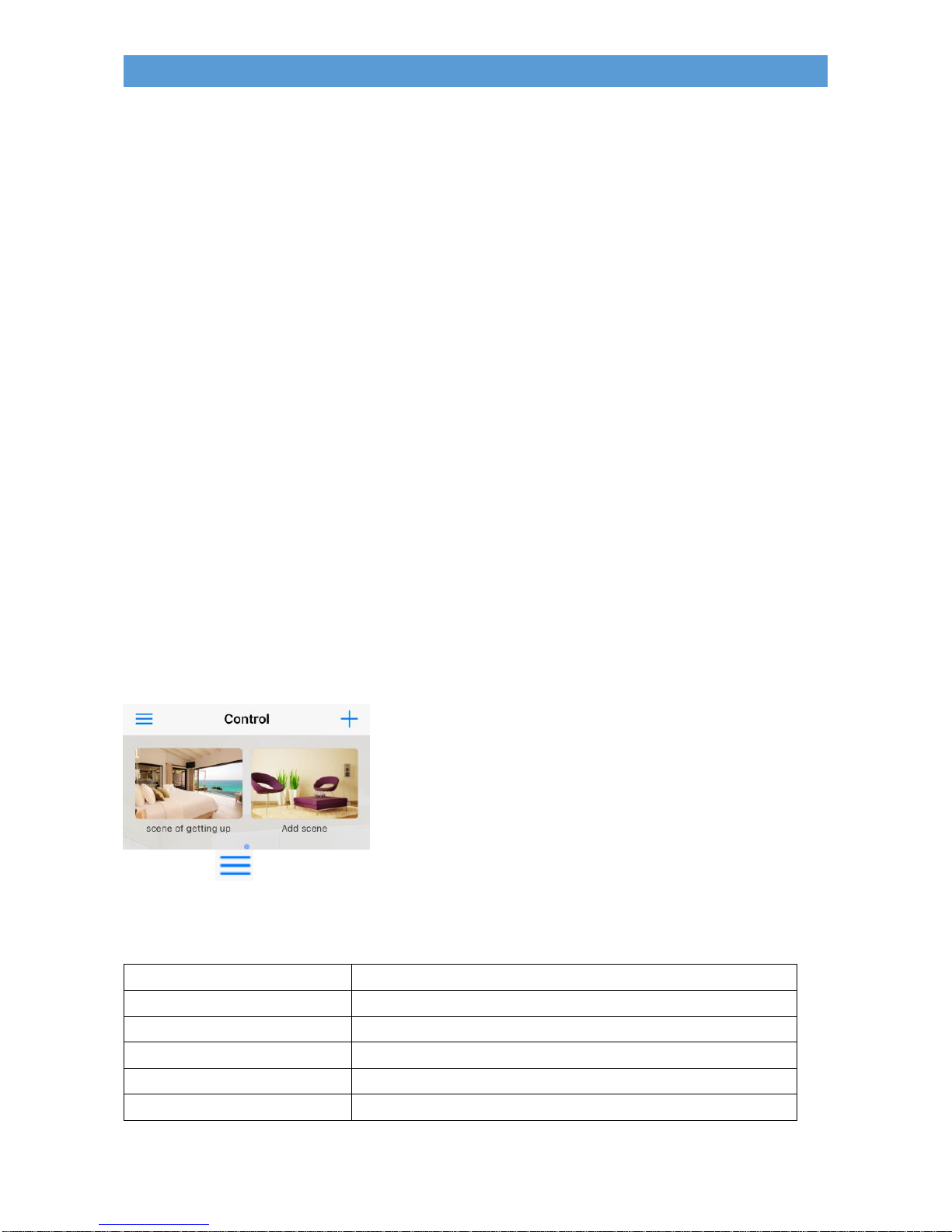
How to find out e-Control’s app version number?
In the Control page as shown below,
click on the icon, select Settings -> About BroadLink -> then you should be able to
see the version starting with v follows by the numeric figures.
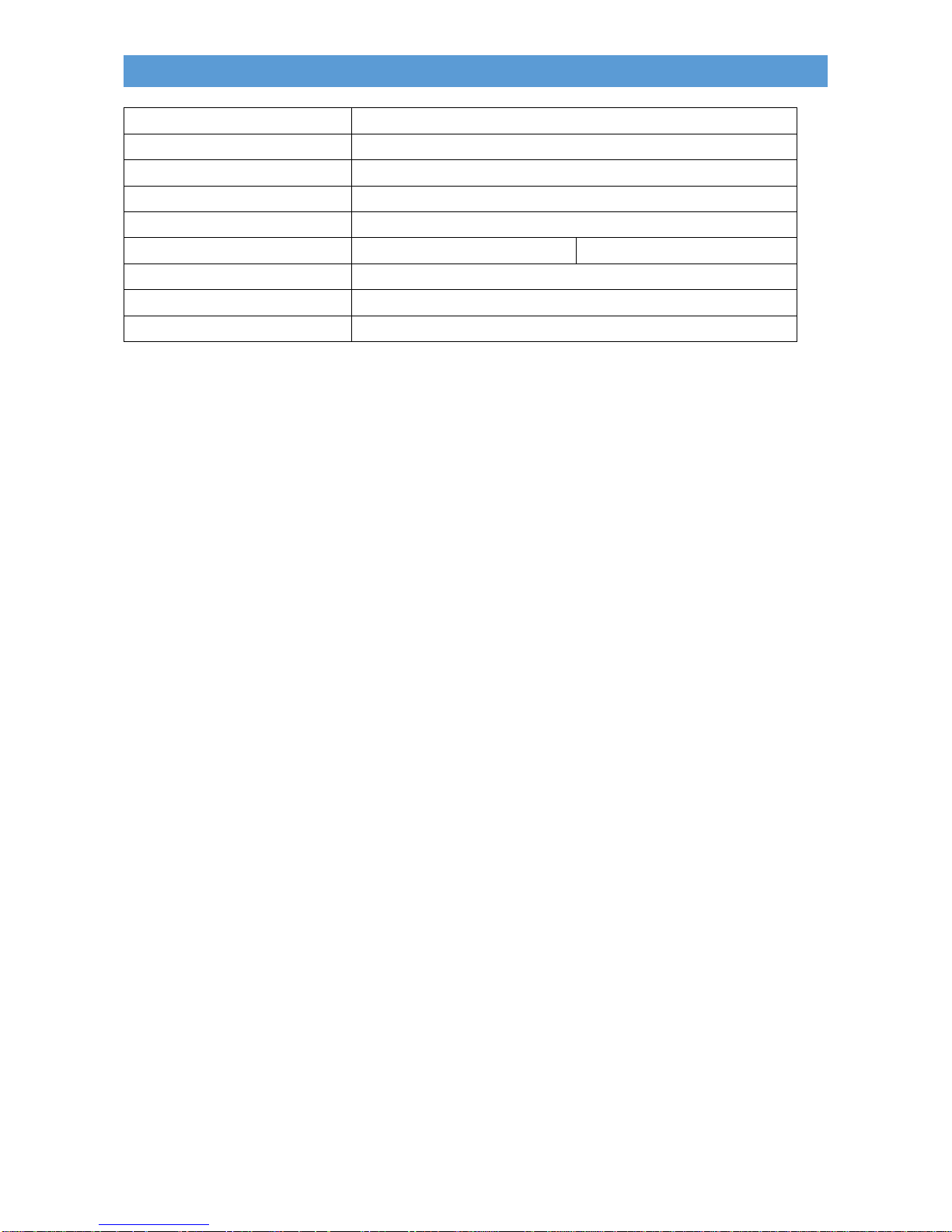
Technical specification
Product
RM pro
Communication Mode
Wi-Fi: 802.11 b/g/n (2.4GHz)
Wireless Power
≤0.5W
Operating Related Humidity
5~95%
Operating Temperature
-10-60°C
Power Supply
AC100~240V,50/60Hz
Page 11
10
INNOV.NET PTY LTD
Power Input
DC 5V1A (Micro USB )
Infrared frequency
38K
Infrared Direction
All Directions
Infrared Control Range:
8-10m
RF Control Range
20m
RF Frequency
433: 432.5MHz~437.3MHz
315: 313.9MHz~317.7MHz
Device size (mm)
114.5 x 109 x 36
Package size (mm)
136 x 136 x 72
Weight
143g
Contact us:
Innov.Net Pty Ltd
Email: [email protected]; www.innovnet.com.au
 Loading...