

Page 1
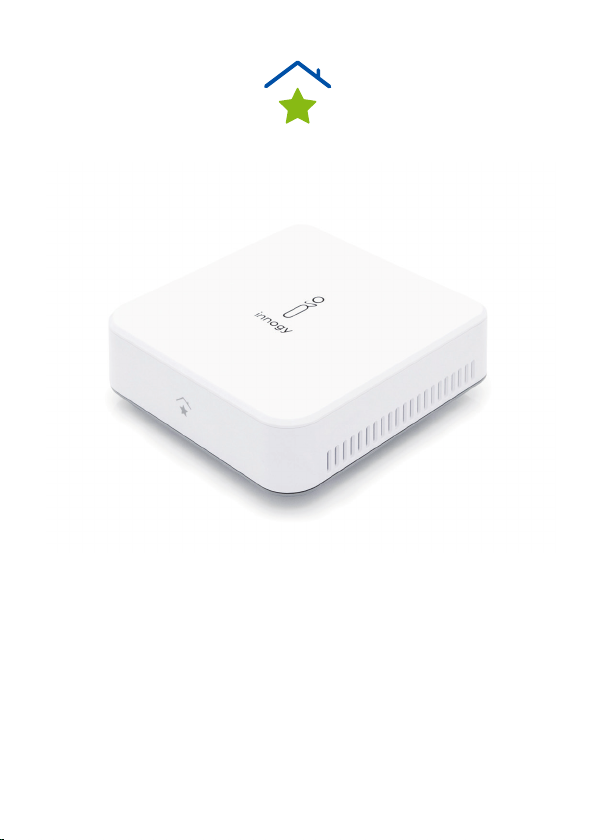
DE innogy Aufsatzmodul Seite 2
EN innogy plug- on module Page 14
FR innogy module complémentaire Page 26
NL innogy opzetmodule Pagina 38
Page 2

DE DE
Hinweise zu dieser Anleitung
Lesen Sie vor der ersten Inbetriebnahme diese Bedienungsanleitung und die Bedienungsanleitung zu den eingebundenen
SmartHome Komponenten gründlich durch und befolgen Sie
vor allen Dingen die Sicherheitshinweise!
Alle Tätigkeiten an und mit diesem Gerät dürfen nur soweit
ausgeführt werden, wie sie in der Bedienungsanleitung beschrieben sind.
Halten Sie diese Bedienungsanleitung stets griffbereit und bewahren diese gut auf, um sie bei einer Veräußerung dem neuen
Besitzer weitergeben zu können!
2
Page 3
Bestimmungsgemäßer Gebrauch
Mit dem innogy Aufsatzmodul können Sie neben den SmartHome Geräten von Medion gleichzeitig auch die Geräte von
innogy einbinden und steuern. Achten Sie daher darauf, dass
dieses Aufsatzmodul vor dem Einbinden der innogy SmartHome
Geräte auf die Medion Smart Home Zentrale gesteckt ist.
Bitte beachten Sie, dass im Falle des nicht bestimmungsgemäßen Gebrauchs die Haftung erlischt!
Gefahrenhinweise
• Bauen Sie das Gerät nicht ohne unsere Zustimmung um
und verwenden Sie keine nicht von uns genehmigten oder
gelieferten Zusatzgeräte.
• Verwenden Sie nur von uns gelieferte oder genehmigte
Ersatz- und Zubehörteile wie z. B. mitgelieferte Originalnetzteile für die Spannungsversorgung.
• Verletzungsgefahr durch Stromschlag/Gefahr von Geräte-
schaden!
• Beachten Sie alle Informationen in dieser Bedienungsanlei-
tung, insbesondere die Sicherheitshinweise. Jede andere
3
Page 4

DE DE
Bedienung gilt als nicht bestimmungsgemäß und kann zu
Personen- oder Sachschäden führen.
• Betreiben Sie das Gerät nur in Innenräumen. Vermeiden Sie
den Einfluss von Feuchtigkeit, Staub sowie Sonnen- oder
andere Wärmebestrahlung.
• Nutzen Sie das Gerät nicht unter extremen Umgebungsbe-
dingungen.
• Ziehen Sie immer am Stecker, nicht am Netzkabel.
• Geräte nicht in Betrieb nehmen, wenn sie sichtbare Schäden
aufweisen.
• Auf keinen Fall selbstständig Veränderungen an den Geräten vornehmen oder versuchen, ein Geräteteil selbst zu
öffnen und/oder zu reparieren. Die Geräte beinhalten keine
zu wartenden Teile.
• Wenn Sie einen Transportschaden feststellen, wenden Sie
sich umgehend an den innogy SmartHome Kundenservice.
4
Page 5

Voraussetzungen
• Medion Smart Home Zentrale
• Internet-Router (WLAN möglich)
• Smartphone, Tablet oder ein PC mit einem
aktuellen Browser.
Lieferumfang
1 x Gerät
2 x Befestigungsschrauben
5
Page 6

DE DE
Montage
Um das innogy Aufsatzmodul anzubringen, gehen Sie wie
folgt vor:
1. Drücken Sie mindestens drei Sekunden die Powertaste
an der Medion Smart Home Zentrale zum Herunterfahren
des Betriebssystems.
2. Nachdem die LED der Powertaste erloschen ist, ziehen Sie
den Anschlussstecker des Netzteils heraus.
3. Hebeln Sie an den Aussparungen die Deckel sowohl von der
Medion Smart Home Zentrale als auch vom innogy Aufsatzmodul ab.
4. Setzen Sie das innogy Aufsatzmodul entsprechend der
Nuten auf die Medion Smart Home Zentrale und drücken Sie
dieses soweit herunter, bis es einrastet.
6
Page 7
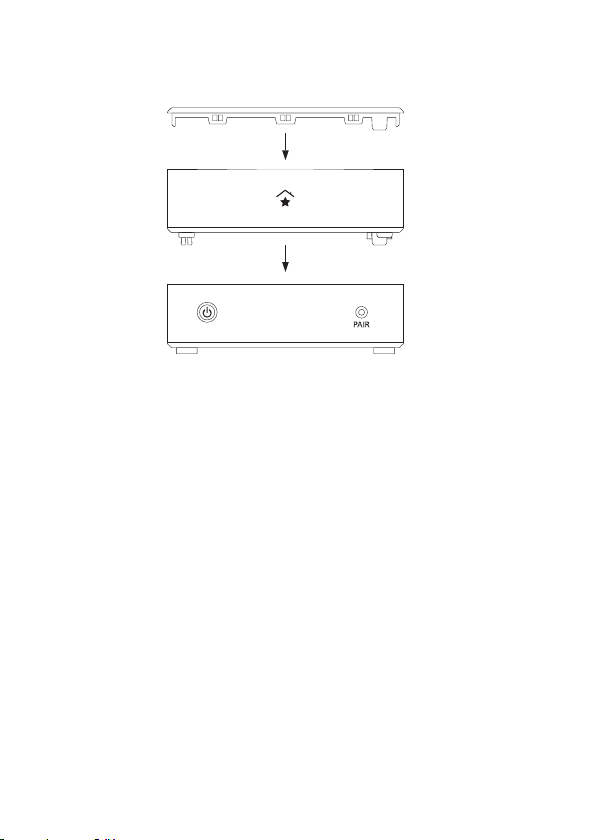
5. Verbinden Sie nun beide Geräte mit den mitgelieferten
Schrauben im Inneren des innogy Aufsatzmoduls.
6. Setzen Sie den Deckel wieder auf das innogy Aufsatzmodul.
7. Stecken Sie den Anschlussstecker des Netzteils wieder in
das Gerät.
Sie können jetzt mit der Inbetriebnahme/Ersteinrichtung
beginnen.
7
Page 8

DE DE
Inbetriebnahme
Sollten Sie bereits SmartHome Geräte über die Medion Smart
Home Zentrale steuern, können Sie ab sofort auch innogy
SmartHome Geräte einbinden und nutzen. Ihre bereits erstellten Szenarien und Einstellungen bleiben erhalten.
Ersteinrichtung für Neukunden
Führen Sie die Ersteinrichtung nur dann durch, wenn Sie noch
keine Medion Smart Home Zentrale nutzen.
Sie können die Registrierung der Zentrale im Internet unter
https://home.innogy-smarthome.de durchführen oder laden
die notwendige innogy SmartHome App im Google Play Store
bzw. im App Store herunter.
1. Registrieren Sie sich auf der Startseite Ihrer innogy SmartHome App oder mit Hilfe des Browsers als NEUKUNDE und
erstellen Ihr Benutzerkonto. Sie erhalten eine Bestätigungsmail in dem von Ihnen angegebenen E-Mail Postfach.
2. Drücken Sie zur Verifizierung auf den angegebene Link, der
Sie zur Anmeldung führt.
8
Page 9

3. Geben Sie Ihren Benutzernamen und das gewählte Passwort
ein, um sich anzumelden.
4. Wählen Sie nach erfolgreicher Anmeldung die Zentrale
(2. Generation) aus.
5. Folgen Sie den weiteren Schritten.
9
Page 10

DE DE
Allgemeiner Hinweis
Hiermit erklärt innogy SE, dass sich dieses Gerät in Übereinstimmung mit den grundlegenden Anforderungen und deren
einschlägigen Bestimmungen befindet:
• RE-Richtline 2014/53/EU
• Öko-Design Richtlinie 2009/125/EG
• RoHS-Richtlinie 2011/65/EU
Die vollständige Konformitätserklärung finden Sie unter:
www.innogy.com/SmartHome
innogy SE
Opernplatz 1
45128 Essen
Deutschland
10
Page 11
Technische Daten
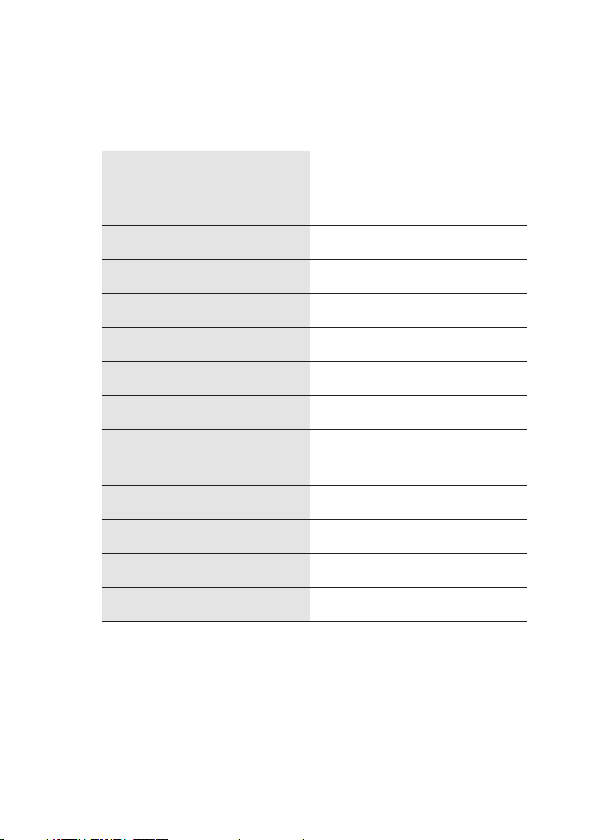
DC 5 V/0,5 A
Stromversorgung
Frequenzbereich 868,1 - 868,5 MHz
Max. Sendeleistung 10 mW
Freifeldreichweite 100 - 300 m ( je nach Funkpartner)
Dut y Cycle <1 % pro h
Empfängerklasse SRD Class 2
Schutzart IP20
(wird von der Medion Smart
Home Zentrale bereitgestellt)
USB-Anschlüsse
Umgebungstemperatur +5 °C bis + 35 °C
Luftfeuchtigkeit (Betrieb) 5 % bis 65 %
Abmessungen 115 x 115 x 41 mm (BxHxT)
Gewicht 142 g
3 x USB 2.0, max. 100 mA pro
Anschluss
Technische Änderungen vorbehalten.
11
Page 12
DE DE
Entsorgungshinweis
Gerät nicht im Hausmüll entsorgen! Elektronische
Geräte sind entsprechend der Richtlinie
für Elek tro- und Elek tronik-Altgeräte über die örtlichen
Sammelstellen für Elektronik-Altgeräte zu entsorgen.
Das CE-Zeichen ist ein Freiverkehrszeichen, das sich
ausschließlich an die Behörden wendet und keine Zusi-
cherung von Eigenschaften beinhaltet.
1. Ausgabe Deutsch 07/2018
Dokumentation © 2018 innogy SE, Deutschland. Alle Rechte
vorbehalten. Für Fehler technischer oder drucktechnischer Art
und ihre Folgen übernehmen wir keine Haftung. Alle Warenzeichen und Schutzrechte werden anerkannt. Änderungen im
Sinne des technischen Fortschritts können ohne Vorankündigung vorgenommen werden.
innogy SE
Opernplatz 1
45128 Essen
Deutschland
12
Page 13

Page 14

EN
Information about this manual
Read this operating manual and the operating manual for the
integrated SmartHome components thoroughly before initial
commissioning, and in particular follow the safety instructions!
All work on and with this device must only be carried out as
described in the operating manual.
Keep this operating manual to hand at all times and store it in a
safe place in order to hand it on to the new owner in the event
of a sale.
14
Page 15

EN
Intended use
In addition to the Smart Home devices from Medion, the
innogy plug-on module allows you to also integrate and control
devices from innogy. Therefore, make sure that this plug -on
module is plugged into the Medion Smart Home Central unit
before integrating the innogy SmartHome devices.
Please note that improper use will invalidate any liability!
Hazard warnings
• Do not convert the device without our consent and do not
use any accessory devices not approved or supplied by us.
• Only use spare parts and accessories supplied or approved
by us, such as the supplied original power packs for power
supply.
• Risk of injury from electric shock/risk of damage to equip-
ment!
• Note all the information given in this operating manual, par-
ticularly the safety instructions. Any other operation will be
deemed to be improper and may result in injury to persons
or material damage.
15
Page 16

EN
• Only operate the device indoors. Avoid the influence of
humidity, dust, sunlight and other heat radiation.
• Do not operate the device in extreme ambient conditions.
• Always pull on the plug, not on the power cable.
• Do not commission devices if they show visible signs of
damage.
• Do not in any circumstances independently make or attempt
any modifications to the devices or try and open and/or
repair a device part yourself. The devices do not contain any
parts to be serviced.
• If you identify any transport damage, contact the innogy
SmartHome Customer Service immediately.
16
Page 17

Prerequisites
• Medion Smart Home Central unit
• Internet router (WLAN possible)
• Smartphone, tablet or a PC with a current browser
Scope of delivery
1 x device
2 x fixing screws
EN
17
Page 18

EN
Installation
Proceed as follows to attach the plug-on module:
1. Press the power button on the Medion Smart Home Central
unit for at least three seconds to shut down the operating
system.
2. Once the LED in the power button has gone out, disconnect
the connecting plug of the power pack.
3. Lever off the covers of both the Medion Smart Home Central
unit and the innogy plug-on module at the recesses.
4. Place the innogy plug-on module on the Medion Smart
Home Central unit in line with the grooves and push down
until it engages.
18
Page 19
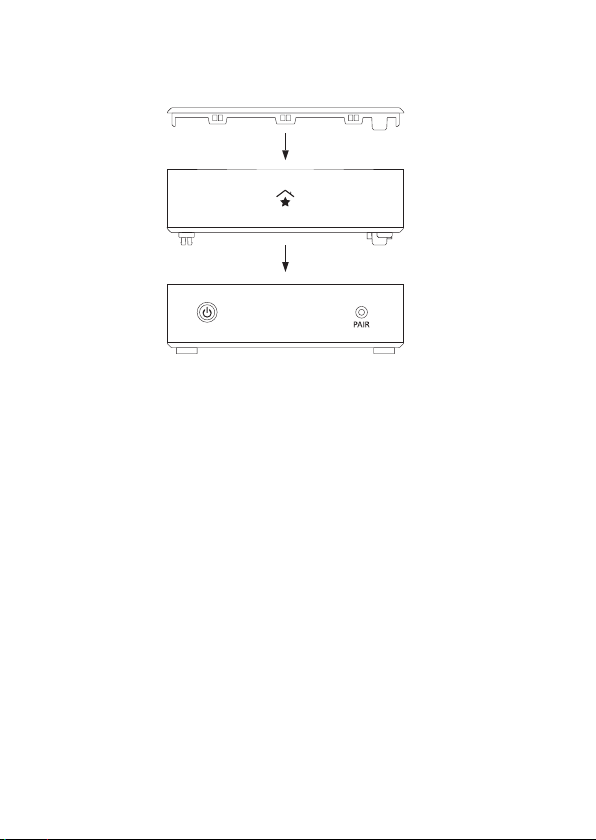
5. Now secure both devices using the supplied screws inside
the innogy plug-on module.
6. Place the cover back on the innogy plug-on module.
7. Plug the connecting plug of the power pack back into the
device.
You can now start commissioning/initial set-up.
EN
19
Page 20

EN
Commissioning
If you are already managing SmartHome devices via the Medion
Smart Home Central unit, you can also incorporate and use
innogy SmartHome devices with immediate effect. Any scenarios and settings you have already made will be retained.
Initial set-up for new customers
Only perform initial set-up if you do not already use a Medion
Smart Home Central unit.
You can register the centre online at
https://home.innogy-smarthome.de or download the innogy
SmartHome app from the Google Play Store or the Apple App
Store.
1. Register as a NEW CUSTOMER on the homescreen of your
innogy SmartHome app or using the browser and create
your user account. A confirmation e -mail will be sent to the
e-mail inbox you specified.
2. Click on the link given to verify this account and you will be
prompted to log in.
20
Page 21

EN
3. Enter your user name and the password you chose to log in.
4. After successful log-in, select the centre (2nd generation).
5. Follow the next steps.
21
Page 22

EN
General information
innogy SE hereby declares that this device meets the basic
requirements and the relevant provisions set out in:
• Radio Equipment Directive 2014/53/EU
• Ecodesign Directive 2009/125/EC
• RoHS Directive 2011/65/EU
You can find the complete declaration of conformity at:
www.innogy.com/SmartHome
innogy SE
Opernplatz 1
45128 Essen
Germany
22
Page 23
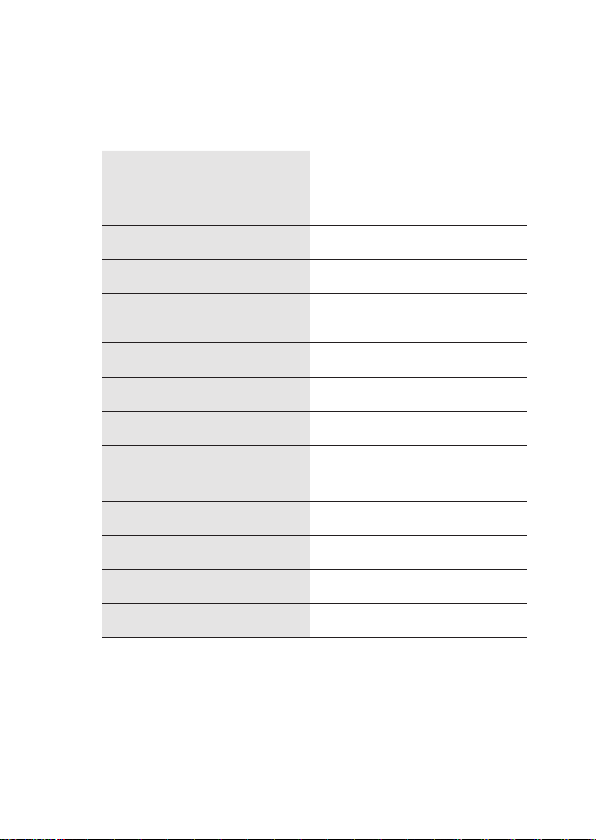
Technical data
DC 5 V/0,5 A
Power supply
Frequency range 868,1 - 868,5 MHz
Maximum transmission power 10 mW
Free-field range
Dut y Cycle < 1 % per hour
Receiver clas s SRD Class 2
Protection class IP20
(supplied by the Medion Smart
Home centre)
100 - 300 m (depending on the
radio partner)
EN
USB connections
Ambient temperature +5°C bis + 35°C
Humidity (during operation) 5% bis 65%
Dimensions 115 x 115 x 41 mm (W x H x D)
Weight 142 g
3 x USB 2.0, max. 100 mA per
connection
Subject to technical modifications.
23
Page 24
EN
Information about disposal
Do not dispose of the device in the household waste!
Electronic devices are to be disposed of via the
local collection points for old electronic devices in
accordance with the Waste Elec trical and Electronic
Equipment Directive.
The CE mark is an open market sign intended exclu-
sively for the authorities and contains no guarantee
regarding characteristics.
1st English edition 07/2018
Documentation © 2018 innogy SE, Germany. All rights
reserved. We accept no liability for errors of a technical or
typographical nature or their consequences. All trademarks
and property rights are recognised. Changes in response to
technical progress can be made without prior notice.
innogy SE
Opernplatz 1
45128 Essen
Germany
24
Page 25

Page 26

FR
Remarques relatives aux présentes instructions
Avant la mise en service, veuillez lire attentivement les
présentes instructions de service ainsi que celles des composants SmartHome intégrés et en respecter en particulier les
remarques relatives à la sécurité !
Toutes les opérations effectuées sur cet appareil et avec cet
appareil ne peuvent l’être que conformément aux descriptions
fournies dans les instructions de service.
Ayez toujours ces instructions de service à portée de la main
et conservez-les afin de pouvoir les transmettre au nouveau
propriétaire en cas de vente de l’appareil !
26
Page 27

Utilisation conforme
Le module complémentaire innogy vous permet d’intégrer et
de gérer également des appareils d’innogy parallèlement aux
appareils Smart Home de Medion. Veillez par conséquent à ce
que ce module complémentaire soit placé sur la centrale Medion Smart Home avant de procéder à l’intégration d’appareils
innogy SmartHome.
Veuillez noter qu’en cas d’utilisation non conforme, la garantie
expire !
Remarques relatives aux risques potentiels
• Ne transformez pas l’appareil sans notre accord et n’utilisez
aucun appareil complémentaire que nous n’avons pas
autorisé ou livré.
• Utilisez uniquement les pièces de rechange ou les acces-
soires que nous avons livrés ou autorisés, par exemple les
blocs d’alimentation d’origine fournis.
• Risque de blessure par électrocution / risque d’endomma-
gement de l’appareil !
FR
27
Page 28

FR
• Veuillez tenir compte de toutes les informations contenues
dans les présentes informations de service, notamment
les remarques relatives à la sécurité. Toute utilisation
divergente est considérée comme non conforme et peut
entraîner des dommages corporels et matériels.
• N’utilisez l’appareil qu’en intérieur. Évitez d’exposer l’appa-
reil à l’humidité, aux poussières, au soleil ou à toute autre
source de chaleur ou de rayonnement.
• N’utilisez pas l’appareil dans des conditions ambiantes
extrêmes.
• Débranchez toujours le câble en tirant sur la fiche et non sur
le cordon du câble.
• Ne mettez pas en service des appareils qui présentent des
dommages visibles.
• Ne modifiez en aucun cas vous-même les appareils et
n’essayez pas d’en ouvrir et/ou d’en réparer vous-même
un composant. Les appareils ne contiennent aucune pièce
pouvant faire l’objet d’une maintenance.
• Si vous constatez un dommage dû au transport, veuillez
vous adresser immédiatement au service clientèle innogy
SmartHome.
28
Page 29

Conditions
• Centrale Medion Smart Home
• Routeur Internet (Wi-Fi possible)
• Smartphone, tablette ou ordinateur avec un navigateur mis
à jour.
Contenu de la livraison
1 x appareil
2 x vis de fixation
FR
29
Page 30

FR
Montage
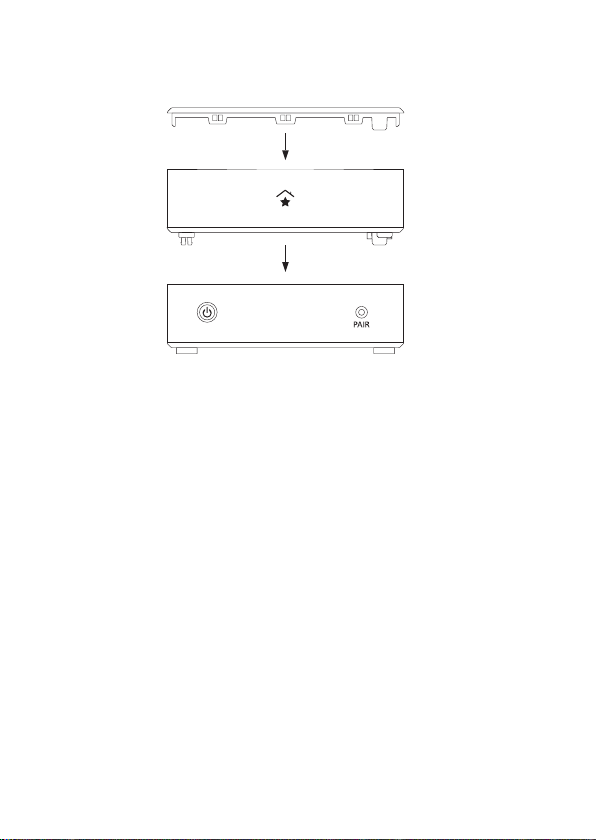
Pour monter le module complémentaire innogy, procédez
comme suit :
1. Appuyez pendant au moins trois secondes sur le bouton
d’alimentation qui se trouve sur la centrale Medion Smart
Home afin d’arrêter le système d’exploitation.
2. Lorsque la LED du bouton d’alimentation s’est éteinte,
débranchez la fiche du bloc d’alimentation.
3. Soulevez les couvercles de la centrale Medion Smart Home
et du module complémentaire innogy en faisant levier au
niveau des encoches.
4. Placez le module complémentaire innogy sur la centrale
Medion Smart Home en tenant compte des rainures et
appuyez sur le module jusqu’à ce qu’il s’enclenche.
30
Page 31
FR
5. Raccordez maintenant les deux appareils en vissant les vis
fournies à l’intérieur du module complémentaire innogy.
6. Replacez le couvercle sur le module complémentaire innogy.
7. Rebranchez la fiche de raccordement du bloc d’alimentation
dans l’appareil.
Vous pouvez maintenant procéder à la mise en service / pre mière configuration.
31
Page 32

FR
Mise en service
Si vous utilisez déjà la centrale Medion Smart Home pour gérer
des appareils Smar tHome, vous pouvez dès à présent intégrer
et utiliser également des appareils innogy SmartHome. Les
scénarios déjà créés et les configurations effectuées seront
conservés.
Première configuration pour nouveaux clients
Ne procédez à une première configuration que si vous utilisez la
centrale Medion Smart Home pour la première fois.
Vous pouvez procéder à l’enregistrement de la centrale sur
Internet sous https://home.innogy-smarthome.de. Vous pouvez également télécharger l’application innogy SmartHome
requise à par tir de Google Play Store ou de l’App Store.
1. Enregistrez-vous sur la page d’accueil de l’application
innogy SmartHome ou par le biais d’un navigateur en cliquant sur NOUVEAU CLIENT ? et en créant votre compte uti lisateur. Un courriel de confirmation vous est envoyé à
l’adresse électronique que vous avez indiquée.
32
Page 33

2. Cliquez sur le lien fourni en guise de vérification. Vous accédez à l’écran de connexion.
3. Pour vous connecter, saisissez votre nom utilisateur et le
mot de passe choisi.
4 Une fois la connexion établie, sélectionnez la centrale
(2e génération).
5 Effectuez les étapes suivantes.
FR
33
Page 34

FR
Remarque générale
La société innogy SE déclare que le présent appareil est
conforme aux critères fondamentaux et à leurs dispositions
correspondantes :
• Directive RED 2014/53/UE
• Directive 2009/125/CE en matière d’écoconception
• Directive RoHS 2011/65/UE
Le texte intégral de la déclaration de conformité peut être
consulté à l’adresse :
www.innogy.com/SmartHome
innogy SE
Opernplatz 1
45128 Essen
Allemagne
34
Page 35
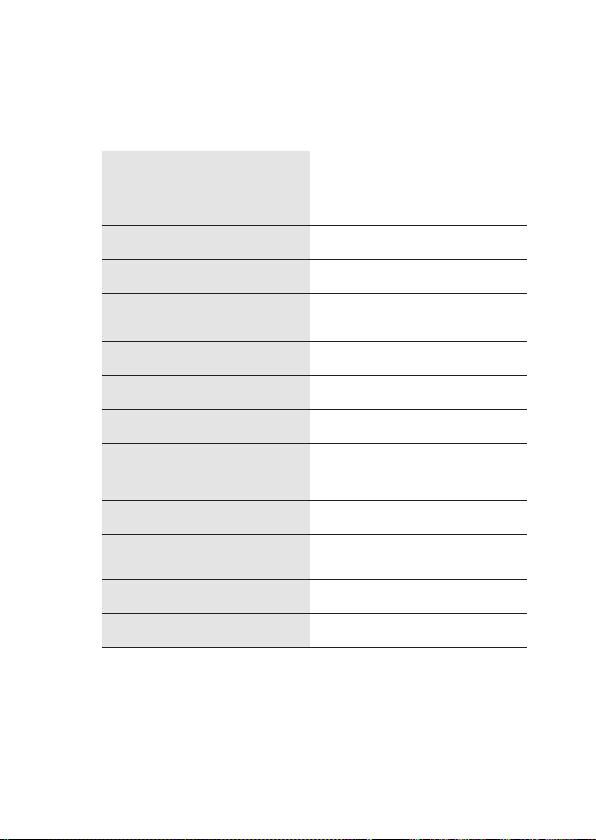
Données techniques
DC 5 V/0,5 A
Alimentation
Bande de fréquence 868,1 - 868,5 MHz
Puissance max. à l’émission 10 mW
Portée à l’extérieur
Cycle de service < 1 % par h
Classe de réception AFP Classe 2
Type de protection IP20
(est mis à disposition par la cen trale Medion Smart Home)
100 - 300 m
(selon partenaire radio)
FR
Prises USB
Température ambiante DE +5 °C à +35 °C
Humidité de l‘air
(fonctionnement)
Dimensions 115 x 115 x 41 mm (L x H x P)
Poids 142 g
3 x USB 2.0, max. 100 mA par
prise
De 5 % à 65 %
Sous réserve de modifications techniques.
35
Page 36
FR
Remarque relative à l’élimination
Ne pas jeter cet appareil avec les ordures ménagères !
Tout appareil électronique doit être éliminé en confor-
mité avec la Directive relative aux déchets d’équipe-
ment électriques et électroniques. Il devra donc être
déposé dans un centre de récupération local pour
déchets électroniques.
Le sigle CE est un « passeport » pour la libre circula -
tion du produit qui ne s’adresse qu’aux autorités de
contrôle et ne garantit pas la présence de caractéris-
tiques.
1re édition française 07/2018
Documentation © 2018 innogy SE, Allemagne. Tous droits
réservés. Nous excluons toute responsabilité pour les erreurs
techniques ou typographiques et leurs conséquences. Tous
les droits de protection et les marques sont reconnus. Sous
réserve de modifications sans préavis pour tenir compte du
progrès technique.
innogy SE
Opernplatz 1
45128 Essen
Allemagne
36
Page 37

Page 38

NL
Opmerkingen over deze instructies
Lees deze handleiding en de bedieningsinstructies voor de
smarthome-componenten grondig door voordat u het apparaat
voor het eerst gebruikt en volg vooral de veiligheidsinstructies!
Alle werkzaamheden aan en met dit apparaat mogen alleen
worden uitgevoerd zoals deze in de bedieningsinstructies
beschreven zijn.
Houd ze bij de hand en bewaar deze op een veilige plaats,
zodat ze aan de nieuwe eigenaar kunnen worden doorgegeven!
38
Page 39
Beoogd gebruik
Met de innogy opzetmodule kunt u naast de smart-home-apparaten van Medion ook de apparaten van innogy integreren en
bedienen. Zorg er daarom voor dat deze opzetmodule is aangesloten op de Medion Smart Home Centrale voordat u de innovatieve smarthome-apparaten integreert.
Houd er rekening mee, dat in geval van oneigenlijk gebruik de
aansprakelijkheid vervalt!
Gevarenaanduidingen
• Demonteer het apparaat niet zonder onze toestemming en
gebruik geen accessoires die niet door ons zijn goedgekeurd of geleverd.
• Gebruik alleen vervangende onderdelen en accessoires die
door ons zijn geleverd of goedgekeurd, zoals bijvoorbeeld
meegeleverde originele voedingen voor de spanningsvoorziening.
• Gevaar voor verwondingen door elektrische schokken/risico
op beschadiging van het apparaat!
NL
• Neem alle informatie in deze handleiding in acht, vooral
39
Page 40

NL
de veiligheidsinstructies. Elke andere vorm van bediening/
handeling wordt als oneigenlijk gebruik beschouwd en kan
leiden tot persoonlijk letsel of schade aan eigendommen.
• Gebruik het apparaat alleen binnenshuis. Vermijd de in-
vloed van vocht, stof en zon of andere warmtestraling.
• Gebruik het apparaat niet onder extreme omgevingscondi-
ties.
• Trek altijd aan de stekker, niet aan het netsnoer.
• Gebruik geen apparaten als deze zichtbare schade vertonen.
• Breng nooit zelf wijzigingen aan in de apparaten, probeer
niet zelf een deel van het apparaat te openen en/of te
repareren. De apparaten bevatten geen onderdelen die
onderhouden vergen.
• Wanneer u een transportschade constateert, moet u onmiddellijk innogy hiervan in kennis stellen.
40
Page 41

Basisvoorwaarden
• Medion Smart Home Centrale
• Internet router (Wifi mogelijk)
• Smartphone, tablet of een pc met een actuele browser.
Leveringsomvang
1 x Apparaat
2 x Bevestigingsschroeven
NL
41
Page 42

NL
Montage
Om de innogy opzetmodule te installeren dient u als volgt te
werk te gaan:
1. Druk minimaal drie seconden op de powertoets van de
Medion Smart Home Centrale om het besturingssysteem uit
te schakelen.
2. Nadat de POWER- knop LED uit is, koppelt u de stekker van
de voeding los.
3. Til aan de uitsparingen de dop van de Medion Smart Home
Centrale als ook van de innogy opzetmodule op.
4. Plaats de innogy opzetmodule overeenkomstig de gleuf op
de Medion Smart Home Centrale en druk hem naar beneden
totdat deze vastklikt.
42
Page 43
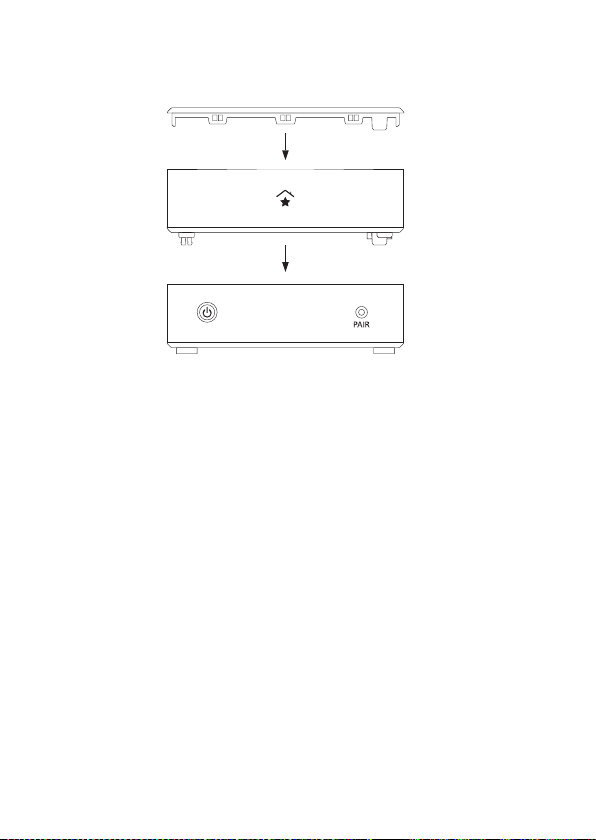
5. Verbind nu beide apparaten met behulp van de meegeleverde schroeven binnenin de innogy opzetmodule
6. Plaats het deksel terug op de innogy opzetmodule.
7. Steek de stekker van de voeding terug in het apparaat.
U kunt nu met de inbedrijfstelling/initiële installatie beginnen.
NL
43
Page 44

NL
Inbedrijfstelling
Wanneer u reeds smarthome-apparaten bedient via de Medion
Smart Home Centrale, kunt u nu ook innogy smarthome-apparaten integreren en gebruiken. Uw reeds aangemaakte scenario’s en instellingen blijven behouden.
Eerste installatie voor nieuwe klanten
Voer de eerste installatie alleen uit als u nog geen gebruik
maakt van de Medion Smart Home Centrale.
U kunt de registratie de Centrale op internet uitvoeren op
https://home.innogy-smarthome.de of de noodzakelijke
innogy SmartHome app downloaden van de Google Play Store
of App Store.
1. Registreer u op de startpagina van uw innogy SmartHome
app of met behulp van de browser als NIEUWE KLANT en
maak uw gebruikersaccount aan. U ontvangt een bevestigingsmail in de e-mail inbox die u hebt opgegeven.
2. Druk voor het verifiëren op de aangegeven link die u naar de
registratie leidt.
44
Page 45

3. Voer uw gebruikersnaam en wachtwoord in om u aan te
melden.
4. Na de succesvolle registratie selecteert u de Centrale
(2e generatie).
5. Volg de verdere stappen.
NL
45
Page 46

NL
Opmerking
Innogy SE verklaar t hierbij dat dit apparaat voldoet aan de
essentiële eisen en relevante bepalingen:
• RE-richtliijn 2014/53/EU
• Eco Design richtlijn 2009/125/EG
• RoHS-richtlijn 2011/65/EU
De volledige conformiteitsverklaring is te vinden op:
www.innogy.com/SmartHome
innogy SE
Opernplatz 1
45128 Essen
Duitsland
46
Page 47
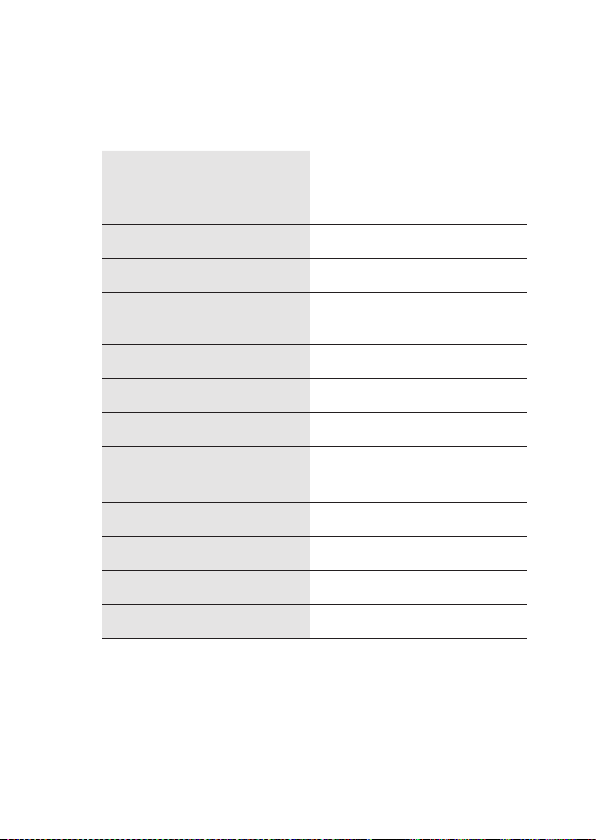
Technische gegevens
DC 5 V/0,5 A (Wordt door de
Stroomvoorziening
Frequentiebereik 868,1 - 868,5 MHz
Maximaal zendvermogen 10 mW
Open air range
Dut y Cycle <1 % pro h
Ontvangerklasse SRD Class 2
Beschermingsklasse IP20
Medio n Smar t Home Centrale
beschikbaar gesteld)
100 - 300 m (afhankelijk van de
radio-par tner)
NL
USB-aansluitingen
Omgevingstemperatuur +5 °C tot + 35 °C
Luchtvochtigheid (bedrijf) 5 % tot 65 %
Afmetingen 115 x 115 x 41 mm (B x H x D)
Gewicht 142 g
3 x USB 2.0, max. 100 mA per
aansluiting
Technische veranderingen voorbehouden.
47
Page 48
NL
Verwijdering
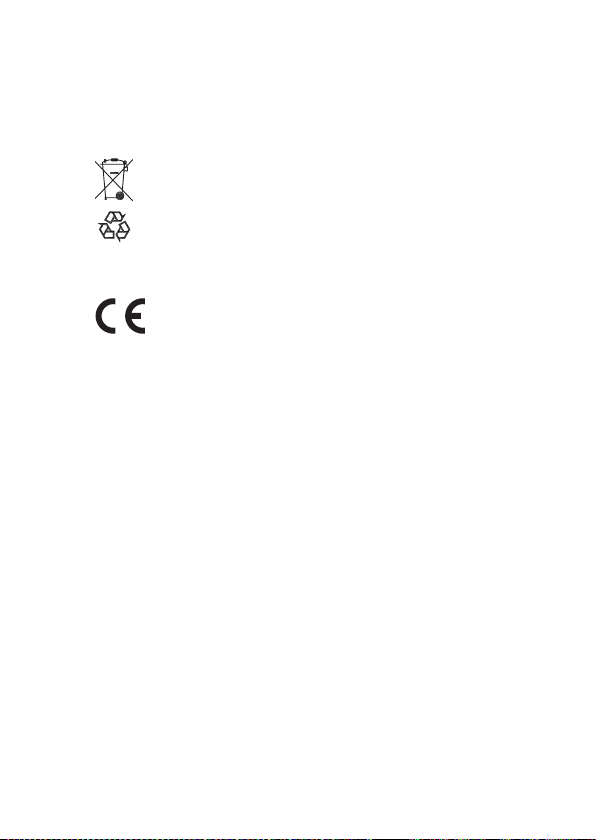
Apparaat niet bij het huisvuil deponeren! Elektroni-
sche apparatuur moet worden verwijderd in overeen -
stemming met de richtlijn betreffende afgedankte
elektrische en elektronische apparatuur via plaatselijke
inzamelpunten voor elektronisch afval.
De CE-markering is een vrij handelsteken dat uitslui -
tend van toepassing is op de autoriteiten en geen enke-
le waarborg van eigenschappen bevat.
1. Uitgave Nederlands 07/2018
Documentatie © 2018 innogy SE, Duitsland. Alle rechten
voorbehouden. Wij aanvaarden geen aansprakelijkheid voor
technische of typografische fouten en de gevolgen hiervan.
Alle handelsmerken en eigendomsrechten worden erkend.
Veranderingen in de zin van technische vooruitgang kunnen
zonder voorafgaande kennisgeving worden aangebracht.
innogy SE
Opernplatz 1
45128 Essen
Duitsland
48
 Loading...