

Page 1

Online Engineering & Tools
2020-06-25
IPOSIM Getting Started
Page 2
IPOSIM – Online Power Simulation Tool
www.infineon.com/iposim
Key Features
› Fast but accurate online power loss and temperature simulation powered by PLECS engine
› Easy to use with clear flow and user interface, quick to share and archive with deep-link
› 19 topologies for discs and modules, multi-selection of up to 5 products for easy comparison
› New control algorithms including Discontinuous PWM and new parameter of load type selection
› Sophisticated load cycle simulation using interpolated or discontinuous load profile with number of cycles
› New products such as IGBT7 and SiC modules available, more are coming…
2
2020-06-25 Copyright © Infineon Technologies AG 2020. All rights reserved. Infineon Proprietary
Page 3

› New: DPWM0, DPWM1,
DPWM2 and DPWM3 control
algorithms (DC-AC 3-Phase 2-
Level topology)
› Coming soon:
› DPWMMIN and
DPWMMAX
› For more topologies
› New: Selection between
inductive and capacitive loads
› Available for all DC-AC
topologies
IPOSIM – Online Power Simulation Tool
New Features
New DPWM Control Algorithms Load Type Selection
3
2020-06-25 Copyright © Infineon Technologies AG 2020. All rights reserved. Infineon Proprietary
Page 4

IPOSIM – Online Power Simulation Tool
New Features
New Load Cycle Features
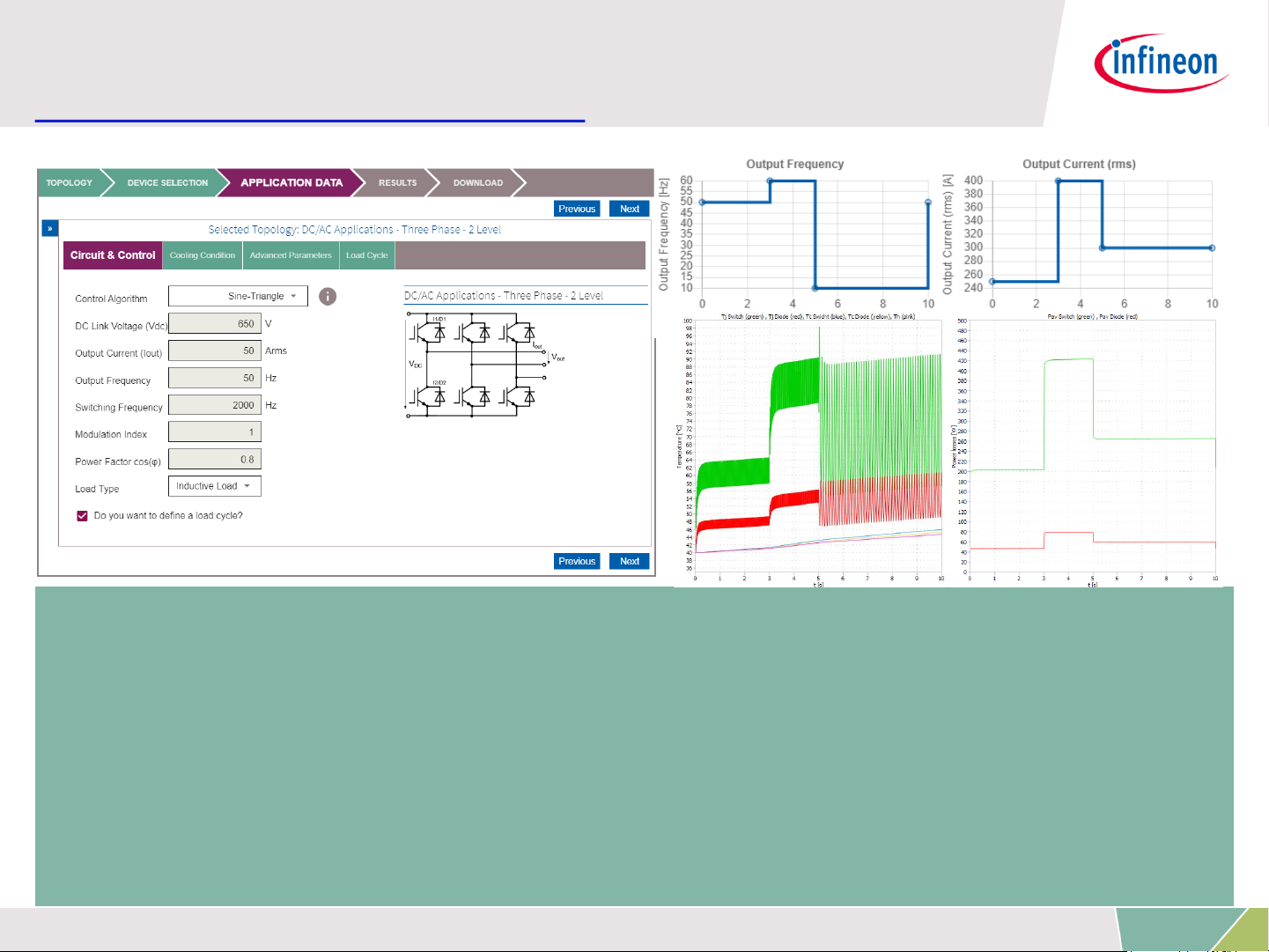
› Uploading load cycle profile (excel) of up to 200 line
› Selection simulation behaviors between temperature ripple or average
temperature
› Save individual load profile setting under “My Design”
› New: interpolated or discontinuous load profiles
› New: possibility to repeat the load profile cycles (up to 10 cycles)
4
2020-06-25 Copyright © Infineon Technologies AG 2020. All rights reserved. Infineon Proprietary
Page 5

IPOSIM – Online Power Simulation Tool
New Features
Live
since
June 15
Advanced scope functions: cursors, zoom-in/out
Load cycle for more topologies including AC-DC
More topologies including Automotive and more
products with new technologies
Advanced parameter-sweep simulations:
› Tj & power losses versus Irms
› Maxmum allowed Irms versus switching frequency fsw
Optimized flow separation for device selection and
application data settings
5
2020-06-25 Copyright © Infineon Technologies AG 2020. All rights reserved. Infineon Proprietary
Page 6
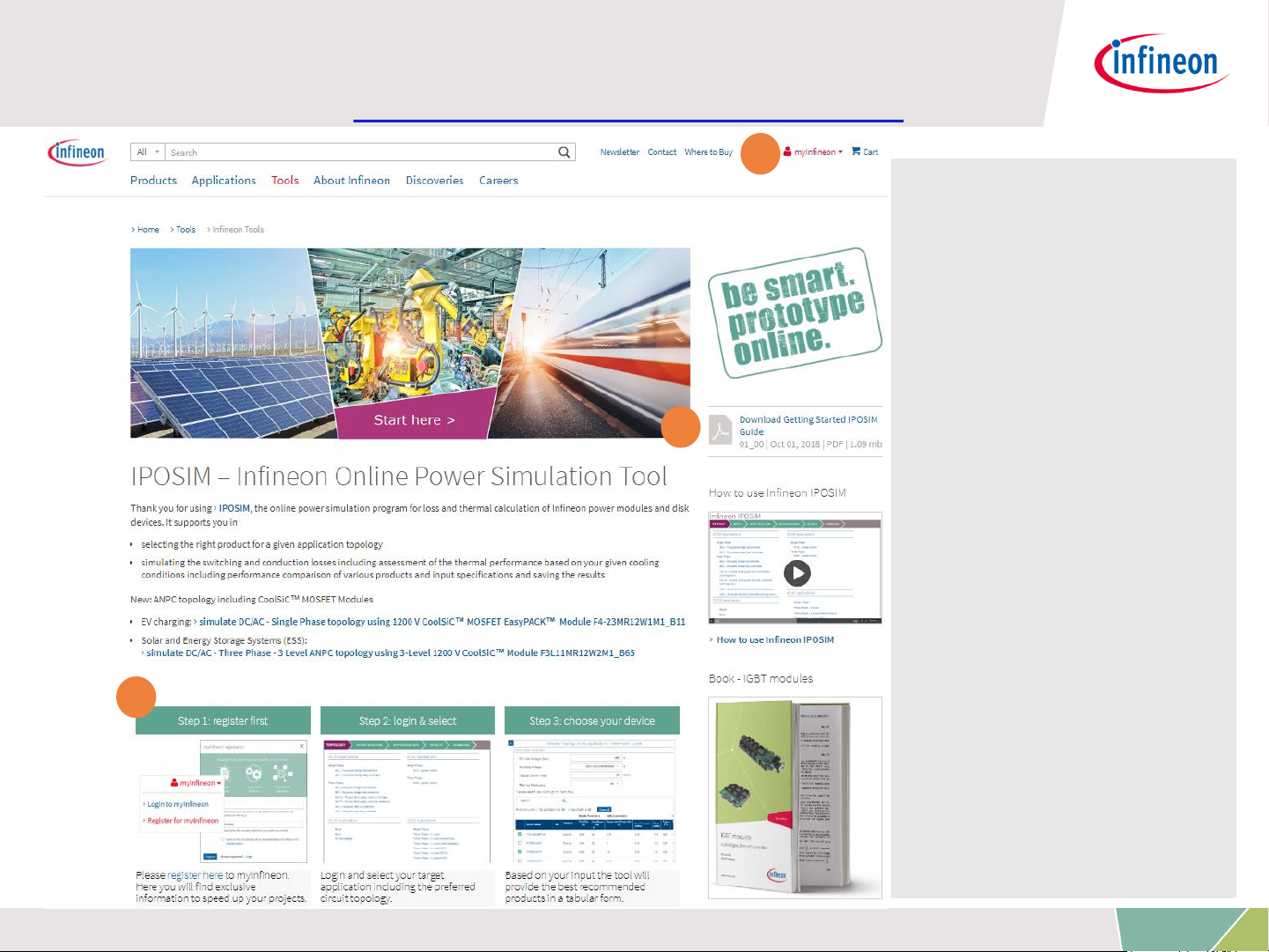
IPOSIM: Infineon Power Simulation Tool
Landing Page: www.infineon.com/iposim
1. myInfineon Registration
– new account
required since old
Transim accounts
will not be
transferred to the
new IPOSIM
platform
2. Getting Started
– Documents
– Videos
3. Steps by step guide with
hyperlinks
1
2
3
6
2020-06-25 Copyright © Infineon Technologies AG 2020. All rights reserved. Infineon Proprietary
Page 7
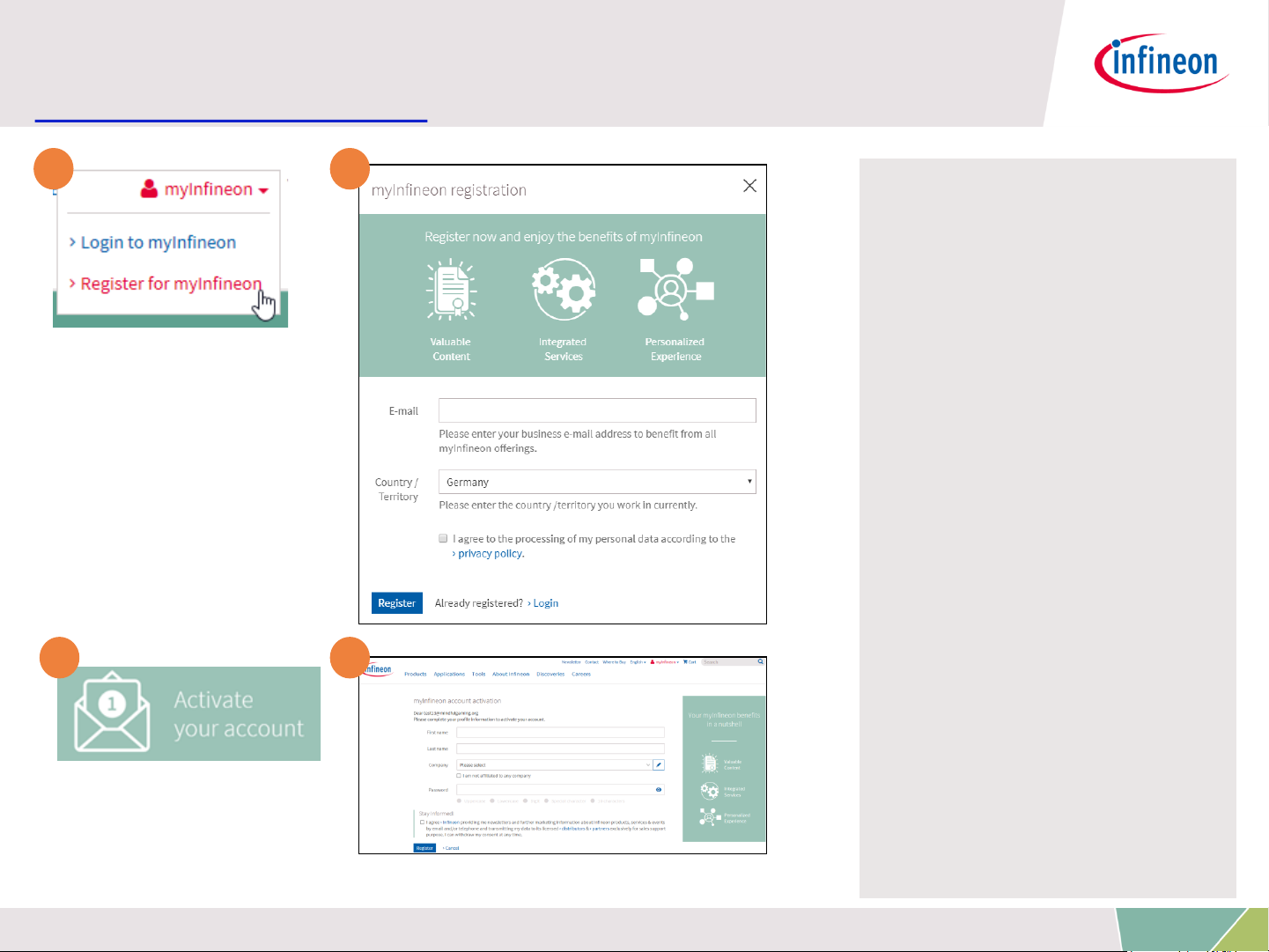
Registration myInfineon
www.infineon.com
1. Click on icon on top of
the page: “Register for
myInfineon”
2. An overlay will pop-up to
enter Email & company
3. An Email will be sent out
(Double Opt-in) to
activate your account
4. Click on link in Email
and finalize registration
1 2
3 4
7
2020-06-25 Copyright © Infineon Technologies AG 2020. All rights reserved. Infineon Proprietary
Page 8

IPOSIM: Infineon Power Simulation Tool
Step By Step Guide
1 2 3
4 5 6
8
2020-06-25 Copyright © Infineon Technologies AG 2020. All rights reserved. Infineon Proprietary
Page 9

IPOSIM: Infineon Power Simulation Tool
Step 1: Select Your Topology
1
Example: Inverter
topologies
2 3 4 5
9
2020-06-25 Copyright © Infineon Technologies AG 2020. All rights reserved. Infineon Proprietary
Page 10

IPOSIM: Infineon Power Simulation Tool
Step 2: Choose Your Devices
Set filtering parameters
1
Circuit topology
2
Search
3
Product List
with sorting
function
4
10
2020-06-25 Copyright © Infineon Technologies AG 2020. All rights reserved. Infineon Proprietary
Page 11

IPOSIM: Infineon Power Simulation Tool
Step 3: Set Your Application Data
Set operation
parameters, enable
load cycle
1
Set other application
data:
• cooling condition
• Rgon,off
• Load cycle
2
11
2020-06-25 Copyright © Infineon Technologies AG 2020. All rights reserved. Infineon Proprietary
Page 12

IPOSIM: Infineon Power Simulation Tool
Step 4: Simulate Electrical & Thermal (PLECS)
Example: IGBT
modules
1
Temperature
ripple
2
Click diagram for
more scope functions
3
12
2020-06-25 Copyright © Infineon Technologies AG 2020. All rights reserved. Infineon Proprietary
Page 13

IPOSIM: Infineon Power Simulation Tool
Step 4.1: Compare Simulation Results
Junction
Temperature
1
Conduction &
Switching
Losses
2
13
2020-06-25 Copyright © Infineon Technologies AG 2020. All rights reserved. Infineon Proprietary
Page 14

Share your design by copy-paste
› Copy the browser URL and share it with anybody to re-execute the simulation with same configuration.
› Example: https://iposim.infineon.com/application/en/download?topology:DC-
AC_3P_2L,inputs:(mod_scheme:1,Vdc:650,Vblock:1200,Irms:50,fout:50,fsw:2000,t_pulse:180,mo
di:1,cos_phi:0.8,cos_phi_sign:2,load_cycle:False),devices:(FP50R12KT4P_B11:(thermal:(model:3,
Tc:50),advanced:(Rgon_1:15,Rgoff_1:15)),FS100R12W2T7_B11:(thermal:(model:3,Tc:50),advance
d:(Rgon_1:1.8,Rgoff_1:1.8))),diode:(),loadcycle:(lcp:none,interpolation:True,cycle_defined:True,cy
cle_count:1,sim_bvr:1),package:All,search:none,isOld:0,appdatatab:tab-advanced,mode:normal
IPOSIM: Infineon Power Simulation Tool
Step 5: Download Results
Design
Summary
Datasheets
1 2
3 4 5
14
2020-06-25 Copyright © Infineon Technologies AG 2020. All rights reserved. Infineon Proprietary
Page 15

IPOSIM – Online Power Simulation Tool
Load Cycle Example: DC-AC 3-Phase 2-Level
› Constant inputs: VDC = 650 V, fsw = 2 kHz, Modulation Index = 1
› Load Profile with 3 cycles repeated
› Deep-link to recall the simulation:
https://iposim.infineon.com/application/en/results?topology:DCAC_3P_2L,inputs:(mod_scheme:1,Vdc:650,Vblock:1200,Irms:300,fout:50,fsw:2000,t_pu
lse:180,modi:1,cos_phi:0.8,cos_phi_sign:2,load_cycle:True),devices:(FF450R12ME4_B1
1:(thermal:(model:3,Tc:50),advanced:(Rgon_1:1.3,Rgoff_1:1.3))),diode:(),loadcycle:(lc
p:2020061526836,interpolation:False,cycle_defined:True,cycle_count:3,sim_bvr:1),pack
age:All,search:none,isOld:0,appdatatab:tab-loadcycle,mode:normal
15
2020-06-25 Copyright © Infineon Technologies AG 2020. All rights reserved. Infineon Proprietary
Page 16

IPOSIM – Online Power Simulation Tool
Load Cycle Example: DC-AC 3-Phase 2-Level
› Results:
Temperature [
°C]
Power losses [W]
16
2020-06-25 Copyright © Infineon Technologies AG 2020. All rights reserved. Infineon Proprietary
Page 17

IPOSIM – Online Power Simulation Tool
Scope Functions: Cursors, Zoom-In/Out
1
2
3
2. Click to switch on
cursors to measure
signals
1. Zoom-in by
dragging with mouse
3. Click lock to freeze the
cursor distance for better
measurement experience
17
2020-06-25 Copyright © Infineon Technologies AG 2020. All rights reserved. Infineon Proprietary
Page 18

IPOSIM – Online Power Simulation Tool
Parameter Sweep: Ploss,average / Tj versus Irms
› Find out the maximum allowed Irm current @ given condition
› Start immediately after steady state simulation
› Deep-link to recall the simulation:
https://iposim.infineon.com/application/en/results?topology:DCAC_3P_2L,inputs:(mod_scheme:1,Vdc:650,Vblock:1200,Irms:50,fout:50,fsw:2000,t_pulse:
180,modi:1,cos_phi:0.8,cos_phi_sign:2,load_cycle:False),devices:(FP50R12KT4P_B11:(ther
mal:(model:3,Tc:50),advanced:(Rgon_1:15,Rgoff_1:15)),FS100R12W2T7_B11:(thermal:(m
odel:3,Tc:50),advanced:(Rgon_1:1.8,Rgoff_1:1.8))),diode:(),loadcycle:(lcp:none,interpolati
on:True,cycle_defined:True,cycle_count:1,sim_bvr:1),package:All,search:none,isOld:0,appd
atatab:tab-advanced,mode:normal
1
2
3
18
2020-06-25 Copyright © Infineon Technologies AG 2020. All rights reserved. Infineon Proprietary
Page 19

IPOSIM – Online Power Simulation Tool
Parameter Sweep: Ploss,average / Tj versus Irms
› Results
Tj versus Irms
@given
condition
1
Average power
losses versus
Irms @ given
condition
2
19
2020-06-25 Copyright © Infineon Technologies AG 2020. All rights reserved. Infineon Proprietary
Page 20

IPOSIM – Online Power Simulation Tool
Tips & Tricks
› 0-Hz Simulation not implemented, down to 0.1 Hz available
› Load cycle simulation: for more accuracy put enough duration of low
frequency section, e.g.: minimum of 10s for fout = 0.1 Hz
› Click result diagrams to enlarge
› Discover signals with scope functions such as cursors, zoom-in/out
› Save your designs under My Designs incl. load cycle settings
› Copy / paste browser URL (deep-link) to share your designs
› Our thermal models of the products are not designed for overheated Tj
› In case of Tj > 200 °C, check your input requirements, cooling condition
or change to a bigger module
Low Output
Frequencies
Save & Share
Result Diagrams
Too High Tj
› browser caching issues after new version updates
• key combination [Ctrl] + [F5] to reset browser cache
• or manually clear the browser caching
› Upgrade to industry leading PLECS engine, available at our partner’s
website: www.plexim.com
Solve artifacts
More features
offline
20
2020-06-25 Copyright © Infineon Technologies AG 2020. All rights reserved. Infineon Proprietary
Page 21

Support
› www.infineon.com/support
21
2020-06-25 Copyright © Infineon Technologies AG 2020. All rights reserved. Infineon Proprietary
Page 22

The information given in this training materials is given as a hint for the implementation of
the Infineon Technologies component only and shall not be regarded as any description or
warranty of a certain functionality, condition or quality of the Infineon Technologies
component.
Infineon Technologies hereby disclaims any and all warranties and liabilities of any kind
(including without limitation warranties of non-infringement of intellectual property rights of
any third party) with respect to any and all information given in this training material.
Disclaimer
Page 23

 Loading...