

Page 1
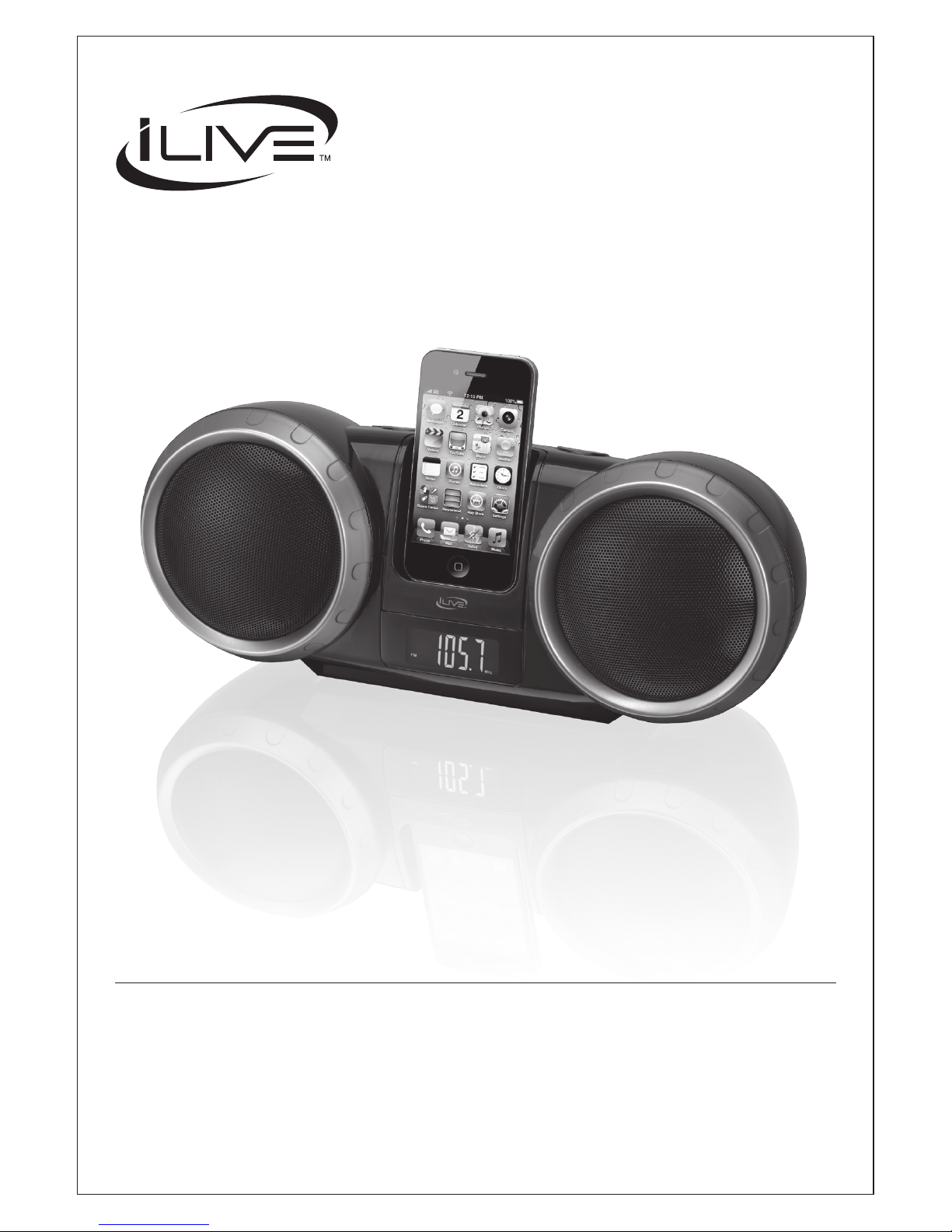
USER’S GUIDE
V: 596-01
For the most up-to-date version of this User’s Guide, go to
www.iLiveElectronics.com
IBP232B
Portable Music System for iPod and iPhone
Page 2
2
Mains Plug or Direct plug-in adapter is used as disconnect
device and it should remain readily operable during intended
use. In order to disconnect the apparatus from the mains
completely, the Mains Plug or Direct plug-in adapter should
be disconnected from the mains socket outlet completely.
La che d’alimentation ou adaptateur de courant est utilisé
comme dispositif de déconnexion et doit rester accessible
pendant l’utilisation. Pour mettre l’appareil hors tension, la
che ou adaptateur de courant doit être débranché de la prise
de courant.
Do not mix old and new batteries.
Do not mix alkaline, standard (carbon-zinc), or rechargeable
(ni-cad, ni-mh, etc) batteries.
No mezcle baterías viejas y nuevas.
No mezcle baterías alcalinas, estándar (carbono-zinc) o
recargables (ni-cad, ni-mh, etc.).
• CAUTION: TO PREVENT ELECTRIC SHOCK,
MATCH WIDE BLADE OF PLUG TO WIDE SLOT,
FULLY INSERT.
• WARNING:To reduce the risk of re or electric shock,
do not expose this apparatus to rain or moisture.
• AVERTISSEMENT: Pour réduire le risque d’incendie
ou de choc électrique, ne pas exposer cet appareil sous la
pluie et l’humidité.
• CAUTION: Use of any controls or adjustments or
performance of procedures other than those herein
specied may result in hazardous radiation exposure.
• WARNING: Changes or modications to this unit
not expressly approved by the party responsible for
compliance could void the user’s authority to operate the
equipment.
• WARNING: Do not place the unit on top of any soft,
porous, or sensitive surfaces to avoid damaging the
surface. Use a protective barrier between the unit and
surface to protect the surface.
• CAUTION:Danger of explosion if battery is incorrectly
replaced. Replace only with the same or equivalent type.
• PRÉCAUTION: Danger d’explosion si les piles sont
remplacées de façon incorrect. Remplacer les piles
seulement par le même type de pile ou l’équivalent.
• WARNING:The battery, batteries, and battery pack
shall not be exposed to excessive heat such as sunshine,
re, or the like.
• WARNING: Shock hazard - Do Not Open.
• AVIS: RISQUE DE CHOC ÉLECTRIQUE - NE PAS
OUVRIR
Warnings and Precautions
The lightning ash with arrowhead symbol,
within an equilateral triangle, is intended to
alert the user to the presence of uninsulated
"dangerous voltage" within the product's
enclosure that may be of sufcient magnitude to
constitute a risk of electric shock to persons.
WARNING: TO REDUCE THE RISK
OF ELECTRIC SHOCK, DO NOT
REMOVE COVER (OR BACK).
NO USER-SERVICEABLE PARTS
INSIDE. REFER SERVICING TO
QUALIFIED SERVICE PERSONNEL.
ATTENTION
RISQUE D' ÉLECTROCUTION
NE PAS OUVRIR
CAUTION
RISK OF ELECTRIC SHOCK
DO NOT OPEN
The exclamation point within an equilateral
triangle is intended to alert the user to
the presence of important operating and
maintenance (servicing) instructions in the
literature accompanying the appliance.
Page 3
Customer Support: 1-888-999-4215 3
13. Unplug this apparatus during lightning storms
or when unused for long periods of time.
14. Refer all servicing to qualied service personnel.
Servicing is required when the apparatus has
been damaged in any way, such as power-supply
cord or plug is damaged, liquid has been spilled
or objects have fallen into the apparatus, the
apparatus has been exposed to rain or moisture,
does not operate normally, or has been dropped.
WARNING: Changes or modications to this unit not
expressly approved by the party responsible for compliance
could void the user’s authority to operate the equipment.
NOTE: This equipment has been tested and found to comply with
the limits for a Class B digital device, pursuant to Part 15 of the FCC
Rules. These limits are designed to provide reasonable protection
against harmful interference in a residential installation. This
equipment generates, uses, and can radiate radio frequency energy
and, if not installed and used in accordance with the instructions,
may cause harmful interference to radio communications. However,
there is no guarantee that interference will not occur in a particular
installation. If this equipment does cause harmful interference to
radio or television reception, which can be determined by turning
the equipment off and on, the user is encouraged to try to correct
the interference by one or more of the following measures:
• Reorient or relocate the receiving antenna.
• Increase the separation between the equipment and receiver.
• Connect the equipment into an outlet on a circuit different
from that to which the receiver is connected.
• Consult the dealer or an experienced radio/TV technician for help.
• The apparatus shall not be exposed to dripping or
splashing and that no objects lled with liquids,
such as vases, shall be placed on apparatus.
L’appareil ne doit pas être exposé aux écoulements
ou aux éclaboussures et aucun objet ne contenant de
liquide, tel qu’un vase, ne doit être placé sur l’objet.
• Battery shall not be exposed to excessive heat
such as sunshine, re or the like.
Les piles ne doivent pas être exposées à de forte chaleur, tel qu’à
la lumière du soleil, au feu ou autres choses de semblable.
• Caution marking is located at the rear or bottom of the apparatus.
Attention marquage est situé sur le paneau
arrière ou inférieur de l’unité.
• The marking information is located at the
rear or bottom of apparatus.
Le marquage est situé sur le paneau arrière ou inférieur de l’unité.
FCC Warnings
Additional Warnings
1. Read these Instructions.
2. Keep these Instructions.
3. Heed all Warnings.
4. Follow all instructions.
5. Do not use this apparatus near water.
6. Clean only with a dry cloth.
7. Do not block any ventilation openings. Install in
accordance with the manufacturer’s instructions.
8. Do not install near any heat sources such as
radiators, heat registers, stoves, or other apparatus
(including ampliers) that produce heat.
9. Do not defeat the safety purpose of the polarized
or grounding - type plug. A polarized plug has two
blades with one wider than the other. A grounding
type plug has two blades and a third grounding
prong. The wide blade or the third prong are
provided for your safety. When the provided plug
does not t into your outlet, consult an electrician
for replacement of the obsolete outlet.
10. Protect the power cord from being walked on or
pinched particularly at plugs, convenience receptacles,
and the point where they exit from the apparatus.
11. Only use attachments/accessories
specied by the manufacturer.
12.
Important Safety Instructions
This symbol indicates that this
product incorporates double insulation
between hazardous mains voltage
and user accessible parts.
Use only with a cart, stand, tripod,
bracket, or table specied by the
manufacturer, or sold with the apparatus.
When a cart is used, use caution when
moving the cart/apparatus combination to
avoid injury from tip-over.
Special note: When placing your unit on a
lacquered or natural nish, protect your furniture
with a cloth or other protective material.
Page 4
4
Introduction
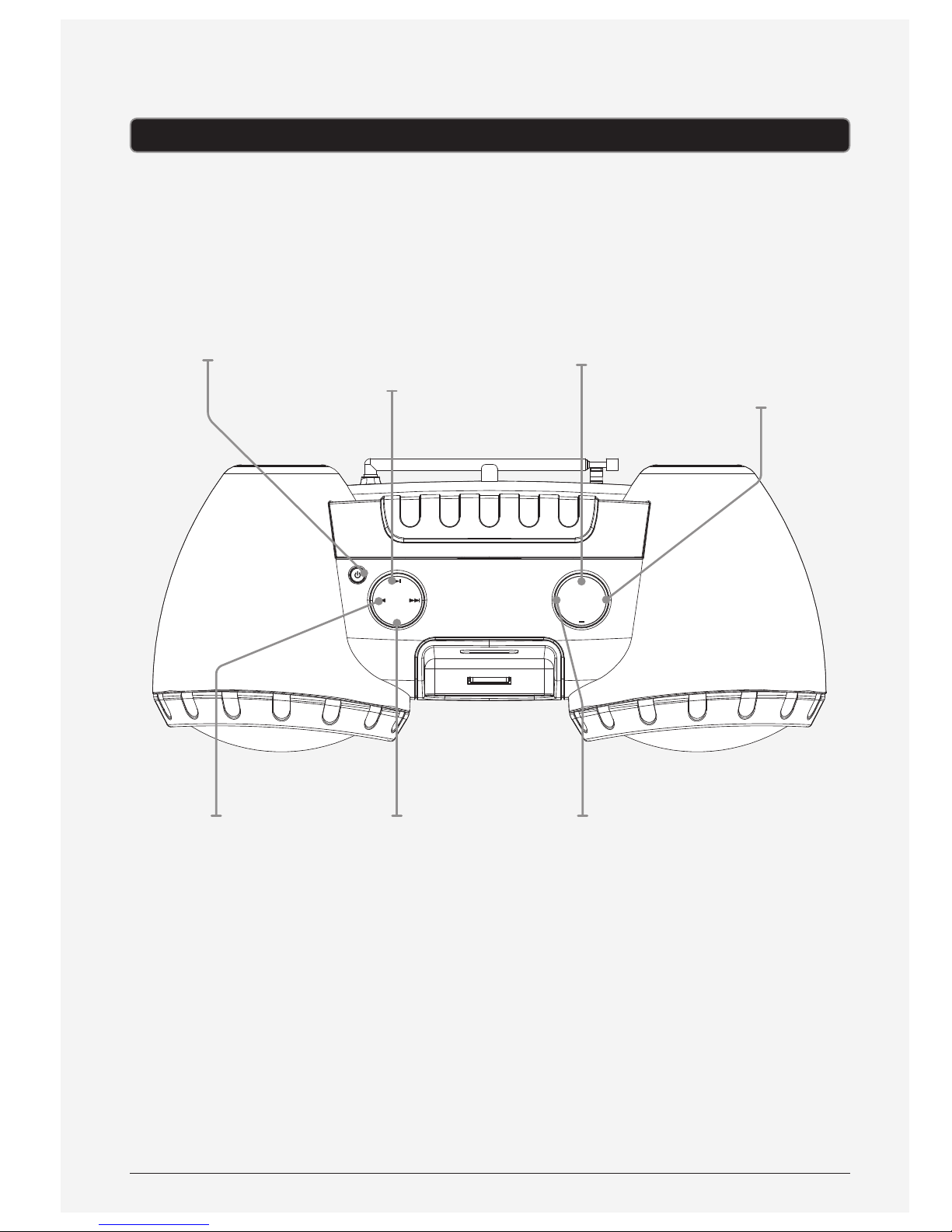
POWER
M+
SOURCE
MEM
VOLUME
TUNE +
TUNE –
Tuning +/-
Press to tune
the FM radio.
Press and hold to
search for the next
available frequency
in FM radio mode.
In iPod mode, press
to skip between
tracks or search
through a single
track on a docked
iPod or iPhone.
Mem
Press to save the
current radio
station as a preset.
M+
Press repeatedly
to cycle through
preset stations.
Source
Press to switch
between iPod, Line In
and FM Radio modes.
Volume +/-
Press to adjust
the volume.
Play/Pause
Press to play or
pause a docked
iPod or iPhone.
Power
Press to turn the
unit on and o.
Page 5
Customer Support: 1-888-999-4215 5
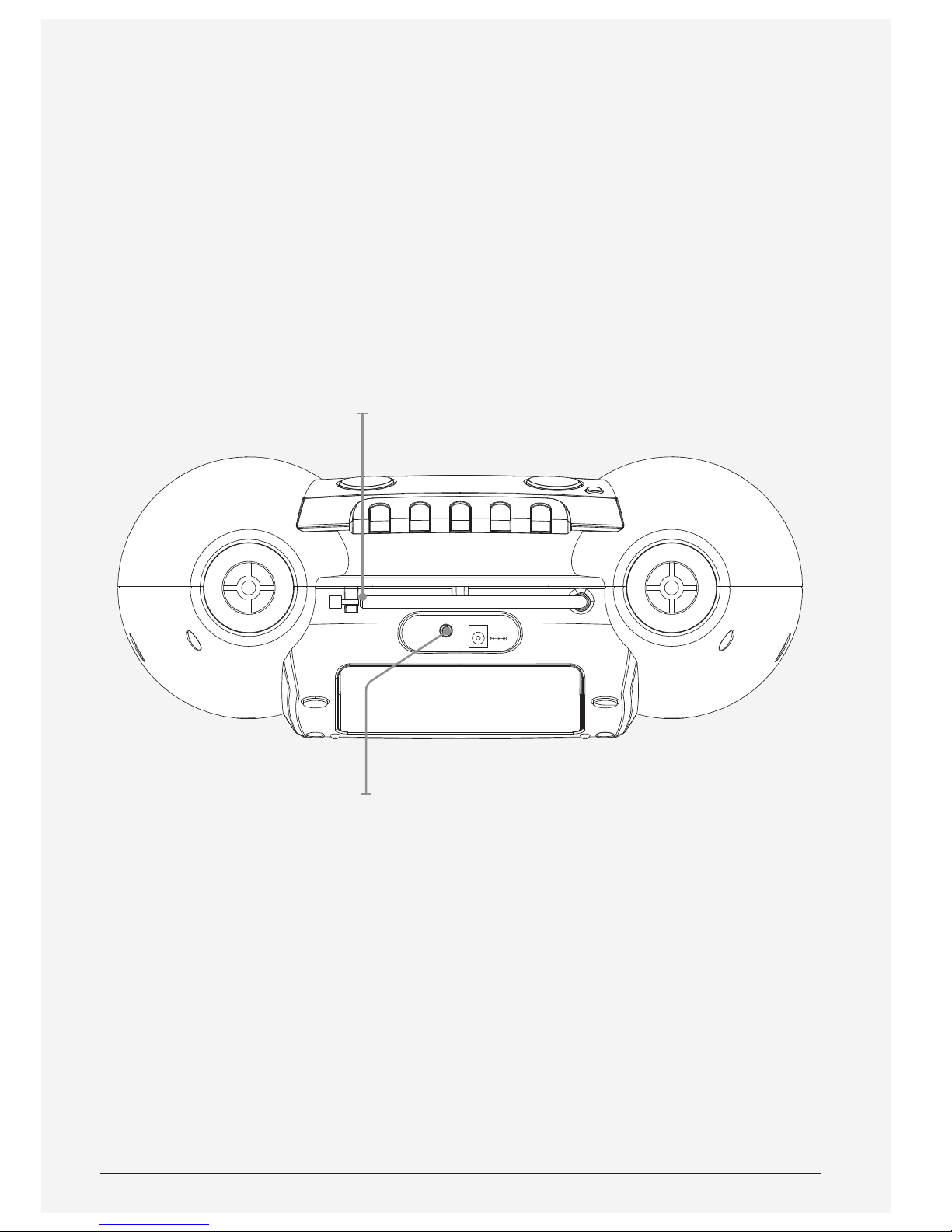
ANT
LINE IN
DC IN 5V
Line In
Telescopic FM
Antenna
Page 6
6
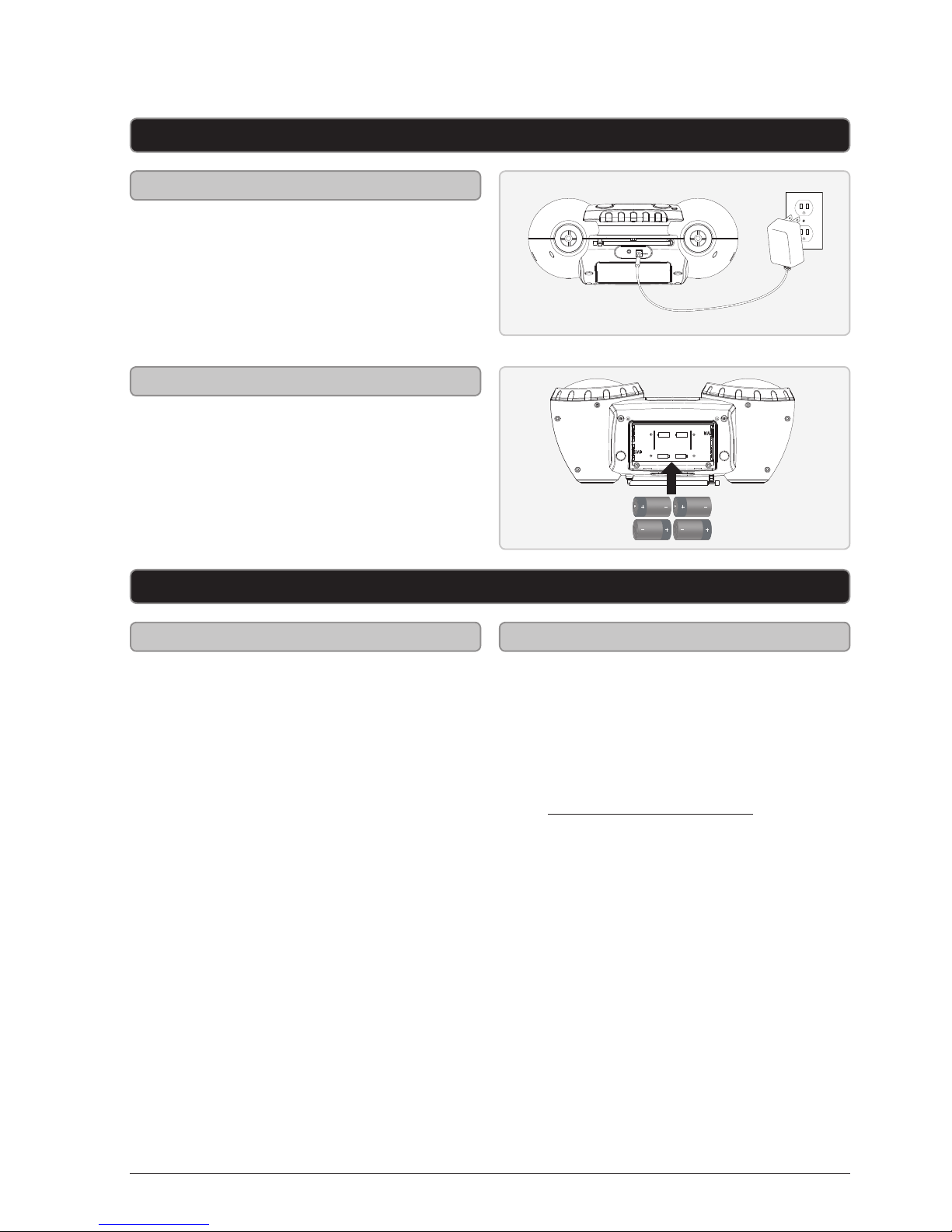
Setup
iPod and iPhone
DC power input: requires an AC/
DC power adapter (included)
Requires 4 C batteries (not included)
Power
Battery Power
ANT
LINE IN
DC IN 5V
UM-2/SIZE “C”/LR14 1.5V X 4
Playing a Docked iPod or iPhone
1. Press the Power button
to turn the unit on.
2. Press the Source button repeatedly
to switch to iPod mode.
3. Follow the instructions for
Docking an iPod or iPhone.
4. Press the Play/Pause button to begin
playing the docked iPod or iPhone.
Docking an iPod or iPhone
1. Connect the iPod or iPhone to
the connector on the unit.
2. When the unit is plugged in,
using AC power, the docked
iPod or iPhone will charge.
Page 7

Customer Support: 1-888-999-4215 7
Radio and 3.5mm Audio Input
Tuning the FM Radio
Saving an FM Station as a Preset
Using Preset Stations
1. Press the Source button repeatedly
to switch to FM mode.
2. Press the Tuning +/- buttons to
tune the FM radio. Press and hold
the Tuning +/-buttons to search
for the next available station.
Extend the Telescopic FM Antenna
fully to improve FM radio reception.
1. Follow the instructions for
Tuning the FM Radio.
2. After you have tuned to the
desired station, press and hold
the Mem button to begin saving
the current station as a preset.
3. Press the Tuning +/- buttons to
adjust the preset channel.
4. Press the Mem button to save
the current radio station to the
selected preset channel.
Up to 20 stations may be
saved as presets.
1. Follow the instructions for Saving
an FM Station as a Preset.
2. Press the M+ button repeatedly to
cycle through saved radio stations.
Using the 3.5mm Audio Input
Requires a 3.5mm audio
cable (not included)
1. Connect a 3.5mm audio cable
to the Line In on the unit and
an audio output on an MP3
player or other audio source.
2. Press the Source button repeatedly
to switch to Line In mode.
3. Use the native controls on the
connected MP3 player or other audio
source to play and control audio
played through the clock radio.
Page 8

Copyright © 2012 Digital Products International (DPI, Inc.) | All other trademarks appearing herein are
the property of their respective owners. Specications are subject to change without notice
Green Initiative
Company Information
Environmental Commitment to ‘Protect
for Today and Sustain for Tomorrow’
On a continual basis DPI, Inc. is making
eorts to sustain the environment
and improve the recyclability of
its products and packaging.
Focusing on “protecting for today and
sustaining for tomorrow” DPI, Inc. has
committed to reducing packaging size,
increasing the usage of recyclable plastics,
and ensuring that packaging and manuals
are made with up to 85% recycled material.
In addition to material consideration, DPI,
Inc. has also focused on the ner details that
positively impact the environment such as
employing the usage of soy-based inks.
DPI, Inc. also ensures that the factories
that produce the company’s wide
variety of consumer electronics adhere
to environmentally friendly air and
water restrictions. This is yet another
example that every step of the way
DPI, Inc. is making eorts to lessen
any impact on the environment.
In 2011 DPI, Inc. also began conversations
with Energy Star in order to ensure
that the consumer electronics being
produced meet high standards of energy
eciency. The ultimate goal is keeping
energy costs for consumers low while
providing quality, feature-rich products.
To download this User’s Guide in
English, Spanish, or French, or to
get answers to frequently asked
questions, visit the support section
at www.iLiveElectronics.com.
Para descargar este Manual del
Usuario en inglés, español y francés, o
para obtener respuestas a preguntas
frecuentes, visite la sección de apoyo
en www.iLiveElectronics.com.
Pour télécharger ce guide de l’utilisateur
en anglais, espagnol ou français, ou pour
obtenir des réponses à des questions
fréquemment posées, consultez la rubrique
d’assistance sur www.iLiveElectronics.com.
Email Support: [email protected]
Email Parts: [email protected]
Phone Support: 1-888-999-4215
Website: www.iLiveElectronics.com
International Support
Contact Information
Warranty
To get information on which iPod, iPhone,
or iPad products are compatible with this
product, go to: www.iLiveElectronics.com
Compatibility
For Warranty Information and the most
up-to-date version of this User’s Guide,
go to: www.iLiveElectronics.com
 Loading...