

Page 1
D7w-DK
7-inch HD-SDI LCD Monitor Deluxe Kit QUICKSTART GUIDE
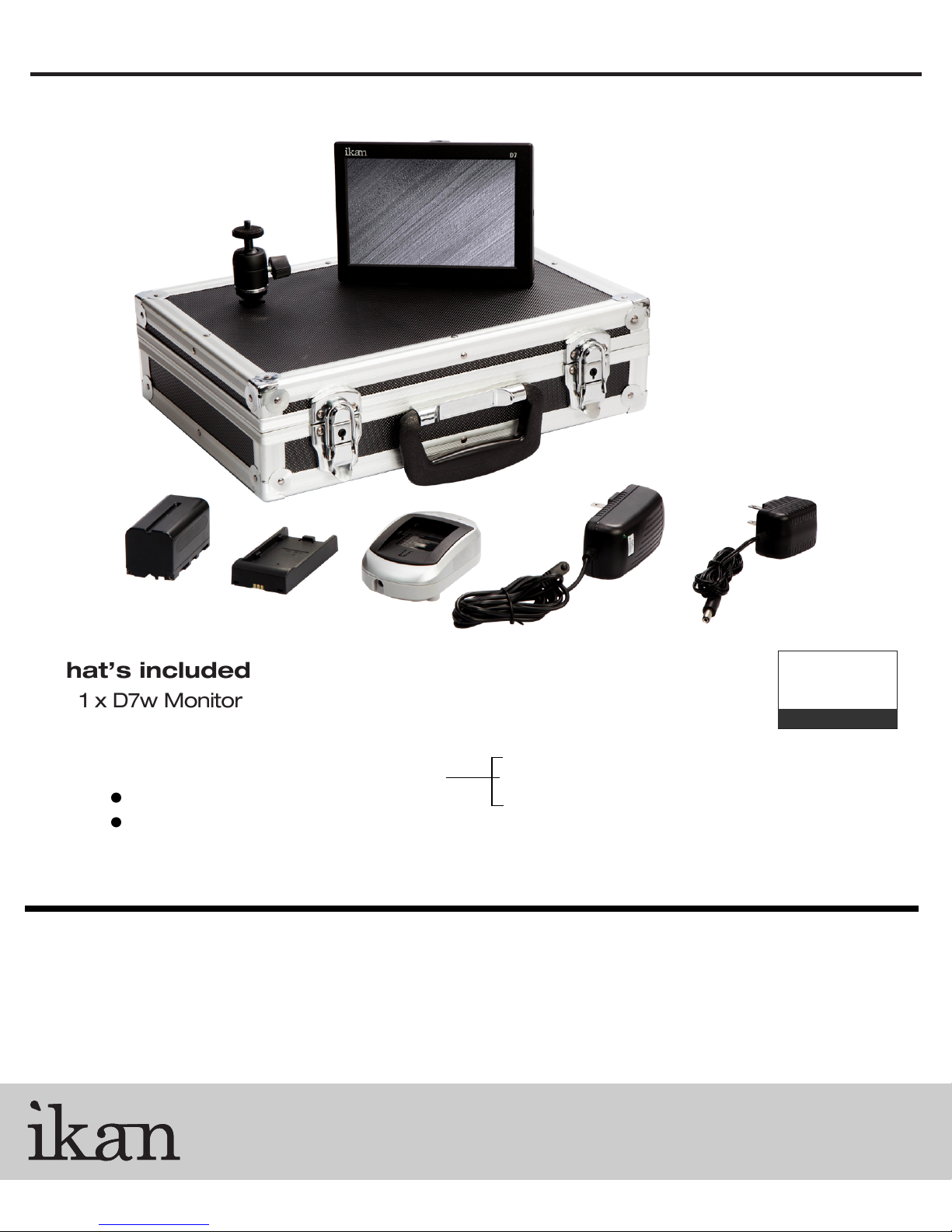
What’s included
1 x D7w Monitor
1 x AC Adapter
1 x SM201 Shoe Mount
1 x DV Battery Adapter (Check one)
Battery
Charger
CONDITIONS OF WARRANTY SERVICE
• Free service for one year from the day of purchase if the problem is caused by manufacturing errors.
• The components and maintenance service fee will be charged if the warranty period has expired.
Free Service will not be Provided in the Following Situations: (* Even if the product is still within the warranty period.)
• Damage caused by abuse or misuse, dismantling, or changes to the product not made by the company.
• Damage caused by natural disaster, abnormal voltage, and environmental factors etc.
www.ikancorp.com
BP5-S Sony "L" Series
5-C
BP
BP5-P Panasonic "D54" Series
Canon "900" Series
3903 Stoney Brook Dr. Houston TX 77063
© 2010 ikan Corporation. All right reserved
Checked by
1.713.272.8822
support@ikancorp.com
Page 2
D7
D7w-DK
7-inch HD-SDI LCD Monitor Deluxe Kit QUICKSTART GUIDE
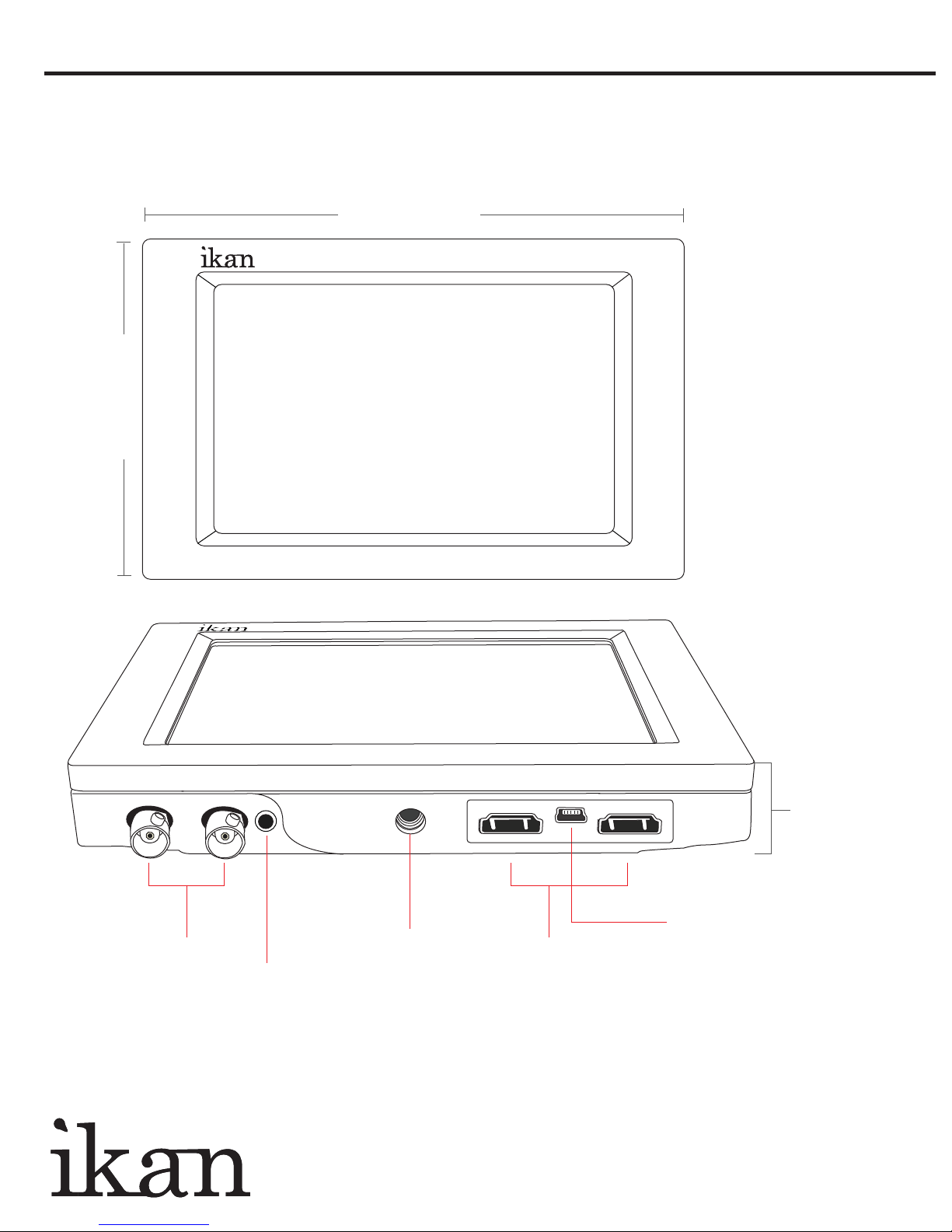
7 Inches
D7
Resolution: 1280 x 800
4.9 Inches
IN OUT
HD-SDI
Audio
Output
1/2-20
Threaded
Mounting
Holes On
All 4 Sides
IN OUT
HDMI
Input
and
Output
Depth
1 Inch
Factory
Service Use
Only
www.ikancorp.com 713-272-8822
Page 3
D7w-DK
7-inch HD-SDI LCD Monitor Deluxe Kit QUICKSTART GUIDE
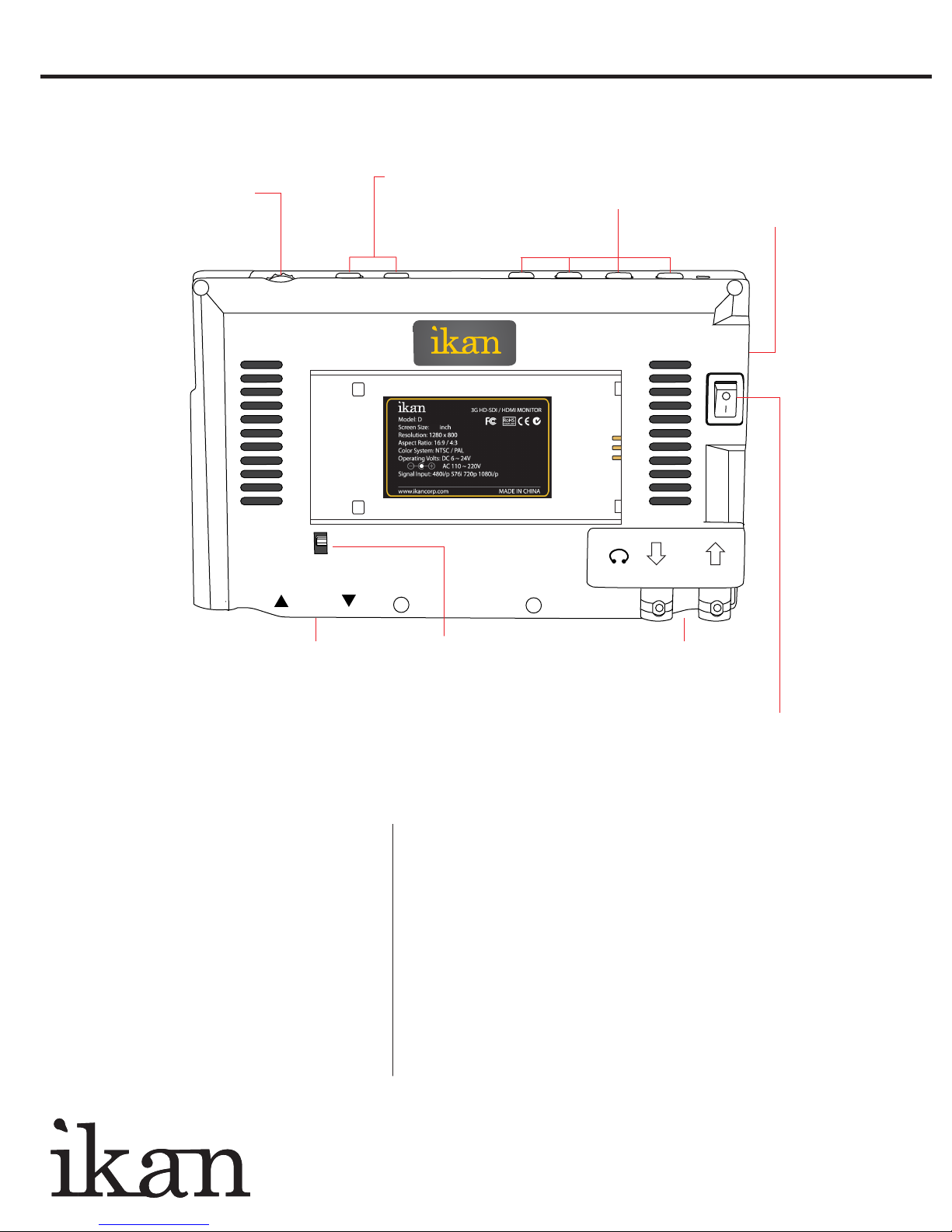
Menu Scroll
Wheel
MENU
Exit/Aspect Input
Button
EXIT/ASPECT INPUT
HDMI
Function
Keys
Standard DC
Connector
F1F2F3F4
DC
7~24V
7
7
3G-SDI
SPECIFICATIONS
Diagonal:
Resolution:
LCD Brightness:
Contrast Ratio:
Viewing angles:
Operating Volts:
Dimension:
Weight:
Video Inputs:
Video Outputs:
Audio Output:
HDMI
Input/Output
7-inch
1280 x 800
400 NIT
800:1
178 (H) 178 (V)
DC 6v to 24v
4.9"H x 7"W x 1"D
0.6 lbs
HD-SDI, HDMI
HD-SDI
Headphone
Battery
Plate Lock
SUPPORTED RESOLUTIONS & FRAME RATES
3G SDI:
HD SDI:
SD SDI:
HDMI:
1920x1080p @ 50, 59.94, 60 Hz
1280x720p @ 50, 59.94, 60 Hz
1920x1080i @ 50, 59.94, 60 Hz
1920x1080psf @ 23.98, 24, 25, 29.97, 30 Hz
1920x1080p @ 23.97, 24, 25, 29.94, 30 Hz
720x480i @ 60Hz
720x576i @ 50Hz
720x480i & 720x480p @ 59.94, 60 Hz
720x576i & 720x576p @ 50 Hz
1280x720p @ 50, 59.94, 60 Hz
1920x1080i @ 50, 59.94, 60 Hz
1920x1080psf @ 24, 25, 29.97, 30 Hz
1920x1080p @ 23.97, 24, 25, 29.94, 30, 50, 59.94, 60 Hz
3G-SDI
Input/Output
Power On/Off
www.ikancorp.com 713-272-8822
Page 4
D7w-DK
7-inch HD-SDI LCD Monitor Deluxe Kit QUICKSTART GUIDE
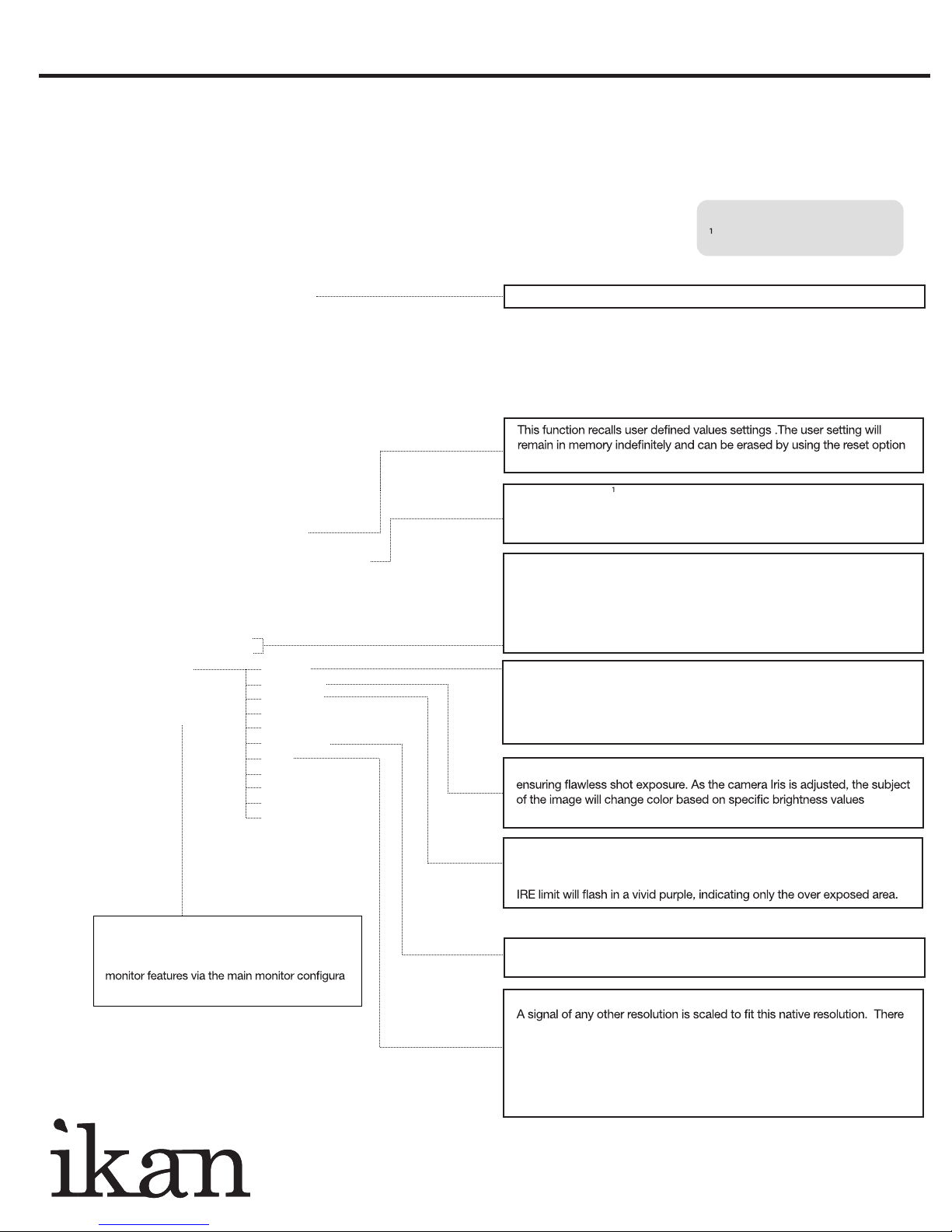
CONFIGURATION OF SETTING MENUS
GUIDES
Guides Full OFF / 90% / 80% / 4:3
Guides 16:9 OFF / 90% / 80% / 4:3
Guides 4:3 OFF / 90% / 80%
G. Background Normal / Half / Black
Crosshair Off / On
Return
VIDEO CONFIGURATION
Brightness 0-100
Contrast 0-100
Chroma 0-100
Sharpness 0-100
Tint 0-100
Color Temp. 5600K / 6500K / 9300K / Manual
Auto
Return
SYSTEM CONFIGURATION
OSD Language English / 简体中文
OSD D
Menu Setup User1-5
Backlight 5-100
DSLR Auto Scaling Off / Full / 16:9 / 3:2
System Reset
Return
FUNCTION SETUP
Luma Under Warn
Luma Over Warn
F1 Key Peaking
False Color
Underscan
DSLR Scaling
Check Field
Pixel
Window 1
Window 2
HV Delay
Guides
Crosshair
EXIT
uration 5-60
(Same As
F2, F3, & F4
Keys)
Clip Guide
Notes:
DSLR Scaling (for HDMI only)
Display a crosshair on the center of screen.
in the main menu.
The DSLR Scaling function will allow users to extend their DSLR camera’s
HDMI video output any option of four – Normal, 3:2, 16:9 or Full Screen –
convenience made simple.
As an additional tool associated with the D7’s False Color feature, ikan’s
exclusive Adjustable Under Exposure and Over Exposed Waning feature
gives the operator full control of the D7 False Color brightness values. By
setting the preferred IRE exposure limits, the operator is warned when the
image exposure is exceeding or falling under the preset IRE limit, providing
customizable, full image exposure control.
The D7 is equipped with Monochrome Peaking features which highlight
the desired focus area in a bright, red outline. The operator adjusts the
focus control until the red indicator outlines on the desired area are razor
sharp, indicating optimal focus. For the best results, be sure the subject is
properly exposed.
The False Color feature utilizes a full spectrum of assigned color indicators,
indicating optimal exposure. See included chart for color assignments.
The D7 offers adjustable upper Clip Guide levels to accurately display
overexposed images in any shooting condition. The operator simply
assigns the upper IRE to their preference and any exposure over the set
User programmable function keys. For quick
access, the user may program the F1, F2, F3 &
F4 buttons to enable frequently accessed
tion menu.
Allows to see the image in monochrome or only the red, blue, or green
-
channels.
The LCD panel in this display has a native display of 1280 x 800 pixels.
may be time when it is desired to view the incoming signal without scaling.
Enabling Pixel to Pixel mode turns off the scaling and displays a 1280 x
800 pixel window of the original image. Each pixel of the panel displays
one pixel of the original image. The user may use the scroll wheel on top of
the monitor to move the window left, right. Push the scroll wheel again to
toggle up and down.
www.ikancorp.com 713-272-8822
 Loading...