

Page 1
scroll
FOLDFOLD
FOLDFOLD
FOLDFOLD
FOLDFOLD
FOLD
wireless laser mouse
Model IH-M180ZB
You have made an excellent choice with your
wireless laser notebook mouse.
Features:
plug-n-play, no syncing needed•
2.4 GHz up to 30 feet•
horizontal and vertical scrolling•
low battery indicator•
stowable nano USB receiver•
This product comes with a limited lifetime
warranty. Before using, please read and
follow these instructions. If you still need help,
see the back page for other support options.
For more about our products, visit
www.life-works.com.
system requirements
Windows•
®
XP, Windows Vista®
or Mac
®
OS X v10.4.8 or later
USB port•
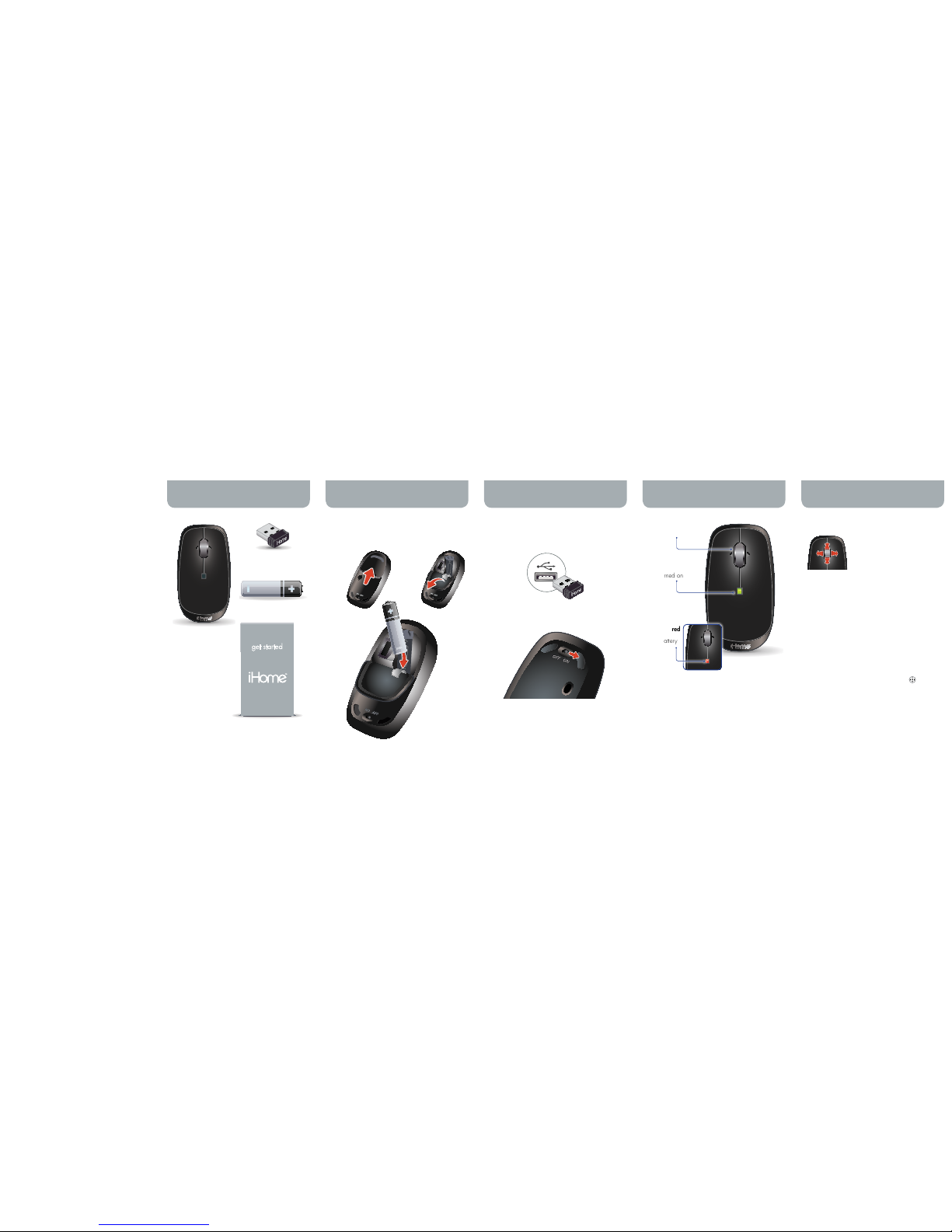
stowable nano
USB receiver
in box wirelessmouse
open battery cover and step 1:
insert battery
go
insert nano USB receiver step 2:
into USB port
turn mouse onstep 3:
1 AA Energizer® battery
scroll wheel
battery indicator
light is green
when mouse is
rst turned on
ip openpush to
release
A B
insert battery in
direction shown
C
horizontal and vertical scroll
Roll the wheel up and down
to scroll vertically.
Tilt the wheel left or right to
scroll horizontally.
For Windows XP and Vista users notef
For horizontal scrolling:
a) download mouse driver from
www.life-works.com/drivers,
b) double-click the downloaded le,
c) follow on-screen instructions to
install.
auto scroll
The scroll wheel is also a button. Press the
scroll wheel (without rolling it) and the mouse
pointer on the screen will change to
.
Move your mouse up/down or left/right
to set the scroll speed (the more you move
the mouse the faster the page will scroll the
document or web page).
Click the wheel button again to turn off
auto scroll.
ashing red
indicates
low battery
“get started” guide
(in your hands now)
wireless laser
notebook mouse
Page 2
FOLDFOLD
FOLDFOLD
FOLDFOLD
FOLDFOLD
FOLD
© 2009 LifeWorks Technology Group LLC.
iHome™ is a trademark of SDI Technologies Inc. used under license.
Windows Vista® is a registered trademark or trademark of Microsoft
Corporation in the United States and/or other countries.
Mac® is a trademark of Apple Inc., registered in the U.S. and other
countries.
All other brands and logos are trademarks of their respective
companies.
Printed in China
technical support
for technical support please visit
www.life-works.com
or call (877) LIFE-540 (877-543-3540)
lifetime warranty
for warranty information, please visit
www.life-works.com/warranty
FCC Statement
This device complies with part 15 of FCC Rules. Operation is
subject to the following two conditions: (1) this device may not cause
harmful interference, and (2) this device must accept any interference
received, including interference that may cause undesired operation.
This equipment has been tested and found to comply with the limits
for a Class B digital device, pursuant to part 15 of FCC Rules.
These limits are designed to provide reasonable protection against
harmful interference when the equipment is operated in a residential
installation. This equipment generates, uses, and can radiate radio
frequency energy and, if not installed and used in accordance
with the instruction guide, may cause harmful interference to radio
communications. However, there is no guarantee that interference
will not occur in a particular installation. If this equipment does
cause harmful interference to radio or television reception, which
can be determined by turning the equipment off and on, the user is
encouraged to try to correct the interference by one or more of the
following measures:
Reorient or relocate the receiving antenna.•
Increase the separation between the equipment and the receiver.•
Connect the equipment into an outlet on a circuit different from that •
to which the receiver is connected.
Consult a service representative for help.•
Properly shielded and grounded cables and connectors must be
used in order to comply with FCC emission limits. LifeWorks is not
responsible for any radio or television interference caused by using
other than recommended cables and connectors or by unauthorized
changes or modications to this equipment. Unauthorized changes or
modications could void the user’s authority to operate the equipment.
Responsible party:
LifeWorks Technology Group LLC
1412 Broadway, New York, NY 10018
Tested To Comply With FCC Standards FOR HOME OR
OFFICE USE
Warning Improper setup, use and care of this product can
increase the risk of serious injury, death or device damage. Read and
keep this guide and all other printed guides for future reference. For
updated guides or replacements, go to www.life-works.com
Do Not Attempt Repairs Do not attempt to take apart, open,
repair, service or modify the device(s). Doing so may risk electric
shock or other hazard. Evidence of any attempt to open or modify the
device, including any peeling, puncture or removal of labels, will void
the Limited Lifetime Warranty.
Choking Hazard This product contains small parts that may pose
a choking hazard to children and pets.
Mouse Devices: Health Warning
Use of a keyboard or mouse may be linked to serious injuries or
disorders. As in many activities, when using a computer you may
experience occasional discomfort in various parts of your body.
However, do not ignore symptoms such as persistent or recurring
discomfort, pain, throbbing, aching, tingling, numbness, burning
sensation or stiffness. Promptly see a qualied doctor, even if
symptoms occur when you are not working at your computer.
There is general consensus among researchers that there may be
many factors linked to the occurrence of these symptoms, including
overall health, stress, physical condition and how a person positions
and uses his or her body during work and other activities (including
the use of a keyboard or mouse). The amount of time a person spends
performing an activity may also be a factor.
If you have questions about how your own lifestyle, activities or
physical condition may be related to these symptoms, see a qualied
health professional.
Battery-Powered Devices
Use of rechargeable or disposable batteries in an improper manner
may result in battery uid leakage, overheating or explosion. Battery
uid is corrosive, may be toxic, can cause skin and eye burns, and is
harmful if swallowed.
Radio Frequency Technical Specications: 2.4 GHz Devices
Non-specic short range device. RF output power meets all SRD
requirements.
Wireless Devices
Remove the batteries from any wireless device, or turn it off, before
boarding an aircraft or packing the device in luggage that will be
checked. Wireless devices can transmit radio frequency (RF) energy
whenever batteries are installed and the device is turned on.
tips
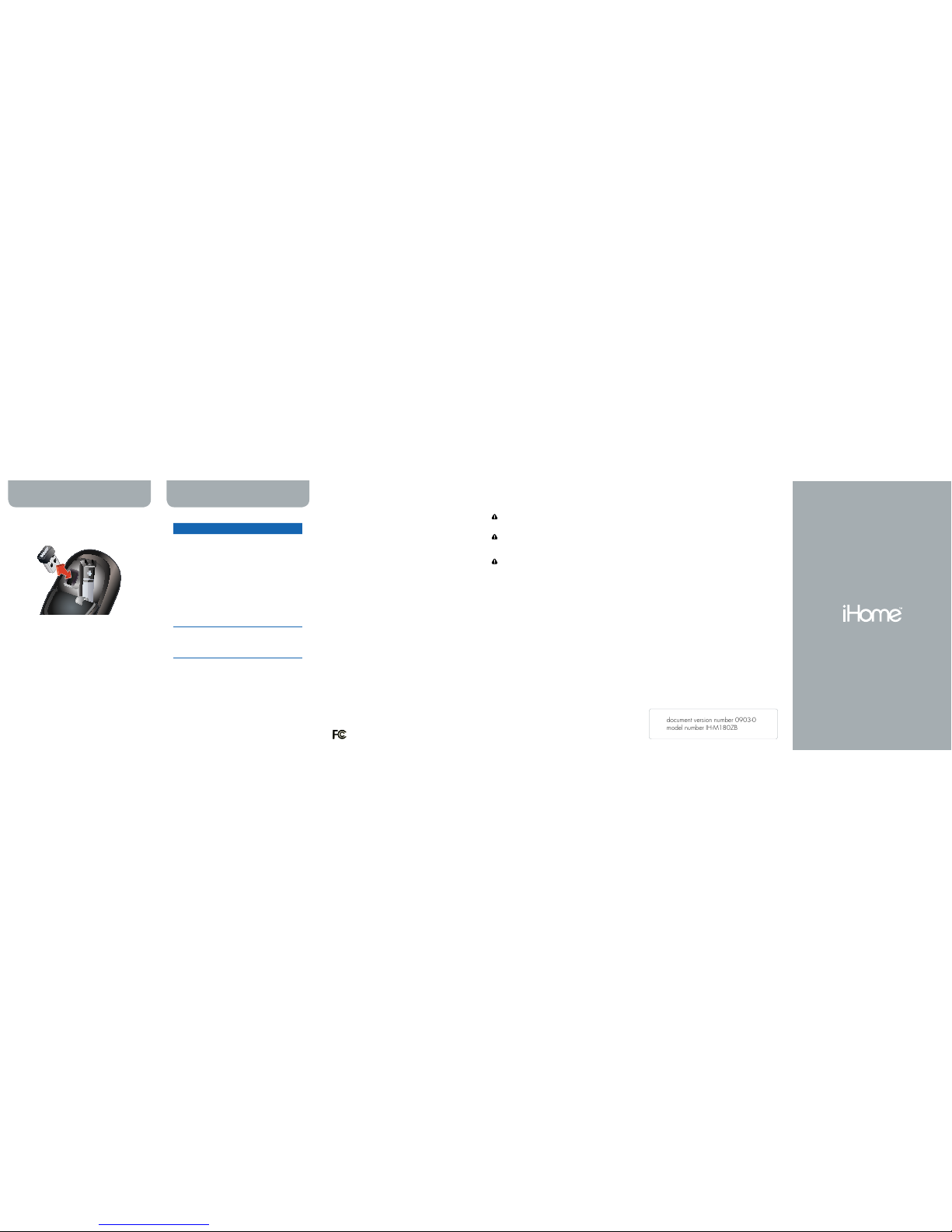
Store the nano USB receiver under the •
battery cover for travel or when not in use.
To save battery power, turn off the mouse •
when not in use.
get started
situation try this
mouse
does not
work
Ensure the nano USB receiver •
is connected.
Connect the nano USB •
receiver to a different USB
port.
Check that the battery is •
inserted correctly.
Move the mouse closer to the •
nano USB receiver.
Ensure the laser sensor on the •
bottom of the mouse is clean.
Install a fresh battery.•
horizontal
scroll does
not work
If you are using Windows XP •
or Vista, download the mouse
driver from www.life-works.
com/drivers and install it.
troubleshooting
document version number 0903-0
model number IH-M180ZB
 Loading...