

Page 1
®
IMPORTANT INFORMATION - PLEASE READ
Easy Setup GUIDE
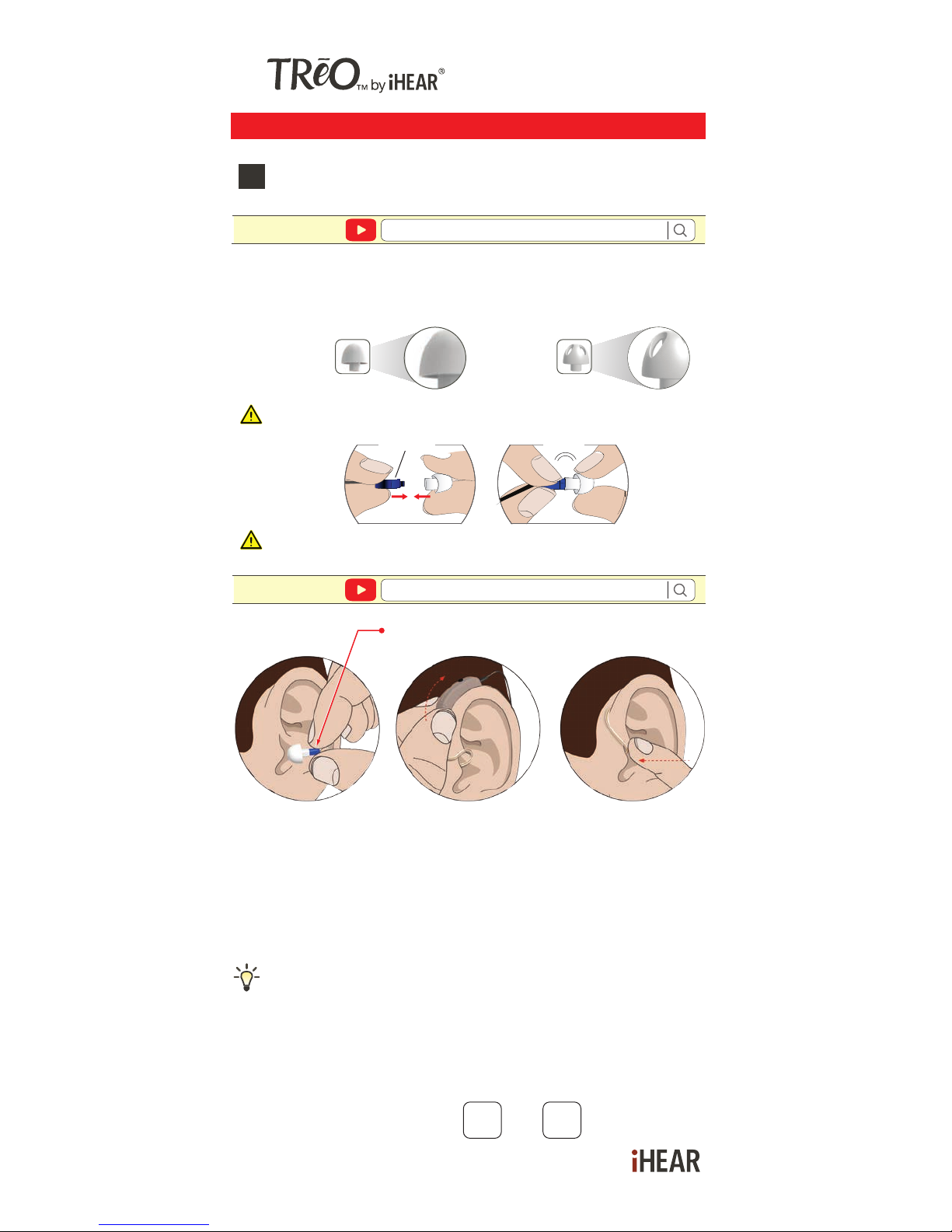
Selecting the correct Tip size
1
https://www.ihearmedical.com/treo-video-1
Watch video
Speaker
a. Gently INSERT the Tip (attached to the TRēO) into your
ear canal (blue - left | red - right).
b. TUCK the TRēO behind your ear.
c. Gently PUSH the Tip into your ear canal to ensure it fits in
securely.
Too tight? Go down a size. Too loose? Go up a size.
Correct Tip size should feel snug but comfortable in
the ear.
Each ear canal may require different Tip sizes.
Feeling too plugged up? Try a Vented Tip.
https://www.ihearmedical.com/treo-video-2
Watch video
RECORD YOUR TIP SIZE L R
Determine your Tip size by using the Closed Tip - use only
Closed Tip to start.
CLOSED VENTED
Start with the Tip already attached to your TRēO(s).
Tip(s) should be securely attached to the speaker.
click
speaker
Page 2
Settings revert to default Sound Profile #1 every time the
TRēO is turned on/off by opening and closing the battery
door.
Easy Setup GUIDE
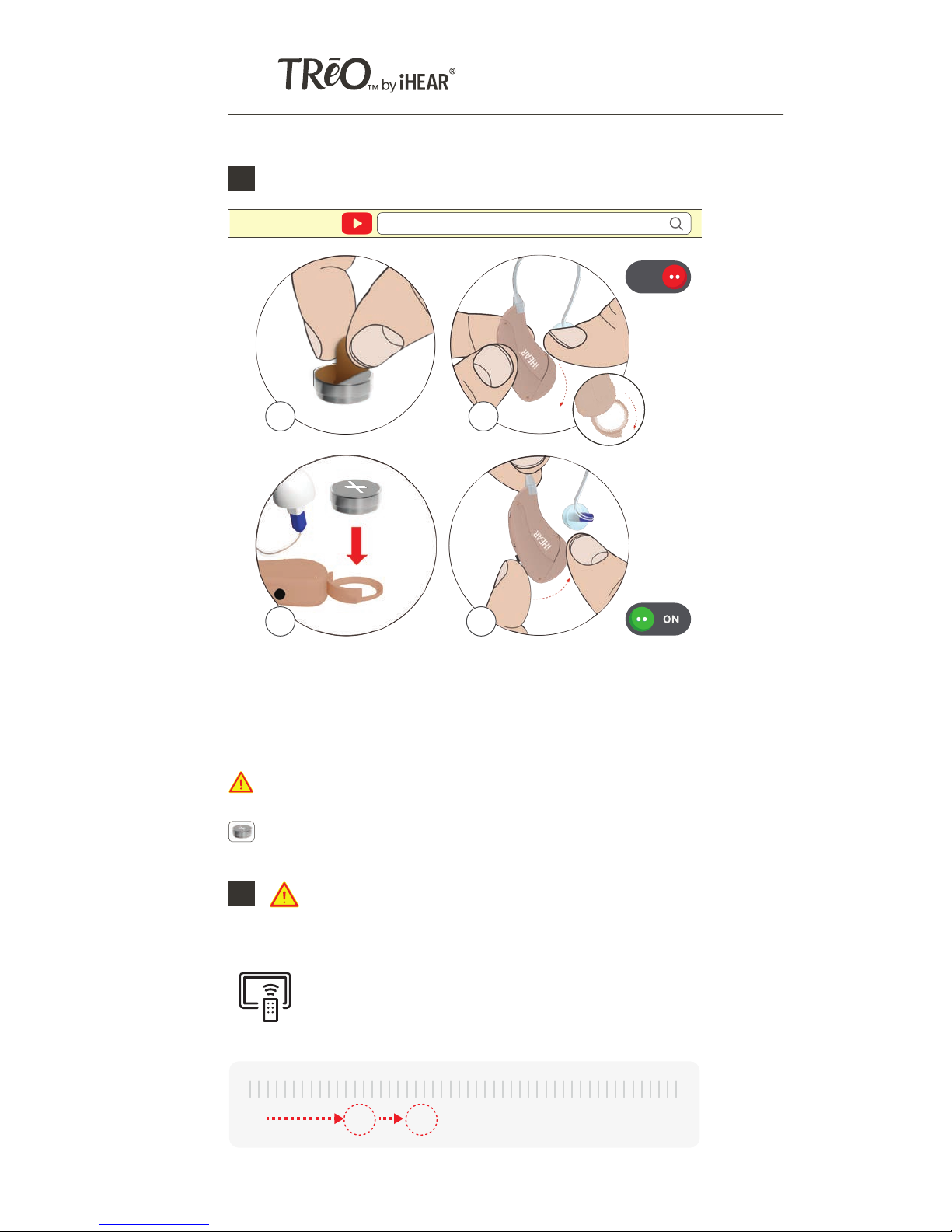
Inserting the battery and turning the TRēO On & Off2
a) PULL Off Battery Tab
b) SWING OPEN Battery Door - when open your TRēO is OFF
c) INSERT Battery with positive (+) side up
d) CLOSE the Battery Door - your TRēO is ON
a b
c d
https://www.ihearmedical.com/treo-video-3
Watch video
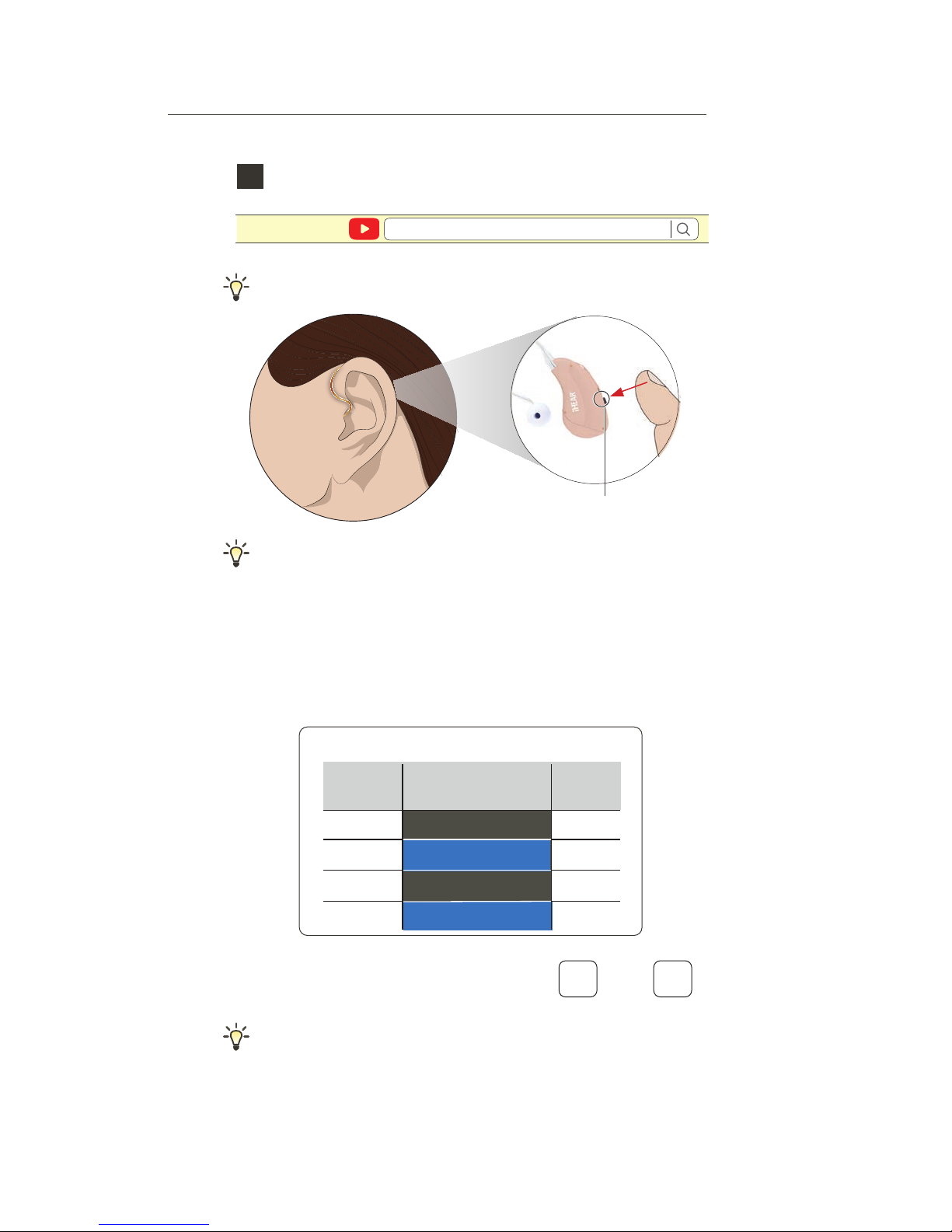
Selecting your Sound Profile
Sound Profile#1 is the default
4
https://www.ihearmedical.com/treo-video-4
Watch video
Keep batteries out of children's reach. Contact a medical
professional immediately if batteries are swallowed.
3
Remove the TRēO(s) from the ear(s) before
proceeding.
With the TRēO(s) out of your ear(s) TURN
ON the TV & ADJUST the volume until
speech is relatively loud.
Now PLACE the TRēO(s) on your ear and
gently INSERT Tip into ear canal.
Volume setting will vary depending on your TV.
If you experience feedback, use a larger and Closed Tip only.
PRESS (short press) the button and release to select your
Sound Profile. Each press cycles to the next profile, the
number of beeps indicate the Sound Profile setting you are in.
SELECT the Sound Profile with the best clarity, voice
intelligibility and overall sound quality. Record your favorite
profile number.
# SOUND PROFILE BEEPS
#1 MILD 1
#2 MODERATE 2
#3 HIGH PITCH 1 3
#4 HIGH PITCH 2 4
PROFILE
PRESS BUTTON TO SELECT SOUND PROFILE
RECORD YOUR SOUND PROFILE#
OFF
Battery Door
0% 40% 75% 100%25%
TV VOLUME
iHEAR batteries are available through our on-line store at www.ihearmedical.com
or through customer support at 1 (844) IHEAR44 (1-844-443-2744).
Page 3
Settings revert to default Sound Profile #1 every time the
TRēO is turned on/off by opening and closing the battery
door.
Easy Setup GUIDE
Selecting your Sound Profile
Sound Profile#1 is the default
4
https://www.ihearmedical.com/treo-video-4
Watch video
If you experience feedback, use a larger and Closed Tip only.
PRESS (short press) the button and release to select your
Sound Profile. Each press cycles to the next profile, the
number of beeps indicate the Sound Profile setting you are in.
SELECT the Sound Profile with the best clarity, voice
intelligibility and overall sound quality. Record your favorite
profile number.
# SOUND PROFILE BEEPS
#1 MILD 1
#2 MODERATE 2
#3 HIGH PITCH 1 3
#4 HIGH PITCH 2 4
PROFILE
PRESS
Button
PRESS BUTTON TO SELECT SOUND PROFILE
RECORD YOUR SOUND PROFILE#
LEFT
EAR
RIGHT
EAR
Page 4
iHear Medical, Inc.
15250 Hesperian Boulevard #102
San Leandro, CA 94578 USA
+1 (844) IHEAR44 (1-844-443-2744)
[email protected]
www.ihearmedical.com
®
IMPORTANT INFORMATION - PLEASE READ
TREO-EZ-GUIDE
08-00121-001-C
© 2018 iHear Medical, Inc.
All rights reserved. iHEAR, TRēO by iHEAR
and TRēO are trademarks of iHear Medical, Inc.
U.S. & international patents issued & pending.
USE ONLY iHEAR TIPS - DO NOT USE other manufacturer’s
Tips as they are NOT COMPATIBLE with the TRēO.
Tip needs to be replaced after 30 days of use for optimal
performance and hygiene.
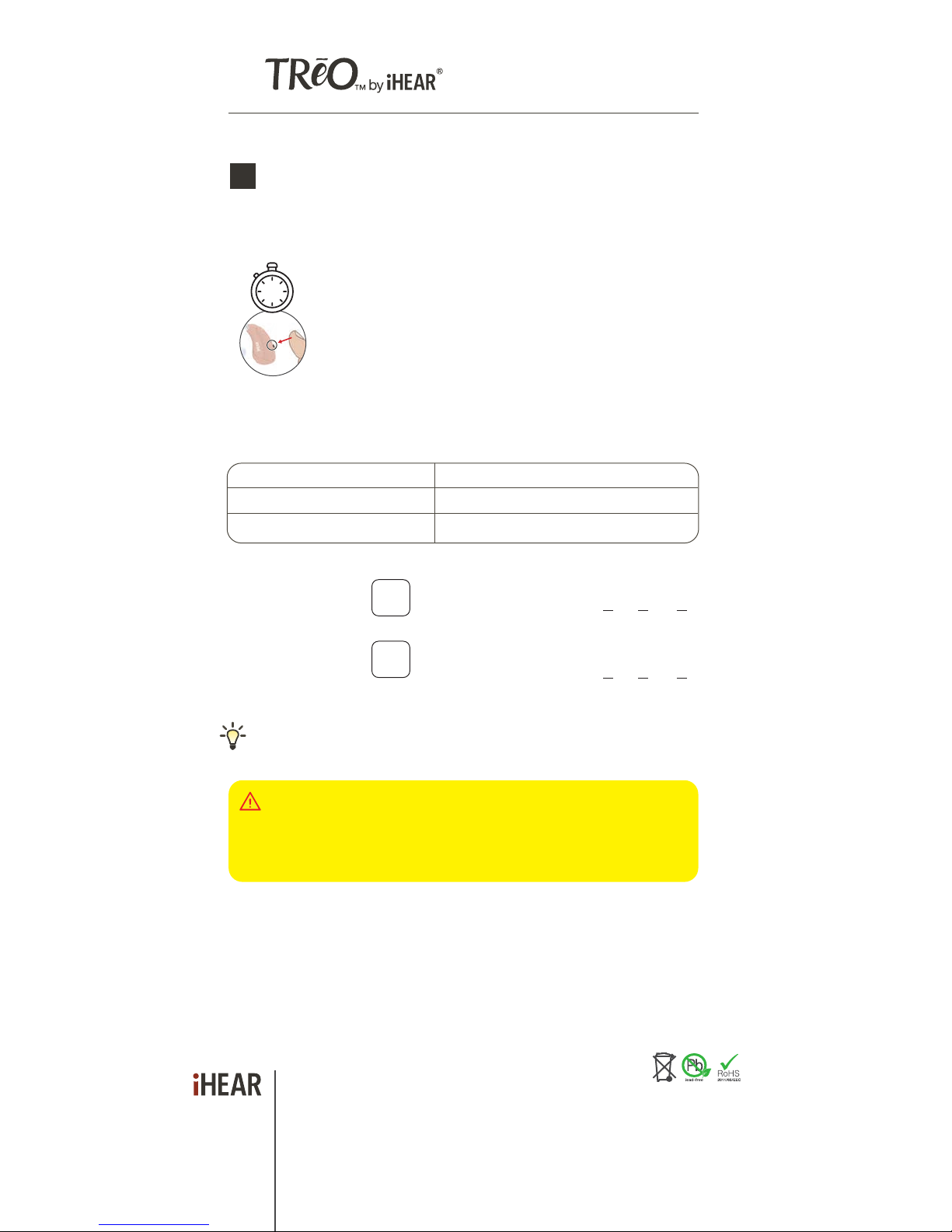
Optimizing your Sound Profile Volume
Now that you have selected your Sound Profile, you can
adjust the volume in 2-steps for better clarity.
5
If you experience problems understanding soft
speech level, boost your Sound Profile Volume by
pressing the button for 2 seconds (long press) until
you hear a high frequency beep. Repeat the volume
boost for improved loudness and intelligibility. You
have a maximum of 2 level boosts. You will hear a
tone when the level has successfully boosted. You will
hear 3 beeps when maximum volume is reached. To
return to default volume boost setting, you must open
and close the battery door.
ACTION FUNCTION
SHORT PRESS Change sound profile (1-4)
LONG PRESS (2 sec) Boost Volume
PRESS &
Hold 2 Sec
2
[NO BOOST]
YOUR LEFT EAR
SOUND PROFILE#
[NO BOOST]
YOUR RIGHT EAR
SOUND PROFILE# CIRCLE YOUR BOOST LEVEL
0 1 2
Left and right may have different boost levels due to different
listening preferences.
CIRCLE YOUR BOOST LEVEL 0 1 2
Selecting the correct Tip size
1
https://www.ihearmedical.com/treo-video-1
Watch video
Speaker
a. Gently INSERT the Tip (attached to the TRēO) into your
ear canal (blue - left | red - right).
b. TUCK the TRēO behind your ear.
c. Gently PUSH the Tip into your ear canal to ensure it fits in
securely.
Too tight? Go down a size. Too loose? Go up a size.
Correct Tip size should feel snug but comfortable in
the ear.
Each ear canal may require different Tip sizes.
Feeling too plugged up? Try a Vented Tip.
https://www.ihearmedical.com/treo-video-2
Watch video
RECORD YOUR TIP SIZE L R
Determine your Tip size by using the Closed Tip - use only
Closed Tip to start.
CLOSED VENTED
Start with the Tip already attached to your TRēO(s).
Tip(s) should be securely attached to the speaker.
speaker
iHEAR batteries, Cleaning Wipes and Tip replacements are available
through our on-line store at www.ihearmedical.com or through customer
support at 1 (844) IHEAR44 (1-844-443-2744).
 Loading...