

Page 1

Page 2

Page 3

1
Table of Contents
1. Hardware....................................................................................2
Hardware Connection .......................................................................................2
Connecting Touch Panel (Optional) ..................................................................3
Connection Diagram .........................................................................................4
DIP Switch Settings...........................................................................................5
36 & 10 PIN Button Layout................................................................................5
Solving Ticket SSR Error...................................................................................6
Reset.................................................................................................................7
2. Bookkeeping & Adjustment....................................................10
Access Flow Chart ..........................................................................................10
System Settings ...............................................................................................11
Chance Settings..............................................................................................12
Touch Screen Calibration................................................................................12
3. Introduction .............................................................................13
Common Features ..........................................................................................13
Lobby...............................................................................................................13
Jackpot............................................................................................................13
4. (Game 1) Robin Hood..............................................................14
Main Game......................................................................................................14
Feature............................................................................................................15
Win Rules........................................................................................................17
5. (Game 2) HalloWin...................................................................18
Main Game......................................................................................................18
Feature............................................................................................................19
Win Rules........................................................................................................20
6. (Game 3) Wild Rider ................................................................21
Main Game......................................................................................................21
Feature............................................................................................................22
Win Rules........................................................................................................24
Page 4
2
1. Hardware
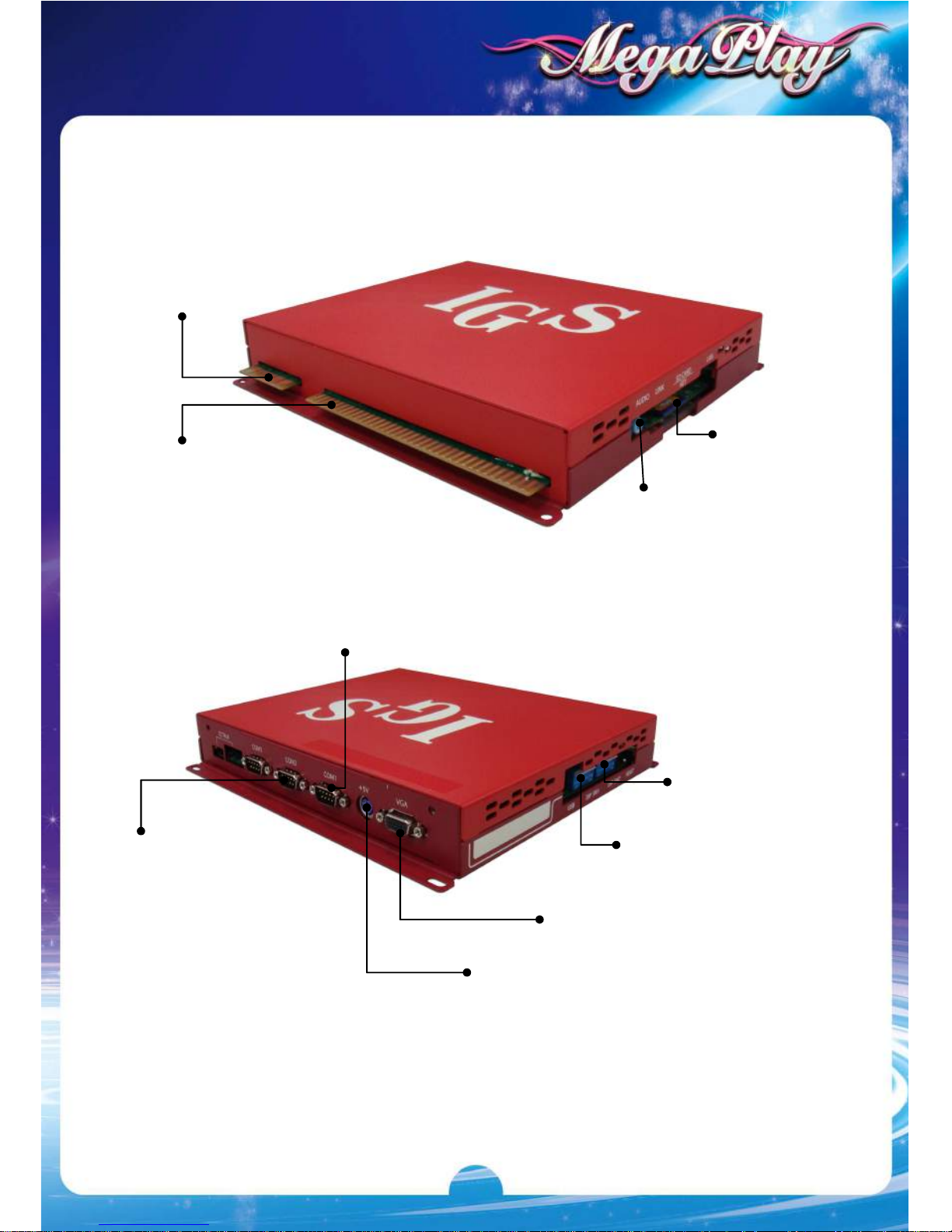
Hardware Connection
36-
Pin Connector
Audio Jack
SD Card Slot
10-
Pin Connector
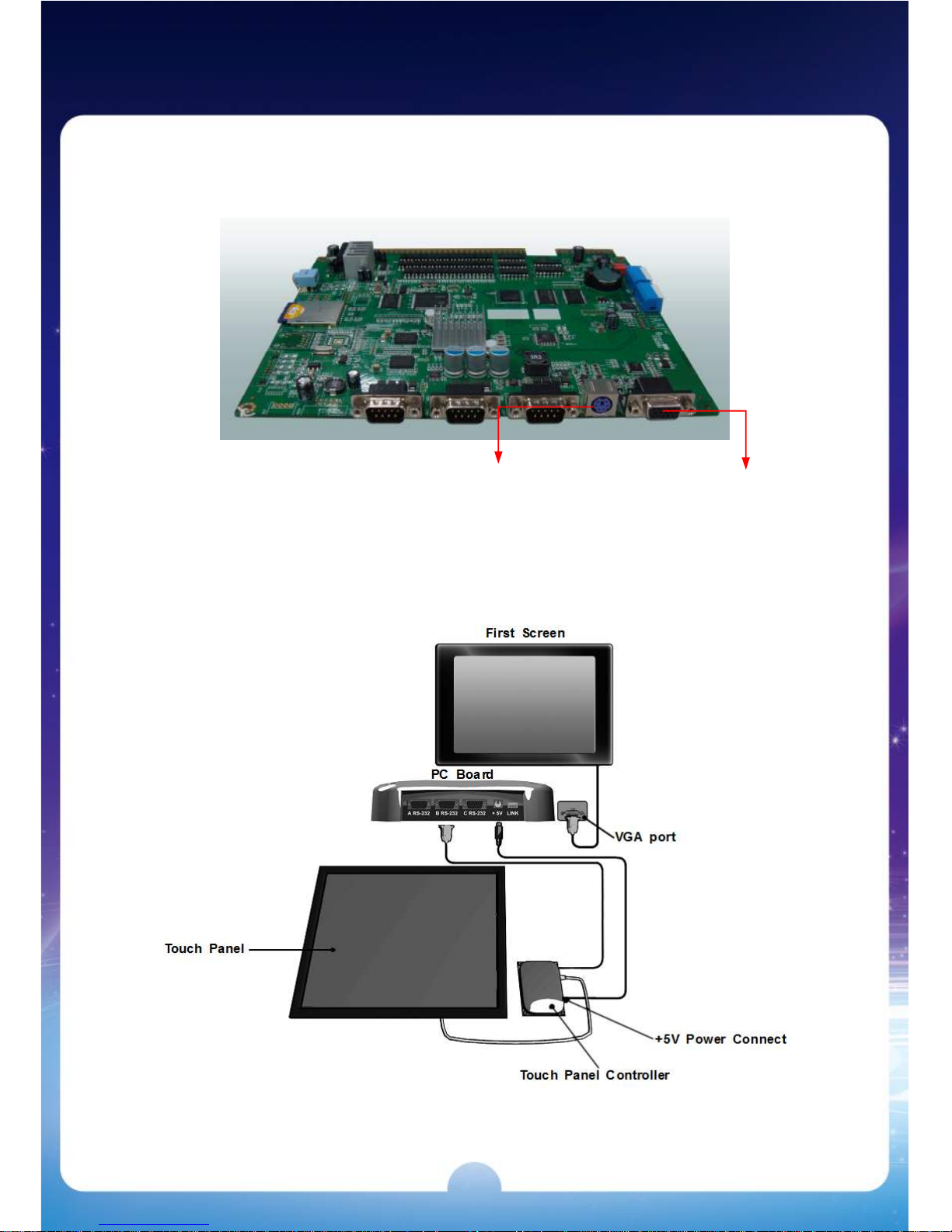
A RS
-
232
Connects to optional Citizen printer/ticket dispenser.
* Use Belkin #F2L044 (serial printer cable/null modem) for Citizen printer.
B RS-232
Connects to Micro Touch
compatible touch screen
+5V
+5V Power output
DIP Sw 1
DIP Sw 2
VGA port
Connects to screen
Page 5
3
Connecting Touch Panel (Optional)
Type A
Refer to the diagram below to connect the touch screen.
After the connection, remember to adjust the Pin 1 of DIP SW1 to ON to enable
touch mode.
Power +5V Connector
(Female)
Monitor Connector
(15PIN Female)
Page 6
4
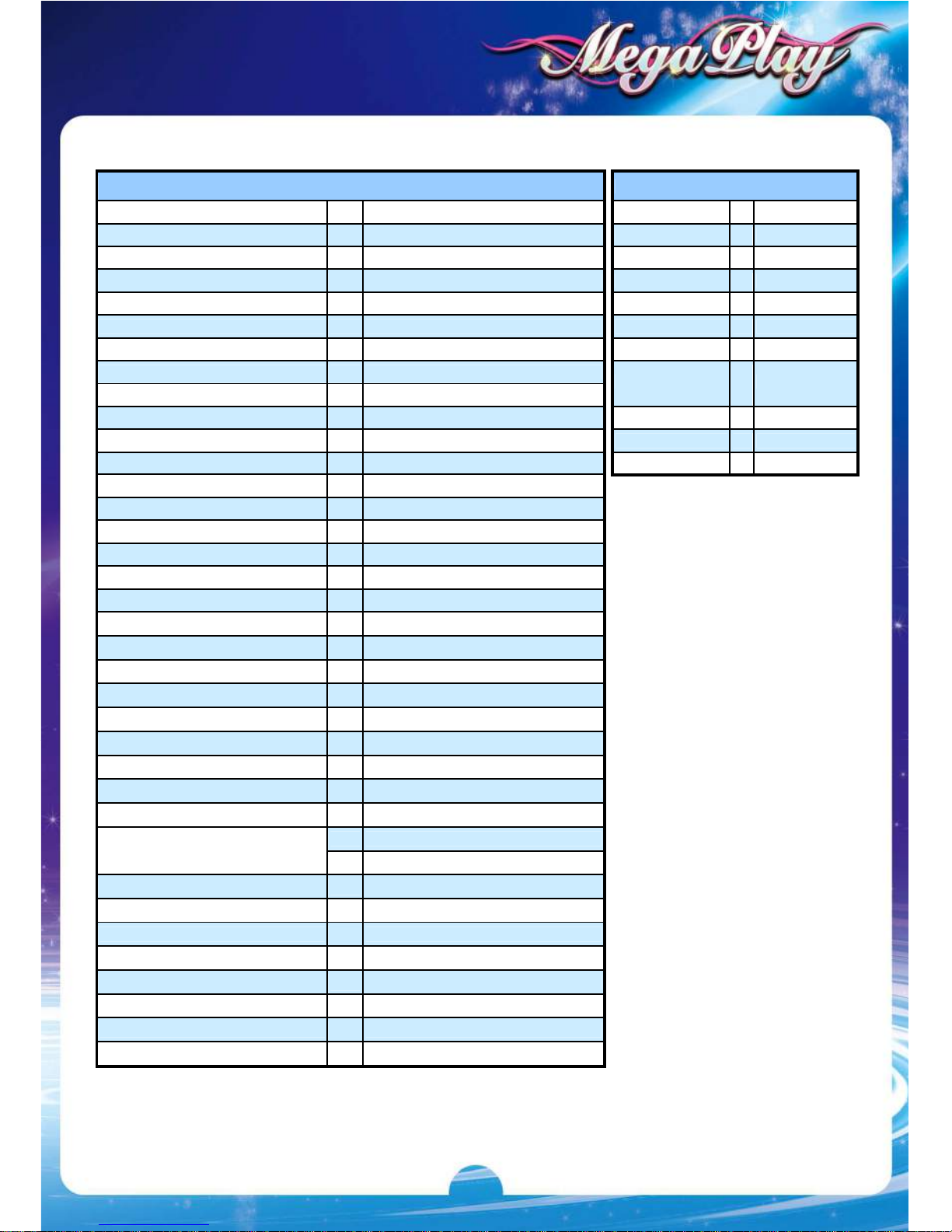
Connection Diagram
36 Pins (6 buttons)
10 Pins (6 buttons)
PARTS SIDE
SOLDER SIDE
PARTS SIDE
SOLDER SIDE
1
GND 1
GND
SPEAKER_R 2
GND 2
GND
SPEAKER_L 3
GND
+5V 3
+5V
4
+5V 4
+5V
5
+12V 5
+12V
6
HOP-VCC 6
TICKET OUT 7
TICKET SWITCH 8
TICKET SSR 7
START / ALL STOP 9
8
HELP / STOP4 10
GND 9
GND
PLAY / STOP5 11
GND 10
GND
TAKE / MENU / STOP1 12
SELECT LINE / STOP 3 13
14
15
STOP 2 16
17
COIN A 18
KEY IN
19
COIN C
RECORD 20
TEST
21
KEY OUT / PRINTER OUT
22
COIN A METER 23
KEY IN METER 24
25
COIN C METER 26
27
OUT METER
28
LAMP: START/ ALL STOP
29
LAMP: HELP / STOP 4
30
LAMP: PLAY / STOP 5
31
LAMP : COUNT
LAMP: TAKE / STOP 1
32
LAMP: SELECT LINE / STOP3
33
LAMP: STOP 2
34
35
GND
36
GND
Page 7
5
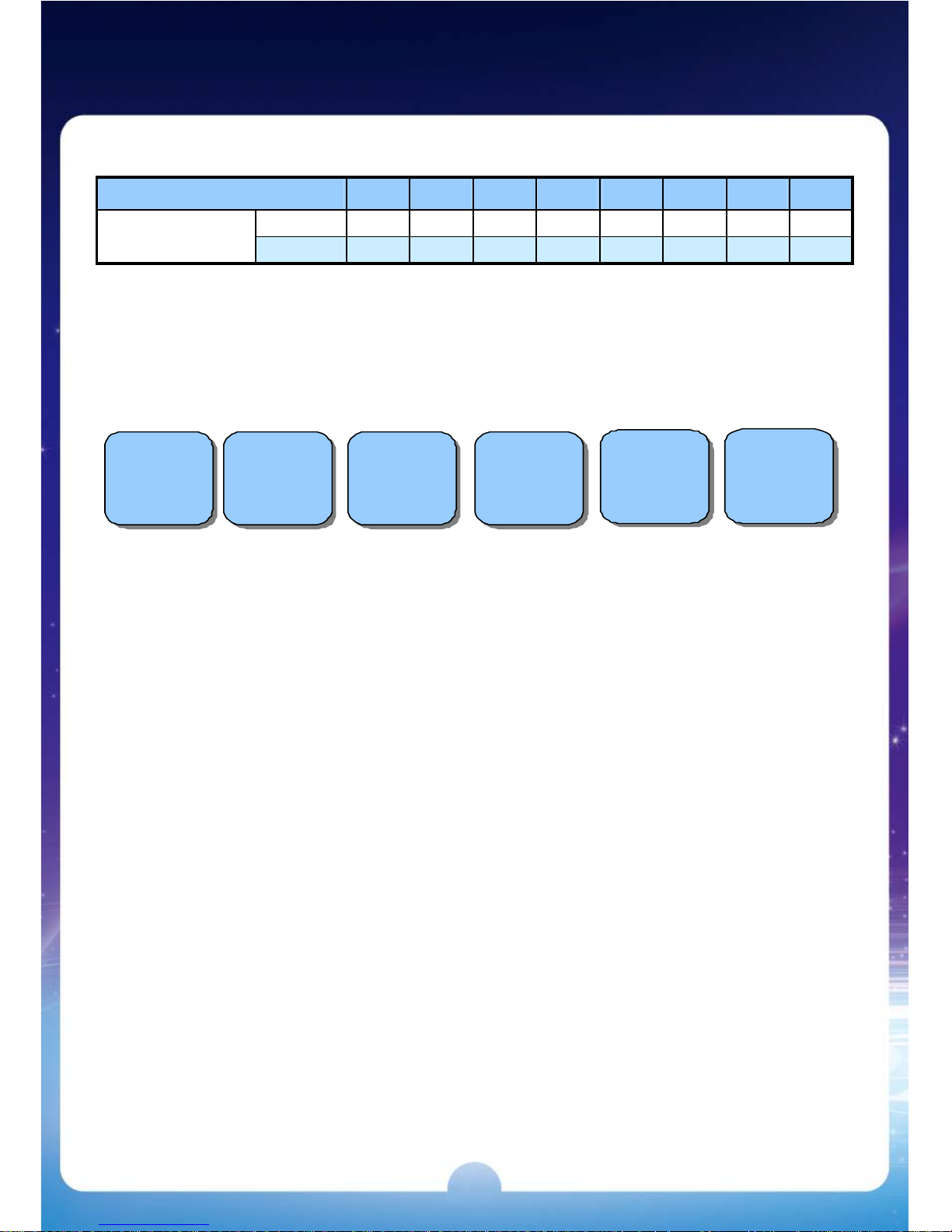
DIP Switch Settings
DIP SWITCH 1 1 2 3 4 5 6 7 8
OFF OFF
TOUCH
ON ON
36 & 10 PIN Button Layout
6 Buttons
STO P1
TA KE
ME N U
STOP 2
STO P3
SELE CT LINE
ST OP 4
HE L P
STO P 5
P LAY
S TART
ALL STO P
TAKE
Page 8
6
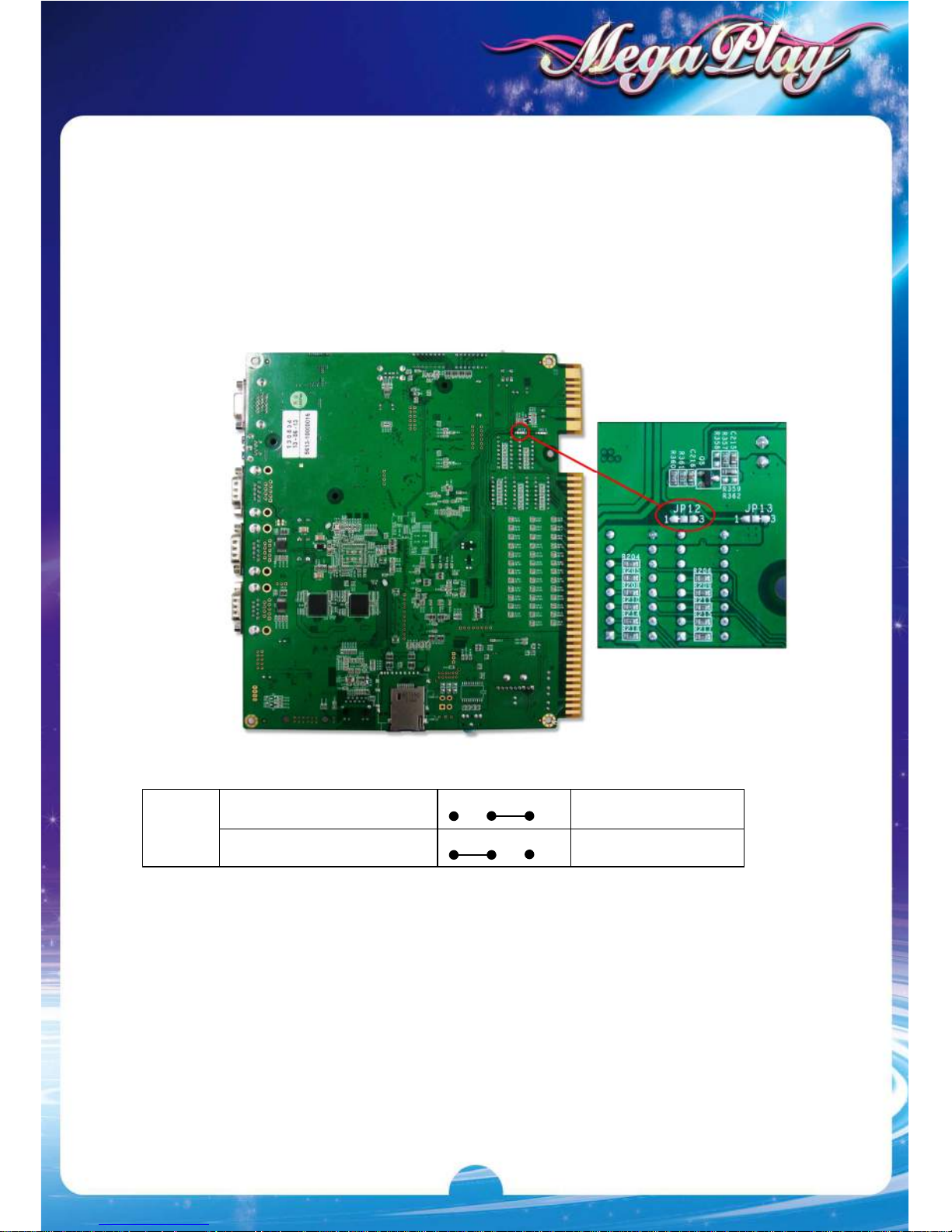
Solving Ticket SSR Error
After powering on the machine, if the hopper keeps working and can’t be stopped,
it could be that the Ticket SSR’s jump setting is incorrect.
How to solve:
1. Locate the Ticket SSR jump (JP12) on the PC board. Then identify current
TICKET SSR is at HIGH ACTIVE or LOW ACTIVE.
2. Change to use the alternative JP12 setting.
Low Active
3 2 1
Short pins 1-2
JP12
High Active (Default)
3 2 1
Short pins 2-3
Page 9
7
Reset
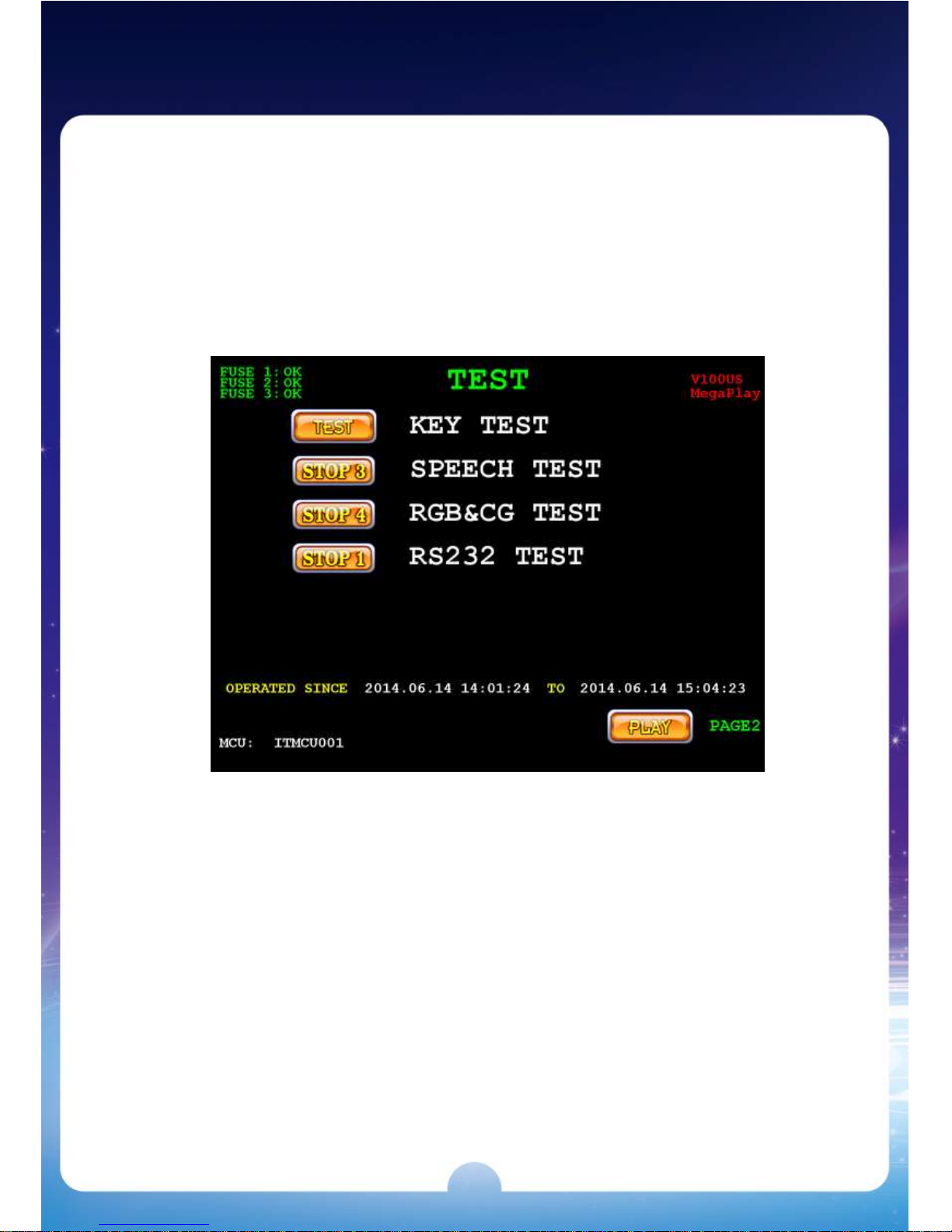
1. Power off the machine and then power on.
2. Press and hold the【TEST】button until the game enters the CHECKING
SYSTEM page.
3. Enter the「TEST」page.
4. Press the【PLAY】button to enter the「TEST 2」PAGE (PAGE 2).
Page 10
8
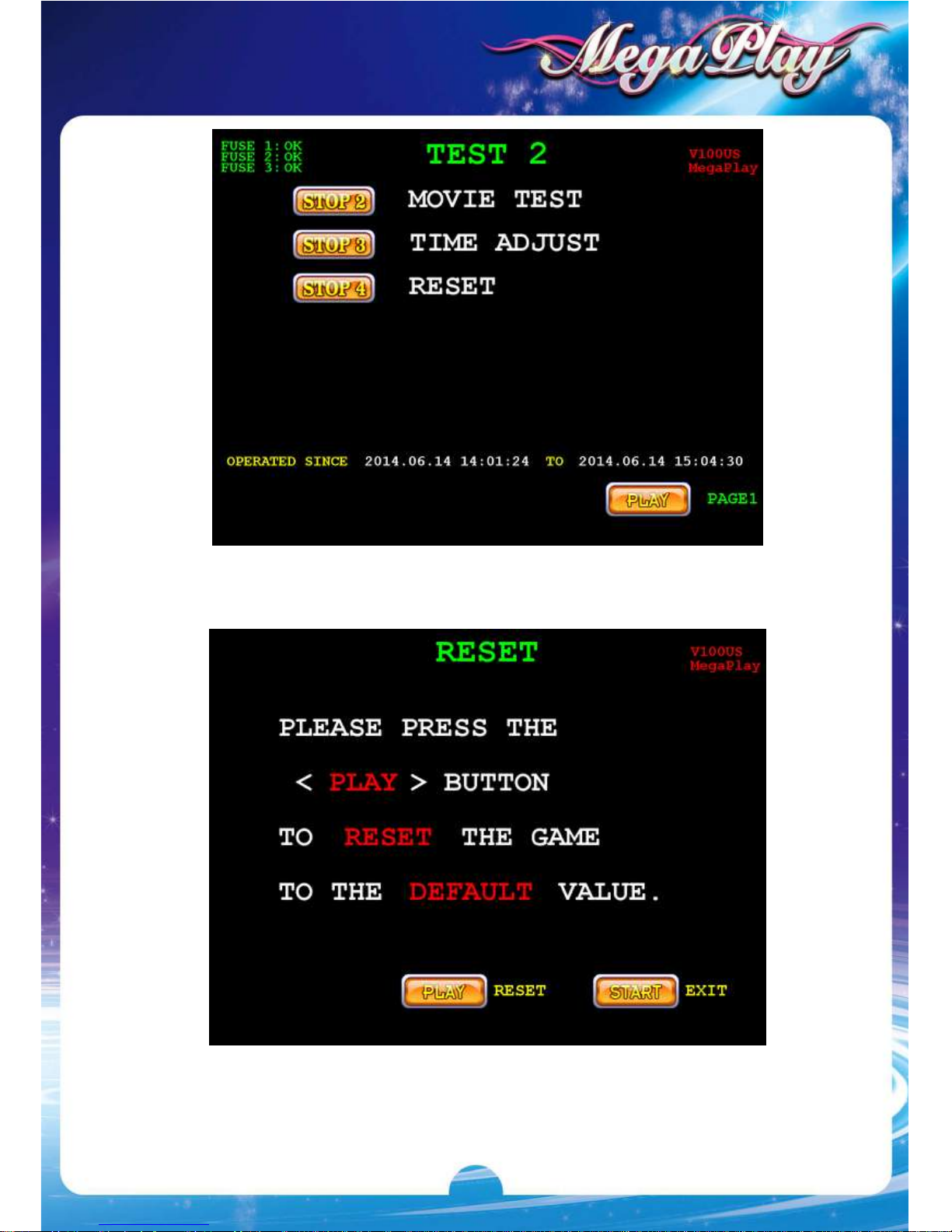
5. Press the【STOP4】button to enter the「RESET」page.
6. Press the【PLAY】button to RESET the game to default value.
Page 11
9
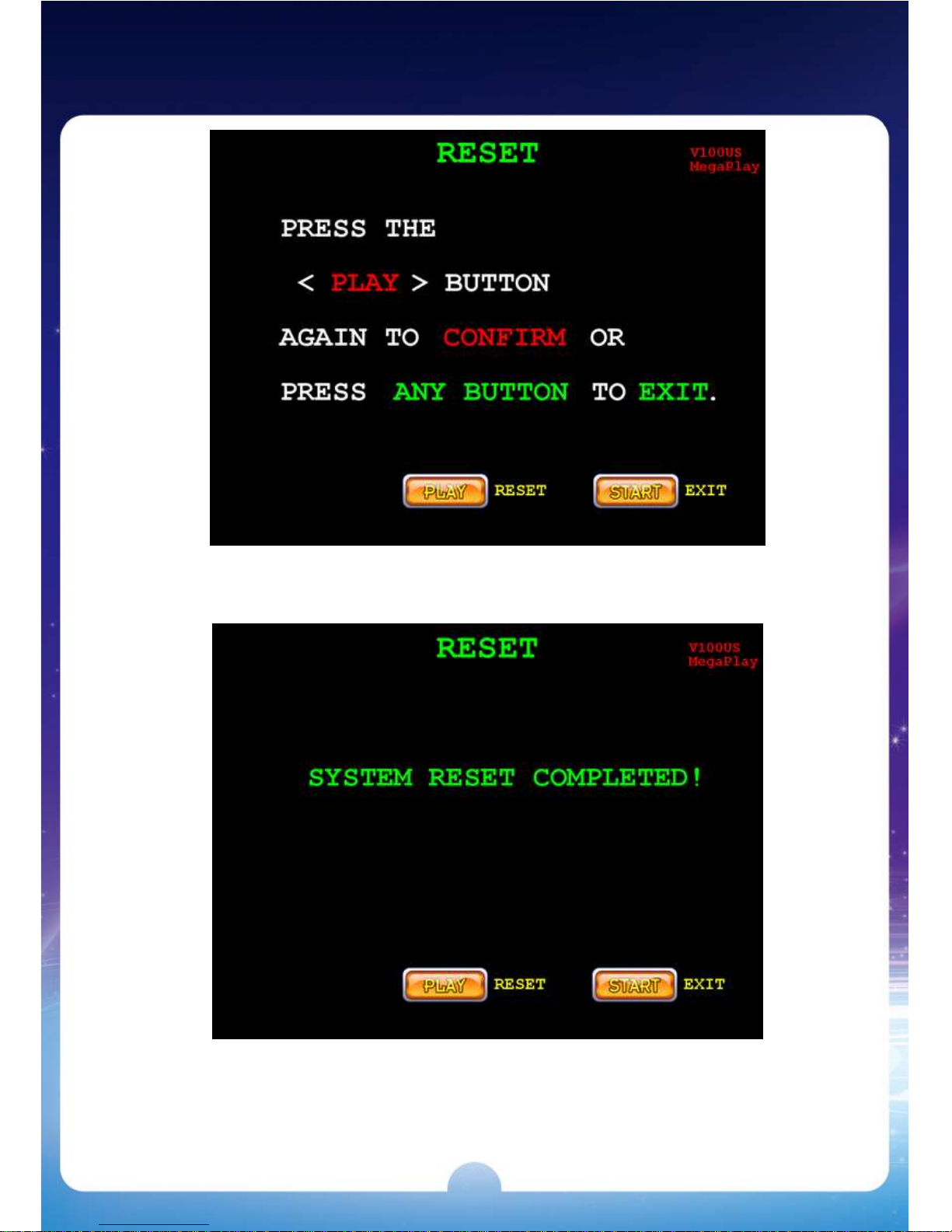
7. Press the【PLAY】button again to confirm RESET or press ANY button to
EXIT.
8. After RESET is completed, it displays SYSTEM RESET COMPLETED on
the screen.
9. Power off the machine and then power on to complete the Reset procedure.
Page 12
10
2. Bookkeeping & Adjustment
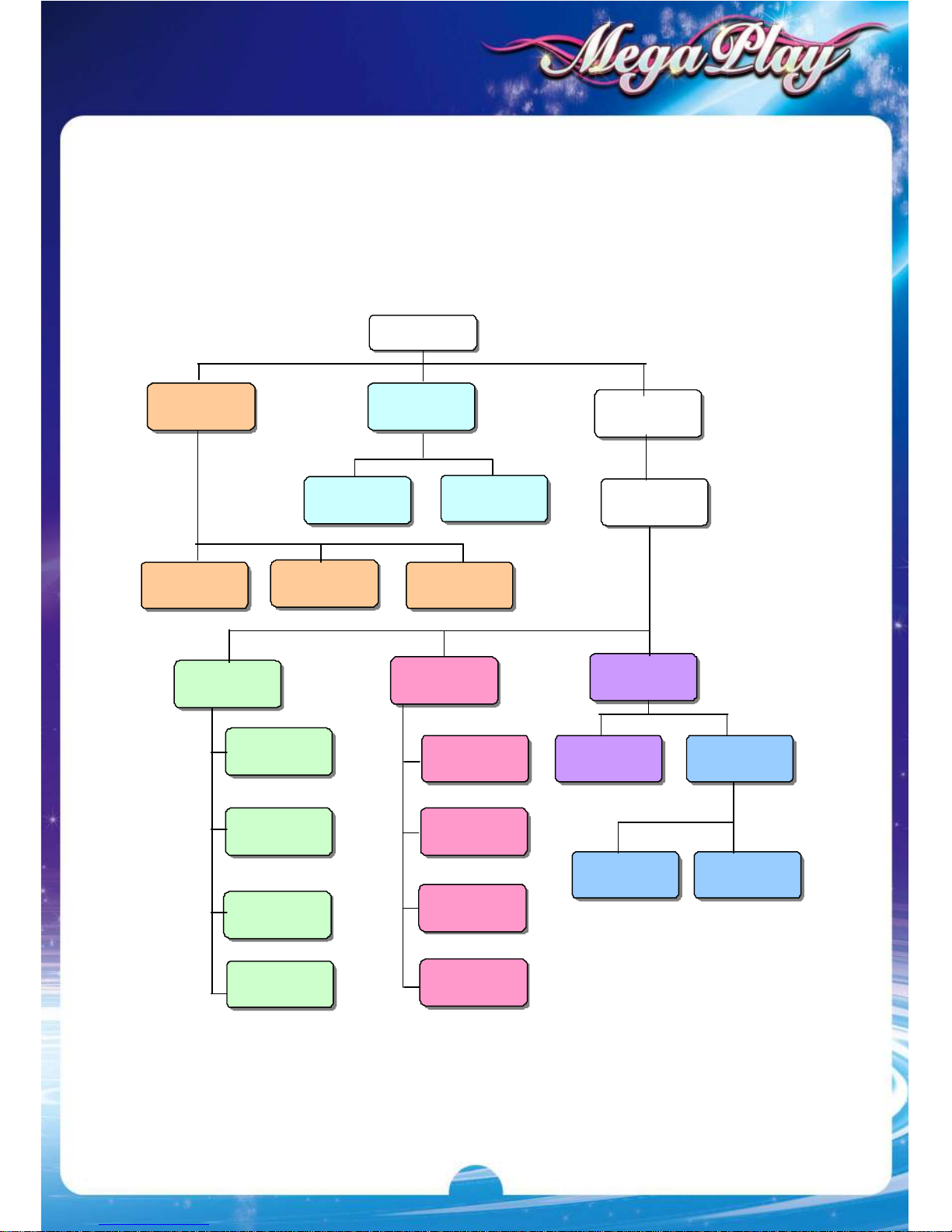
Access Flow Chart
[STOP2]
LAST HAND
Enter
Password
[RECORD]
[STOP3]
SHORT-TERM
Default password:
Press [START] 8 times
[STOP4]
SYSTEM
CURRENT
DATA
LAST
DATA
[STOP2]
ROBIN HOOD
[STOP3]
HALLOWIN
[STOP4]
WILD RIDER
[STOP2]
MAIN GAME
[STOP3]
ADJUSTMENT
[STOP4]
INTERFACE
[STOP1]
TOTAL
[STOP2]
ROBINHOOD
[STOP3]
HALLOWIN
[STOP4]
WILDRIDER
[STOP2]
SYSTEM
[STOP3]
CHANCE
[
STOP4]
TIME
[STOP1]
VOLUME
[STOP2]
PRINTER
[STOP3]
TOUCH
[STOP2]
TOUCH CALIBRATE
[STOP3]
TOUCH REVERSE
Page 13
11
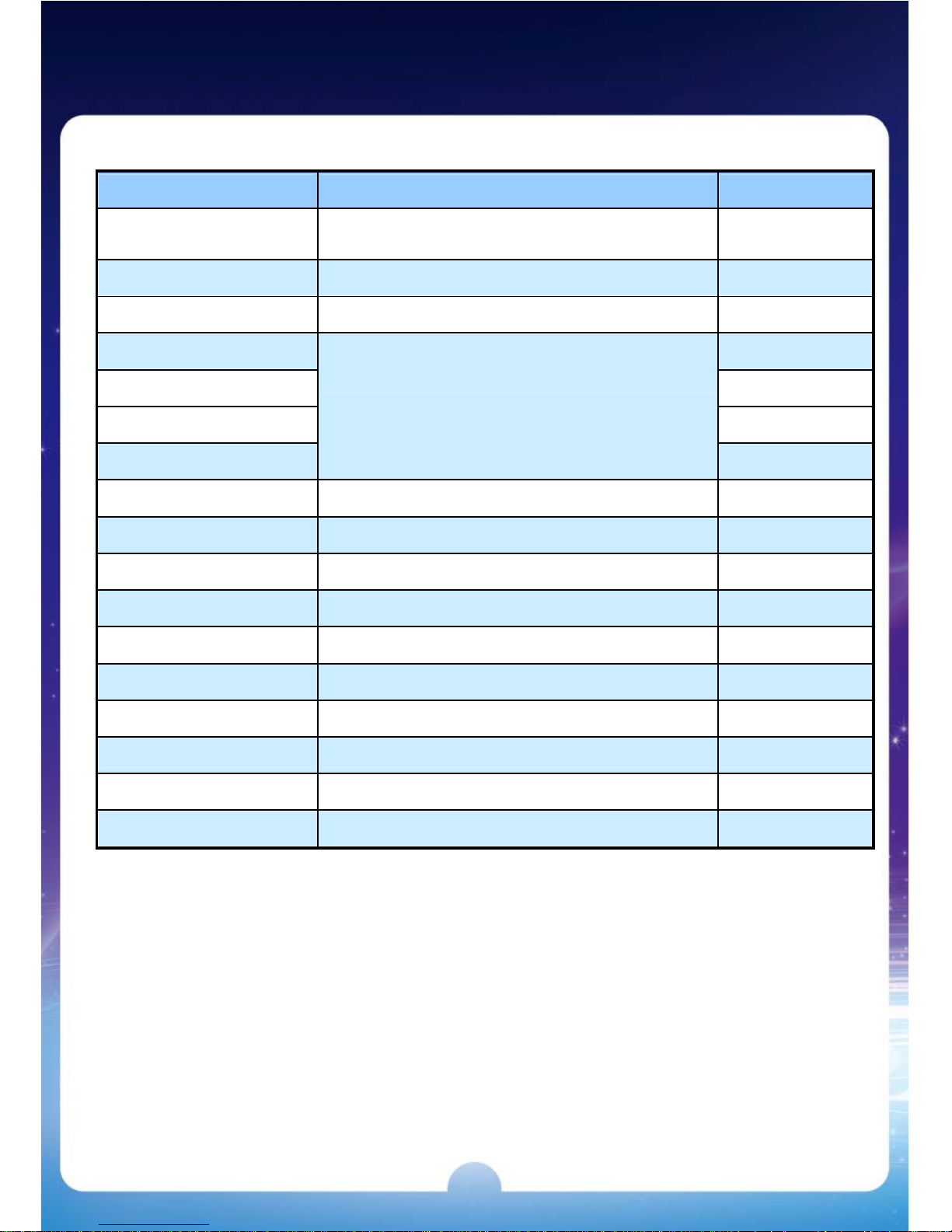
System Settings
ITEMS SETTING SELECTION DEFAULT
MIN. PLAY / TOTAL
1, 1 x MAX LINE, 2 x MAX LINE, 3 x MAX LINE
,
4 x MAX LINE, 5 x MAX LINE, 6 x MAX LINE
1 x MAX LINE
MAX. PLAY / TOTAL 100,200,300,400,500 200
MIN. PLAY FOR JACKPOT
40,60 40
COIN RATE 25
KEY IN RATE 100
KEY OUT RATE 1
TICKET RATE
1,5,10,20,25,50,100,200,500,1000
500
GAME TICKET 1,2,3,4,5,8,10,CONTINUES CONTINUES
INTERFACE DISPENSER , PRINTER ,ATTENDANT PRINTER
PRINTER COMMAND
CBM1 , ESC/POS , ESC/POS2 , STAR CBM1
DISPLAY CREDIT, 1C, 5C, 10C, 20C, 25C, 50C, $1 CREDIT
SYSTEM LIMIT NO,YES NO
DEMO MUSIC NO,YES YES
NON-STOP NO,YES NO
PASSWORD NO,YES NO
ODDS TABLE NO,YES YES
AUTO PLAY NO,YES YES
Page 14
12
Chance Settings
ITEMS SETTING SELECTION DEFAULT
MAIN GAME LEVEL
LEVEL1(Easiest), LEVEL2,LEVEL3,
LEVEL4,LEVEL5,LEVEL6(Hardest)
LEVEL 6
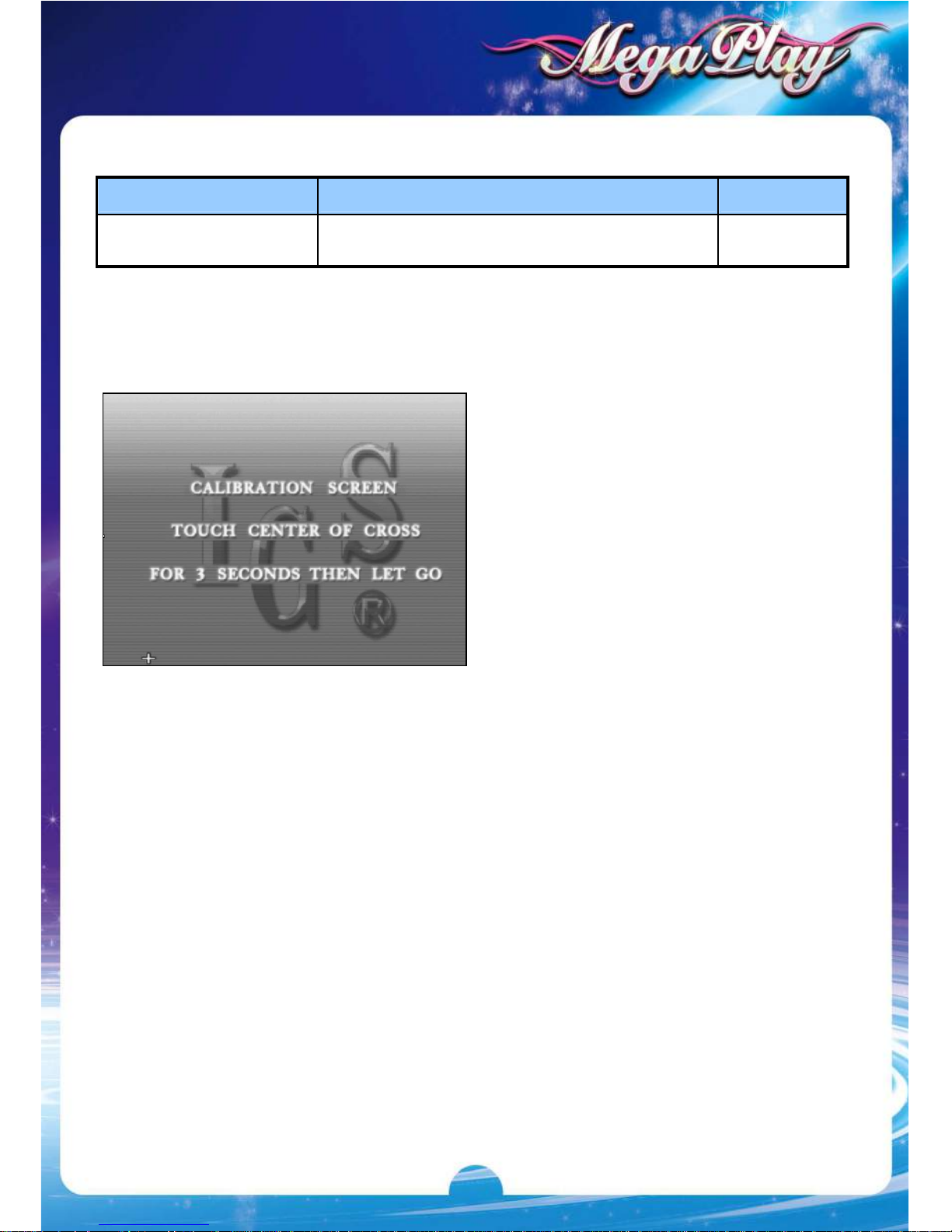
Touch Screen Calibration
1. If a touch screen is connected,
press
[RECORD]>
[SYSTEM]>[INTERFACE]>
[TOUCH]
and follow the on-screen
prompts to enter the calibration
screen.
2. Touch center of the cross on the
screen for 3 seconds.
3. Follow the cross when it moves till
the calibration is completed.
Page 15
13
3. Introduction
Common Features
Max. Win up to 500,000.
When collecting 3 Jackpot Symbols in the main game reel, players win the
Jackpot.
Touch screen / Auto play support.
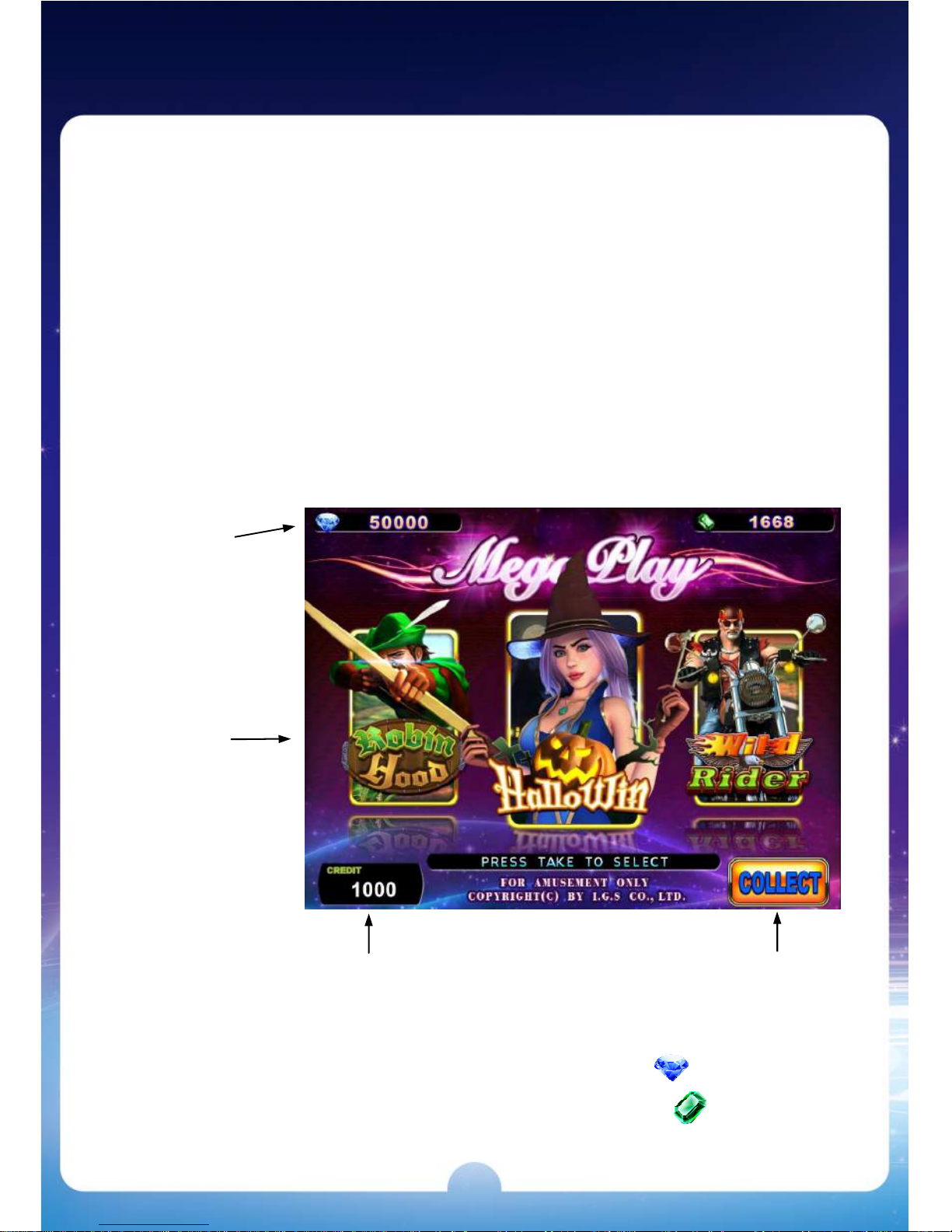
Lobby
MegaPlay
is a 3 in 1 multigame .
Jackpot
The Diamond Jackpot is the fixed value triggered by 3 in the game.
The Emerald Jackpot is the random value triggered by 3 in the game.
2 sets of
Jackpots
Games
Pay Out Button Credit
Page 16
14
4. (Game 1) Robin Hood
Main Game
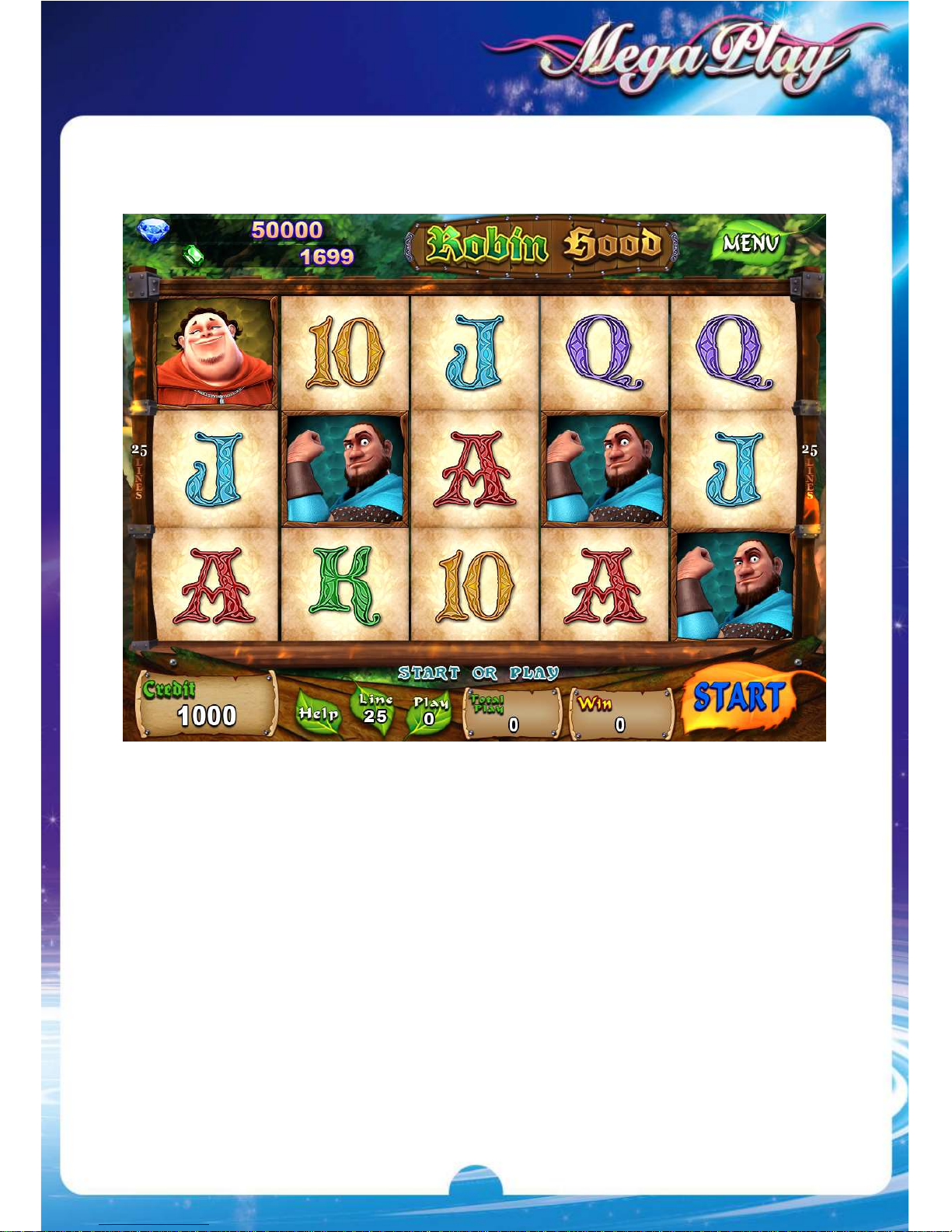
Robin Hood
is a 5 Reels & 25 Liners game.
After collecting winning values, the winning symbols will be cleared with new
symbols dropped above to fill all empty spaces, and then re-collect again if
there is a win. A game repeats this feature until there is no winning
combination.
Page 17
15
Feature
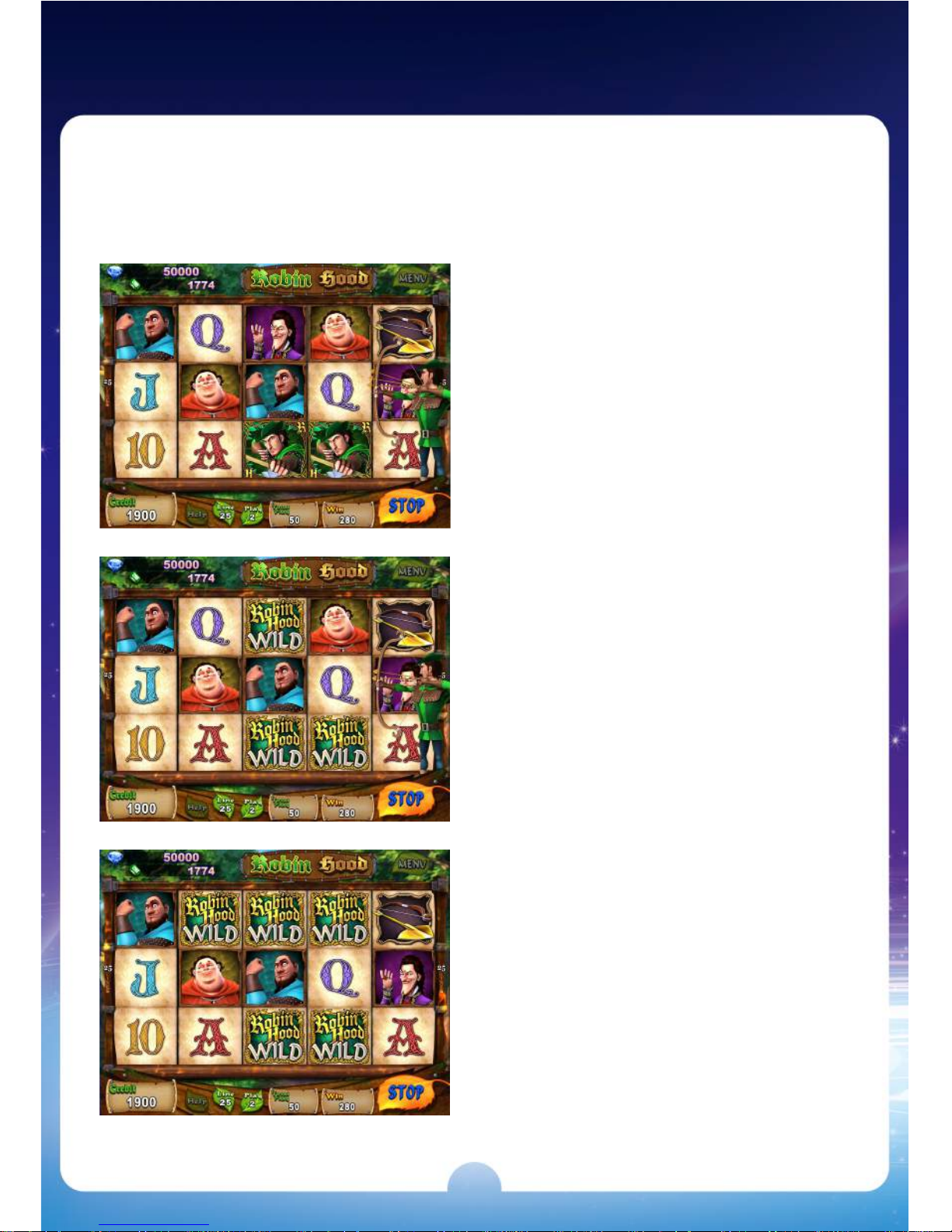
Golden Arrow
When the Golden Arrow appears
on the 5
th
reel, the symbols shot by
Robin Hood will be replaced with
WILD symbols to increase the
winning possibility.
Page 18
16
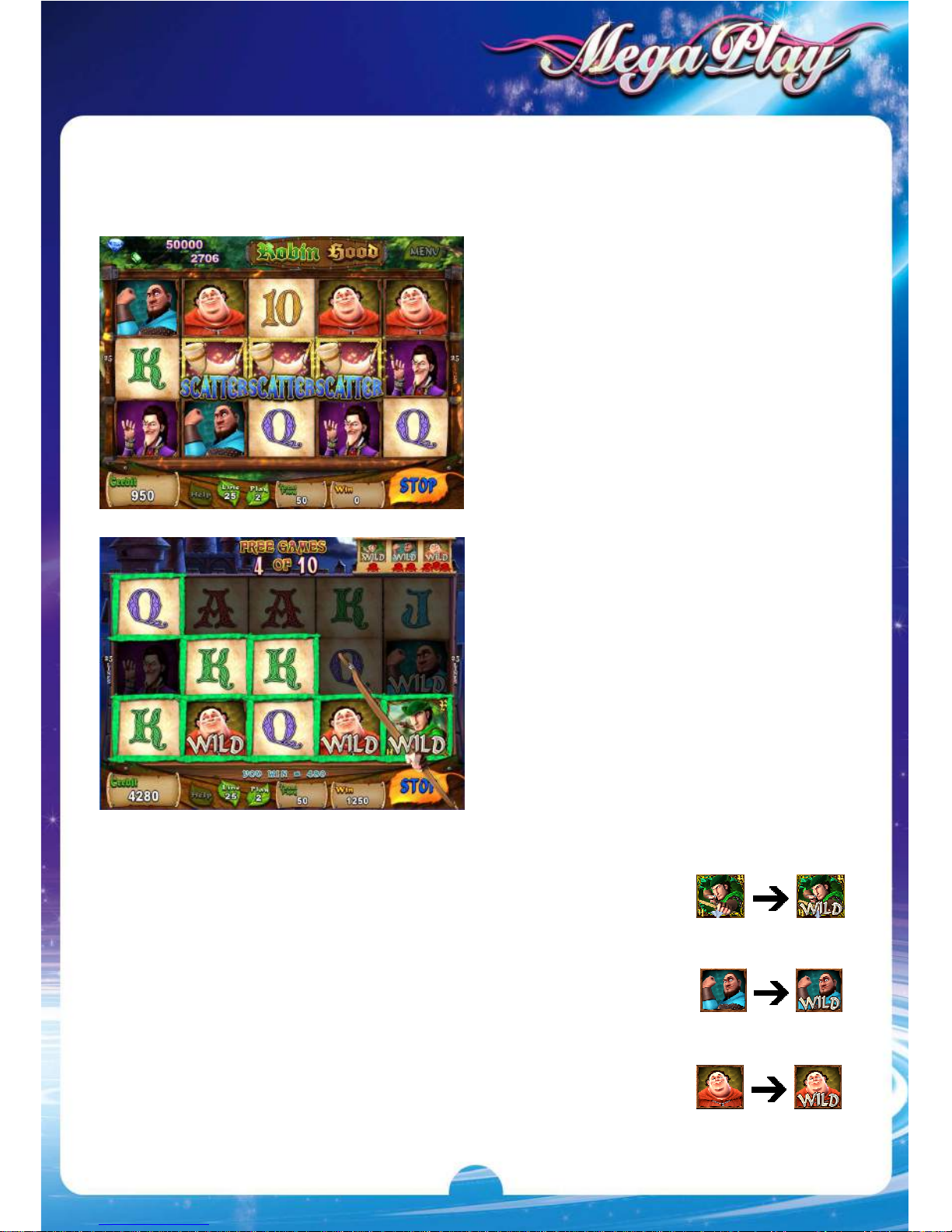
Free Game
The first winning time will turn the Robin Hood symbols in a game into WILD
symbols.
3 consecutive winning times will turn the Little John symbols in a game into
WILD symbols.
6 consecutive winning times will turn the Friar Tuck symbols in a game into
WILD symbols.
3 SCATTER symbols appear in
a game to trigger Free Game
and 10 free games will be
awarded.
The winning times will be
accumulated in each free game.
When the accumulated times
reach the following terms, the
designated symbols will become
WILD symbols in a game to
increase the winning possibility.
Page 19
17
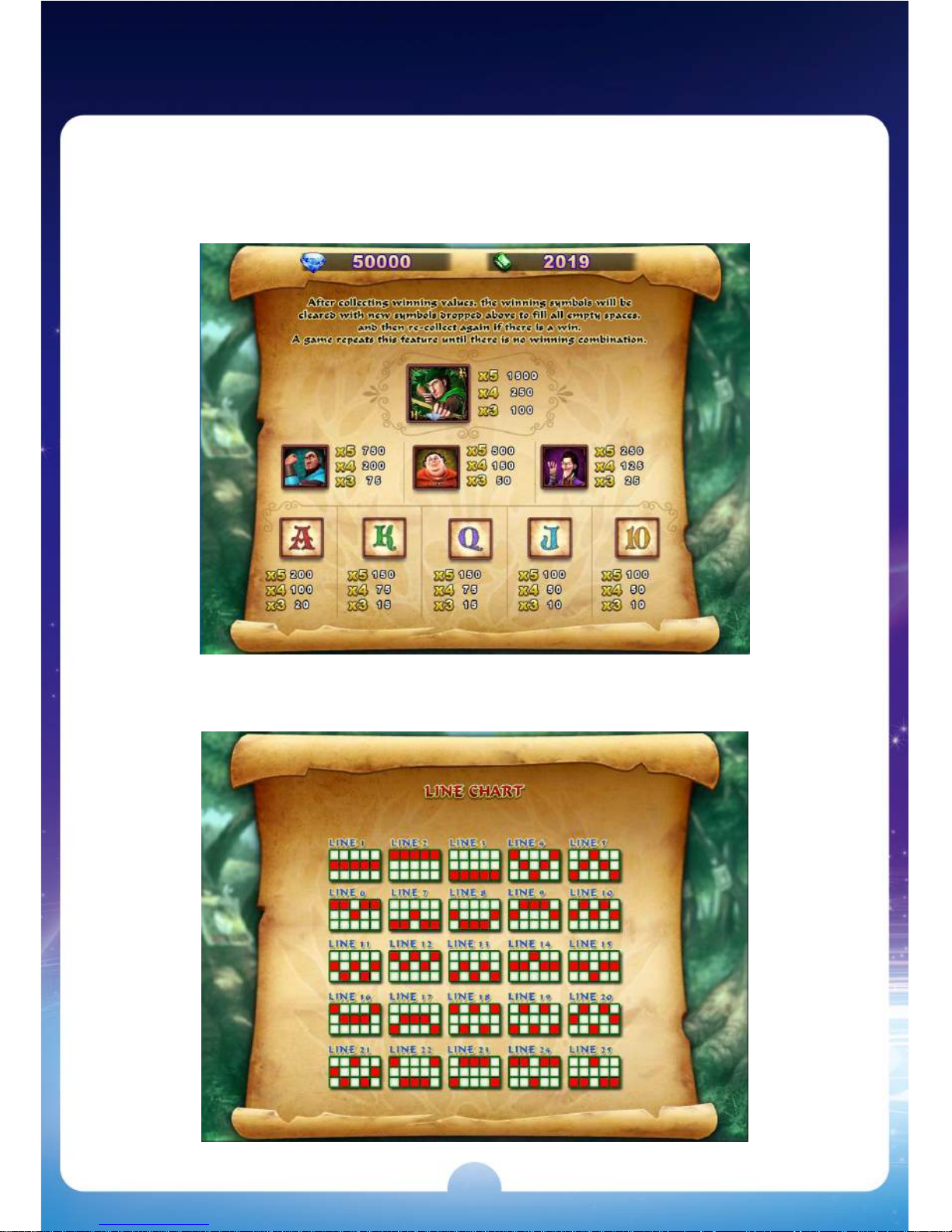
Win Rules
Odds Table
Line Chart
Page 20
18
5. (Game 2) HalloWin
Main Game
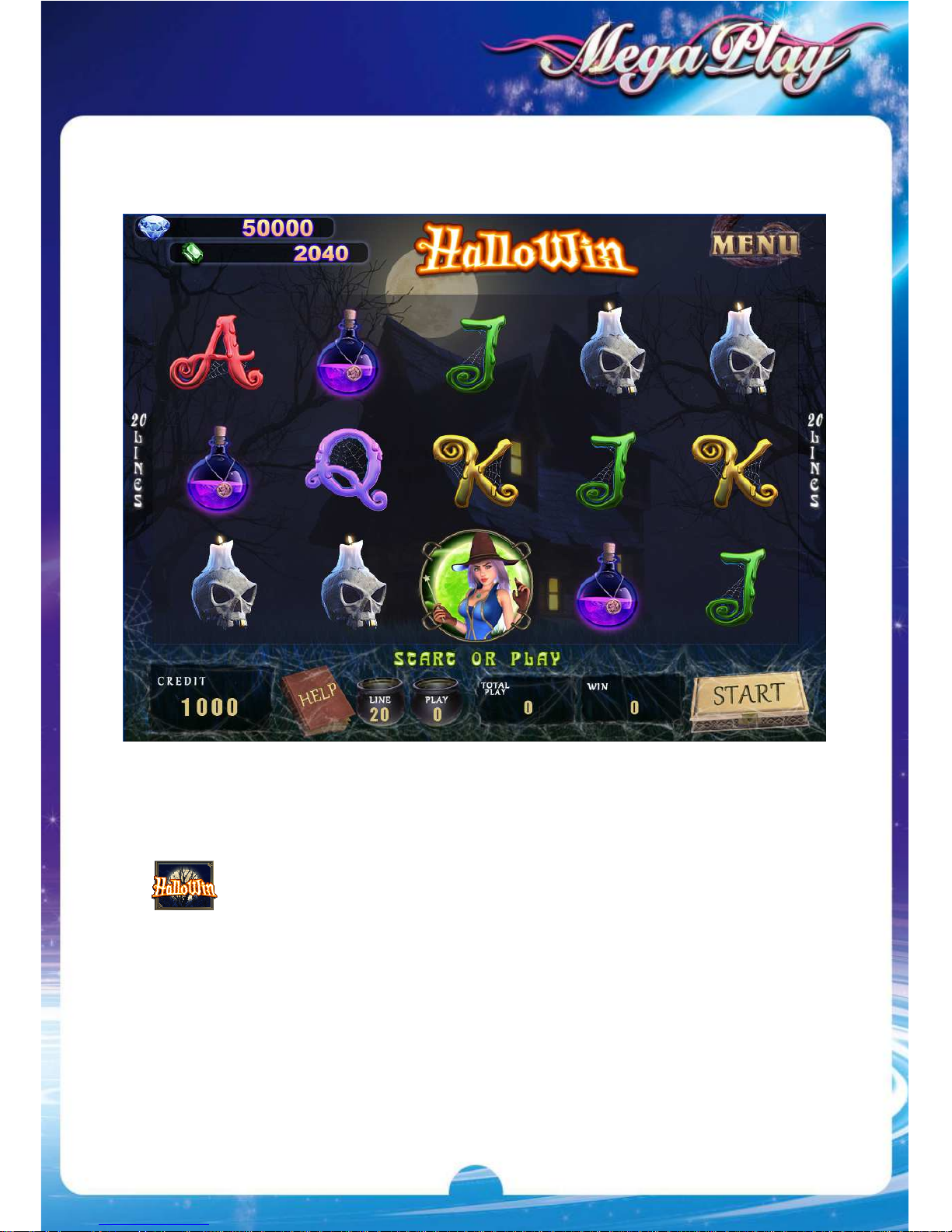
HalloWin
is a 5 Reels & 20 Liners game.
only appears in the Main Game and substitutes for all symbols.
Page 21
19
Feature
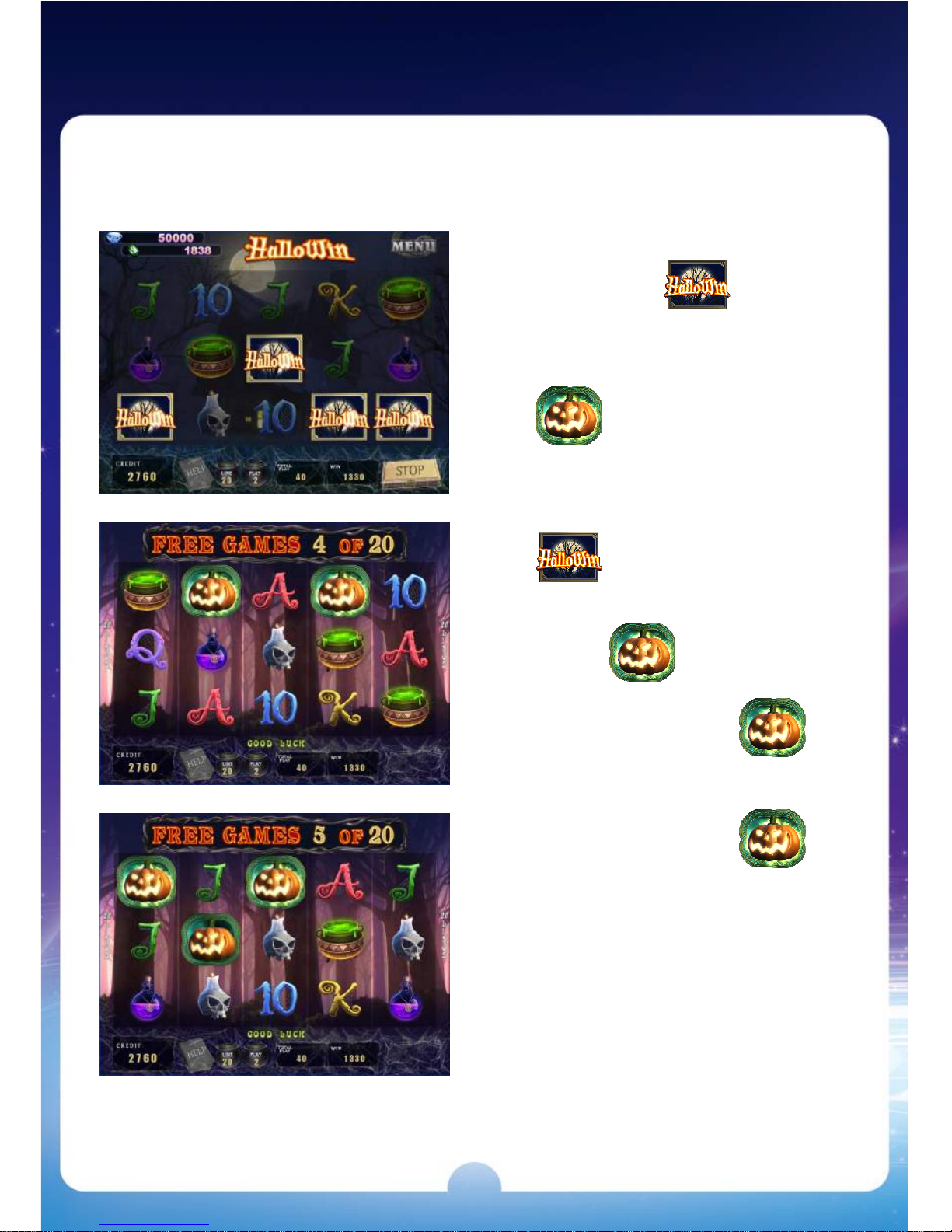
Free Game
3 or more trigger
FREE GAME.
only appears in the
Free Game and substitutes
for all symbols except
.
When appears in
the FREE GAME,
moves forward each spin and
collect the wins until
jumps out from the first reel
or the FREE GAME is
finished.
Page 22
20
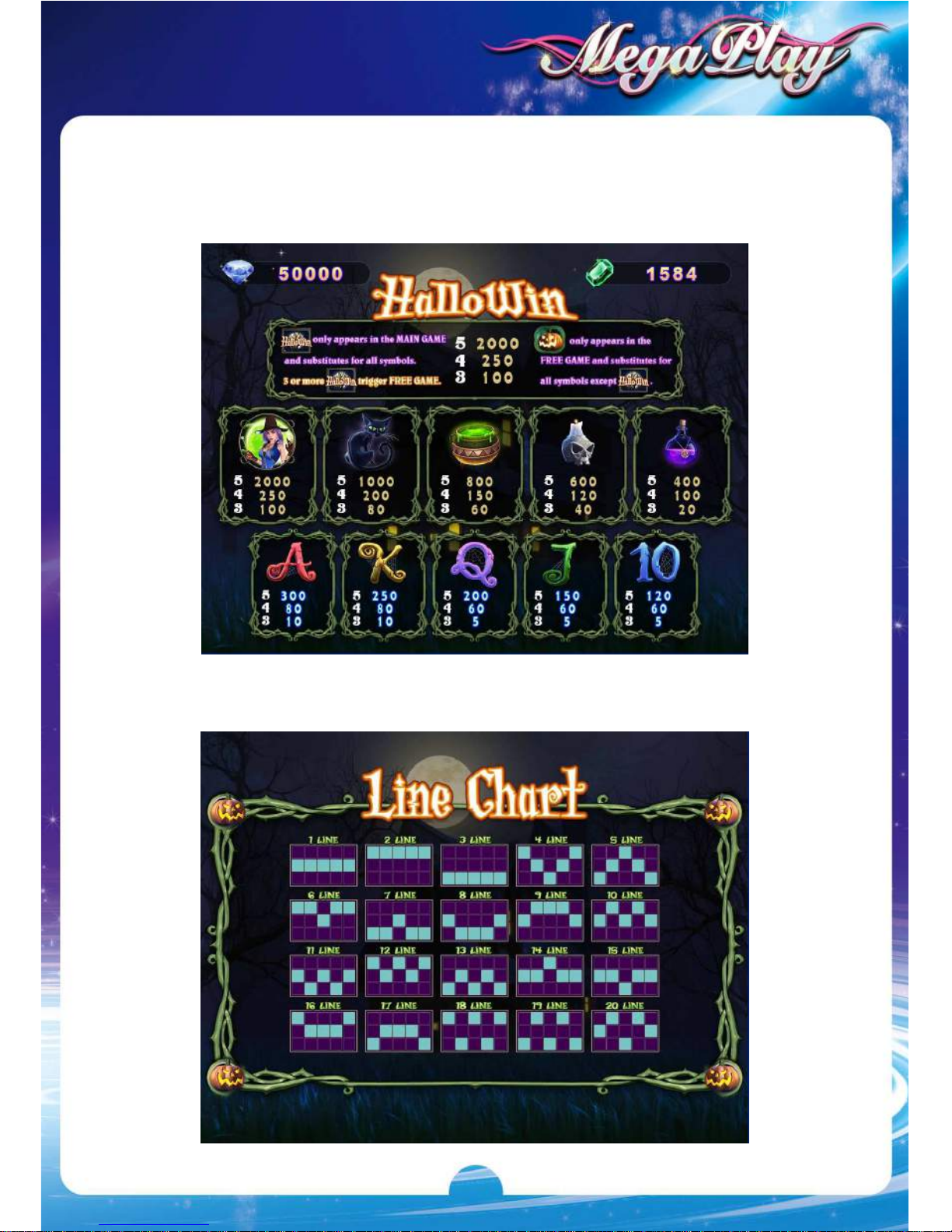
Win Rules
Odds Table
Line Chart
Page 23
21
6. (Game 3) Wild Rider
Main Game
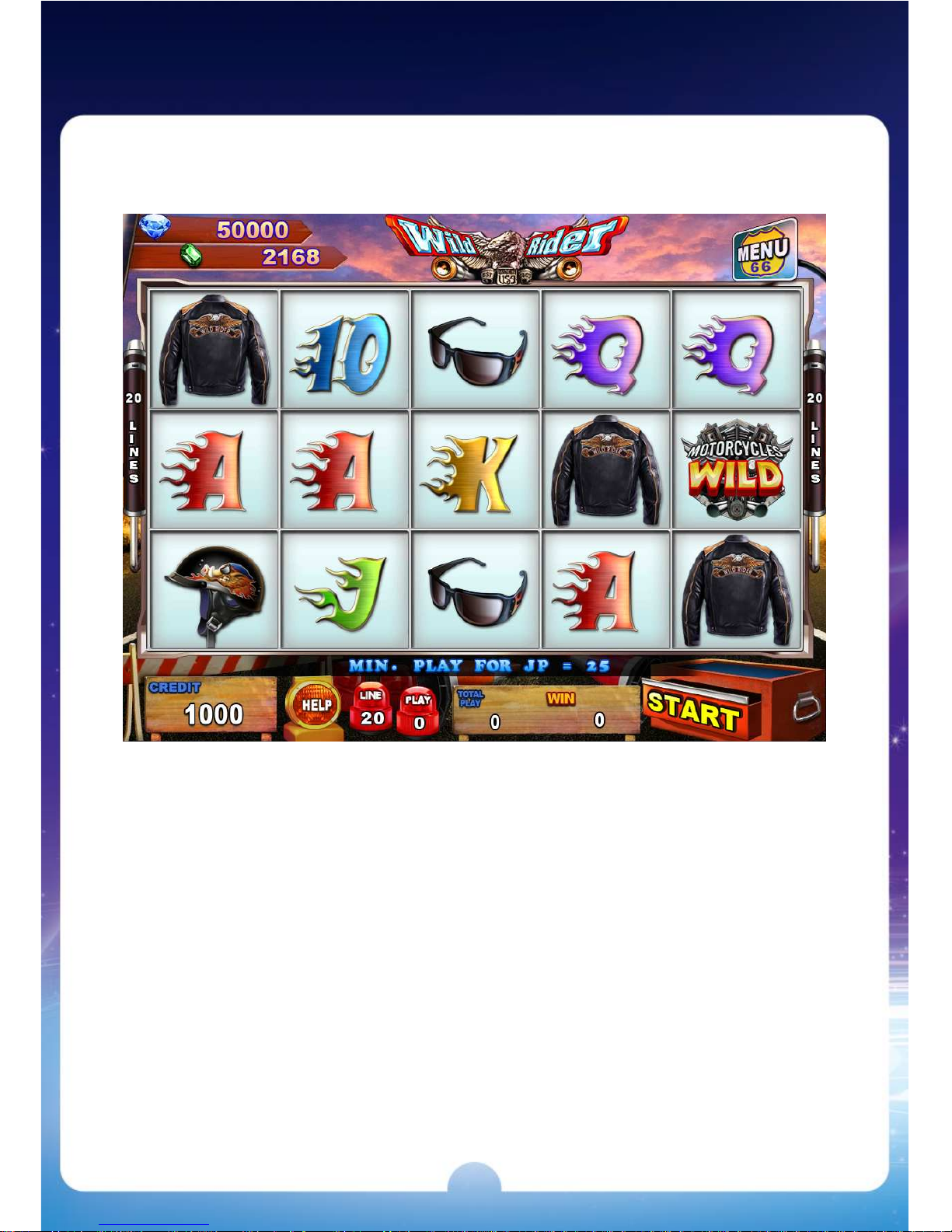
Wild Rider
is a 15 Reels & 20 Liners game.
Page 24
22
Feature
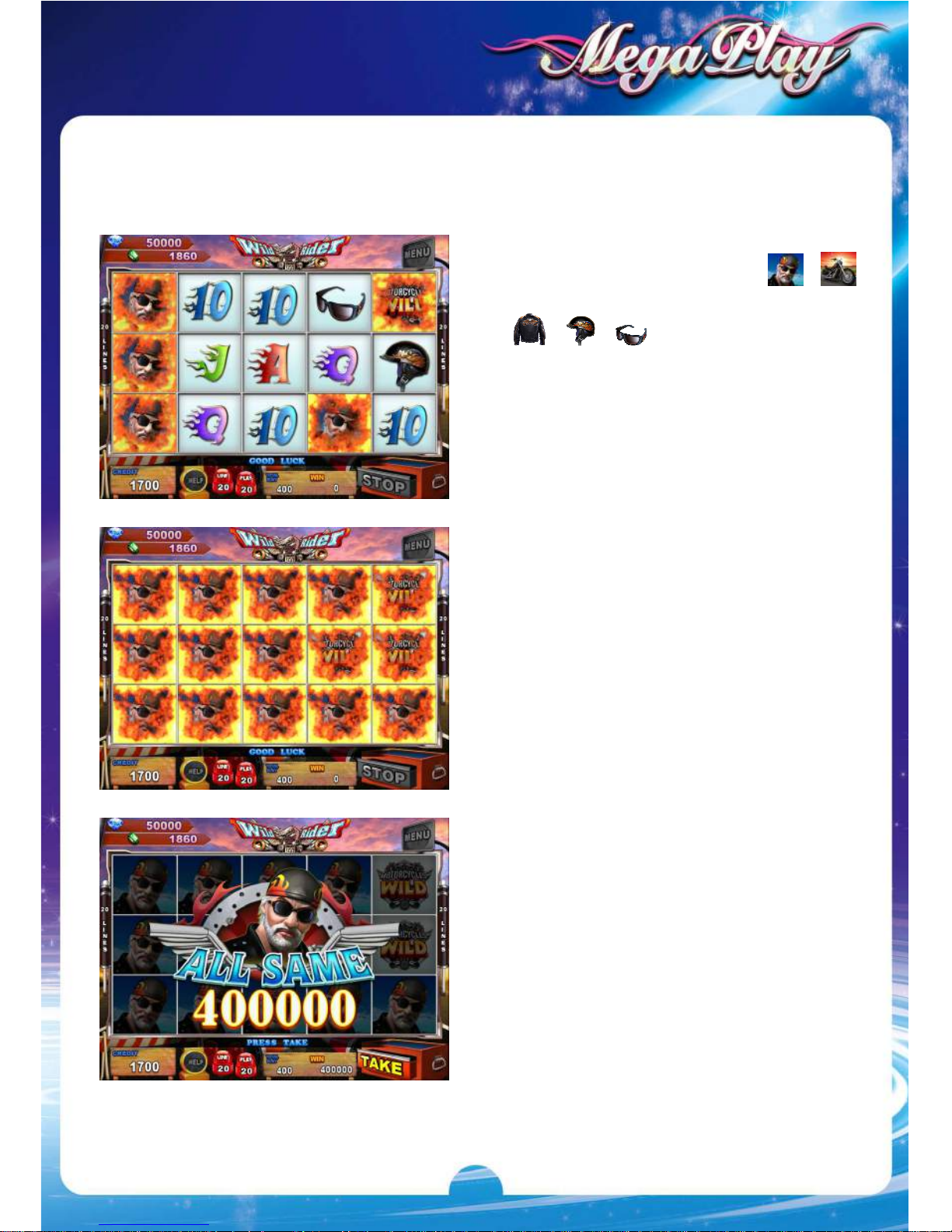
Respin Feature
When one of the symbols ( 、 、
、 、 ) appear on the left 3
reels to trigger RESPIN FEATURE.
The defined symbol and WILD symbol
will be held on screen after each
respin, and then other symbols will
re-spin again.
It repeats the same rule until no
defined symbol or WILD symbol
appears in the last respin, and then
calculates the wins accordingly.
When it reaches ALL SAME on
screen, RESPIN FEATURE ends and
players win the big prizes.
Page 25
23
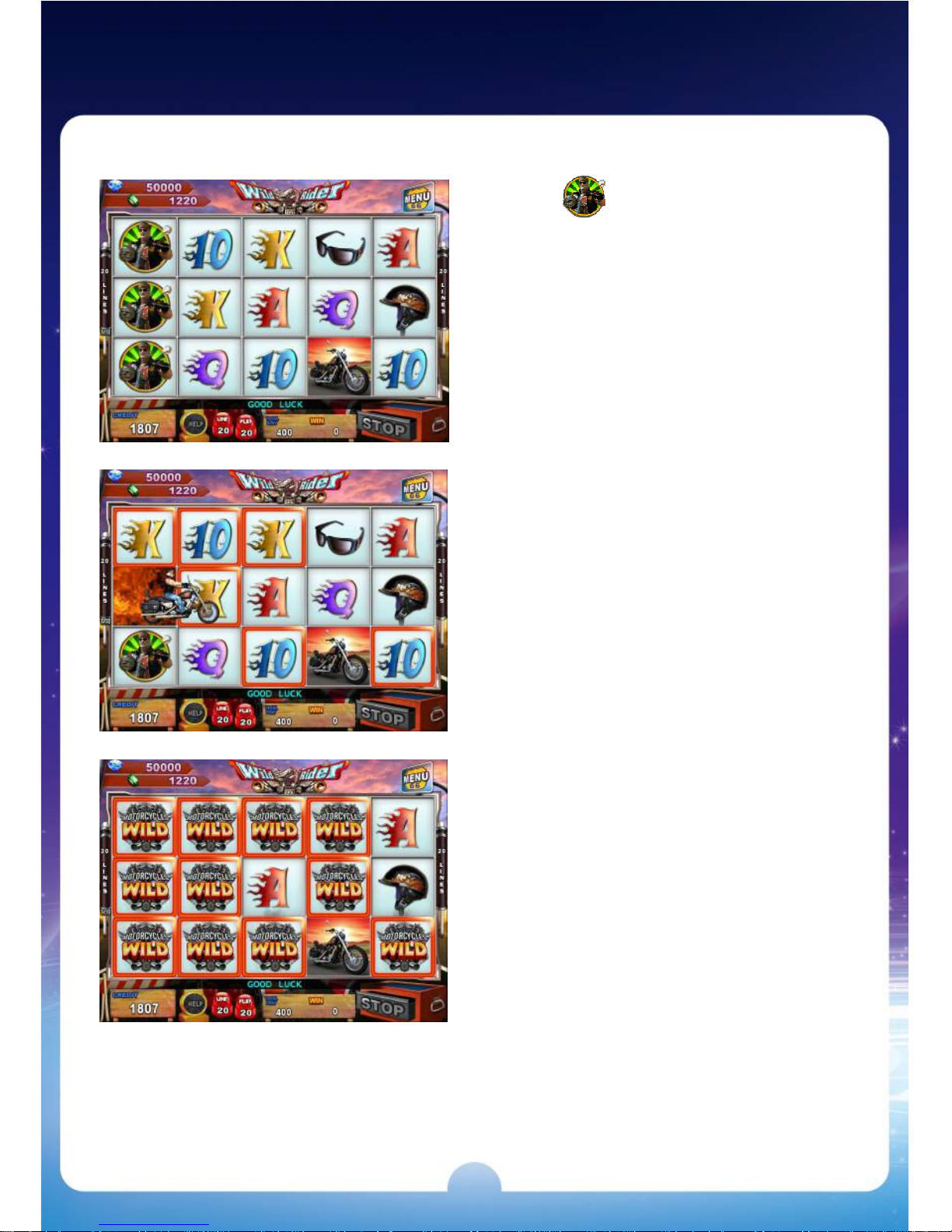
Wild Rider Feature
ANY appears on the first 3 reels
to trigger WILD RIDER FEATURE, and
then RESPIN.
The symbol after RESPIN will make the
same symbols on screen become
WILD symbols to increase the winning
possibility.
Page 26
24
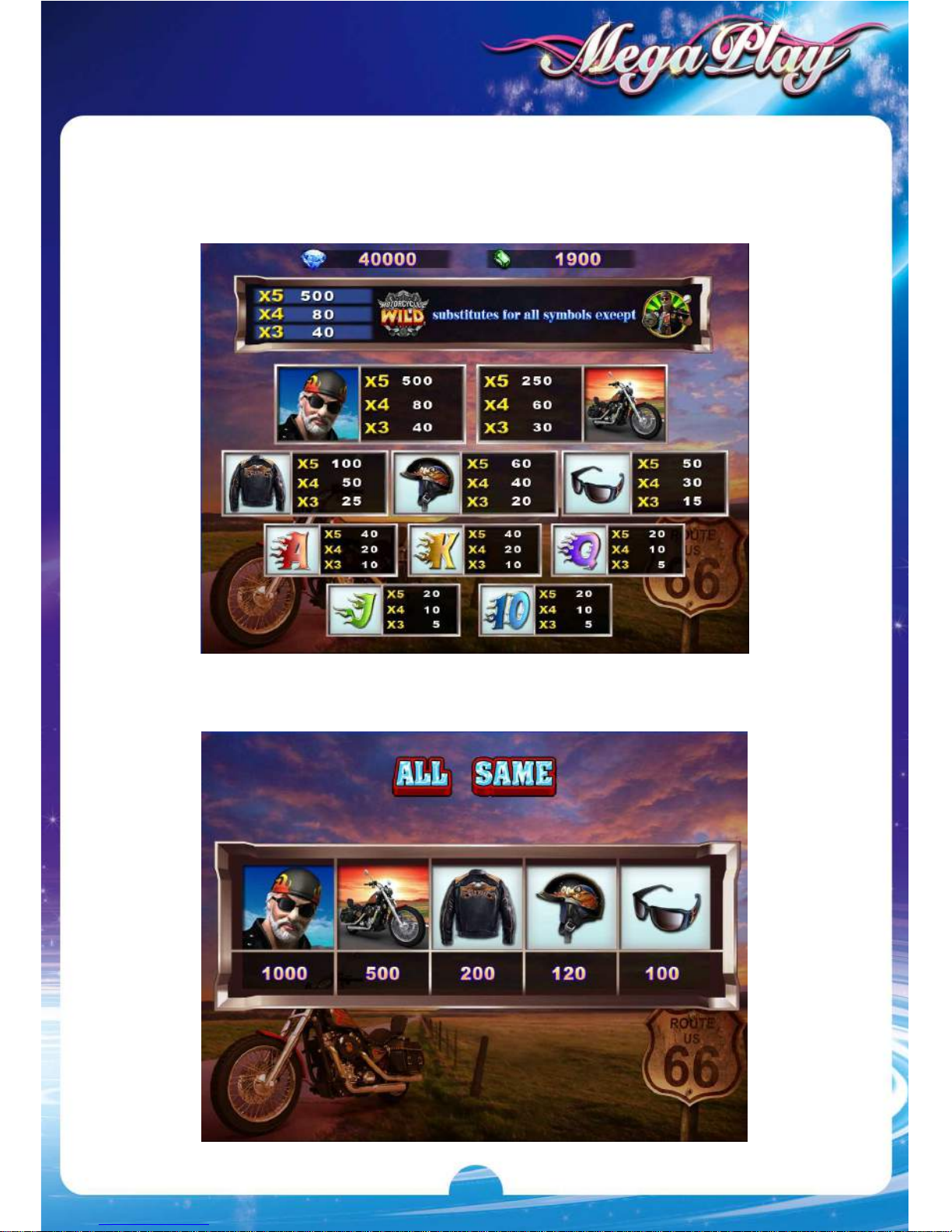
Win Rules
Odds Table
All Same Odds
Page 27
25
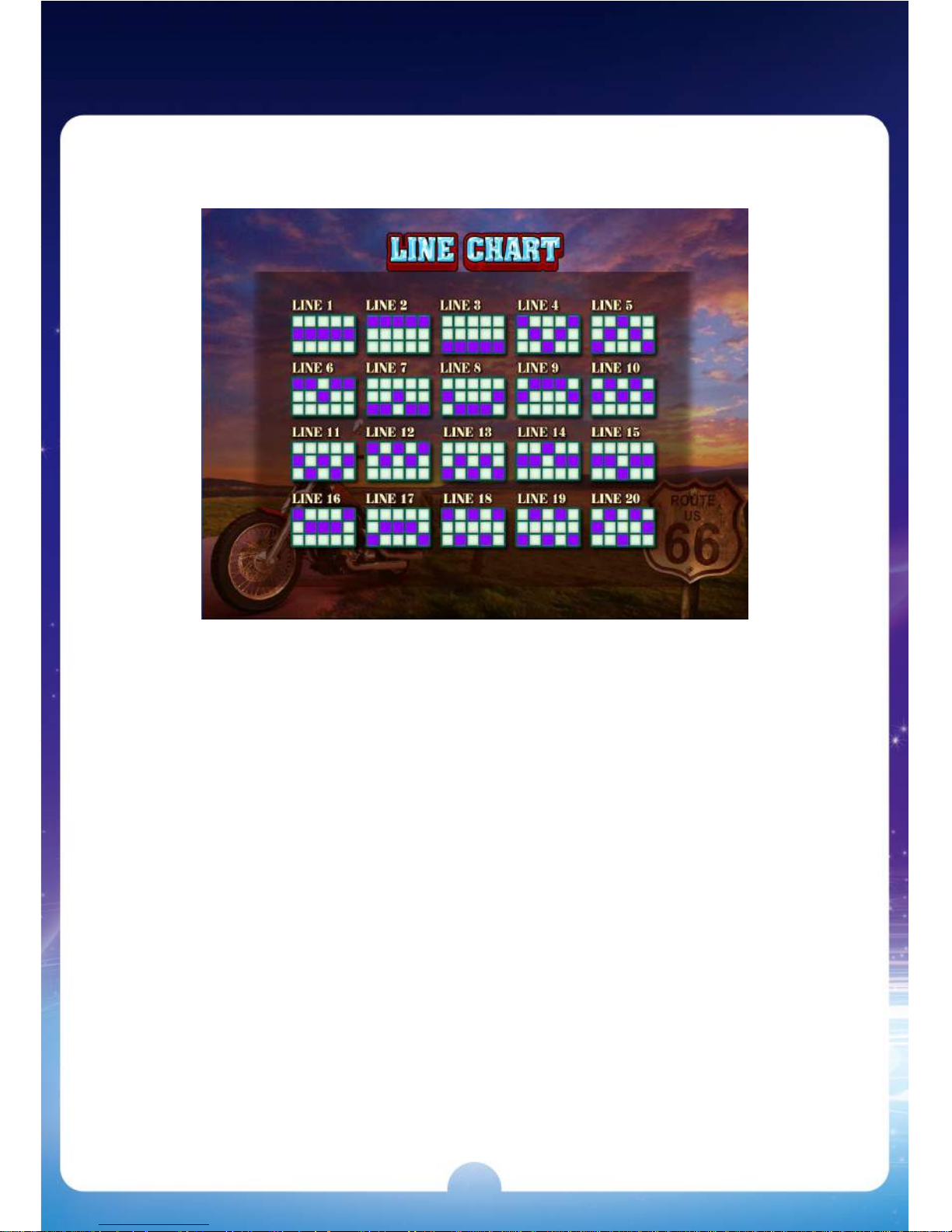
Line Chart
Page 28
26
V106US
 Loading...