

Page 1

User guide
Padlock.
1Version 0.2 05/19
Page 2

Welcome!
This guide will get you up and running with your igloohome Smart
Padlock. In the meantime, you should follow igloohome on Facebook
and Youtube!
Visit our YoutubeLike us on Facebook
As our igloohome app is frequently updated, there may be changes to this manual.
Please refer to our website igloohome.co/support for the latest version of the manual.
Page 3

Table of Contents
What’s Included 4
Specifications 5
Lock Anatomy 6
Features 7
Changing the shackle 8
Replacing Batteries 10
App Onboarding 12
Managing Access in App 13
Unlocking 14
Locking 15
Lock Behaviour 16
9V Jumpstart 17
Audio and LED Indications 18
Troubleshoot 19
Page 4
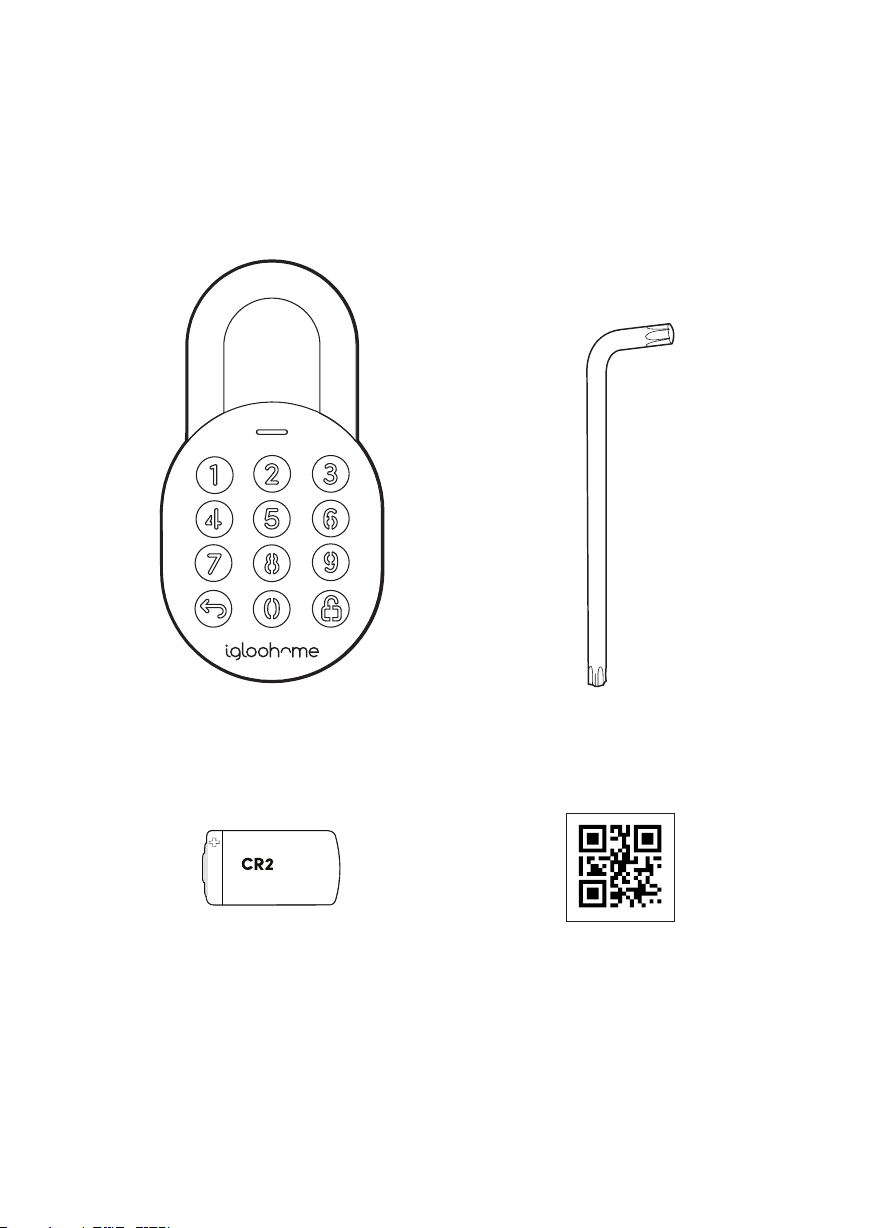
What’s Included
Padlock T27 Torx Security Screwdriver
CR2 Lithium Battery QR Code Stickers x3
4
Page 5
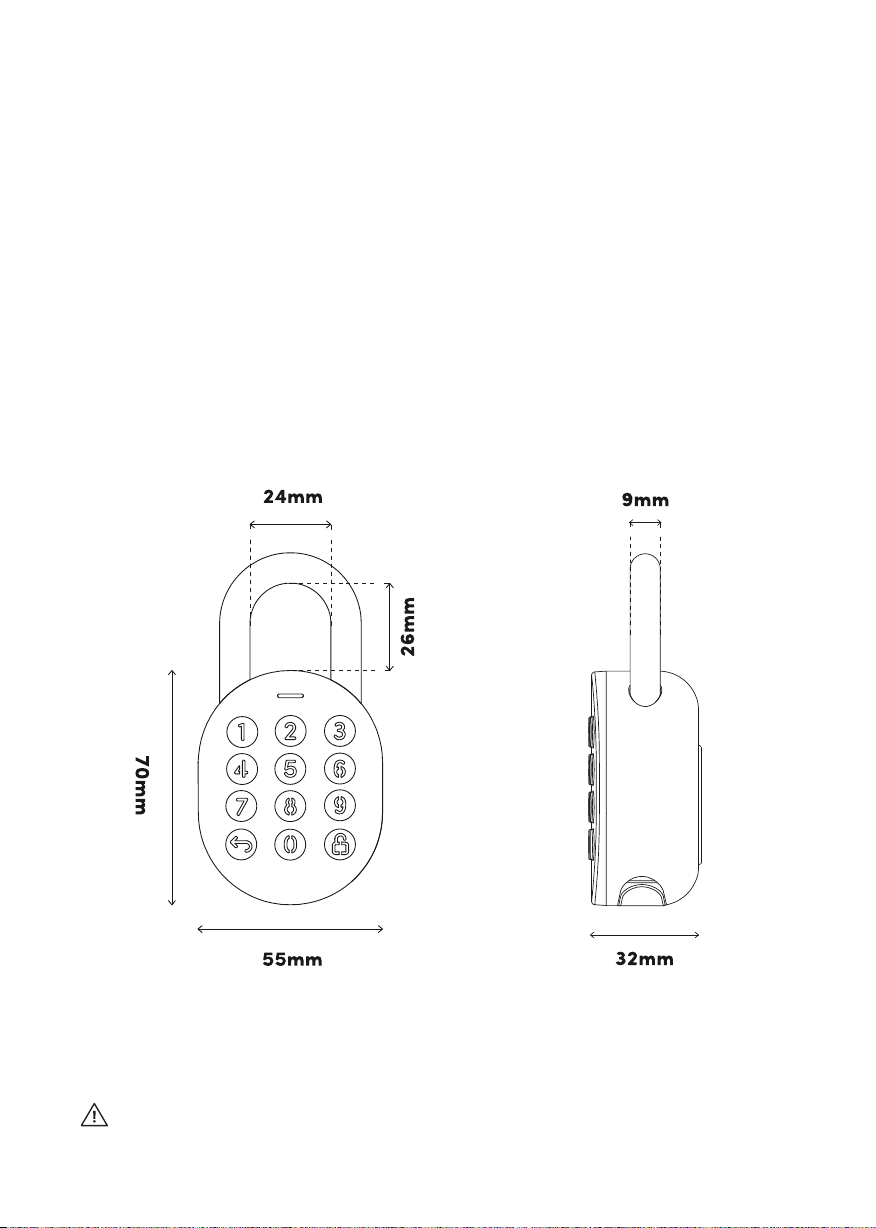
Specifications
Model igloohome Smart Padlock
Battery Type CR2 Lithium Battery
Battery Life Up to 1 Year
Emergency Power 9V Alkaline Battery
Operation Temp -20°C to 50°C
Storage Temp -30°C to 60°C
IP Rating IP66
Body Material Zinc Alloy
Shackle Material Hardened Steel
Weight Net: 450g, Gross: 550g
Unlock Mechanism Bluetooth, PIN code
Front
NOTE: This product functions best with Panasonic CR2 Lithium batteries. Do not use
rechargeable, heavy-duty or other battery types. Please note that using recommended
battery brands such as Panasonic, Duracell, or Energizer will improve the performance and
lifespan of the lock.
Side
For damage resulting from incorrect use of lock, use of lock in potentially explosive
environments, or use of lock outside of stipulated specifications, the customer bears sole
responsibility. igloohome accepts no liability whatsoever.
5
Page 6
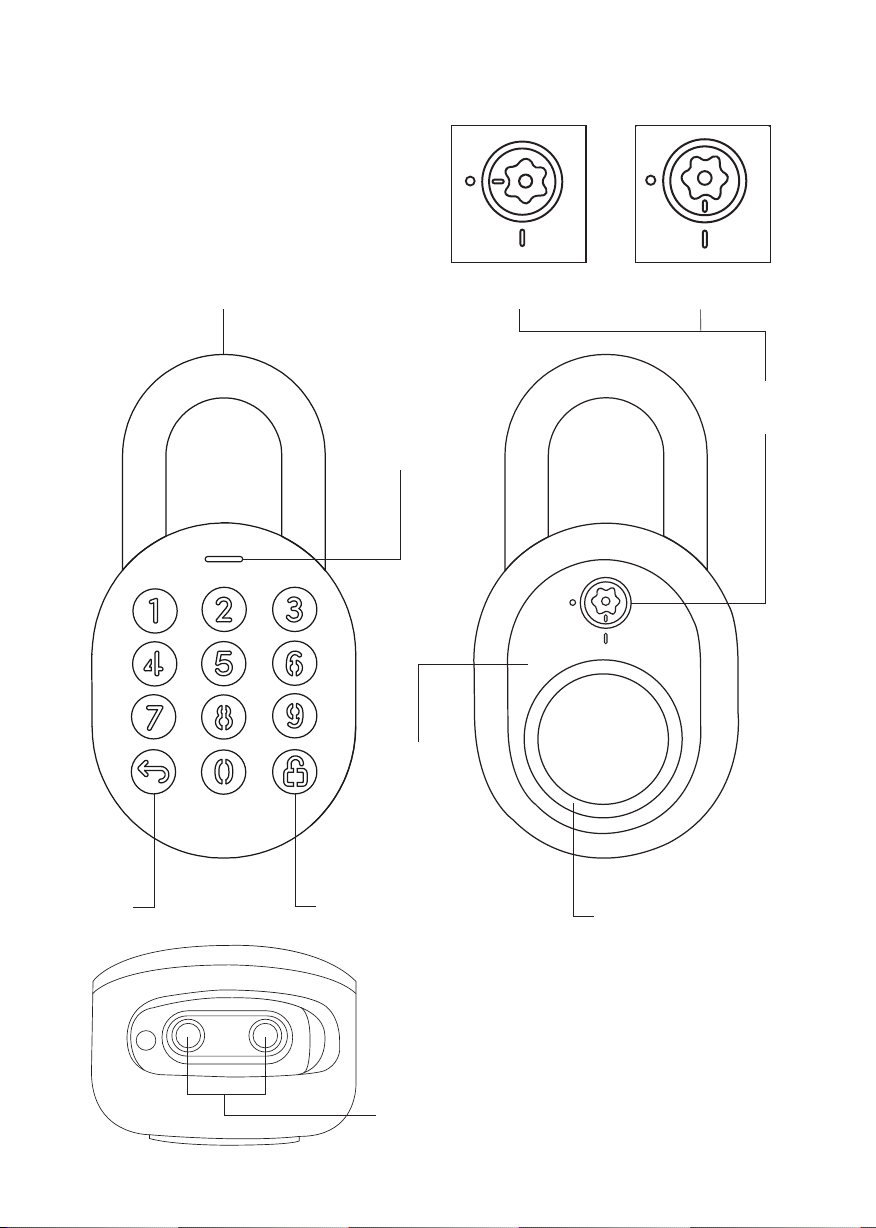
Lock Anatomy
Hardened
Shackle
ClosedOpened
Torx Cap
LED Indicator
CLEAR UNLOCK
6
Battery
Cover
Rubber Bumper
9V Contact Points
Page 7
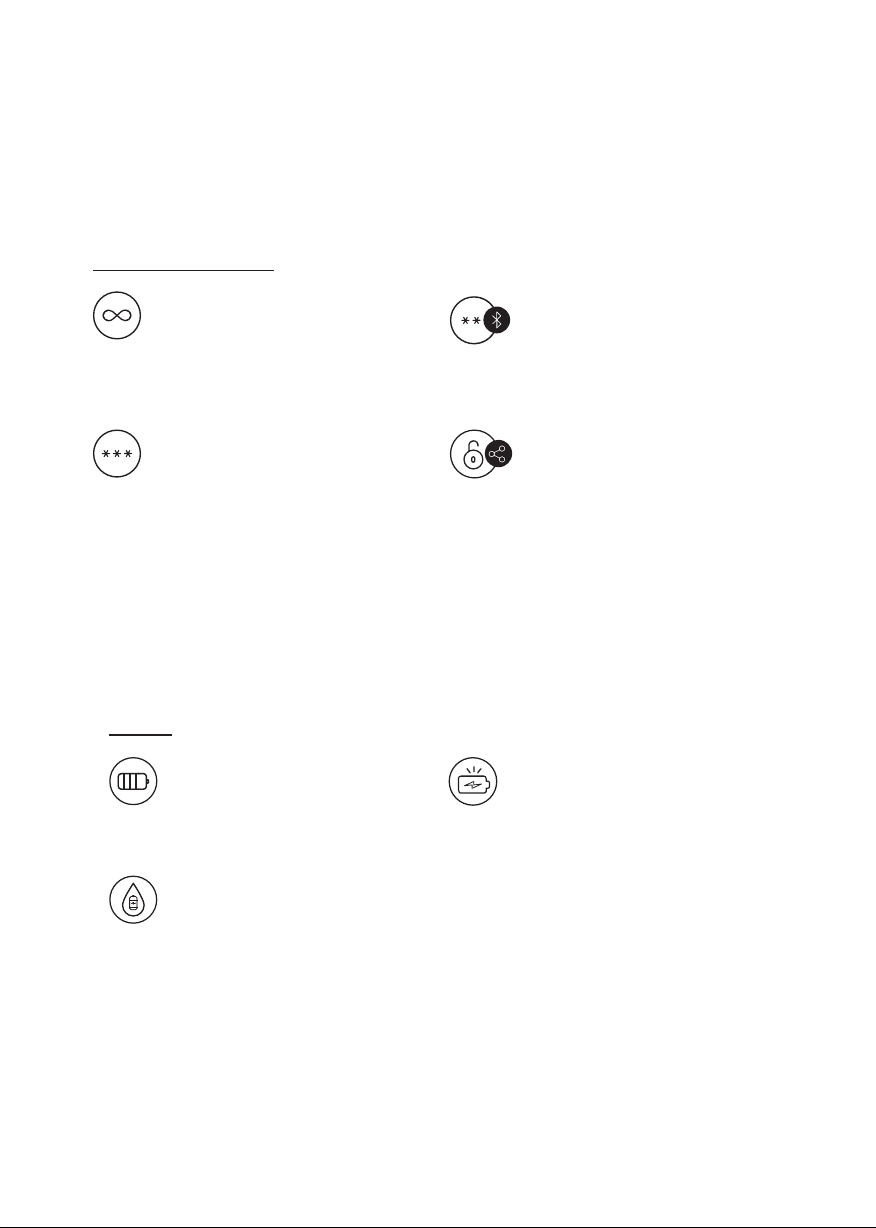
Features
PIN / Bluetooth Unlock
Master PIN Code
The igloohome Smart Padlock unlocks
with a permanent Master PIN Code.
User PIN Code
The igloohome mobile app can
generate multiple types of User Pin
codes, e.g. One-Time, Permanent &
Duration.
Battery
Battery Life
The Padlock can last up to 1 year
with CR2 lithium battery.
Emergency Jump Start
If battery power is drained, an
external 9 Volt battery can be used
to provide emergency power. The
terminals of the 9V battery must
be in contact with the Jump Start
contact points of the Padlock as
shown in page 15.
Bluetooth Master Key
The igloohome Smart Padlock unlocks
with Bluetooth via the app.
Bluetooth Guest Key
The igloohome mobile app can
generate and share Bluetooth keys
(based on duration with guests to
unlock the Smart Padlock.
Low Battery Indicator
The Status Indicator shows red light
when battery level is 20% and below,
followed by a sound alert when the
keypad is woken up. The battery level
can also be monitored on the app and
is updated during Bluetooth Unlock.
7
Page 8

Features
Others
Keypad Security Lockout
Lock will dissallow any PIN entries
and sound an alarm when there is
a number of incorrect PIN attempt.
User can configure number of
incorrect attempts to trigger
timeout.
Auto Relock
The Padlock relocks automatically
when shackle is closed. User can
deactivate auto-relock function if
they prefer manual relock.
Masking Security Code
A total of 16 digits including the
masking digits can be entered to
prevent the PIN code from being
exposed.
Protective Rubber Bumper
Prevent bumping on hard surfaces
with the rubber bumper as a
padding on the back.
Weather Resistant
The padlock is able to withstand
weather conditions with protection
against dust and water (IP66).
8
Page 9
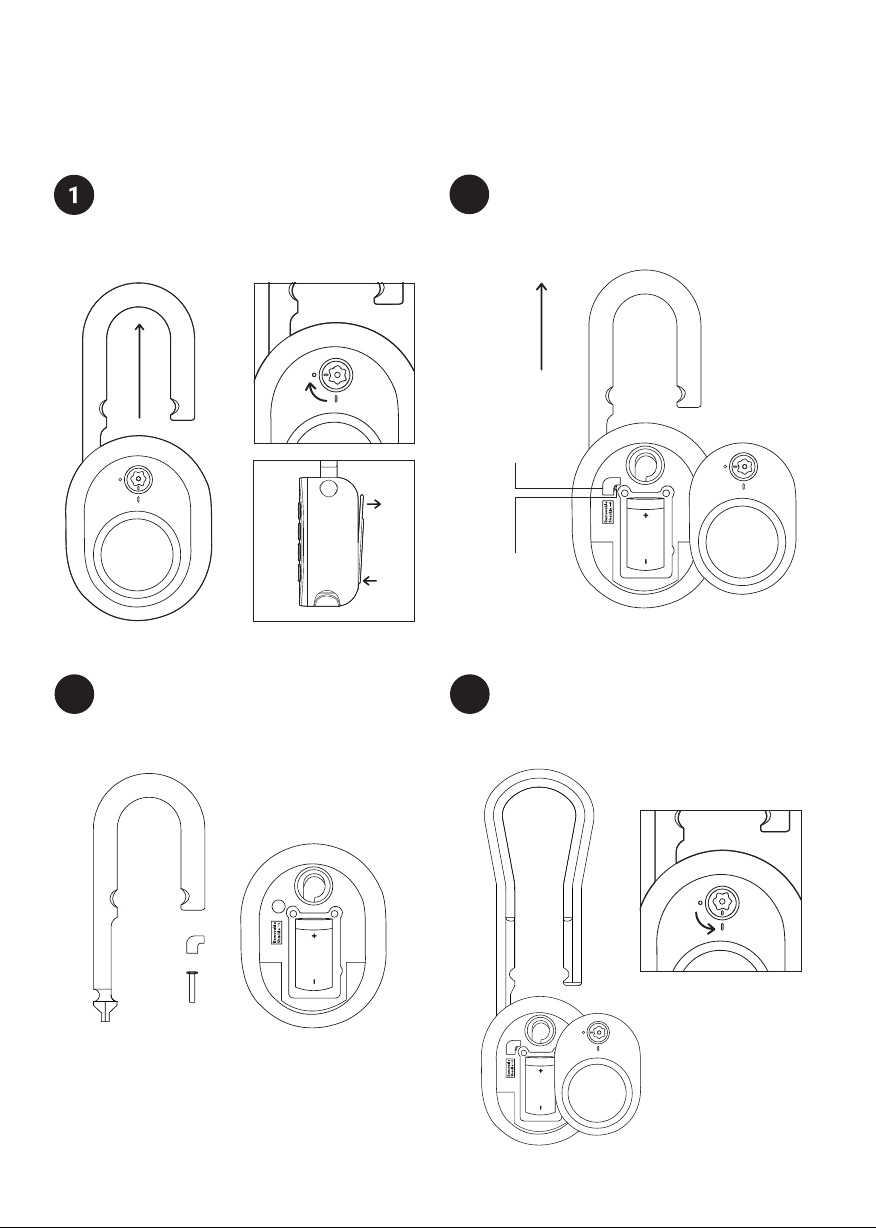
Changing the shackle
Unlock the Padlock and pull the shackle to
open position. Turn Torx cap clockwise 90°
with the Torx Screwdriver & push battery
cover out.
Replace with the long shackle and place
3 4
the retaining pin and sticker back in the
original position. Ensure that the long
shackle remains in the opened position.
Firstly, remove the battery cover, locate
2
sticker to remove and use a sharp object to
remove the retaining pin. Once removed,
the Padlock shackle is now removable.
Sticker
Retaining
Pin
Secure the battery cover by turning the torx
cap counter-clockwise 90° with the Torx
Screwdriver while the Padlock is unlocked.
Push the shackle in and you’re done!
9
Page 10
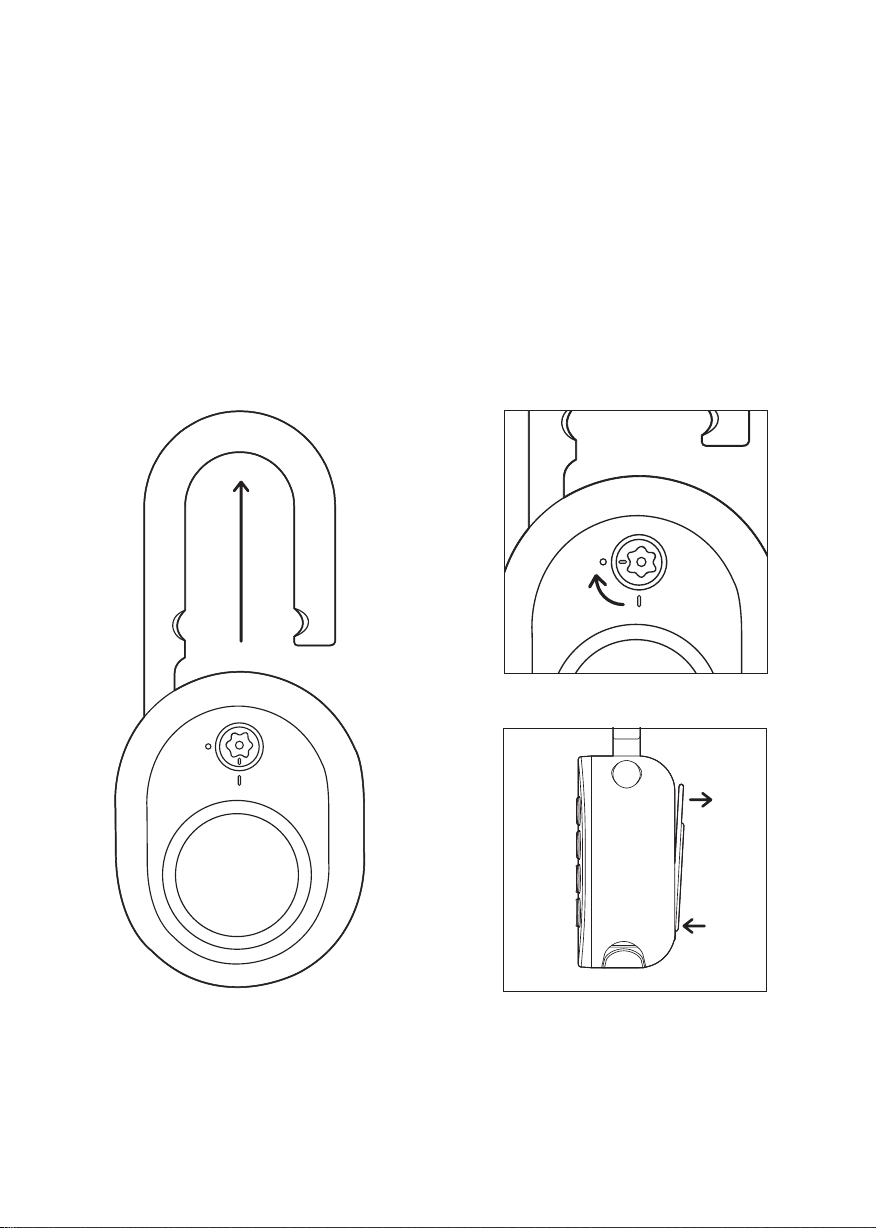
Replacing Batteries
1. Unlock the Padlock and pull the
shackle to open position.
2. Turn Torx cap clockwise 90° with the
Torx Screwdriver & push battery cover
out.
10
Page 11
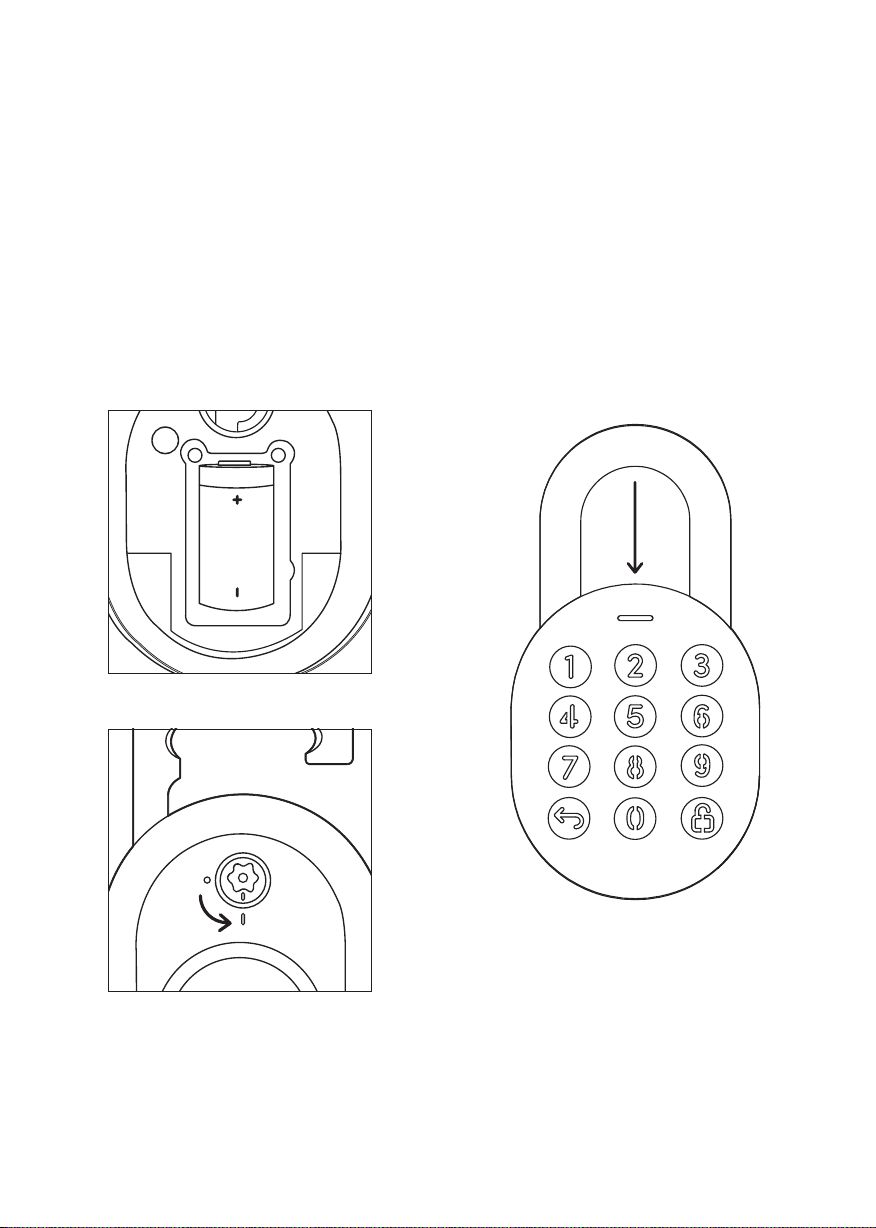
3. Replace the CR2 Battery, close
battery cover and turn Torx cap
counter-clockwise 90°.
4. Push the shackle to close position to
auto-relock or manual relock.
11
Page 12
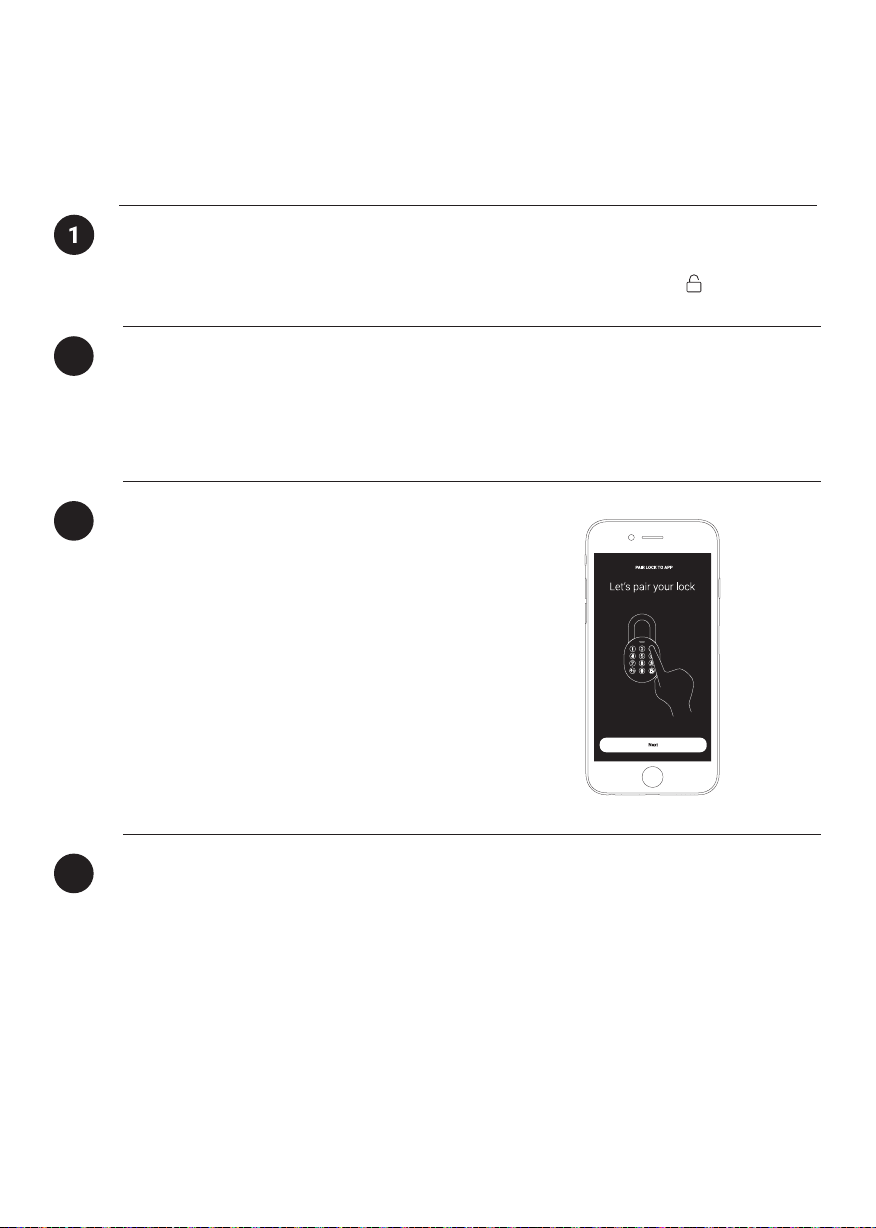
App Onboarding
Test Factory PIN Unlock
In the factory mode (before pairing), the PIN to unlock the lock is 1 2 3 4 5 6 7 8 9 0
2
Register as a Lock User
a) Download igloohome from the App Store / Play Store
b) Create an account and login
Pairing
3
a) Select [Add new igloohome lock]
Note: For existing users with other paired locks, go
to [Configuration], select [Add Locks] and follow the
instructions.
12
Setting Master PIN Code
4
Before proceeding, turn on your Bluetooth and ensure that you are within Bluetooth range
of the lock.
Go to [Access] and customize your [Master PIN] by editing it.
Page 13
Managing Access in App
Creating PIN codes
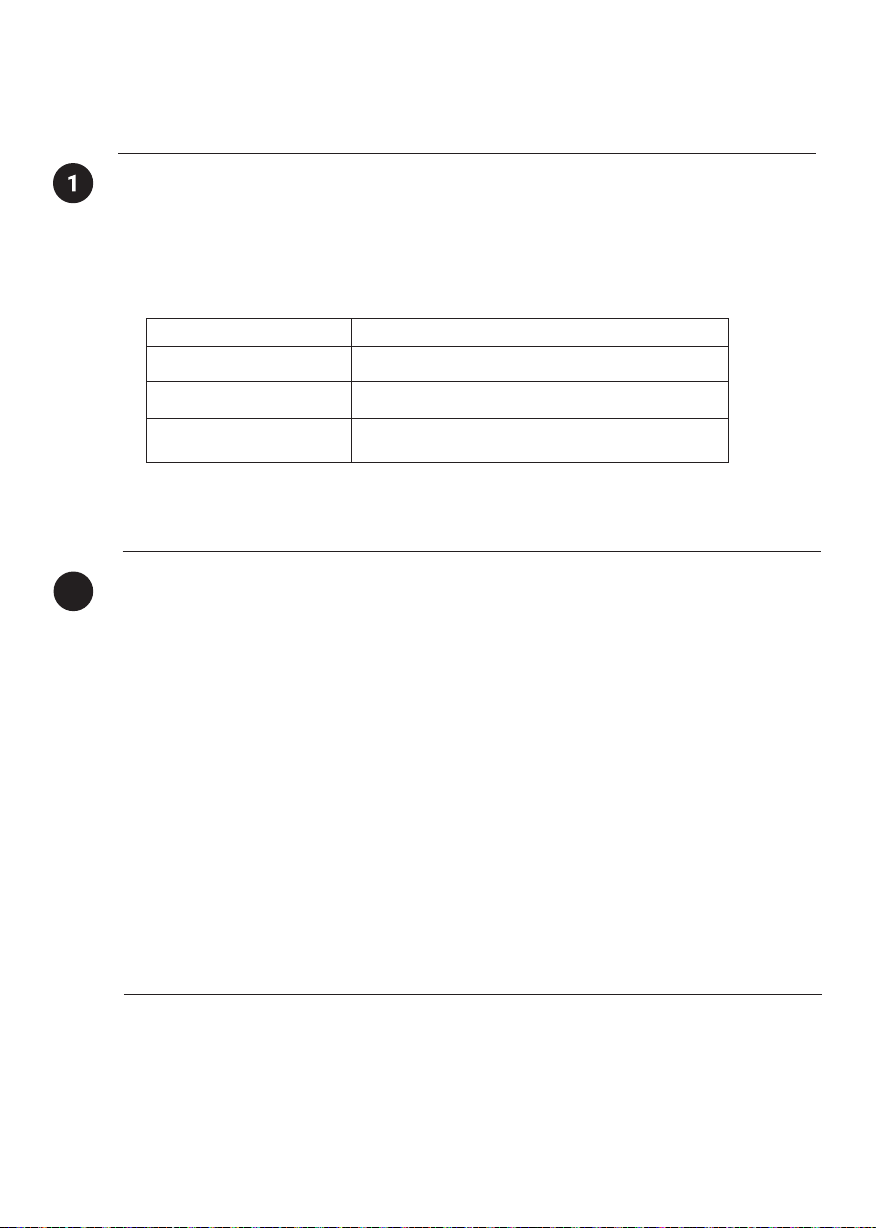
PIN codes can be generated on the app under [Access], press [New Key] and choose either
One-Time, Permanent or Duration PIN.
Pin codes will expire if its not use within its activation period. Refer to the table below.
PIN Type Use PIN within*
Permanent PIN 24 hrs of generation
One-Time PIN 24hrs of generation
Duration PIN 24hrs from the start time
Note: Duration PIN code end times can be customised within a 28-day timeframe. Past this
timeframe, the end time will automatically be configured to the start time.
2
Bluetooth Guest Key
Bluetooth Guest Key can be shared with other users for mobile access. It allows your guests
to unlock the igloohome smart lock via Bluetooth.
There are 3 steps to using a Shared Bluetooth Key
1. Under [Access], press [New Key] and choose [Bluetooth Key] under
[Access Type]. Proceed to share the key after it is created.
2. Guest receives the Bluetooth Key by one of these methods:
• Clicking the URL given and follow the instructions.
• Claiming Bluetooth Key under [Configuration].
3. Guest can now use the Bluetooth Key under the Guest Bluetooth Key Section
whenever he/she is within range of the lock.
Notes:
• The owner can revoke the Bluetooth Key in App.
• Bluetooth Key must be accepted within 1 hour generation before it expires.
13
Page 14
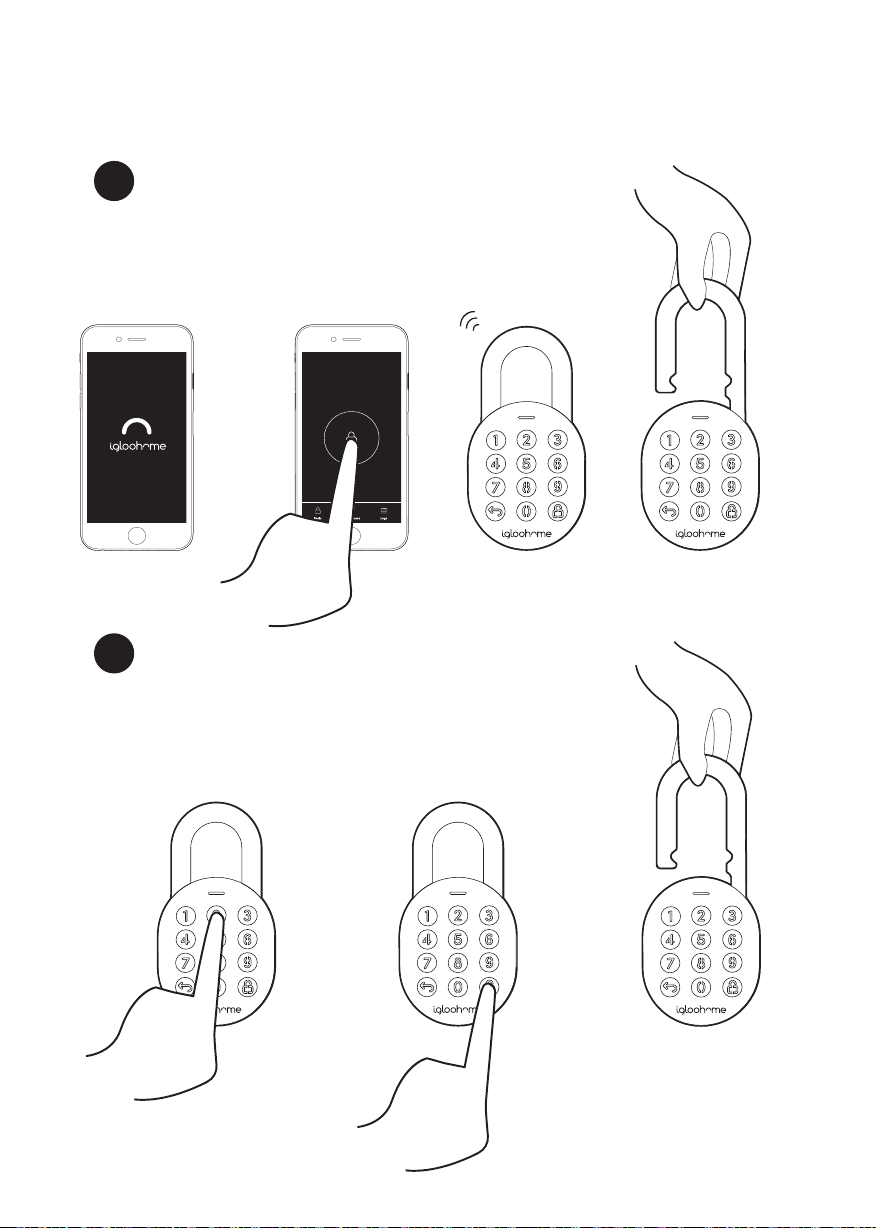
Unlocking
a
Bluetooth Unlock
1. Open your igloohome app
2. Tap on the “Bluetooth Unlock” button
3. The status indicator will flash green twice with 4 short
ascending tone once unlocked.
PIN Code
b
1. Press any button on the keypad to wake device up
2. Key in a valid PIN code (with or without masking pins)
followed by the “Unlock Icon”
3. The status indicator will flash green twice with 4 short
ascending tone once unlocked.
Home
Padlock
14
Page 15
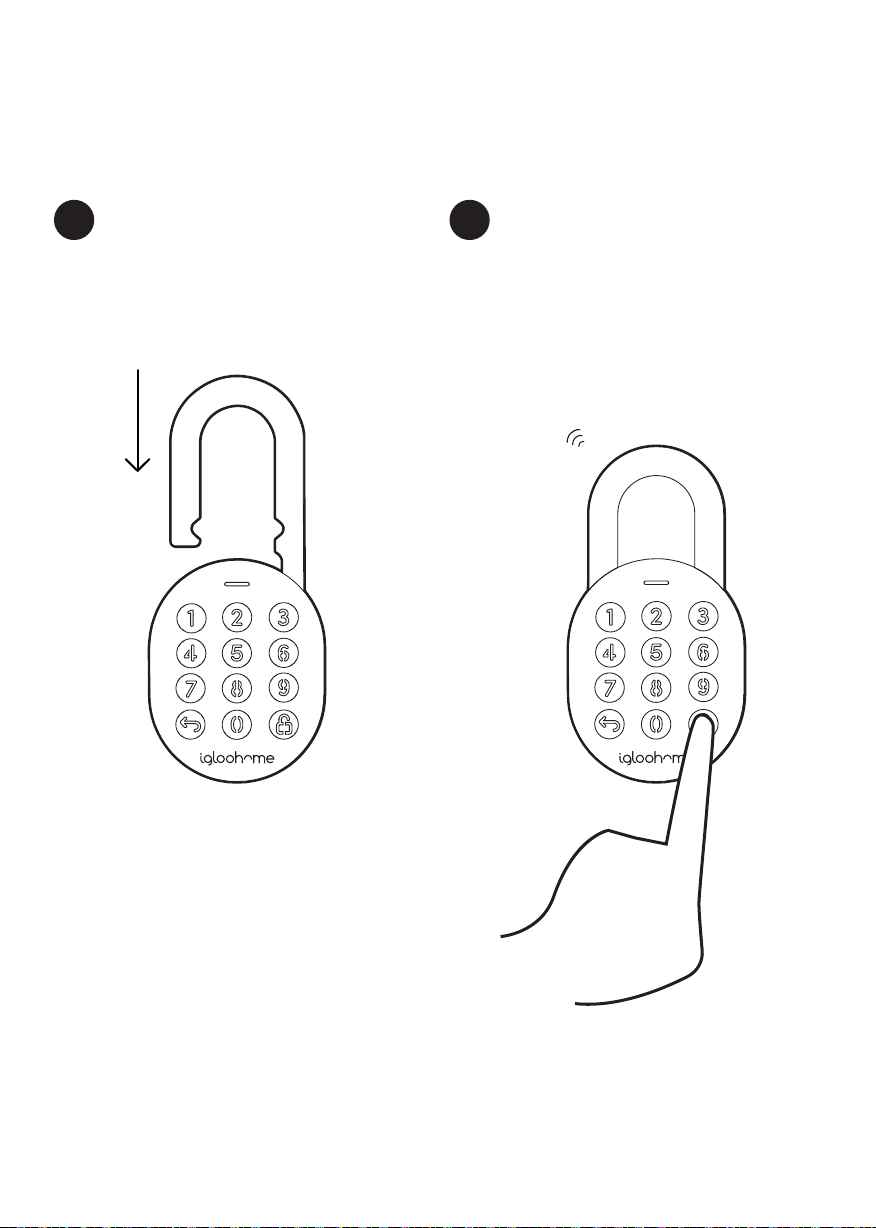
Locking
a
Auto Relock
Simple close the shackle in place and
Status Indicator will show green with a
long beep.
Manual Relock
b
Press and hold the Unlock icon on the bottom
right of the keypad for 2 seconds until the
status indicator will show green with a long
beep.
Note: Used when Auto Relock is “O”
15
Page 16
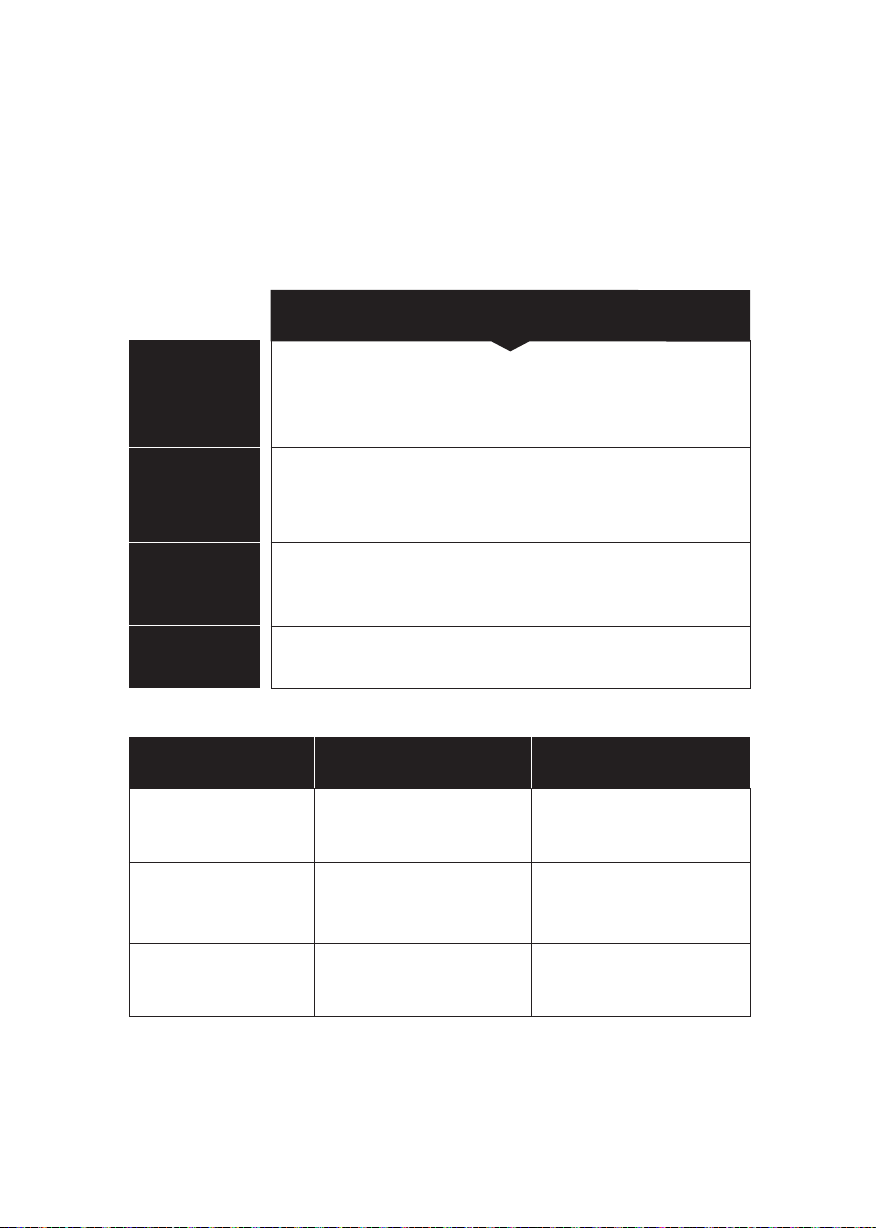
Lock Behaviour
Note: User is able to Enable and Disable Keypad Security Lockout via Bluetooth.
Keypad Security Lockout
Triggered by
Disable By
Behaviour
Duration
5 consecutive PIN Code attempts by default
(Configurable via Bluetooth)
After 1 / 5 / 10 Minutes
or
Master / Guest Bluetooth Unlock
Single flash White LED on keypad and Red LED
on status indicator when keypad is triggered.
Please refer to table below.
Triggered Security Alarm Keypad Lockout
1st Time
2nd Time
30 Sec
60 Sec
1 Min
5 Min
16
3rd and
Consecutive Time
90 Sec
10 Min
Page 17
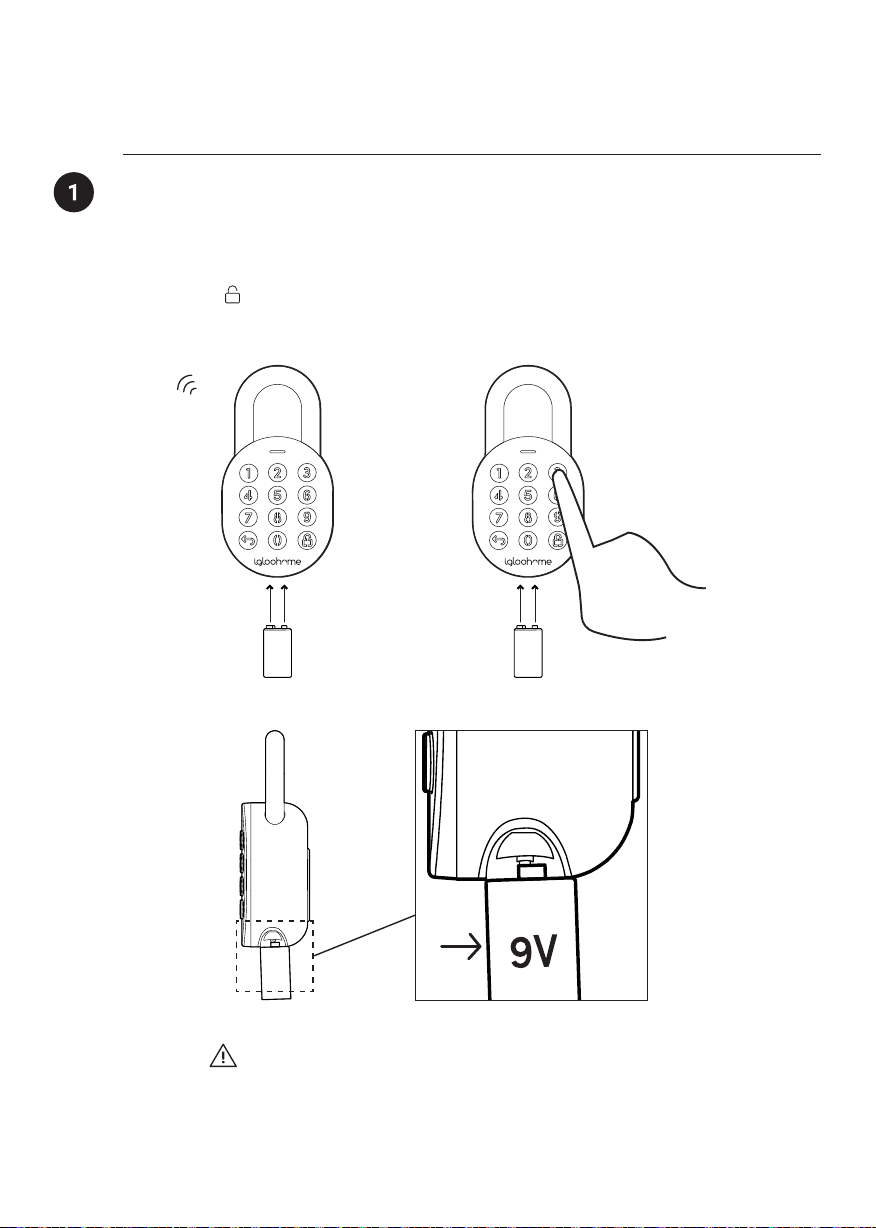
9V Jumpstart
9V Jumpstart Feature
1. Touch and hold the battery contacts against the 9V jumpstart pin on the lock.
2. While holding the 9V battery to the jumpstart, press in PIN code on the keypad
followed by or Bluetooth Key to unlock.
9V
9V
Please ensure terminals of the 9V battery are in contact with
the Jump Start contact points of the Padlock for 2 seconds
to activate the padlock.
9V
17
Page 18
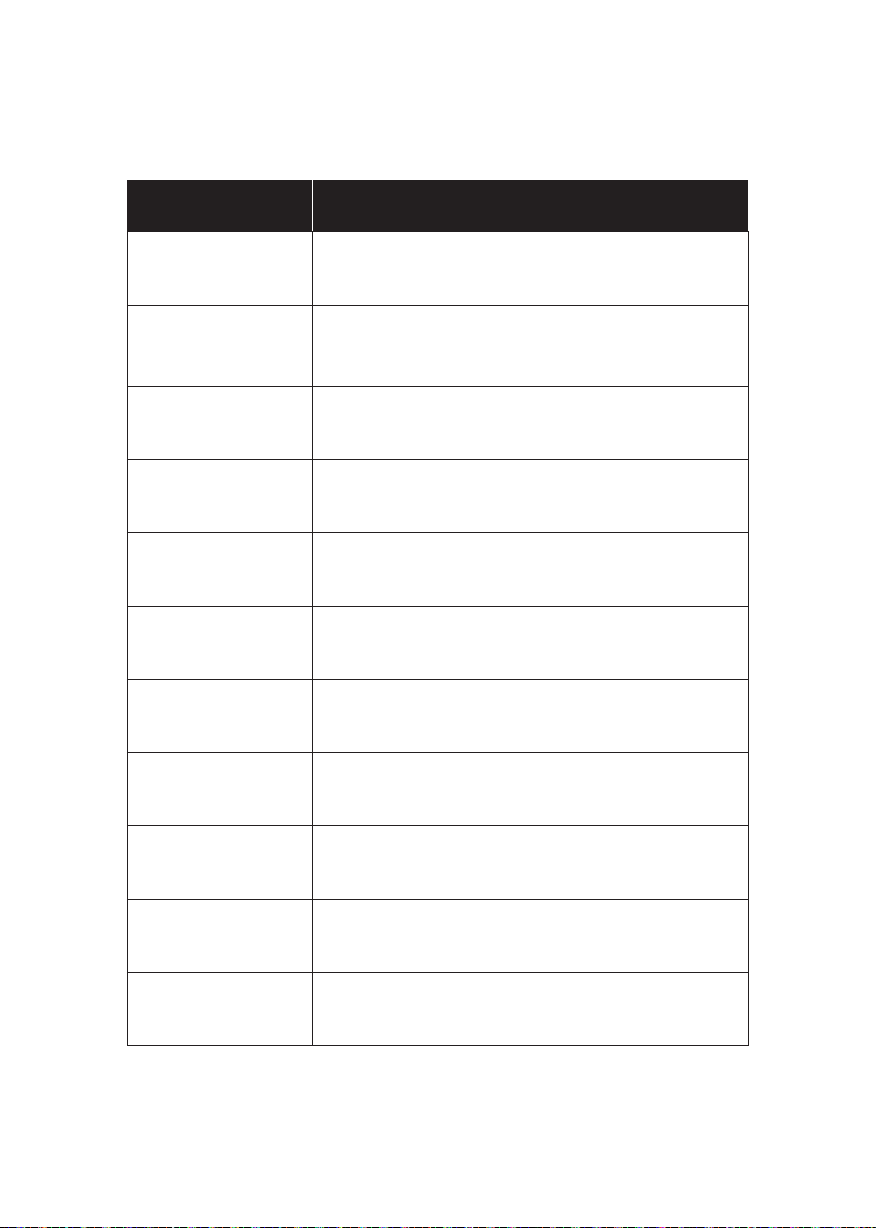
Audio and LED indications
Actions Indications
Bluetooth Connection
Successfully Unlocked
Successfully Locked
Incorrect PIN
Deleted PIN
Obstruction Alarm
Security Lockout
Alarm
Security Lockout
Deactivated
Status indicator flashes Blue
Ascending 4 fast tones after unlocked
and flash Green LED 2 times
1 long beep after Padlock is locked and
Green LED for 2 seconds
4 short beeps and flash Red 2 times
3 sets of 4 short beeps and flash Red 2 times
6 sets of 4 short beeps
Low - High siren for 30 / 60 / 90 seconds
2 long beeps
18
Low Battery Alert
Hard Reset / Unpair
Power Start Up
Descending 3 fast tones when keypad is woken
up and breathing Red LED
Descending 4 slow tones
2 slow beeps then 2 quick beeps
Page 19

Troubleshoot
I am unable to close the shackle
to lock the padlock.
• Do an unlock via PIN code or Bluetooth and try
to close the shackle again.
• Note that you might accidentally lock the
padlock manually by holding the UNLOCK
button for 2 seconds when the padlock is open.
I am unable to turn the Torx Cap to
remove the battery cover.
• Make sure the Padlock is unlocked before you
turn the Torx cap, to remove the batter cover.
• Note that the Torx cap cannot be turned while
the Padlock is locked.
The padlock keypad flashes white
and LED indicator flashes red when I
activate the keypad.
• Keypad Security Lockout is triggered on the
Padlock.
• Please refer to page 14.
I tried to use a 9V Battery to
jumpstart the lock but unable to.
• Please ensure terminals of the 9V battery are in
contact with the Jump Start contact points of the
Padlock for 2 seconds to activate the padlock.
• The 9V Battery terminals must be in constant
contact with the padlock 9V contact pins while
unlocking it with PIN code or Bluetooth.
The lock is not responding at all.
• The Padlock’s battery is flat.
• Use an Alkaline 9V Battery to jumpstart the lock
and unlock the Padlock to replace the batteries.
• Refer to page 8 to know how to replace batteries.
I closed the shackle but the padlock
did not relock automatically.
• Make sure Auto Relock is ON via the
igloohome mobile app.
• If Auto Relock is ON and the padlock is
still not working, try to lock the padlock
manually by holding the UNLOCK button for
2 seconds.
I tried to unlock the Padlock but
the keypad went o and came
back on with 2 slow and 2 quick
beeps.
• The Padlock is low in battery.
• Use an Alkaline 9V Battery to jumpstart the
lock and unlock the Padlock to replace the
batteries.
• Refer to page 8 to know how to replace
batteries.
I can’t scan the QR sticker as it is
worned out.
• Use the spare QR sticker that is provided in the
Padlock box.
I have generated my PINs from the
app but it cannot work.
• Do a Bluetooth Unlock or sync and try again.
• Make sure that the generated PIN codes are
activated within the activation period before it
expired.
19
Page 20

For enquiries go to:
20
igloohome.co/support
 Loading...