

Page 1
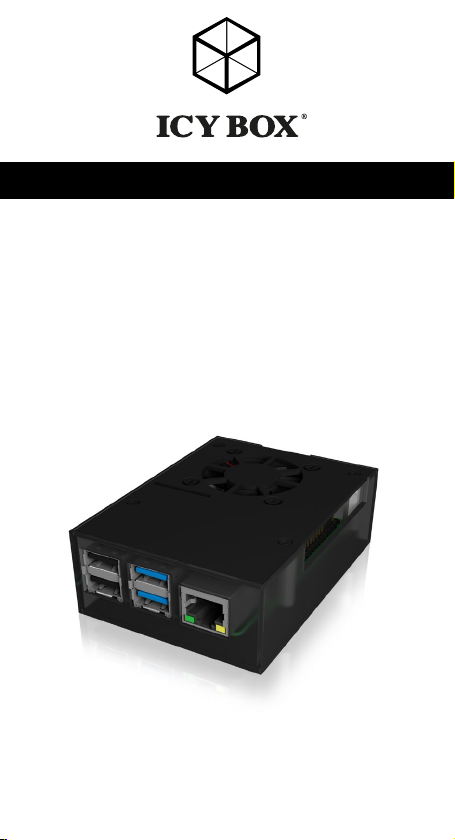
Quick installation guide IB-RP108
Protective case for Raspberry Pi® 4
Schnellinstallationsanleitung IB-RP108
Schutzgehäuse für Raspberry Pi
®
4
Page 2
Safety information
Please read carefully the following information to prevent injuries, damage to
material and device as well as data loss:
Warning levels
Signal words and safety codes indicate the warning level and provide immediate
information in terms of the probability of occurrence as well as the type and severity of the
consequences if the measures to prevent hazards are not complied with.
DANGER
WARNING
CAUTION
IMPORTANT
1. Risk of electrical shock
WARNING
• Read the operating instructions prior to use
• Make sure the device has been de-energised prior to working on it
• Do not remove contact protection panels
• Avoid contact with conducting parts
• Do not bring plug contacts in contact with pointed and metal objects
• Use in intended environments only
• Operate the device using a power unit meeting the specifications of the type plate only!
• Keep the device/power unit away from humidity, liquid, vapour and dust
• Do not modify the device
• Do not connect the device during thunderstorms
• Approach specialist retailers if you require repairs
2. Hazards during assembly (if intended)
CAUTION
• Read the operating instructions prior to assembly
• Avoid coming into contact with sharp edges or pointed components
• Do not force components together
• Use suitable tools
• Use potentially enclosed accessories and tools only
3. Hazards caused by a development of heat
IMPORTANT
• Prevent externally heating up components and ensure an exchange of air
• Do not cover the fan outlet and passive cooling elements
• Avoid direct sunlight on the device/power unit
• Guarantee sufficient ambient air for the device/power unit
• Do not place objects on the device/power unit
Warns of a directly hazardous situation causing death or
serious injury.
Warns of a potentially hazardous situation that may cause
death or serious injury.
Warns of a potentially hazardous situation that may cause
minor injury.
Warns of a potential situation that may cause material or
environmental damage and disrupt operative processes.
Contact with parts conducting electricity
Risk of death by electrical shock
Sharp components
Potential injuries to fingers or hands during assembly (if intended)
Insufficient device/power unit ventilation
Overheating and failure of the device/power unit
Page 3
Safety information
4. Hazards caused by very small parts and packaging
WARNING
• Keep small parts and accessories away from children
• Store/dispose of plastic bags and packaging in an area that is inaccessible to children
• Do not hand over small parts and packaging to children
5. Potential data loss
IMPORTANT
• Always comply with the information in the operating instructions/Manual
• Exclusively use the product once the specifications have been met
• Back up data prior to commissioning
• Back up data prior to connecting new hardware
• Use accessories enclosed with the product
6. Cleaning the device
IMPORTANT
• Disconnect the device prior to cleaning
• Aggressive or intense cleaning agents and solvents are unsuitable
• Make sure there is no residual moisture after cleaning
• We recommend cleaning devices using a dry, anti-static cloth
7. Disposing of the device
IMPORTANT
This icon on product and packaging indicates that this product must not be
disposed of as part of domestic waste. In compliance with the Waste Electrical and Electronic Equipment Directive (WEEE) this electrical device and
potentially included batteries must not be disposed of in conventional, domestic waste or recycling waste. If you would like to dispose of this product
and potentially included batteries, please return it to the retailer or your local
waste disposal and recycling point.
If you have any questions, please do not hesitate to contact our support at
[email protected] or visit our website at www.raidsonic.de.
Risk of suffocation
Risk of death by suffocation or swallowing
Data lost during commissioning
Potentially irreversible data loss
Harmful cleaning agents
Scratches, discolouration, damage caused by moisture or
short circuit in the device
Environmental pollution, unsuitable for recycling
Potential environmental pollution caused by components,
recycling circle interrupted
Page 4
Sicherheitshinweise
Zur Vermeidung körperlicher Schäden, sowie von Sach-, Geräteschäden und
Datenverlust beachten Sie bitte folgende Hinweise:
Warnstufen
Signalwort und Sicherheitszeichen kennzeichnen die Warnstufe und geben einen sofortigen
Hinweis auf aWahrscheinlichkeit, Art und Schwere der Folgen, wenn die Maßnahmen zur
Vermeidung der Gefahr nicht befolgt werden.
GEFAHR
WARNUNG
VORSICHT
ACHTUNG
1. Gefahren durch elektrische Spannung
WARNUNG
• vor Benutzung Betriebsanleitung lesen
• vor Arbeiten am Gerät, Spannungsfreiheit sicherstellen
• Kontaktschutzblenden nicht entfernen
• Kontakt mit Spannungsführenden Komponenten vermeiden.
• Steckkontakte nicht mit spitzen und metallischen Gegenständen berühren
• Verwendung nur in dafür vorgesehenen Umgebungen
• Gerät ausschließlich mit Typenschildkonformen Netzteil betreiben!
• Gerät/Netzteil fern von Feuchtigkeit, Flüssigkeit, Dampf und Staub halten
• Eigenständige Modifikationen sind unzulässig
• Gerät nicht während eines Gewitters anschließen
• Geben Sie Ihr Gerät im Reparaturfall in den Fachhandel
2. Gefahren während Montage (wenn vorgesehen)
VORSICHT
• vor Montage, Betriebsanleitung lesen
• Kontakt mit scharfen Kanten oder spitzen Bauteilen vermeiden
• Bauteile nicht mit Gewalt zusammensetzen
• geeignetes Werkzeug verwenden
• nur gegebenenfalls mitgeliefertes Zubehör und Werkzeug verwenden
3. Gefahren durch Wärmeentwicklung
ACHTUNG
• externe Erwärmung vermeiden und Luftaustausch zulassen
• Lüfter-Auslass und passive Kühlkörper freihalten
• direkte Sonneneinstrahlung auf Gerät/Netzteil vermeiden
• ausreichend Umgebungsluft für Gerät/Netzteil sicherstellen
warnt vor einer unmittelbar gefährlichen Situation, die zum
Tod oder zu schweren Verletzungen führen wird.
warnt vor einer möglicherweise gefährlichen Situation, die
zum Tod oder zu schweren Verletzungen führen kann.
warnt vor einer möglicherweise gefährlichen Situation, die
zu leichten Verletzungen führen kann.
warnt vor einer möglichen Situation, die zu Sach- und
Umweltschäden führen und den Betriebsablauf stören kann.
Kontakt mit elektrisch leitenden Teilen
Lebensgefahr durch Stromschlag
Scharfkantige Bauteile
Finger- oder Handverletzungen bei Zusammenbau (wenn
vorgesehen) möglich
Mangelhafte Belüftung des Geräts/Netzteils
Überhitzung und Ausfall des Geräts/Netzteils
Page 5
Sicherheitshinweise
• keine Gegenstände auf dem Gerät/Netzteil abstellen
4. Gefahren durch Kleinstteile und Verpackung
WARNUNG
• Kleinteile, Zubehör für Kinder unzugänglich verwahren
• Plastiktüten und Verpackung für Kinder unzugänglich verwahren/entsorgen
• Kleinteile und Verpackungen nicht in Kinderhände geben
5. Möglicher Datenverlust
ACHTUNG
• Unbedingt Hinweise in der Bedienungsanleitung/Schnellinstallationsanleitung beachten
• Produkt nur verwenden, wenn Spezifikationen erfüllt sind
• Datensicherung vor Inbetriebnahme durchführen
• Datensicherung vor Anschluss neuer Hardware durchführen
• dem Produkt beiliegendes Zubehör verwenden
6. Reinigung des Gerätes
ACHTUNG
• vor Reinigung, das Gerät außer Betrieb nehmen
• aggressive bzw. scharfe Reinigungs- und Lösungsmittel sind ungeeignet
• nach der Reinigung sicherstellen, dass keine Restfeuchtigkeit vorhanden ist
• Reinigung der Geräte am besten mit trockenem Antistatiktuch durchführen
7. Entsorgung des Gerätes
ACHTUNG
Dieses auf dem Produkt und der Verpackung angebrachte Symbol zeigt an,
dass dieses Produkt nicht mit dem Hausmüll entsorgt werden darf. In Übereinstimmung mit der Richtlinie über Elektro- und Elektronik-Altgeräte (WEEE)
darf dieses Elektrogerät und ggf. enthaltene Batterien nicht im normalen
Hausmüll oder dem Gelben Sack entsorgt werden. Wenn Sie dieses Produkt und ggf. enthaltene Batterien entsorgen möchten, bringen Sie diese bitte
zur Verkaufsstelle zurück oder zum Recycling-Sammelpunkt Ihrer Gemeinde.
Bei Fragen kontaktieren Sie gerne unseren Support unter [email protected] oder
besuchen Sie unsere Internetseite www.raidsonic.de.
Erstickungsgefahr
Lebensgefahr durch Ersticken oder Verschlucken
Datenverlust bei Inbetriebnahme
Unwiederbringlicher Datenverlust möglich
Schädigende Reinigungsmittel
Kratzer, Farbveränderungen, Feuchteschäden oder
Kurzschluss am Gerät
Umweltverschmutzung, Wiederverwertung nich t möglich
Mögliche Umweltbelastung durch Bestandteile, Recyclingkreislauf
unterbrochen
Page 6

Quick installation guide IB-RP108
Important product information
Dear customer,
please note the following information about the main boards which are supported by this device!
The device has been developed for:
• Compatible with: Raspberry Pi® 4 Model B
• Raspberry Pi® board and antenna not included
Package content:
1x IB-RP108
1x 40 mm cooling fan
1x set of heat sinks
1x set of screws
4x footpad stickers
1x screw driver
1x quick installation guide
(Raspberry Pi® not included)
®
Enclosure for Raspberry Pi
Keep your Raspberry Pi® computer cool in this enclosure with aluminium top
and bottom lids. We designed this case to be beautiful, easy to assemble and
perfect for any use and supports a 40 mm cooling fan, which can improve the
performances of the single board computer.
4
Key features
• Protective solution designed specifically for the Raspberry Pi
®
4
• Translucent frame, so you can still see your Pi® and all status LEDs
• The aluminium top cover supports the installation of a 40 mm cooling fan
(included)
• Self-adhesive heat sinks for the most important chipsets included
• Can prevent the Raspberry Pi® from slowness caused by high temperature
• Supports the installation of Raspberry Pi® HAT modules and contains an
antenna mount hole
• Innovative enclosure design allows easy access to all ports like power, video,
• audio, USB, LAN, microSD card and GPIO, camera CSI and display DSI
• Prepared to connect a Raspberry Pi® touch display and wall mount
compatible
Page 7

Schnellinstallationsanleitung IB-RP108
Wichtige Produktinformationen
Sehr geehrter Kunde,
nehmen Sie bitte folgende Informationen zur Kompatibilität mit einzubauenden
Boards zur Kenntnis!
Anforderungen und Informationen:
• Kompatibel mit: Raspberry Pi® 4 Modell B
• Raspberry Pi® Board und Antenne nicht im Lieferumfang enthalten
Verpackungsinhalt:
1x IB-RP108
1x 40 mm Lüfter
1x Satz Kühlkörper
1x Satz Schrauben
4x Gummifußaufkleber
1x Schraubendreher
1x Schnellinstallationsanleitung
(Raspberry Pi® nicht im Lieferumfang enthalten)
®
Schutzgehäuse für Raspberry Pi
Dieses Raspberry Pi®-Gehäuse ist ein Aluminium-/Kunststoffgehäuse mit kleinem
Formfaktor, das auf Leistung und Komfort ausgelegt ist. Das Gehäuse kühlt die
Raspberry Pi® CPU und den IC-Chipsatz dank seiner Aluminiumabdeckungen
und dem mitgelieferten 40 mm Lüfter.
4
Hauptmerkmale
• Speziell für den Raspberry Pi
®
4 entwickelte Gehäuselösung
• Durchscheinender Kunststoffrahmen um Raspberry Pi® und alle Status LEDs im
Blick zu haben
• Obere Aluminiumabdeckung unterstützt Einbau eines 40 mm Lüfters (im
Lieferumfang enthalten)
• Selbstklebende Kühlkörper für die wichtigsten Chipsätze inklusive
• Kann verhindern, dass der Raspberry Pi® durch hohe Temperaturen langsam wird
• Unterstützt den Einbau Raspberry Pi® HAT Modulen und Antennen (nicht
enthalten)
• Innovatives Gehäusedesign ermöglicht einfachen Zugang zu allen Anschlüssen, wie z.B. Strom, Video, Audio, USB, LAN, microSD und GPIO, Kamera
CSI und Display DSI
• Vorbereitung für Raspberry Pi® Touchdisplay- und Wandmontage
Page 8

Quick installation guide IB-RP108
Assembly
• Please follow the drawing to assemble the appropriated board to the
IB-RP108.
• The heat sinks can be placed to the main chip sets on the board accordingly to their sizes.
• Please remove the foil before stick them to the PCB.
• Alternatively, or in addition, you can use the 40 mm fan (included) at the
top cover of the case.
Zusammenbau
• Um das entsprechende Board einzubauen, folgen Sie bitte der Darstellung.
• Die Kühlkörper können bei Bedarf auf die entsprechend dimensionierten
PCB Bauteile gesetzt werden. Bitte entfernen Sie die Folie, bevor Sie die
Kühlkörper anbringen.
• Alternativ oder zusätzlich können Sie auch den 40 mm Lüfter (enthalten) im
Oberteil des Gehäuses verbauen.
Page 9
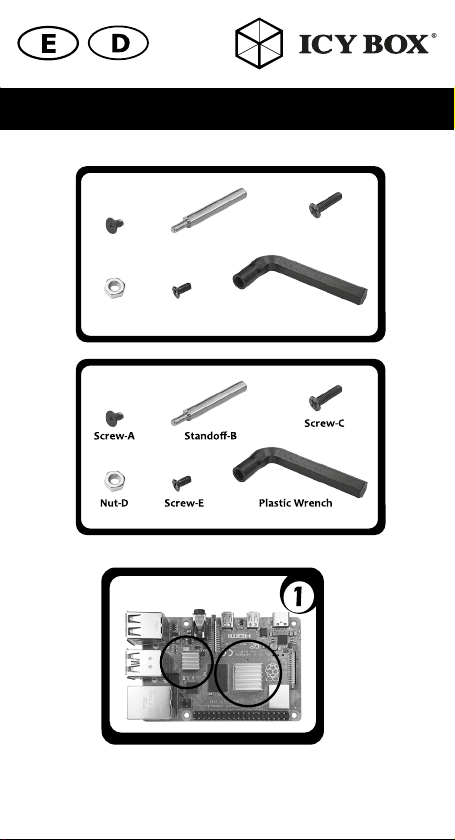
Schraube-A
Mutter-D Schraube-E Kunststoff Inbusschlüssel
Abstandshalter-B
Schraube-C
1. Apply two heatsinks to the CPU and IC of your
Raspberry Pi
®
1. Platzieren Sie die Kühlkörper auf der CPU und dem IC Chip wie abgebildet
Page 10
Quick installation guide IB-RP108
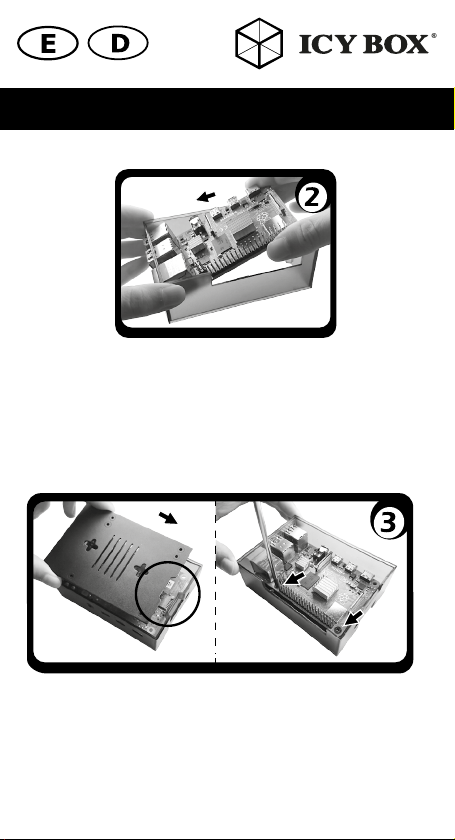
2. Place the
2. Setzen Sie das Raspberry Pi® Board wie gezeigt in das Unterteil ein.
3. Install the aluminum bottom by alligning the micro-SD card notch and
3. Setzen Sie den Aluminiumboden entsprechend des microSD
Raspberry Pi® by putting in the USB side to the plastic frame
first and slightly twist the frame to fit all the connectors in the right place.
Achten Sie dabei darauf die USB Anschlüsse zuerst einzupassen und
dann entsprechend der seitlichen Ausschnitte das Board zu platzieren.
fasten your
next to the 40-pin GPIO
Kartenauschnittes ein und befestigen das Raspberry Pi® Board mittels
zweier Schrauben -A in den Schraublöchern rechts und links vom
40-Pin GPIO Anschluss.
Raspberry Pi® with two black screws-A in the screw holes
Page 11
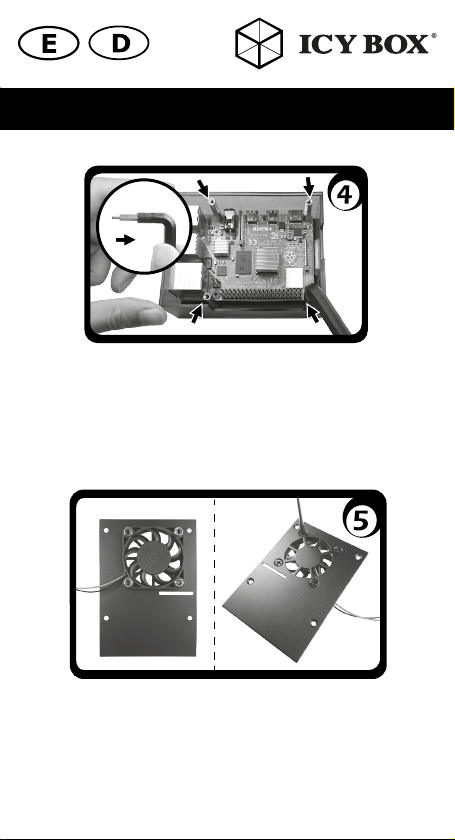
4. Lock the standoff-B into the 4 screw holes using the provided plastic
wrench.
4. Setzen Sie Abstandshalter -B in die verbleibenden vier Schraublöcher
ein, indem Sie den mitgelieferten Inbusschlüssel wie gezeigt verwenden.
5. Install the fan at the side of the aluminum top without the countersunk
holes and fasten the fan with screws-C and nuts-D.
5. Wenn gewünscht, bauen Sie den Lüfter an der Innenseite (ohne
Senklöcher) des Aluminiumdeckels ein und befestigen ihn mittels der
Schrauben -C und Muttern -D.
Page 12
Quick installation guide IB-RP108
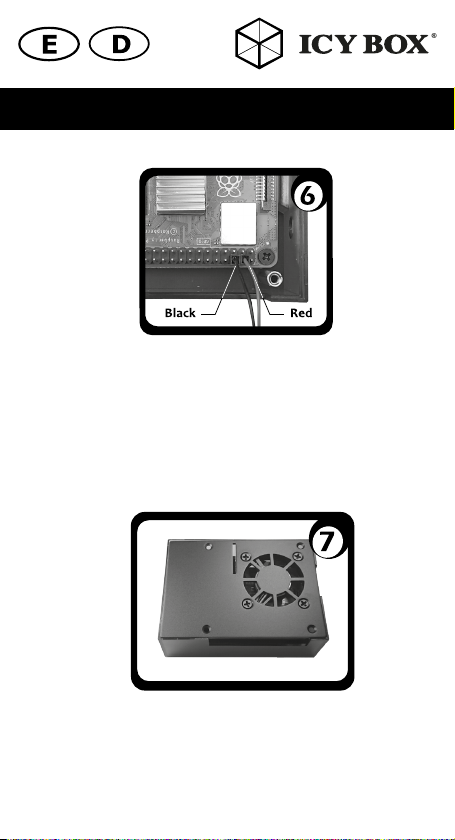
6. Connect the red cable of the fan to the 5 V pin of the GPIO and the
black cable to the ground pin of GPIO.
6. Montieren Sie das rote (Red) Kabel des Lüfters auf Position GPIO-4
(5 V) und das schwarze (Black) Kabel auf Position GPIO-6 (GND).
7. Allign the screw holes of the aluminum top and install it into the plastic
frame.
7. Richten Sie die Schraublöcher des Aluminiumoberteils entsprechend
der Schraublöcher aus und setzen es ein.
Page 13
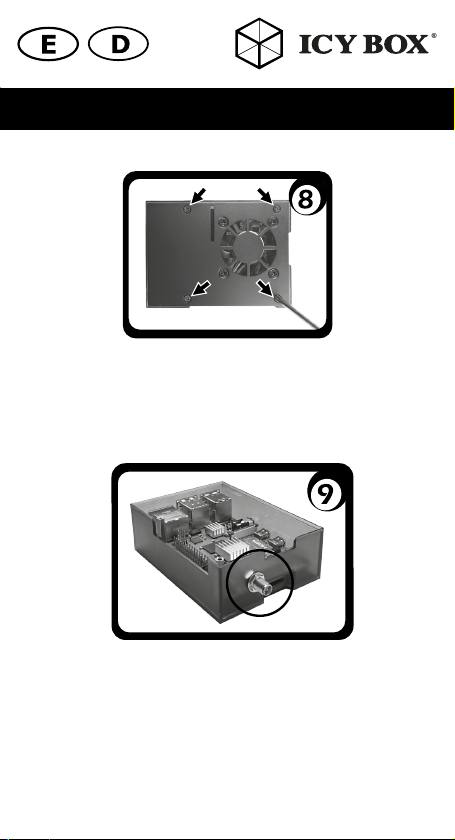
8. Fasten the aluminum top to the frame with four screws-E.
8. Befestigen Sie das Aluminiumoberteil mittels der Schrauben -E.
9. If antenna installation is needed, please install your antenna before
step 4.
9. Wenn Sie eine Antenne einbauen möchten, tun Sie dies bitte vor
Schritt 4.
Page 14
© Copyright 2019 by RaidSonic Technology GmbH. All Rights Reserved
The information contained in this manual is believed to be accurate and reliable. RaidSonic
Technology GmbH assumes no responsibility for any errors contained in this manual. RaidSonic
Technology GmbH reserves the right to make changes in the specifications and/or design of the
above mentioned product without prior notice. Raspberry Pi® is a trademark of the Raspberry Pi
Foundation. The diagrams contained in this manual may also not fully represent the product that
you are using and are there for illustration purposes only. RaidSonic Technology GmbH assumes
no responsibility for any differences between the product mentioned in this manual and the pro-
duct you may have.
 Loading...