

Page 1
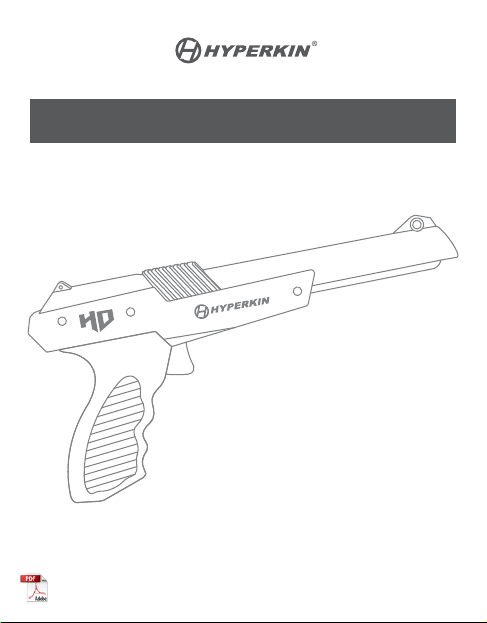
HYPER BLASTER HD
for Duck Hunt™ Compatible with NES®
QUICK USER GUIDE
Page 2
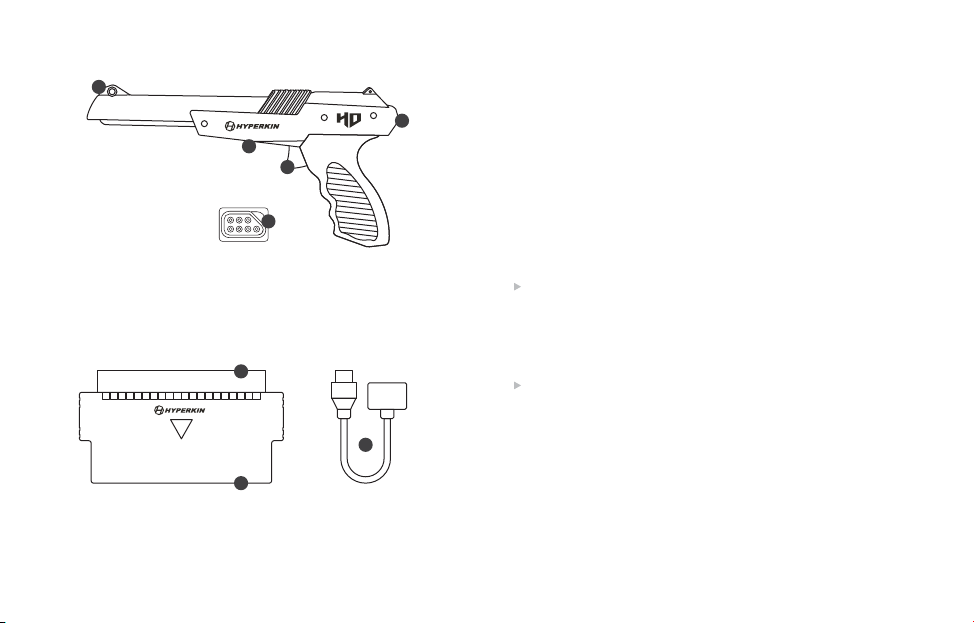
INCLUDED
1
3
4
5
1. FRONT SIGHT
2. STOCK
3. SENSITIVITY SWITCH
4. TRIGGER
5. PLUG FOR NES®
6
7
6. CARTRIDGE PIN CONNECTOR
7. ADAPTER CONTACTS
8. ADAPTER FOR RETRON 2 HD/RE TRON 3 HD
Adjusting the Delay
You can manua lly adj ust the D E L AY at the title s creen by press UP or
DOWN on the gamepad connected to the PL AYE R 1 port. UP increases
the delay, which is represented by milliseconds. DOWN decreases it. Fo r
larger TVs, you may need to adjust the delay to above 7 milliseconds.
2
8
Smaller TVs op erate be st with the delay b elow 7 milliseconds.
You can also adjust the delay in-game by pressing STAR T and pausing.
From there, you can press UP or DOWN on the gamepad connected to
the PL AYER 1 po rt to adj ust the delay.
Shooting Distance
Make sure you are sta nding the correct distance f rom your s hootin g area
to your TV. In most cases, stand ing 3 to 4 feet from your TV is
recommende d. For TVs 32" to 42" in size, stand 4 to 5 feet f rom your
television. For T Vs 42" to 55" in size, stand 5 to 6 feet from you r TV.
Optimizing Gameplay
Getting the best experienc e from you r Hyper Blaste r HD may require
several adjustments to the SENSITIVITY SWITCH, DEL AY, and shooting
distan ce. Record these settings for f uture use or when chang ing playing
environments.
Using RetroN 2 HD and RetroN 3 HD
Use the Hyper Blaster HD on your RetroN 2 HD or RetroN 3 HD the
includ ed adapter. Plug the adapter into th e Player 2 c ontroller por t, then
plug the Hyper Blaster into the adapter.
Page 3

Adjusting the Delay
You can manua lly adj ust the D E L AY at the title s creen by press UP or
DOWN on the gamepad connected to the PL AYE R 1 port. UP increases
the delay, which is represented by milliseconds. DOWN decreases it. Fo r
larger TVs, you may need to adjust the delay to above 7 milliseconds.
Smaller TVs op erate be st with the delay b elow 7 milliseconds.
You can also adjust the delay in-game by pressing STAR T and pausing.
From there, you can press UP or DOWN on the gamepad connected to
the PL AYER 1 po rt to adj ust the delay.
Shooting Distance
Make sure you are sta nding the correct distance f rom your s hootin g area
to your TV. In most cases, stand ing 3 to 4 feet from your TV is
recommende d. For TVs 32" to 42" in size, stand 4 to 5 feet f rom your
television. For T Vs 42" to 55" in size, stand 5 to 6 feet from you r TV.
Optimizing Gameplay
Getting the best experienc e from you r Hyper Blaste r HD may require
several adjustments to the SENSITIVITY SWITCH, DEL AY, and shooting
distan ce. Record these settings for f uture use or when chang ing playing
environments.
Using RetroN 2 HD and RetroN 3 HD
Use the Hyper Blaster HD on your RetroN 2 HD or RetroN 3 HD the
includ ed adapter. Plug the adapter into th e Player 2 c ontroller por t, then
plug the Hyper Blaster into the adapter.
For troubleshooting, contact us at [email protected].
Please visit www.Hyperkin.com/warranty to register your official Hyperkin
product for Hyperkin’s Warranty.
FCC Notice
This equ ipment has bee n tested and found to c omply with the li mits for Class B di gital device, pu rsuant to
Part 15 of the FCC R ules. These li mits are design ed in a resident ial installati on. This equip ment generate s,
uses, an d can radi ate radio fr equen cy energ y and, if not i nstall ed and use d in accor dance wi th the
instruc tions, ma y cause ha rmful i nterfe rence to rad io comm unicati ons. Howev er, there is no gu arantee
that inter ference wi ll not occur in a pa rticular in stallation. I f this equipme nt does cause h armful inter ference
to radio or te levision recep tion, which can be d etermined by turn ing the equipme nt off and on, the use r is
encour aged to try to correc t the interferen ce by one or more of the fo llowing m easures:
- Reorie nt or relocate the re ceiving antenn a.
- Increa se the separation b etween the equip ment and receiv er.
- Connec t the equipment in to an outlet on a circui t different fro m that to which the rec eiver is
connected.
- Consult the dealer or an experienced radio TV technician or email [email protected] for
assist ance. Shielded c ables must be use d with this unit to ens ure compliance w ith the Class B FCC
limits.
Changes or modifications to this unit not expressly approved by the party responsible for compliance
could voi d the user’s authorit y to operate this equ ipment.
Page 4
Stateme nt of Compliance w ith EU Directive
Hyperk in Inc., loc ated at 1939 West M ission B lvd, Pomo na, CA 91766, declare s under o ur sole
responsibility that the product, Insert the Hyper Blaster HD for NES®, is in comp liance w ith the es sentia l
require ments an d other rel evant pro vision s of Low Voltage D irecti ve (LVD) 2014/35/EU, RoHS Di rective
2011/65/EU, and carrie s the CE marking.
The full D eclaration of Co nformity can be r equested by email ing:
Email: [email protected]
Company N ame: Hyperkin I nc.
Address: 1939 We st Mission Blvd, Po mona, CA 91766
Déclaration de Conformité à la Directive Européenne
Hyperk in Inc. si tuée au 1939 Wes t Missio n Blvd, Pom ona, CA 91766, affirm e sous notr e seule
responsabilité que le produit, Hyper Blaster HD for NES®, est con forme au x exigen ces ess entiel les et
autres di spositions per tinentes des Low Vol tage (LVD) 2014/35/EU, RoHS Direct ive 2011/65/EU, et porte
le marqu age CE.
La Déclaration de Conformité complète peut être demandée par e-mail:
[email protected]
Nom de l'entre prise: Hyperki n Inc.
Adresse: 1939 We st Mission Blvd, Po mona, CA 91766
Erklärung zur Einhaltung der EU-Richtlinie
Hyperk in Inc., 1939 West M ission B lvd, Pomo na, CA 91766, erklär t unter un serer a lleini gen
Verantwo rtung, d ass das P rodukt H yper Bl aster HD fo r NES® den grundlegenden Anforderungen und
andere n relevanten Besti mmunge n der Low Voltage (LVD) 2014/35/EU, RoHS D irective 2011/65/EU, und
die CE-Ken nzeichnung träg t.
Die vollständige Konformitätserklärung kann per e-mail angefordert werden:
[email protected]
Firma: Hyperkin Inc.
Adresse: 1939 We st Mission Blvd, Po mona, CA 91766
© 2020 Hyper kin Inc. Hy perkin ® is a registe red trademark of Hyp erkin In c. NES®, Super M ario Bros .®,
and Duck Hu nt™ are regi stered tra demarks a nd trademarks, res pective ly, of Ninten do® of Amer ica Inc.
This product is not designed, manufactured, sponsored, endorsed, or licensed by Nintendo® of America
Inc. in the Un ited States and/or oth er countries. Al l rights reserv ed. Made in China.
 Loading...