

Page 1
Page 2

HydRemote Cable System
1. INTRODUCTION
Congratulations on the purchase of the HydRemote
Cable System. This cable allows you to interface the
GoPro HD Hero and HD Hero2 cameras with a variety
of remote control devices, both wired and wireless. The
HydRemote Cable System allows you to power your
camera on and off when used with remote control
systems such as the Pocket Wizard. Remote control
functionality is achieved by programming the GoPro
camera to begin recording or taking photos when the
camera is powered on (aka “One Button Mode”).
Additionally, the HydRemote Cable, when
combined with a modified GoPro BacPac door and the
supplied compression fittings, becomes watertight.
HydRemote is a 3rd party entity and is not affiliated,
sponsored, or endorsed by GoPro or Pocket Wizard.
2. PACKAGE CONTENTS
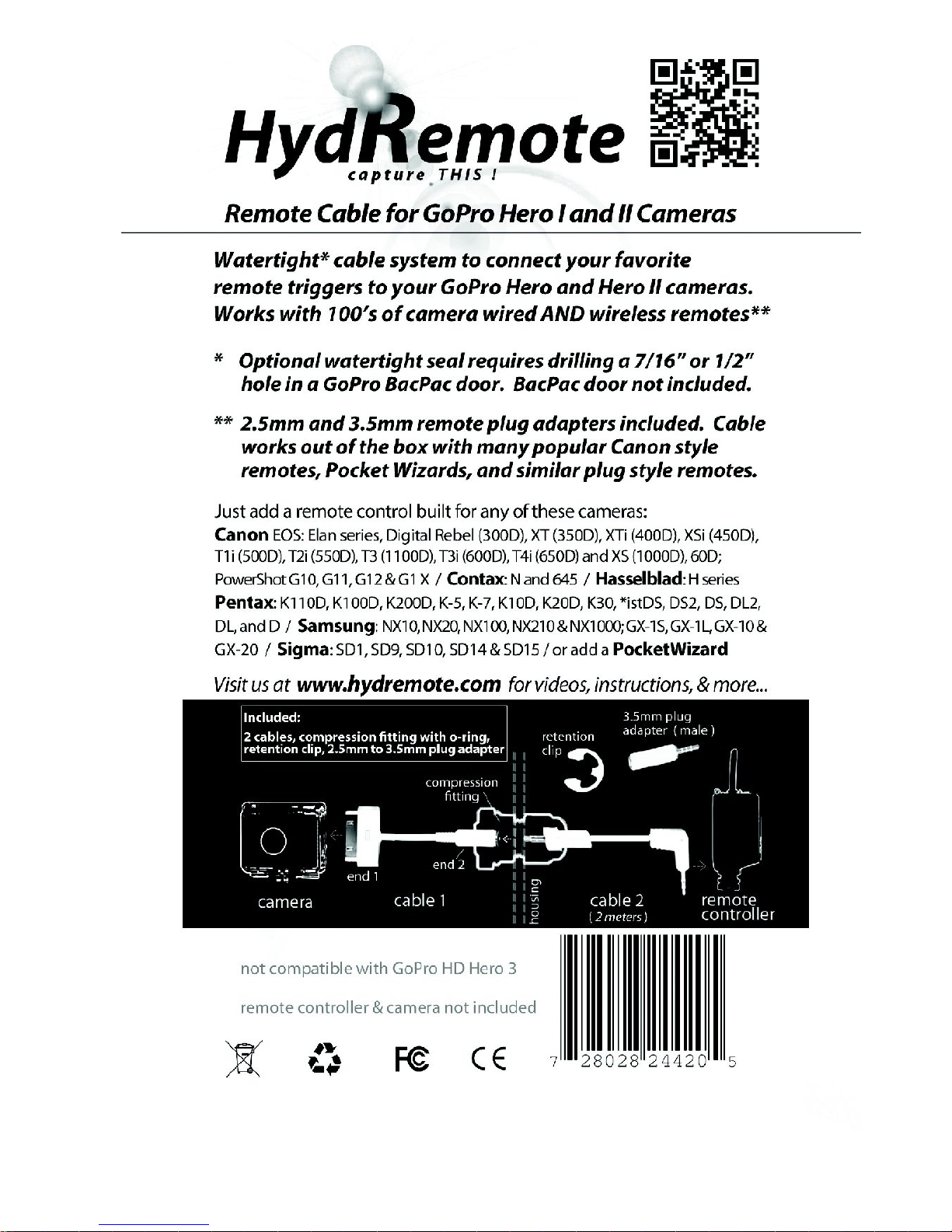
The standard HydRemote Cable System includes:
• 2 Part Cable (30 pin GoPro and 2.5mm connectors)
• 1 watertight compression fitting with o-ring
• 1 E-clip
• 1 2.5mm to 3.5mm plug adapter
• user manual
3. SYSTEM REQUIREMENTS
• Compatible with GoPro HD Hero and HD Hero2
firmware updates as of the time of this manual
publication (January 2013).
• GoPro HD Hero or Hero2 camera with 30 pin port
• Compatible cabled remote control or wireless
receiver (ie- Pocket Wizard, Yongnuo,...).
• If a watertight system is desired, a waterproof
GoPro BacPac door (LCD or Battery) modified to fit
the included compression fitting is required. See
intsructions below and videos at
www.hydremote.com for more details.
NOTE: This HydRemote Cable System is not GoPro HD Hero 3 compatible.
2
Page 3

4. WARRANTY AND LIMITATION OF LIABILITY
This product is offered to you conditioned upon your
acceptance without modification of the terms, conditions,
and notices contained.
Exclusive Obligation
Although the HydRemote.com system has been designed for
a specific use, consumers are subject to mishap and even
injury while using this product. By purchasing our product(s)
you hereby RELEASE AND DISCHARGE HydRemote.com and
all subsidiaries, owners or proprietors while using
HydRemote cables and accessories.
Limitation of Liability
In no event shall HydRemote.com be liable for any direct,
indirect, punitive, incidental, special consequential damages
whatsoever arising out of or connected with the use or
misuse of its product(s). Water tight functionality requires
modification of GoPro mounts and/or accessories. The end
user makes these modifications at his/her own risk.
HydRemote.com is not liable for any harm caused to cameras
or other devices used in conjunction with our product(s). The
HydRemote.com cable system is specifically intended for use
with GoPro HD Hero and HD Hero2 cameras.
HydRemote.com makes no guarantee that its products will
work with any present or future versions of GoPro cameras.
Use of the HydRemote cable with GoPro products could void
the warranty of those GoPro products. Purchaser assumes all
liability for using these products in compliance with all
applicable state and federal laws regarding surreptitious
audio and or video recording or monitoring.
WARRANTY:
HydRemote.com warrants our products against defects in
material or workmanship for a period of 30 days from the
original date of purchase of the product by a consumer (the
“Warranty Period”). HydRemote.com does not warrant, and is
not responsible for, any camera or other device made by
anyone other than HydRemote.com. If a material or
workmanship defect arises with regard to any HydRemote
product, and a valid claim is received within the Warranty
3
Page 4

Period, HydRemote will (i) repair the HydRemote product
using new or refurbished parts or (ii) replace the HydRemote
product with a new or refurbished HydRemote product. For
purposes of this limited warranty, “refurbished” means a
product or part that has been substantially returned to its
original specifications. Except for such repair or
replacement, the sale, processing or other handling of this
product is without warranty, condition or other liability even
though the defect or loss is caused by negligence or other
fault. Damage resulting from use, accident, or normal wear
and tear is not covered by this or any warranty.
HydRemote.com is not responsible for improper installation,
modification, power spikes, or misuse of products. Corrosion
due to improper care or salt spray is not covered. Because of
possible user resealing error, this product is not warrantied
against waterhousing leakage or any resulting damage.
Please review and follow the instructions carefully when
sealing the waterhousings! Returns or replacements of parts
and/or products may be subject to shipping, handling,
replacement and/or restocking fees. HydRemote.com is not
responsible for shipping costs associated with warranty
returns.
Further details, including our RETURN POLICY, can be found
at www.hydremote.com
INSTRUCTIONS:
IMPORTANT: HydRemote is a 3rd party accessory for the GoPro HD
Hero and HD Hero2 cameras. As such, there is no guarantee that
this device will work with your particular camera. This accessory has
been successfully tested with the aforementioned cameras. Use the
HydRemote Cable System at your own risk. Use of the HydRemote
Cable System could void the warranty of devices to which it attaches.
Insructional Videos and Tutorials can be found online at
www.hydremote.com
Watertight capable HydRemote Cables are designed to
connect many wired AND wireless remote systems to the
GoPro HD Hero and Hero2 cameras set in "One Button
Mode". One Button Mode allows your GoPro camera to start
recording video or photos as soon as the camera powers on.
The GoPro camera remains completely powered off when it
4
Page 5

is not recording. This means that your camera can remain
dormant for days without draining the battery! The
HydRemote Cable is able to power these cameras on or off.
This cable does not act as a traditional shutter button.
HYDREMOTE CABLE WITH WATERPROOFING :
Please watch the waterproofing installation VIDEO to assure
proper preparation of your GoPro BacPac door for
waterproof use with the HydRemote Cable. Refer to VIDEO
for more detailed instructions (found at www .hydremote.com )
MODIFICATION OF GOPRO BACK DOOR FOR CABLE GLAND
(both standard and wrist housing LCD/Battery BacPac doors):
1.Drill a 7/16th inch hole (or slightly larger) into the back
face your BacPac door, at the end opposite from the
GoPro camera's pin connector. Clean off ALL rough burs
from both sides of the drilled hole.
2.Remove the foam cushions from the BacPac door.
3.Insert the compression fitting into the BacPac door. A
7/16th hole will require you to moderately thread the
fitting to insert it completely. Be sure to use the
included o-ring if you plan to expose the cable to
extremely wet or submerged conditions.
4.Tighten the inside nut. Do not overtighten, as this could
cause the o-ring to lose its seal, and could permanently
damage the o-ring. Routinely examine the o-ring(s) to
assure they are not cracking or getting brittle. See
"Proper Care for O-rings".
5.For additional waterproofing you can glue the Cable 1
end#2 into the compression fitting. This may
permanently bond the fitting to your cable, but you
should still be able to remove the cable and fitting from
the BacPac door.
CABLE PREPARATION for WATERPROOFING:
1.Connect your modified GoPro BacPac door to the GoPro
waterhousing (refer to GoPro manual for more details).
2.Examine your HydRemote Cable for any nicks or other
damage. Loss of integrity in the cable itself can lead to
water leakage and harm to your cables and camera.
3.If using the cable's compression fitting, tightly and fully
5
Page 6

insert Cable 1-end#2 into the inner female portion of
the compression fitting.
4.Fit the compression fitting's domed nut onto cable #2.
5.Carefully place the compression fitting's black o-ring
onto Cable 2. The o-ring should be flush with the widest
diameter of the male connector (see website video/photo).
6.Carefully connect Cable 2 into fitting. A slight twisting
motion helps prevent trauma to fitting's combed teeth.
7.To test the watertightness of your system, tighten the
compression fitting dome nut around Cable 2. Close the
waterproof case WITHOUT the camera inside and
submerge into a suitable environment. A weighted
attachment will be needed to compensate for buoyancy.
IMPORTANT: Underwater use of the HydRemote system
is done at your own risk. NEVER use the HydRemote
cable to suspend the weight of your camera or housing.
When satisfied with your testing, continue to next step...
8.Set your GoPro camera in one button mode (refer to
GoPro for instructions). Also program camera's desired
sound and led light settings, quality of video, etc...
9.Connect Cable #1 to the GoPro camera. Be sure to
insert the HydRemote connector carefully and
COMPLETELY. Complete insertion of the connector into
the camera is important to minimize stress on the cable
when closing the waterhousing.
10.Carefully close the back door without pinching cable.
11.Connect the remaining end of the HydRemote Cable
#2 to your remote (note: during connection of many
transmitters, the camera will power on automatically. Be
sure to check your camera status and turn it off with
your remote if necessary). The included 2.5mm to
3.5mm adapter is needed for some remote systems.
12.Trigger your switch to start recording! Hold your
switch for 3-4 seconds to turn off the camera.
6
Page 7

O-RING MAINTENANCE:
Rinse your sealed camera in fresh water to dissolve and
wash away salt crystals. Do not use high pressure. To
maintain o-ring and gasket, carefully remove them with a
blunt instrument. Clean the o-ring, gasket, and all surfaces
which contact them with a lint free cloth. Examine o-ring for
any nicks, scratches, or brittleness and replace if needed.
Apply small quantity of appropriate o-ring grease to the o-
ring. Caution, use of incorrect grease could cause o-ring to
deteriorate. Reinsert o-ring onto fitting, being careful not to
introduce any contaminants which could compromise the
seal. Test watertight functionality. Replacement o-rings
(size -111) can be found at your local hardware store or
online.
HYDREMOTE CABLE with TIMER REMOTE (tips) :
1.If you wish to simply turn on the camera at a certain
time, program your timer to activate once at the desired
time.
2.If you wish to turn your camera on and off via the timer,
program your timer to take 4 second exposures. Set
your start time, and then your interval (time between
shots). The first 4" exposure should turn on the camera.
The next 4" exposure will turn it off. This feature may
require some creative thought and results will vary
based on the timer remote used. This method is also
useful for taking long interval time lapses while
conserving camera battery between shots (see video).
We have successfully tested this technique using the
Yongnuo MC-36R wireless timer remote.
HYDREMOTE CABLE without WATERPROOFING :
OPTION 1: Use a non-waterproof BacPac door and feed the
HydRemote cable through the door openings.
OPTION 2: Secure Cable 1 to BacPac door through a 3/8”
hole with a 3/8” e-clip (see video).
Alternatively, use no housing at all, or no back door and
secure camera to housing with rubber bands or oth
7
Page 8

For more information about
HydRemote Cable Systems visit us at
www.hydremote.com
Hydremote's proprietary cable connector
is patent pending
8
 Loading...