

Page 1
(C) AUTO TELECOM 2000
Page 2
DOCS:KEYPHOP.B80, 06-10-1999
THIS MANUAL WAS WRITTEN FOR SOFTWARE VERSION CX8I03u, NMSI10d and B1I00y. WHILE ALL CARE HAS BEEN TAKEN TO ENSURE ACCURACY IT RESTS WITH
THE INSTALLER TO ENSURE THAT THE FUNCTIONS PERFORM AS TO THE
CUSTOMERS REQUIREMENTS. THE POLICY OF AUTO TELECOM IS ONE OF
CONTINUAL IMPROVEMENT AND LATER VERSIONS OF HARDWARE AND
SOFTWARE MAY CONTAIN ENHANCEMENTS TO THE OPERATION OR FUNCTIONS
OF THE BX8, BX320 and B1-408. AUTO TELECOM DOES NOT AUTOMATICALLY
PROVIDE LATER HARDWARE OR SOFTWARE VERSIONS TO ENHANCE FEATURES
OR OPERATION AND A CHARGE MAY BE INCURRED FOR UPGRADES.
AUTO- TELECOM Company Ltd.
Head Office
6th Floor, No.1, Lane 16,
Shih Chuan Road, Sec.2,
Pan Chiao City, Taipei,
Taiwan. R.O.C.
Telephone:886-2-2964-5752
Facsimile: 886-2-2964-5764
AutoCad by: Leo Lee
Edited by: Jack Wei, Daniel
Australian Office
7/3 Gibbes St.
Chatswood
NSW 2067
Telephone: 61-2-9415-0100
Facsimile: 61-2-9417-6877
Australian version by:
Greg Morrison
Page 3
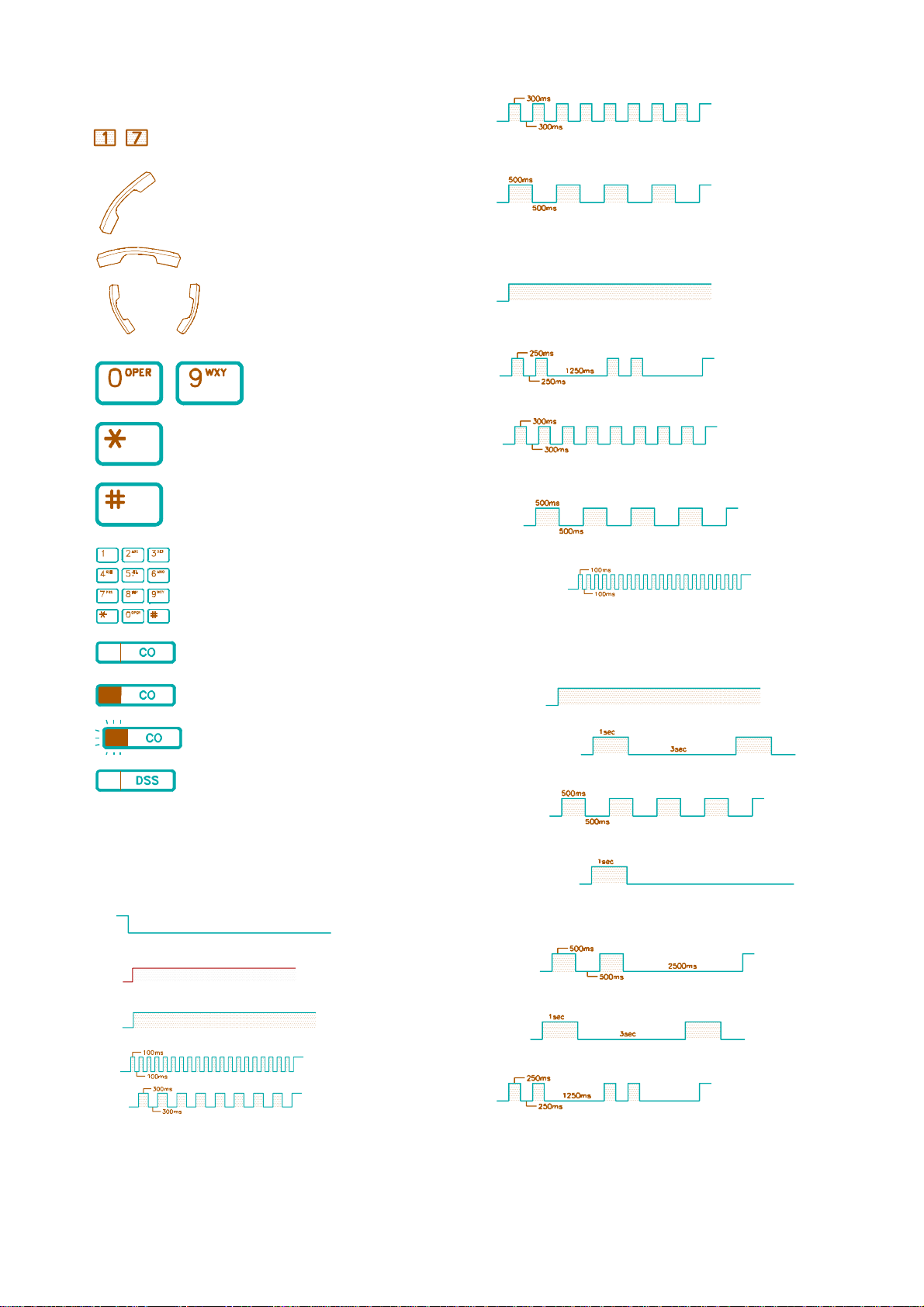
Icons Used
- Step one to seven.
66 then
Lift Handset ; Handset off hook.
(Fast Flashing) Red
Exclusive Hold
(Slow Flashing) Green
Hang up ; Handset on hook
<= In conversation ; make a call.
- Press Dial Key [0] - [9].
Press [*] key.
Press [#] key.
Dial numbers.
Press the CO key.
Press the busy CO key.
$ [PRG/VU] key
Volume Up
(Steady On)
Call Forward
(Double Flashing)
System Program
(Fast Flashing)
$ [DND/CN] key
DND (Slow Flashing)
Night Transfer (Fast Blinking)
Signaling
$ Tone
Dial Tone
Press the flashing or blinking CO key.
Press DSS key.
* function keys
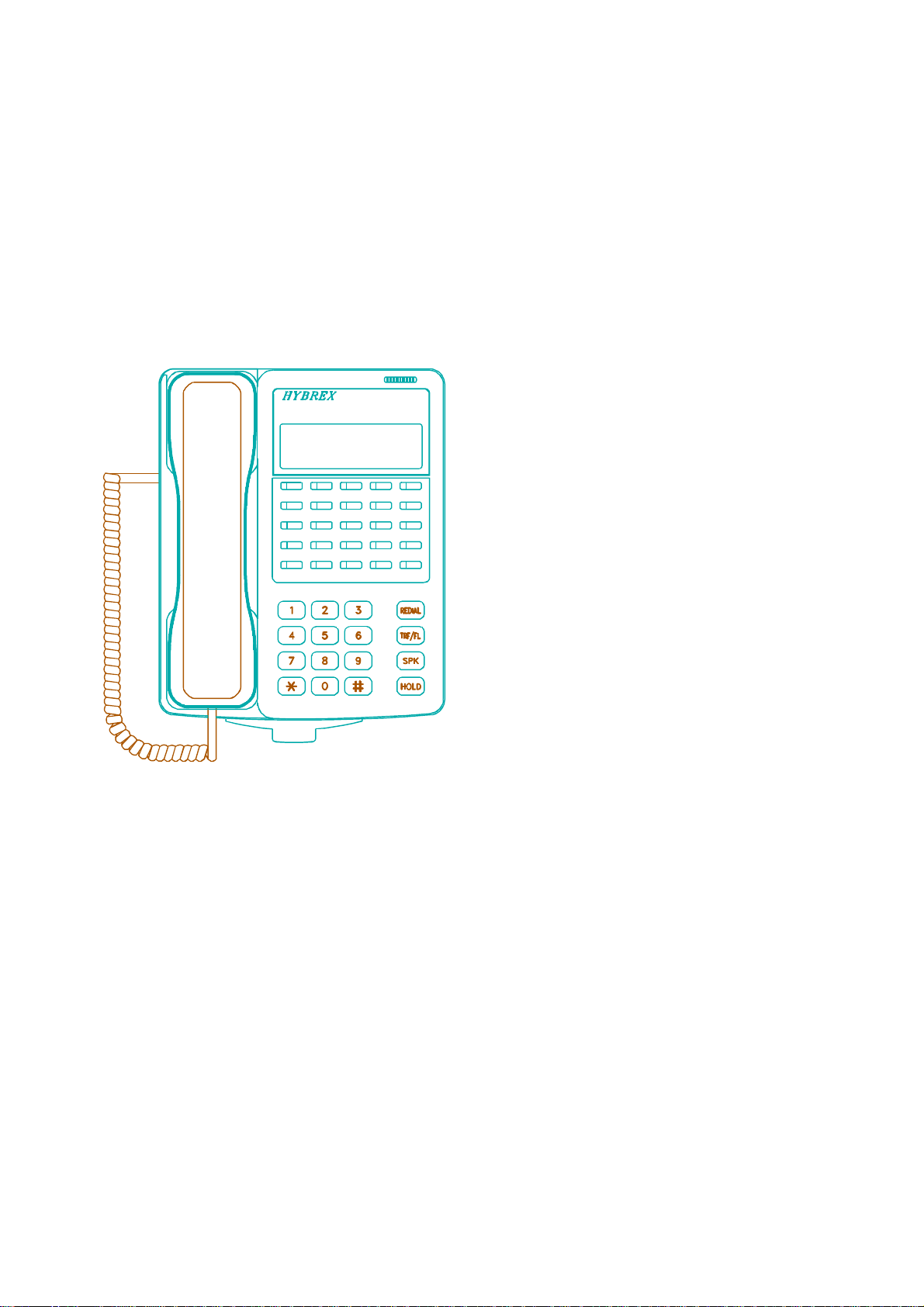
Please refer to Keyphone Layout.
LED Indication
$$ CO key (Trunk Line)
Idle (Off)
I-Use (Steady On )Green
Busy (Steady On) Red
Ring (Fast Blinking) Red
I-Hold (FastFlashing) Green
Ring Back tone
Busy Tone
Override Tone
$ Ring
Intercom
Trunk
Hold Recall
System Hold
Page 4

CONTENTS
A. MAKING CALLS ............................... 1
A.01 Inter Office Call (Intercom) ........................... 1
A.02 Automatic Line Access (Trunk Group Access) ........... 1
A.03 Individual Line Access .............................. 2
A.04 Flash (Open Loop Timed Flash) ....................... 2
A.05 Speed Dialling ..................................... 2
A.06 One Touch Dialling ................................. 2
A.07 Calling Doorphone ................................. 3
A.08 Dial Access To Attendant ............................ 3
G. STATION PROGRAMMING ................... 13
G.01 Call Forwarding .................................... 13
G.02 Toll Restriction Override (Forced Account Code) ......... 13
G.03 Volume Control .................................... 14
G.04 Store Speed Dial/One Touch Dial ..................... 14
G.05 Lock/Unlock Extension By Security Code ............... 15
G.06 Set Time-Reminding Service .......................... 15
G.07 Set Morning Call Time .............................. 16
G.08 Absent Message ................................... 16
B. WHEN LINE BUSY ............................. 3
B.01 Call Waiting / Message Waiting ....................... 4
B.02 Trunk Queuing .................................... 4
B.03 Automatic Redial ................................... 4
B.04 Last Number Redial ................................. 5
B.05 Barge-In to Extension .............................. 5
B.06 Barge-In to CO .................................... 5
C. RECEIVING CALLS ........................... 5
C.01 Answer ........................................... 5
C.02 Automatic Answer-Intercom .......................... 5
C.03 Call Pickup ....................................... 6
C.04 Doorphone ........................................ 6
D. DURING CONVERSATION .................... 7
D.01 Call On Hold ...................................... 7
D.02 Call On Exclusive Hold ............................. 7
D.03 Conference ........................................ 8
D.04 Call Transfer ...................................... 8
D.05 Answer Call Waiting / Message Waiting ................ 8
D.06 Call Splitting ...................................... 9
D.07 Mute Operation .................................... 9
D.08 Switching Between Using Handset And Handsfree ........ 9
D.09 Volume Control .................................... 9
G.09 Function Key Assignment ............................ 16
G.10 User Programming Help ............................. 17
G.11 Saved Number Redial ............................... 18
G.12 Account Code ..................................... 18
G.13 Do Not Disturb .................................... 18
G.14 Baby Listen ....................................... 19
G.15 Automatic Line Access by Lifting Handset - Keyphone .... 19
G.16 Changing Key Display using Shift key .................. 19
H. CONSOLE PROGRAMMING
H.01 Day / Night Switching ............................... 19
H.02 Automatic/Manual Day Night Switching ................ 20
H.03 Lock / Unlock SMDR (Call Accounting) Output .......... 20
E. PAGING ........................................ 10
E.01 Zone Paging (Internal) .............................. 10
E.02 All Paging (Internal) ............................... 10
E.03 Zone Paging (External only) ......................... 10
E.04 All Paging (External) ............................... 10
E.05 All Paging (Internal And External) .................... 10
E.06 Answer Paging (Meet Me Page) ...................... 10
F. OTHER FEATURES ........................... 11
F.01 Pulse to Tone Conversion ........................... 11
F.02 Handsfree ........................................ 11
F.03 Background Music ................................. 11
F.04 Reviewextension Data ............................... 11
F.05 Dual Voice Path (OHCA) ........................... 12
F.06 Voice Channel Recording ............................ 12
Page 5
A. MAKING CALLS
&&&&&&&&&&&&&&&&&&&&&&&&&&&&&&&&&&&&&
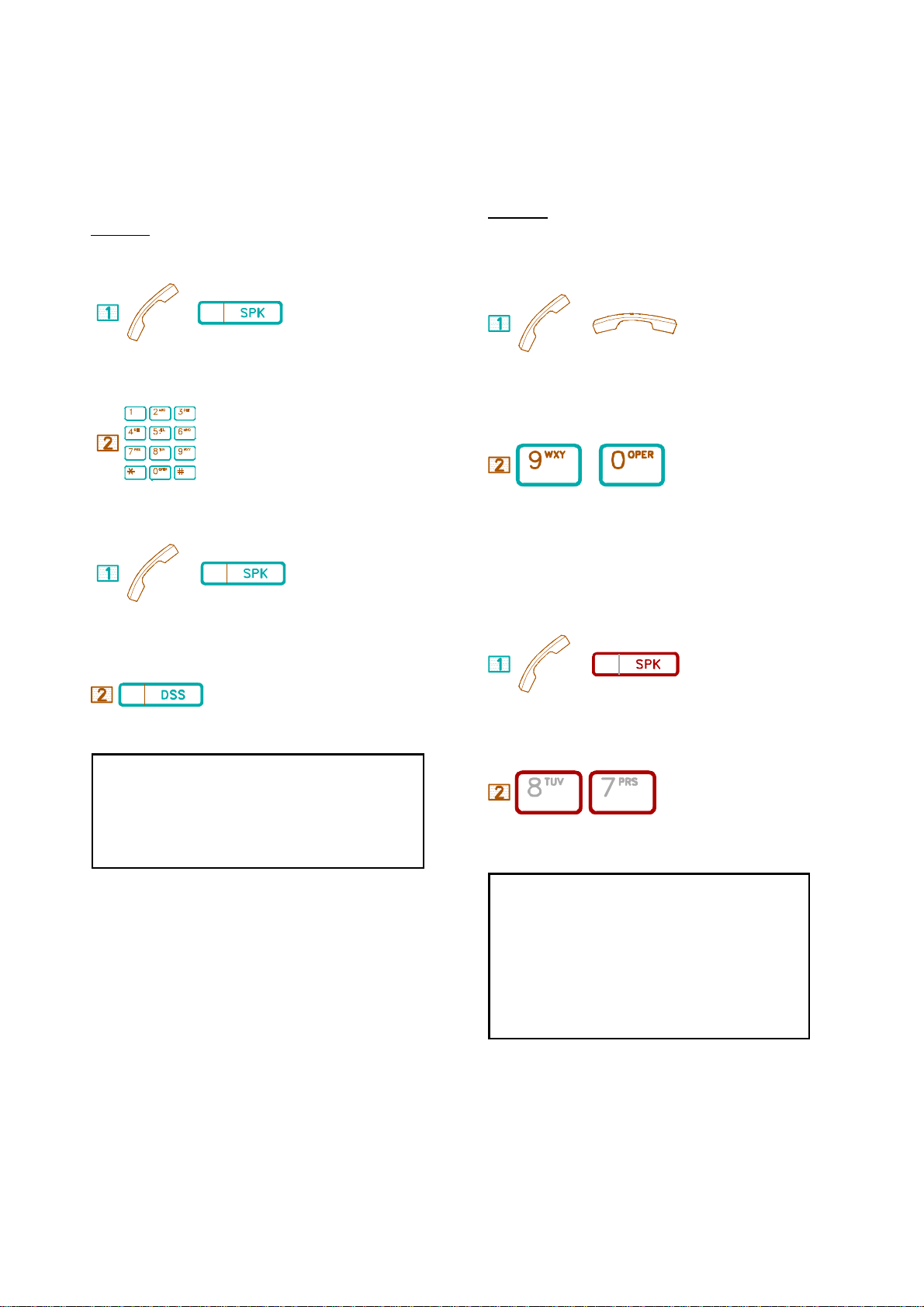
A.01 Inter Office Call (Intercom)
(((((((((((((((((((((((((((((((((((((
The Intercom is for an Extension to call another Extension of the same
system.
Description:
By Dial number:
&&&&&&&&&&&&&&&&&&&&&&&&&&&&&&&&&&&&&&&&&&&&&&
A.02 Automatic Line Access (Trunk Group Access)
((((((((((((((((((((((((((((((((((((((((((((((
The feature allows each Extension to automatically select an idle CO
Line. If CO lines are divided into trunk groups, an extension can only
select from its own group.
Description:
Dial 9/0 Trunk Group Access: (8 Groups)
/
. Lift Handset or press [SPK] key.
. Dial Extension number.
By DSS key:
/
. Lift Handset or press [SPK] key.
. Press a programmable DSS key.
/
. Handset off hook / on hook.
/
. Dial [9] or [0]. (programmable) * Dial tone from CO (Central Office)
is heard.
* The CO LED goes steady Green at your Extension and Red at other
Extensions.
Dial 87 Trunk Group Access: (8 Groups)
/
. Handset off hook / Press [SPK].
1. Extension number of the calling party will display on the LCD of the called
Extension.
2. For ringing the called Extension, you may change signalling from Ring Signal
to Voice Signal or Voice Alert to Ring Signal by pressing [3].
3. If the system is programmed for Voice Alert, after Alert Tone is heard, speak
to the called party through Speaker, and your voice will be heard from the
called Extension.
4. When the called Extension is busy (Busy Tone heard,) press another DSS
key for calling another Extension.
. Dial [8][7].
* Dial tone from CO (Central Office) is heard.
1. After key [9] or [0] or [8][7] is dialled, you will hear the following tones:
* Dial tone means a CO line is selected.
* Busy tone means all CO lines are busy.
2. Maximum Trunk Groups for each system:
+))))))))0)))))))))))))0)))))))))))))0)))))))),
* System * Max CO lines *Dial 9 Groups *Dial 87
/))))))))3)))))))))))))3)))))))))))))3))))))))
* BX-320 * 40 * 8 * 8
/))))))))3)))))))))))))3)))))))))))))3)))))))))1
* B1-408 * 4 * 8 * 8 *
/))))))))3)))))))))))))3)))))))))))))3))) ))))1
* BX-8 * 8 * 8 * 8
.))))))))2)))))))))))))2)))))))))))))2)))))))))-
1 KEYPHONE OPERATION
Page 6
&&&&&&&&&&&&&&&&&&&&&&&&&&&&&&&&&&&&&
A.03 Individual Line Access
(((((((((((((((((((((((((((((((((((((
&&&&&&&&&&&&&&&&&&&&&&&&&&&&&&&&&&&&&
A.05 Speed Dialling
(((((((((((((((((((((((((((((((((((((
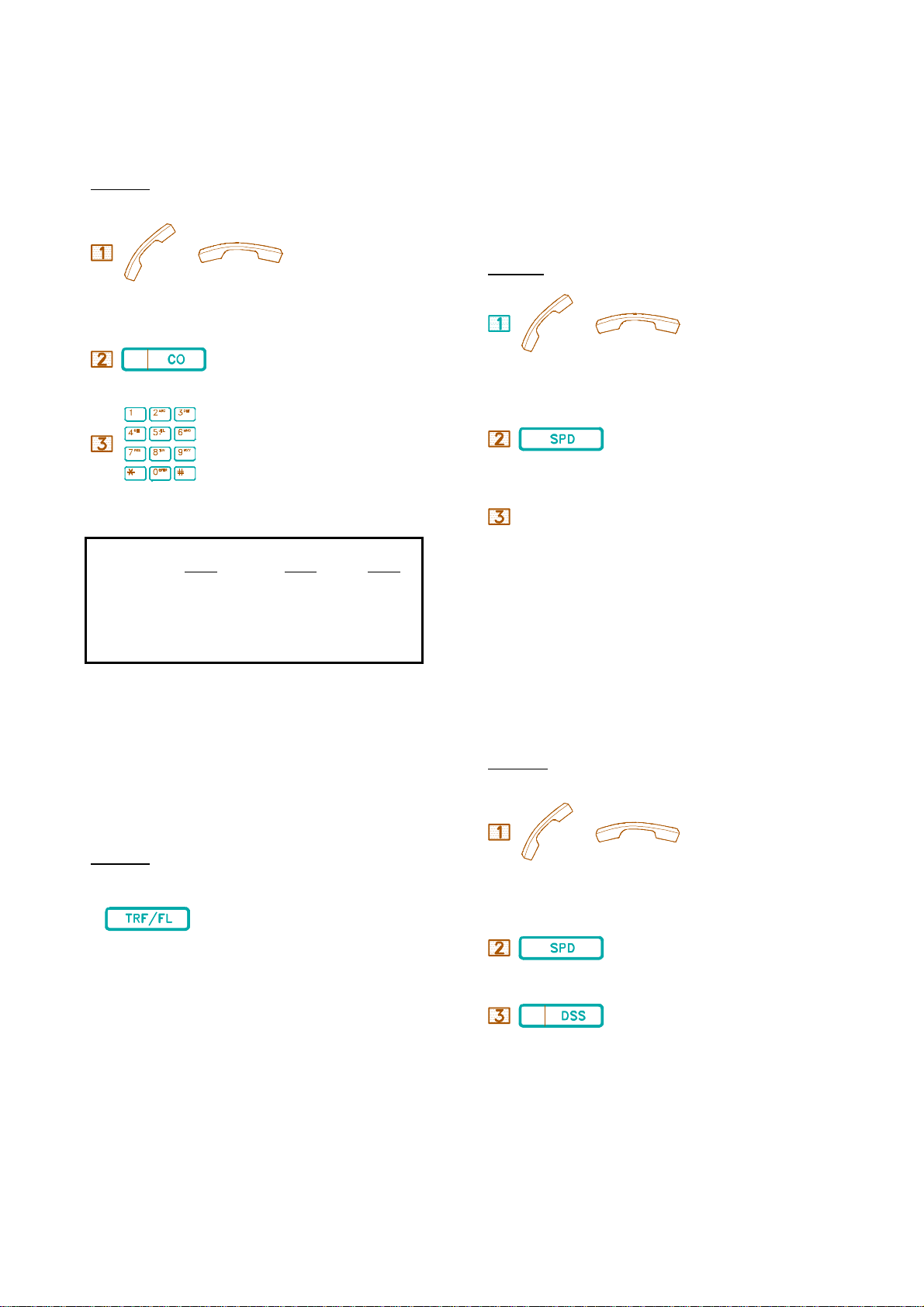
Any CO line can be directly selected.
Description:
/
. Handset off hook / on hook.
. Press a CO key.ard.
. Dial phone number.
1. In the BX systems, you can also dial Individual Line Access codes instead of
pressing a CO key. Code 801-840 for the BX-320, 801-804 for B1-408,.801-808 for
BX8
* Code 801 represents the first CO line, Code 802 the second, etc.
2. In the BX-320, when all CO keys light busy, dial [9] or [0] to automatically selec
another idle CO line beyond the CO lines displayed on CO keys.
3. The dialled telephone number will display on the LCD of the calling Extension.
4. A steadily lit red LED of a CO key means the CO key is busy to another station.
5. During conversation, if you press another CO key, the original conversation will be
disconnected and you will connect to another CO without hanging up.
By Dialling a programmed Speed Dial Access Code, The system will
automatically dial a telephone number assigned for the Code. There are
500 sets of System Speed Dials for the BX8 and B1-408 and 900 sets
System Speed Dial for the BX-320. For individual Speed Dials, 20 sets
are available for each station.
***** Refer to Program G.04 Station Programming.*****
Description:
/
. Handset off hook / on hook.
. Press [SPD] key.
+))))))),+))))))),
**S.A.C.** . Dial Speed Access Code
.)))))))-.)))))))-
* You may also press a CO key to select the Line before pressing the
[SPD] key.
&&&&&&&&&&&&&&&&&&&&&&&&&&&&&
A.06 One Touch Dialling
(((((((((((((((((((((((((((((
&&&&&&&&&&&&&&&&&&&&&&&&&&&&&&&&&&&&&&&
A.04 Flash (Timed Open Loop Break)
(((((((((((((((((((((((((((((((((((((((
The Flash Key provides a temporary loop disconnection from a used CO
line. This allows a user to end a conversation and regain dial tone at the
same trunk. Flash duration is pre-programmed, and can offer special
functions if the Central Office or PABX Lines offer it.
Description:
. Press [TRF/FL] key to end an outside call or access special features.
* Dial tone is heard.
For One Touch Dialling, press SPD and a programmed DSS key, the
Extension selects an idle CO line, and the stored phone number will be
dialled.
Description:
/
. Handset off hook / on hook.
. Press [SPD] key.
. Press a programmed DSS key.
44 BX8,B1-408, 320
10 sets One Touch Dialling, DSS 1-10.
KEYPHONE OPERATION 2
Page 7
&&&&&&&&&&&&&&&&&&&&&&&&&&&&&&&&&&&&&
A.07 Calling Doorphone
(((((((((((((((((((((((((((((((((((((
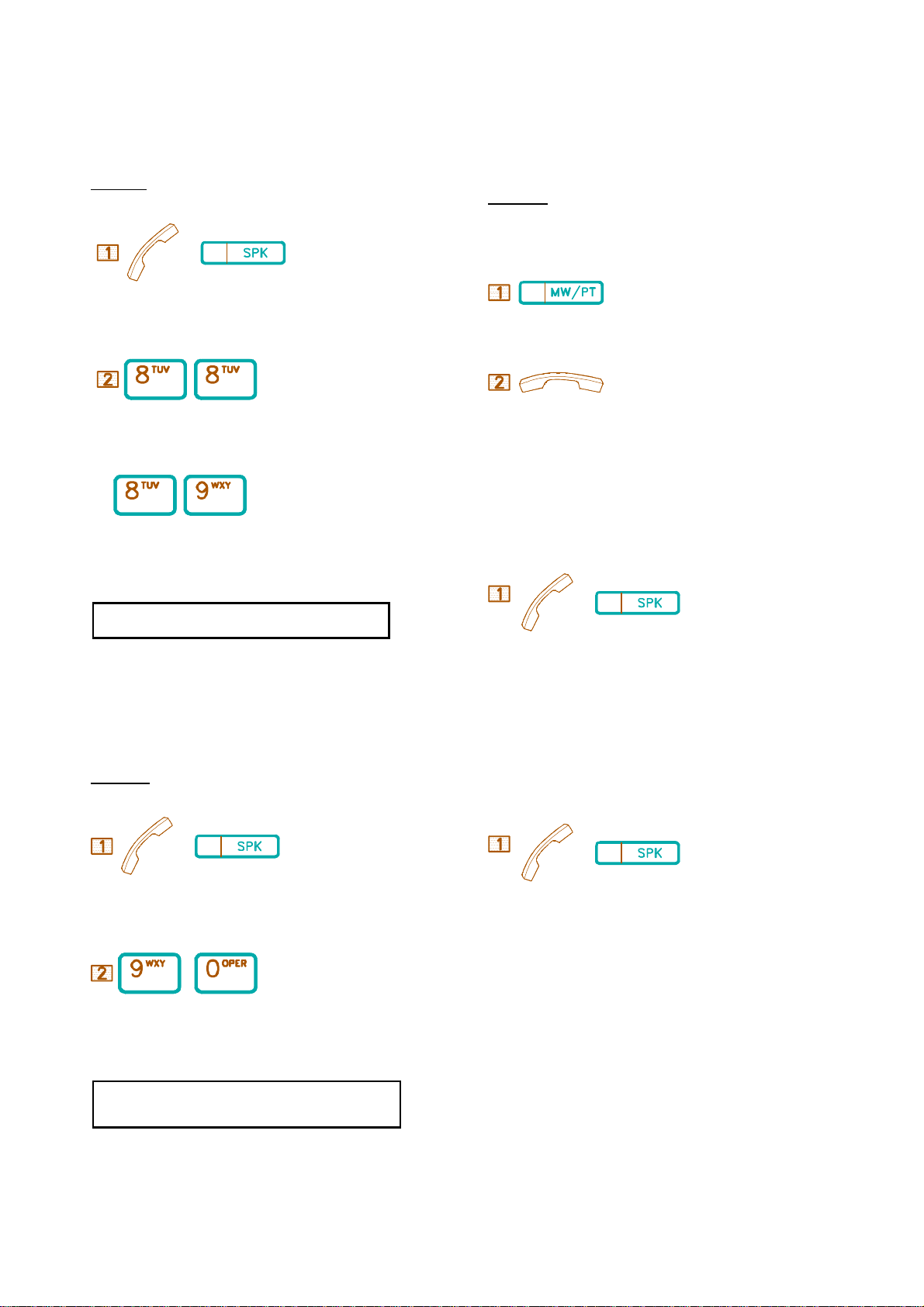
This is for an Extension to call a Doorphone.
Description:
/
. Lift Handset / press [SPK] key.
B.01 Call Waiting /Message Waiting
(((((((((((((((((((((((((((((((((((((((
If the Extension you're calling is busy or does not answer, this feature
allows you to "mark" the station so that when the called Extension
becomes free, the called Extension will ring back your Extension.
Description:
When Busy Tone heard or no one answers your call:
. Press [MW/PT] key.
, /
. Dial 88 to speak to Doorphone 1 or
,
. Dial 89 to speak to Doorphone 2. Except B1
Function keys such as HOLD, TRANSFER can not be activated by
the Doorphone.
&&&&&&&&&&&&&&&&&&&&&&&&&&&&&&&&&&&&&
A.08 Dial Access To Attendant
(((((((((((((((((((((((((((((((((((((
This is for an Extension user to reach the Attendant by Dialling a
programmed one-digit code. (usually 0)
Description:
. Hang up (if Handset off hook) and wait for recall.
* When the called Extension is free, a Call Waiting Ring will be heard
at the Extension which left the Message.
When Call Waiting Ring is heard:
/
. Lift Handset or press [SPK] key, the called Extension will ring.
OR
When user returns to their phone and answers the Message waiting left
on the phone, your phone will ring
/
. Lift Handset or press [SPK] key.
/
. Lift Handset or press [SPK] key to talk to other party,
/
. Dial [9] or [0]. (programmable)
When digit [9] is programmed for Automatic Line Access, digit [0] is for
Dial Access To the Attendant. When digit [0] is programmed for
Automatic Line Access, digit [9] is for Dial Access to the Attendant.
B. WHEN LINE BUSY
&&&&&&&&&&&&&&&&&&&&&&&&&&&&&&&&&&&&&&&
3 KEYPHONE OPERATION
Page 8
&&&&&&&&&&&&&&&&&&&&&&&&&&&&&&&&&&&&
B.02 Trunk Queuing
((((((((((((((((((((((((((((((((((((
&&&&&&&&&&&&&&&&&&&&&&&&&&&&&&&&&&&&
B.04 Automatic Redial
((((((((((((((((((((((((((((((((((((
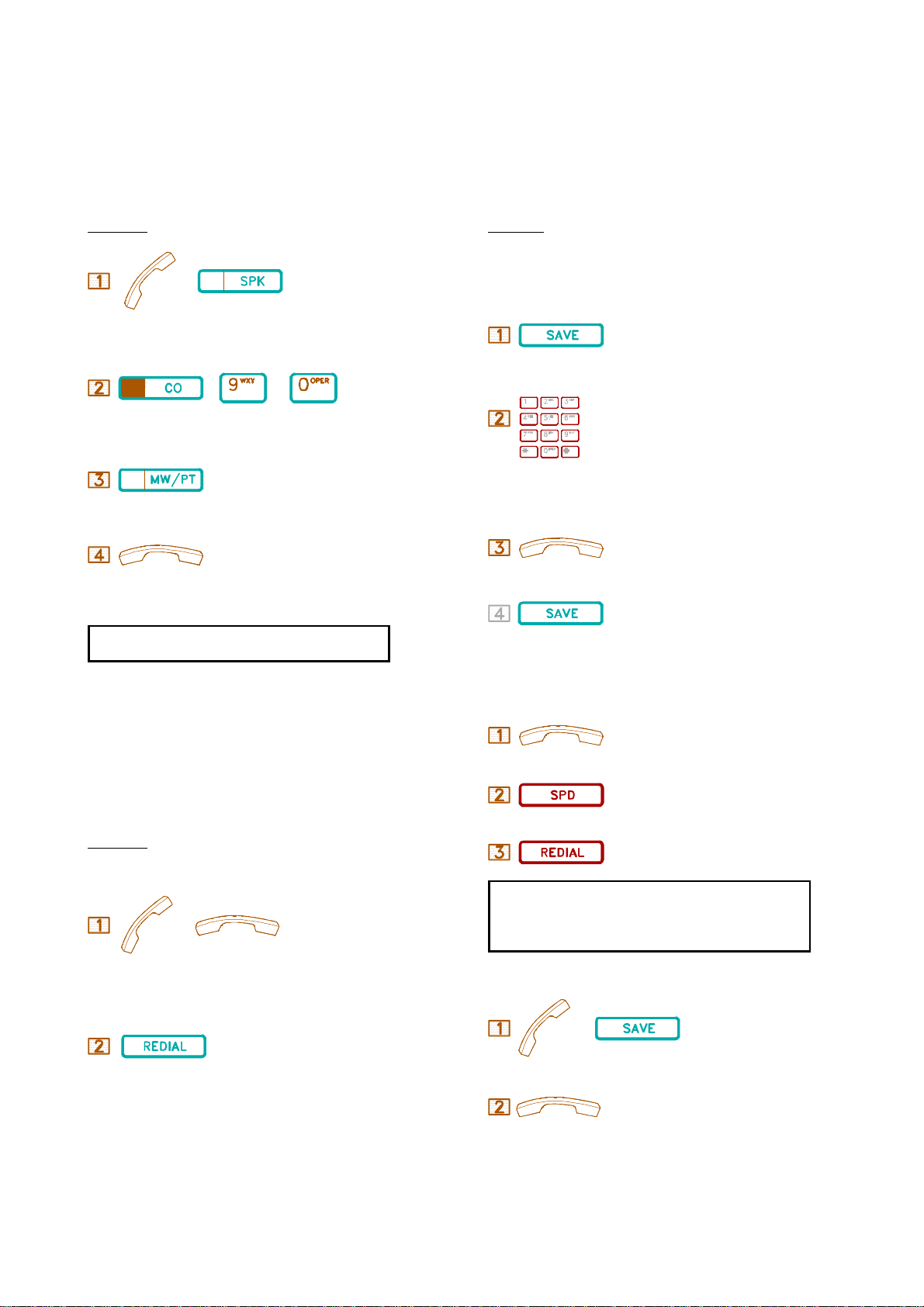
Trunk Queuing is for an Extension to queue (wait in line) for a busy
trunk. When the busy trunk is free, it will automatically signal the first
free Extension in the Queue.
Description:
/
. Lift Handset or press [SPK] key.
( / )
. Select a CO line.
. Press [MW/PT] key.
. Hang up (if Handset off hook) and wait for recall.
If you dial an outside number and find it busy, by using this feature, the
numbers will be automatically redialed at intervals of at least 10 seconds.
The value for the interval can be programmed from 10 to 90 seconds.
Description:
Automatic Save Number Redial
Busy Tone heard when making an outside call:
. Press [SAVE] key.
* "Auto Save" will display in LCD.
. Press new Telphone number. (If you skip this step, the last dialed
number will be stored.)
. Hang up.
. Press [SAVE] key again for Redial.
NOTE: After receiving a recall, lift the Handset or press [SPK] key. A
Dial tone will be heard.You can then dial the telephone number.
&&&&&&&&&&&&&&&&&&&&&&&&&&&&&&&&&&&&
B.03 Last Number Redial
((((((((((((((((((((((((((((((((((((
The feature automatically stores the last dialed outside telephone number
for you to redial. The number is stored whether the call is answered, not
answered or busy.
Description:
/
. Handset off hook / on hook.
. Press [REDIAL] key.
Automatic Last Number Redial
Busy Tone heard when making an outside call:
. Hang Up.
. Press [SPD].
. Press [REDAIL].
1. The LCD will show you the dialed number.
2. LED of [SPK] key lights steady when the Extension redials
automatically. After redialing, the LED of [PRG/VU]
blinks, reminding you that Auto Number Redial is activated.
To Cancel Automatic Save Number Redial
6
. Lift Handset and press [SAVE]
* When the [REDIAL] key is pressed, the Extension will automatically
select a CO line for dialing the last stored number.
. Hang up to cancel.
KEYPHONE OPERATION 4
Page 9
&&&&&&&&&&&&&&&&&&&&&&&&&&&&&&&&&&&&&&
B.05 Barge-In To Extensions
((((((((((((((((((((((((((((((((((((((
&&&&&&&&&&&&&&&&&&&&&&&&&
C.01 Answer
(((((((((((((((((((((((((
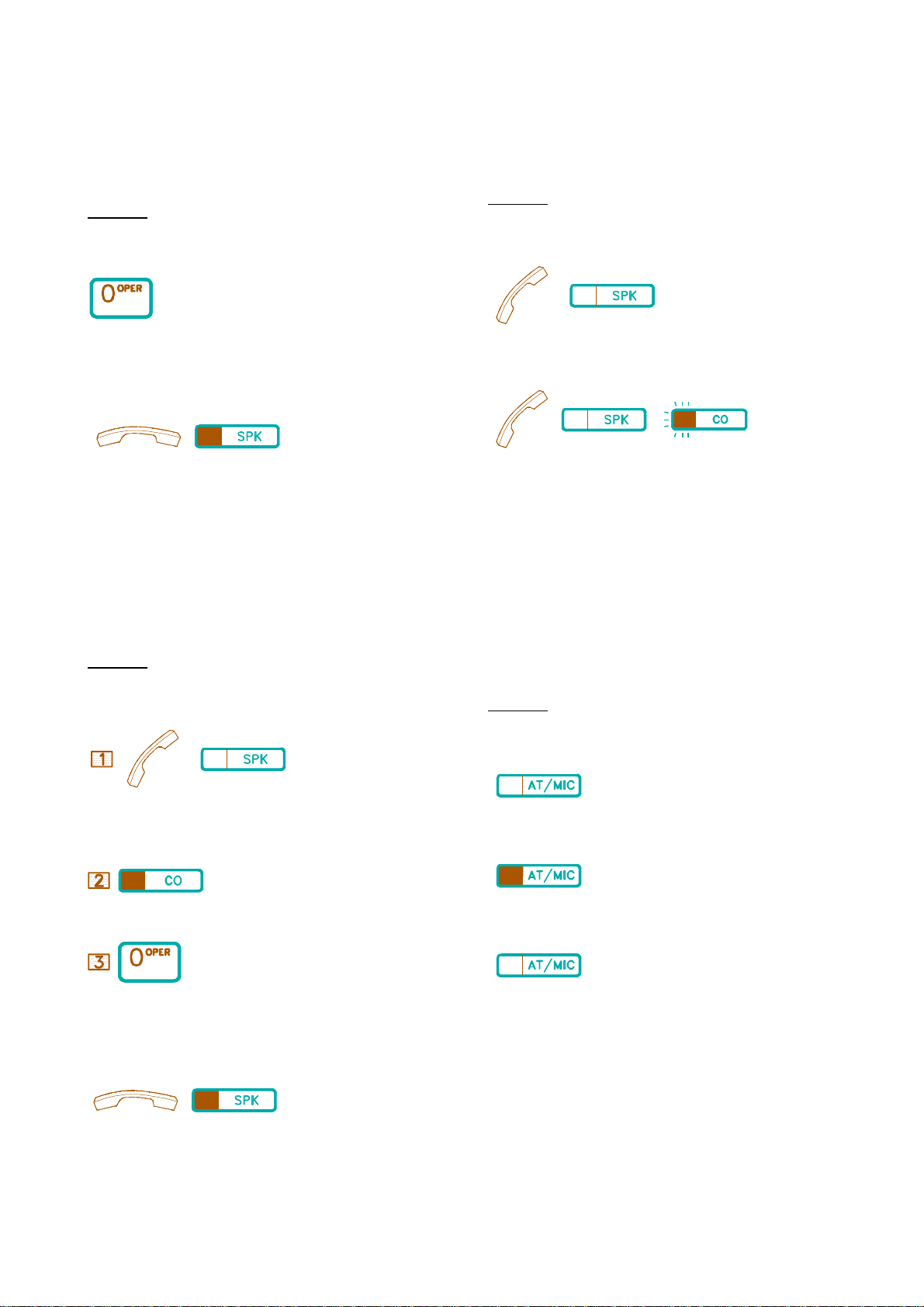
This feature is for an Extension to override another busy or DND
Extension. The station needs to be programmed to allow this function.
Description:
To override
. Dial [0], a short tone will signal the barged Extension. A 3-party
conference is made.
To cancel:
/
. Hang up or press the [SPK] key (if Handsfree).
&&&&&&&&&&&&&&&&&&&&&&&&&&&&&&&&&&&&&&&&
B.06 Barge-In To CO
((((((((((((((((((((((((((((((((((((((((
This feature is for an Extension to join another Extension in conversation
on a CO line. The calling Extension needs to be allowed this feature in
programming.
Description:
To Barge in:
To answer a call.
Description:
To answer an Intercom call:
/ . Lift Handset or press [SPK] key.
To answer an outside call:
/ / .
Lift Handset or use Handsfree by pressing [SPK] or the blinking CO key.
&&&&&&&&&&&&&&&&&&&&&&&&&&&&&&&&&
C.02 Automatic Answer-Intercom
(((((((((((((((((((((((((((((((((
Assigned in advance, this feature allows an Extension to automatically
answer an intercom call in the Handsfree mode. (The feature can only be
applied to Extensions with a Microphone.) Individual extensions can also
be set in system programming to automatically switch on the [MIC] key
when an intercom call is received.
Description:
/
. Lift Handset or press [SPK] key.
. Press the busy CO key.
. Dial , a short tone will be heard at the barged Extension. A 3-party
To cancel:
. Hang up/press [SPK] key. (if Handsfree)
C. RECEIVING CALLS
To assign / to cancel:
. Press [AT/MIC] to assign and to cancel.
* LED Indication:
.When Extension is in Automatic Answer Mode, LED is on.
.When the Extension is back in normal mode, LED is off.
5 KEYPHONE OPERATION
Page 10
&&&&&&&&&&&&&&&&&&&&&&&&&&
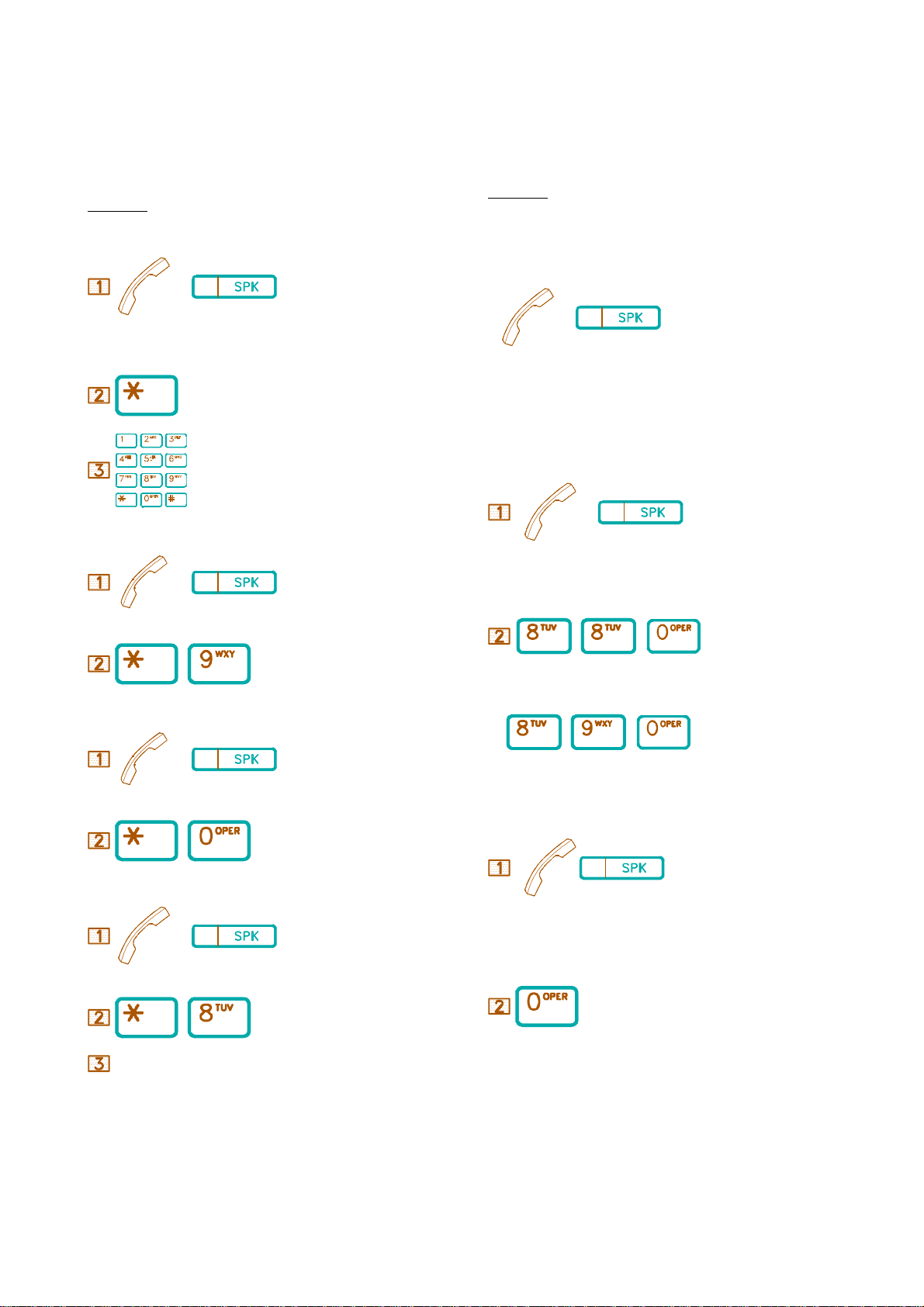
C.03 Call Pickup
((((((((((((((((((((((((((
&&&&&&&&&&&&&&&&&&&&&&&&&&&&&&&&&&&&&&&
C.04 Doorphone (Optional)
(((((((((((((((((((((((((((((((((((((((
The feature is for an Extension to answer for another ringing Extension.
(grouped by programming or not grouped.)
Description:
Direct Call Pickup
/
. Lift Handset or press [SPK] key.
. Press [*] key.
. Dial the ringing Extension number.
Pickup All Groups
/
The feature is for an Extension to answer a Doorphone call.
Description:
To answer a Doorphone call:
* Doorphone Ring is heard through Extension Speaker.
/
.Lift Handset or press [SPK] key.
An Extension has to be programmed to receive Doorphone calls.
To unlock the door from an Extension:
/
.Lift Handset or press [SPK] key.
.Lift Handset or press [SPK] key.
66 . Press [*] then [9] key.
Pickup same Group
/
.Lift Handset or press [SPK] key.
66 . Press [*] then [0] key.
Pickup Groups
/
.Lift Handset or press [SPK] key.
66 . Press [*] then [8] key.
Group Number (1-8)
, 6
.Dial [8][8],[0] for Doorphone 1 or
/ , 6
[8][9],[0] for Doorphone 2.
Or
/
.Answer the Doorphone ringing by Lifting the Handset or pressing the
[SPK] key.
. Dial [0] to open the door.
.Dial a programmed Group number: 1-8 for Extensions in Groups 1-8.
D. DURING CONVERSATION
&&&&&&&&&&&&&&&&&&&&&&&&&&&&&&&&&&&&&&&
D.01 Call On Hold
(((((((((((((((((((((((((((((((((((((((
KEYPHONE OPERATION 6
Page 11
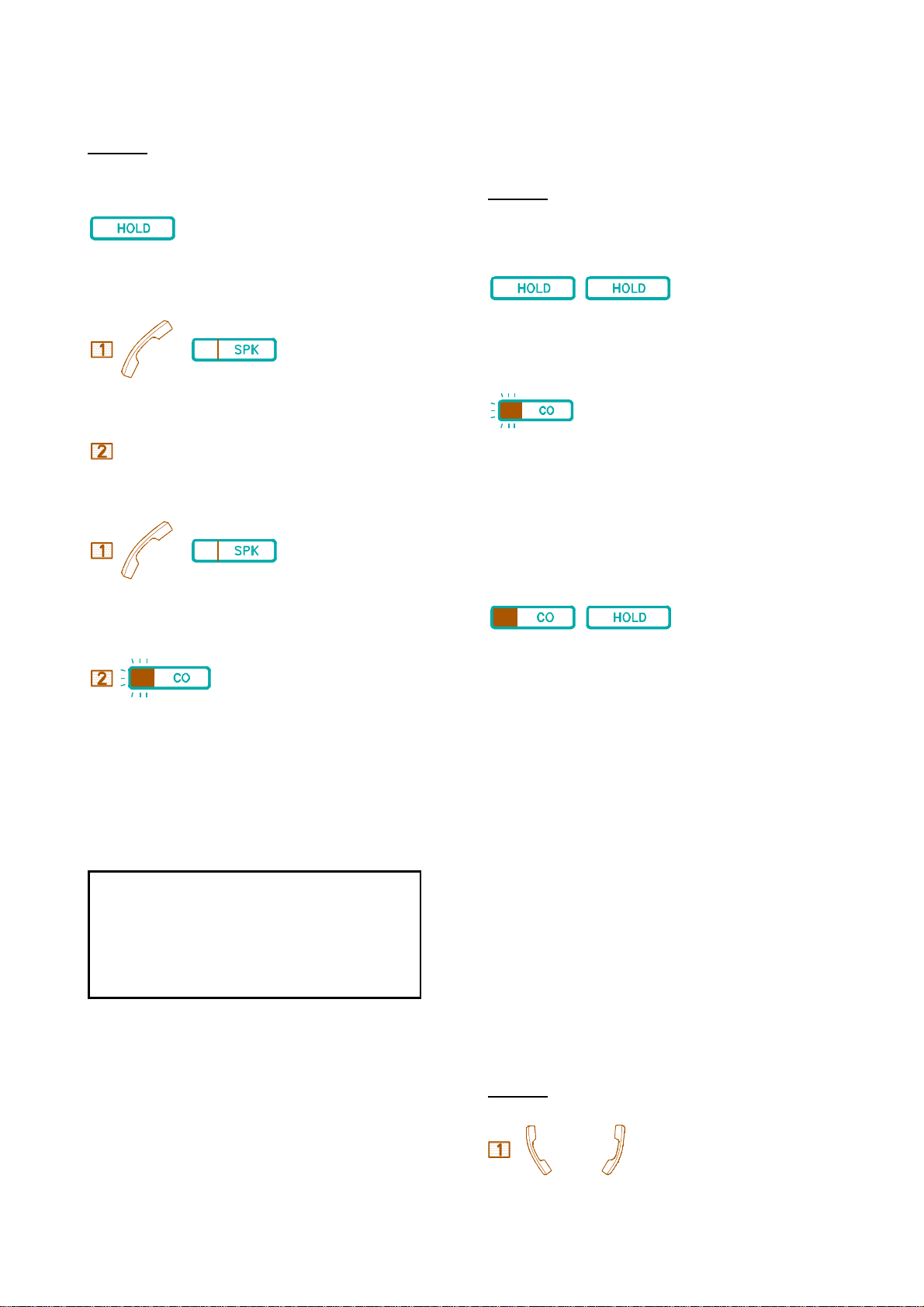
This is for holding an outside or intercom call. Calls on normal hold can
be retrieved by any Extension.
Description:
To place a call on hold:
&&&&&&&&&&&&&&&&&&&&&&&&&&&&&&&&&&&&&&
D.02 Call On Exclusive Hold
(((((((((((((((((((((((((((((((((((((((
This is for an Extension to hold an outside call which can be retrieved
only by the holding Extension.
Description:
. Press [HOLD] key.
To retrieve a held internal call from any Extension
/
. Lift Handset or press [SPK] key.
Held Ext No. . Dial the held Extension number.
To retrieve an external call from any Extension:
/
. Lift Handset or press [SPK] key.
/ CODE .
To place an external call on Exclusive Hold:
66
. Press the [HOLD] key twice.
To retrieve by the holding Extension:
/ CODE
.Press the flashing CO key or Line Access Code:
801-808 for the BX-32
801-824 for the BX-96
801-840 for the BX-320.
To retrieve by another Extension:
6
.At other Extensions, the CO LED goes steady.
Press the CO key, Busy Tone will be heard, then press [HOLD].
Press the flashing CO key or Line
Access Codes :
801-804 for B1-408;
801-808 for BX8;
801-840 for BX-320.
The holding Extension will be recalled if it fails to retrieve the
call after a programmed duration (30 to 270 seconds).
2. The "Hold Recall" will ring the holding Extension. If the
call is still not retrieved, the "Hold Recall" will continue to ring
both the holding Extension and the Attendant Console. The
Recall will not stop until it is answered.
3. If there are several calls held at the same time, unless the first
hold recall is answered.
&&&&&&&&&&&&&&&&&&&&&&&&&&&&&&&&&&&&&&&
D.03 Conference
(((((((((((((((((((((((((((((((((((((((
An Extension user can set up a Conference with two other parties. (Either
internal or external.)
NOTE: The "Hold Recall" feature is the same as D.01,.
Description:
Conference with two external parties:
<=A
7 KEYPHONE OPERATION
Page 12
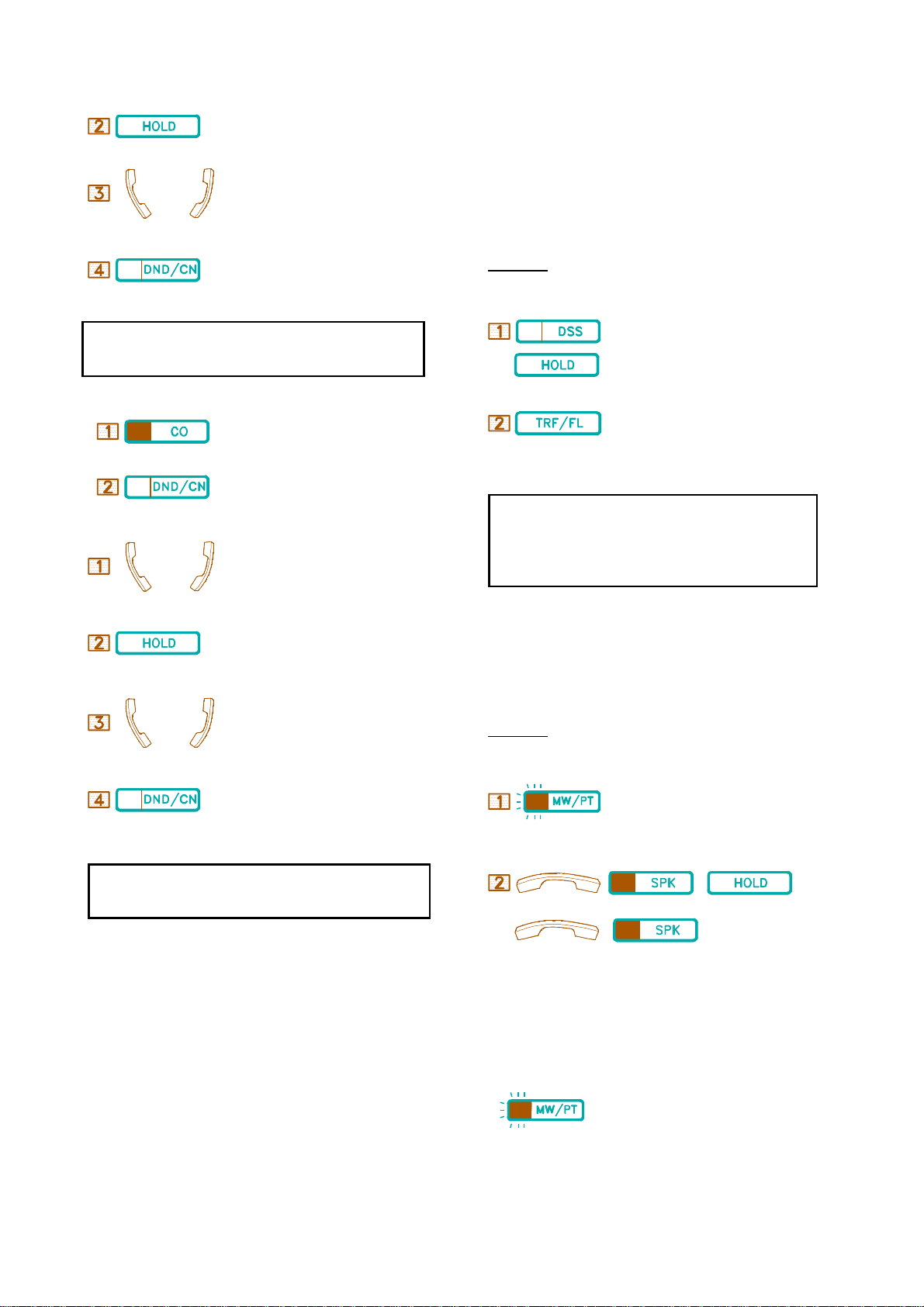
. In conversation with the 1st. external party.
.Press [HOLD] key to hold the 1st party.
<=B
.Make the second external call. (Select a CO line.)
&&&&&&&&&&&&&&&&&&&&&&&&&&&&&&&&&&&&&&
D.04 Call Transfer
(((((((((((((((((((((((((((((((((((((((
Call Transfer is to send a call from one Extension to another. There are
three types of Transfer: Direct, Indirect, and voice-announced. For
Direct Transfer, the sending Extension transfers the call and hangs up; for
Indirect Transfer, the sending Extension rings a selected Extension and
waits until the call is answered, then transfer the call; for voiceannounced, the sending Extension informs the selected Extension through
Speaker by the paging function.
.Press [DND/CN] when the 2nd party answers, all three
parties are connected.
When you hang up, the other two parties can not converse with each other unless
you press [DND/CN] key again before hanging up. The other two parties can then
have three minutes for conversation, and either of them can dial a digit (0-9)-DTMF signal--for three more minutes.
To re-enter the conversation between two external parties:
.Press either CO key of the two CO lines, A Busy tone is heard.
. Press [DND/CN] key.
Conference with 1 internal party and 1 external party:
<=A
. In conversation with an internal/external call.
. Press [HOLD] key to hold the call.
<=B
Description:
Transfer an external call:
/ . Press a programmed DSS key or
6EXT.No.
press [HOLD] then dial the selected Ext. number.
. Press [TRF/FL] key directly for Direct Transfer; press [TRF/FL]
after the selected Ext. answers for Indirect Transfer.
1. When a programmed DSS key is pressed, the call automatically goes on
hold and dials the Extension number programmed for the DSS key.
2. Transfer Recall: If the selected Extension is busy, the transferred call will
ring when the Extension is free. If the transferred call is not answered after a
programmed duration, the call will ring back the sending Extension.
3. To transfer the call again or to another party, press the blinking CO key to
retrieve the call and repeat the Call Transfer procedure.
&&&&&&&&&&&&&&&&&&&&&&&&&&&&&&&&&&&&&&&
D.05 Answer Call Waiting
(((((((((((((((((((((((((((((((((((((((
As described in B.01 Call Waiting, if you are absent or your Extension
is busy when other Extension uses the Call Waiting feature to wait for
your answer, the LED of your [MW/PT] key flashes slowly.
Description:
. Make another internal/external call.
. Press [DND/CN] when the 2nd party answers, all three parties are
connected.
1. To return to the first call if the second call is not answered, press the blinking
CO key (external call) or dial the called Ext. No. (intercom) to retrieve held party.
2. When connecting 1 external party and 1 internal party, after one of the three
parties has hung up, the other two parties can still converse with each other.
Your Extension busy: end/hold the previous call:
.The LED of the [MW/WT] key flashes, informing you someone is
waiting.
/ ; 66
/
. Terminate the previous call by hanging up/press [SPK] or hold the
previous call and then hang up to wait. The waiting Extension will receive
a Call Waiting Ring when you finish the previous call. Once the waiting
caller answers the Ring, your telephone then rings. If the Handset of the
waiting Extension is off hook, or its Speaker is on, your Extension will
ring after you hang up.
Your Extension is idle when someone leaves a Message
.Press the flashing [MW/PT] key to ring the waiting Extension.
KEYPHONE OPERATION 8
Page 13
&&&&&&&&&&&&&&&&&&&&&&&&&&&&&&&&&&&&&&
D.06 Call Splitting
(((((((((((((((((((((((((((((((((((((((
&&&&&&&&&&&&&&&&&&&&&&&&&&&&&&&&&&&&&&&
D.08 Switching Between Using Handset And Handsfree
((((((((((((((((((((((((((((((((((((((((
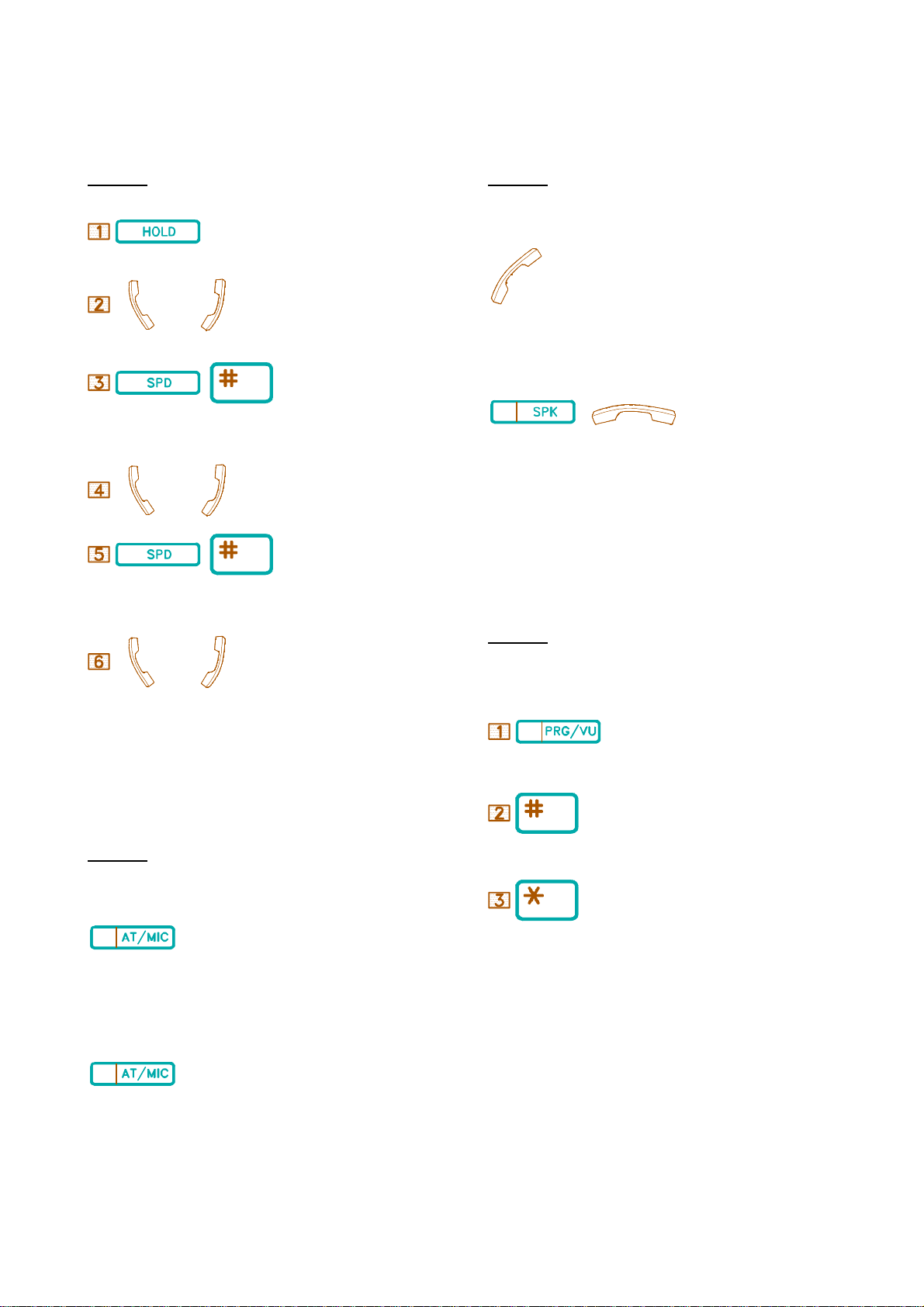
This is for an Extension user to switch between two parties alternatively.
Description:
:A .Press [HOLD] key to hold A party.
<= B .Make another call B.
66
. Press [SPD] then [#] key to retrieve A party and hold B party.
<= A .In conversation with A.
66
. Press [SPD] then [#] key to retrieve B party and hold A party.
You may choose to use Handset or Handsfree alternatively.
Description:
From Handsfree to Using Handset:
. Lift Handset.
From Using Handset to Handsfree:
66
. Press [SPK] key, place handset back on hook.
&&&&&&&&&&&&&&&&&&&&&&&&&&&&&&&&&&&&&&&
D.09 Volume Control
(((((((((((((((((((((((((((((((((((((((
During a conversation, you may Increase or Decrease volume by this
function. There are eight volume levels to chose from.
<= B .In conversation with B party.
&&&&&&&&&&&&&&&&&&&&&&&&&&&&&&&&&&&&&&&
D.07 Mute Operation
(((((((((((((((((((((((((((((((((((((((
When you do not want your voice to be heard by the party in conversation
with you, use this feature.
Description:
To place in Mute:
.Press [AT/MIC] key.
* LED goes steady when off hook / goes off when on hook.
To resume the conversation:
. Press [AT/MIC] key again.
Description:
During Conversation Adjustment:
. Press [PRG/VU] key.
. Press [#] key for voice up.
. Press [*] key for voice down.
* LED goes off when off hook / goes on when on hook.
E. PAGING
&&&&&&&&&&&&&&&&&&&&&&&&&&&&&&&&&&&&&&&
9 KEYPHONE OPERATION
E.01 Zone Paging (Internal)
(((((((((((((((((((((((((((((((((((((((
Page 14
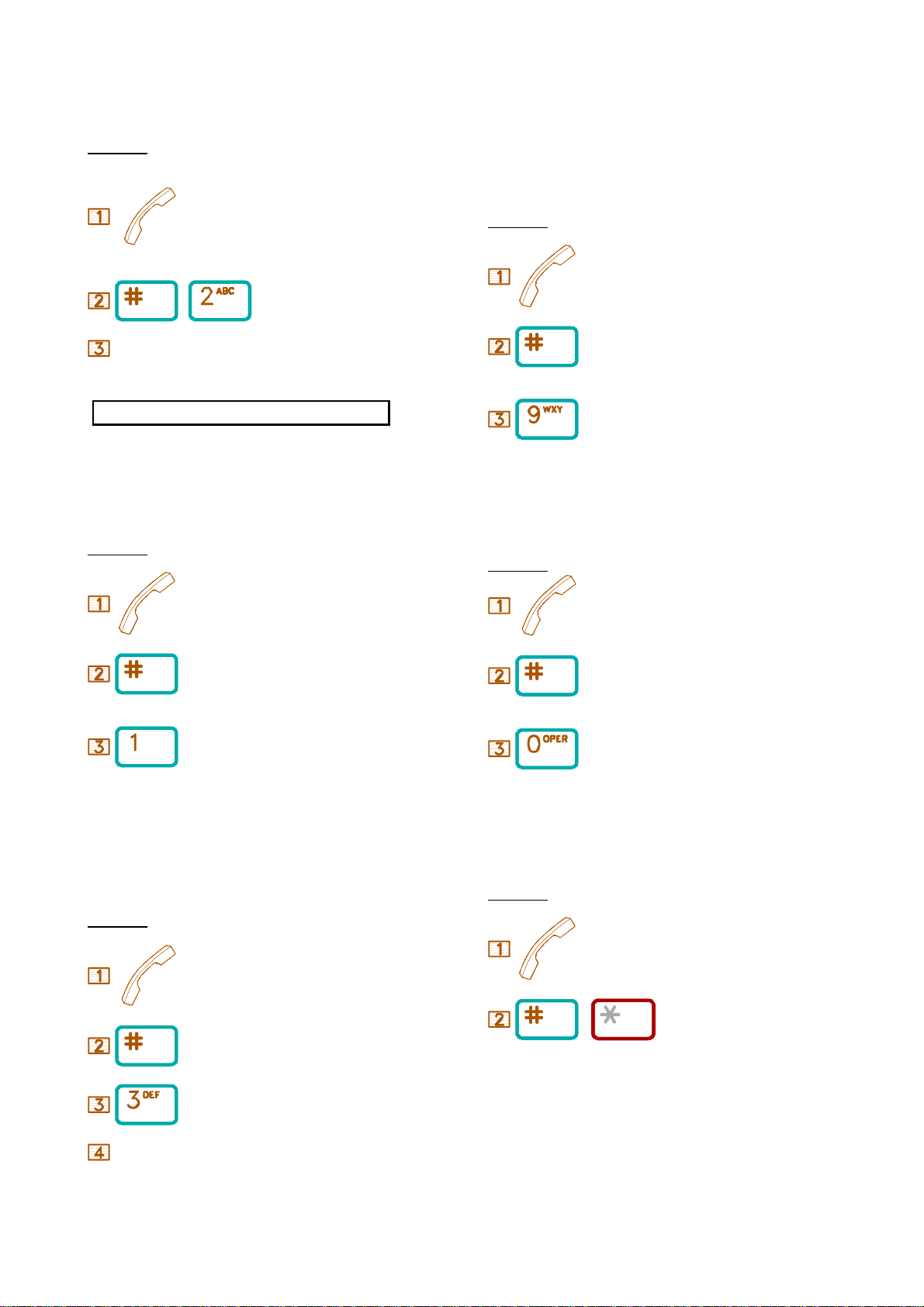
This feature allows an Extension to announce to a zone of Extensions
through Speaker on the telephone. There are eight Paging Zones in the
system. The paging can be received from Extension only.
Description:
. Lift Handset.
6 . Press [#] then [2].
. Dial a one-digit External Paging Code(1-8).
&&&&&&&&&&&&&&&&&&&&&&&&&&&&&&
E.04 All Paging (External)
((((((((((((((((((((((((((((((
Paging can be broadcast over external paging equipment to all external
zones.
Description:
. Lift Handset.
Code(1-8) . Dial a one-digit Paging Zone Code.
4 Page Zone codes range from 1 to 8.
A busy Extension can not receive the paging.
&&&&&&&&&&&&&&&&&&&&&&&&&&&&&&&&&&&&&&&
E.02 All Paging (Internal)
(((((((((((((((((((((((((((((((((((((((
The feature is for Paging all Zones. The paging can be received from
Keyphones only.
Description:
. Lift Handset.
. Press [#].
. Dial a one-digit All Paging Code.
4 All Paging code is 1.
&&&&&&&&&&&&&&&&&&&&&&&&&&&&&&&&&&&&&&&
E.03 Zone Paging (External)
(((((((((((((((((((((((((((((((((((((((
In the BX system, Paging can be broadcast over external paging equipment
to one of the eight (maximum, depending on the system) External Zones.
. Press [#].
. Dial All External Paging Code [9].
&&&&&&&&&&&&&&&&&&&&&&&&&&&&&&&&&&&&&&&&&&&
E.05 All Paging (Internal And External)
(((((((((((((((((((((((((((((((((((((((((((
The feature allows an Extension to announce to all Internal and External
Paging Zones.
Description:
. Lift Handset.
. Press [#].
. Dial All Paging Code [0].
&&&&&&&&&&&&&&&&&&&&&&&&&&&&&&&&&
E.06 Answer Paging (Meet Me Page)
(((((((((((((((((((((((((((((((((
Paging through Speaker or external paging equipment can be answered
through any Extension before the paging party hangs up.
Description:
Description:
. Lift Handset.
. Lift Handset.
6 . Press [#] then [*].
. Press [#].
F. OTHER FEATURES
. Press [3].
&&&&&&&&&&&&&&&&&&&&&&&&&&&&&&&&
F.01 Pulse to Tone Conversion
((((((((((((((((((((((((((((((((
Paging Code 1-8
The feature is used for changing Pulse Mode to Tone Mode when DTMF
KEYPHONE OPERATION 10
Page 15
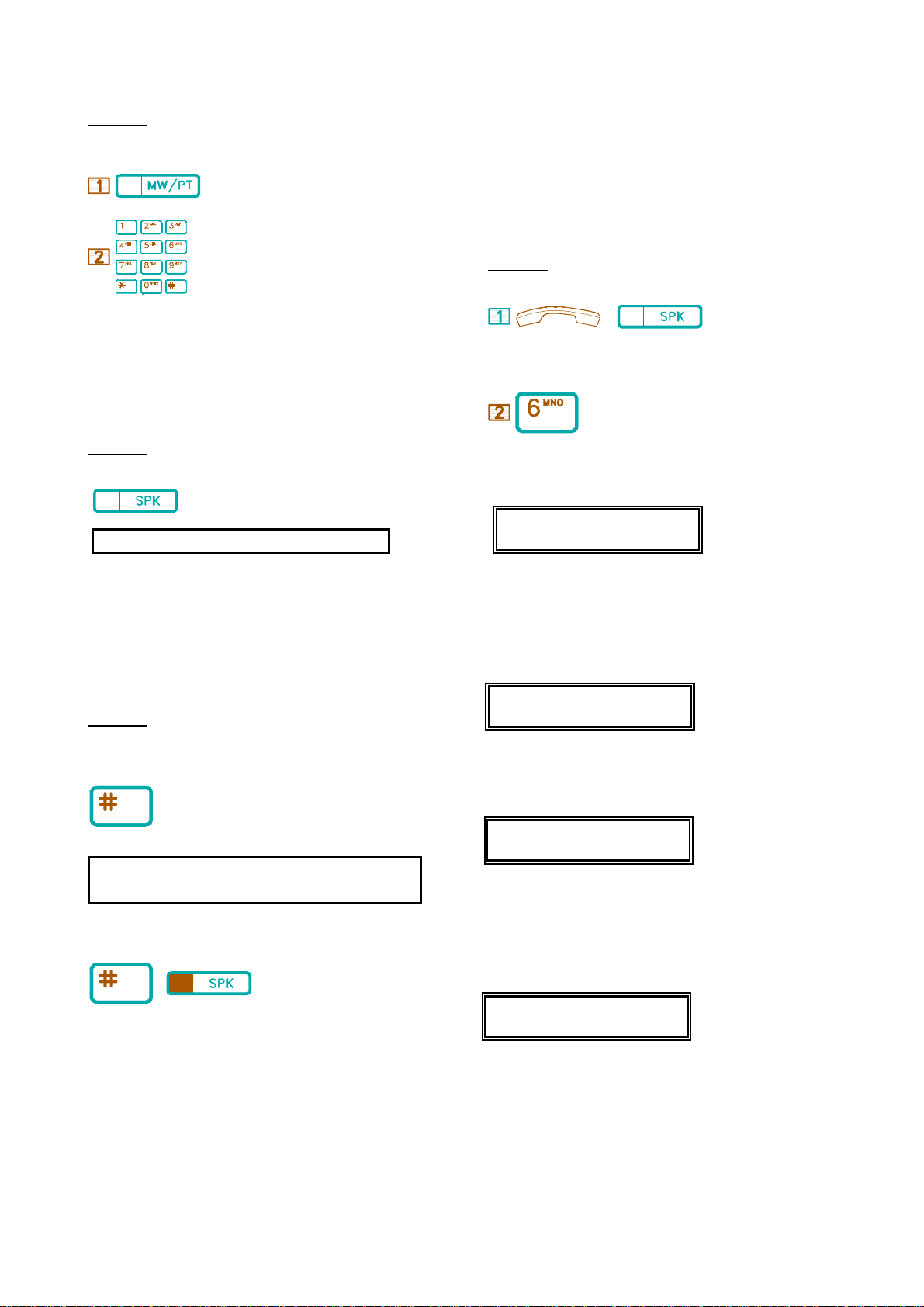
(tone) dialling is needed.
Description:
To change from Pulse to Tone while dialing:
&&&&&&&&&&&&&&&&&&&&&&&&&&&&&&&&&&&&
F.04 Review Extension's Prime Data
&&&&&&&&&&&&&&&&&&&&&&&&&&&&&&&&&&&&
General:
.Press [MW/PT] key.
Dial the phone number.
&&&&&&&&&&&&&&&&&&&&&&&&&&&&&&&&&&&&&&&
F.02 Handsfree
(((((((((((((((((((((((((((((((((((((((
Handsfree allows a user to make and receive calls using the Microphone
and Speaker of the telephone, instead of using the Handset.
Description:
.Press [SPK] key.
Handsfree is only available for Keyphones with a Microphone fitted.
&&&&&&&&&&&&&&&&&&&&&&&&&&&&&&&&&&&&&&&
F.03 Background Music
(((((((((((((((((((((((((((((((((((((((
You can hear the Background Music (BGM) through telephone Speakers.
The music is temporarily off when the telephone is in use. Background
Music can share the music source for Music On Hold.
Description:
The feature is for users to consult the Extension's basic information such
as System Model No., Package Version No., Method of Programming,
Extension No., Port No., IPU (cabinet) No., IPU Package Version No., or
whether the system is equipped with IPU, etc. The data shows on the
LCD.
Description:
/
. Handset on hook / [SPK] key off.
. Dial [6].
When [6] is dialed, LCD will display as follows:
44 BX-320
HYBREX BX-320 U
VER:I01s9 PORT:166
HYBREX: Trade mark of Auto Telecom Company.
BX-320: Model number.
The "U" indicates that programming data is set by a user.The "S" indicates that
programming data is set by the system. (Default)
VER:I01s9: Software Version.
PORT:16: Port number.
44 BX8
HYBREX BX-32 U
V:I03m Port: 11
To listen:
. Press [#] key.
1. Incoming calls, Handset lifted, or Paging will interrupt the Background
Music.
2. The music will resume when Handset is on hook again or Paging over.
To cancel:
/ . Press [#] or [SPK] key.
44 Forthe BX-320, Press [6] again, the LCD shows more
information:
Cab.= c Slot= SS
Pos.= p Port=csn
Cab. (c): Cabinet Numbers 1-4
Slot (SS) : Slot Numbers 0-9
Pos. (p) : Position Numbers on the slot 1-8.
Port (csn):Port Numbers.(BX-320: csn = c(SS-1)p)
4 For the BX-320, Press [6] again, the LCD shows further information:
I1:V007 I2: NC
I3: NC I4: NC
I1-I4 :IPU number (Cabinet Numbers 1-4).
VI01s9:Software Version of IPU Unit.
NC:The cabinet is not installed
&&&&&&&&&&&&&&&&&&&&&&&&&&&&&&&
F.05 Dual Voice Path (OHCA)
11 KEYPHONE OPERATION
Page 16
(((((((((((((((((((((((((((((((
BX-320 : Programmable.
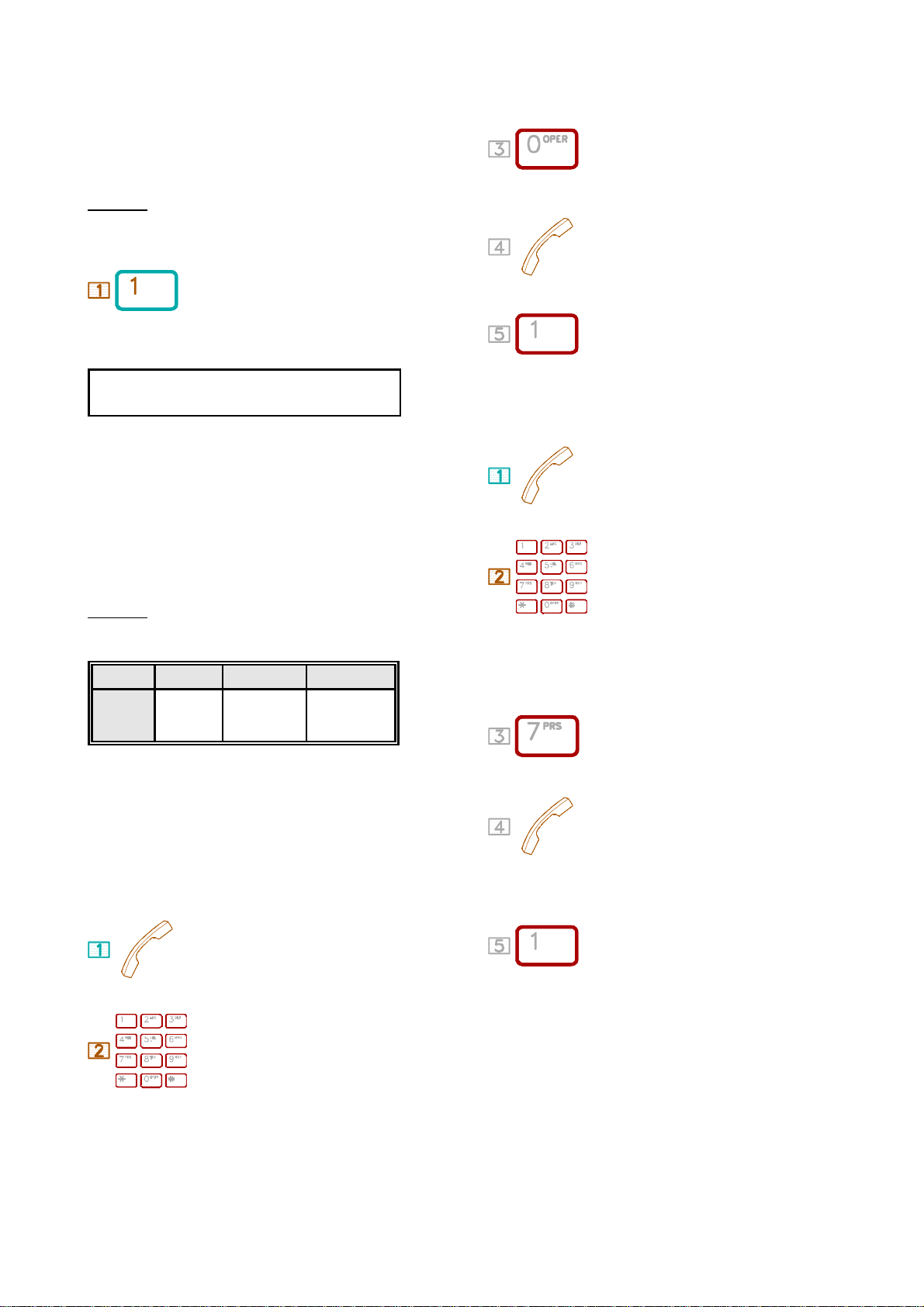
Dual Voice Path is also known as Off Hook Call Announce (OHCA). It
allows User to announce a busy, Handset-using Extension through
Speaker. For response, the called Extension must be a dual-path telephone
equipped with Microphone.
Description:
When the called Extension is busy:
. Dial [1].
Speak to the called party through Speaker.(announcement)
Using OHCA, The called Extension can talk to the outside party by
Handset and to the calling Extension through the Speaker and
Microphone.
&&&&&&&&&&&&&&&&&&&&&&&&&&&&&&&&&&&&&
F.06 Voice Service Channel
(((((((((((((((((((((((((((((((((((((
Each Voice channel has 8 segments(maximum) memories for recording
and playing the service voice. The maximum recording time is 60 seconds
for each channel. For the applications and programming, you can refer to
the system programming manual of each system(B1-408, BX8, BX-
320).
. Dial [0].
. Record your voice after the tone.
.To stop the recording and select the next voice segment.
Playing Method:
. Handset off hook.
.Dial the Voice Channel number.
Description:
Each System Voice channel capacity is as follows:
B1-408 BX8 BX-320
System
Capacity
1 Channel 1 Channel Depends on the
number of cards
installed
The maximum recording time is 60 seconds for each channel. You can
distribute these 60 seconds into 8 segments.
For example: If the first segment occupies 20 seconds and segment two
occupies 40 seconds, then the other segments will not be available.
Message Recording must be performed at the Console.
Recording Method:
. Handset off hook.
. Dial the Voice Channel number.
The Voice Channel Numbers for
B1-408: 86.
BX8: 86
BX-320: Programmable.
. Dial [7].
.The Voice Service Channel will play the recorded voice.
. Dial [1] to stop playing or select the next voice segment.
The Voice Channel Numbers are
B1-408 : 86.
BX8 : 86
KEYPHONE OPERATION 12
Page 17
G . STATION PROGRAMMING
(((((((((((((((((((((((((((((((((((((((((((((((((((((((((((((((((((
&&&&&&&&&&&&&&&&&&&&&&&&&&&&&&&&&&&
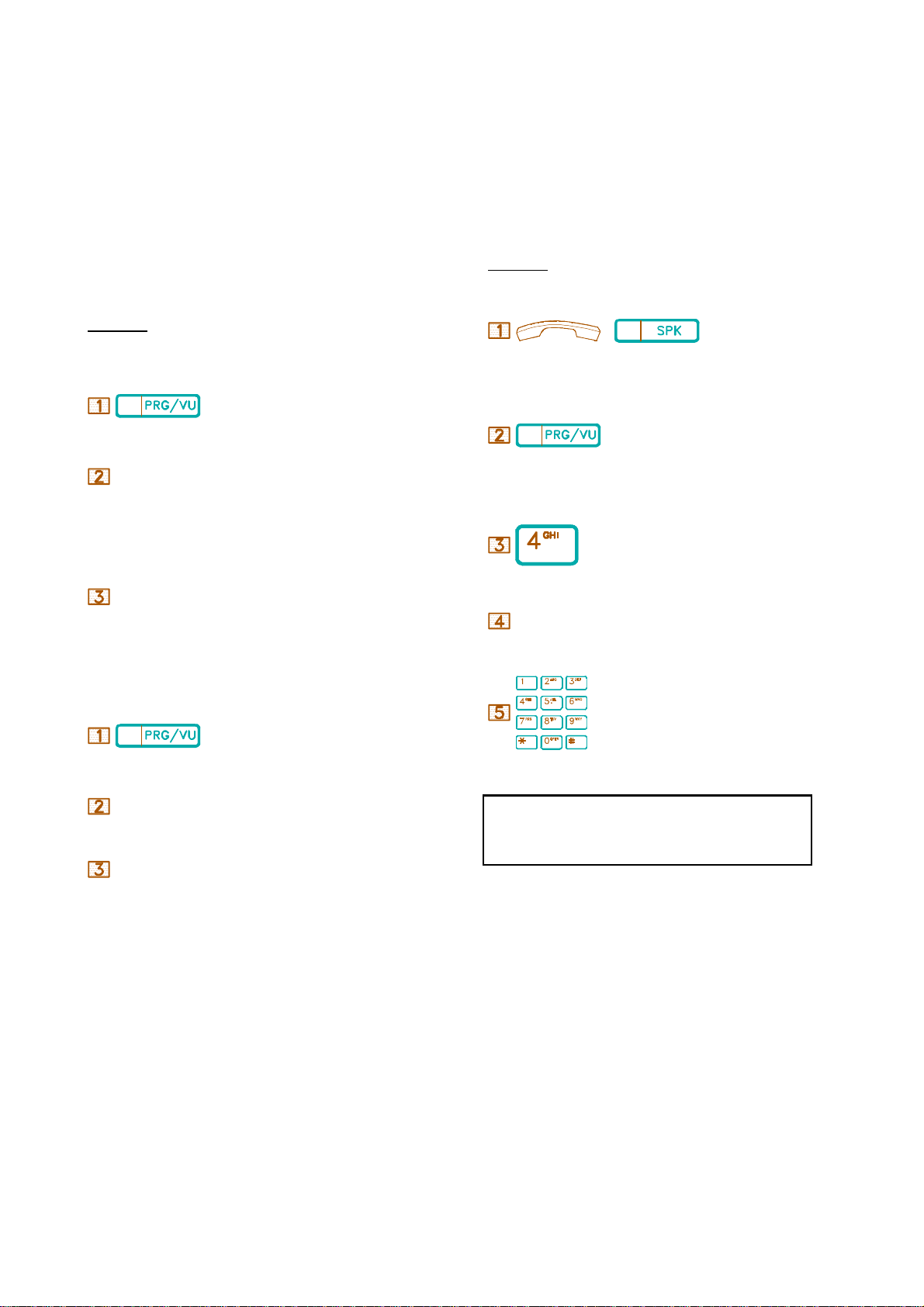
G.01 Call Forwarding
(((((((((((((((((((((((((((((((((((
1. To forward All Calls: All incoming calls (Incoming CO, Intercom
and Transferred CO Lines) to your Extension are automatically forwarded
to any other Extension of the system you have programmed.
2. When Busy or No Answer: If your Extension fails to answer after 20
seconds (programmable) or is busy, all incoming calls to your Extension
are automatically forwarded to any other
Extension you have programmed
&&&&&&&&&&&&&&&&&&&&&&&&&&&&&&&&&&&&&&&&&&&&&&&&&&&&&&&&&&&&&&&&&
G.02 Toll Restriction Override (Forced Account Code)
Toll Restriction prevents telephone toll abuse and saves telephone costs.
Once a correct Forced Account Code (FAC) is dialled, you have access
to Unrestricted Dialling and the SMDR will record all outgoing calls of
the station with the FAC No.
Forced Account Code's are entered in system programming.
Description:
Description:
To forward:
. Press [PRG/VU] key.
CODE.
. Dial [1]] for All Calls,
[2] for Busy, and
[3] for No Answer.
SPD DIAL [DSS] for External Forward
Ext. No.
.Dial the forwarded Ext. number.
To cancel:
. Press [PRG/VU] key.
/
. Handset on hook / [SPK] key off.
. Press [PRG/VU] key.
. Dial [4].
F.A.C. . Dial the Forced Account Code.
. Dial telephone number.
CODE. . Dial [1] ,
Ext.No. . Dial your own Extension number.
Or
Press [FWD] key
13 KEYPHONE OPERATION
1. If the dialled FAC is correct, your Extension automatically
selects an idle CO line for you. If not, you will hear Busy Tone.
2. Once you end the call, the Extension automatically returns to
normal (in Toll Restriction Mode).
Page 18
&&&&&&&&&&&&&&&&&&&&&&&&&&&&&&&
G.03 Volume Control
(((((((((((((((((((((((((((((((
&&&&&&&&&&&&&&&&&&&&&&&&&&&&&&&&&&&&&
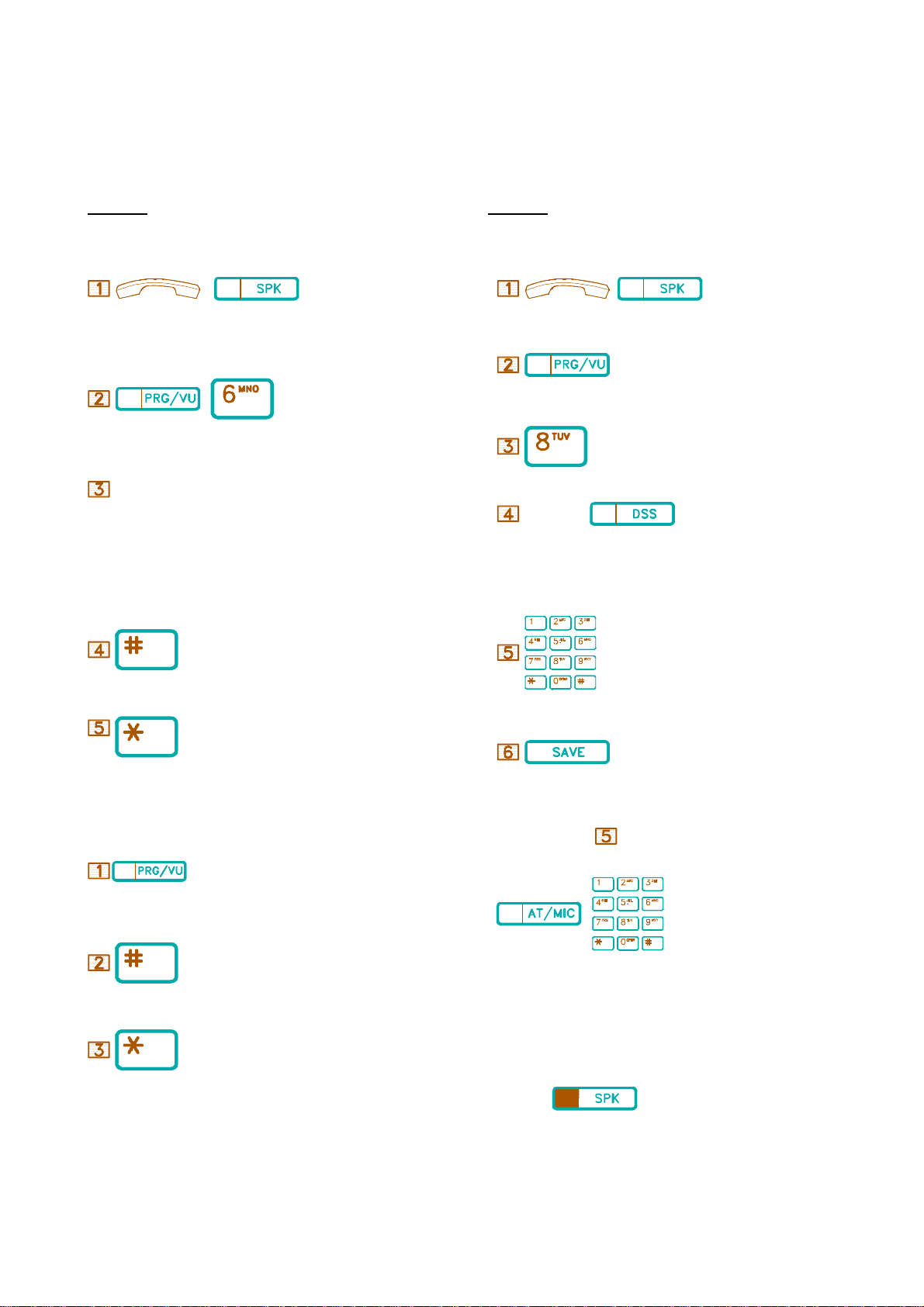
G.04 Store Speed Dial/One Touch Dial
(((((((((((((((((((((((((((((((((((((
This program can adjust the Volume of Key Telephone. There are three
types of Volume you can adjust - Ring, Speaker, Handset.
Description:
Program the Volume for your Telephone:
/
. Handset on hook / [SPK] key off.
6
. Press [PRG/VU], [6].
CODE
. Dia [1] for setting Ring Volume,
[2] for setting Speaker Volume,
[3] for setting Handset Volume.
[4] for setting Ring Volume up Gradually
[5] for setting Ring Frequency
Speed Dial automatically dials the stored telephone numbers.
There are two types of Speed Dial: Personal (Extension) and System.
Description:
To store Personal Speed Dial numbers:
/
. Handset on hook / [SPK] key off.
. Press [PRG/VU] key.
. Dial [8].
SPD CODE/
. Dial the Speed Access Code / Press a programmed DSS key.
PERSONAL SPEED ACCESS CODE DSS KEY
0 - 9 1-10
. Press [#] key for Volume Up.
. Press [*] key for Volume Down.
Adjusting the Volume During Conversation:
. Press [PRG/VU] key.
. Press [#] key for Volume up.
. Press [*] key for Volume down.
. Dial stored numbers (Max.30 digits).
. Press [SAVE] key.
To define a specific CO line for Speed Dialling:
Before or after step above, the user can assign a CO line to the
memory.
6
. Press [AT/MIC] key then dial the CO line number
01-40 for BX-320,
01-04 for B1-408,
01-08 for BX8 or
00 for Automatic CO Selection.
To exit:
. Press [SPK] key.
KEYPHONE OPERATION 14
Page 19
&&&&&&&&&&&&&&&&&&&&&&&&&&&&&&&&&&&&&&&&&&
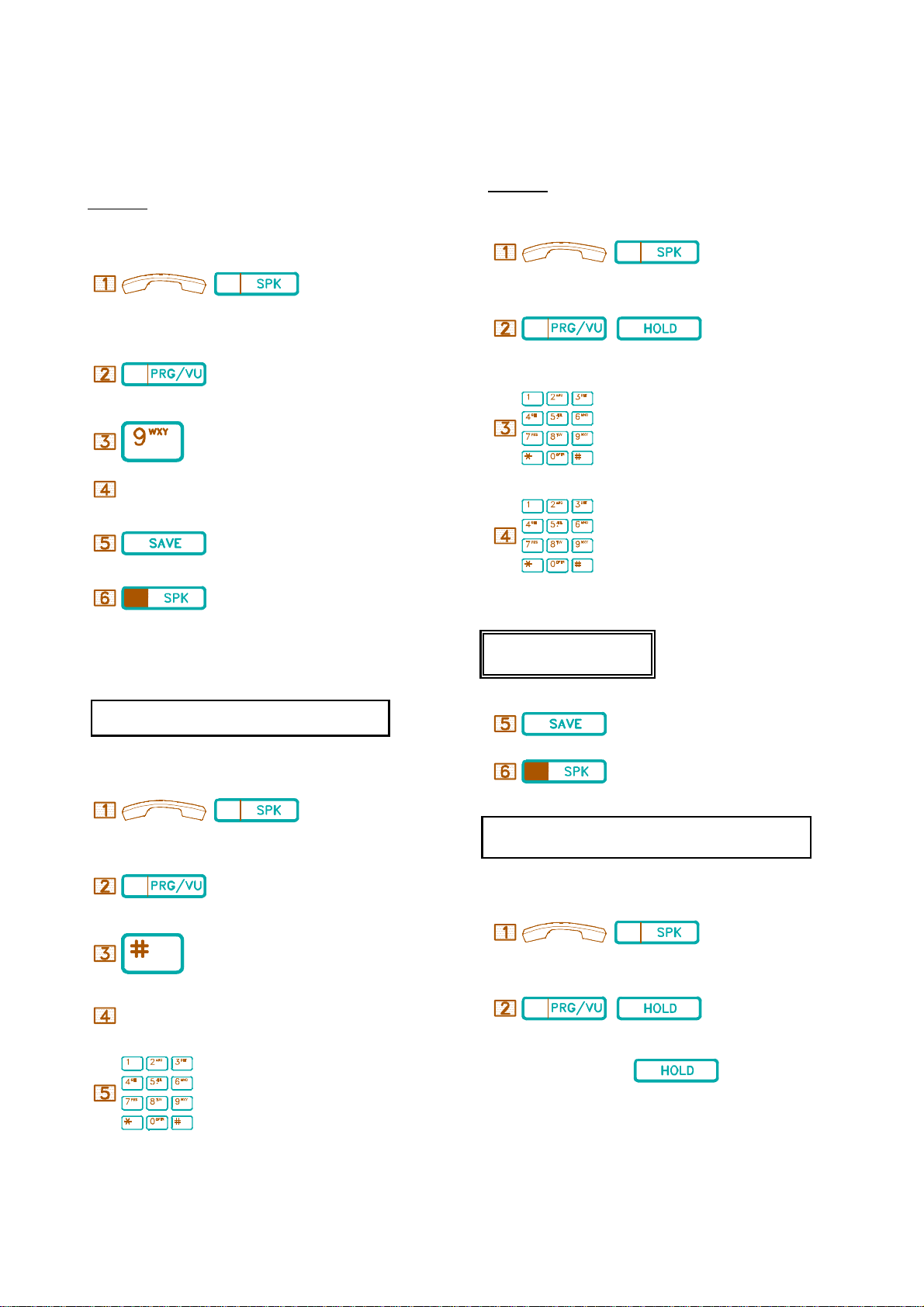
G.05 Lock / Unlock Extension By Security Code
((((((((((((((((((((((((((((((((((((((((((
To prevent others from making outside calls through your telephone, you
may lock your telephone by Security Code.
Description:
To lock / unlock:
((((((((((((((((((((((((((((((((((((((
The system is equipped with an internal clock. Using the TimeReminding Service, you can assign your Extension to play Background
Music at a specific time.
Description:
To set:
/
/
. Handset on hook / [SPK] key off.
. Press [PRG/VU] key.
. Dial [9].
S. CODE . Define / insert your Security Code.
. Press [SAVE] key.
. Press the [SPK] key to quit, then the Extension is locked / unlocked.
44 The Security Code is made up of three characters (digits).
To change the Security Code, unlock the Extension and then lock it by
a new Security Code.
. Handset on hook / [SPK] key off.
66
. Press [PRG/VU] then [HOLD] key.
. Insert the Alarm-Time HH:MM (24-hour)
.
Insert the duration (00-98 minutes).
For instance, 01 means 1 minute's duration.
EXAMPLE:
User Alarm 07
15:30 01
.The music plays at 15:30
for 1 minute.
. Press [SAVE] key.
Temporary access to a locked telephone:
/
. Handset on hook / [SPK] key off.
. Press [PRG/VU] key.
. Press [#] key.
S. CODE . Insert the your Security Code.
. Dial the telephone number.
&&&&&&&&&&&&&&&&&&&&&&&&&&&&&&&&&&&&&&
G.06 Set Time-Reminding Calls
.Press [SPK] key to exit.
If the time is not correctly set in HH:MM format, the LCD will
show "Access Denied," and a Busy tone will be heard.
To cancel:
/
. Handset on hook / [SPK] key off.
66
. Press [PRG/VU] then [HOLD] twice.
15 KEYPHONE OPERATION
Page 20
&&&&&&&&&&&&&&&&&&&&&&&&&&&&&&&&&
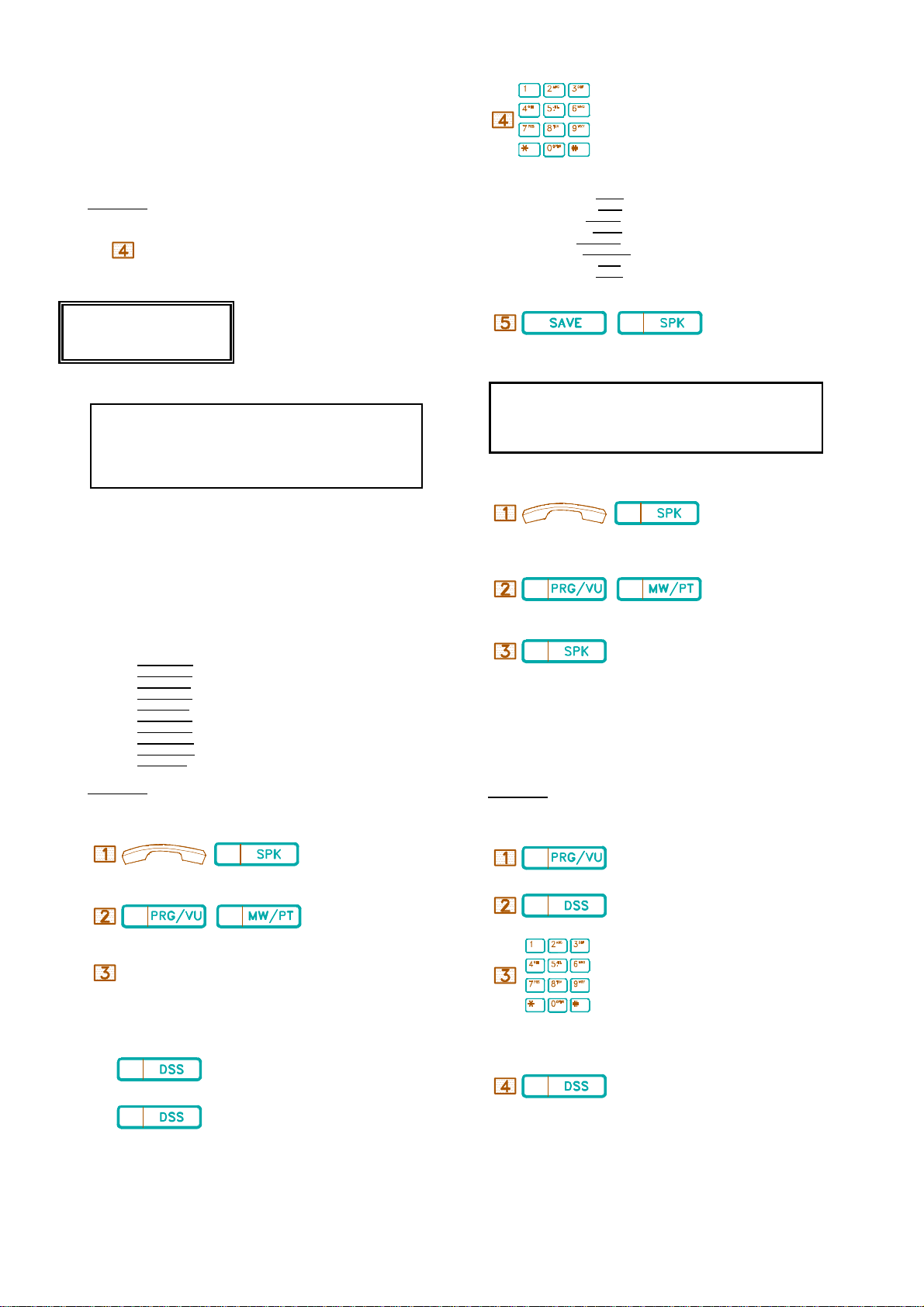
G.07 Set Morning Call Time
(((((((((((((((((((((((((((((((((
For the Morning Call Service, the Background Music or a Voice
Announcement (optional) is sent to assigned Extensions when the
programmed time is reached.
Description:
The same as G.06 Define Time-Reminding Service.
Step set the duration for 99 minutes.
EXAMPLE:
. Insert data after Message. (If needed)
Examples:
Message 0= Vacation 24/12
Message 1= Will back 15:30
Message 2= Lunch 12:00
Message 3= Meeting 10:10
Message 4= Call 9578244
Message 5= DND 12:30/13:30
Message 6= Call EXT 16
Message 7= Off Duty 17:30
User Alarm 07
07:00 99
The music or a Predefined Voice
Announcement alarm plays at
07:00, For Morning Call.
1. Follow the same steps as G.06, Define Time Reminding
Service.
2. Once the morning call is answered, the "Morning Call
Service" feature is automatically cancelled. And you will have
to set again when next you wish to use this service.
&&&&&&&&&&&&&&&&&&&&&&&&&&&&&&&&&
G.08 Absent Message
(((((((((((((((((((((((((((((((((
Any telephone can be programmed to use this feature (either Keyphone or
Single Line Phone.) When a caller calls a telephone leaving Absent
Messages, one of the following Absent Message's will display on the
caller's telephone LCD.
Absent Message (0 to 9):
Message 0= Vacation
Message 1= Will back
Message 2= Lunch
Message 3= Meeting
Message 4= Call
Message 5= DND
Message 6= Call EXT
Message 7= Off duty
Message 8= Business trip
Message 9= (Future feature)
Description:
To leave a message:
6
. Press [SAVE] then [SPK] to exit.
1. Each "Absent Message" can have a maximum of 16
characters, the Absent Message included.
2. Press [*] key to insert a colon (:).
3. Press [#] key to insert a slash (/).
To cancel:
/
. Handset on hook / [SPK] key off.
66
. Press [PRG/VU], [MW/PT] key.
. Press the [SPK] key.
&&&&&&&&&&&&&&&&&&&&&&&&&&&&&&&&&&
G.09 Function Key Assignment
((((((((((((((((((((((((((((((((((
This program allows a user to store special functions into an assigned
DSS key.
Description:
Programming:
/
. Press [PRG/VU] key.
. Handset on hook / [SPK] key off.
66
. Press DSS16~DSS25 key.
. Press [PRG/VU], [MW/PT] key.
CODE(0-9)
.Dial one of the Absent Messages.
To select the Absent Message in ascending / descending order:
Insert the operation steps (up to 5) of a special function that you wish to
store. (For example, # 0 for All Paging.)
4 . DSS key 4 for ascending order.
3 . DSS key 3 for descending order.
&&&&&&&&&&&&&&&&&&&&&&&&&&&&&&&&&&&&&
. Press the programmed [DSS] key to store the function.
KEYPHONE OPERATION 16
Page 21
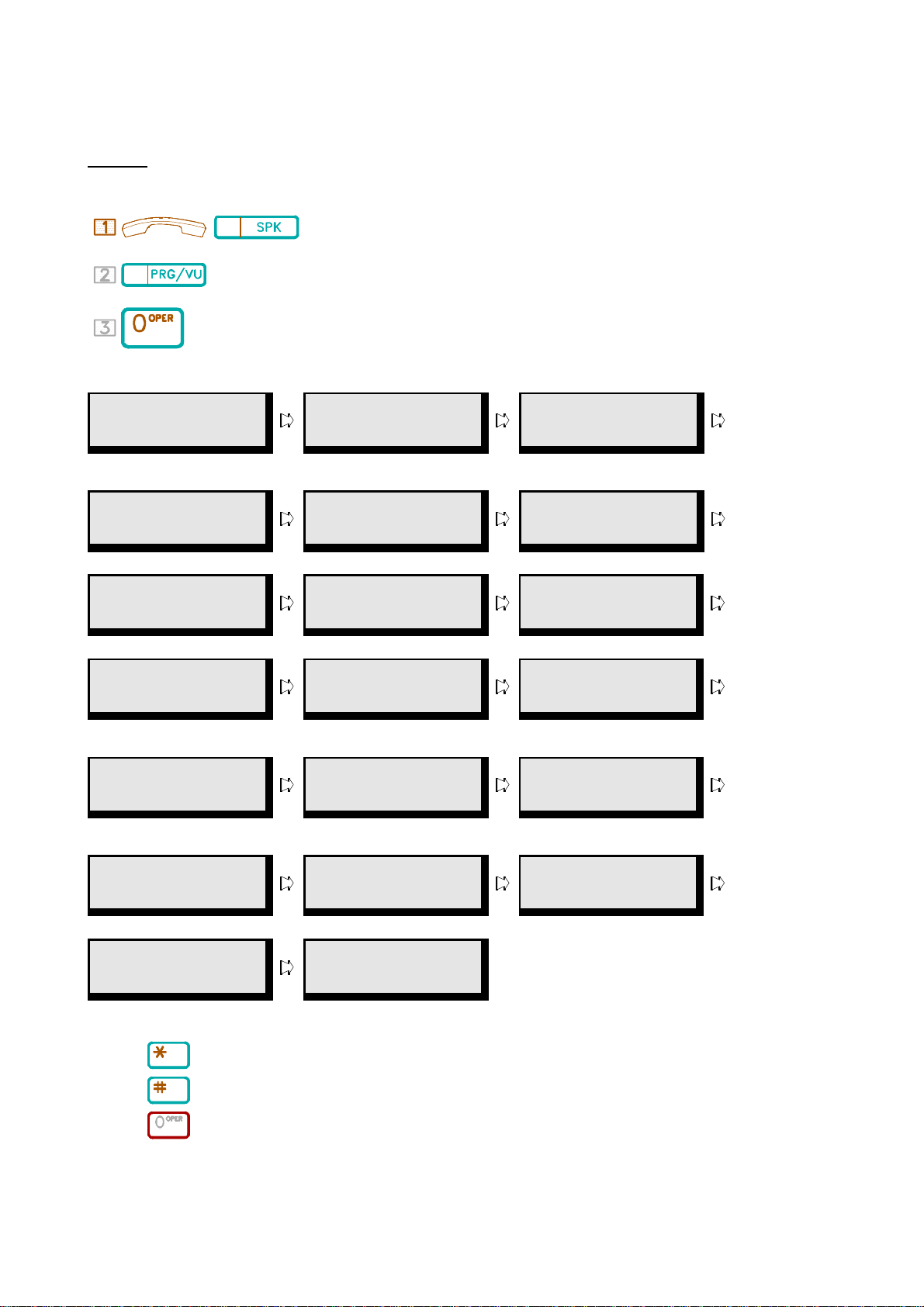
G.10 User Programming Help
(((((((((((((((((((((((((((((((((((((
This Program allows the user to perform station programming by LCD help screens if an operation manual is not available.
Description:
Programming:
/ . Handset on hook / [SPK] key off.
. Press [PRG/VU] key.
. Press [0] key.
The LCD of the telephone will display the help information. * Each Screen will be held for two seconds and then move on the next Screen.
[PROG] [1] [ST:]
Forward All Call
Call Forwarding
-- All Call.
[PROG] [4] [INP]
Force Acc Code
Force Account Code Volume Control System Programming
[PROG] [8] [INP]
Speed Dialling
Speed Dialling Lock Up/Unlock Extension Access to a Lock-up extension
[PROG][DND/CN]
Release Toll
Toll Free
Password
[PROG] [TRF]
Night TRF Mode
Day/Night Service Mode
Switching
[PROG] [Dss2]
[ST:] Check Out
[PROG] [2] [ST:]
Forward Busy
Call Forwarding
-- Busy.
[PROG] [6] [INP]
Set Voice Volume
[PROG] [9] [INP]
(Un)Lock Station
[PROG] [MW/PT] Set/Del
Message
Absent Message Morning Call
[PROG] [HOLD]
Date/Time/Alarm
Time Reminding Service Check In Service
[PROG] [Dss3]
[ST:] Charge
[PROG] [3] [ST:]
Forward No Ans
Call Forwarding
-- No answer.
[PROG] [7] [INP]
System Program
[PROG] [#] [INP]
Tempory Unlock
[PROG] [REDIAL]
Set Morning Call
[PROG] [Dss1] [ST:] Check In
[PROG] [Dss4]
[ST:] Metering
Check Out Service Extension Charge Inquiry Mete Unit Setting
[PROG] [Dss16 ~
25] Function Key
Function Key Assignment End of Help
To Operate:
. Press [*] key to Scroll the Screen Up.
. Press [#] key to Scroll the Screen Down.
. Press [0] to select and execute the function.
17 KEYPHONE OPERATION
User Programming
Help List End
Page 22
&&&&&&&&&&&&&&&&&&&&&&&&&&&&&&&&&&&&&&&&&&&&
G.11 Station Programming - Saved Number Redial
((((((((((((((((((((((((((((((((((((((((((((
&&&&&&&&&&&&&&&&&&&&&&&&&&&&&&&&&
G.12 Account Code
(((((((((((((((((((((((((((((((((
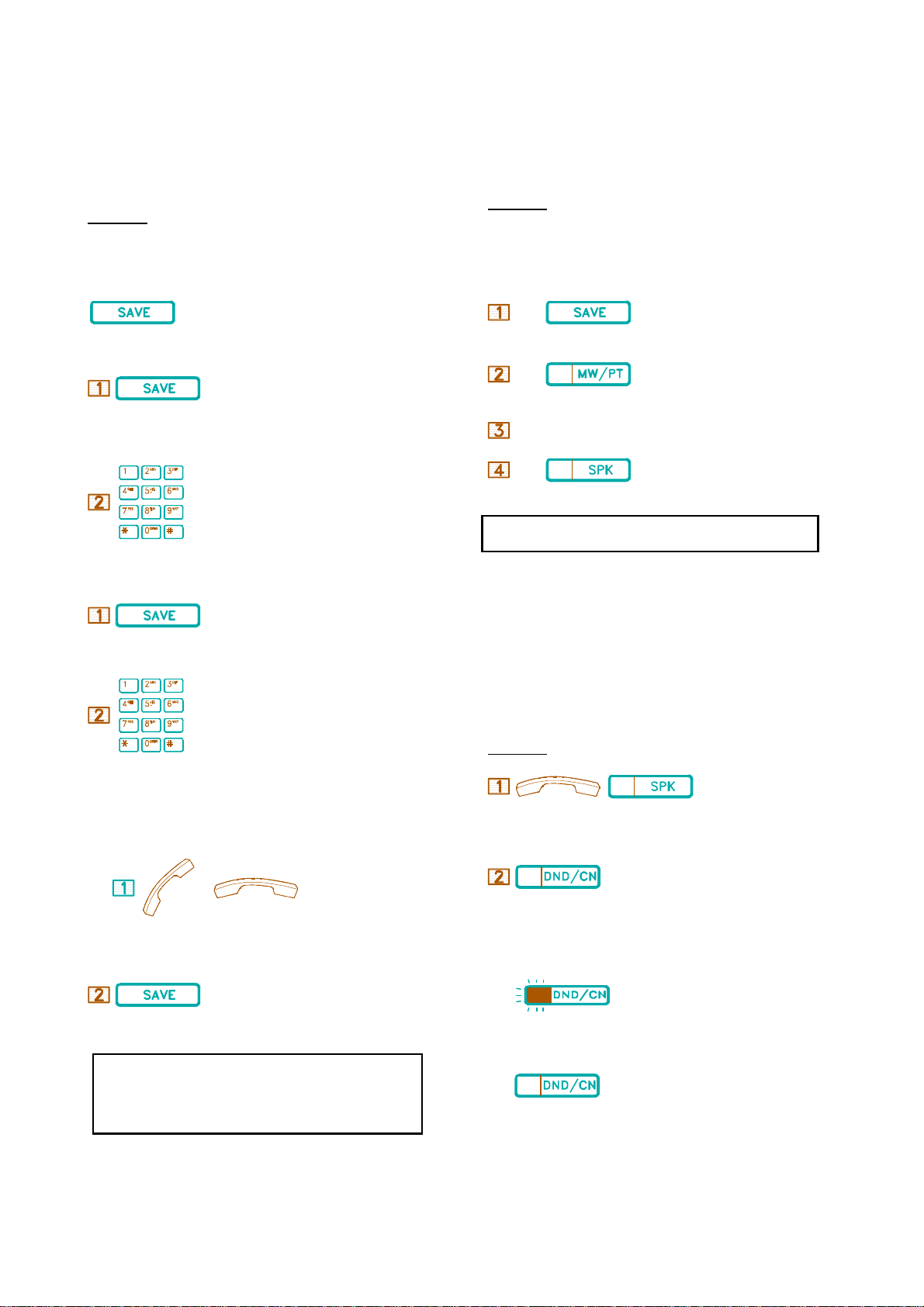
Saved Number Redial allows the last dialled CO number to be stored and
easily accessed when required. The number is stored in the system
memory and remains until the User replaces it with another number.
Description:
To save
1. Automatic Save:
.Before ending the call, press [SAVE] key.
2. Manual Save:
. Before ending the call, press [SAVE] key.
. Insert the phone number to be saved.
3. Renew data when saving number:
This feature allows an Extension user to enter a Cost Accounting Code
into the System's Station Message Detail Recording (SMDR), which
records all incoming and outgoing calls.
Description:
Setting:
*During Conversation when two parties are connected.
.Press [SAVE] key.
. Press [MW/PT] key.
ACCOUNT CODE .Dial an Account Code. (up to 8 digits)
. To complete the input.
If the Account Code is inserted incorrectly, repeat the above steps.
&&&&&&&&&&&&&&&&&&&&&&&&&&&&&&
G.13 Do Not Disturb
((((((((((((((((((((((((((((((
.Before ending the call, press [SAVE] again.
. Insert a new set of numbers to be saved.
To redial:
/
. Handset off hook / on hook.
. press [SAVE] key.
1. Once the [SAVE] key is pressed, the system will automatically
select a line.
2. You may press a CO key to select a line before pressing the
[SAVE] key.
Each Extension can be individually programmed to block all incoming
calls, including Paging announcements. A user whose Extension is in the
DND mode can still place calls and use features of the telephone. A
caller attempting to reach an Extension in DND mode will receive "Do
Not Disturb" on the LCD and hear Busy Tone.
Description:
/
. Handset on hook / [SPK] key off.
. Press [DND/CN] key to activate or cancel.
* LED Indication
. The flashing [DND/CN] indicates DND on status.
. [DND/CN] off indicates normal status.
KEYPHONE OPERATION 18
Page 23
&&&&&&&&&&&&&&&&&&&&&&&&&&&&&&&
G.14 Baby Monitor
(((((((((((((((((((((((((((((((
&&&&&&&&&&&&&&&&&&&&&&&&&&&&&&&&&&&&&&&
G.16 Changing Key Display Using the Shift Key
(((((((((((((((((((((((((((((((((((((((
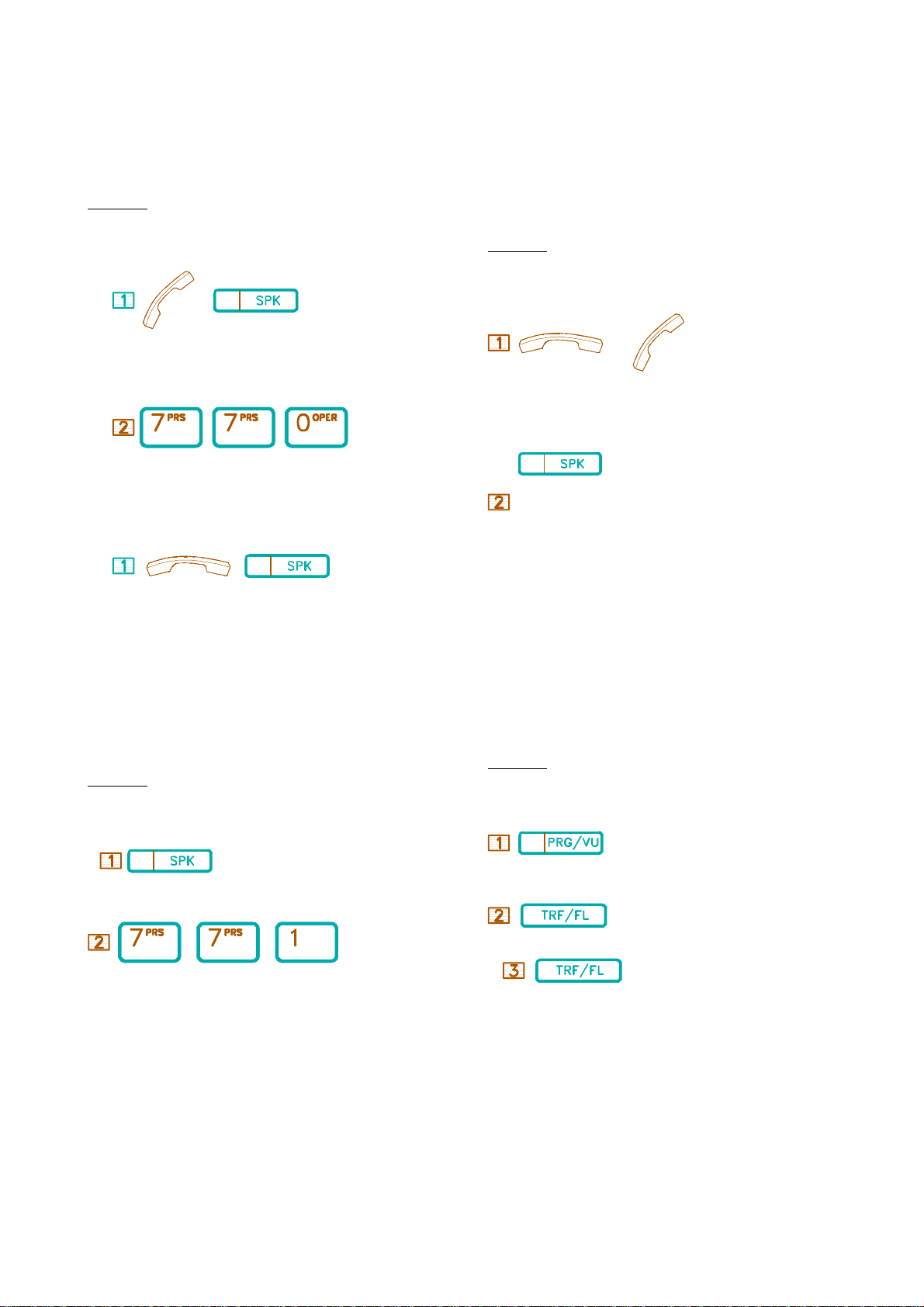
By assigning before hand, another station can directly call this station
without it ringing and monitor the room from Handset or Microphone.
Description:
to enable
/
. Handset off hook or Press [SPK] key.
66 66
. Dial [7],[7],[0].
to disable
/
Each key phone has 25 keys which are programmed by system
programming to display CO lines, Station status and functions. If your
system has been programmed to allow the use of a shift key the pressing
this key will change the settings of your key pad to a second set of
functions for the 25 keys.
Description:
At any time during conversation or when the keyphone is idle;
0r
. Handset on hook or off hook
. Press [SHIFT] key.
The [SHIFT] key will light red and stay red until it is pressed again to
revert to the normal key plan.
. Put handset on hook or Press [SPK] key.
&&&&&&&&&&&&&&&&&&&&&&&&&&&&&&&&&&&&&&&&&&&&&&&&&&
G.15 Automatic Line Access by Lifting Handset
(Keyphone only)
((((((((((((((((((((((((((((((((((((((((((((((((((
By assigning beforehand, a CO line is directly selected when Handset is
lifted.
Description:
to enable / cancel
. Press [SPK] key.
66 66
. Dial [7],[7],[1].
&&&&&&&&&&&&&&&&&&&&&&&&&&&&&&&&&&&&&&&&&&&&&&&&&&
H.01 Day / Night Switching
((((((((((((((((((((((((((((((((((((((((((((((((((
The Console is able to manually change the system from Day to Night
operation. This can affect Ringing, toll restrictions and Voice card
operation.
Description:
to enable / cancel
. Press [PRG/VU] key.
. Press [TRF/FL] key.
. Press [TRF/FL] key.
You can still make intercom calls by on hook Dialling after enabling this
feature.
.Press [PRG],[TRF/FL],[TRF/FL].
The DND/CN key will fast flash on the console.
&&&&&&&&&&&&&&&&&&&&&&&&&&&&&&&&&&&&&&&&&&&&&&&&&&
H.02 Automatic / Manual Day Night Switching
19 KEYPHONE OPERATION
Page 24
((((((((((((((((((((((((((((((((((((((((((((((((((
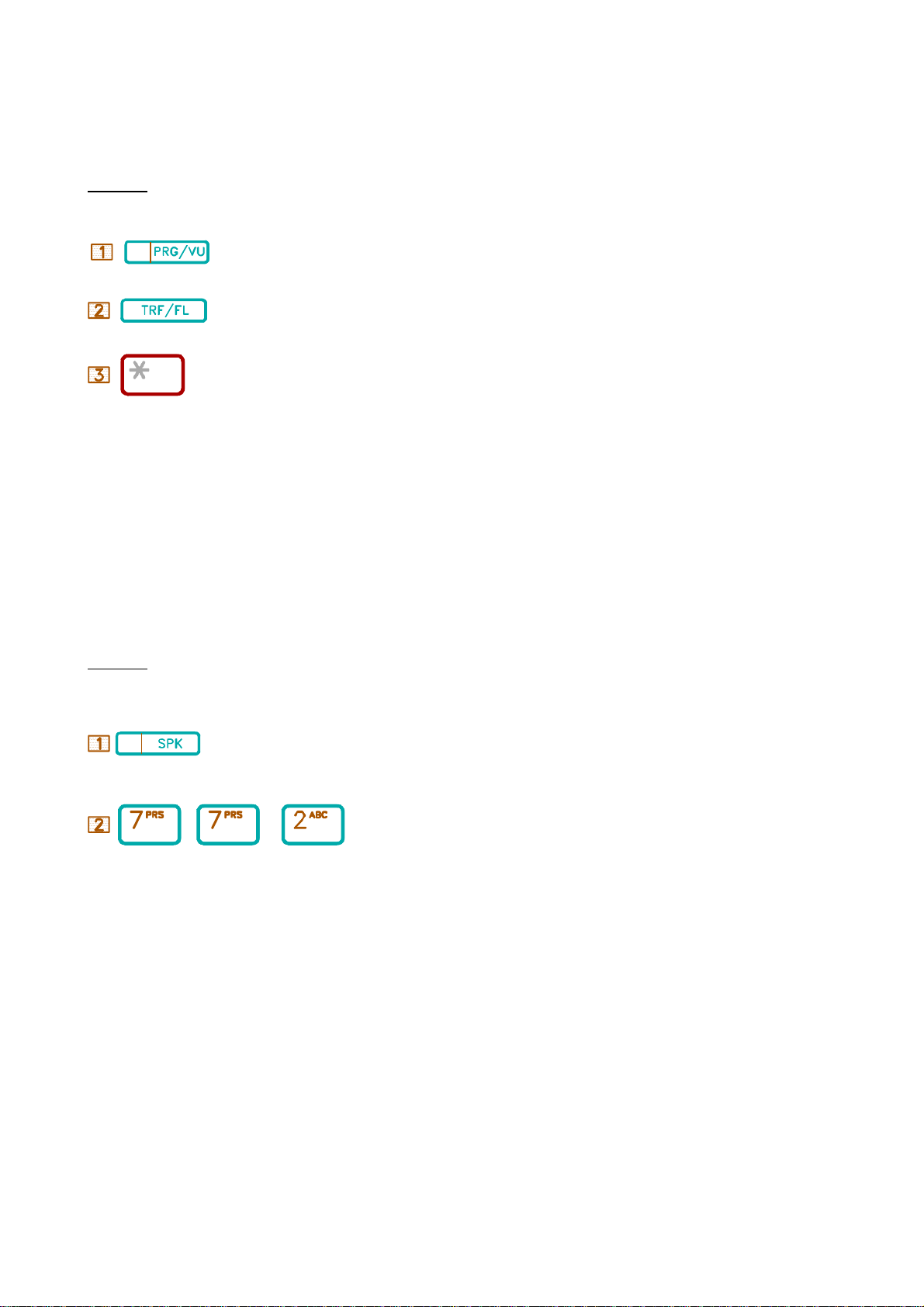
The system can automatically change from Day to night using a time
table programmed into the sytsem. This table can be set individually for
each day.
Description:
to enable / cancel
. Press [PRG/VU] key
. Press [TRF/FL] key.
. Press [*] key.
. Dial [PRG],[TRF],[*].
&&&&&&&&&&&&&&&&&&&&&&&&&&&&&&&&&&&&&&&&&&&&&&&&&&
H.03 Lock / Unlock SMDR (Call Accounting) Output
((((((((((((((((((((((((((((((((((((((((((((((((((
The output to a serial printer or PC based call accounting package can be
controled by the console. When the output is switched off the calls will be
stored in a buffer in the system and then will print out when the SMDR is
turned on again.
Description:
to enable / disable
. Press [SPK] key.
66 66 6
. Dial [ SPK], [7],[7],[2].
KEYPHONE OPERATION 20
 Loading...