

Page 1

BLi100C, BLi200C, BLi300C
EN Operator's manual 2-10
Page 2

Contents
Introduction..................................................................... 2
Safety..............................................................................3
Operation........................................................................ 4
Maintenance................................................................... 5
Troubleshooting.............................................................. 6
Transportation, storage and disposal............................. 6
Technical data................................................................ 7
Federal Communication Commission
Interference Statement................................................... 9
EC Declaration of Conformity....................................... 10
Introduction
Product overview
3
5
4
1
2
9
6
8
7
1. Battery
2. Battery charger
3. Plug
4. Charging LED
5. Warning LED
6. Lock LED
7. Connection LED
8. LED indicator for the state of charge
9. Battery indicator button
Symbols on the product
WARNING! Incorrect or careless use of a
battery can turn it into a dangerous tool that
can cause serious or even fatal injury. It is
extremely important that you read and
understand the contents of the operator's
manual.
Please read the operator’s manual carefully
and make sure you understand the
instructions before using the product.
Do not submerge the battery in water.
The product features
Bluetooth
®
wireless
technology.
1
1
The
Bluetooth
®
word mark and logos are registered trademarks owned by the Bluetooth SIG, Inc. and any use
of such marks by Husqvarna AB (publ) is under license. Other trademarks and trade names are those of their
respective owners.
2 545 - 005 -
Page 3

Symbols on the product or its packaging
indicate that this product cannot be handled
as domestic waste. This product must be
deposited at an appropriate recycling facility.
The product agrees with the applicable EC
directives.
The type plate shows the Husqvarna ID.
Article number Factory and
production line
Production
date
Serial number/
Batch ID
Control number
XXXXXXXXX XXX XXXXXXX XXXXX X
Other symbols/decals on the product refer to special
certification requirements for certain markets.
Safety
Safety definitions
Warnings, cautions and notes are used to point out
specially important parts of the manual.
WARNING: Used if there is a risk of injury or
death for the operator or bystanders if the
instructions in the manual are not obeyed.
CAUTION: Used if there is a risk of damage
to the product, other materials or the
adjacent area if the instructions in the
manual are not obeyed.
Note: Used to give more information that is necessary in
a given situation.
Battery safety
(1) to (9) refer to
Product overview on page 2
.
WARNING: Read all safety warnings and all
instructions. Failure to follow the warnings
and instructions may result in electric shock,
fire and/or serious injury.
Note: Save all warnings and instructions for future
reference.
Only use Husqvarna original batteries for Husqvarna
products and only charge them in original QC330 or
QC500 battery charger from Husqvarna. The batteries
are software encrypted.
The rechargeable BLi100C, BLi200C, BLi300C battery
(1), is exclusively used as a power supply for the
relevant Husqvarna cordless appliances. To avoid injury,
the battery must not be used as a power source for
other devices.
• Do not dismantle, open or shred batteries.
• Do not expose cells or batteries to heat or fire. Avoid
storage in direct sunlight.
• Regulary check that the battery charger and the
battery are intact. Damaged or modified batteries
may exhibit unpredictable behaviour resulting in fire,
explosion or risk of injury.
• Never use a battery or appliance that is faulty,
modified or damaged.
• Never attempt to modify or repair the battery. Entrust
all repairs to your authorized dealer only.
• Do not subject batteries to mechanical shock.
• Do not remove a battery from its original packaging
until required for use.
• In the event of leaking, do not allow the liquid to
come in contact with the skin or eyes. If contact has
been made, wash the affected area with copious
amounts of water and seek medical advice.
• Keep batteries out of the reach of children.
• Keep battery clean and dry.
• Wipe the battery terminals with a clean dry cloth if
they become dirty.
• Batteries need to be charged before use. Always use
Husqvarna QC330 or QC500 battery charger.
• Do not leave a battery on prolonged charge when
not in use.
• Remove the battery from the equipment when not in
use.
• When battery is not in use, keep it away from other
metal objects, like paper clips, coins, keys, nails,
screws or other small metal objects, that can make a
connection from one terminal to another. Shorting
the battery terminals together may cause burns or a
fire.
545 - 005 -
3
Page 4

Operation
Husqvarna Connect
This battery features
Bluetooth
®
wireless technology
and is capable of connecting to mobile devices with the
Husqvarna Connect App installed. Husqvarna Connect
is a free App for your mobile device that allows you to
utilize the full potential of your Husqvarna battery and
product.
The Husqvarna Connect App will provide additional
functions to your Husqvarna battery and product, for
instance:
• Lock and unlock function to prevent unauthorized
use.
• Enhanced product information display.
• Convenient control of and help with, product parts
and servicing needs.
A battery connected to the Husqvarna
Connect App
A battery with
Bluetooth
®
wireless technology that is
connected to the Husqvarna Connect App will provide
information about both the battery and the product that
uses the battery. The battery will collect and share data
from the battery and the product with the Husqvarna
Connect App. The battery and the product will collect
data if the battery is not connected to the Husqvarna
Connect App. The stored data will be available when the
battery is connected to the Husqvarna Connect App
again.
Note: Availablity of the Husqvarna Connect App is
limited to selected markets and products. For more
information about Husqvarna Connect, please visit
www.husqvarna.com or speak to you dealer.
To get started with Husqvarna Connect
1. Download the Husqvarna Connect App at the App
Store 2 or on Google Play 3.
2. Register an account in the Husqvarna Connect App.
3. Follow the instructions in the Husqvarna Connect
App to connect and register the battery.
4. Press the battery indicator button (9) to complete the
connection process.
To connect the battery to the Husqvarna
Connect App
1. Make sure that the battery is charged.
2. Open the Husqvarna Connect App.
3. Push the battery indicator button (9) to connect the
battery to the Husqvarna Connect App.
Battery LED information
The LED lights on the battery give information about the
battery and the battery status. The LED lights show the
battery status for 5 seconds when you push the battery
indicator button (9).
6
8
7
9
• The LED indicator (8) shows the state of charge.
• The Connection LED (7) shows the connection
status of the
Bluetooth
®
wireless technology or if an
error has occurred.
2
Apple and the Apple logo are trademarks of Apple Inc., registered in the U.S. and other countries. App Store is
a service mark of Apple Inc., registered in the U.S. and other countries.
3
Google Play and the Google Play logo are trademarks of Google LLC.
4 545 - 005 -
Page 5
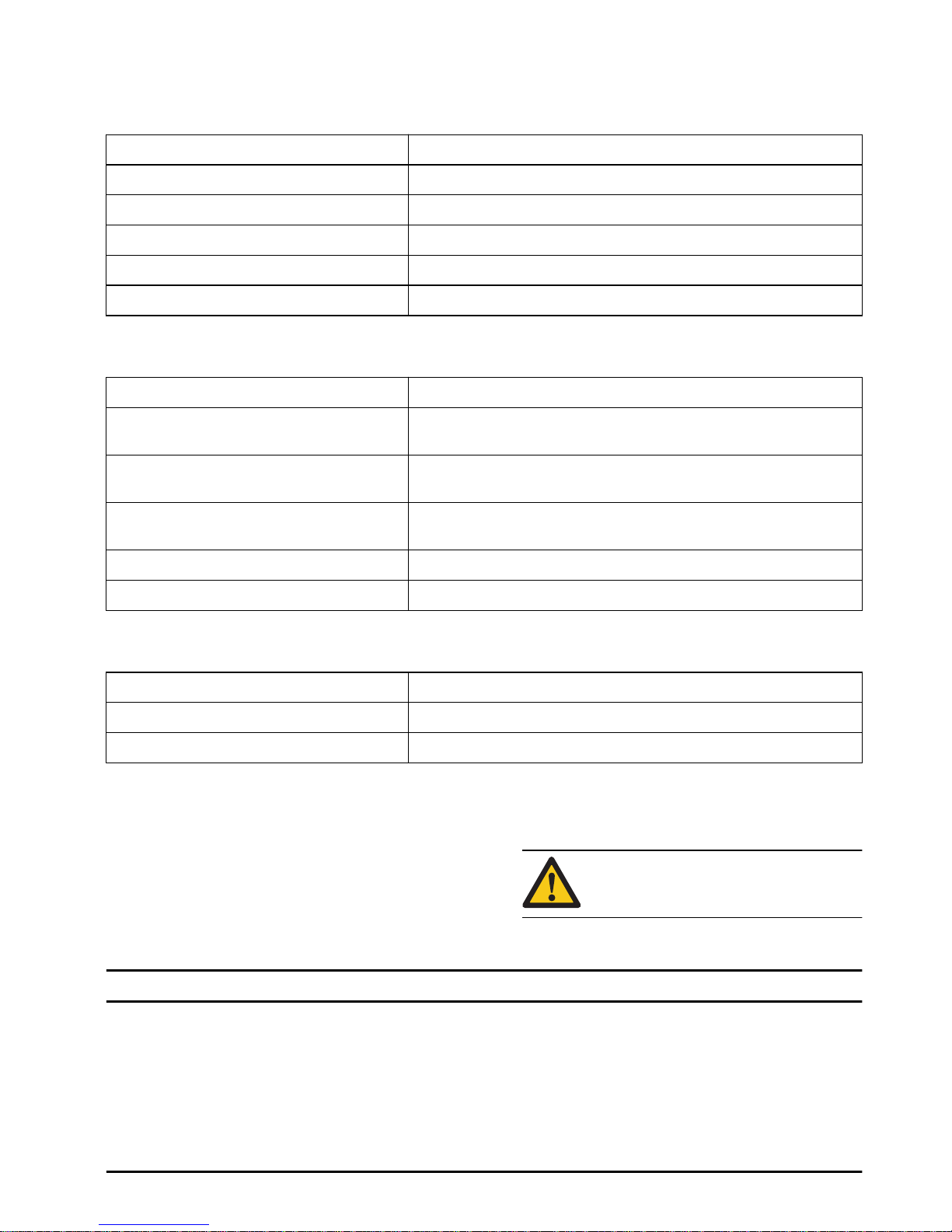
• The Lock LED (6) shows if the battery is locked.
Battery LED lights
LED indicator (8) State of charge
All LEDs are on. The battery is 75%-100% charged.
3 LEDs are on. The battery is 50%-75% charged.
2 LEDs are on. The battery is 25%-50% charged.
1 LED is on. The battery is 5%-25% charged.
1 LED flashes. The battery is empty.
Connection LED light (7) Battery status
Connection LED flashes blue. The battery identification process starts on a device with
Bluetooth
®
wireless technology.
Connection LED is blue. The battery is connected to a device with
Bluetooth
®
wireless tech-
nology.
Connection LED is off. The battery is not connected to a device with
Bluetooth
®
wireless
technology.
Connection LED flashes red. Temporary battery error. Refer to
Troubleshooting on page 6
Connection LED is red. Permanent battery error. Refer to
Troubleshooting on page 6
LED light with lock symbol (6) Battery status
The LED with lock symbol is on. The battery is locked.
The LED with lock symbol is off. The battery is unlocked.
To charge the battery
Charge the battery before the first time of operation. The
battery is only 30% charged when delivered.
1. Put the battery in the battery charger. Make sure that
the battery (1) is connected to the battery charger
(2).
2. When the battery is connected to the battery
charger, the charging LED (4) on the charger is on.
3. The battery is fully charged when all LEDs on the
LED indicator (8) are on.
4. Remove the battery from the battery charger.
CAUTION: Use the battery charger only
when the surrounding temperature is
between 5 °C (41°F) and 40 °C (114°F).
Maintenance
To do maintenance
• Make sure that the battery, battery charger and
terminals on the battery are clean and dry before you
put the battery in the battery charger.
• Make sure that the battery guide tracks are clean.
• Clean plastic parts with a clean and dry cloth.
• Make sure that the battery and the battery charger
are not damaged.
545 - 005 - 5
Page 6
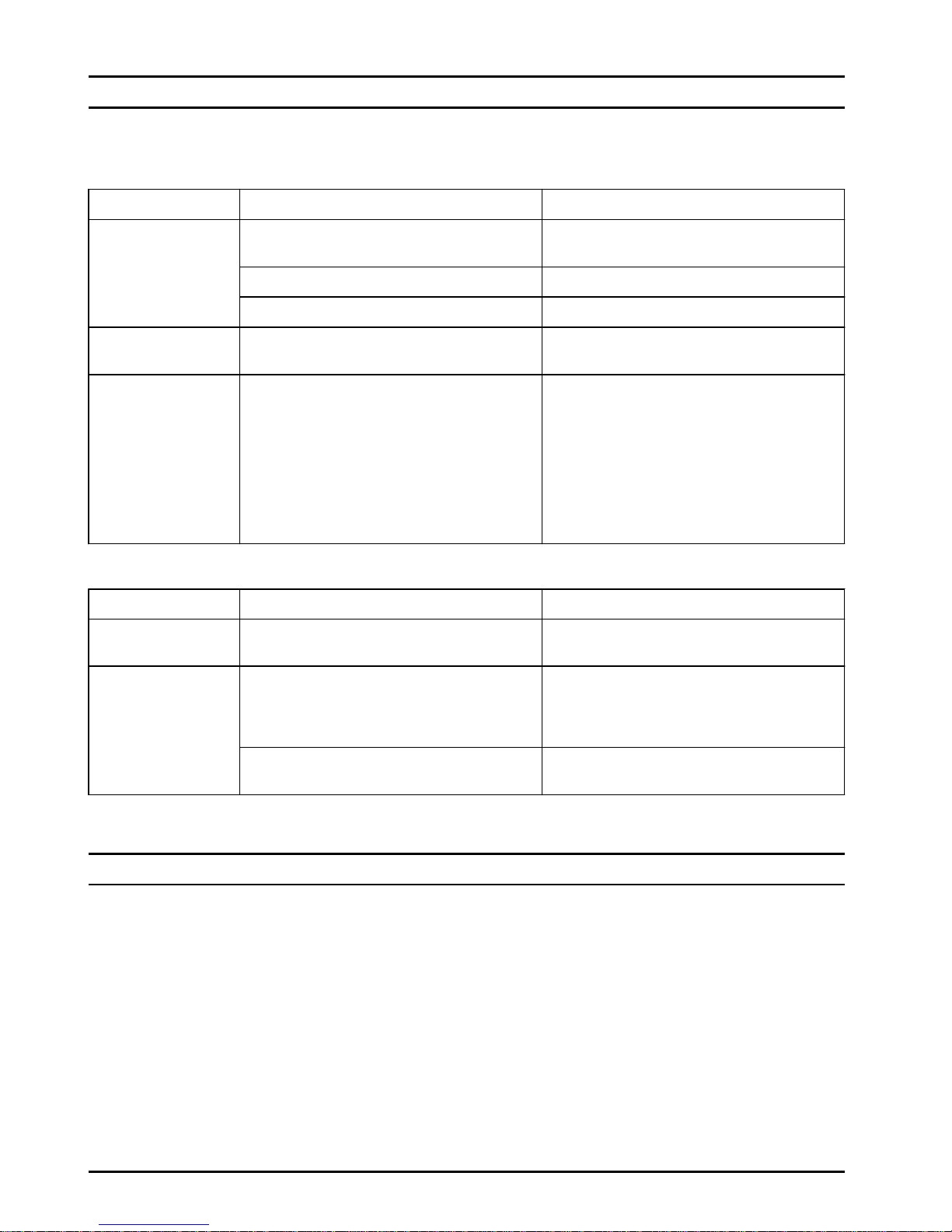
Troubleshooting
Battery
Condition Possible faults Possible action
The Connection LED
(7) flashes red.
Temperature deviation.
Use the battery in ambient temperatures between -10 °C (14°F) and 40 °C (104°F).
The battery is empty. Charge the battery.
The battery is too hot. Let the battery cool down.
Connection LED (7)
is red.
Permanent battery error. Speak to your dealer.
A connection to a device with
Bluetooth
®
wireless technology
is not found.
The battery disconnects from the device with
Bluetooth
®
wireless technology, if the battery
is moved out of range.
Move the battery or the device into range to
connect the battery automatically. If the battery does not connect automatically, refer to
To connect the battery to the Husqvarna
Connect App on page 4
to connect manually.
If it is not possible to connect manually, restart the device with the Husqvarna Connect
App installed. If the problem stays, speak to
your dealer.
Battery charger
Condition Possible faults Possible action
The Warning LED (5)
flashes.
Permanent battery charger error. Speak to your dealer.
The Charging LED
(4) flashes.
The battery is too hot.
Let the battery cool down. Let the battery
charger cool down the battery. The battery
charger starts to charge the battery when the
battery has the correct temperature.
Temperature deviation.
Charge the battery in ambient temperatures
between 5°C (41°F) and 40°C (104°F).
Transportation, storage and disposal
Transportation and storage
• The supplied Li-ion batteries obey the Dangerous
Goods Legislation requirements.
• Obey the special requirement on package and labels
for commercial transportations, including by third
parties and forwarding agents.
• Speak to a person with special training in dangerous
material before you send the product. Obey all
applicable national regulations.
• Use tape on open contacts when you put the battery
in a package. Put the battery in the package tightly
to prevent movement.
• Remove the battery for storage or transportation.
• Put the battery and the battery charger in a space
that is dry and free from moisture and frost.
• Do not keep the battery in an area where static
electricity can occur. Do not keep the battery in a
metal box.
• Put the battery in storage where the temperature is
between 5 °C (41 °F) and 25 °C (77 °F) and away
from open sunlight.
• Put the battery charger in storage where the
temperature is between 5 °C (41 °F) and 45 °C (113
°F) and away from open sunlight.
6 545 - 005 -
Page 7
• Charge the battery 30% to 50% before you put it in
storage for long periods.
• Put the battery charger in storage in a space that is
closed and dry.
• Keep the battery away from the battery charger
during storage. Do not let children and other not
approved persons to touch the equipment. Keep the
equipment in a space that you can lock.
• Clean the product and do a full servicing before you
put the product in storage for a long time.
• Attach the product safely during transportation.
Disposal
Symbols on the product or the packaging of the product
indicate that this product cannot be handled as domestic
waste. It must be submitted to an appropriate recycling
station for the recovery of electrical and electronic
equipment.
By ensuring that this product is taken care of correctly,
you can help to counteract the potential negative impact
on the environment and people that can otherwise result
through the incorrect waste management of this product.
For more detailed information about recycling this
product, contact your municipality, your domestic waste
service or the shop from where you purchased the
product.
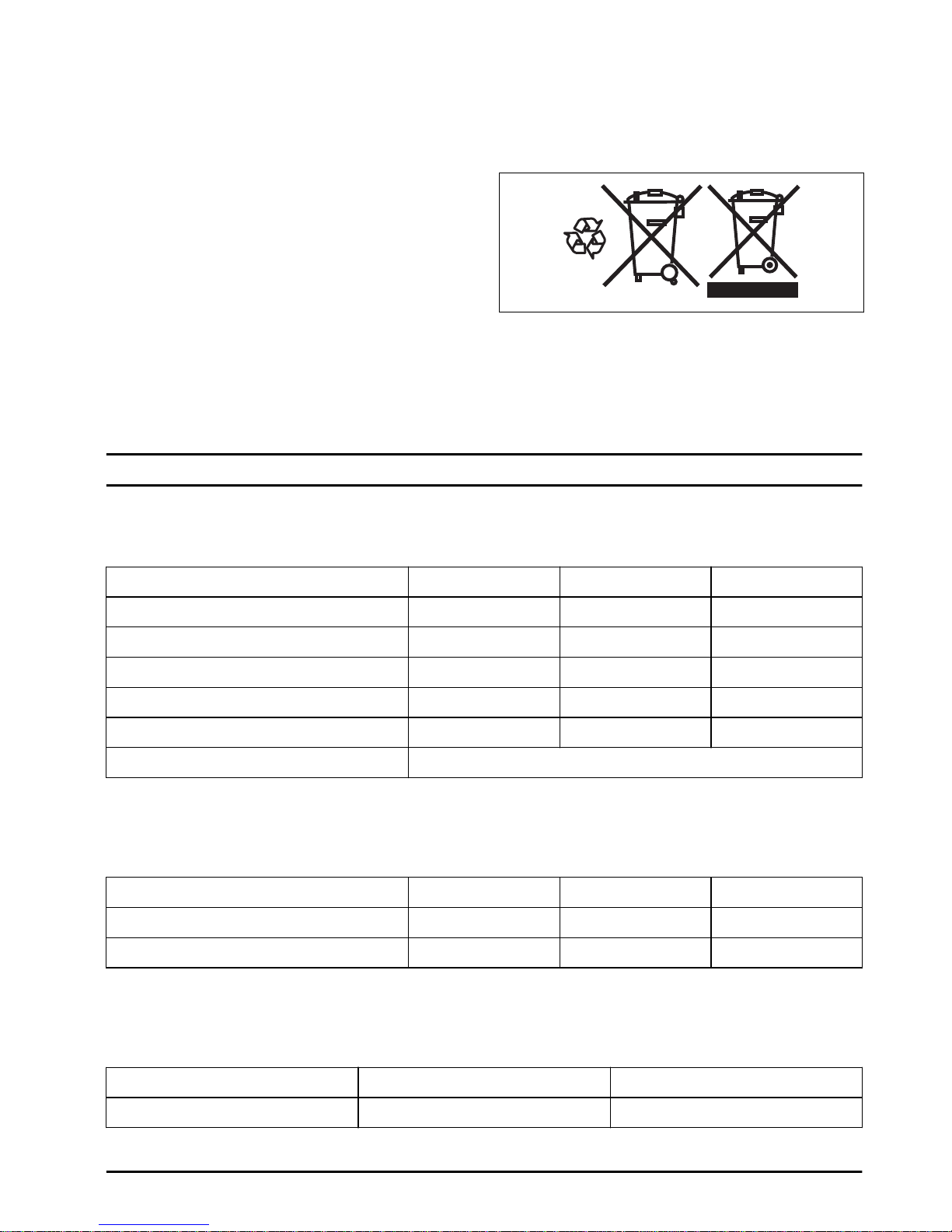
Technical data
Technical data
BLi100C BLi200C BLi300C
Types of battery Lithium-Ion Lithium-Ion Lithium-Ion
Nominal voltage, V 36 36 36
Nominal capacity, Ah 2.6 5.2 9.4
Nominal energy, Wh 94 187 338
Weight, kg/lb 0.8/1.8 1.3/2.9 1.9/4.2
Ambient temperature during operation -10 °C (14°F) and 40 °C (114°F).
Radio frequency data
BLi100C
BLi200C BLi300C
Frequency range, MHz 2402-2480 2402-2480 2402-2480
Output power, dBm 3.7 3.7 3.7
Approved battery chargers for the product
Battery charger
QC330 QC500
Mains voltage, V 220-240 240
545 - 005 - 7
Page 8

Battery charger QC330 QC500
Frequency, Hz 50-60 50-60
Power, W 330 500
8 545 - 005 -
Page 9
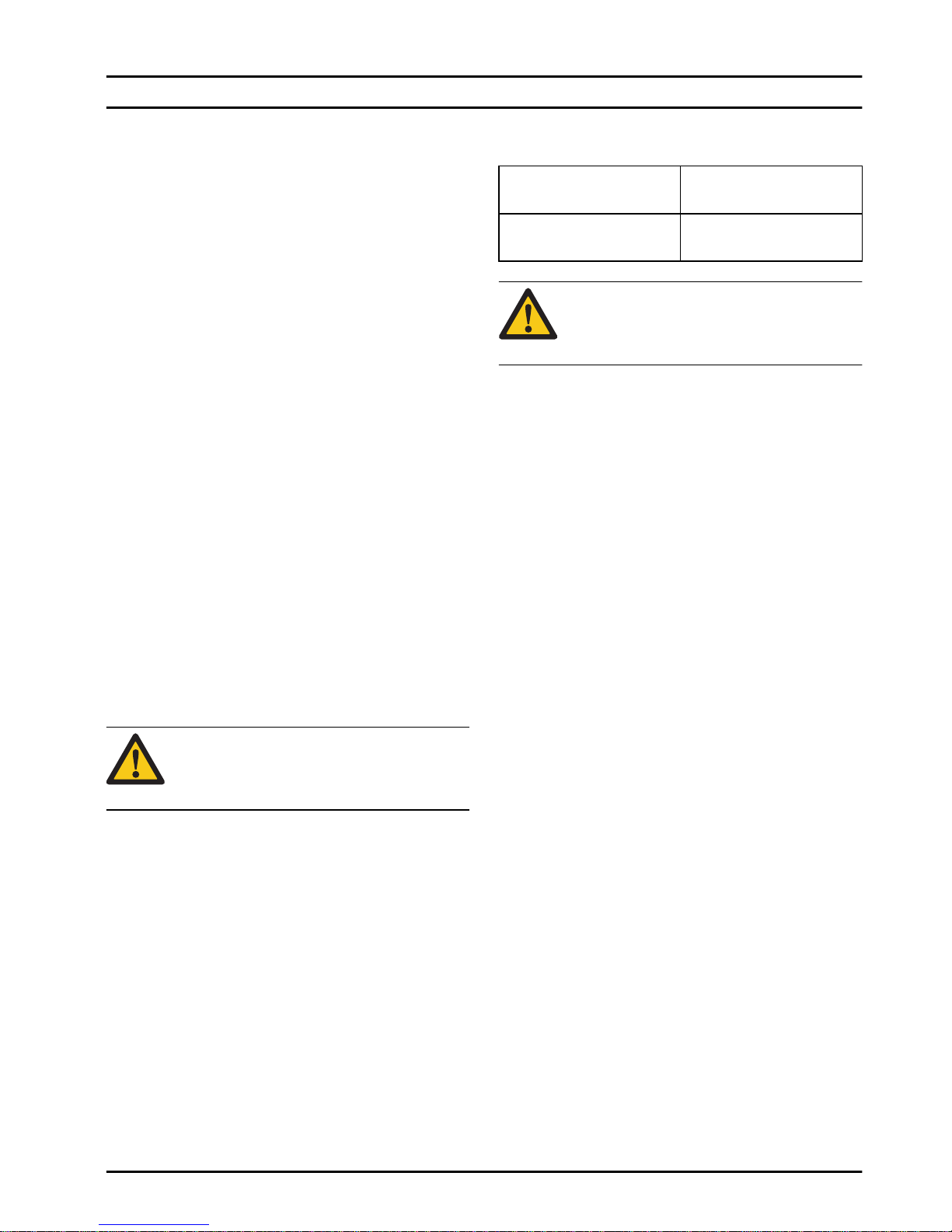
Federal Communication Commission Interference Statement
Federal Communication
Commission Interference Statement
For USA
This device complies with Part 15 of the FCC Rules.
Operation is subject to the following two conditions: (1)
This device may not cause harmful interference; and (2)
This device must accept any interference received,
including interference that may cause undesired
operation.
This equipment has been tested and found to comply
with the limits for a Class B digital device, pursuant to
part 15 of the FCC Rules. These limits are designed to
provide reasonable protection against harmful
interference in a residential installation. This equipment
generates, uses and can radiate radio frequency energy
and, if not installed and used in accordance with the
instructions, may cause harmful interference to radio
communications. However, there is no guarantee that
interference will not occur in a particular installation. If
this equipment does cause harmful interference to radio
or television reception, which can be determined by
turning the equipment off and on, the user is
encouraged to try to correct the interference by one or
more of the following measures:
• Reorient or relocate the receiving antenna.
• Increase the separation between the equipment and
receiver.
• Connect the equipment into an outlet on a circuit
different from that to which the receiver is connected.
• Consult the dealer or an experienced radio/TV
technician for help.
CAUTION:
Changes/Modifications not
approved by the responsible party could
void the user’s authority to operate the
equipment.
Federal Communication
Commission Interference Statement
For Canada
This device complies with Industry Canada’s licenceexempt RSSs. Operation is subject to the following two
conditions:
• This device may not cause interference; and
• This device must accept any interference, including
interference that may cause un-desired operation of
the device.
This radio transmitter (identify the device by certification
number) has been approved by In-dustry Canada to
operate with the antenna types listed below with the
maximum permissi-ble gain indicated. Antenna types not
included in this list, having a gain greater than the
maximum gain indicated for that type, are strictly
prohibited for use with this device.
Approved antenna type Maximum permissible
antenna gain (dBi)
2.4-GHz Inverted F-Antenna (PCB)
+3.3
CAUTION: Changes/Modifications not
approved by the responsible party could
void the user’s authority to operate the
equipment.
545 - 005 - 9
Page 10
EC Declaration of Conformity
EC Declaration of conformity
We, Husqvarna AB, SE-561 82 Huskvarna, Sweden, tel:
+46-36-146500, declares under sole responsibility that
the battery product;
Description Battery
Brand Husqvarna
Type / Model BLi100C, BLi200C,
BLi300C
Complies fully with the following EU directives and
regulations:
Directive/Regulation Title
2011/65/EU RoHS Directive
2014/53/EU Radio Equipment Direc-
tive
The harmonized standards and/or technical
specifications are applied as follows:
• ETSI EN 300 328 v.2.1.1
• EN 62311:2008
• EN 62368-1:2014+AC:2015
• Draft ETSI EN 301 489-1 v.2.2.0
• Draft ETSI EN 301 489-17 v.3.1.0
• EN 55032:2015
• EN 55024:2010+A1:2015
The battery is in accordance with the UN-Manual of
Tests ST/SG/AC/Revision 5, Criteria Part III, Subsection
38.3.
Huskvarna, 2018-02-01
Lars Roos, Global R&D Director
10
545 - 005 -
Page 11

545 - 005 - 11
Page 12
www.husqvarna.com
Original instructions
1159656-38
2018-09-07
 Loading...