

Page 1
Classic Table FanClassic Table Fan
Classic Table Fan
Oscillating Fan
Owner’s Guide
Owner’s Manual
English
44832-01
20130103
©2013 Hunter Fan Co.
Models
90401
90402
Page 2
IMPORTANT SAFETY INFORMATION
Read & Save ese Instructions
WARNING
To reduce the risk of re or electrical
shock, DO NOT use this fan with
any solid-state speed control device.
CAUTION
When using electrical appliances,
basic precautions should always
be taken to reduce the risk of re,
electric shock and personal injury:
1. Read all instructions before
using this fan.
2. Improper installation may
result in the risk of re, electric
shock or personal injury.
3. To prevent the risk of re and
electric shock, DO NOT use
the unit near windows. Rain
and moisture may create an
electrical hazard.
4. The power plug must be
removed from the power
socket when not in use,
before cleaning, servicing,
maintenance and before
moving to another location.
5. DO NOT put fan in a damp
place or where humidity is
high-such as a bathroom.
6. The fan should be placed on a
at, stable surface or tabletop
to avoid overturning.
7. Use fan only for intended
use, as described in this
instruction manual.
8. To protect against electrical
shock, DO NOT immerse unit,
plug or cord in water or spray
with liquids.
9. Close supervision is necessary
when any appliance is used by
or near children.
10. NEVER insert ngers, pencils
or any other objects through the
grill when the fan is running.
11. DO NOT operate any appliance
with a damaged cord or plug,
after the appliance malfunctions
or has been dropped or
damaged in any manner.
12. To disconnect, grip plug and
pull from wall outlet. NEVER
yank on cord.
13. ALWAYS use on a dry surface.
14. This product is intended for
household use only and not for
commercial or industrial use.
15. DO NOT operate fan in the
presence of explosive and/or
ammable fumes.
16. DO NOT place fan or any parts
near an open ame, cooking or
any other heating appliances.
17. DO NOT use near curtains,
plants, window treatments, etc.
18. This appliance has a grounded
three-prong plug and is suitable
for grounded receptacle use
only. An adapter is available
for connecting three-blade
grounding-type plugs to two-slot
receptacles. The adapter must
be properly grounded. DO NOT
attempt to defeat the purpose
of this safely feature.
2
Page 3
WELCOME UNPACKING
Thank you for choosing the Hunter
Classic Table Fan. This manual gives
you complete instructions for using
your fan. Here are some the features
you will enjoy with your fan:
• An attractive design that
enhances any decor
• A powerful Hunter motor for
maximum air ow
• Three speeds to adjust your
comfort level
Before using your fan, record the
following information for your records
and for warranty assistance.
Model Name _________________
Date Purch ased ______________
Where Purchased _____________
As you unpack the fan, save the carton
and packing materials in case you want
to move or ship the unit in the future.
Carefully remove all items from the box.
Make sure all shipping materials are
removed from fan before operating.
Please attach your
receipt or a copy of
your receipt to this manual
for future reference.
3
Page 4
GROUNDING INSTRUCTIONS
This appliance is for household
use only and may be plugged into
any 120-volt AC electrical outlet
(ordinary household current). DO
NOT use any other type of outlet.
WARNING
This unit is suitable for grounded
receptacle use only.
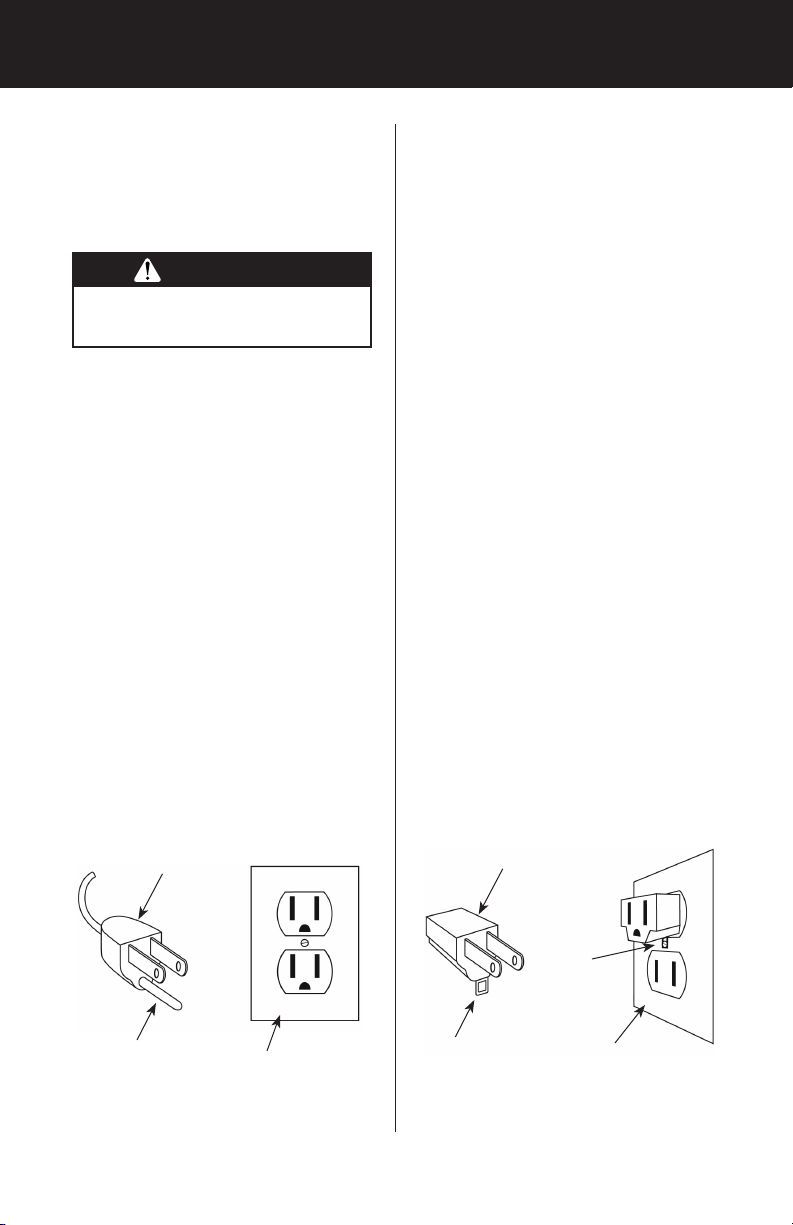
The cord has a grounded plug as
shown in Figure 1. An adapter,
(not included) as shown in Figure
2, is available for connecting
three-blade grounding-type
plugs to two-slot receptacles.
The green grounding lug
extending from the adapter must
be connected to a permanent
ground such as a property
grounded outlet box. The adapter
should not be used if a three-slot
grounded receptacle is available.
LINE CORD SAFETY TIPS
1. NEVER pull or yank on the
cord or the appliance.
2. To insert plug, grasp it rmly
and guide it into the outlet.
3. To disconnect the appliance,
grasp the plug and remove it
from the outlet.
4. Before each use, inspect
the line cord for cuts and/or
abrasion marks. If any are
found, the appliance should
be serviced and the line cord
replaced. Please return it
to our Service Department
or to an authorized service
representative.
5. NEVER wrap the cord tightly
around the appliance, as this
could place undue stress on
the cord where it enters the
appliance and could cause it
to fray and break.
6. DO NOT operate appliance
if the line cord shows any
damage, if the appliance
works intermittently or stops
working entirely.
Grounded
Plug
Grounding
Pin
Adapter
Metal
Screw
Grounded Outlet
Box Cover
Grounding
Means
Grounded Outlet
Box Cover
FIGURE 1 FIGURE 2
4
Page 5
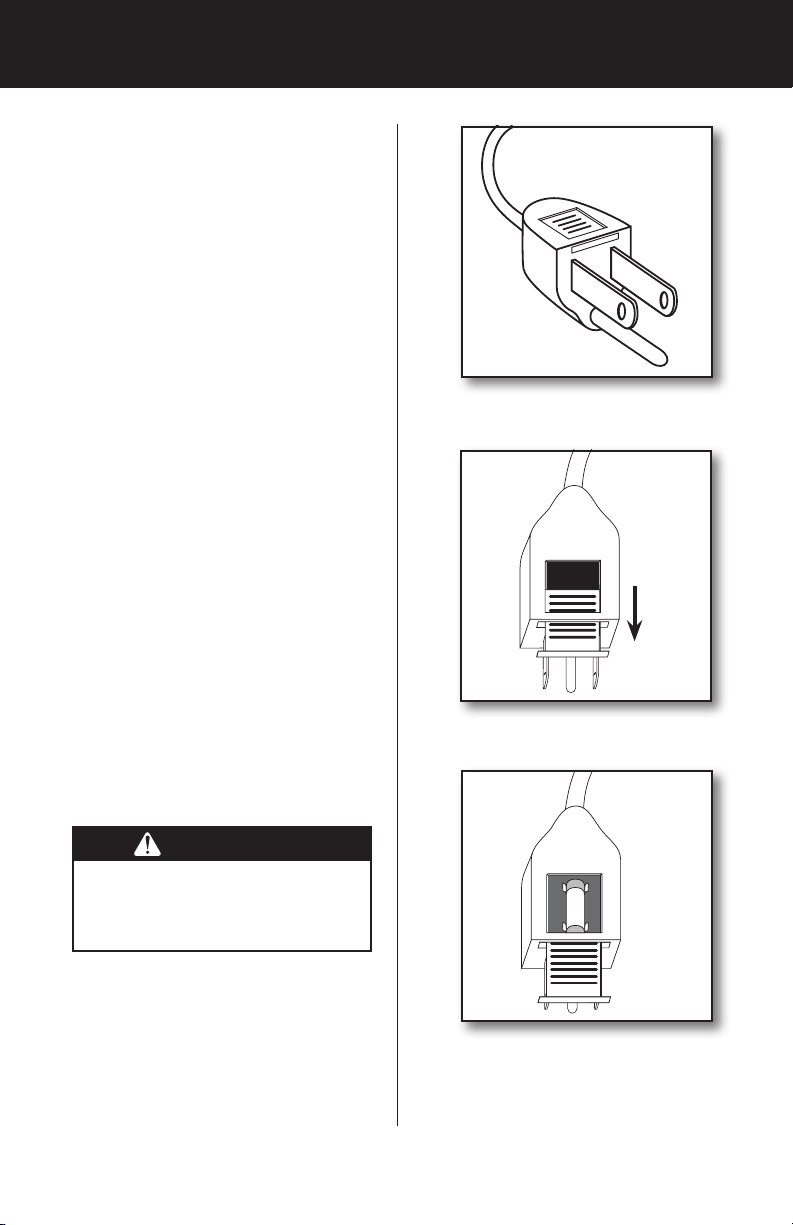
FUSED PLUG
This plug has a safety feature. It
contains a safety device (fuse) that
should not be removed. Discard
product if the attachment plug is
damaged. To reduce the risk of re,
electric shock and personal injury,
DO NOT remove, replace, repair or
tamper with the originally supplied
plug. If the Fan does not function
properly, it may be due to the safety
device incorporated in this plug.
If the fuse fails, it is generally
due to a short circuit or circuit
overload. Replace the fuse as
per the instructions below. If the
replacement fuse fails, immediately
unplug the unit and contact our
technical support department for
assistance.
Fuse Replacement:
1. To replace the fuse, rst turn the
unit it off and unplug it from the
wall. Locate the door on top of
the plug. Figure 1.
2. Slide the door on top of the plug
towards the blades. Figure 2.
3. Carefully remove the fuse from
the clips holding it on the top and
bottom. Figure 3.
Figure 3
Figure 4
WARNING
Electrical Hazard! Only replace with
a fuse type and rating matching what
was removed from the product.
4. Gently push the fuse back into
the pins that will hold it in place.
Note: If the fuse is not seated properly,
the unit will not function.
5. Slide the Door back over the fuse
box in the plug.
6. Plug the fan back in and
resume use.
Figure 5
5
Page 6
OPERATION
This appliance is for household use only.
1. Place the fan on a dry, safe, at
surface where it cannot fall or
be pulled by the cord.
2. Plug the fan into a grounded
120-volt AC electrical outlet
(ordinary household current).
DO NOT use any other type of
outlet. Make sure that the rated
voltage of the fan is the same
as the power source before
plugging it into the power
source.
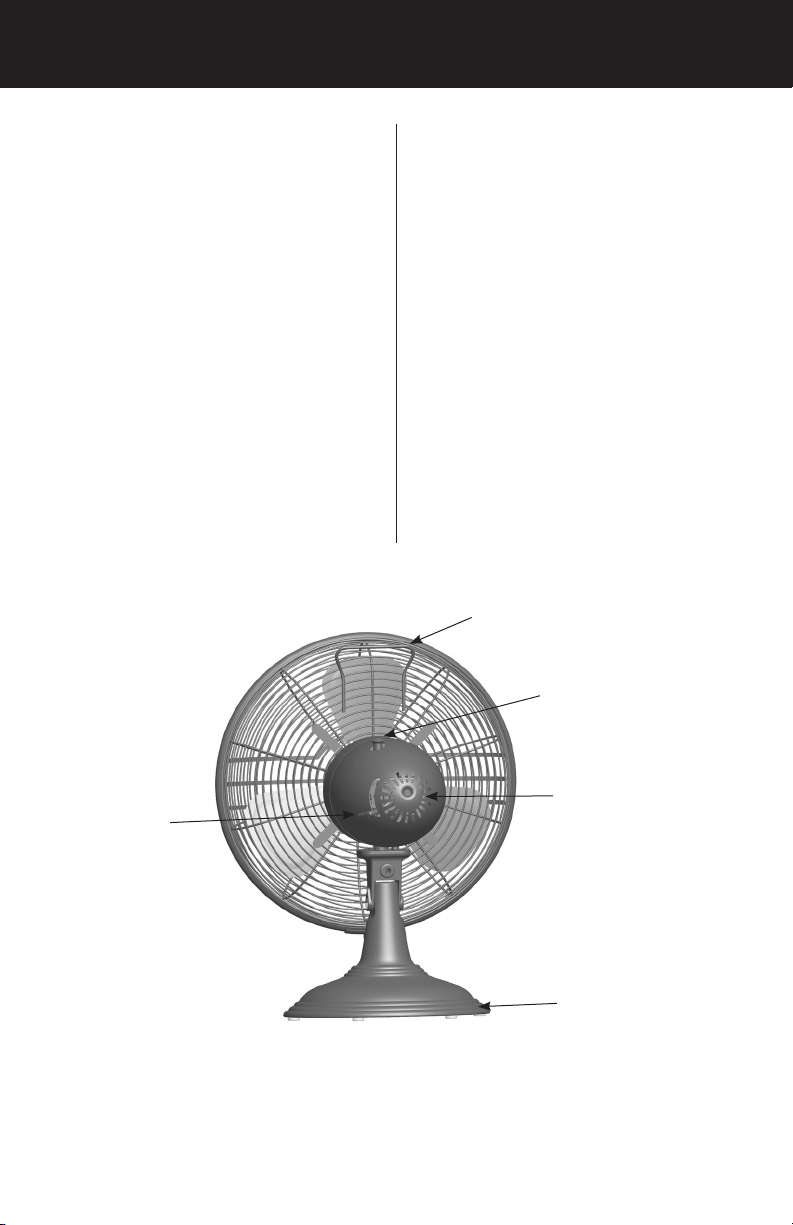
3. Turn the fan “ON” or “OFF” by
moving the power/speed lever.
The power should always be
OFF before unplugging the fan.
4. To select the speed, move the
power/speed lever from OFF to
the desired speed setting: O (off),
I (low), II (medium), III (high).
5. To make the fan oscillate, push
the oscillation knob down. To stop
oscillating, pull the oscillation
knob up. The oscillation knob
is located on the top of the fan
housing, near the handle.
Handle
Oscillation Knob
Power/Speed
Lever
Motor Housing
Base
FIGURE 6
6
Page 7
MAINTENANCE
This fan is permanently lubricated and
will not require additional lubrication (oil)
for the life of the fan.
This fan requires little maintenance
and contains no user serviceable parts.
DO NOT try to x it yourself. Contact
qualied service personnel
if servicing is needed.
TO CLEAN:
1. Before cleaning, turn fan off
and unplug from electrical
outlet. Wipe off excess dust
with a lint-free cloth.
2. To ensure adequate air
circulation to the motor, keep
vents located at the rear of
the motor housing free from
dust accumulation. A vacuum
cleaner hose can be used to
clean these vents.
3. DO NOT immerse the fan in
water or any other liquid.
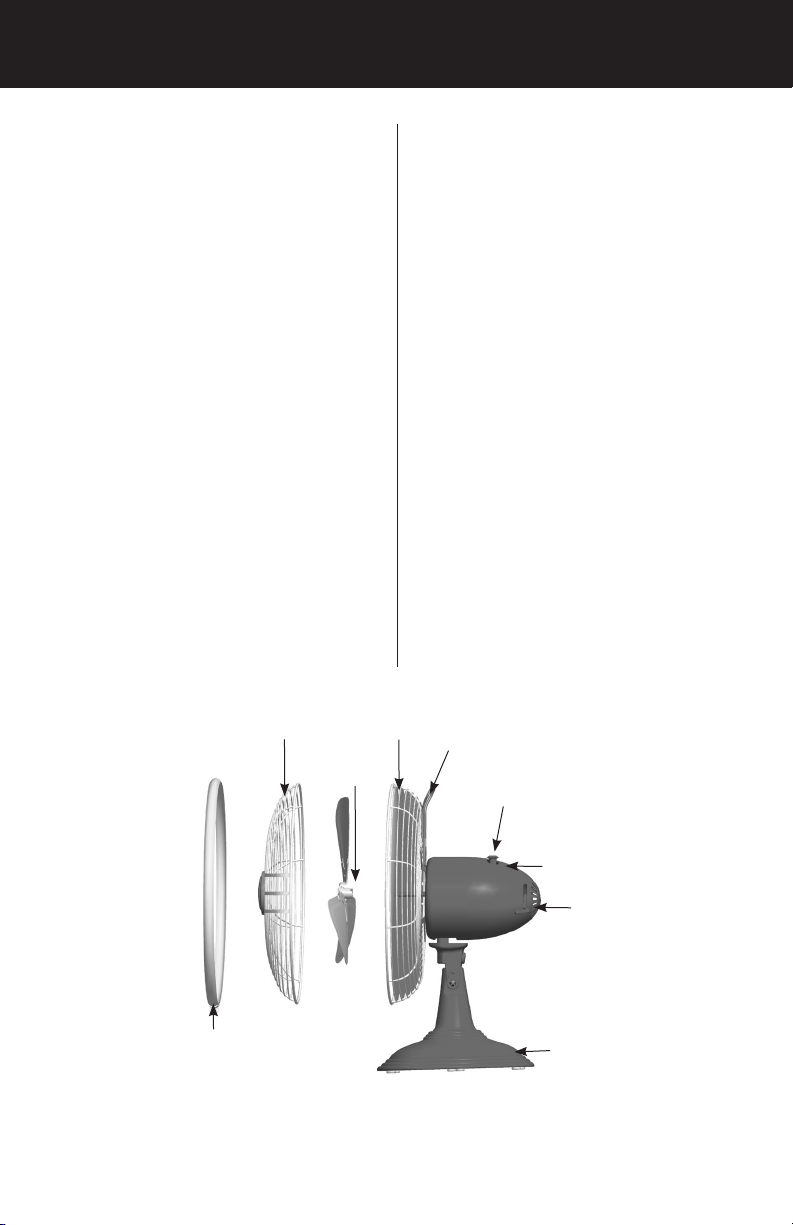
Front
Grill
Blade
Screw
CLEANING GRILL AND BLADE:
1. Turn the fan off and unplug
from the electrical outlet.
2. Disassemble grills by carefully
removing the screw on the
bottom of the ring. See Figure 4.
3. Remove the ring.
4. Use a dry or slightly damp lint
free cloth to clean the fan.
5. Use a soft, slightly damp cloth
to wipe the remaining fan parts.
6. DO NOT allow water or any
other liquid to get into the motor
housing or base.
7. Reassemble the fan after
blades and grills have dried
completely. Align the grills,
replace the ring, and replace
the screw.
8. DO NOT plug fan into an
electrical outlet until it has been
fully reassembled.
Back
Grill
Handle
Oscillation
Knob
Ring
Motor Housing
Power/Speed Lever
Base
FIGURE 7
7
Page 8

STORAGE TROUBLESHOOTING
1. Disassemble and clean fan
before storing.
2. Keep the original packaging for
the purpose of storing the fan.
3. ALWAYS store the fan in a
dry place.
4. NEVER store the fan while it is
still plugged in.
5. NEVER wrap the cord tightly
around the fan.
6. DO NOT put any stress on the
cord where it enters the fan, as
it could cause the cord to break.
PROBLEM
• Fan will not oscillate.
SOLUTION
• Push down on knob on top of motor
housing to activate oscillation.
If you have tried these troubleshooting
solutions and still have trouble, call
1-888-830-1326 (For CAN: 1-866268-1936) or visit our Web site at
http://www.HunterFan.com.
8
Page 9

WARRANTY
The Hunter Fan Company makes the
following limited warranty to the user
or consumer purchaser of this Hunter
Portable fan:
If your Hunter Portable Fan motor
fails at any time within one year after
the date of sale to you due to a defect
in material or workmanship, labor
to repair the defect will be provided
free of charge at our nearest service
center or our Service Department
in Memphis, Tennessee. You will
be responsible for labor costs after
this one-year period. The foregoing
limited warranty applies only to the
motor itself, and does not apply to
electronic controls such as remote
controls, remote control receivers or
transmitters used in conjunction with
the motor. These electronic control
items are included in the one year
limited warranty below.
If any part of your Hunter Portable
Fan other than the motor fails at any
time with one year after the date of
sale to you due to a defect in material
or workmanship, we will repair or, at
our option, replace the defective part
free of charge for parts and labor
performed at our nearest service
center or at our Service Department
in Memphis, Tennessee.
IF THE USER OR CONSUMER
PURCHASER CEASES TO OWN THE
FAN, THIS WARRANTY AND ANY
IMPLIED WARRANTY WHICH THEN
REMAINS IN EFFECT, INCLUDING
BUT NOT LIMITED TO ANY IMPLIED
WARRANTY OF MERCHANTABILITY
OR FITNESS FOR A PARTICULAR
PURPOSE, ARE VOIDED. NO
WARRANTY, EXPRESSED OR IMPLIED,
INCLUDING ANY WARRANTY OF
MERCHANTABILITY OR FITNESS FOR
A PARTICULAR PURPOSE, IS MADE
IN RESPECT TO THE GLASS GLOBES
OR LIGHT BULBS OR THE FINISH
ON ANY METAL PORTION OF THE
FAN. THIS WARRANTY IS IN LIEU OF
ALL OTHER EXPRESS WARRANTIES.
THE DURATION OF ANY IMPLIED
WARRANTY, INCLUDING, BUT
NOT LIMITED TO ANY IMPLIED
WARRANTY OF MERCHANTABILITY
OR FITNESS FOR A PARTICULAR
PURPOSE, IN RESPECT TO ANY
HUNTER FAN MOTOR OR OTHER
FAN PART, IS EXPRESSLY LIMITED
TO THE PERIOD OF THE EXPRESS
WARRANTY SET FORTH ABOVE FOR
SUCH MOTORS AND OTHER PARTS.
This warranty is voided if your
Hunter Fan is not purchased and
used in the USA.
This warranty excludes and does
not cover defects, malfunctions or
failures of any Hunter Portable fan
which were caused by repairs by
persons not authorized by us, use of
parts or accessories not authorized
by us, mishandling, improper
installation, modifications, or
damage to the Hunter Portable
fan while in your possession,
or unreasonable use, including
failure to provide reasonable and
necessary maintenance.
To obtain servicing, contact the
nearest Hunter authorized service
center or the Hunter Fan Company
9
Page 10

Service Department, 7130 Goodlett
Farms Pkwy. Suite 400, Memphis,
Tennessee 38016. Please contact us
before shipping your fan to us. If we
authorize you to ship it to us, you
will be responsible for all insurance
and freight or other transportation
charges to our factory service
center. We will return your Hunter
Fan freight prepaid. Your portable
fan should be properly packed
to avoid damage in transit since
we will not be responsible for any
such damage. Proof of purchase is
required when requesting warranty
service. The purchaser must present
sales receipt or other document that
establishes proof of purchase.
IN NO EVENT SHALL HUNTER
FAN COMPANY BE LIABLE
FOR CONSEQUENTIAL OR
INCIDENTAL DAMAGES.
SOME STATES DO NOT ALLOW
LIMITATIONS ON HOW LONG
AN IMPLIED WARRANTY
LASTS OR THE EXCLUSION OR
LIMITATION OF INCIDENTAL OR
CONSEQUENTIAL DAMAGES
SO THE ABOVE LIMITATION MAY
NOT APPLY TO YOU.
THE WARRANTY GIVES YOU
SPECIFIC LEGAL RIGHTS AND
YOU MAY ALSO HAVE OTHER
RIGHTS WHICH VARY FROM
STATE TO STATE.
Fan Company
7130 Goodlett Farms Pkwy., Suite 400
Memphis, Tennessee 38016
Impreso en China y Taiwán
10
 Loading...