

Page 1

Plus
Air Purifier
ENGLISH
See page 1
FRANÇAIS
Voir page 17
Models 30785 & 37785
Replacement Filter Information
Model
37785
42937-01 07/27/2007 © 2007 Hunter Fan Company
Carbon Odor Filter
30901
www.hunterfan.com
QuietFlo® Filter
30943
Page 2

Table of Contents
Safety Instructions ....................................................................................... 3
Introduction ................................................................................................. 3
Description of Air Filtration System
How the Air Purier Works .................................................................. 4
Air Purier Components ...................................................................... 4
Display and Control Keys .................................................................... 5
Operation
Initial Operation ................................................................................... 6
Locking/Unlocking the Keypad ............................................................ 8
Filter Life Counters .............................................................................. 9
Resetting the Air Purier ..................................................................... 9
Air Purier Maintenance
Cleaning Your Air Purier .................................................................. 10
Cleaning the Pre-Filters & Changing the Carbon Odor Filter ............ 10
Changing the QuietFlo® Main Filter ...................................................11
Obtaining Replacement Filters .......................................................... 12
Troubleshooting
Problem and Solutions ...................................................................... 13
Technical Support ............................................................................. 13
Warranty Information ................................................................................. 14
42937-01 2
Page 3

SAFETY INSTRUCTIONS
IMPORTANT!
READ ALL INSTRUCTIONS BEFORE USING THIS Air Purier.
1. This Air Purier is designed for use on a at level oor and may not work properly on
an uneven oor. ALWAYS place the Air Purier on a rm level oor. ALWAYS place the
Air Purier at least six (6) inches away from walls and heat sources such as stoves,
radiators, or heaters.
2. Place the Air Purier in an area that is out of the reach of children.
3. Before using the Air Purier, extend the cord and inspect for any signs of damage.
DO NOT use the product if the cord has been damaged.
4. This product has a polarized plug (one blade is wider than the other) as a safety
feature. This plug will t into a polarized outlet only one way. If the plug does not t
fully into the outlet, reverse the plug. If the plug still does not t, contact a qualied
electrician. DO NOT attempt to defeat or override this safety feature.
5. ALWAYS UNPLUG the Air Purier while it is being cleaned.
6. DO NOT move or tilt the Air Purier while it is in operation. Turn off and unplug before
moving.
7. DO NOT immerse the Air Purier in water at any time because permanent damage
will occur. To properly clean your Air Purier, follow the instructions in the Maintenance
section of this manual (pg. 10).
READ AND SAVE THESE INSTRUCTIONS.
Introduction
Thank you for purchasing the QuietFlo® Plus Air Purier from Hunter Fan Company. You
have purchased our latest development in portable air purication which has been designed
to improve the quality of the air that you breathe. The following innovative features are
included in your Hunter Air Purier.
• High Particulate Efciency: The QuietFlo® lter will remove 99.97% of 0.3 micron
particles from the air that passes through the lter.
• Odor Removal: The activated carbon lter helps remove odors such as cooking, smoke,
and pet smells from the air.
• Quiet: The Air Purier has been designed to operate quietly and efciently. You can
choose among three speeds to best meet your needs at different times.
• Filter Counters: Filter maintenance is critical to the performance of the Air Purier. To
help you determine when to change the carbon lter, the pre-lters and QuietFlo® lter,
the unit has built in life counters that keep track of the life remaining of each lter.
3 42937-01
Page 4
Description of Air Filtration System
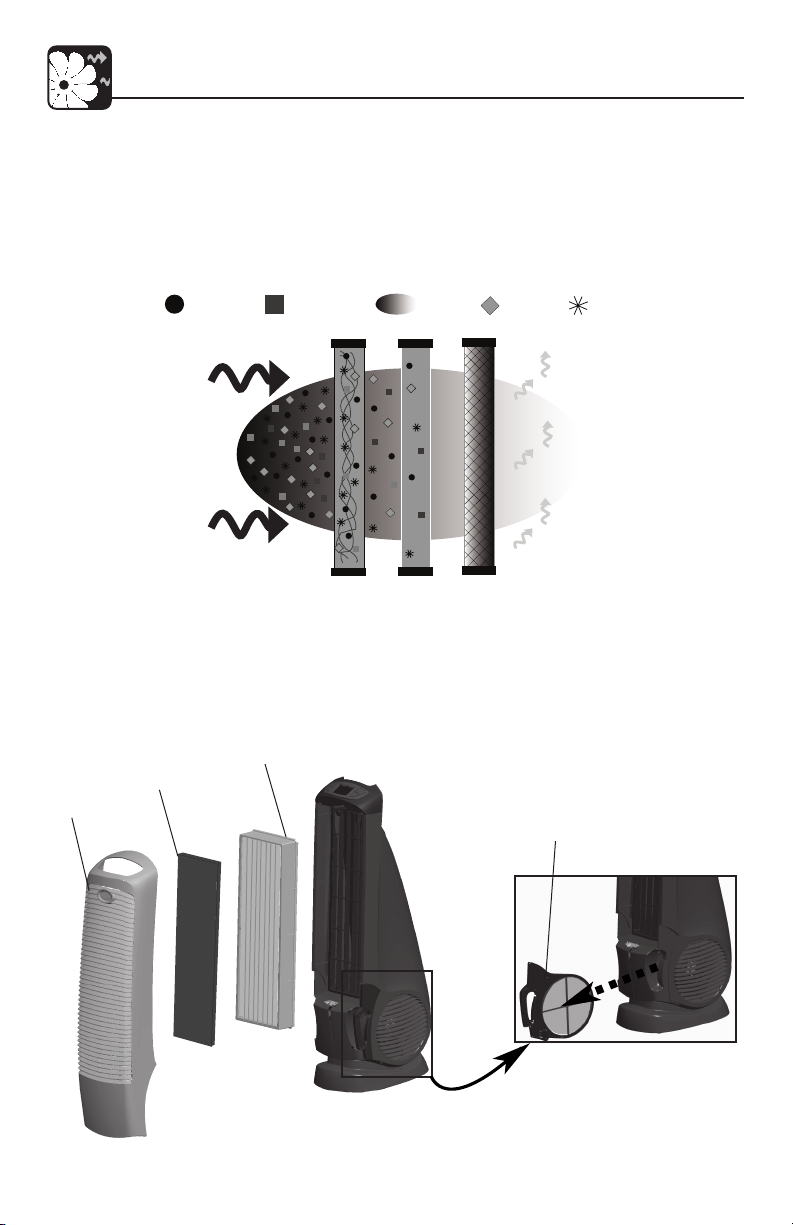
How the QuietFlo® Plus Air Purier System Works
As the air is pulled into the Air Purier, the Pre-Filters capture large particles. Then,
the air travels through the QuietFlo® Main Filter where the smaller particles are collected. Odors are removed as the air passes through the Carbon Odor Filter. Finally,
the clean, puried air is released back into the room.
Dust & Irritants
Fig. 1 - Illustration of the Air Filtration System
Air Purier Components
QuietFlo® MAIN
FILTER
FRONT
GRILL
CARBON ODOR
FILTER
Pollen & Allergens Odors Bacteria Pet Hair & Dander
Pre-Filter
QuietFlo®
99.97% – .1 Microns
Filter
Carbon
Odor Filter
PRE-FILTER
(ONE ON EACH SIDE)
Fig. 2 - Air Purier Components
42937-01 4
Page 5

Description of Air Filtration System
Display and Control Keys
The display and control keys allow for easy operation of the Air Purier.
FAN SPEED CONTROL: Sets the fan speed.
PRE-FILTERS & CARBON ODOR FILTER RESET: Resets the Pre-Filter
and Carbon Filter Life Counter.
QuietFlo
®
MAIN FILTER RESET: Resets the QuietFlo
®
Main Filter Life
Counter.
ON / OFF KEY: Turns the fan on and off. NOTE: The ON / OFF key oper-
ates the fan ONLY. The LCD Display will remain on even when the fan is
off.
5 42937-01
Page 6
Operation
Initial Operation
This section provides basic instructions on the use of your Air Purier. After following
these initial directions, please continue reading this booklet to learn how to operate
the more advanced features of your Air Purier.
Basic Operation of the Air Purier:
1. Take the Air Purier out of the box and remove the clear plastic protective bag. Place the unit on a rm level oor.
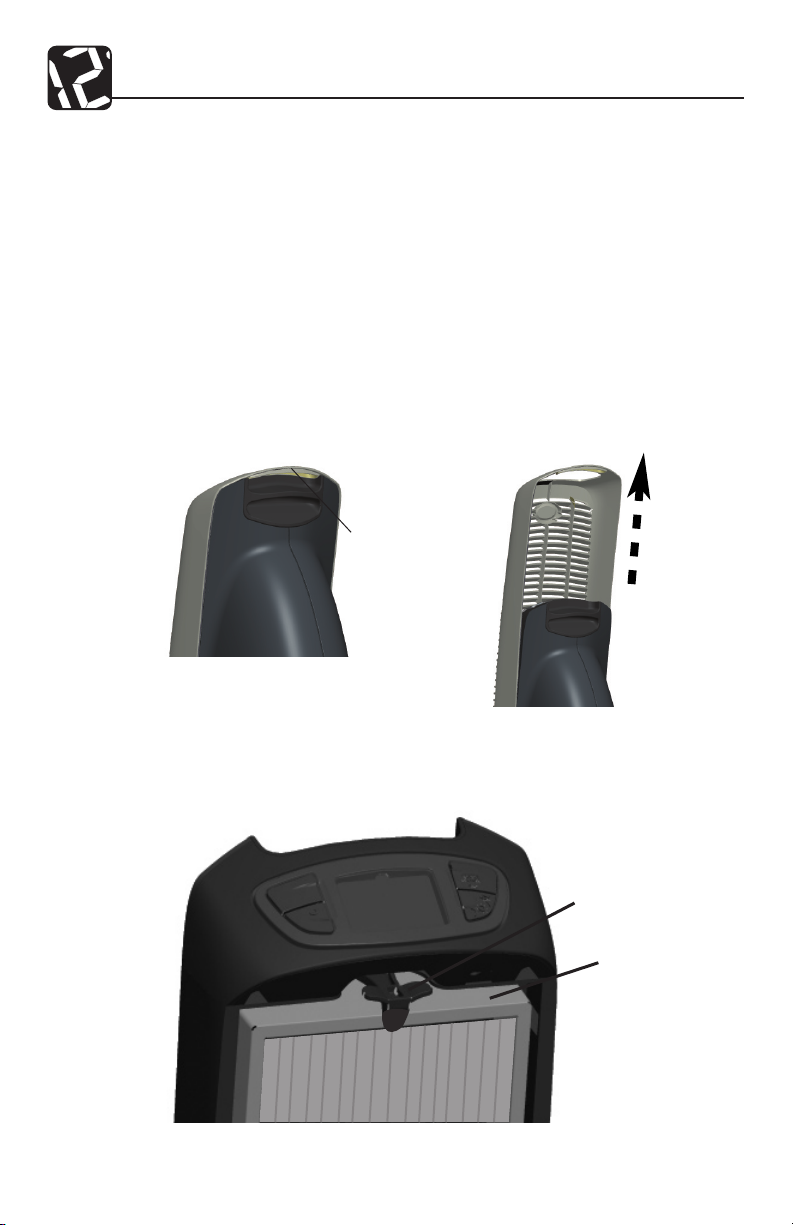
2. Before turning on the Air Purier, you need to conrm that the QuietFlo
®
Main Filter is rmly in place and has not become loose during shipping.
To check the lter, remove the front grill by placing your ngers under
the grill release handle and pulling the handle up. Refer to Figs. 4 and
5.
GRILL RELEASE
HANDLE
Fig. 4
Fig. 5
3. Inspect the lter to ensure the bottom of the lter is secure and the top
of the lter is behind the lter tab. Refer to Fig. 6.
FILTER TAB
Fig. 6
42937-01 6
FILTER
Page 7
Operation
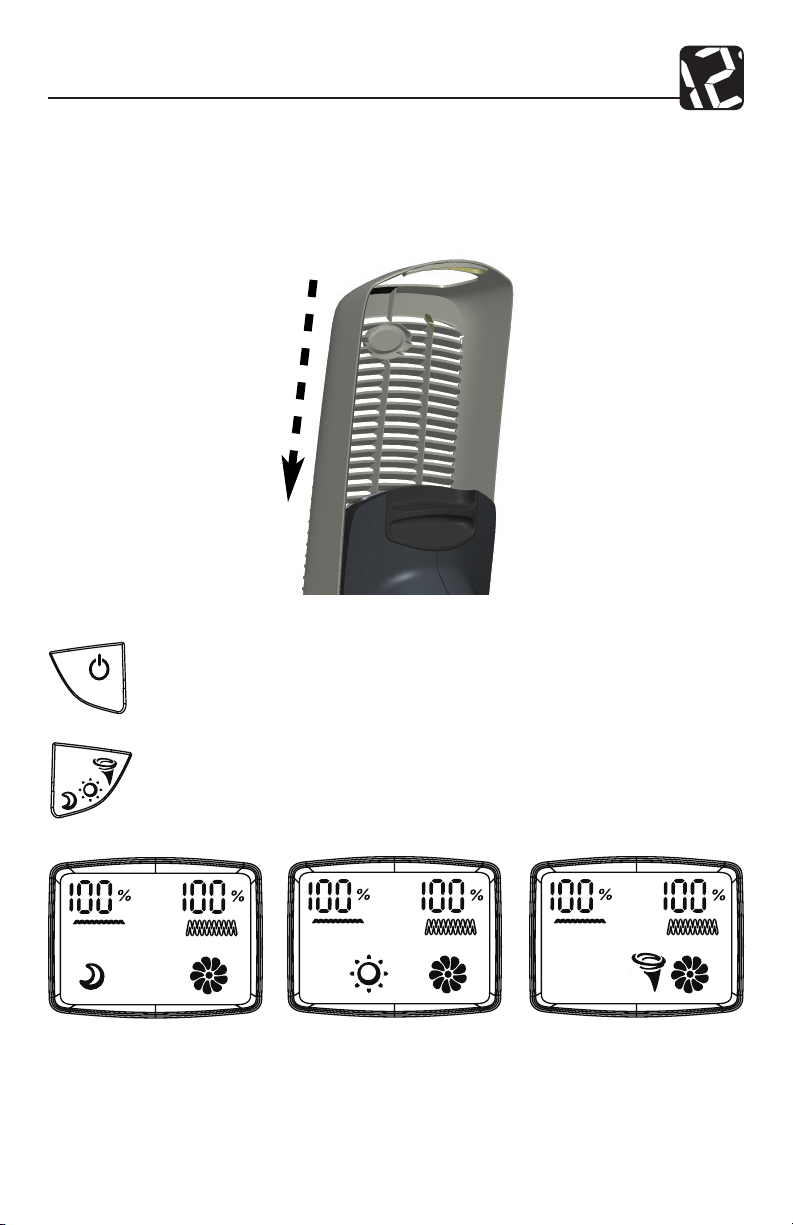
4. If the lter is secure, place the front grill back onto the unit. Place the grill
over the front of the Air Purier and lower it into position. Refer to Fig. 7.
NOTE: This unit will not operate unless the grill is in the correct position.
If the lter is not secure, refer to the section Changing the QuietFlo®
Main Filter (pg. 14).
Fig. 7
5. Plug the unit into a 120V electrical outlet and press the ON/OFF Key.
The fan will begin to blow air from the front of the unit.
6. Use the FAN SPEED CONTROL Key to set the fan speed. Refer to
Fig. 8.
SLEEP (SLOW) ACTIVE (MEDIUM) TURBO CLEAN
Fig. 8
7 42937-01
(FAST)
Page 8
Operation
Locking/Unlocking the Keypad
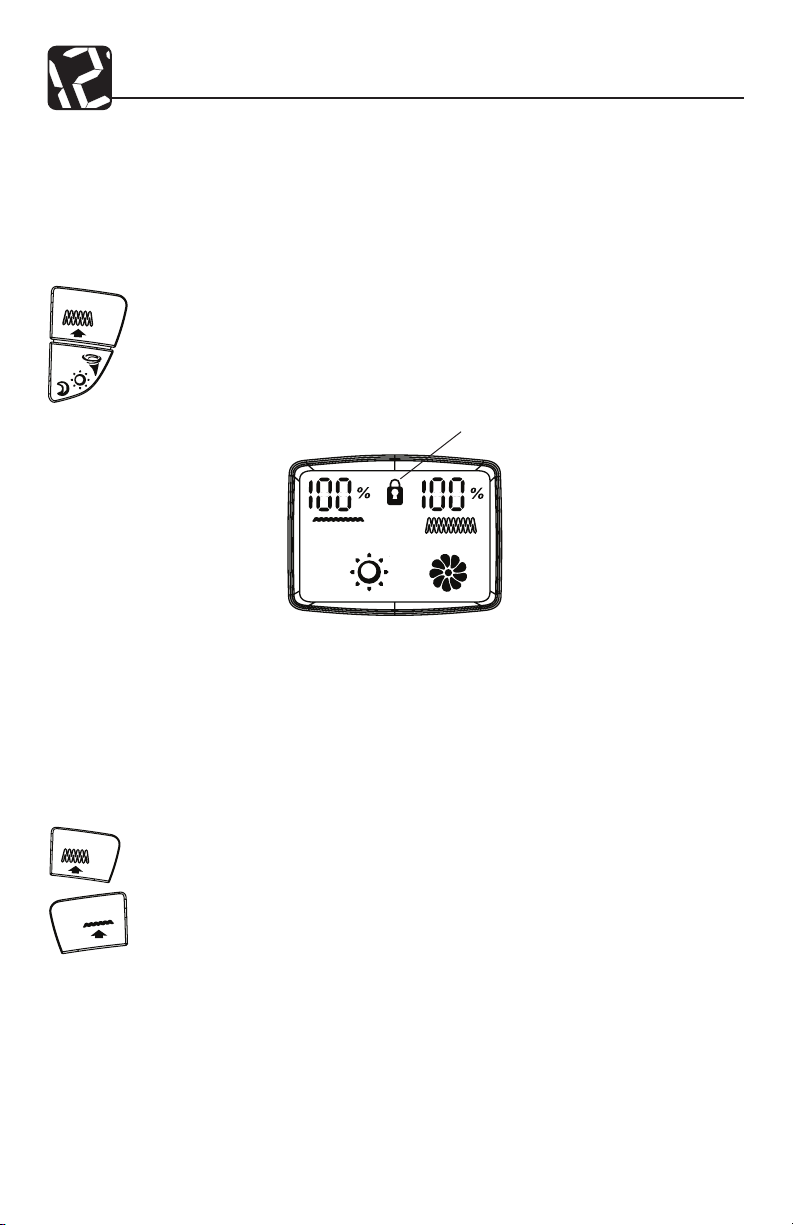
Once you enter the desired speed, you may want to lock the keypad to prevent accidental changing of the speed. When the keypad is locked, all keys will be disabled.
If you press a key, the Keypad Locked Indicator will be displayed on the screen for
1-2 seconds.
1. To lock the keypad, press and hold the QuietFlo® Main Filter Reset key
and the Fan Speed Control key simultaneously for 2-3 seconds. The
Keypad Locked Icon will appear on the display. Refer to Fig. 9. After
releasing the keys, the Keypad Locked Icon will disappear.
KEYPAD
LOCK ICON
Fig. 9
2. To unlock the key pad, press and hold the QuietFlo® Main Filter Reset
key and the Fan Speed Control key simultaneously for 2-3 seconds. The
Keypad Locked Icon will disappear and the keypad will be functional.
Using the LCD Backlight
1. To turn on the LCD Backlight, press and hold the Pre-Filter and the
Main Filter keys for 3 seconds. To turn the LCD Backlight off, repeat the
process.
42937-01 8
Page 9

Operation
Filter Life Counters
The Pre-Filters, Carbon Odor Filter, and QuietFlo® Main Filter are critical to the proper
operation of the Air Purier. To help you know when to clean and change the lters,
your Hunter Air Purier has Filter Life Counters that will monitor the life of your lter.
Although the exact life of the lters depends on the environment, the table below
gives typical usage times of the lters.
Table 1: Typical Usage Times of the Filters
Pre-Filter / Carbon Odor Filter
When the Pre-Filters & Carbon Odor Filter Life Counter reaches 0%, clean the Pre-
Filters and change the Carbon Odor Filter. Replace the QuietFlo® Main Filter when
the QuietFlo® Main Filter Life Counter reaches 0%.
The values of the Filter Life Counters are stored in the Air Purier’s memory. The
unit may be unplugged and moved or stored without losing the Pre-Filter and Filter
Counter values.
To properly track lter life, reset the Filter Life Counters each time the lters are
changed or cleaned. Refer to Pre-Filters & Carbon Odor Filter (pg. 10) or Chang-
ing the QuietFlo® Main Filter (pg. 11) sections for instructions on how to reset the
counters.
Filter Type
QuietFlo
®
Main Filter
Typical Usage
8000 hours
2000 Hours
Resetting the Air Purier
In the unusual situation that the unit or the display is exhibiting erratic behavior, you
may want to reset the Air Purier. If you still have problems after resetting the Air
Purier, please contact Hunter for additional assistance (refer to Technical Support,
pg. 14).
To Reset the Air Purier:
1. Unplug the unit for at least 30 seconds.
2. Plug the unit back in.
9 42937-01
Page 10

Cleaning Your Air Purier
Proper maintenance of your Hunter Air Purier will help ensure years of trouble free
service.
Follow these steps to properly maintain your Air Purier:
1. Approximately every 90 days, the outside of the unit should be cleaned with a
soft, damp cloth.
2. If needed, the Front Grill can be removed from the unit and cleaned with soapy
water. NOTE: Remove the Carbon Odor Filter before exposing the Front Grill to
water.
3. Follow the instructions in Cleaning the Pre-Filters and Changing the Carbon Odor
Filter (pg. 10) and Changing the QuietFlo® Main Filter (pg. 11) to determine when
and how to replace the lters.
NOTES:
• The Air Purier must be unplugged during the cleaning process.
• Be sure the unit is completely dry before plugging in and using.
• Never immerse unit in water.
Cleaning the Pre-Filters and Changing the Carbon Odor Filter
When the Pre-Filter exceeds 2000 hours (refer to Filter Life Counters for additional
information, pg. 9), the Pre-Filter indicator will turn on as a reminder that you should
clean the Pre-Filter and change the Carbon Odor Filter. To maintain proper odor-
removing capability and overall ltration performance, the Pre-lters should be cleaned
and the Carbon Odor lters replaced every 2000 hours (approximately 3 months of
use). If necessary, clean the pre-lter and change the odor lter more often. Proper
maintenance of the pre-lter will help extend the life of the QuietFlo® lter. Refer to
Obtaining Replacement Filters (pg. 13) if you need help nding replacement lters.
To clean the Pre-Filters, Change the Carbon Odor Filter, and reset the Pre-Filters &
Carbon Odor Filter Life Counter:
1. First, turn off and unplug the Air Purier.
2. Next, remove the front grill. Refer to Figs. 4 and 5 (pg. 6).
3. Remove the Pre-Filters. Refer to Fig.2, pg. 4. Use a vacuum cleaner to
remove dust from them. Then, reinsert the Pre-Filters into the Air Purier.
4. The Carbon Odor Filter is held to the back of the Front Grill with four
hook-and-pile fasteners. Peel off the old Carbon Odor Filter.
5. If needed, use a soft damp cloth to wipe off the Front Grill. Gently press
a new lter into place.
42937-01 10
Page 11
Air Purier Maintenance
6. Place the Front Grill back onto the unit.
7. Plug in the Air Purier.
8. To reset the Pre-Filters & Carbon Odor Filter Life Counter to zero, press
and hold the Pre-Filters & Carbon Odor Filter Reset Key for three sec-
onds. When the display shows 100%,, release the Key. The Counter is
now reset.
Changing the QuietFlo® Main Filter
When the QuietFlo® Main Filter Life Counter reaches 0% (approximately 10 to 12
months of use), you should replace the lter. Refer to Filter Life Counters for additional information, pg. 9. The proper time to change the lter depends on usage
and the environment. Generally, if you notice a decrease in air output or an increase
in noise at any time during normal operation, the lter may be clogged. Replace the
lter to return to normal operation.
To change the lter and reset the Filter Life Counter:
1. First, turn off and unplug the Air Purier.
2. Next, remove the Front Grill. Place your ngers under the Grill Release
Handle and pull up. Refer to Figs. 4 and 5 (pg. 6).
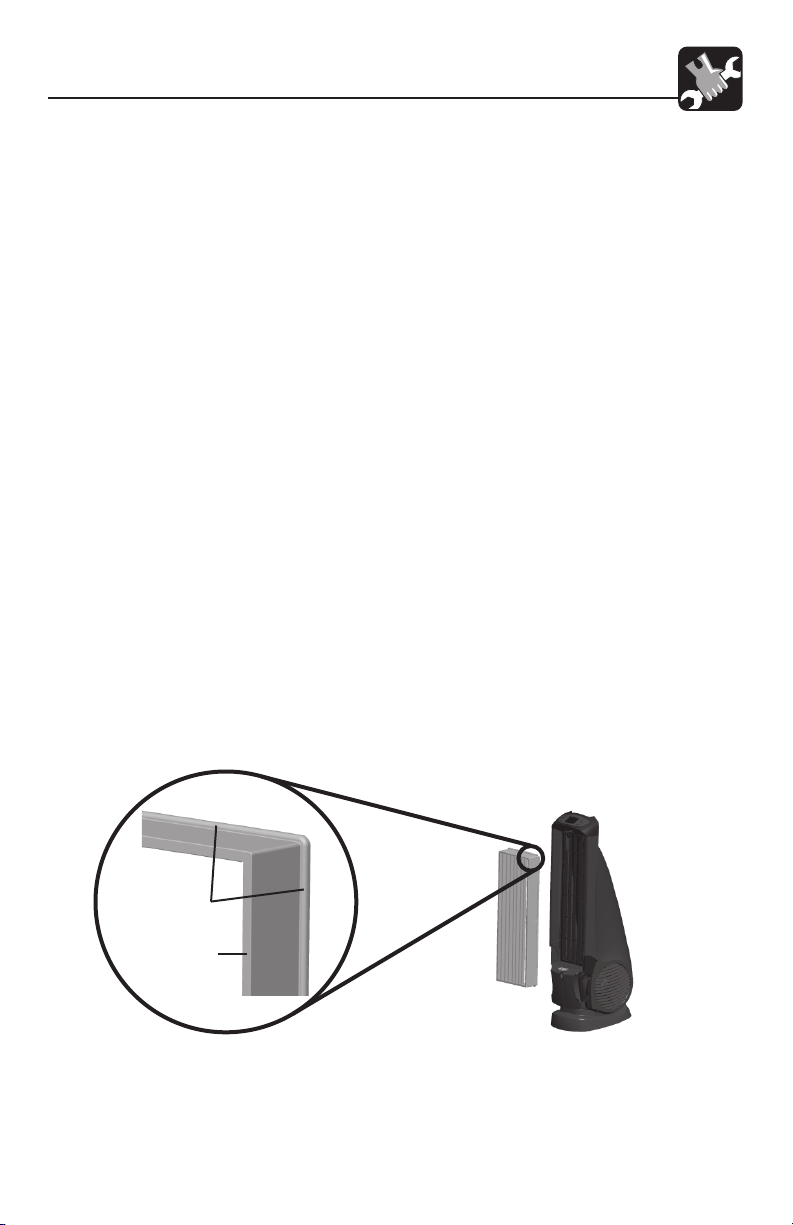
3. Lift the Filter Tab and gently pull the lter out of the unit. Refer to Fig. 6.
While removing the lter, note the lter’s orientation - the new lter will
be installed with the same orientation. Refer to Fig. 10. Once removed,
the used lter can be discarded.
4. To install a new lter, position the lter with its rim facing the unit. Refer
to Fig. 10.
FILTER RIM
FILTER FRAME
Fig. 10
11 42937-01
Page 12
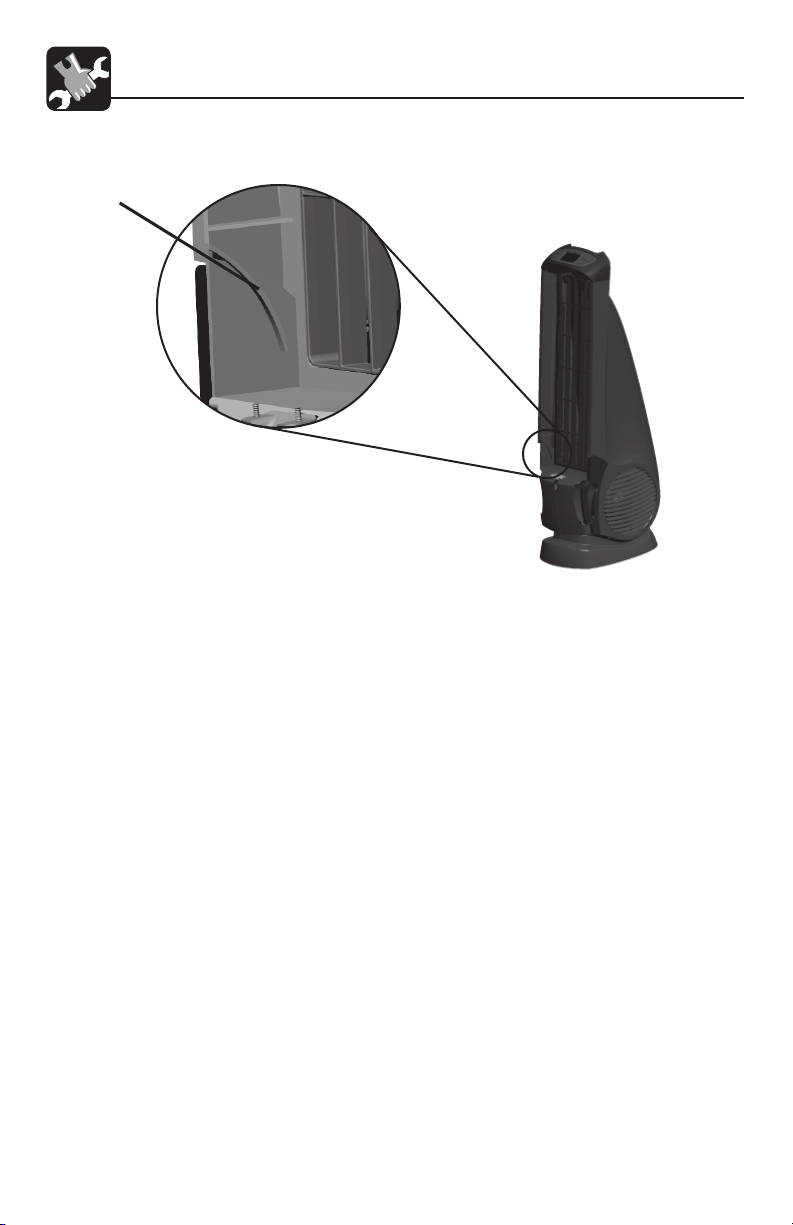
5. Place the bottom of the lter rim behind the ridges on each side of the
bottom of the unit. Refer to Fig. 11.
RIDGE
Fig. 11
6. Lift the Filter Tab and press the top of the lter into the Air Purier. To
avoid damaging the lter, you should press only on the lter’s frame.
When the new lter is in place, release the Filter Tab.
7. Place the front grill back onto the unit. Refer to Figs. 7, pg. 7. NOTE:
This unit will not operate unless the grill is in the correct position.
8. Plug the unit in and continue operating it normally.
9. To reset the QuietFlo® Main Filter Life Counter to zero, press and hold
the QuietFlo® Main Filter Life Counter Reset Key for three seconds.
When the display shows 100%, release the Key. The Counter is now
reset.
Obtaining Replacement Filters
To obtain replacement lters for your Air Purier, rst determine your model number
by looking at the information label on the bottom of the Air Purier. The model number will be listed on the label. Then, call 1-800-4HUNTER for your nearest retailer
or Hunter Customer Service at 1-800-313-3326 (CAN 1-888-855-8300) to order
directly. To order online, visit our Website at www.hunterfan.com. To ensure that
you obtain the correct lters, please nd your model number below that species
the correct replacement lters.
Hunter Air Purier Model No.: 37785
Carbon Odor Filter Replacement Model No.: 30901
HEPAtech® Filter Replacement Model No.: 30943
42937-01 12
Page 13

Problem Solutions
Troubleshooting
1. No display or operation.
2. Erratic Operation.
4. Unit has reduced air
ow or increased noise.
• Conrm that the unit is plugged in.
• Check the installation of the front grill.
• Reset the Air Purier. (See Resetting the Air Purier
on pg. 9.)
• Reset the Air Purier. (See Resetting the Air Purier
on pg. 9.)
• The lters are clogged and should be cleaned/
changed. (Refer to Cleaning the Pre-lters and
Changing the Carbon Odor Filter on pg. 10, and
QuietFlo® Main Filter on pg, 11.)
Technical Support
If you have any additional questions or problems with your Hunter Air Purier, please
call 1-888-830-1326 from 8:00 am to 5:00 pm Central Time or contact us over the
Internet at www.hunterfan.com.
13 42937-01
Page 14

Warranty
Hunter Fan Company
QuietFlo® Plus Air Purier
5 YEAR LIMITED WARRANTY
The Hunter Fan Company makes the following limited warranty to the original resi-
dential user or consumer purchaser of the QuietFlo® Plus Air Purier:
If any part of your QuietFlo® Plus Air Purier motor or control panel fails during the
rst ve (5) years from the date of installation due to a defect in material or workmanship, we will provide a replacement Air Purier free of charge. Installation is deemed
to occur at the date of purchase.
If the Air Purier cord or front grill fails any time within one (1) year after installation
due to a defect in material or workmanship, we will replace or, at our option, repair
the unit free of charge at our nearest service center or at our Service Department in
Memphis, Tennessee. You will be responsible for all parts and labor costs after this
one-year period.
USE OF A NON-HUNTER FILTER WILL INVALIDATE THIS WARRANTY. IF THE
ORIGINAL RESIDENTIAL USER OR CONSUMER PURCHASER CEASES TO OWN
THE Air Purier, THIS WARRANTY AND ANY IMPLIED WARRANTY WHICH THEN
REMAINS IN EFFECT, INCLUDING BUT NOT LIMITED TO ANY IMPLIED WARRANTY OF MERCHANTABILITY OR FITNESS FOR A PARTICULAR PURPOSE,
ARE VOIDED.
NO WARRANTY, EXPRESSED OR IMPLIED, INCLUDING ANY WARRANTY OF
MERCHANTABILITY OR FITNESS FOR A PARTICULAR PURPOSE, IS MADE IN
RESPECT TO THE FILTER MATERIAL OR CARBON FILTER.
THIS WARRANTY IS IN LIEU OF ALL OTHER EXPRESS WARRANTIES. THE DURATION OF ANY IMPLIED WARRANTY INCLUDING BUT NOT LIMITED TO ANY
IMPLIED WARRANTY OF MERCHANTABILITY OR FITNESS FOR A PARTICULAR
PURPOSE, IN RESPECT TO THE MOTOR IS EXPRESSLY LIMITED TO THE PERIOD OF THE EXPRESS WARRANTY SET FORTH ABOVE.
This warranty is voided if the Air Purier is not purchased and used in the USA or
Canada.
This warranty excludes and does not cover defects, malfunctions or failures of the Air
Purier which were caused by repairs by persons not authorized by us, use of parts
or accessories not authorized by us, mishandling, modications, or damage to the
Air Purier while in your possession, or unreasonable use, including failure to provide
reasonable and necessary maintenance. This warranty does not cover Air Puriers
used in commercial applications. There are no express or implied warranties as to
commercial purchasers or users.
To obtain service, contact the Hunter Fan Company Service Department, 2500 Frisco
42937-01 14
Page 15

Warranty
Avenue, Memphis, Tennessee 38114, 1-888-830-1326. You will be responsible for
insurance and freight or other transportation to our factory service center. We will
return the Air Purier freight prepaid. The Air Purier should be properly packaged
to avoid damage in transit since we will not be responsible for any such damage.
Proof of purchase is required when requesting warranty service. The purchaser must
present sales receipt or other document that establishes proof of purchase.
IN NO EVENT SHALL HUNTER FAN COMPANY BE LIABLE FOR DIRECT, INDIRECT, SPECIAL CONSEQUENTIAL OR INCIDENTAL DAMAGES IN EXCESS
OF THE PURCHASE PRICE OF THE Air Purier. YOUR SOLE REMEDY WILL BE
REPAIR OR REPLACEMENT AS PROVIDED ABOVE.
SOME AMERICAN STATES AND CANADIAN PROVINCES DO NOT ALLOW:
• LIMITATIONS ON HOW LONG AN IMPLIED WARRANTY LASTS;
• THE EXCLUSION OR LIMITATION OF DIRECT, INDIRECT SPECIAL, INCIDENTAL OR CONSEQUENTIAL DAMAGES;
SO THE ABOVE LIMITATIONS MAY NOT APPLY TO YOU.
THIS WARRANTY GIVES YOU SPECIFIC LEGAL RIGHTS AND YOU MAY ALSO
HAVE OTHER RIGHTS WHICH VARY FROM STATE TO STATE OR PROVINCE
TO PROVINCE.
15 42937-01
Page 16
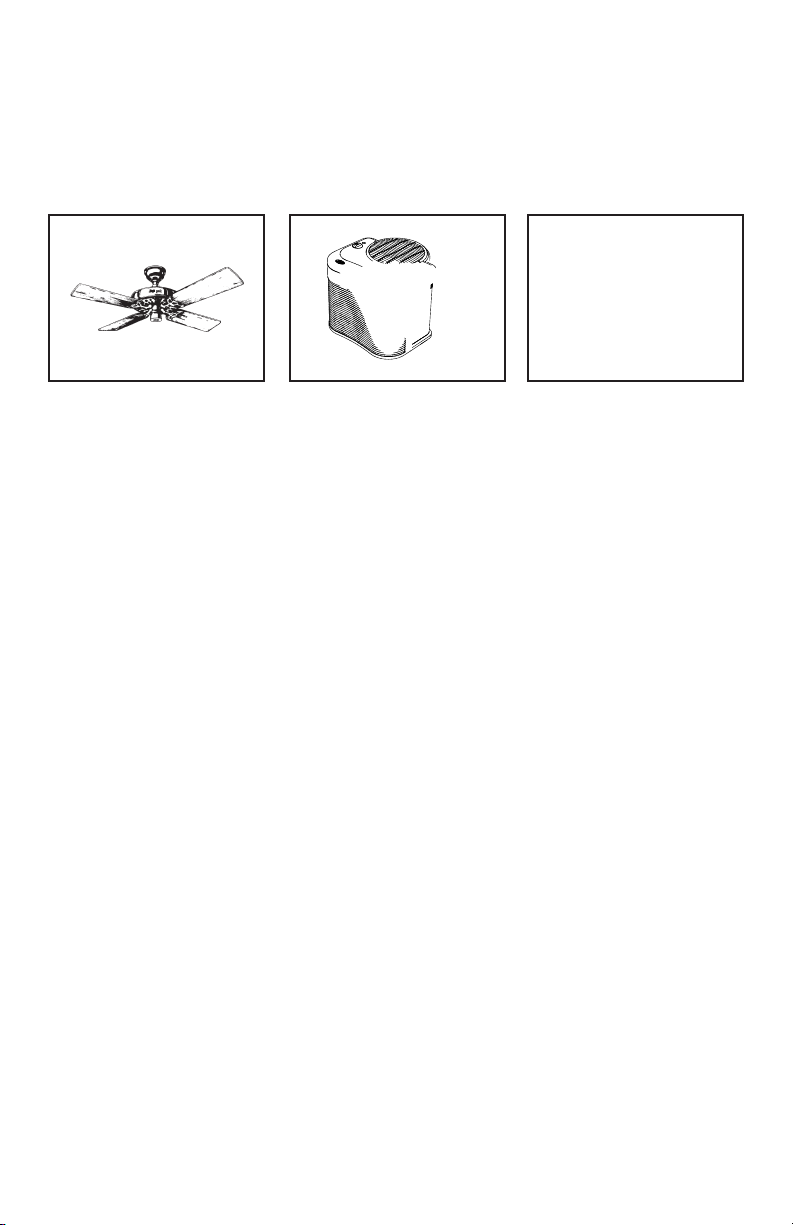
Other Home Comfort Products from Hunter
The Care-Free
Humidier
To learn more about Hunter Fan Company products, please see our Web page at:
™
Programmable
Thermostat
www.hunterfan.com
 Loading...