

Page 1
www.hunterfan.com
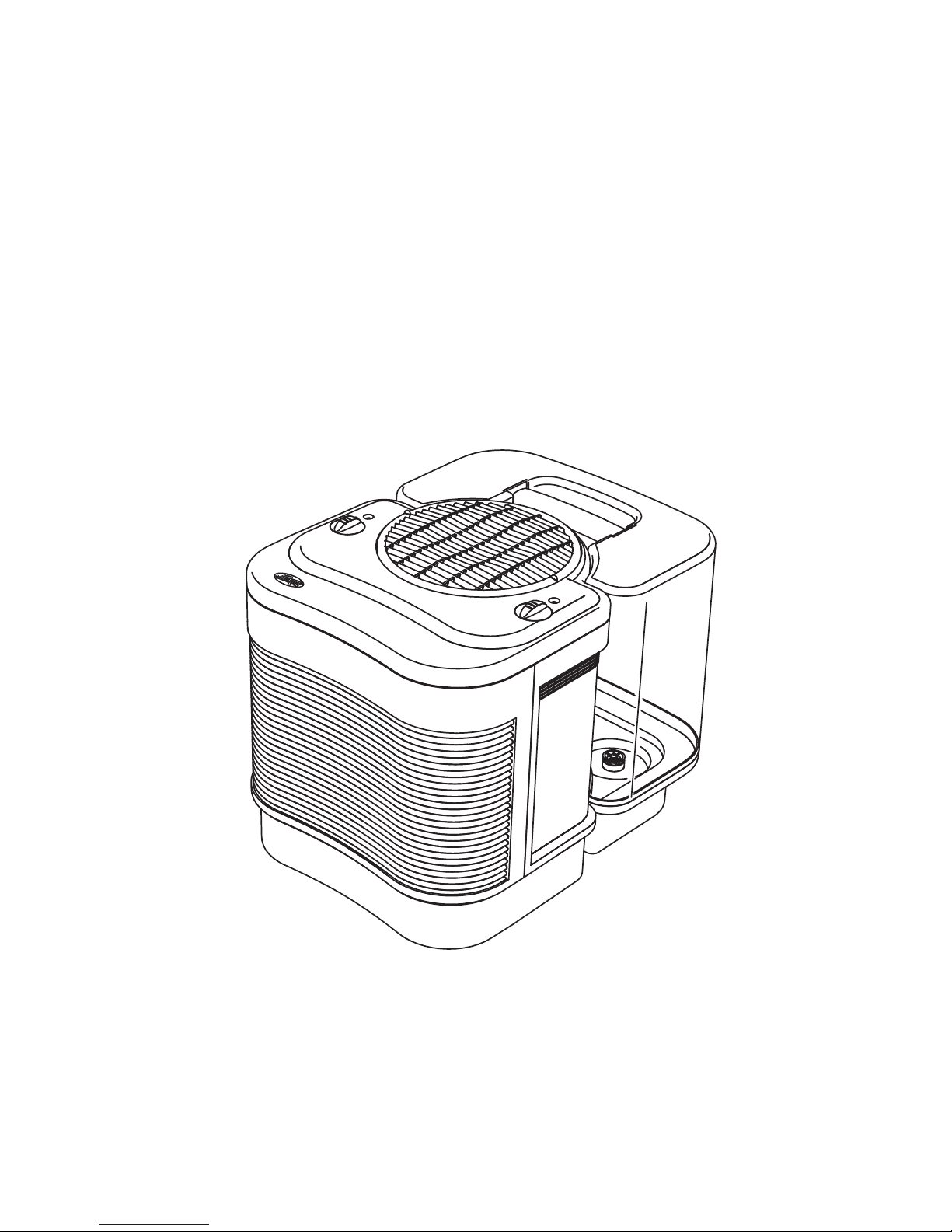
T he C are Free
Æ
H umidifier Plus
Evaporative H umidifier
41554-01 7/12/2002 1 © 2002 HUNTER FAN CO.
Features (Vary By M odel) :
N iteGloô N ight L ight
A djustable H umidistat
A utomatic Shut-O ff
Page 2

41554-01 7/12/2002 8 © 2002 HUNTER FAN CO.
C leaning T he H umidifier A nd T he Water Tank
R efilling T he W ater Tank
1. When the water tank level is low, turn the
humidifier ëOFFí, and unplug.
2. Remove the tank and take it to the sink or
tub to refill.
3. Turn the tank upside down and unscrew the
tank cap by turning it counterclockwise.
Empty the tank, refill with fresh cool water
(never use hot water), and replace the tank
cap. Be sure not to overfill the tank as water
damage may occur to furniture or flooring
due to spillage.
HUNTER W ILL NOT ACC EPT RESPONSIBILITY FOR DAMAG E TO PROPERTY C AUSED
BY WATER SPILLAGE.
4. Carry the tank back to the humidifier. Turn
the tank upright and place it on the humidifier. Be sure that the tank is seated
properly in the base. If the tank is properly
located on the base, you will see air bubbles
flowing up into the tank.
Many regions have hard water with high
concentrations of minerals. W hen water
evaporates from The C are Free
Æ
Humidifier Plus
Evaporative Humidifier, minerals may be left
behind. These minerals can form a hard white
scale which can be removed by following the
cleaning instructions. The frequency of
cleaning due to mineral build up can vary
depending upon the quality of water you
may have.
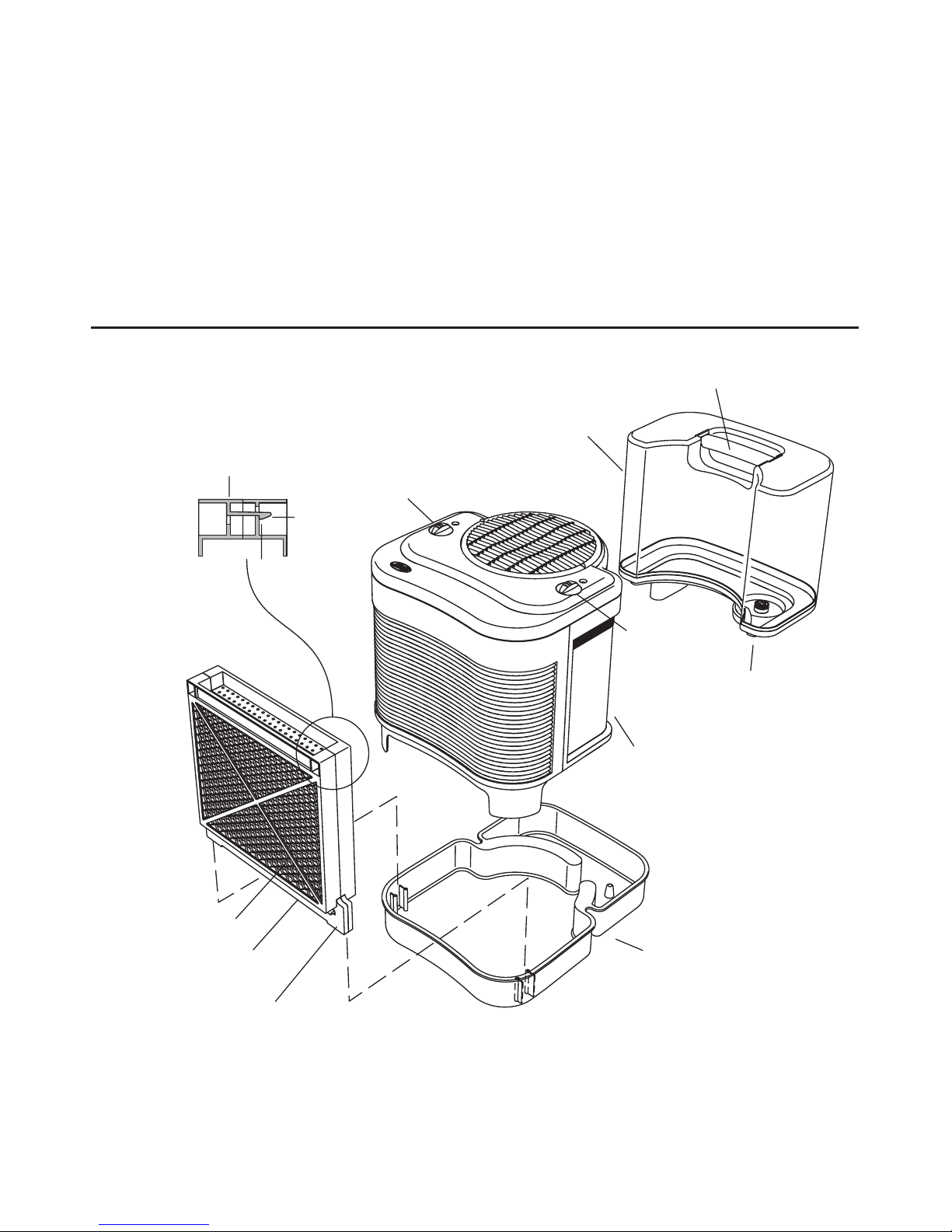
Refer to Figure 1 for part names.
1. Turn the humidifier ëOFFí and unplug the
unit.
2. Lift the main housing and remove the water dispersion tray and the PermaWickô
Filters. T he motor is at ta ched to the ma in
housing. Do not place the motor near
w ater. Do not use a w et tow el on the
motor or motor housing as electrical
sh ock ma y occur.
3. The PermaW ickô Filter should be cleaned
in a vinegar and water solution to remove
any mineral buildup. Place in a solution of
one (1) gallon of water and eight (8) ounces
of undiluted white vinegar. Allow the filter
to soak for 20 minutes.
4. After soaking, rinse it several times with
clean water. Place the PermaW ickô Filter
in a location where it can drip dry while
you clean the other parts of your humidifier.
5. Remove the water tank from the base and
empty any water that is left in the tank.
Soak the base in a mixture of one (1) gallon of water and eight (8) ounces of vinegar for 20 minutes.
6. After soaking, wipe the base with a soft
cloth or sponge to remove any mineral
build up. Rinse with clean water several
times. If you are planning on storing the
humidifier, be sure the base is completely dry.
7. Fill the water tank with one (1) gallon of
water and eight ounces of undiluted white
vinegar. Replace the tank cap and shake
the tank vigorously until all interior surfaces of the tank have been exposed to the
water/vinegar mixture.
8. Empty the tank of the water/vinegar mixture. Rinse it several times with clean water
and then replace the tank cap. If you are
planning on storing the humidifier, dry it
inside and out, leaving the cap off to allow
the tank to completely dry. Continue to
clean the other parts of your humidifier.
9. Remove the water diffuser cap and sponge.
Rinse the sponge in clean water to remove
any debris. If the sponge contains hard
Page 3
41554-01 7/12/2002 4 © 2002 HUNTER FAN CO.
H umidifier Features
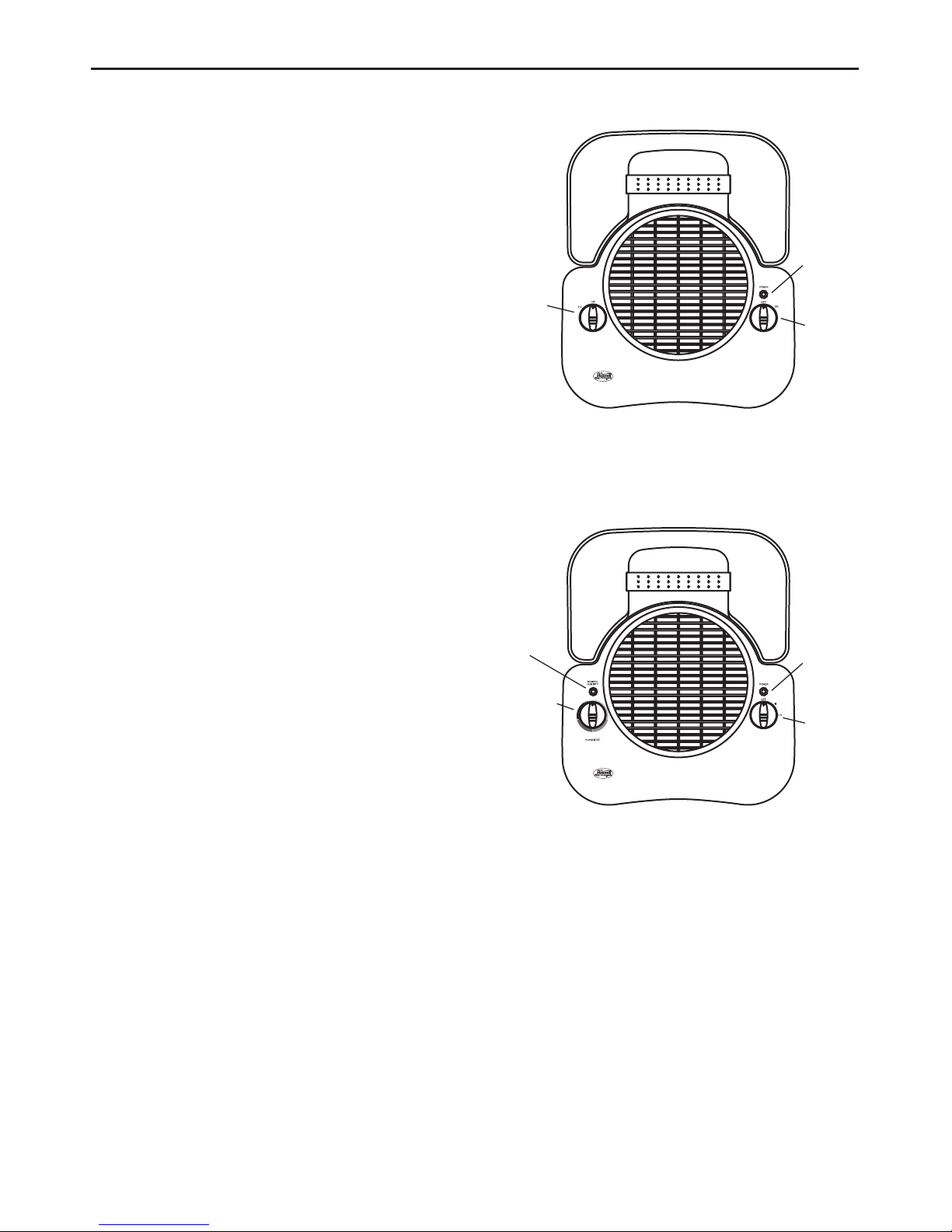
For Models 33200A & 37200A
Speed
Control
Power
Control
Power
Light
Figure 2
Fan Pow er: Turns the humidifier ëONí and
ëOFFí. The power should always be off before
unplugging the humidifier, moving the
humidifier, or refilling the water tank.
Speed Control: Enables you to choose ëHIí or
ëLOí speed.
Pow er Light: The light will be illuminated
when the power is on.
Adjustable
Humidistat
Power/
Speed
Control
Power
Light
Desired
Humidity
Light
For Models 33250A , 33280A , 34331 & 37250A
Adjustable Humidistat: Enables you to set a
desired maximum humidity level. Once this
level is reached, the unit will shut off until the
humidity level drops.
Note: The humidifier may not be running
because the humidistat setting may need to
be adjusted.
Desired Humidity Light: The green light will
be illuminated when the humidity in the room
has reached the level that you selected with
the adjustable humidistat knob.
Pow er/Speed Control: Turns the humidifier
ëONí and ëOFFí. The power should always be
off before unplugging the humidifier, moving
the humidifier, or refilling the water tank.
Pow er Light: The light will be illuminated
when the power is on.
Figure 3
Page 4

41554-01 7/12/2002 7 © 2002 HUNTER FAN CO.
1. Remove The C are FreeÆ Humidifier Plus
Evaporative Humidifier from its packaging.
Read and Save the Instructions.
2. Place the humidifier on a hard, flat, water
resistant surface. Always place the humidifier at least six (6) inches away from walls and
sources of heat.
3. Lift the main housing to confirm that the
PermaWickô filters are placed upright in the
slots. Replace the main housing. (See Figure 1 .)
4. Remove the water tank and take it to the
sink or tub to fill.
5. Turn the tank upside down and unscrew the
tank cap by turning it counterclockwise. Fill
the water tank with cool water and replace
the tank cap (Never use hot water). Be sure
not to overfill the tank as water damage may
occur to furniture or flooring due to spillage.
HUNTER W ILL NO T A C C EPT RESPONSIBILITY FOR
DAMAGE TO PROPERTY CAUSED BY WATER
SPILLAG E.
6. Carry the tank back to the humidifier. Turn
the tank upright and place it on the humidifier. Be sure that the tank is seated properly
in the base. If the tank is properly located on
the base, you will see air bubbles flowing up
into the tank.
7. With the power control knob in the ëOFFí position, plug the humidifier into the wall.
CA UTION: Never plug in the Humidifier
w h il e yo u r ha nd s ar e w e t a s El ect ri c S ho ck
co ul d occu r.
8. Use the power control knob to turn the
humidifier ëONí by selecting a speed setting.
U sing Your H umidifier
Only f or models w ith a n Adjustable Humidistat
9. You can choose the desired humidity output by adjusting the Adjustable Humidistat knob. In a very dry room, the ì HIî
setting should be used to quickly achieve
a comfortable level of humidity. Once the
room is comfortable, you can turn the
Adjustable Humidistat down. Selection
of your desired humidity level is a personal choice and you may have to adjust
the dial to find the level where you feel
most comfortable. To begin with, we suggest you try a middle location between
the lowest and the maximum setting.
Then, adjust the level to suit your needs.
10. W hen the humidity reaches the level you
have set, the ì Desired Humidityî light will
be illuminated. The humidifier will not
output humidity while the humidity in the
room is at the selected humidity level. The
ì Desired Humidityî light will stay on until the humidity changes. W hen the humidity in the room drops below the selected level, the humidifier will cycle on
again and the ì Desired Humidityî light
will go off.
Only f or models w ith A utomatic Shut-off
11. When the water tank is empty, the humidifier will automatically shut itself off. The
red light will be illuminated, indicating that
the water tank needs to be refilled.
12. Follow REFILLING THE W ATER TANK directions. Once the water tank is refilled,
the Refill Light will not be illuminated.
O nly f or mo del s w it h a Ni teG loô Ni ght Li gh t
13. Use the control to turn the night light off
and on. The night light can be operated
even if the humidifier fan is turned ëOFFí.
Page 5
41554-01 7/12/2002 5 © 2002 HUNTER FAN CO.
Adjustable
Humidistat
Power/
Speed
Control
Power
Light
Desired
Humidity
Light
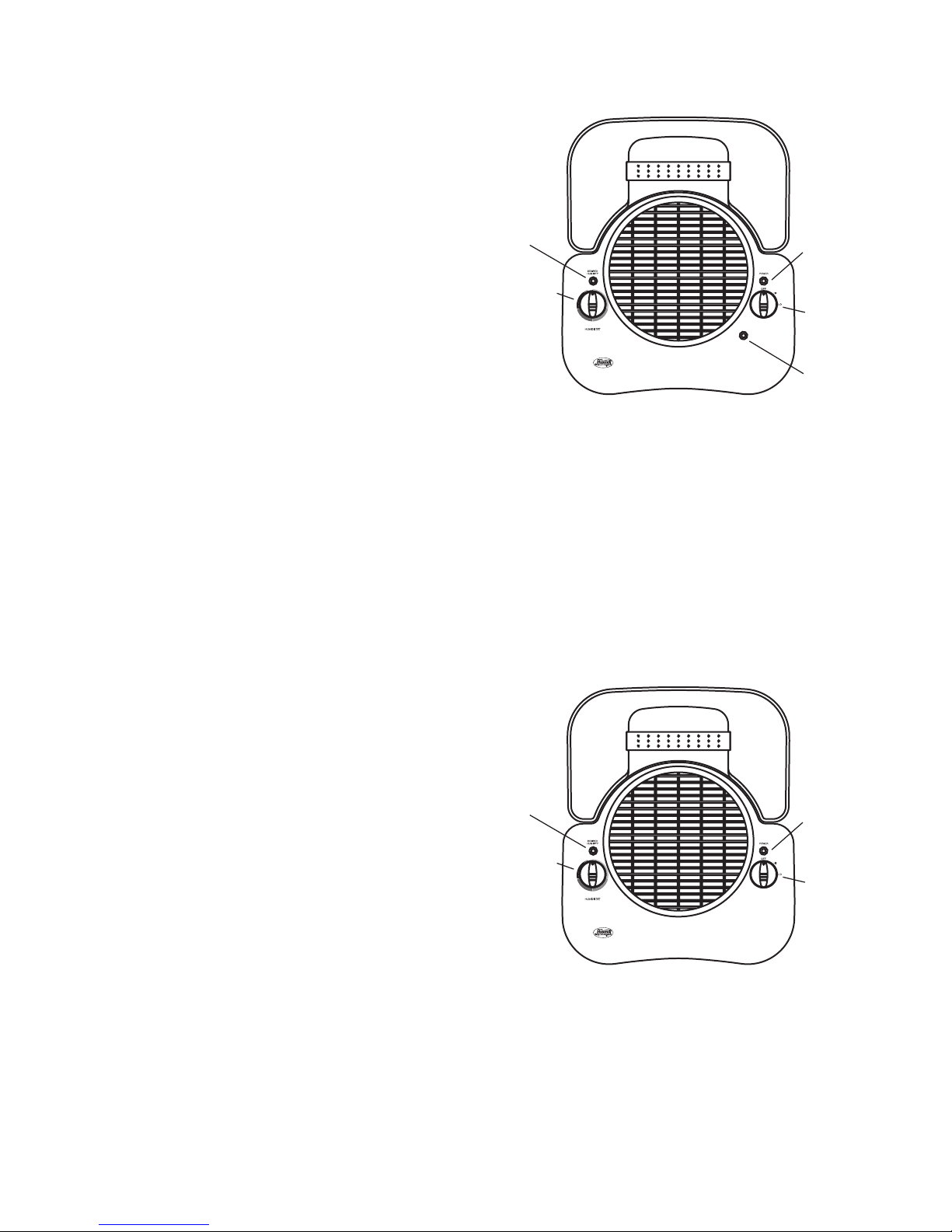
For Models 33203, 33252, 33282, 34332 37203 & 37252
Adjustable Humidistat: Enables you to set a
desired maximum humidity level. Once this
level is reached, the unit will shut off until the
humidity level drops.
Note: The humidifier may not be running
because the humidistat setting may need to
be adjusted.
Desired Humidity Light: The green light will
be illuminated when the humidity in the room
has reached the level that you selected with
the adjustable humidistat knob.
Pow er/Speed Control: Turns the humidifier
ëONí and ëOFFí. The power should always be
off before unplugging the humidifier, moving
the humidifier, or refilling the water tank.
Pow er Light: The light will be illuminated
when the power is on.
NiteG loô Night Light Control: Turns the
night light ëONí and ëOFFí. The night light can
be turned on even if the humidifier fan is turned
off.
Figure 4
NiteGloô
Night
Light
Control
Adjustable
Humidistat
Power/
Speed
Control
Refill
Light
Desired
Humidity
Light
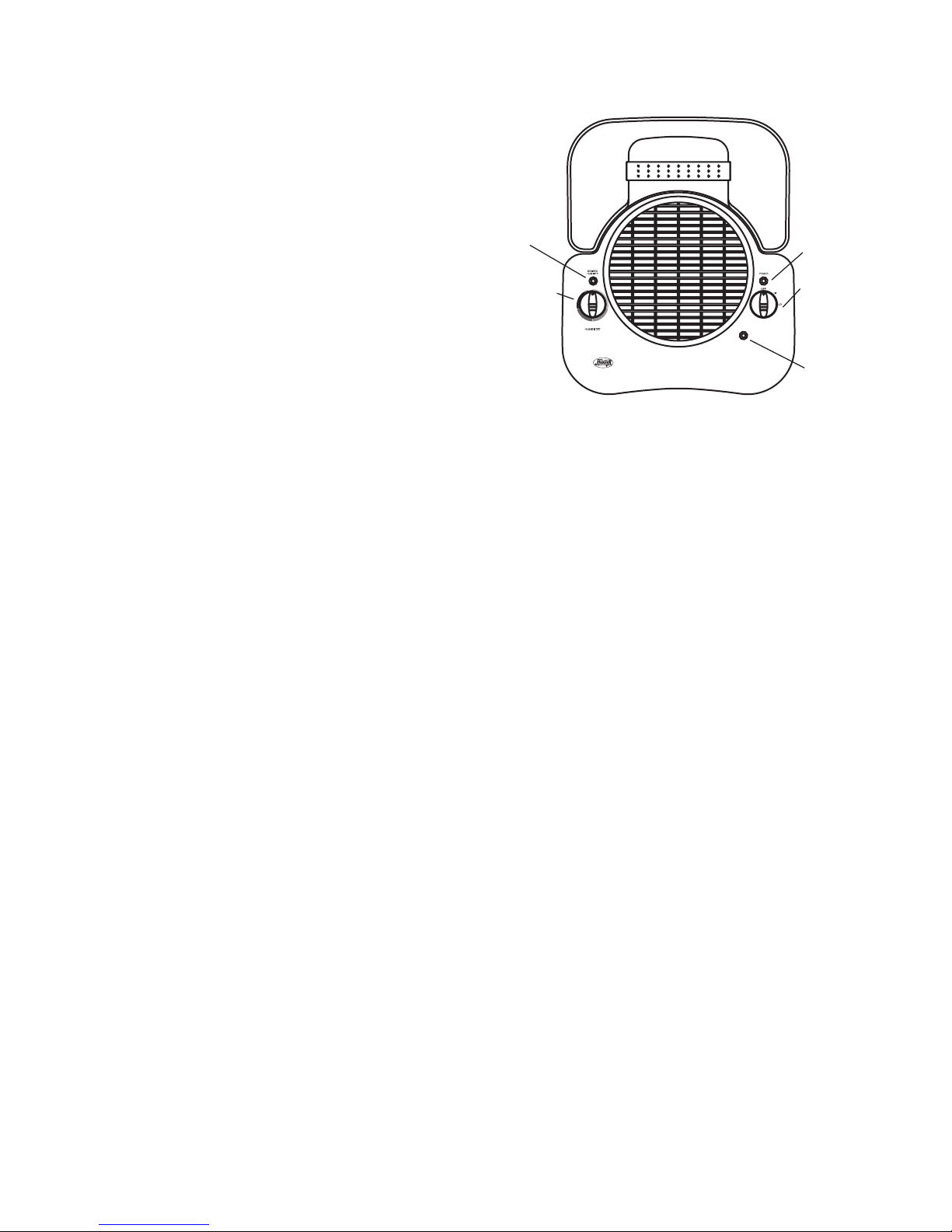
For Models 34301, 34351, 37301 & 37351
Adjustable Humidistat: Enables you to set a
desired maximum humidity level. Once this
level is reached, the unit will shut off until the
humidity level drops.
Note: The humidifier may not be running
because the humidistat setting may need to
be adjusted.
Desired Humidity Light: The green light will
be illuminated when the humidity in the room
has reached the level that you selected with
the adjustable humidistat knob.
Pow er/Speed Control: Turns the humidifier
ëONí and ëOFFí. The power should always be
off before unplugging the humidifier, moving
the humidifier, or refilling the water tank.
Refill Light: The red light will be illuminated
to signal you that the humidifier has
automatically turned off and the water tank
needs to be refilled.
Figure 5
Page 6
41554-01 7/12/2002 6 © 2002 HUNTER FAN CO.
Adjustable
Humidistat
Power/
Speed
Control
Refill
Light
Desired
Humidity
Light
For Models 34302, 34352, 37302 & 37352
Adjustable Humidistat: Enables you to set a
desired maximum humidity level. Once this
level is reached, the unit will shut off until the
humidity level drops.
Note: The humidifier may not be running
because the humidistat setting may need to
be adjusted.
Desired Humidity Light: The green light will
be illuminated when the humidity in the room
has reached the level that you selected with
the adjustable humidistat knob.
Pow er/Speed Control: Turns the humidifier
ëONí and ëOFFí. The power should always be
off before unplugging the humidifier, moving
the humidifier, or refilling the water tank.
Refill Light: The red light will be illuminated
to signal you that the humidifier has
automatically turned off and the water tank
needs to be refilled.
NiteG loô Night Light Control: Turns the
night light ëONí and ëOFFí. The night light can
be turned on even if the humidifier fan is turned
off.
Figure 6
NiteGloô
Night
Light
Control
Page 7

41554-01 7/12/2002 2 © 2002 HUNTER FAN CO.
R EA D A N D SAV E T H ESE IN ST R U C T I ON S
The Care FreeÆ Humidifier Plus Evaporative
Humidifier has a unique patented design with
several innovative features:
• Low M ai ntena nce ñ Other humidifiers ha ve
paper filters that need to be replaced every
few months. Our exclusive PermaWickô filter saves time and money. Itís designed to
last season after season, saving up to $45 a
year. No wet paper odors either.
Regulated Releaseô System ñ By dis-
persing water from the top of the
PermaW ickô filter, stagnant water around
the PermaWickô filter is eliminated, and
the buildup of mineral residue that can
clog the filter and impede performance
is eliminated. NOTE: The filter has a coat-
H ow T he C are FreeÆ H umidifier Plus
Evaporative H umidifier Works
ing on the wick which may make it appear
old or used, but is actually new.
Built-in A ntimicrobial Properties ñ The
plastic parts and the PermaWickô filter
have built-in antimicrobial properties to inhibit the growth of bacteria, mold and
fungi that may affect these parts.
NOTE: This product contains antimicrobial
properties which are built-in to inhibit the
growth of bacteria which may affect the
plastic and PermaWickô filter in the humidifier. These properties do not extend to
the water, humidified air or users. C onduct
routine cleaning and maintenance based
upon use and individual conditions.
Important Safety I nstructions:
R ead all instructions before
using this humidifier.
1. This humidifier may not work properly
on an uneven surface. A LWAY S place
this humidifier on a firm, level, and water resistant surface. A LW AY S place the
humidifier at least six (6) inches away from
walls and heat sources such as stoves,
radiators, or heaters.
2. ALW AY S place the humidifier in an area
that is out of the reach of children.
3. Before using the humidifier, extend the
cord and inspect for any signs of damage. DO NO T use the product if the cord
has been damaged.
4. This product has a polarized plug (one
blade is wider than the other) as a safety
feature. This plug will fit into a polarized
outlet only one way. If the plug does not
fit fully into the outlet, reverse the plug.
If it still does not fit, contact a qualified
electrician. DO NOT attempt to defeat
or override this safety feature.
5. A LW AY S U NPLUG A ND EM PTY the humidifier when it is not in operation or
while it is being cleaned.
6. DO NO T tilt or move the humidifier while
it is in operation. Never move the humidifier while there is water in the tank.
Empty the water tank, turn off, and unplug the unit before moving.
7. In addition to routine maintenance which
may be required, this humidifier requires
seasonal cleaning. Refer to and follow
CLEANING THE HUM IDIFIER A ND THE
WATER TANK instructions.
Thank you for purchasing The C are Free
Æ
Humidifier Plus Evaporative Humidifier by
Hunter Fan C ompany. Please read and
save these instructions to receive the maximum benefit and performance from your
humidifier.
Page 8
41554-01 7/12/2002 3 © 2002 HUNTER FAN CO.
No W hite Dust – The C are FreeÆ Humidi-
fier Plus Evaporative Humidifier produces
no white dust that can settle on furniture
or be inhaled.
NOTE: You may notice mineral deposits
accumulating in the tank base or on the
PermaWickô filter. This is normal and
does not affect performance. If you
would like to clean these deposits away,
please see C LEANING THE HUMIDIFIER
AND WATER TANK .
H umidifier Parts
Figure 1
Water Tank
Tank Cap
Easy Tote Handle
Main Housing
Base
PermaWickô Filter
Knob A
Knob B
Filter Frame
Hooks
Push
Lift Up
PermaWickô
Filter Frame
Insert Guides
Into Base
Page 9
41554-01 7/12/2002 9 © 2002 HUNTER FAN CO.
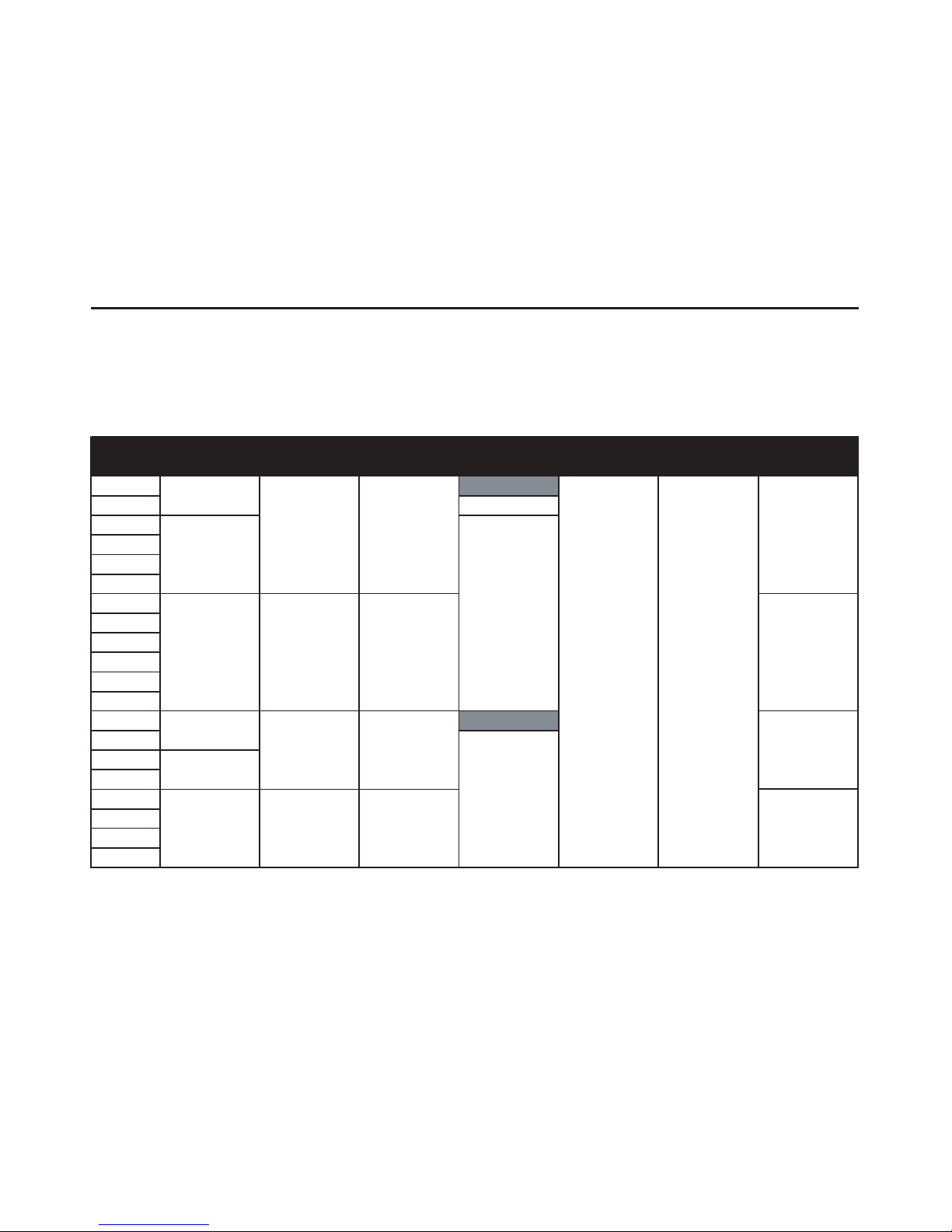
To obtain a service part for your humidifier, call customer service at 1-888-830-1326 or e-mail us
at Techsupport@hunterfanhq.com. Please be prepared to tell the operator the model number of
your humidifier and the name of the part you need to replace and the part number. Refer to
Figure 1 for part names.
Service Parts
water residue, soak it in a mixture of
one (1) gallon of water and eight (8)
ounces of vinegar for 20 minutes. Rinse
well and reinstall sponge and diffuser cap
in unit. Do not ex pose motor or other
electrical components to w ater.
10 . W ipe the surfaces of the main housing with
a soft cloth.
11. Once all the parts are clean, reassemble the humidifier, and follow the
USING Y O UR HUM IDIFIER to continue use. If you are storing the humidifier, mak e sure the parts a re
completely dry, reassemble, and
store in a dry location.
Model No.
Filter
Frame
Base
Water
Tan k
Knob
A
Knob
B
Tank
Cap
Perma wick
Filter
33200A
33203 64101-01-325
33250A
33252
33280A
33282
34301
34302
34331
34332
34351
34352
37200A
37203
37250A
37252
37301
37302
37351
37352
74079-01-325
74080
74082
74080
74082
92849-01-325
92850-01-325
64171-03-000
64171-01-000
64171-01-000
67171-01-001
64171-01-001
64171-03-000
92849-01-325
92850-01-325 92852-01-326
92851-01-326
92852-01-326
64101-01-325
64102-01-325
64102-01-325
92851-01-326
1-800-322-4707
 Loading...