

Page 1

41787 04/28/2006 © 2006 Hunte r Fan Compan y
www.hunterfan.com
The Care Free®
Warm Mist Humidifier
Models 35205, 35207, 36205, 36207
ENGLISH
See page 1
ESPAÑOL
Vea la página 15
Page 2

41787 04/28/2006 © 2006 Hunte r Fan Compan y
2
READ AND SAVE THESE INSTRUCTIONS
Thank you for purchasing the Care Free
®
Warm Mist Humidifier by Hunter Fan
Company. Please read and save these
instructions to receive maximum benefit
and performance from your humidifier.
Important Safety Instructions:
Read all instructions before using
this humidifier.
CAUTION: To avoid electrical
shock and/or fire, please read all
instructions before use.
1. This humidifier may not work properly
on an uneven surface. ALWAYS place
this humidifier on a firm, level, and
water resistant surface. ALWAYS place
the humidifier at least six (6) inches
away from walls and heat sources, such
as stoves, radiators, or heaters.
2. ALWAYS
place the humidifier in an area
that is out of the reach of children.
3. Before using the humidifier, extend
the cord and inspect for any sign of
damage. DO NOT use the product if the
cord has been damaged.
4. This product has a polarized plug as
a safety feature (one blade is wider
than the other). This plug will fit into
a polarized outlet only one way. If the
plug does not fully fit into the outlet,
reverse the plug. If it still does not
fit, contact a qualified electrician. DO
NOT
attempt to defeat or override this
feature.
5. ALWAYS
unplug and empty the
humidifier when it is not in operation or
while it is being cleaned.
6. DO NOT
tilt or move the humidifier
while it is in operation. Never move
the humidifier while there is water in
the tank. Empty the water tank, turn
the unit off, and unplug the unit before
moving.
7. In addition to routine maintenance
which may be required, this humidifier
requires seasonal cleaning. Refer to and
follow the instructions for CLEANING
THE HUMIDIFIER AND THE WATER TANK.
8. This unit was designed to be used with
distilled and/or tap water. DO NOT add
scented oils, perfumes or fragrance
additives to the water.
9. DO NOT
attempt to move or
disassemble the Base while there is hot
water still in the unit. Allow a minimum
of fifteen (15) minutes cooling time
before moving or disassembling the
Base.
10. ALWAYS
use clean, cool tap water to fill
the Water Tank.
11. To avoid the risk of electrical shock, DO
NOT
use an extension cord.
12. DO NOT
operate outdoors. This
humidifier is for indoor use only.
13. DO NOT
let water get into the air inlets
on the back of the enclosure, the cord,
or the plug.
14. DO NOT
store or use gasoline or other
flammable vapors and liquids near the
humidifier.
15. DO NOT
touch hot surfaces. DO NOT
place hands or face directly over the
Exhaust Grille while the unit is in
operation.
16. DO NOT
allow the Exhaust Grille to
directly face a wall surface. Direct mist
aimed at a wall could cause damage,
particularly to wallpaper.
Page 3
41787 04/28/2006 © 2006 Hunte r Fan Compan y
3
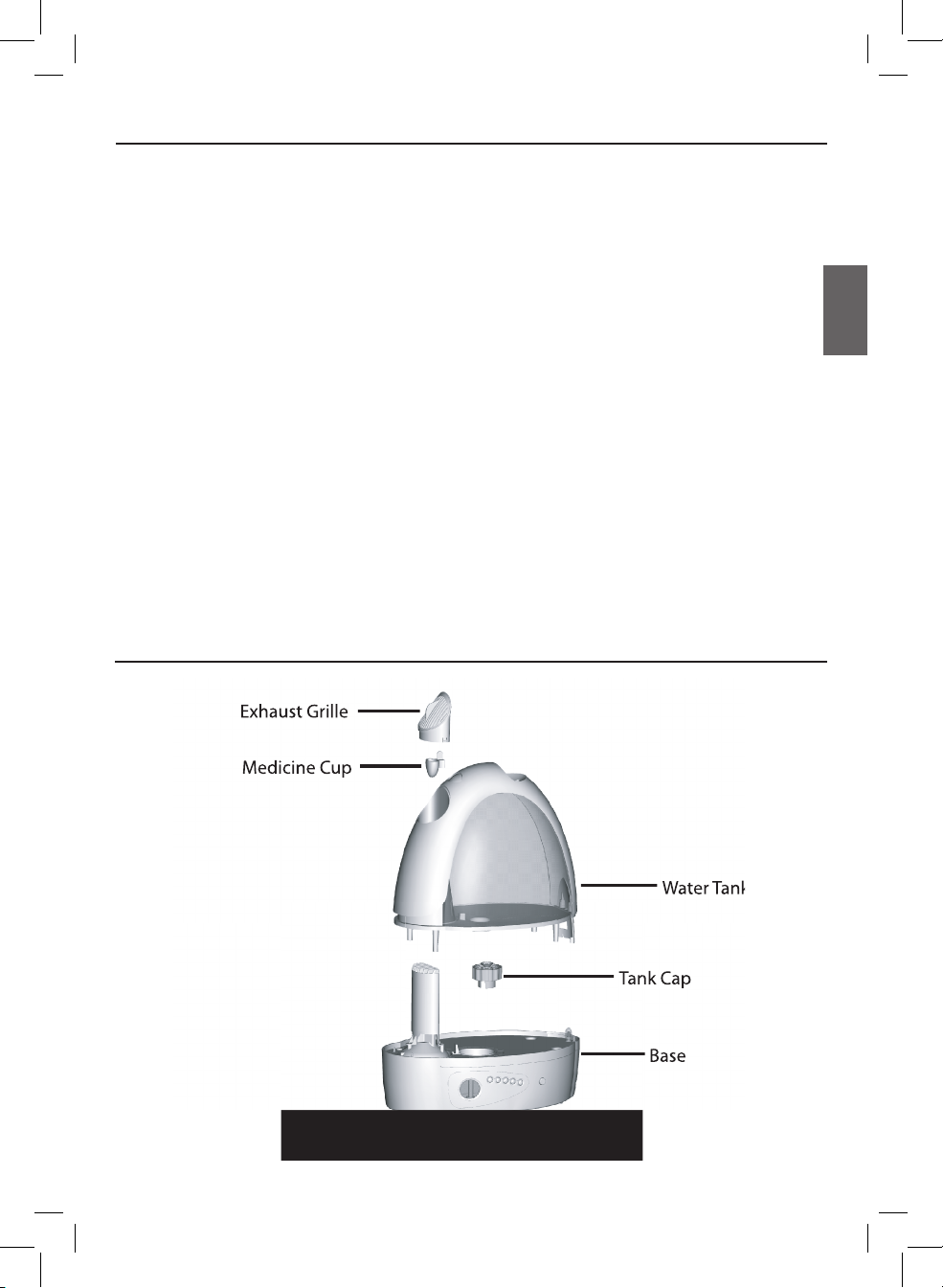
Assembly Of Humidifier Parts
The Care Free® Warm Mist Humidifier has
a unique, patented design with several
innovative features:
• Removable Boiling Chamber
–
The detachable heater can be easily
removed for cleaning and maintenance.
• Humidification System
– Water is passed
through a heating element which creates
warm mist to humidify the air. Stagnant
water in the reservoir is eliminated due
to minimal water quantity in the boiler
reservoir.
• Built-In Antimicrobial Properties
–
The plastic parts in this humidifier have
built-in antimicrobial properties to inhibit
the growth of bacteria, mold and fungi
that may affect these parts.
NOTE: The antimicrobial properties built-
into this humidifier do not extend to the
How The Care Free® Warm Mist Humidifier Works
water, humidified air or users. Conduct
routine cleaning and maintenance based
upon use and individual conditions.
• No White Dust
– The Care Free® Warm
Mist Humidifier produces no white
dust that can settle on furniture or be
inhaled.
NOTE: You may notice mineral deposits
accumulating in the tank base or on
other components. This is normal and
comes with regular usage conditions. If
you would like to remove these deposits
and maintain humidifier performance,
please see the section CLEANING THE
HUMIDIFIER AND THE WATER TANK.
• Dishwasher Safe
– All components of
The Care Free® Warm Mist Humidifier
are top-rack dishwasher safe, except for
the powered base.
ENGLISH
Page 4
41787 04/28/2006 © 2006 Hunte r Fan Compan y
4
1. Remove the Care Free® Warm Mist
Humidifier from its packaging.
2. Select a location for your humidifier. The
location should be flat, hard, waterresistant, and at least six (6) inches
away from walls and sources of heat.
Mount the humidifier on a drip tray
if you are using the unit on a wood
surface or other surface which could be
damaged by accidental water spillage or
condensation.
HUNTER WILL NOT ACCEPT RESPONSIBILITY
FOR DAMAGE DUE TO WATER SPILLAGE.
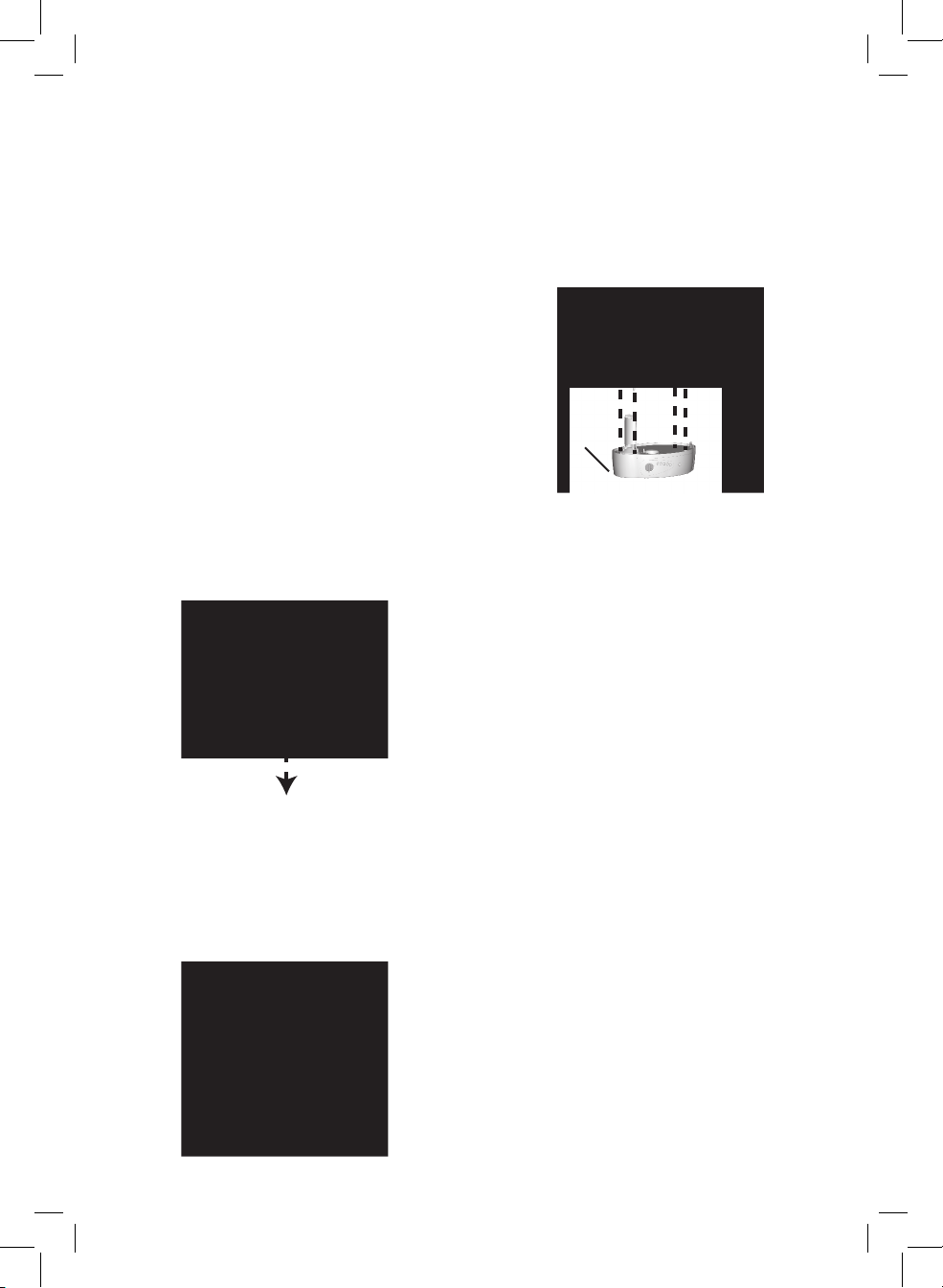
3. Place the Base in the location you
selected. Take the Water Tank to a sink or
tub to fill with water.
4. Unscrew the Tank Cap by twisting it
counterclockwise and fill the Water Tank
with cool water.
NOTE: When the Water Tank is empty, the
refill indicator icon will turn ON and the unit
will stop. You must press the RESET button
after refilling the Water Tank to reactivate the
unit.
5. Replace the Tank Cap by screwing it
clockwise onto the Water Tank.
6. Place the Water Tank back onto the Base.
Make sure the Water Tank is properly
seated on the Base or the humidifier will
not work properly.
HUNTER WILL NOT ACCEPT RESPONSIBILITY
FOR DAMAGE DUE TO WATER SPILLAGE.
7. Make sure the Power Button is set to
OFF and plug the humidifier into the wall
outlet.
CAUTION: Never plug in the humidifier
while your hands are wet, as electric shock
could occur.
NOTE: Let the humidifier sit for one minute
after refilling the tank, before turning the
power back ON.
8. Push the Power Button to turn the
humidifier ON. Adjust the setting as
needed.
Base
Water
Tank
Page 5

41787 04/28/2006 © 2006 Hunte r Fan Compan y
5
Operating Your Humidifier
Functional Buttons
There are 6 buttons to control the functions
of the humidifier. You will hear a
confirmation ‘beep’ when a button is
pressed.
1. POWER
– Press the POWER button
to set the humidifier to HI. Press
the POWER button again to turn the
unit OFF.
a. When initially turned ON after being
plugged in, the humidifier will
‘beep’ and all icons on the screen
will be temporarily illuminated.
After a few seconds, the LCD icons
will turn OFF, and the unit will be
in standby mode with the backlight
OFF.
b. Pressing POWER once will set the
unit to HI and turn the backlight
ON. The LCD screen will display the
Continue message (“CO %") which
means the unit will be continuously
on HI until set otherwise. After
a few seconds, the current room
humidity and the ROOM message
will be displayed.
c. If the unit is plugged in and has
been turned ON once, turning the
unit OFF and back ON will display
the Relative Humidity (RH) value last
used.
d. When the unit is ON, all backlights
will remain ON.
2. SETTING
– The humidifier has two
settings: HI and LOW. Press the
SETTING button and the unit will
loop settings (HI-LOW-HI) while the
respective icon is illuminated.
3. UP
– Each time the UP button is
pressed, the RH value will increase
by 5 %.
4. DOWN
– Each time the DOWN
button is pressed, the RH value will
decrease by 5 %.
5. RESET
– When the water level is
too low, the unit will turn itself
OFF. Pressing the RESET button will
reactivate the unit after you have
refilled the tank.
6. NITE GLO™
– Press the NITE GLO
button to turn the blue night light
ON or OFF.
UP
DOWN
SETTING
RESET
POWER
LIGHT
ENGLISH
Page 6

41787 04/28/2006 © 2006 Hunte r Fan Compan y
6
LCD Messages
1. Misting Control:
When the humidity
is higher than the set humidity, the
heater will stop misting, and the
misting icon will blink. When the
unit is in normal misting mode, the
misting icon will be illuminated.
2. Continuous Indicator:
When the
LCD screen displays the CO %
message, it will also illuminate
the continuous icon, indicating the
humidifier is working continuously.
3.
Refill Warning: When the water
level is too low, the heater will stop.
The refill icon will blink to indicate
that the tank needs to be refilled.
After refilling the water tank, you
must press the RESET button to
reactivate the unit.
4. Humidity Set Range:
Humidity may
be set between 40 % RH and 85
% RH in increments of 5 %. If the
humidity is set higher than 85 %, the
LCD screen will display the CO % RH
message, indicating the humidifier is
set to work continuously.
5. Humidity Display Range: The
humidity or ROOM display range is
40 % to 80 % RH. The LCD screen
will display LO % if the humidity in
the room is lower than 40 %. If the
humidity in the room is higher than
85 %, the LCD screen will display HI
%.
6. Setting Humidity:
Press UP or
DOWN to change the humidity
setting by 5 % up or down,
respectively. The LCD screen will
display the SET message and the
digits on the screen will blink for
two seconds until you change the
setting. Once the humidity level
is set, the LCD screen will display
the current room humidity and the
ROOM message.
1
2
3
4
5
6
Operating Your Humidifier
Page 7

41787 04/28/2006 © 2006 Hunte r Fan Compan y
7
1. When the water level is low, push the
POWER button to turn the humidifier OFF
and unplug the humidifier.
NOTE:
When the tank level is too low, the
humidifier will turn OFF.
2. Lift the Water Tank and take it to the sink
or a tub to refill.
3. Turn the Water Tank over and unscrew the
Tank Cap by twisting it counterclockwise.
4. Empty the Water Tank and refill it with
fresh, cool water. NEVER USE HOT
WATER.
5. Replace the Tank Cap by screwing it
clockwise onto the Water Tank. Make
sure that the tank cap is properly seated
before screwing it back onto the tank to
ensure a proper seal.
6. Place the Water Tank back onto the Base.
Make sure the Water Tank is properly
seated on the Base or the humidifier will
not work properly.
HUNTER WILL NOT ACCEPT RESPONSIBILITY
FOR DAMAGE DUE TO WATER SPILLAGE.
7. Make sure the Power Button is set to
OFF and plug the humidifier into the wall
outlet.
CAUTION: Never plug in the humidifier
while your hands are wet, as electric shock
could occur.
NOTE: Let the humidifier sit for one minute
after refilling the tank, before turning the
power back ON.
8. Push the Power Button to turn the
humidifier ON. Adjust the setting as
needed.
Base
Water
Tank
Refilling The Water Tank
ENGLISH
Page 8

41787 04/28/2006 © 2006 Hunte r Fan Compan y
8
Reassembly Of Humidifier Parts
Exhaust Grille
Medicine Cup
Water Tank
Boiler Cover
Boiling Chamber
Base
Tank Cap
Many regions have hard water with high
concentrations of minerals. When water
evaporates from the Care Free® Warm
Mist Humidifier, minerals may be left
behind. These minerals can form a hard
white scale which can be removed by
following the cleaning instructions. The
frequency of cleaning due to mineral build
up varies depending on the quality of
water you have. Failure to perform the
necessary cleaning steps can damage the
unit and affect performance.
NOTE:
The Water Tank, Tank Cap,
Medicine Cup, Boiler Cover, Boiling
Chamber, and Exhaust Grille are
dishwasher safe in the top rack only.
1. Push the POWER button to turn the unit
OFF (the indicator light will be OFF) and
unplug the humidifier.
2. Remove the Water Tank and carry it to a
sink or a tub. Unscrew the Tank Cap by
twisting it counterclockwise and empty
any water in the Water Tank.
3. CAUTION: HEATING ELEMENT MAY BE
EXTREMELY HOT.
Allow at least fifteen (15) minutes for the
hot water in the Boiling Chamber to cool,
after turning the humidifier OFF, before
moving the Base or removing the Boiling
Chamber from the Base. Pull the Boiling
Chamber away from the Base to remove
the Boiling Chamber.
Cleaning The Humidifier And The Water Tank
Page 9

41787 04/28/2006 © 2006 Hunte r Fan Compan y
9
Boiler
Cover
Boiling
Chamber
Boiler
Base
4. Place the Boiling Chamber into an empty
sink and carefully lift the Boiling Chamber
Cover by pressing the Chamber Cover
Release Tab. This will expose the Heater.
Drain all water and rinse with cool, clean
water. Use a soft brush or sponge to clean
the Boiling Chamber and the Boiling
Chamber Cover.
5. Pour one (1) cup of white vinegar into the
Boiling Chamber and allow it to soak for
20-30 minutes. Rinse several times with
cool, clean water. Wipe the Boiler clean if
necessary.
6. Before reinstalling the Boiling Chamber,
make sure the three metal pins in the
Chamber are clean and completely dry.
Place the Boiling Chamber Cover into the
Boiling Chamber and slide the Chamber
slowly back into place. Make sure the
Chamber fits properly in the Base.
7. To disinfect the Water Tank, create a
solution of one (1) cup of white vinegar
and one (1) gallon of clean water. Fill the
Water Tank with the solution and allow
it to soak for 20 minutes, occasionally
swishing the solution to wet all
interior surfaces. Empty the Water Tank
completely and rinse with clean water
several times. Refill the Water Tank with
cool, clean water and place it back on the
humidifier Base.
8. NEVER
use any metal or hard object,
which could cause scratching of the
humidifier surface, to clean plastic parts.
NEVER
use gasoline, kerosene, glass
cleaner, furniture polish, paint thinner,
or other household solvents to clean any
part of the humidifier.
9. The Water Tank should be drained EACH
DAY, rinsed, and refilled with clean tap
water.
10. To clean the exterior surfaces, use a
solution of water and mild detergent
with a damp cloth. Rinse the surfaces
with clean water and dry with a cloth.
Allow sufficient time to dry before
plugging the electrical cord back into the
outlet.
11. Place the Water Tank back onto the Base
and resume normal use.
Base
Water
Tank
ENGLISH
Page 10

41787 04/28/2006 © 2006 Hunte r Fan Compan y
10
If you do not plan to use your humidifier
for an extended period of time, such
as during the summer months, it is
important that you follow these instructions
to help prevent problems from developing
in the unit.
1. Clean your humidifier as outlined in
the CLEANING THE HUMIDIFIER AND
THE WATER TANK section.
2. Make sure all water is emptied from
Storage Tips
the tank and the hot and cold water
reservoirs.
3. Make sure the unit is completely dry.
4. Leave the Tank Cap off to expose the
Water Tank to air.
5. Pack the humidifier in the original
carton and store it in a cool, dry
place.
• Problem: Humidifier not
misting.
Solution:
1. Make sure the unit is plugged in.
2. Check the circuit breaker or fuses.
3. Adjust the humidity level using
the UP or DOWN buttons. Once the
room reaches the set humidity level,
the humidifier will turn OFF; this is
normal.
4. Check the LCD to determine if the
unit needs to be RESET. If so, press
the RESET button.
5. Remove and refill the Water Tank.
6. Reposition the Water Tank on the
Base.
• Problem: Humidity output and
water usage decreased.
Solution:
1. Check the LCD screen to make sure
the humidifier is set to the desired
humidity level.
2. Check the LCD to determine if the
unit needs to be RESET. If so, press
the RESET button.
3. Clean any components that have
mineral build-up. Refer to the section
on CLEANING THE HUMIDIFIER AND
THE WATER TANK.
Troubleshooting
If you have questions or problems, please call 1-888-830-1326 for assistance before returning
the unit to the retailer.
Page 11

41787 04/28/2006 © 2006 Hunte r Fan Compan y
11
Service Parts
To obtain a service part for your humidifier, call Hunter Customer Service at 1-888830-1326 or e-mail us at [email protected]. Please be prepared to tell the
operator the model number of your humidifier, the name of the part you need to replace,
and the part number.
Model
Number
Boiler Cover Exhaust Grille Medicine Cup Tank Cap Water Tank
35205,
35207,
36205,
36207
96362-01-325 86731-01-325 75690-01-325 83736-01-325 96361-01-326
ENGLISH
Page 12

41787 04/28/2006 © 2006 Hunte r Fan Compan y
12
Hunter Fan Company, Inc. makes the following warranty to the original residential user
or consumer purchaser of the Care Free® Warm Mist Humidifier.
If any part of the Care Free® Warm Mist Humidifier ("Humidifier") fails during
the first three (3) years from the date of installation due to a defect in material or
workmanship, we will provide a replacement part free of charge. If no replacement
part can be provided, we will replace your humidifier.
If your humidifier fails anytime within one (1) year after the date of installation due
to a defect in material or workmanship, labor to repair the defect will be provided
free of charge at our nearest service center or at our Service Department in Memphis,
Tennessee. You will be responsible for all parts and labor costs after this one year
period.
If your humidifier water tank, boiler cover, boiling chamber, base, knobs or tank cap
fail at any time within one (1) year after the date of sale to you due to a defect in
material or workmanship, we will repair, or at our option, replace the water tank,
boiler cover, boiling chamber, base, knobs or tank cap free of charge for parts or labor
at our nearest service center or at our Service Department in Memphis, Tennessee.
IF THE ORIGINAL RESIDENTIAL USER OF CONSUMER PURCHASER CEASES TO OWN THE
HUMIDIFIER, THIS WARRANTY AND ANY IMPLIED WARRANTY WHICH THEN REMAINS IN
EFFECT, INCLUDING BUT NOT LIMITED TO IMPLIED WARRANTY OF MERCHANTABILITY
OR FITNESS FOR A PARTICULAR PURPOSE, ARE VOIDED.
NO WARRANTY, EXPRESSED OR IMPLIED, INCLUDING ANY WARRANTY OF
MERCHANTABILITY OR FITNESS FOR A PARTICULAR PURPOSE, IS MADE IN RESPECT TO
THE FILTER.
THE WARRANTY IS IN LIEU OF ALL OTHER EXPRESS WARRANTIES. THE DURATION OF
ANY IMPLIED WARRANTY, INCLUDING BUT NOT LIMITED TO ANY IMPLIED WARRANTY
OF MERCHANTABILITY OR FITNESS FOR A PARTICULAR PURPOSE, IN RESPECT TO THE
MOTOR IS EXPRESSLY LIMITED TO THE PERIOD OF THE EXPRESS WARRANTY SET FORTH
ABOVE.
This warranty is voided if your humidifier is not purchased and used in the USA or
Canada.
This warranty excludes and does not cover defects, malfunctions or failures which
were caused by repairs by persons not authorized by Hunter Fan Company, or
Hunter Fan Company
The Care Free® Warm Mist Humidifier
3 Year Limited Warranty
Page 13

41787 04/28/2006 © 2006 Hunte r Fan Compan y
13
accessories not authorized by Hunter Fan Company, mishandling, modifications, or
damage to the humidifier while in your possession, or unreasonable use, including
failure to provide reasonable and necessary maintenance. This warranty does not cover
humidifiers used in commercial applications. There are no express or implied warranties
as to commercial purchasers or users.
To obtain service, contact the nearest Hunter authorized service center or the Hunter
Fan Company Service Department at 2500 Frisco Avenue, Memphis, Tennessee, 38114
or at (901) 248-2222. You will be responsible for insurance and freight or other
transportation to our factory service center. We will return the humidifier, freight
prepaid, to you. The humidifier should be properly packaged to avoid damage in transit
since we will not be responsible for any such damage. Proof of purchase is required
when requesting warranty service. The purchaser must present the sales receipt or
other documentation that establishes proof of purchase.
IN NO EVENT SHALL HUNTER FAN COMPANY BE LIABLE FOR DIRECT, INDIRECT, SPECIAL,
CONSEQUENTIAL OR INCIDENTAL DAMAGES IN EXCESS OF THE PURCHASE PRICE OF
THE HUMIDIFIER. YOUR SOLE REMEDY WILL BE REPAIR OR REPLACEMENT AS PROVIDED
ABOVE.
SOME AMERICAN STATES AND CANADIAN PROVINCES DO NOT ALLOW:
• LIMITATIONS ON HOW LONG AN IMPLIED WARRANTY LASTS
• THE EXCLUSION OR LIMITATION OF DIRECT, INDIRECT, SPECIAL, INCIDENTAL OR
CONSEQUENTIAL DAMAGES
• THE EXCLUSION OR INVALIDITY OF EXPRESS OR IMPLIED WARRANTIES IF THE
USER CEASES TO OWN THE HUMIDIFIER
• THE LIMITATION OF REMEDIES AND RECOURSES AVAILABLE TO THE PURCHASER,
OR
• THE INVALIDITY OF AN EXPRESS WARRANTY WHEN A PRODUCT IS
IDENTIFIED BY BRAND NAME IS NOT USED (UNLESS SPECIFIC CONDITIONS ARE
FULFILLED)
SO THE ABOVE LIMITATIONS OR EXCLUSIONS MAY NOT APPLY TO YOU.
THIS WARRANTY GIVES YOU SPECIFIC LEGAL RIGHTS AND YOU MAY ALSO HAVE OTHER
RIGHTS WHICH VARY FROM STATE TO STATE OR PROVINCE TO PROVINCE.
ENGLISH
Page 14

41787 04/28/2006 © 2006 Hunte r Fan Compan y
14
Other Home Comfort Products from Hunter
Hunter Original
®
QuietFlo™ HEPA Air
Purifier
Programmable
Thermostat
To learn more about Hunter Fan products, visit our web page at:
www.hunterfan.com
HU N T E R FAN C O M PAN Y
2 5 0 0 F R I SC O A V EN UE
MEMPHIS, TN 38114, USA
 Loading...