

Page 1
www.hunterfan.com
Model 30721
43007-01 06/21/2007 © 2007 Hunter Fan Company
HE P At e c h®
A i r P u r i f i e r
Model
30721
Pre-Filter
30901
HEPAtech® Filter
30963
Replacement Filter Information
ENGLISH
See page 2
ESPAÑOL
Vea la página 19
Page 2

43007-01 2
Table of Contents
Safety Instructions ........................................................................................................................3
Introduction ....................................................................................................................................3
Description of Air Filtration System
How the Air Purier Works ..............................................................................................4
Air Purier Components ..................................................................................................4
Display and Control Keys ................................................................................................ 5
Operation
Initial Operation .................................................................................................................6
Remote Operation .............................................................................................................8
Filter Life Counters .............................................................................................................9
Locking/Unlocking the Keypad .................................................................................... 9
Resetting the Air Purier ...............................................................................................10
Using the Ionizer ..............................................................................................................10
Controlling the Backlight ..............................................................................................10
Air Purier Maintenance
Cleaning Your Air Purier ..............................................................................................11
Changing the Pre-Filter..................................................................................................11
Changing the HEPAtech® Filter ...................................................................................12
Obtaining Replacement Filters ...................................................................................14
Troubleshooting
Problem and Solutions ..................................................................................................15
Technical Support ............................................................................................................15
Warranty Information ................................................................................................................16
Page 3

3 43007-01
SAFETY INSTRUCTIONS
IMPORTANT!
READ ALL INSTRUCTIONS BEFORE USING THIS AIR PURIFIER.
1. This air purier is designed for use on a at level oor and may not work properly on an
uneven oor. ALWAYS place the air purier on a rm level oor. ALWAYS place the air purier at least six (6) inches away from walls and heat sources such as stoves, radiators, or
heaters.
2. Place the air purier in an area that is out of the reach of children.
3. Before using the air purier, extend the cord and inspect for any signs of damage. DO NOT
use the product if the cord has been damaged.
4. This product has a polarized plug (one blade is wider than the other) as a safety feature.
This plug will t into a polarized outlet only one way. If the plug does not t fully into the
outlet, reverse the plug. If the plug still does not t, contact a qualied electrician. DO NOT
attempt to defeat or override this safety feature.
5. ALWAYS UNPLUG the air purier while it is being cleaned.
6. DO NOT move or tilt the air purier while it is in operation. Turn o and unplug before
moving.
7. DO NOT immerse the air purier in water at any time because permanent damage will occur. To properly clean your air purier, follow the instructions in the Maintenance section
of this manual (pg. 10).
READ AND SAVE ALL INSTRUCTIONS.
Introduction
Thank you for purchasing the HEPAtech® Air Purier from Hunter Fan Company. You have
purchased our latest development in portable air purication which has been designed to
improve the quality of the air that you breathe. The following innovative features are included
in your Hunter Air Purier:
• High Particulate Eciency: The HEPAtech® lter will remove 99.97% of 0.1 micron particles
from the air that passes through the lter.
• Odor Removal: The activated carbon pre-lter helps remove odors such as cooking, smoke,
and pet smells from the air. It also traps lint, hair, and other large particles to help extend
the life and performance of the HEPAtech® lter.
• Ionizer: The ionizer improves the quality of air in the room by releasing negative ions into
the air that attract positively charged dust, smoke, and pollen particles.
• Quiet: The air purier has been designed to operate quietly and eciently. You can choose
among three speeds to best meet your needs at dierent times.
• Filter Counters: Filter maintenance is critical to the performance of the air purier. To help
you determine when to change the pre-lter and HEPAtech® lter, the unit has built in life
counters that keep track of the life remaining of each lter.
• NiteGlo™ Light: Your air purier display has a backlight that is continuously lit as long as
there is power to the unit. You can choose to turn the backlight o or on.
Page 4
43007-01 4
Description of Air Filtration System
Air Purier Components
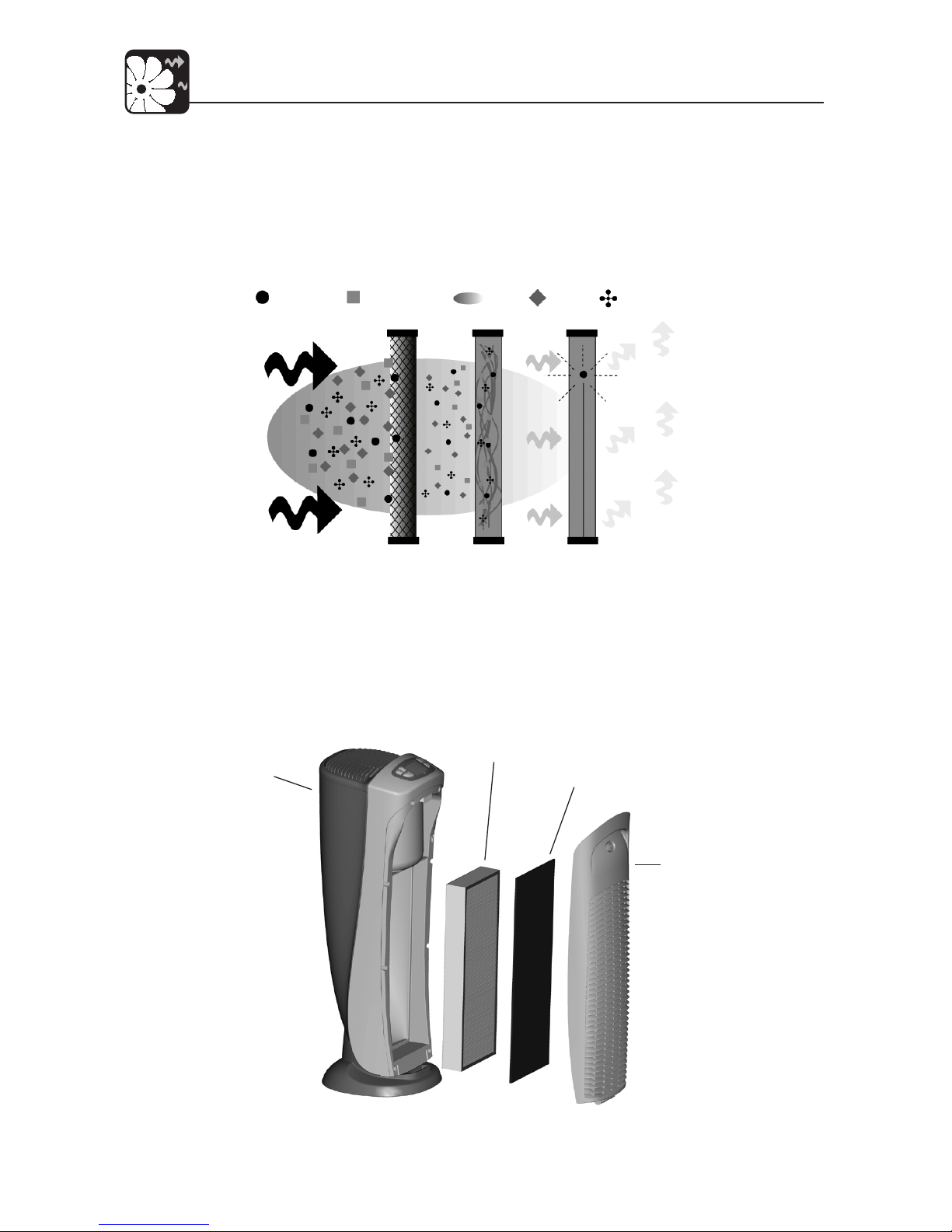
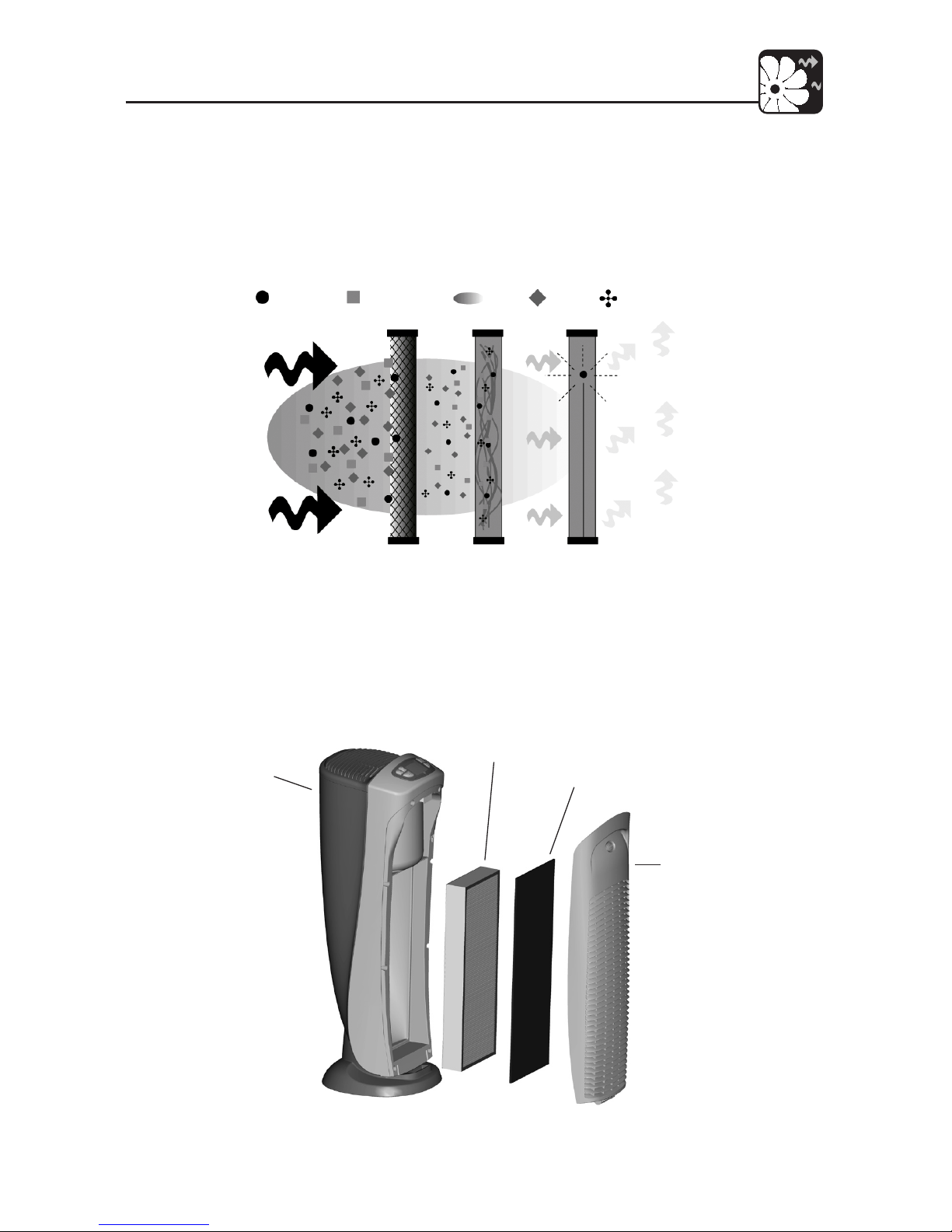
Fig. 1 - Illustration of the Air Filtration System
Fig. 2 - Air Purier Components
HEPATECH®
FILTER
PREFILTER
FRONT
GRILL
BASE
Dust & Irritants
Pollen & Allergens Odors Bacteria Pet Hair & Dander
Carbon
Pre-lter
HEPAtech®
Filtration System
99.97% – 0.1 Microns
Ionizer
How the HEPAtech® Air Purier System Works
As the air is pulled into the purier, the activated carbon pre-lter absorbs odors and
catches large particles. Then, the air travels through the HEPAtech® Filtration System where
the smaller particles are collected. Then, the ionizer releases negative ions into the air that
attract positively charged dust, smoke, and pollen particles. Finally, the clean puried air
is released back into the room.
Page 5
5 43007-01
Description of Air Filtration System
Display and Control Keys
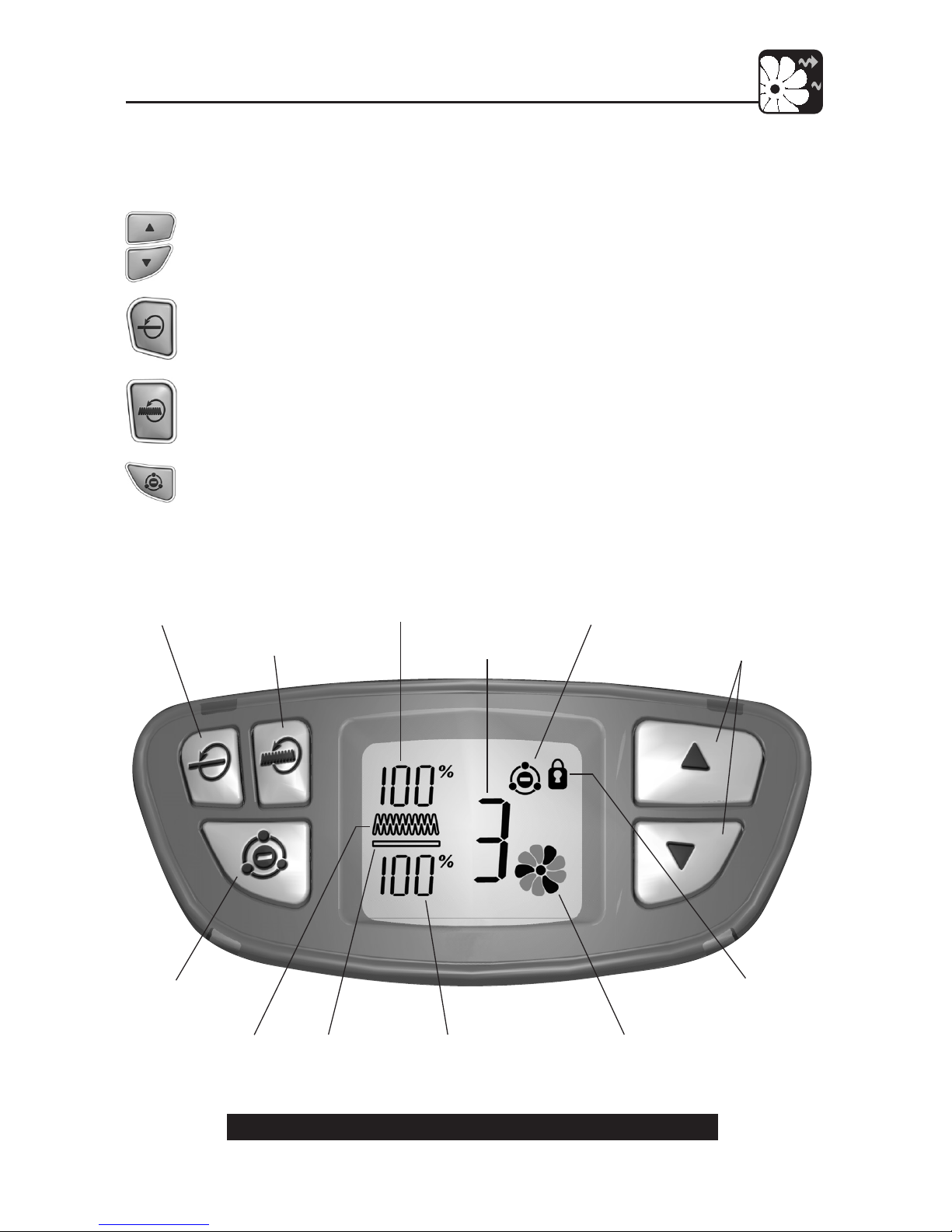
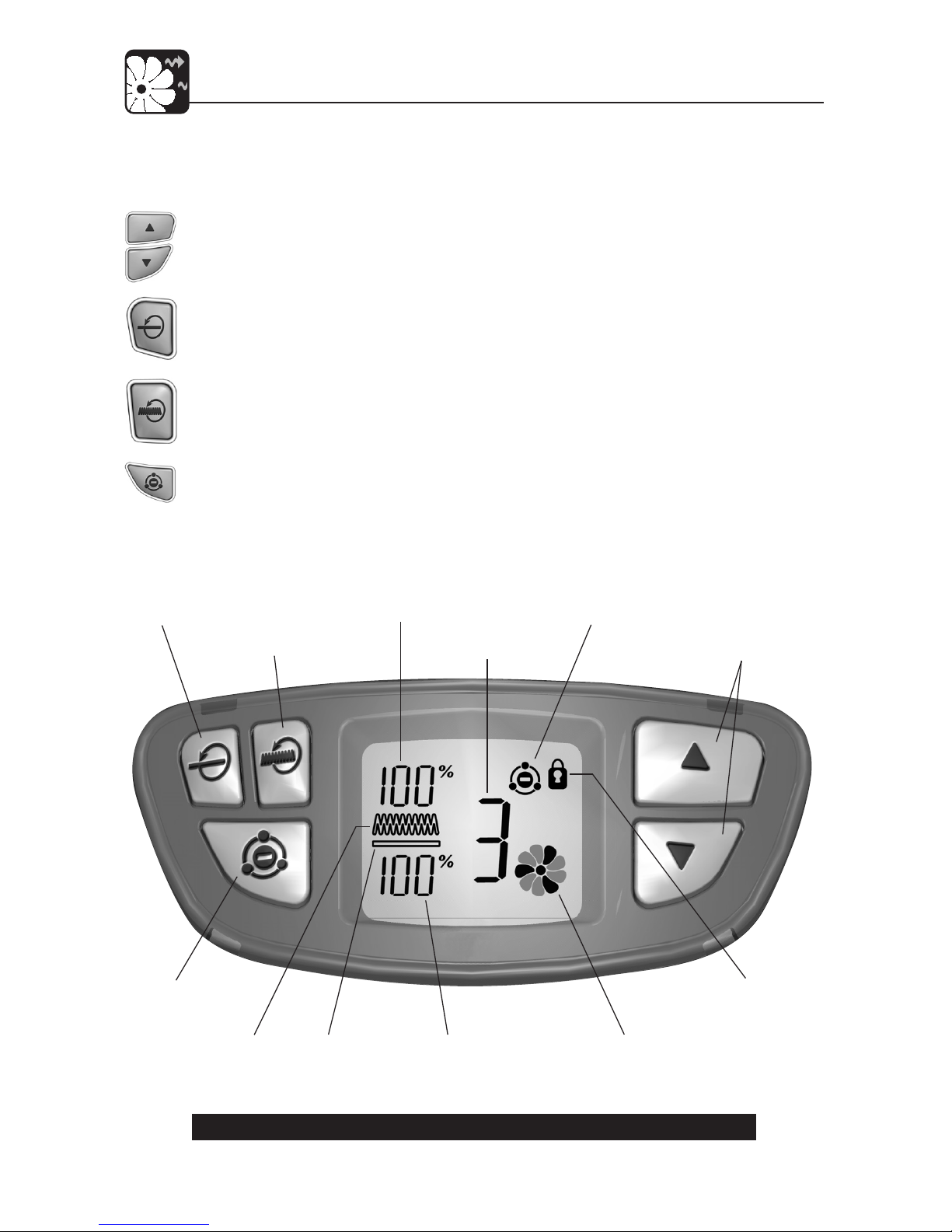
The display and control keys allow for easy operation of the air purier.
UP/DOWN KEYS: Adjusts the blower speed and turns the unit on and o.
PREFILTER RESET: Resets the Carbon Pre-Filter Life Counter.
FILTER RESET: Resets the HEPAtech® Filter Life Counter.
IONIZER KEY: Turns the ionizer on and o.
Fig. 3 - Air Purier Control Area and Alpha-numeric Display
HEPATECH® FILTER
LIFE COUNTER
KEYPAD
LOCKED
INDICATOR
BLOWER
SPEED
PREFILTER LIFE
COUNTER
ANIMATED
BLOWER
IONIZER
INDICATOR
UP/DOWN
KEYS
PREFILTER RESET
KEY
FILTER RESET
KEY
IONIZER
KEY
HEPATECH® FILTER
INDICATOR
CARBON
PREFILTER
INDICATOR
Page 6
43007-01 6
Operation
Initial Operation
This section provides basic instructions on the use of your air purier. After following these
initial directions, please continue reading this booklet to learn how to operate the more
advanced features of your air purier.
Basic Operation of the Air Purier:
1. Take the air purier out of the box and remove the clear plastic protective bag.
Place the unit on a rm level oor.
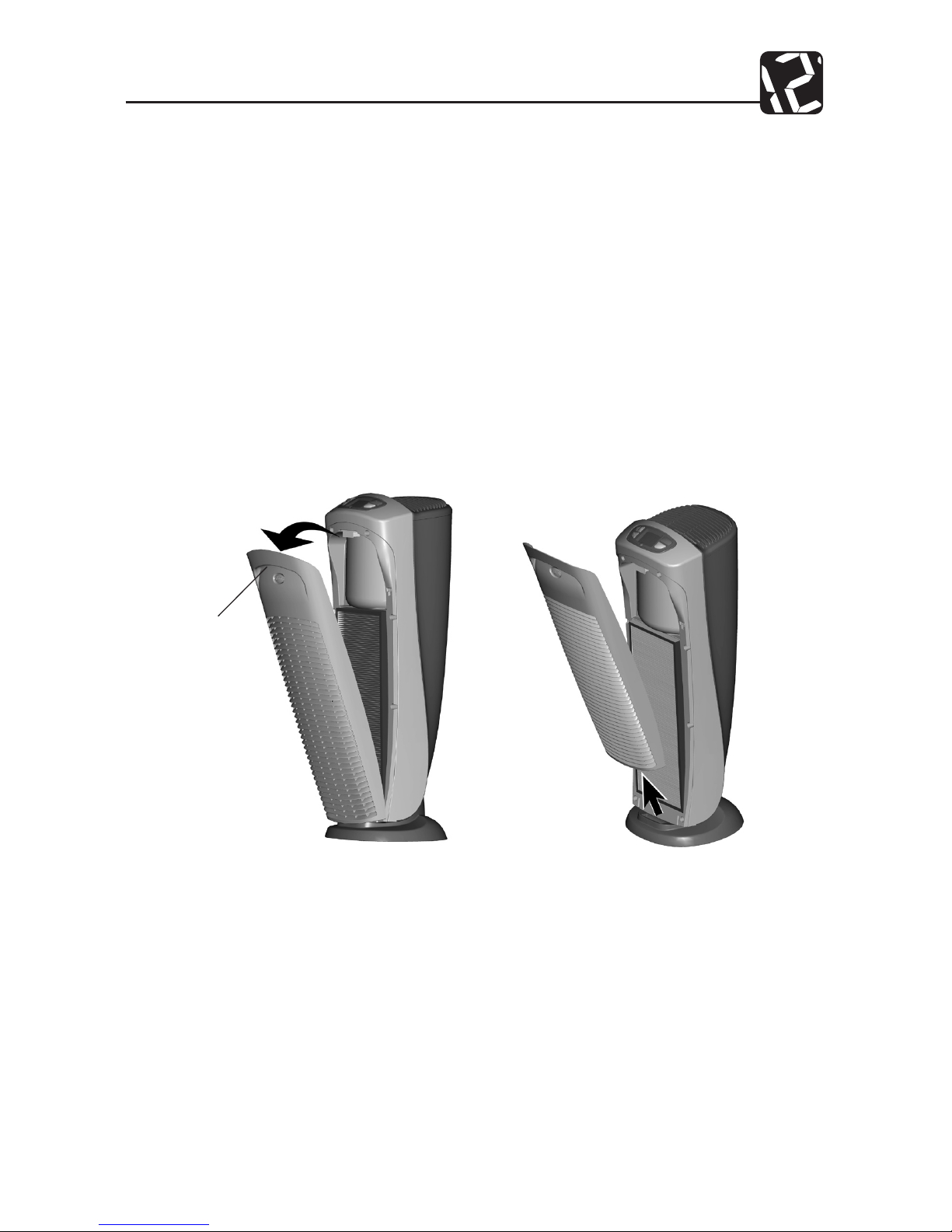
2. Before turning on the air purier, you need to conrm that the lters are rmly
in place and have not become loose during shipping. To check the lters, rst
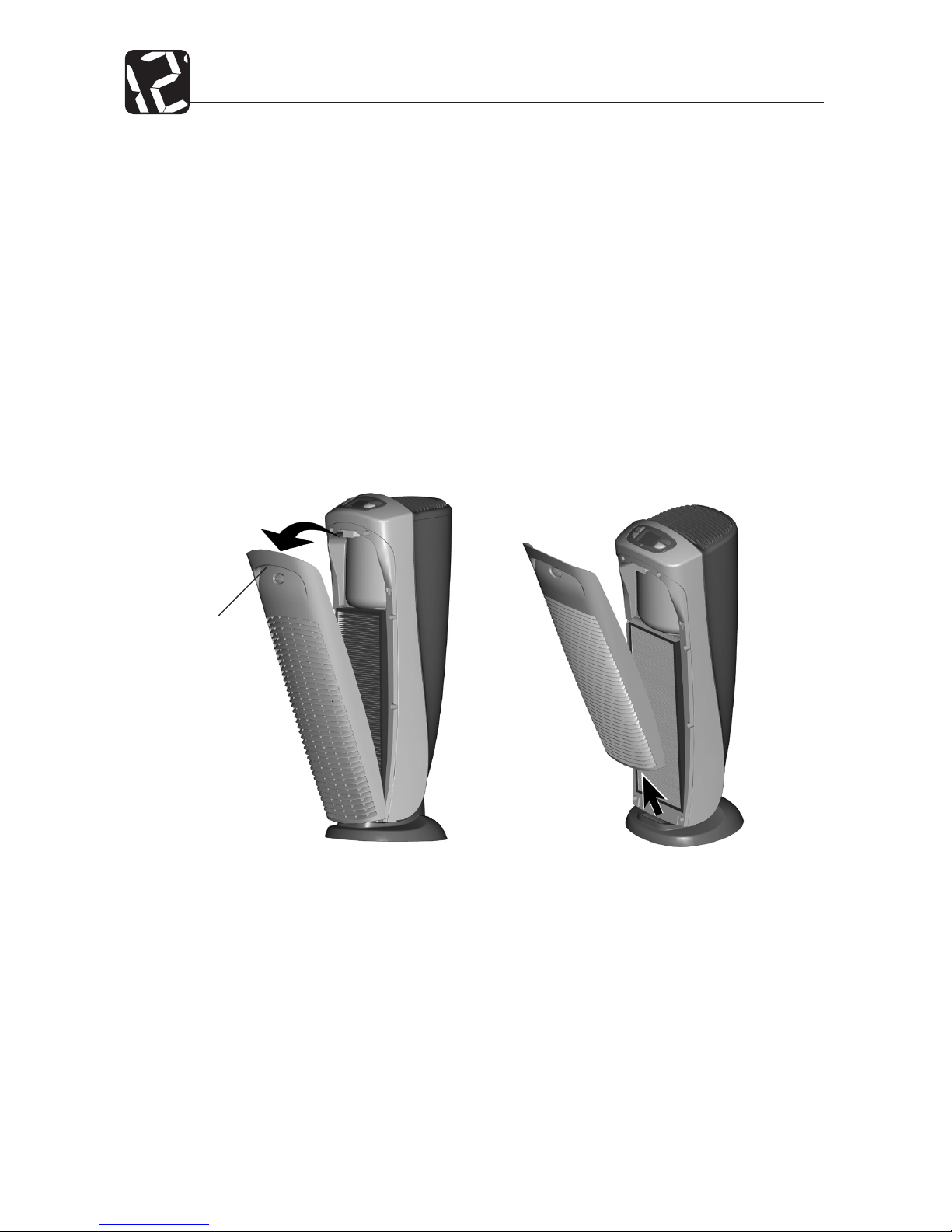
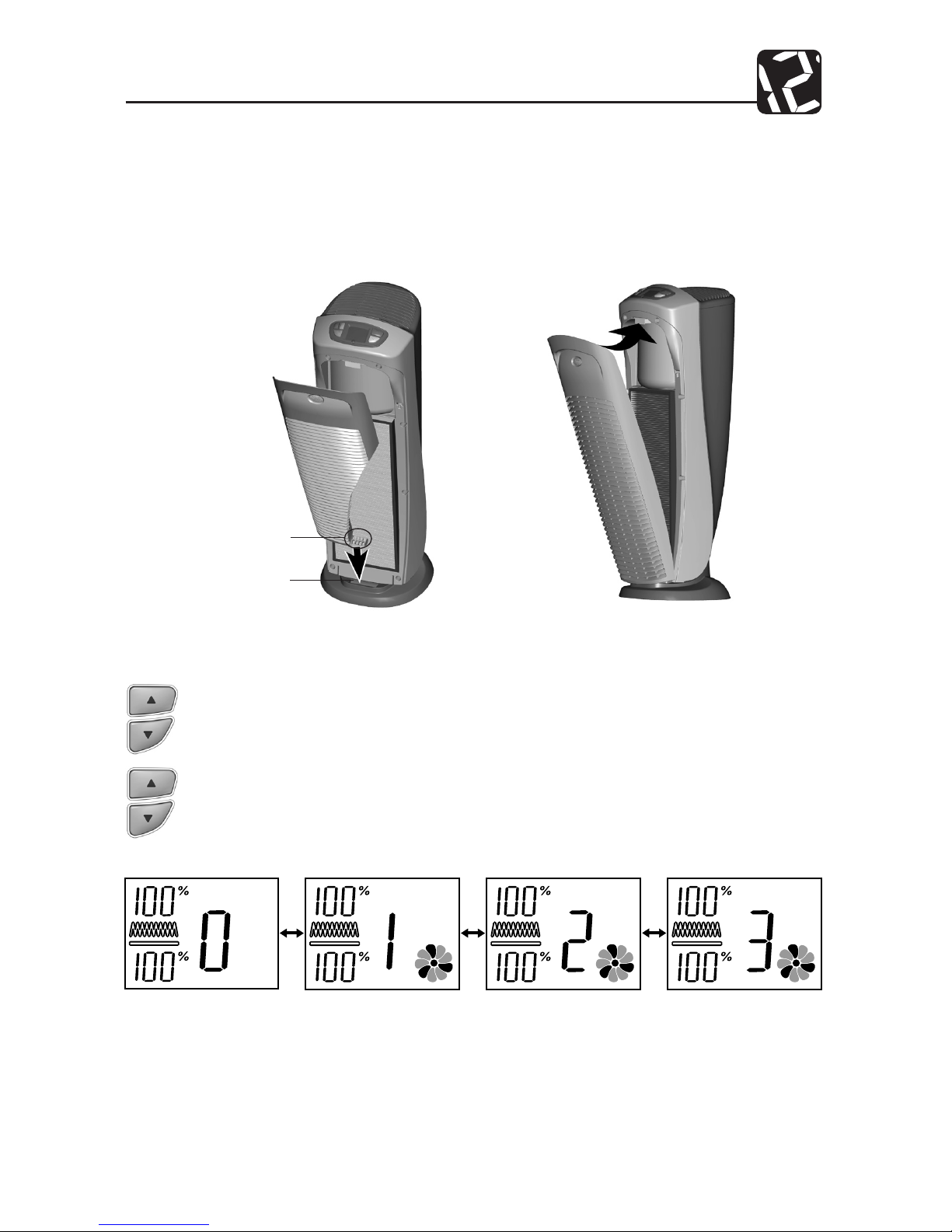
open the front grill. Release the front grill by placing your ngers under the
handle on the grill and pull forward, then up. Refer to Figs. 4 and 5.
Fig. 4
Fig. 5
3. Next, check the HEPAtech® lter by pressing rmly on all four corners of the lter
to ensure that it is fully inserted into the lter opening.
4. The carbon pre-lter is mounted inside the front grill with hook tape. Conrm
that it properly covers the grill vents. You may notice a few black particles coming
o the pre-lter. Those particles are part of the odor-removing activated carbon
and will be collected on the lter during use.
HANDLE
PULL
FORWARD,
THEN UP
Page 7
7 43007-01
Operation
6. Plug the unit into a 120V electrical outlet and press the UP key. The air purier
will start with a low blower speed.
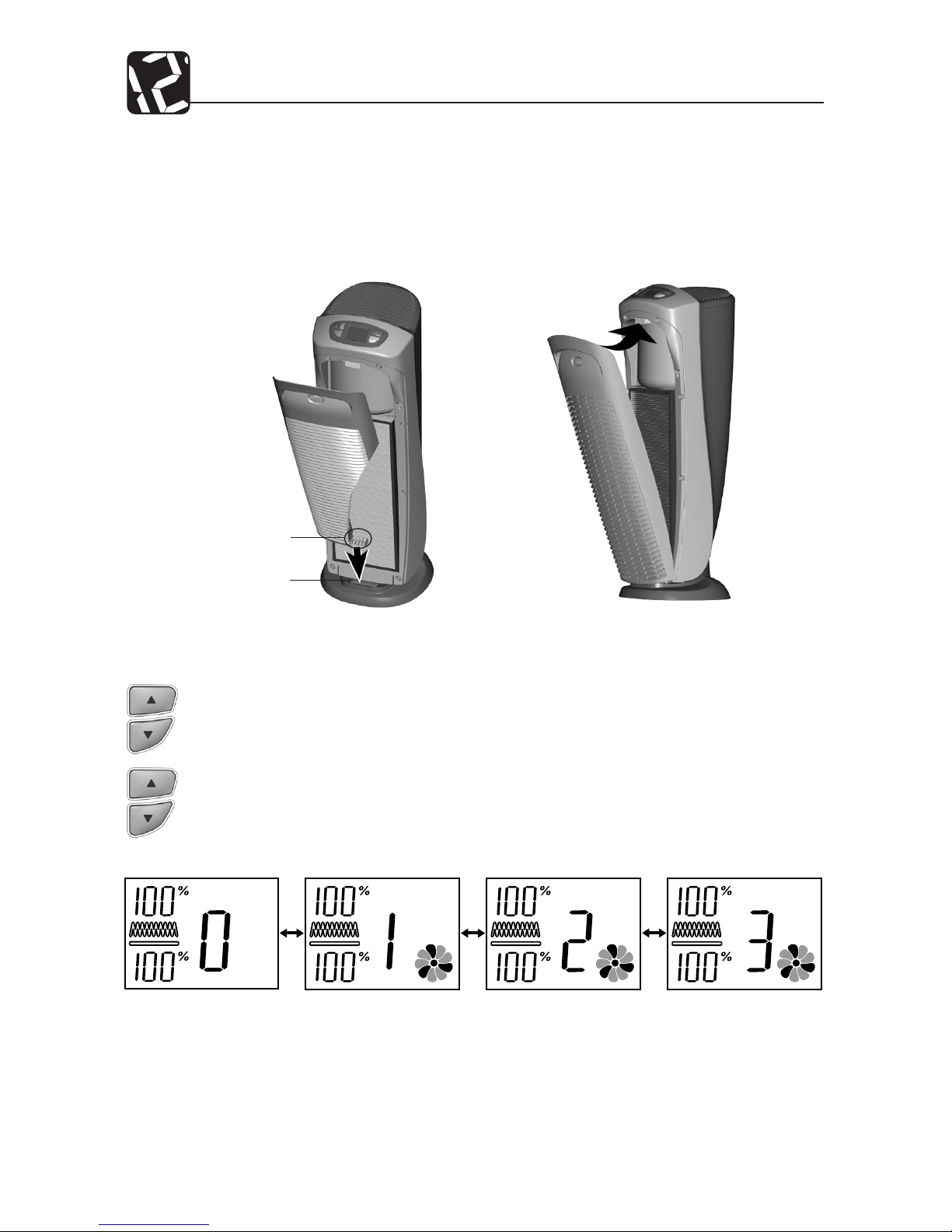
7. Use the UP/DOWN keys to adjust the blower speed to the desired level (0 = O,
1 = Sleep, 2 = Active, 3 = Turbo Clean). Refer to Fig. 8.
5. Place the front grill back onto the unit. First, line up the tab on the bottom of
the grill with the recess on the purier base and then push the top of the grill
forward until it is closed. Refer to Figs. 6 and 7. NOTE: This unit will not operate
unless the grill is in the correct position.
Fig. 8
Fig. 6
Fig. 7
TAB
RECESS
LINE UP TAB WITH
RECESS IN BASE
Page 8
43007-01 8
Operation
Remote Operation
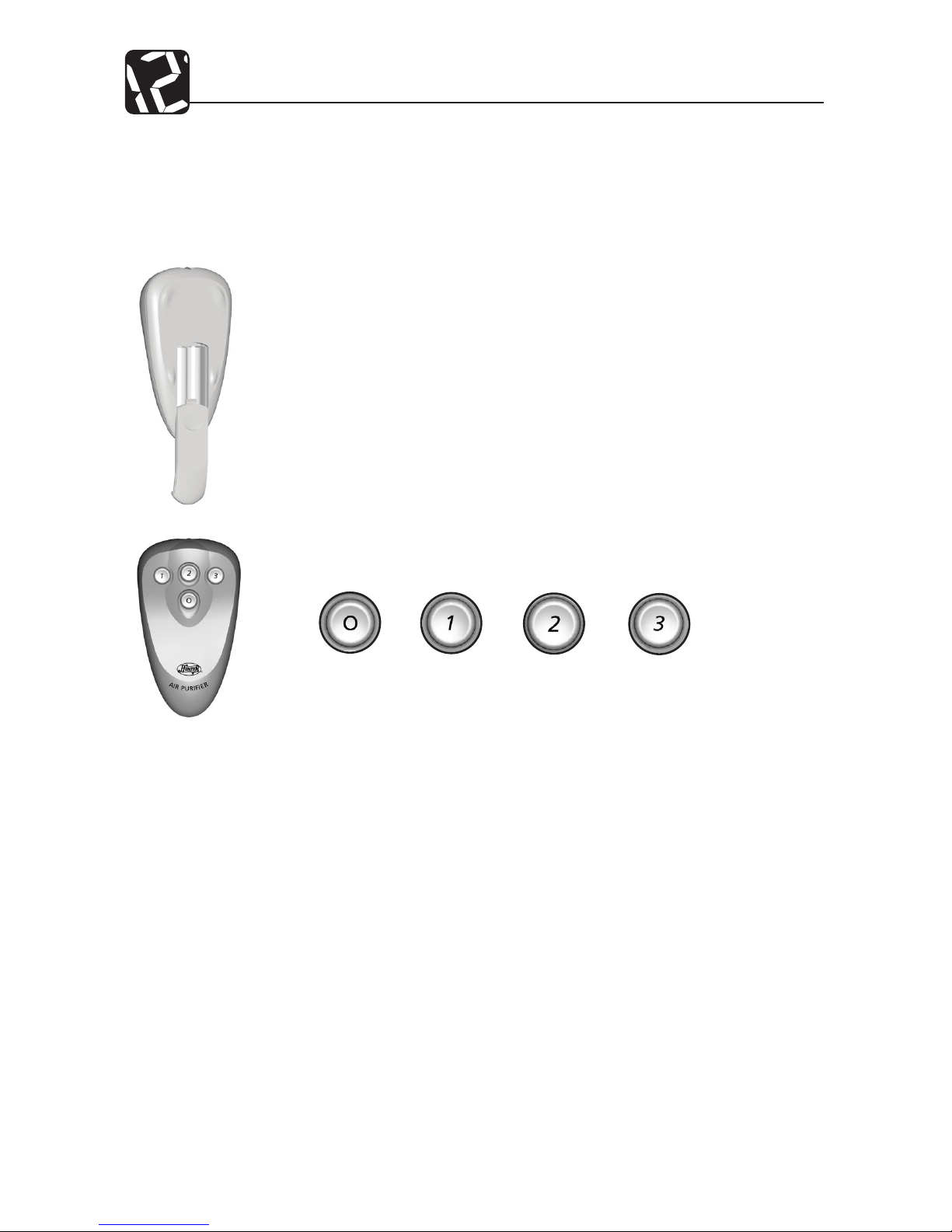
For your convenience, a remote control is provided with this air purier. The remote may
be used to turn the air purier on or o and adjust the fan speed.
Operating the Air Purier with the remote:
1. Install two AAA batteries (UM-4 or IEC R03 or equivalent). Refer to the
graphics in the battery compartment for proper orientation of the batteries.
WARNING: Do not mix old and new batteries. Do not mix alkaline, standard
(carbon-zinc), or rechargeable (nickel cadmium) batteries.
2. To use the remote, point it at the air purier, then press and release the
appropriate key. The key functions are as follows:
When the keypad is locked, the remote may still be used to adjust the speed or turn o
the air purier.
If the remote is not working properly, rst be sure that the remote is facing the air purier
when pressing the key. If it still does not work, check the batteries.
OFF SLEEP ACTIVE TURBO CLEAN
Page 9
9 43007-01
Operation
To Lock or Unlock the Keypad:
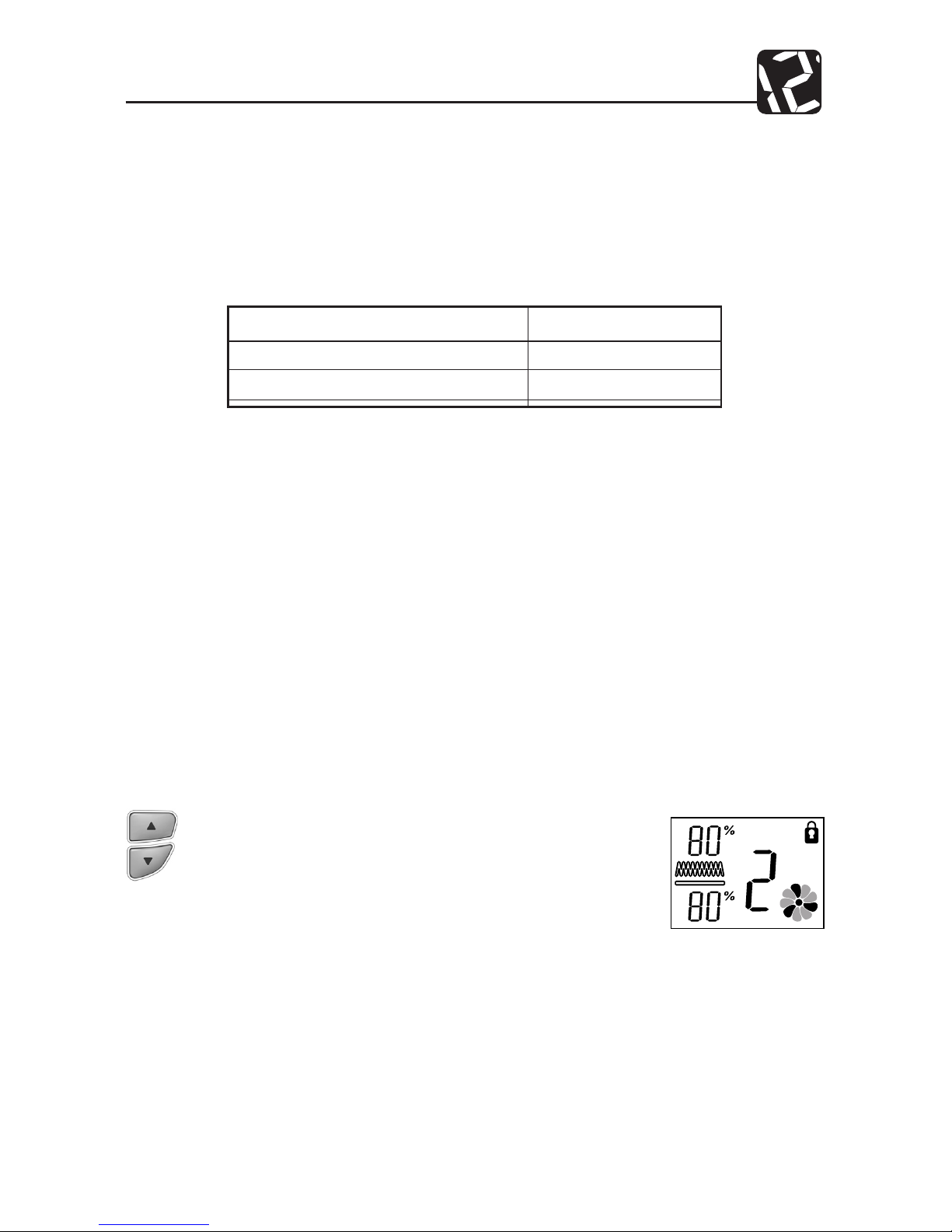
1. To lock the keypad, press and hold the UP/DOWN keys
simultaneously for 2-3 seconds. The Keypad Locked Indicator will appear on the display. Refer to Fig. 9. After releasing
the keys, the Keypad Locked Indicator will disappear.
2. To unlock the key pad, press and hold the UP/DOWN keys
simultaneously for 2-3 seconds. The Keypad Indicator will
disappear and the keypad will be functional.
Filter Life Counters
The pre-lter and lter are critical to the proper operation of the air purier. To help you
know when to clean or change the lters, your Hunter Air Purier has Filter Life Counters that
will monitor the percentage of life your lter has left. Although the exact life of the lters
depends on the environment, the table below gives typical usage times of the lters.
Table 2: Typical Usage Times of the Filters
Filter Type Typical Usage
Activated Carbon Pre-Filter 1400 hours
HEPAtech® Filter 2800 hours
The display shows the percentage of life left since the counter was reset. NOTE: The percentage level drops in 5% increments.
The values of the Pre-Filter and Filter Life Counters are stored in the air purier’s memory.
The unit may be unplugged and moved or stored without losing the Pre-Filter and Filter
Counter values.
To properly track lter usage, the Pre-Filter and Filter Life Counters should be reset each
time the lters are changed or cleaned. Refer to Changing the Pre-Filter (pg. 11) orChanging the HEPAtech® (pg. 12) for instructions on how to reset the counters.
Locking/Unlocking the Keypad
Once you enter the desired speed, you may want to lock the keypad to prevent accidental
changing of the speed. When the keypad is locked, all keys will be disabled. If you press a
key, the Keypad Locked Indicator will be displayed on the screen for 1-2 seconds.
Fig. 9
Page 10
43007-01 10
Operation
Resetting the Air Purier
In the unusual situation that the unit or the display is exhibiting erratic behavior, you may
want to reset the air purier. If you still have problems after resetting the air purier, please
contact Hunter for additional assistance (refer to Technical Assistance, pg. 14).
To Reset the Air Purier:
1. Unplug the unit for at least 30 seconds.
2. Plug the unit back in.
Using the Ionizer
Using the ionizer improves the quality of air in the room. Negative ions are released into the
air and positively charged dust, smoke, and pollen particles are attracted to the negative
ions. These particles settle out of the air and can be vacuumed up during normal cleaning.
These particles are also more easily captured by the HEPAtech® lter as they pass through
the HEPAtech® Filtration System. To ensure the best air circulation in the room, we recommend that you place your air purier six (6) inches away from any walls.
Controlling the Backlight
Your air purier display has a backlight that is continuously lit as long as there is power to
the unit. The backlight may be turned o.
To turn the backlight o or on:
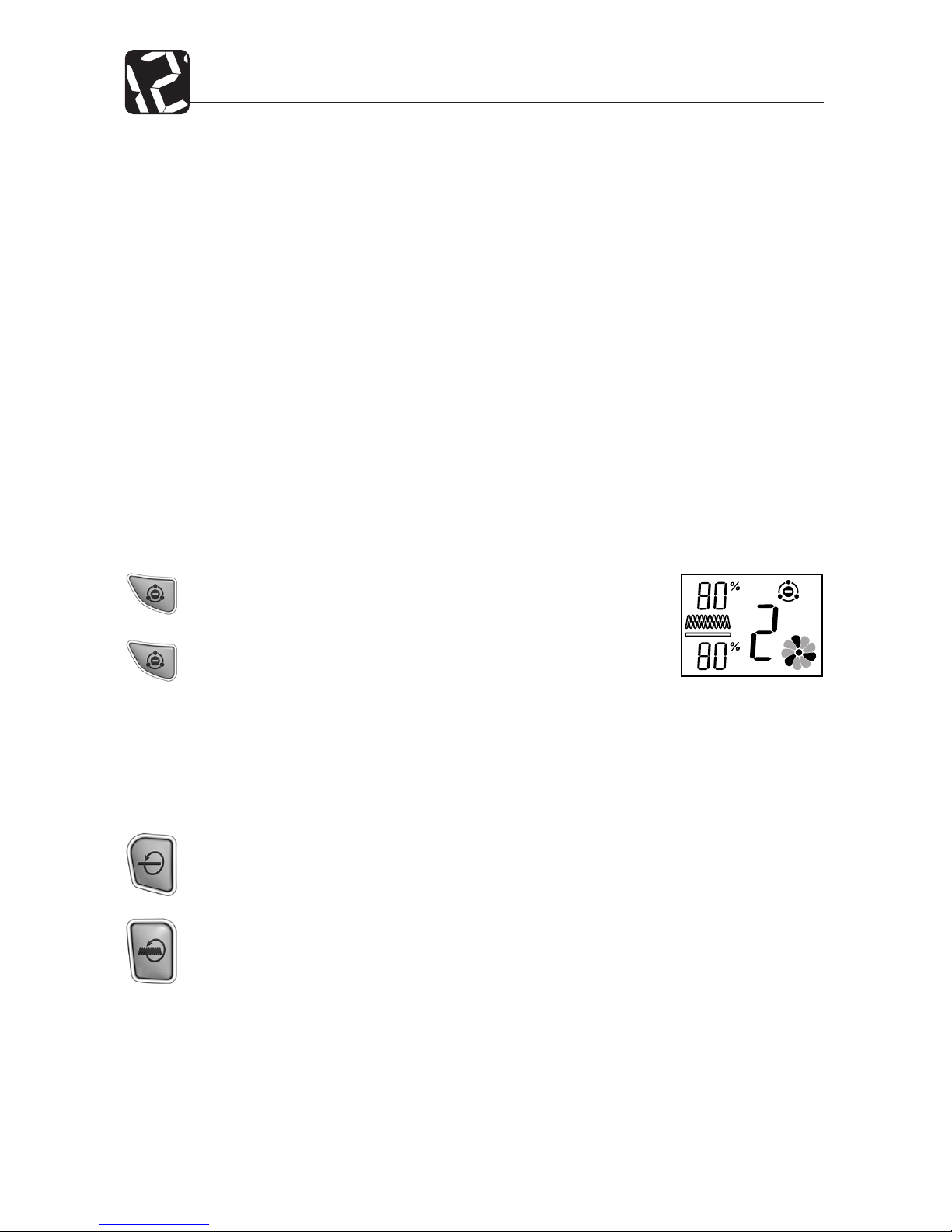
Press the PRE-FILTER RESET and FILTER RESET keys at the same time.
NOTE: Do not hold down the keys for longer than 2 seconds. This may reset a
lter counter.
and
Fig. 10
To turn the ionizer on or o:
1. To turn the ionizer on, press the IONIZER key. The Ionizer
Indicator will appear on the display. Refer to Fig 10.
2. To turn the ionizer o, press the IONIZER key. The Ionizer
Indicator will disappear.
Page 11

11 43007-01
Air Purier Maintenance
Cleaning Your Air Purier
Proper maintenance of your Hunter Air Purier will help ensure years of trouble free
service.
Follow these steps to properly maintain your air purier:
1. Approximately every 90 days, the outside of the unit should be cleaned with a soft,
damp cloth.
2. If needed, the front grill can be removed from the unit and cleaned with soapy water.
Simply remove the pre-lter before exposing the grill to water.
3. Follow the instructions in Changing the Pre-Filter and Cleaning the Filter (pgs. 11 and
12) to determine when and how to replace or clean the lters.
NOTES:
• The air purier must be unplugged during the cleaning process.
• Be sure the unit is completely dry before plugging in and using.
• Never immerse unit in water.
Changing the Pre-Filter
When the Pre-Filter exceeds 1400 hours (refer to Filter Life Counters for additional information, pg. 9), the Pre-Filter Life Counter will display 0% life remaining and the Pre-Filter
indicator will ash as a reminder that you should replace the pre-lter. To maintain proper
odor-removing capability and overall ltration performance, the pre-lter should be
changed every 1400 hours (approximately 3 months of use). If necessary, the pre-lter
can be changed more often. Proper maintenance of the pre-lter will help extend the life
of the HEPAtech® lter. Refer to Obtaining Replacement Filters (pg. 14) if you need help
nding replacement lters.
To change the Pre-Filter and reset the Pre-Filter Life Counter:
1. First, turn o and unplug the air purier.
2. Next, remove the front grill. Place your ngers under the handle on the grill
and pull forward, then up. Refer to Figs. 4 and 5 (pg. 6).
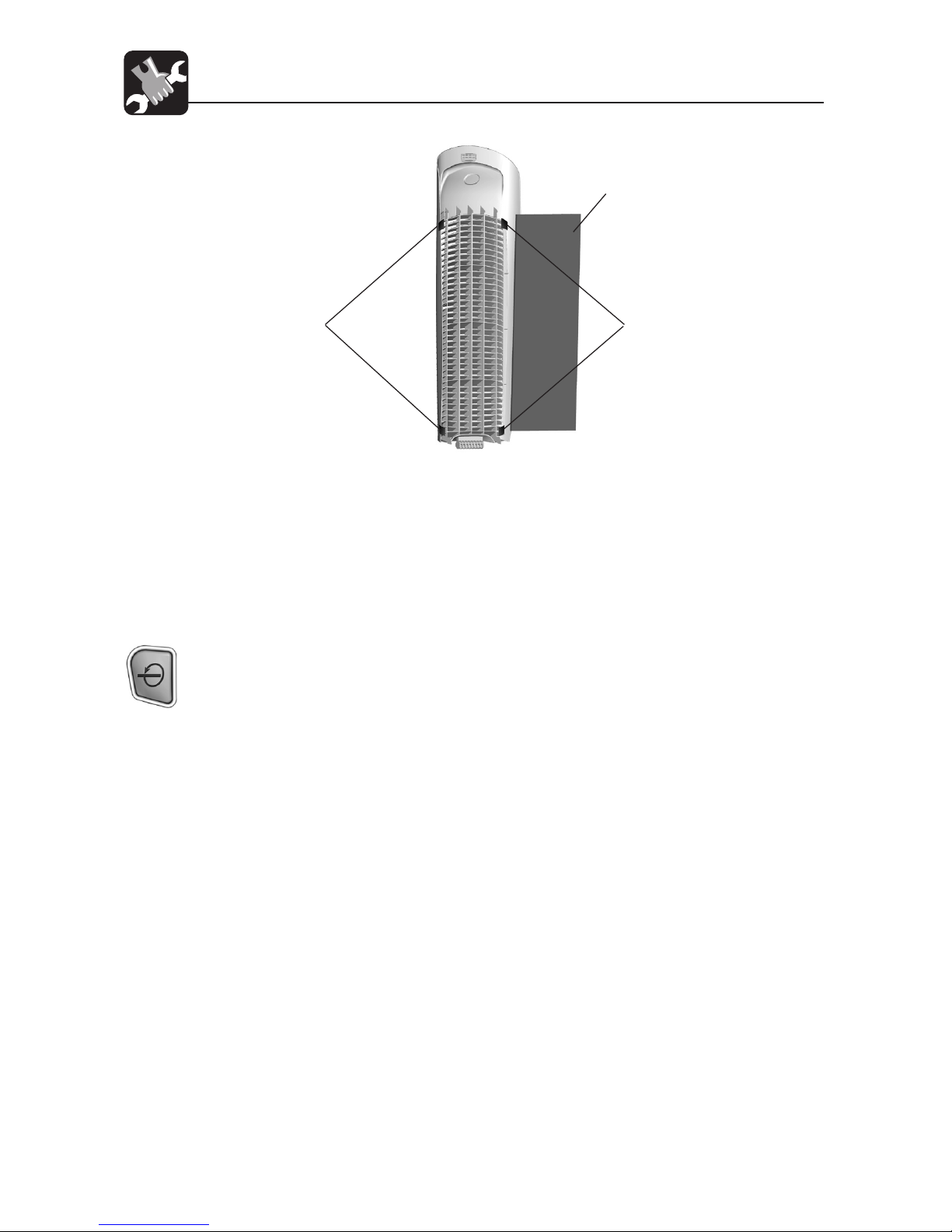
3. The pre-lter is attached to the inside of the grill with hook tape. Pull gently on
the pre-lter to remove it. Refer to Fig. 11 (pg. 11).
4. If needed, use a soft damp cloth to wipe o the grill.
5. Install the new pre-lter by placing it in the grill and pressing gently on the prelter so that it adheres to the hook tape. You may notice a few black particles
coming o the pre-lter. Those particles are part of the odor-removing activated
carbon and will be collected on the lter during regular use.
Page 12
43007-01 12
Air Purier Maintenance
Fig. 11
PREFILTER
HOOK
TAPE
HOOK
TAPE
6. Place the front grill back onto the unit. First, line up the tab on the bottom of
the grill with the recess on the purier base and then push the top of the grill
forward until it is closed. Refer to Figs. 6 and 7 (pg. 7). NOTE: This unit will not
operate unless the grill is in the correct position.
7. Plug in the air purier.
8. Finally, reset the Pre-Filter Counter by pressing the PREFILTER RESET key for 2
seconds. The Pre-Filter Counter will return to 100% and the Pre-Filter indicator
will stop ashing.
Changing the HEPAtech® Main Filter
When the HEPAtech® Main Filter exceeds 2800 hours (approximately 4 to 6 months of use),
the HEPAtech® Main Filter Indicator will turn on as a reminder that you should replace the
lter. Refer to Filter Life Counters for additional information, pg. 9. This is a reminder that
you should check the lter and replace it if necessary. The proper time to change the lter
depends on usage and the environment. Generally, if you notice a decrease in air output
or an increase in noise at any time during normal operation, the lter may be clogged.
Replace the lter to return to normal operation.
To change the lter and reset the Filter Life Counter:
1. First, turn o and unplug the Air Purier.
2. Next, remove the Front Grill. Place your ngers under the Grill Release Handle
and pull up. Refer to Figs. 4 and 5 (pg. 6).
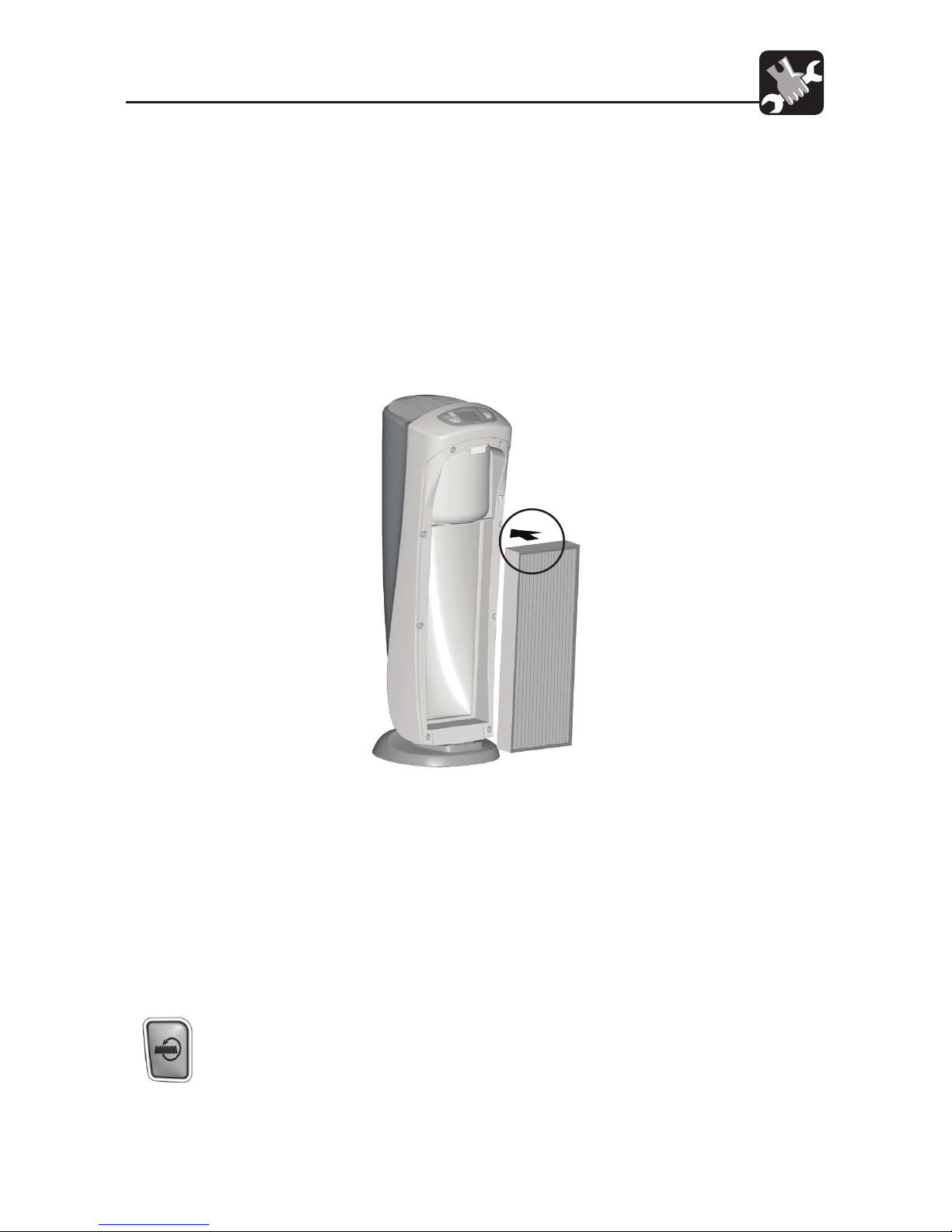
3. Lift the Filter Tab and gently pull the lter out of the unit. Refer to Fig. 6. While
removing the lter, note the lter’s orientation - the new lter will be installed
with the same orientation. Refer to Fig. 10. Once removed, the used lter can
be discarded. While removing the lter, note the directional arrows printed on
Continued
Page 13
13 43007-01
Air Purier Maintenance
the top of the lter. The lter will be reinstalled with the same orientation. Refer
to Fig. 12.
4. To install a new lter, position the lter with its rim facing the unit. Refer to Fig
12.
5. Place the bottom of the lter rim behind the ridges on each side of the bottom
of the unit. Refer to Fig. 11.
6. Lift the Filter Tab and press the top of the lter into the Air Purier. To avoid
damaging the lter, you should press only on the lter’s frame. When the new
lter is in place, release the Filter Tab.
7. Place the front grill back onto the unit. Refer to Figs. 6 and 7, pg. 7. NOTE: This
unit will not operate unless the grill is in the correct position.
8. Plug in the unit.
9. To reset the Filter Life Counter to zero hours and turn o the indicator, press and
hold the HEPAtech® Filter Reset Key for three seconds, then release it.
10. To rest the counter to zero before it expires, press and hold the HEPAtech® Filter
Reset Key for three seconds. When the Indicator begins ashing, release the
Key. Then, once again, press and hold the HEPAtech® Filter Reset Key for three
seconds. The Indicator will turn o. The Counter is now reset to zero.
Fig. 12
Page 14

43007-01 14
Air Purier Maintenance
Obtaining Replacement Filters
To obtain replacement lters for your air purier, rst determine your model number by
looking at the information label on the back of the air purier. The model number will
be listed on the label. Then, call 1-888-830-1326 (CANADA 1-866-268-1936) from 7AM to
7PM Central Time Monday thru Friday and 8AM to 5PM Central Time on Saturday to order
directly. Or contact us over the internet at www.hunterfan.com. to order online. To ensure
that you obtain the correct lters, please nd your model number below that species the
correct replacement lters.
Hunter Air Purier Model No.: ..................................30721
Pre-Filter Replacement Model No.: ........................30901
HEPAtech® Filter Replacement Model No.: .......... 30963
Page 15

15 43007-01
Troubleshooting
Technical Support
If you have any additional questions or problems with your Hunter air purier, please call
1-888-830-1326 from 7:00AM to 7:00PM Central Time Monday thru Friday and 8:00AM to
5PM Central Time on Saturday, or contact us over the Internet at www.hunterfan.com.
1. No display or operation.
2. Keypad does not work.
3. Erratic Display or Opera-
tion.
4. HEPAtech® Filter and/or
Pre-lter Indicator is
Flashing.
5. HEPAtech® Filter and/or
Carbon Pre-Filter Life
Counter is ashing 0%.
6. Unit has reduced air ow
or increased noise.
Problem Solutions
• Conrm that the unit is plugged in.
• Check the installation of the front grill.
• Reset the air purier. (See Resetting the Air Purier on
pg. 10.)
• Key pad has been locked to prevent accidental changes
to the programs. (See Keypad Lock on pg. 9 to unlock
the key pad.)
• Reset the air purier. (See Resetting the Air Purier on
pg. 10.)
• The HEPAtech® Filter and/or Pre-Filter Life Counters
have reached the estimated usage times. Check and
replace or lters if needed. (Refer to Changing the
Pre-Filter on pg. 11, and Changing the HEPAtech® Main
Filter on pg. 12.)
• The HEPAtech® Filter and/or Pre-Filter Life Counters
have greatly exceeded the estimated usage times.
Replace the corresponding lters.
• The lters are clogged and should be cleaned.(Refer to
Changing the Pre-Filter on pg. 11, and Changing the
HEPAtech® Main Filter on pg. 12.)
Page 16

43007-01 16
Warranty
Hunter Fan Company
HEPAtech® Air Purier
5 YEAR LIMITED WARRANTY
The Hunter Fan Company makes the following limited warranty to the original residential
user or consumer purchaser of the HEPAtech® Air Purier:
If any part of your HEPAtech® Air Purier motor or control panel fails during the rst ve
(5) years from the date of installation due to a defect in material or workmanship, we will
provide a replacement Air Purier free of charge. Installation is deemed to occur at the
date of purchase.
If the Air Purier cord or front grill fails any time within one (1) year after installation due
to a defect in material or workmanship, we will replace or, at our option, repair the unit
free of charge at our Service Department in Memphis, Tennessee. You will be responsible
for all parts and labor costs after this one-year period.
USE OF A NON-HUNTER FILTER WILL INVALIDATE THIS WARRANTY. IF THE ORIGINAL
RESIDENTIAL USER OR CONSUMER PURCHASER CEASES TO OWN THE AIR PURIFIER, THIS
WARRANTY AND ANY IMPLIED WARRANTY WHICH THEN REMAINS IN EFFECT, INCLUDING
BUT NOT LIMITED TO ANY IMPLIED WARRANTY OF MERCHANTABILITY OR FITNESS FOR A
PARTICULAR PURPOSE, ARE VOIDED.
NO WARRANTY, EXPRESSED OR IMPLIED, INCLUDING ANY WARRANTY OF MERCHANTABILITY OR FITNESS FOR A PARTICULAR PURPOSE, IS MADE IN RESPECT TO THE FILTER
MATERIAL OR CARBON FILTER.
THIS WARRANTY IS IN LIEU OF ALL OTHER EXPRESS WARRANTIES. THE DURATION OF ANY
IMPLIED WARRANTY INCLUDING BUT NOT LIMITED TO ANY IMPLIED WARRANTY OF MERCHANTABILITY OR FITNESS FOR A PARTICULAR PURPOSE, IN RESPECT TO THE MOTOR IS
EXPRESSLY LIMITED TO THE PERIOD OF THE EXPRESS WARRANTY SET FORTH ABOVE.
This warranty is voided if the air purier is not purchased and used in the USA or Canada.
This warranty excludes and does not cover defects, malfunctions or failures of the Air Purier
which were caused by repairs by persons not authorized by us, use of parts or accessories
not authorized by us, mishandling, modications, or damage to the Air Purier while in your
possession, or unreasonable use, including failure to provide reasonable and necessary
maintenance. This warranty does not cover Air Puriers used in commercial applications.
There are no express or implied warranties as to commercial purchasers or users.
To obtain service, contact the Hunter Fan Company Service Department, 2500 Frisco Avenue, Memphis, Tennessee 38114, 1-888-830-1326 from 7:00AM to 7:00PM Central Time
Monday thru Friday and 8:00AM to 5PM Central Time on Saturday. You will be responsible
for insurance and freight or other transportation to our factory service center. We will return the Air Purier freight prepaid. The Air Purier should be properly packaged to avoid
Continued
Page 17

17 43007-01
Warranty
damage in transit since we will not be responsible for any such damage. Proof of purchase
is required when requesting warranty service. The purchaser must present sales receipt or
other document that establishes proof of purchase.
IN NO EVENT SHALL HUNTER FAN COMPANY BE LIABLE FOR DIRECT, INDIRECT, SPECIAL
CONSEQUENTIAL OR INCIDENTAL DAMAGES IN EXCESS OF THE PURCHASE PRICE OF THE AIR
PURIFIER. YOUR SOLE REMEDY WILL BE REPAIR OR REPLACEMENT AS PROVIDED ABOVE.
SOME AMERICAN STATES AND CANADIAN PROVINCES DO NOT ALLOW:
• LIMITATIONS ON HOW LONG AN IMPLIED WARRANTY LASTS;
• THE EXCLUSION OR LIMITATION OF DIRECT, INDIRECT SPECIAL, INCIDENTAL OR
CONSEQUENTIAL DAMAGES;
SO THE ABOVE LIMITATIONS MAY NOT APPLY TO YOU.
THIS WARRANTY GIVES YOU SPECIFIC LEGAL RIGHTS AND YOU MAY ALSO HAVE OTHER
RIGHTS WHICH VARY FROM STATE TO STATE OR PROVINCE TO PROVINCE.
Page 18
To learn more about Hunter Fan Company products, please see our Web page at:
www.hunterfan.com
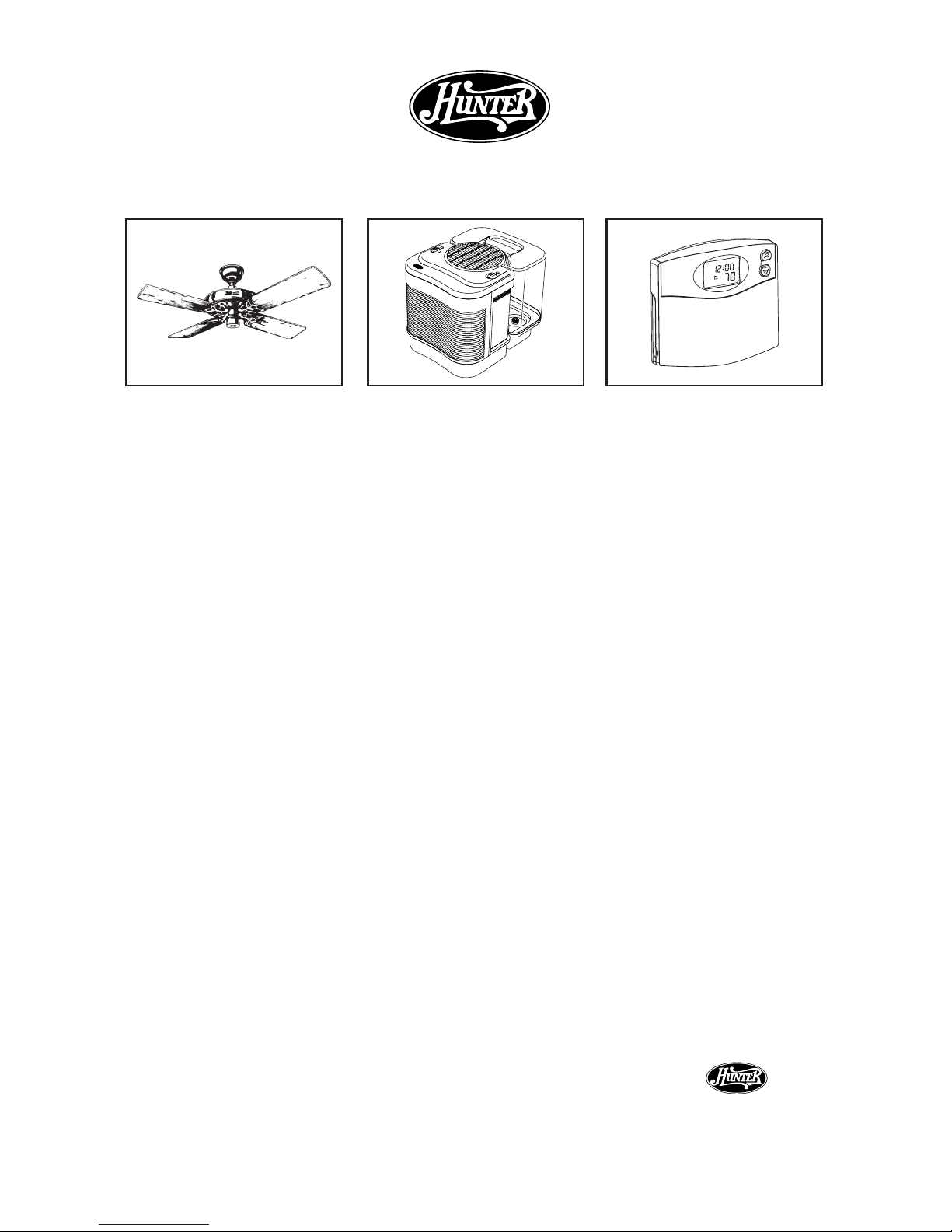
Other Home Comfort Products from Hunter
The Care-Free
Humidier
™
Programmable
Thermostat
®
Hunter Original®
Fans
HUNT ER FA N COM PAN Y
2 500 F RI SCO AVE NUE
MEMPHIS, TN 38114, USA
®
43007-01
Printed in China and Taiwan
M
AM
4
TEMP
Page 19
www.hunterfan.com
Modelo 30721
43007-02 06/21/2007 © 2007 Hunter Fan Company
P u r i f i c a d o r d e a i r e
HE P At e c h®
Modelo
30721
Pre-ltro
30901
Filtro HEPAtech
®
30963
Información sobre el reemplazo de ltro
ESPAÑOL
Page 20

19 43007-02
Tabla de contenido
Instrucciones de seguridad ....................................................................................................... 3
Introducción ...................................................................................................................................3
Descripción del sistema de ltrado de aire
Cómo funciona el puricador de aire .........................................................................4
Componentes del puricador de aire.........................................................................4
Pantalla y teclas de control .............................................................................................5
Operación
Operación inicial ................................................................................................................6
Operación remota .............................................................................................................8
Contadores de vida de ltro...........................................................................................9
Bloqueo/Desbloqueo del teclado ................................................................................9
Restableciendo el puricador de aire .......................................................................10
Uso del ionizador .............................................................................................................10
Control de la luz de fondo ............................................................................................10
Mantenimiento del puricador de aire
Limpieza de su puricador de aire ............................................................................11
Cambio del pre-ltro ......................................................................................................11
Cambio del ltro HEPAtech® ........................................................................................12
Obtención de ltros de reemplazo ............................................................................14
Solución de problemas
Problemas y soluciones .................................................................................................15
Soporte técnico ................................................................................................................15
Información de garantía ...........................................................................................................16
Page 21

43007-02 20
INSTRUCCIONES DE SEGURIDAD
¡IMPORTANTE!
LEA TODAS LAS INSTRUCCIONES ANTES DE USAR ESTE
PURIFICADOR DE AIRE
1. Este puricador está diseñado para usarse en un piso plano y nivelado, y puede no funcionar
correctamente en pisos irregulares. SIEMPRE coloque este puricador de aire en un piso
rme y nivelado. SIEMPRE coloque el puricador al menos a 15 cm. (6") de distancia de las
paredes y de fuentes de calor como estufas, radiadores o calentadores.
2. Colóquelo en un área fuera del alcance de los niños.
3. Antes de usar el puricador de aire, extienda el cordón e inspecciónelo para detectar
cualquier señal de daños. NO use el producto si el cordón está dañado.
4. Este producto tiene un enchufe polarizado (una espiga es más ancha que la otra) como
característica de seguridad. El enchufe sólo se podrá introducir en una toma polarizada de
una sola manera. Si el enchufe no entra completamente en la toma de corriente, invierta el
enchufe. Si todavía no encaja, contacte a un electricista calicado. NO trate de inhabilitar
o anular esta característica de seguridad.
5. SIEMPRE DESENCHUFE el puricador de aire mientras se esté limpiando.
6. NO lo incline ni lo mueva durante su operación. Apáguelo y desconéctelo antes de moverlo.
7. NUNCA sumerja el purificador de aire en agua porque pueden producirse daños
permanentes. Para limpiar adecuadamente su puricador de aire, siga las instrucciones
de la sección Mantenimiento de este manual (página 10).
LEA Y GUARDE ESTAS INSTRUCCIONES
Introducción
Gracias por comprar el Puricador de aire HEPAtech® de Hunter Fan Company. Usted ha adquirido
nuestro más reciente desarrollo en puricación portátil de aire, diseñado para mejorar la calidad del
aire que respira. Su Puricador de aire Hunter incluye las siguientes novedosas características:
• Alta eciencia de ltrado de partículas: El ltro HEPAtech® eliminará el 99.97% de las
partículas de 0.1 micrones del aire que pasa a través del ltro.
• Eliminación de olores: El pre-ltro de carbón activado ayuda a eliminar los olores, como el de
la cocina, el humo, y los olores de mascotas del aire. También atrapa hilachas, cabello y otras
partículas grandes, lo que ayuda a prolongar la vida y el rendimiento del ltro HEPAtech®.
• Ionizador: El ionizador mejora la calidad del aire en la habitación mediante la liberación
de iones negativos en el aire, que atraen el polvo, el humo y las partículas de polen cargados
positivamente.
• Silencioso: El puricador de aire se ha diseñado para funcionar silenciosa y ecientemente.
Puede elegir entre tres velocidades para satisfacer sus necesidades en momentos diferentes.
• Contadores de ltros: El mantenimiento del ltro es crítico para el funcionamiento del
puricador de aire. Para ayudarle a determinar cuando cambiar el pre-ltro y el ltro
HEPAtech®, la unidad tiene incorporados contadores de vida útil que llevan la cuenta de la
vida restante de cada ltro.
• Luz NiteGlo™: La pantalla de su puricador de aire tiene una luz de fondo que está encendida
permanentemente mientras haya alimentación eléctrica a la unidad. Puede elegir encenderla
o apagarla.
Page 22
21 43007-02
Descripción del sistema de ltrado de aire
Componentes del Puricador de aire
Fig. 1 - Ilustración del sistema de ltrado de aire
Fig. 2 - Componentes del Puricador de aire
FILTRO
HEPATECH®
PREFILTRO
REJILLA
FRONTAL
BASE
Polvo e irritantes
Polen y alergenos Olores Bacteria Pelo y caspa de mascotas
Pre-ltro
de carbón
Sistema de ltrado
HEPAtech®
99.97% - 0.1 micrones
Ionizador
Cómo funciona el sistema del puricador de aire HEPAtech®
Mientras el aire es atraído hacia el puricador, el pre-ltro de carbón activado absorbe los
olores y atrapa las partículas grandes. Luego el aire viaja a través del Sistema de ltrado
HEPAtech® donde se acumulan las partículas más pequeñas. Luego, el ionizador libera
iones negativos en el aire que atraen el polvo, el humo y las partículas de polen cargados
positivamente. Finalmente, el aire puricado y limpio es devuelto en la habitación.
Page 23
43007-02 22
Descripción del sistema de ltrado de aire
Pantalla y teclas de control
La pantalla y las teclas de control permiten una sencilla operación del puricador de
aire.
TECLAS ARRIBA/ABAJO: Ajusta la velocidad del ventilador y enciende y apaga la
unidad.
RESTABLECER PREFILTRO: Restablece el contador de vida del pre-filtro
de carbón.
RESTABLECER FILTRO: Restablece el contador de vida del ltro HEPAtech®.
TECLA IONIZADOR: Enciende y apaga el ionizador.
Fig. 3 - Área de control del puricador de aire y pantalla alfanumérica
CONTADOR DE
VIDA DEL FILTRO
HEPATECH®
INDICADOR
DE TECLADO
BLOQUEADO
VELOCIDAD DEL
VENTILADOR
CONTADOR DE VIDA
DEL PREFILTRO
VENTILADOR
ANIMADO
INDICADOR
DE IONIZADOR
TECLAS
ARRIBA/ABAJO
TECLA RESTABLECER
PREFILTRO
TECLA RESTABLECER
FILTRO
TECLA
IONIZADOR
INDICADOR
DEL FILTRO
HEPATECH®
INDICADOR
DEL PREFILTRO
DE CARBÓN
Page 24
23 43007-02
Operación
Operación inicial
Esta sección proporciona instrucciones básicas sobre el uso de su puricador de aire.
Después de seguir esta orientación inicial, continúe leyendo este folleto para aprender a
operar las funciones más avanzadas de su puricador de aire.
Operación básica del puricador de aire:
1. Retire el puricador de aire de la caja y quite la bolsa plástica de protección.
Coloque la unidad sobre un piso rme y nivelado.
2. Antes de encender el puricador de aire, debe conrmar que los ltros estén
rmemente en posición y que no se hayan aojado durante el despacho. Para
revisar los ltros, abra la rejilla delantera. Libere la rejilla delantera colocando
sus dedos debajo de la manija en la rejilla y tire hacia adelante y luego hacia
arriba. Consulte las Figuras 4 y 5.
Fig. 4
Fig. 5
3. Luego, revise el ltro HEPAtech® presionando rmemente en sus cuatro esquinas
para asegurar que esté completamente introducido en la abertura del ltro.
4. El pre-ltro de carbón está montado dentro de la rejilla delantera con cinta tipo
“gancho”. Asegúrese de que cubra adecuadamente los conductos de ventilación
de la rejilla. Podrá notar que se desprenden partículas de color negro del preltro. Esas partículas son parte del carbón activado que elimina olores y serán
atrapadas en el ltro durante el uso.
MANIJA
TIRE HACIA
DELANTE Y
LUEGO HACIA
ARRIBA
Page 25
43007-02 24
Operación
5. Coloque la rejilla delantera nuevamente en la unidad. Primero, alinee la lengüeta
de la parte inferior de la rejilla con la cavidad en la base del puricador y luego
presione la parte superior de la rejilla hacia adelante hasta que esté cerrada.
Consulte las Fig. 6 y 7. NOTA: Esta unidad no funcionará a menos que la rejilla
esté en la posición correcta.
Fig. 8
Fig. 6
Fig. 7
6. Conecte la unidad en una toma de corriente de 120 V y presione la tecla UP
(arriba). El puricador de aire arrancará con una velocidad baja del ventilador.
7. Use las teclas ARRIBA/ABAJO para ajustar la velocidad del ventilador al nivel
deseado (0 = Apagado, 1 = Apagado automático, 2 = Activo, 3 = Turbo limpieza).
Consulte la Fig. 8.
PESTAÑA
CAVIDAD
ALINEE LA
PESTAÑA CON
LA CAVIDAD
EN LA BASE
Page 26
25 43007-02
Operación
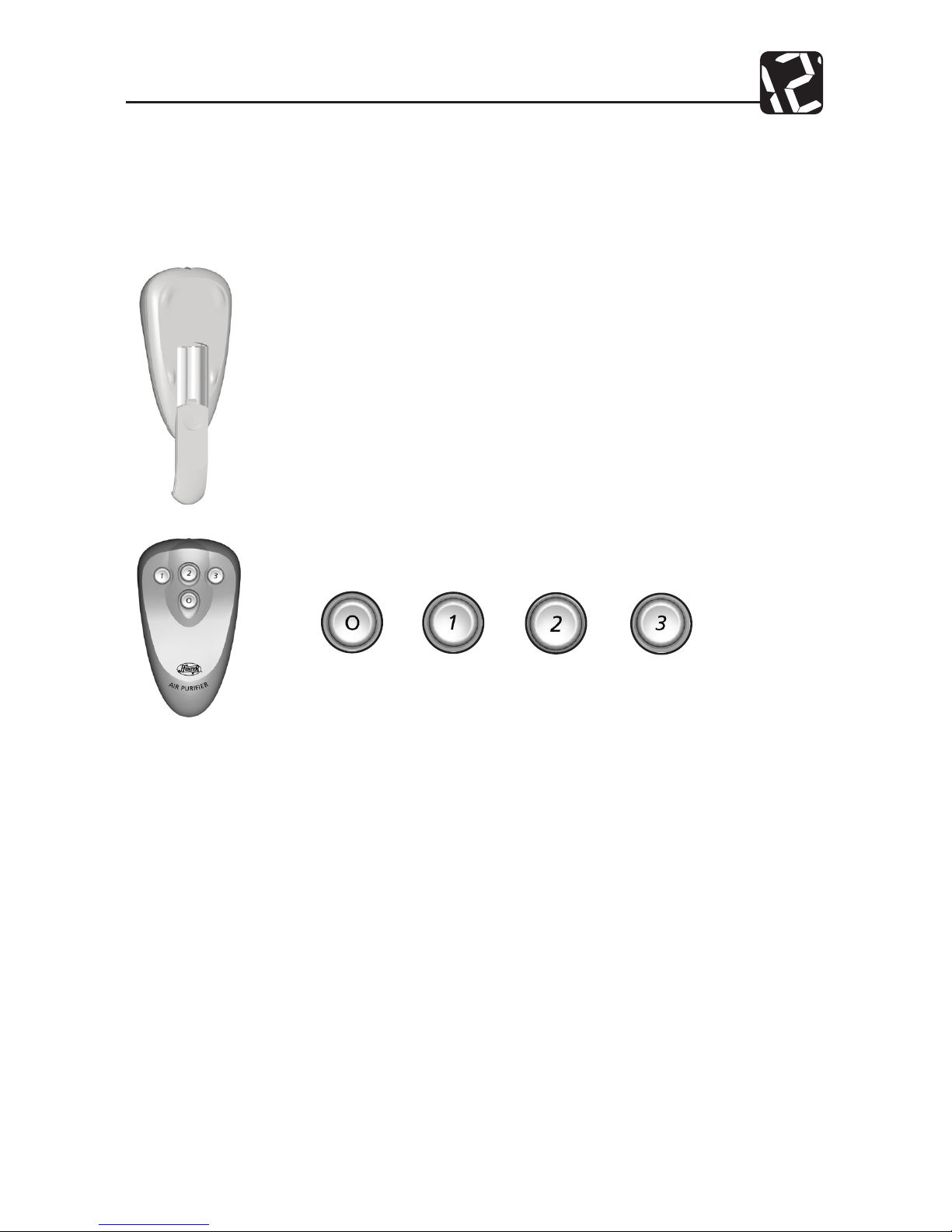
Operación remota
Para su comodidad, este puricador de aire incluye un control remoto. El control puede
usarse para encender o apagar el puricador de aire y ajustar la velocidad del ventilador.
Operación del puricador de aire con el control remoto:
1. Instale dos baterías AAA (UM-4 o IEC R03 o equivalente) Vea el gráfico
en el compartimiento de las baterías para insertarlas correctamente.
ADVERTENCIA: No mezcle baterías nuevas y viejas. No mezcle baterías
alcalinas, estándar (carbón-zinc) o recargables (níquel cadmio).
2. Para usar el control, apunte al puricador de aire y presione y suelte la
tecla apropiada. Las funciones de las teclas son:
Cuando el teclado está bloqueado, todavía puede usar el control remoto para ajustar la
velocidad o para apagar el puricador.
Si el control no está trabajando correctamente, primero asegúrese de que esté apuntando al
puricador de aire cuando presione sus teclas. Si aún no funciona, verique las baterías.
APAGADO APAGADO
AUTOMÁTICO
ACTIVO TURBO
LIMPIEZA
Page 27
43007-02 26
Operación
Contadores de vida del ltro
El pre-ltro y el ltro son críticos para la correcta operación del puricador de aire. Para
ayudarle a saber cuando cambiar o limpiar los ltros, su puricador de aire Hunter tiene
contadores de vida del ltro que monitorean el porcentaje de vida que le queda a su ltro.
Aunque la vida exacta de los ltros depende del ambiente, la siguiente tabla proporciona
la duración típica de los ltros.
Tabla 2: Tiempos de utilización típica de los ltros
Tipo de ltro Utilización típica
Pre-ltro de carbón activado 1400 horas
Filtro HEPAtech® 2800 horas
La pantalla muestra el porcentaje de vida restante desde que el contador fue restablecido.
NOTA: El nivel de porcentaje baja en incrementos de 5%.
Los valores de los contadores de vida del pre-ltro y ltro se almacenan en la memoria del
puricador de aire. La unidad puede ser desconectada y movida o almacenada sin perder
los valores de los contadores de ltro y pre-ltro.
Para llevar correctamente la cuenta de la utilización de los ltros, los contadores de vida
del ltro y pre-ltro deben restablecerse cada vez que se cambian o limpian los ltros.
Consulte Cambio del pre-ltro (página 11) o Cambio del ltro HEPAtech® (página 12) para
obtener instrucciones sobre cómo restablecer los contadores.
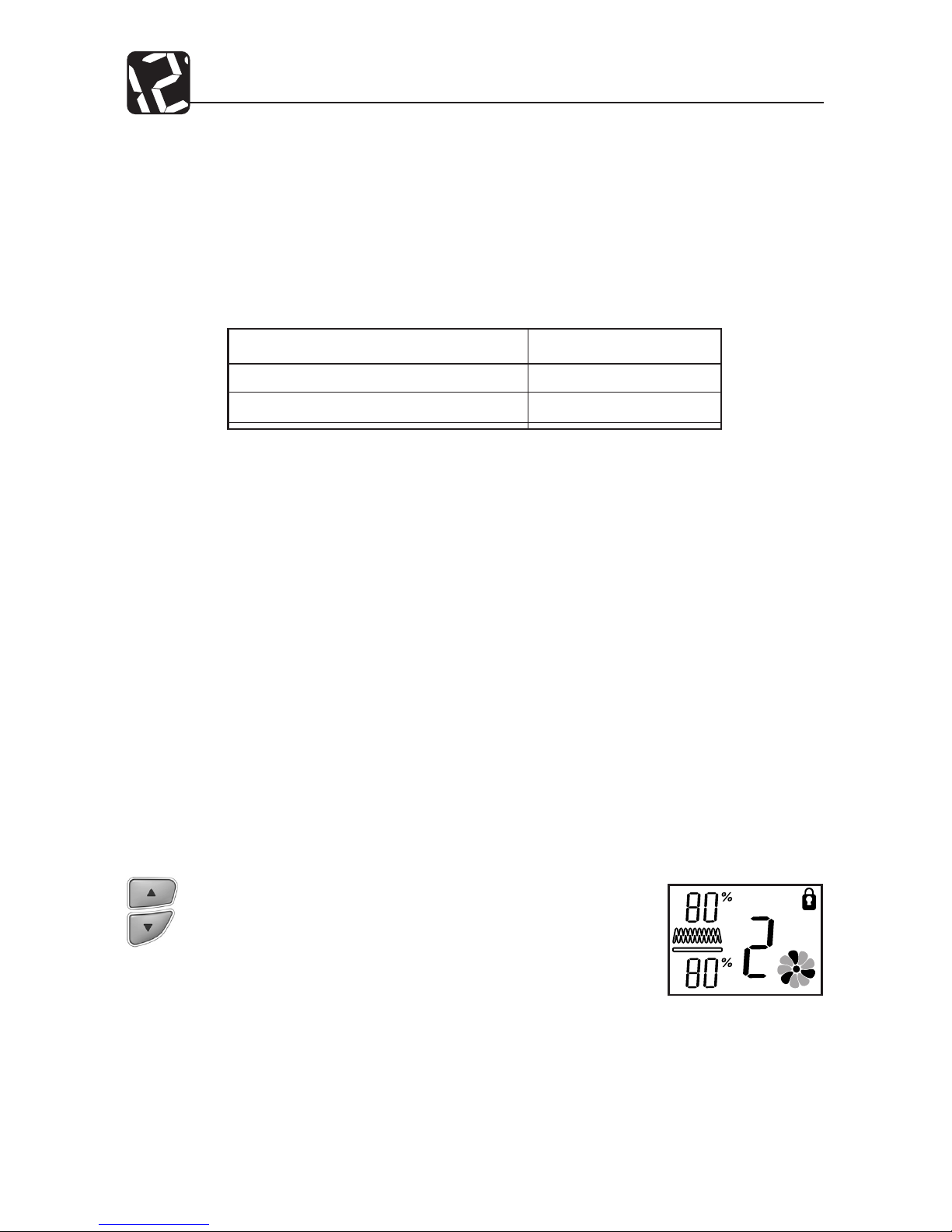
Bloqueo/Desbloqueo del teclado
Luego de haber introducido la velocidad deseada, puede desear bloquear el teclado para
evitar el cambio accidental de la velocidad. Cuando el teclado está bloqueado, todas las
teclas están desactivadas. Si presiona una tecla, el indicador de teclado bloqueado aparecerá en la pantalla por 1-2 segundos.
Fig. 9
Para bloquear o desbloquear el teclado:
1. Parabloquear el teclado,presione y mantengapresiona-Para bloquear el teclado, presione y mantenga presionadas simultáneamente las teclas ARRIBA/ABAJO por 2-3
segundos. El indicador de teclado bloqueado aparecerá
en la pantalla. Consulte la Fig. 9. Después de soltar las teclas, el indicador de teclado bloqueado despararecerá.
2. Para desbloquear el teclado, presione y mantenga presionadas simultáneamente las teclas ARRIBA/ABAJO por
2-3 segundos. El indicador de teclado desaparecerá y el
teclado funcionará normalmente.
Page 28
27 43007-02
Operación
Restableciendo el puricador de aire
En la poco común situación que la unidad o la pantalla exhiba un comportamiento errático, puede desear restablecer el puricador de aire. Si aún tiene problemas después
de restablecer el puricador de aire, comuníquese con Hunter para ayuda adicional (vea
Soporte técnico en la página 14).
Para restablecer el puricador de aire:
1. Desconecte la unidad al menos por 30 segundos.
2. Conecte la unidad nuevamente.
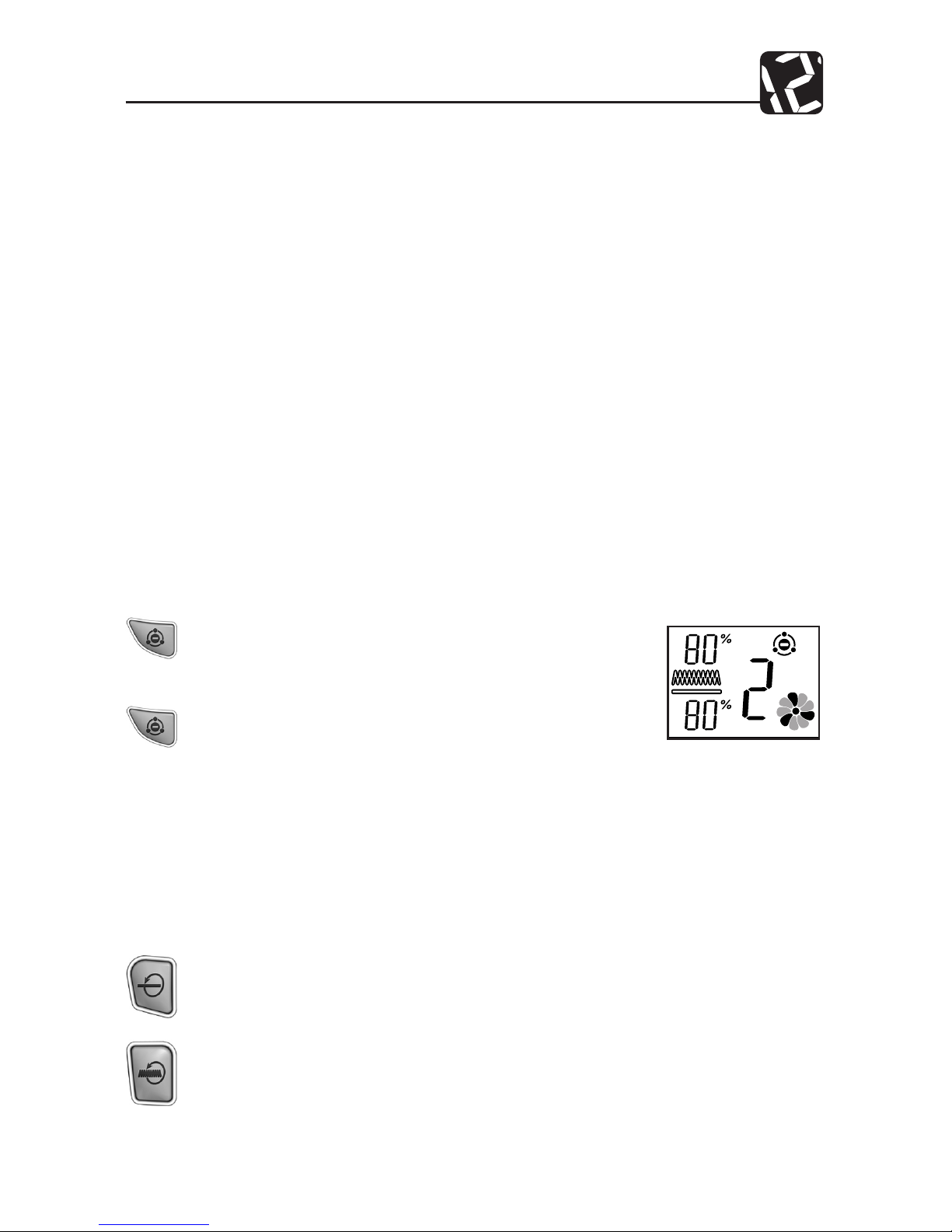
Uso del ionizador
El uso del ionizador mejora la calidad del aire en la habitación. Los iones negativos son
liberados en el aire, y el polvo, humo y las partículas de polen cargados positivamente
son atraídos por estos iones negativos. Estas partículas se asientan y pueden ser aspiradas
durante una limpieza normal. Estas partículas también son capturadas más fácilmente por
el ltro principal HEPAtech® mientras pasan a través del Sistema de ltrado HEPAtech®. Para
asegurar la mejor circulación de aire en la habitación, le recomendamos que coloque su
puricador de aire a 15 cm. (6”) de distancia de las paredes.
Control de la luz de fondo
La pantalla de su puricador de aire tiene una luz de fondo que está encendida permanentemente mientras haya alimentación eléctrica a la unidad. La luz de fondo puede
apagarse.
Para encender o apagar la luz de fondo:
Presione las teclas RESTABLECER PRE-FILTRO y RESTABLECER FILTRO al mismo
tiempo.
NOTA: No mantenga presionadas las teclas por más de 2 segundos. Esto puede
restablecer un contador de ltro.
y
Fig. 10
Para encender o apagar el ionizador:
1. Para encender el ionizador, presione la tecla IONIZADOR. El indicador del ionizador aparecerá en pantalla.
Consulte la Fig. 10.
2. Para apagar el ionizador, presione la tecla IONIZADOR.
El indicador del ionizador desaparecerá.
Page 29

43007-02 28
Mantenimiento del puricador de aire
Limpieza de su puricador de aire
El correcto mantenimiento de su Puricador de aire Hunter ayudará a asegurar años de
servicio sin problemas.
Siga estos pasos para dar un mantenimiento apropiado a su puricador de aire:
1. Aproximadamente cada 90 días, debe limpiarse la parte externa de la unidad con un
paño suave y húmedo.
2. Si es necesario, puede retirar la rejilla delantera de la unidad para limpiarla con agua
jabonosa. Solo retire el pre-ltro antes de exponer la rejilla al agua.
3. Siga las instrucciones en Cambio del pre-ltro y Limpieza del ltro (páginas 11 y 12)
para determinar cuándo y cómo limpiar o reemplazar los ltros.
NOTAS:
• El puricador de aire debe desconectarse durante el proceso de limpieza.
• Asegúrese de que la unidad esté completamente seca antes de conectarla y usarla.
• Jamás sumerja la unidad en agua.
Cambio del pre-ltro
Cuando el pre-ltro exceda las 1400 horas (consulte Contadores de vida del ltro para
información adicional, pág. 9), el contador de vida de pre-ltro indicará 0% de vida restante
y el indicador de pre-ltro destellará para recordarle que debe reemplazar el pre-ltro. Para
mantener una adecuada capacidad de eliminación de olores y un rendimiento de ltrado
general, el pre-ltro debe cambiarse cada 1400 horas (aproximadamente 3 meses de uso)
Si es necesario, puede cambiarse con mayor frecuencia. Un adecuado mantenimiento del
pre-ltro ayudará a prolongar la vida del ltro HEPAtech®. Consulte Obtención de ltros
de reemplazo (página 14) si necesita ayuda para hallar ltros de reemplazo.
Para cambiar el pre-ltro y restablecer el contador de pre-ltro:
1. Primero, apague y desconecte el puricador de aire.
2. Luego, retire la rejilla delantera. Coloque sus dedos debajo de la manija en la rejilla
y tire hacia adelante y luego hacia arriba. Consulte las Fig. 4 y 5 (página 6).
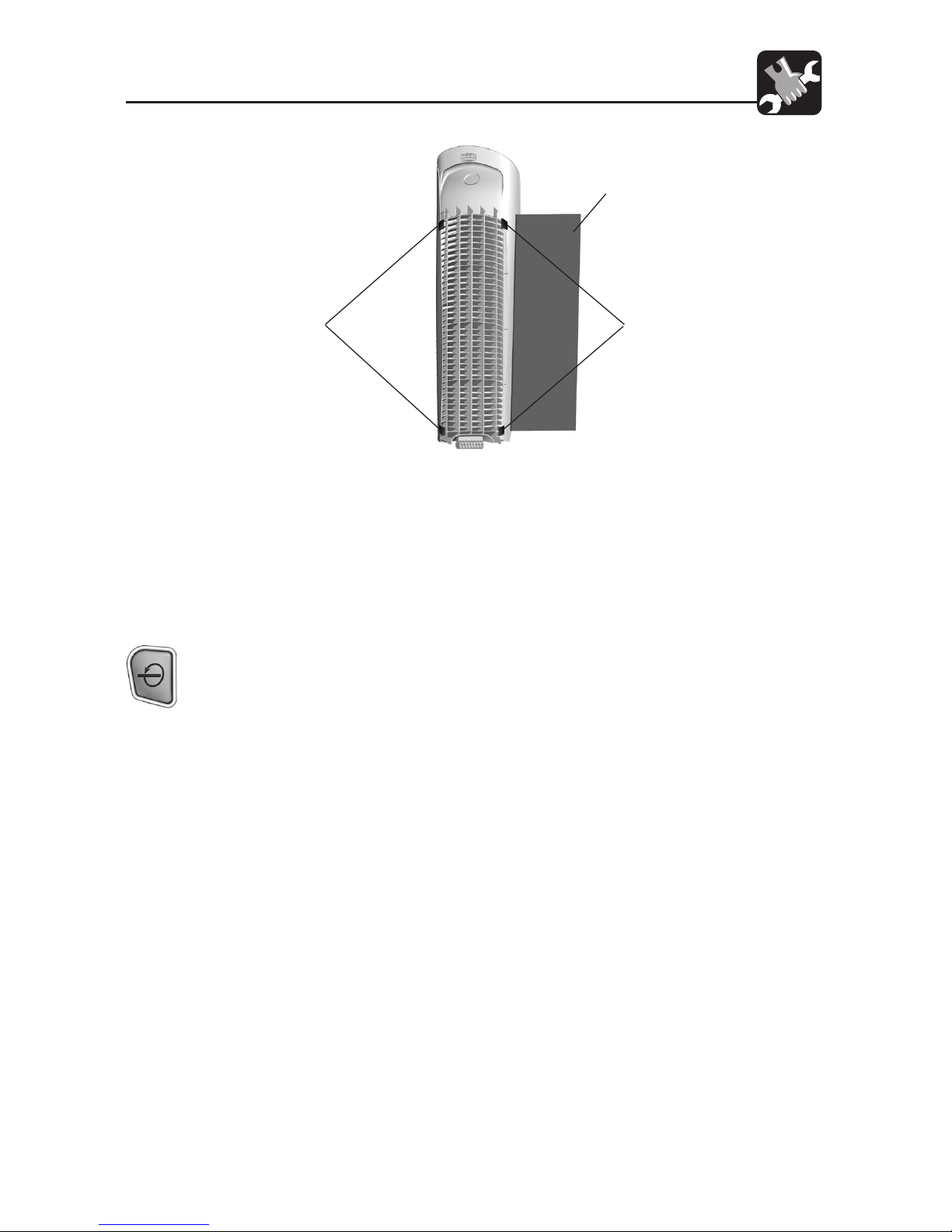
3. El pre-ltro está conectado a la parte interna de la rejilla con cinta tipo gancho.
Tire suavemente del pre-ltro para retirarlo. Consulte la Fig. 11 (pág. 11).
4. Si es necesario, use un paño suave y húmedo para limpiar la rejilla.
5. Instale el nuevo pre-ltro colocándolo en la rejilla y presionándolo suavemente
de modo que se adhiera a la cinta tipo gancho. Podrá notar que se desprenden
partículas de color negro del pre-ltro. Esas partículas son parte del carbón
activado que elimina olores y serán atrapadas en el filtro durante el uso
regular.
Page 30
29 43007-02
Mantenimiento del puricador de aire
Fig. 11
PREFILTRO
CINTA
TIPO
GANCHO
CINTA
TIPO
GANCHO
6. Coloque la rejilla delantera nuevamente en la unidad. Primero, alinee la lengüeta
de la parte inferior de la rejilla con la cavidad en la base del puricador y luego
presione la parte superior de la rejilla hacia adelante hasta que esté cerrada.
Consulte las Fig. 6 y 7 (página 7). NOTA: Esta unidad no funcionará a menos que
la rejilla esté en la posición correcta.
7. Conecte el puricador de aire.
8. Finalmente, restablezca el contador del pre-filtro presionando la tecla
RESTABLECER PRE-FILTRO por 2 segundos. El contador del pre-ltro regresará
a 100% y el indicador del pre-ltro dejará de destellar.
Cambio de ltro principal HEPAtech
®
Cuando el ltro principal HEPAtech® excede las 2800 horas (aproximadamente de 4 a 6
meses de uso), el indicador del ltro principal HEPAtech® se encenderá para recordarle
que debe reemplazar el ltro. Consulte Contadores de vida del ltro para información
adicional en la pág. 9. Este es un recordatorio para que verique el ltro y lo reemplace
si es necesario. El tiempo adecuado para cambiar el ltro depende de su utilización y el
ambiente. Generalmente, si observa una disminución en la salida de aire o un aumento en
el ruido en cualquier momento durante la operación normal, el ltro puede estar obstruido.
Reemplace el ltro para retornar a operación normal.
Para cambiar el ltro y restablecer su contador de tiempo de operación:
1. Primero, apague y desconecte el puricador de aire.
2. Luego, retire la rejilla delantera. Coloque sus dedos debajo de la manija de la
rejilla delantera y tire hacia arriba. Consulte las Fig. 4 y 5 (página 6).
3. Levante la pestaña del ltro y suavemente retire el ltro de la unidad. Consulte
la Fig. 6. Mientras retira el ltro, observe la orientación del ltro - el nuevo ltro
Continuación
Page 31
43007-02 30
Mantenimiento del puricador de aire
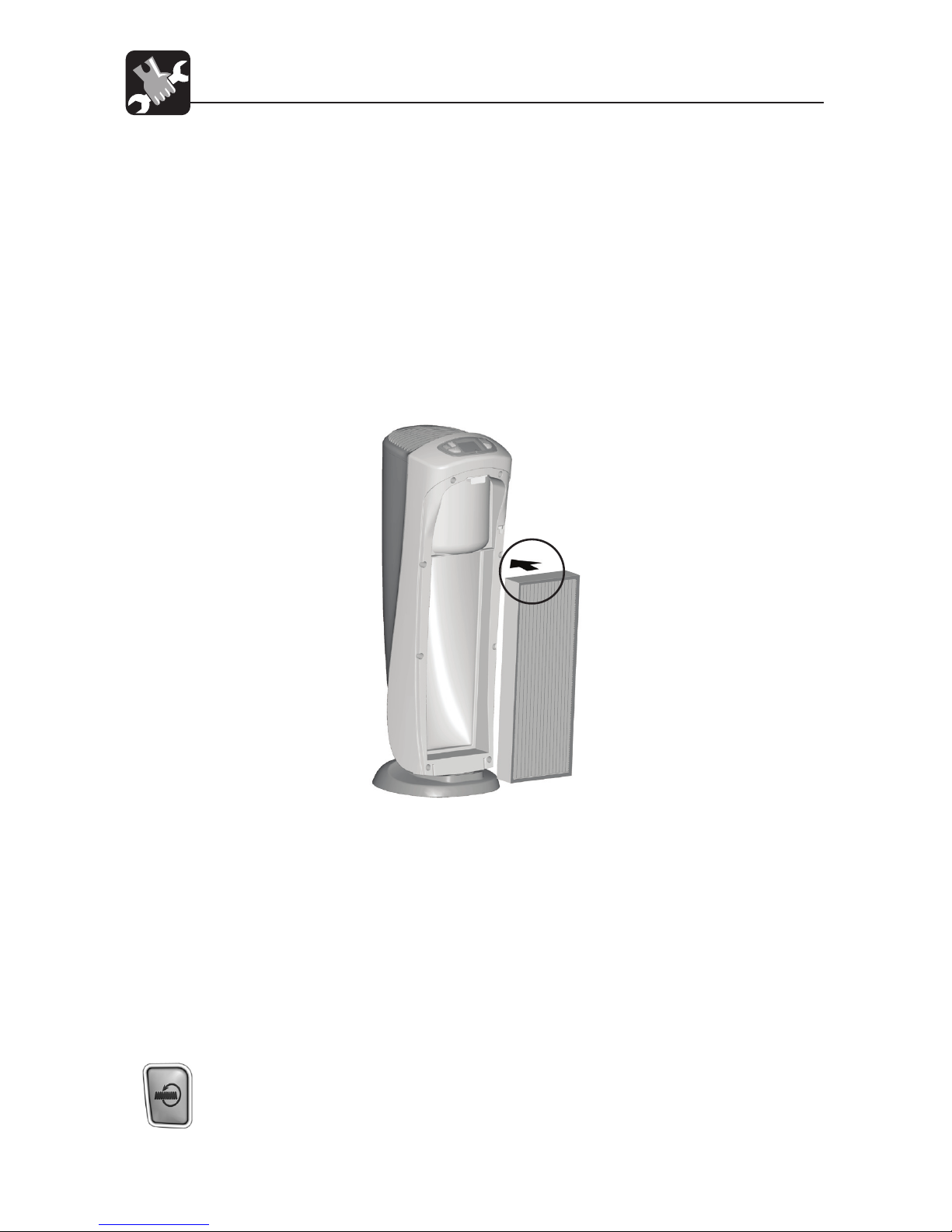
se instalará con la misma orientación. Consulte la Fig. 10. Luego de retirarlo, el
ltro usado puede ser desechado. Al retirar el ltro, observe las echas de dirección impresas en la parte superior del mismo. El ltro debe reinstalarse con la
misma orientación. Consulte la Fig. 12.
4. Para instalar un nuevo ltro, coloque el ltro con el borde hacia la unidad. Consulte la Fig. 12.
5. Coloque la parte inferior del borde del ltro detrás de los resaltos a cada lado
de la parte inferior de la unidad. Consulte la Fig. 11.
6. Levante la pestaña del ltro y presione la parte superior del ltro hacia el puricador de aire. Para evitar dañar el ltro, sólo debe presionar el marco del ltro.
Cuando el nuevo ltro esté en posición, suelte la pestaña del ltro.
7. Coloque la rejilla delantera nuevamente en la unidad. Consulte las Fig. 6 y 7,
pág. 7. NOTA: Esta unidad no funcionará a menos que la rejilla esté en la posición
correcta.
8. Conecte la unidad.
9. Para restablecer el contador de vida del ltro a cero y apagar el indicador,
presione y mantenga presionada la tecla Restablecer ltro HEPAtech® por tres
segundos, luego suelte la tecla.
10. Para restablecer el contador a cero antes de que expire, presione y mantenga
presionada la tecla Restablecer ltro HEPAtech® por tres segundos. Cuando el
indicador comience a destellar, suelte la tecla. Luego, una vez más, presione
y mantenga presionada la tecla Restablecer ltro HEPAtech® por tres segundos.
El indicador se apagará. El contador está restablecido a cero.
Fig. 12
Page 32

31 43007-02
Mantenimiento del puricador de aire
Obtención de ltros de reemplazo
Para obtener filtros de repuesto para su purificador de aire, primero determine el
número de su modelo mirando la etiqueta de información en la parte posterior del
purificador. El número de modelo estará indicado en la etiqueta. Luego, llame al 1-888830-1326 (CANADÁ 1-866-268-1936) de 7:00 a.m. a 7:00 p.m. hora del centro de lunes a
viernes y de 8:00 a.m. a 5:00 p.m. hora del centro los sábados para ordenar directamente.
O contáctenos a través de Internet en www.hunterfan.com para ordenar en línea. Para
asegurarse de obtener los ltros correctos, vea a continuación el número de su modelo
que indica los ltros de reemplazo correctos.
Puricador de aire Hunter Modelo No.: ................ 30721
Reemplazo del pre-ltro Modelo No.: ................... 30901
Reemplazo del ltro HEPAtech® Modelo No.: .....30963
Page 33

43007-02 32
Solución de problemas
Soporte técnico
Si tiene alguna otra pregunta o inquietud sobre su puricador de aire Hunter, llame al
1-888-830-1326 de 7:00 a.m. a 7:00 p.m., hora del centro, de lunes a viernes y de
8:00 a.m. a 5:00 p.m., hora del centro, los sábados o contáctenos a través de Internet en
www.hunterfan.com.
1. No hay visualización u
operación.
2. El teclado no funciona.
3. Pantalla u operación
erráticas.
4. El Indicador de ltro y/o
pre-ltro HEPAtech® está
destellando.
5. El contador de vida
del ltro y pre-ltro de
carbón HEPAtech® está
destellando 0%.
6. La unidad ha reducido el
ujo de aire o aumentado
el ruido.
Problema Soluciones
• Conrme que la unidad esté conectada.
• Verique la instalación de la rejilla delantera.
• Restablezca el puricador de aire. (Consulte Restable-Restablezca el puricador de aire. (Consulte Restableciendo el puricador de aire en la página 10)
• El teclado ha sido bloqueado para evitar cambios
accidentales a los programas. (Vea Bloqueo/Desbloqueo
del teclado en la página 9 para desbloquear el teclado)
• Restablezca el puricador de aire. (Consulte Restableciendo el puricador de aire en la página 10)
• Los contadores de vida de ltro y/o pre-ltro HEPAtech®
han alcanzado los tiempos estimados de utilización.
Revise y reemplace o limpie los ltros si es necesario.
(Consulte Cambio del pre-ltro en la página 11 y
Cambio de ltro principal HEPAtech® en la página 12.)
• Los contadores de vida del ltro y pre-ltro HEPAtech®
han excedido con mucho los tiempos estimados de
utilización. Reemplace los ltros correspondientes.
• Los ltros están obstruidos y deben limpiarse. (Consulte
Cambio del pre-ltro en la página 11 y Cambio de ltro
principal HEPAtech® en la página 12.)
Page 34

33 43007-02
Garantía
Hunter Fan Company
Puricador de aire HEPAtech®
GARANTÍA LIMITADA DE 5 AÑOS
Hunter Fan Company otorga la siguiente garantía limitada al usuario o comprador residencial original del Puricador de aire HEPAtech®:
Si cualquier pieza del motor o panel de control de su Puricador de aire HEPAtech® falla
durante los primeros cinco (5) años desde la fecha de instalación debido a un defecto de
material o mano de obra, le proporcionaremos un Puricador de aire de reemplazo en
forma gratuita. Se considera que la instalación se realiza en la fecha de compra.
Si el cordón del puricador de aire o la rejilla delantera falla antes de un (1) año después
de la instalación debido a un defecto en materiales o mano de obra, reemplazaremos o,
a nuestra elección, repararemos la unidad sin costo para usted en nuestro Departamento
de Servicio en Memphis, Tennessee. Usted será responsable por el costo de las piezas y la
mano de obra después de este período de un año.
EL USO DE UN FILTRO QUE NO SEA DE HUNTER INVALIDARÁ ESTA GARANTÍA. SI EL USUARIO
O COMPRADOR RESIDENCIAL ORIGINAL DEJA DE POSEER EL PURIFICADOR DE AIRE, ESTA
GARANTÍA Y CUALQUIER GARANTÍA IMPLÍCITA QUE PERMANEZCA EN EFECTO, INCLUYENDO
PERO SIN LIMITARSE A TODA GARANTÍA IMPLÍCITA DE COMERCIABILIDAD O IDONEIDAD
PARA UN PROPÓSITO PARTICULAR, QUEDA ANULADA.
NO SE OFRECE NINGUNA GARANTÍA EXPRESA O IMPLÍCITA, INCLUYENDO CUALQUIER
GARANTÍA DE COMERCIABILIDAD O IDONEIDAD PARA UN PROPÓSITO PARTICULAR, EN
RELACIÓN CON EL MATERIAL DEL FILTRO O EL FILTRO DE CARBÓN.
ESTA GARANTÍA SUSTITUYE A TODAS LAS OTRAS GARANTÍAS EXPRESAS. LA DURACIÓN DE
TODA GARANTÍA IMPLÍCITA, INCLUYENDO PERO SIN LIMITARSE A CUALQUIER GARANTÍA
IMPLÍCITA DE COMERCIABILIDAD O IDONEIDAD PARA UN PROPÓSITO PARTICULAR,
RELACIONADA CON EL MOTOR ESTÁ EXPRESAMENTE LIMITADA AL PERÍODO DE LA
GARANTÍA EXPRESA ESTABLECIDA ANTERIORMENTE.
Esta garantía será nula si el Puricador de aire no fue comprado en los EE.UU. o Canadá.
Esta garantía excluye y no cubre defectos, averías o fallas del Puricador de aire que fueran
ocasionados por reparaciones por parte de personas no autorizadas por nosotros, por el
uso de piezas o accesorios no autorizados por nosotros, por mal uso, modicaciones, o
daños al Puricador de aire mientras esté en su posesión, o por un empleo no razonable,
incluyendo la falta de suministrar un mantenimiento razonable y necesario. Esta garantía no
cubre Puricadores de aire usados en aplicaciones comerciales. No hay garantías expresas
o implícitas en lo que respecta a compradores o usuarios comerciales.
Para obtener servicio, comuníquese con el Departamento de servicio de Hunter Fan
Company, en 2500 Frisco Avenue, Memphis, Tennessee 38114, 1-888-830-1326 de 7:00 a.m.
a 7:00 p.m. hora del centro de lunes a viernes y de 8:00 a.m. a 5:00 p.m. hora del centro, los
Continuación
Page 35

43007-02 34
Garantía
sábados. Usted será responsable por el seguro y el ete u otro transporte hasta nuestro
centro de servicio en la fábrica. Devolveremos el Puricador de aire con el ete prepagado.
El Puricador de aire debe estar adecuadamente embalado para evitar daños mientras
esté en tránsito, ya que no seremos responsables de dichos daños. Debe proporcionar una
prueba de su compra cuando solicite un servicio de garantía. El comprador debe presentar
el recibo de compra u otro documento que establezca la prueba de su compra
EN NINGÚN CASO, HUNTER FAN COMPANY SERÁ RESPONSABLE POR DAÑOS DIRECTOS,
INDIRECTOS, CUANTIFICABLES, PERJUDICIALES O ACCESORIOS, EN EXCESO DEL PRECIO
DE COMPRA DEL PURIFICADOR DE AIRE. SU ÚNICO RECURSO SERÁ LA REPARACIÓN O EL
REEMPLAZO COMO SE ESTIPULÓ ANTERIORMENTE.
ALGUNOS ESTADOS NORTEAMERICANOS Y ALGUNAS PROVINCIAS CANADIENSES NO
PERMITEN:
• LIMITACIONES SOBRE LA DURACIÓN DE UNA GARANTÍA IMPLÍCITA;
• LA EXCLUSIÓN O LIMITACIÓN DE DAÑOS DIRECTOS, INDIRECTOS, CUANTIFICABLES,
ACCESORIOS O PERJUDICIALES;
DE MODO QUE LAS LIMITACIONES ANTES MENCIONADAS PUEDEN NO APLICARSE A
USTED.
ESTA GARANTÍA LE DA DERECHOS LEGALES ESPECÍFICOS, PERO USTED TAMBIÉN PUEDE
TENER OTROS DERECHOS QUE VARÍAN DE ESTADO A ESTADO O DE PROVINCIA A
PROVINCIA.
Page 36
Para obtener más información sobre los productos Hunter Fan Company,
visite nuestra página Web en:
www.hunterfan.com
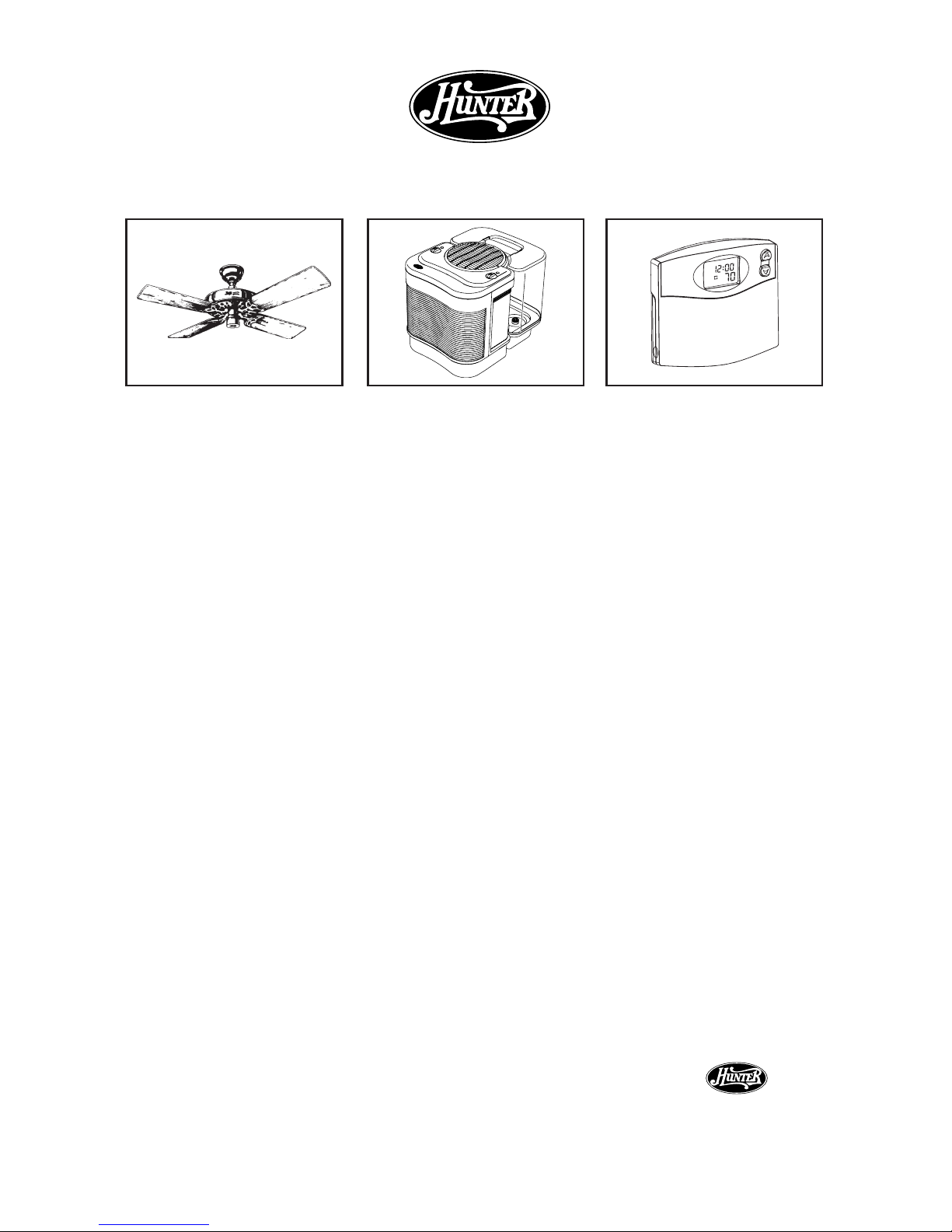
Otros productos Hunter para la comodidad de su hogar
Care-Free
Humidier
™
Termostato
programable
®
Ventiladores Hunter
Original
®
HU NT ER FA N COM PANY
2 5 0 0 F R IS CO A VE N U E
MEMPHIS, TN 38114, USA
®
43007-02
Impreso en China y Taiwán
M
AM
4
TEMP
 Loading...