

Page 1

FingerprintIDMouse MS3500
FingerprintIDScanner MS2600
User'sManual
HunnoTechnologiesInc.
Page 2

Fingerprint ID Mouse/Scanner
Copyright (c) 1999-2002 Hunno Technologies Inc. All rights reserved.
The copyright of this document belongs to Hunno Technologies Inc. No part of this document may be
copied or reproduced by any means.
MagicSecure is a registered trademark of Hunno Technologies Inc.
Microsoft Windows 2000 Professional is a registered trademark of Microsoft Corporation.
Microsoft Windows XP Home Edition is a registered trademark of Microsoft Corporation.
Microsoft Windows XP Professional Edition is a registered trademark of Microsoft Corporation.
All other product names mentioned in this document are the registered trademarks of the corresponding
companies and are protected by the patent and copyright laws.
FCC Notice
This device complieswithPart 15 of the FCC Rules. Operation is subject to the
following two conditions: (1) This device may not cause harmful interference,
and (2) This device must accept any interference received, including
interference that may cause undesired operation.
This equipment has been tested and found to comply with the limits for a Class B digital device, pursuant to
part 15 of the FCC Rules. These limits are designed to provide reasonable protection against harmful
interference in a residential installation. This equipment generates, uses and can radiate radio frequency
energy and, if not installed and used in accordance with the instructions, may cause harmful interference to
radio communication. However, there is no guarantee that interference will not occur in a particular
installation. If this equipment does cause harmful interference to radio or television reception, which can be
determined by turning the equipment off and on, the user is encouraged to try to correct the interference by
one or more of the following measures:
Reorient or relocate the receiving antenna.
Increase the separation between the equipment and receiver.
Connect the equipment into an outlet on a circuit d ifference from that to which the receiver is
connected.
Consult the dealer of an experienced radio/TV technician for help.
MS3500/2600
NOTE : The manufacturer is not responsible for any radio or TV interference caused by unauthorized
modifications to this equipment. Such modifications could void the user's authority to operate the
equipment.
12F. Sewon Venture Town, 705-18, Yoksam-Dong,
Kangnam-Ku, Seoul, 135-080, South Korea
Website : http://www.hunno.com/
E-mail: [email protected]
-2-
Hunno Technologies Inc.
Page 3
Fingerprint ID Mouse/Scanner
MS3500/MS2600
Getting Started
MagicSecure MS3500/MS2600 eliminates the need for user passwords with something can't be stolen or
forgotten, tighten network security, simplifies the log-on process, and reduces the costs associated with
managing corporate networks.
MS3500/MS2600, which can be used on almost any surface without a mouse pad, guarantees fast
recognition speed and accuracy.
Strong durability of optical sensor shall be efficient for user's Cost Saving Policy.
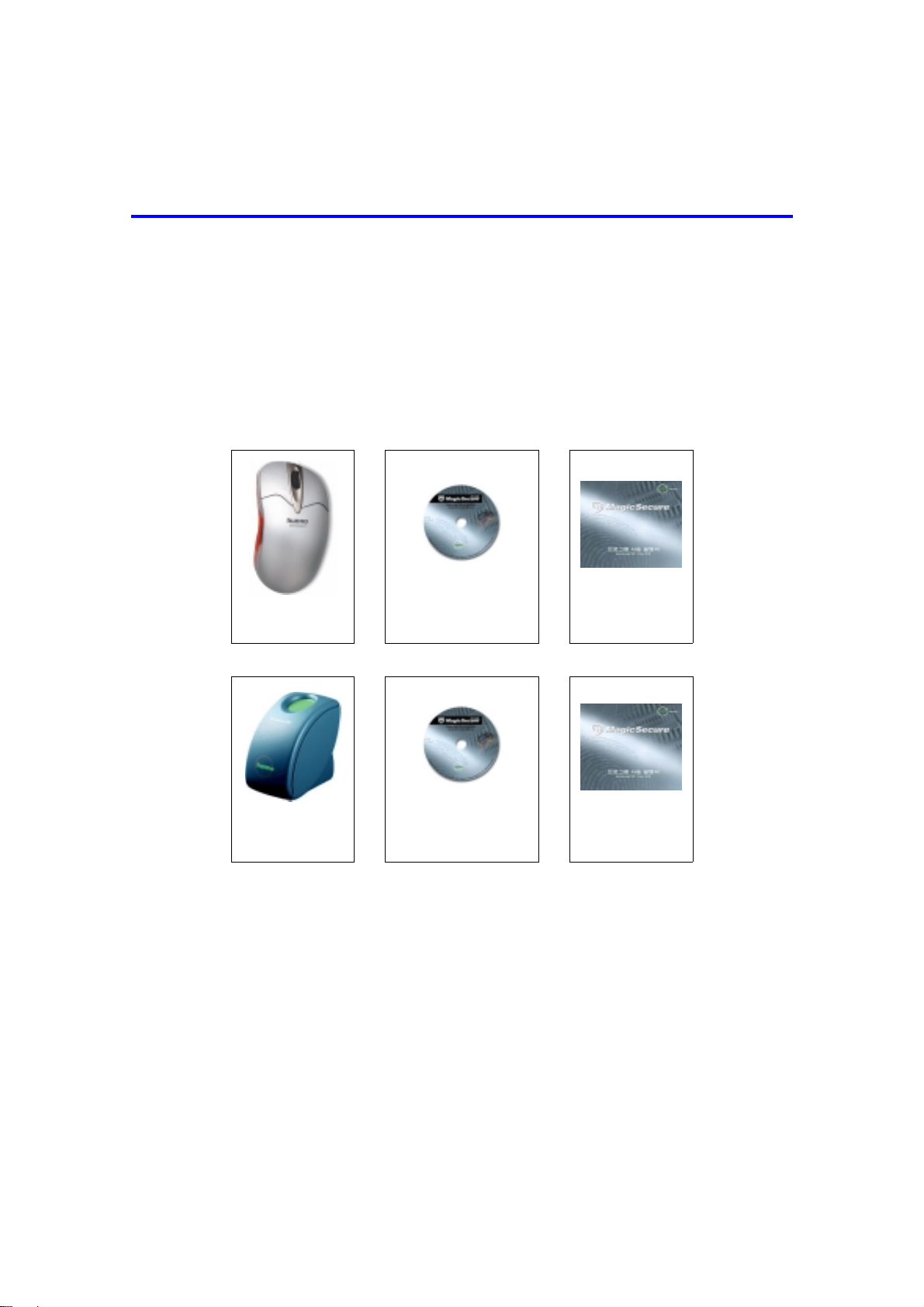
Unpacking
MS3500 : USB Fingerprint ID Mouse
MS3500
USB Mouse
MagicSecure
Program CD
Software
User Guide
MS2600 : USB Fingerprint ID Scanner
MS2600
USB Scanner
MagicSecure
Program CD
Software
User Guide
Features
Windows 98/ME/2000/XP/NT Logon
USB Support
Weel & Optical Mouse Function, Scroll Function, Zoom Function
Folder & File Encryption
Screensaver
4 Type Security Code (Fingerprint, Password, Fingerprint and/or Password)
Boot Protection
Log Data Management
Windows XP-Style Icon
Hunno Technologies Inc.
-3-
Page 4
Fingerprint ID Mouse/Scanner
gerp
r
r
r
MS3500/2600
Specifications
Verification Time : 1.0 sec
FRR : 0.01%
FAR : 0.001%
Size of Template : 256 byte
Resolution : 500 dpi
Communication : USB
Power : DC 5V (Bus Power)
System requirements
Windows 98/ME, Windows 2000
Pentium 133Mhz or above, 32MB RAM, 20MB HDD
USB Port
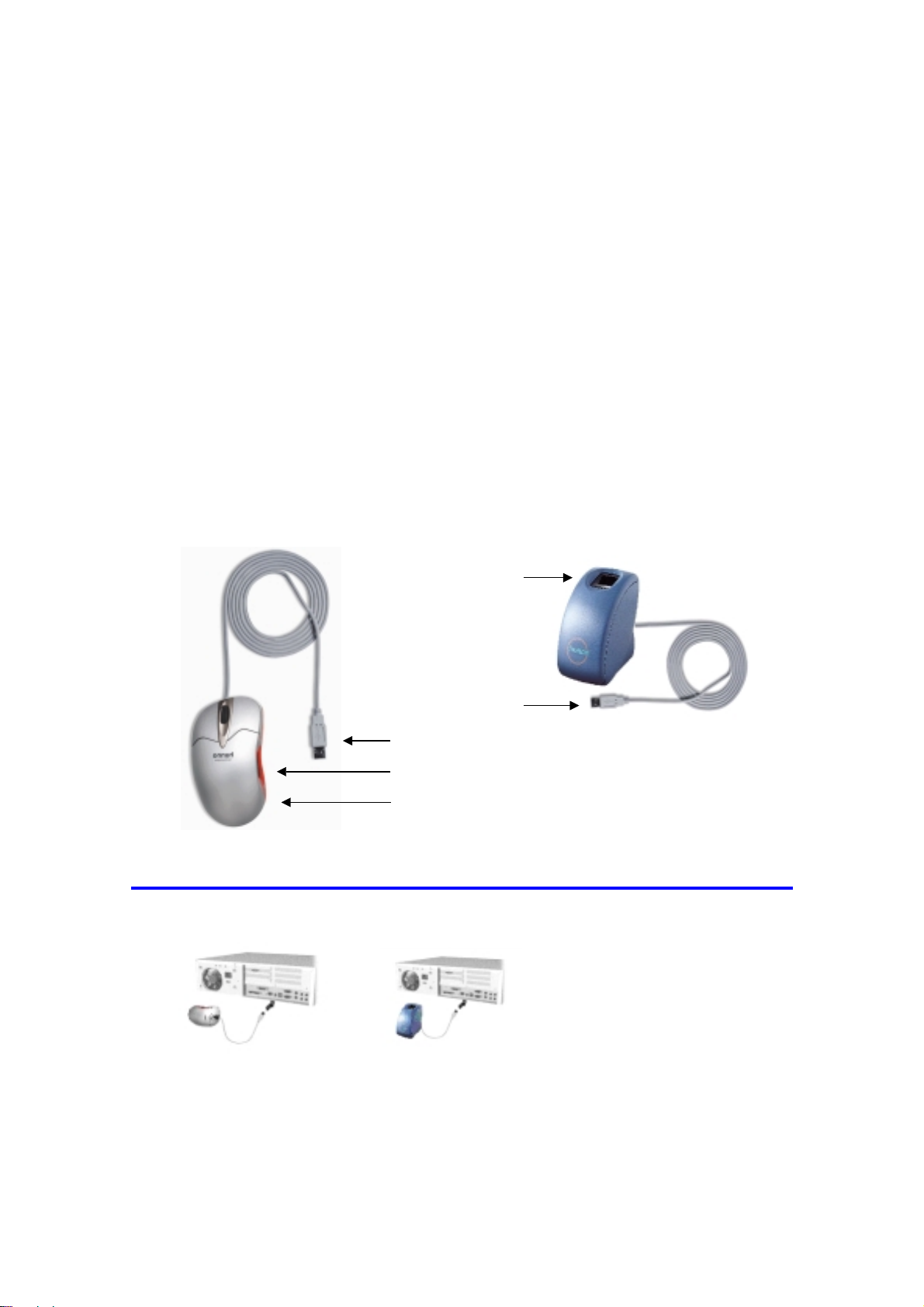
MagicSecure MS3500/MS2600 Part Names
Fin
rint Senso
/
USB Interface
USB Interface
Fingerprint Senso
Optical Senso
Hardware Installation
1. Turn on the power of PC1.
2. Connecting the MS3500/MS2600.
Connect the MS2600 (Fingerprint Identification Device for PC Security) to the USB port of the PC
3. Installing Device Drivers.
-4-
Hunno Technologies Inc.
Page 5

Fingerprint ID Mouse/Scanner
MS3500/MS2600
Software Installation
There are three device drivers that should be installed when MS3500(device name) is operated on Windows
98 : USB composite device, MS3500(driver name), and USB human interface device. Install MS3500 only
when MS3500 is operated on Windows 2000/Window XP.
There is one device driver that should be installed when MS2600 is operated on Windows 98/ Windows
2000/ Windows XP : MS2600
For Windows 98
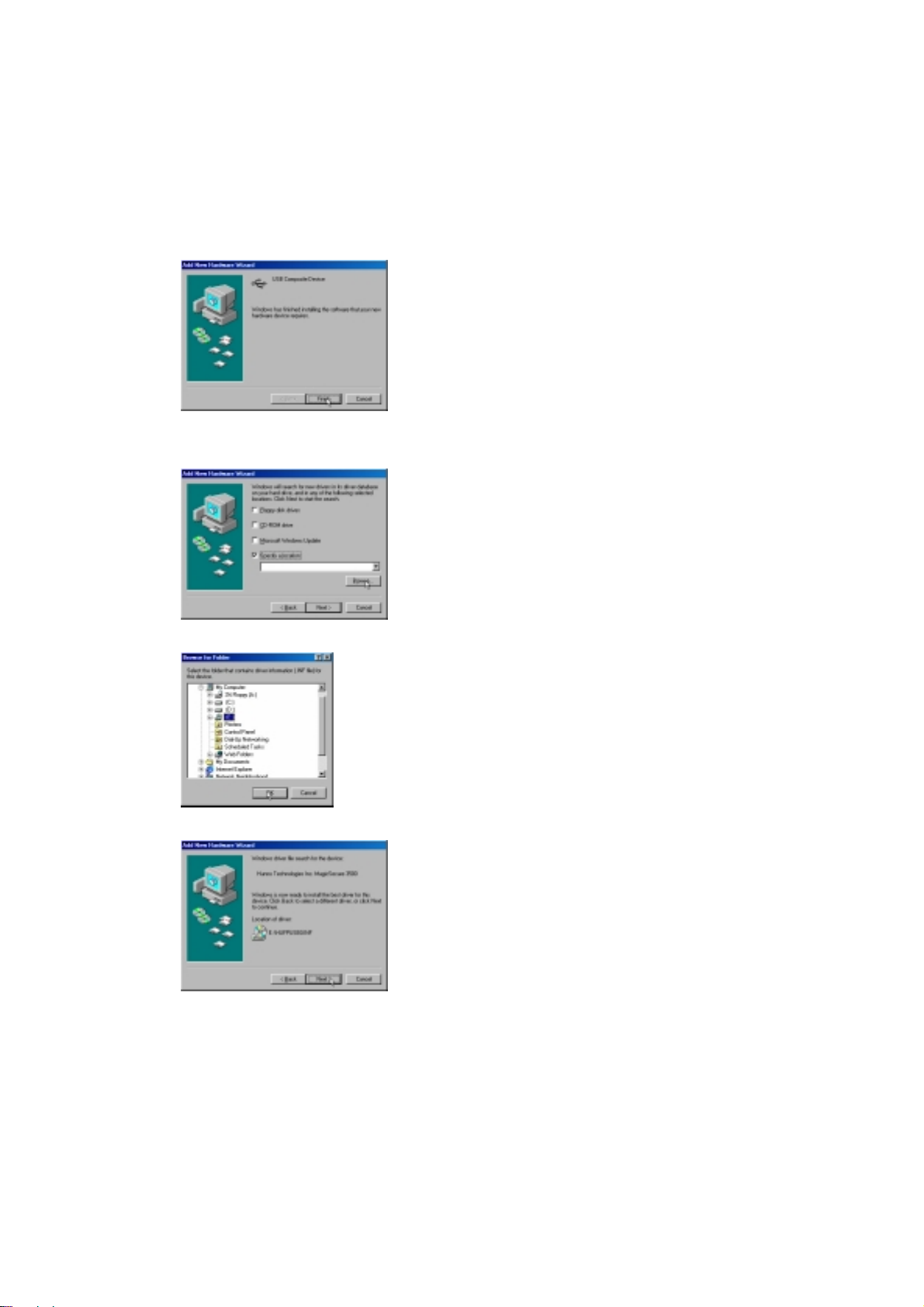
1. USB composite device (MS3500)
At the Add New Hardware Wizard screen shown above, click Next.
At the screenshownabove, select Search for the best driver for your device(Recommended),and
then click Next.
At the screen shown above, select Specify a location, and then click Next.
Hunno Technologies Inc.
-5-
Page 6

Fingerprint ID Mouse/Scanner
At the screen shown above, clicking Next will start the installation
When the driver installation is complete and the screen indicating that Windows has finished
installing USB composite device appears, click Finish.
MS3500/2600
2. MS3500/MS2600
At the Add New Hardware Wizard screen shown above, click Next.
At the screenshownabove, select Search for the best driver for your device(Recommended),and
then click Next.
-6-
Hunno Technologies Inc.
Page 7
Fingerprint ID Mouse/Scanner
At the screen shown above, insert the MagicSecure CD and s elect CD ROM drive, and then click
Next.
Note: If the path to the CD ROM drive is not found
1) Ensure that the C D has been inserted.
2) Afterverifying the CD is inserted, click Back to return to the screen wherethe drive is specified.
MS3500/MS2600
3) Select Specify a location, and then click Browse....
4) At Folder Brow se, specify the CD-ROM drive and click OK.
At the screen shown above, clicking Next will start the installation.
Hunno Technologies Inc.
-7-
Page 8

Fingerprint ID Mouse/Scanner
When the driver installation is complete and the screen indicating that Windows has finished
installing MS3500/MS2600 appears, click Finish.
MS3500/2600
3. USB human interface device (MS3500)
At the Add New Hardware Wizard screen shown above, click Next.
At the screenshownabove, select Search for the best driver for your device(Recommended),and
then click Next.
At the screen shown above, select Specify a location, and then click Next.
-8-
Hunno Technologies Inc.
Page 9

At the screen shown above, clicking Next will start the installation.
When the driver installation is complete and the screen indicating that Windows has finished
installing USB human interface device appears, click Finish.
For Windows ME
Fingerprint ID Mouse/Scanner
MS3500/MS2600
At the Add New Hardware Wizard screen shown above select Specify the location of the driver
(Advanced), and then click Next.
At the screen shown above, insert the MagicSecure CD and select Removable media (Floppy,
CD-ROM...), and then click Next.
At the screen shown above, clicking Next will start the installation.
Hunno Technologies Inc.
-9-
Page 10
Fingerprint ID Mouse/Scanner
When the driver installation is complete and the screen indicating that Windows has finished
installing MagicSecure3500 appears, click Finish.
MS3500/2600
For Windows 2000 (MS3500/MS2600)
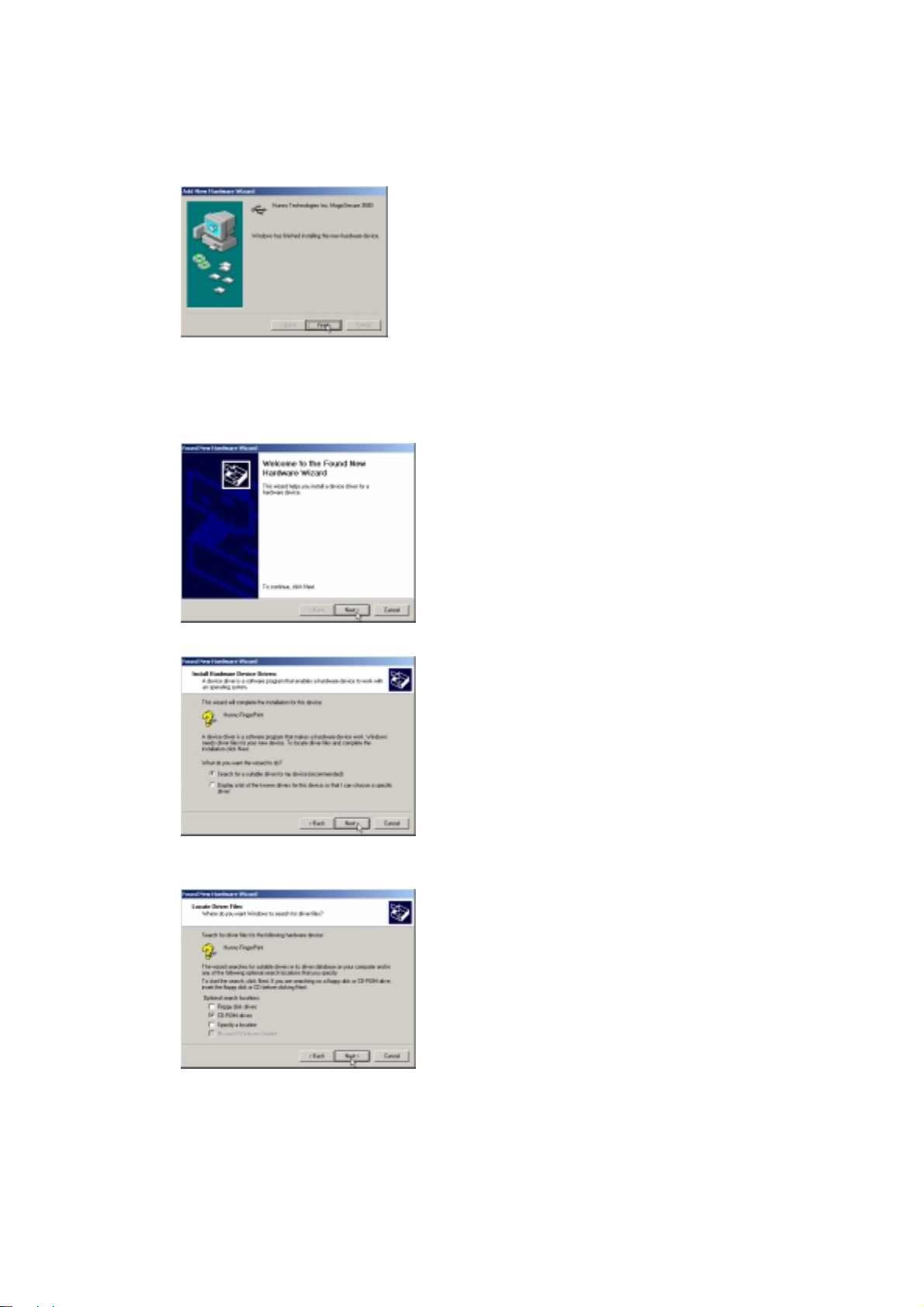
At the Found New Hardware Wizard screen shown above, click Next.
At the screen shown above, select Search for a suitable driver for my device (Recommended),
and then click Next.
At the screen shown above, insert the MagicSecure CD and select CD-ROM drive from Optional
search locations, and then click Next.
-10-
Hunno Technologies Inc.
Page 11
Fingerprint ID Mouse/Scanner
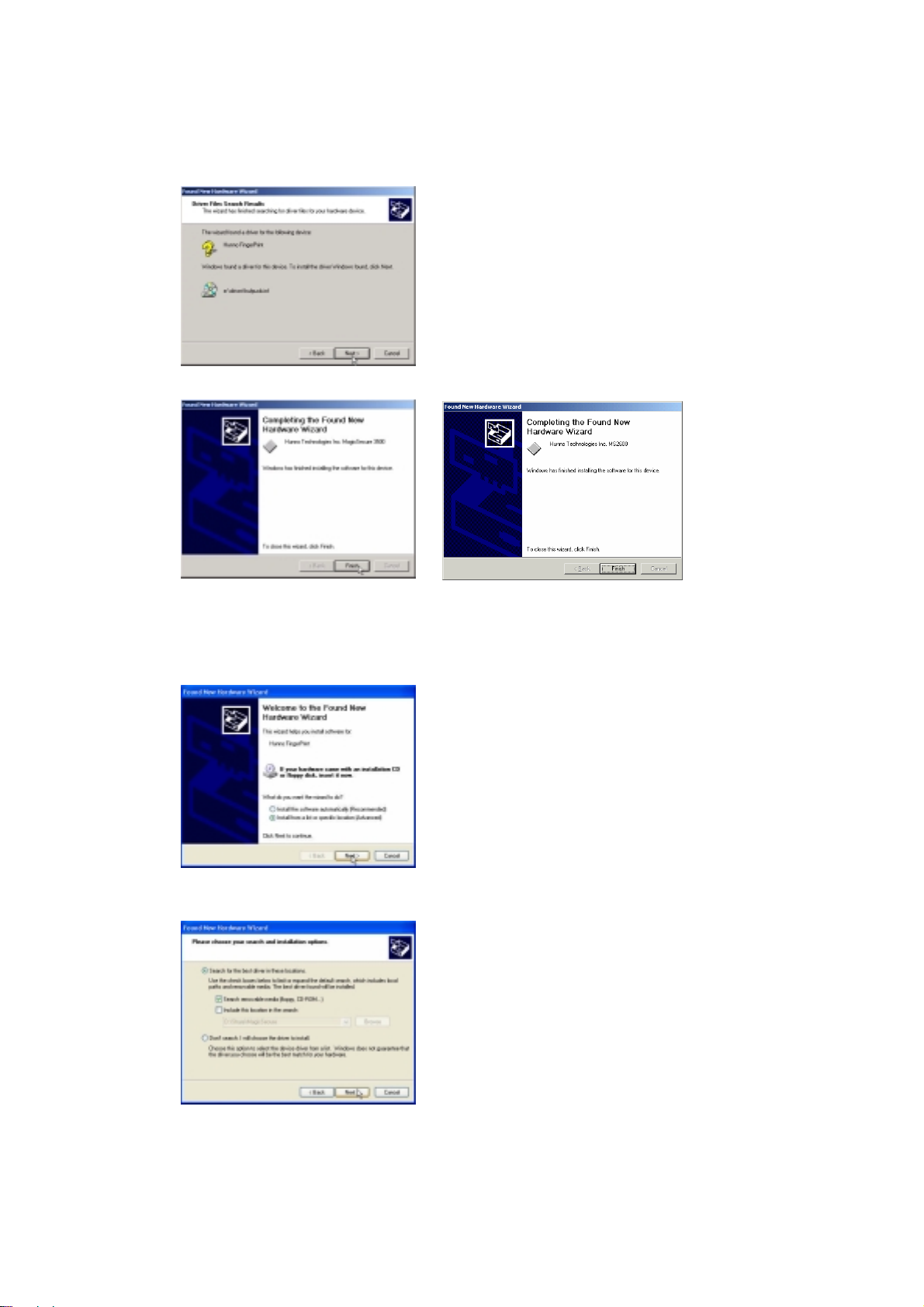
At the screen shown above, clicking Next will start the installation.
MS3500/MS2600
When the driver installation is complete, and the Completing the Found New Hardware Wizard
screen for MS3500/MS2600 appears, click Finish.
For Windows XP (MS3500/MS2600)
At the Welcome to the Found New Hardware Wizard screen,select Install from a list or specific
location (Advanced), and then click Next.
Insert the MagicSecure CD and select Search removable media (Floppy, CD-ROM...),andthen
click Next.
Hunno Technologies Inc.
-11-
Page 12

Fingerprint ID Mouse/Scanner
When the driver installation is complete and the Completing the Fond New Hardware Wizard
screen for MS3500/MS2600 appears, click Finish.
MS3500/2600
-12-
Hunno Technologies Inc.
 Loading...