

Page 1
USER GUIDE
Page 2

CONGRATULATIONS
Thank you for purchasing your new HUE HD Webcam.
This user guide will provide you with all of the information you
need to get the most from your system.
Before you make your first video call you will need to install and set
up your webcam. Simple instructions are provided on the following
pages.
Need help?
If you have any problems setting up or using your HUE HD Webcam
please contact us by email at: [email protected]
Alternatively, solutions to common problems can be found in the
FAQ section at the end of this manual.
Page 3
3Assembling your webcam
ASSEMBLING YOUR WEBCAM
Remember to connect the webcam to your computer before installing any video software.
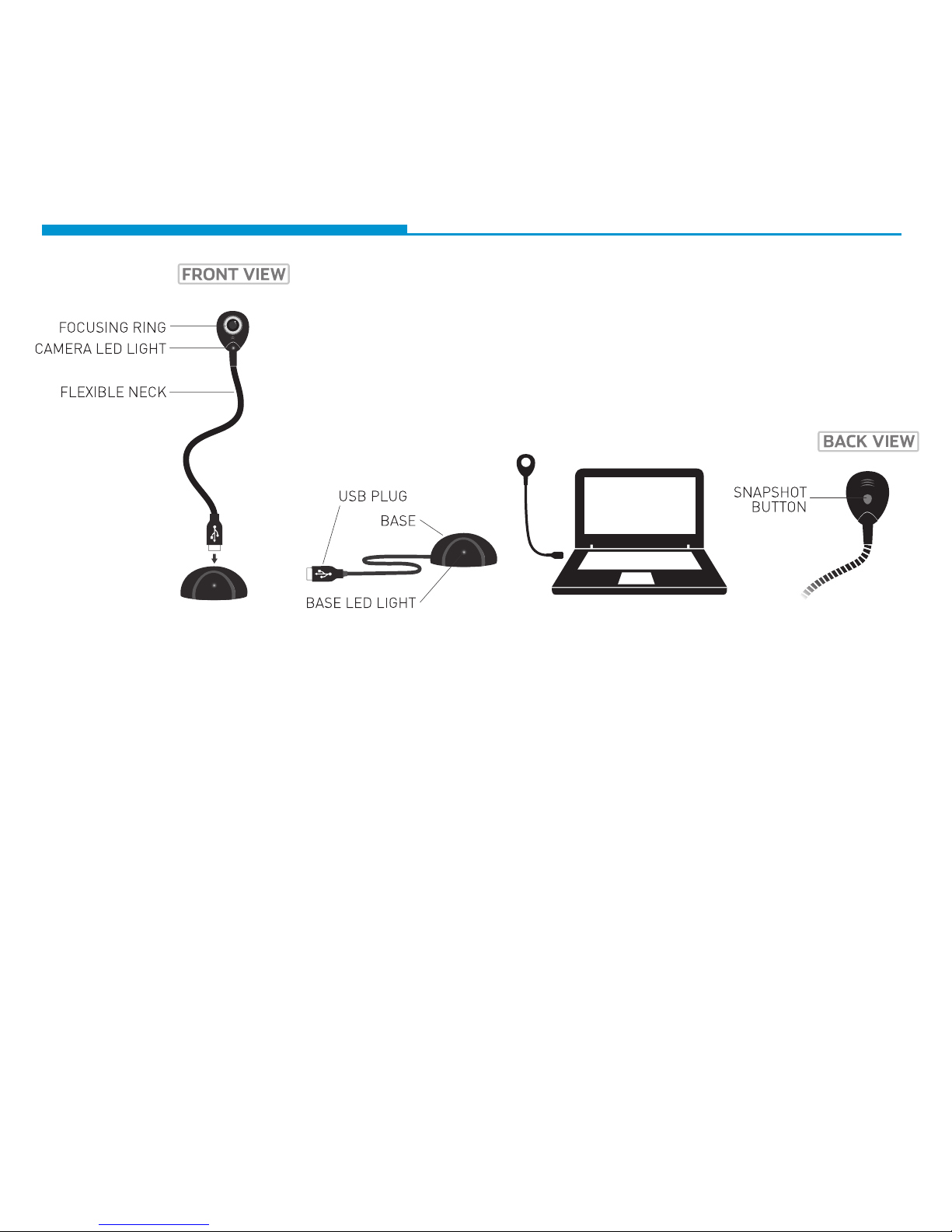
Insert the Webcam’s flexible neck into the opening at the top of the Base(Fig. 1.1). Make sure that the neck is
pushed into the Base properly.
Connect the Base to your computer with the included USB cable (Fig. 1.2).
Or just directly connect the HUE HD Webcam’s flexible neck to your computer’s USB port (Fig. 1.3).
On the reverse side of the Webcam is the Snapshot Button (Fig. 1.4).
When the Base LED light is on, the HUE HD Webcam is connected.
When the Camera LED light is on, the HUE HD Webcam is in use.
Fig 1.1 Fig 1.2 Fig 1.3 Fig 1.4
•
•
Page 4

4Contents
CONTENTS
WINDOWS 2000/XP/VISTA
Installation
Setting up video
Taking photograps and using visual effects
Recording video
Setting up audio (Windows 2000/XP)
Setting up audio (Windows Vista)
Installation
Setting up video
Recording video
Setting up audio
MAC OS X
FAQs - FREQUENTLY ASKED QUESTIONS
CHAT SOFTWARE CONFIGURATION
APPENDIX I
Technical Specification
5
6
7
8
9
10
11
12
13
14
15
16
17
18
19
20
20
21
22
24
24
26
27
29
30
31
AOL Instant Messanger (AIM)
Google Mail (Gmail)
Google Talk
iChat
Photo Booth
Skype
Windows setup
Mac OS X setup
Windows Live Messenger (MSN)
Yahoo! Messenger
Windows setup
Mac OS X setup
Windows
Mac OS X
Other problems
Page 5
5Windows 2000/XP/Vista Installation
WINDOWS 2000/XP/VISTA
Installation
The webcam will automatically be installed when you connect it to your computer. If you would like extra software for
making videos, using special effects or testing the webcam, you can install it from the included CD or download the
latest version here (www.huehd.com/drivers.html). If the CD doesn’t automatically run, browse to it in My Computer
and double click Setup.exe to start it up. Follow the on-screen instructions to complete the installation.
The CD will install a program called AMCap on your computer.
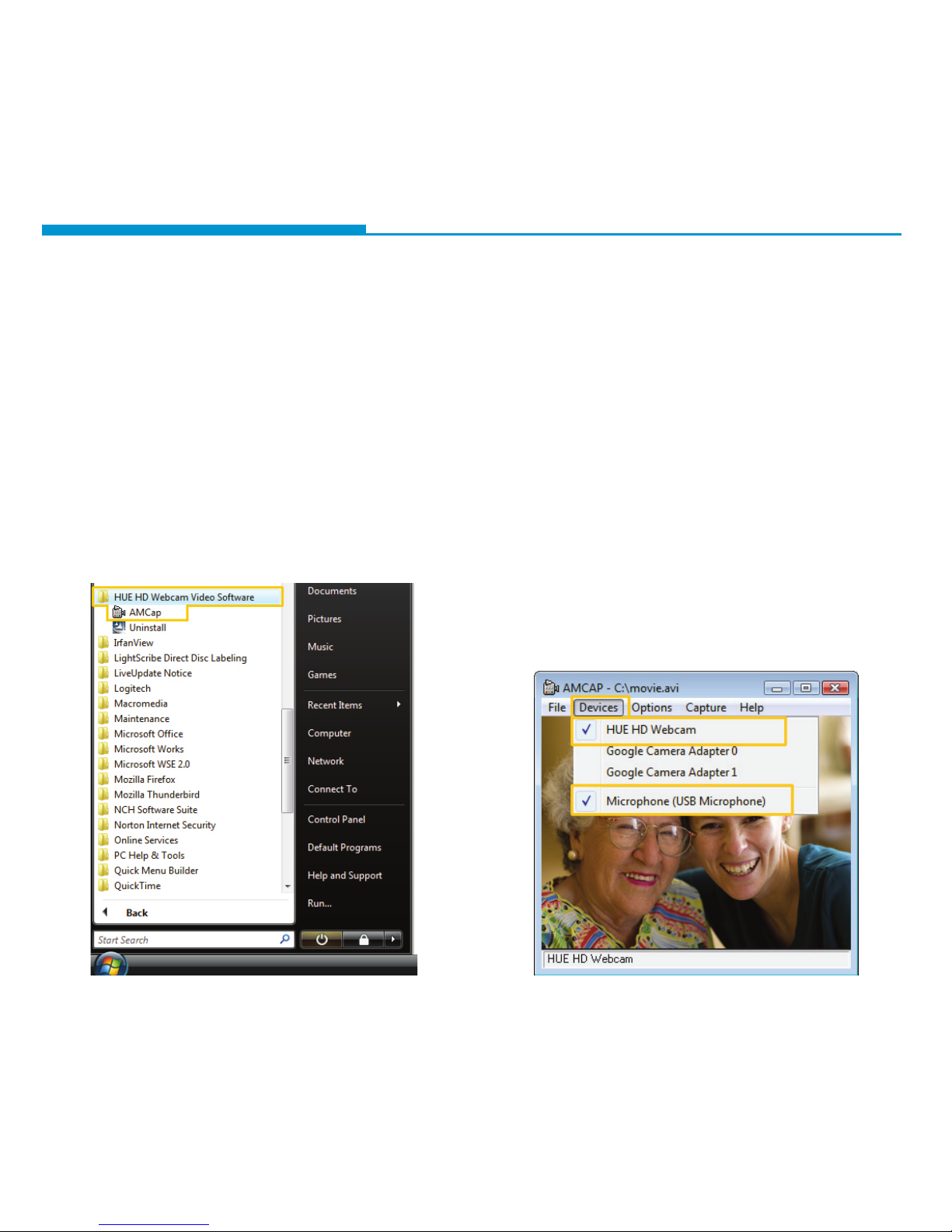
Go to your Windows Start Menu and select All Programs, HUE HD Webcam Video Software, and then AMCap (Fig. 2.1);
your picture will appear on the screen.
If you have more than one webcam installed or the picture does not immediately appear, open the Devices menu in
AMCap and choose the HUE HD Webcam (USB Video Device) from the list. Also make sure that Microphone (USB
Microphone) is ticked as shown (Fig.2.2).
Fig. 2.1 Fig. 2.2
•
•
Page 6
6Windows 2000/XP/Vista Setting up video
Setting up video
Note: You can focus the picture by manually turning the focusing ring around the camera lens.
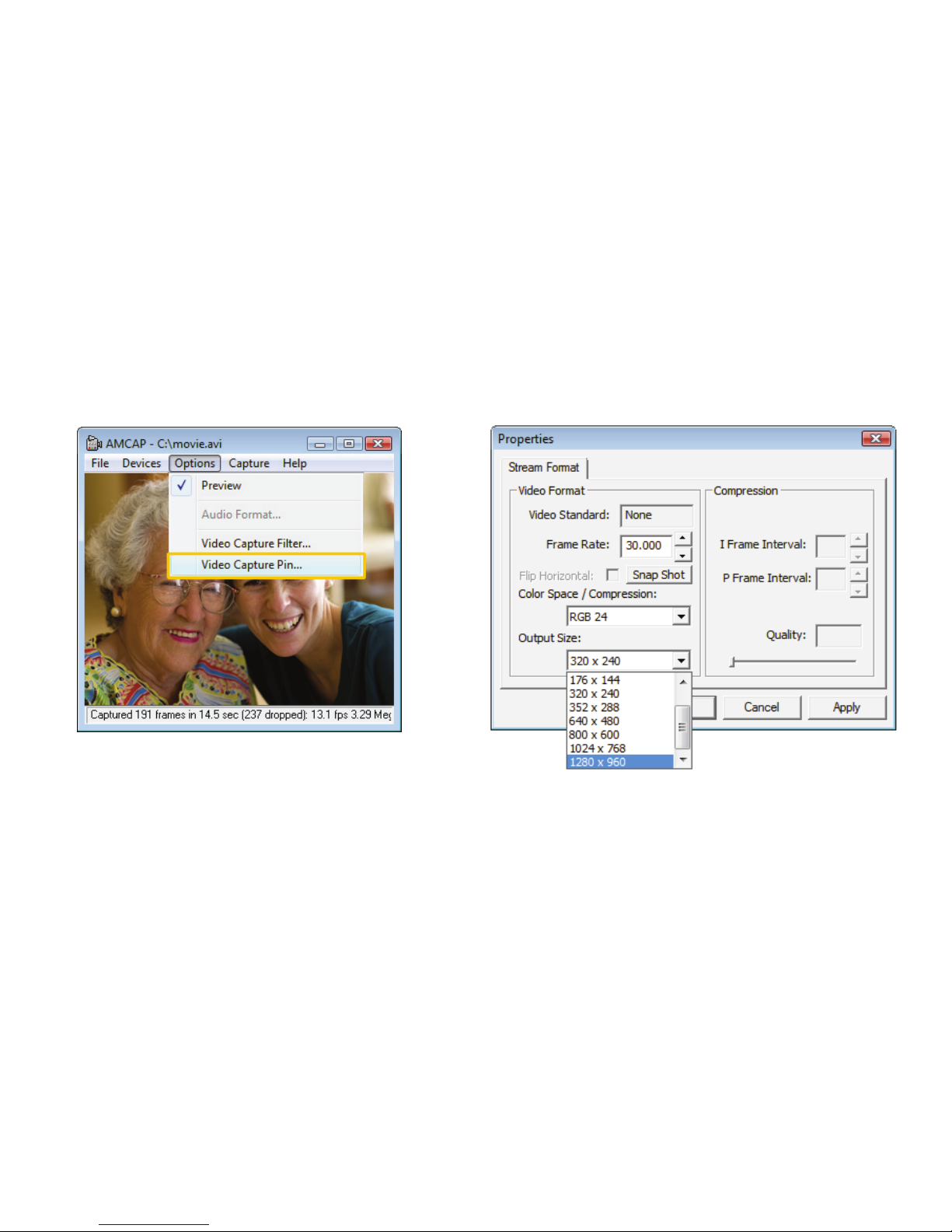
To configure your video settings, open AMCap and select Video Capture Pin… from the Options menu (Fig. 2.3). You can
change the settings to match your personal preferences.
To adjust the zoom or visual effects, select Video Capture Filter… from the same Options menu to open the Properties
windows (Fig. 2.4).
Hit OK after making any changes to store your new settings.
Fig. 2.3
Fig. 2.4
•
•
•
Page 7
7Windows 2000/XP/Vista Taking photographs and using visual effects
Taking photographs and using visual effects
There is a Snapshot button on the back of the webcam for taking still pictures.
Please make sure that all other video chat programs are closed before trying to take pictures.
To adjust the zoom or visual effects, select Video Capture Filter… from the same Options menu. Hit OK after making
any changes to store your new settings (Fig. 2.3).
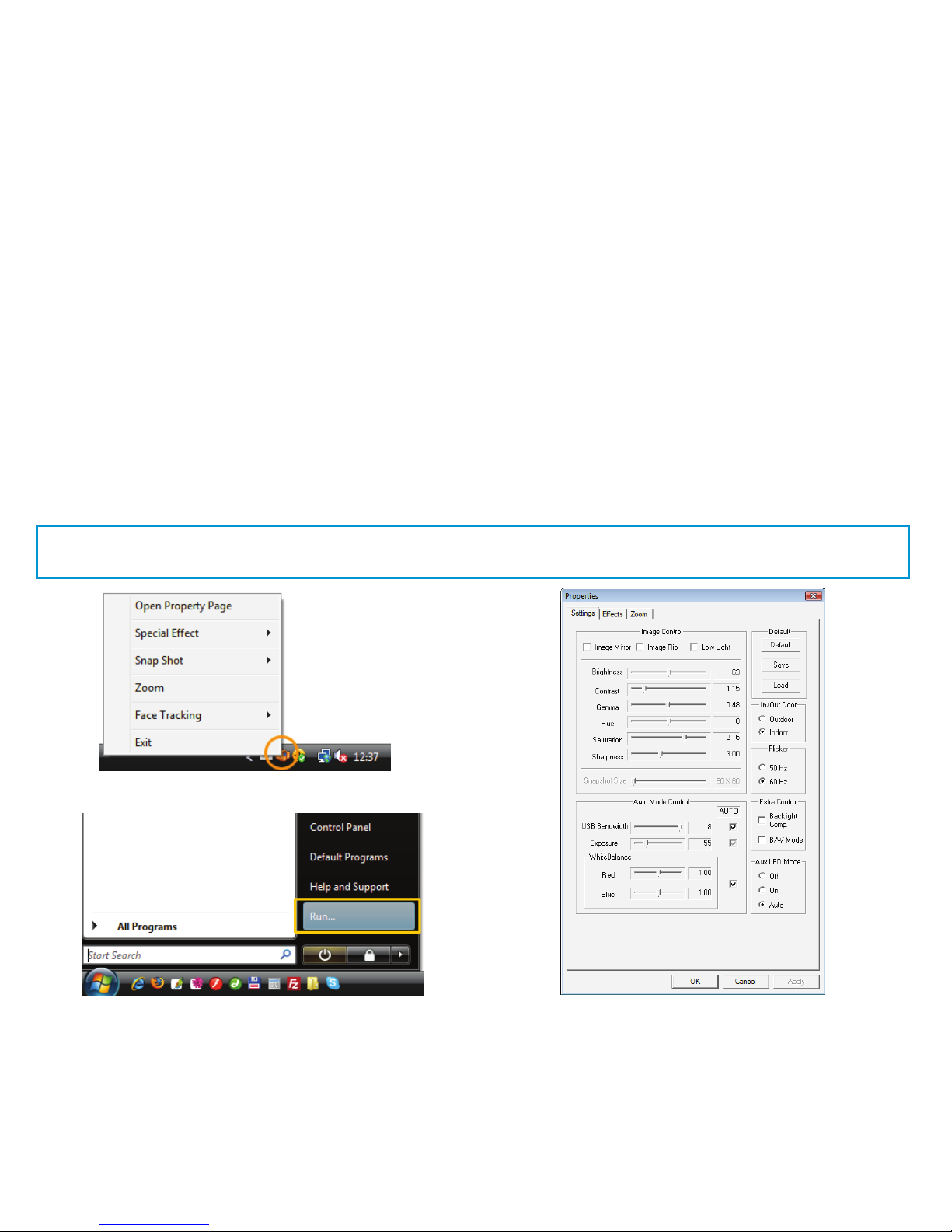
If you prefer, you can take pictures or change the visual effects using an icon in the Windows System Tray for quick
access (Fig. 2.5); right click this icon to be able take snapshots and use the webcam’s special features whenever
the webcam is in use (Fig. 2.7).
If you don’t see the icon in your System Tray, go to My Computer and find your Windows directory (usually, this is
on your C drive). Double click the file inside called “tsnp2uvc.exe”. Alternatively open your Windows Start Menu and
select Run… then type in “tsnp2uvc” without the quotes (Fig. 2.6). The icon will appear in your System Tray.
The special effects you set also work in Skype and some other video chat applications. Please make sure that
AMCap is fully closed before starting other video chat software.
fig
Fig. 2.5
Fig. 2.6 Fig. 2.7
Page 8
8Windows 2000/XP/Vista Recording video
Recording video
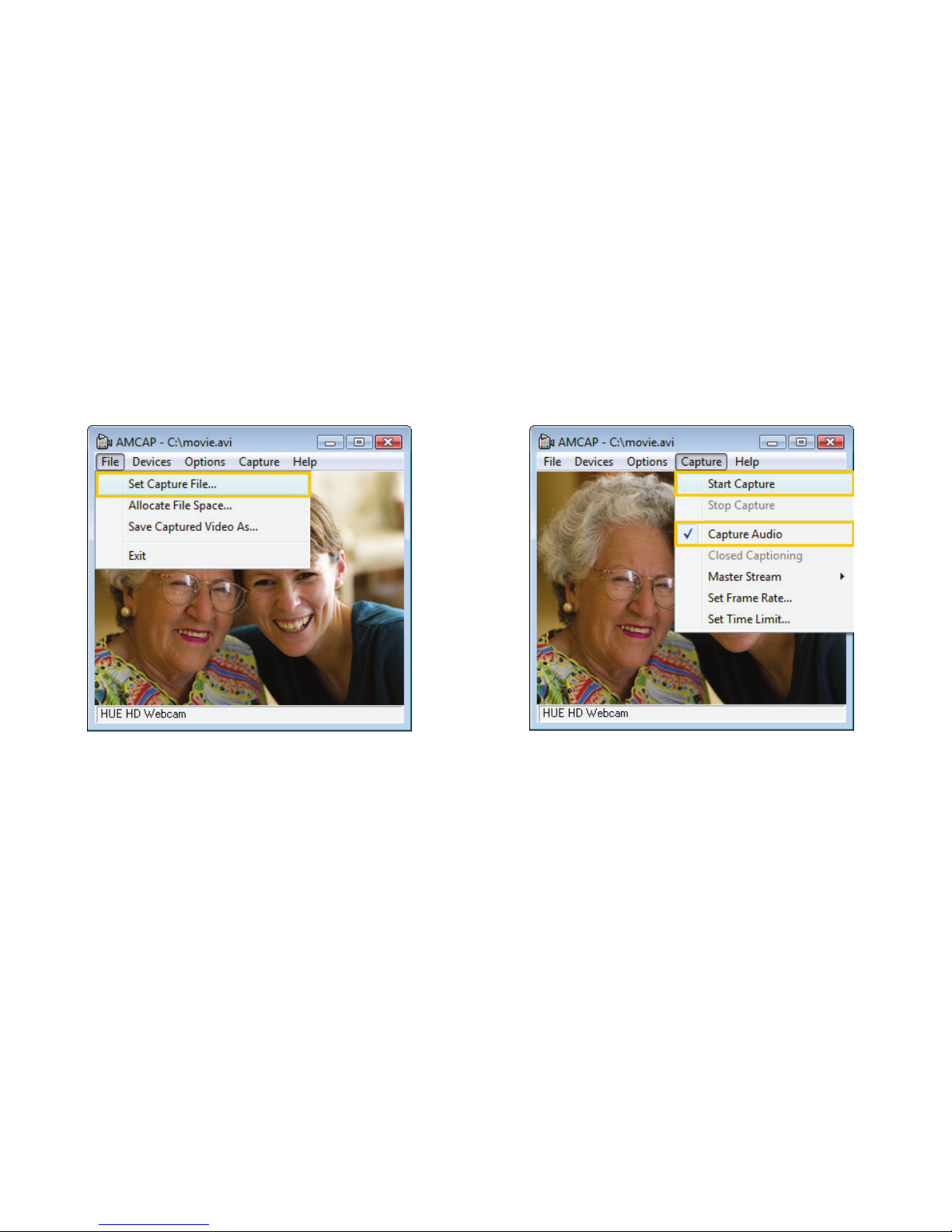
Before recording a video, select Set Capture File… from the File menu and choose a location on your computer
where your recorded video will be saved (Fig. 2.8).
Enter a file name and click Open to confirm.
On the next window, if you are not sure, set the size to 0 to avoid setting limitations on what you can record.
You can then record a video using the Capture menu in AMCap.
If you would like sound in your video, make sure that the Capture Audio option is ticked as shown (Fig. 2.9).
Click Start Capture to begin recording and Stop Capture to finish (Fig. 2.9).
Fig. 2.8 Fig. 2.9
•
•
•
•
•
•
Page 9
9Windows 2000/XP/Vista Setting up the microphone
Setting up the microphone (Windows 2000/XP)
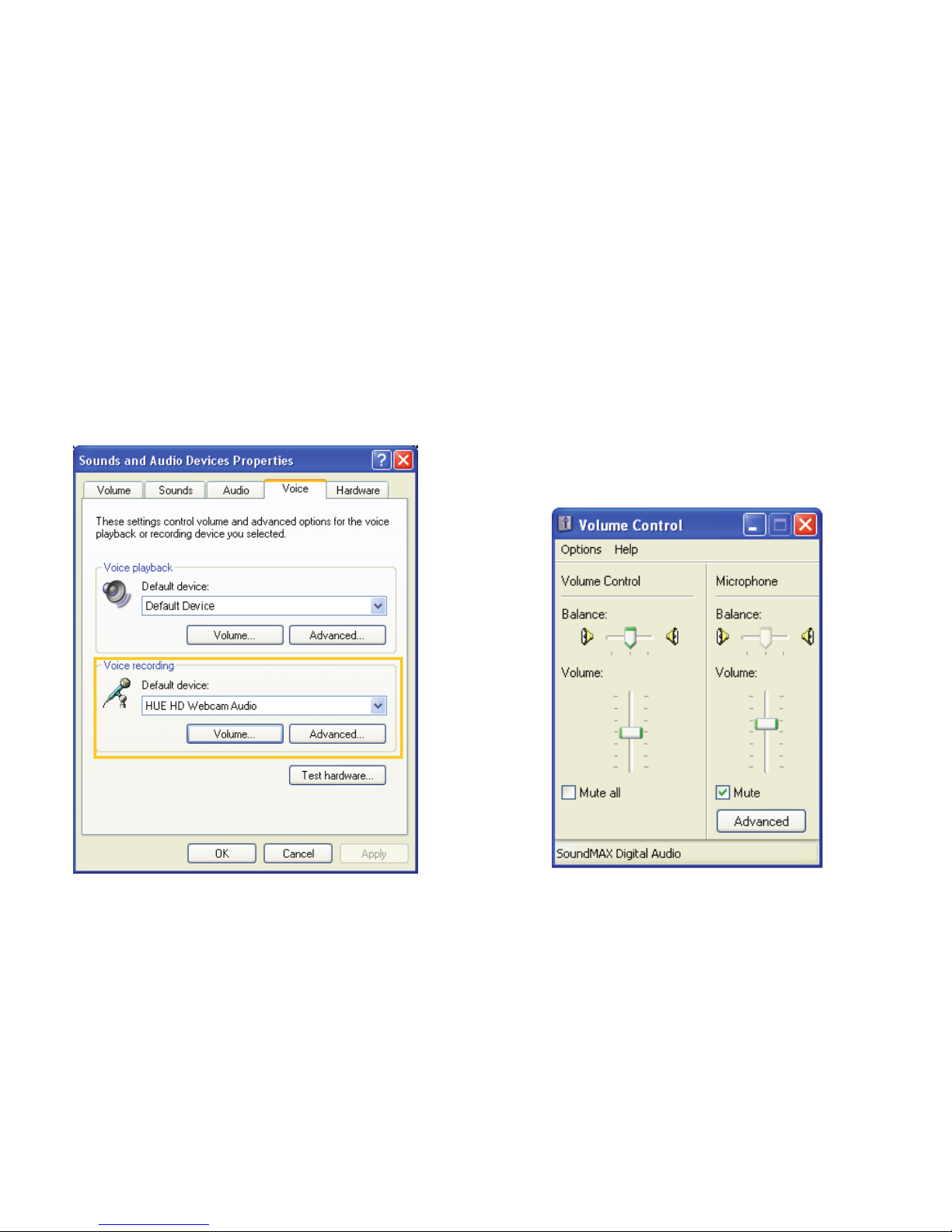
Open your Control Panel from the Start Menu and select the Sound and Audio Devices panel.
Click the Voice tab along the top of the settings window which appears.
Make sure that “HUE HD Webcam Audio” is selected as the default device under Voice Recording (Fig. 2.10), and
then click OK to save your changes.
If the microphone is too quiet or too loud, you can adjust it with the Volume… (Fig. 2.11) setting in the same Voice
Recording panel.
You may also need to set up the default device for the individual applications you use.
Fig. 2.10 Fig. 2.11
•
•
•
•
Page 10
10Windows 2000/XP/Vista Setting up the microphone
Setting up the microphone (Windows Vista)
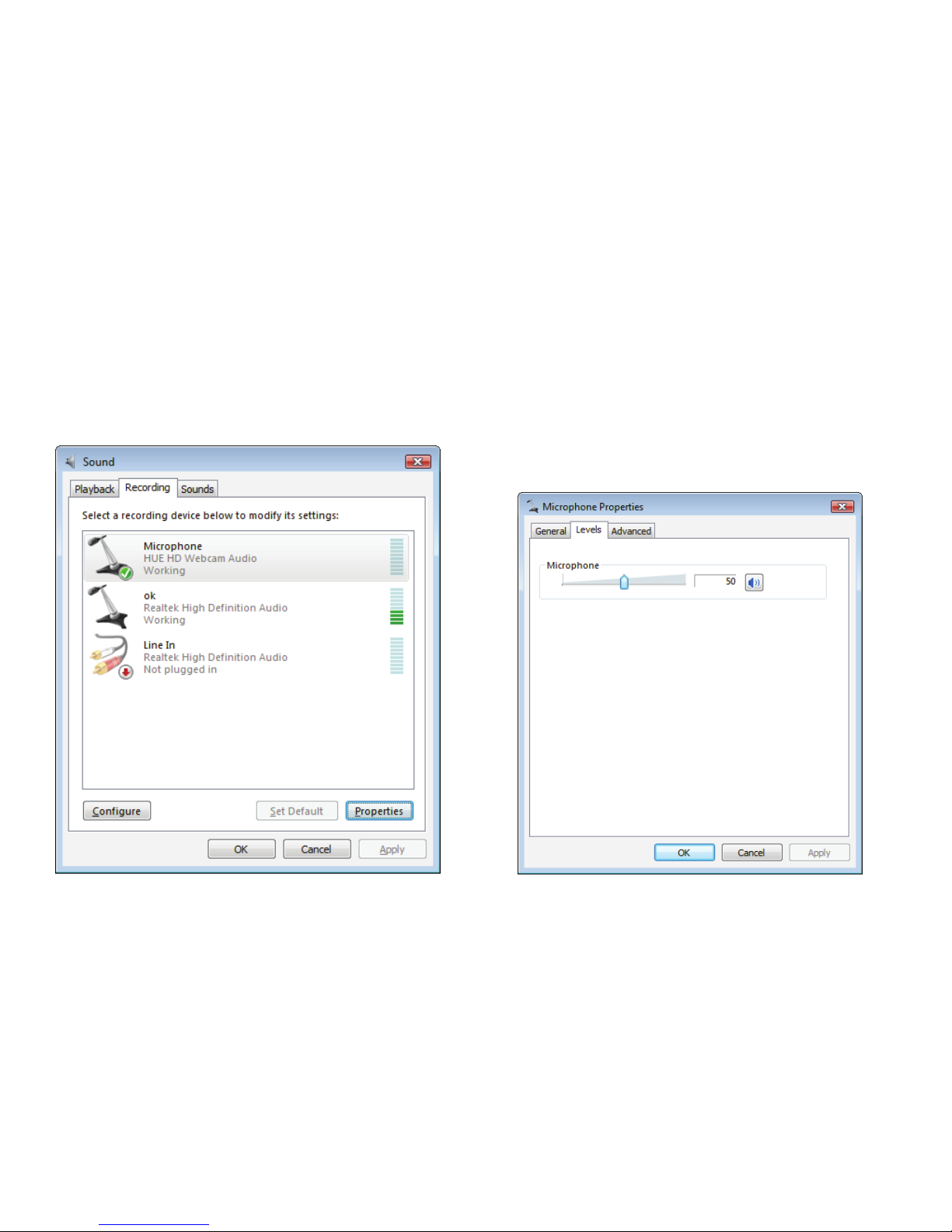
Open your Control Panel from the Start Menu and select the Hardware and Sound panel.
Click Manage Audio Devices and then the Recording tab (Fig. 2.12) along the top of the settings window which
appears.
Make sure that “HUE HD Webcam Audio” is selected as the default device under Recording, and then click OK to
save your changes.
If the microphone is too quiet or too loud, you can adjust it with the Properties (Levels) (Fig. 2.12.1) setting in the
same Recording panel.
You may also need to set up the default device for the individual applications you use.
Fig. 2.12 Fig. 2.12.1
•
•
•
•
Page 11
11Mac OS X Installing
MAC OS X
Installing
The webcam will automatically be installed when you connect it to your computer. If you would like extra software
for making videos or testing the webcam, you can install it from the included CD or download the latest version here
(www.huehd.com/drivers.html).
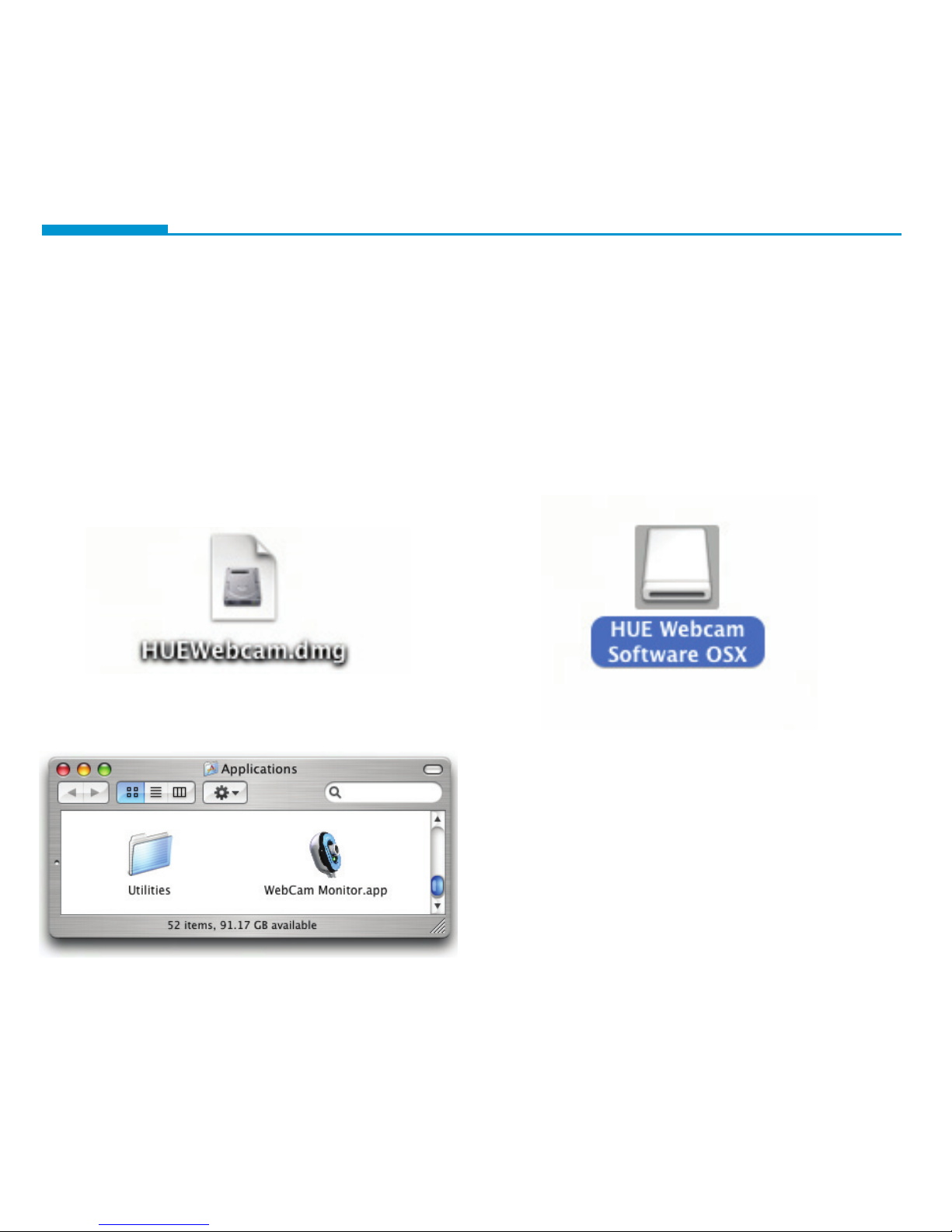
Click the HUEWebcam.dmg [Fig. 3.1] to mount the file on your desktop, if it doesn’t appear automatically.
Double click the HUE Webcam Software OSX icon [Fig. 3.2] and;
Drag WebCam Monitor.app to the Applications folder as instructed.
You can then open WebCam Monitor from your Applications folder at any time to use the software [Fig. 3.3].
Fig. 3.1
Fig. 3.3
Fig. 3.2
•
•
•
Page 12
12Mac OS X Setting up video
Setting up video
Note: You can focus the picture by manually turning the focusing ring around the camera lens.
To configure your video settings:
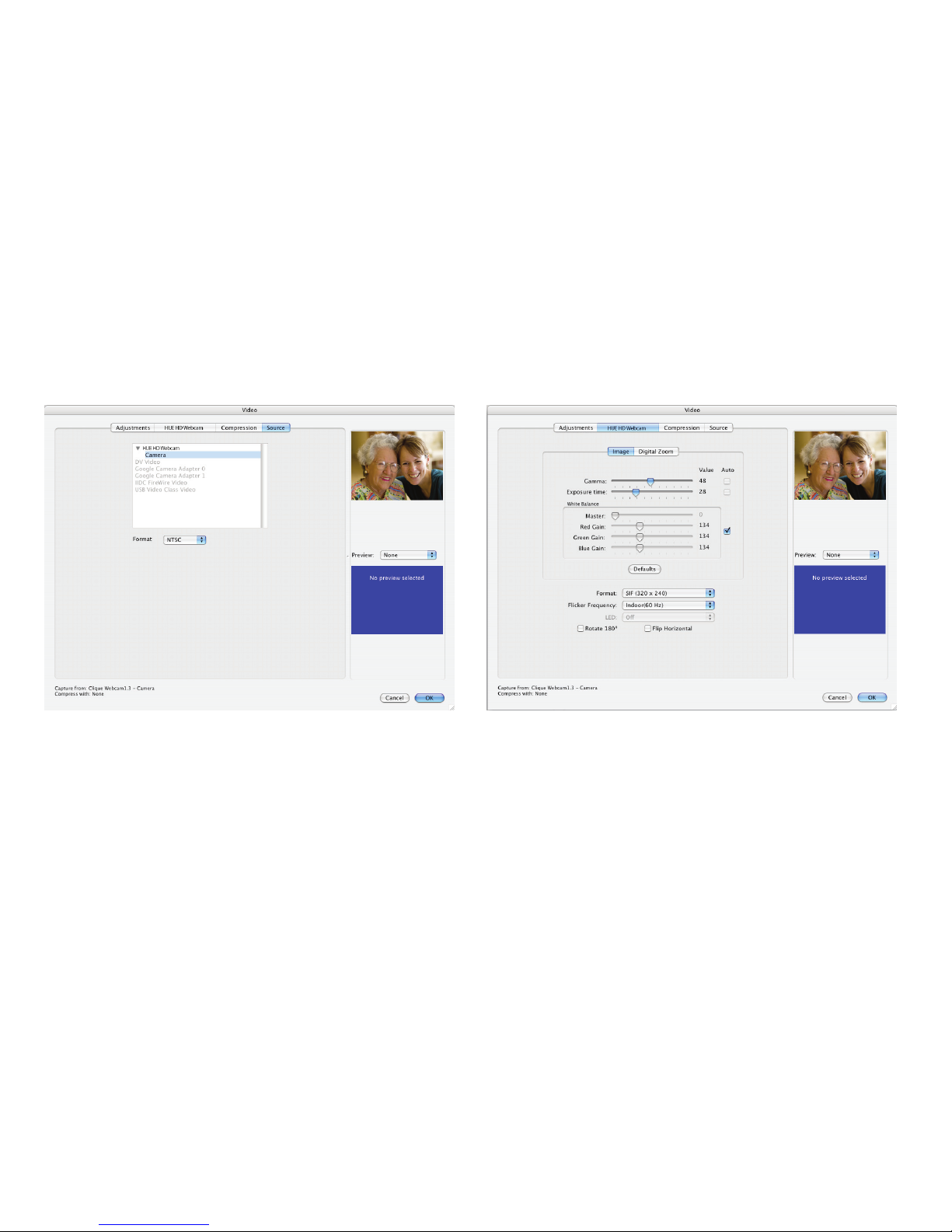
Open WebCam Monitor and select Video Settings… from the Monitor menu.
Check that the correct camera is selected under Source (Fig. 3.3) and if required, adjust the settings to match
your personal preferences (Fig. 3.4).
Fig. 3.3 Fig. 3.4
•
•
Page 13
13Mac OS X Recording video
Recording video
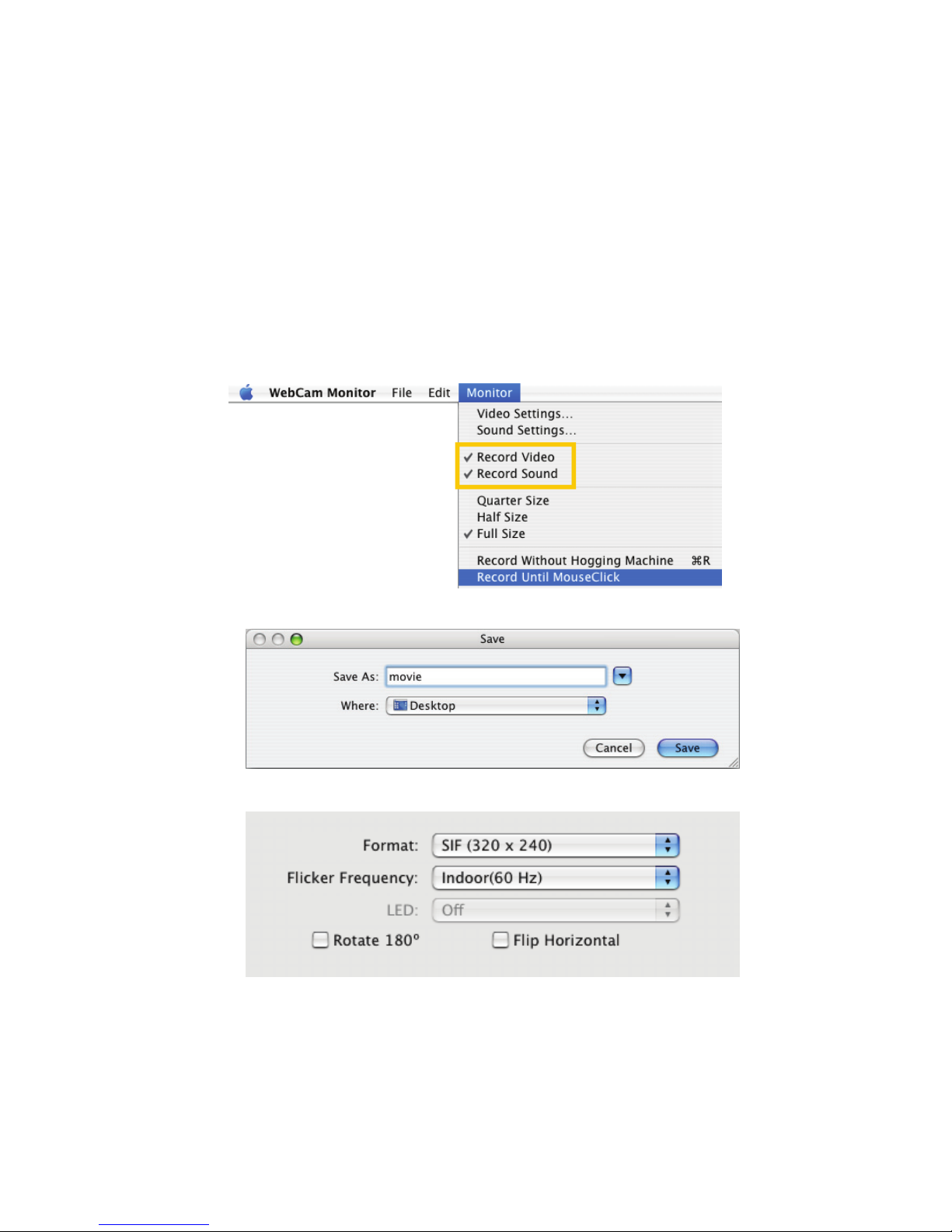
You can record a video using Record Until MouseClick in the Monitor menu in WebCam Monitor (make sure both
video and sound are ticked in the menu if you want your recording to include both) (Fig. 3.5).
Remember to save your video somewhere convenient on your computer as the camera has no internal storage (Fig. 3.6).
You may wish to change the resolution or format in the Video Settings to make your recording perfect (Fig. 3.7).
Fig. 3.5
Fig. 3.6
Fig. 3.7
Page 14
14Mac OS X Setting up audio
Setting up audio
The HUE HD webcam comes with a built-in microphone.
Please make sure that it is selected as the input device in the application you are using to access this feature.
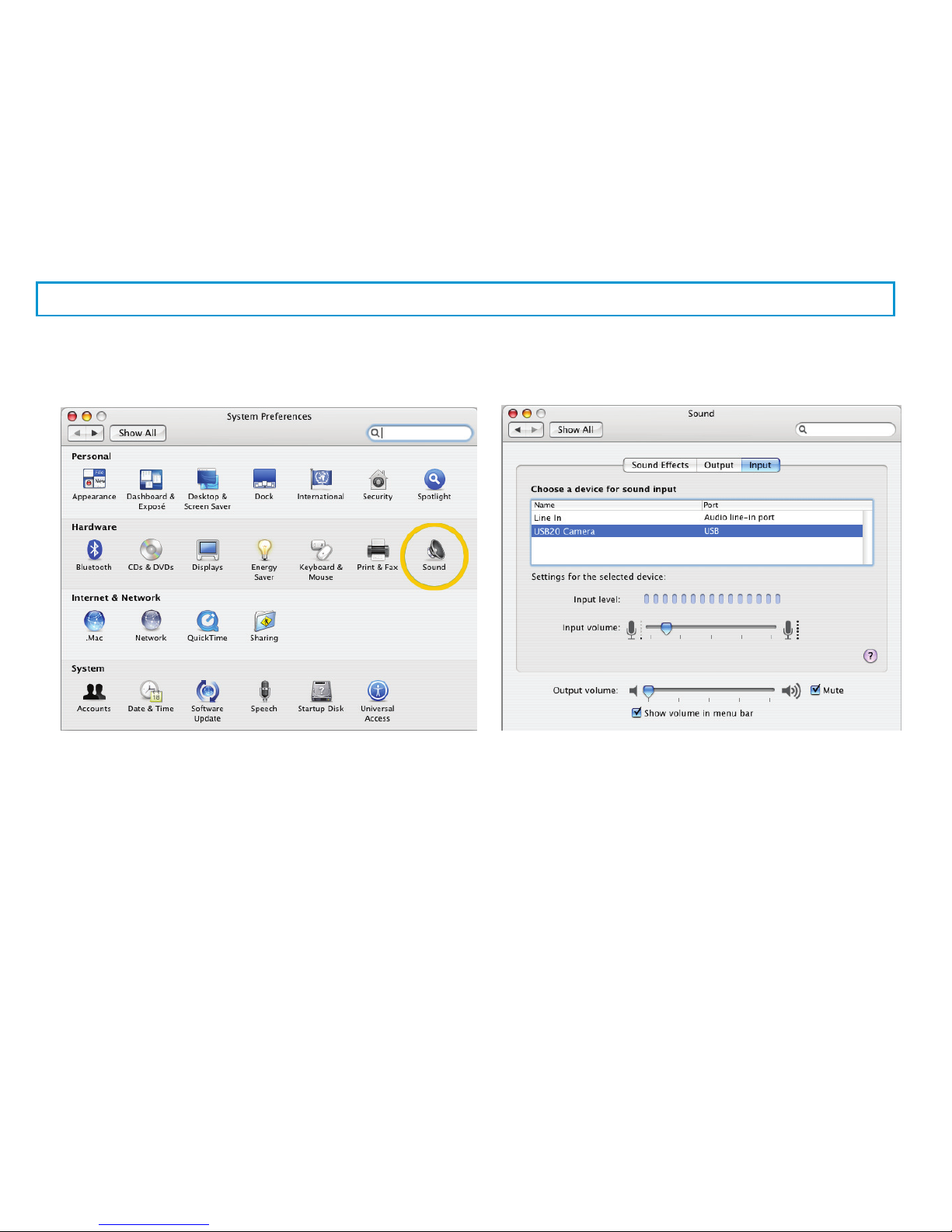
You can also select it in the Mac’s System Preferences – choose the Sound (Fig. 3.8) pane and go to the Input
(Fig. 3.9) tab to designate the webcam’s microphone as your system default.
Fig. 3.8 Fig. 3.9
Page 15
15Chat software configuration AOL Instant Messenger
CHAT SOFTWARE CONFIGURATION
AOL Instant Messenger (AIM)
Note: AIM only supports video chat for Windows users. Mac users wishing to use the AIM network should follow the
instructions for iChat.
If you do not have an AIM account, first download the software and register at: www.aim.com
Before running AIM, make sure that the AMCap program is fully closed. Failure to do so will mean that AIM may not
recognise the webcam.
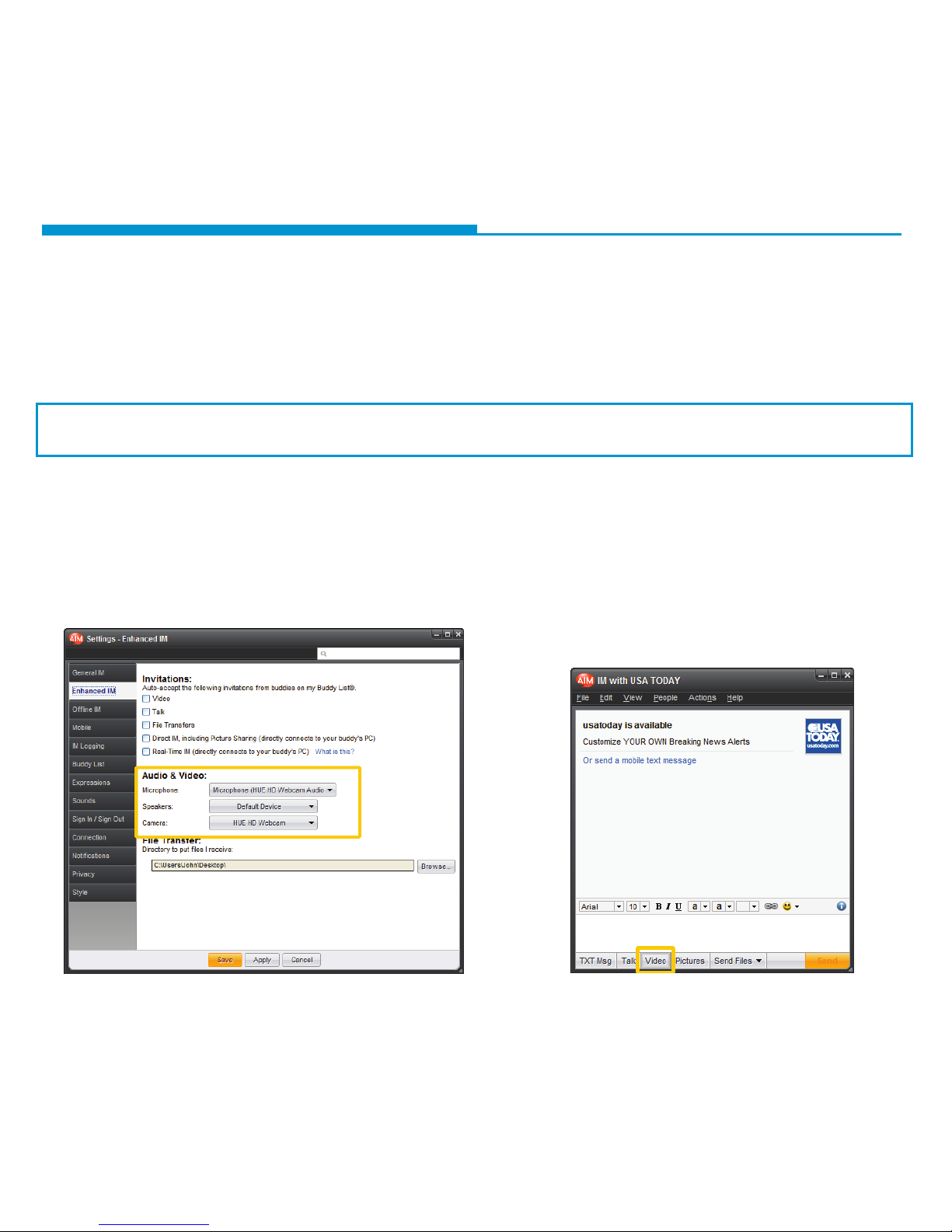
Open AIM and go to Settings… in the Edit menu (or press F7 to go directly to the settings).
Under Enhanced IM, change the Microphone dropdown to the USB2.0 Camera and the Camera dropdown to the
HUE HD Webcam. Speakers should be set to your default device or internal sound card (Fig. 4.1).
Save your settings and double click the name of the person you want to start a video chat with in the AIM contacts
window.
At the bottom of the chat window there will be a Video button which will open the video chat (Fig. 4.1.1).
Fig. 4.1 Fig. 4.1.1
•
•
•
•
Page 16
16Chat software configuration Google Mail
Google Mail (Gmail)
If you do not have a Google account or haven’t activated Gmail chat, first download the software and register at:
http://mail.google.com/videochat/
Before running the browser you plan on using to access Gmail chat, make sure that the webcam program
(AMCap on Windows, WebCam Monitor on Mac OS X) is fully closed. Failure to do so will mean that Google
may not recognise the webcam.
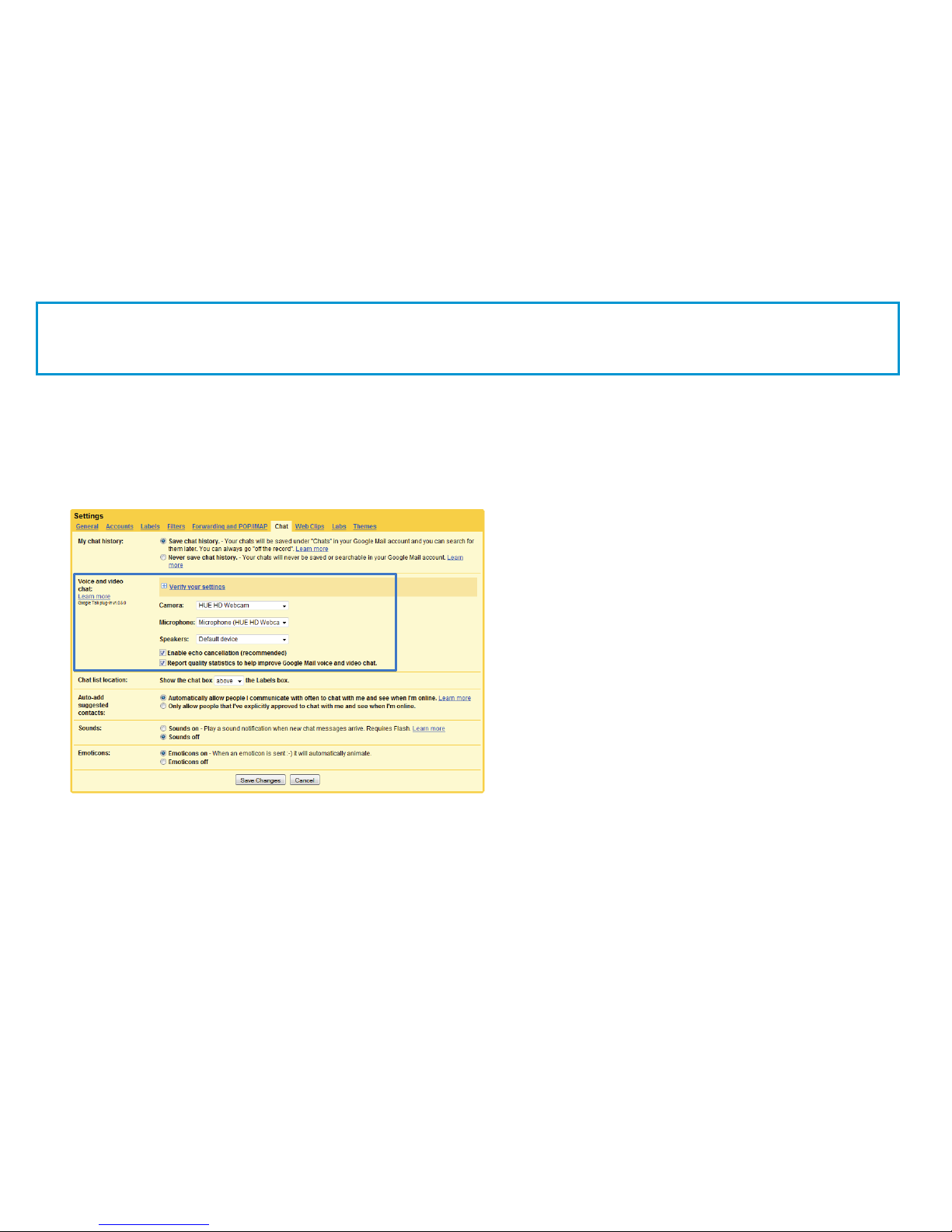
Log in to your Gmail account as usual and click the Settings link at the top of the main Gmail inbox page.
Click the Chat link and under Voice and Video Chat, make sure that Camera is set to the HUE HD Webcam and the
microphone to USB2.0 Camera.
Speakers should be set to your default device or internal sound card (Fig. 4.2).
Fig. 4.2
You can click the Verify Your Settings option to check that everything is working correctly.
Click Save Changes at the bottom of the window to complete the setup.
In the Chat box in your Gmail window select the person you want to call and pick Video & More in the box which
appears, then Start Video Chat. Contacts with no camera icon by their name may also need to install the Gmail
voice and video chat software on their computer.
•
•
•
Page 17
17Chat software configuration Google Talk
Google Talk
Note: Google Talk currently only works with Windows.
Google Talk does not currently support video calls.
If you do not have a Google account, first download the software and register at: www.google.com/talk
Before running the Google Talk software, make sure that the AMCap program is fully closed. Failure to do so will
mean that Google Talk may not recognise the webcam.
Within the Google Talk application,
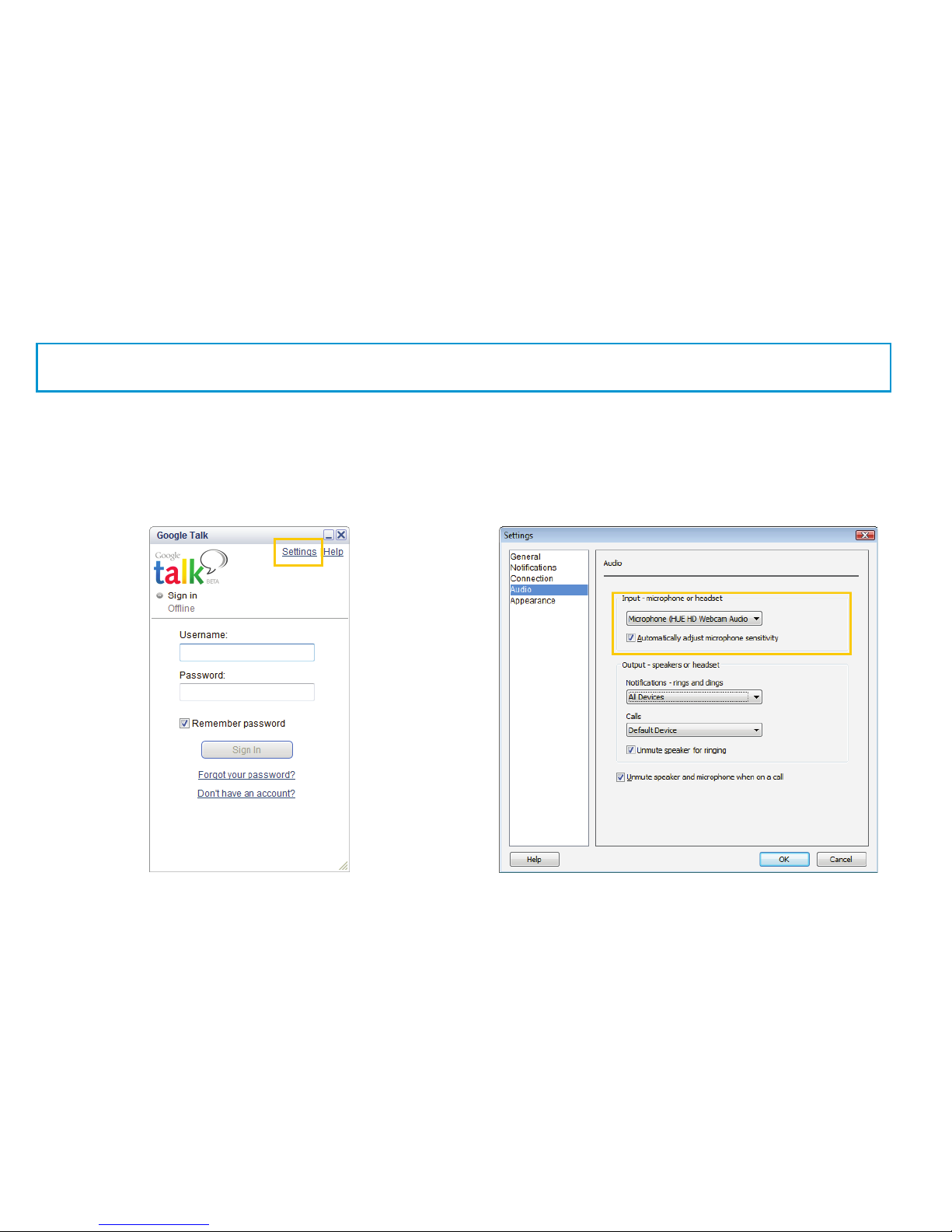
Click Settings on the login screen (Fig. 4.3).
Under Audio, make sure that the Input dropdown is set to the USB2.0 Camera and click OK to save your settings
(Fig. 4.3.1).
Fig. 4.3 Fig. 4.3.1
•
•
Page 18
18Chat software configuration iChat
iChat
Note: iChat is only available for Macs.
Before running iChat, make sure that the WebCam Monitor program is fully closed. Failure to do so will mean
that iChat will not recognise the webcam. If you are not sure, open the application again and select Quit from the
WebCam Monitor menu.
For users running Mac OS X 10.4.9 or later, iChat should automatically detect the camera. Select Preferences
from the iChat menu and go to the Video tab. Your preview will appear if you have only the HUE HD Webcam connected; if you have other webcams connected first use the Camera dropdown menu to choose the right one. Close
the Preferences window when you can see the preview video.
To open a video chat, select the person you want to chat with and click the green camera icon on your buddy list.
If you are running an earlier version of Mac OS X, you will require extra software to use a USB webcam in iChat.
One popular option is iUSBCam (www.ecamm.com/mac/iusbcam).
Once iUSBCam is installed
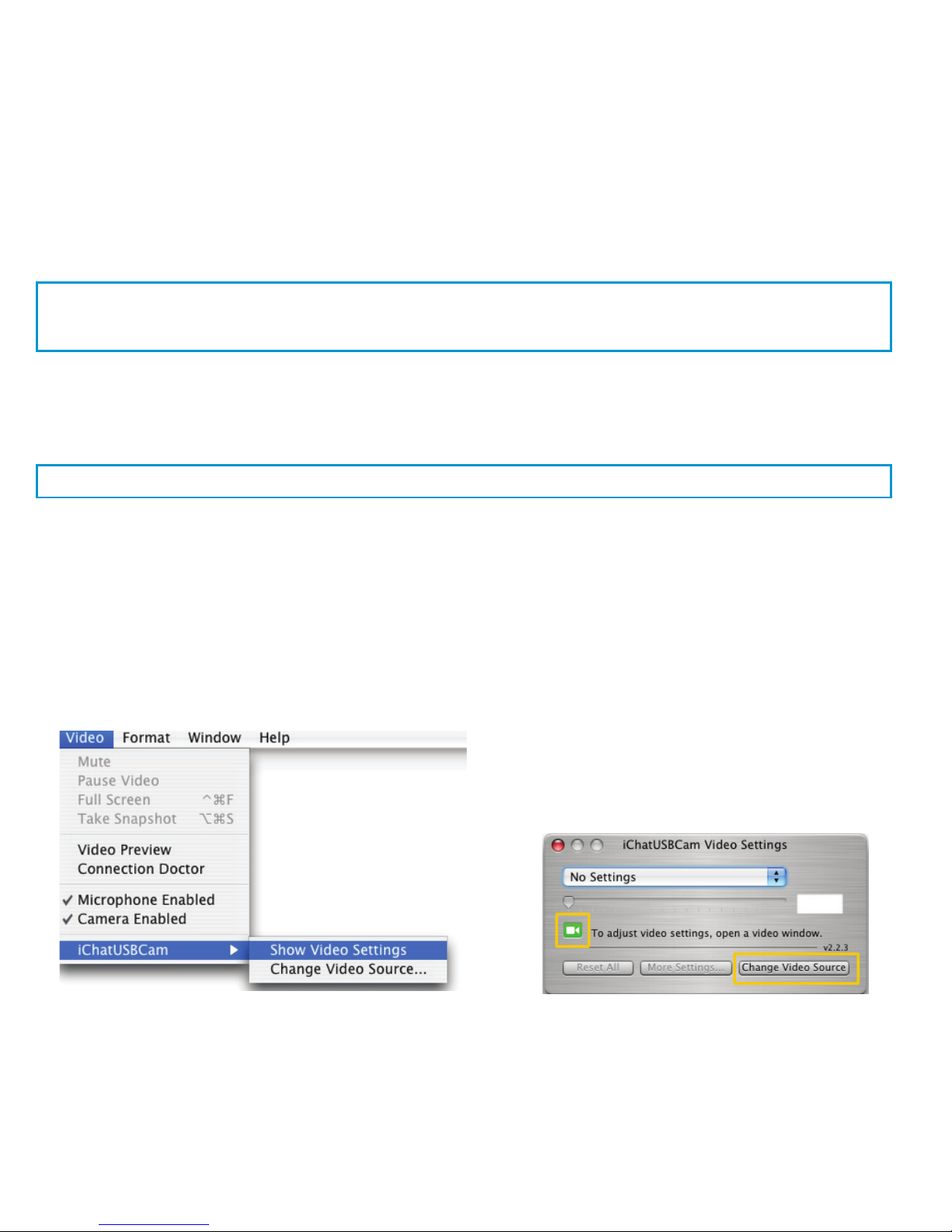
Select iChatUSBCam from the Video menu. Click Show Video Settings (Fig. 4.4) and then Change Video Source
(Fig. 4.4.1) (highlighted in blue on the screenshot below).
Select the HUE HD Webcam from the dropdown menu and click OK to save your choice.
Back in the Video Settings window you can click the green camera icon (Fig. 4.4.1). Your video feed should appear.
There are sliders to adjust the brightness and quality of your video, or you can click More Settings… for advanced
video options. When you are satisfied with the video quality you can close the iChatUSBCam settings.
Fig. 4.4 Fig. 4.4.1
•
•
•
•
Page 19

19Chat software configuration Photo Booth
Photo Booth
Note: Photo Booth is only available for Macs.
So long as the Mac being used meets Apple’s guidelines for running Photo Booth (having either OS X v10.5 installed
or, on a small number of models, a built-in iSight camera and OS X v10.4), simply follow the installation instructions
for Macs. Your system should automatically detect the webcam in Photo Booth if it has no internal camera of its own.
In rare cases where it does not, please try disconnecting the camera and reconnecting it once Photo Booth is already
running.
If your Mac has a built-in camera already, Photo Booth will default to using that. As there is no way to change settings in the current version of Photo Booth you will have to open the built-in camera in another program, then try
opening Photo Booth again. Because the built-in camera will be in use Photo Booth will instead select your HUE
HD webcam.
You can put the built-in camera in use in this way with the HUE HD webcam’s own WebCam Monitor software; open
WebCam Monitor and pick the Mac’s internal camera in Video Settings. You can then open Photo Booth as described
above.
Page 20
20Chat software configuration Skype
Skype™
If you do not have a Skype account, first download the software and register at: www.skype.com
Before running the Skype software, make sure that the webcam program (AMCap on Windows, WebCam Monitor
on Mac OS X) is fully closed. Failure to do so will mean that Skype may not recognise the webcam.
Windows setup:
Within the Skype application,
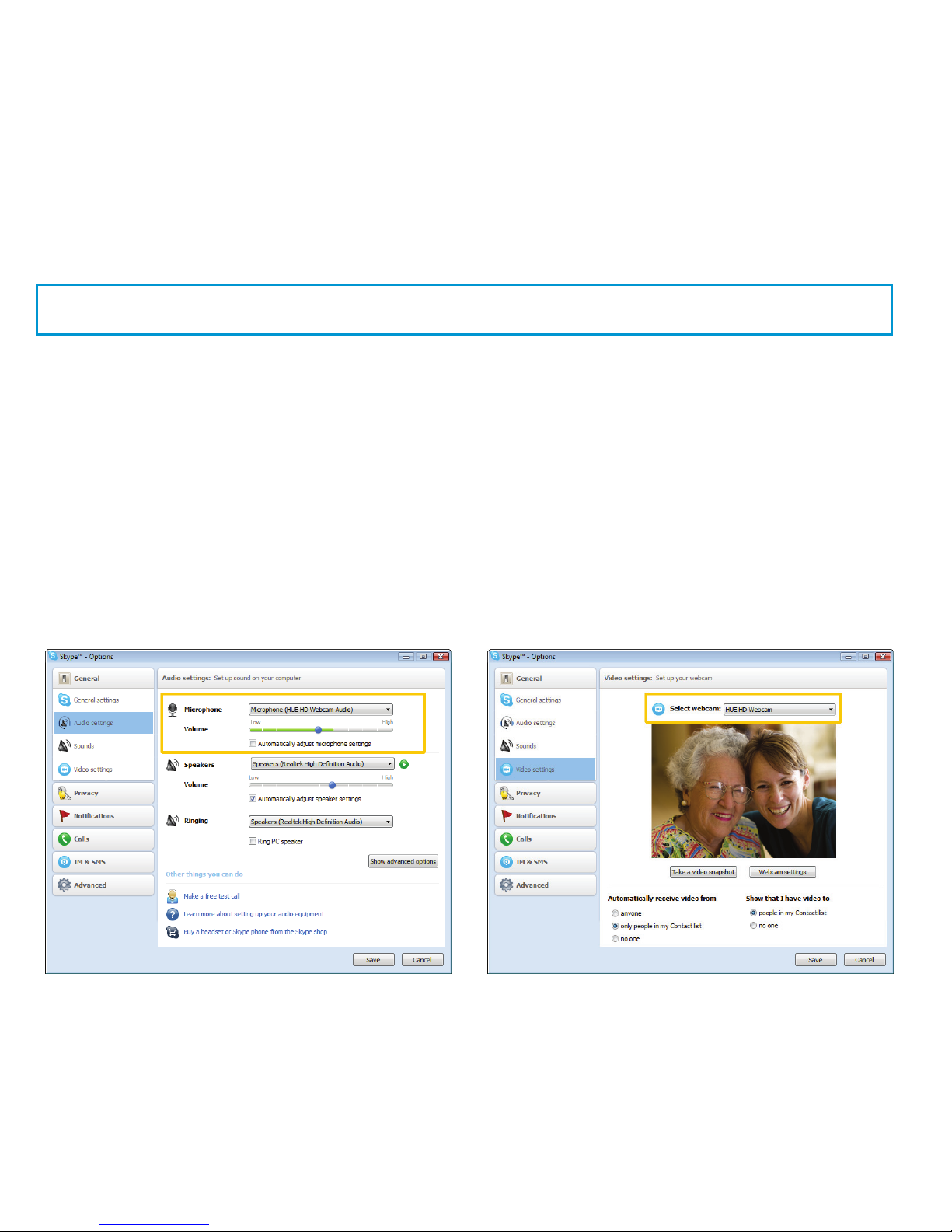
Select the Tools menu and go to Options. In the General tab, make sure that your settings are as follows:
Audio Settings: Select HUE HD Webcam Audio for Microphone and Windows Default Device (or your soundcard)
for Ringing and Speakers (Fig. 4.5);
Video Settings: Select HUE HD Webcam from the dropdown menu (Fig. 4.5.1).
We recommend that users also uncheck the box below the Microphone dropdown menu marked “Let Skype adjust
my audio settings” (Fig. 4.5). This option, when checked, can sometimes cause sound interruptions during voice
calls. Initially it is best to set the volume slider a little less than halfway along the bar, as shown. You can adjust
this later to suit your preferences.
Remember to save your changes before closing the window.
•
•
•
Fig. 4.5 Fig. 4.5.1
Page 21
21Chat software configuration Skype
Mac setup:
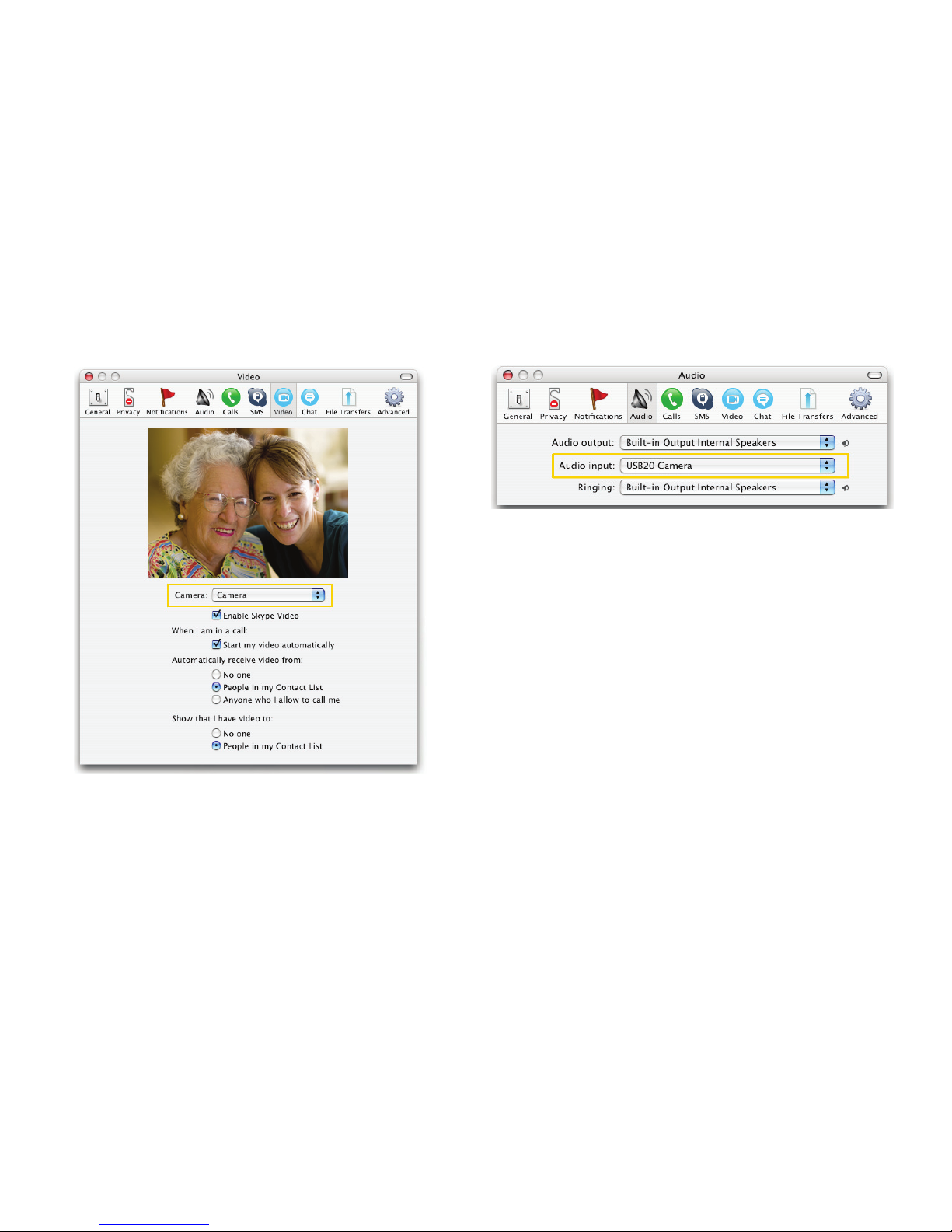
Once you have installed Skype and started it up, select Preferences from the Skype menu:
Select Preferences… from the Skype menu.
In the Video tab (Fig. 4.5.2), select the Camera in the dropdown menu.
In the Audio tab (Fig. 4.5.3), select USB2.0 Camera in the Audio Input dropdown menu.
Fig. 4.5.3
Fig. 4.5.2
•
•
•
Page 22
22Chat software configuration Windows Live Messenger (MSN)
Windows Live Messenger (MSN)
Note: Windows Live Messenger (MSN) only supports video chat for Windows users.
If you do not have an MSN account, first download the software and register at: http://get.live.com/messenger
Before running the Messenger software, make sure that the AMCap program is fully closed. Failure to do so will
mean that Messenger may not recognise the webcam.
Within Windows Live Messenger (MSN)
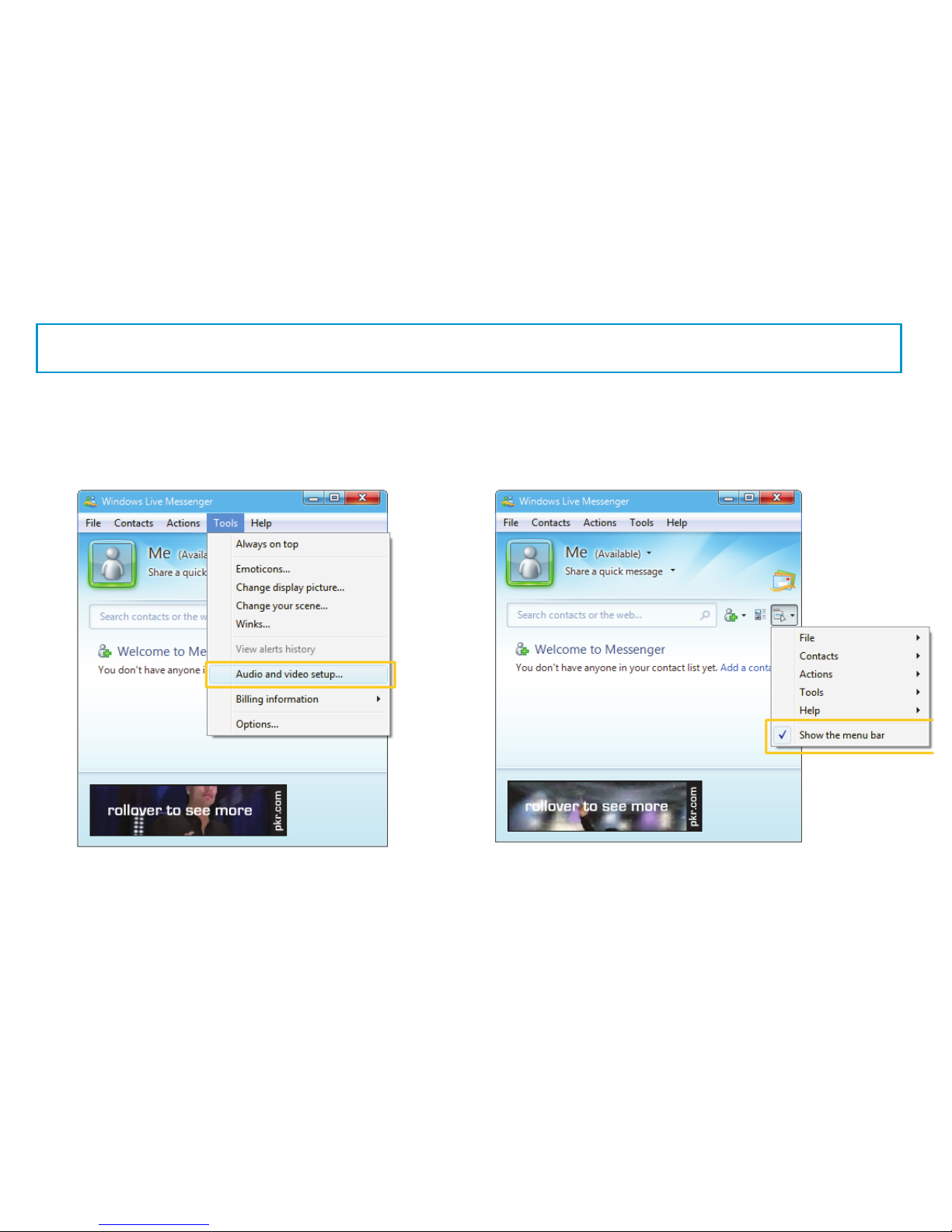
Select Audio and video setup… from the Tools menu (Fig. 4.6).
If the Tools menu is not visible, you may need to select Show the menu bar first as shown (Fig. 4.6.1).
Fig. 4.6 Fig. 4.6.1
•
Page 23
23Chat software configuration Windows Live Messenger (MSN)
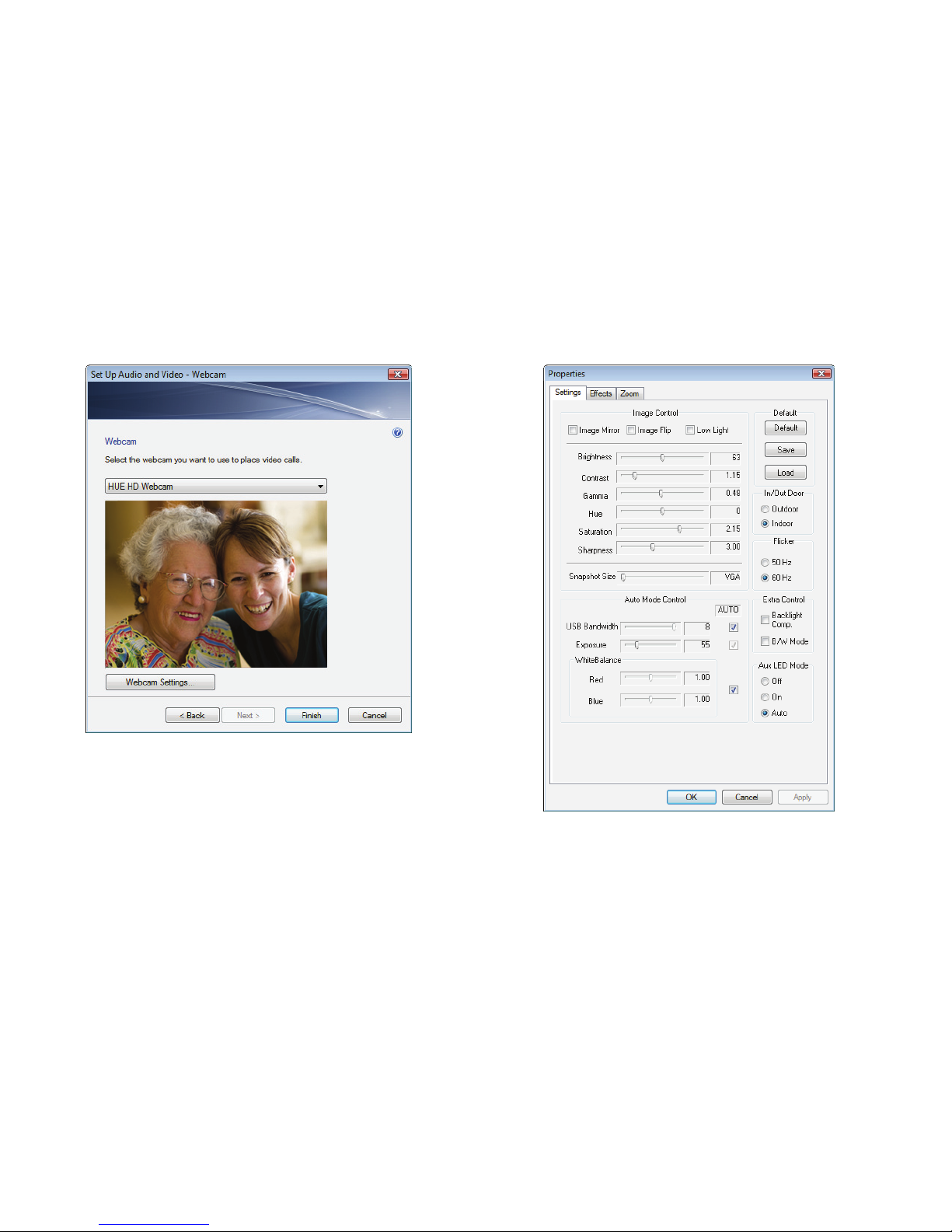
In Audio and Video Setup, check that the Microphone is set to your HUE HD Webcam Audio as shown. If it is not
selected and the option to change it is greyed out, you may need to change the dropdown menu at the top from
Default to Custom. When the correct microphone is shown, click the Next button.
On the next screen select your camera from the dropdown menu. Either “HUE HD Webcam” or “Default – HUE
HD Webcam” is correct. A preview image of your video should appear in the box (Fig. 4.6.2).
If you’d like to adjust the video quality or add some special effects, click Webcam Settings… (Fig. 4.6.2) to gain access
to all of the options. There are three tabs at the top of the window with settings you can adjust (Fig. 4.6.3).
When you are satisfied with the preview, click the Finish button at the bottom to save your settings.
You can now start chatting by selecting Video from the Actions menu, followed by Start a Video Call.
Fig. 4.6.2
Fig. 4.6.3
•
•
•
•
•
Page 24
24Chat software configuration Yahoo! Messenger
Yahoo! Messenger
If you do not have a Yahoo! Account, first download the software and register at: http://messenger.yahoo.com/
Before running the Yahoo! Messenger software, make sure that the webcam program (AMCap on Windows, WebCam
Monitor on Mac OS X) is fully closed. Failure to do so will mean that Yahoo! Messenger may not recognise the webcam.
Windows setup:
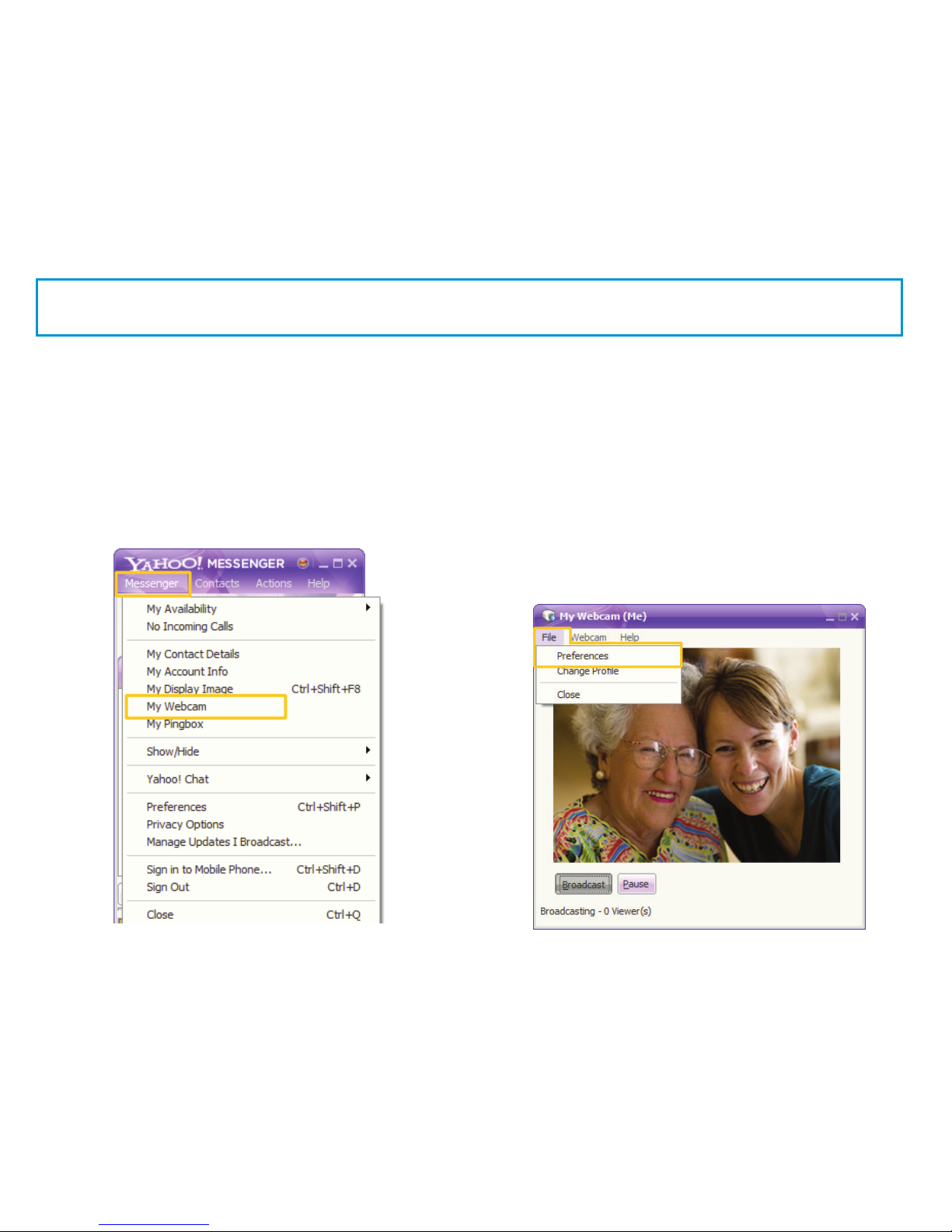
First of all you have to activate your Webcam within Yahoo! Messenger.
Select My Webcam from the Messenger menu (Fig. 4.7) and click through the advice pages. Once done, you should see
a preview window with your video.
Select Preferences from the File menu, just above your video preview (Fig. 4.7.1). Alternatively you can select Preferences
from the Messenger menu in the contact list window (Fig. 4.7).
Fig. 4.7 Fig. 4.7.1
•
•
Page 25
25Chat software configuration Yahoo! Messenger
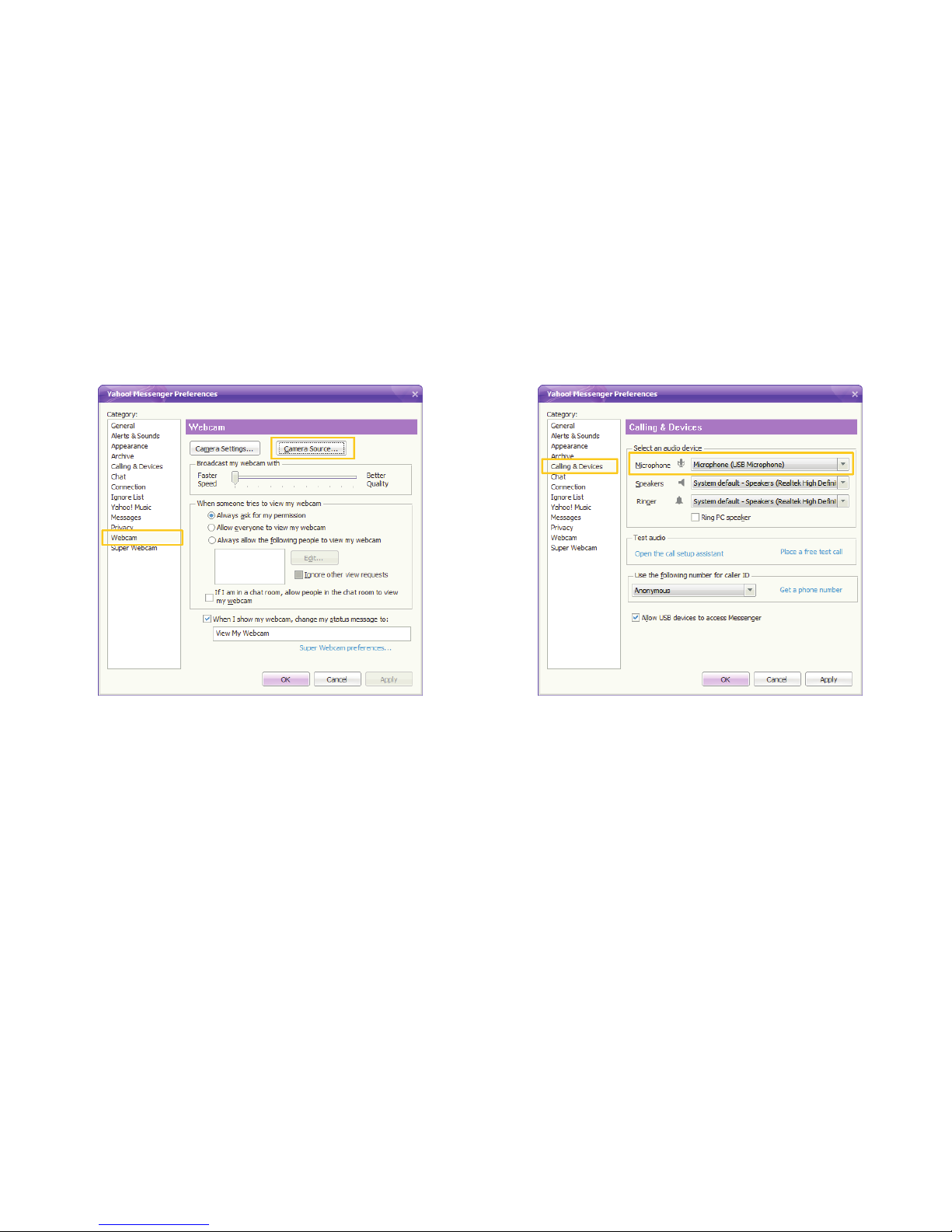
Under Webcam, click Camera Source (Fig. 4.7.2) and choose the HUE HD Webcam from the dropdown menu. Click OK.
If you’d like to adjust the video quality or add some special effects, click Camera Settings to gain access to all of the
options. There are three tabs at the top of the window with settings you can adjust.
Under Calling & Devices, select the HUE HD Webcam for your Microphone and the System Default (or your sound card)
for Speakers and Ringer (Fig. 4.7.3). Use the Call Setup Assistant if you want to check your audio settings.
Click OK to save your changes then go back to My Webcam in the Messenger menu. Use the Broadcast button to control
the video as you chat.
•
•
•
•
Fig. 4.7.2 Fig. 4.7.3
Page 26
26Chat software configuration Yahoo! Messenger
Mac setup:
Within the Yahoo! Messenger application:
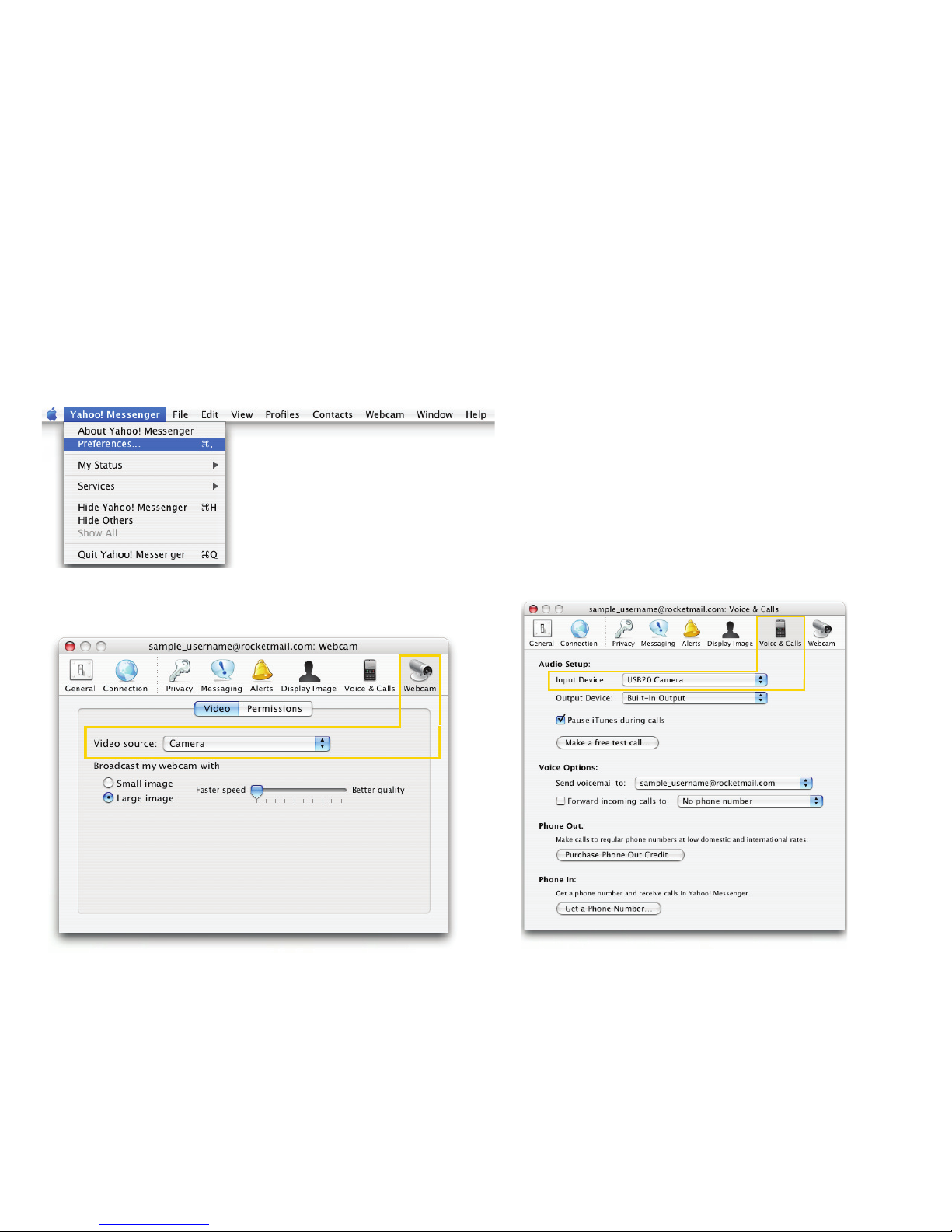
Select Preferences… from the Yahoo! Messenger menu (Fig. 4.7.4).
In the Webcam tab, change the Video Source to Camera (Fig. 4.7.5). In the Voice & Calls tab, change the Input Device
to USB 20 Camera (Fig. 4.7.6).
Close the Preferences window when you are satisfied with the settings.
You can use the Webcam menu to control your video chats.
•
•
•
•
Fig. 4.7.4
Fig. 4.7.5
Fig. 4.7.6
Page 27

27Faqs Windows
FAQs - FREQUENTLY ASKED QUESTIONS
WINDOWS
My system does not recognise the webcam:
Go to Programs in the Start Menu and select HUE HD Webcam, then open AMCap. If any error messages appear,
clear them with OK. In the Devices menu, look for “HUE HD Webcam” and “HUE HD Webcam Audio”. If both of
these devices are present, then the system is recognising the camera.
If one or both of these devices is missing, please check that the camera is properly connected to the computer.
Try plugging the camera into a different USB port. If the camera is plugged into one of the ports in the front try one
of the ports in the rear of the computer.
Note: Please try installing the software from the included CD .If during the installation you see a preview window
with video from the camera, then the installation was successful. If you are still having problems when trying to
use particular programs, please contact the vendor of the software you are attempting to use the camera with for
support.
The webcam works in AMCap but in Skype the screen is blank:
Please make sure that AMCap is completely closed before starting up Skype.
The microphone cuts out when making Skype calls:
Please check the Skype setup chapter of this manual for a solution to this problem.
The Snapshot button is not working:
Please install the webcam software from the included CD. For the Snapshot button to work, the camera needs to
be running. If no program or website is using the HUE HD Webcam pressing the Snapshot button on the back of
the camera will do nothing. By default the first click of the Snapshot button will start AMCap so that you can take
pictures.
If the Snapshot button is not functioning at all, make sure that the process “vsnp2std.exe” is running in the
Windows Task Manager’s Processes tab. If that process is missing, another program must be blocking it or the
webcam installation may have been unsuccessful.
To run this process, go to C:\Windows\ and double click the vsnp2std.exe file. If it still does not appear in the
process list, another program - usually antivirus software - may be preventing the software from running. If you
suspect that the problem is with the webcam software you can uninstall and reinstall the driver from the CD.
Page 28

28Faqs Windows
Windows reports that no video device was recognised:
Please open AMCap and check that the correct webcam is selected in the Devices menu.
Windows reports a Code 39 error (Device Status) when the webcam is plugged in:
If other cameras have been installed on the computer and you are receiving a Code 39 error when you plug in the
HUE HD Webcam, do the following:
Start Menu> Run and type in “regedit” (without quote marks).
File->Export and save a copy of your current registry. Always save a copy before making changes to the registry
settings.
Find the key:
HKEY_LOCAL_MACHINE\SYSTEM\CurrentControlSet\Control\Class\{6BDD1FC6-810F-11D0-BEC7-08002BE2092F}
In the right hand panel, find and delete the UpperFilters and LowerFilters values.
Disconnect and reconnect the camera from the computer.
The error should be gone.
I am using a SigmaTel sound card and there is no option to select a microphone in Windows.
Please check with your computer’s manufacturer and make sure you are running the most up to date version of
the SigmaTel drivers. You should be able to download the newest version from your computer or motherboard
manufacturer directly. If the most recent ones still do not work, uninstalling and reinstalling the drivers might fix
the problem. For further support with this issue please speak to your computer manufacturer.
I made a video but the file size is too large.
Please note that the video will be in raw format (uncompressed) and can take up a lot of disk space; you may wish
to change the resolution of the movie clip in AMCap by selecting Video Capture Pin… from the Options menu and
adjusting Output Size. You can also edit and compress your movie clip using Windows software and video editing
suites.
Page 29

29Faqs Mac OS X
MAC OS X
The video settings menu is greyed out in WebCam Monitor:
Please fully quit WebCam Monitor (Quit from the WebCam Monitor menu or press Command-Q on the keyboard) so
that it does not show up in your Dock. Then try opening WebCam Monitor again.
Please also make sure that the camera is directly connected to your Mac; not to a USB hub or through the keyboard. If you change the USB port the camera is connected to, please make sure that the WebCam Monitor application is fully quit as above and then reopen it after reconnecting the device.
The webcam works in WebCam Monitor but in Skype the screen is blank:
Please make sure that WebCam Monitor is completely closed before starting up Skype. Exit the application with
Quit from the WebCam Monitor menu, not just by closing the window.
The webcam works in WebCam Monitor but not in iChat:
For users running Mac OS X 10.4.9 or later, iChat should automatically detect the camera, though it may initially
need configuring with the setup instructions in this manual.
If you are running an earlier version of Mac OS X 10.4 you will need to run Software Update from the Apple menu
and upgrade to the Mac OS X 10.4.9 patch. If that is not possible please see Page 18 of this manual for instructions
on how to use the HUE HD Webcam in iChat with third party software.
The camera light does not come on.
Please fully quit WebCam Monitor (Quit from the WebCam Monitor menu or press Command-Q on the keyboard) so
that it does not show up in your Dock. Then try opening WebCam Monitor again.
Please also make sure that the camera is directly connected to your Mac; not to a USB hub or through the keyboard. If you change the USB port the camera is connected to, please make sure that the WebCam Monitor application is fully quit as above and then reopen it after reconnecting the device.
My camera is not recognised when I connect it to my computer. I am using OS X 10.4.2 or earlier.
If you are using an early version of the OS X 10.4 software, please install the free Apple Software Update to 10.4.3
or later for the automatic webcam detection to work. We recommend updating to 10.4.9 if possible for full iChat
webcam support to be available as well.
Page 30

30Faqs Other problems
OTHER PROBLEMS
I have successfully installed the camera. How do I talk with my friends over the internet?
You will need to install some video chat software. Please find out which network your friends are using and then
follow the corresponding setup instructions in this manual to join them. Additional help on using a specific network
can be found on each company’s website.
I cannot install the software from CD:
Please download the software from our website (www.huehd.com/drivers.html).
I cannot install the software from CD or download it from the website:
Please check that your antivirus software is not blocking access and that you have permission to install software on
your computer.
The preview image from the camera is blurry:
Turn the focusing ring on the webcam’s lens until the picture appears sharp.
I have installed the software but nothing happens when I plug the webcam into the USB port:
Please try a different USB port. We recommend directly connecting webcams to a USB port on your computer, not
through a USB hub.
My video is choppy; the frame rate is worse than expected.
Please note that in low light situations the frame rate of the capture will drop, making the video appear choppier. To
obtain the highest possible frame rate, use HUE HD in a well lit area where the light source is behind the camera
and out of the picture. If this is not possible, the quality may be improved by checking the Low Light option in the
settings if available in your chosen software.
For an up to date list of Frequently Asked Questions please also check our website www.huehd.com/support.html
Page 31

31Appendix I Technical Specification
APPENDIX I – TECHNICAL SPECIFICATION
Minimum System Requirements
CPU 1.5 GHz Processor
Memory 512 MB RAM
Operating System Windows 2000/XP/Vista
Requires Mac OS X v.10.4 or later
Disk Space 50MB
Connection USB 1.1 port (USB 2.0 port required for megapixel image capture)
Resolution 800 x 600 Supported; 1024 x 768 or higher recommended
Video/Sound Card 16 bit or higher
Video
Sensor True 2 Megapixel CMOS
Lens 5-layer antiglare optical
Video Resolution/Framerate 1600 x 1200 with 10 fps real time only; 1280 x 768, 800 x 600 with 15 fps; 640 x 480 to 160 x 120,
with 30 fps; Support lower rates (0-30fps contiguous); Accurate (+/- 0.25 FPS) video frame rate
even in low-light environments
Video Format I420, YUY2, RGB24
Viewing Angle 73 degrees
Focus Range 5cm ~ infinity. Low barrel/pincushion distortion at edges of visual field. Low focus variation at
edges of visual field.
Adjustable Video Setting Brightness, Contrast, White balance, Auto exposure
Also Includes Still image capture (True 2 Megapixel; SW interpolated 5 megapixel);
High color fidelity; Face tracking; Low-light sensitivity
Page 32

32Appendix I Technical Specification
Audio
Includes Integrated Microphone; Noise Reduction/Cancellation; Acoustic Echo Cancellation
Sampling Rate 8000 / 16000 Hz
Sampling Accuracy
< 5 PPM
Device Characteristics
Characteristics USB Powered; Still image capture button; Detachable Base
Dimensions 3“ x 2.5“ x 15“HUE HD Webcam
Package Contents HUE HD Webcam
Camera Base
6 ft USB to USB Mini Cable
Install CD
User Guide
Software
Host Operating System
Driver
Windows XP/Vista; Mac OS X;
Standalone driver installation package (self-contained .EXE and an .MSI file;
.DMG file for Mac OS X 10.4 and above);
Silent install option;
Driver WHDC certified for XP and Vista;
Driver upgrade process detects previous
installation and provides remove, maintenance, and upgrade option
Page 33

© 2009 HUE. All rights reserved.
All brand names are registered trademarks or trademarks of their respective owners.
AIM and the AIM logo are registered trademarks of AOL LLC. Used with permission. Mac, Mac OS, iChat, iSight and
Photo Booth are either registered trademarks or trademarks of Apple Inc., registered in the U.S. and other countries.
Mac logo used with permission.Microsoft, Windows, MSN, and the MSN logo are either registered trademarks or
trademarks of Microsoft Corporation in the United States and/or other countries.Specifications are subject to change
without prior notice.
Made in China for Ascent Information Technology Ltd.
P/N HueHD-v2
www.huehd.com
 Loading...