

Page 1

Copyright © 2008 Huawei Technologies Co., Ltd.
All Rights Reserved
No part of this document may be reproduced or transmitted in any form or by any
means without prior written consent of Huawei Technologies Co., Ltd.
Trademarks and Permissions
and other Huawei trademarks are trad emarks of Huawei T echnolo gies Co. ,
Ltd.
All other trademarks and trade names mentioned in this document are the
property of their respective holders.
Notice
The information in this document is subject to change without notice. Every effort
has been made in the preparation of this document to ensure accuracy of the
contents, but all statements, information, and recommendations in this document
do not constitute the warranty of any kind, express or implied.
Page 2

Table of Contents
Getting to Know the EM770............................................................. 1
Requirements for the PC................................................................. 2
Preparing the EM770...................................................................... 3
Installation Guide.......................................................................... 4
Safety Information........................................................................10
i
Page 3
Thank you for purchasing Huawei EM770 HSPA
Embedded PC Module.
Note:
This manual briefly describes the preparation, the process for
installing/uninstalling, and safety precautions for using Huawei EM770 HSPA
Embedded PC Module (hereinafter referred to as the EM770).
You are recommended to read the manual before using the EM770.
The signal strength and the transmission rate are affected by the actual
environment.
Getting to Know the EM770
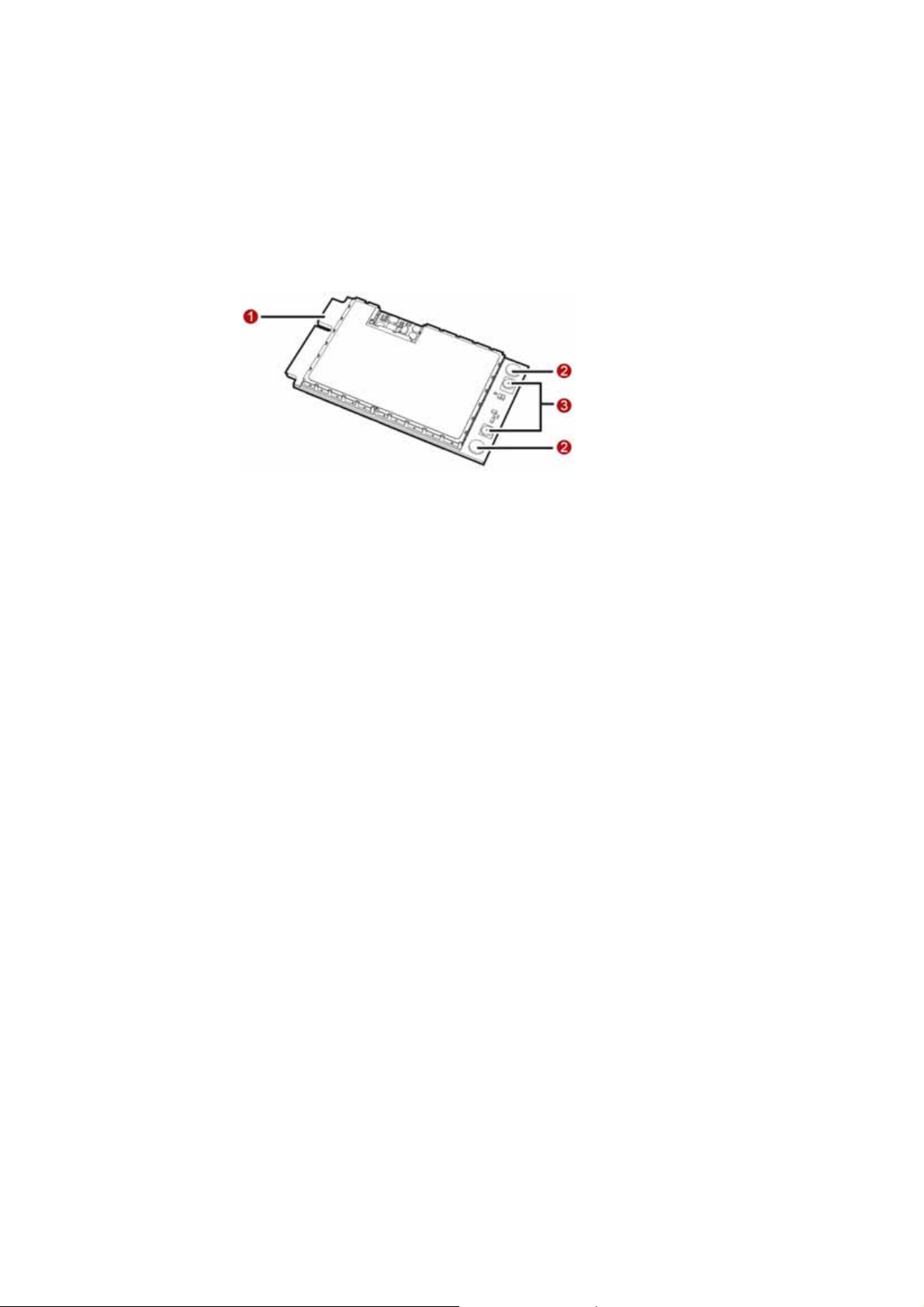
The following figure shows the appearance of the EM770. The actual product may
differ.
1
Page 4

Mini PCI Express connector
It is used to connect the EM770 to the WWAN Mini PCI Express interface of the PC.
Screw holes
They are used to fix the EM770 on the main board of the PC with screws.
Antenna interfaces
They are used to connect antennas.
Requirements for the PC
To use the EM770, the PC must meet the following requirements:
WWAN Mini PCI Express interface.
Windows 2000 SP4, Windows XP SP2, Windows Vista and Linux 2.6.18 or
above
The hardware of your PC must meet or exceed the recommended system
requirements for the installed version of OS.
Display resolution: 800 × 600 or above.
EM770 has an external antenna which connect with laptop.
The max gain which is allowed of external antenna is :
GSM850<8dBi
GSM1900< 3.77dBi
W850<8dBi
W1900< 3.77dBi.
2
Page 5

Preparing the EM770
Locate the WWAN Mini PCI Express interface on the ma in board of the PC. Find the
main antenna and the auxiliary antenna.
If a USIM/SIM car d is provid ed by yo ur service p rovider, insert t he USIM/SI M card
into the USIM/SIM card slot on the main board of the PC.
Note:
In certain cases, your PC may be disassembled only by the professionals.
Before you install the EM770 onto the main board of the PC, consult the PC
manufacturer or read the user manual of the PC.
3
Page 6
Installation Guide
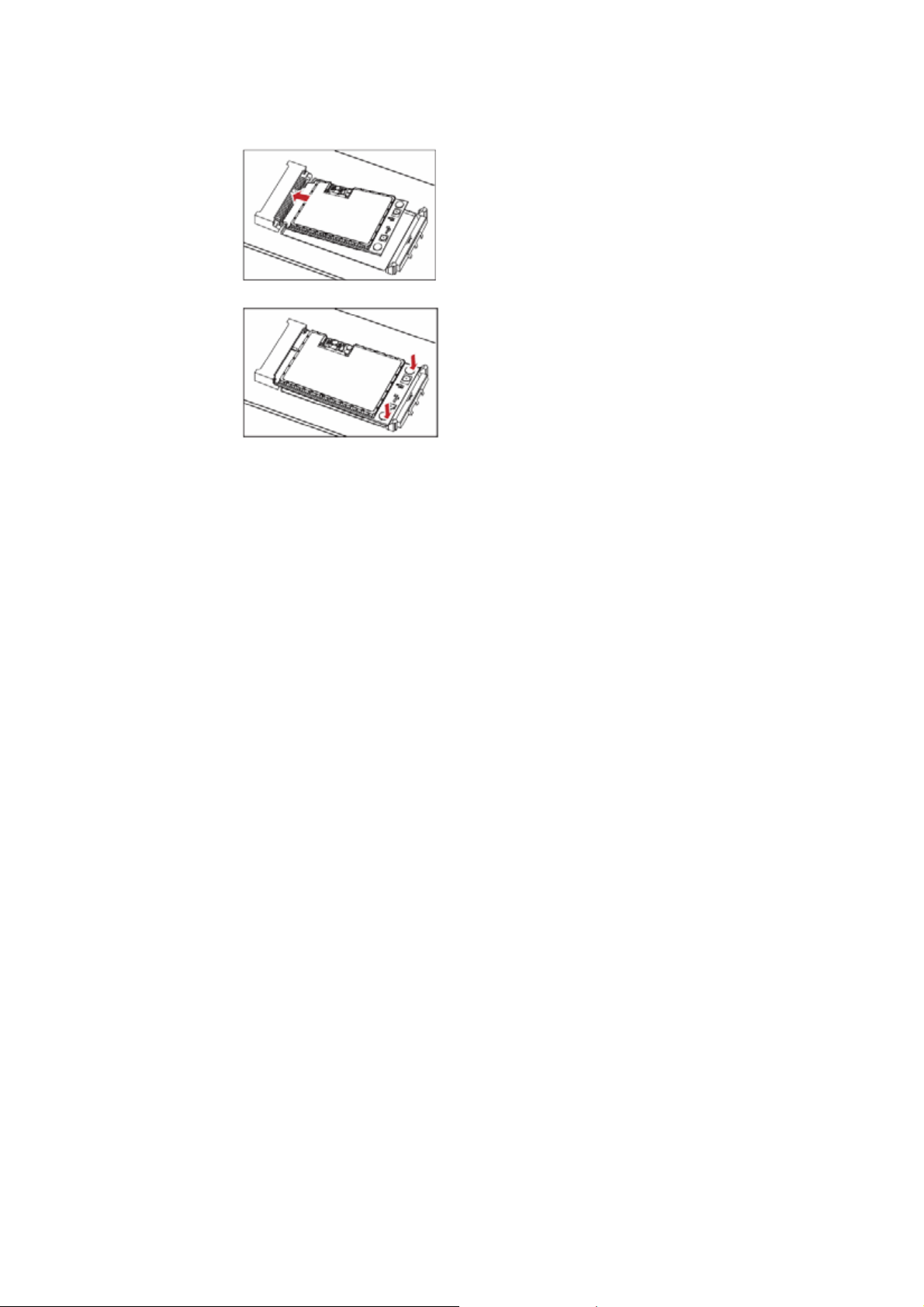
Installing the EM770 onto the Main Board of the PC
1. Insert the Mini PCI Express connector of the EM770 into the WWAN Mini PCI
Express interface on the main board of the PC.
2. Press downwards to fix the EM770 in the module slot.
4
Page 7
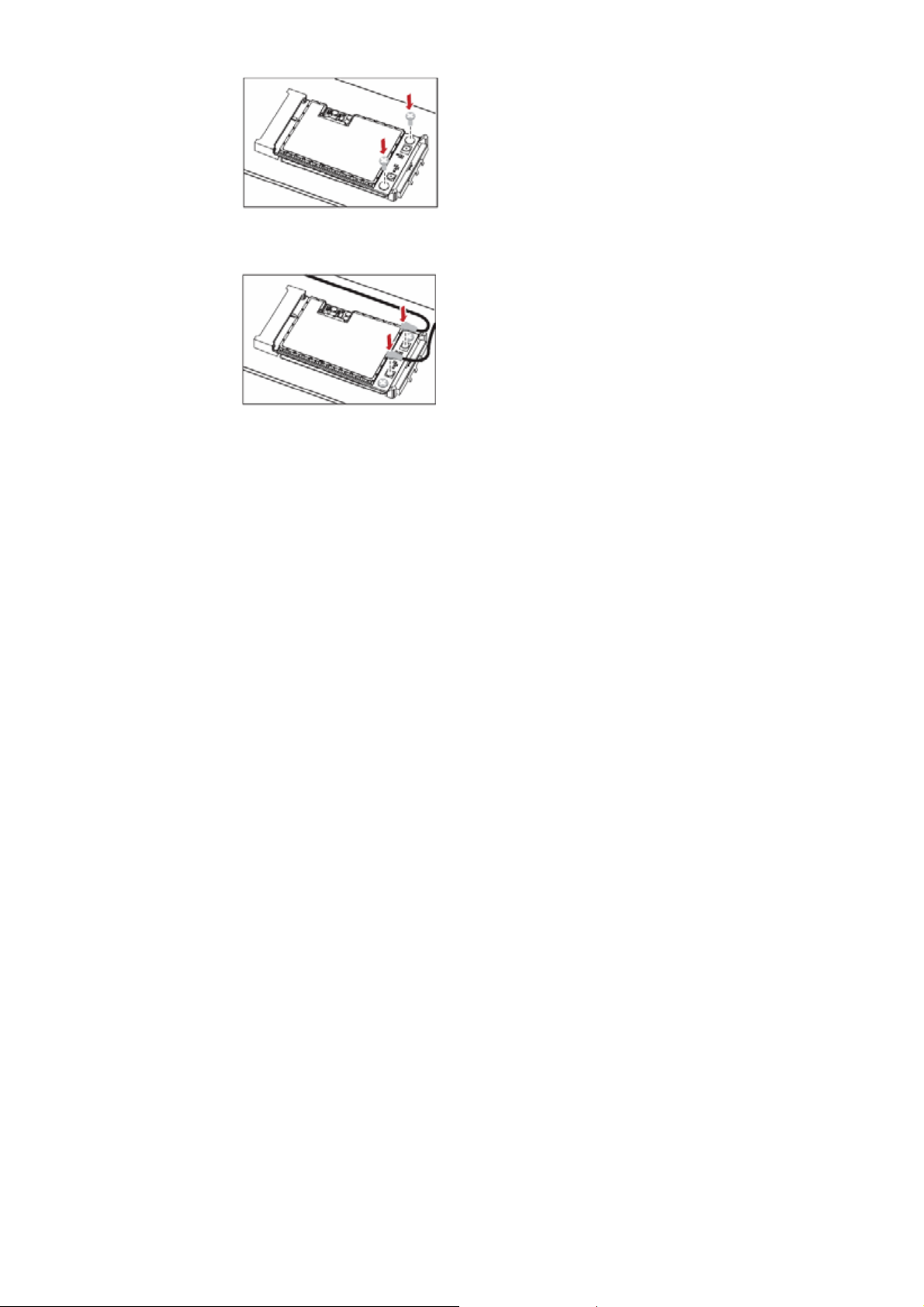
3. Use a screwdriver to fix the EM770 onto the main board of the PC with two
screws provided in the EM770 packing box.
4. Insert the connector of the main antenna into the MAIN antenna interface (M)
of the EM770 according to the indication on the label of the EM770. Insert the
connector of the auxiliary antenna into the AUX an tenna interface ( A) of the
EM770 in the same way.
Note:
Insert the antenna connectors vertically into the antenna interfaces of the
EM770.
5
Page 8

Do not pinch the antenna cable or damage the connectors. Otherwise, the
wireless performance of the EM770 may be reduced or the EM770 cannot
work normally.
Ensure that the antenna cables are routed through the channel in the frame o f
the PC and do not lay across the raised edges of the frame.
6
Page 9
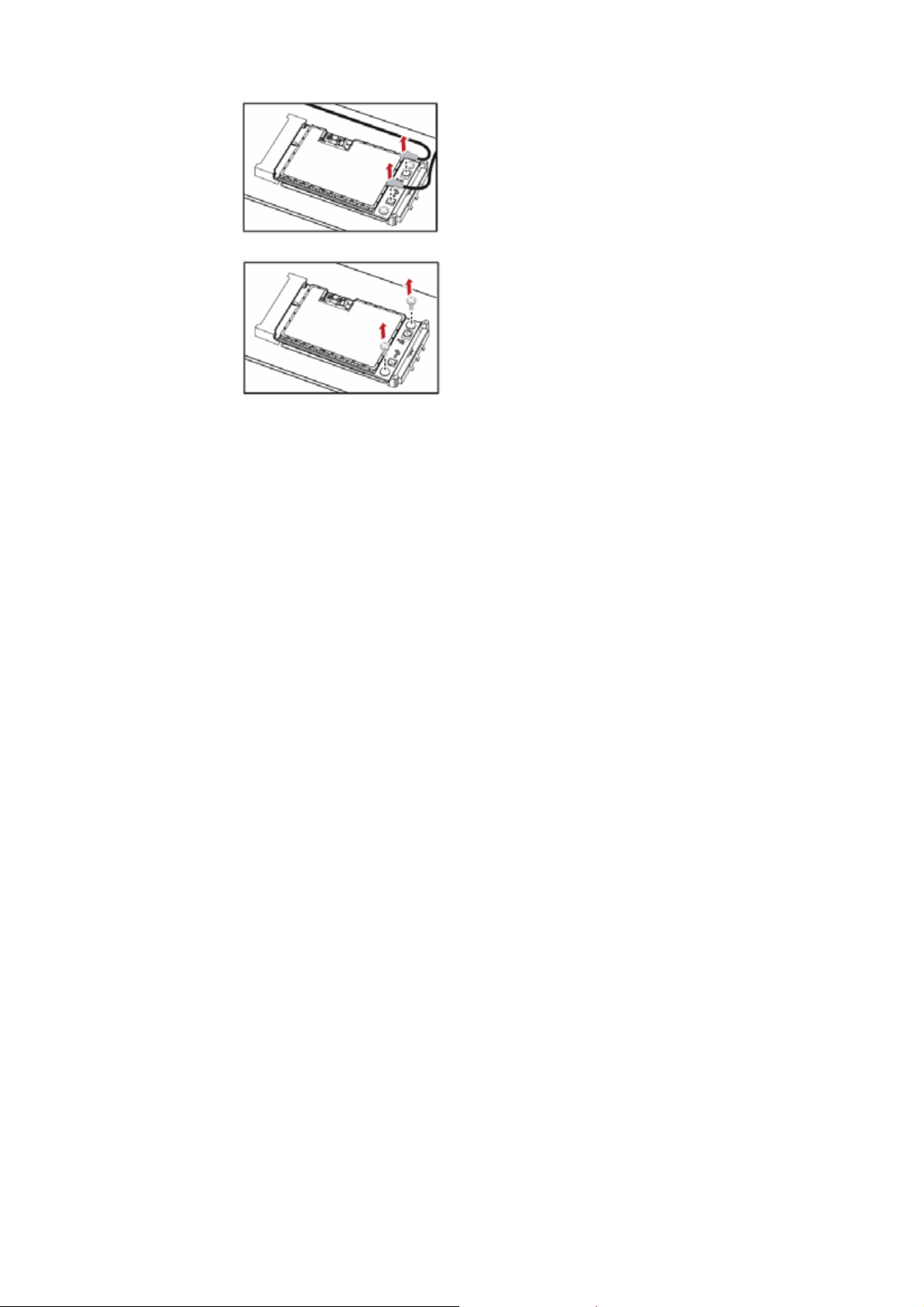
Removing the EM770 from the Main Board of the PC
1. Disconnect the antenna cables from the EM770. You can lift the connectors
with a small screwdriver.
2. Remove the two screws with the screwdriver.
7
Page 10
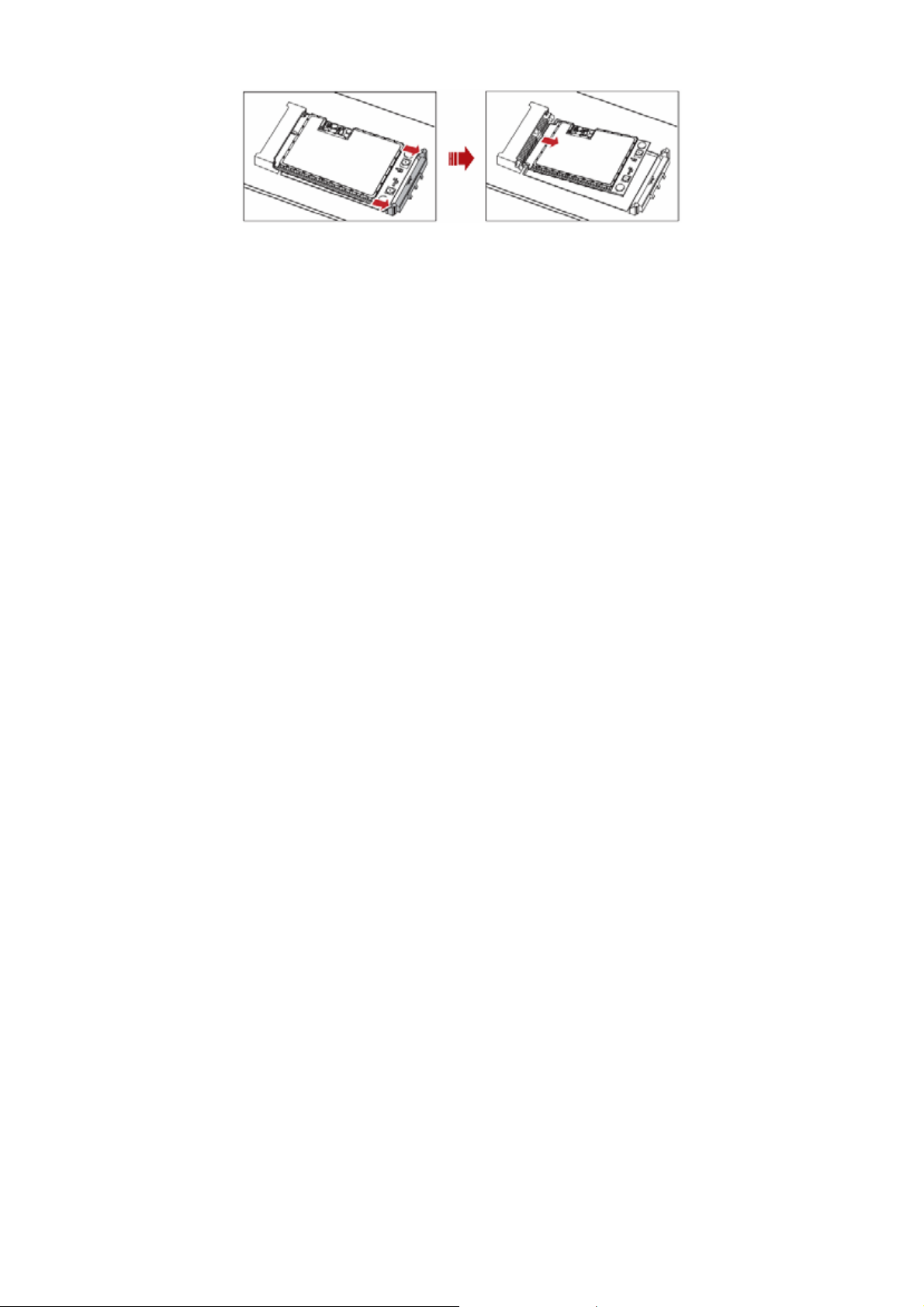
3. Slide backwards the two clips to release the EM770 from the slot. Then, lift up
the EM770.
Installing the EM770 Software
A disk is provided in the EM770 packing box. The disk contains the management
program and the driver of the EM770.
1. Insert the disk into the disk drive of the PC.
2. Find the AutoRun.exe file under the disk path. Then double-click
AutoRun.exe to run the program.
3. Follow the prompts of the installation wizard.
4. After the program is installed, the shortcut icon of the management progr am
is displayed on the desktop.
Uninstalling the Management Program
1. Choose Start > Control Panel.
8
Page 11

2. Find the management program, and click Add/Remove Program to
uninstall the management program.
Note: It is recommended to restart the PC after the uninstallation to ensure that
the management program is completely uninstalled.
9
Page 12

Safety Information
Read the safety information carefully to ensure the correct and safe use of your
wireless device.
Interference
Do not use your wireless device if using the dev ice is prohibited or when it causes
danger or interference with electric devices.
Medical Device
Do not use your wireless device and follow the rules and re gulations set forth
by the hospitals and health care facilities.
Some wireless devices may affect the performance of the hear ing aids. For
any such problems, consult your service provider.
If you are using an electronic medical device, consult the doctor or device
manufacturer to confirm whether the radio wav e affects the oper ation of this
device.
Area with Inflammables and Explosives
To prevent explosions and fires in areas that are stored with inflammable and
explosive devices, do not use your w ireless device and observe the rules. Areas
stored with inflammables and explosives include but are not limited to the
following:
Gas station
Fuel depot (such as the bunk below the deck of a ship)
Container/Vehicle for storing or transporting fuels or chemical products
Area where the air contains chemical substances an d particles (such as
10
Page 13

granule, dust, or metal powder)
Area indicated with the "Explosives" sign
Area indicated with the "Power off bi-direction wireless equipment" sign
Area where you are generally suggested to stop the engine of a vehicle
Traffic Security
Observe local la ws and regulat ions while using th e wireless devic e. T o prevent
accidents, do not use your wireless device while driving.
RF signals may affect electronic systems of motor veh ic les. For more
information, consult the vehicle manufacturer.
In a motor vehicle, do not place the wireless device o ver the air bag or in th e
air bag deployment area. Otherwise, the w ireless device ma y hurt y ou owing
to the strong force when the air bag inflates.
Observe the rules and regulations of airline companies. When boarding,
switch off your wireless device. Otherwise, the radio signal of the wireless
device may interfere with the plane control signals.
Safety of Children
Do not allow children to use the wireless device without guidance. Small and
sharp components of the wireless device may cause danger to children or cause
suffocation if children swallow the components.
Environment Protection
Observe the local regulations regarding the di sposal of your packaging mat erials,
used wireless device and accessories, and promote their recycling.
11
Page 14

WEEE Approval
The wireless device is in compliance with the ess ential requirements and other
relevant provisions of the Waste Electrical and Electronic Equipment D irective
2002/96/EC (WEEE Directive).
RoHS Approval
The wireless device is in compliance with the restriction of the use of certain
hazardous substances in electrical and electronic equipment Directive
2002/95/EC (RoHS Directive).
Laws and Regulations Observance
Observe laws and regulations when using your wireless device. Respect the
privacy and legal rights of the others.
Care and Maintenance
It is normal that your wireless device gets hot whe n y ou us e or cha rge it. Bef ore
you clean or ma in ta in t he w ir eles s dev ic e, s top a ll ap pl icat io ns and po we r of f t he
wireless device.
Use your wireless device and accessories with care and in clean en vironment.
Keep the wireless device from a fire or a lit cigarett e.
Protect your wireless device and accessories from w ater a nd vapor and keep
them dry .
Do not drop, throw or bend your wireless devic e.
Clean your wireless device with a piece of damp and soft antistatic cloth. Do
not use any chemical agents (such as alcohol and benzene), chemical
detergent, or powder to clean it.
Do not leave your wireless device and accessories in a place with a
12
Page 15

considerably low or high temperature.
Use only accessories of the wireless device appro ved by the manufacture.
Contact the authorized service center for any abnormit y of the wireless device
or accessories.
Do not dismantle the wireless device or accessories. Otherwise, the wireless
device and accessories are not covered by the w arranty.
Emergency Call
This wireless device functions through receiving and transmitting radio signals.
Therefore, the connection cannot be guaranteed in all conditions. In an
emergency, you should not rely solely on the wireless device for essential
communications.
Regulatory Information
The following approvals and notices apply in specific regions as noted.
CE Approval (European Union)
The wireless device is approved to be used in the member states of the EU. The
wireless device is in compliance with the essential requirements and other
relevant provisions of the Radio and Telecommunications Terminal Equipment
Directive 1999/5/EC (R&TTE Directive).
Federal Communications Commission Notice (United States): Before a wireless
device model is available for sale to the public, it must be tested and certified to
the FCC that it does not exceed the lim it establish ed by the g ov ernment -a dopted
requirement for safe exposure.
FCC Statement
This device complies with Part 15 of the FCC Rules. Operation is subject to the
following two conditions: (1) this device may not cause harmful interferen ce, and
(2) this device must ac cept any interfer ence rece ived, in cludin g inter ference th at
13
Page 16

may cause undesired operation.
Warning: Changes or modifications made to this equipment not expressly
approved by HUAWEI ma y vo id the FCC a uthorization to oper ate th is equ ipment.
When this device should be installed and operated , a minimum distance of 20 c m
between the radiator of external antenna and your body must be required.
14
 Loading...