

Page 1
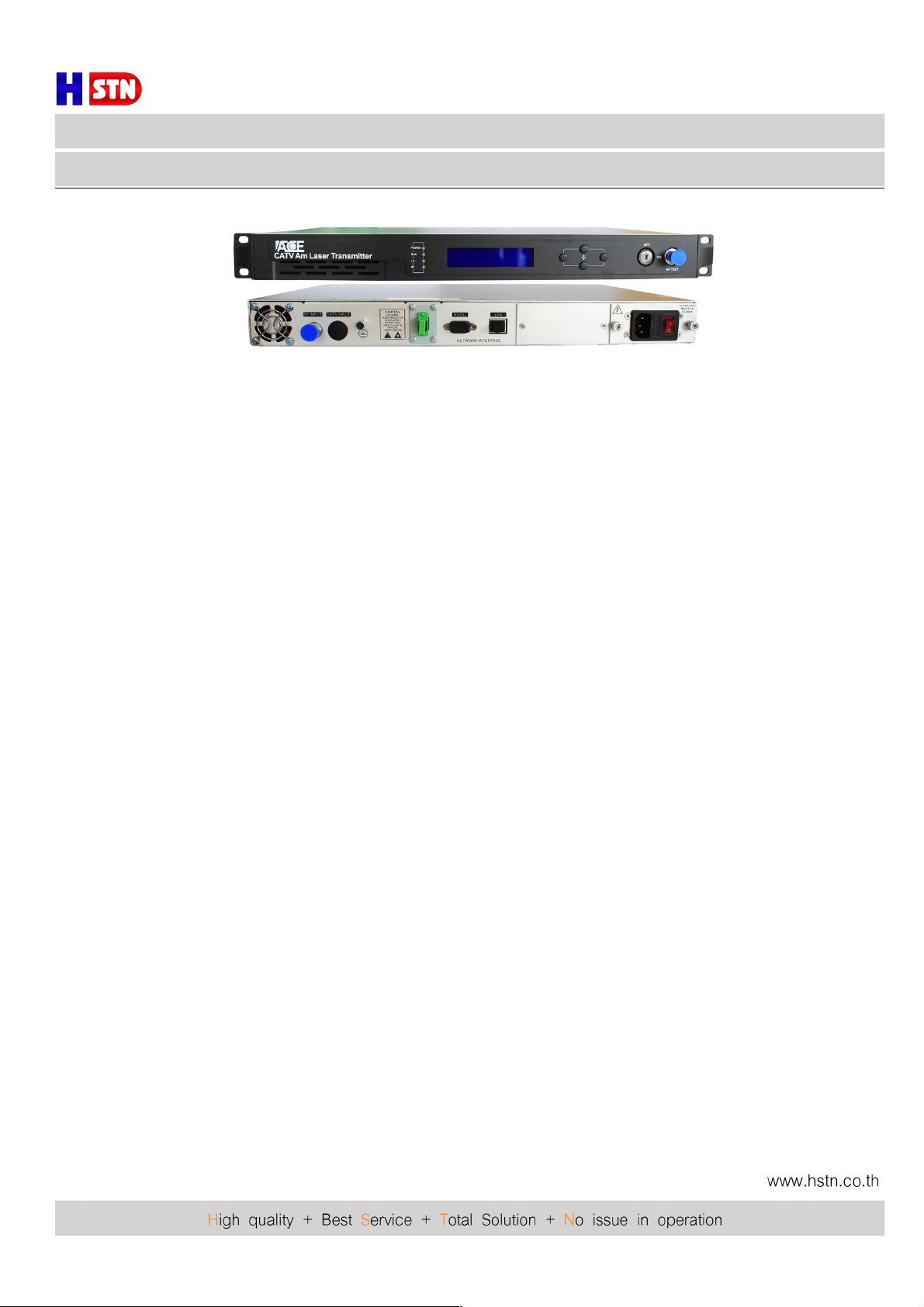
Fiber Optic
Model : ACEWT86260
ACEWT86260 TX-1310
Foreword
This manual applies to 1310nm AM direct modulated optical transmitter with SNMP network management
interface. It mainly describes the performance characteristics, technical parameters, installation and debugging,
common troubleshooting, and other related content of the product. In order to ensure that the equipment can be
successfully installed and safely operated, please read this manual carefully before installing and debugging
the equipment. And the installation and debugging should be strictly according to the specified steps on the
manual to avoid unnecessary damage to equipment or accident harm to the operator. Any question, please
contact with us in time.
Special Tips:
! Optical transmitter is professional equipment, and its installation and debugging must be operated
by special technician. Read this manual carefully before operating to avoid damage to equipment
caused by fault operation or accident harm to the operator.
! While the optical transmitter is working, there is an invisible laser beam from the optical output adapter
on the front panel. Avoiding permanent harm to the body and eye, the optical output should not aim at
the human body and human should not look directly at the optical output with the naked eye!
! Please make sure that the ground terminal of the case and power outlet has been reliably grounding.
Before turning on the power (Grounding resistance should be less than 4Ω) to prevent the static
damage the pump laser device and harm to human because of case charged.
! To ensure the equipment can work stable over a long time in voltage unsteady or poor voltage wave
region, it’s recommend to the customer that he equips special AC regulated power supply, or even
AC uninterrupted power supply(UPS)system for conditional region. In the region with large temperature
variation environment (The equipment’s ideal work environment temperature is 25°C) or bad room
environment it’s recommend to the customer that he equips special air-condition system to improve
the work environment.
Page 2

Fiber Optic
Model : ACEWT86260
ACEWT86260 TX-1310
1. Product Summary
Optical transmitter is the most important equipment to construct the CATV HFC network. It mainly used for
the long distance optical fiber transmission of TV image signal, digital television signal, telephone voice
signal and data (or compressed data) signal. This product does use the high-performance DFB laser as the
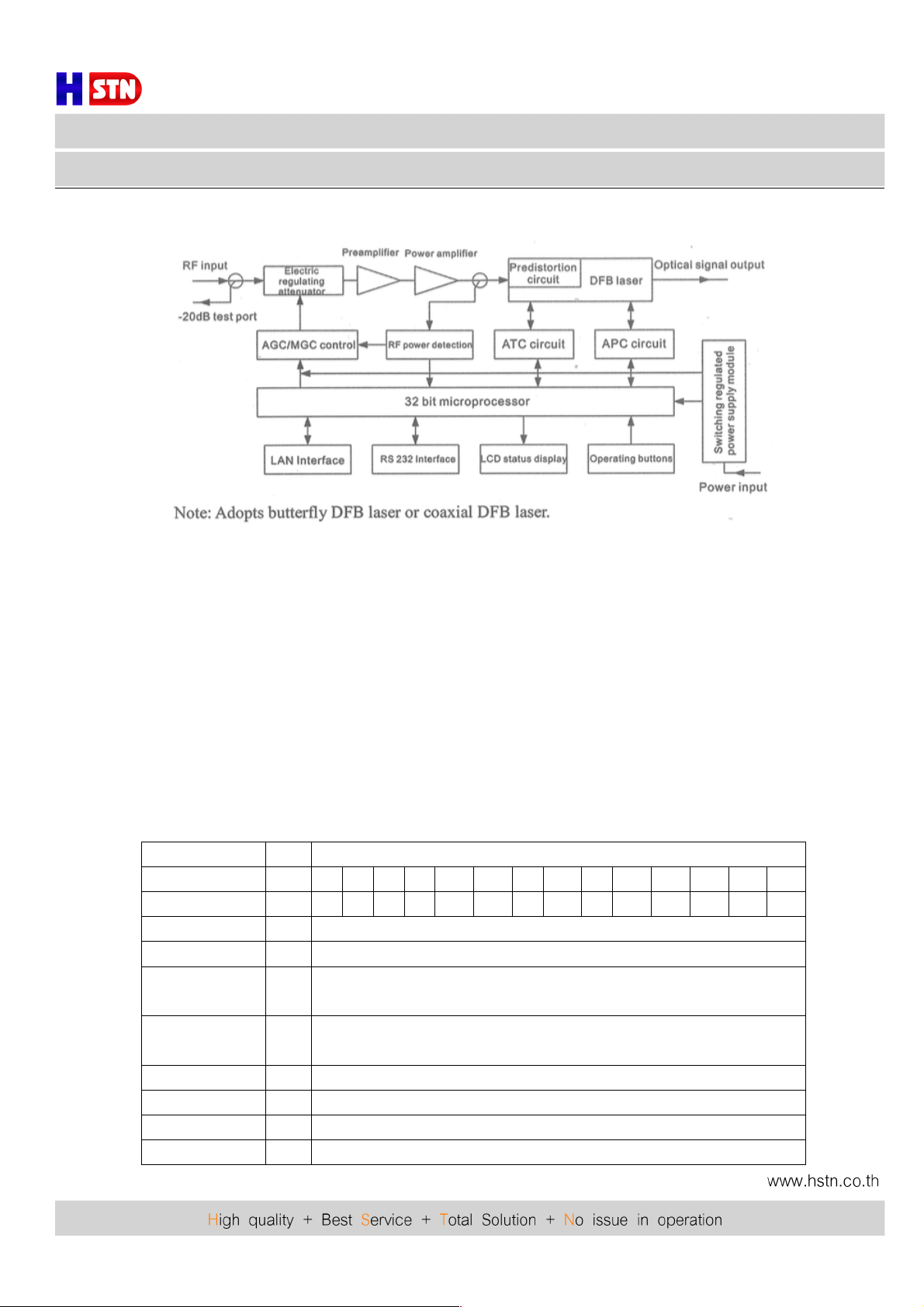
optical source. The RF drive part adopts RF power digital automatic processing technology and advanced
RF pre-distortion circuit, and built-in microcomputer automatic monitoring system, to ensure the excellent
Performance indicators.
2. Performance characteristics
! Adopt high-performance coaxial/butterfly DFB laser, narrow spectral lines, good linearity and high
output power.
! The RF drive part adopts the RF power digital automatic processing technology. Automatic processing
the dive level power according to the RF input signal level and the number of channels(15-84channels),
make the CSO, CTB and C/N index always at the optimal value to ensure the overall performance.
! Advanced multi-frequency RF pre-distortion technology, combined with the GaAs device, effectively
improve the CATV system most important CTB and CSO index, C/N index also gets the maximum upgrade.
! Adopt advanced 32 bit processor; coordinate with perfect automatic monitoring system circuit. It’s can
timely and accurately monitor working status of the laser to ensure a stable optical output power and
effectively extend the working life of the laser.
! Built-in blue screen 160x32 dot matrix LCD monitor on the front panel, accurately showing all working
status parameters.
! 19”1U standard rack mount, equipped standard IEEE802.3 10Base-T Ethernet interface and RS232
interface, can expediently realize network management monitoring.
Page 3
Fiber Optic
Model : ACEWT86260
ACEWT86260 TX-1310
3. Block Diagram
4. Technology Parameters
4.1 Link test condition
Special instruction : The performance of this manual according to the measuring method of GY/T 143-2000
<Specification and methods of measurement on AM optical transmitter and receiver used in CATV system>,and
tested under the specified test condition.
Test condition : With standard optical fiber and standard optical receiver composed the test link. Set 84
PAL-D analog TV channel signal at 750MHz frequency range under the specified link loss. When the optical input
power of optical receiver is -1dBm, measure the C/CTB, C/CSO and C/N.
4.2 Technique Parameters Table
Item
Unit
Technique parameters
Optical Output power
mW 4 6 8 10
12
14
16
18
20
22
24
26
28
31
Optical link loss
dB 7 9
10
11
11.8
12.5
13
13.6
14
14.4
14.8
15.1
15.4
15.9
Optical wavelength
nm
1310±20
Laser type
DFB laser
Optical modulation
mode
Direct optical intensity modulation
Optical connector
type
FC/APC or SC/APC
Frequency range
MHz
47-750/862/1003
RF input level
dBμV
72-88
Flatness in band
dB
±0.75
RF input impedance
Ω
75
Page 4
Fiber Optic
Model : ACEWT86260
ACEWT86260 TX-1310
Input return loss
dB
≥ 16 ( 47-550MHz ); ≥ 14 ( 550-750/862/1003MHz )
C/CSO
dB
≥ 60
C/CTB
dB
≥ 65
C/N
dB
≥ 51
AGC control range
dB
±5
MGC control range
dB
0-10
Power supply voltage
V
AC 110V-250V (50Hz)
Consumption
W
30
Operating
temperature
°C
0--45
Storage temperature
°C
-20--+65
Relative humidity
%
MAX95%no condensation
Dimension
mm
483 (L) x380 (W) x44 (H)
4.3 Optical link carrier to noise ratio degradation table
Optical
Power
Optical link loss (dB)
4 5 6 7 8 9 10
11
12
13
14
15
16
17
18
4mW
53.8
52.8
51.8
51
50.1
49.2
48.2
6mW 53.0
52.0
51.0
50.1
49.1
48.1
8mW
52.8
51.9
51.0
50.1
49.2
48.2 10mW 52.9
51.9
51.0
50.1
49.1
48.2
12mW
52.7
51.8
50.8
49.9
49.0
48.0 14mW 52.4
51.5
50.5
49.5
48.6
47.8
16mW
52.0
51.0
50.1
49.1
48.1
18mW
52.5
51.6
50.6
49.7
48.7
47.9 20mW 51.9
51.0
50.0
49.0
48.0 22mW 52.2
51.4
50.4
49.4
48.6
47.8
24mW
51.5
50.3
49.2
48.5
47.7
26mW
51.5
50.2
49.2
48.5
47.6
28mW
51.6
50.4
49.3
48.6
47.8
31mW 51.3
50.4
49.3
48.5
Page 5
Fiber Optic
Model : ACEWT86260
ACEWT86260 TX-1310
5. External Function Description
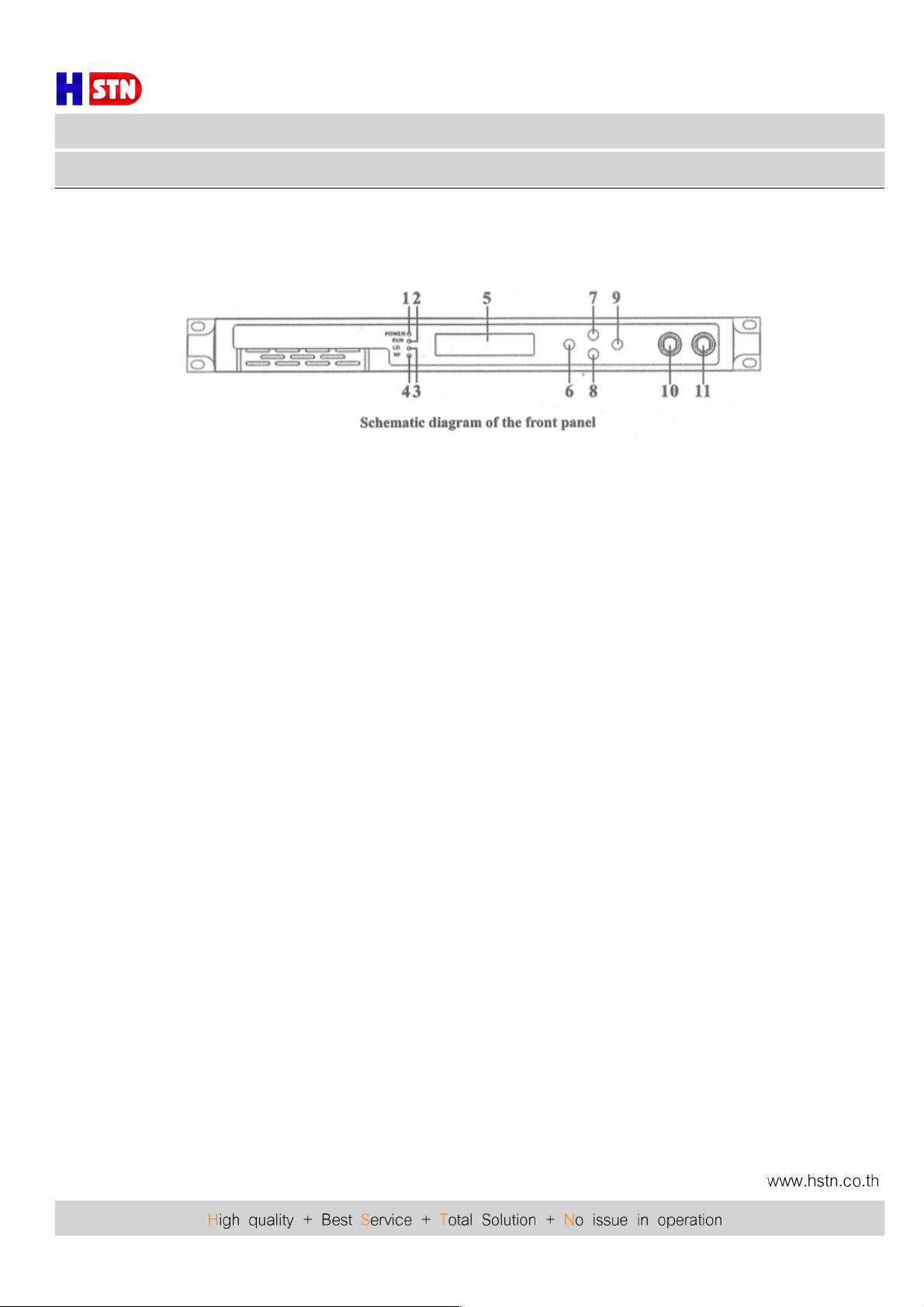
5.1 Front Panel Description
1) Power indicator: The light is on while the switching power supply inside is working.
2) Device running indicator: This indicator will flash after the device start running.
3) Laser working status indicator: Red light means the laser is not working, but the machine parameters are
normal; flashing red light means the machine has broken down, related fault reason see the alarm menu
of the display menu; green light means the laser is working normal.
4) RF status indicator: Flashing red light means the RF input signal is warned; green light means RF input
signal is normal.
5) 160x32 dot-matrix LCD screen: used to display all the parameters of the machine.
6) Display the exit or cancel key of the setup menu.
7) Display the up or increase key of the setup menu.
8) Display the down or decrease key of the setup menu.
9) Display the enter key of the set up menu.
10) Laser switching key: used to control the working status of laser. “ON” means the laser is open and “OFF”
means the laser is closed. Ensure the key is on “OFF” position before power on. After passing self-test,
rotate the key “ON” position according to the displayed massage.
11) RF input signal test port: -20dB test port of the rear panel RF input port.
Page 6
Fiber Optic
Model : ACEWT86260
ACEWT86260 TX-1310
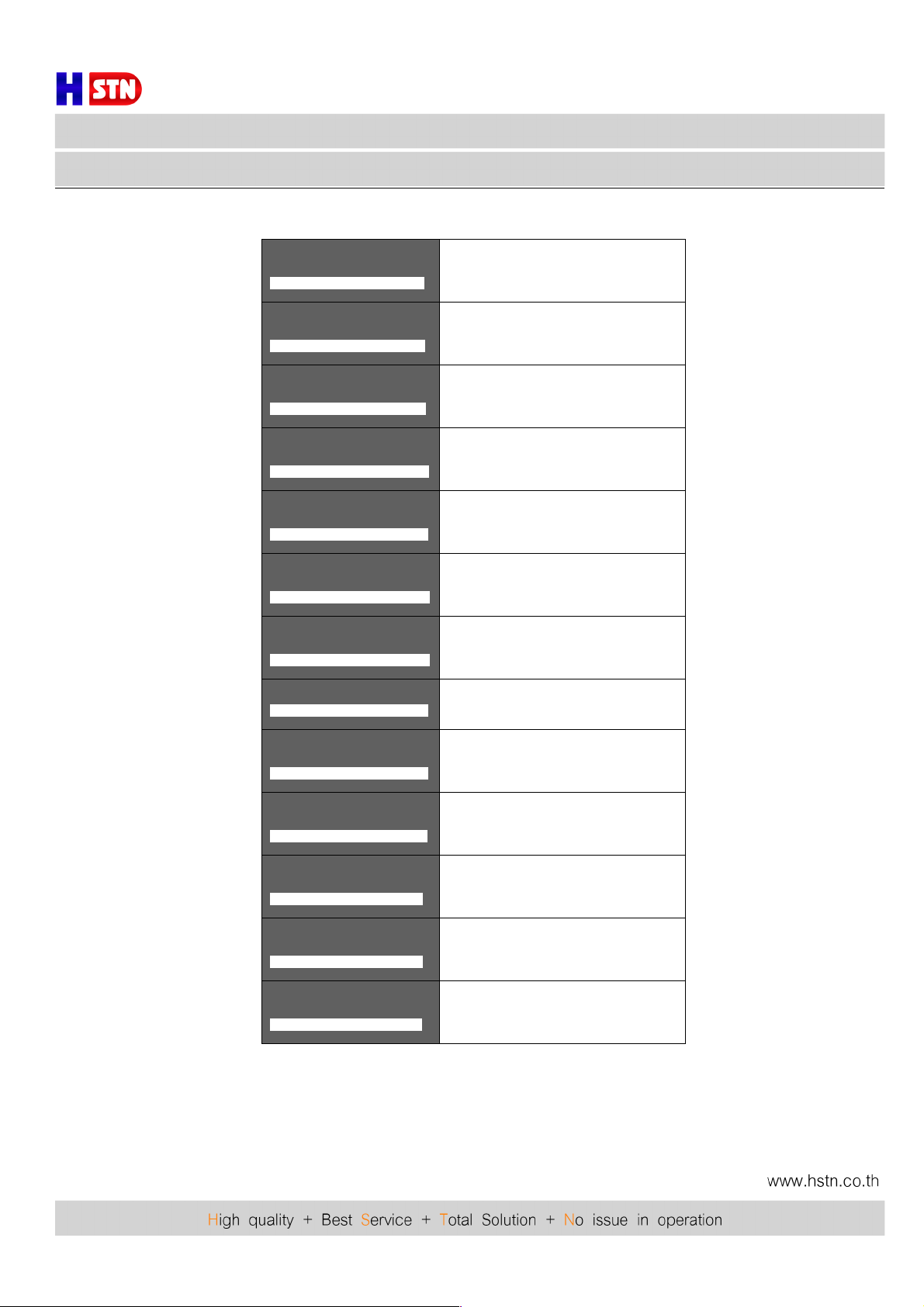
RF Channel Number : 84
Input RF : 30.7 dBµV
RF Control Mode: AGC
RF control mode at present
Input RF : 30.5 dBµV
RF Control Mode: AGC
AGC Ref: +0 dB
The offset of control level in the AGC
mode
Input RF: 30.7 dBµV
RF Control Mode: MGC
MGC ATT : 3 dB
The attenuation of electrically controlled
attenuator in the MGC mode
RF Control Mode : AGC
AGC ATT: +0 dB
+5V Read: 5.00V
Switching power supply output +5V
supply voltage
AGC Ref : +0 dB
+5V Read: 5.00V
- 5V Read: 4.90V
Switching power supply output -5V
supply voltage
+5V Read: 5.00V
- 5V Read: 4.91V
+24V Read : 0.00V
Switching power supply output +24V
supply voltage
- 5V Read: 4.90V
+24V Read : 0.00V
S/N : 12345678
Serial number
+24V Read : 0.00V
S/N : 12345678
Box Temperature: 19.2°C
Internal temperature at present
S/N: 061103123
Box Temperature: 25.25°C
IP Address: 192.168.0.97
IP address
Box Temperature: 25.25°C
IP Address: 192.168.0.97
Subnet Mask: 255.255.255.0
Subnet Mask
IP Address: 192.168.0.97
Subnet Mask: 255.255.255.0
Net Gateway: 192.168.0.1
Gateway
Subnet Mask: 255.255.255.0
Net Gateway: 192.168.0.1
Mac: 00-03-b9-88-10-11
MAC address
Net Gateway: 192.168.0.1
Mac: 00-03-b9-88-10-11
Software Version: 3.00
Software system version
Page 7
Fiber Optic
Model : ACEWT86260
ACEWT86260 TX-1310
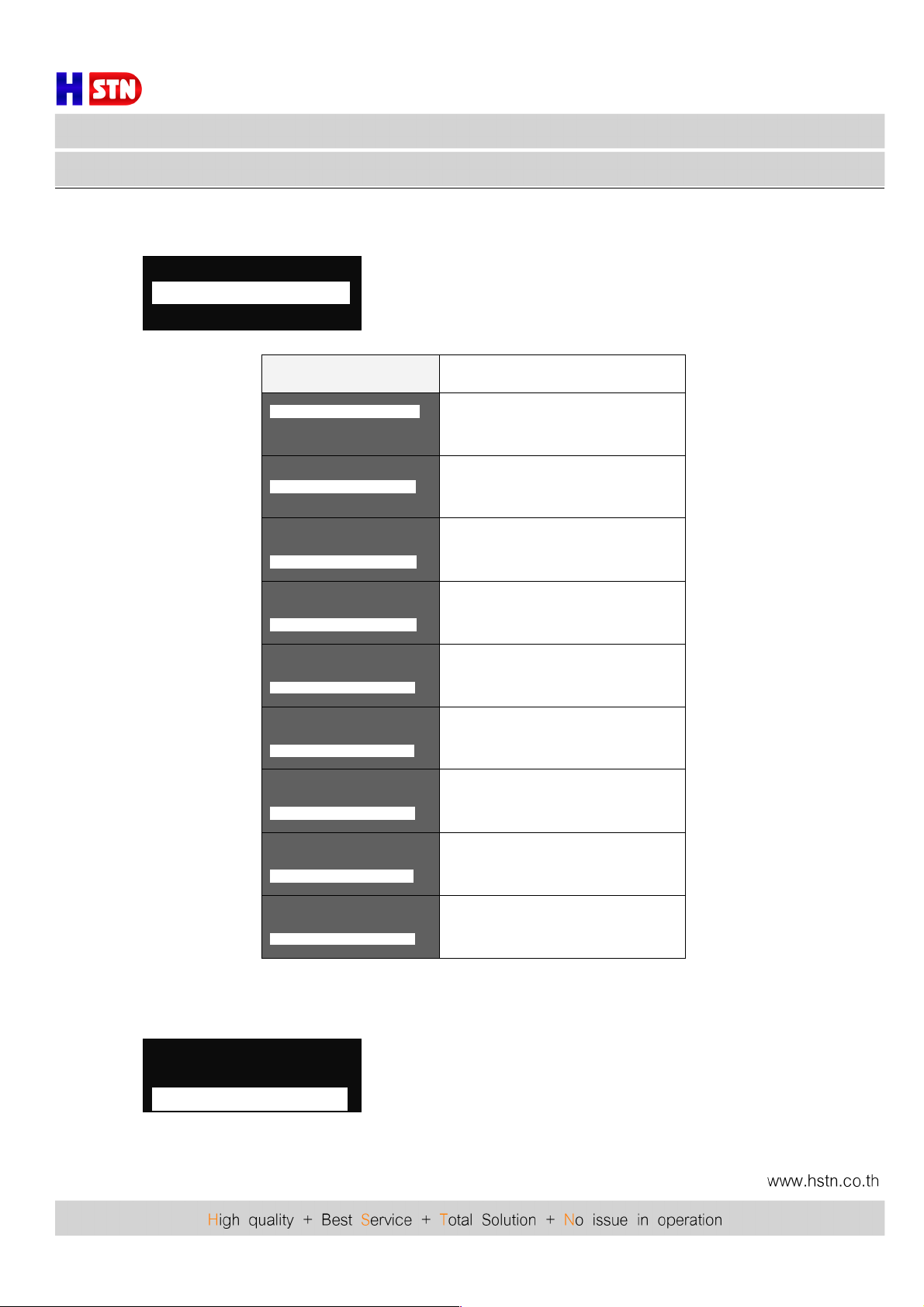
6) Setting menu
Pass “Enter” key into the menu
Content Meaning
Set Laser Output Unit………
Set Buzzer Alarm
Set RF Control Mode
Set the displayed optical power unit
Set Laser Output Unit
Set Buzzer Alarm…………….
Set RF Control Mode
Turn on or off the buzzer
Set Laser Output Unit
Set Buzzer Alarm
Set RF Control Mode………...
Set the control mode of the RF
Signal : AGC or MGC
Set Buzzer Alarm
Set RF Control Mode
Set MGC ATT…………………
Set the attenuation of MGC
Set Buzzer Alarm
Set RF Control Mode
Set AGC Ref………………….
Set the offset of AGC start control level
Set RF Control Mode
Set MGC ATT
Set Channel Number………..
Set system transmission channels
number. This parameter is used to
correct the accuracy of displayed
laser RF signal level
Set +24V Low Alarm
Set +24V High Alarm
Set Local IP Address………..
Set IP address
Set +24V High Alarm
Set Local IP Address
Set Subnet Mask…………….
Set Subnet Mask
Set Local IP Address
Set Subnet Mask
Set Gateway………………….
Set gateway
7) Warning menu
Pass “Enter” into the alarm menu
1.Disp Parameters
2.Set Parameters……………………..
3.Alarm Status
1.Disp Parameters
2.Set Parameters
3.Alarm Status………………………..
Page 8

Fiber Optic
Model : ACEWT86260
ACEWT86260 TX-1310
6. Installation debugging
6.1 Unpack and Check
1. Insure the package is not defaced. If it has any damage or water mark, please contact local agency or
carrier.
2. After unpacking, check equipment and accessories according to package list. Any question, please contact
local agency or our company.
3. If you think the equipment has been damaged, please don’t electrify to avoid worse damage. Please contact
local agency or our company in time.
6.2 Instrument and tools
1. An optical power meter;
2. A digital multimeter;
3. A standard optical fiber test jumper (FC/APC or SC/APC);
4. Some absolute alcohol and medical cotton wool;
6.3 Installation steps
1. Before installing the equipment, please read the <User’s manual> carefully and install the equipment
according to the <User’s manual>. Note : For the man-made damage and other all consequence caused
by error installation that not according to the <User’s manual>, we will not be responsible and will not supply
free warranty.
2. Take out the device from the box; fix it to the rack and reliably grounding (The grounding resistance must
be <4Ω).
3. Use the digital multimeter to check the supply voltage, make sure the supply voltage comply with the
requirements and the switch key is on the “OFF” position. Then connect the power supply.
4. Input the RF signal, turn the switch key to the “ON” position and observe the front panel LED status. After the
LED working status indicator turn into green, the device is working normal. Then press the menu button on
the front panel to check the working parameters.
5. Connect the optical power meter to the optical signal output end by the standard optical fiber test jumper,
then measure the optical output power. Affirm the measured optical output power and the displayed power
are the same and have reached the nominal value. (Affirm the optical power meter is on 1310nm
wavelength test position; the optical fiber test jumper is the matched one and on the connector surface has
no pollution). Remove the standard optical fiber test jumper and optical power meter; connect the device to
the network. So far, the device has been completely installed and debugged.
Page 9
Fiber Optic
Model : ACEWT86260
ACEWT86260 TX-1310
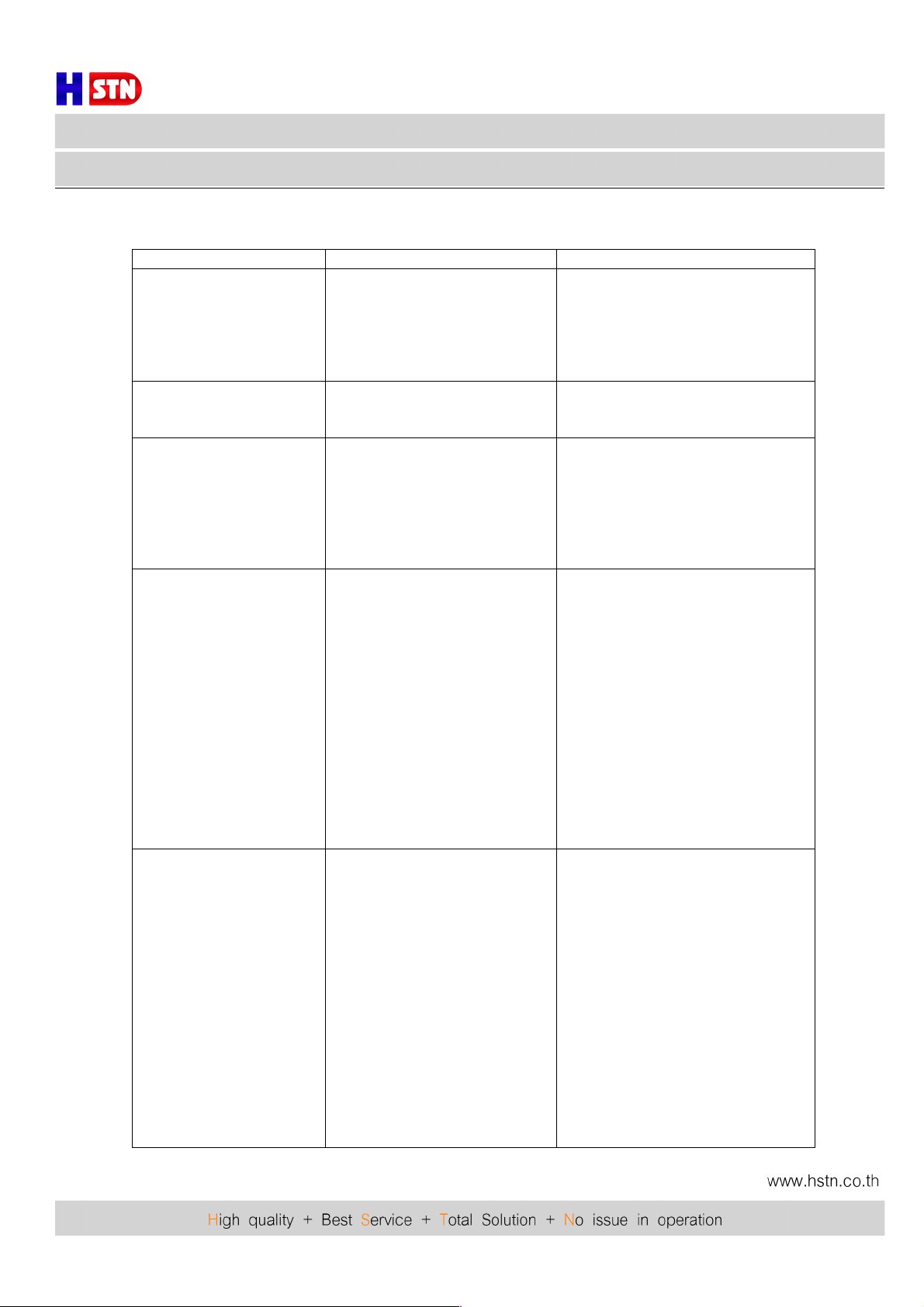
7. Common Failure Analysis and Troubleshooting
Failure phenomenon
Failure cause
Solution
Power on, the front panel
display screen and power
Indicator are both off.
Switch powering power supply couldn’t
start; equipment; internal DC
power supply is not working.
Check if the power supply is normal
(should be AC: 110V-250V). If the
Supply voltage is normal, it could be a
Failure of switching power supply
module. Please contact the dealer or
our company
Power on, the display screen is
off, only the power indicator is
on.
The internal microprocessor is not
working.
Please contact the dealer or our
company.
Power on; the optical output
power displayed on the front
panel display screen and laser
status indicator are both normal,
but the actual measured optical
output power is low.
1. The poor quality of the test
jumper.
2. The active fiber connector or
adapter may be contaminated.
3. The ceramic tube in the adapter
may have been broken.
1. Replace with good quality test
jumper.
2. Clean the contaminated active fiber
connector or adapter. Specific operation
methods see "The clean and maintenance
method of optical fiber connector".
3. Replace the damaged adapter.
After initial startup, the image of
the optical contact point has
obvious netlike curve or large
particles highlights.
1. The received optical power of
the optical contact point is too
high; the output level of the
optical receiver module is too
high and intermodulation index
of RF signal deteriorates.
2. The RF signal input of the
optical transmitter is too high;
beyond the device AGC
control range, results in
deterioration of the
intermodulation index.
3. The intermodulation index of
RF signal input of the optical
transmitter itself is poor.
1. Check the receiver optical power
of the optical contact point and
make appropriate adjustments.
2. Check the input level of the optical
transmitter RF signal, and adjust to
the device required input range.
(RF signal input level should be
72-88dBµV).
3. Check the intermodulation index of the
RF signal input of the optical transmitter
And make appropriate adjustments.
After initial startup, the image of
the optical contact point has
obvious noises.
1. The received optical power of
the optical contract point is not
high enough, results in decrease
of C/N.
2. The RF signal level input of the
optical transmitter is too low;
make modulation degree of the
laser is not enough.
3. The C/N index of system link signal
is too low.
1. Recover received optical power of the
optical contract point by cleaning the
active fiber connector or. Specific
operation methods see “Clean and
maintenance methods of optical
fiber connector”.
2. Check the RF signal level input of the
optical transmitter and adjust to the
device required input range.
(72--88dBµV). When the input channel
number less than 15, set to the MGC
control mode.
3. Use a spectrum analyzer to check the
system link C/N and make appropriate
adjustment. Make sure the system link
Signal C/N > 51dB.
Page 10
Fiber Optic
Model : ACEWT86260
ACEWT86260 TX-1310
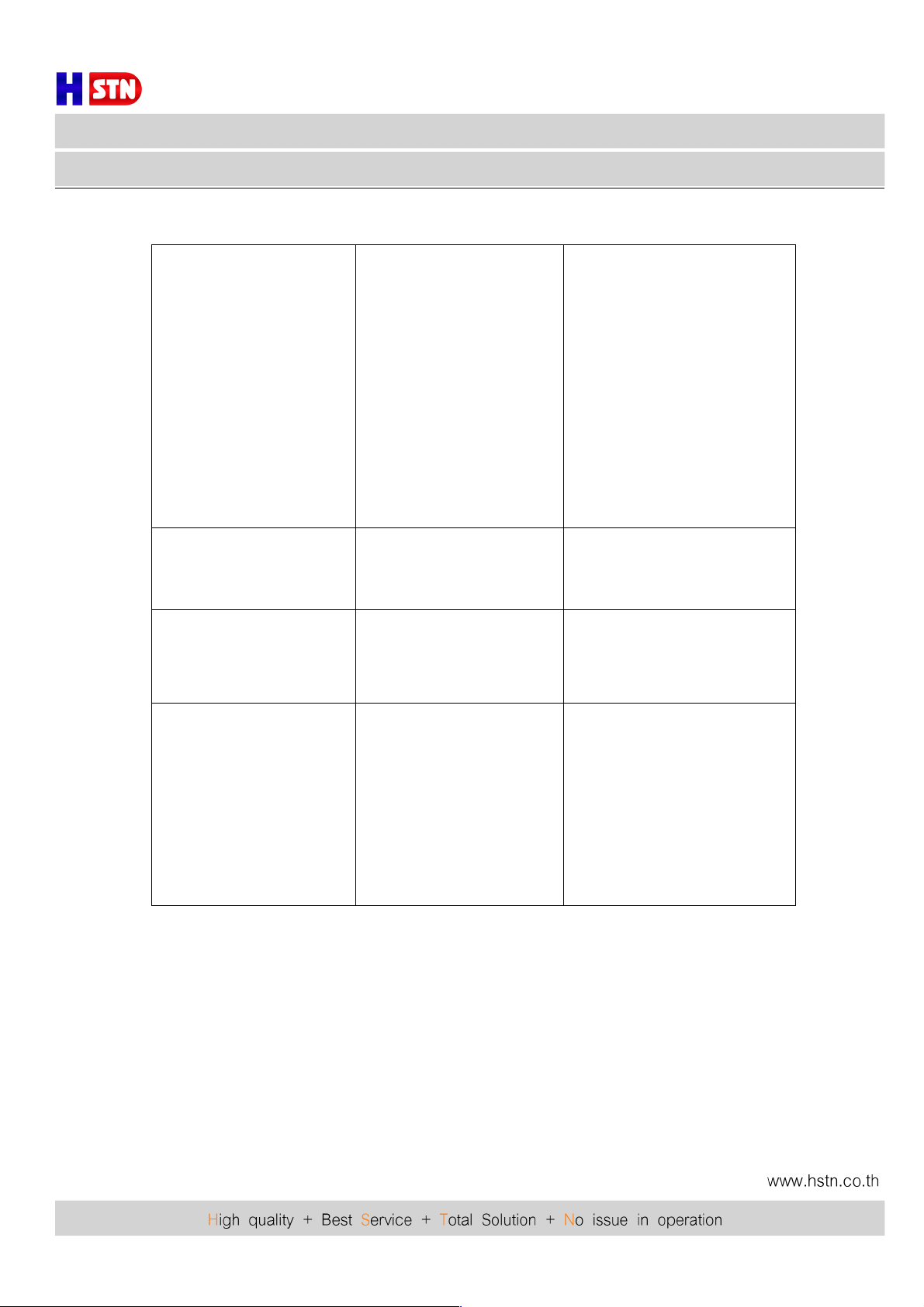
After initial startup, the image of
several optical contact points
randomly appear obvious noises
or bright trace.
The optical contact point has open
circuit signal interference or strong
interference signal intrusions.
1. Check if there is a strong
interference signal source; change
the optical contact point location if
possible to avoid the influence of
strong interference signal sources.
2. Check the cable lines before the
optical contact point, the shielding
net or the RF connector shielding
effect is not good.
3. Close the equipment enclosure
tightly to ensure the shielding
effect; if possible add shielding
cover to the optical contact point
and reliable grounding.
After initial startup, at optical
contact points, the image of
several channels have obvious
noises.
The C/N indexes of these channels
are too low.
Check the C/N of these channels signal
and make appropriate adjustments.
After initial startup, the image of
several optical contact points
appear one or two horizontal
bright traces.
Power supply AC ripple
interference because of the bad
earth of equipment or power
supply.
Check grounding situation of the
equipment; make sure that every
equipment in the line has been
reliably grounding and the
grounding resistance is < 4 Ω .
After initial startup, the received
optical power of the optical
contact point is unstable and has
large continuous change. The RF
output signal is unstable too. But
the detected optical output power
of the optical transmitter is normal.
The fiber connector types do not
match, maybe the APC type
connect to PC type, make the
optical signal cannot normal
transmission. The active fiber
connector or adapter may be
contaminated seriously or the
adapter has been broken.
1. Check the fiber connector type;
adopt the APC type fiber connector
to ensure the normal transmission
of optical signal.
2. Clean the contaminated active fiber
connector or adapter. Specific
operation methods see "The clean
and maintenance method of optical
fiber connector".
3. Replace the damaged adapter.
Page 11
Fiber Optic
Model : ACEWT86260
ACEWT86260 TX-1310
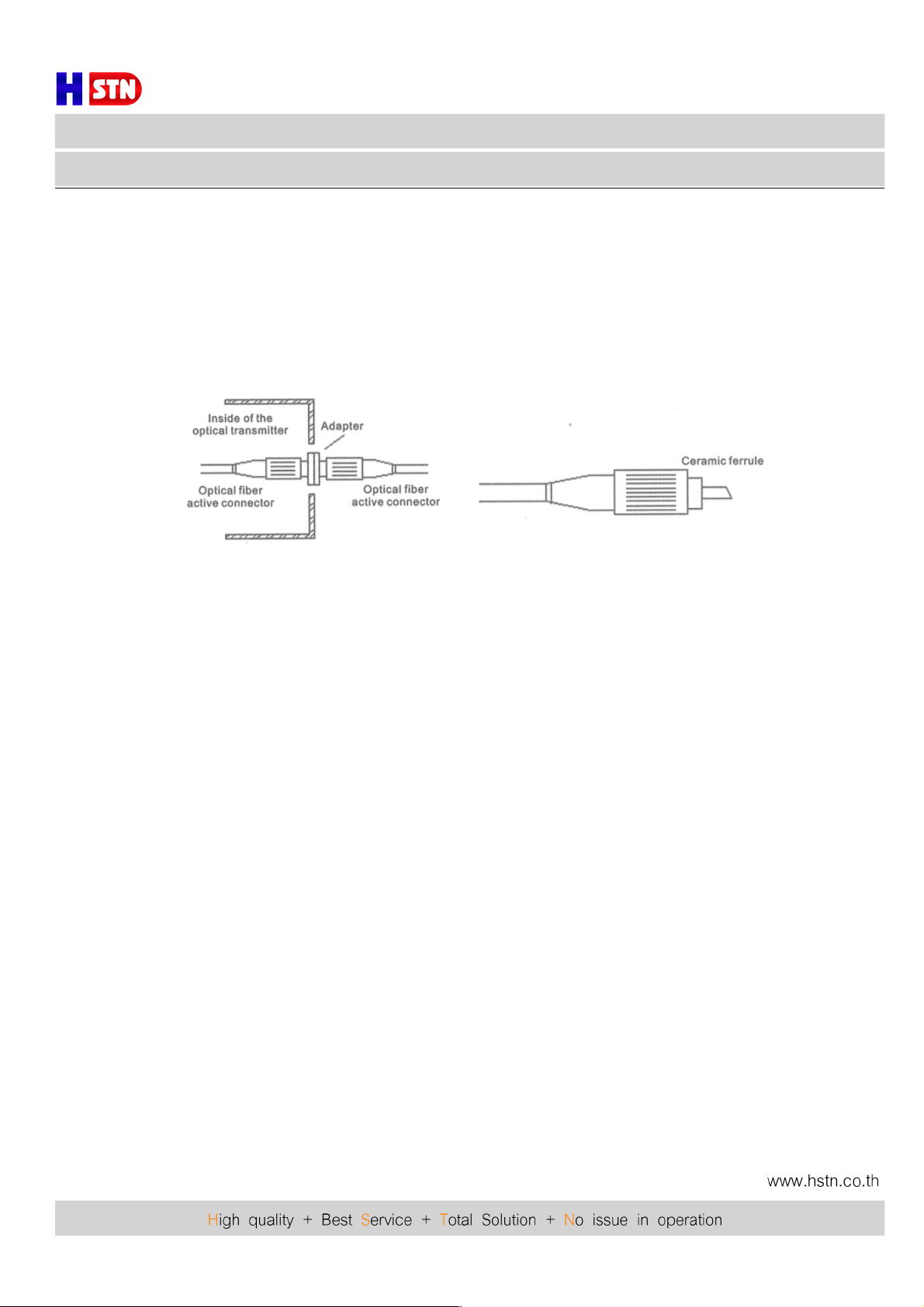
The Clean and Maintenance Method of Optical Fiber Connector
In many times, we consider the decline of the optical power as the equipment faults, but actually it may
be caused by that the optical fiber connector was polluted by dust or dirt. Inspect the fiber connector,
component, or bulkhead with a fiberscope. If the connector is dirty, clean it with a cleaning technique following
these steps:
1. Turn off the device power supply and carefully pull off the optical fiber connector from the adapter.
2. Wash carefully with good quality lens wiping paper and medical absorbent alcohol cotton. If use the
medical
absorbent alcohol cotton, still need to wait 1-2 minutes after wash, let the connector surface dry in the air.
3. Cleaned optical connector should be connected to optical power meter to measure optical output power to
affirm whether it has been cleaned up.
4. When the cleaned optical connector screwed back to adapter, should notice to make force appropriate to
avoid ceramic tube in the adapter crack.
5. The optical fiber connector should be cleaned in pairs. If optical power is on the low side after clean, the
adapter may be polluted, clean it. (Note: Adapter should be carefully operated, so as to avoid hurting inside
fiber.
6. Use compressed air or degrease alcohol cotton to wash the adapter carefully. When use compressed air, the
muzzle aims at china tube of the adapter, clean the china tube with compressed air. When use degrease
alcohol cotton, insert directions need be consistent, otherwise can't reach a good clean effect.
Special notice:
a. In the process of clean the active optical fiber connector, you should avoid direct shining at eye, which will
cause permanence burn!!!!
b. Use proper energy to install the active optical connector, or the ceramic tape in the adaptor will lead to
break. Once the ceramic tape is broken, the optical output power will decrease rapidly. And turn the active
optical fiber connector slightly, the optical output power changes obviously.
c. Please operate the optical fiber under the condition of shut off the pump laser. Or the high output power will
lead to burn the ioint of the optical output fiber, which will cause the output power decrease.
Changes of the equipment lead to some disagree with this manual, without notice.
 Loading...