

Page 1
User’s Manual
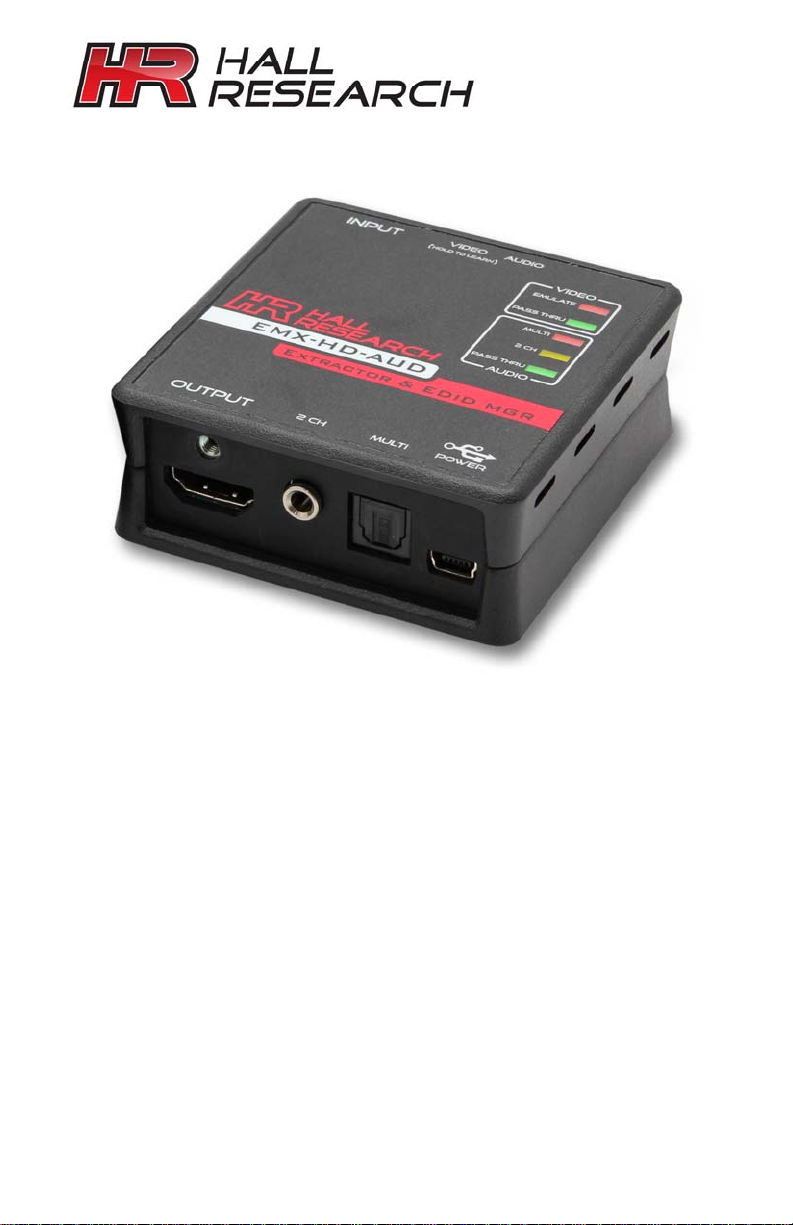
EMX-HD-AUD
HDMI Audio Extractor w/ EDID Management
Extracts Digital and Analog Audio from HDMI input
Equalizes and Extends HDMI video signals to 50 ft
Learns and Emulates EDID
USB Port for EDID Read & Write
HDCP Compliant
CUSTOMER
SUPPORT
INFORMATION
Order toll-free in the U.S. 800-959-6439
FREE technical support, Call 714-641-6607 or fax 7641-6698
Mail order: Hall Research, 1163 Warner Ave., Tustin, CA
Web site: www.hallresearch.com E-mail: info@ hallresearch.com
92780
UMA1201 Rev B
Page 2

Page 3

HDMI Audio Extractor w/ EDID Mgmt
1.0 Introduction
Thank you for purchasing the Hall Research EMX-HD-AUD. This versatile device
can be used to extract the audio from HDMI, extend HDMI cable length, manage
EDID (pass-thru or emulate), and re-clock both TMDS video and DDC data. The use
of EMX-HD-AUD can often resolve system level HDMI signal-chain issues by acting
as an intelligent intermediary.
The EMX-HD-AUD is powered from the HDMI source input and no additional power
supply connection is needed for most applications. A USB power supply is included
and may be used in case the HDMI source has limited power.
Use the EMX-HD-AUD wherever you want to diagnose or resolve HDMI issues. It
can fix problems caused by incompatibility of components in the video signal chain,
signal degradation due to long cables, or issues related to EDID.
Multi-color LED’s on the unit indicate the mode of operation with regards to EDID
routing, and also provide real-time status on the HDMI signal’s video and audio. The
audio outputs include stereo analog on a 3.5mm jack, Digital audio (2 or multichannel SPDIF) on optical TOSLINK connector, and of course the audio that is
embedded in the HDMI output stream. Each of the audio outputs can be
independently muted. For example, you can remove the audio from the HDMI
output. This would be desirable in many applications if the connected TV’s audio
were causing annoying echo due to processing delay.
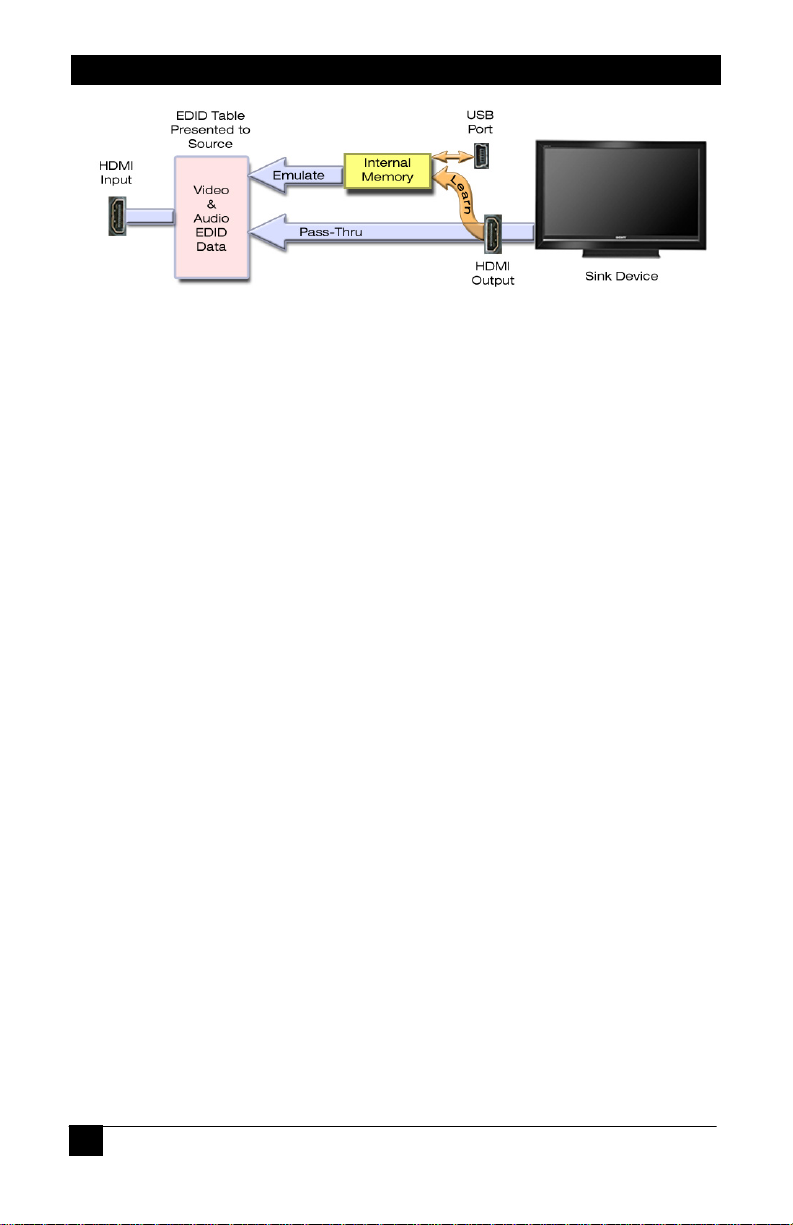
The EMX-HD-AUD constructs an EDID table (capabilities list) for the connected
source. This table either is copied verbatim from the connected display (sink) when
in pass-thru mode, or substitutes an internal EDID data from on board memory. The
internal EDID data can be learned from any connected display by using the buttons
on the box, or uploaded to it from a PC via the USB port. Most importantly, the
device maintains HDCP compliance regardless of the EDID routing mode, so HDCP
protected content passes through the system with protection intact even when the
EDID is emulated from internal memory.
The EMX-HD-AUD is HDMI 1.3 and 1.4 (deep-color and 3D) compatible, and
automatically compensates for the signal degradation caused by long video cable
runs of up to 50 ft (15 m) on its input and can drive HDMI cables on its output to 30
ft (10 m).
The package includes a universal power supply and a USB cable for connection to a
PC. Free Windows™ PC software is available on the product’s website that allows
reading, saving, manipulating, and writing EDID tables to and from the unit. The
software can also be used to control the operational modes and provides diagnostic
tools such as indication of the HDMI input signal’s video and audio characteristics.
© Copyright 2012. Hall Research, Inc.
All rights reserved.
1
Page 4
EMX-HD-AUD
EDID Routing Modes
2.0 Features
Extracts both analog and digital audio
Pass-through EDID or Learn and emulate custom files
Powered from HDMI input or external power (if required)
Re-clocks HDMI and buffers DDC (resolves EDID and HDCP issues)
Surge protects HDMI input and output
Supports DVI, HDMI™, HDCP, CEC, Deep-Color, and 3D Video
LED indicators for Mode and HDMI Video/Audio status
Extract audio with or without a display
Can mute audio outputs independently
Can remove the audio from the HDMI output signal
USB port for EDID management
Free PC software to grab, manipulate or upload EDID data
Locking HDMI Connectors (requires compatible cable for locking feature)
Designed and made in USA
2
© Copyright 2012. Hall Research, Inc.
All rights reserved.
Page 5
HDMI Audio Extractor w/ EDID Mgmt
3.0 Installation
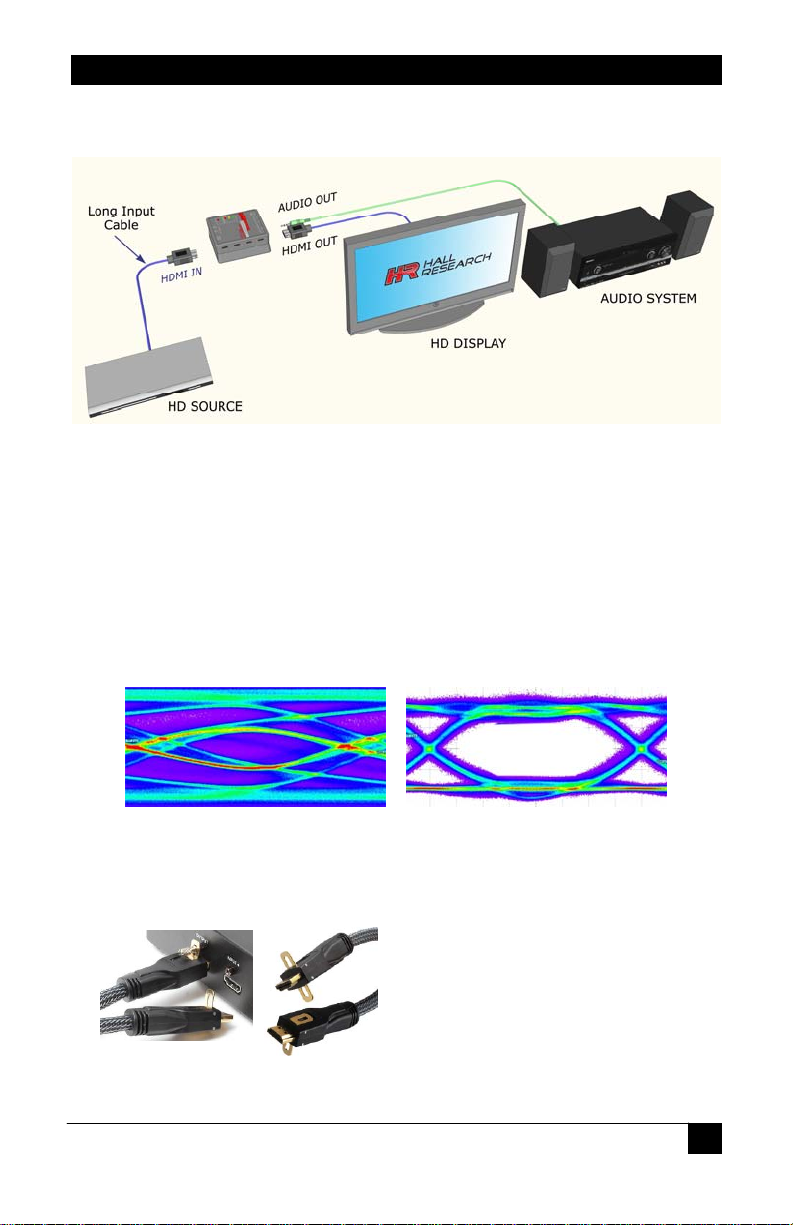
The EMX-HD-AUD connects between the video source and an optional display device.
Connect the included power supply to the mini-USB connector on the video output end
of the unit if needed.
Connect the HDMI or DVI video source to the EMX-HD-AUD video input.
Connect the EMX-HD-AUD video output to the display device (not required for
operation).
Connect the EMX-HD-AUD 3.5mm audio output and/or TOSLINK optical output to the
external sound system.
Though capable of driving long cables on its output, when used as an extender, it is best to
place the EMX-HD-AUD at the far end of the long HDMI cable. In that way its automatic
equalizer can clean the signal and open the TMDS “eye”
TMDS Signal at end of long Cable TMDS Signal after Equalization
The EMX-HD-AUD LEDs show the current device settings. Refer to the operations section for
more information.
Model C-HDMI-L-x
(x = 1.5, 3, 6, 10, 15, 25, 35 or 50 ft)
© Copyright 2012. Hall Research, Inc.
All rights reserved.
3
Page 6
EMX-HD-AUD
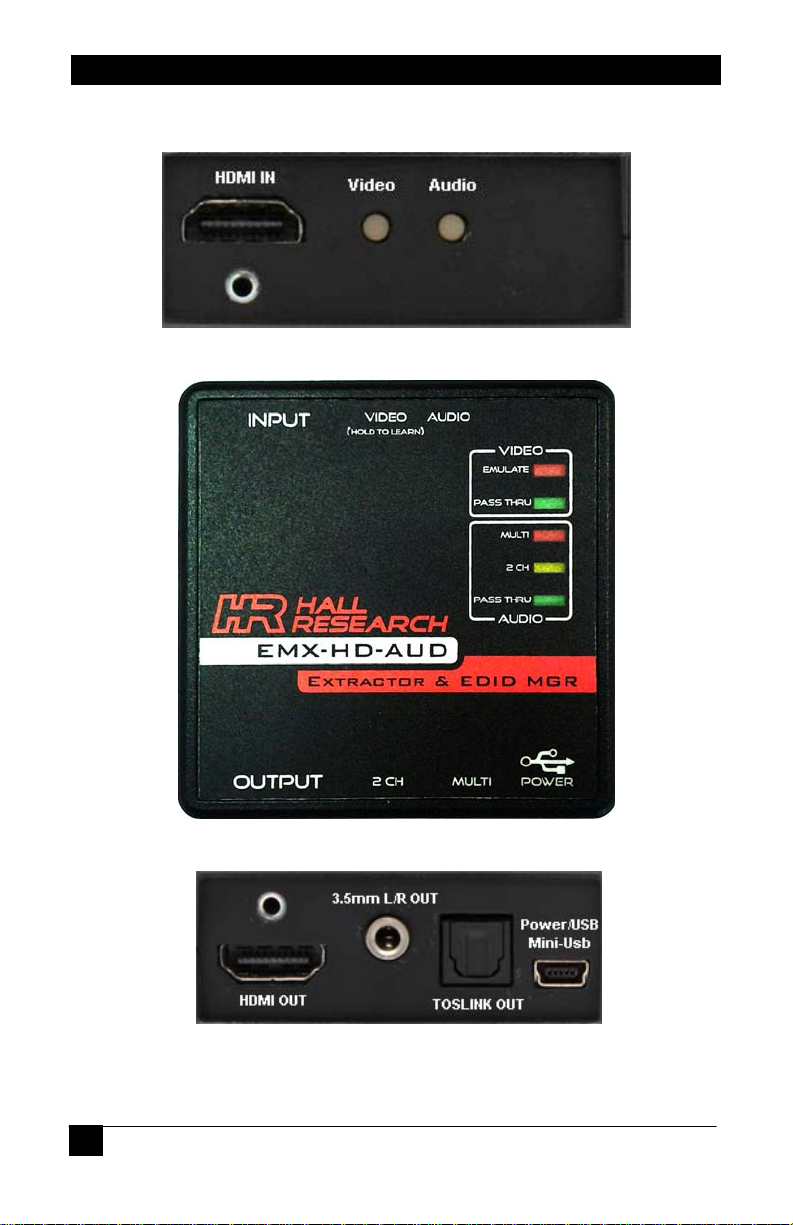
Video Input End
Top View
Video Output End
4
© Copyright 2012. Hall Research, Inc.
All rights reserved.
Page 7
HDMI Audio Extractor w/ EDID Mgmt
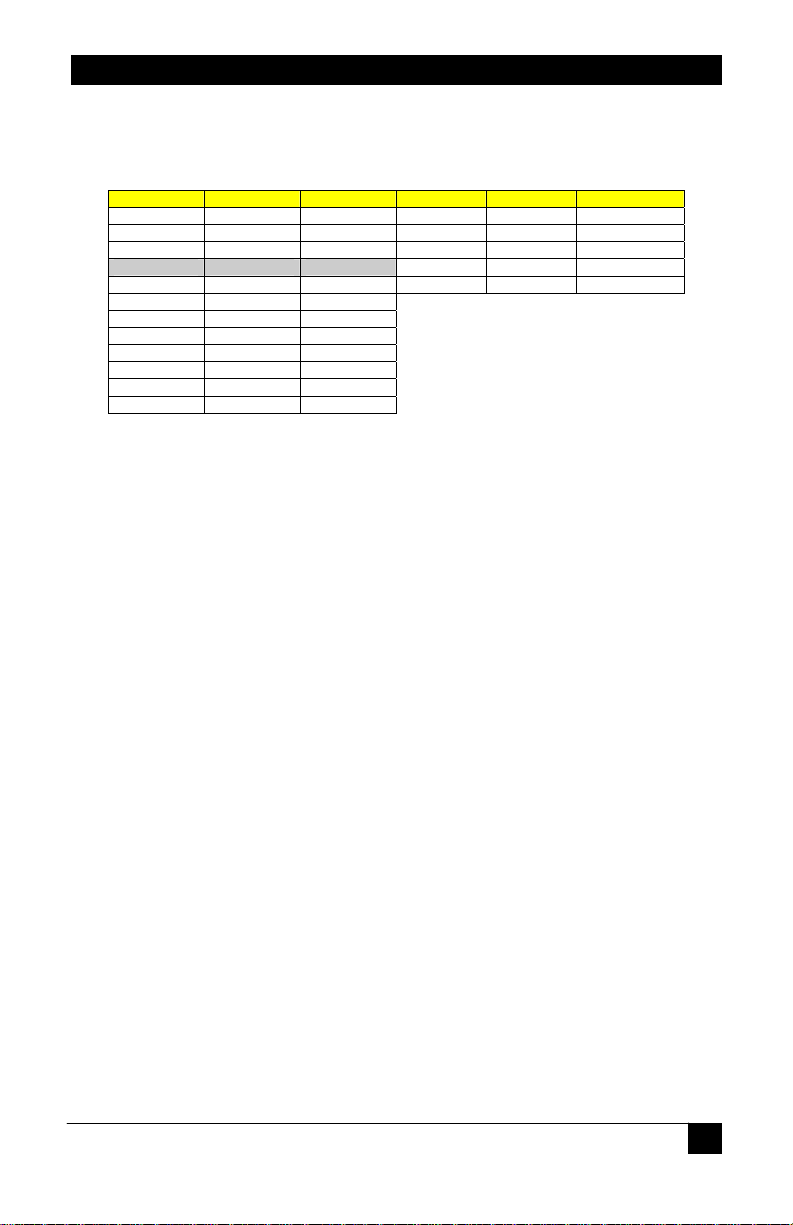
4.0 Default EMULATION resolutions
The following lists the default resolutions of the EMX-HD-AUD. The user can overwrite the
default EDID table but upon performing a Factory Default reset, these values are reset.
RESOLUTION FREQUENCY ASPECT RATIO RESOLUTION FREQUENCY ASPECT RATIO
640x480 60, 67, 72, 75 (Aspect 4:3) 720x480i 59.94/60 (Aspect 4:3, 8:9)
800x600 56, 60, 72, 75 (Aspect 4:3) 720x480p 59.94/60 (Aspect 4:3, 8:9)
1024x768 60, 70, 75 (Aspect 4:3) 1280x720p 59.94/60 (Aspect 16: 9, 1:1)
1280x720 60 (Aspect 16:9)
1280x800 60 (Aspect 16:10) 1920x1080p 50, 59.94/60 (Aspect 16:9, 1:1)
1280x1024 60, 75, 85 (Aspect 5:4)
1400x1050 60 (Aspect 4:3)
1440x900 60 (Aspect 16:10)
1600x1200 60 (Aspect 4:3)
1680x1050 60 (Aspect 16:10)
1920x1080 60 (Aspect 16:9)
1920x1200 60 (Aspect 16:10)
1920x1080i 59.94/60 (Aspect 16:9, 1:1)
5.0 Power Requirements
This device requires 5 Volts DC which can come from the included power supply with a miniUSB connector or from Pin 18 (+5 V) of the HDMI connector.
To power the EMX-HD-AUD from the HDMI or DVI input power, the source must be able to
supply a minimum of 100 mA (@ 5 vDC). Using a video source with insufficient power
capabilities will result in erratic operation and loss of video.
6.0 Operation
o The EMX-HD-AUD buttons are recessed in the device to help prevent accidental
changes to the device settings and may require the use of a pointed device to press
the buttons!
VIDEO LEDS
• EMULATE
o All portions of the EDID pertaining to video are from internally stored memory.
• PASS-THRU
o All portions of the EDID pertaining to video are from the attached SINK.
• Video input Status Indication
o A slow blink (~1/sec) indicates NON-HDCP content; a fast blink (~2/sec) indicates
HDCP content, no blinking indicates no video detected.
© Copyright 2012. Hall Research, Inc.
All rights reserved.
5
Page 8

EMX-HD-AUD
AUDIO LEDS
• MULTI
o Audio EDID includes 2-channel LPCM, as well as multi-channel DTS and DOLBY.
• 2 CH
o Audio EDID includes 2-channel LPCM.
• PASS-THRU
o Audio EDID reported to the source is directly derived from the audio capabilities of
attached SINK.
• Video input Status Indication
o If Audio is embedded on the input HDMI signal, either the MULTI or the 2CH LED
positions will be blinking to indicate the type of Audio that is being received. Note
that the Analog output is muted if the received HDMI audio is multi-channel.
LEARNING an EDID
o Press and hold the VIDEO button for approximately 3~5 seconds until the
EMULATE LED starts blinking
o Release the button, the EMULATE LED will continue blinking while the unit reads
the EDID from the connected output.
o If the EDID reads successfully, ALL LED’s will illuminate one at a time in a
sequential pattern 5 times.
o If the EDID was NOT successfully read, the PASS-THRU and EMULATE VIDEO
LEDs will alternately flash 5 times to indicate the error. This usually indicates either
a cable issue or the connected OUTPUT device has an invalid EDID.
SET FACTORY DEFAULTS
o Press and hold BOTH the AUDIO and VIDEO buttons for approximately 3~5
seconds until BOTH the VIDEO EMULATE and AUDIO MULTI LED’s start blinking
together.
o Release both buttons.
o If the factory defaults were successfully restored, ALL LED’s will illuminate one at a
time in a circular pattern 5 times.
6
© Copyright 2012. Hall Research, Inc.
All rights reserved.
Page 9
HDMI Audio Extractor w/ EDID Mgmt
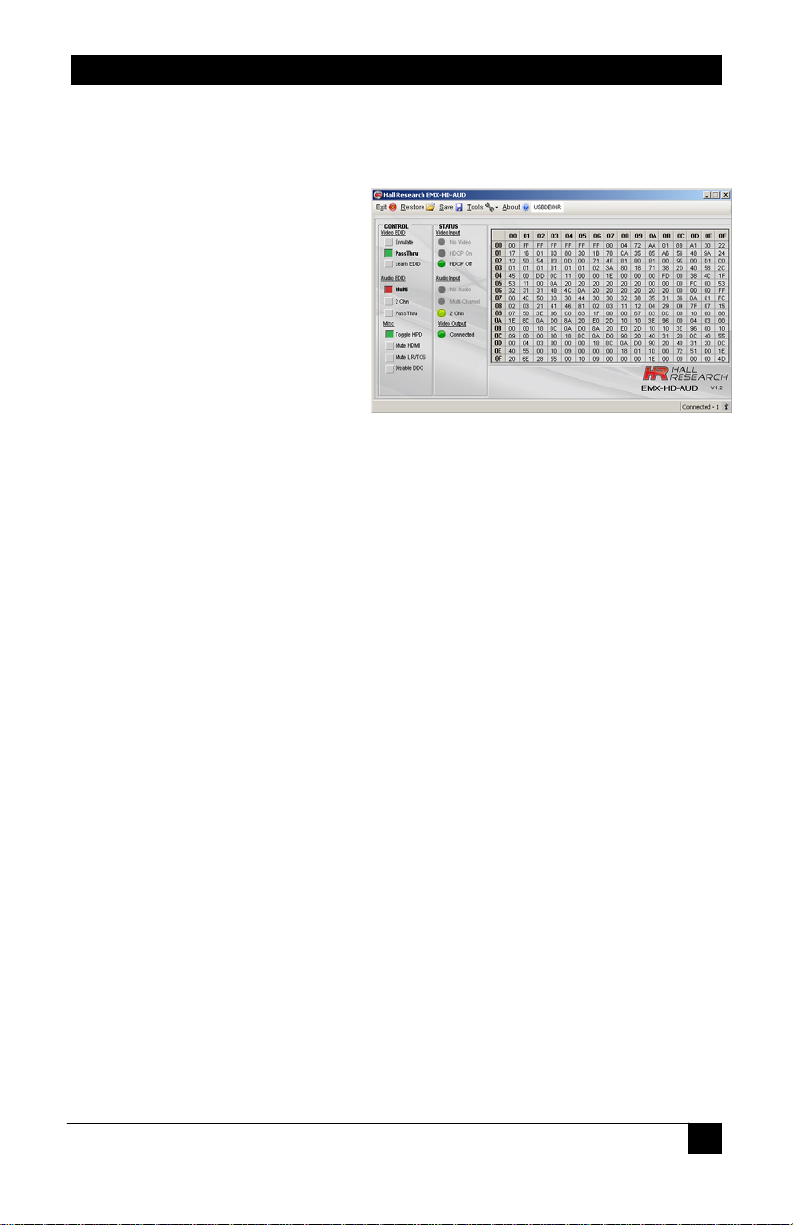
7.0 Free Windows Software GUI
The EMX-HD-AUD is controllable via a free Windows™ based GUI available on the Hall
Research website http://www.hallresearch.com.
All of the device features, and more,
are accessible from the GUI. EDID
files can be exported and modified
rd
party software and imported
using 3
back into the EMX-HD-AUD. The
device is also capable of writing
custom EDID data back to
compatible display devices.
The user guide for the Software GUI
is only available on the website.
8.0 Troubleshooting
No LEDs illuminate............................................................... Check power supply
Device will not remember settings or will not LEARN and EDID or the LEDs only
momentarily FLASH when buttons are pushed
No Video ................................................Verify cabling and check power supply.
.............................................. Verify HDCP compliant display for HDCP content.
.........................................................................Verify GUI DDCcontrol is enabled.
No Audio..................................................Verify source audio and video formats
If neither MULTI nor 2CH LED’s are blinking, input may be DVI rather than HDMI video.
Ensure GUI ‘MUTE’ controls are set correctly and not MUTED.
The 3.5mm stereo audio is only active when the HDMI audio format is 2-channel LPCM.
EDID Not Learned Correctly ...... Ensure VIDEO & AUDIO modes not changed
When an EDID is learned, the EMX-HD-AUD is placed in Pass-Thru modes for both
Video and Audio. In these modes, the EDID will remain un-touched and can be
exported, if desired.
If either VIDEO or AUDIO modes are changed; the EDID will be mixed to have audio
capabilities. The previous ‘un-touched’ EDID will no longer be available unless
previously saved.
© Copyright 2012. Hall Research, Inc.
All rights reserved.
7
Page 10
EMX-HD-AUD
9.0 Returning unit for Repair
If you need to transport or ship your unit: Pack age it carefully. We recommend that you use
the original container.
Before you ship the units back to Hall Research for repair or return, contac t us to get a Return
Authorization (RMA) number.
10.0 Specifications
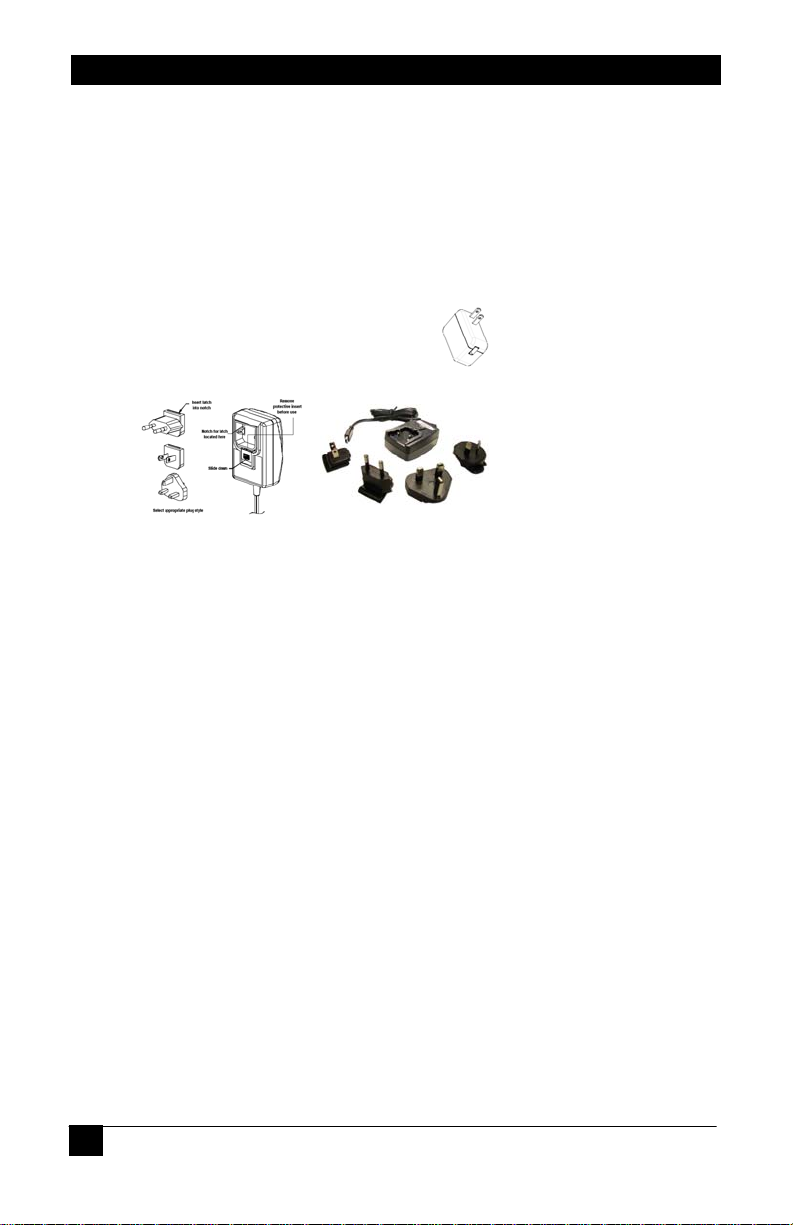
Power Supply.................................................................................................................. (North American)
5 vDC, 1 ADC
USB-A to mini-B cable
90-264 VAC, 47-63 HZ
5 vDC, 1.2 ADC
Integral mini-B cable
90-264 VAC, 47-63 HZ
Inter-changeable blades
Size ......................................................................................................... 2.71” (W) x 2.825” (D) x 1.25” (H)
(68.83 mm) x (71.76 mm) x (31.75 mm)
Weight...................................................................................................................................1 Lb (0.453 kg)
Operating Temperature...............................................................................32 to 104 DegF (0 to 40 DegC)
Storage Temperature..............................................................................-40 to 185 DegF (-40 to 85 DegC)
Humidity.............................................................................................................10 to 90% non-condensing
Cooling........................................................................................................................................Convection
Enclosure type............................................................................Black Plastic ABS-94VO, UL File #56070
Vibration............................................................ISTA 1A in carton (International Safe Transit Association)
Safety.......................................................................................................................................................CE
EMI/EMC...........................................................................................................................CE, FCC Class A
MTBF........................................................................................................................................90,000 hours
Warranty...................................................................................................................2 years parts and labor
USB........................................................................................................................................1.1 Full Speed
Support video formats.......................................................................................................................DVI 1.0
....................................................................................................................................................HDMI™ 1.4
.......................................................................................................................................................HDCP 1.0
..............................................................................................................................................Analog RGBHV
11.0 Trademarks
Hall Research and its logo are trademarks of Hall Research Technologies, Inc. All other
trademarks mentioned in this manual are acknowledged as the property of the trademark
owners.
CE/FCC/UL
(Export)
CE/FCC/UL
8
© Copyright 2012. Hall Research, Inc.
All rights reserved.
Page 11

Page 12

© Copyright 2012. Hall Research, Inc.
All rights reserved.
 Loading...