

Page 1
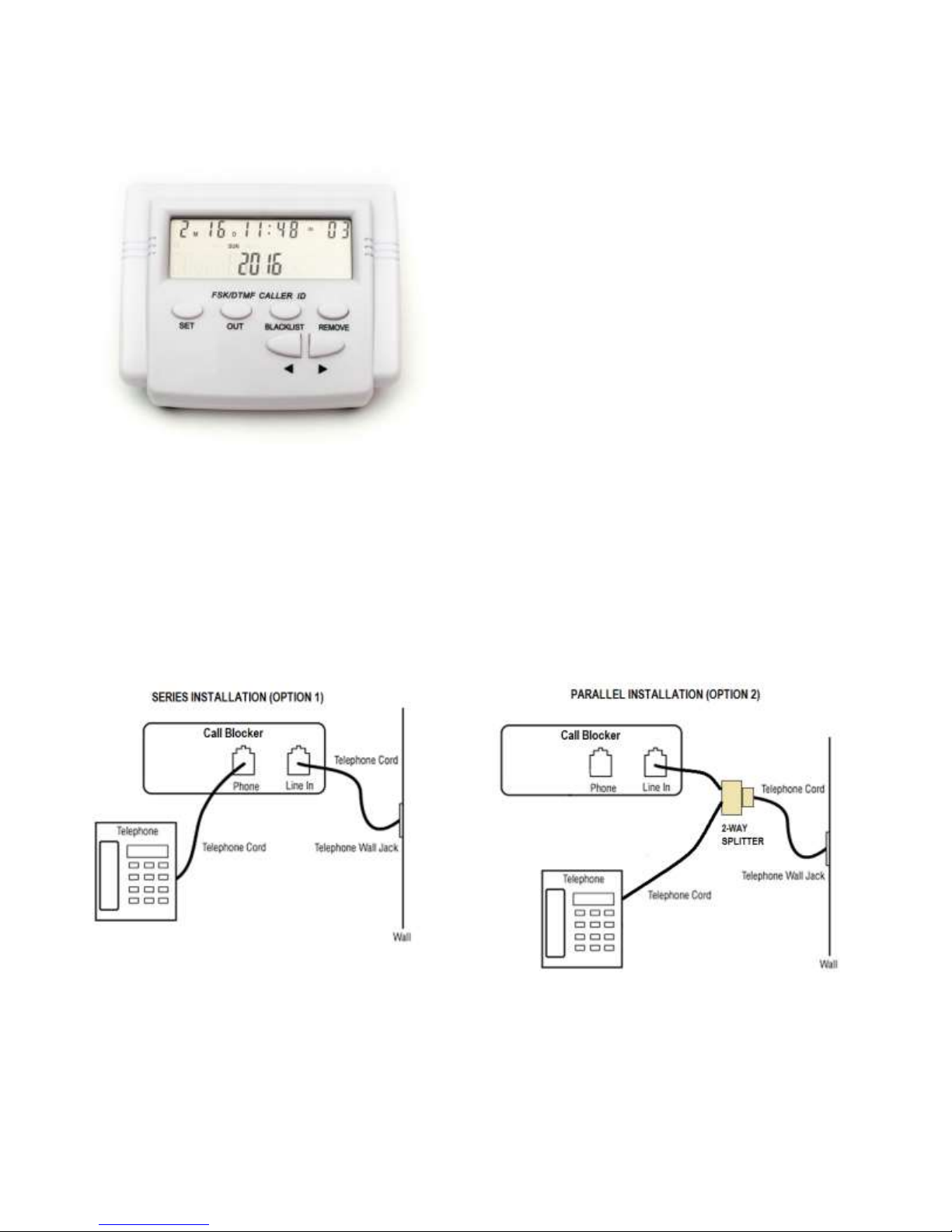
Universal PRO Call Blocker with LCD Display & Blacklist Memory
This modern and eco-friendly incoming phone call
blocker has been designed for avoiding the
disturbances coming from incoming calls. It can block
ringing of up to 1,500 phone numbers that you do not
want to answer.
Features:
- FSK/DTMF dual system compatible CID
- Stores up to 1,500 phone numbers in the “Black list”
- Line Powered — does not require any external power
supply
- EEPROM technology prevents losing stored numbers
when disconnected from the telephone line.
- Stores up to 100 sets of income phone numbers and
50 sets outgoing phone numbers
- LCD display has 4 levels of brightness
- Lock and un-lock function
User’s Manual (Revised by HQTELECOM) Model CT-CID 803
Installation:
As shown below, there are 2 options available to install your call blocker. We recommend you try option 1
first. If you run into any issues e.g. unable to display caller id on existing phones, then use option 2.
Page 2

Operation:
1. Setting Date and Time
If you have the CallerID feature enable on your phone line, the date/time will be automatically set when a phone
call come in. So, there is no need to set the date/time, except for the year (which is set to 2011 as default).
Follow these instructions if you do not have CallerID on your telephone line:
Press the “SET” key, the LCD displays setting items, then press “<” or ”>” keys for selecting corresponding
item. During this setting, you can press the REMOVE key to return to previous menu item. The LCD will
display the week and calendar according to setting of the time and date.
2. LCD Brightness Setting
Press the “SET” key, the LCD displays setting items, then press “<” or ”>” keys for selecting corresponding
item. Then press “<” or ”>” keys again to change the LCD brightness levels. There are four (4) levels of
brightness. Press the SET key to confirm. After setting, briefly press the REMOVE key to exit this setting.
Warning: If you press and hold the REMOVE key for 3 seconds or more, all incoming numbers, outgoing
numbers, and numbers stored in the blacklist will be deleted, and will display NO CODE when finished.
3. Checking incoming phone numbers
Press the “<” or ”>” keys for up-page and down-page checking of incoming calls. The LCD will display the
incoming numbers, time and date. It will display NO CODE if there are no incoming calls registered.
4. Checking the outgoing dialed numbers
Press OUT key to then press the “<” or ”>” keys for up-page and down-page checking of the outgoing calls.
The LCD will display the outgoing numbers, time and date. A maximum of 16 digits of the numbers dialed will
be stored and displayed. If the caller dialed more than 16 digits, the unit will only store and display the last 16
digits. It will display NO CODE if there are no outgoing calls.
5. REMOVE
When displaying an incoming, outgoing, or blacklist number, press the REMOVE key to delete the displaying
number. Warning: If you press and hold the REMOVE key for 3 seconds or more, all incoming numbers,
outgoing numbers, and numbers stored in the blacklist will be deleted, and will display NO CODE when
finished.
6. BLACKLIST
When checking the incoming or outgoing phone numbers, press BLACKLIST key on displaying number to
add into the blacklist. If successful, the display will display SAVE and SUCCEED. If the number was already
added to the blacklist, it will display REP.
If you wish to add a number that is not shown in the Caller ID, simply enter the number using the dialpad of the
telephone unit connected to the Blocker and press the BLACKLIST key.
Blacklist Operation: When a telephone number is in the Blacklist, the incoming calls will be blocked
automatically. The blocker device will pick up and then disconnect the call (go off hook) after 1 second. The
caller will hear one ring and then silence.
Please visit www.HQTelecom.com if you have any questions or need help with this device.
 Loading...