

Page 1

RFID Reader
User Manual
Model name : 9502
FCC ID : A379502
Page 2

Instruction of 9502 Reader
Instructions for 9502 Reader
The 9502 reader is a member of the 9000 Series of UHF RFID readers. It comes
with features for multi-protocol and multi-tag reading, integrated and environmentally
protected packaging, long-distance reading and writing, and the ability of reading
multiple tags moving at high speed, One of the popular applications for the 9502
reader is toll collection at moderate speed on toll roads and bridges. 9502 is also used
for vehicle identification automobile dealers and service shops, as portable (on vehicle)
service records and maintenance records, warranty controls, as well as recall and
upgrade implementations. Another popular application for the 9000 family of readers
are border vehicle control, container management, baggage and package identification
and parking management, other dock/port vehicle and container and personnel
management applications.
1、Introduction
9502 reader is a fully integrated reader with RF module, digital signal processing
(DSP) module, power conditioning module, built-in circular polarized antenna and all
these packaged in a weather-proof and UV protected housing. 9502 Reader operates
from 902.5 MHz to 927 MHZ, allowing it to be
regulations. The circular polarized antenna allows it to work in asset management
applications and its programmable triggering modes enable the reader to work in
either self-triggering or master/slave modes. Versatile I/O interface enable the 9502 to
work with RS-232, Wiegand 26/34,TCP/IP.
The 9502 reader is multi-protocol UHF reader, which supports ISO18000-6B and
EPC protocols. It can read and write UCODE, TI, Alien and others many other labels.
The reader’s firmware is upgradable, enabling it to support protocol expansion,
feature upgrade, giving it the ability to grow with the maturing RFID technologies,
making this reader a truly lasting investment.
The integrated high-gain and circular polarized antenna allows the reader to
achieve a respectable read range, and the internal DSP module enable to reader to
manage multi-tag arbitration at high speed, thus making suitable for material
management applications. A unique feature for the 9502 is its ability for multi-reader
synchronization, making it suitable for portal applications with superior
anti-interference features.
programmed to meet local/regional
2、Introduction of Features
Support Multi-Protocol: 9502 reader supports ISO18000-6B, EPC Class 1,
EPC Class 1 GEN 2 standards, and can also be programmed to support other
protocols and feature expansions through reader’s software upgrade.
Protocol Specific Optimization: 9502 series readers can optimize for specific
protocol, making it possible to enhance the price-quality ratio on a specific
close-loop system applications.
One-way TriggerInput
Page 3
Instruction of 9502 Reader
Power Control: Each 9502 reader can be setup with specific radiating power
to meet complex installation environments.(
Maximum Power: 27.91 dBm)
3、Technical Specifications:
9502 reader’s technical details are as follow:
Item Specifications
Operating Frequency 902.5 MHz~927MHz
RF Protocol ISO18000-6B、EPC Class 1、EPC Class 1 GEN 2
Operating Method
AFSK
Antenna Ports Internal 7dBi circular polarized antenna
Max RF Power
27.91 dBm
Power Flatness <0.5 DB
Timed Mode - automatically reads at fixed time
Tag ID Modes
Trigger Mode - external trigger control to read
Master/slave Mode – Under software control
Identify Tag Time <8ms Identify single tag)
Reading/Writing Tag Time
Reads every 8 bytes in less than 5ms
Writes every 4 bytes in less than 25ms
Reading/Writing Tag Distance 6 meters
Communication Interface RS-232、Wiegand 26/34、TCP/IP
Input One way trigger input
Power Supply 8-16V
Power Consumption ≤5W
Size 260mm×260mm×90mm (10.23x10.23x3.54inches)
Package Size 435mm×290mm×128mm (17.12x11.41x5.04 inches)
Gross Weight 3.20kg (7.0 lb)
Net Weight 1.91kg (4.2 lb)
Work Temperature -20℃ to +70℃
Storage Temperature -40 ℃ to +85℃
Work Status Indication Buzzer
4、Installing & Notification
The shipping package includes a 9502 reader, a RS232 serial communicating line,
a power adapter, and an antenna mounting bracket.
Please check to confirm all items are present upon receiving the reader package. If
any questions, please contact our dealer immediately or contact our after-sales support
directly.
4.1Appearance
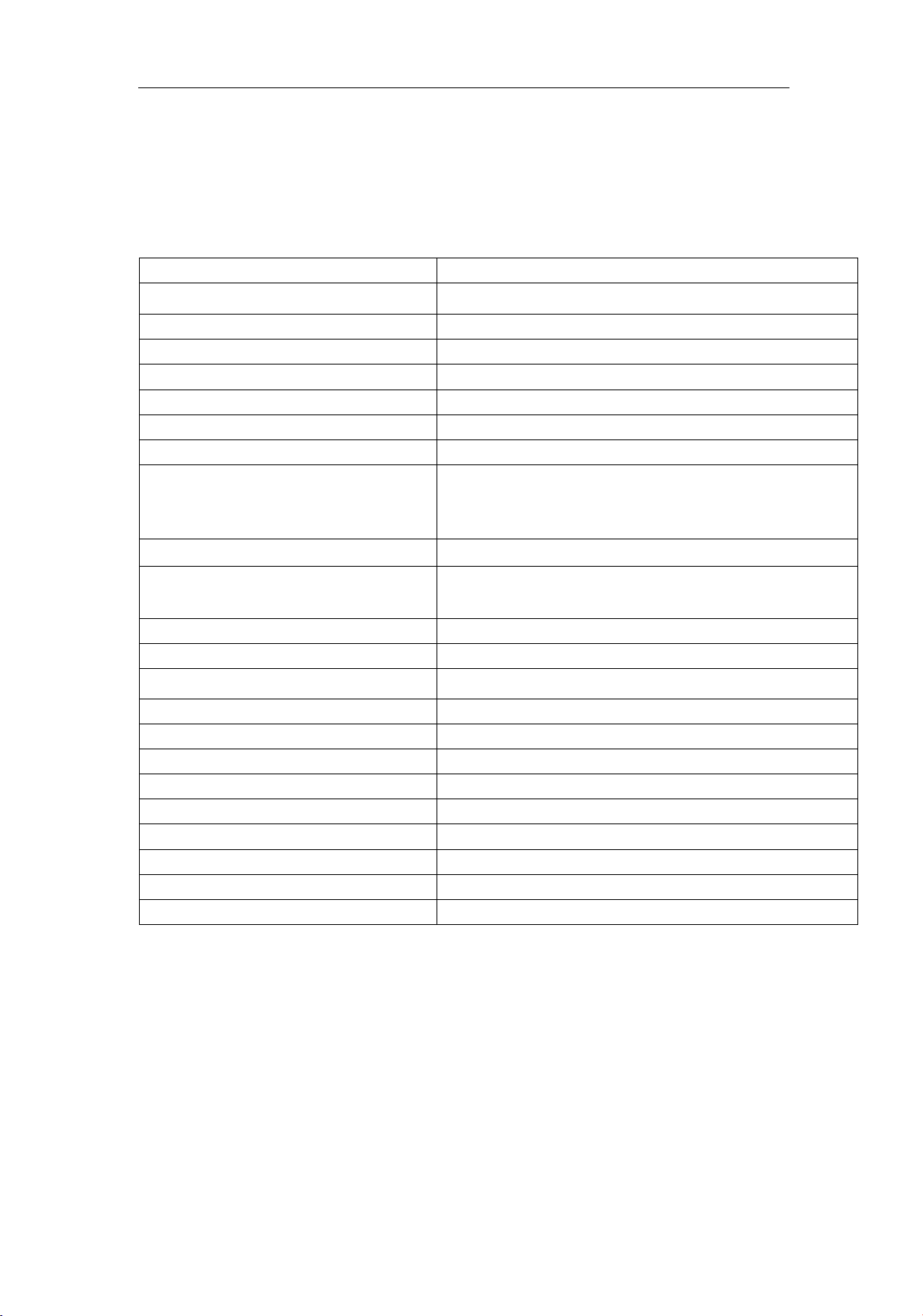
The reader is silvery white cuboids (as picture 1). There are screw holes on its
Page 4
Instruction of9502 Reader
back panel for mounting and installation.
Picture 1 9502 reader face
4.2 Interface indication
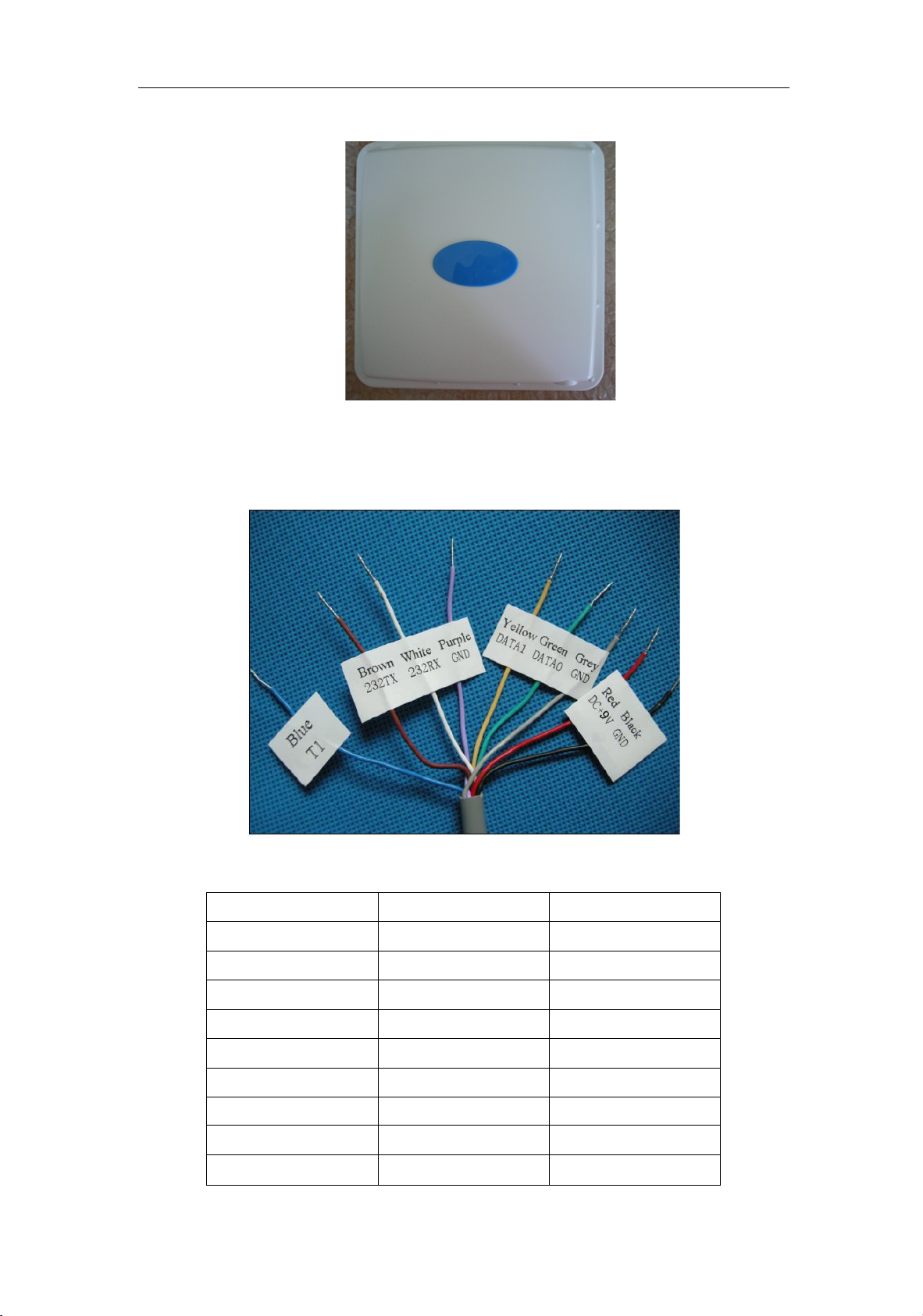
Connecting line port as picture 2 and pins as follows:
Picture 2 Connecting line port
Form 2 9502AReader connecting line pin
Color
Signal Name
Function
Brown
232TX
RS-232
White
232RX
RS-232
Purple
GND
GND Line
Yellow
DATA1
Wiegand Data 1
Green
DATA0
Wiegand Data 0
Grey
GND
GND Line
Blue
T1
Trigger
Red
DC
8~16V
Black
GND
GND Line
Page 5
Instruction of9502 Reader
4.3 Installation
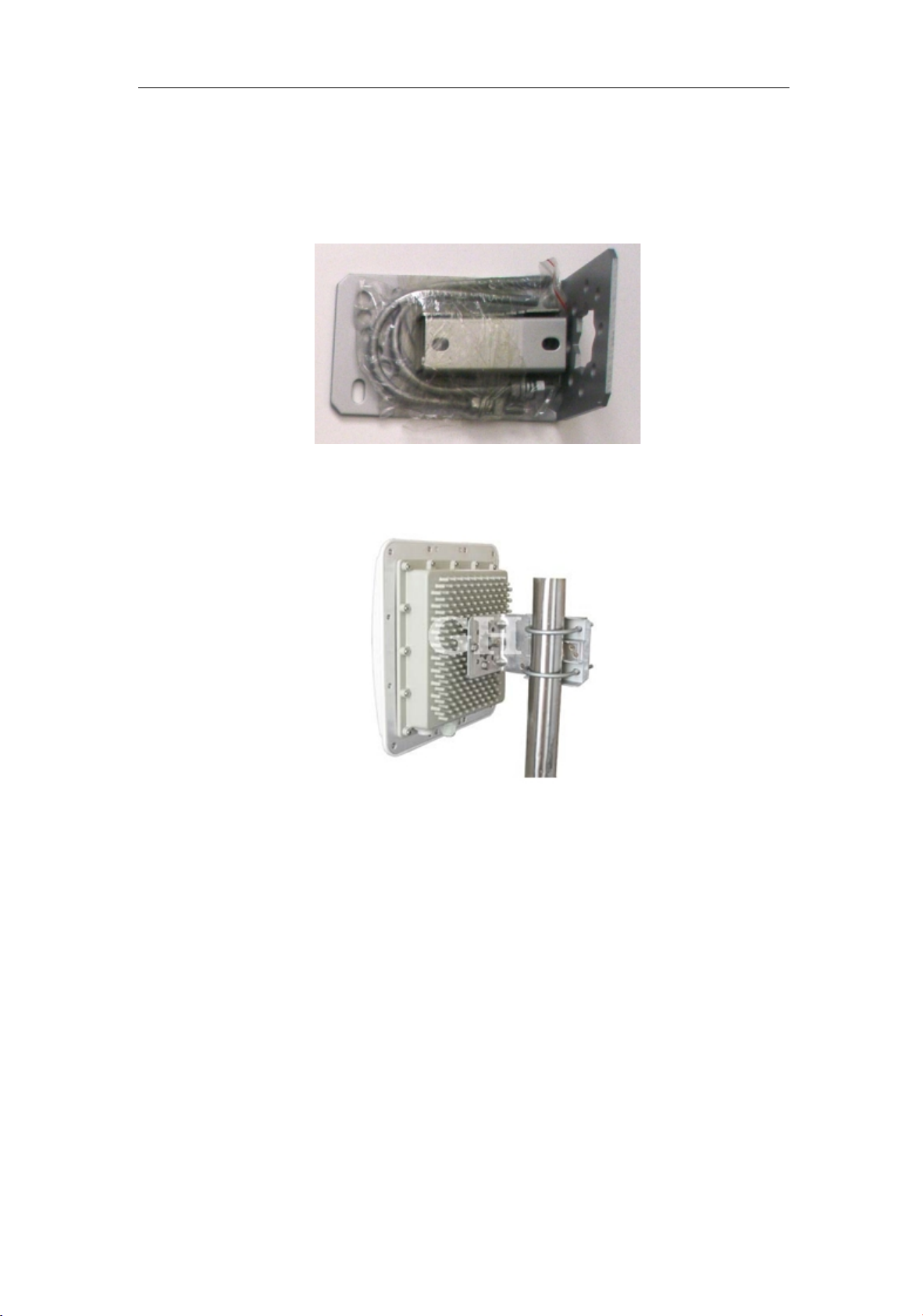
The mounting bracket are designed specifically for mounting the 9502 reader. The
reader could be installed on wood, concrete, or brick structures and aim the antenna
toward zone of coverage.
Picture 3 bracket
Picture 4 9502 Reader of mounting
4.4 Other accessories
4.4.1 Power adapter
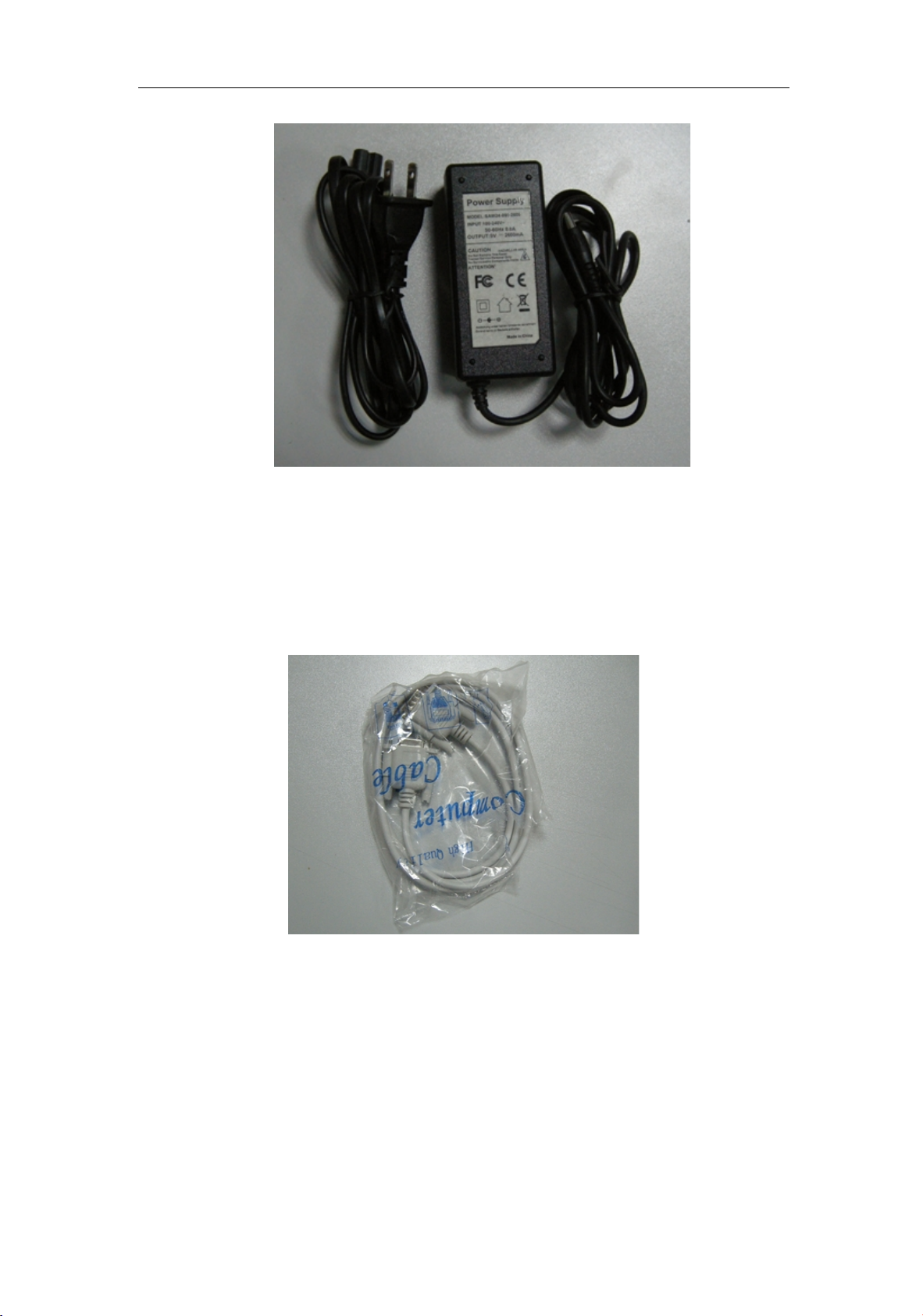
9502 reader supports using 9V/2.6A adapter, user can also use other 8 ~ 16V
power supply.
Page 6
Instruction of9502 Reader
Picture 5 9V/2.6A adapter
4.4.2 DC Base
The DC base is used as the connector of adapter; user can remove the DC base if
use other power supply.
4.4.3 RS232 serial communicating line
The RS232 serial communicating line, as an accessory, user can connect the
reader with PC by the extension cable.
Picture 6 TheRS232 serial communicating line
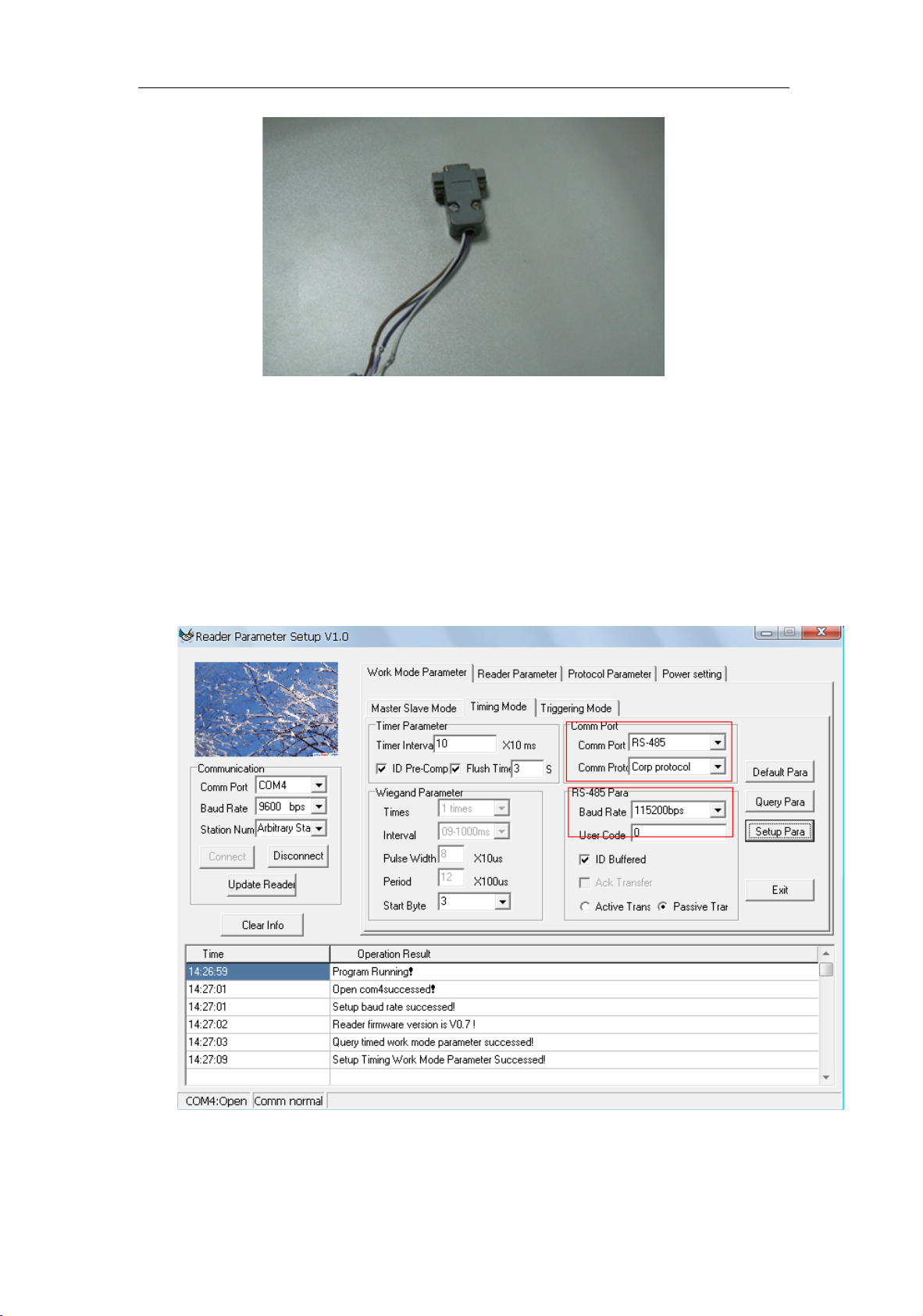
4.4.4 RS-232 Connector
The RS-232 connector is convenient for user configuring the reader parameters, Demo
presentation and upgrading the reader. You can remove the connector if no need to use it.
Page 7
Instruction of9502 Reader
Picture 7 RS-232 Connector
4.5 Communication Port
4.5.1 Wiegand
Use the “DATA1” “DATA0” and “GND” wires to connect the reader to access
panel for access applications.
4.5.2、TCP/IP
The reader can be connected with PC by TCP/IP interface, also can be connected
by router. If reader is connected by TCP/IP interface, it’s necessary to configure the
communication port as RS-485, baud rate set as 115200bps. See below pictures:
Picture 8 Reader Configuration
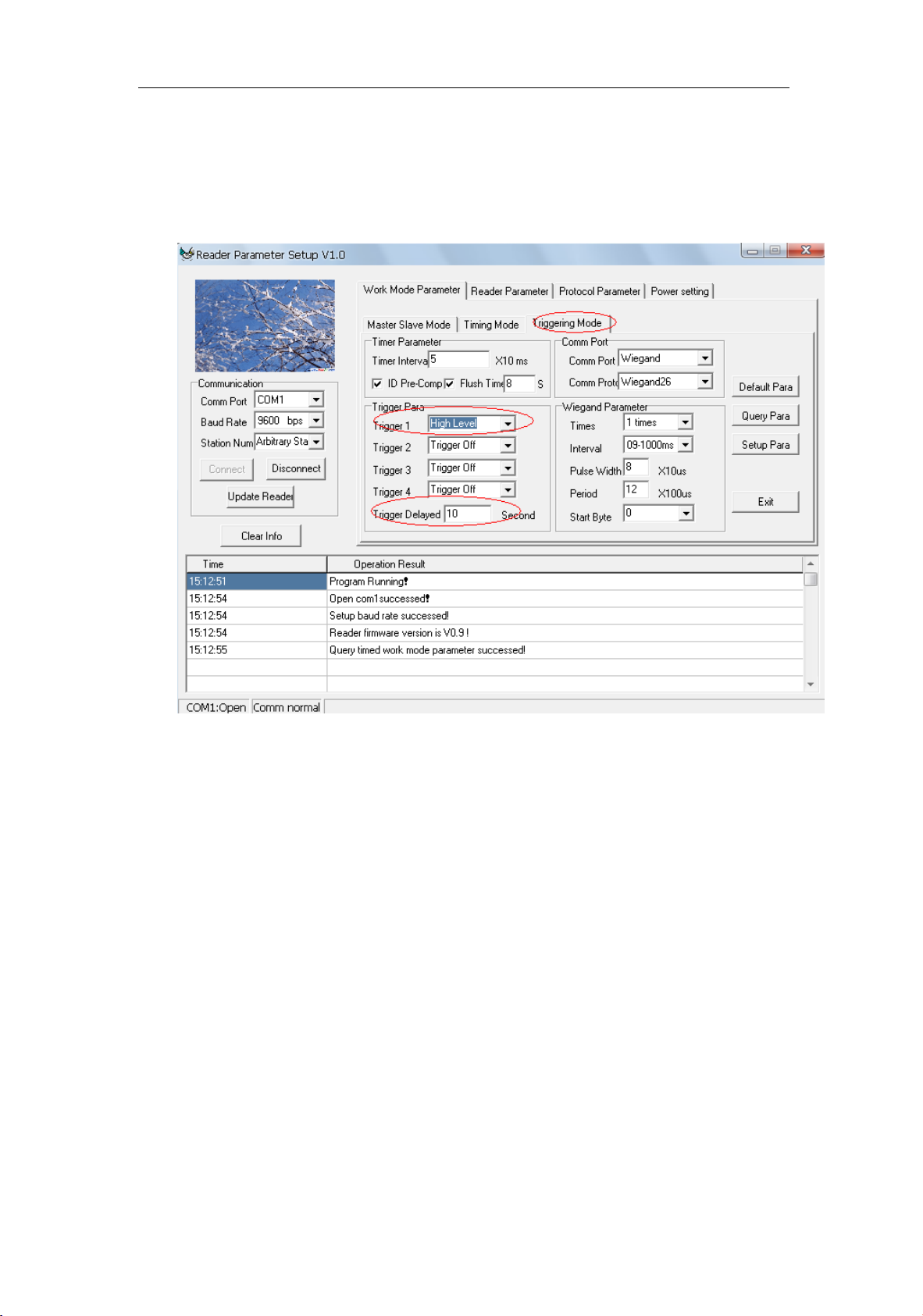
4.5.3、Trigger
The 9502 reader with trigger input module, when works in trigger mode, please
Page 8
Instruction of9502 Reader
set the parameters asbellows:
1). Set the reader works in trigger mode
2). Choose high level trigger
3). Trigger relay time can be set according to customer requirements, it’s 10s by
default.
Picture 9 Triggering Mode
After set the trigger parameters, the reader is in standby mode, the reader works
when T1 and GND shorted to trigger.
Page 9

Note: This equipment has been tested and found to comply with the limits for a Class B
digital device, pursuant to part 15 of the FCC Rules. These limits are designed to provide
reasonable protection against harmful interference in a residential installation. This
equipment generates, uses and can radiate radio frequency energy and, if not installed
and used in accordance with the instructions, may cause harmful interference to radio
communications. However, there is no guarantee that interference will not occur in a
particular installation. If this equipment does cause harmful interference to radio or
television reception, which can be determined by turning the equipment off and on, the
user is encouraged to try to correct the interference by one or more of the following
measures:
—Reorient or relocate the receiving antenna.
—Increase the separation between the equipment and receiver.
—Connect the equipment into an outlet on a circuit different from that to which the
receiver is connected.
—Consult the dealer or an experienced radio/TV technician for help.
WARNING:
a.Changes or modifications to this unit not expressly approved by the party
responsible for compliance could void the user's authority to operate the equipment.
b, In order to comply with the RF exposure requirements, please also keep the device
(including the antenna) 30cm away from the public.
 Loading...