

Page 1
Table of Contents
Handbook Overview 1
Terms of Klein ISD Tablet PC Use 2
Tablet PC Security 2
Social Media Guidelines 3
Internet Access from Home 3
Parent Responsibili es 3
Klein ISD Tablet PC Guidelines 4
Student Responsibili es 5
Care of the Tablet PC 6
Screen Care 7
Repair Down me 7
Repair Cost Informa on 8
Approximate Fees for Loss or Damage 9
Items Not Covered by ADPC* 9
Repor ng Damages/The 10
1:1 Program Defi ni ons 11-12
Unoffi cial KISD Parent/Student Agreement Form 13
Appendix: KISD Student Guidelines for Acceptable Use of
Technology Resources
14-17
*Accidental Damage and Protec on Coverage
Klein ISD
Student Tablet PC
Handbook
July 2014
Page 2

This handbook is intended to provide essen al informa on about the use
of student Tablet PC computers in Klein ISD. The one-to-one student and
teacher Tablet PC program provides exci ng learning opportuni es that
incorporate the use of technology in the classroom and at home.
Please read the following important guidelines in this handbook. It is
important that parents/guardians and students understand and abide by
the policies and procedures set forth in this handbook.
The following condi ons are a summary of some of the most important
concepts outlined in this handbook.
• Accidental Damage and Protec on Coverage is recommended and
can be purchased for $60 per year. Tablet PC damage that is either
inten onal or the result of gross neglect is not covered by Accidental
Damage and Protec on Coverage. See Pages 8 and 9 for details.
• An annual $350 Tablet PC Security Deposit is required for all students
whose parent or guardian chooses not to purchase the Accidental
Damage and Protec on Coverage. See Pages 8 and 9 for details.
• There are fees associated with damaging the Tablet PC if the Accidental
Damage and Protec on Coverage is not purchased. These fees are
listed on Page 9 of this Tablet PC Handbook.
• Klein ISD Tablet PCs not returned when students leave for the summer
or withdraw from school will be considered stolen. The charges will
be fi led.
• Internet content is fi ltered on all Klein ISD computers. This includes use
at school and off campus. See Page 2 for details.
• Parents are ul mately responsible for all ac vi es involving the Klein
ISD Tablet PC while the student is off campus. See Page 3 for details.
• If a Tablet PC needs to be repaired or is lost, the student must report
the need for repair or replacement to the campus repair center as
soon as possible. The student’s report must be fi led and the required
paperwork completed at the campus repair center within 5 school days
from the me of breakage or loss. See Pages 3 and 5 for details.
• This handbook should be read carefully by students and parents/
guardians. The agreement form included in this Tablet PC Handbook
is a copy of what you and your student must sign prior to the student
receiving the Tablet PC.
Handbook Overview
Page 1
Acceptable Use: All students must comply at all mes with the Klein ISD Student
Guidelines for Acceptable Use of Technology in Pages 11-14 of this Tablet
PC Handbook and in the KISD Student Handbook along with the guidelines
outlined in this Tablet PC Handbook. Failure to comply will result in disciplinary
ac on and could end the rights of possession eff ec ve immediately.
Liability: If the Tablet PC is accidentally damaged, lost or stolen, the parent/
guardian may be responsible for the reasonable cost of repair or the
replacement value on the date of the loss if the op onal Accidental Damage
and Protec on Coverage is not purchased and in other instances outlined in
this handbook. In the case of the , the parent/guardian or the student must
immediately no fy school administra on. If the Tablet PC is lost or damaged
due to gross negligence, the parent/guardian will be responsible for the
reasonable cost of replacement. Tablet PCs not returned, for any reason, at
the end of the school year or when a student withdraws will be considered
stolen. The charges will be fi led.
Repossession: If the student and/or parent/guardian does not mely and fully
comply with all terms of this agreement, Klein ISD has the right to come to you
to pick up the property at any me.
Scheduled Evalua ons: Each Tablet PC may be evaluated each six weeks or
randomly checked to verify condi on and compliance with district policy.
Terms of Klein ISD Tablet PC Use
Various security measures are used on Klein ISD computers. Security measures
are not only used to protect Klein ISD assets, but measures are also taken to
protect Klein ISD students. Two primary forms of security exist:
Computer Security: Security is in place on each system to prevent certain
ac vi es. These include, but are not limited to, downloading, installing
so ware, removing so ware, and changing system se ngs. See Student
Responsibili es on Page 5 for addi onal informa on.
Filtering So ware: Internet fi ltering so ware automa cally fi lters all access to
the Internet. While at home Internet content will con nue to be fi ltered while
students are using their Klein ISD Tablet PC. Since no fi ltering so ware can
fi lter 100% of improper content, parents are responsible for monitoring their
child’s access to the Internet when the student is at home.
Tablet PC Security
Page 2
Page 3

• Students will be expected to use some Web 2.0 and social media tools
as part of their course curriculum under the supervision and guidance of
their teachers. These tools may include SharpSchool, Parent Connec on,
Klein Private Label Wiki, Project Share, Blackboard Learn, Learning.com
Sky, and others.
• Students use these tools to meet the communica on, collabora on,
crea on, research, and informa on fl uency skills required by the Texas
Essen al Knowledge and Skills (TEKS). These tools are hosted on the
Internet, making some student work and informa on rela ng to students
visible to parents, guardians, rela ves, and in some circumstances, other
Internet users around the world.
• When using Web 2.0 and social media tools, safeguards are in place to
protect and assure the safety of students. In some instances, individual
or iden fi able profi les may be used that are open to the public. Public
viewing or commen ng might occur on district-approved sites. Classroom
lessons or projects may require publicly iden fi able student informa on
to be made available on the Internet.
• Use of these tools must be in accordance with Klein ISD’s Policies and
Procedures including but not limited to the Acceptable Use Procedures.
Social Media Guidelines
Internet Access from Home
Parental Responsibili es
In order to access the Internet from home, you must have an Internet service
provider. Students can access that Internet service in the two ways.
1. Using an Ethernet cable, the Tablet PC can be “hardwired” to a switch,
hub, or router.
2. If you have an exis ng wireless access point, the Tablet PC can join your
wireless network.
• Parents are responsible for monitoring the student’s use of the Tablet PC
while at home and away from campus at all mes.
• Parents must review with their student the Student Guidelines for
Acceptable Use of Technology in Pages 11-14 of this Tablet PC Handbook
and in the KISD Student Handbook.
• Parents are responsible for monitoring their student’s ac vi es on the
Internet on a regular basis.
Page 3 Page 4
• Only a Klein ISD Tablet PC will be permi ed for use at school or on the
district network. Students may not bring in or set up their own network.
District rules also prohibit connec ng to the Klein network with your
personal device(s) (i.e. smart phone, iPad, Kindle, etc.).
• Students may have no expecta on of privacy on any informa on stored
on, accessed from, or used with the Tablet PC. The Tablet PC belongs
to Klein ISD, and appropriate district and school offi cials may monitor a
computer or access its contents at any me.
• All students will be issued a Klein ISD case with an iden fi ca on tag. The
iden fi ca on tag must remain on the case at all mes. If the iden fi ca on
tag is lost, the student must immediately no fy the Repair Center.
• If technical issues arise, students must no fy a teacher or the campus
repair center immediately.
• Each Tablet PC is iden fi ed by a specifi c number and assigned to an
individual student. To ensure that a student always has his assigned Tablet
PC, Tablet PCs should never be switched from case to case.
• Under no circumstances may Tablet PCs be le in unsupervised areas.
Unsupervised areas include but are not limited to the school grounds
and campus, the commons, the cafeteria, locker rooms, library, unlocked
classrooms, hallways, and any place outside of school that is not the
student’s home. Any computer le in these areas will be collected by staff
and taken to the campus repair center. Disciplinary ac on may be taken
for leaving a Tablet PC in unsupervised loca ons.
• Files may not be deleted by anyone other than the original creator/owner.
Dele on of certain fi les can aff ect the performance of the Tablet PC, and
can interfere with the student’s ability to complete class work, which may
aff ect the student’s grades.
• Students may not download or save any music, games, or unauthorized
programs to the Tablet PC. See Page 5 for details and consequences.
• All students have access to a network drive on which to store data. It is
the responsibility of the student to see to it that cri cal fi les are backed up
regularly on the network drive.
• All use of the Internet must comply with district guidelines. Log fi les are
maintained on each Tablet PC with a detailed history of all Internet sites
accessed. All student fi les are subject to be reviewed.
Klein ISD Tablet PC Guidelines
Page 4

Page 5
Student Responsibili es
• As the primary users, students have specifi c responsibili es when using
their Klein ISD-issued Tablet PCs.
• At all mes, students are responsible for their Tablet PC, whether at
home or school.
• Students are responsible for bringing their Tablet PC to school everyday.
Ba eries must be charged and maintained daily.
• Students are responsible for logging in under their assigned username.
Students may not share their password with other individuals.
• Students must keep the Tablet PC in the provided case at all mes.
• Students should not loan their Tablet PC nor any Tablet PC component to
another student for any reason.
• Students may not play games, load or download any so ware, music
pictures, etc. on the Tablet PC unless instructed by a teacher to do so.
• Tablet PCs come with standardized so ware already loaded. This
standardized load may not be changed in any way.
• When a Tablet PC is lost or stolen, the student must immediately no fy
the campus repair center and submit the required paperwork no later
than 5 school days a er discovering that the device is missing.
• When a Tablet PC is damaged or func oning improperly, the student
must immediately no fy the campus repair center and submit the
required paperwork no later than 5 school days a er discovery of the
damage or malfunc on.
• If a student adds any unauthorized items to the Tablet PC, the student
will be required to return the Tablet PC. A student can either pay $15.00
to re-image the Tablet PC or certain restric ons may be placed on the
student’s use or access of district technology. In any event, the district
has the right to place certain restric ons on the student’s use or access
of district technology.
• Sound will be muted at all mes unless teachers grant permission.
Page 6
Care of the Tablet PC
Students are responsible for the general care of the Tablet PC. Tablet PCs that
are broken or fail to work properly must be taken to the campus repair center
within 5 school days. Please follow these precau ons:
• Do not place food and/or liquids near the Tablet PC.
• Do not stack heavy objects on top of the Tablet PC.
• Never a empt to repair or reconfi gure the Tablet PC or any peripherals.
• Do not write, draw, s ck or adhere anything to the Tablet PC.
• Do not decorate the Tablet PC using markers, personalized s ckers, etc.
• Keep the Tablet PC and other electronic storage media away from
electromagne c fi elds, which can erase or corrupt your data.
• Do not expose the Tablet PC to direct sunlight, extreme temperatures, or
ultraviolet light for extended periods of me.
• Do not leave the Tablet PC in any vehicle.
• Do not obstruct the Tablet PC’s vents, and do not place the Tablet PC on
surfaces such as paper or carpet while it is turned on.
• Tablet PCs are not to be used on Klein buses.
• When walking from class to class, the Tablet PC must be properly closed
and stored in the case.
• The power cord must not be plugged in to the Tablet PC while in a backpack.
This will cause damage to the Tablet PC.
Page 5

Page 7
Screen Care
Repair Down me
The Tablet PC screen is par cularly sensi ve to excessive pressure. In order
to convert the Tablet PC into a wri ng tablet, the screen must be rotated. The
screen must only be rotated in a clockwise direc on. Extreme care must be
taken to protect the screen from accidental damage.
• Do not place anything on top of the Tablet PC or lean on it when it is
closed.
• Do not place anything in the case that may press against the cover of the
Tablet PC including paperwork.
• Do not poke the screen with anything. The stylus and your fi nger are the
only devices that should be used to interact with the Tablet PC.
• Do not place anything on the keyboard before closing the lid (e.g., pens,
pencils, paper clips, stapled papers, etc.).
• Do not use any cleaning solu on to clean the screen. Common cleaners
such as Windex and 409 will damage the LCD screen. If your screen needs
to be cleaned, please stop by the repair center.
Klein ISD is commi ed to student use of technology to aid academic success.
When a student’s Tablet PC is being repaired, there are several op ons
available for con nued use of technology.
Network Student Folders (N drives)
All students have a network folder in which to store digital fi les.
Students can save important work in this folder and access their
work from any computer on the network.
Classroom Computers
Each classroom has desktop computers that are available for student
use.
Loaner/Tablet PC Replacement
If a student’s Tablet PC is damaged, it will be repaired or replaced as
quickly as possible. If available, a replacement Tablet PC will be issued.
The policies outlined in this handbook also apply to replacement
Tablet PCs. A replacement Tablet PC may not be provided if the
damage is determined to be inten onal or the result of gross neglect.
Page 8
Repair Cost Informa on
All Tablet PCs are covered by a factory warranty for the en re year that covers
all manufacturer’s defects. The Tablet PCs are in good working order and are
issued with KISD standardized so ware loaded. Students are expected to keep
the Tablet PC in good condi on. Failure to do so could result in out-of-pocket
costs summarized in the tables on the following page.
All monies owed must be paid in full before a Tablet PC will be issued. Report
card holds will apply to all Tablet PC monies owed.
Accidental Damage and Protec on Coverage (ADPC):
This coverage may be purchased through the school for $60.00 (nonrefundable) per year by the parent/guardian. This coverage is payable in one
lump sum prior to the distribu on of the Tablet PC, or in special cases, paid
in installments as determined by the principal. The coverage includes three
incidents of accidental loss and/or damage per year. Tablet PC damage that is
either inten onal or the result of gross neglect is not covered by Accidental
Damage and Protec on Coverage.
Tablet PC Security Deposit:
(Required for all, unless the Accidental Damage and ProtecƟ on Coverage is
purchased.)
An annual $350 Tablet PC Security Deposit is required for all students whose
parent or guardian chooses not to purchase the Accidental Damage and Protec on Coverage. The $350 Tablet PC Security Deposit is fully refundable at
the end of the school year (or when a student checks out of school) when the
Tablet PC is returned to Klein ISD in acceptable working order. The $350 Tablet PC Security Deposit will be applied to all outstanding charges for repair of
the Tablet PC. In the event charges exceed $350, the parent/guardian will be
responsible for the en re repair charge. The full amount of the $350 Tablet PC
Security Deposit is due before students are issued their Tablet PCs. No installment payments will be accepted for the $350 deposit.
The required $350 Tablet PC Security Deposit is waived if a parent/guardian
opts to purchase the $60.00 non-refundable Accidental Damage and Protec on Coverage.
The tables on the following page represents charges for each occurrence of
loss or damage. They are not all inclusive and are subject to change.
Page 6
Page 9
The following items are considered incidental, and are not covered by the
Accidental Damage and Protec on Coverage. If lost, broken, damaged or
stolen, the parent will assume full responsibility for replacement cost.
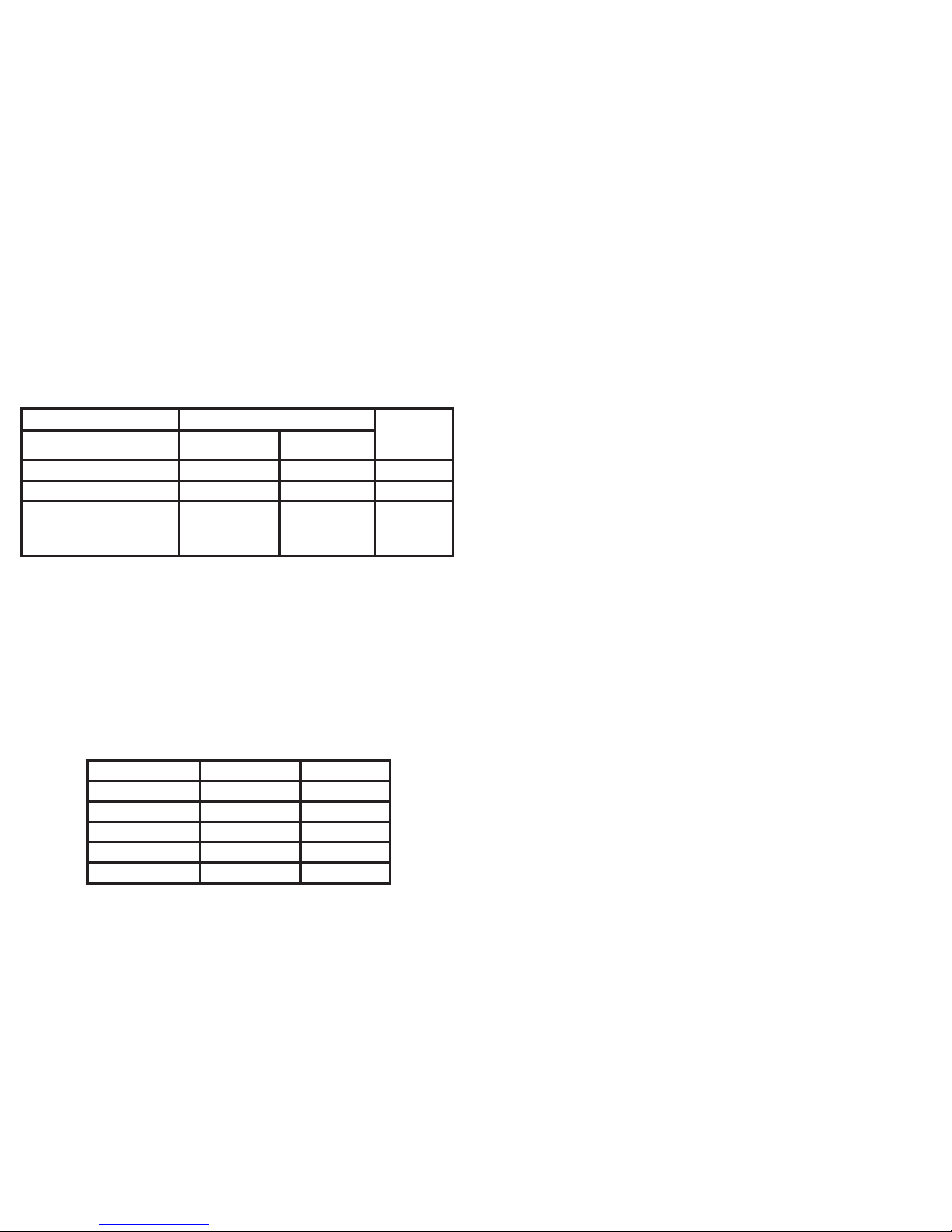
Approximate Fees for Loss or Damage
HP 2700 Series: Klein Collins, Klein High,
Klein Oak & Krimmel
Fujitsu T734: Klein Forest & Vistas
Cost of Items with $350 Deposit
Cost of
Items with
ADPC
Item HP 2700 Series Fujitsu T734
Display (Monitor) $768.69 $635.77 $0.00
Keyboard $59.09 $62.82 $0.00
Tablet PC (approximate
cost for current available
model)
$1,260.50 $1,247.92 $0.00
These tables represent charges for each occurrence of loss or damage. They
are not all inclusive and are subject to change.
Items Not Covered by ADPC
Item HP 2700 Series Fujitsu T734
Stylus $20.00 $16.00
Power Adapter $41.00 $58.00
Ba ery (External) $110.00 $89.00
Ba ery (Internal) $70.00 $88.00
Case $58.00 $44.00
Repor ng Damages/The
Damages
Students will have 5 days to report any damages or the to the Repair Center
through the Work Order System. Students will be required to answer a series
of ques ons to help gather more informa on about what is wrong with their
Tablet PC. A er you have turned in a Work Order Request, please back up any
items on your Tablet PC and bring the Tablet to the Repair Center.
The
If a student thinks that their tablet is lost and/or stolen they need to go to the
Repair Center and fi ll out a “Missing Tablet Report”.
If a student knows that their tablet has been stolen or damaged and already
has a police case number, they need to go to the Repair Center and fi ll out a
“Missing Tablet Report”.
In either case, we will issue a new tablet to the student as soon as possible.
Page 10
Page 7

1:1 Program Defi ni ons
One-to-One (also abbreviated 1:1): program where the ra o of students to
computers is one to one. In Klein this program is in place at our four high
schools, Krimmel Intermediate School and Vistas.
Products We Use
Browser: the program you choose to use to explore the internet; Internet
Explorer, Chrome, and FireFox are available for your use on Klein devices
DyKnow: monitoring so ware that allows teachers to view and take control
of student tablets; the DyKnow vision piece also allows teachers to send and
retrieve fi les from students
eInstruc on: “clickers”: students respond to ques ons posed by the teacher
using response pads; teachers can use the informa on as a grade
GradeSpeed: our online gradebook system that is “live” – parents have access
and can set “triggers” to get alerts when grades drop or assignments aren’t
turned in
Learning Management System (LMS): (our par cular product is Blackboard
Learn 9.1, April 2014 version): where you will input digital assignments and use
collabora ve learning tools in each course
OneNote: an Offi ce suite program specifi cally for tablet computers; digital
binder where students can create a notebook for each class and sec ons within
each notebook to keep all of their informa on
Offi ce 365 (Student Advantage): the way that students will access Offi ce 2013.
It will require you to log-in to verify you are s ll a student every 60-90 days.
Respondus: Lockdown Browser: forces students to only have the assessment
browser open when taking a test – curbing chea ng
SCCM: So ware Center: where you can go to install District-approved so ware
and updates (So ware Center is pinned to the taskbar).
SharpSchool: student email program that also off ers student storage space and
Web 2.0 tools
Work Order System: The online site where you can submit a work order for your
tablet. The Work Order System is only available while you are on a Klein ISD
campus.
StarBoard: the really big board in each classroom that connects to your
computer where you can draw on it electronically and control your computer
using the pen on the board
TBSI: Technology Baseline Standard Ini a ve: Klein’s Ini a ve to make sure
all core-content classrooms K-12 have the same basic technology including
StarBoard, eInstruc on, document cameras, and projectors
Hardware
2760: the Tablet PC model number the students have at Klein Oak, Klein High,
Klein Collins and Krimmel.
Fujitsu T734: the Tablet PC model number students have at Klein Forest and
Vistas
Hardwire: when your computer is actually connected to the internet using an
Ethernet cable (usually yellow, but can also be blue or grey)
Stylus: the electronic pen that allows students to “write” on digital fi les in their
tablet PC – it does not have ink. Each student is provided one stylus a ached to
their device via a tether. If you lose the stylus you will have to replace it.
Touch Screen: allows you to use your fi nger and gestures to control your Tablet
PC
Tether: the piece of string that a aches the stylus to the Tablet PC
ADPC: Accidental Damage Protec on Coverage : a plan students purchase to
protect their computers through the district
Iden fi ca on Tag: iden fi es who the tablet is issued to and must remain intact
at all mes.
Power Adapter: each student is provided one power adapter. Please make
sure to keep track of your power adapter. If you lose it, you are responsible for
replacing it.
N:Drive: student network drive that is accessible from any KISD building but not
from home
Wireless: wireless access is available outside all KISD buildings if you do not have
wireless access at home; you can also connect to most public wifi networks
SchoolCash: the website where parents can pay online fees including ADPC.
Case: please keep your device in the case at all mes. The case is designed to
protect the device. You will be required to remove your device from the case at
certain mes to check the status of your device.
People
Technicians: each campus has a repair center staff ed with a secretary, a lead
technician and two regular technicians. All technicians are able to assist you
with requests. The fastest way to get your problem resolved is to turn in a Work
Order Request online and then bring it to the Repair Center.
Page 11 Page 12
Page 8

Klein ISD Tablet PC Parent/Student Agreement Form 2014-2015
I am aware of the terms set forth in the Klein ISD Student Tablet PC handbook. I understand and will
comply with all of the conditions outlined within. Parents, please read and initial the following:
_______ I understand that my student must report any needed repairs and or damage to the
Tablet PC within 5 school days from time of occurrence otherwise I may be liable for any
cost incurred by the district to repair or replace the Tablet PC.
_______ I have received and under stand that I am bound by the terms and conditions stated in
the 2014-2015 Klein ISD Student Tablet Handbook.
Please initial one (1) of the following options:
_______ I am purchasing the Accidental Damage and Protection Coverage (ADPC) for $60.00
(does not cover stylus, charger, extended battery, internal battery, carrying case,
damage due to gross neglect or intentional damage).
_______ I choose not to purchase the Accidental Damage and Protection Coverage and will assume
full responsibility for the costs associated with repair and/or replacement of the Tablet
PC or any component. Because I have chosen not to purchase the Accidental Damage and
Protection Coverage, I will remit a $350.00 Security Deposit to Klein ISD. The $350.00
Tablet PC Security Deposit is fully refundable at the end of the school year (or when a
student checks out of school) when the Tablet PC is returned to Klein ISD in acceptable
working order. The $350.00 Tablet PC Security Deposit will be applied to all outstanding
charges for repair of the Tablet PC. In the event charges exceed $350.00, I will be
responsible for the entire repair charge.
Date Grade
Student Name (please print) Student Signature
Student ID #
Parent/Guardian Name (please print) Parent/Guardian Signature
unofficial
copy
unofficial
copy
Page 13
Klein ISD Tablet PC
Parent/Student Agreement Form 2014-15
Page 14
Appendix
The Klein ISD Student Guidelines for Acceptable Use of Technology
Resources can be found in the Klein ISD Student Handbook and on the
district website at: h p://www.kleinisd.net/default.aspx?name=it.aup
It is included as Pages 11-14 of the Tablet PC Handbook for convenient
reference.
Klein Independent School District Student Guidelines for Acceptable Use of
Technology Resources
These guidelines are provided so that students and parents are aware
of the responsibili es students accept when they use District-owned
computer hardware, opera ng system so ware, applica on so ware,
stored text, data fi les, electronic mail, local databases, removable media,
digi zed informa on, communica on technologies, and Internet access. In
general, this requires effi cient, ethical, and legal u liza on of all technology
resources.
1. Expecta ons
2. Unacceptable conduct includes but is not limited to the following:
a. Using the network for illegal ac vi es, such as copyright, license, or
contract viola ons or downloading inappropriate materials, viruses, and/
or so ware, including but not limited to hacking and host fi le sharing
so ware.
b. Using the network for fi nancial or commercial gain, adver sing, or
poli cal ac vi es.
c. Accessing or exploring online content that does not support the
curriculum and/or is inappropriate for school assignments, including but
not limited to pornographic sites.
d. Vandalizing, tampering, or accessing without permission, equipment,
programs, fi les, so ware, system performance, or other technology. Use or
possession of hacking so ware is strictly prohibited.
e. Causing conges on on the network or interfering with the work of
others, e.g., chain le ers, jokes, or pictures to lists or individuals.
f. Unauthorized or non-curricular use of online video, music or streaming
content.
g. Gaining unauthorized access anywhere on the network.
h. Invading the privacy of other individuals.
Page 9

Page 15
i. Using another user’s account, password, or ID card or allowing another
user to access your account, password, or ID.
j. Coaching, helping, joining or acquiescing in any unauthorized ac vity on
the network.
k. Pos ng anonymous, unlawful, or inappropriate messages or informa on
on a district-owned system.
l. Engaging in sexual harassment or using any language of a sexual or
otherwise objec onable nature (e. g., racist, terroris c, abusive, threatening,
demeaning, stalking, or slanderous) in public or private messages.
m. Falsifying permission and/or authoriza on of iden fi ca on documents.
n. Obtaining copies of or modifying fi les, data, or passwords belonging to
other users on the network without authoriza on.
o. Knowingly placing a computer virus on a computer or network.
p. Transmission of any material that is in viola on of any federal or state
law. This includes, but is not limited to confi den al informa on, copyrighted
material, threatening or obscene material, and computer viruses.
3. Acceptable Use Guidelines
a. General Guidelines
(1) Students are responsible for the ethical and educa onal use of technology
in the District and when a district owned device is used out of district.
(2) Students will have access to available forms of electronic media and
communica on that is in support of educa on and research, and in support of
the educa onal goals and objec ves of the District.
(3) All technology policies and restric ons must be followed.
(4) Access to the District’s computer online services is a privilege and not a
right. Each student will be required to sign and adhere to the Acceptable Use
Guidelines Agreement.
(5) When placing, removing, or restric ng access to data or online services,
school offi cials shall apply the same criteria of educa onal suitability used for
other educa on resources.
(6) Parents concerned with the District’s computer online services at their
child’s school should refer to the EFA (LOCAL): Instruc onal Resources:
Instruc onal Material Selec on and Adop on policy and follow the stated
procedure.
(7) Any parent wishing to restrict their children’s access to any District computer
online services will need to provide this restric on request in wri ng. Parents
will assume responsibility for imposing restric ons only on their own children.
Page 16
b. Network E que e
(1) Be polite.
(2) Use appropriate language.
(3) Do not reveal personal data (i.e. home address, phone number, or phone
numbers of other people).
(4) Remember that the other users of technology are human beings whose
culture, language, and humor have diff erent points of reference from your
own.
(5) Users should be discrete when forwarding e-mail, and it should only be
done on a need-to-know basis.
c. E-Mail
(1) E-mail may be used for educa onal or administra ve purposes only.
Students are provided a Gaggle e-mail account if e-mail is required in the
course in which they are enrolled.
(2) E-mail transmissions, stored data, transmi ed data, or any other use of
district-owned technology by students or any other user is subject to being
monitored at any me by designated staff to ensure appropriate use.
(3) All e-mail and all contents are property of the District.
4. Consequences
The student in whose name a system account and/or computer hardware is
issued will be responsible at all mes for its appropriate use.
Noncompliance with the guidelines published here, in the Student Handbook
/ Student Code of Conduct, and in Board policy CQ may result in suspension
or termina on of technology privileges and disciplinary ac on. Use or
possession of hacking so ware is strictly prohibited and violators will be
subject to consequences in the Student Handbook / Student Code of Conduct.
Viola ons of applicable state and federal law, including the Texas Penal Code,
Computer Crimes, Chapter 33, may result in criminal prosecu on, as well as
disciplinary ac on by the District.
The District cooperates fully with local, state, or federal offi cials in any
inves ga on concerning or rela ng to viola ons of computer crime laws.
In addi on, contents of e-mail and network communica ons are governed
by the Texas Public Informa on Act, and therefore, may be subject to public
disclosure as required by law.
Any a empt to alter data, the confi gura on of a computer, or the fi les
of another user without the consent of the individual, campus or district
administrator, will be considered an act of vandalism and subject to
disciplinary ac on in accordance with the Student Handbook / Student Code
of Conduct.
Page 10

Page 17
5. Web 2.0 and Social Media Tools
a. Approved for Classroom Use
(1) Klein ISD students, under the supervision and guidance of their teachers,
will use Web 2.0 and social media tools commonly used in K 12 educa on
today as part of instruc on in their classrooms. Such tools may include but
are not limited to: Gaggle, Parent Link, Klein Private Label Wiki, Project Share,
Angel LMS, Learning.com Sky, and others.
(2) Students use these tools to meet the communica on, collabora on,
crea on, research, and informa on fl uency skills required by the Texas
Essen al Knowledge and Skills (TEKS). Tools such as these are hosted on
the Internet making some of the students’ work and/or other informa on
rela ng to students visible to parents/guardians/rela ves, and in some
circumstances, other Internet users around the world.
b. Safety
(1) When using Web 2.0 and social media tools, the following safeguards are
in place to protect and assure the safety of students. Please be aware that in
some instances:
• Individual or iden fi able profi les (which include personally iden fi able
informa on of students such as fi rst and last name, campus, home
address, email address, etc.) may be used that are open to the public.
• Public viewing and commen ng might occur on district-approved sites.
• Classroom lessons or projects may require publicly iden fi able student
informa on (fi rst and last name, campus, home address, email address,
etc.) to be made available on the Internet.
(2) Use of these tools must be in accordance with the Klein ISD’s Policies and
Procedures including but not limited to these Acceptable Use Procedures.
7.14
 Loading...