

Page 1

HP Pro Scanner Output Tray
User Guide
Page 2

Edition 2
© Copyright 2017 HP Development Company,
L.P.
Legal notices
The information contained herein is subject to
change without notice.
The only warranties for HP products and
services are set forth in the express warranty
statements accompanying such products and
services. Nothing herein should be construed as
constituting an additional warranty. HP shall not
be liable for technical or editorial errors or
omissions contained herein.
Page 3

Table of contents
1 Introduction ............................................................................................................................................................................................... 1
Required space .......................................................................................................................................................................... 2
2 Items included in the box ......................................................................................................................................................................... 3
3 Stopper adjustment .................................................................................................................................................................................. 4
4 Tray angle adjustment ............................................................................................................................................................................. 6
Tips for a successful batch scan ............................................................................................................................................. 7
5 Fold the tray for storage .......................................................................................................................................................................... 9
6 HP Limited Warranty Statement .......................................................................................................................................................... 11
A. Extent of HP Limited Warranty ........................................................................................................................................ 11
B. Limitations of warranty .................................................................................................................................................... 13
C. Limitations of liability ........................................................................................................................................................ 13
D. Local law ............................................................................................................................................................................. 13
Regulatory notices ................................................................................................................................................................. 13
ENWW iii
Page 4

iv ENWW
Page 5
1 Introduction
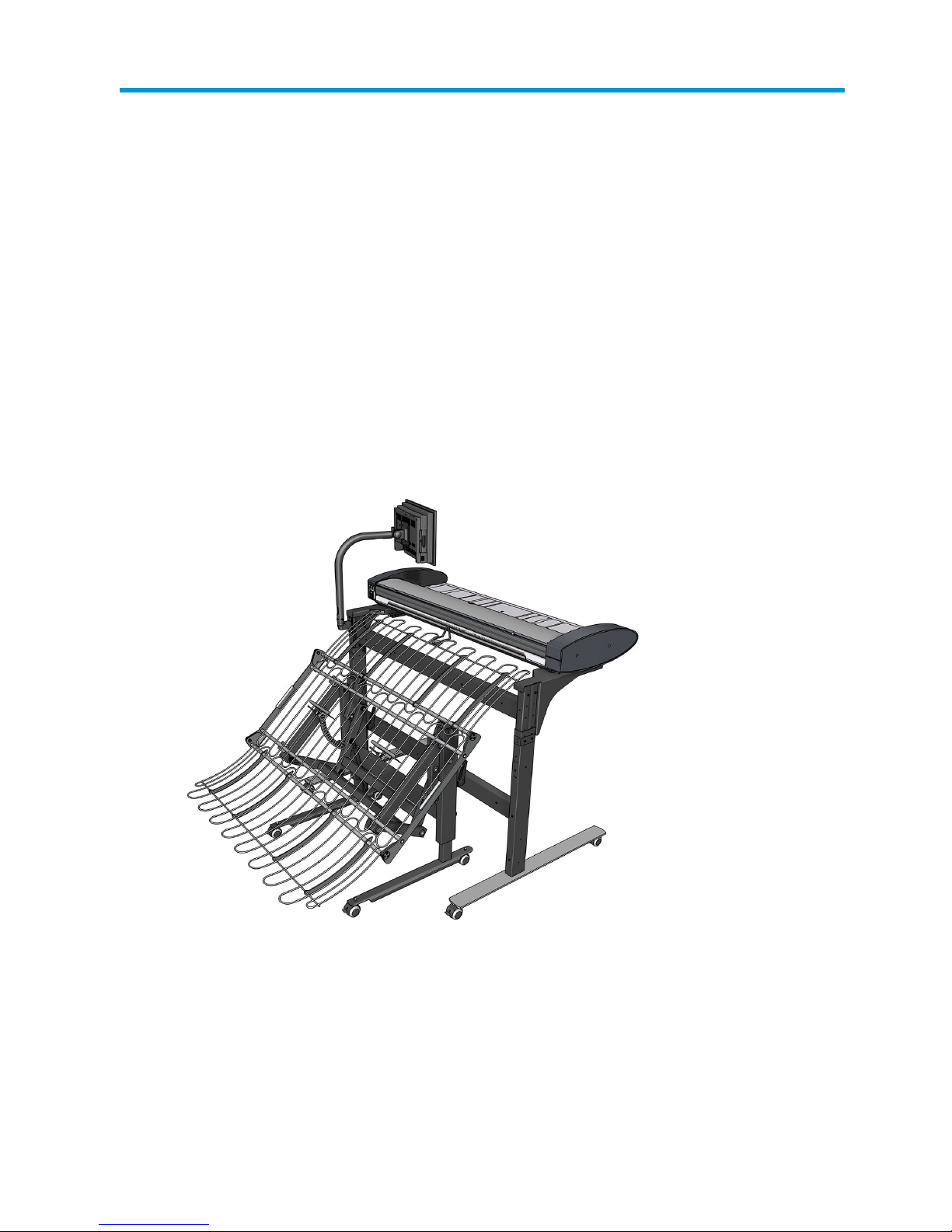
This accessory for the HP Pro Scanner is designed to stack sheets of paper of the same size scanned as a batch.
It has been designed for optimal performance with plain and bond papers (75–80 g/m²) with little tendency to
curl.
With these conditions, up to 50 sheets can be stacked if the angle of the tray is correctly set, and the stopper is in
place, as explained in this guide. Capacity for other paper types or sizes may be lower, depending on their density
and weight.
The tray has been designed to support paper sizes from A2 (ANSI C) to A0 (Arch E) in length. The maximum width
is the maximum supported by the scanner, which may be 1067 or 1118 mm (42 or 44 in), depending on the
model.
ENWW 1
Page 6
Required space
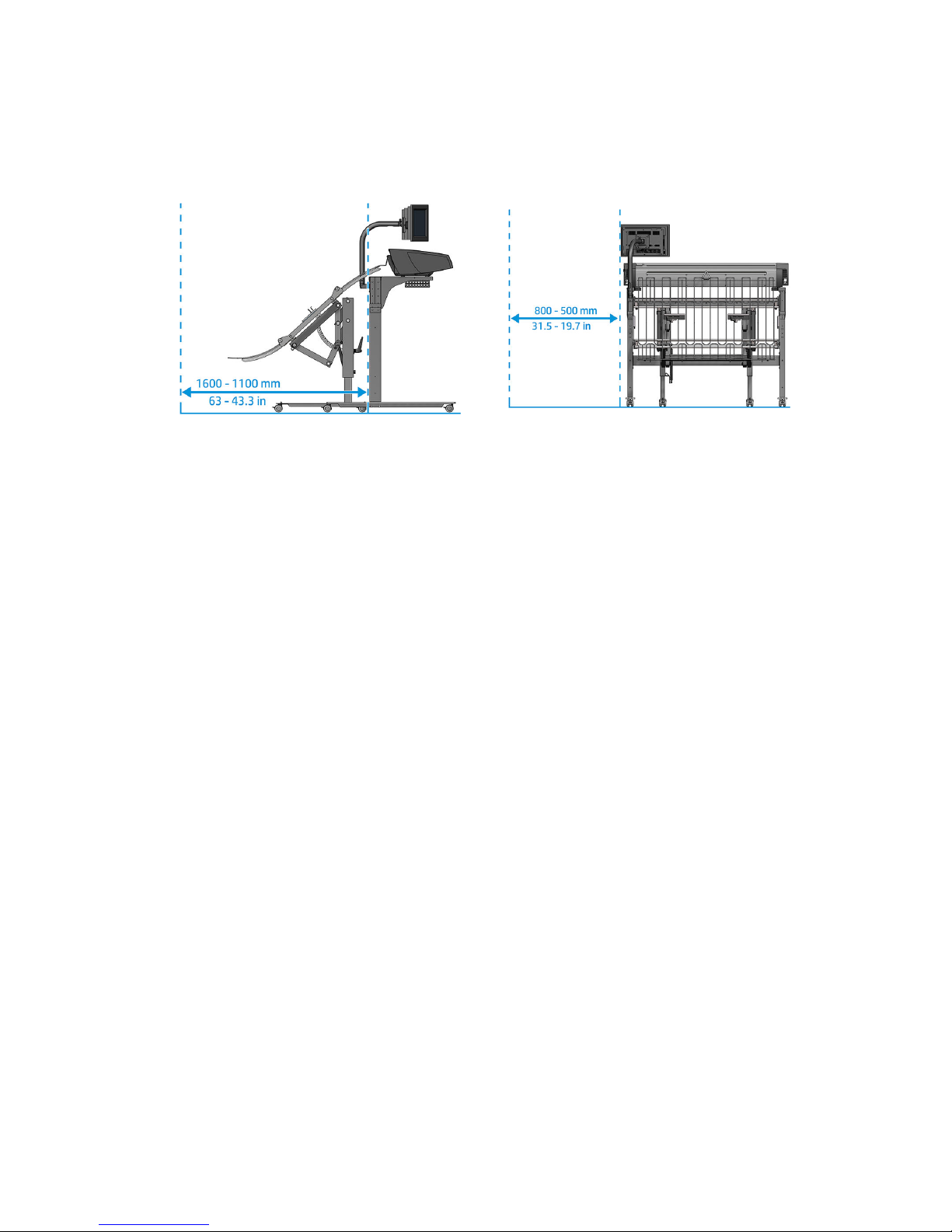
The output tray has approximately the following dimensions: 1150 mm long × 1190 mm wide × 1200 mm high
(45.3 × 46.9 × 47.2 in). You are recommended to allow some extra space at the left and front of the tray for
normal actions while it is in use.
2 Chapter 1 Introduction ENWW
Page 7
2 Items included in the box
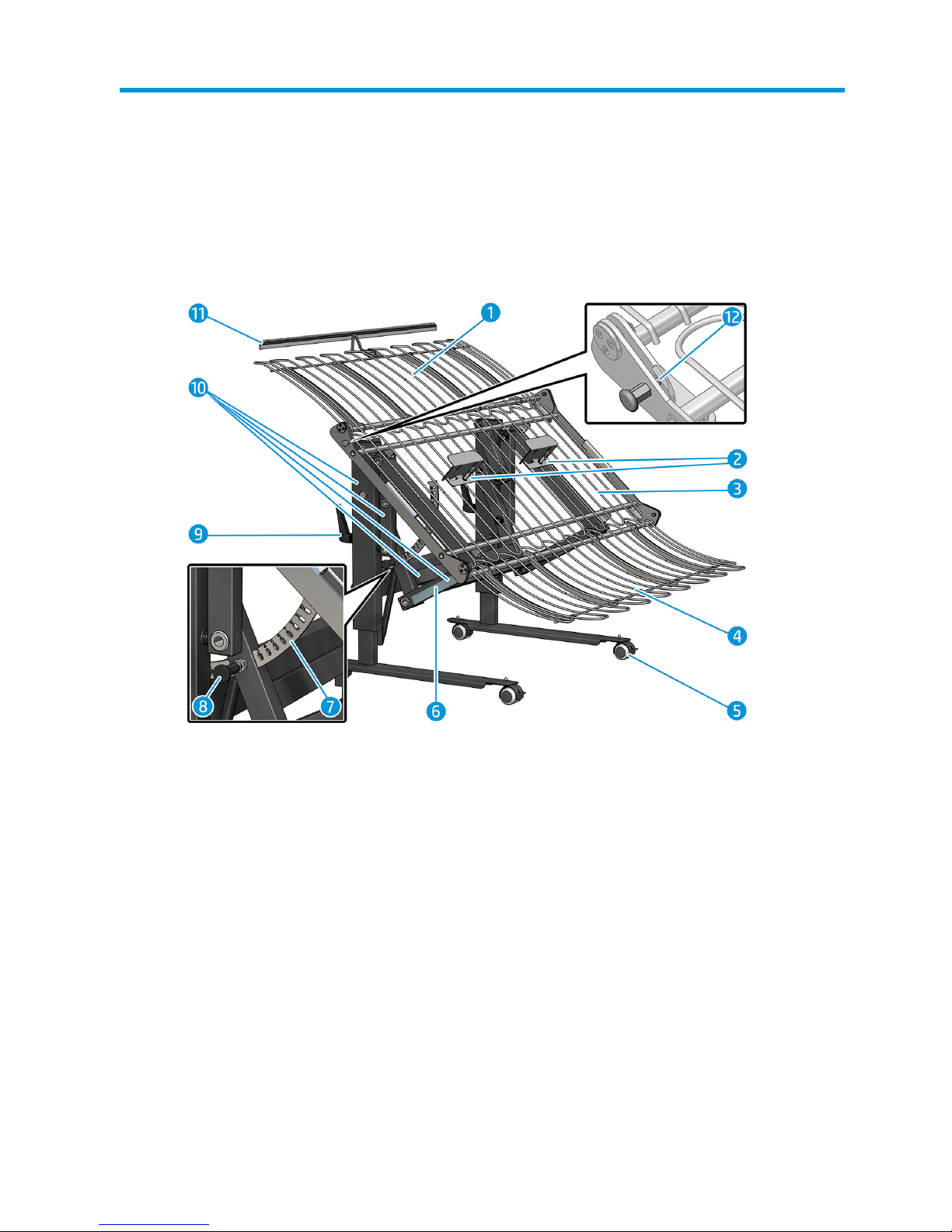
1. Upper tray
2. Paper stoppers (2)
3. Central tray
4. Lower tray
5. Wheels
6. Angle selector touch zone
7. Angle selector
8. Angle knob
9. Height adjusters (2)
10. Main structure
11. Antistatic brushes (SD version only)
12. Safety lock
ENWW 3
Page 8
3 Stopper adjustment
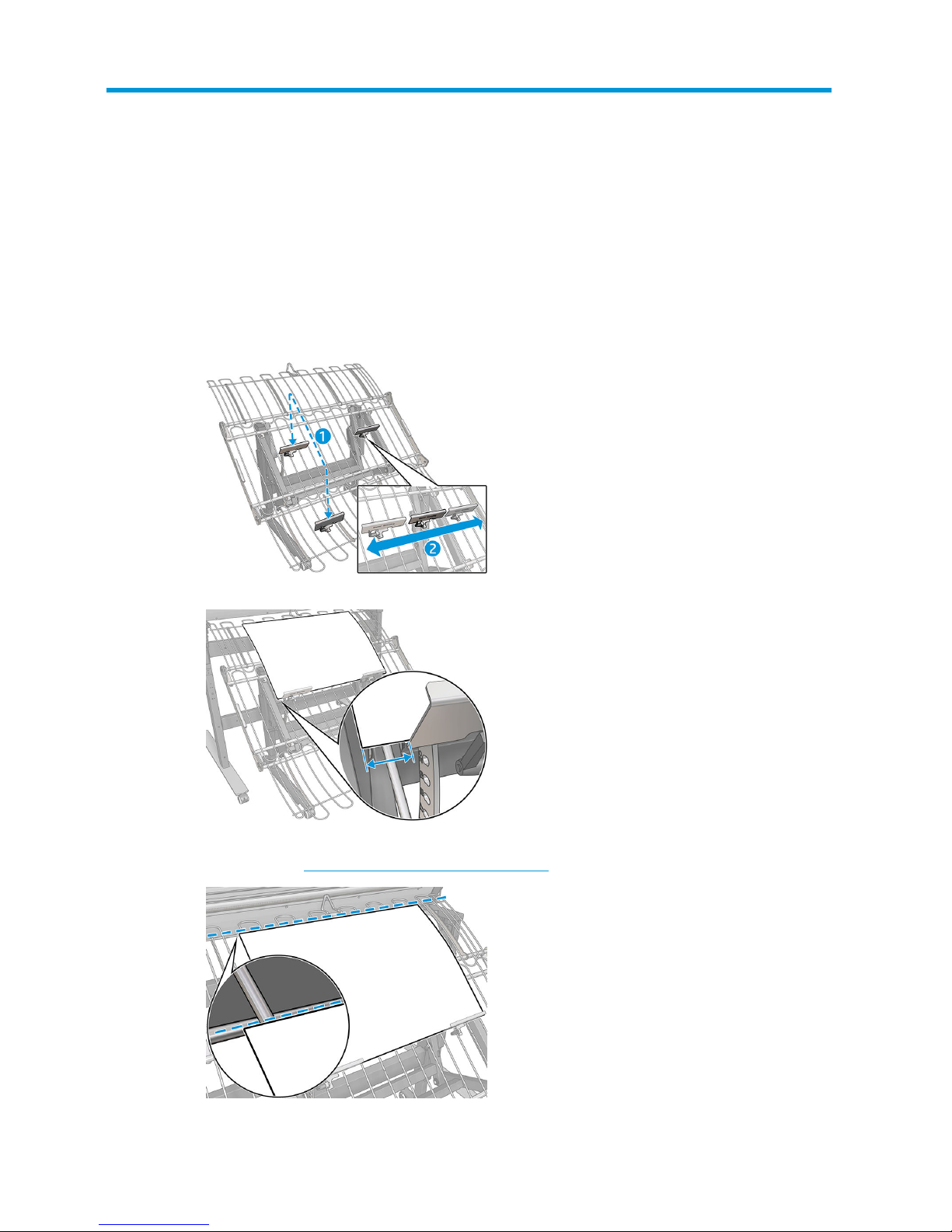
1. Take a sheet of paper of the size that you intend to scan.
2. Preinstall the stoppers in the central or lower tray area, depending on the paper size.
HP recommends that the edge of the paper should be 5–10 cm outside the edge of the stopper.
3. Put the paper on the tray, ensuring that the trailing edge is above (or at least not below) the upper rod of
the fall tray. See Tips for a successful batch scan on page 7.
4 Chapter 3 Stopper adjustment ENWW
Page 9

4. Fix the two stoppers in place by rotating the handle, so that the paper stops with its trailing edge in the
indicated position.
5. Remove the sheet of paper.
6. Adjust the angle of the tray if necessary (see Tray angle adjustment on page 6).
7. Start scanning.
ENWW 5
Page 10
4 Tray angle adjustment
You may be able to improve the sliding and stacking of the originals on the output tray by adjusting its angle of
slope. The ideal angle could vary with paper type, paper size, and ambient conditions.
The objective is to adjust the angle of the tray so that paper can fall freely from the scanner.
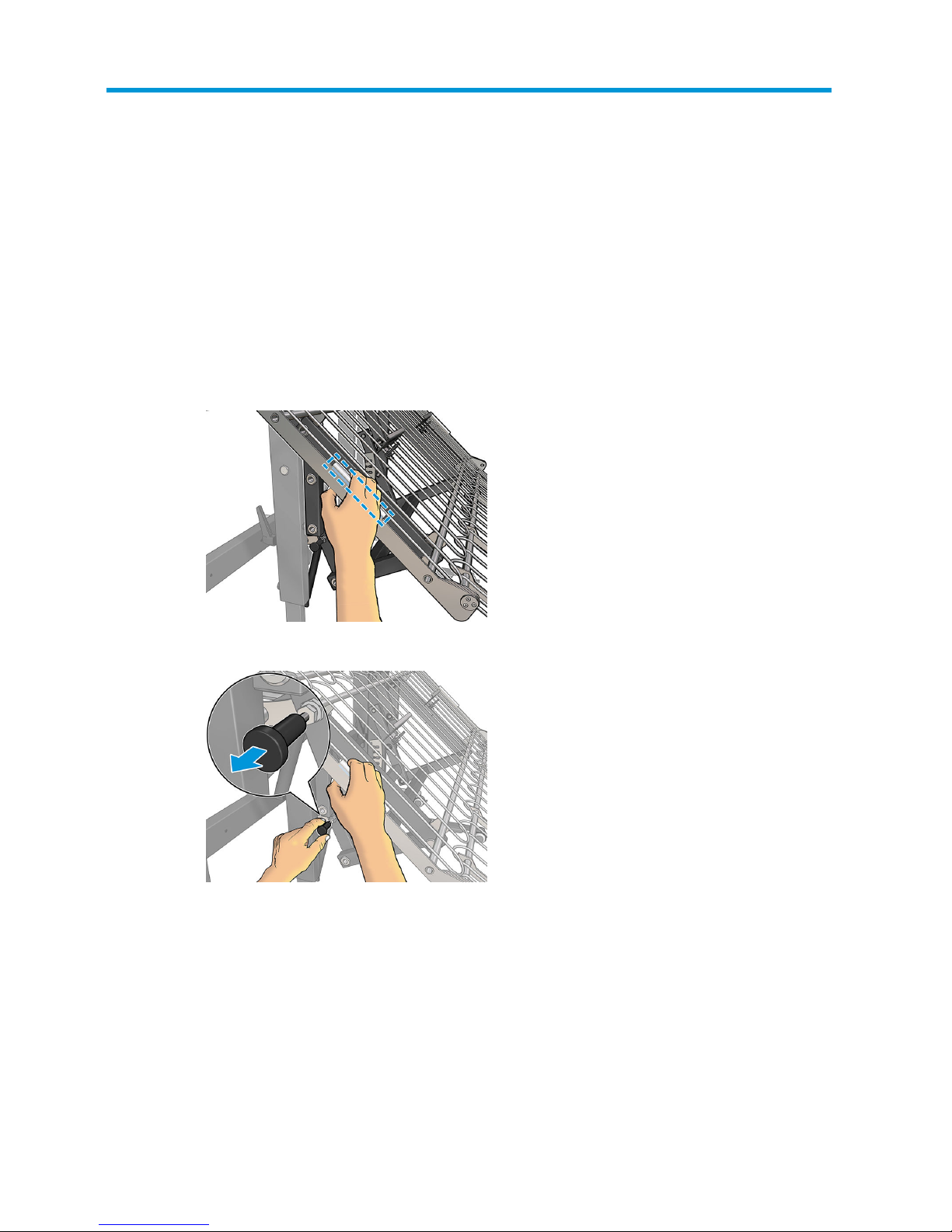
1. Hold the tray with your hand in the touch zone.
2. With the other hand, pull out the knob to disengage the lock.
6 Chapter 4 Tray angle adjustment ENWW
Page 11
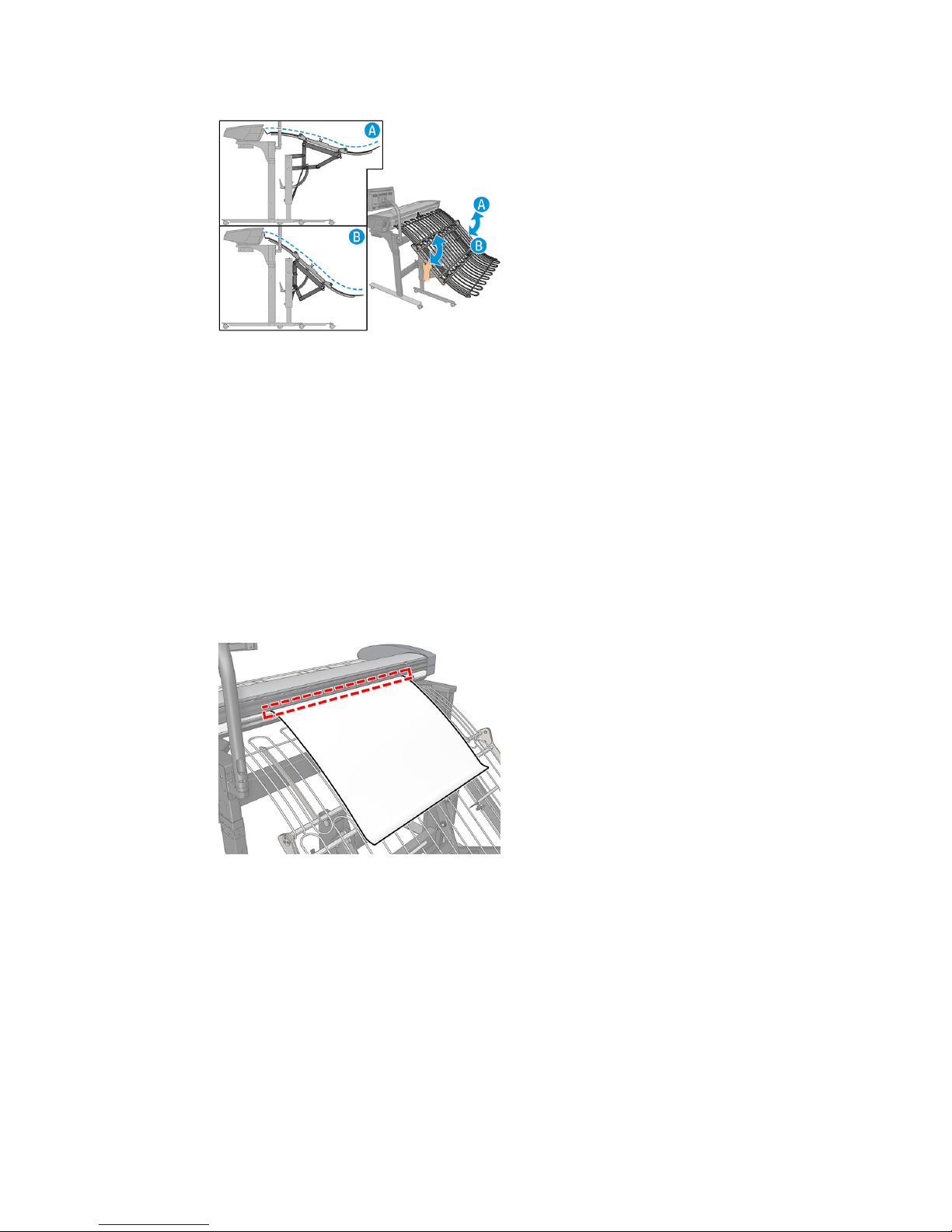
3. Move the tray to the desired angle by pulling it up or down.
4. Release the knob when the tray is at the desired angle.
Tips for a successful batch scan
The angle of the output tray should be adjusted so that the scanned sheets of paper fall freely from the scanner
to the tray without jamming. The stoppers should be previously set up.
The best angle for the tray could vary slightly with the paper type, the paper size, and the ambient conditions
(temperature and humidity).
There could be some variation in the angle from the rst page to the subsequent pages, due to the dierent
friction coeicient paper/tray versus paper/paper. You are strongly recommended to set the angle with a sheet
of paper in the tray.
1. If the end of a sheet is trapped in the scanner and does not slide completely into the tray, the angle of the
tray should be changed, lowering the height of the end of the tray.
ENWW Tips for a successful batch scan 7
Page 12
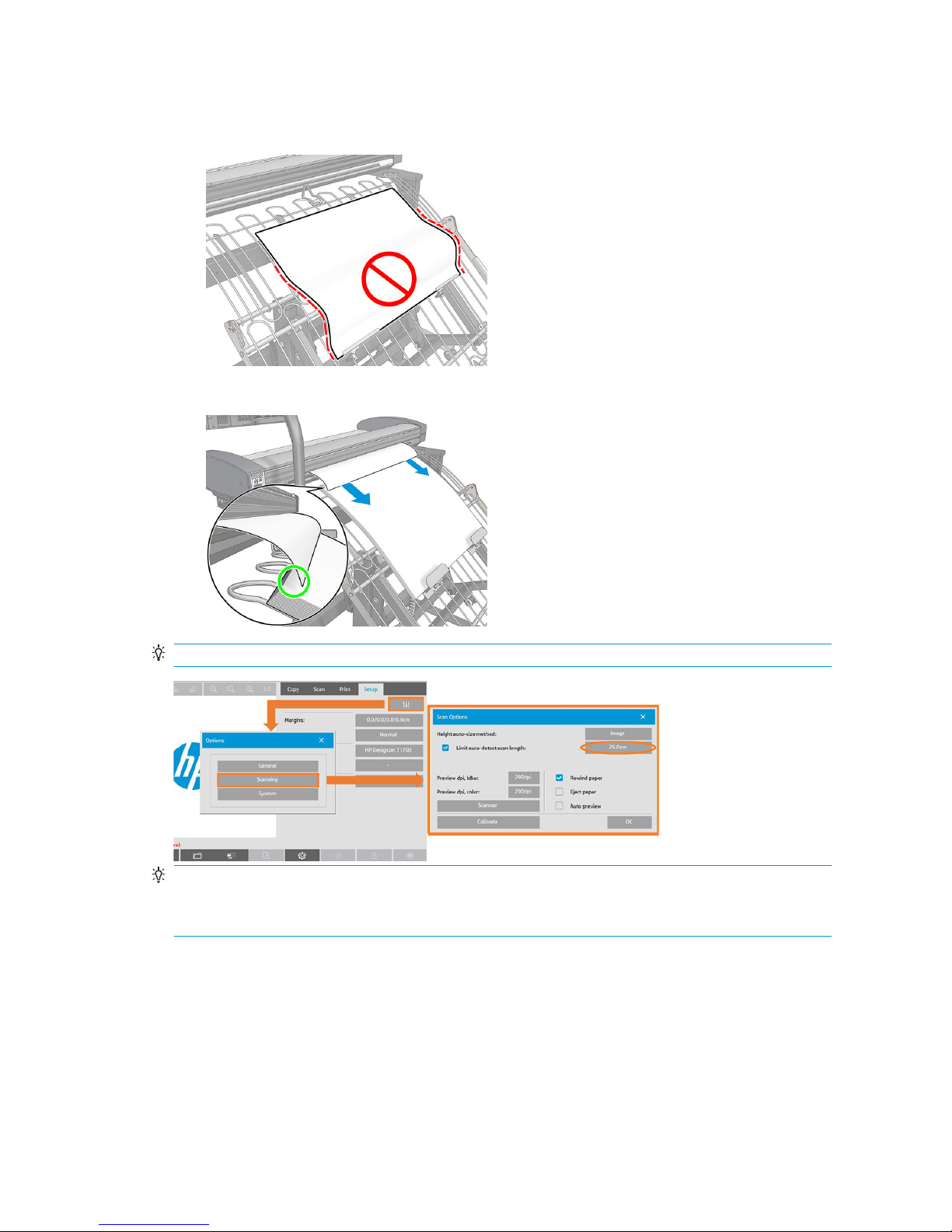
2. When a sheet falls into the tray, it should hit the stopper gently, to avoid paper damage and future paper
jams during the scan session. If a sheet does not lie at on the tray, the angle of the tray should be
decreased, increasing the height of the end of the tray.
3. To avoid paper jams, ensure that the scanned sheet falls on top of the previous scanned sheets.
TIP: Increase the scanner’s prescan length to 25 cm.
TIP: The recommended angle at which to start a batch scan is between 6° and 10°.
TIP: If the paper tends to curl, you are recommended to scan with the curled edges in the direction of the scan,
to reduce the risk of paper jams.
8 Chapter 4 Tray angle adjustment ENWW
Page 13
5 Fold the tray for storage
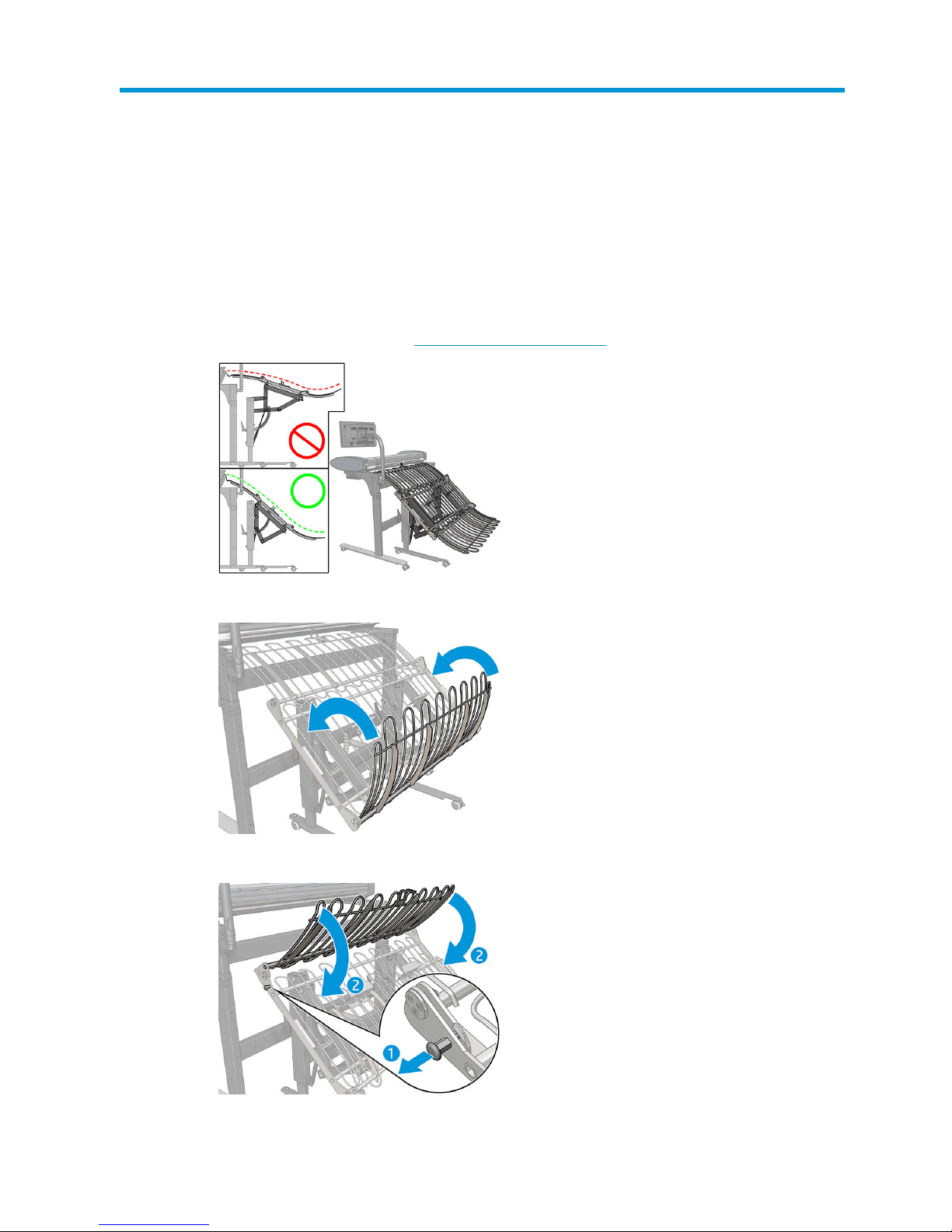
You can fold the output tray for storage so that it takes up less space:
1. Set the tray to a steep angle (see Tray angle adjustment on page 6).
2. Fold the lower tray upwards over the central tray.
3. Unlock the upper tray, and fold it downwards over the central tray.
ENWW 9
Page 14

4. Store the tray wherever convenient. For example, it can be stored under the scanner.
10 Chapter 5 Fold the tray for storage ENWW
Page 15

6 HP Limited Warranty Statement
HP product Limited Warranty Period
HP hardware product 1 year
HP software product 90 days
A. Extent of HP Limited Warranty
1. HP warrants to you, the end-user customer, that the HP hardware products will be free from defects in
materials and workmanship under normal usage during the Limited Warranty Period specied above. The
Limited Warranty Period starts on the date of purchase by you. Your dated sales or delivery receipt,
showing the date of purchase of the product, is your proof of purchase date. You may be required to
provide proof of purchase as a condition of receiving warranty service.
2. For software products, HP’s Limited Warranty applies only to a failure to execute programming instructions
for the Limited Warranty Period specied above, due to defects in materials and workmanship, when
properly installed and used on the device designated by HP. HP further warrants that HP-owned standard
software will substantially conform to specications. HP does not warrant that software will operate in
hardware and software combinations selected by you, or meet requirements specied by you.
3. HP does not warrant that the operation of any product will be uninterrupted or error-free.
4. HP’s Limited Warranty covers only those defects that arise as a result of normal use of the HP products,
and does not cover any other problems, including those that arise as a result of:
a. Improper or inadequate maintenance or calibration
b. Accessories, software, interfacing, paper, parts, ink, or supplies not provided or supported by HP
c. Operation outside the product's specications
d. Improper site preparation or maintenance
e. Unauthorized modication or misuse
5. If HP or an HP-authorized service provider receives, during the applicable warranty period, notice of a
defect in any product covered by this HP Limited Warranty, HP shall, at its option, either repair or replace
the product that proved to be defective.
6. Customer self-repair warranty service. HP products are designed with many Customer Self-Repair (CSR)
parts to minimize repair time and allow for greater exibility in performing defective parts replacement. If,
during the diagnosis period, HP identies that the repair can be accomplished by the use of a CSR part, HP
will ship that part directly to you for replacement. There are two categories of CSR parts:
ENWW A. Extent of HP Limited Warranty 11
Page 16

● Parts for which customer self-repair is mandatory. If you request HP to replace these parts, you will
be charged for the travel and labor costs of this service.
● Parts for which customer self-repair is optional. These parts are also designed for Customer SelfRepair. If, however, you require that HP replace them for you, this may be done at no additional charge
under the type of warranty service designated for your product.
Based on availability and where geography permits, CSR parts will be shipped for next-business-day
delivery. Same-day or four-hour delivery may be oered at an additional charge where geography permits.
If assistance is required, you can call the HP Technical Support Center and a technician will help you over the
phone. HP species in the materials shipped with a replacement CSR part whether a defective part must be
returned to HP. In cases where it is required to return the defective part to HP, you must ship the defective
part back to HP within a
dened period of time, normally ve (5) business days. The defective part must be
returned with the associated documentation in the provided shipping material. Failure to return the
defective part may result in HP billing you for the replacement. With a customer self-repair, HP will pay all
shipping and part return costs and determine the courier/carrier to be used.
7. Should HP elect to replace or repair the defective product or part onsite, such products will be serviced at
the end-user customer's facility at no charge only within designated local service travel areas. Outside
designated local service travel areas, warranty services will be performed at the end-user customer's
facility only upon prior agreement; you may be required to pay travel expenses and other applicable
expenses for such services. Contact your local HP-authorized service provider for details on local travel
areas.
8. You will make all reasonable eorts to support and cooperate with HP or an HP-authorized service provider
in resolving the problem remotely, for example, starting and executing self-tests or diagnostic programs,
providing all necessary information, or performing basic remedial activities upon request from HP or an HPauthorized service provider.
9. If HP is unable to repair or replace, as applicable, a defective product that is covered by this Limited
Warranty, HP shall, within a reasonable time after being notied of the defect, refund the residual value of
the product. The residual value will be the purchase price paid to HP or to an HP Authorized Reseller minus
depreciation and amortization.
10. HP shall have no obligation to replace or refund until you return the defective components, parts, supplies,
or hardware product to HP, including its associated documentation. All components, parts, supplies, or
hardware products removed under this Limited Warranty become the property of HP. Notwithstanding the
above mentioned, HP may waive the requirement for you to return the defective product.
11. Unless otherwise stated, and to the extent permitted by local law, HP products may be manufactured using
new materials or new and used materials equivalent to new in performance and reliability. HP may repair or
replace products (i) with equivalent products to the products being repaired or replaced but which may have
been subject to prior use; or (ii) with an equivalent product to an original product that has been
discontinued.
12. This Limited Warranty is valid in any country/region where HP or its authorized service providers oer
warranty services and HP has marketed the HP product covered by this Limited Warranty. However,
warranty service availability and response time may vary from country/region to country/region. HP will not
alter form, t, or function of the product to make it operate in a country in which it was never intended to
function for legal or regulatory reasons. This HP Limited Warranty is subject to all applicable laws and
regulations including US and other national export and import laws and regulations.
13. Contracts for additional services may be available from any authorized HP service facility where the listed
HP product is distributed by HP or an authorized importer.
14. You are responsible for the security of your proprietary and condential information and for maintaining a
procedure external to the HP product for reconstruction of lost or altered les, data, or programs. HP IS
NOT RESPONSIBLE FOR DAMAGE TO OR LOSS OF ANY FILES STORED BY YOU ON THE HP PRODUCT’S HARD
DISK OR OTHER STORAGE DEVICES. HP IS NOT RESPONSIBLE FOR THE RECOVERY OF LOST FILES OR DATA.
12 Chapter 6 HP Limited Warranty Statement ENWW
Page 17

B. Limitations of warranty
TO THE EXTENT ALLOWED BY LOCAL LAW, NEITHER HP NOR ITS THIRD PARTY SUPPLIERS MAKE ANY OTHER
WARRANTY OR CONDITION OF ANY KIND, WHETHER EXPRESS OR IMPLIED, AND SPECIFICALLY DISCLAIM THE
IMPLIED WARRANTIES OR CONDITIONS OF MERCHANTABILITY, SATISFACTORY QUALITY, AND FITNESS FOR A
PARTICULAR PURPOSE.
C. Limitations of liability
TO THE EXTENT ALLOWED BY LOCAL LAW, THE REMEDIES IN THIS LIMITED WARRANTY ARE YOUR SOLE AND
EXCLUSIVE REMEDIES. EXCEPT AS INDICATED ABOVE, IN NO EVENT WILL HP OR ITS THIRD PARTY SUPPLIERS BE
LIABLE FOR LOSS OF DATA, DIRECT, INDIRECT, SPECIAL, INCIDENTAL, OR CONSEQUENTIAL DAMAGES (INCLUDING
ANY LOSS OF PROFITS OR SAVINGS), WHETHER BASED ON CONTRACT, TORT, OR ANY OTHER LEGAL THEORY AND
WHETHER ADVISED OF THE POSSIBILITY OF SUCH DAMAGES.
D. Local law
1. This Limited Warranty gives you specic legal rights. You may also have other rights which vary from state
to state in the United States, from province to province in Canada, and from country to country elsewhere in
the world. You are advised to consult applicable state, province, or national laws for full determination of
your rights.
2. To the extent that this Warranty Statement is inconsistent with local law, this Warranty Statement shall be
deemed modied to be consistent with such local law. THE WARRANTY TERMS CONTAINED IN THIS LIMITED
WARRANTY, EXCEPT TO THE EXTENT LAWFULLY PERMITTED, DO NOT EXCLUDE, RESTRICT, OR MODIFY AND
ARE IN ADDITION TO THE MANDATORY STATUTORY RIGHTS APPLICABLE TO THE SALE OF THIS PRODUCT TO
YOU.
Rev. 05/09
Regulatory notices
Refer to the printer's documentation and HP's websites (http://www.hp.com/go/certicates/ and
http://www.hp.com/go/environment/) to nd relevant safety notices and regulatory and environmental
information for your product.
ENWW B. Limitations of warranty 13
 Loading...