

Page 1

HP ProLiant SL6000 Scalable System
technology
Technology brief, 2nd Edition
Introduction ......................................................................................................................................... 2
Mechanical design for extreme scale-out computing ................................................................................. 2
HP ProLiant z6000 G6 chassis .......................................................................................................... 3
Rack and cabling options .................................................................................................................. 3
Rail kits for the z6000 G6 chassis .................................................................................................. 3
Rail kits for network switches .......................................................................................................... 3
Rack management with HP ProLiant SL Advanced Power Manager ..................................................... 4
SL6000 server trays ......................................................................................................................... 4
HP ProLiant SL165z G7 server ....................................................................................................... 5
HP ProLiant SL160z G6 server ....................................................................................................... 5
HP ProLiant SL170z G6 server ....................................................................................................... 6
HP ProLiant SL2x170z G6 server ................................................................................................... 7
Memory technologies ........................................................................................................................... 8
Unbuffered and registered DIMMs ..................................................................................................... 8
Fan speed control ............................................................................................................................ 9
I/O technologies ................................................................................................................................. 9
Hard drive technologies .................................................................................................................... 9
Serial ATA technology implementation ............................................................................................ 9
Networking technologies .................................................................................................................. 9
Power and thermal technologies .......................................................................................................... 10
Power supply options ...................................................................................................................... 10
Management and deployment technologies .......................................................................................... 10
Power and thermal management with the Power Management Controller ............................................. 10
Remote management and control with Lights Out 100i ....................................................................... 12
IPMI 2.0 and DCMI 1.0 .................................................................................................................. 13
For more information .......................................................................................................................... 14
Call to action .................................................................................................................................... 14
Page 2
Introduction
High Performance Computing, large-scale enterprise server deployments, and the latest web and
cloud computing applications have special needs. The primary need may be for greater processing
power, high density, or maximized operating efficiency. At HP, we have developed a system to meet
these needs. It is based on industry-standard components and has a new mechanical design and
infrastructure.
The HP ProLiant SL6000 Scalable System provides extreme density and high performance at low
acquisition costs. It is easy to service in a rack and optimized for power and cooling efficiency.
Simplified server management and monitoring reduce the cost and effort needed to manage a
scale-out solution made up of thousands of servers.
Mechanical design for extreme scale-out computing
HP developed a new mechanical design and infrastructure for the ProLiant SL6000 Scalable System to
meet your needs. The HP ProLiant SL6000 Scalable System maximizes power efficiency by sharing
power supplies and fans to maintain total flexibility. The system consists of:
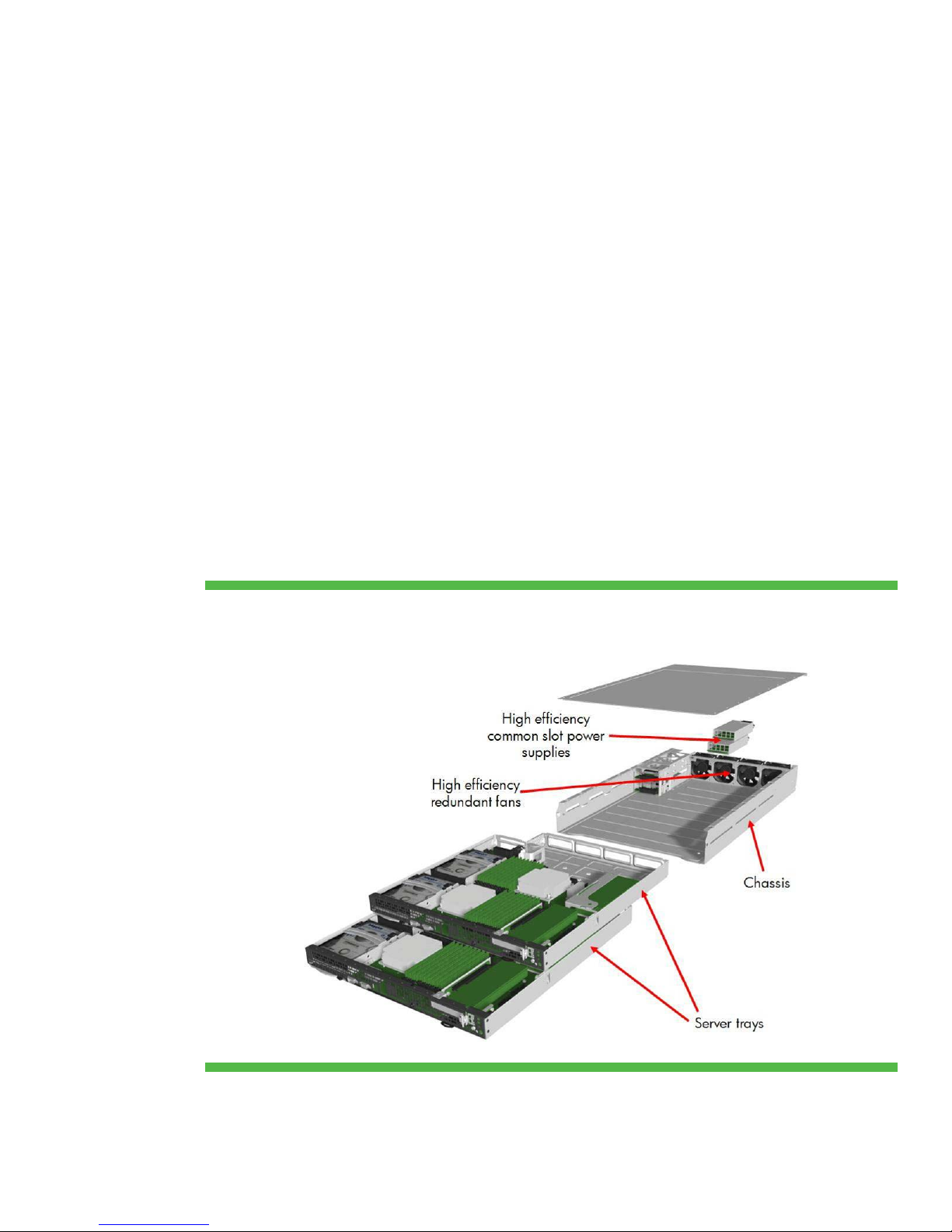
• A 2U ProLiant z6000 G6 chassis
• Two self-contained 1U server trays (Figure 1)
Each server tray has its own industry-standard processors, Double Data Rate-3 (DDR3) memory, I/O,
and storage. The rack-mountable chassis includes a highly efficient modular power and cooling
infrastructure that supports the slide-in pluggable server trays.
Figure 1. Exploded view of an HP ProLiant SL6000 Scalable System
2
Page 3
HP ProLiant z6000 G6 chassis
The HP ProLiant SL6000 Scalable System introduces new chassis architecture into the industrystandard server market. The HP ProLiant z6000 G6 chassis provides shared power and cooling to the
system components. It contains one or two high efficiency, HP common slot power supplies and up to
four system fans. An embedded microcontroller monitors and adjusts power for the entire chassis.
The chassis has no midplane. The I/O connectors are at the front of the chassis for easy serviceability
and unrestricted airflow to the server trays.
Rack and cabling options
The HP ProLiant SL6000 Scalable System fits in the HP 10000 Series rack, telco racks, and industry
standard square- or round-hole racks.
Rail kits for the z6000 G6 chassis
The z6000 G6 chassis mounts into any industry standard universal rack with standard mounting
hardware. You can choose to use a more cost-effective 10U bulk rail system (only for HP racks). You
can also mix the standard rail kit and the 10U bulk rail kit within HP racks.
Rail kits for network switches
We offer several rail kit options for switches: the HP ProCurve 6600 rail kit, the CISCO 4948 rail kit,
and the HP SL Universal Switch rail kit. All network cables must connect to the network switches. The
best place to install these switches is in the center of the rack. This reduces cable lengths and further
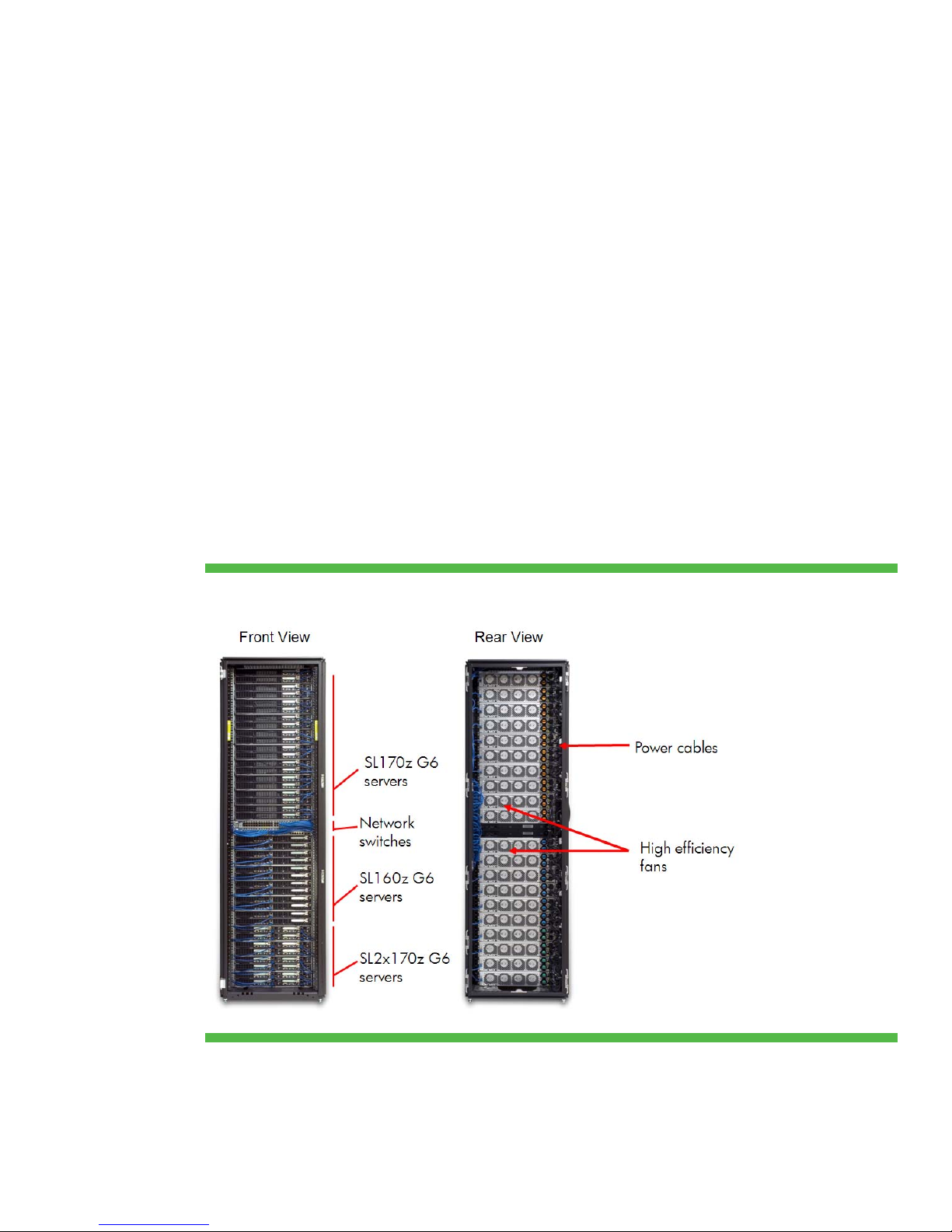
improves serviceability. In the rear, all power cables fit cleanly on the right side of the rack as shown
in Figure 2.
Figure 2. Front and rear views of HP 42U rack fully populated with SL6000 systems
3
Page 4

Rack management with HP ProLiant SL Advanced Power Manager
The HP ProLiant SL Advanced Power Manager (APM) is a tool for managing HP ProLiant Scalable
Systems. It consists of software and two hardware components: an SL APM Control Module and SL
APM Distribution Modules.
APM has several important functions:
• Discover individual chassis
• Monitor individual chassis
• Control individual chassis
• View the topology and power status of a chassis
• Power on/power off individual server trays in a chassis
The SL APM communicates with the SL6000 to collect identification and power data. You can access
this data at a centralized management console through a serial or network interface.
We developed the HP SL APM solution specifically for rack-mounted SL6000 chassis. You can mount
the SL APM Control Module as a 1U or 0U component. You can mount the SL APM Distribution
Modules in the rear of the rack, close to the connected SL6000 chassis. A standard 42U rack can
hold 20 SL6000 chassis and a 1U SL APM Control Module. You can control all these chassis with an
SL APM Control Module and two SL APM Distribution Modules.
SL6000 server trays
We developed multiple SL6000 server trays to meet various needs. Some trays have high memory
capacity. Others are best suited for internal storage or compute density. Each tray supports the
following components:
• AMD
• DDR3 memory
• An integrated Serial ATA (SATA) controller with HP Smart Array B110i RAID
• Non-hot-plug SATA storage drives housed in quick-release drive carriers
• Integrated dual-port 1 gigabit NICs
• An optional PCI Express (PCIe) 2.0 x16 slot available on a riser
• Optional HP Smart Array SAS controllers and SAS hard drives
For more detailed information on supported SAS controllers, SAS hard drive options, and server node
storage configuration, refer to the HP technology document “
ProLiant SL6000 servers.”
You will find the following components on the front panel of each server tray (Figure 3):
• Video and serial ports
• Two USB ports
• Four 1 Gb NIC ports
• An SD slot
• An optional LO100 dedicated management port
• LEDs for health and UID status
• An access port for a low profile PCIe 2.0 x16 adapter
™
Opteron™ 6100 Series processors or Intel® Xeon® 5500 or 5600 Series processors
Configuring SATA and SAS in HP
4
Page 5

Figure 3. Front view of a ProLiant z6000 G6 chassis containing two HP ProLiant SL165z G7 server trays
HP ProLiant SL165z G7 server
The SL165z G7 server tray is ideal for HPC database tier or web memory-cache-intensive
applications. The system board holds either one or two 8-core or 12-core AMD Opteron 6100 Series
processors and 24 slots for DDR3 memory module. This choice of processors makes the server well
suited for maximum expansion. The server tray has two HP NC362i integrated dual port NICs. There
is an optional PCI Express (PCIe) 2.0 x16 slot and room for an optional internal PCIe 2.0 x4 slot. The
SL165z G7 server supports large form factor (LFF), small form factor (SFF), or solid state (SSD) SATA
storage drives in quick-release drive carriers. You can find more information about the SL165z G7
server in the
QuickSpecs
.
HP ProLiant SL160z G6 server
The SL160z G6 server is well suited for maximum expansion because the system board (shown in
Figure 4) supports up to two Intel Xeon 5500 or 5600 Series processors and up to 18 slots for DDR3
memory modules (9 per processor). There is an optional PCIe 2.0 x16 slot and room for another
optional internal PCIe 2.0 x4 slot. The SL160z G6 server can support LFF, SFF, or SSD SATA drives
housed in quick-release drive carriers. You can find more information about the SL160z G6 server in
the
QuickSpecs.
5
Page 6
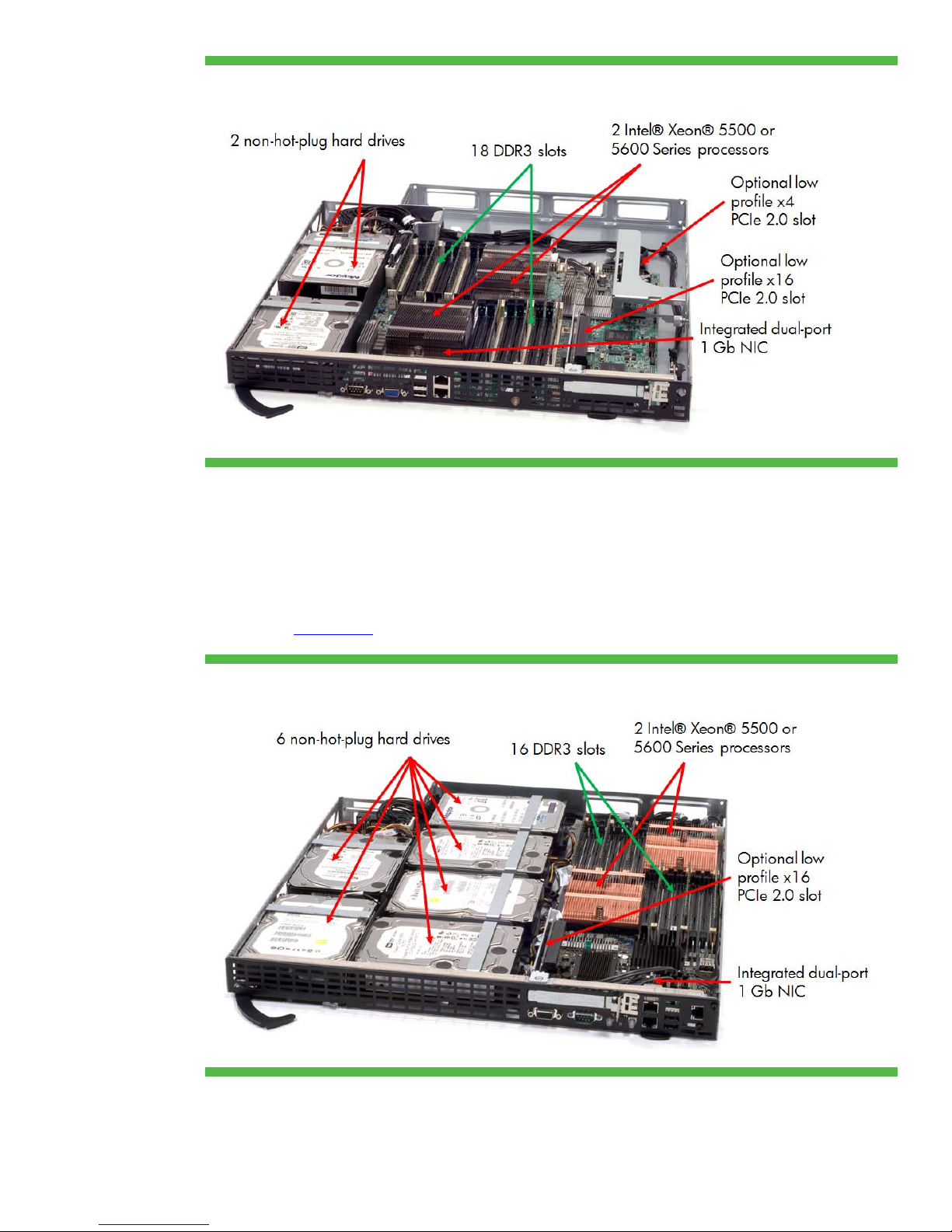
Figure 4. Internal view of the HP ProLiant SL160z G6 server tray
HP ProLiant SL170z G6 server
The HP ProLiant SL170z G6 server tray is well suited for maximum storage capability because it
supports six LFF, SFF, or SSD SATA storage drives housed in quick-release drive carriers (Figure 5).
The system board supports up to two Intel Xeon 5500 or 5600 Series processors and provides up to
16 slots for DDR3 memory modules (8 per processor). There is a PCIe 2.0 slot and an optional low
profile PCIe 2.0 x16 slot for expansion. You can find more information about the ProLiant SL170z G6
server in the
QuickSpecs.
Figure 5. Internal view of the HP ProLiant SL170z G6 server tray
6
Page 7
HP ProLiant SL2x170z G6 server
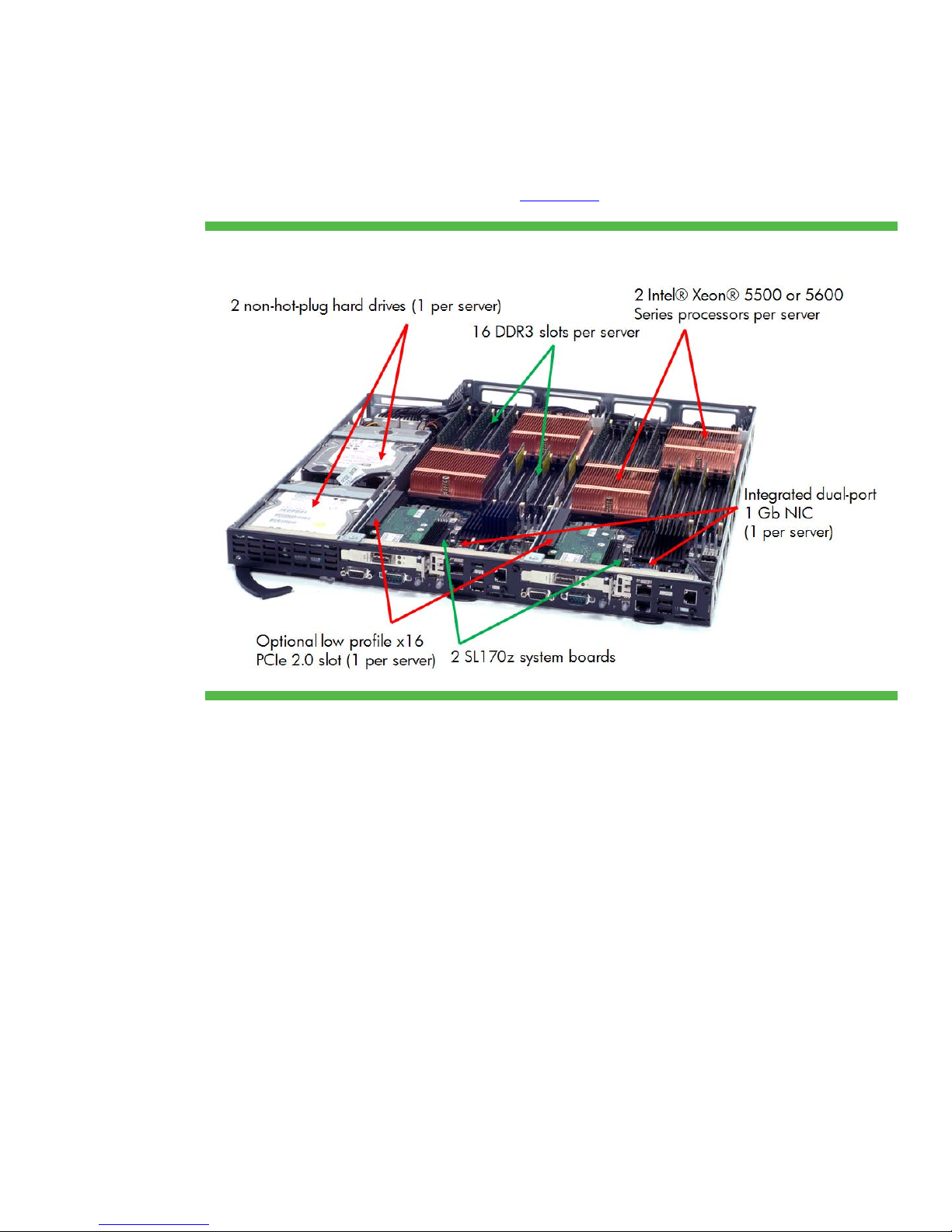
We optimized the HP ProLiant SL2x170z G6 server tray (shown in Figure 6) for compute power and
density. It contains two SL170z G6 server nodes side-by-side in the tray. It has up to four sockets for
Intel Xeon 5500 or 5600 Series processors and 32 slots for DDR3 memory modules (8 per
processor). Each server in the tray has its own embedded SATA controller to access one of the two
LFF, SFF, or SSD SATA storage drives housed in quick-release carriers. You can find more information
about the ProLiant SL2x170z G6 server in the
QuickSpecs.
Figure 6. Internal view of a HP ProLiant SL2x170z G6 server tray
Two server nodes installed side-by-side means the front of the unit has twice as many ports and LEDs
as the SL170z G6 server tray. Each server node has the following components (Figure 7):
• Video and serial connectors
• USB ports
• NIC ports
• Health and UID LEDs
• Optional out-of-band management LAN port
• A slot for an optional PCIe 2.0 x16 adapter
7
Page 8
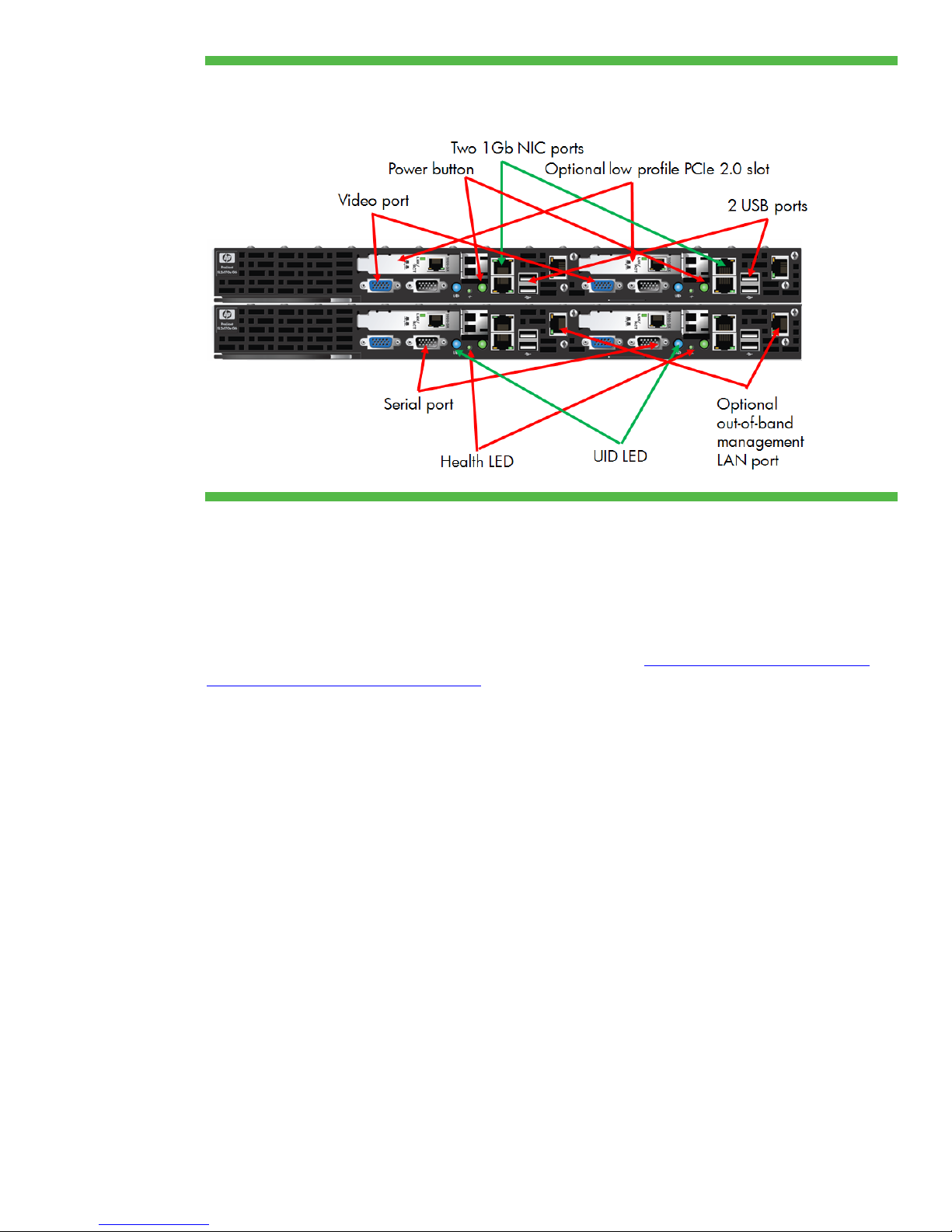
Figure 7. Front view of two ProLiant z6000 G6 chassis, each containing two HP ProLiant SL2x170z G6 server
trays
Memory technologies
SL6000 server trays use DDR3 memory. You can control all processor function options, including
memory mirroring and memory channel interleaving. You use the ROM-based setup utility (RBSU) for
G6 or G7 servers to do that.
You will find details about DDR3 memory in the HP paper titled “Memory technology evolution: an
overview of system memory technologies.”
Unbuffered and registered DIMMs
DDR3 DIMMs are available as both Unbuffered (UDIMMs) and Registered (RDIMMs). Both UDIMMs
and RDIMMs support error-correcting code (ECC). There are three types of DDR3 memory:
• PC3-8500R (RDIMM)—1066 or 800 megatransfers per second (MT/s) data rate, depending on the
memory configuration and processor
• PC3-10600E (UDIMM)—1333, 1066, or 800 MT/s data rate, depending on the memory
configuration and processor
• PC3-10600R (RDIMM)—1333, 1066, or 800 MT/s data rate, depending on the memory
configuration and processor
You cannot mix UDIMM and RDIMM memory within a single server tray.
UDIMM configurations have a maximum of two UDIMMs per memory channel because the memory
controller must drive the address and command signals to each DRAM chip on a channel. This results
in a 24 GB maximum configuration. UDIMMs are typically less expensive than RDIMMs because
UDIMMs require fewer components.
RDIMM configurations can provide larger memory capacity because the memory controller only drives
the address and command signals to a single register chip. This reduces the electrical load on the
8
Page 9

memory controller and lets systems remain stable with more memory modules. You can install three
8 GB RDIMMs per channel for a total of 144 GB if you need large memory footprints.
PC3-10600R memory modules can run at 1333 MT/s with two DIMMs per channel and no
performance degradation, if you have configured them properly through the RBSU. We fully validate
our HP branded DIMMs to operate at this speed. Currently, only some ProLiant SL G6 and G7 server
trays using the Xeon 5500 or 5600 Series processors operating at 95W support operating the
memory at 1333 MT/s.
Use the online
DDR3 Memory Configuration Tool for detailed memory configuration guidelines.
Fan speed control
During POST, the HP BIOS in ProLiant G6 and G7 servers verifies the presence of an integrated
thermal sensor on HP DIMMs. The sensor in HP DDR3 modules signals the chipset to limit memory
traffic to the DIMM if the DIMM temperature exceeds a programmable trip point. Using the data from
these thermal sensors, ProLiant G6 and G7 servers can reduce fan speed while memory is idle. This
reduces power consumption. If the thermal sensor is absent, a POST message will warn that the DIMM
lacks a thermal sensor, and the fans will run at higher speeds, consuming more power.
I/O technologies
ProLiant SL G6 and G7 server trays have PCIe, SAS, and SATA I/O technologies.
Hard drive technologies
ProLiant SL G6 and G7 server trays support non-hot-plug SFF SAS, SATA, and SSD drives through an
optional HP Smart Array controller and SFF drive cage. ProLiant SL G6 and G7 server trays support
the Smart Array P212, P410, and P411 controllers. Optional battery-backed or flash-backed write
cache is available for the Smart Array controller.
Serial ATA technology implementation
We developed a software RAID solution based on Smart Array firmware to provide RAID support for
the embedded SATA controller. The B110i SATA RAID supports the Array Configuration Utility (ACU),
ACU command line interface (CLI), SNMP agents, and WBEM providers. You can enable the B110i
SATA RAID controller through the advanced section in the RBSU. The HP Smart Array B110i SATA
RAID Controller Hot Plug Advance Pack, integrated with SmartStart, provides a license to enable the
RAID support on hot-plug models.
The B110i includes an OS-specific HP driver that uses the embedded controller. It can use RAID 0, 1,
and 1+0 and supports one or two logical drives. The B100i supports up to four 1.5 Gb/s or 3 Gb/s
SATA drives. You can also move drives to a hardware-based Smart Array controller in a seamless
procedure that maintains the user data and RAID configuration.
Networking technologies
SL G6 and G7 server trays have an integrated NC362i dual-port, 1 Gb NIC. These servers also
support optional multifunction 1 Gb or 10 Gb Ethernet NICs that provide several advantages:
• TCP/IP Offload engine (TOE) for Microsoft
efficiency.
• Receive-side Scaling (RSS) for Windows load balances incoming traffic across all processors in a
server.
• iSCSI Acceleration (available on some integrated NICs) offloads some work of creating iSCSI
packets from the processor onto the network controller. This frees up the processor for other work.
®
Windows® operating systems improves processor
9
Page 10

• iSCSI boot for Linux
disk drives.
®
operating systems lets you boot the server from a SAN so the server needs no
Power and thermal technologies
We developed high-efficiency, right-size power supplies and a common-slot power supply bay for
multiple ProLiant server platforms. Like many other ProLiant G6 and G7 servers, the SL6000 Scalable
System supports these common slot power supplies to increase power efficiency without degrading
server performance.
Power supply options
HP common-slot power supplies are available in four types. This range of available capacities lets you
maintain high operating efficiency during server reconfigurations for both upgrading and
downgrading.
Table 1 shows efficiency data collected by the Electric Power Research Institute (EPRI) during 80 PLUS
measurement tests for HP common-slot power supplies operating from 230 VAC.
Table 1. Operating efficiencies of HP common-slot power supplies
HP Power supply
type
460-watt 90.70% 93.20% 92.81% Gold
750-watt 91.33% 94.58% 92.57% Gold
1200-watt 86.84% 91.75% 91.19% Silver
1200-watt 92.53% 94.34% 93.21% Platinum
Most common load point
Efficiency is the overall goal when choosing power supplies. We recommend using the HP Power
Advisor to identify the best power supply for each SL6000 configuration. Power Advisor can help you
choose from the three available wattage choices the option that meets your needs.
Percent of efficiency
80 PLUS
Certification @ 20% load @ 50% load @ 100% load
Management and deployment technologies
The SL6000 Scalable System infrastructure has integrated management capabilities based on the
Power Management Controller and LO100i integrated on each server tray. HP Insight Management
Agents provide alerts that let you significantly reduce unplanned downtime. The ProLiant SL6000
Scalable System uses the same SNMP-based Insight Management Agents supported on other ProLiant
servers. You can use HP Systems Insight Manager (SIM) 5.3 and later to manage SL6000 servers.
You can also use any other SNMP-based management tool. The agents are available on the ProLiant
model-specific “Easy Set-up” CDs or from the Internet at http://www.hp.com/servers/easysetup
.
Power and thermal management with the Power Management Controller
The embedded Power Management Controller on each 2U chassis provides advanced power
metering and capping capabilities for the entire chassis. It monitors power consumption throughout
the chassis and throttles processor speed and memory in each node to maintain a preset power
budget. It manages the power capping technology built into the chassis, making extreme density in
the rack possible.
10
Page 11

We provide a simple command-line utility, called PPIC, to read and configure the power control logic
in the SL6500 Scalable System. Versions are available for Microsoft
2008 and for the Linux
®
operating system after installing the OS IPMI driver. Running the PPIC utility
®
Windows® Server 2003 and
from the command line without any command-line options will provide the options shown below.
HP ProLiant Power Interface Control Utility v.1.09
Copyright (c) 2003, 2009 Hewlett-Packard Development Company, L.P.
Usage: POW [Options]
options:
-d Display and Log Power Status and Configuration
-v verbose data displayed
-s Set Power Configuration Mode
-m<mode>
00= No Redundancy Mode (Power Throttling
Disabled)
01= AC Redundancy with Throttling Mode (Max
Performance w/
Redundancy)
02= Full AC/DC Redundancy Mode
03= User Configurable Mode (LO100 Advanced
License
Required)
-l<power limit> (in Watts - Required for <Mode 03)
-c Calibrate and Display Power Limits
-p Poll and Log Power Readings
-v verbose data logged
-f<frequency> (in secs)
-t<duration of run> (in secs)
-o<name> override output log filename
(default log filename= ppic.log)
Power control logic in the z6000 G6 chassis operates in one of four possible modes (Table 2).
11
Page 12

Table 2. Power control modes of HP ProLiant G6 chassis
Mode Function
0 No Redundancy. Power Control Disabled. No power throttling will occur.
1 AC Redundancy with throttling, the default mode. It provides maximum
performance with power supply redundancy. Power control logic will throttle the
performance of each server tray if the chassis has only one operational power
supply. In this mode, we expect the servers to survive an unexpected AC power
loss to one of the power supplies.
2 Full AC/DC Redundancy. Power control logic will maintain a power cap value at
the DC rating of a single power supply (460W, 750W, or 1200W), such that if
one power supply has a DC or AC failure, the chassis should remain online and
operational. The chassis’ minimum power consumption must be less than the
rating of a single power supply. Running the PPIC utility with the –c option will
provide this information.
3 User Configurable (with purchase of LO100i Advanced Pack on the server trays).
You specify the total power required to operate the 2U chassis within the
capabilities of the hardware installed. Before you set this mode, we strongly
advise you to run the PPIC utility with the –c option to calibrate the minimum and
maximum power consumption for the chassis. For accuracy, you should run the –c
command after installing and configuring all hardware and bringing all nodes
online in the 2U chassis. To avoid reduced performance due to throttling, do not
set a power cap value below or within 20 percent of the minimum power value
that the –c option provides.
Remote management and control with Lights Out 100i
HP LO100i Remote Management is hardware and firmware that provides remote server access and
control capabilities through an Ethernet interface. All ProLiant SL servers include LO100i for core
embedded management functions. LO100i works with HP SIM, RBSU, and Option ROM
Configuration for Arrays (ORCA) to give you remote management, deployment, and control functions
without additional software. You can access and control these functions locally though the RBSU, or
remotely with a web browser through HP SIM.
The HP LO100i management interface is active even when the operating system is not running. It gets
power from the server’s auxiliary power plane. The interface is available with the server connected to
an active power source.
HP LO100i Remote Management is compatible with industry standards:
• IPMI 2.0 for hardware health
• DCMI 1.0
• Secure Sockets Layer (SSL) and Secure Shell (SSH) technology for secure communications over
public and private local area networks
HP LO100i is fully accessible using popular web browsers including Microsoft Internet Explorer 6.0,
7.0, or 8.0; Firefox 1.5; and Mozilla 1.7.12. HP LO100i is also accessible using SMASH CLP for
Telnet and SSH sessions.
Purchasing an optional license key provides you access to Advanced Pack functions:
• Improvements to HP SIM support by adding Insight Management (SNMP) Agents
• Host access to in-band IPMI 2.0 features supported by IPMI-aware operating systems
• DNS Registration—LO100i comes with default host names. With DHCP enabled, it will
automatically register with the DNS.
12
Page 13

LO100i supports a full-speed shared Ethernet port and a dedicated Ethernet port. LO100i and the
server share the full-speed Ethernet port, using the system network for both. The full-speed connection
supports Graphic Remote Console and virtual media.
An optional mezzanine card provides the dedicated Ethernet port for SL series G6 and G7 server
trays and enables a separate management network.
IPMI 2.0 and DCMI 1.0
ProLiant SL G6 and G7 server trays and LO100i include IPMI 2.0 and DCMI 1.0 standards to
manage heterogeneous environments. These are the basic requirements for compliance:
• Implementation of all mandatory IPMI 2.0 and DCMI 1.0 in-band and out-of-band commands
• Reliable local and remote power on/off/reset through IPMI chassis commands
• Serial over LAN console redirection from a remote server (IPMI 2.0)
• Server identification by device ID, globally unique identifier (GUID), asset tag, and chassis ID
• Accurate system event logging using IPMI
• Reliable in-band keyboard controller style (KCS) interface and out-of-band LAN interface
13
Page 14
For more information
© 2010 Hewlett-Packard Development Company, L.P. The information contained herein is subject to change
For additional information, refer to the resources listed below.
Resource description Web address
HP ProLiant SL160z G6 Server Software
Configuration Guide
HP ProLiant SL170z G6 Server Software
Configuration Guide
HP ProLiant SL2x170z G6 Server Software
Configuration Guide
HP ProLiant SL6000 Scalable System Cabling
Guide
HP Power Interface Controller User Guide
HP ROM-Based Setup Utility User Guide
“Memory technology evolution: an overview of
system memory technologies” technology brief
“Serial ATA technology” technology brief
HP Cluster Platforms http://www.hp.com/techservers/clusters/ucp/index.html
Online DDR3 Memory Configuration Tool www.hp.com/go/ddr3memory-configurator
HP Power Advisor www.hp.com/go/hppoweradvisor
http://bizsupport2.austin.hp.com/bc/docs/support/Suppo
rtManual/c01778682/c01778682.pdf
http://bizsupport2.austin.hp.com/bc/docs/support/Suppo
rtManual/c01814434/c01814434.pdf
http://bizsupport2.austin.hp.com/bc/docs/support/Suppo
rtManual/c01769955/c01769955.pdf
http://bizsupport2.austin.hp.com/bc/docs/support/Suppo
rtManual/c01769895/c01769895.pdf
http://bizsupport2.austin.hp.com/bc/docs/support/Suppo
rtManual/c01828162/c01828162.pdf
http://h20000.www2.hp.com/bc/docs/support/Support
Manual/c00191707/c00191707.pdf
http://h20000.www2.hp.com/bc/docs/support/Support
Manual/c00256987/c00256987.pdf
http://h20000.www2.hp.com/bc/docs/support/Support
Manual/c00301688/c00301688.pdf
Call to action
Send comments about this paper to [email protected]
without notice. The only warranties for HP products and services are set forth in the express warranty statements
accompanying such products and services. Nothing herein should be construed as constituting an additional
warranty. HP shall not be liable for technical or editorial errors or omissions contained herein.
Microsoft and Windows are U.S. registered trademarks of Microsoft Corporation.
Linux is a U.S. registered trademark of Linus Torvalds.
Intel and Xeon are trademarks of Intel Corporation in the United States and other countries.
AMD and Opteron are trademarks of Advanced Micro Devices, Inc.
TC101209TB, December 2010
 Loading...