

Page 1

HP Power Interface Control (PPIC) Utility 1.2.0.0
User Guide
Part Number 583301-004
November 2010 (Fourth Edition)
Page 2

© Copyright 2009, 2010 Hewlett-Packard Development Company, L.P.
The information contained herein is subject to change without notice. The only warranties for HP products and services are set forth in the express
warranty statements accompanying such products and services. Nothing herein should be construed as constituting an additional warranty. HP
shall not be liable for technical or editorial errors or omissions contained herein.
Microsoft and Windows Server are U.S. registered trademarks of Microsoft Corporation.
Page 3

Contents
Introduction .................................................................................................................................. 4
New chassis/rack architecture ...................................................................................................................... 4
Power Interface Controller ............................................................................................................................. 4
Power Control Configuration .......................................................................................................... 5
Power Interface Control modes ...................................................................................................................... 5
Supported OSs ............................................................................................................................. 6
OS utility versions ........................................................................................................................................ 6
PPIC Utility and Usage ................................................................................................................... 7
Command line utility ..................................................................................................................................... 7
Page 4
Introduction
New chassis/rack architecture
The new line of HP ProLiant SL6500 Scalable Server, HP ProLiant DL1000/DL2000 Multi-Node Server,
and HP ProLiant SL6000 Scalable Servers implement entirely new chassis/ rack architecture in the
industry standard server market space, producing the most power efficient and power manageable
servers in the world. Each 2U chassis consists of up to 4 nodes, up to 24 HDDs, and up to 4 fans. Each
4U chassis consists of up to 8 nodes, up to 16 HDDs, and up to 8 fans. Each chassis also contains an
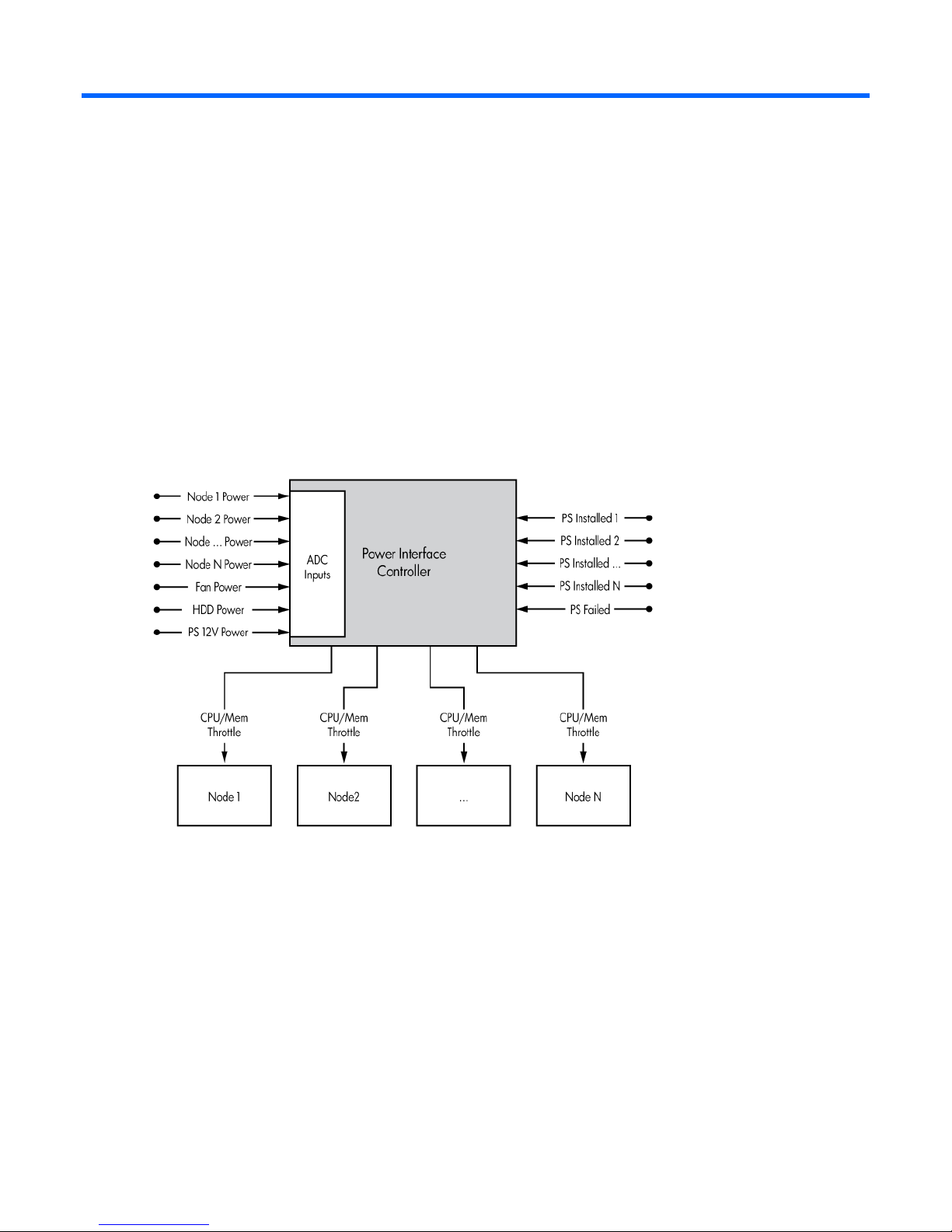
Power Interface Controller
embedded microcontroller that provides power metering and throttling capabilities for the entire chassis.
As depicted in the above diagram, the embedded Power Interface Controller is able to monitor power
consumption for all aspects of the 2U/4U chassis and throttle the speed of the processors and memory in
each node within the 2U/4U chassis in order to maintain a pre-set power budget.
Introduction 4
Page 5

Power Control Configuration
Power Interface Control modes
Mode Configuration
0 No Redundancy, Power throttling disabled.
1
2
3
AC Redundancy with throttling- This provides Maximum Performance with PS Redundancy. Power
control logic will only throttle the performance of each node in the case where the chassis only
has one operational power-supply. In this mode, the box is expected to survive an unexpected
AC Power loss to one of the power supplies. (This is the default.)
Full AC/DC Redundancy- Power control logicl maintains a power cap value at the DC rating of a
single power supply (Example: 460W, 750W, or 1200W), such that if one power supply
experiences a DC or AC failure, the chassis remains on-line and operational. User must be
cognizant of the minimum power consumption of the chassis and this must be less than the rating
of a single power supply. Running the PPIC utility with the -c option provides this information.
User Configurable- User specifies the power envelope for the chassis, within the capabilities of
the HW installed. Before setting this mode, it is required that the user run the PPIC utility with the c option in order to calibrate the minimum and maximum power consumption envelope for the
chassis. For accuracy,run the -c command after installing and configuring all HW, and bringing
all nodes on-line in the chassis. In order to avoid punitive performance due to throttling,do not set
a User configurable power cap limit value below or within 20% of the minimum power value
provided by the PPIC -c option.
Note: The User Configurable power capping mode is included with the LO100/iLO 3 Advanced
Pack.
Power Control Configuration 5
Page 6

Supported OSs
OS utility versions
Versions of this utility are available for Microsoft Windows Server OS (2008 and 2008 R2) and Linux OS
(RHEL5 and SLES11) with the requirement that the OS IPMI Driver be installed.
Supported OSs 6
Page 7

PPIC Utility and Usage
Command line utility
HP provides a simple command line utility, called PPIC, for reading and configuring the power control
logic of the SL product lines. Running the PPIC utility from the command line without any command-line
options provides a dump if the usage as shown below.
The PPIC utility must only be executed through one server node per chassis.
HP ProLiant Power Interface Configuration Utility v.1.2.0.0
Copyright (c) 2003, 2010 Hewlett-Packard Development Company, L.P.
Usage: ppic1.2.0.0 [Options]
options:
-d Display and Log Status and Config
-v verbose data displayed
-s Set Power Config Mode
-m<mode>
00= No Redundancy Mode (Power Throttling Disabled)
01= AC Redundancy with Throttling Mode (Max Performance w/
Redundancy)
02= Full AC/DC Redundancy Mode
03= User Configurable Mode
-l<power limit> (in Watts - Required for Mode 03)
-c Calibrate and Display Power Limits
-p Poll and Log Power Readings
-f<frequency> (in secs)
-t<duration of run> (in secs)
-v verbose data logged
-b<i2c bus> override i2c bus #, default = 4
-o<name> override output log filename
(default log filename= ppic.log)
"Usage" screen output for PPIC
PPIC Utility and Usage 7
 Loading...