

Page 1
© 2008 Hewlett-Packard GmbH (SAPCC Germany)
The information contained herein is subject to change without notice
SAP
Master Configurations with HP ProLiant Servers
Heinrich Gschwandner
SAP Competence Center Germany
January 2009
Page 2
12/17/2008
© 2008 Hewlett-Packard GmbH (SAPCC Germany)
The information contained herein is subject to change without notice
2
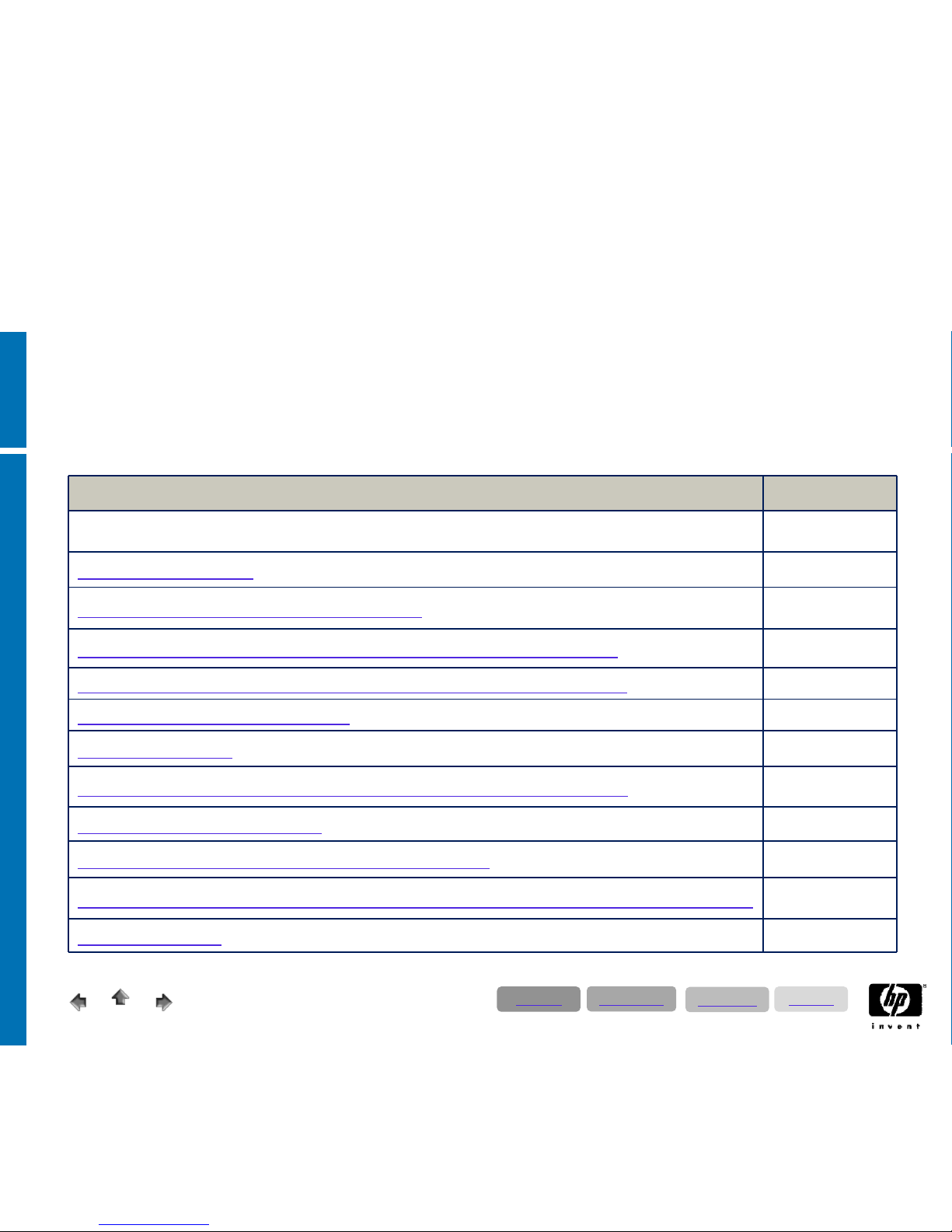
Directory 1:
T-shirt sizings for SAP ERP & SAP Business Suite
Subject Slide Nr.
Directory 2 - 4
Preface / introduction
5 - 9
Definition of SAP ERP & SAP Business Suite
10 – 11
SAP ECC 6.0 & Customer Relationship Managemtent / CRM 2007
13 – 14
Service Specifications & Categories for SAP ECC 6.0 & CRM 2007
15 – 16
SAP Business Intelligence / BI 7.0
17 – 18
SAP BI -Accelerator
19 – 22
SAP Process Integration / PI 7.1 (before XI / Exchange Information)
23 – 24
SAP Enterprise Portal / EP 7.0
25 – 26
SAP Supplier Relationship Management / SRM 5.0
27 – 28
SAP Supply Chain Management / SCM ; Advanced Planer & Optimizer / APO 4.1
29 – 30
Solution Manager
31
Directory
Applications
Technology
Solutions
Page 3
12/17/2008
© 2008 Hewlett-Packard GmbH (SAPCC Germany)
The information contained herein is subject to change without notice
3
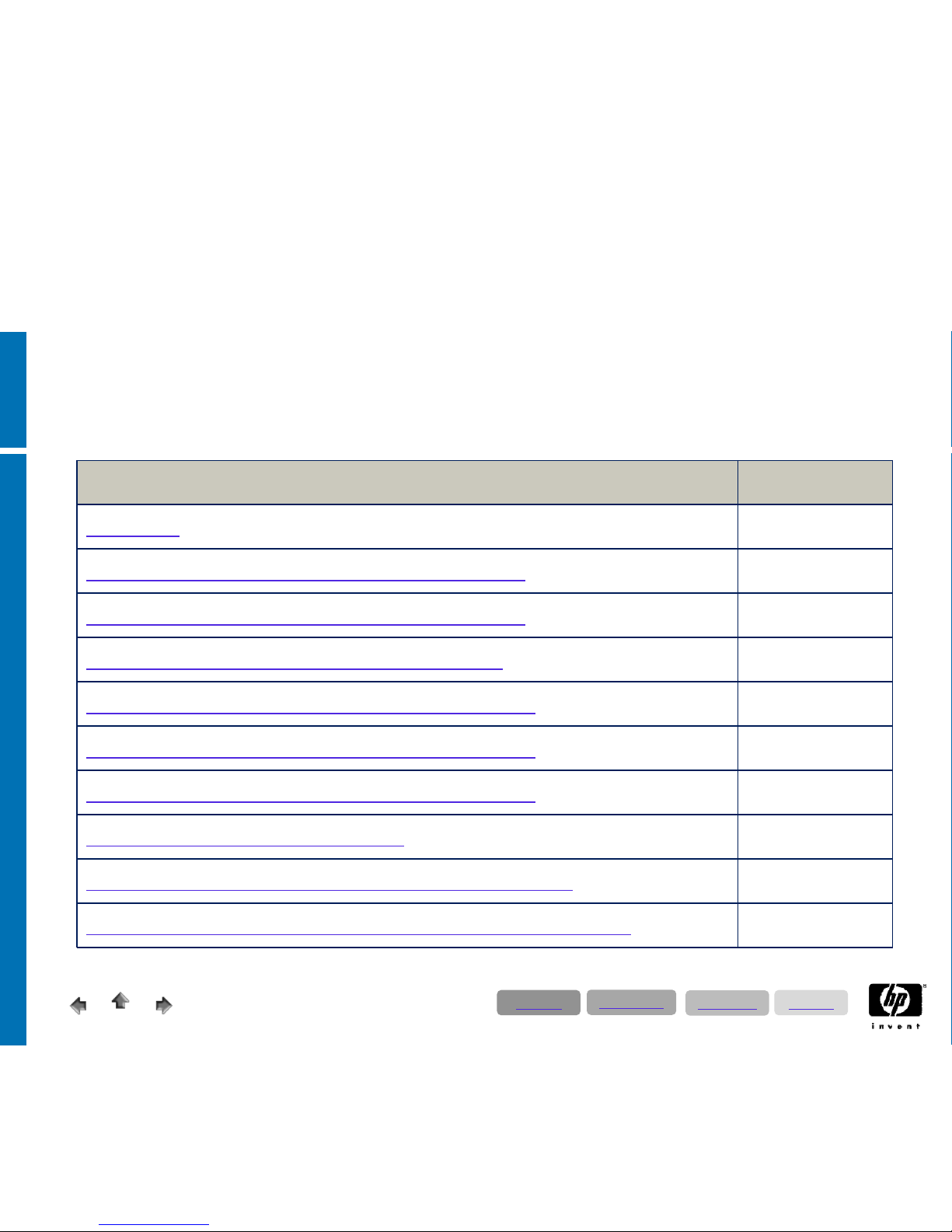
Directory 2:
Server & StorageWorks Hardware Technology
Subject Slide Nr.
Introduction 33
Intel ProLiant 2 Processor / Socket Server (Quad Core)
34
Intel ProLiant 4 Processor / Socket Server (Quad Core)
35
Intel ProLiant 4 Processor / Socket Server (Six Core)
36
AMD ProLiant 2 Prozessor / Socket Server (Quad Core)
37
AMD ProLiant 4 Prozessor / Socket Server (Quad Core)
38
AMD ProLiant 8 Prozessor / Socket Server (Quad Core)
39
StorageWorks entry level – MSA based
40
StorageWorks Enterprise Solution (EVA 4400, 6100, 8100)
41 – 42
HP Storage & Backup Solutions for business continuity & availability
43
Directory
Applications
Technology
Solutions
Page 4
12/17/2008
© 2008 Hewlett-Packard GmbH (SAPCC Germany)
The information contained herein is subject to change without notice
4
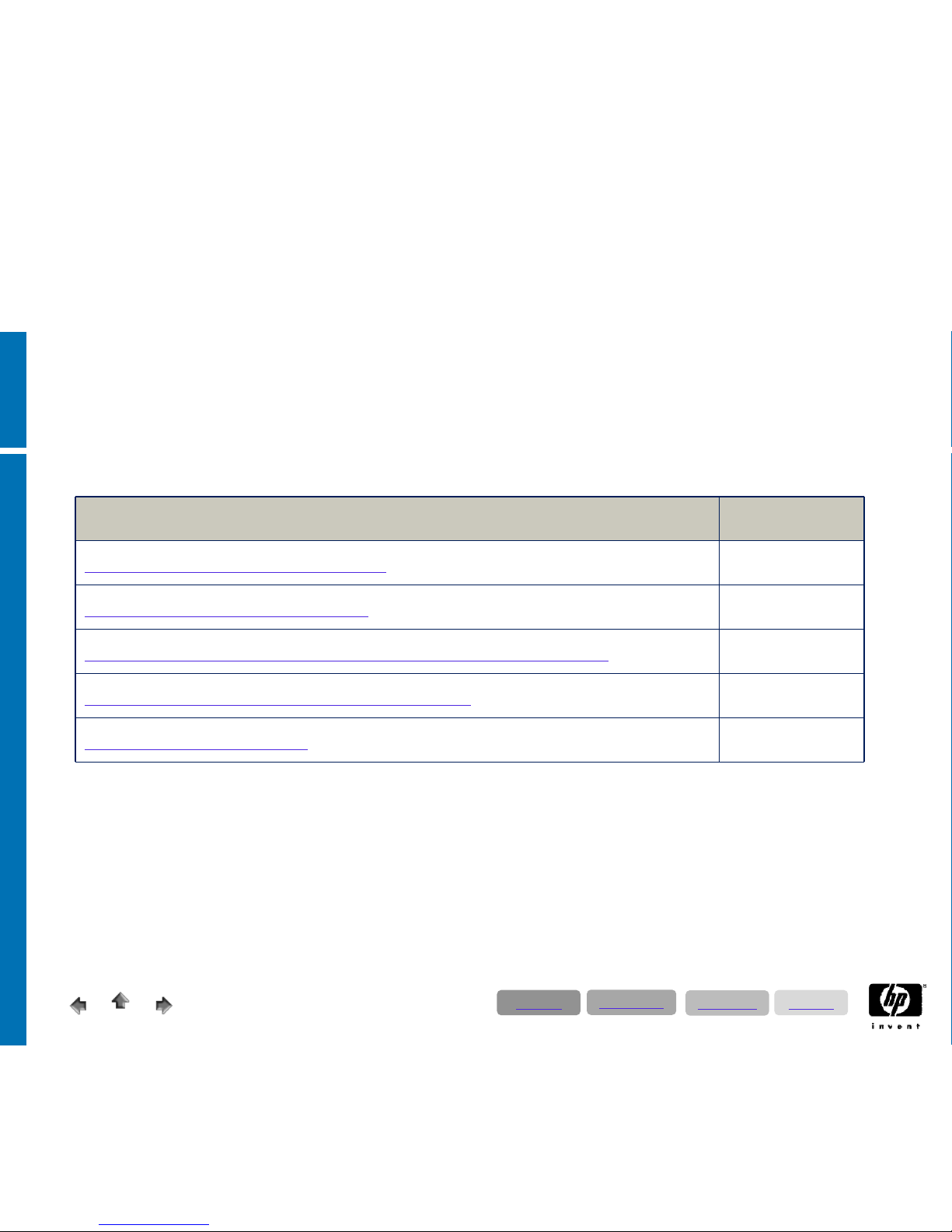
Directory 3:
HP SAP Landscapes / Solutions
Subject Slide Nr.
Basic informations to SAP landscapes 45
ERP cluster scenario with EVA4400
46
ERP cluster scenario for mirrored data centers with two EVA8100
47
SAP business suite with blades & and EVA4400
48
Virtualized SAP Landscapes
49
Directory
Applications
Technology
Solutions
Page 5
12/17/2008
© 2008 Hewlett-Packard GmbH (SAPCC Germany)
The information contained herein is subject to change without notice
5
Preface
For effective use of this slide set, we strongly recommend to read through the preface!
•
This slide set is primarily intended as a working tool for the SAP Competence Center; providing support for
our partners and customers.
•
Each of the SAP solutions presented is based on two certified HP ProLiant servers. These proposals are
intended to provide a general reference only; however, these proposals do not replace customer specific
sizing!
•
Mixing the different SAP applications might require different server & storage configurations as proposed in
this guide.
•
This is not a marketing document to position different HP platforms with regard of SAP configurations – it is a
tool for daily sales work.
•
For sizing requests please contact:
Hewlett-Packard GmbH
SAP Competence Center
Altrottstr. 31
D-69190 Walldorf
Germany
Phone: +49 (0) 170 783 35 25 or
+49 (0) 40 638 08 - 141
e-mail:
[email protected] – German Sizing Account
– EMEA Sizing Account
– AMA Sizing Account
Directory
Applications
Technology
Solutions
Page 6
12/17/2008
© 2008 Hewlett-Packard GmbH (SAPCC Germany)
The information contained herein is subject to change without notice
6
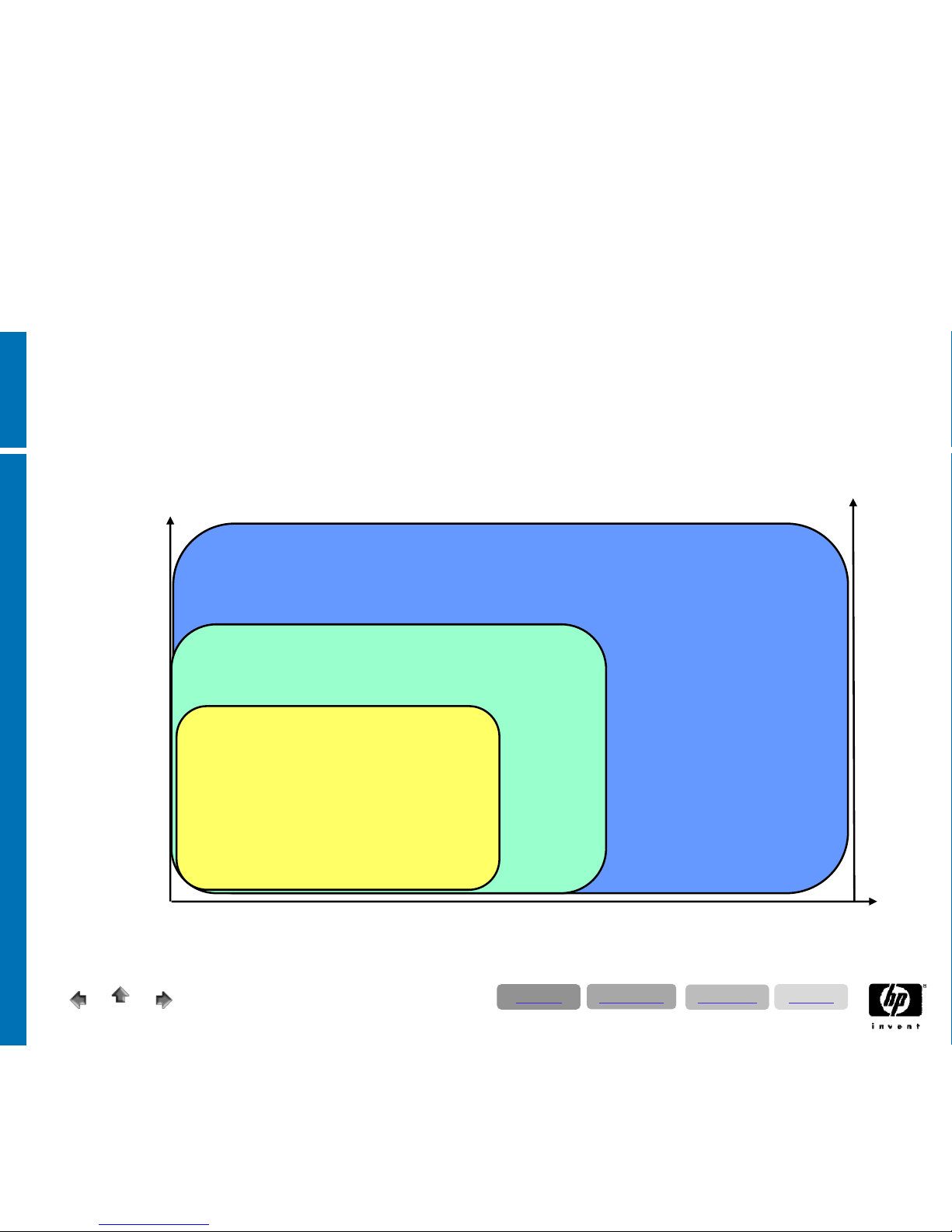
SAPS
Availability
Proliant Windows/Linux/Solaris*
IA64 Windows/Linux
IA64/HP-UX
250k
100k
+ RAS
Standard OS
Standard HA
+ SGeSAP
+ WLM
50k
DB Size
5TB
1 TB
20TB
*some restrictions apply,….
Preface: Platform Guide for SAP Solutions
Directory
Applications
Technology
Solutions
Page 7
12/17/2008
© 2008 Hewlett-Packard GmbH (SAPCC Germany)
The information contained herein is subject to change without notice
7
• Server Design & Performance:
• The term CPU is equivalent with socket or processors such as a two CPU Quad Core server contains 8 Cores.
• For availability and performance reasons, HP recommends for SAP ProLiant servers a minimum configuration of two
processors or sockets.
• Depending on customer requirements in relation to data throughput (LAN; SAN); memory extension and scalability of
the server it might be advantageously to choose 4-socket servers as they provide more PCI-slots (data throughput) and
memory slots as 2-socket machines.
• In smaller system landscapes, we offer more powerful server systems than required by SAPS. With Intel Xeon or AMD
Quad Core technology the systems offer huge CPU reserves.
• Although one CPU might be able to cover system requirements of smaller systems (especially for non productive
environments), we recommend using two CPUs.
• For clarification – one 2.0 GHz Quad Core CPU costs about 250€ list price. Also bear in mind that two
CPUs improve server memory addressing and redundancy!
• The sizes of the test- and quality assurance systems are related to the size of the given production system and serve as a
general guide.
• The database sizes are based on SAP CC experiences.
• We strongly recommend to get in touch with our StorageWorks specialists in our SAP CC regarding the following topics:
• Selection of appropriate storage array like SWD All-in-One, storage blades, MSA, EVA or even XP, based on
customer requirements
• Backup & restore and availability concepts considering recovery point, recovery time and general availability
• Consolidation of backup and the various associated topics like tape backup, virtual tape libraries, disk-assisted
backup, local and remote mirroring including cluster integration with CLX or MetroCluster
• Value-added tax (sales tax) is not included in the prices (see separate excel worksheet) listed.
Preface
Directory
Applications
Technology
Solutions
Page 8

12/17/2008
8
© 2008 Hewlett-Packard GmbH (SAPCC Germany)
The information contained herein is subject to change without notice
Preface: SAP System Landscapes – Basics!
•
When running business critical processes on an SAP production system, you have to customize
and develop on a separate SAP system, called the development system. Upon completion of
a change, the change needs to be transferred to a
•
quality assurance system (also called test system), where the changes will be tested with
master data, ported from the production system. When it has been verified that the changes
function correctly, these changes will be ported from the development system to the production
system. Consequently, SAP recommends the implementation of at least three systems in every
SAP project.
•
On big systems, we recommend the additional installation of a lab system for testing new
software versions and operational concepts. Another critical task handled by the lab system is to
verify if backups from the production system can be restored, implying that the
database size needs to be the same as that on the production system.
•
If your production system is deployed on a cluster, SAP strongly recommends the
installation of a lab system which is also operated in a cluster.
•
HP recommends to provide high availability for production systems and to use a cluster generally
for 300 users and above.
Directory
Applications
Technology
Solutions
Page 9
12/17/2008
9
© 2008 Hewlett-Packard GmbH (SAPCC Germany)
The information contained herein is subject to change without notice
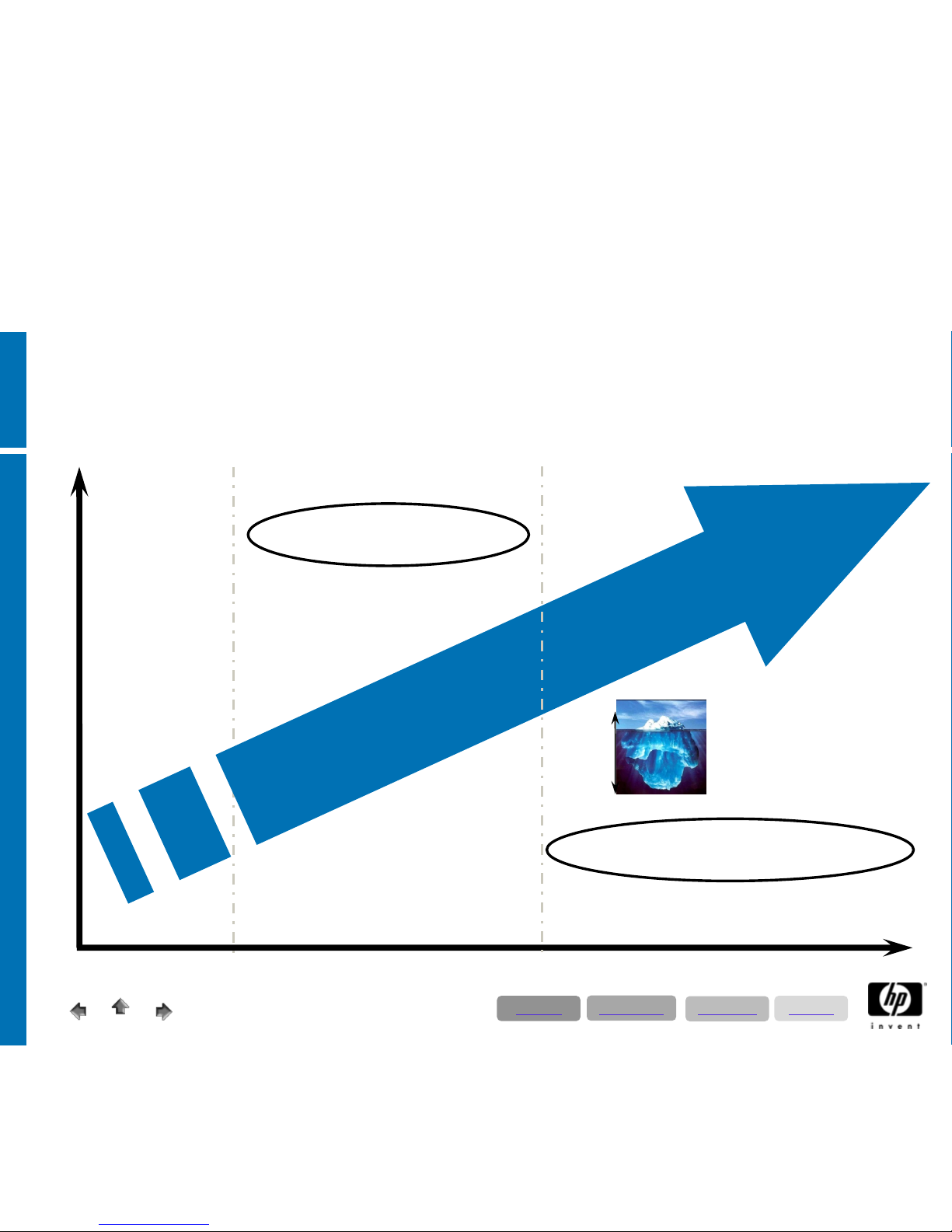
Preface: Guideline for HP Services
IT availability requirements
Business requirements
Proactive 24
Service
Critical Service
Ensure high
availability
Increased
effectiveness
Enhanced support
services
Achievement of
business objectives
through continual
improvement of IT
service quality
Mission Critical
Partnership
99,5 % 99,9 %
99,97 %
98,5 %
Reactive
Services
Emergency
support
Proactive Services
Mission Critical Services
20%
80%
Directory
Applications
Technology
Solutions
Page 10
12/17/2008
10
© 2008 Hewlett-Packard GmbH (SAPCC Germany)
The information contained herein is subject to change without notice
SAP ERP – the components
•
SAP ERP Central Component (current Release ECC 6.0)
− The former SAP R/3 will end in year 2012; the Netweaver based follow up Bundle
ERP will offer Service Oriented Architecture. The technical replacement of SAP R/3
Enterprise is SAP ECC (Enterprise Central Componets).
•
SAP Business Intelligence - BI (SAP Netweaver)
•
SAP Enterprise Portal - EP (SAP Netweaver)
•
SAP Process Integration PI before XI (SAP Netweaver)
•
SAP Web Application Server (SAP Netweaver)
•
SAP Supplier Relationship Management - (only self-service-procurement
scenario)
•
SAP Strategic Enterprise Management
•
SAP E-Recruitment (engine for extra listprice)
•
SAP Learning Solution (engine for extra listprice)
•
SAP Financial Supply Management (engine for extra listprice)
•
Employee Self-Services / Manager Self-Services
N
o
t
p
art
o
f
this s
o
l
u
t
io
n
ma
p
Directory
Applications
Technology
Solutions
Page 11

12/17/2008
11
© 2008 Hewlett-Packard GmbH (SAPCC Germany)
The information contained herein is subject to change without notice
SAP Business Suite & SAP ERP
SAP ERP
Analytics
Financials
Human Capital Management
Operations
Coporate Services
mySAP Business Suite
SAP SRM
SAP PLM
(not part of this solutions map)
SAP CRM
SAP SCM
SAP Netweaver
Directory
Applications
Technology
Solutions
Page 12
© 2008 Hewlett-Packard GmbH (SAPCC Germany)
The information contained herein is subject to change without notice
The SAP Core Applications & Corresponding
T-Shirt Sizing recommendations
Page 13

12/17/2008
13
© 2008 Hewlett-Packard GmbH (SAPCC Germany)
The information contained herein is subject to change without notice
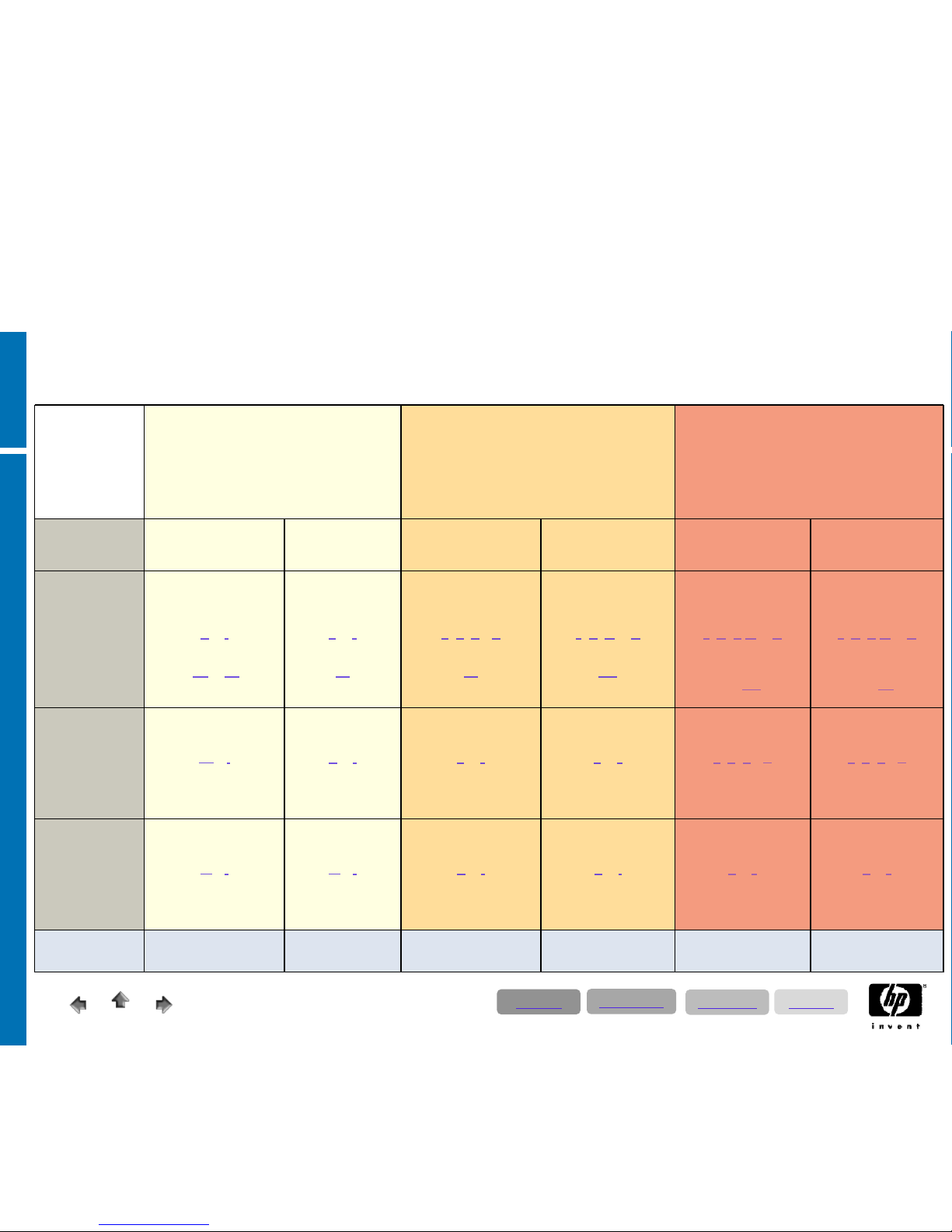
• The following block diagram is user based. A user based sizing can be done by HP Sizer or SAP
Quicksizer. Quantity based (requires expert know-how) sizing can only be done by SAP
Quicksizer or SAP CC. The description refers to concurrent users; that means SAP users effective
working on the system and not the number of SAP licenses or logged-on users. This is a good
approximation; and this is verified by our experience; is a ratio of one concurrent user for two SAP
licenses (50%).
• As every SAP system has to be customized to the individual customer requirements, it creates
variable load. To provide for adequate system reserves, we estimate a minimum of 10 SAPS (SAP
Application Performance Standard) for each concurrent user that is equivalent to a medium SAP SD
(Sales & Distribution) user.
• The performance of the servers (CPUs) has increased during the last years; you have to put
adequate memory into the servers. A rational starting base for production systems is to calculate 4until up to 8 GB per Core. Be aware that you only get the feasible SAPS values of the respective
servers when using sufficient memory (for instance 32 GB for 2- socket- & 64 GB for 4- socket
servers).
• The size of the database is based on our experience and best practices. On smaller databases we
have to prioritize performance instead of capacity.
SAP ECC & CRM Sizing Considerations
Directory
Applications
Technology
Solutions
Page 14
12/17/2008
© 2008 Hewlett-Packard GmbH (SAPCC Germany)
The information contained herein is subject to change without notice
14
Comfort Sizing Area
• Generous measured CPU resources by 2-Processor Quad
CoreTechnology
• Easy scalable by increasing the memory in the servers
• For high availability requirements cluster & SAN storage
recommended
• In the majority of cases user based sizing
• HP services recommended (for those countries where SAP
TS Services are available)
Advandced Sizing Area
Contact SAP CC !
• High availability – cluster & SAN mandatory
• Quantity / special sizing recommended
• Desaster tolerance to be discussed
• HP services mandatory (for those countries where
SAP TS Services are available)
Expert Sizing Area
Contact SAP CC !
• Detailed customer consulting mandatory
• High availability – cluster & SAN mandatory
• Quantity / special sizing mandatory
• Desaster tolerance recommended / mandatory
• HP services mandatory (for those countries where
SAP TS Services are available)
Concurrent
medium SD
Users
200 User 500 User 900 User 1800 User To be defined To be defined
Database Server
Production
System(Central
System)
respective
NetWeaver
2004s cluster
incl. App. Server
2 CPU
16 GB RAM
Server char.
A
or I
Storage char.
A2
or B1
~400GB DB net
2 CPU
32 GB RAM
Server char.
B
or J
Storage char.
B2
~1,0 TB DB net
2/4 CPU
64 GB RAM
Server char.
C
; K; D or L
Storage char.
B2
~1,8 TB DB net
4 CPU
128 GB RAM
Server char.
E
; G; M or O
Storage char.
D1
~ 3,6 TB DB net
Depends on detailled
Sizing
Server char.
F
; N; H; P or Q
Storage char.
>= D1
Depends on detailled
Sizing
Server char.
F
; N; H;Por
Q
Storage char.
>= D2
Test- & Quality
Assurance
System (Central
System)
2 CPU
16 GB RAM
Server char.
A
or I
Internal Storage or SAN
DB size as prod.
2 CPU
16 GB RAM
Server char.
A
or I
SAN
DB size as prod.
2 CPU
32 GB RAM
Server char.
B
or J
SAN
DB size as prod.
2 CPU
32 GB RAM
Server char.
B
or J
SAN
DB size as prod.
2/4 CPU
64 GB RAM
Server char.
C
; K; D or L
SAN
DB size as prod.
2/4 CPU
64 GB RAM
Server char.
C
; K; DorL
SAN
DB size
as prod.
Development
System (Central
System)
2 CPU
16 GB RAM
Server char.
A
or I
Internal Storage or SAN
~100GB DB net
2 CPU
16 GB RAM
Server char.
A
or I
SAN
~200GB DB net
2 CPU
16 GB RAM
Server char.
A
or I
SAN
~200GB DB net
2 CPU
16 GB RAM
Server char.
A
or I
SAN
~200GB DB net
2 CPU
32 GB RAM
Server char.
B
or J
SAN
~200GB DB net
2 CPU
32 GB RAM
Server char.
B
or
J
SAN
~200GB DB net
Recommended
Service
Support Plus 24 Support Plus 24 Proactive 24 Proactive 24 Critical Service Critical
Service
SAP ECC 6.0 & CRM 2007; T-Shirt Server Sizing Categories
Directory
Applications
Technology
Solutions
Page 15

12/17/2008
© 2008 Hewlett-Packard GmbH (SAPCC Germany)
The information contained herein is subject to change without notice
15
Service Specifications
Directory
Applications
Technology
Solutions
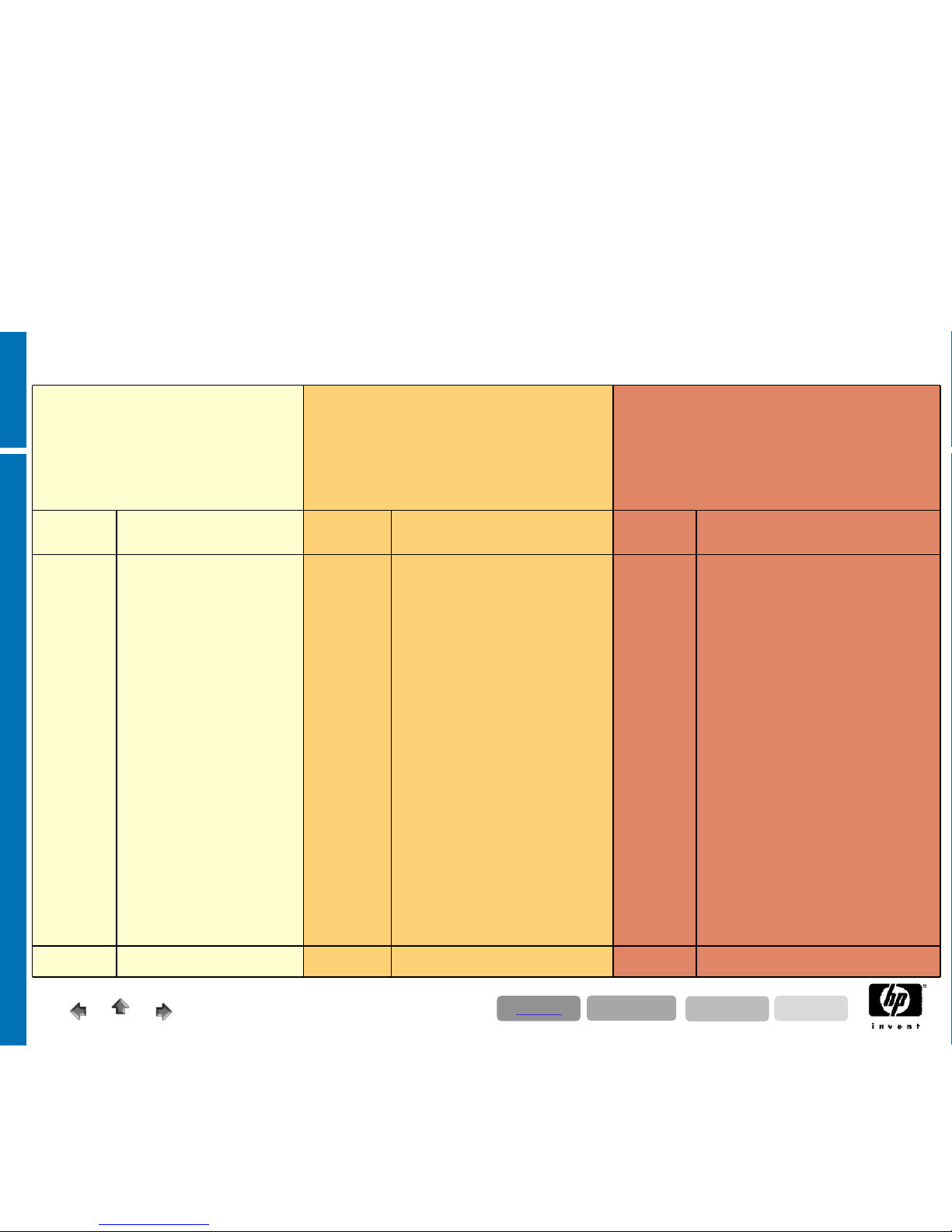
The key to improving IT operational effectiveness is to coordinate activities across all the components of your infrastructure.
HP Service includes consistent proactive and reactive services across the whole infrastructure, including hardware, software
and specialized solution support for SAP environments.
Reactive support (Support Plus 24) is delivered through HP’s global support infrastructure. Reactive Support Services
focus on fast and full restoration in the event of a failure, so any problems are fixed quickly and cost-effectively. HP provides
industry-leading call-to-resolution commitments for hardware, including a six-hour call-to-repair commitment for hardware.
HP’s Global Solution Centers are located in key points around the globe, so they can work on any issues 24x7, 365 days a
year.
Proactive onsite support services, delivered by availability and technical experts at your site, help you continually
improve your IT operations. These services are based on industry standards for IT service management, such as ITIL, and HP’s
own experience in managing mission critical business applications. With a proactive approach and remote support
technology HP helps you identify, diagnose and resolve problems before they cause downtime, through monitoring and
analysis of your mission critical environment.
HP Proactive 24 Service helps to improve the stability, availability, and operational effectiveness of your IT environment
through a combination of industryleading technical assistance and proactive account services that cover the entire IT
infrastructure.
HP Critical Service integrates proactive and reactive services to improve availability and performance for businesses where
downtime can be disastrous. Critical Service combines proactive onsite expertise from HP-certified high availability experts,
24x7 priority assistance from HP’s worldwide missioncritical response centers, and proactive remote support tools.
Depending on the size and the complexity of an SAP environment, we propose here a generally adequate service level.
We highly recommend getting in touch with a Service Solution Architect to select and configure the specifically appropriate
service level.
• For Germany, please send service requests to [email protected].
• For EMEA, please send service requests to [email protected]
• For AMA, please send service request to [email protected]
Page 16
12/17/2008
© 2008 Hewlett-Packard GmbH (SAPCC Germany)
The information contained herein is subject to change without notice
16
Comfort Sizing Area
• Generous measured CPU resources by 2-Processor Quad
CoreTechnology
• Easy scalable by increasing the memory in the servers
• For high availability requirements cluster & SAN storage
recommended
• In the majority of cases user based sizing
• HP services recommended (for those countries where SAP
TS Services are available)
Advandced Sizing Area
Contact SAP CC!
• High availability
–
cluster & SAN mandatory
• Quantity / special sizing recommended
• Desaster tolerance to be discussed
• HP services mandatory (for those countries where
SAP TS Services are available)
Expert Sizing Area
Contact SAP CC !
• Detailed
customer consulting mandatory
• High availability – cluster & SAN mandatory
• Quantity / special sizing mandatory
• Desaster tolerance recommended / mandatory
• HP services mandatory (for those countries where
SAP TS Services are available)
HP
Service
Deliverables
HP
Service
Deliverables
HP
Service
Deliverables
Support
Plus 24
Service Window: 24 x 7
Onsite Hardware Support
Software Support
Software Updates
Escalationmanagement
HW 4h react
SW 4h react
Proactive
24
SAP trained Account Support Team
- Account Support Plan
- Support Activity Reviews
- Review Meetings
Proactive
- Patch assistance for OS and Storage FW
- Patch assistance for database and SAP
software
- Quarterly Trend analysis & report
- Capacity planning
Reactive
- Single point of contact
- Accelerated HP-SAP troubleshootng and
escalation process
- Remote access via SAP/OSS infrastructure
- SAP internal information access
Onsite Hardware Support
Software Support
Software Updates
Escalationmanagement
HW 4h react
SW 2h react
Critical
Service
SAP trained Account Support Team
- Account Support Plan
- Support Activity Reviews
- Review Meetings
Proactive
- Availability Checkup
- Availability Healthcheck
- Quarterly Activity reviews
- HW preventative maintenance
- Patch assistance for OS and Storage FW
- Patch assistance for database and SAP
software
- Monthly Trend analysis & report
- Capacity planning
Reactive
- Single point of contact
- Accelerated HP-SAP troubleshootng
and
escalation process
- Enhanced Parts Inventory
- Remote access via SAP/OSS infrastructure
- SAP internal information access
Onsite Hardware Support
Software Support
Software Updates
Escalationmanagement
HW 4h Call to Repair
SW react at once
Availability 98,5% Availability 99,5% Availability 99,9%
SAP ECC 6.0 & CRM 2007; Service Categories
Directory
Applications
Technology
Solutions
Page 17
12/17/2008
© 2008 Hewlett-Packard GmbH (SAPCC Germany)
The information contained herein is subject to change without notice
17
• The SAP BI configuration examples represent 2 different sizes of BI
landscapes, based on practical experience. The medium configuration
represents the most common type. These examples are intended for a first
budgetary proposal, when no detailed data quantities are available.
• Sizing BI-BPS based on user numbers is not possible!! The 2 examples are
therefore without usage of BI-BPS. For BI-BPS data quantities are
essential!
• A well-founded BI sizing has to be done by defining detailed data quantities
for the SAP Quicksizer tool. To determine the data quantities, the operating
departement and the BI consultant need to collaborate closely.
• Rough data estimations without existing blueprint about BI components
(e.g. number of Info Cubes, ODS Objects ..), cannot lead to a valid sizing
result. Even minor changes in the input parameters can change the result
considerably.
SAP BI Sizing Considerations
Directory
Applications
Technology
Solutions
Page 18
12/17/2008
© 2008 Hewlett-Packard GmbH (SAPCC Germany)
The information contained herein is subject to change without notice
18
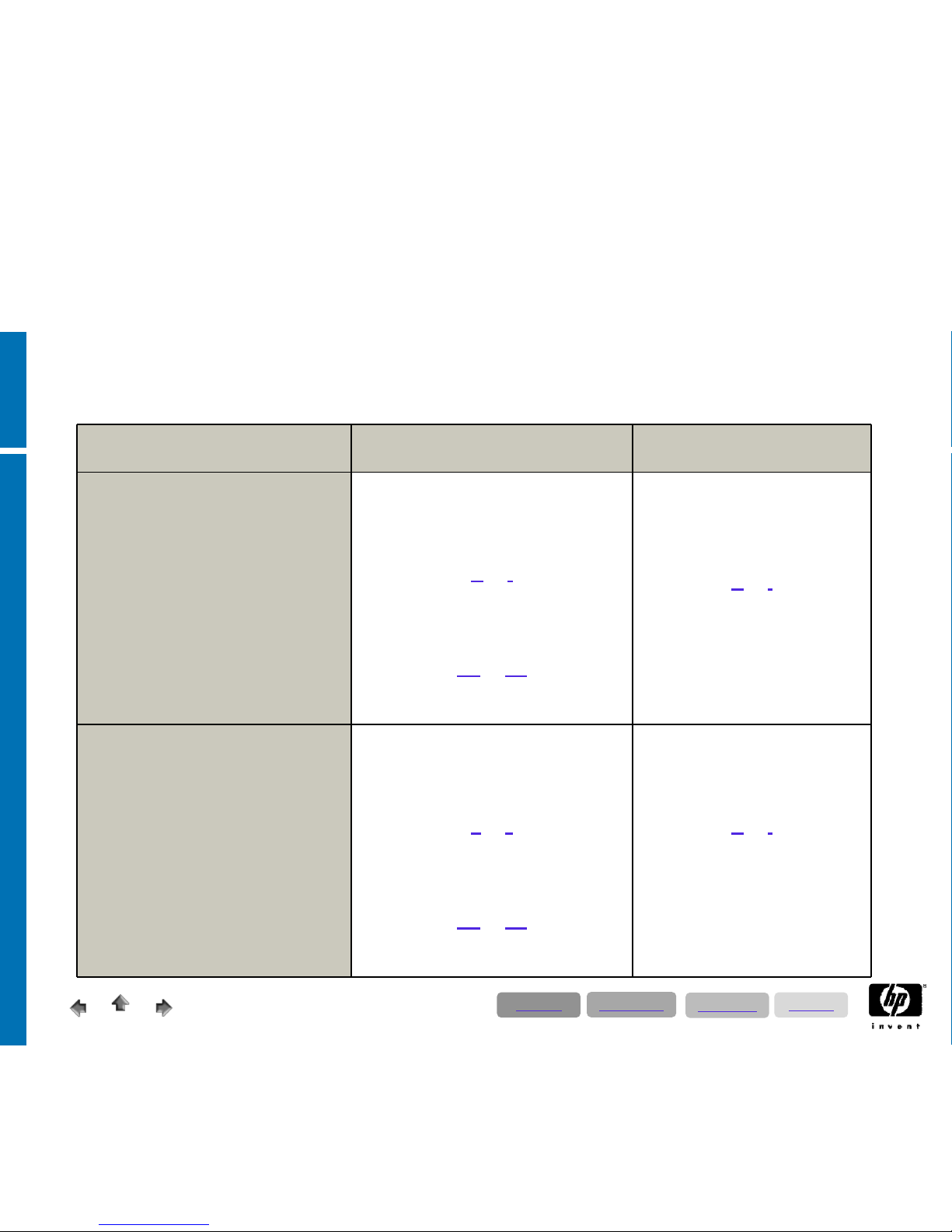
SAP BI – T-Shirt Sizing Categories
Production Environment
Test- & Development
Environment (2 instances)
Small
• Up to 100 concurrent users
• 70% Infos
User
• 20% Executive User
• 10% Power user
• only pre-defined
• Info Cubes
• Non Unicode; for Unicode
add 50% Memory and 30% CPU
• No web reporting included
BI Central System
2 CPU
16 GB RAM
Server char.
A or I
external Storage;
SAN recommended
Storage char.
A2 or B1
200-400 GB DB net
BI Central System
2 CPU
16 GB RAM
Server char.
A or I
external Storage;
SAN recommended
150 GB DB net
Medium
• Up tp
200 concurrent users:
• 70% Infos
User
• 20% Executive User
• 10% Power user
• only pre-defined
• Info Cubes
• Non Unicode; for Unicode
add 50% Memory and 30% CPU
• No web reporting included
BI Central System
2 CPU
32 GB RAM
Server char.
B or J
external Storage;
SAN recommended
Storage char.
A2 or B1
200-400 DB net
BI Central System
2 CPU
16 GB RAM
Server char.
A or I
external Storage;
SAN recommended
200-400 GB DB net
Directory
Applications
Technology
Solutions
Page 19

12/17/2008
© 2008 Hewlett-Packard GmbH (SAPCC Germany)
The information contained herein is subject to change without notice
19
•
There is an ABAP Report on the SAP Marketplace available (SAP
Note-917803) that the customer should run over all Info Cubes
that will be transferred into BIA
•
--> please download the latest version of the ABAP Report from the
SAP Marketplace (SAP Note-917803)
•
This means that the customer has to decide in a first step which
Cubes he will shift into BIA. In a second step he should run the
ABAP Report in detail only over these Cubes (that will be shifted
into BIA!!)
SAP BI Accelerator -
Sizing Considerations
Directory
Applications
Technology
Solutions
Page 20
12/17/2008
© 2008 Hewlett-Packard GmbH (SAPCC Germany)
The information contained herein is subject to change without notice
20
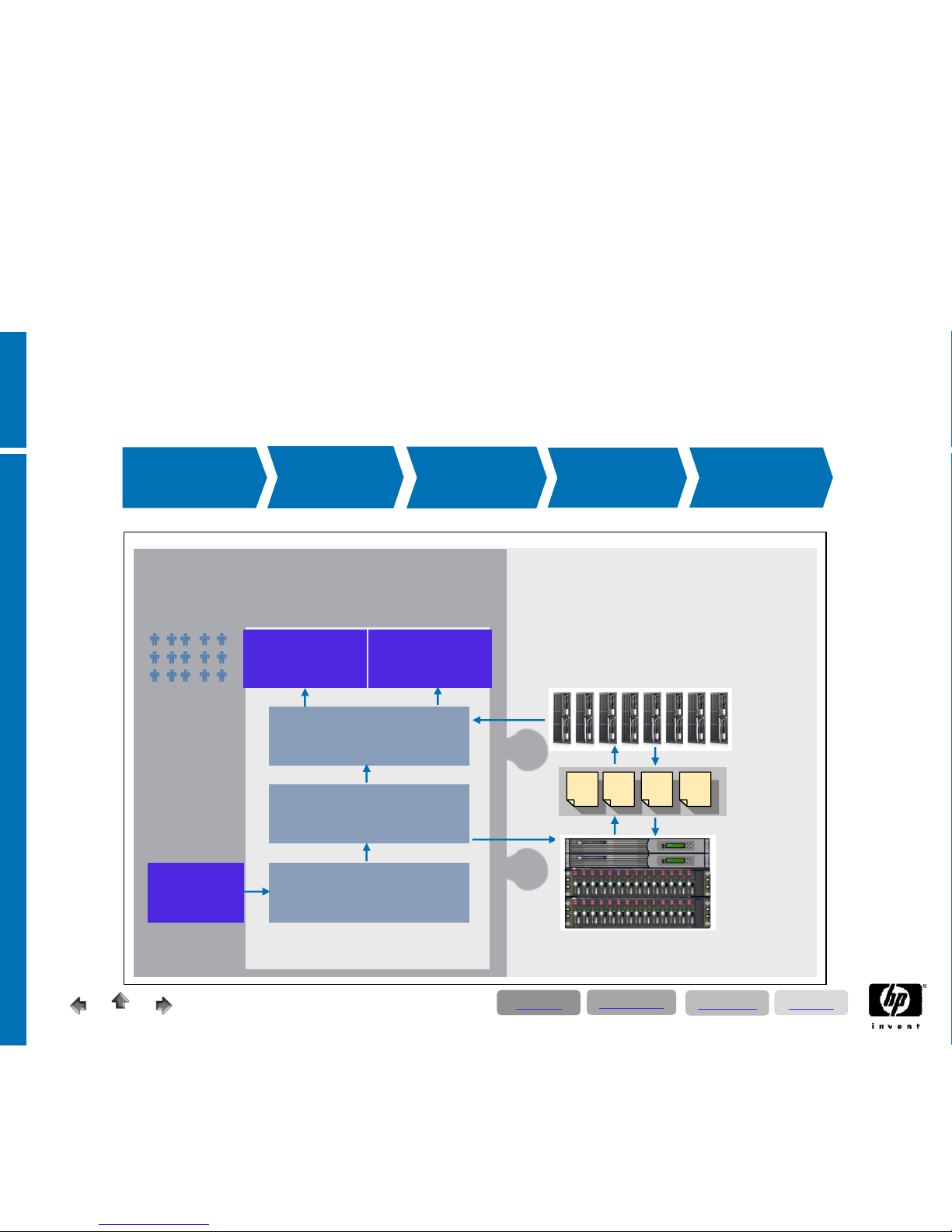
Mission
critical support
BIA
installation
BI system
optimization
BI preparation
BIA
configuration
Any
source
Data acquisition
InfoCubes
Analytic engine
Business
Explorer
Any tool
SAP NetWeaver BI
SAP NW BI environment
HP ProLiant BL460c server blades
HP EVA storage
BIA appliance
HP’s holistic approach to the BI accelerator
Directory
Applications
Technology
Solutions
Page 21
12/17/2008
© 2008 Hewlett-Packard GmbH (SAPCC Germany)
The information contained herein is subject to change without notice
21
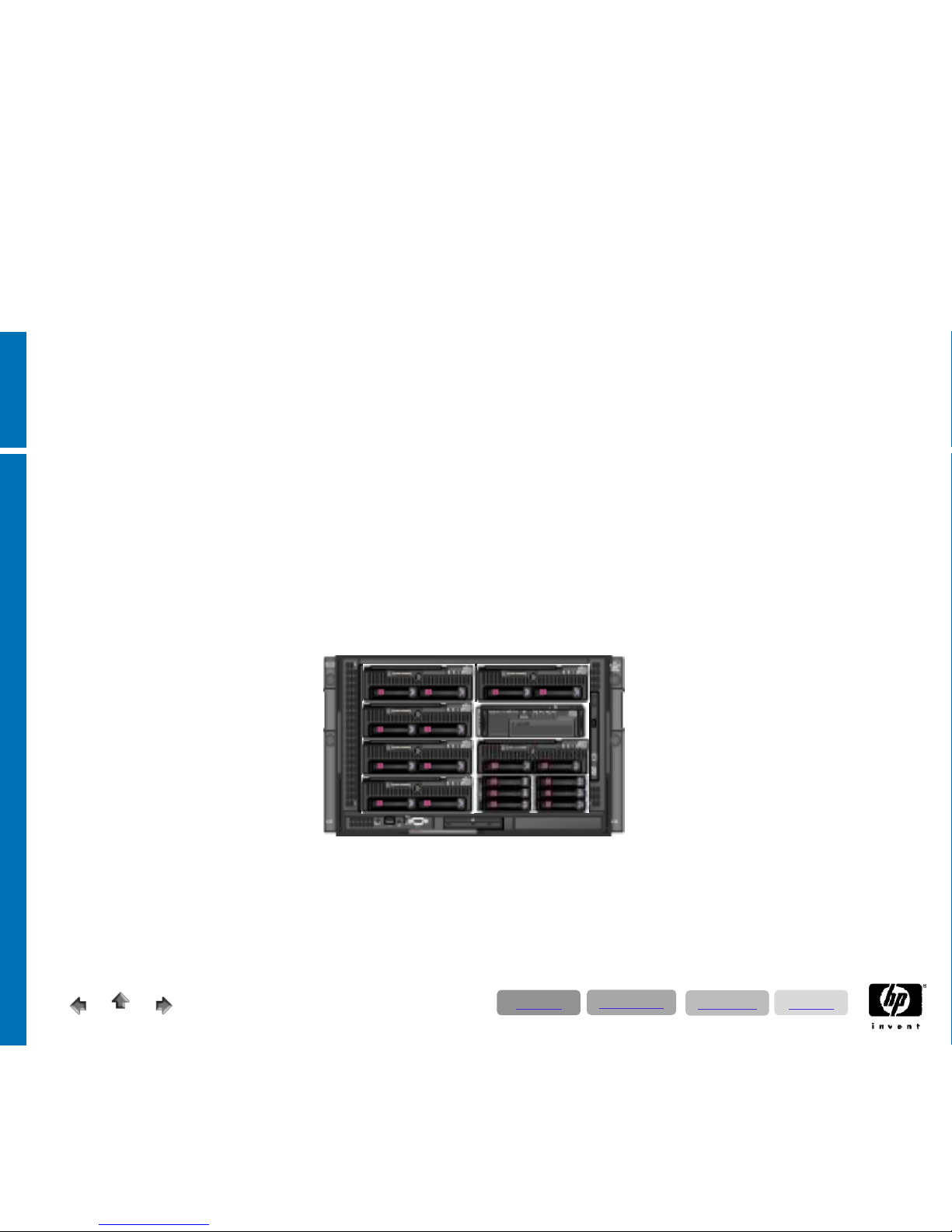
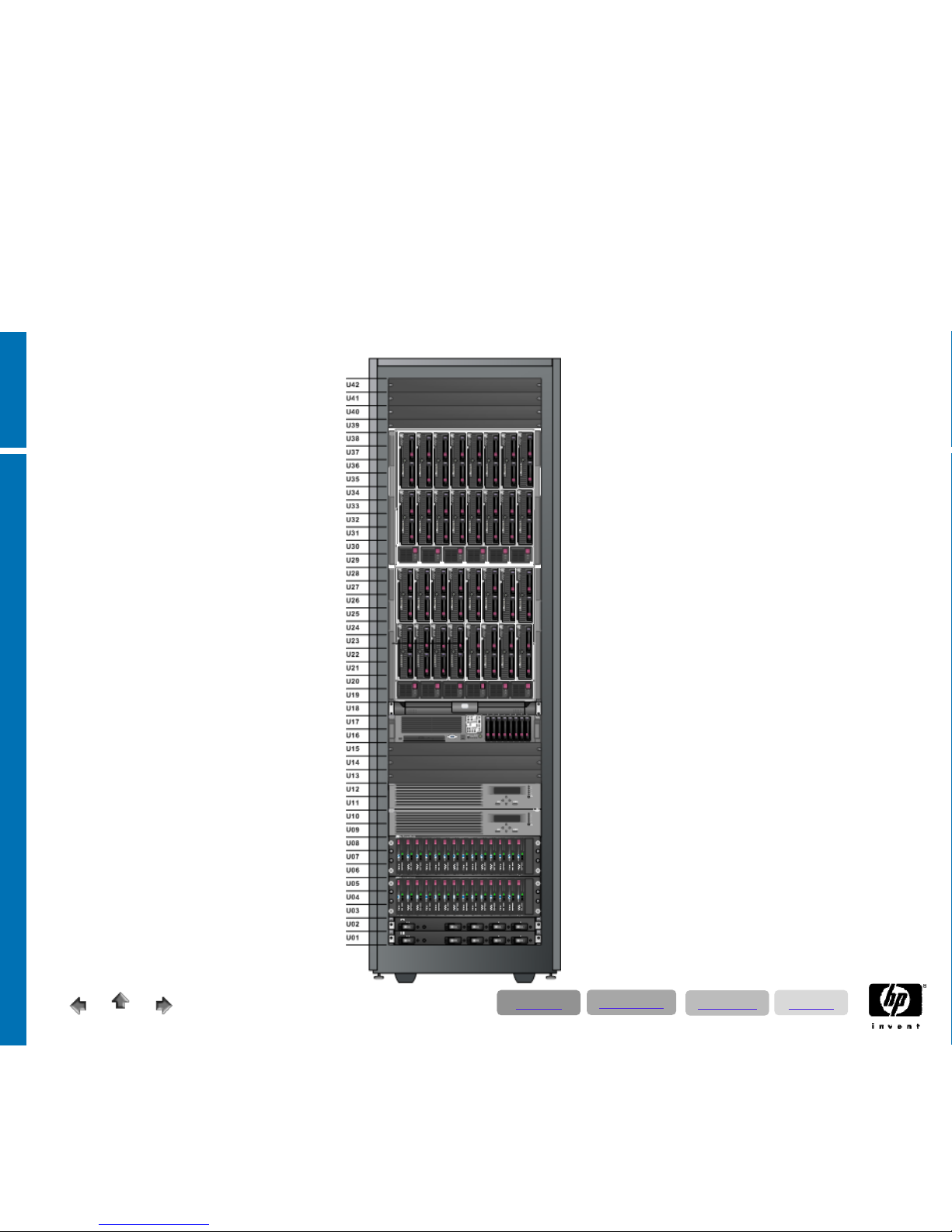
BIA „Light“ Configuration
Start Configuration
1 x AIO Shared Storage
2 x BL460c Quad Core &
8 GB RAM or 16 GB RAM
Scaling
with 2 x BL460c Quad Core &
8 GB RAM or 16 GB RAM
Redundancy
With a spare blade functionality
1 x BL460c Quad Core &
8 GB RAM or 16 GB RAM
Backup Integration
In the enclosure with
a blade tape drive
Directory
Applications
Technology
Solutions
Page 22
12/17/2008
© 2008 Hewlett-Packard GmbH (SAPCC Germany)
The information contained herein is subject to change without notice
22
BIA Standard Configuration
Start Configuration !
1 x EVA Shared Storage
4 x BL460c Quad Core &
16 GB RAM or 32 GB RAM
Upgradable !
with 12 x BL460c Quad Core
&
16 GB RAM or 32 GB RAM
Scaling !
by further
16 x BL460c Quad Core &
16 GB RAM or 32 GB RAM
Directory
Applications
Technology
Solutions
Page 23
12/17/2008
© 2008 Hewlett-Packard GmbH (SAPCC Germany)
The information contained herein is subject to change without notice
23
SAP Exchange Infrastructure (SAP PI/XI)
Sizing Considerations
Following hardware proposals for SAP Exchange Infrastructure refer to SAP PI v7.0
Given SAPS figures relate to mainly asynchronous IDoc message transfers being
processed
The performance corridor given is for orientation purposes only and can not be granted
The given information on approx. back-end SAP system(s) is for orientation purposes
only
Customer-specific implementations of SAP PI may require significantly more resources
Please visit
http://www.service.sap.com/instguidesnw04
s -> Planning -> Exchange Infrastructure
for PDF ‘SAP PI 7.0 High-Availability Guide’
Directory
Applications
Technology
Solutions
Page 24
12/17/2008
© 2008 Hewlett-Packard GmbH (SAPCC Germany)
The information contained herein is subject to change without notice
24
Production Environment
Test- & Development
Environment
Small
• back-end SAP system(s)
• up to 10,000 to 15,000 SAPS
XI Central System
2 CPU
16 GB RAM
Server char.
A or I
Internal Storage or SAN
Storage char.
A2 or B1
200 GB DB net
XI Central System
2 CPU
16 GB RAM
Server char.
A or I
Internal Storage or SAN
200 GB DB net
Medium
• back-end SAP system(s)
• up to 15,000 to 25,000 SAPS
XI Central System
2 CPU
32 GB RAM
Server char.
B or J
Internal Storage or SAN
Storage char.
A2 or B1
200 GB DB net
XI Central System
2 CPU
16 GB RAM
Server char.
A
or I
Internal Storage or SAN
200 GB DB net
SAP Exchange Infrastructure (SAP PI/XI)
T-Shirt Proposals
Directory
Applications
Technology
Solutions
Page 25
12/17/2008
© 2008 Hewlett-Packard GmbH (SAPCC Germany)
The information contained herein is subject to change without notice
25
SAP EP 7.0
• Portal is
Java only
• Load
distribution is about 1:10 (DB vs. SAP)
• Portal sizing is
only user-driven – Sizing parameters are number of users:
• logged
in users for memory sizing
• active
users for CPU Sizing
• about
500 active working users per core (SAP Component only)
• add
one core for the OS and do not forget the 10% DB uplift
• about
6 GB memory per core; alternatively 6-8 GB per 1.000 SAPS
• DB size
is
about 140 GB (without using CM/KM/Trex) independend of the number of
users
• Standard sizing does
not include using of home-grown IViews – only SAP standard
• Front-end
is
a web-based infrastructure (Loadbalancer, ReverseProxy, SSL Termination,
etc.) which is not included in the sizing but has to be considered
Directory
Applications
Technology
Solutions
Page 26
12/17/2008
© 2008 Hewlett-Packard GmbH (SAPCC Germany)
The information contained herein is subject to change without notice
26
Always refer to the current SAP PAM (Product Availability Matrix) for NetWeaver supported platforms and OS - http://service.SAP.com/PAM
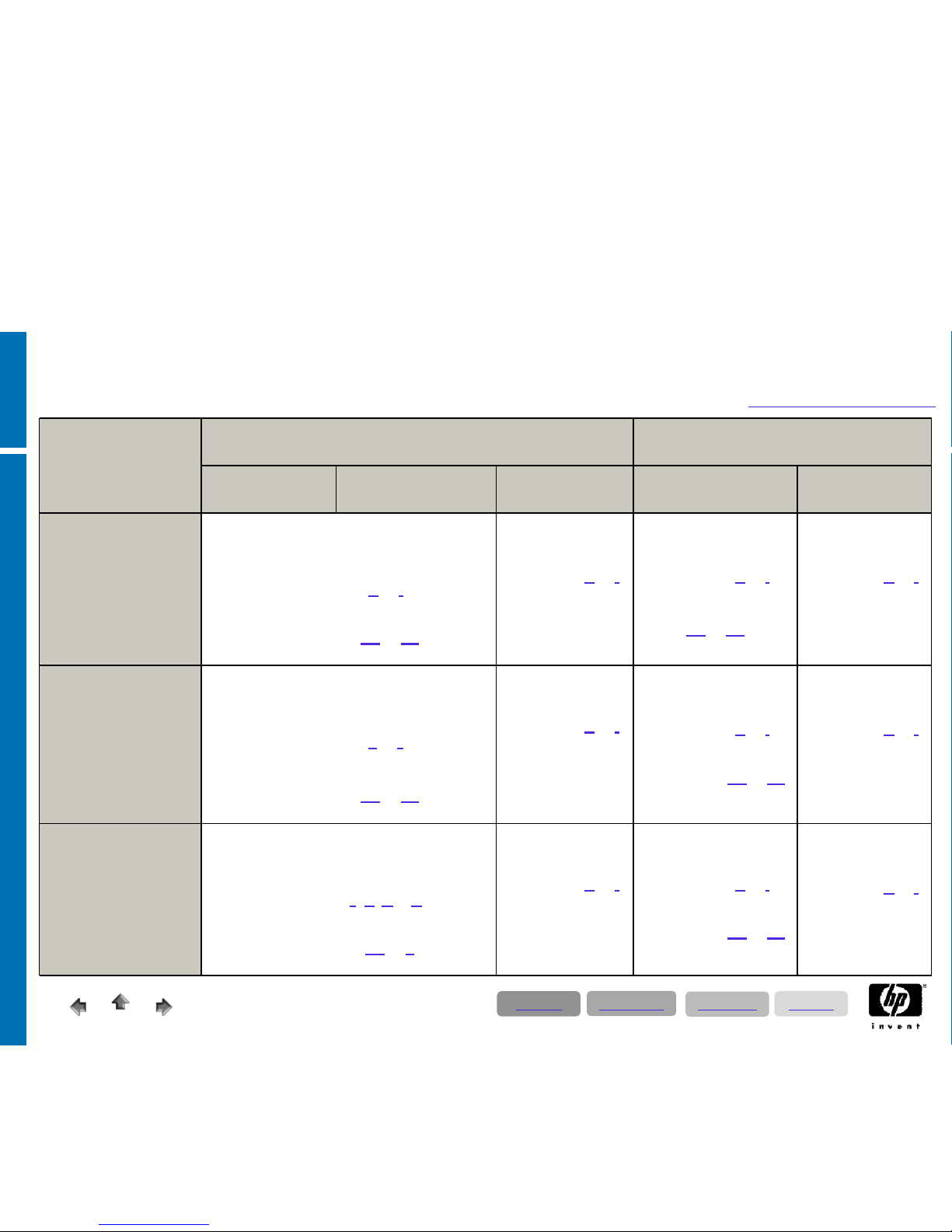
SAP EP – Sizing categories
Production Environment
Test- & Development
Environment
Application Database Trex (optional) Application &
Database
Trex (optional)
Small
1000 concurrent user
Only standard iViews
EP 7.0 central system
2 CPU
16 GB RAM
2 x 146 GB intern
Server char. A
or I
Internal Storage or SAN
Storage char. A2
or B1
140 GB DB net plus content (optional)
2 CPU
16 GB RAM
2 x 146 GB intern
Server char. A
or I
Internal Storage
2 CPU
16 GB RAM
2 x 146 GB intern
Server char. A
or I
Internal Storage or SAN
Storage char.
A2
or B1
146 GB DB net
2 CPU
16 GB RAM
2 x 146 GB intern
Server char. A
or
I
Internal Storage
Medium
2500 concurrent user
Only standard iViews
EP 7.0 central system
2 CPU
32 GB RAM
2 x 146 GB intern
Server char. B
or J
Internal Storage or SAN
Storage char. A2
or B1
140 GB DB net plus content (optional)
2 CPU
16 GB RAM
2 x 146 GB intern
Server char. A
or I
Internal Storage
2 CPU
16 GB RAM
2 x 146 GB intern
Server char. A
or I
Internal Storage or SAN
Storage char. A2
or B1
140 GB DB net
2 CPU
16 GB RAM
2 x 146 GB intern
Server char. A
or
I
Internal Storage
Large
6000 concurrent user
Only standard iViews
EP 7.0 central system
4 CPU
128 GB RAM
2 x 146 GB intern
Server char.
E; G; M or O
Internal Storage or SAN
Storage char. A2
or B
140 GB DB net plus content (optional)
2 CPU
16 GB RAM
2 x 146 GB intern
Server char. A
or I
Internal Storage
2 CPU
16 GB RAM
2 x 146 GB intern
Server char. A
or I
Internal Storage or SAN
Storage char. A2
or B1
140 GB DB net
2 CPU
16 GB RAM
2 x 146 GB intern
Server char. A
or
I
Internal Storage
Directory
Applications
Technology
Solutions
Page 27
12/17/2008
© 2008 Hewlett-Packard GmbH (SAPCC Germany)
The information contained herein is subject to change without notice
27
SAP SRM Sizing Considerations
• The SAP SRM configuration examples represent 2 different sizes of SRM &
CCM landscapes, based on practical experience. The SRM small
configuration and the CCM medium configuration represent the most
common type.
These examples are intended for a first budgetary proposal, when
no detailed data quantities are available.
• A well-founded SRM sizing has to be done by defining detailed data quantities
for the SAP Quicksizer tool. To determine the data quantities, the operating
department and the SRM consultant need to collaborate closely.
• Rough data estimations without existing blueprint about SRM scenarios
(e.g. self service procurement, plan driven procurement, service
procurement …) to be implemented cannot not lead to a valid sizing result.
Even minor changes in the input parameters can change the result
considerably.
Directory
Applications
Technology
Solutions
Page 28
12/17/2008
© 2008 Hewlett-Packard GmbH (SAPCC Germany)
The information contained herein is subject to change without notice
28
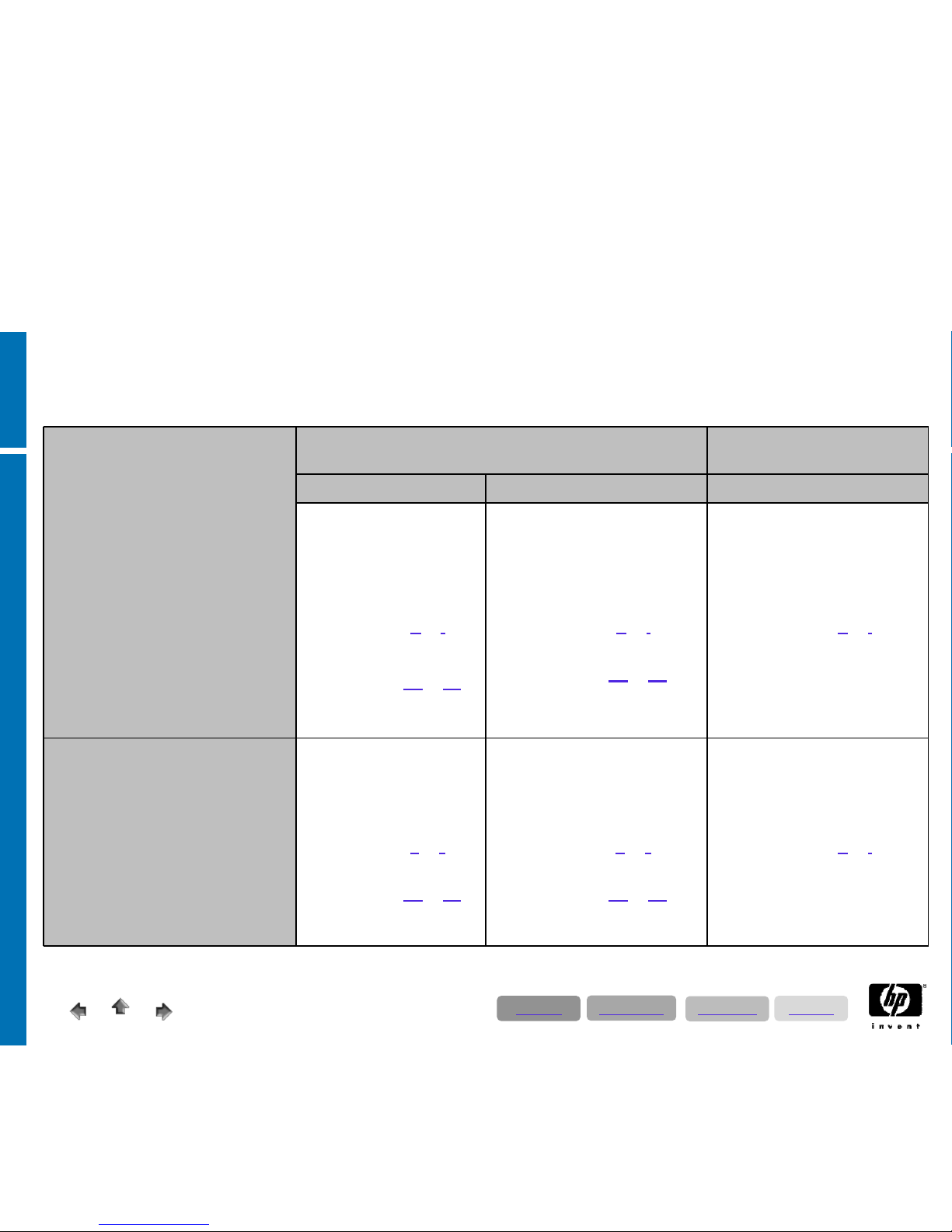
SAP SRM – Sizing Categories
Small
SRM:
• 100 active users (medium activity
CCM:
• 30000 to 40000 entries uploading
or indexinf of the catalog
• Up to 100 of searches per hour
• Two languages
Production Environment Test- & Development
Environment
SRM / MDM MDM* SRM & MDM*
SRM Central System
2 CPU
16 GB RAM
Server char. A
or I
Internal Storage or SAN
Storage char. A2
or B1
100 GB DB net
Master Data Mgmt. System
2 CPU
16 GB RAM
Server char. A
or I
Internal Storage or SAN
Storage char. A2
or B1
100 GB DB net
SRM & MDM Central System
2 CPU
16 GB RAM
Server char. A
or I
Internal Storage or SAN
100 GB DB net
Medium
SRM:
• 300 active users (medium activity)
CCM:
• 40000 to 50000 entries uploading
or indexinf of the catalog
• Up to 1000 of searches per hour
• Two languages
SRM Central System
2 CPU
32 GB RAM
Server char. B
or J
Internal Storage or SAN
Storage char. A2
or B1
200 GB DB net
Master Data Mgmt. System
2 CPU
32 GB RAM
Server char. B
or J
Internal Storage or SAN
Storage char. A2
or B1
200 GB DB net
Master Data Mgmt. System
2 CPU
16 GB RAM
Server char. A
or I
Internal Storage or SAN
100 GB DB net
* Optional or mandatory; please check the SRM standard scenarios diagram on the previous slide
Directory
Applications
Technology
Solutions
Page 29
12/17/2008
© 2008 Hewlett-Packard GmbH (SAPCC Germany)
The information contained herein is subject to change without notice
29
SAP APO Sizing Considerations
• The SAP APO configuration examples represent 3 different sizes of APO
landscapes, based on practical experience. The medium configuration
represents the most common type. These examples are intended for a first
budgetary proposal, when no detailed data quantities are available.
• Sizing based on user numbers is not possible. The 3 examples are therefore
based on business figures like characteristic combinations and different
order types.
• A well-founded APO sizing has to be done by defining detailed data quantities
for the SAP Quicksizer tool. To determine the data quantities, the operating
department and the SCM consultant need to collaborate closely.
• Rough data estimations without existing blueprint about APO components
(e.g. DP, SNP, PP/DS ..), locations, business processes to be implemented
cannot not lead to a valid sizing result. Even minor changes in the input
parameters can change the result considerably.
Directory
Applications
Technology
Solutions
Page 30
12/17/2008
© 2008 Hewlett-Packard GmbH (SAPCC Germany)
The information contained herein is subject to change without notice
30
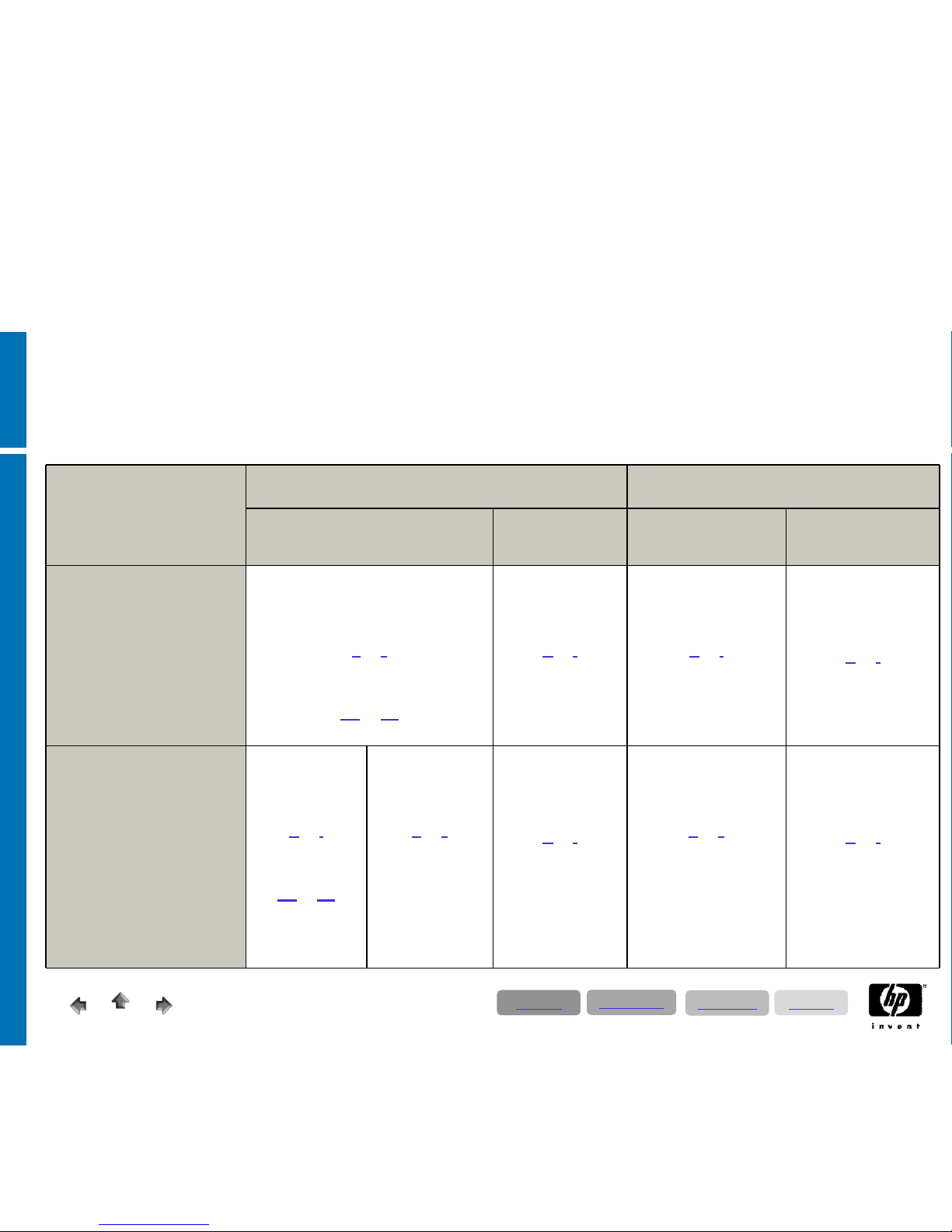
SAP APO – Sizing Categories
Production Environment Test- & Development Environment
APO / LiveCache Optimizer
(optional)
APO / LiveCache Optimizer
(optional)
Small & Medium
• 100.000 char. comb.
• 10.000 location products,
• 50.000 sales orders
• 30.000 procurement orders
• 50.000 forecast orders
• 10.000 production orders
Central System
2 CPU
16 GB RAM
Server char.
B
or J
Internal Storage or SAN
Storage char.
A2
or B1
100 GB DB net
2 CPU
16 GB RAM
Server char.
A
or I
2 x 146 GB
internal
Central System
2 CPU
16 GB RAM
Server char.
A
or I
Internal Storage or SAN
100 GB DB net
2 CPU
16 GB RAM
Server char.
A
or
I
2 x 146 GB internal
Large
• 250.000 char. comb.
• 50.000 location products
• 100.000 sales orders
• 60.000 procurement orders
• 100.000 forecast orders
• 20.000 production orders
APO System
2 CPU
16 GB RAM
Server char.
A
or I
Internal Storage
Storage char.
A2
or B1
80 GB DB net
LiveCache System
2 CPU
32 GB RAM
Server char.
B
or J
Internal Storage or
SAN
60 GB DB net
2 CPU
16 GB RAM
Server char.
A
or I
2 x 146 GB
internal
Central System
2 CPU
32 GB RAM
Server char.
B
or J
Internal Storage or SAN
140 GB DB net
2 CPU
16 GB RAM
Server char.
A
or
I
2 x 146 GB internal
Directory
Applications
Technology
Solutions
Page 31
12/17/2008
© 2008 Hewlett-Packard GmbH (SAPCC Germany)
The information contained herein is subject to change without notice
31
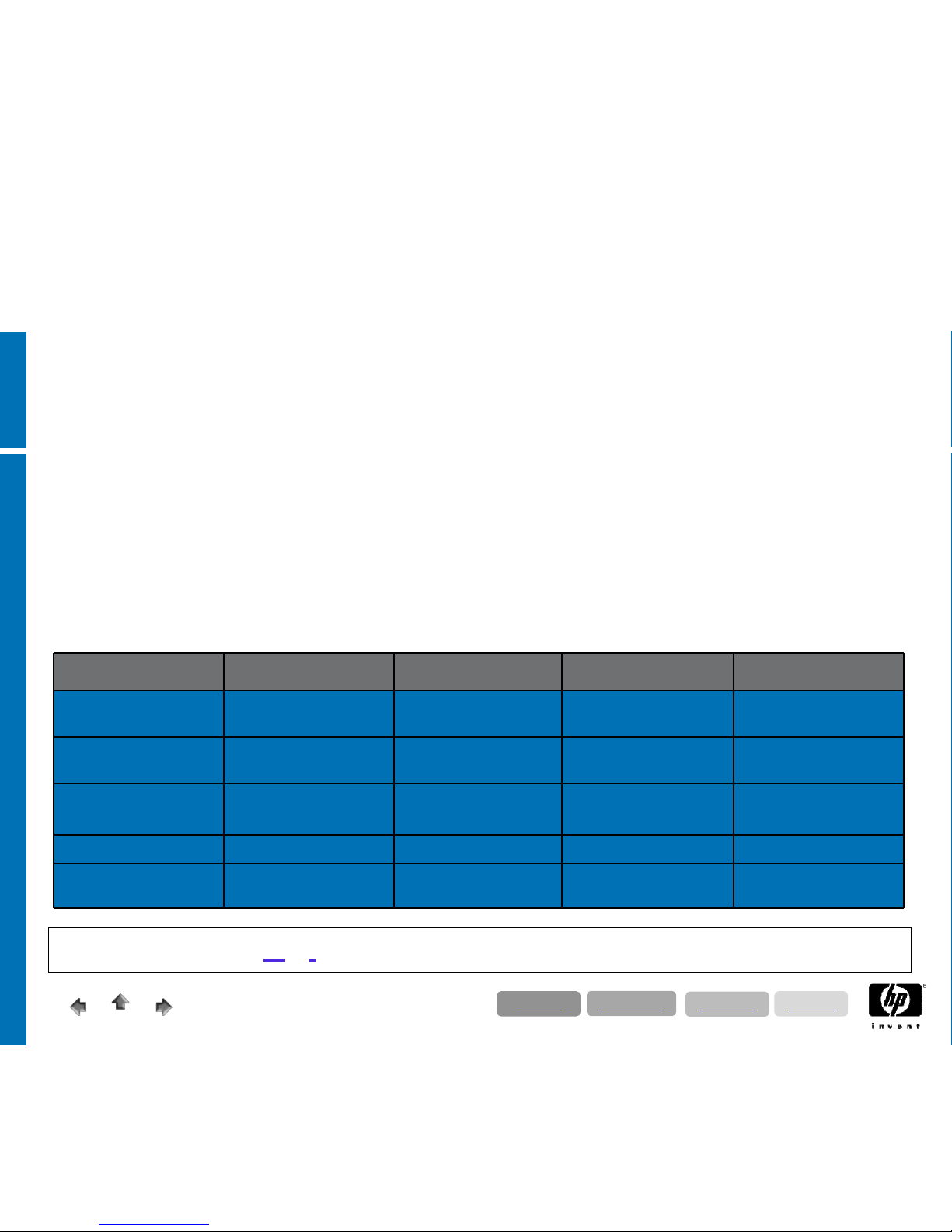
Implement, Operate, Monitor, and Support
•
SAP Solution Manager is a centralized, robust solution management toolset. It empowers companies to implement, operate, monitor,and
support their SAP solutions.
•
SAP Solution Manager facilitates technical support for distributed systems, with functionality that covers all key aspects of solution
deployment, operation, and continuous improvement. It combines tools, content, and direct access to SAP to increase the reliability of
solutions and lower total cost of ownership.
•
With SAP Solution Manager, you can be sure your entire SAP solution environment is performing at its maximum potential. The toolset
addresses your entire IT environment, supporting SAP and non-SAP software and covering current and forthcoming SAP solutions. As part
of SAP NetWeaver, SAP Solution Manager is included in the annual maintenance fee for SAP solutions.
•
SAP Solution Manager targets both technical and business aspects of your solutions, focusing strongly on core business processes. It
supports the connection between business processes and the underlying IT infrastructure. As a result, it eases communication between your
IT department and your lines of business. And ensures that you derive the maximum benefits from your IT investments.
Special Information to Solution Manager
Implementation Service Delivery Solution Monitoring Change Request
Management
Service Desk
Solution Management
Roadmap
Proactive & Predictive
Services
Business Process Monitoring Hot Fix SAP & Non SAP Support
Prozess
Implementation Tools Optimization Services System Monitoring Service – Regular
Maintenance Activity
Integration SAP Support
(OSS)
Customizing
Empowering
(Best Practices)
Adminstration
Project – Business Change Solution Database
eLearning Management EarlyWatch Alert (EWA) Web Service Portal
Service Level Reporting
Server Sizing Category A or I; 2 CPU; 16 GB RAM; 300 GB DB netto (internal Storage or SAN)
Directory
Applications
Technology
Solutions
Page 32
© 2008 Hewlett-Packard GmbH (SAPCC Germany)
The information contained herein is subject to change without notice
Server & Storage
Hardware Technology Solutions
Page 33

12/17/2008
33
© 2008 Hewlett-Packard GmbH (SAPCC Germany)
The information contained herein is subject to change without notice
Preface
The previous slides presented server- and storage characteristic information marked
by alphabetic letters for use in the following slides. By combining the specifications
from the T-shirt sizing data with the hardware data, you can build individual system
landscapes and/or size the required components. Configuration and budgeting
(German list price) details can be extracted from a separate Excel worksheet.
• Extra information on the server systems:
• As SAP (especially Java) generally allocates a huge amount of system resources, we
recommend to apply a minimum of 8- optimal 16 GB RAM per server system; as well as
for non-productive systems (behold server sizing categories A & I).
• All systems should be configured with redundant options such as host bus controller; fans
and power supplies (see server configuration layout in the Excel sheet).
• For booting from SAN, you have to plan internal server disks for the page file anyway,
otherwise performance problems will arise.
• Extra information to the storage solutions:
• Listed storage solutions are approved for running SAP; whereas in existing SAP
landscapes the majority is using our Enterprise Virtual Arrays (EVA).
Directory
Applications
Technology
Solutions
Page 34
12/17/200834
© 2008 Hewlett-Packard GmbH (SAPCC Germany)
The information contained herein is subject to change without notice
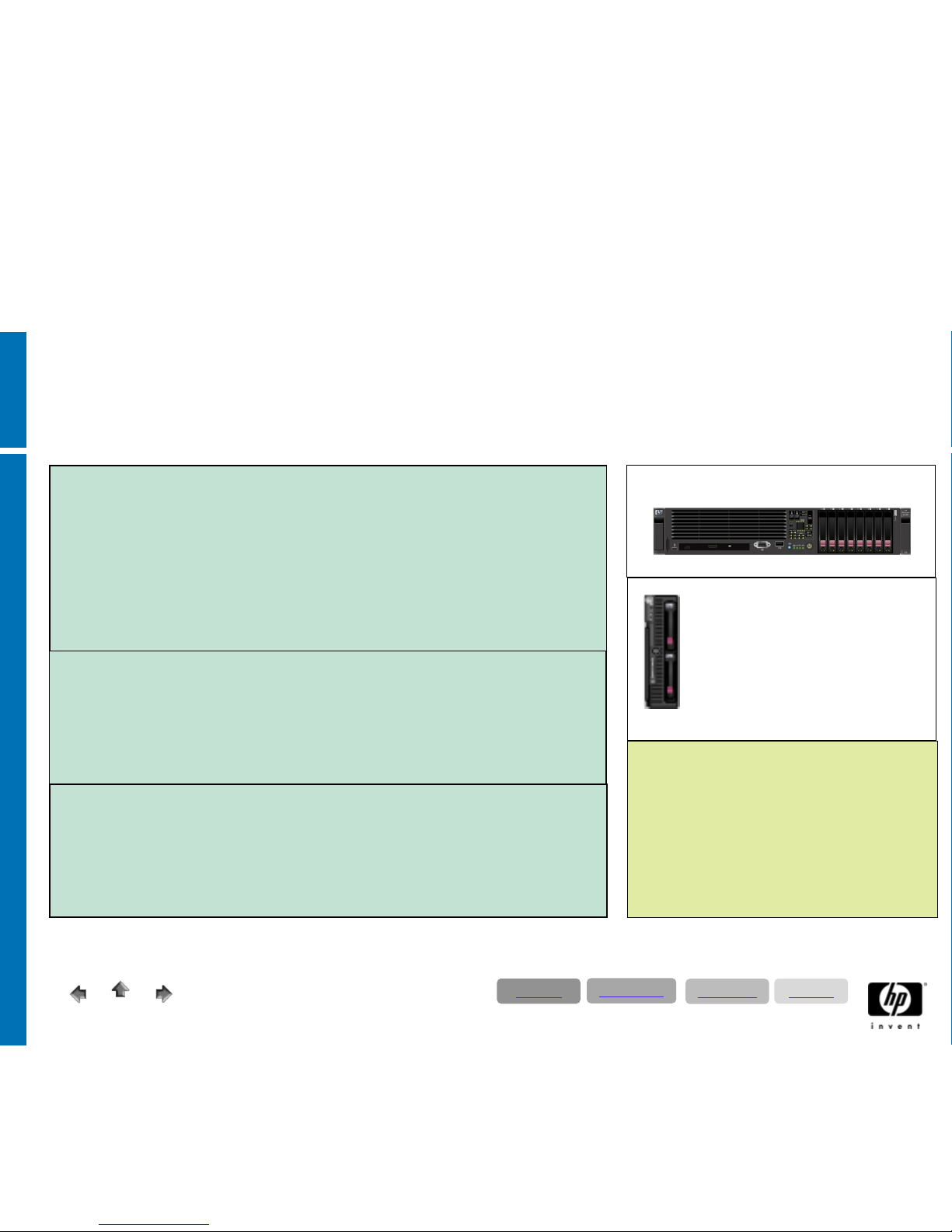
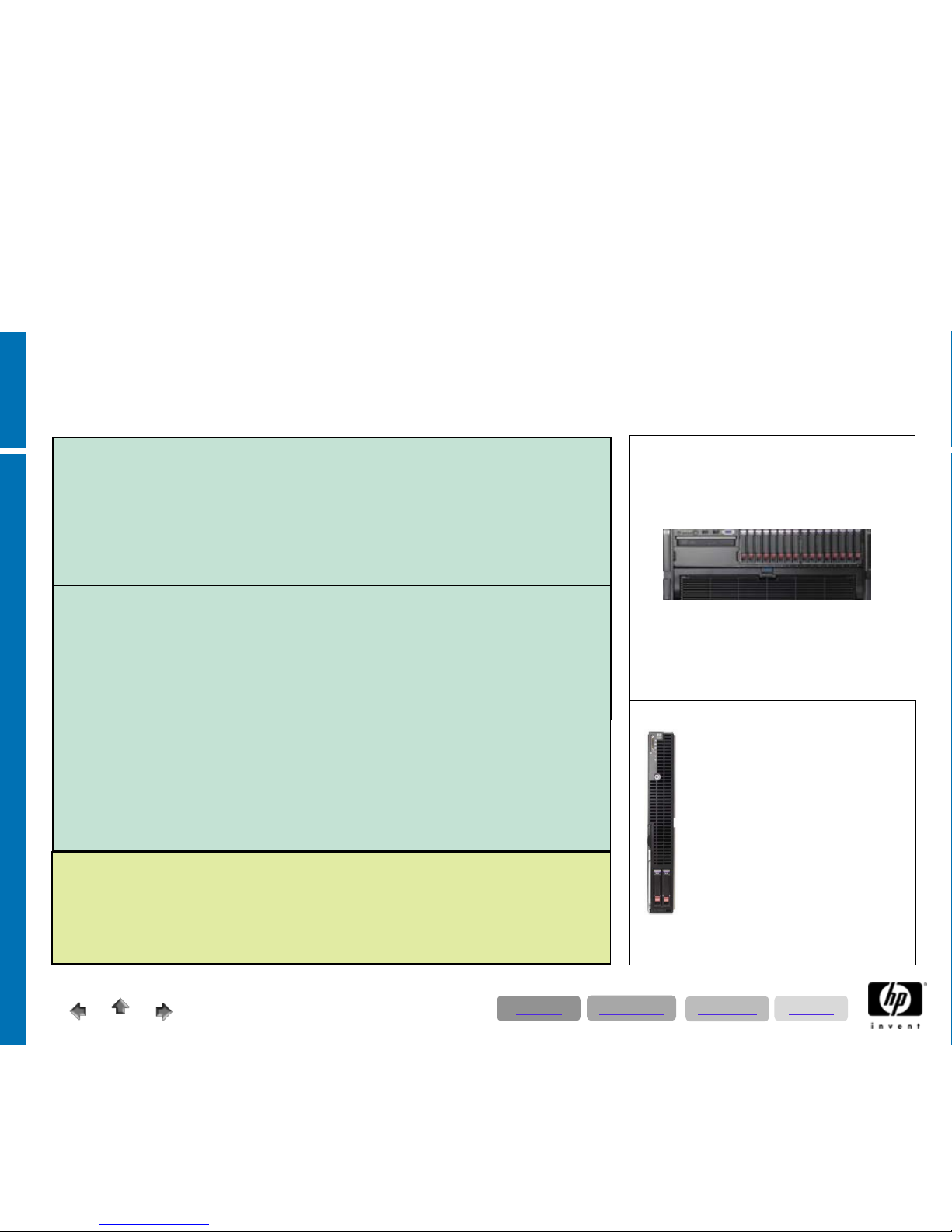
2 – Socket Intel Quad Core ProLiant Server
up to 12.200 SAPS
Server characteristic type A:
• ERP Productions Systems up to 200 users
• ERP Production Systems up to 100 users – with DL380G5 and internal Storage
• ERP; BI, XI, APO, CRM, SRM, Enterprise Portal test - & development systems
• XI; APO;- CRM;- SRM;- Enterprise Portal production systems
• SAP Solution Manager; Application Server
• Server key
data:
• 2* Xeon
DP Quad Core 2,50 GHz; DL380G5 / 2,66 GHz BL460c
• 16 GB RAM
ProLiant DL380G5
ProLiant BL460 Server Blade
(requires c3000/7000 Enclosure)
Only for use with external
storage (SAN recommended)
Server characteristic type B:
• ERP Productions Systems up to 500 users
• ERP; BI, XI, APO, CRM, SRM, Enterprise Portal test - & development systems
• BI; APO;- CRM;- SRM;- Enterprise Portal production systems; Application Server
• Server key data:
• 2* Xeon DP Quad Core 3,16 GHz; DL380G5 / 3,66 GHz BL460c
• 32 GB RAM
Server Storage layout:
2 * 146 GB OS; Pagefile (SAN Connection;
requires SAN Adapters) or
8* 146 GB internal Storage (only DL380G5)
For ECC Systems with more than 100 users
we
strongly recommend external Storage e.g. SAN
(EVA) solution
Regarding the storage layout for different
applications we strongly recommend collaborating
with SAP CC!
Server characteristic type C:
• ERP Productions Systems up to 900 users
• BI Production Systems
• APO;- CRM;- SRM;- Enterprise Portal production systems; Application Server
• Server key data:
• 2* Xeon DP Quad Core 3,16 GHz; DL380G5 / 3,00 GHz BL460c
• 64 GB RAM
Directory
Applications
Technology
Solutions
Page 35
12/17/200835
© 2008 Hewlett-Packard GmbH (SAPCC Germany)
The information contained herein is subject to change without notice
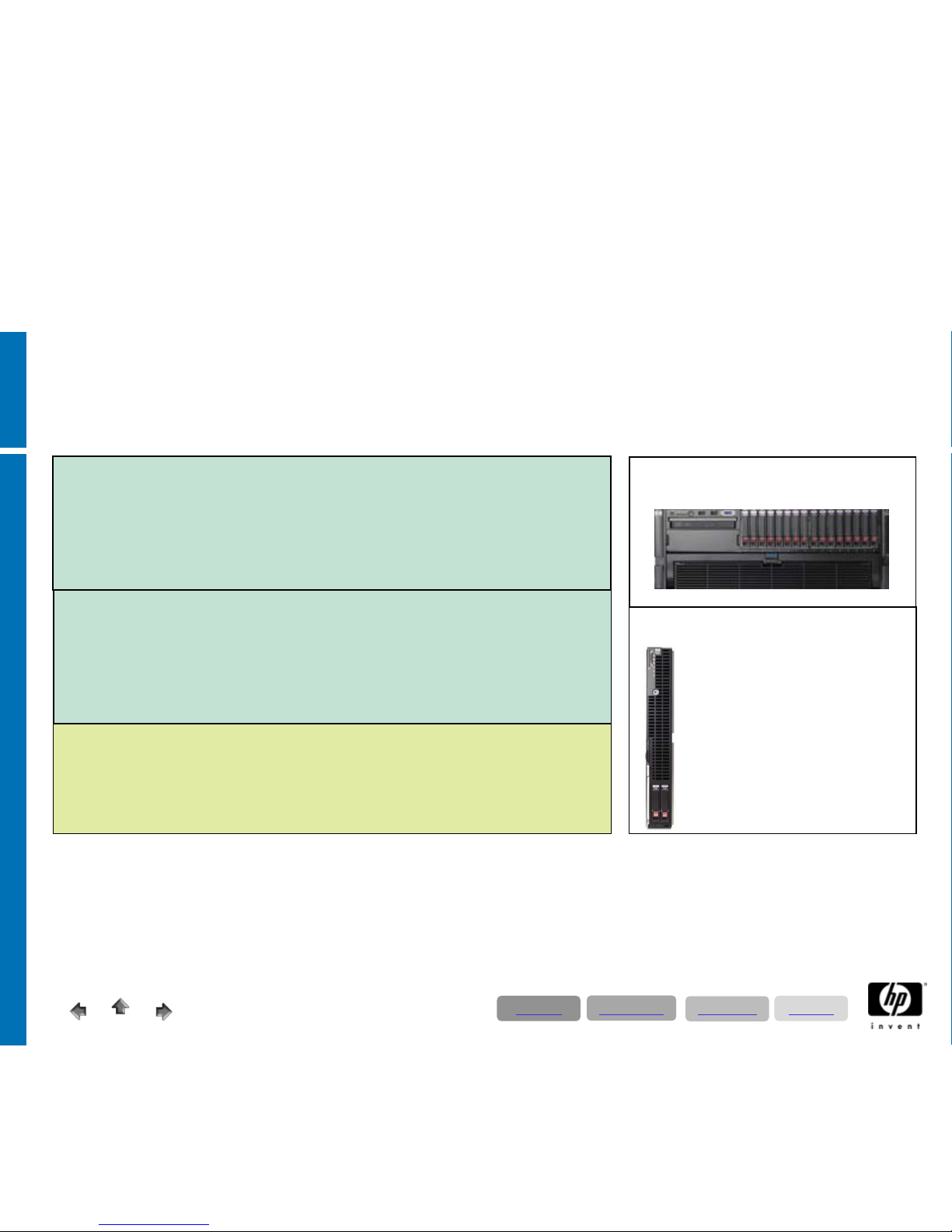
4 – Socket Intel Quad Core ProLiant Server
up to 18.500 SAPS
Server characteristic type D:
• ERP Production
Systems up to 900 users
• BI Production
systems
• VMware
Server; Application server
• Server key data:
• 4* Xeon MP Quad Core 2,40 GHz; DL580G5 / 2,40 GHz BL680c
• 64 GB RAM
ProLiant DL580G5
ProLiant BL680G5c Server
Blade
(requires c3000/7000
Enclosure)
Only for use with external
storage (SAN recommended)
Server Storage layout:
2 * 146 GB OS; Pagefile (SAN Connection; requires SAN Adapters) or
16* 146 GB internal Storage (only DL580G5)
Regarding the storage layout for different applications we strongly recommend collaborating
with SAP CC!
Server characteristic type E:
• ERP Production Systems
• High level BI Production systems
• VMware Server; Application server
• Server key data:
• 4* Xeon MP Quad Core 2,93 GHz; DL580G5 / 2,40 GHz BL680c
•128 GB RAM
Server characteristic type F:
• ERP Production Systems
• High level BI Production systems
• VMware Server; Application server
• Server key data:
• 4* Xeon MP Quad Core 2,93 GHz; DL580G5
• 256 GB RAM
Directory
Applications
Technology
Solutions
Page 36
12/17/200836
© 2008 Hewlett-Packard GmbH (SAPCC Germany)
The information contained herein is subject to change without notice
4 – Socket Intel Six Core ProLiant Server
up to 25.800 SAPS
ProLiant DL580G5
ProLiant BL680G5c Server Blade
(requires c3000/7000
Enclosure)
Only for use with external
storage (SAN recommended)
Server Storage layout:
2 * 146 GB OS; Pagefile (SAN Connection; requires SAN Adapters) or
16* 146 GB internal Storage (only DL580G5)
Regarding the storage layout for different applications we strongly recommend collaborating
with SAP CC!
Server characteristic type G:
• ERP Production Systems
• High level BI Production systems
• VMware Server; Application server
• Server key data:
• 4* Xeon MP Six 2,40 GHz; DL580G5 / 2,40 GHz BL680c
•128 GB RAM
Server characteristic type H:
• ERP Production Systems
• High level BI Production systems
• VMware Server; Application server
• Server key data:
• 4* Xeon MP Six Core 2,66 GHz; DL580G5
• 256 GB RAM
Directory
Applications
Technology
Solutions
Page 37

12/17/200837
© 2008 Hewlett-Packard GmbH (SAPCC Germany)
The information contained herein is subject to change without notice
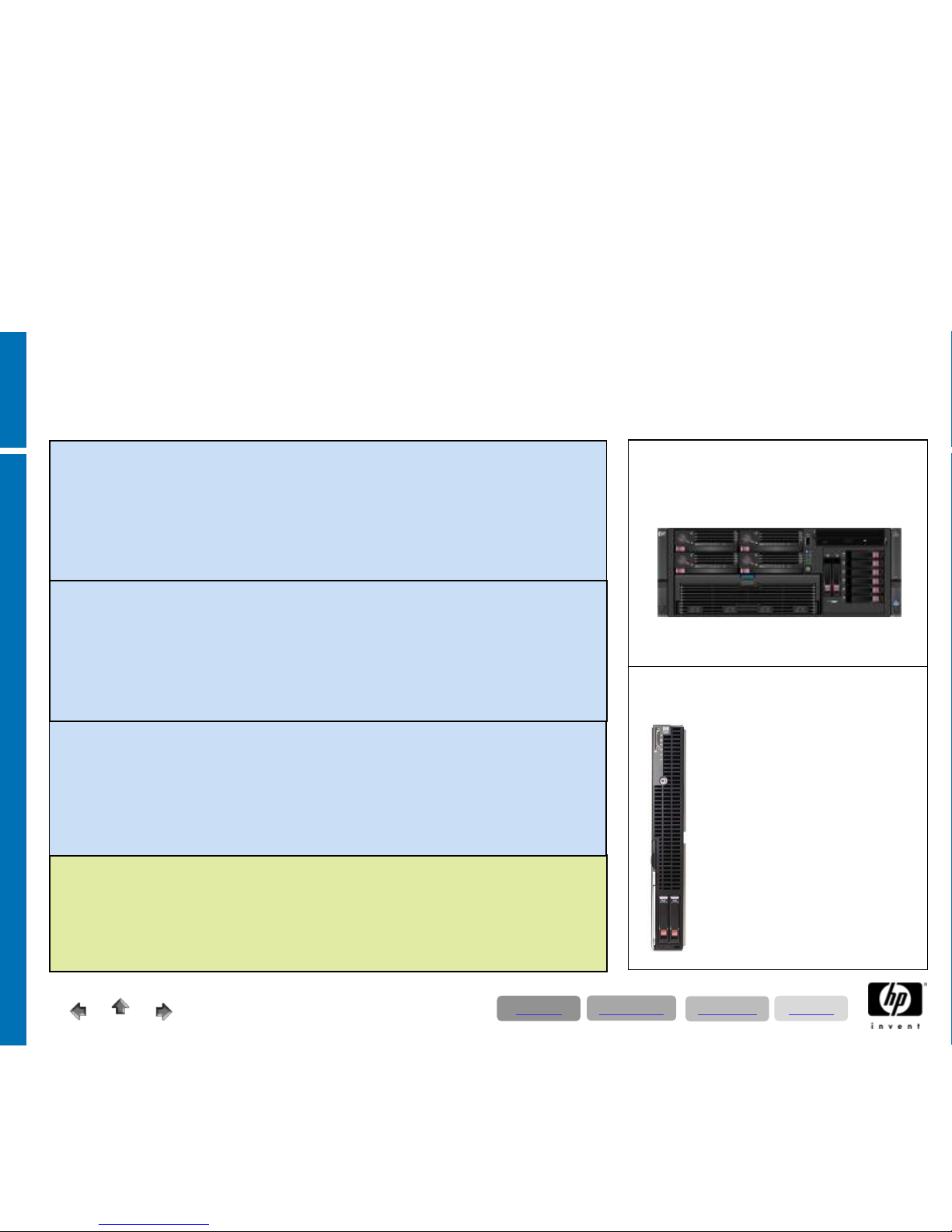
2 – Socket AMD Quad Core ProLiant Server
up to 13.700 SAPS
Server characteristic type I:
• ERP Productions
Systems up to 200 users
• ERP Production Systems up to 100 users – with DL385G5 and internal storage
• ECC; BI, XI, APO, CRM, SRM, Enterprise Portal test - & development systems
• XI, medium APO, CRM, SRM, Enterprise Portal production systems
• SAP Solution Manager; Application Server
• Server key data:
• 2* AMD Opteron Quad Core 2,4 GHz DL385G5p / 2,4 GHz BL465c
• 16 GB RAM
ProLiant DL385G5p
ProLiant BL465c Server Blade
(requires c3000/7000 Enclosure)
Only for use with external
storage (SAN recommended)
Server characteristic type J:
• ERP Productions
Systems up to 500 users
• ERP; BI, XI, APO, CRM, SRM, Enterprise Portal test - & development systems
• Low level BI Production Systems
• XI, medium APO, CRM, SRM, Enterprise Portal production systems; Application Server
• Server key data:
• 2* AMD Opteron Quad Core 2,4 GHz DL385G5p / 2,4 GHz BL465c
• 32 GB RAM
Server Storage layout:
2 * 146 GB OS; Pagefile (SAN Connection;
requires SAN Adapters)
or
16* 146 GB internal Storage (only DL385G5p)
For ECC Systems with more than 100 users
we
strongly recommend external Storage e.g. SAN
(EVA) solution
Regarding the storage layout for different
applications we strongly recommend collaborating
with SAP CC!
Directory
Applications
Technology
Solutions
Server characteristic type K:
• ERP Productions
Systems up to 900 users
• BI Production Systems
• APO, CRM, SRM, Enterprise Portal production systems; Application Server
• Server key data:
• 2* AMD Opteron Quad Core 2,7 GHz DL385G5p / 2,7 GHz BL465c
• 64 GB RAM
Page 38
12/17/200838
© 2008 Hewlett-Packard GmbH (SAPCC Germany)
The information contained herein is subject to change without notice
4 – Socket AMD Quad Core ProLiant Server
up to 23.500 SAPS
Server characteristic L:
• BI Production
systems
• ERP Production
Systems up to 900 users
• VMware
Server; Application Server
• Server key data:
• 4* AMD Opteron Quad Core 2,5 GHz DL585G5 / 2,7 GHz BL685c
• 64 GB RAM
ProLiant DL585G5
ProLiant BL685c Server Blade
(requires c3000/7000
Enclosure)
Only for use with
external storage (SAN
recommended)
Server Storage layout:
2 * 146 GB OS; Pagefile (SAN Connection; requires SAN Adapters) or
16* 146 GB internal Storage (only DL585G5)
Regarding the storage layout for different applications we strongly recommend collaborating
with SAP CC !
Server characteristic M:
• ERP Production Systems
• High Level BI Production systems
• VMware Server; Application Server
• Server key data:
• 4* AMD Opteron Quad Core 2,5 GHz DL585G5 / 2,7 GHz BL685c
• 128 GB RAM
Directory
Applications
Technology
Solutions
Server characteristic N:
• ERP Production Systems
• High Level BI Production systems
• VMware Server; Application Server
• Server key data:
• 4* AMD Opteron Quad Core 2,7 GHz DL585G5
• 256 GB RAM
Page 39

12/17/200839
© 2008 Hewlett-Packard GmbH (SAPCC Germany)
The information contained herein is subject to change without notice
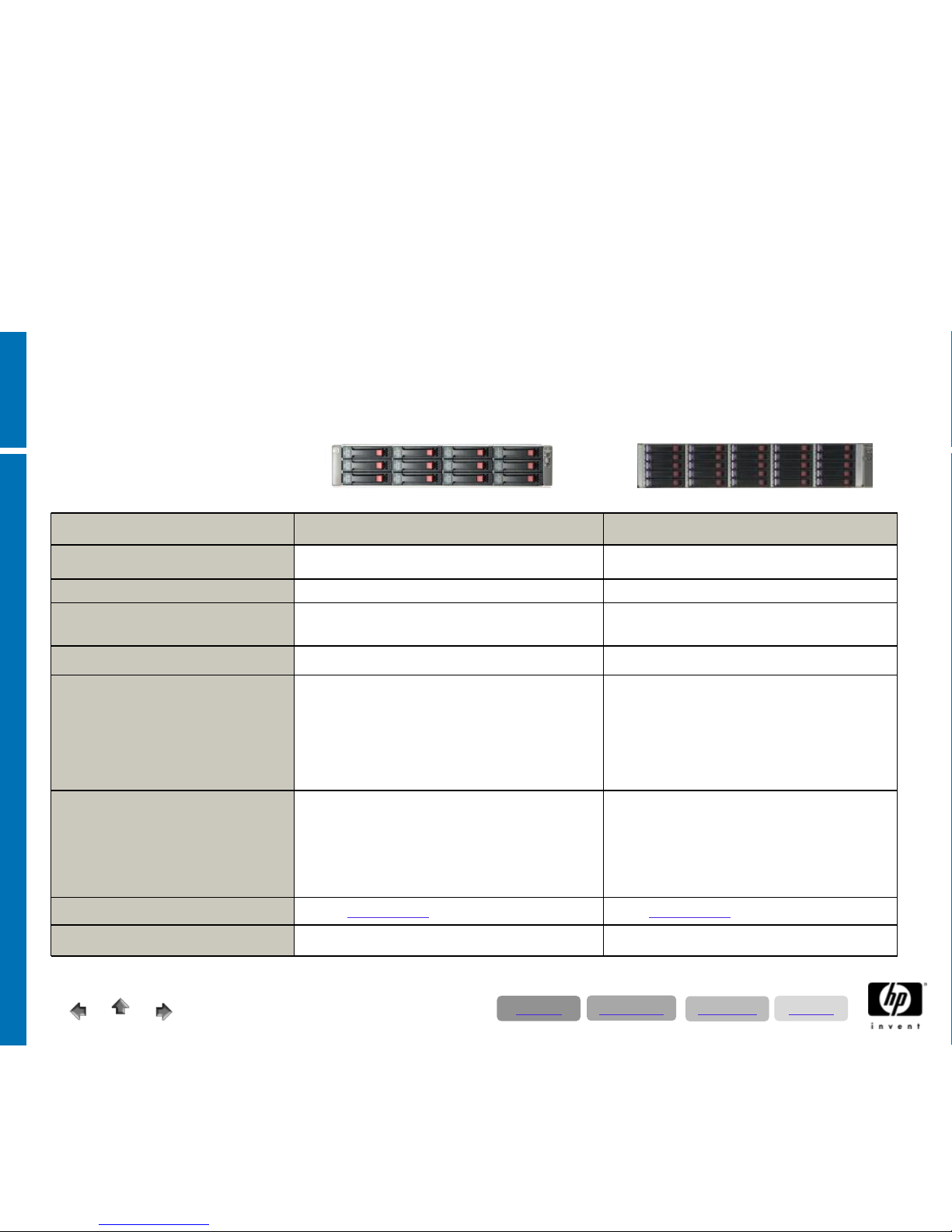
8 – Socket AMD Quad Core ProLiant Server
up to 35.400 SAPS
ProLiant DL785G5
Server characteristic O:
• ERP Production Systems up to 1400 users
• BW Production systems
• VMware Server; Application Server
• Server key data:
• 8* AMD Opteron Quad Core 2,4 GHz DL785G5
• 128 GB RAM
Server Storage layout:
4 * 146 GB OS; Pagefile (SAN Connection;
requires SAN Adapters)
or
8* 146 GB internal Storage
Regarding the storage layout for different
applications we strongly recommend collaborating
with SAP CC
!
Server characteristic P:
• ERP Production Systems
• BW Production systems
• VMware Server; Application Server
• Server key data:
• 8* AMD Opteron Quad Core 2,5 GHz DL785G5
• 192 GB RAM
Server characteristic Q:
• ERP Production Systems
• BW Production systems
• VMware Server; Application Server
• Server key data:
• 8* AMD Opteron Quad Core 2,7 GHz DL785G5
• 256 GB RAM
Directory
Applications
Technology
Solutions
Page 40
12/17/200840
© 2008 Hewlett-Packard GmbH (SAPCC Germany)
The information contained herein is subject to change without notice
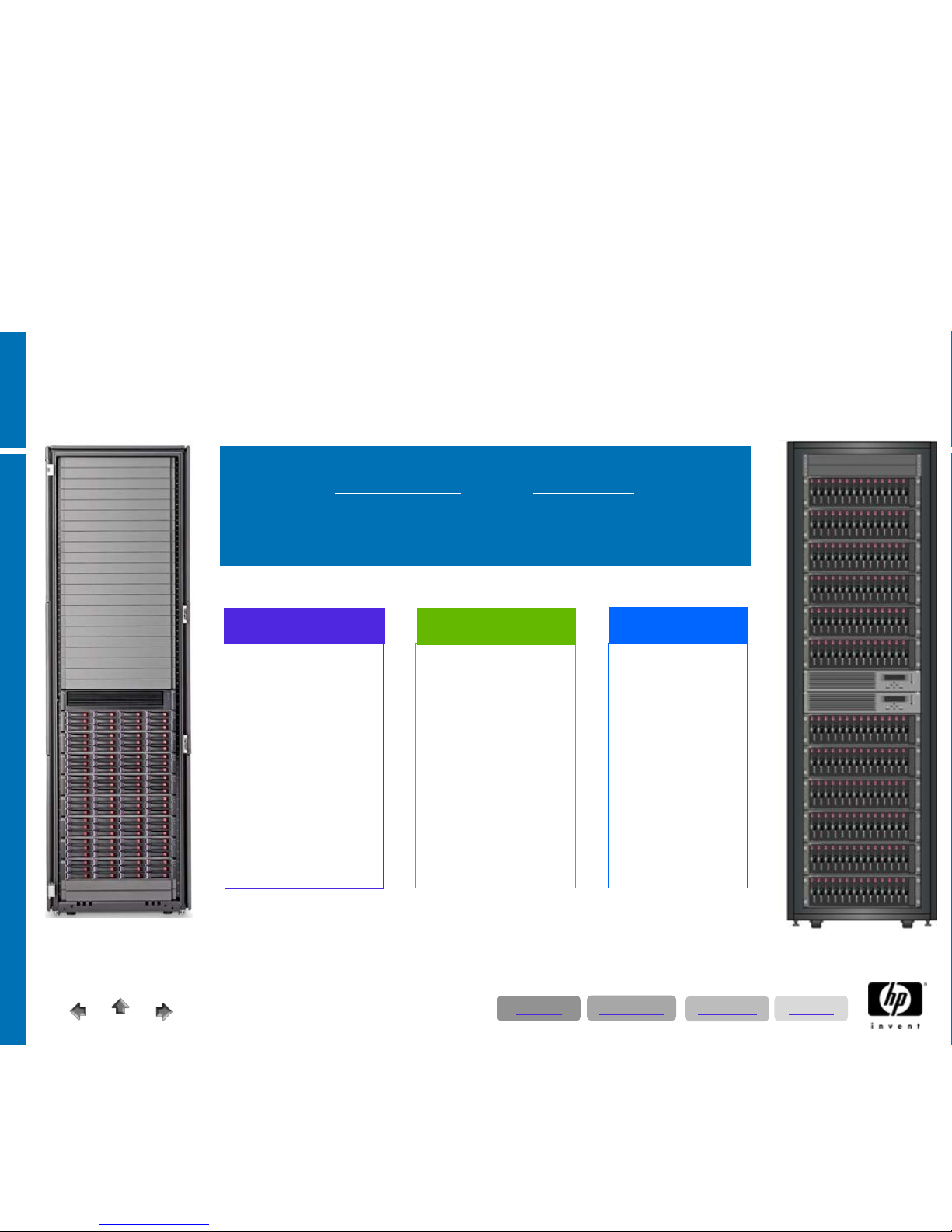
StorageWorks entry level - MSA based
AIO1200 (AK222A) MSA 70
max. user
(CC recommendation)
100 200
Connection Type
iSCSI SAN SCSI
Maximum discs
10 netto (12 brutto -2 disk for OS = 10) 25
Disk size (only SAS drives!) 300 GB SAS 72 & 146 GB SAS
Controller recommendation (Server)
Mulifunktion Gigabit Server Adapter with
optional HP ProLiant Essentials
Accelerated iSCSI Pack!
Smart Array P800
Disklayout / Raid Sets
10 disks Raid 1+0!
provided system discs
(logs, archives, sap exe are mounted in the server)
24 disks Raid 1+0!
+ one disk online spare
provided system discs
(logs, archives, sap exe are mounted in the server)
Backup / Restore Data Protector (DP) backup solution Data Protector (DP) backup solution
Storage characteristic
A1 A2
Directory
Applications
Technology
Solutions
Page 41
12/17/200841
© 2008 Hewlett-Packard GmbH (SAPCC Germany)
The information contained herein is subject to change without notice
Leadership in:
With EVA, aggregate and automate your array management tasks to manage more
storage capacity with fewer resources.
Pooling storage
over very large disk
groups vs.
fractured, small disk
groups; snap copies
into unallocated
space vs. requiring
LUNs to be
reserved.
Automated disk
group & LUN set
ups, automated
online LUN
expansions,
automated array
tuning, snap clones
enable our
customers to earn
more revenue
Enables less
experienced
people to
manage the
array, frees up
higher level
professionals to
create revenue
for the customer,
removes the
opportunities for
human errors.
Space
Time
Cost
EVA is an enterprise class storage array system designed with
a powerfully simple interface
and the performance you expect
from the storage market leader. Its rich set of software
capabilities keep your data safe even in the most complex of
environments.
HP Storageworks Enterprise Solution in SAP Environments
EVA 4400, 6100, 8100
Directory
Applications
Technology
Solutions
Page 42

12/17/200842
© 2008 Hewlett-Packard GmbH (SAPCC Germany)
The information contained herein is subject to change without notice
HP Storageworks Enterprise Solution in SAP Environments
Configuration Guide based on EVA
EVA 4400 EVA 6100 EVA 8100
Entry level configuration: 2C2D
24 * 146/300/400 GB/ 1TB
Storage characteristic B1
Medium level configuration: 2C4D
48 (max. 96) * 146 /300/400 GB/ 1 TB
Storage characteristic B2
2C6D
84 * 146/300 GB/ 1 TB
Storage characteristic C1
High level configuration:
Recommendation: using two EVA
systems connected via Continuous
Access (CA) EVA
2C8D
112 * 146/300 GB / 1 TB
Storage characteristic C2
2C12D
168 * 146/300 GB/ 1 TB
Storage characteristic D1
Enterprise level configuration:
Recommendation: using two EVA
systems connected via Continuous
Access (CA) EVA
2C18D
240 * 146/300 GB/ 1 TB
Storage characteristic D2
Storagetools recommendation for
Backup & Restore:
• Business Copy (BC) EVA
• Data Protector (DP) backup solution
• DP ZDB/IR or AppRM for disk-assisted
backup/restore
• Tape systems
incl. Virtual Tape Library
•Business Copy (BC) EVA
• Data Protector (DP) backup
solution
• DP ZDB/IR
or AppRM for disk-
assisted backup/restore
• Tape systems
incl. Virtual Tape
Library
•Business Copy (BC) EVA
• Data Protector (DP) backup
solution
• DP ZDB/IR
or AppRM for disk-
assisted backup/restore
• Tape systems
incl. Virtual Tape
Library
Storage High Availability with using
a Microsoft Cluster and CA (Two
EVAs & Continous Access are
required):
Cluster Extension CLX
Cluster Extension CLX
Directory
Applications
Technology
Solutions
Page 43

12/17/200843
© 2008 Hewlett-Packard GmbH (SAPCC Germany)
The information contained herein is subject to change without notice
HP StorageWorks solutions for SAP
•
Configuration, qualification and performance guides
− EVA, EVA iSCSI, XP,
− MSA, Enterprise File Services Clustered Gateway – available on request – coming public soon
− Performance sizer XP for SAP –availableon request
•
Best practices whitepapers
− SAP ERP on EVA, ProLiant, SQL, Windows
− SAP ERP and BI on EVA
, ProLiant, SQL, Windows
− SAP ERP and CRM on EVA
, Integrity, Oracle, Windows
•
External webpages & further information:
− overview www.hp.com/go/SAP/storage and www.hp.com/go/storage
− SAP upgrade testing - HP System Copy for SAP brief
− BC&A business continuity & availability
• HP Data Protector (DP – incl. ZDB/IR) for SAP and MaxDB whitepaper
• HP Application Recovery Manager (AppRM) for SAP
• HP CA EVA for SAP whitepaper – on request
• Cluster Extension CLX (CA cluster integration for Windows and Linux) / or MetroCluster (CA cluster integration for HP-UX)
• HP StorageWorks Business Continuity Solutions for SAP brief
− Consolidation
• HP Polyserve for SAP on Microsoft SQL - web
• Consolidation with Storage Essentials including SAP ACC integration – web SAP / HP VIS view
− SAP BI archiving - HP Reference Information Manager Live Archive for SAP Business
Intelligence brief - web
− HP Adaptive Infrastructure for SAP business whitepaper - web
Directory
Applications
Technology
Solutions
Page 44
© 2008 Hewlett-Packard GmbH (SAPCC Germany)
The information contained herein is subject to change without notice
HP SAP Landscapes:
Microsoft Netweaver 2004s cluster, mirrored data centers;
blade- & VMware solutions
Page 45

12/17/2008
45
© 2008 Hewlett-Packard GmbH (SAPCC Germany)
The information contained herein is subject to change without notice
SAP system landscape proposals
•
The following SAP landscape proposals reflect proven solutions that are in widespread
use. A large number of environments with ProLiant server (increasingly blade
environments) and Enterprise Virtual Storage Arrays have been placed in the market
during the last years.
•
Detailed technical and pricing (German list price) information on the following
configuration examples is available (only for HP SAP partners) via a separate Excel
worksheet. As the corresponding infrastructure, such as host bus controllers, FC
switches- and cables, rack and accessory are included and separately illustrated, you
are able to create individual landscapes for budgeting and method of resolution. The
hardware building blocks are separated in rack, server, storage, backup, fibre channel
server- and san components.
• The cluster examples are designed for NetWeaver 2004s. What’s new in 2004s is that
only the critical components of a SAP system are clustered. These are the database and
(A)SCS SAP instance (Message and Enqueue). Additionally SAP application servers are
required to provide dialog, batch, update, spool and gateway services. It is
recommended that the application server is configured as a log on group.
Directory
Applications
Technology
Solutions
Page 46
12/17/2008
46
© 2008 Hewlett-Packard GmbH (SAPCC Germany)
The information contained herein is subject to change without notice
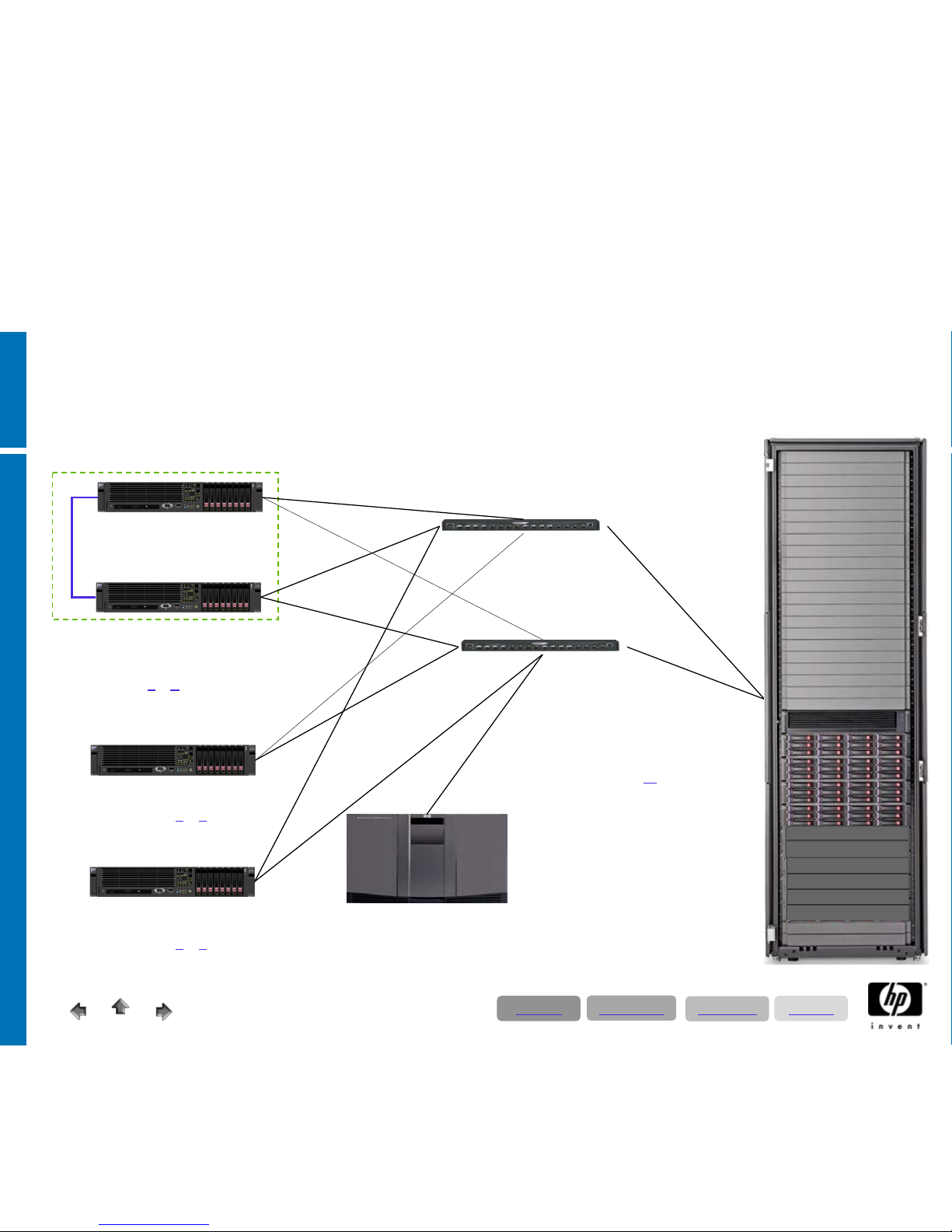
SAN
Switch
SAN
Switch
Fibre channel backup system
MSL6060 tapelibrary
• Two LTO 960 drives
• Dataprotector / AppRM
production system - cluster node A+B
constituents: database; ASCS; SCS;
application server
2 x ProLiant DL380/DL385G5
• Server char. D
or M
• 2 * CPU´s
• 64 GB RAM
test- and qa system
ProLiant DL380/385G5
• Server char. B
or K
• 2 * CPU´s
• 16 GB RAM
development system
ProLiant DL380/385G5
• Server char. B
or K
• 2 * CPU´s
• 16 GB RAM
SAP Microsoft Cluster with
Replicated Enqueue
Fibre Channel Storage System
Enterprise Virtual Array 4400 2C4D
• Storage char. B2
• max. 8 disk shelves = 96 disks
• here 48 x 300 GB fc disks 15k/min
• 2 x HSV300-B fibrechannel controller
• fibre to disk technologie
• operating mode up to 4 Gb
• business copy - unlimited
Disksizing
• production:
• ~ 1 TB VRAID 1 netto
• test- and qa:
• ~ 1 TB VRAID 5 netto
•development
• ~ 200 GB VRAID 5 netto:
ECC cluster scenario
Note:
• For more System-; Memory-, or IO performance you should choose to our 4-Socket servers = ProLiant DL580/585G5
• HP ProLiant c-class servers could be applied as well
Directory
Applications
Technology
Solutions
Page 47
© 2008 Hewlett-Packard GmbH (SAPCC Germany)
The information contained herein is subject to change without notice
12/17/2008
4747
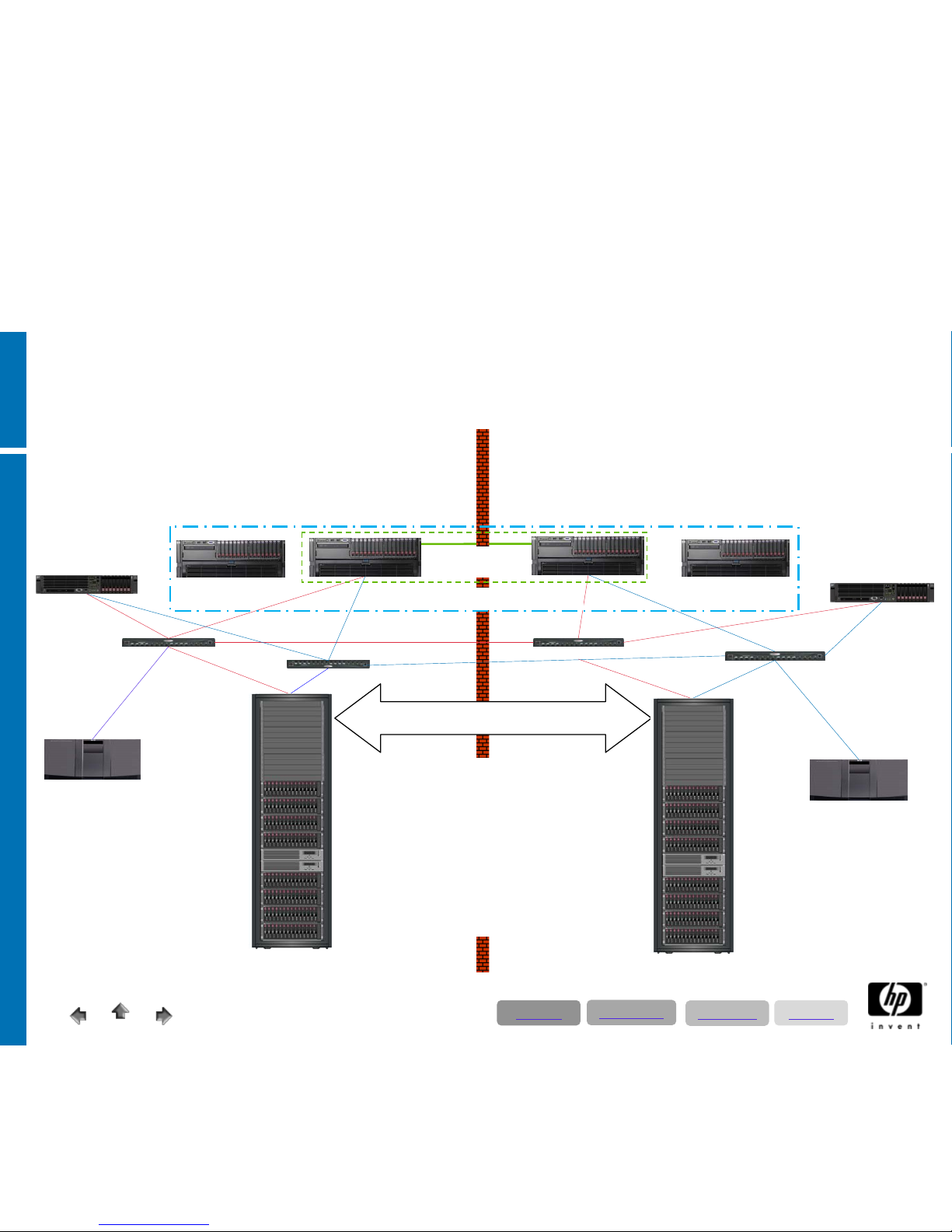
2 x 16 Port
SAN Switch
Fibre channel
backup system 2
MSL6060 tapelibrary
• 2 x LTO 960 GB Drives
• Dataprotector AppRM
Fibre Channel controller based data replication
Continuous Access (CLX Extension)
2 x 16 Port
SAN Switch
Fibre channel backup
system 1
MSL6060 tapelibrary
• 2 x LTO 960 GB Drives
• Dataprotector AppRM
2 x ISL 4Gb Fabirc 1
2 x ISL 4Gb Fabric 2
production system
constituents: database;
ASCS; SCS; application server
ProLiant DL580/585G5
(cluster node A)
• 4 * CPU´s
• 128 GB RAM
production system
constituents: database;
ASCS; SCS; application server
ProLiant DL580/585G5
(cluster node B)
• 4 * CPU´s
• 128 GB RAM
application server 1
production system
ProLiant DL580/585G5
• 4 * CPU´s
• 128 GB RAM
application server 2
production system
ProLiant DL580/585G5
• 4 * CPU´s
• 128 GB RAM
development system
ProLiant DL380/385G5
• 2 * CPU´s
• 64 GB RAM
test- and qa system
ProLiant DL380/385G5
• 2 * CPU´s
• 64 GB RAM
SAP Microsoft Cluster
with Replicated Enqueue
SAP Application Server Logon Group
Fibre Channel Storage Systems
2x Enterprise Virtual Array 8100 2C8D
• max. 12 disk shelves = 240 disks
• here 112 x 300 GB FC disks 15k/min
• 2 x HSV200 controller
• business copy - unlimited
Disksizing
• Production:
• ~ 4 TB VRAID 1 netto
• Test- and QA:
• ~ 4 TB VRAID 5 netto
• Development
• ~ 200 GB VRAID 5 netto:
ECC cluster scenario for mirrored data centers
Directory
Applications
Technology
Solutions
Page 48
© 2008 Hewlett-Packard GmbH (SAPCC Germany)
The information contained herein is subject to change without notice
12/17/2008
4848
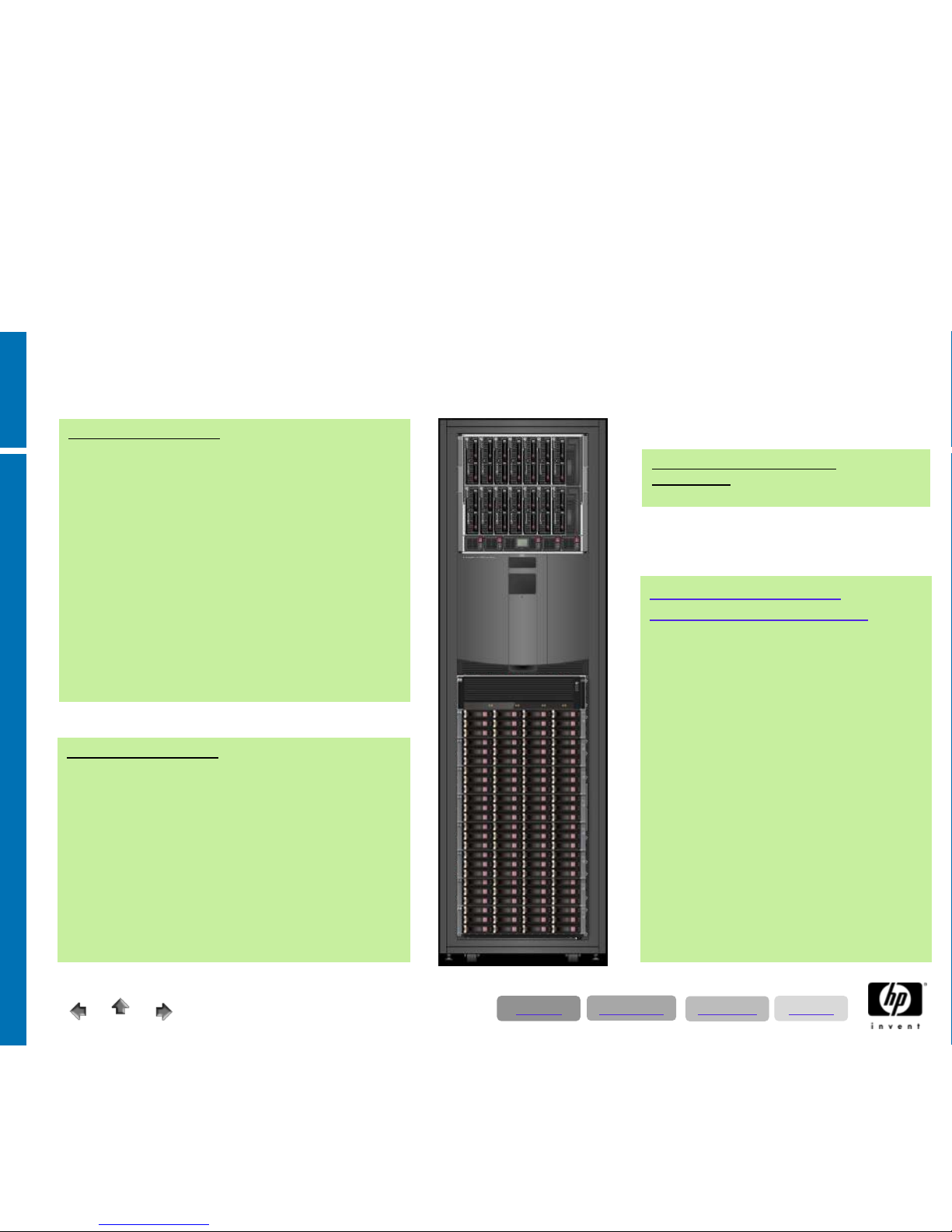
Fibre Channel Storage System
Enterprise Virtual Array 4400 2C8D
• 2 x HSV300 fibre channel controller
• max. 8 disk shelves = 96 disks
• here 96 x 300 GB fc 15K/min disks
• operating mode 2 Gb, 4 Gb or mixed
Disksizing:
• R/3 production: 2 TB VRAID 1 net
• R/3 test- and qa: 2 TB VRAID 5 net
• R/3 dev: 200 GB VRAID 5 net
• BW production: 2 TB VRAID 1 net
• BW dev: 200 GB VRAID 5 net
• Portal production: 100 GB VRAID 1 net
• Portal test- & dev: 100 GB VRAID 5 net
• XI production: 200 GB VRAID 1 net
• XI test- & dev: 200 GB VRAID 5 net
• Solution manager: 100 GB VRAID 5
• Backup: 100 GB VRAID 5
Fibre channel backup system
1 x MSL6060
with 2 x LTO Ultrium 960GB Drives
8 x ProLiant BL460/465c
1. R/3 development server
2. BW development server
3. Portal TRex test-& development server
4. XI production server
5. XI development server
6. Solution manager server
7. Deployment server
8. Backup server
each blade configured with:
• 2 * Quad Core CPU´s
• 32 GB RAM
• 2 x 146 GB Raid 1 for OS & page file
8 x ProLiant BL460/465c
1. R/3 database server production system (cluster node A)
constituents: database; ASCS; SCS;
application server
2. R/3 database server production system (cluster node B)
constituents: database; ASCS; SCS;
application server
3. R/3 application server 1 production system
4. R/3 application server 2 production system
5. BW database server production system
6. Portal & TRex production server
7. R/3 test- & qa server
8. Universal server / hot spare blade
each blade configured with:
• 2 * Quad Core CPU´s
• 64 GB RAM
• 2 x 146 GB Raid 1 for OS & page file
SAP Applications Landscapes with HP ProLiant Blades
Directory
Applications
Technology
Solutions
Page 49

© 2008 Hewlett-Packard GmbH (SAPCC Germany)
The information contained herein is subject to change without notice
12/17/2008
49
SAN Switch
ProLiant DL580/585G5
• 4 * Quad or Six Core
• 128 GB RAM
Fibre Channel Storage System
Enterprise Virtual Array 8100 2C6D
• max. 4 disk shelves = 56 disks
• here 84 x 300 GB fc disks 10k/min
• 2 x HSV200-B fibrechannel controller
• fibre to disk technologie
• operating mode up to 4 Gb
• business copy - unlimited
Classical SAP Landscape
• ECC 6.0 Productionsystem
• ECC Testsystem
• ECC Developmentsystem
• BI Productionsystem
• Bi Developmentsystem
• Portal Productionsystem
• Portal Test- und Devsystem
• CRM Productionsystem
• CRM Test- und
Developmentsystem
• XI/PI Productionsystem
• XI/PI Test- &
Developmentsystem
• SAP Solution Manager
• Fileserver
• Printserver
• Exchange Server
• Active Directory Server
= 16 physically Servers
Assumption:
Serverlayout =
DL380; 2 CPU; 16 GB
SAN Switch
Without Virtualization
With Virtualization
Directory
Applications
Technology
Solutions
Sizing Considerations:
• Depending on customer requirements and landscape size the applicable servers could be 2; 4 or 8-socket servers; respective the corresponding blade servers as well
• To represent flexibility and for transforming the VMware concept the configuration layout; especially for memory and data throughput might in summary map out
larger than in physical landscapes; especially in the erection phase. SAP CC recommends starting with a minimum of three pyhsical servers.
• Some more factors:
• customer requirements to availability, failover performance & desaster tolerance (such as VMware side recovery manager)
• user behavior
• the choosen SAP applications
• distribution of productive- and non productive systems
To assure a successful course of SAP virtalization projects we highly recommend contacting SAP CC!
Recommended HP Hypervisor SAP Landscapes
ProLiant DL580/585G5
• 4 * Quad or Six Core
• 128 GB RAM
ProLiant DL580/585G5
• 4 * Quad or Six Core
• 128 GB RAM
ProLiant DL580/585G5
• 4 * Quad or Six Core
• 128 GB RAM
 Loading...