

Page 1
fast path technology
hp procurve switch
4108gl bundle
white paper
introducing fast path technology
the need for speed With today’s ever increasing use of electronic media, along comes the ever increasing traffic
on your network. Faster PC’s, digital color scanners, high speed color laser printers, digital
cameras, PDA’s (Personal Digital Assistants), IP telephones, and video conferencing have
opened up a whole new world of electronic communication. No longer is email restricted to
simple, short text messages. Today’s electronic mail messages usually include embedded color
graphics, attachments such as color photos, video clips, color presentations, and more! Web
based applications with complex color graphics present intuitive, attention grabbing
applications. The old “shared whiteboard” has been replaced with full color application
sharing. Webinars complete with interactive audio/video are mainstream applications. All
this boils down to the need for speed in you network infrastructure.
The road to fast path
technology
Hewlett -Packard has been a leader in providing affordable, high performance networking for
many years. HP invented key elements of 10Base-T and introduced the first 10Base-T products
in February 1990 to enable widespread 10Mbps Ethernet networking over common Category
3 telephone wire. It then followed up with the invention in March 1994 of 100VG, the first
commercially available, robust, affordable, 100Mbps Ethernet technology. With the
development of full-duplex Ethernet switches came industry wide adoption of 100Base-T. HP
quickly became a leader in 10/100Base -T Ethernet switches.
In October 1999, anticipating the need for affordable higher bandwidth connections, HP once
again revolutionized the industry with the introduction of 1000Base -T, the first commercially
available gigabit Ethernet interface capable of using Category 5 copper cable. As a part of
this introduction and as an ease -of-use feature, HP contributed HP Auto-MDIX to the gigabit
standard to automatically sense and connect to either a straight -through cable or cross
connect cable. HP Auto-MDIX has also been implemented in HP’s latest 10/100 Ethernet
switches and has been licensed for use with 10/100 links to several other vendors as well.
In October 2000, HP introduced the HP Procurve switch 2300 series and 2500 series of
10/100 switches, the first fixed 10/100 Ethernet switches with the “Switch on a Chip”. The
“Switch on a Chip” technology in these switches is the first to integrate all the essential
electronics for switching Ethernet packets (including the traditional backplane) into a single
Application Specific Integrated Circuit (ASIC). This family of switches is still the fastest in its
class, providing full wire speed switching on all ports.
In addition to significantly reducing cost, HP’s high performance switches greatly ease the
complexity of today’s networks by greatly reducing the need for configuring complex software
based congestion control schemes. HP’s competitors solve the congestion control issue using
complex prioritization schemes to speed high priority traffic through the network. Since the
HP Procurve 2300 and 2500 series of switches can support full media speed, HP switches take
advantage of a fundamental axiom in congestion control or prioritization. The axiom states
that if congestion does not exist, prioritization has no effect.
Page 1 of 17
Page 2

what is fast path
technology?
The HP Procurve Switch 4108gl, with Fast Path Technology , has taken the concept of “Switch
on a Chip” and applied it to a modular 10/100/1000 mini-chassis form factor. As with the
HP Procurve 2300 series and 2500 series switches, these modules use a single ASIC “Switch
on a Chip” similar to that in the 2300 and 2500 switches. This provides reduced complexity
and higher reliability than traditional chassis switches. With Fast Path Technology, each
module of the Switch 4108gl is an independent switch. Each module is capable of
forwarding packets at full media speed to ports on the same module without crossing the
central switching fabric that interconnects the individual modules!
The 410 8gl eight slot chassis, can in effect, house up to eight independent “switches” or
connectivity modules! These modules are all interconnected with an HP proprietary multi-path,
high performance 36.6Gbps central switch fabric that acts as a “switch of swit ches” (patent
pending).
Each 4108gl module has its own switch ASIC and CPU and is able to act as an independent
switch. All modules connect to the central parallel Ethernet switching fabric with two trunked
internal full-duplex Gigabit links. Each of these internal links goes to one of two gigabit
Ethernet switch ASICs in the central switching fabric. The two Ethernet switch ASICs run in a
parallel fashion providing multiple paths between all modules in the 4108gl. This architecture
is able to provide t hroughput rates up to 21.6 Mpps across the central switching fabric and up
to 71.4 Mpps when traffic is switched locally on each module.
what are the benefits of
fast path technology?
high performance local
workgroup traffic
isolation
The unique architecture of Fast Path Technology makes it ideal for t oday’s demanding
workgroup/desktop network requirements. This can probably best be described by presenting
several practical applications for the HP Procurve Switch 4108gl.
Today’s typical work environments can usually be divided into several smaller workgroups
with heavy local traffic as well as lighter traffic flows between these workgroups. This makes it
desirable to isolate workgroup traffic to such devices as high-speed printers, digital scanners,
and local servers. By simply connecting devices that are in the same workgroup to the same
module in the 4108gl, all traffic within that workgroup will be switched locally on the module
and never traverse the central switching fabric of the 4108gl. Workgroups on other modules
will not have to contend with traffic local to that workgroup, thus minimizing traffic congestion
through the central switching fabric as would be the case with traditional chassis switches.
Page 2 of 17
Page 3
hp procurve switch
4108gl
8 Slot ChassisSwitch 4108GL
4 10 8 GL
P ro C urv e S w itc h
C o n sol e
4 86 1 AJ
H P
J4864A- Transceiver Blade J4862A- 24 Port 10/100-TX Blade
J4862A- 24 Port 10/100-TX Blade J4862A- 24 Port 10/100-TX Blade
Local Server
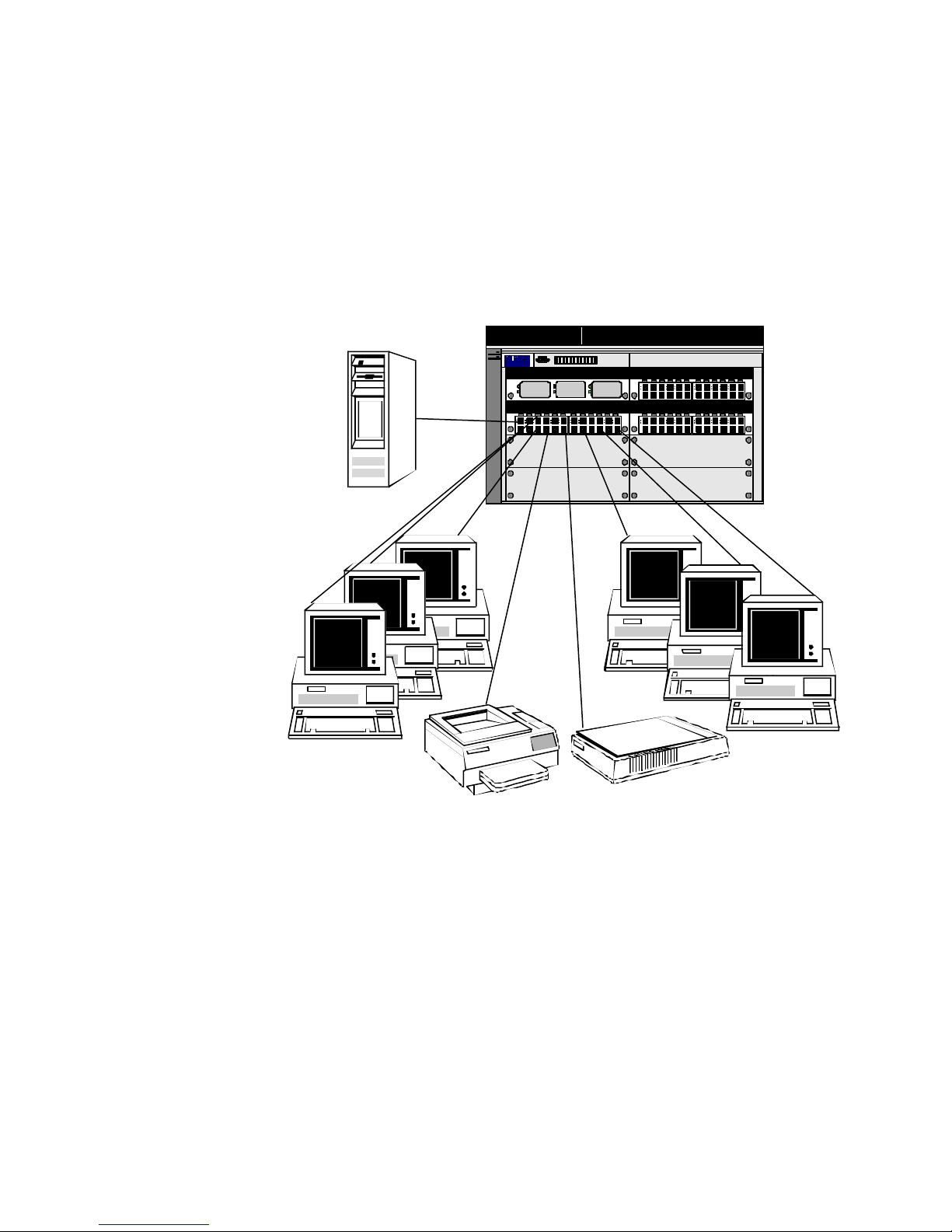
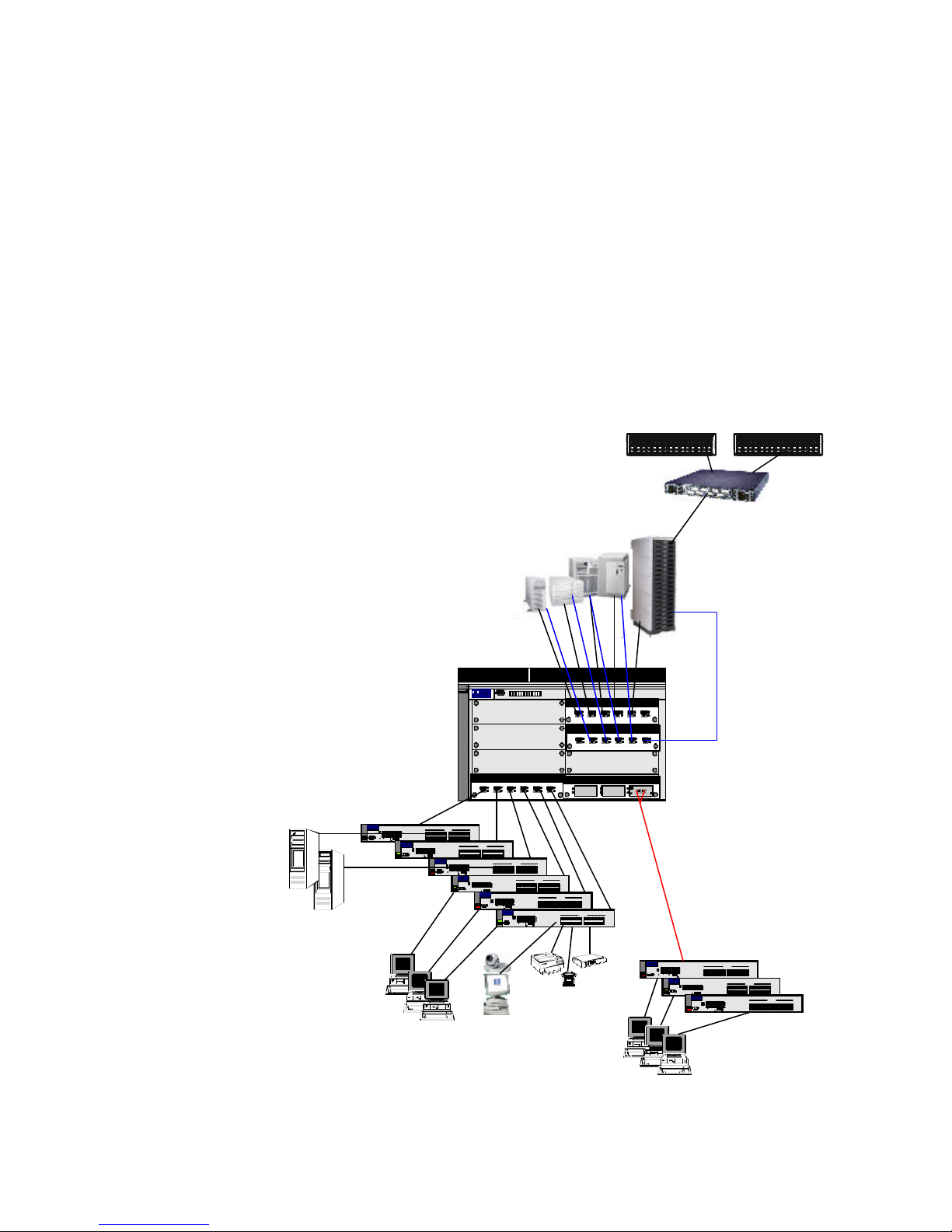
As illustrated in Figure 1, you can easily connect local workgroups of up to 24 devices
including workstations, servers, printers, faxes, digital scanners, hubs, switches, and other
workgroup appliances to a single hp procurve switch gl 10/100 module.
to using typical fixed form factor 24 + 2 (24 10/100 ports and 2 gigabit Ethernet ports)
Ethernet switches such as the HP Procurve Switch 2524.
devices for this particular workgroup are connected to the same HP Procurve Switch GL
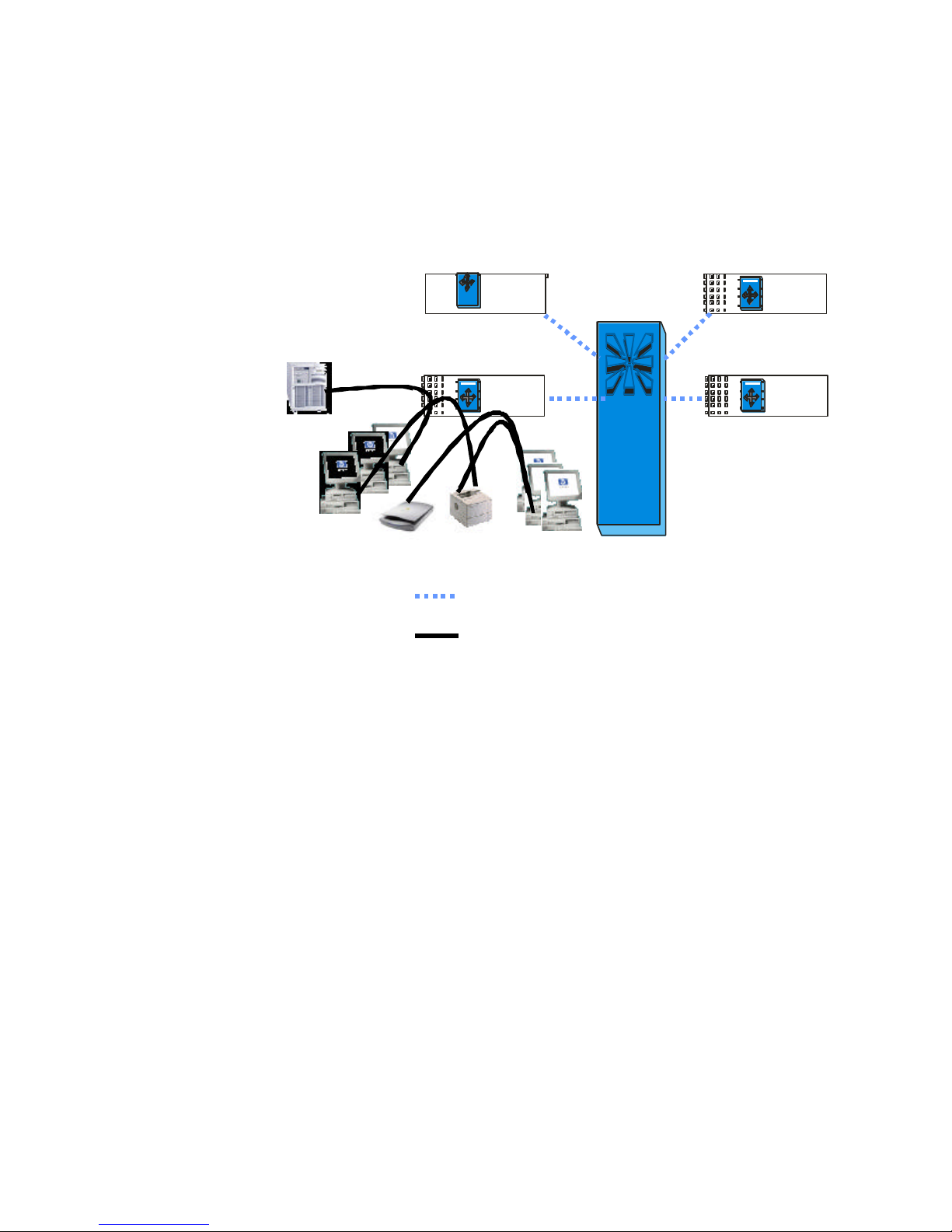
10/100-TX module (J4862A), all traffic within this workgroup is switched locally on the
module at wire-speed as shown in Figure 1b.
Workgroup
Printer
Workgroup
Scanner
Figure 1a: physical view of localized workgroup connections
This is very similar
In the example in Figure 1, since all
Page 3 of 17
Page 4
Switch GL Transceiver Module (J4864A) Switch GL 10/100-TX Module (J4862A)
•3
•24
36.6 Gbps
Central
Switching
Fabric
•24
•24
Inter-Module Connections
Localized Intra-Module Traffic Flows
Figure 1b: logical view of localized workgroup connections and traffic flow
For high density wiring closet applications, the 4108gl offers an attractive alternative to
“stacking” several fixed 24+2 switches together. The 4108gl offers the same type of
connectivity but without the need for stacking several switches together and managing,
installing, maintaining, and troubleshooting multiple switches in a stack. Since every 10/100
module of the 4108gl functions as a 24 port 10/100 media speed switch, you get the best of
both worlds: media speed growth in 24 port increments as found in the best 24 + 2 switches
like the HP Procurve Switch 2524, along with the ease of expandability and manageability of
a chassis. The high-speed 36.6 Gbps central switching fabric functions similarly to the
stacking mechanisms found in 24 + 2 switches. However, unlike 24 + 2’s, the 4108gl
expands without the use of messy cable systems. Throughput between the “switches”
(modules) in the 4108gl is much higher than for stackables. Stacking speeds between most
stackables ranges from 1 Gbps to 2.5 Gbps. The multi-path central switch fabric that
interconnects the “switches” in a 4108gl has a 36.6 Gbps capacity! The 4108gl also offers
many more gigabit uplink/server ports than 24 + 2’s. You can easily add gigabit connectivity
in increments of 3 ports with the HP Procurve Switch GL Transceiver Module, or in increments
of 6 ports with the HP Procurve Switch GL 100/100-TX Module.
Page 4 of 17
Page 5
IP telephony
designers will be very comfortable designing local workgroups in increments of 24 ports.
media speed of each module makes complex prioritization schemes unnecessary.
Network
The
congestion and its associated problems can be avoided by designing and provisioning the
network correctly.
Since the most popular switches and hubs have 24 ports plus one to two uplinks, network
IP Telephony
Workgroup #1
IP Telephony
Workgroup #2
Local Server
hp procurve switch
4108gl
8 Slot ChassisSwitch 4108GL
Pr oC u rve Sw itc h
4 108 G L
H P
C on s ole
48 61 AJ
J4864A- Transceiver Blade
J4862A- 24 Port 10/100-TX Blade J4862A- 24 Port 10/100-TX Blade
J4862A- 24 Port 10/100-TX Blade
Workgroup
Printer
Workgroup
Scanner
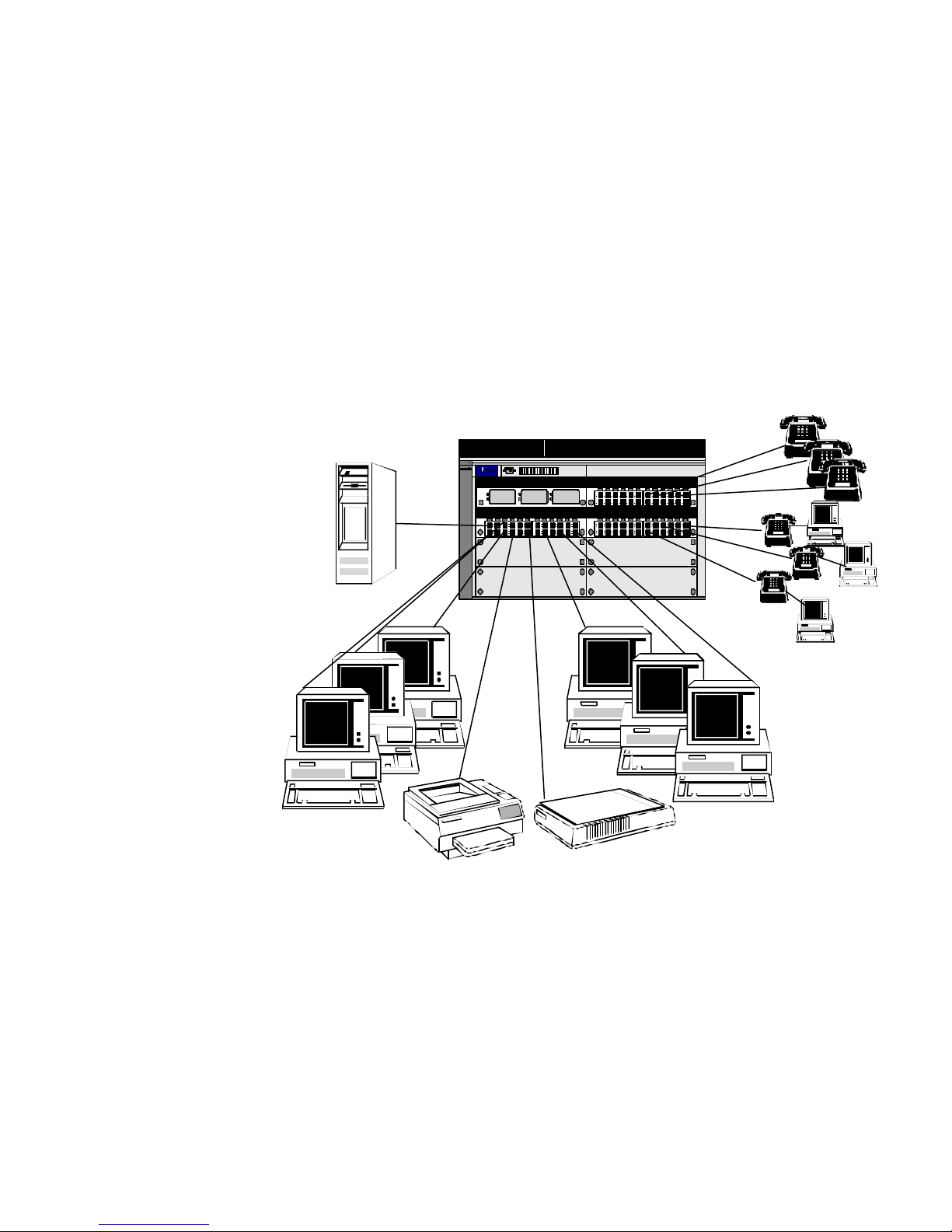
Figure 2a: physical view of localized IP telephony workgroups
Page 5 of 17
Page 6
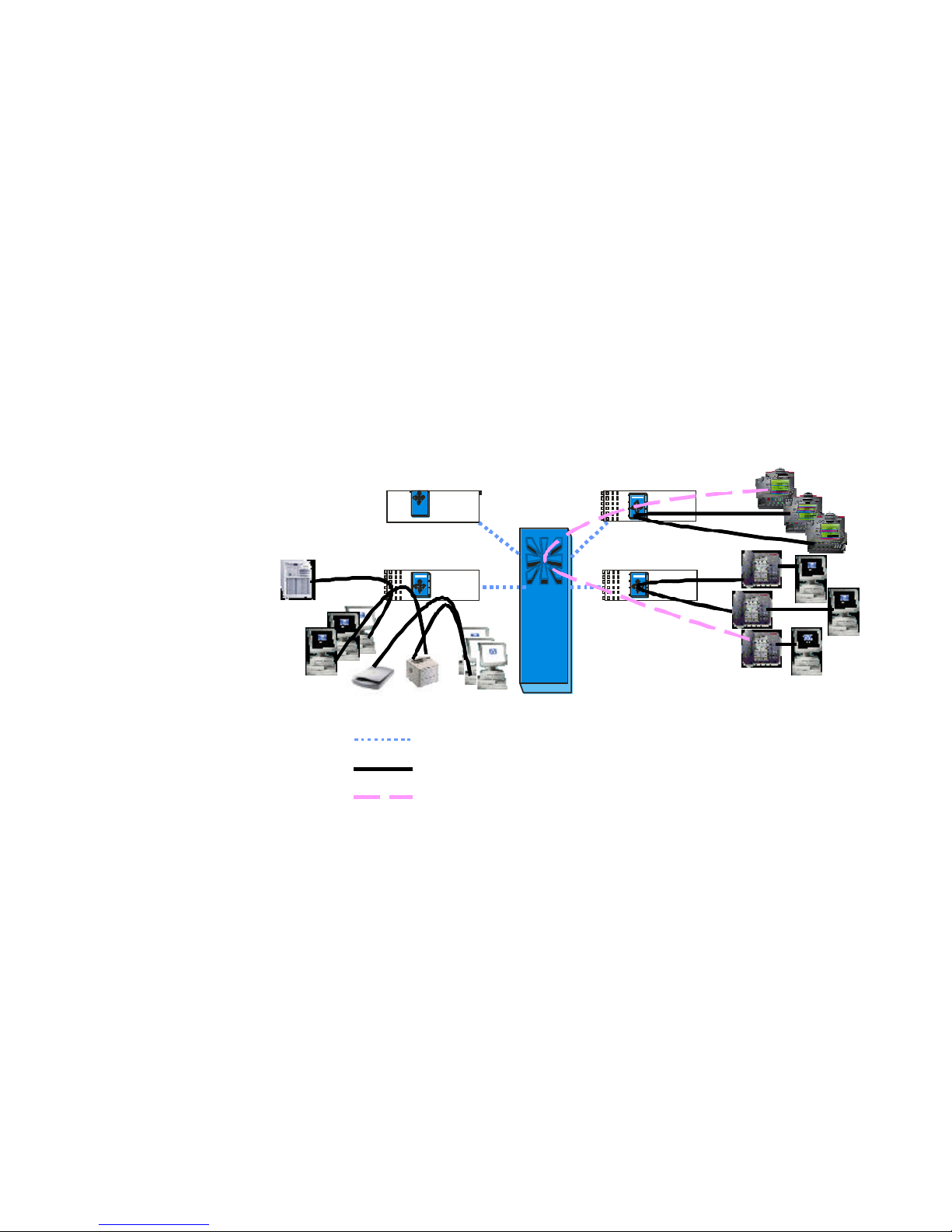
Figure 2a illustrates the easy control of voice traffic from IP telephones by grouping those
phones with the most interaction on the same module. For “off module” conversations, the
high performance central switch fabric provides ample bandwidth and is capable of
prioritizing voice in the event that congestion occurs.
Using a 4108gl with a Mitel VoIP solution, IP phones talk directly with other IP phones after
initial call setup. After initial call setup, all intra-workgroup communications are switched
locally on the 10/100 modules in the 4108gl.
IP Telephony Workgroup #1
IP Telephony Workgroup #1
Switch GL Transceiver Module (J4864A) Switch GL 10/100-TX Module (J4862A)
Switch GL Transceiver Module (J4864A) Switch GL 10/100-TX Module (J4862A)
•3
•3
•24
•24•24 •24
36.6 Gbps
Central
Switching
Fabric
•24
•24•24
•24•24
IP Telephony Workgroup #2
IP Telephony Workgroup #2
Inter-Module Connections
Inter-Module Connections
Localized Intra-Module Traffic Flows
Localized Intra-Module Traffic Flows
Inter-Module Traffic Flows
Inter-Module Traffic Flows
Figure 2b: logical view of localized IP telephony workgroups and workgroup to workgroup
traffic flows
Page 6 of 17
Page 7

Figure 2b shows the addition of two separate IP telephony workgroups 1 and 2. The solid
black line shows that intra-module IP telephony traffic still gets switched independently on the
connectivity module. The dashed purple line shows inter-module (workgroup #1 to workgroup
#2) IP telephony traffic traverses the high-speed 36.6 Gbps inter-modular central switching
fabric. If there is extremely heavy inter-module traffic, it may be desirable to use Class of
Service (CoS) features to prioritize traffic using the IEEE802.1p standard. Many VoIP solutions
such as the Mitel support IEEE 802.1p and set the priority bits for Quality of Service (QoS) so
there is no need for the 4108gl to set the 802.1p tag. It merely needs to recognize it and
prioritize it accordingly. Also, since a standard voice conversation requires less than one
tenth of a percent of a 100Mbps link, bandwidth reservation is not a concern when using a
4108gl. This can be compared to the need for a carpool lane on an un-crowded freeway –
there is no need for the carpool lane!
Note that the intra -workgroup traffic described in Figures 1a and 1b above, is still switched
independently of the additional traffic loads offered by the IP telephony scenarios shown in
Figures 2a and 2b.
Page 7 of 17
Page 8
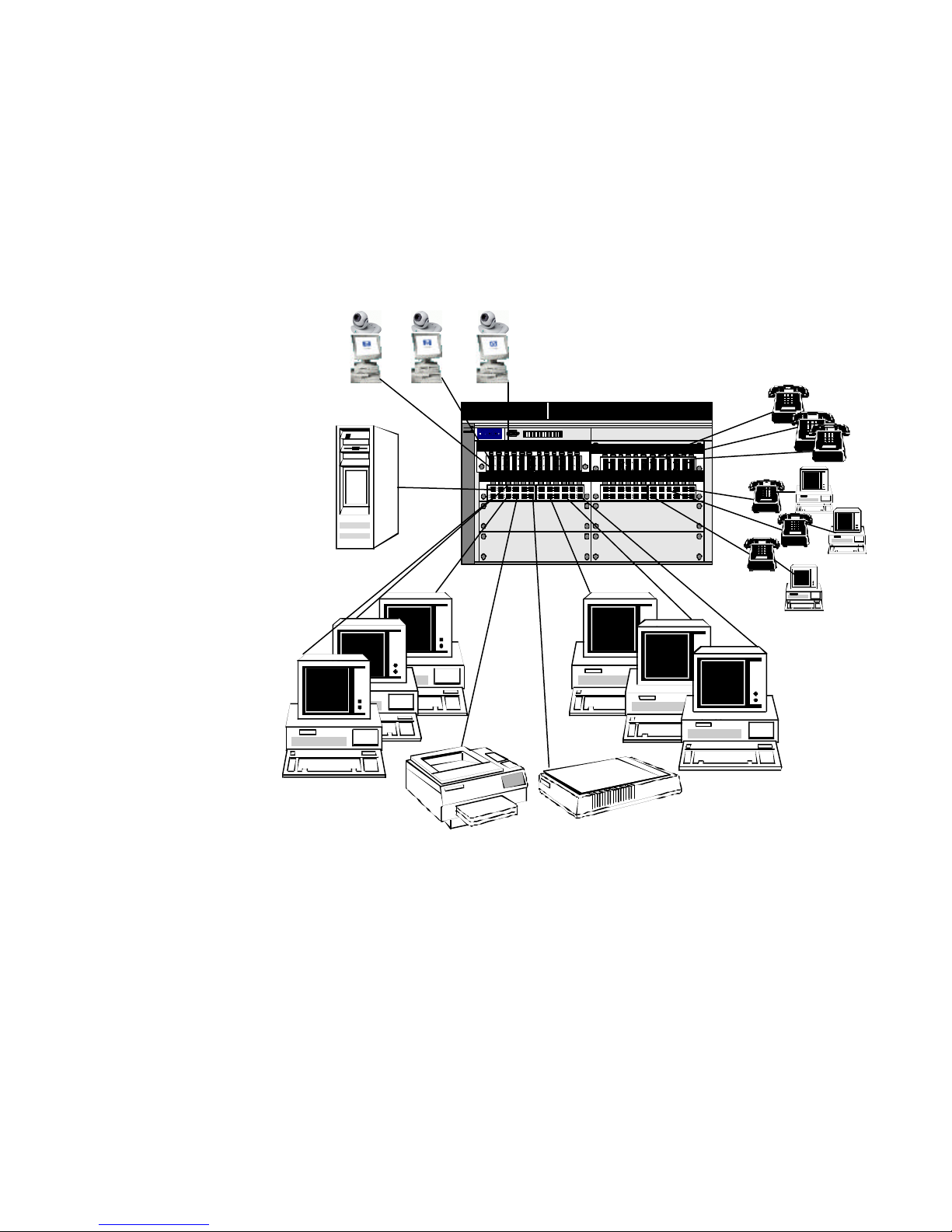
Figure 3a: This shows the addition of video conferencing on a separate HP Procurve Switch GL
not only of the network infrastructure, but also the application
multicast control
Video
hp procurve switch
4108gl
Conferencing
IP Telephony
Workgroup #1
8 Slot ChassisSwitch 4108GL
4 108 G L
P ro C urv e Sw it ch
C on s ole
4 86 1 AJ
H P
J4862A- 24 Port 10/100-TX Blade
J4862A- 24 Port 10/100-TX Blade J4862A- 24 Port 10/100-TX Blade
J4862A- 24 Port 10/100-TX Blade
Local Server
IP Telephony
Workgroup #2
Workgroup
Printer
Workgroup
Scanner
10/100-TX Module in the upper left of the network presented in figure 2a above.
With the increased use of video conferencing for net meetings, webinars, and multimedia
classroom training, multicast traffic control is also a requirement (see Figure 3a above).
Multicast controls such as IGMP have been widely used for this purpose.
of multicast controls is a function
software.
Proper implementation of both is required to take full advantage of these methods.
The implementation
Page 8 of 17
Page 9
Video Conferencing Video Conferencing
•24
•24•24
•24
•24•24
Inter-Module Connections
Inter-Module Connections
Localized Intra-Module Traffic Flows
Localized Intra-Module Traffic Flows
Inter-Module Traffic Flows
Inter-Module Traffic Flows
Switch GL 10/100-TX Module (J4862A)
Switch GL 10/100-TX Module (J4862A)
•24
•24•24
•24
•24•24
36.6 Gbps
Central
Switching
Fabric
IP Telephony Workgroup #2
IP Telephony Workgroup #2
IP Telephony Workgroup #1
IP Telephony Workgroup #1
medium to large data
center applications
NAS applications
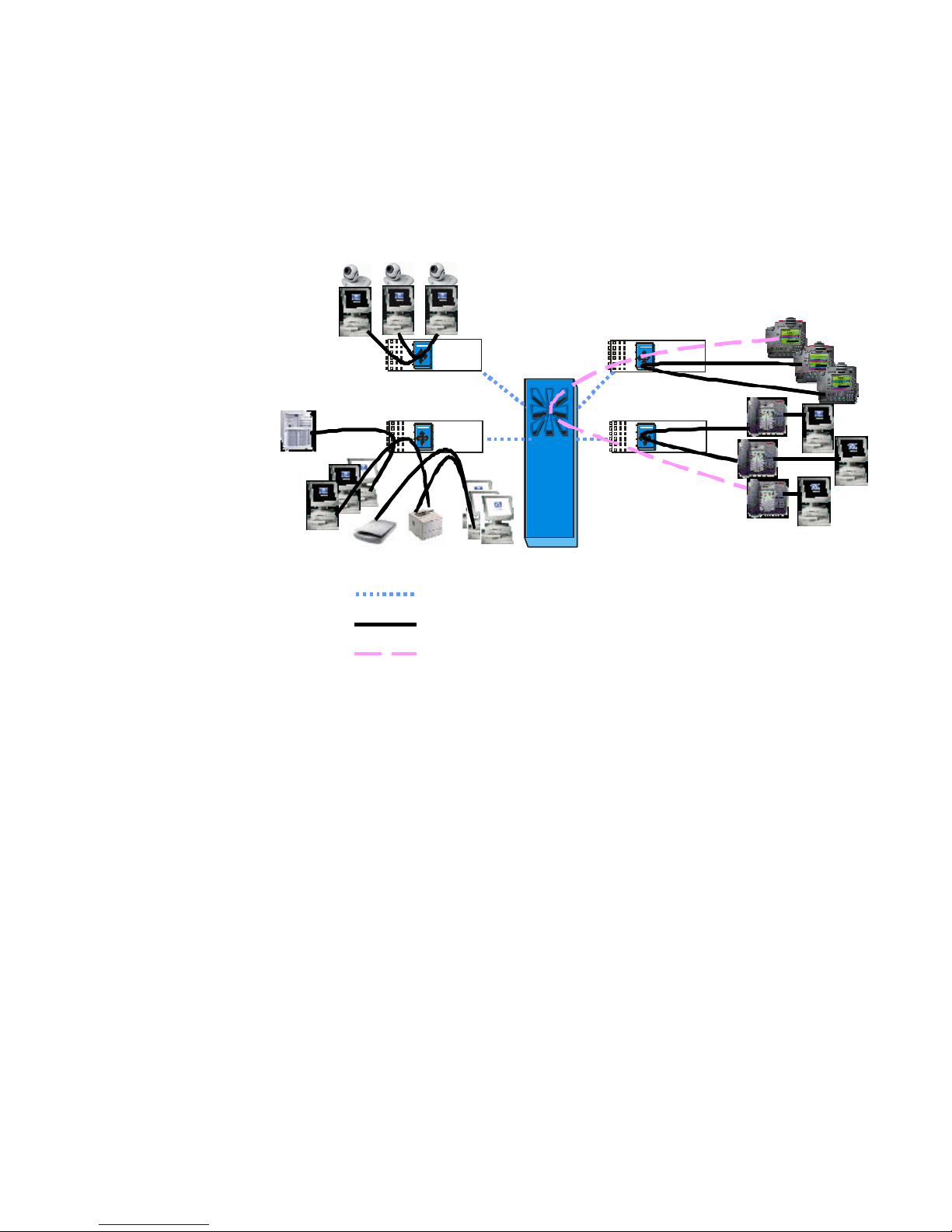
Figure 3b: This shows the independent traffic flows that continue with the addition of video
conferencing on a separate HP Procurve Switch GL 10/100 -TX Module in the
upper left of the network .
Most multicast applications written today support IGMP. The 4108gl with Fast Path
Technology takes advantage of IGMP to further isolate workgroup traffic. By simply grouping
workgroup or classroom devices on the same 10/100 module, these multicast streams can be
localized on a per module basis as shown in Figure 3b.
Although the HP Procurve Switch 4108gl was designed for high density, high performance
wiring closet applications, Fast Path Technology also makes it ideal for several medium to
large data center applications such a Network Attached Storage (NAS) and gigabit
aggregation
Network Attached Storage or NAS is a solution such as the HP Surestore NAS VA 15, 30 or
45 which includes a file server (or NAS head) and its attached storage, which in turn is
connected to the Ethernet LAN. The NAS head processes block-level I/O’s from its attached
storage. The NAS head then converts the data blocks into file -level I/O’s and sends the files
to the requesting application server or client.
Page 9 of 17
Page 10
hp procurve switch
4108gl
VA 7100
Storage Arrays
Application
Servers
SilkWorm 2400
Fibre Channel
Switch
Video
Conferencing
J6000
NAS Head
IP Telephony
Workgroup #1
Dual Gig
Links
Switch 4108GL
4 108 G L
P roC u rve S wit ch
C ons o le4 86 1AJ
H P
J4862A- 24 Port 10/100-TX Blade
J4862A- 24 Port 10/100-TX Blade J4862A- 24 Port 10/100-TX Blade
8 Slot Chassis
J4863A - Gigabit Copper Blade
1 X 2 X 3 X 4 X 5 X 6 X
J4862A- 24 Port 10/100-TX Blade
Local Server
IP Telephony
Workgroup #2
Workgroup
Printer
Workgroup
Scanner
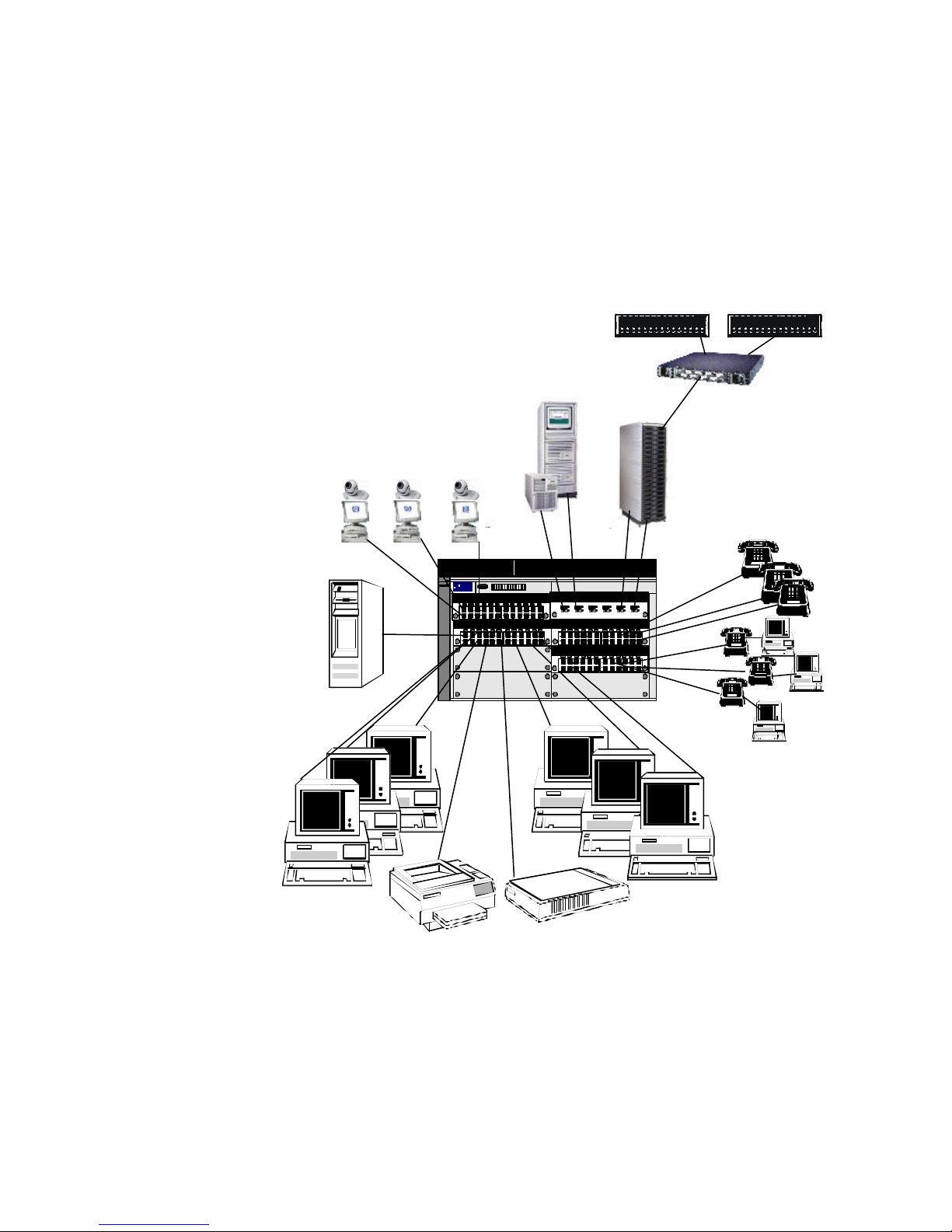
Figure 4a: building on to previous examples, we now add NAS to our 4108gl
Page 10 of 17
Page 11
Network Attached
Network Attached
Storage
Storage
•6
•24
•24•24
•24
•24•24
36.6 Gbps
36.6 Gbps
Central
Central
Switching
Switching
Fabric
Fabric
Inter-Module Connections
Inter-Module Connections
•6
•24
•24•24
•24
•24•24
Localized Intra-Module Traffic Flows
Localized Intra-Module Traffic Flows
Inter-Module Traffic Flows
Inter-Module Traffic Flows
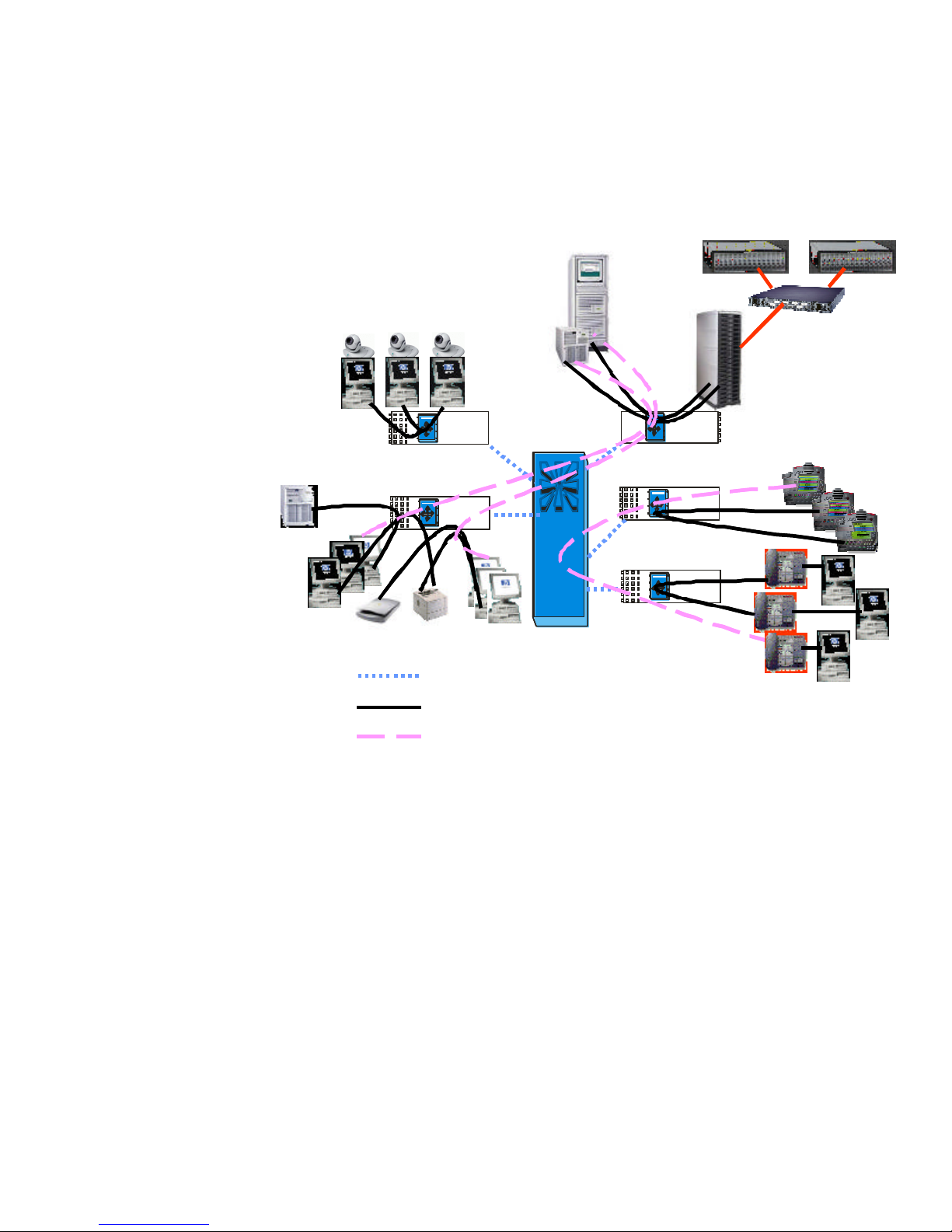
As show in figure 4b, Fast Path Technology on the 4108gl is ideal for NAS applications.
connecting the NAS head to the same module as the application servers as shown in Figure
4a, the 4108gl with Fast Path Technology provides media speed connections for NAS file
transfers to and from the servers without crossing the central switching fabric!
Figure 4b: logical view of traffic flows for NAS application
By
Page 11 of 17
Page 12
hp procurve switch
4108gl
VA 7100
Storage Arrays
Dual Homed
Application
Servers
SilkWorm 2400
Fibre Channel
Switch
Video
Conferencing
Dual Gig
8 Slot ChassisSwitch 4108GL
4 10 8G L
Pr oCu r ve Sw itc h
C ons o le4 8 61AJ
HP
J4862A- 24 Port 10/100-TX Blade
J4862A- 24 Port 10/100-TX Blade
J4863A - Gigabit Copper Blade
1 X 2X 3 X 4 X 5 X 6 X
J4863A - Gigabit Copper Blade
1 X 2X 3 X 4 X 5 X 6X
J4862A- 24 Port 10/100-TX Blade
J4862A- 24 Port 10/100-TX Blade
Links
J6000
NAS Head
IP Telephony
Workgroup #1
Local Server
IP Telephony
Workgroup #2
Workgroup
Printer
Workgroup
Scanner
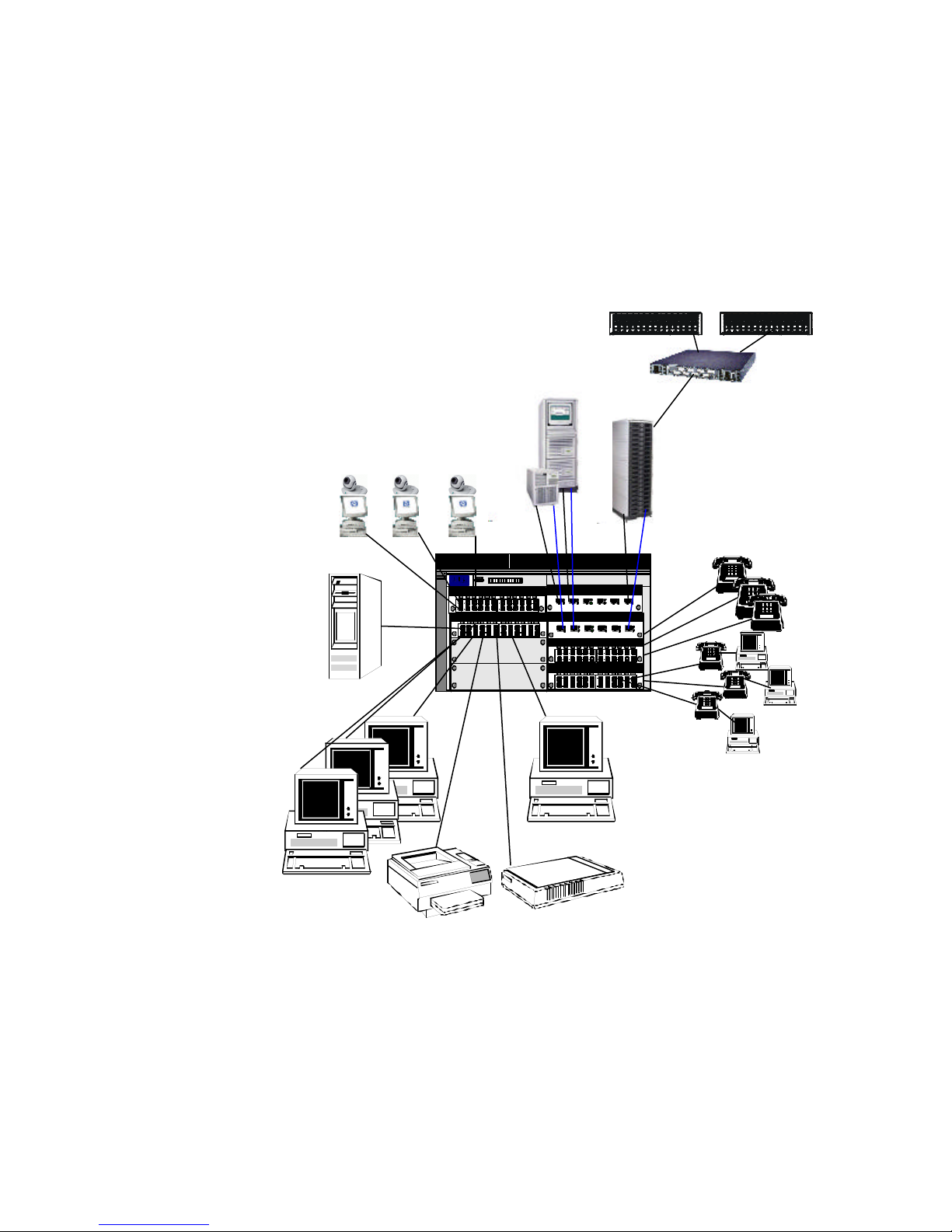
Figure 4c: high availability NAS example
Page 12 of 17
Page 13

Expanding upon the example in 4a and 4b above, figure 4C illustrates some of the flexibility
of the 4108gl. By adding another 100/1000 Switch GL Module, dual homing the application
servers, and evenly distributing the NAS and application server connections between the two
100/1000 Switch GL Modules, you now have a load balancing, high availability solution.
Since the 4108gl supports an optional RPS and hot swappable modules, you are protected
against power supply failure as well as 100/1000 Switch GL Module failure in this example.
If one of the 100/1000 modules fails, traffic can still be supported on the other 100/1000
module until the failed unit can be hot swapped.
gigabit aggregation
Since HP introduced the first commercially available gigabit Ethernet interface capable of
using Category 5 copper cable in October 1999, prices for gigabit connectivity have steadily
decreased. This has created a demand for affordable, high performance, high -density gigabit
Ethernet switches. The HP Procurve Switch 4108gl can provide a solution for this where
simple, fast, Layer 2 gigabit aggregation is desired. The HP Procurve Switch GL 100/1000
-T
Module (J4863A) and HP Procurve Switch GL Transceiver Module (J4864A) for the 4108gl
provide intra-module wire speed gigabit switching. For inter-module switching, the highspeed 36.6Gbps central switching fabric provides more than enough throughput for most
applications.
Using HP Procurve Switch GL 100/1000-T Modules (J4863A), which have 6 RJ-45 ports
each, you can populate all eight slots of a 4108gl and get 48 ports (6 ports x 8 slots) of
100/1000 -T connectivity. In this case, if all eight modules only need to provide intra-module
switching, you can get up to 71.4 Mpps throughput! Most installations will see maximum
performance of between 21.6 Mpps (the central switch fabric speed) and 71.4 Mpps.
The HP Procurve Switch GL Transceiver Module (J4864A) provides 3 transceiver slots that
accept any combination of gigabit SX, LX, 100/1000-T, Gigabit Stacking, and 100Base-FX
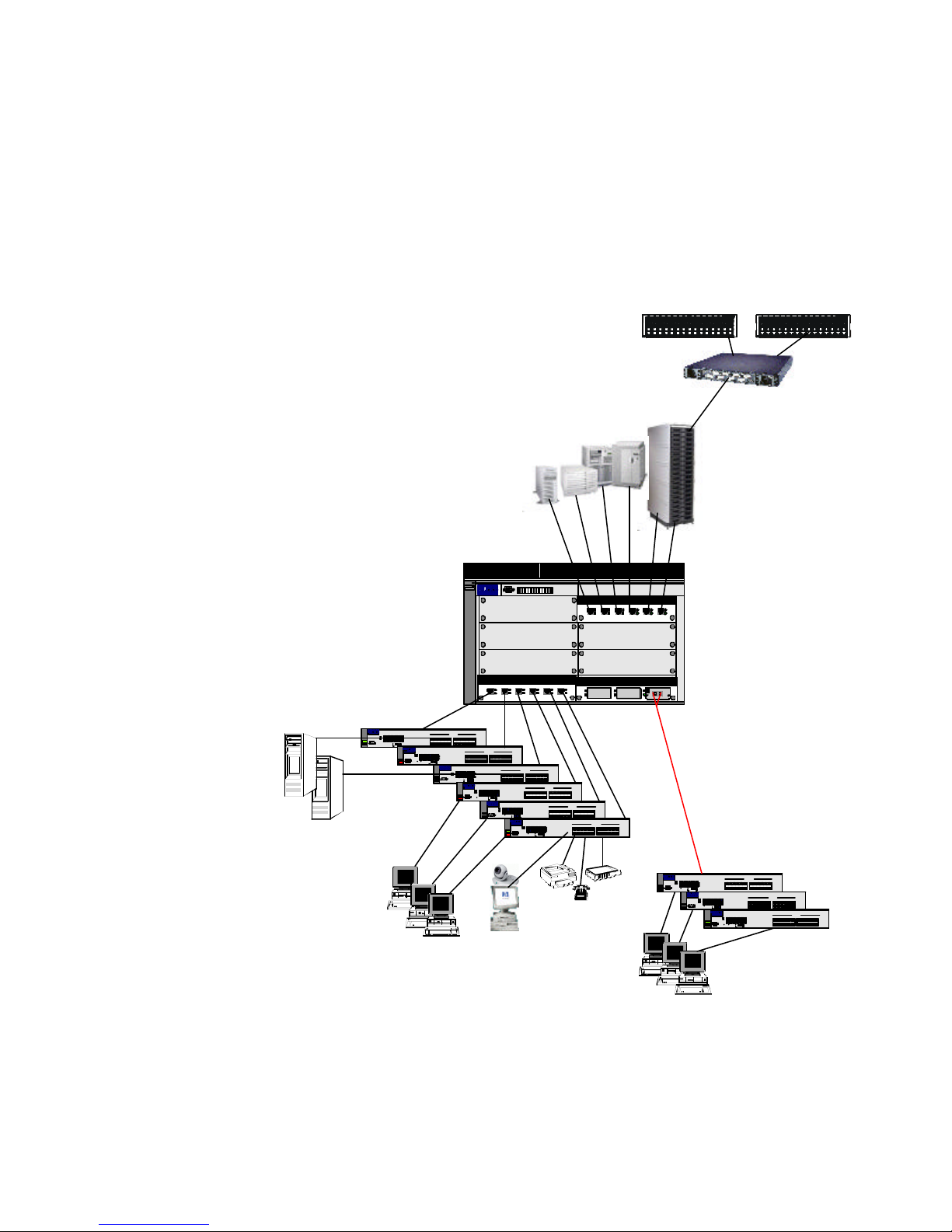
transceivers. Figure 5a provides an example of usin g the 4108gl as a gigabit aggregator
switch.
Page 13 of 17
Page 14
hp procurve switch
4108gl
VA 7100
Storage Arrays
SilkWorm 2400
Fibre Channel
Server Farm
Switch
J6000
NAS Head
Dual Gig
Links
8 Slot ChassisSwitch 4108GL
P roC u rve S wit ch
4 108 G L
H P
Local
Servers
Pr oCurve Switch 24 24M
HP J 4093A
1 2 3 4 5 6
Lin k
13 14 15 161 7 18
Mo dule Sta tus
Se lf Test
Mo de
Co nsole
7 8 9 10 11 12
Lin k
19 212 0 22 2 324
Mo de
Power
FdxAct
10 0
Cl ear
Res et
Mod e Selec t
Fault
Pro Cu rve Swit ch 2424M
HP J 4093A
Mo dule Sta tus
Sel f Test
Con sole
Power
Res et
Fault
10/100/1000
switches (like
HP Procurve
Switch
1 2 3 4 5 6
7 8 9 101 1 12
Cle ar Mod e Select
1X 2X 3X 4 X 5 X 6 X
7X 8X 9X 10 X 11 X 12 X
13 141 5 161 71 8
19 2 120 22 2 324
FdxAct
1 00
Power
Fault
C ons o le48 6 1AJ
J4863A - Gigabit Copper Blade
1 X 2 X 3 X 4 X 5 X 6 X
Gigabit uplinks
SD
1 0/100 Ba se-T Ports
1 3X1 4X 1 5X 16 X 17 X 18 X
1 9X2 0X 2 1X 22 X 23 X 24 X
L ink
1X 2X 3X 4X 5X 6 X
Mo de
L ink
Mo de
7X 8X 9X 10 X 11 X 12 X
Pro Cu rve Switc h 2 424M
HP J4093A
1 2 3 45 6
1 314 1 516 17 18
Mod ule Sta tus
Self Test
Con sole
7 8 9 101 1 12
1 9 2 120 2 223 2 4
FdxAct
1 00
Cle ar
Re set
Mod e Select
HP J 4093APro Cu rv e Swit ch 2424M
Mo dule Sta tus
Se lf Test
Co nsole
Power
Fault
SD
1 0/100 Ba se-T Ports
1 3X1 4X 1 5X 1 6X 1 7X 18X
1 9X2 0X 2 1X 2 2X 2 3X 24X
L ink
1 X2 X 3X 4X 5X 6X
Mod e
L ink
Mod e
7 X8 X 9X 1 0X1 1X 12 X
1 2 3 4 5 6
Lin k
13 141 5 161 7 18
Mo de
7 8 9 10 11 12
Lin k
19 2 12 0 22 23 24
Mo de
FdxAct
10 0
Cl ear Mod e Selec t
Res et
ProCur ve Switch 24 24 M
HP J4093A
1 23 4 56
Mod ule Statu s
Se lf Test
Cons ole
7 89 10 111 2
Powe r
Clea r
Re set
Fa ult
Power
Fault
S D
10 /100Bas e- T Por ts
13 X14 X 1 5X 1 6X 1 7X 1 8X
19 X20 X 2 1X 2 2X 2 3X 2 4X
1 0/100 Ba se-T Ports
1X 2X 3X 4 X 5X 6 X
1 3X1 4X 1 5X 16X 17 X18 X
7X 8X 9X 10 X 11 X 12 X
1 9X2 0X 2 1X 22X 23 X24 X
Li nk
1 314 15 16 17 18
1 X2 X 3 X 4 X 5 X 6 X
Mod e
Li nk
1 9 212 0 2 223 24
Mod e
FdxAc t
10 0
Mo de Sele ct
7 X8 X 9 X 1 0X 1 1X 1 2X
Pro Cu rve Switc h 2 424M
HP J4093A
1 2 3 45 6
L ink
1 314 1 516 17 18
Mod ule Sta tus
Self Test
Mod e
7 8 9 101 1 12
L ink
1 9 2 120 2 223 2 4
Con sole
Mod e
FdxAct
1 00
Cle ar Mod e Select
Re set
1 X 2 X 3 X 4 X 5 X 6 X
SD
SD
1 0/10 0Bas e-T Ports
13 X14 X 15 X 16 X 17 X 1 8X
19 X20 X 21 X 22 X 23 X 2 4X
10 /100Bas e- T Por ts
1 X2 X 3X 4X 5X 6X
13 X14 X 1 5X 1 6X 1 7X 1 8X
7 X8 X 9X 1 0X1 1X 12 X
19 X20 X 2 1X 2 2X 2 3X 2 4X
J4863A - Gigabit Copper Blade
J4864A- Transceiver Blade
S D
Rx
Tx
Gi gabit -SX
Fiber-Opti c
HPJ4131A
Fiber Gigabit uplinks
for longer distances or
noise immunity
2524's)
S D
10 /100Bas e- T Por ts
13 X14 X 1 5X 1 6X 1 7X 1 8X
19 X20 X 2 1X 2 2X 2 3X 2 4X
1X 2X 3X 4X 5X 6 X
7X 8X 9X 10 X 11 X 12 X
Li nk
13 14 15 16 17 18
Mode
Li nk
19 212 0 2 2 2324
Mode
FdxAc t
10 0
1 0/100 Ba se-T Ports
1 3X1 4X 1 5X 1 6X 17X 18 X
1 9X2 0X 2 1X 2 2X 23X 24 X
1 X2X 3 X4 X 5 X 6 X
7 X8X 9 X10 X 1 1X 1 2X
1 0/10 0Bas e-T Ports
SD
13X 14 X 15 X 16 X 17 X 18 X
19X 20 X 21 X 22 X 23 X 24 X
SD
Network
Appliances
HP J4093APro Cur ve Switch 2 42 4M
1 2 3 45 6
L ink
1 314 1 516 17 18
7 8 9 101 1 12
Cle ar Mode Select
1 X2 X 3 X 4X 5X 6X
Mod e
L ink
1 9 2 120 2 223 2 4
Mod e
FdxAct
1 00
7 X8 X 9 X 1 0X 1 1X 12X
Pro Cu rv e Swit ch 2424M
HP J 4093A
1 2 3 4 5 6
L ink
13 141 5 161 7 18
Mo dule Sta tus
Mo de
Se lf Test
Co nsole
7 8 9 101 1 12
L ink
19 2 120 22 2 324
Mo de
Power
FdxAct
100
Cle ar
Res et
Mod e Selec t
Fault
Pr oCurve Switch 24 24M
HP J4093A
1 23 4 56
Modu le Statu s
Se lf Test
7 89 1 011 1 2
Co nsole
Powe r
Clea r Mo de Se lec t
Re set
Fa ult
Mod ule Stat us
Self Te st
Con sole
Powe r
Re set
Fa ul t
Clients
Clients
Figure 5a: 4108gl as a gigabit aggregator switch
Page 14 of 17
Page 15
Network Attached
Storage
•6
•6
•3
36.6 Gbps
Central
Switching
Fabric
Inter-Module Connections
Localized Intra-Module Traffic Flows
Inter-Module Traffic Flows
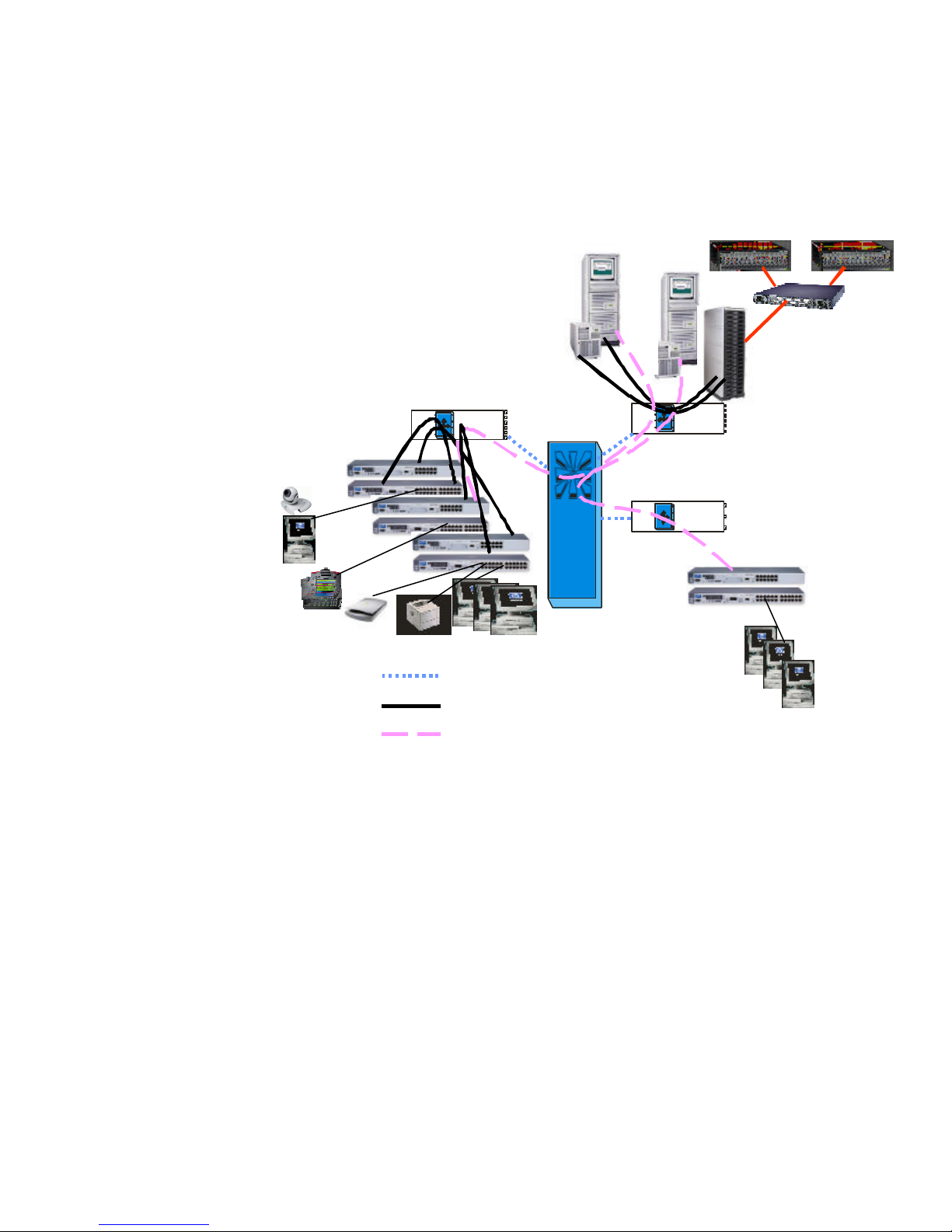
Figure 5b: traffic flow diagram for 4108 gl functioning as a gigabit aggregator switch
Figure 5b depicts the traffic flows for the example showing the 4108gl acting as a gigabit
aggregator switch. All traffic localized to the gigabit modules gets switched at wire speed on
the module and never has to traverse the central switch fabric. For inter-module traffic, the
36.6 Gbps multi-path central switching fabric provides adequate throughput for most
applications.
Page 15 of 17
Page 16
many other applications including IP telephony, video conferencing, NAS applications, gigabit
summary
Procurve Switch 4108gl with Fast Path Technology.
Although positioned as a high
performance, high density wiring closet switch, Figure 5C shows how the 4108gl can serve
aggregation, and even function as a “network in a box”!
hp procurve switch
In summary, the previous examples show the flexibility, power, and application of the HP
Dual Homed
Servers
Switch 4108GL
P roC u rve S witc h
4 108 G L
H P
C ons o le486 1 AJ
4108gl
Server Farm
8 Slot Chassis
1X 2 X 3X 4 X 5 X 6 X
1X 2 X 3 X 4 X 5 X 6 X
VA 7100
Storage Arrays
SilkWorm 2400
Fibre Channel
Switch
J6000
NAS Head
Dual Gig
Links
J4863A - Gigabit Copper Blade
J4863A - Gigabit Copper Blade
Local
Servers
Pro Cu rve Switc h 2 424M
HP J4 093A
1 2 3 4 5 6
Lin k
1 314 15 161 7 18
Mod ule Statu s
Self Test
Mo de
7 8 9 101 1 12
Lin k
1 9 21 20 2 223 24
Con sole
Mo de
Power
F dxAc t
10 0
Cle ar Mo de Sele ct
Res et
F ault
HP J4 093APro Cu rve Switc h 2 424M
Mod ule Stat us
Self Test
Con sole
Power
Re set
F ault
10/100/1000
switches (like
HP Procurve
Switch
J4863A - Gigabit Copper Blade
1 X 2 X 3X 4 X 5 X 6 X
Gigabit uplinks
SD
10 /100Bas e- T Ports
1 X2 X 3 X 4 X 5X 6X
13 X14 X 15 X 16X 1 7X1 8X
7 X8 X 9 X 10 X 11 X 12 X
19 X20 X 21 X 22X 2 3X2 4X
1X 2 X 3 X 4 X 5 X 6 X
1 2 3 4 5 6
Lin k
1 314 15 16 17 18
Mo de
7 8 9 101 1 12
Lin k
1 9 21 20 2 223 24
Mo de
F dxAc t
10 0
Cl ear
Mo de Sele ct
7X 8 X 9 X 10 X 11 X 12 X
Pro Cu rve Switc h 2 424M
HP J4 093A
1 2 3 4 5 6
1 314 15 16 17 18
Mod ule Stat us
Self Test
7 8 9 101 1 12
1 9 21 20 2 223 24
Con sole
Power
F dxAc t
1 00
Clea r Mode Sele ct
Re set
F ault
Pr oCu rv e Switc h 2 424M
HP J 4093 A
Mo dule Stat us
Sel f Test
Co nsole
Power
Fa ult
SD
1 0/100Bas e- T Ports
13 X14 X 15 X 16 X 17X 1 8X
19 X20 X 21 X 22 X 23X 2 4X
Lin k
1X 2X 3 X4 X 5 X 6 X
Mo de
Lin k
Mo de
7X 8X 9 X1 0X 11 X 12 X
1 23 4 56
Li nk
13 141 51 617 1 8
Mode
7 89 1 011 12
Li nk
19 2 120 2 2 232 4
Mode
F dxAc t
1 00
Clea r
Re set
Mod e Select
Pr oCurve Switch 242 4M
HP J 4093 A
1 23 4 56
Mo dule Sta tus
Sel f Test
Co nsole
7 89 1 011 1 2
Po we r
Clea r Mod e Sel ect
Re set
Fa ult
SD
1 0/100 Ba se-T Por ts
13 X14 X 15 X 16 X 17X 1 8X
19 X20 X 21 X 22 X 23X 2 4X
1 0/100 Ba se-T Po rts
1X 2X 3X 4 X 5 X 6 X
1 3X14 X 15 X 16 X 17 X 18 X
7X 8X 9X 1 0X 1 1X 12 X
1 9X20 X 21 X 22 X 23 X 24 X
L ink
13 141 5 1617 1 8
1X 2X 3X 4X 5X 6 X
Mod e
L ink
19 2 120 22 23 24
Mod e
Fd xAct
1 00
7X 8X 9X 1 0X 1 1X 1 2X
ProCur ve Switch 24 24M
HP J4093 A
1 2 3 45 6
L ink
13 14 15 161 71 8
Mo dule Sta tus
Se lf Tes t
Mod e
7 8 9 1011 1 2
L ink
19 212 0 22 2 324
Cons ole
Mod e
Po we r
Fd xAct
100
Cle ar Mod e Se lec t
Res et
Fa ult
1 0/10 0Ba se-T Po rts
S D
1 3X1 4X 1 5X 1 6X 17 X 18 X
1 9X2 0X 2 1X 2 2X 23 X 24 X
1 X2X 3X 4X 5X 6X
7 X8X 9X 10 X1 1X1 2X
10 /100Bas e-T Po rts
S D
13X 1 4X 1 5X 1 6X 1 7X 1 8X
19X 2 0X 2 1X 2 2X 2 3X 2 4X
J4864A- Transceiver Blade
2524's)
Network
Appliances
Clients
Clients
Figure 5c: HP Procurve Switch 4108gl “network in a box”
Rx
Tx
HPJ4131A
Fi ber -Opti c
G igabi t- SX
Fiber Gigabit uplinks
for longer distances or
noise immunity
S D
Pro Cu rve Switc h 2 424M
HP J 4093A
1 2 3 4 5 6
Lin k
1 314 1 516 17 18
7 8 9 101 1 12
Clea r Mode Sele ct
1X 2X 3 X4 X 5 X 6 X
Mo de
Lin k
1 9 2 120 2 223 24
Mo de
F dxAc t
1 00
7X 8X 9 X1 0X 11 X 12 X
Pr oCu rv e Swit ch 2 424M
HP J 4093 A
1 23 4 56
Li nk
13 141 51 617 1 8
Mo dule Sta tus
Sel f Test
Mode
7 89 1 011 12
Li nk
19 2 120 2 2 232 4
Co nsole
Mode
Power
Clea r
F dxAct
Re set
1 00
Mod e Select
Fa ult
ProCurv e Swit ch 2424M
HP J 4093 A
1 23 4 56
Mo dule Sta tus
Se lf Test
Co nsole
7 89 1 011 1 2
Po we r
Clea r Mod e Sel ect
Re set
Fa ult
Mod ule Stat us
Self Test
Con sole
Power
Re set
F ault
SD
1 0/100 Ba se-T Por ts
13 X14 X 15 X 16 X 17X 18X
19 X20 X 21 X 22 X 23X 24X
1X 2X 3X 4X 5 X6 X
7X 8X 9X 1 0X 1 1X 1 2X
L ink
13 141 5 1617 1 8
Mod e
L ink
19 2 12 0 22 232 4
Mod e
Fd xAct
1 00
1 0/100 Ba se-T Po rts
1 3X14 X 15 X 16 X 17 X 18 X
1 9X20 X 21 X 22 X 23 X 24 X
1X 2X 3X 4X 5X 6X
7X 8X 9X 1 0X 1 1X 1 2X
10/ 100Base -T Po rts
S D
1 3X1 4X 1 5X 1 6X 17 X 18 X
1 9X2 0X 2 1X 2 2X 23 X 24 X
S D
Page 16 of 17
Page 17

for more information For more information, please visit our web site at: www.hp.com/go/hpprocurve
All brand names are trademarks of their respective owners.
Technical information in this document is subject to change without notice.
ª Copyright Hewlett-Packard Company 2001
10/2001
Page 17 of 17
 Loading...